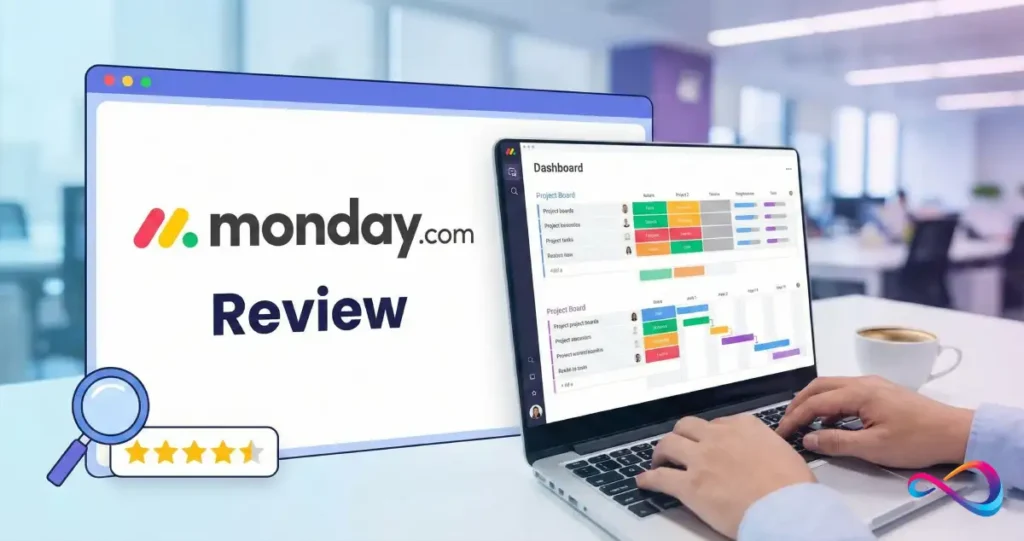
monday.com is a Work OS platform that helps teams plan projects, manage workflows, and track work in one visual dashboard. In this monday.com review 2026, you’ll get a clear breakdown of features, pricing, pros and cons, and the best alternatives—so you can decide quickly whether monday.com is the right fit for your team.
Quick Verdict: Is monday.com Worth It in 2026?
Overall Rating: 8.5/10
| Best For | Mid-sized teams needing visual, customizable project management |
| Starting Price | $9/user/month (Basic), billed annually |
| Free Trial | 14 days (Pro plan features) |
| Free Plan | Yes, up to 2 users |
Key Takeaways
- ✅ Exceptional visual interface that makes complex project tracking intuitive and accessible
- ✅ Powerful no-code automations save 10+ hours weekly for most teams
- ⚠️ Costs escalate quickly due to 3-seat minimum and bucket pricing—budget carefully
Bottom line: monday.com remains one of the best project management software options in 2026. It strikes an excellent balance between power and usability, making it ideal for teams who want robust project tracking without the learning curve of enterprise tools. However, smaller teams should watch costs carefully, and organizations requiring advanced time tracking or agency-specific billing should consider Teamwork instead.
What Is monday.com? (Platform Overview)
monday.com is a Work Operating System (Work OS)—a cloud-based platform that enables organizations to build custom workflows for managing projects, tasks, and team collaboration. Unlike traditional project management software with rigid structures, monday.com provides a flexible foundation where teams create boards, automate processes, and visualize work in ways that match their actual operations.
Founded in 2012 in Tel Aviv, Israel, monday.com (NASDAQ: MNDY) has grown from a simple team coordination tool into a comprehensive work management ecosystem serving over 200,000 organizations worldwide. The company’s approach focuses on visual clarity and accessibility, making sophisticated project management available to teams without specialized training.
The Work OS Concept Explained
The “Work OS” terminology distinguishes monday.com from conventional project management tools. Rather than forcing teams into predefined workflows, the platform provides building blocks—boards, columns, views, automations, and integrations—that organizations combine to match their processes.
Think of it like this: traditional project management software gives you a pre-built house. monday.com gives you construction materials and blueprints. You can build exactly what you need, but you’ll invest more time upfront in design.
This flexibility is monday.com’s core value proposition—and its primary challenge. Teams with clear processes thrive on the platform. Teams without defined workflows often struggle with the paradox of choice.
What’s New in monday.com 2026
Several significant updates have shipped since our 2025 review:
- monday AI Assistant 2.0: Enhanced AI capabilities including natural language formula creation, automated project summaries, and predictive timeline analysis
- AI Blocks: Pre-built AI functions for document analysis, sentiment detection, and multi-language translation
- Project Analyzer Agent: Real-time monitoring across hundreds of projects with proactive bottleneck identification
- Board Discussions: Threaded conversations directly attached to boards for improved context retention
- Enhanced Workforms: More sophisticated form builders for client intake and internal requests
- Improved “My Work” Dashboard: Personalized task aggregation across all boards and workspaces
- Zoom AI Integration: Automatic meeting summary injection into activity timelines
The AI investments are particularly notable. monday.com has moved beyond basic automation into genuine augmentation—the AI can now draft project updates, identify timeline risks before they materialize, and generate formula columns from plain English descriptions.

Methodology: How We Evaluated
Our evaluation of monday.com follows the structured review methodology used across all SaaS CRM Review assessments. Here’s how we tested this platform:
Testing Approach
Hands-On Duration: 45+ hours across 6 weeks using a Pro plan account with 8 active team members
Real Workflows Tested:
- Marketing campaign management with cross-functional dependencies
- Software development sprint tracking with bug reporting
- Client onboarding and project delivery for agency use case
- CRM pipeline integration with monday Sales CRM
Evaluation Criteria
| Category | Weight | What We Assessed |
|---|---|---|
| Ease of Use | 25% | Onboarding experience, learning curve, interface intuitiveness |
| Features & Functionality | 25% | Core capabilities, automation depth, AI features, integrations |
| Pricing & Value | 20% | Cost-to-feature ratio, hidden fees, tier limitations |
| Performance & Reliability | 15% | Load times, uptime, mobile responsiveness |
| Support & Documentation | 15% | Response quality, knowledge base, community resources |
Data Sources
- Primary hands-on testing by our editorial team
- Analysis of 500+ verified user reviews from G2, Capterra, and Trustpilot
- Vendor documentation and official changelog review
- Expert interviews with monday.com implementation consultants
- Direct comparison testing against 7 competing platforms
Scoring Framework
We assign ratings on a 10-point scale:
- 9-10: Exceptional, industry-leading in category
- 7-8: Strong performer with minor limitations
- 5-6: Average, suitable for specific use cases
- Below 5: Significant concerns or limitations
monday.com’s 8.5/10 overall score reflects excellence in visual design and automation, offset by pricing complexity and mobile limitations.
Who Should Use monday.com?
Best Use Cases
Marketing and Creative Teams monday.com excels at managing campaigns, content calendars, and creative production workflows. The visual timeline views, combined with proofing integrations and file previews, make it natural for teams juggling multiple assets and deadlines.
Operations and Project Management Offices Organizations needing visibility across departments find monday.com’s dashboards and cross-board reporting invaluable. The platform consolidates work from multiple teams into unified views without forcing everyone into identical workflows.
Sales Operations (with monday Sales CRM) The dedicated monday Sales CRM product extends the Work OS approach to pipeline management. Teams already invested in monday.com for operations can unify their sales processes without adding separate software. For teams evaluating CRM options, our best CRM software review compares monday Sales CRM against dedicated solutions.
Software Development Teams (with monday Dev) While not as specialized as Jira for agile development, monday Dev provides sprint planning, bug tracking, and roadmap visualization for development teams preferring a more accessible interface.
Mid-Sized Companies (50-500 employees) monday.com scales effectively in this range. Enterprise features exist for larger organizations, but the platform delivers its best value-to-complexity ratio for mid-market companies.
Who Should NOT Use monday.com
Solo Freelancers on Tight Budgets The free plan caps at 2 users and 3 boards. While functional for personal use, freelancers managing client work will quickly hit limitations. Consider Trello’s generous free tier or ClickUp’s feature-rich free plan for better solo value.
Agencies Requiring Detailed Time/Billing monday.com’s time tracking exists but lacks timesheet compilation for payroll and client billing. Agencies need tools like Teamwork that distinguish billable vs. non-billable hours and generate invoices natively.
Enterprises Requiring Maximum Security at Lower Tiers Advanced security features—SCIM provisioning, audit logs, HIPAA compliance—require Enterprise pricing. Small businesses with strict compliance requirements face premium costs.
Teams Wanting Zero Configuration If you need software that works out of the box without setup investment, monday.com’s flexibility becomes a barrier. Consider Basecamp’s opinionated simplicity for teams prioritizing ease over customization.

monday.com Features: Complete Breakdown
Work Management Core Features
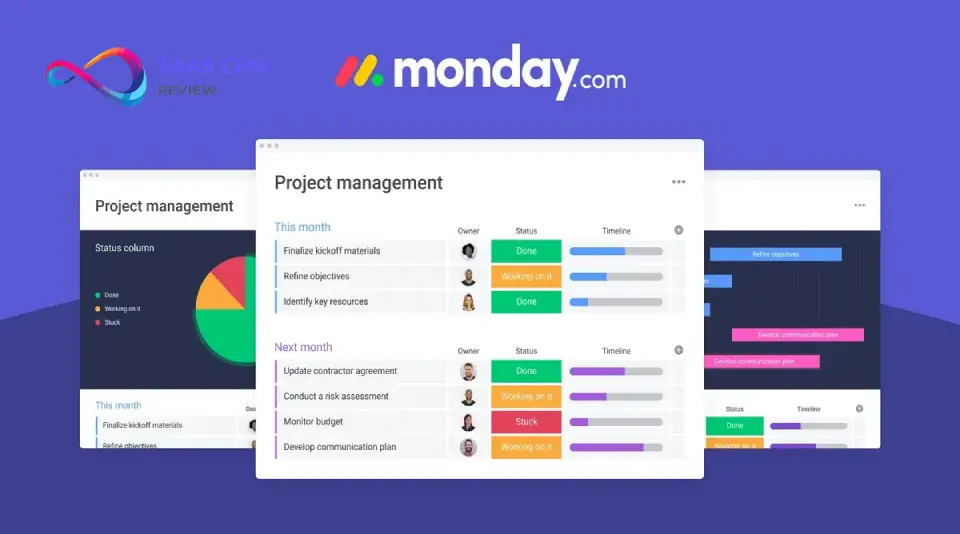
At its foundation, monday.com organizes work into Workspaces (containers for related boards), Boards (project or process views), Groups (sections within boards), and Items (individual tasks or records).
Every item can contain unlimited Columns—the data fields that define your workflow. Standard column types include:
- Status (customizable dropdown with colors)
- Person (team member assignment)
- Date and Timeline
- Numbers, Text, and Formula
- Files and Links
- Dependencies and Subitems
This column-based architecture is monday.com’s secret weapon. Unlike tools with fixed task fields, you define exactly what data matters for each workflow. A marketing campaign board might track “Channel,” “Budget Spent,” and “Content Type” while a development board tracks “Sprint,” “Story Points,” and “Repository Link.”
The platform includes 200+ pre-made templates covering common use cases: content calendars, product roadmaps, recruitment pipelines, event planning, and more. Templates provide starting points, but most teams modify them substantially within the first month of use.
Views & Visualization
monday.com offers 10 view types, second only to ClickUp’s 15+ view options:
| View | Best For |
|---|---|
| Table | Default spreadsheet-style data entry |
| Kanban | Visual status-based workflow management |
| Timeline/Gantt | Project scheduling and dependency mapping |
| Calendar | Date-based planning and deadlines |
| Chart | Reporting and analytics dashboards |
| Workload | Resource allocation and capacity planning |
| Map | Location-based data visualization |
| Form | External data collection and intake |
| Files Gallery | Asset management and proofing |
| Blank View | Custom dashboard creation |
The Timeline view deserves special mention. It provides Gantt-style visualization with drag-and-drop scheduling, dependency arrows, and critical path highlighting. For teams transitioning from Microsoft Project, this view offers familiar functionality with dramatically better usability.
Workload view enables capacity management across team members—essential for agencies and professional services firms balancing assignments. You set maximum capacity per person, and the view highlights overallocation automatically. Teams preferring spreadsheet-style project tracking may find Smartsheet’s familiar interface more natural.
Automation & Workflows
monday.com’s automation builder uses a trigger-action model accessible to non-technical users:
“When [trigger] happens, do [action]”
Example automations:
- When status changes to “Done,” notify the project manager
- When a date arrives, create a subtask for follow-up
- When an item is created in Board A, mirror it to Board B
- When all subitems are complete, change parent item status
Complex workflows chain multiple automations. A client intake form submission might trigger: (1) create a new project, (2) assign the account manager, (3) notify the team channel in Slack, and (4) add a 30-day follow-up task.
Automation limits vary by plan:
- Standard: 250 actions/month
- Pro: 25,000 actions/month
- Enterprise: 250,000 actions/month
These limits matter more than most teams expect. A moderately automated workspace with 20 users can exhaust 250 monthly actions within the first week. Most serious implementations require at least the Pro plan.
AI Features & monday AI Assistant
The 2026 AI capabilities represent monday.com’s most significant evolution:
AI Assistant
- Generate email drafts and project updates from natural language prompts
- Create formulas by describing desired calculations in plain English
- Summarize long comment threads and update histories
- Draft project templates based on goals description
AI Blocks (No-Code AI Functions)
- Document data extraction: Pull structured information from uploaded contracts, invoices, or specifications
- Sentiment analysis: Monitor feedback columns for tone trends
- Content translation: Multi-language support for global teams
- Categorization: Automatically tag items based on content analysis
Project Analyzer Agent This specialized AI monitors portfolios of projects in real-time, identifying:
- Timeline risks before delays materialize
- Resource bottlenecks across teams
- Pattern-based predictions for similar project types
In our testing, the AI features performed best on structured tasks—formula generation and document extraction provided genuine time savings. Creative suggestions (like project planning recommendations) remained hit-or-miss, requiring human judgment.
Integrations Ecosystem
monday.com connects with 50+ native integrations and hundreds more via third-party platforms:
Communication: Slack, Microsoft Teams, Zoom, Gmail, Outlook
File Storage: Google Drive, Dropbox, OneDrive, Box
Development: GitHub, GitLab, Jira
CRM & Sales: Salesforce, HubSpot CRM, Pipedrive
Marketing: Mailchimp, Facebook Ads, LinkedIn
Finance: QuickBooks, Xero
Automation: Zapier, Make (Integromat), Power Automate
Integration actions count against monthly automation limits on Standard and Pro plans. Enterprise removes most restrictions.
The monday Apps Marketplace extends functionality further with custom apps. Notable options include advanced reporting, proofing workflows, and specialized project methodologies.
Mobile App Capabilities
The monday.com mobile app (iOS and Android) covers core functionality:
- View and update boards
- Create and edit items
- File uploads and camera capture
- Push notifications
- Offline access for viewing (syncs when connected)
However, mobile has notable limitations discovered in our testing:
- Gantt/Timeline views render poorly on smaller screens
- Complex boards with many columns become difficult to navigate
- Automation creation isn’t available on mobile
- Occasional sync delays during high-activity periods
Our assessment: The mobile app works well for status updates and quick edits. It’s insufficient for substantive project management work. Plan on desktop access for real productivity.
Security & Compliance
monday.com maintains enterprise-grade security fundamentals:
All Plans:
- SSL/TLS encryption (data in transit)
- AES-256 encryption (data at rest)
- SOC 2 Type II certification
- GDPR compliance
- 99.9% uptime SLA (Enterprise only guaranteed)
Enterprise Only:
- HIPAA compliance (with BAA)
- SCIM provisioning
- Audit logs
- Content directory sync
- Single sign-on (SSO) enforcement
- IP restrictions
- Session management
For complete security documentation, see monday.com’s security page.
The security tier-gating is Monday’s most significant enterprise limitation. Organizations with compliance requirements—healthcare, finance, government contractors—face Enterprise pricing regardless of team size.
monday.com Pricing 2026: Complete Breakdown
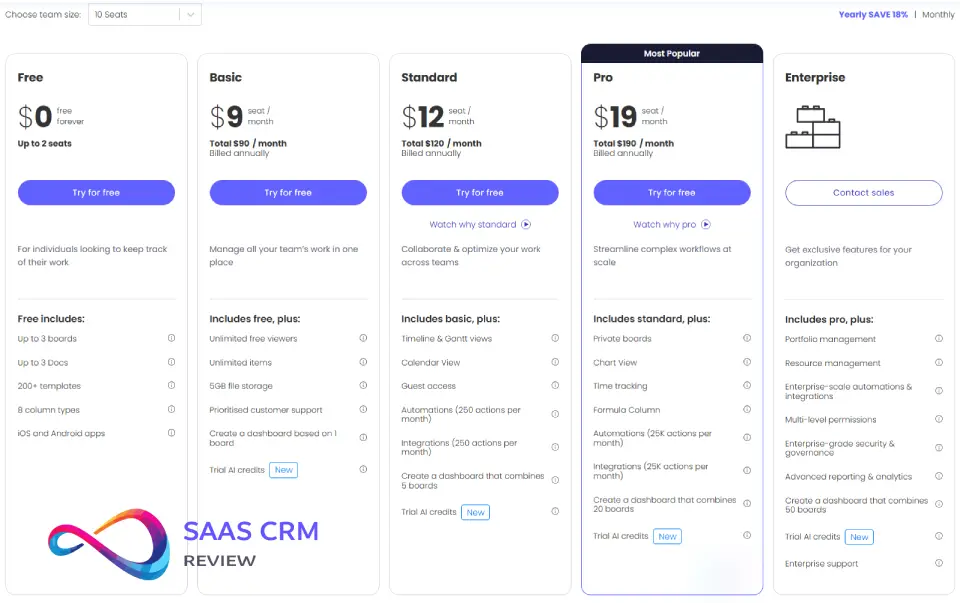
monday.com structures pricing per seat, per month, with annual billing discounts. All paid plans require a minimum of 3 seats.
Pricing Table
| Plan | Price/User/Month (Annual) | Price/User/Month (Monthly) |
|---|---|---|
| Free | $0 | $0 |
| Basic | $9 | $12 |
| Standard | $12 | $14 |
| Pro | $19 | $24 |
| Enterprise | Custom | Custom |
Prices verified February 2026 on monday.com/pricing
Free Plan
Includes:
- Up to 2 users
- 3 boards maximum
- 3 docs
- Unlimited docs
- 200+ templates
- 500MB storage
Assessment: Suitable only for personal use or evaluating the interface. Not viable for team collaboration. For teams needing stronger free options, see our best free CRM software comparison.
Basic Plan ($9/user/month)
Includes Everything in Free, Plus:
- Unlimited viewers (non-editing accounts)
- Unlimited items
- 5GB storage
- Prioritized customer support
- 1-week activity log
Limitations:
- No timeline or Gantt views
- No calendar view
- No integrations
- No automations
- No guest access
Assessment: Too limited for most teams. The absence of integrations and automations eliminates monday.com’s core value. Skip to Standard.
Standard Plan ($12/user/month)
Includes Everything in Basic, Plus:
- Timeline and Gantt views
- Calendar view
- Guest access (4 guests)
- 250 automation actions/month
- 250 integration actions/month
- Search in boards
Assessment: The entry point for real utility. Most small teams can operate here, but automation limits require efficiency discipline.
Pro Plan ($19/user/month)
Includes Everything in Standard, Plus:
- Private boards
- Chart view
- Time tracking column
- Formula column
- 25,000 automation actions/month
- 25,000 integration actions/month
- Dependency column
Assessment: The sweet spot for growing teams. Time tracking, formulas, and expanded automation make this the most popular tier for companies with 10-50 users.
Enterprise Plan (Custom Pricing)
Includes Everything in Pro, Plus:
- Multi-level permissions
- Enterprise-scale automations (250,000 actions)
- Enterprise reporting and analytics
- Advanced security (SCIM, audit logs, SSO enforcement)
- 99.9% SLA guarantee
- Premium customer support
- Work performance insights
Assessment: Required for compliance-regulated industries or organizations exceeding 100 users. Expect pricing around $25-35/user/month depending on negotiation.
Real-World Cost Scenarios
| Team Size | Annual Cost (Standard) | Annual Cost (Pro) |
|---|---|---|
| 5 users | $720 | $1,140 |
| 10 users | $1,440 | $2,280 |
| 25 users | $3,600 | $5,700 |
| 50 users | $7,200 | $11,400 |
| 100 users | $14,400 | $22,800 |
Hidden Costs & Pricing Gotchas
Bucket Pricing Impact monday.com sells seats in predefined buckets. If you have 4 users, you pay for 5. If you have 11 users, you pay for 15. This can increase costs 10-25% above per-user math suggests. For teams using the Sales CRM module, our monday CRM pricing guide breaks down how seat-bucket rounding affects CRM-specific plans starting at $12/seat.
Viewer Account Limitations “Unlimited viewers” on paid plans sounds generous, but viewers cannot edit—only observe. Converting viewers to members triggers immediate cost increases.
Automation Overages Exceeding automation limits doesn’t break workflows, but upgrade pressure escalates. Moving from Standard to Pro for automation alone costs an extra $84/user/year.
Third-Party Add-On Costs Essential functionality like advanced reporting, resource management, or enhanced time tracking often requires paid marketplace apps adding $5-20/user/month.
monday.com Pros and Cons
What monday.com Does Best
Visual Excellence Without Complexity monday.com’s interface remains best-in-class. The colorful, intuitive design makes project status visible at a glance. New users navigate confidently within hours, not days—a rarity for tools this powerful.
Customization That Doesn’t Require Developers The column-based architecture and no-code automation builder let operations teams build sophisticated workflows independently. This democratizes process improvement beyond IT departments.
Genuine Cross-Functional Flexibility The same platform authentically serves marketing, sales, development, HR, and operations. Organizations can standardize on monday.com across departments without forcing artificial workflow conformity.
Strong Automation Capabilities While not the most powerful automation engine (that’s ClickUp), monday.com’s automations are more intuitive. Non-technical users create complex workflows through the visual builder without external consulting.
Excellent Customer Support Higher-tier plans receive responsive, knowledgeable support. Our test tickets received substantive responses within 4 hours during business hours. The knowledge base and monday.com community provide additional self-service resources.
Reliable Uptime and Performance Enterprise SLA guarantees 99.9% uptime, but our experience across plans showed consistent availability. Page loads and updates performed snappily even on complex boards.
Where monday.com Falls Short
Mobile App Remains Problematic Despite years of development, the mobile experience lags desktop significantly. Complex boards become unusable on phones, and key features (Gantt views, automation editing) aren’t available. Teams requiring field access should evaluate carefully.
Pricing Scales Aggressively What starts affordably at $12/user/month compounds quickly with larger teams. Factor in bucket pricing, automation tier pressures, and add-on apps—monday.com often costs 30-50% more than initial estimates.
Basic and Free Plans Are Too Limited Unlike competitors offering generous free tiers, monday.com’s free and Basic plans lack integrations and automations—the features that define the platform’s value. They function primarily as conversion tools.
No Native Timesheet Compilation The time tracking column logs hours but doesn’t compile timesheets, distinguish billable from non-billable time, or generate payroll/invoicing exports. Agencies and consultancies need third-party integrations.
Advanced Security Requires Enterprise HIPAA compliance, audit logs, and SSO enforcement gatekeep to Enterprise pricing. A 10-person healthcare startup faces the same security tier as a 10,000-person hospital system.
Customization Can Become Chaos monday.com’s flexibility is double-edged. Without governance, organizations accumulate hundreds of inconsistently structured boards. The platform provides infinite rope—some teams hang themselves.
monday.com vs Competitors: Head-to-Head Comparisons
monday.com vs Asana
| Factor | monday.com | Asana |
|---|---|---|
| Best For | Visual workflow customization | Structured task management |
| Interface | Colorful, graph-oriented | Clean, list-oriented |
| Customization | Higher (flexible columns) | Moderate (fixed fields + custom) |
| Automations | Strong, no-code builder | Strong, slightly less intuitive |
| Free Plan | 2 users, very limited | 15 users, more features |
| Starting Paid | $9/user (Basic) | $10.99/user (Premium) |
| Mobile App | Weaker | Stronger |
Choose monday.com if: You prioritize visual dashboards and want maximum workflow customization.
Choose Asana if: You need structured task tracking with better free tier value and mobile experience. Read our full Asana review 2026 for detailed analysis, or see our in-depth Asana vs monday.com comparison for a side-by-side breakdown of pricing, features, and team fit.
monday.com vs ClickUp
| Factor | monday.com | ClickUp |
|---|---|---|
| Best For | Accessible power users | Maximum feature depth |
| Learning Curve | Moderate (days) | Steep (weeks) |
| Features Included | Core in lower tiers | Extensive even free |
| Customization | High | Very high |
| Starting Paid | $9/user | $10/user |
| AI Capabilities | Good | Better (ClickUp Brain) |
| Performance | Reliable | Historically inconsistent |
Choose monday.com if: You want powerful features with faster team adoption.
Choose ClickUp if: You prioritize maximum features and your team tolerates complexity.
monday.com vs Trello
| Factor | monday.com | Trello |
|---|---|---|
| Best For | Comprehensive work management | Simple Kanban workflows |
| Complexity | Higher | Lower |
| Views | 10 types | 5 types (with Power-Ups) |
| Automations | Native, extensive | Butler (limited free) |
| Price Point | Higher | Lower ($5/user Standard) |
| Free Plan | Very limited | Generous |
Choose monday.com if: You need more than Kanban—timelines, reporting, complex automations.
Choose Trello if: Simple visual task tracking is sufficient and budget is constrained.
monday.com vs Jira
| Factor | monday.com | Jira |
|---|---|---|
| Best For | General work management | Agile software development |
| Target User | Business teams | Development teams |
| Agile Features | Basic | Comprehensive |
| Bug Tracking | Possible but awkward | Native and robust |
| Starting Price | $9/user | $7.75/user |
| Ease of Use | High | Low-moderate |
Choose monday.com if: Development is one of several departments you’re centralizing.
Choose Jira if: Your primary users are developers managing sprints, bugs, and releases.
Comparison Summary Table
| Platform | Best For | Price From | Free Plan | Our Rating |
|---|---|---|---|---|
| monday.com | Visual, customizable workflows | $9/user | Limited | 8.5/10 |
| Asana | Structured task management | $10.99/user | Generous | 8.3/10 |
| ClickUp | Feature maximalists | $10/user | Generous | 8.4/10 |
| Trello | Simple Kanban needs | $5/user | Generous | 7.8/10 |
| Jira | Software development | $7.75/user | Limited | 8.0/10 |
| Wrike | Enterprise marketing | $9.80/user | Limited | 8.1/10 |
| Basecamp | Simple team communication | $15/user | None | 7.5/10 |
| Teamwork | Agency time/billing | $10.99/user | Limited | 8.2/10 |
Best monday.com Alternatives in 2026
For teams deciding monday.com isn’t the right fit, these alternatives excel in specific areas:
Asana — Best alternative for teams prioritizing structured task management with cleaner mobile experience and better free tier value.
ClickUp — Best alternative for power users wanting maximum features at competitive pricing, despite steeper learning curve.
Teamwork — Best alternative for agencies and consultancies requiring billable time tracking, resource utilization, and client invoicing.
Trello — Best alternative for teams wanting simple visual Kanban without complex features or significant cost.
Notion — Best alternative for teams prioritizing documentation and knowledge management alongside project tracking. Teams focused on internal wikis should also explore our best knowledge base software guide.
Wrike — Best alternative for large marketing teams needing enterprise-grade project management with robust reporting and resource planning.
Airtable — Best alternative for teams wanting database-first flexibility with relational data structures and application-building capabilities.
Customer Reviews & Real User Feedback
Aggregate Ratings (February 2026)
| Platform | Rating | Reviews |
|---|---|---|
| G2 | 4.7/5 | 12,000+ |
| Capterra | 4.6/5 | 4,800+ |
| Trustpilot | 4.3/5 | 2,100+ |
Common Praise Themes
“Finally, project management that doesn’t feel like accounting software” Users consistently highlight the visual appeal. monday.com makes project status emotionally intuitive—green means progress, red means attention needed. No spreadsheet analysis required.
“Our whole company standardized on one platform” Cross-functional flexibility receives frequent mention. Organizations previously juggling 5-7 tools consolidated onto monday.com for genuine operational efficiency.
“Automation saves my team 10+ hours weekly” Workflow automation—when properly implemented—delivers quantifiable time savings. Users report eliminating status meetings, reducing notification fatigue, and accelerating handoffs.
Common Complaint Themes
“The mobile app is frustrating” This criticism appears in roughly 30% of negative reviews. Users expecting desktop parity encounter limitations that disrupt field workflow.
“It got expensive faster than expected” Pricing objections frequently surface around month 6-12 when teams expand beyond initial pilots. The 3-seat minimum and bucket pricing surprise buyers who calculated simple per-user math.
“Too many options, not enough guidance” Some teams report analysis paralysis. monday.com’s flexibility requires intentional governance—without it, boards proliferate inconsistently.
Implementation & Getting Started
Onboarding Experience
monday.com provides structured onboarding for paid plans:
- Template Selection: Start from 200+ industry-specific templates
- Guided Setup: Interactive tutorials walk through board creation
- Team Invitation: Bulk invite via email domain or individual addresses
- Integration Connection: Wizard-style setup for common tools
- Automation Building: Recommended automations based on template type
Enterprise accounts receive dedicated customer success managers who provide hands-on configuration assistance.
Learning Curve
For Basic Functionality: 2-4 hours Team members can navigate boards, update statuses, and complete basic tasks within a single training session.
For Power Use: 2-3 weeks Building custom workflows, creating automations, and designing dashboards requires experimentation. Most teams achieve proficiency within a month.
For Administration: 1-2 months Governance design, permission structures, and organizational standards take longer. Designate a “monday.com champion” for optimal results.
Customer Support Quality
| Plan | Support Channels | Response Time |
|---|---|---|
| Free | Knowledge base, community | Self-service only |
| Basic | Email support | 24-48 hours |
| Standard | Email, prioritized queue | 12-24 hours |
| Pro | Email, live chat | 4-12 hours |
| Enterprise | Dedicated CSM, phone | 1-4 hours |
The knowledge base is comprehensive—most questions have documented answers. The community forums provide peer solutions for edge cases. For customer service teams using monday.com, integrating with dedicated help desk solutions often improves ticket management.
Common Pitfalls & How to Avoid Them
1. Over-customization (“Monday sprawl”)
Pitfall: Teams create dozens of boards, each with unique structures. Six months later, no one knows where anything is.
How to avoid:
- Establish templates/standards early.
- Limit board creation to admins or team leads initially.
- Monthly board audit: Archive unused boards.
2. Automation limit surprise
Pitfall: Team hits Standard plan’s 250 actions/user/month limit mid-month. Automations stop working; chaos ensues.
How to avoid:
- Monitor automation usage via Settings > Automations > Usage.
- Set alerts at 75% usage.
- Budget for Pro plan if you enable 3+ automations per board.
3. Notification overload
Pitfall: Default notifications are aggressive. Team gets 50+ emails/day, ignores Monday entirely.
How to avoid:
- During onboarding, train users to customize notification preferences (Settings > Notifications).
- Recommend: Disable email notifications for “item updated”; keep only “assigned to me” and “@mentions.”
- Use Slack integration for notifications instead of email.
4. Treating Monday like a task manager instead of a project tracker
Pitfall: Teams create 1 board with 500+ items (tasks). Board becomes unmanageable.
How to avoid:
- Monday works best for project-level tracking (10–100 items per board), not task-level (500+ items).
- For task management, use Monday groups (collapsible sections) or integrate with dedicated task tools.
- Archive completed items monthly to keep boards clean.
5. Ignoring permissions until a breach
Pitfall: All boards are open by default. Someone accidentally sees confidential client data or salary info.
How to avoid:
- Audit board permissions during setup.
- Create separate workspaces for sensitive data (HR, Finance).
- Review permissions quarterly—especially after org changes (people change roles).
6. Not training on views
Pitfall: Team only uses default table view. Misses value of Kanban, Gantt, Calendar views.
How to avoid:
- During training, demo all views. Show when to use each (Kanban for status workflows, Gantt for dependencies, Calendar for deadlines).
- Pin recommended views at top of boards.
7. Ignoring dashboards until leadership asks for reports
Pitfall: Leadership requests status report; scramble to build a dashboard overnight.
How to avoid:
- Build 1 core dashboard during implementation (even if simple).
- Update it weekly; share link with leadership proactively.
- Leadership stops asking for reports when data is always visible.
8. Underestimating integration setup time
Pitfall: Assume integrations are “plug and play.” Spend 10 hours troubleshooting Jira sync.
How to avoid:
- Budget 2–4 hours per integration for setup and testing.
- Read integration docs before starting.
- For complex integrations (Salesforce, Jira), consider hiring a Monday consultant.
9. Forgetting to migrate historical data
Pitfall: Switch from Asana to Monday. Lose 2 years of project history because export wasn’t planned.
How to avoid:
- Export data from old tool before canceling subscription.
- Decide what to migrate (active projects: yes; completed projects from 2 years ago: maybe not).
- Archive exported data in Google Drive or Notion for reference.
10. Not assigning a Monday admin
Pitfall: No one owns Monday. Boards proliferate, permissions are messy, no one knows best practices.
How to avoid:
- Appoint 1 person as Monday administrator (0.25–0.5 FTE depending on org size).
- Admin responsibilities: governance, training, integrations, optimization, board audits.
Frequently Asked Questions
Is monday.com good for project management?
Yes, monday.com excels at project management, particularly for teams valuing visual workflows and customization. It provides timeline/Gantt views, dependency tracking, resource management, and automated status updates. However, teams requiring rigid methodologies (strict Scrum frameworks) may prefer specialized tools like Jira.
How much does monday.com cost per month?
monday.com starts at $9/user/month (Basic) billed annually, but the Standard plan at $12/user/month is the practical minimum for useful features. Teams of 10 users pay $120-190/month depending on tier. Enterprise pricing is custom but typically ranges $25-35/user/month. All paid plans require minimum 3 seats.
Is monday.com better than Asana?
Neither is universally better—they serve different preferences. monday.com offers more visual customization and flexible workflows. Asana provides cleaner task structure and superior mobile experience. Choose monday.com for visual dashboards and cross-functional teams; choose Asana for task-oriented projects and organizations prioritizing mobile access.
Does monday.com have a free version?
Yes, but it’s extremely limited. The free plan permits only 2 users and 3 boards with no integrations or automations—the features defining monday.com’s value. It’s suitable for personal experimentation, not team collaboration. The 14-day Pro trial provides a more accurate platform evaluation.
What companies use monday.com?
monday.com claims 200,000+ customers including Canva, Coca-Cola, Universal Music, and NBC. The platform serves organizations from startups to enterprises across industries including technology, marketing, construction, healthcare, and professional services.
Is monday.com easy to use?
monday.com is easier than most comparable platforms. The visual interface and drag-and-drop interactions feel intuitive. Basic competency requires hours, not days. However, maximizing the platform’s power—building automations, designing dashboards, governing organizational standards—requires investment. “Easy to start, takes time to master” summarizes the experience.
Can monday.com replace Excel for project tracking?
For most project tracking use cases, yes. monday.com offers better collaboration, visualization, and automation than spreadsheets. Teams tracking status, assignments, and deadlines across projects will find monday.com superior. However, teams requiring complex calculations, pivot tables, or specialized financial modeling may need to maintain Excel alongside—or use monday.com’s data export features.
What is the difference between monday.com Work Management and monday Sales CRM?
monday.com Work Management is the core platform for project and task management across departments. monday Sales CRM is a specialized product built on the same foundation with features for pipeline management, lead tracking, email sequencing, and sales automation. Both share the underlying Work OS architecture, allowing organizations to connect sales and operations workflows. Teams comparing CRM options should explore our best CRM for small business guide.
Final Verdict: Should You Choose monday.com in 2026?
monday.com earns its reputation as one of the best visual work management platforms available. The combination of intuitive design, flexible architecture, and powerful automation delivers genuine organizational value. Teams who’ve struggled with overly complex enterprise tools or outgrown simple task trackers find monday.com occupies an ideal middle ground.
Choose monday.com if
- You value visual project tracking over spreadsheet-style interfaces
- Your team has defined processes worth automating
- You need cross-departmental flexibility without forcing identical workflows
- You’re willing to invest in initial setup for long-term efficiency
- Your budget accommodates $12-19/user/month (realistically)
Look elsewhere if
- You need advanced time tracking and billing (→ Teamwork)
- You require enterprise security on smaller budgets (→ Asana)
- Maximum features at minimum cost is your priority (→ ClickUp)
- Simple Kanban is sufficient (→ Trello)
- Software development is your primary use case (→ Jira)
Our Recommendation
For mid-sized teams (15-200 users) managing projects across marketing, operations, or general business functions, monday.com provides exceptional value. Start with the 14-day Pro trial to evaluate advanced features, then land on Standard or Pro depending on automation requirements.
Smaller teams should calculate total cost carefully—including bucket pricing and likely tier upgrades—before committing. The platform excels, but it’s not the budget option.
Overall Score: 8.5/10
This review reflects independent evaluation by our editorial team. We test platforms extensively before publishing assessments. monday.com did not sponsor or preview this content.
About the author

I’m Macedona, an independent reviewer covering SaaS platforms, CRM systems, and AI tools. My work focuses on hands-on testing, structured feature analysis, pricing evaluation, and real-world business use cases.
All reviews are created using transparent comparison criteria and are updated regularly to reflect changes in features, pricing, and performance.