

These Claude prompts are copy-paste prompts for Anthropic’s Claude, grouped by work task and coding job. Each one carries [PLACEHOLDERS] to replace, a note on when to use it and the Claude plan or feature it needs.
Prompts 1–28 cover office work, prompts 29–60 coding in a chat and prompts 61–68 Claude Code. Most run on Claude Free; the Research and Claude Code prompts need a paid plan.
The structure follows Anthropic’s prompting guide as checked in October 2026, including a change older prompt lists miss. Anthropic’s models overview lists thinking on Claude Opus 5.5 and Claude Fable 5.1 as “Adaptive (always on)”, so no prompt on this page carries an old “think step by step” script.
Every numbered prompt is a filled version of this master template. Copy it whole when no prompt below fits your task:
You are [ROLE].

<context>
[CONTEXT]
</context>

<input>
[INPUT]
</input>

Task: [TASK]
Audience: [AUDIENCE]
Format: [FORMAT], [LENGTH]
Rules: [CONSTRAINTS]
Before you answer, [CHECK].| Group | Prompts | Needs |
|---|---|---|
| Email and messages | 1–4 | Any Claude plan |
| Meetings and summaries | 5–8 | Any Claude plan |
| Reports and documents | 9–12 | Any plan; Artifacts setting on for prompt 12 |
| Research and analysis | 13–16 | Claude Pro or higher for prompt 13 (Research); any plan for prompts 14–16 |
| Data and spreadsheets | 17–20 | Code execution and file creation on for XLSX (17) and Artifacts (20) |
| Planning and decisions | 21–24 | Any Claude plan |
| Writing and editing | 25–28 | Any Claude plan |
| Debugging | 29–32 | Any Claude plan |
| Code review | 33–36 | Any Claude plan |
| Refactoring | 37–40 | Any Claude plan |
| Writing tests | 41–44 | Any Claude plan |
| Explaining code | 45–48 | Any Claude plan |
| Documentation | 49–52 | Any Claude plan |
| SQL | 53–56 | Any Claude plan |
| Architecture and planning | 57–60 | Any Claude plan |
| Claude Code in the terminal | 61–68 | Claude Pro, Claude Max, Team or Enterprise seat |
Sources: Claude plans and pricing and Claude’s artifacts help article, checked October 2026.
In This Article (11 sections)
What’s in the Claude Prompt Template
The master template lists every field: role, context, tagged input, task, audience, format and length, rules and a self-check. Each prompt below keeps the fields its job needs; replace the brackets and keep the tags.
| Field | What to enter | Example |
|---|---|---|
| [ROLE] | Who Claude works as, in one sentence | An operations manager at a 20-person agency |
| [CONTEXT] | Why the task matters and what Claude cannot guess | The client missed last week’s call; the tone must stay calm |
| [INPUT] | Pasted text or an attached file, inside a named tag | The pasted notes inside notes tags, or the attached quarterly-report.pdf |
| [TASK] | The one job, written as an outcome | Turn these notes into a status update for the client |
| [AUDIENCE] | Who reads the result | Acme Co’s marketing director |
| [FORMAT] | The output shape: prose, bullet list, table, numbered steps, JSON, code block or artifact | A short bulleted email |
| [LENGTH] | The size limit | One short paragraph |
| [CONSTRAINTS] | Must-follow rules, written as what to do | Keep all dates exactly as written |
| [CHECK] | How Claude checks its work before answering | List any figure not found in the notes |
Sources: field order from Anthropic’s prompting best practices, checked October 2026; the example values are fictional.
The order is deliberate. Anthropic’s prompting guide recommends placing long documents above the question and instructions, so the template puts [INPUT] before [TASK]. The guide also asks for consistent, descriptive tag names, so rename a tag only when you rename it everywhere in the prompt.
Knowing the parts is half the job; the other half is the order you fill and run them in.
How to Use These Claude Prompts
Five steps take a prompt from this page to a usable result:
- Pick the prompt whose When line matches your task, using the group table above.
- Replace every [PLACEHOLDER], including the role and the audience, with your own words.
- Paste the input between its tags, or attach the file and name it inside the tags.
- Run the prompt in a Claude chat for a one-off task, or inside a Project when you repeat the task.
- Send one correction at a time, or chain a review: ask Claude to check the draft against your criteria, then to revise it.
The fifth step is the pattern Anthropic’s guide calls the most common chain: draft, review against criteria, refine. Prompts 61–68 run in Claude Code instead of a chat.
Example: A Claude Prompt Filled In
Prompt 5, the meeting summary, shows what a filled prompt looks like.
Here is a hypothetical meeting with invented sample data: Acme Co’s Q3 onboarding project, a call led by Jane Rivera (jane@example.com, 555-0100).
| Field | Sample value |
|---|---|
| [ROLE] | A chief of staff who writes meeting notes people act on |
| [INPUT] | Jane Rivera’s notes from the Q3 onboarding project call, pasted inside transcript tags |
| [AUDIENCE] | Acme Co’s onboarding team and its sponsor |
| [FORMAT] | Three tables: Decisions, Action items, Open questions |
| [CHECK] | Confirm every action item appears in the notes |
Sources: sample data invented for this example; no real company or person.
You are a chief of staff who writes meeting notes people act on.

<transcript>
Q3 onboarding project call. Jane: welcome emails go live Sept 30 if legal signs off. Sam owns the checklist. Nobody has picked the survey tool yet. Jane to send the timeline to the sponsor on Friday.
</transcript>

Task: summarize this meeting for Acme Co's onboarding team and its sponsor.
Format: three tables: Decisions (decision, who decided), Action items (task, owner, deadline), Open questions (question, who answers).
Rules: write "No owner named" or "No deadline set" when the transcript gives none.
Before you answer, check that every action item appears in the transcript.
The prompt asks for a Decisions table with the conditional go-live, an Action items table with Sam’s checklist and Jane’s Friday email, and an Open questions row for the survey tool marked “No owner named”.
The same fill-in pattern applies to every prompt below; pick the group that matches today’s task.
Claude Prompts for Real Work
Prompts 1–28 below cover office work. Each one runs in Anthropic’s Claude on any plan unless its Needs line names a paid plan or a setting.
Email and Messages
These four prompts write the reply, update or follow-up a specific reader needs.
1. Reply to a difficult customer email
You are a customer support lead at [COMPANY].

<email>
[CUSTOMER_EMAIL]
</email>

Context: [WHAT_ALREADY_HAPPENED]
Task: draft a reply that acknowledges the problem, states what we will do and by when, and holds our position on [POLICY].
Format: plain email, under 150 words, one sentence of apology at most.
Before you answer, list any promise in your draft that is not in the context.
When to use: an angry or confused customer email that needs a calm answer without promising more than your policy allows.
Needs: Anthropic’s Claude on any plan, Claude Free included.
2. Turn rough notes into a team status update
You are a project manager writing for a busy team channel.

<notes>
[ROUGH_NOTES]
</notes>

Task: turn these notes into a status update for [SLACK_OR_TEAMS_CHANNEL].
Format: three short sections: Done, Next, Blocked. One line per item, owner first.
Rules: keep every date and number exactly as written; leave out anything marked "private".
Before you answer, check that every blocker names who can unblock it.
When to use: weekly or stand-up updates where your notes are accurate but nobody else could read them.
Needs: Anthropic’s Claude on any plan; the notes are pasted as text, so no upload is involved.
3. Follow up after no reply
You are [ROLE] following up with [RECIPIENT_NAME], who has not replied in [DAYS] days.

<previous_message>
[YOUR_LAST_EMAIL]
</previous_message>

Task: write a follow-up that restates the one decision I need and makes it easy to answer.
Format: a subject line and under 80 words, ending with one yes-or-no question.
Rules: open with the decision itself.
When to use: a proposal, invoice or approval stalled in someone’s inbox.
Needs: Anthropic’s Claude, any plan, with your earlier email pasted between the tags.
4. Rewrite one message for a different audience
<message>
[ORIGINAL_MESSAGE]
</message>

Task: rewrite this message twice: once for [EXECUTIVE_AUDIENCE] and once for [TEAM_AUDIENCE].
Context: the executive version supports a decision about [DECISION]; the team version says what changes in their work.
Format: executive version in 3 sentences with the ask first; team version as up to 5 bullets.
Rules: both versions carry the same facts.
When to use: one update that leadership and the delivery team both need, at different depths.
Needs: Anthropic’s Claude on any plan; one chat handles both versions.
Meetings and Summaries
These prompts turn a meeting into decisions, owners and deadlines, and prepare the next one.
5. Summarize a meeting into decisions, owners and deadlines
You are a chief of staff who writes meeting notes people act on.

<transcript>
[MEETING_TRANSCRIPT_OR_NOTES]
</transcript>

Task: summarize this meeting for [AUDIENCE].
Format: three tables: Decisions (decision, who decided), Action items (task, owner, deadline), Open questions (question, who answers).
Rules: write "No owner named" or "No deadline set" when the transcript gives none.
Before you answer, check that every action item appears in the transcript.
When to use: after a call with a transcript or messy notes, when the follow-up email has to go out today.
Needs: Anthropic’s Claude on any plan; a transcript file goes in as a chat upload in PDF, DOCX or TXT.
6. Build an agenda from goals and a time box
You are a facilitator planning a [MINUTES]-minute meeting.

<goals>
[MEETING_GOALS]
</goals>

Attendees: [ATTENDEES_AND_ROLES]
Task: build an agenda that reaches a decision on [MAIN_DECISION].
Format: a table with time slot, topic, owner and the outcome each slot must produce.
Rules: the slots add up to the meeting length; the decision slot comes before the halfway point.
When to use: a recurring or high-stakes meeting that keeps running out of time before the decision.
Needs: Anthropic’s Claude, any plan, with goals and attendees typed into the chat.
7. Pull action items from a long thread, with quotes
<thread>
[EMAIL_OR_CHAT_THREAD]
</thread>

Task: find every commitment in this thread.
First, quote each line that contains a commitment inside numbered quote tags.
Then list the action items: task, owner, deadline and the quote number it comes from.
Rules: an item without a supporting quote stays off the list.
When to use: a long email or chat thread where nobody is sure who agreed to what.
Needs: Anthropic’s Claude on any plan; Claude’s pricing page lists a context window of up to 1M, varying by model, on every plan.
8. Prepare questions for a client call or a one-on-one
You are [ROLE], preparing for a [CALL_TYPE] with [PERSON_OR_CLIENT].

<background>
[NOTES_ON_THE_ACCOUNT_OR_PERSON]
</background>

Task: write the questions I should ask to learn [GOAL_OF_THE_CALL].
Format: 8 questions in priority order, each with one line on why it matters.
Rules: open questions only; the first two take under a minute to answer.
When to use: the hour before a client check-in, a discovery call or a one-on-one with a direct report.
Needs: Anthropic’s Claude, any plan; paste your notes or attach the account file.
Reports and Documents
These prompts draft a report from raw material or digest a long document without losing the source.
9. Weekly or monthly report from raw bullets
You are an operations manager writing the [WEEKLY_OR_MONTHLY] report for [AUDIENCE].

<bullets>
[RAW_BULLETS_AND_NUMBERS]
</bullets>

Task: turn these bullets into a report.
Format: a 3-sentence summary, then sections for Results, Issues and Next period, in flowing prose paragraphs.
Rules: every number comes from the bullets; mark a missing comparison as "not reported".
Before you answer, list any figure you changed or computed.
When to use: the report is due and the facts sit in a list, a tracker export or your own shorthand.
Needs: Anthropic’s Claude on any plan; a tracker export can be attached as a CSV file.
10. Summarize a long PDF, quotes first
<document>
[ATTACHED_PDF_OR_PASTED_TEXT]
</document>

You are [ROLE] reading this document for [AUDIENCE].
First, quote the passages that matter for [QUESTION] inside quote tags, with page numbers.
Then answer the question in under [LENGTH] words, citing the quote numbers.
Rules: write "not covered in the document" when the answer is not there.
When to use: a policy, vendor proposal or research report too long to read before the meeting.
Needs: Anthropic’s Claude with a PDF upload on any plan; PDFs are capped at 1,000 pages, and Claude reads charts and images only in PDFs of 100 pages or fewer.
11. Compare two versions of a document
<documents>
<document index="1">
<source>[OLD_VERSION_NAME]</source>
<document_content>[OLD_VERSION]</document_content>
</document>
<document index="2">
<source>[NEW_VERSION_NAME]</source>
<document_content>[NEW_VERSION]</document_content>
</document>
</documents>

Task: list every change from document 1 to document 2 that affects [WHAT_YOU_CARE_ABOUT].
Format: a table with section, old wording, new wording and why it matters.
Rules: quote the wording exactly; skip formatting-only changes.
When to use: a revised proposal, policy or spec where you need the substance of the edits, not a legal opinion.
Needs: Anthropic’s Claude, any plan; attach both files to one chat, which takes up to 20 files.
12. Turn a document into a one-page brief
<document>
[ATTACHED_DOCUMENT]
</document>

Task: create a one-page brief from this document as a Docs artifact for [AUDIENCE].
Format: a title, a 2-sentence summary, three sections ([SECTION_NAMES]) and a "Decisions needed" list.
Rules: keep the document's own figures and names; add nothing the document does not say.
When to use: a long report that stakeholders will only read as a one-pager they can edit and share.
Needs: Anthropic’s Claude with Artifacts, which every plan includes, after turning on code execution and file creation in Settings > Capabilities.
Research and Analysis
These prompts research a question, compare sources or sort feedback while keeping claims tied to evidence.
13. Research brief with competing hypotheses
You are a research analyst. Use Research to investigate: [RESEARCH_QUESTION].

Context: the answer feeds a decision about [DECISION] for [AUDIENCE].
Task: develop two or three competing explanations, gather evidence for and against each, and say which one the evidence favors.
Format: a one-paragraph answer, a table of hypotheses with evidence and a confidence level (high, medium, low), then the source list.
Rules: separate what sources state from your own inference.
When to use: a market, vendor or policy question where one quick web answer would hide the uncertainty.
Needs: Claude Pro, Claude Max or a Team seat for Research, which Claude Free does not include; web search alone works on every Claude plan.
14. Competitor comparison table from pasted pages
<documents>
<document index="1"><source>[COMPETITOR_A]</source><document_content>[PASTED_PAGE_A]</document_content></document>
<document index="2"><source>[COMPETITOR_B]</source><document_content>[PASTED_PAGE_B]</document_content></document>
</documents>

Task: compare these offers for [PRODUCT_CATEGORY] on [CRITERIA_LIST].
Format: one table, one row per criterion, one column per competitor.
Rules: write "Not stated" where a page is silent; quote prices exactly as printed.
When to use: a pricing or positioning review built from competitors’ own pages.
Needs: Anthropic’s Claude on any plan; to pull the live pages instead of pasting them, ask for web search, also on every plan.
15. Find themes in survey or support feedback
You are a customer insights analyst.

<feedback>
[SURVEY_ANSWERS_OR_TICKETS]
</feedback>

Task: group this feedback into themes for [AUDIENCE].
Format: a table with theme, number of mentions, two short representative quotes and a suggested next step.
Rules: count each mention exactly; put one-off comments under "Other".
When to use: an NPS export, a survey’s open-text column or a month of support tickets.
Needs: Anthropic’s Claude, any plan; a CSV export uploads straight into the chat.
16. Critique my plan as a skeptical reviewer
You are a skeptical [REVIEWER_ROLE] who has seen plans like this fail.

<plan>
[YOUR_PLAN]
</plan>

Task: find the weakest assumptions in this plan.
Format: the 5 biggest risks, ranked, each with the assumption behind it, the evidence that would prove it wrong and a cheaper way to test it.
Rules: be direct; mention a strength only when it changes the ranking.
When to use: before a plan goes to your manager, a client or a budget committee.
Needs: Anthropic’s Claude on any plan, with the plan pasted or attached as a document.
Data and Spreadsheets
These prompts get Claude to read numbers from the file itself and show its working.
17. Analyze an uploaded CSV or XLSX and explain the trend
You are a financial analyst explaining [METRIC] to [AUDIENCE].

<data>
[ATTACHED_CSV_OR_XLSX]
</data>

Task: describe the main trend over [PERIOD], the two biggest changes and what the columns show about their causes.
Format: 3 short paragraphs, then a table of the figures you used.
Rules: compute from the file; state the formula behind every derived figure.
Before you answer, check the row count and flag blank or duplicate rows.
Finance variant: replace the Task line with “compare [ACTUALS_COLUMN] with [BUDGET_COLUMN], list the five largest variances in dollars and percent, and name the line item behind each”.
When to use: a sales, traffic or budget export where you need the story behind the numbers.
Needs: Anthropic’s Claude with code execution and file creation turned on, which XLSX uploads require; a CSV needs no extra setting.
18. Spreadsheet formula from a plain description
I use [EXCEL_OR_GOOGLE_SHEETS].
My columns: [COLUMN_LETTERS_AND_HEADERS]

Task: write a formula for cell [CELL] that [WHAT_IT_SHOULD_CALCULATE].
Format: the formula in a code block, then one sentence per function on what it does.
Rules: handle blank cells; use non-volatile functions.
Before you answer, work the formula through this sample row: [SAMPLE_ROW_VALUES].
When to use: a lookup, conditional sum or date calculation you can describe but not write.
Needs: Anthropic’s Claude on any plan; the column list is typed, so no file upload is needed.
19. Cleaning rules for messy data
<sample>
[A_SAMPLE_OF_THE_ROWS]
</sample>

Task: propose cleaning rules for this data before it goes into [DESTINATION_SYSTEM].
Format: a table with column, problem found, rule, and one example before and after.
Rules: flag rows that need a human decision; keep the original values in a separate column.
When to use: a CRM import, mailing list or survey export with mixed date formats, duplicates and typos.
Needs: Anthropic’s Claude, any plan; paste a sample rather than the whole file when the data holds personal details.
20. Build an interactive chart as an artifact
<data>
[PASTED_TABLE_OR_ATTACHED_CSV]
</data>

Task: build an interactive chart artifact showing [METRIC] by [DIMENSION] over [PERIOD].
Format: a [CHART_TYPE] with a filter for [FILTER_FIELD], axis labels with units and a title that states the finding.
Rules: use only the values in the data; show a note where a value is missing.
When to use: a recurring metric you want to explore or share as a working chart rather than a static image.
Needs: Anthropic’s Claude on any plan; prompt 20 asks for a chart artifact, which every plan creates once code execution and file creation are on.
Planning and Decisions
These prompts make Claude weigh options and constraints instead of listing ideas.
21. Weighted decision matrix
You are a neutral advisor helping [TEAM_OR_PERSON] choose between [OPTIONS].

<context>
[CONSTRAINTS_BUDGET_DEADLINES]
</context>

Task: build a weighted decision matrix.
Format: first propose 5 to 7 criteria with weights that add up to 100 and wait for my approval; then score each option 1 to 5 per criterion with one line of reasoning per score.
Rules: show the weighted totals and the math. Think thoroughly about which criterion could flip the result.
When to use: a vendor, hire, location or tool choice where opinions keep circling.
Needs: Anthropic’s Claude, any plan; the matrix is built over two or three turns of one chat.
22. Project plan with milestones, owners and risks
You are a project manager planning [PROJECT_NAME].

<scope>
[GOAL_DEADLINE_TEAM_BUDGET]
</scope>

Context: the plan goes to [STAKEHOLDERS], who care most about [PRIORITY].
Task: create a project plan.
Format: a milestone table (milestone, owner, due date, dependency), then the top 5 risks with an owner and a mitigation each.
Rules: work the dates back from [DEADLINE]; flag any milestone with less than [BUFFER] of buffer.
When to use: kicking off a project that needs a first plan to argue over.
Needs: Anthropic’s Claude on any plan; asking for a Docs artifact keeps the plan editable once Artifacts are on.
23. Pre-mortem
<plan>
[PROJECT_OR_LAUNCH_PLAN]
</plan>

Task: run a pre-mortem. Imagine it is [DATE_AFTER_LAUNCH] and this project failed.
Format: the 7 most likely causes of failure, each with an early warning sign to track and one action to take this week.
Rules: every cause is specific to this plan.
When to use: a week before a launch, migration or campaign goes live.
Needs: Anthropic’s Claude, any plan; paste the plan or attach the project document.
24. Prioritize a week or a backlog
<tasks>
[TASK_LIST_WITH_DEADLINES]
</tasks>

My constraints: [HOURS_AVAILABLE], [FIXED_MEETINGS], [WHAT_MY_MANAGER_CARES_ABOUT].
Task: prioritize these tasks for [THIS_WEEK_OR_SPRINT].
Format: three lists: Do this week (with a day each), Delegate (to whom), Defer or drop (with a one-line reason).
Rules: planned hours stay within my available hours.
When to use: a Monday with more tasks than hours, or a backlog review before a sprint.
Needs: Anthropic’s Claude on any plan, Claude Free included, with the task list pasted.
Writing and Editing
These prompts keep your voice when Claude edits or drafts.
25. Edit for clarity and list each change
You are an editor for [PUBLICATION_OR_TEAM].

<draft>
[YOUR_DRAFT]
</draft>

Task: edit this draft for clarity and concision for [AUDIENCE].
Format: the edited text first, then a numbered list of each change and why.
Rules: keep my voice, facts and structure; change words, not meaning.
When to use: a draft you wrote yourself that needs a second pair of eyes before it goes out.
Needs: Anthropic’s Claude, any plan, with the draft pasted between the draft tags.
26. Match my style from samples
<examples>
<example>[WRITING_SAMPLE_1]</example>
<example>[WRITING_SAMPLE_2]</example>
<example>[WRITING_SAMPLE_3]</example>
</examples>

Task: write [PIECE_TYPE] about [TOPIC] in the style of these examples.
Format: first describe the style in 5 bullets (sentence length, tone, structure, vocabulary, openings), then write the piece in [LENGTH].
Rules: borrow the style, not the sentences.
When to use: newsletters, LinkedIn posts or client updates that must sound like you.
Needs: Anthropic’s Claude on any plan; saving the samples to a Project keeps them for every later chat.
27. Post or article outline for a marketing audience
You are a content strategist for [COMPANY], writing for [AUDIENCE_ROLE_AND_SENIORITY].

Context: the reader wants to [READER_GOAL] and already knows [WHAT_THEY_KNOW].
Task: outline a [POST_OR_ARTICLE] on [TOPIC].
Format: a working title, a one-sentence promise, H2 headings with 2 or 3 bullets each, and the question each section answers.
Rules: every section gives the reader something to do or decide.
When to use: planning a blog post, landing page or LinkedIn article before anyone writes a word.
Needs: Anthropic’s Claude, any plan; add “search the web for current figures” when the outline needs fresh facts.
28. Cut to a length in plain language
<text>
[TEXT_TO_SHORTEN]
</text>

Task: cut this text to [WORD_LIMIT] words for [AUDIENCE].
Format: plain language and short sentences, with the main point first.
Rules: keep every number, name and date; replace jargon with everyday words.
Before you answer, count the words and report the count.
When to use: an abstract, a bio, a product description or an email that has to fit a limit.
Needs: Anthropic’s Claude on any plan, in the web, desktop or mobile app.
The same structure works for code, with one difference: the input is code, an error and the behavior you expected.
Claude Prompts for Coding
Prompts 29–60 below are for pasting code into a Claude chat: each wraps the code, the error or the diff in tags and keeps the template fields its job needs.
Debugging
These prompts ask for the root cause and the evidence for it, not a guess.
29. Root cause from an error and stack trace
You are a senior [LANGUAGE] engineer.

<code>
[RELEVANT_CODE]
</code>

<error>
[ERROR_MESSAGE_AND_STACK_TRACE]
</error>

Expected behavior: [WHAT_SHOULD_HAPPEN]
Task: find the root cause, then propose the smallest fix.
Format: the cause in 2 sentences, the fix as a diff, and how to confirm it worked.
Rules: fix the root cause rather than suppressing the error.
When to use: a crash or exception you can reproduce, with the trace in hand.
Needs: Anthropic’s Claude on any plan; the code and trace are pasted, with no repository access.
30. Intermittent bug: ranked hypotheses and a logging plan
<symptoms>
[WHEN_IT_FAILS_HOW_OFTEN_ENVIRONMENT]
</symptoms>

<code>
[SUSPECTED_CODE]
</code>

Task: list the likely causes of this intermittent failure, ranked by likelihood, with the evidence for each.
Format: for each hypothesis, the log line or metric that would confirm or rule it out.
Rules: think thoroughly about race conditions, caching and environment differences.
When to use: a bug that shows up in production and never on your machine.
Needs: Anthropic’s Claude, any plan, with the suspected code and the logs pasted.
31. Failing test: explain, then the smallest fix
<test>
[FAILING_TEST]
</test>

<code>
[CODE_UNDER_TEST]
</code>

<output>
[TEST_RUNNER_OUTPUT]
</output>

Task: explain why this test fails, decide whether the test or the code is wrong, then give the smallest change that makes it pass for the right reason.
Rules: if the test itself is incorrect, tell me instead of working around it.
When to use: a red CI run where you are not sure the test still reflects the intended behavior.
Needs: Anthropic’s Claude on any plan; in Claude Code, prompt 63 runs the tests itself.
32. Diagnose a slowdown from timings or a profile
<profile>
[PROFILER_OUTPUT_OR_TIMINGS]
</profile>

<code>
[HOT_PATH_CODE]
</code>

Context: [ENDPOINT_OR_JOB] went from [OLD_TIME] to [NEW_TIME] after [CHANGE].
Task: identify where the time goes and the top 3 fixes, with the expected effect of each.
Rules: base each claim on a quoted line of the profile.
When to use: an endpoint, query or batch job that got slower, with numbers to show it.
Needs: Anthropic’s Claude, any plan; attach long profiler output as a TXT or JSON file.
Code Review
These prompts get a review that ranks real problems and skips what a linter catches.
33. Review a diff, ranked by severity
You are a senior reviewer for a [LANGUAGE_AND_FRAMEWORK] codebase.

<diff>
[GIT_DIFF]
</diff>

Context: this change is meant to [PURPOSE].
Task: review the diff.
Format: findings ranked Critical, Major, Minor, each with file and line, the problem and a suggested fix.
Rules: leave style points to the linter; write "No critical issues" when there are none.
When to use: before you ask a teammate for review, or when you are the only reviewer.
Needs: Anthropic’s Claude on any plan, with the diff pasted as text.
34. Security review of one function or endpoint
You are an application security engineer.

<code>
[FUNCTION_OR_ENDPOINT_CODE]
</code>

Context: this code receives input from [INPUT_SOURCE] and touches [DATA_OR_SYSTEMS].
Task: review it for injection, broken access control, secrets in code, unsafe deserialization and [OTHER_CONCERN].
Format: each finding with its severity, the exploit in one sentence and a fixed version of the code.
When to use: an endpoint that handles user input, payments or personal data, before it ships.
Needs: Anthropic’s Claude, any plan; strip real keys and customer data from the snippet first.
35. Review against a reference file of team conventions
<reference>
[A_FILE_THAT_FOLLOWS_YOUR_CONVENTIONS]
</reference>

<code>
[NEW_CODE]
</code>

Task: review the new code for consistency with the reference file: naming, error handling, structure, logging and tests.
Format: a list of differences, each with the reference pattern and the change to make.
When to use: a new teammate’s first pull requests, or code written outside your usual patterns.
Needs: Anthropic’s Claude on any plan, with both files in the same chat.
36. Check a pull request for missing tests
<diff>
[PULL_REQUEST_DIFF]
</diff>

<tests>
[EXISTING_TESTS_FOR_THESE_FILES]
</tests>

Task: list the behaviors this pull request adds or changes that no test covers.
Format: a table with behavior, file and a one-line test case.
Rules: include error paths and boundary values.
When to use: a pull request that changes logic but adds few or no tests.
Needs: Anthropic’s Claude, any plan, with the diff and the current tests pasted.
Refactoring
These prompts change structure while keeping behavior identical.
37. Refactor with behavior unchanged
<code>
[CODE_TO_REFACTOR]
</code>

Task: refactor this code for [GOALS_SUCH_AS_CLEARER_NAMES].
Rules: behavior stays identical, including error messages and edge cases; the public interface stays the same.
Format: the refactored code, then the tests that should pass both before and after.
When to use: code that works but that nobody wants to touch.
Needs: Anthropic’s Claude on any plan; for changes across many files, prompt 65 in Claude Code reads the repository instead.
38. Split a long function
<function>
[LONG_FUNCTION]
</function>

Task: split this function into smaller functions with one job each.
Format: the new functions with clear names, the slimmed original calling them and a one-line description of each.
Rules: keep everything in this file, with plain functions only.
When to use: a function that scrolls past one screen.
Needs: Anthropic’s Claude on any plan; include the callers too if the split changes the function’s signature.
39. Migrate to a new library or API version
<code>
[CODE_USING_THE_OLD_VERSION]
</code>

<changelog>
[MIGRATION_GUIDE_OR_CHANGELOG_EXCERPT]
</changelog>

Task: migrate this code from [LIBRARY] [OLD_VERSION] to [NEW_VERSION], following the changelog.
Format: the migrated code, then a table of each breaking change and how it was handled.
Rules: flag any change the changelog does not cover.
When to use: a major version upgrade or a deprecated API with a deadline.
Needs: Anthropic’s Claude on any plan; paste the vendor’s migration notes so the answer follows them.
40. Remove duplication without new abstractions
<code>
[DUPLICATED_CODE_BLOCKS]
</code>

Task: remove the duplication in this code.
Rules: keep the solution minimal: a shared function before a new class, framework or configuration layer, and change only what the duplication requires.
Format: the new code and a note on what stays duplicated on purpose.
When to use: copy-pasted logic in two or three places that drifts apart over time.
Needs: Anthropic’s Claude on any plan; paste every copy of the duplicated logic into the one chat.
Writing Tests
These prompts name the behavior each test must verify, as Anthropic’s Claude Code common workflows page advises: when asking for tests, be specific about what behavior you want to verify.
41. Unit tests with edge cases and no hardcoded answers
You are a test engineer for [LANGUAGE_AND_TEST_FRAMEWORK].

<code>
[FUNCTION_TO_TEST]
</code>

Task: write unit tests covering normal input, edge cases ([EDGE_CASES]) and error cases.
Rules: test the logic for all valid inputs; the code under test stays unchanged.
Format: the test file, then a list of the cases covered.
When to use: new or untested code that needs a safety net before a refactor.
Needs: Anthropic’s Claude on any plan; run the tests yourself, or let Claude Code run them with prompt 63.
42. A failing test that reproduces a bug
<bug_report>
[BUG_DESCRIPTION_AND_STEPS]
</bug_report>

<code>
[RELEVANT_CODE]
</code>

Task: write one test that fails because of this bug and will pass once it is fixed.
Format: the test, and one sentence on why it fails today. Stop there; the fix comes in my next message.
When to use: before fixing a reported bug, so the fix is proven and the bug cannot quietly return.
Needs: Anthropic’s Claude, any plan; prompt 29 handles the fix in the next message.
43. Test plan for a feature
<spec>
[FEATURE_SPEC_OR_USER_STORY]
</spec>

Task: write a test plan for this feature.
Format: a table with scenario, type (unit, integration, end-to-end, manual), steps, expected result and priority.
Rules: include permissions, empty states, failures of [EXTERNAL_DEPENDENCIES] and [PLATFORMS].
When to use: a feature heading to QA, or a release that needs sign-off.
Needs: Anthropic’s Claude, any plan; attach a long spec as a DOCX or PDF file.
44. Tests that mock an external service
<code>
[CODE_THAT_CALLS_THE_SERVICE]
</code>

<api_docs>
[RESPONSE_EXAMPLES_FROM_THE_SERVICE_DOCS]
</api_docs>

Task: write tests that mock [SERVICE_NAME] with [MOCKING_LIBRARY].
Cover: success, timeout, rate limit, malformed response and [OTHER_CASE].
Rules: mock responses follow the documented formats exactly.
When to use: code that calls a payment, email or other third-party API you cannot hit from CI.
Needs: Anthropic’s Claude, any plan; paste the provider’s response examples so the mocks match.
Explaining Code
These prompts explain code you did not write at the level you need.
45. Explain a file to a new teammate
<code>
[FILE_CONTENTS]
</code>

Task: explain this file to a developer who joined [TEAM] this week and knows [LANGUAGE] but not this codebase.
Format: what the file is for (2 sentences), the main parts in order, where it is risky to change, and 3 questions to ask its original author.
When to use: your first week on a codebase, or a handover of code you wrote.
Needs: Anthropic’s Claude on any plan; for a whole repository, prompt 61 in Claude Code reads the files itself.
46. Walk through a tricky snippet line by line
<code>
[SNIPPET]
</code>

Task: walk through this snippet line by line for someone at [SKILL_LEVEL].
Format: a numbered list matching the lines, then a plain-language summary of what the snippet does with the input [EXAMPLE_INPUT].
When to use: a regex, a one-line reduce or a dense window function you now have to own.
Needs: Anthropic’s Claude, any plan, with the snippet pasted.
47. Trace one request through pasted files
<documents>
<document index="1"><source>[FILE_PATH_1]</source><document_content>[FILE_1]</document_content></document>
<document index="2"><source>[FILE_PATH_2]</source><document_content>[FILE_2]</document_content></document>
</documents>

Task: trace what happens when [REQUEST_OR_EVENT] arrives, from entry point to response.
Format: a numbered sequence naming the file and function at each step, then where errors are handled.
When to use: debugging or documenting a flow that crosses several files.
Needs: Anthropic’s Claude on any plan; a chat takes up to 20 attached files.
48. Explain an error message in plain words
<error>
[ERROR_MESSAGE]
</error>

Context: I was trying to [WHAT_YOU_WERE_DOING] in [TOOL_LANGUAGE_AND_VERSION].
Task: explain what this error means in plain words, its 3 most common causes, and how to check which one applies here.
Format: the meaning in 2 sentences, then the causes as a numbered list, each with its check.
When to use: an unfamiliar compiler, package manager or cloud error.
Needs: Anthropic’s Claude, any plan; a screenshot of the error works too, as a PNG or JPEG.
Documentation
These prompts write documentation from the code itself.
49. Docstrings for public functions only
<code>
[MODULE_CODE]
</code>

Task: write docstrings in [DOCSTRING_STYLE] for the public functions and classes in this module.
Rules: document parameters, return values, raised errors and one usage example each; leave private helpers as they are.
When to use: a module about to be used by another team or published as a package.
Needs: Anthropic’s Claude on any plan, with the module pasted.
50. README from code and commands
<files>
[PACKAGE_MANIFEST_ENTRY_FILE_AND_SCRIPTS]
</files>

Task: write a README for [PROJECT_NAME] for [AUDIENCE].
Format: a one-paragraph purpose, requirements, install, configuration, usage with a working example, and troubleshooting.
Rules: every command comes from the files; mark anything you had to assume with "(confirm)".
When to use: an internal tool that only its author knows how to run.
Needs: Anthropic’s Claude, any plan; in Claude Code, prompt 67’s CLAUDE.md gives the same commands a permanent home.
51. API reference table
<code>
[ROUTES_OR_CONTROLLER_CODE]
</code>

Task: produce an API reference for these endpoints.
Format: a table with method, path, parameters, request body, response codes and an example response, then notes on authentication.
Rules: list only endpoints present in the code.
When to use: an API that other teams call but nobody documented.
Needs: Anthropic’s Claude on any plan; a Docs artifact turns the reference into a shareable page.
52. Changelog from commit messages
<commits>
[GIT_LOG_OUTPUT]
</commits>

Task: write release notes for version [VERSION] for [USERS_OR_DEVELOPERS].
Format: sections for New, Improved, Fixed and Breaking changes, one line each, in plain language.
Rules: merge related commits; leave out internal refactors that change no behavior.
When to use: release day, with a log full of terse commit messages.
Needs: Anthropic’s Claude, any plan, with the git log output pasted.
SQL
These prompts tie every query to your actual schema and dialect.
53. Query from a schema and a question
<schema>
[CREATE_TABLE_STATEMENTS]
</schema>

Database: [POSTGRESQL_MYSQL_BIGQUERY_OR_OTHER]
Question: [BUSINESS_QUESTION]
Task: write the SQL query that answers this question.
Format: the query in a code block, then your assumptions about joins and filters.
Before you answer, check every table and column name against the schema.
When to use: a report or dashboard number you need from a database you only partly know.
Needs: Anthropic’s Claude on any plan; paste the schema, not customer rows.
54. Optimize a slow query from its EXPLAIN output
<query>
[SLOW_QUERY]
</query>

<explain>
[EXPLAIN_ANALYZE_OUTPUT]
</explain>

<schema>
[TABLES_AND_EXISTING_INDEXES]
</schema>

Task: explain why this query is slow and propose fixes: rewrites, indexes or schema changes.
Format: each fix with the plan line it addresses and its trade-off (write cost, storage).
When to use: a query that times out or slows a page, with its plan in hand.
Needs: Anthropic’s Claude, any plan, with the EXPLAIN output pasted as text.
55. Explain what a query returns
<query>
[SQL_QUERY]
</query>

Task: explain in plain words what this query returns, for [AUDIENCE].
Format: a one-sentence summary, each clause in order, then any rows the query may silently drop (NULLs, inner joins, filters).
When to use: inheriting a report query before you trust its numbers.
Needs: Anthropic’s Claude on Claude Free or any paid plan, with the query pasted as text.
56. Convert between SQL dialects
<query>
[QUERY_IN_SOURCE_DIALECT]
</query>

Task: convert this query from [SOURCE_DIALECT] to [TARGET_DIALECT].
Format: the converted query, then a table of every function or syntax change.
Rules: flag behavior that differs between the dialects, such as date handling or NULL sorting.
When to use: a warehouse migration, or a query found online in another dialect.
Needs: Anthropic’s Claude, any plan, with the query pasted.
Architecture and Planning
These prompts plan the design before anyone writes code.
57. Compare designs with trade-offs
You are a staff engineer.

<requirements>
[REQUIREMENTS_SCALE_TEAM_CONSTRAINTS]
</requirements>

Task: compare [DESIGN_A], [DESIGN_B] and [DESIGN_C] for this system.
Format: a table on complexity, cost, scalability, failure modes and time to build, then a recommendation and the condition that would change it.
Think thoroughly before you recommend.
When to use: a design review where the team has two or three options and no shared criteria.
Needs: Anthropic’s Claude on any plan; attach diagrams as PNG or JPEG images.
58. Design doc outline
<context>
[PROBLEM_GOALS_NON_GOALS]
</context>

Task: outline a design doc for [FEATURE_OR_SYSTEM].
Format: headings for context, goals, non-goals, proposed design, alternatives considered, risks, rollout and open questions, with 2 or 3 bullets of draft content each.
Rules: where information is missing, add an open question.
When to use: before writing a design doc you will circulate for review.
Needs: Anthropic’s Claude, any plan; a Docs artifact gives the team one document to edit.
59. Break a feature into ordered tasks
<spec>
[FEATURE_SPEC]
</spec>

Task: break this feature into tasks a developer can finish in [TASK_SIZE] each.
Format: a numbered list in build order, each with acceptance criteria and the tasks it depends on.
Rules: the first task delivers something testable end to end.
When to use: sprint planning or ticket writing for a feature you have scoped.
Needs: Anthropic’s Claude on any plan, with the spec pasted.
60. Data model or schema proposal
<requirements>
[ENTITIES_RELATIONSHIPS_AND_QUERIES]
</requirements>

Task: propose a data model for [DATABASE] that supports these queries: [MAIN_QUERIES].
Format: CREATE TABLE statements, a short note on each index and the trade-offs of the design.
Before you answer, check that each main query can be written against the schema.
When to use: a new feature or service that needs tables before code.
Needs: Anthropic’s Claude, any plan; prompt 53 then writes queries against the result.
Every prompt so far assumes you paste the code.
Claude Code Prompts for the Terminal
Claude Code prompts describe the outcome, name a way to verify it and point at a reference file instead of pasting code, because Claude Code reads and edits the repository itself. That is how Anthropic’s Claude Code prompt library frames its patterns.
Claude Code needs Claude Pro, Claude Max, a Team or Enterprise seat, or an Anthropic Console account; Claude Free does not include it. Anthropic’s Claude Code overview lists four surfaces, with install steps: the terminal, IDE extensions, a desktop app and the web.
If you are still choosing a coding agent, Codex vs Claude Code is the comparison to settle first.
Prompts 61–68 follow the order of a task: explore and plan first, then implement, verify and ship.
Explore and Plan
Prompts 61 and 62 run before any file changes, in plan mode: Anthropic’s common workflows page says to press Shift+Tab mid-session until the status bar shows plan mode on.
61. Explore and explain before editing
read [DIRECTORY_OR_FEATURE] and explain how [BEHAVIOR] works: the entry points, the main files and where [CONCERN] is handled. make no changes yet.When to use: the first session in an unfamiliar repository, or before a change that touches several files.
Needs: Claude Code on Claude Pro, Claude Max, a Team or an Enterprise seat; in plan mode, Claude Code reads files and proposes a plan but makes no edits until you approve.
62. Interview me, then write a spec
before writing any code for [FEATURE_DESCRIPTION], question me in rounds about edge cases, data, UI and trade-offs I may have missed. skip what the code already answers. when nothing important is open, save the spec to [SPEC_FILE].md.When to use: a feature larger than one sitting, while the idea is still fuzzy.
Needs: Claude Code with a paid Claude plan; when the questions run past one sitting, Claude Code’s claude –continue command resumes the most recent session in the current directory.
Implement, Verify and Ship
These six prompts make changes, and each gives Claude Code a way to check its own work.
63. Implement and run the tests until they pass
implement [CHANGE] from the plan we agreed. write tests for [CRITICAL_PATH], run [TEST_COMMAND] and fix failures until the suite passes. show me the final test output.When to use: right after a plan is approved, so Claude Code iterates instead of stopping after one attempt.
Needs: Claude Code in the terminal, an IDE, the desktop app or the web, on any plan that includes Claude Code.
64. Why is the build failing?
why is the build failing? @[BUILD_LOG_FILE] fix the root cause, then run [BUILD_COMMAND] and confirm it succeeds.When to use: a red build with a log file you would otherwise paste by hand.
Needs: Claude Code on Claude Pro, Claude Max, Team or Enterprise; the @ reference adds the log to the chat if it stays under the Read tool’s default limit of 25,000 tokens.
65. Add a feature that follows an existing pattern
look at how [EXISTING_FEATURE] is built in [REFERENCE_FILE] and follow the same pattern to add [NEW_FEATURE]. use only libraries the project already uses. run the related tests when done.When to use: a new endpoint, component or job that should look like the ones you already have.
Needs: Claude Code on a paid Claude plan or a Team or Enterprise seat.
66. Hit a measurable target and show what changed
get [METRIC] [BELOW_OR_ABOVE] [THRESHOLD], measured with [COMMAND]. show me the before and after numbers and list every change you made.When to use: bundle size, test coverage, page load or query time goals with a number attached.
Needs: Claude Code, which Claude Free lacks; long runs draw on the same usage pool as your Claude chats.
67. Create CLAUDE.md and keep it short
review the CLAUDE.md that /init generated. trim it to under 200 lines: build and test commands, conventions you would not discover from the code, and [TEAM_RULES]. list what you removed.When to use: the first Claude Code session in a repository; type /init, then send this prompt.
Needs: Claude Code on Claude Pro, Claude Max, Team or Enterprise; Anthropic’s memory docs target under 200 lines per CLAUDE.md file.
68. Commit with a descriptive message and open a pull request
review the staged changes, commit them with a message that explains why, and open a pull request against [BRANCH] with a summary, the testing done and [REVIEWERS] as reviewers.When to use: the end of a task, once the tests pass.
Needs: Claude Code with a paid Claude plan; Anthropic’s common workflows page says Claude Code links the session to the pull request when Claude creates it with gh pr create.
All 68 prompts share one skeleton for a reason: it is built from Anthropic’s own rules.
Why These Claude Prompts Work: Anthropic’s Prompting Rules
Each prompt on this page applies techniques from Anthropic’s prompting guide, which Anthropic’s prompt engineering overview calls the living reference for clarity, examples, XML structuring, role prompting, thinking and prompt chaining.
| Technique | How the prompts on this page apply it | Prompts that use it |
|---|---|---|
| Clarity | Each chat prompt names one task and states the output in a Format line, a Rules line or both | 1–60 |
| Examples | Writing samples sit in example tags inside an examples block | 26 |
| XML structuring | Pasted input sits in a named tag; several documents nest with an index, a source and the content | 11, 14, 47 |
| Role prompting | A one-sentence “You are” line opens the prompt | 16, 29, 34, 57 |
| Thinking | A plain “think thoroughly” line replaces a scripted step-by-step plan | 21, 30, 57 |
| Prompt chaining | A failing test comes first and the fix follows in the next message | 42, 29 |
| Claude Code recipes | Each prompt names the outcome and points Claude Code at the files, the command or the reference file in the repository | 61–68 |
Sources: technique names from Anthropic’s prompt engineering overview; Claude Code recipes from Anthropic’s common workflows page, checked October 2026.
The table explains the template: [FORMAT] and [CONSTRAINTS] carry the clarity technique, the tags carry XML structuring, and [CHECK] asks Claude to review its own answer before you read it.
What Changed for Current Claude Models
Old “think step by step” prompts need a rewrite for the newest Claude models. As checked in October 2026, Anthropic’s models overview lists thinking on Claude Opus 5.5 and Claude Fable 5.1 as “Adaptive (always on)”, and on Claude Sonnet 5.5 and Claude Haiku 5.5 as “Adaptive”.
Anthropic’s extended thinking page explains the change: “With adaptive thinking, Claude determines whether and how much to think on each request.” At lower effort, Claude may skip thinking on easy inputs.
For API users, Anthropic’s extended thinking page says a manual thinking budget (type: “enabled”) returns a 400 error on Claude Opus 5.5, Claude Sonnet 5.5, Claude Fable 5.1 and Claude Haiku 5.5. An effort level sets reasoning depth instead.
The techniques decide how a prompt is written; your plan decides which prompts you can run at all.
Which Claude Plan and Features These Prompts Need
Most prompts on this page run on Claude Free. Research prompt 13 needs Claude Pro or higher; the Claude Code prompts 61–68 need Claude Pro, Claude Max, a Team or Enterprise seat, or an Anthropic Console account; and Claude Free caps Projects at 5.
| Feature | Claude Free | Claude Pro | Claude Max | Claude Team |
|---|---|---|---|---|
| Claude Code | No | Yes | Yes | Yes |
| Research | No | Yes | Yes | Yes |
| Web search | Yes | Yes | Yes | Yes |
| Projects | Up to 5 | Yes | Yes | Yes |
| Project sharing | No | No | No | Yes |
| Create Artifacts | Yes | Yes | Yes | Yes |
| Create and edit files with code execution | Yes | Yes | Yes | Yes |
| Context window | Up to 1M, varies by model | Up to 1M, varies by model | Up to 1M, varies by model | Up to 1M, varies by model |
Sources: Claude plans and pricing, checked October 2026.
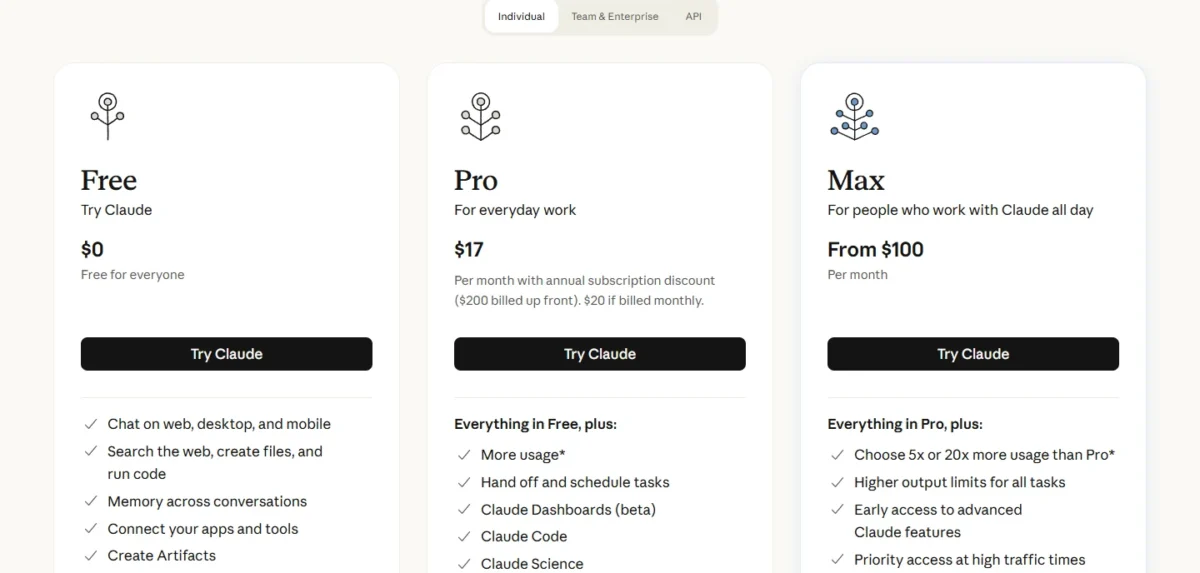
The pricing page prints Claude Pro at $17 per month with the annual subscription discount, the per-month figure for $200 billed up front, or $20 if billed monthly.
Paying monthly for a year comes to $20 x 12 months = $240, $40 more than the $200 annual charge. Pay monthly while you find out whether the Research and Claude Code prompts earn their place; switch to annual once they do.
Claude Max starts at $100 per month, billed monthly, with 5x or 20x Pro’s usage per five-hour session. A Claude Team Standard seat costs $20 per seat per month billed annually, or $25 billed monthly, for teams of 2 to 150.
Project sharing is a Team feature: the pricing page lists it as No on Free, Pro and Max. That matters once one Project’s instructions serve a whole team. Plan-by-plan detail is in Claude pricing and plan limits.
Four feature rules decide whether a prompt works as written:
- Artifacts. Every plan creates them, but only with code execution and file creation turned on in Settings > Capabilities (Organization settings on Team and Enterprise). The Docs, Slides and Design templates are on all plans; Dashboards is a beta on Claude Pro, Claude Max, Team and Enterprise.
- File uploads. A chat takes files up to 500MB each and up to 20 per chat; PDFs stop at 1,000 pages, and only PDFs of 100 pages or fewer have their charts and images read.
- XLSX files. Claude’s upload help article says XLSX uploads need code execution and file creation enabled.
- Shared usage. Claude Code shares the plan’s usage limits with your chats, so a long coding session reduces what is left for prompts 1–60. Limits reset on a rolling five-hour window, and paid plans add weekly limits.
When the shared pool runs out every week, Anthropic lists three exits: wait for the reset, move to a higher plan, or turn on usage credits at standard API rates on a paid plan. A fourth is the set of Claude alternatives built for the same jobs.
Whether the paid seat is worth it beyond prompts is the question my Claude review answers.
The best AI chatbots ranking widens the choice past Claude.
Once a prompt works on your plan, the next step is not retyping its context.
Make a Claude Prompt Reusable
Put the [ROLE], [CONTEXT] and standing [CONSTRAINTS] in a Project’s instructions and files, or in CLAUDE.md for Claude Code, and keep only [TASK] and [INPUT] in each chat.
- Project instructions. Claude’s help center describes project instructions that set a formal tone or answer from a specific role’s perspective, which is the [ROLE] line saved once.
- Project knowledge. Style samples for prompt 26 or a glossary for prompt 9 live in the Project’s files, at up to 30MB per file. Claude Free allows up to five projects; paid plans add RAG, which expands project knowledge capacity by up to 10x.
- Team sharing. On Team and Enterprise plans, a Project can be shared with set people or the whole organization, with view or edit permission, so one tuned prompt serves the team.
- CLAUDE.md. The file holds Claude Code’s standing project instructions; /init generates a first version, and Anthropic’s docs target under 200 lines per file (prompt 67).
- Skills. Anthropic’s memory docs describe skills as packages for repeatable workflows that load on demand, so a Claude Code prompt you rerun every week belongs in a skill rather than in CLAUDE.md.
Saved context removes one failure. The others come from how the prompt itself is written.
Common Mistakes With Claude Prompts
Six mistakes sink prompts that look fine, each with its fix:
- A vague task. Anthropic’s Claude Code guide contrasts “fix the login bug” with a prompt that names the symptom, the likely location and what fixed looks like. The [TASK] and [CONTEXT] fields do that job in chat.
- Long input under the question. Anthropic’s guide puts long documents above the query; the template’s [INPUT] block sits before [TASK] for that reason.
- Rules written as bans. Anthropic’s guide advises telling Claude what to do rather than what to avoid, for example asking for flowing prose paragraphs instead of banning markdown.
- Scripting the reasoning. Anthropic’s models overview lists thinking on Claude Opus 5.5 and Claude Fable 5.1 as “Adaptive (always on)”. A “think step by step” script switches on nothing new there; ask for a thorough approach and a final check instead.
- Files Claude cannot read as expected. An XLSX upload fails with code execution off, and a PDF over 100 pages loses its charts.
- Claude Code billing the API. Claude’s help center warns that an ANTHROPIC_API_KEY environment variable makes Claude Code use that key, so you pay API charges instead of using your subscription.
FAQ
What are the best prompts for Claude?
The best Claude prompt is the one built for your task, with a role, tagged input, a format and a check. Start from the group table at the top of this page and pick the numbered prompt whose When line matches your situation.
What is Claude’s system prompt?
A system prompt is the instruction block that sets Claude’s role and rules before the conversation, and Anthropic’s guide places the role there. In the Claude apps, project instructions are the nearest equivalent for every chat in a Project.
Is there a Claude prompt generator?
Yes. Anthropic’s prompt engineering overview points to a metaprompt recipe in the Claude Cookbook for generating a first draft prompt, plus tutorials on GitHub and in Google Sheets. The GitHub tutorial was written for Claude 3 models, so Anthropic says to follow its current best practices where the two differ.
Do these prompts work in ChatGPT or Gemini?
The prompts are plain text, so they paste into ChatGPT or Gemini, but the techniques and Needs lines come from Anthropic’s documentation for Claude only. Which assistant to pay for is the question my ChatGPT vs Claude for business comparison takes on.
What are the top 10 Claude prompts to start with?
One per job: prompt 1 (difficult email), prompt 5 (meeting summary), prompt 10 (long PDF), prompt 13 (research brief) and prompt 17 (spreadsheet trend). Then prompt 21 (decision matrix), prompt 25 (clarity edit), prompt 29 (root cause), prompt 33 (diff review) and prompt 61 (Claude Code).
What are some cool things Claude AI can do?
Beyond chat, the features these prompts lean on are the ones to try. Artifacts turn a prompt into a doc, slide deck, design or chart (prompts 12 and 20), and Projects keep files and instructions across chats.
Research, a Claude Pro and higher feature, powers prompt 13, and Claude Code edits files and runs commands in your project (prompts 61–68).
Does this page include image prompts?
No. The 68 prompts cover text, data and code work; portrait prompts are in my AI headshot prompts library.




Pingback: How to Use Claude in 2026: Setup, Prompts & Projects