ChatGPT prompts for real estate agents are easy to find and hard to trust. ChatGPT led the AI tools agents reported using in NAR’s 2025 Technology Survey at 58%, yet 46% in the same survey said AI had no noticeable impact on their business.
One place that gap opens is the prompt. Ask for “a listing description” with nothing attached, and ChatGPT can fill the space with features the house may not have and phrases about who the home is “perfect for”, the kind of wording fair housing rules target.
This library gives you 50 copy-and-paste prompts organized by the job in front of you: listing launch, social media, prospecting, buyer and seller work, market data, closing and past clients. Prompts that touch property facts, numbers or client documents tell ChatGPT to work only from what you paste, and every prompt ends with the check to run before anything reaches a client.
The prompts and review rules draw on OpenAI’s documentation, US federal fair housing rules, the NAR Code of Ethics and FTC guidance, checked on September 21, 2026.
In This Article (20 sections)
Quick-Start Prompt Finder
| Need | Start with |
|---|---|
| MLS listing description | Prompt 3 |
| Feature list from listing photos | Prompt 4 |
| Open house flyer | Prompt 8 |
| Just-listed social posts | Prompt 14 |
| Lead follow-up | Prompt 21 |
| Buyer agreement summary | Prompt 25 |
| CMA narrative | Prompt 32 |
| Market data from an MLS export | Prompt 37 |
| Closing timeline | Prompt 41 |
| Review request | Prompt 47 |
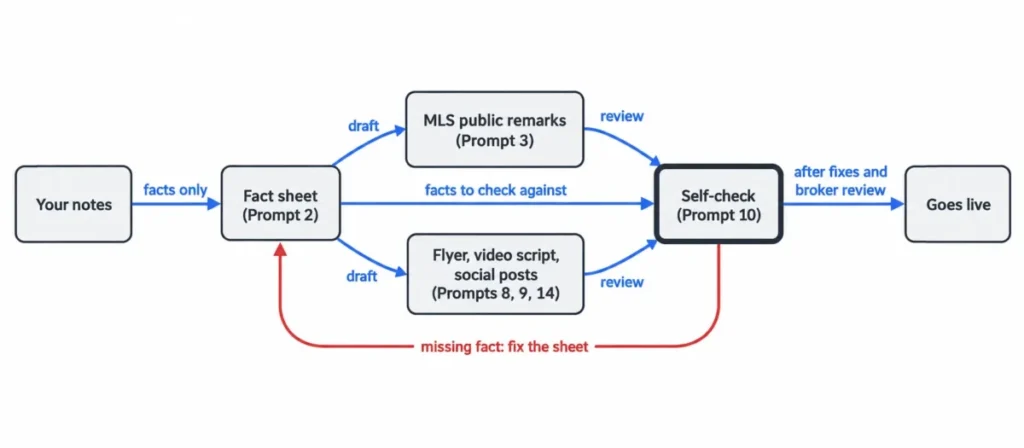
Prompts 3, 8, 14 and 21 read from the fact sheet that Prompt 2 builds, so run Prompt 2 first for those jobs.
The library starts with setup (Prompt 1), then listing launch (2 to 10), marketing on social media and video (11 to 16) and leads (17 to 23). The rest run through buyers (24 to 30), sellers (31 to 36), market data (37 to 40), closing (41 to 45), past-client retention (46 to 48) and practice (49 and 50).

Quick Copy: The Universal Real Estate Prompt
Use this when no prompt below fits the task. Fill the brackets, delete the lines you don’t need, and keep the last four: two set your fair housing and no-promises limits, and two stop ChatGPT from guessing.
ROLE: You are my writing assistant. I'm a licensed real estate agent in [city, state] with [brokerage].TASK: [what you need, e.g. "a just-listed email to my sphere"]AUDIENCE: [who reads it: past clients, a buyer, a seller, neighbors]FACTS (use only these): [paste verified facts]VOICE: [3 words, e.g. warm, plain, direct]. Never use: [words you dislike]LENGTH AND FORMAT: [e.g. under 120 words, 3 short paragraphs, subject line included]FAIR HOUSING: Describe the property and its features, never the people who should live there.NO PROMISES: Nothing about future value, investment returns, loan approval, or how fast it will sell.IF A FACT IS MISSING: Ask me, or write [VERIFY: what is missing]. Don't guess.AFTER THE DRAFT: List every fact you used so I can check it against my source.Each line does one job: the role and task set the frame, the facts line sets the boundary, and the last two lines turn gaps into questions and list every fact ChatGPT used. The guide to prompt engineering explains why that structure holds up across tasks.
How to Use These Prompts
- Paste the instruction block once. It lives in custom instructions or a project (next section), and every prompt below inherits your voice and your fair housing rules.
- Pick the template by its use case. The “Use it when” line under each prompt names the job it fits.
- Build the fact sheet before any listing prompt. Prompt 2 turns your notes into the fact source most listing prompts read from.
- Fill the brackets and delete what doesn’t apply. The brackets mark the required input, and a client’s first name or initials is enough for any draft in this library.
- Read the “Facts used” list before the draft. Anything in the draft that isn’t on your sheet gets cut or verified.
- Run the check under the prompt, then the shared standard. Each check targets a common error with that kind of draft, and the scorecard and red-flag list in the “Check Every Draft” section cover the rest.
- Revise with one instruction at a time, then save what works. “Cut the second paragraph to two sentences” gets a better revision than “make it better”.
If ChatGPT invents the same fact twice after you’ve corrected it, stop arguing with that chat. Open a new one with a cleaner fact sheet.
Set Up ChatGPT Once: Voice, Fact Rules and Privacy
Every prompt in this library gets shorter and safer once ChatGPT knows how you write and which lines it can’t cross. One paste here saves a paragraph of instructions in every later prompt.
Prompt 1: Build a Voice Guide From Your Own Writing
Use it when: you want drafts that sound like you rather than like a generic agent.
Below are 3 listing descriptions and 2 client emails I wrote myself. Study how I write, not what the properties are.Give me a voice guide of no more than 150 words covering: typical sentence length, words and phrases I use often, words I never use, how I open and close messages, and how formal I am. Then list 10 words or phrases that would sound out of character for me.Do not copy any property facts, names, or addresses into the guide.[paste your samples]Verify before sending: strip client names from the samples before you paste them. The guide only needs your sentences, not their details.
The Instruction Block to Paste Once
Paste your voice guide into the “How I write” part, fill the brackets, and put the whole block where the next section explains.
ABOUT MEI'm a licensed real estate agent with [brokerage] in [city, state]. I mostly work with [buyers / sellers / both] in [areas].My ads must include: [brokerage name and the license details your state requires].HOW I WRITEVoice: [3 words, e.g. warm, plain, direct]. Short sentences. No exclamation marks unless I ask.Never use: stunning, dream home, must-see, nestled, boasts, oasis, gem, [your own list].RULES FOR EVERY REAL ESTATE DRAFT1. Use only facts I give you in this chat or in project files. If a fact is missing, write [VERIFY: what's missing] and keep going. Never guess.2. Describe the property, never the people who should live there. Never mention or hint at race, color, religion, sex, disability, familial status, national origin, sexual orientation, gender identity, or any class my state adds: [your state's list].3. Don't describe a neighborhood by who lives there, and don't rate schools, safety, or crime.4. No promises about value, appreciation, investment returns, loan approval, or how fast a home will sell.5. If a question needs a lawyer, lender, inspector, appraiser, or tax professional, say so instead of answering.6. End every draft with "Facts used:" and list each fact you relied on.Custom Instructions or a Project?
Custom instructions apply to every chat while customization is switched on, and they are available on all plans. The field holds 1,500 characters on Free and Go and 5,000 on Plus, Pro, Business, Enterprise and Edu.
The block plus a full voice guide runs past 1,500 characters. On Free or Go, or if you might ever downgrade, keep only your three voice words and the never-use list in the “How I write” part.
On personal plans, anything in that field is also used to improve model performance unless you opt out. Keep client details out of it entirely.
A project keeps related chats, files, instructions and sources together, and its instructions apply across its chats. One project per listing keeps that listing’s fact sheet, photos and drafts in one place.
Custom GPTs are no longer the setup to build. Creating GPTs is closed on personal accounts, including Free, Go, Plus and Pro, and OpenAI has announced plans to retire custom GPTs in favor of plugins.
Privacy Settings to Check Before You Paste Client Details
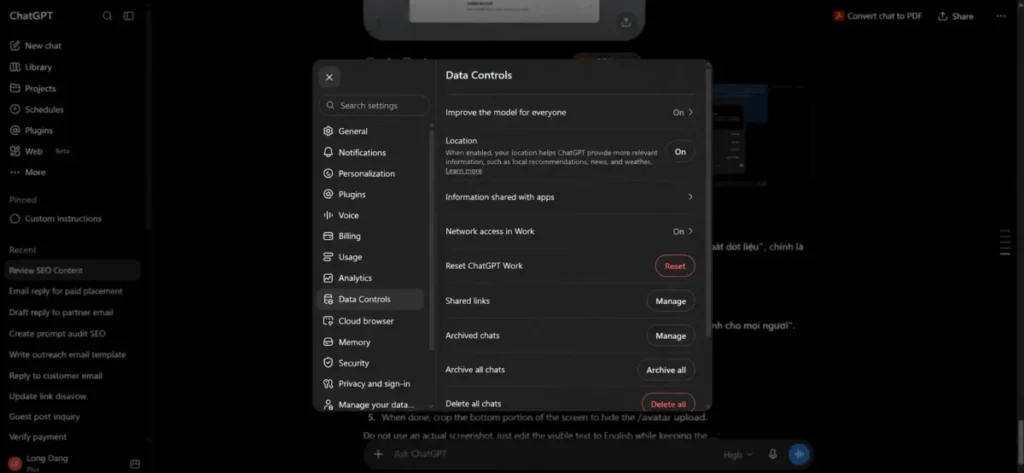
On personal Free, Plus and Pro accounts, data sharing for model training is on by default.
To opt out, open Settings > Data Controls > Improve the model for everyone and switch the toggle off. New conversations then stop being used for training, and your chat history stays.
| Setting | What it does | Use it when |
|---|---|---|
| Improve the model for everyone, switched off | New conversations are not used for training, and history stays | You use ChatGPT for client work on a personal plan |
| Temporary chat | Stays out of history, is not used to improve models while temporary, and creates no memories | A draft touches a client’s situation or documents |
| Business workspace | Inputs and outputs are not used for training by default | A team shares prompts and client files |
Temporary chat details come from OpenAI’s temporary chat article, which also notes that OpenAI may keep a copy for up to 30 days for safety purposes. Choose Personalized when you start one, because an Unpersonalized temporary chat ignores your custom instructions.
Whatever your settings, keep these out of every chat: Social Security numbers, bank and loan account numbers, lockbox and door codes, and signed contract packages. If your brokerage has no written AI policy yet, NAR offers members a customizable AI policy template for brokerages, with a member login required.
Listing Launch Prompts
Most listing prompts read from one fact sheet, built with Prompt 2, and every draft goes through the Prompt 10 self-check before it goes live. When a later prompt needs something the sheet doesn’t have, fix the sheet and rerun rather than patching the draft.
Prompt 2: Turn Messy Notes Into a Listing Fact Sheet
Use it when: you are starting any listing. Most other prompts in this section read from this sheet.
Turn my notes into a listing fact sheet with these headings: Basics (type, beds, baths, interior square footage and its source, lot size, year built), Updates (what, which year, who did it if known), Kitchen, Primary suite, Other rooms, Outdoor, Systems (roof, HVAC, water heater, windows, with ages), Parking and storage, HOA (fee and what it covers), Location facts (street type, nearby public places by name only), and Showing notes.Rules: use only what is in my notes. If a heading has nothing, write "not provided". If something is vague (for example "new roof"), keep it and add [VERIFY: year and source]. Do not add anything.My notes:[paste]Verify before sending: compare square footage and year built against the county record or your measurement source before any later prompt uses the sheet.
Prompt 3: MLS Public Remarks Within Your Character Limit
Use it when: you are writing the public remarks field and want the draft to fit your MLS limit on the first pass.
Using only the fact sheet below, write MLS public remarks.Order: open with the one feature a buyer can't change later (layout, light, lot, or position on the street), then updates with their years, then practical details (parking, storage, HOA).Describe the home, not the buyer who should live in it.Leave out showing instructions, lockbox or agent-only notes, and any mention of compensation.Hard limit: [your MLS limit] characters including spaces.Give me the draft, then a second version about 20% shorter.Fact sheet:[paste]Verify before sending: paste the draft into your MLS form or a character counter before you trust the length. ChatGPT works in tokens, and one token is roughly four characters of English text, so treat its own character count as an estimate.
Prompt 4: A Feature List From Your Listing Photos
Use it when: you have the photos before you have good notes. Image inputs work on Free and paid plans, within each plan’s usage limits.
I'm uploading [number] listing photos. For each photo, list only what is clearly visible: room type, materials, fixtures, and layout features.Do not guess brands, ages, square footage, or anything out of frame. If you are not sure what a material is (for example quartz vs. quartzite), write "unclear" instead of picking one.Then name the 5 visible features most worth mentioning in the listing, with one line each on why.Verify before sending: confirm every material with the seller or the disclosure. Crop out house numbers, family photos and mail before uploading.
Prompt 5: Three Lengths From One Approved Description
Use it when: the MLS remarks are approved and you need matching copy for social, email and your website.
Here is my approved listing description. Rewrite it into three versions without adding any facts:1. A 25-word teaser for a social post2. A 60-word version for a just-listed email3. A 120-word version for my website, with a headline under 10 wordsKeep every number exactly as written. Follow my voice rules.Approved description:[paste]Verify before sending: compare each version with the approved text. Short versions can drop a qualifier like “remodeled in 2019”.
Prompt 6: A Luxury Listing in a Quieter Voice
Use it when: the property sells on craftsmanship and setting, and adjective-heavy copy would cheapen it.
Write a listing description of 180 to 220 words using only the fact sheet below.Tone: calm and specific. Show quality through named materials, makers, architects or builders, and measurements that appear in the fact sheet.No superlatives ("best", "finest", "most exclusive"), no use of the word "luxury", and nothing about investment value.Open with the setting or the architecture, not the price.Fact sheet:[paste]Verify before sending: every named material, maker and architect must trace to a document the seller gave you, not to the seller’s memory.
Prompt 7: A Spanish Version of an Approved Listing
Use it when: a meaningful share of buyers in your market reads Spanish first. Swap in another language as needed.
Translate my approved listing description into Spanish for readers in [region, e.g. South Texas or Miami].Keep numbers, measurements, street names, and HOA figures exactly as written. Use the everyday real estate terms buyers in that region use, and list any term where you chose between two regional options.After the translation, list any sentence that would sound unnatural if translated literally, with a smoother alternative.Approved description:[paste]Verify before sending: a fluent speaker on your team reads it before it goes live. Use this for marketing copy only, never for contracts or disclosures.
Prompt 8: Open House Flyer Copy
Use it when: you need print-ready text for a one-page flyer or a sign-in table handout.
Write copy for a one-page open house flyer using only facts from the fact sheet below.Include: a headline under 8 words, a 50-word summary, 6 feature bullets under 10 words each, the open house date and time exactly as I give them, parking instructions, and a line for my name, brokerage, and phone.Leave a clearly marked spot for a QR code to the property page. Describe the neighborhood only through named public places in the fact sheet.Fact sheet:[paste]Open house: [open house date and time]Verify before sending: check the date, time and address three times. A printed flyer is the one asset you can’t edit after it’s handed out.
Prompt 9: A Walkthrough Video Script With a Shot List
Use it when: you are filming a listing video yourself and want the footage and the voiceover planned together.
Write a 75-second walkthrough video script for the home in the fact sheet.Format it as a table with columns: Shot number, Room, Camera move, On-screen text (max 6 words), Voiceover (max 18 words).Walk the rooms in this order: [order]. Mention only features in the fact sheet. Don't open with "Welcome to". End with a line inviting viewers to book a private showing with me.Fact sheet:[paste]Verify before sending: read the voiceover aloud against a timer. Scripts run long once real pauses and camera moves are added.
Prompt 10: The Fair Housing and Accuracy Self-Check
Use it when: any listing copy, ad, post or neighborhood description is about to go live.
Review the draft below as a careful editor. Do not rewrite it yet.1. Flag any word or phrase that describes people rather than the property, or that could suggest a preference for or against a group (race, color, religion, sex, disability, familial status, national origin, sexual orientation, gender identity, or [classes your state adds]).2. Flag any fact that is not in the fact sheet.3. Flag promises about value, appreciation, or how fast the home will sell.4. For each flag, quote the phrase, explain the risk in one sentence, and suggest a property-focused rewrite.Draft:[paste]Fact sheet:[paste]Verify before sending: treat this as a second reader, and let your broker’s compliance review have the final word.
Social Media and Video Prompts
A post that markets a listing is advertising under the federal fair housing advertising rule, so it gets the same checks as your MLS remarks. These prompts keep the facts pinned and leave the local color for you to add.
Prompt 11: A 30-Day Content Calendar
Use it when: you want a month of posts planned in one sitting instead of improvising each morning.
Build a 30-day social media calendar for a real estate agent in [city or area] who works mainly with [buyers / sellers / both].Mix: 40% local life, 30% buyer or seller education, 20% listings and closings, 10% behind the scenes.For each day give: platform (Instagram, Facebook, or LinkedIn), format (Reel, carousel, single image, story), a hook under 12 words, and a one-line outline.Where a local business, park or event belongs, write [LOCAL: type of place] instead of naming one.Verify before sending: fill every slot marked LOCAL yourself, from places and event dates you’ve checked.
Prompt 12: An Educational Carousel
Use it when: you want a saveable post that answers a question buyers or sellers ask you every week.
Write a 7-slide Instagram carousel titled "[topic, e.g. 5 costs sellers forget to budget for]" for homeowners in [state].Slide 1: the title plus a one-line promise.Slides 2 to 6: one point each, max 25 words, plain English.Slide 7: a call to action to message me.Where a cost or rule differs by state or county, write "varies in [state], ask me" instead of giving a number. Then write a 60-word caption.Verify before sending: any rule or fee that survives into the final slides needs a local source you could show a client.
Prompt 13: Reel Scripts From a Real Client Question
Use it when: a client asks something good and you want to turn the answer into short video.
A client asked me: "[paste the question]".Write 3 Reel scripts under 40 seconds each that answer it, each with a different opening: a common mistake, a quick story setup, and a direct answer.Format each as: Hook (spoken, under 10 words), 3 talking points, closing line.Keep advice general. If the answer depends on the contract, the lender, or state law, say so in the script.Verify before sending: strip anything that identifies the client who asked before the video goes up.
Prompt 14: Just-Listed Posts for Three Platforms
Use it when: a listing goes live and you need platform-ready posts in the same hour.
Write just-listed posts for this property:- Instagram: under 60 words plus 5 hashtags- Facebook: under 90 words, neighborly tone- LinkedIn: under 70 words, about the launch plan rather than the house aloneUse only facts from the fact sheet. Include price and beds/baths exactly as written. Do not describe the kind of person the home is "perfect for".Fact sheet:[paste]Verify before sending: add your brokerage name and any license details your state’s advertising rules call for.
Prompt 15: One Market Update, Five Posts
Use it when: you already wrote a monthly market update (Prompt 38) and want it to work harder.
Turn the market update below into 5 short posts: 2 for Instagram (under 50 words), 2 for Facebook (under 80 words), and 1 for LinkedIn (under 100 words).Use only the numbers in the update, with the same time period and area labels. Do not predict where prices or rates will go. End each post with a different question that invites a reply.Market update:[paste]Verify before sending: every number keeps its time period and area. A change quoted without “year over year” and the area name invites the wrong reading.
Prompt 16: A YouTube Relocation Video Package
Use it when: you are filming a “Moving to (your city)” video, the format relocation buyers search for.
I'm filming a YouTube video about moving to [city or area]. Give me:1. 5 title options under 60 characters2. A description of about 150 words with timestamps for these chapters: [your chapters]3. 10 topics relocating viewers ask about (commute, housing types, costs, weather, things to do)Describe places, housing, and amenities, never the people who live there. Mark any fact I need to check with [VERIFY: what to check].Verify before sending: check every place name, drive time and cost figure yourself before you record, not after.
Prospecting and Lead Follow-Up Prompts
Outreach is repetitive writing, which ChatGPT drafts quickly, and it is also where a wrong tone costs you a relationship.
Prompt 17: Reconnect With Your Sphere Without a Pitch
Use it when: you are working through your database and want a message that sounds like a person, not a campaign.
Write a short text (under 45 words) and a short email (under 90 words) to reconnect with [name], who I know from [how you know them]. The last conversation was about [topic], around [when].No sales pitch and no market talk. Ask one genuine question about [something in their life]. Sound like me: [3 words from your voice guide].Verify before sending: the question has to be one you actually want answered. People can tell when a check-in is a funnel.
Prompt 18: A Farm Postcard Built on One Verified Number
Use it when: you mail a geographic farm and want each card to say something specific.
Write postcard copy for homeowners in [neighborhood]. Use this one statistic exactly as written, with its source and time period: "[statistic, where it comes from, time period]".Include: a headline under 8 words, 2 short sentences on what the number means for a homeowner, and an offer of a free home value consultation. No predictions, no guarantees, no claims about how fast homes sell.Add my name, brokerage, and the license details my state requires on ads.Verify before sending: pull the statistic from your MLS or board report yourself. Never let ChatGPT supply the number.
Prompt 19: An Expired Listing Letter
Use it when: you contact owners whose listing expired and want to sound helpful rather than opportunistic.
Write a letter of about 180 words to the owner of an expired listing at [address]. It was on the market [number] days at [list price].Tone: calm and respectful. Acknowledge that the process was frustrating. Explain in general terms that price, presentation, and marketing reach all affect results, and offer a no-pressure conversation.Do not criticize the previous agent or brokerage, do not promise a selling price or timeline, and do not state facts about the listing I haven't given you.Verify before sending: keep the previous agent out of it entirely. That also keeps the letter inside Article 15 of the NAR Code of Ethics, which bars knowingly or recklessly making false or misleading statements about other real estate professionals.
Prompt 20: A FSBO Call Script
Use it when: you call for-sale-by-owner sellers and want a respectful opener that earns a second conversation.
Write a phone script for calling a for-sale-by-owner seller at [address]. The home has been listed for [number] days.Structure: a permission-based opener ("Is now an OK time?"), one sentence acknowledging their effort, two questions about their plans and timeline, one specific way I could help (buyer exposure or pricing data), and a polite exit if they say no.Keep it under 150 words. No pressure lines and no criticism of their pricing.Verify before sending: check the number against the National Do Not Call Registry first. NAR’s cold-calling page says agents must comply with the registry for any cold calling.
A legal explainer quoted on that page applies the registry rule to FSBO and expired-listing owners when the call’s purpose is to offer to list the property.
Prompt 21: The First Reply to a Portal Lead
Use it when: an online inquiry lands and speed matters more than polish.
A new lead asked about [address] through [lead source]. Their message: "[paste]".Write a first reply as a text (under 50 words) and as an email (under 100 words).Answer their question only with facts from the fact sheet. If the answer isn't there, say I'll confirm it today.Ask one question about their timeline or whether they've spoken with a lender. Offer two showing times: [times], and mention that I'll send the buyer agreement to review before the tour.Fact sheet:[paste]Verify before sending: confirm the listing is still active before you offer times. Prompt 25 covers the plain-English summary of the buyer agreement you send next.
Prompt 22: A First-Time Buyer Guide and Landing Page
Use it when: you want a lead magnet that is useful enough to earn an email address.
Outline a free PDF guide called "Buying Your First Home in [city or state]" for first-time buyers.Give 8 to 10 chapters with 3 bullet points each, in the order a buyer experiences the process. Mark every spot that needs local information with [LOCAL: what's needed] and every state-specific rule with [STATE RULE: what's needed], so I can fill them from verified sources.Then write the landing page: a headline, a 70-word description, and a 3-bullet "what you'll learn" list. No claims about rates, approvals, or assistance programs I haven't named.Verify before sending: every slot marked STATE RULE gets filled from your state’s official source or your broker, not from ChatGPT.
Prompt 23: Open House Follow-Ups for Buyers and Neighbors
Use it when: the open house is over and you have two very different groups to follow up with.
Write two follow-up emails for people who visited my open house at [address] on [open house date]:A. Visitors who are house hunting: thank them, mention one detail of the home they reacted to ([detail]), and offer similar listings or a private showing. Under 90 words.B. Neighbors who stopped by: thank them, mention the turnout ([number] groups), and offer a no-pressure conversation about their own home's value. Under 80 words.Put an unsubscribe line and my brokerage's postal address at the bottom of each.Verify before sending: the neighbor email is marketing, so it needs what the FTC’s CAN-SPAM guide lists, including a valid physical postal address and a clear way to opt out. If you send these at volume, an email marketing platform can add those footers automatically.
Buyer Client Prompts
Buyer communication runs on explanations: agreements, offers, inspections and the market. ChatGPT is good at plain English, so the risk sits in the details it might add.
Prompt 24: Buyer Consultation Prep Email
Use it when: a new buyer has booked a first meeting and you want them to arrive prepared.
Write an email to [name], a buyer I'm meeting on [meeting date] for a first consultation.Include: what to bring (pre-approval letter if they have one, a must-have list, a deal-breaker list), what the meeting covers (their goals, how I work, the written buyer agreement to review together, next steps), and how long it takes ([time]).Tone: friendly and organized. Under 170 words.Verify before sending: match the agenda to the agreement form your brokerage actually uses.
Prompt 25: The Buyer Agreement in Plain English
Use it when: a buyer wants to understand the representation agreement before signing it.
Below is the text of the buyer representation agreement my brokerage uses, with names removed. Write a plain-English summary for a first-time buyer, organized as: what I will do, what the buyer agrees to, how my compensation is set and who may pay it, how long the agreement lasts, and how either side can end it.Quote the section number for each point. Do not add terms that aren't in the text and do not give legal advice. End with a line inviting questions and suggesting they consult an attorney before signing if they want legal advice.Agreement text:[paste]Verify before sending: the agreement controls, not the summary. NAR’s MLS policy requires MLS participants working with a buyer to sign a written agreement before touring a home, unless state or federal law says otherwise, so this conversation belongs before the first showing.
Prompt 26: A Weekly Search Update
Use it when: an active buyer needs a weekly note that helps them decide which homes to see.
Write this week's search update email to [buyer name]. They want: [criteria].New listings that match, from my MLS search: [paste address, price, beds/baths, and one key feature for each].For each listing, write one sentence on how it fits their criteria and one on a trade-off. Close by asking which ones they want to see and offering [days and times]. Under 200 words. Don't add facts about the listings.Verify before sending: confirm each listing is still active on the morning you send it.
Prompt 27: Offer Terms Without the Jargon
Use it when: a buyer is writing a first offer and the vocabulary is slowing them down.
My buyer is writing their first offer. Explain these terms in plain English, one short paragraph each: [e.g. earnest money, inspection contingency, appraisal contingency, financing contingency, escalation clause].Keep the explanations general, note that details depend on the state contract form ([state]), and mark anything the buyer should ask their lender or attorney about. Reading level: 8th grade. Under 300 words.Verify before sending: line up every explanation against your state’s form. General explanations go wrong on deadlines and default remedies.
Prompt 28: An Inspection Report Summary
Use it when: a long inspection report has landed and your buyer needs orientation before the repair conversation.
The attached file is a home inspection report with names and the address removed. Summarize it for my buyer in three groups: safety or major system items, repair items, and routine maintenance.For each item, quote the inspector's own wording and the page number. Do not estimate repair costs, do not soften or strengthen the inspector's language, and list everything the inspector recommended a specialist review.End with: "This summary does not replace the full report."Verify before sending: read the full report yourself. Use the summary to open the repair conversation, and go back to the report for every decision.
Prompt 29: A Neighborhood Comparison From the Buyer’s Own Criteria
Use it when: a buyer is torn between areas and you want to compare them without steering.
My buyer is comparing [neighborhood A], [B], and [C]. Their criteria: [commute to X, lot size, HOA or no HOA, price range, housing type].Make a comparison table using only these criteria and the data I paste below. Do not describe residents, and do not rate schools, safety, or "character". Instead, add a column listing where the buyer can research those topics themselves, such as the state school report card site or the local police department's public data.Data:[paste]Verify before sending: keep the table to the buyer’s own criteria, which keeps the comparison on the homes.
The federal steering rule, 24 CFR 100.70, lists as prohibited conduct telling a buyer they would not be comfortable or compatible with existing residents because of a protected characteristic. The characteristics it names are race, color, religion, sex, handicap (disability), familial status and national origin.
Prompt 30: The Reply to a Buyer Waiting on Rates
Use it when: a buyer hesitates because of rates and you want to respond without forecasting.
A buyer asks whether they should wait until rates drop. Write a reply I can send by text (under 70 words) and a longer email version (under 160 words).Don't predict rates or prices. Frame it around their situation: the monthly payment they're comfortable with, how long they plan to stay, and the options to discuss with their lender. Suggest a call with [lender name or "your lender"].Verify before sending: if you mention any rate or program, it comes from the buyer’s lender in writing.
Seller Client Prompts
Seller prompts carry a lot of numbers: comps, days on market, settlement figures. The prompts that handle those numbers tell ChatGPT to use only the figures you give it, and none of them asks it to set a price.
Prompt 31: Listing Appointment Prep Sheet
Use it when: you have a listing appointment tomorrow and want your questions, agenda and objection answers on one page.
I have a listing appointment with [seller name] for [address] on [appointment date]. Build my prep sheet:1. 8 questions about their goals, timing, and the home's history2. An agenda for a 45-minute meeting3. Documents to ask them to gather (HOA documents, utility averages, permits, warranties)4. 3 likely objections, each with a calm, honest responseKeep responses free of guarantees about price or timing.Verify before sending: swap the generic objections for the ones you actually hear in your market.
Prompt 32: A CMA Narrative From Your Comps
Use it when: you picked the comps and the price range, and the seller needs the reasoning in plain English.
Below are the comparable sales I selected and my recommended list price range. Write a one-page explanation for the seller.For each comp: address, sale date, sold price, and one sentence on how it compares (size, condition, location on the street, updates). Then explain in 3 or 4 sentences why the range is [range], using only these comps.Do not change any number, do not add comps, and do not promise a selling price. Label it "Comparative market analysis, not an appraisal."Comps and notes:[paste]Verify before sending: recheck every sold price and date against the MLS record before the seller sees it.
Prompt 33: The Price Reduction Conversation
Use it when: the listing has stalled and you need to present the evidence without blaming anyone.
My listing at [address] has been active [number] days with [number] showings, this feedback: [summary], and [number] offers. Comparable active listings: [paste].Write talking points for a phone call with the seller: open with the facts, share the buyer feedback without judgment, present two options ([option 1], [option 2]) with the trade-offs of each, and ask for a decision by [decision deadline].Then write a short follow-up email that summarizes the call. Use only the numbers above, with no blame and no pressure language.Verify before sending: quote buyer feedback exactly as agents gave it to you. Paraphrased feedback reads as your opinion.
Prompt 34: The Weekly Seller Update
Use it when: your seller expects a Friday update and you want it consistent every week.
Write this week's update email to my seller at [address]. Data: [showings], [online views and where the number comes from], [feedback quotes], [open house results], [price changes on competing listings].Structure: 3-line summary, what buyers are saying (quote feedback as given), what I'm doing next week, and one decision I need from them, if any.Tone: calm and transparent. Under 200 words. Don't invent numbers.Verify before sending: view counts differ by portal, so name the source next to every view number.
Prompt 35: A Room-by-Room Prep List From Photos
Use it when: you want a prep list for the seller before the photographer comes.
I'm uploading photos of each room in a home that's about to be listed. For each room, list up to 5 low-cost preparation tasks (declutter, clean, touch-up repairs, lighting, furniture layout).Comment only on what's visible. Do not estimate costs or value added, and do not suggest structural changes. Order the tasks by what a buyer notices first.Verify before sending: walk the house before you send the list. Photos hide smells, noise and condition problems.
Prompt 36: The Seller’s Estimated Settlement Statement, Explained
Use it when: the title or escrow company sent an estimate and the seller wants to understand every line.
Below is the seller's estimated settlement statement from [title or escrow company], with account numbers removed. Explain each line in plain English, grouped as: payoff and liens, commissions and fees, taxes and prorations, title and escrow charges, and credits.Keep every number exactly as written. If a line is unclear, say so and suggest the seller ask [company name]. Do not calculate a different net amount.Statement:[paste]Verify before sending: the title or escrow officer answers any question about the numbers, not ChatGPT and not you.
Market Data and File Upload Prompts
Prompts 37 and 39 use ChatGPT’s data analysis, which reads spreadsheets such as .csv and .xlsx files and, for some tasks, writes and runs Python code to do the math. OpenAI’s own guidance is to review the generated code, outputs and assumptions before relying on the result, which is why the comps prompt asks ChatGPT to show its formulas and exclusions.
Prompt 37: Comps Analysis From an MLS Export
Use it when: you exported closed sales to a CSV file and want the summary math done and shown.
The attached CSV lists closed sales exported from my MLS for [area], [date range]. Columns include: [list the columns].1. Tell me how many rows you received and which rows you excluded (missing price, missing square footage, not a closed sale), with the reason for each.2. For the remaining rows, calculate: count, median sold price, median price per square foot (sold price divided by living area), median days on market, and median sale-to-list-price ratio.3. Show the formula or code you used for each number.4. List the 10 sales most similar to this subject property: [beds, baths, square footage, year built, lot size].Do not fill in missing values and do not estimate a value for my listing.Verify before sending: spot-check two or three rows by hand. Before uploading any export, confirm your MLS data license allows it.
Prompt 38: The Monthly Market Update Email
Use it when: you send a monthly market email and want the numbers explained, not just listed.
Write a monthly market update email for homeowners in [area] using only these figures for [month and year] compared with [comparison period]: [median price, closed sales, new listings, active inventory, median days on market, and the source of the data].Explain what each change means for sellers and for buyers, one sentence each. Say where the data comes from. No forecasts. Under 220 words.Put an unsubscribe line and my brokerage's postal address at the bottom.Verify before sending: use one data source for the whole email. Mixing an MLS report with a portal’s figures produces changes that never happened.
Prompt 39: Charts and Takeaways From Your Data
Use it when: you want a chart for a listing presentation or a post, built from your own export.
Using the uploaded CSV, make a line chart of monthly median sold price and a bar chart of monthly closed sales for [area] over [period].Label axes, units, and the data source ("[MLS name], closed sales"). Then write 3 plain-English takeaways, one sentence each, without forecasting.Verify before sending: check where the price axis starts. An axis that doesn’t start at zero makes small moves look dramatic.
Prompt 40: A Neighborhood Guide Research Plan
Use it when: you are building a neighborhood page on your website and want a plan before you write a word.
Outline a neighborhood guide page for [neighborhood, city]. Sections: getting around, housing types and typical lot sizes, parks and public spaces, shopping and dining, local events, and homeowner costs to verify (property taxes, HOA ranges).For each section, list the facts I need to gather and the public source to check (city website, county assessor, transit agency). Don't write the guide itself, and don't describe residents or rate schools or safety.Verify before sending: keep a source list for every fact on the finished page. It turns next year’s update into a short job.
Transaction and Closing Prompts
From acceptance to closing, most of your writing is status and scheduling. The risk is dates, so these prompts work only from the dates you paste and flag any date ChatGPT calculates.
Prompt 41: A Contract-to-Close Timeline From Your Dates
Use it when: a contract is fully executed and you want every deadline in one table.
Here are the dates and deadlines from an executed purchase contract: [paste the acceptance date and each deadline exactly as the contract states it].Build a timeline table with columns: Milestone, Deadline date, Who is responsible, What I need to send or receive.Use only the dates I gave. If a deadline is written as a number of days, show your date math and mark it [VERIFY: day count], because my contract defines how days are counted.Verify before sending: check every computed date against the contract and your transaction coordinator’s calendar.
Prompt 42: A Transaction Status Update
Use it when: a client asks for a status check and you want a clear answer in one message.
Write a status update email to my [buyer or seller], [name].Where things stand: [milestone just completed]. What's next: [next steps and dates]. What I need from them: [items]. Still waiting on: [lender, title, inspector].Use only the dates and facts above. Under 150 words, calm and specific. Bold the one action they need to take, if there is one.Verify before sending: confirm every “waiting on” item with the other party before you promise a date.
Prompt 43: Closing Prep Email With Your Wire Fraud Warning
Use it when: closing is a week out and your buyer needs one clear set of instructions.
Write an email to my buyer [name] about closing on [closing date] at [location or "remote signing"].Include: what to bring (government photo ID and anything [title company] listed), the final walkthrough time ([time]), and what to expect at signing.Add this warning in bold, word for word: "[paste your brokerage's or title company's wire fraud warning]". Do not write any wiring instructions or account details yourself.Verify before sending: tell the buyer to confirm any wiring instructions by phone, at a number they already have for the title company. The FBI’s IC3 has flagged business email compromise tied to the real estate sector and advises verifying account changes through a second channel.
Prompt 44: Scheduling Messages for Inspection and Access
Use it when: the inspection window is short and three parties need to line up quickly.
Write short scheduling texts (under 40 words each) to: the home inspector, the listing agent for access, and my buyer's lender to confirm the appraisal has been ordered, for a property at [address] with the inspection period ending [deadline].Include the time windows my buyer can attend: [windows]. Keep each message professional and specific.Verify before sending: put the confirmed times in your calendar before you tell the buyer.
Prompt 45: A Repair Request Draft From Inspection Items
Use it when: your buyer has read the inspection summary and wants to discuss what to ask for.
From the inspection summary below, draft a repair request list for my buyer to review. For each item: the inspector's wording, the page number, and the request type (repair by a licensed professional, credit, or no request).This is a draft for discussion with my buyer only. The final requests go on the state's [form name]. Do not assign dollar amounts.Inspection summary:[paste]Verify before sending: the buyer decides every item. Your job is to lay out the trade-offs so they can choose.
Past Client, Review and Referral Prompts
Past clients already know you, so a generic template does the most damage here. Feed these prompts one real detail each time.
Prompt 46: A Home Anniversary Email
Use it when: a client’s closing anniversary comes up in your CRM.
Write a home anniversary email to [client name], who bought [address] on [purchase date].Include one seasonal maintenance tip for [season] in [climate or region], an offer of a free market update for their home, and one line about working together ([a real memory]). Under 110 words. No sales pitch in the subject line.Verify before sending: get the date right. A wrong anniversary undoes the whole point of the email.
Prompt 47: An Honest Review Request
Use it when: a transaction closed well and you want a review from the client who lived it.
Write a short email asking [client name] to leave an honest review of working with me on [platform, e.g. Google or Zillow], [number] days after closing.Include the direct review link: [link]. Suggest they mention whatever stood out to them, positive or negative. Do not suggest wording, do not offer anything in exchange, and keep it under 90 words.Verify before sending: never let ChatGPT write the review itself. The FTC’s rule on fake reviews covers reviews from people who don’t exist, including AI-generated ones, and bans incentives conditioned on a positive or negative review.
Prompt 48: A Referral Ask That Is Easy to Decline
Use it when: you want referrals from past clients without making the relationship feel transactional.
Write a referral request email to past client [name]. Thank them for [one real detail], and ask if anyone they know is thinking about buying or selling in the next year.Make it easy to say no. Under 100 words. Don't mention gifts or rewards.Verify before sending: if you plan to thank referrers with a gift, check your state license law and brokerage policy first.
Practice and Planning Prompts
The last two prompts don’t produce anything a client sees. They make you better at the conversations the other 48 support.
Prompt 49: Listing Presentation Role-Play Out Loud
Use it when: you have a listing presentation coming up and want to practice answers out loud.
Role-play a seller who is interviewing three agents and thinks my fee is too high. Stay in character, push back twice on anything vague, and don't make it easy.After 6 exchanges, step out of character and score my answers from 1 to 5 on clarity, honesty, and listening, with one specific improvement for each.Verify before sending: check any fee or policy answer with your broker before you use it with a seller. ChatGPT Voice lets you speak and hear the reply, so rehearse the substance out loud.
Prompt 50: A 90-Day Plan From Your Own Numbers
Use it when: you set a production goal and want it turned into weekly activity you can track.
Help me build a 90-day plan. My goal: [number] closed transactions in the next 12 months.My numbers from last year: contacts to appointments [%], appointments to signed clients [%], signed clients to closings [%], and average commission per closing [amount].Work backward from the goal to weekly activities (conversations, appointments), using only my conversion rates and showing every calculation. Then turn it into a weekly schedule with time blocks.Verify before sending: rerun the math with next quarter’s real numbers. A plan built on hoped-for conversion rates fails without warning.
Check Every Draft Before It Goes Out
The check under each prompt covers that prompt’s specific risk. Every draft then gets the same three steps: sort it by risk, clear the gates, and score what’s left.
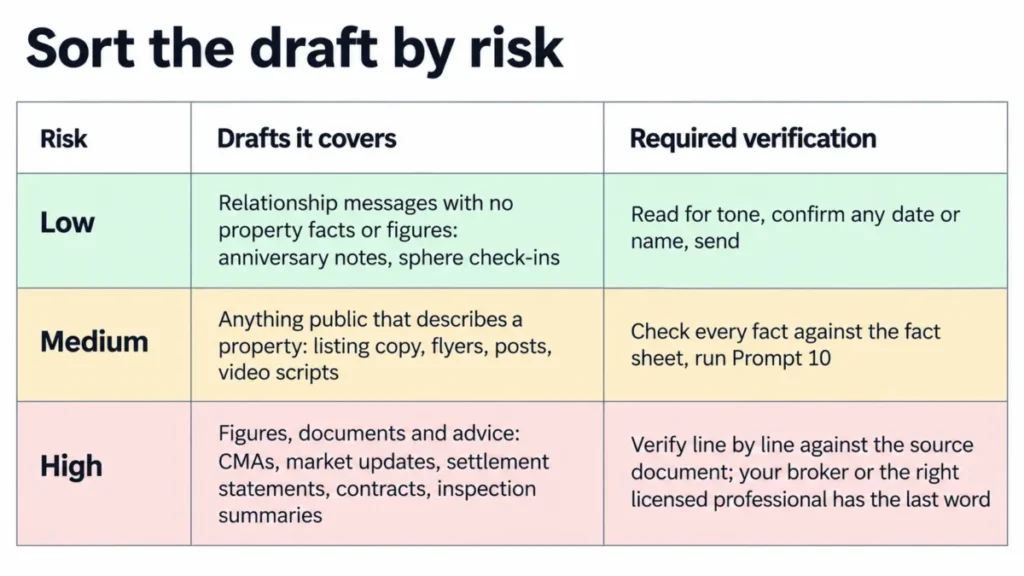
Sort the Draft by Risk First
- Low risk: relationship messages with no property facts or figures, such as anniversary notes and sphere check-ins. Read for tone, confirm any date or name, and send.
- Medium risk: anything public that describes a property, such as listing copy, flyers, posts and video scripts. Check every fact against the fact sheet and run Prompt 10.
- High risk: figures, documents and advice, such as CMAs, market updates, settlement statements, contracts and inspection summaries. Verify line by line against the source document, and let your broker or the right licensed professional have the last word.
OpenAI’s usage policies prohibit automating high-stakes decisions in sensitive areas, housing among them, without human review. Keep ChatGPT on drafting and explaining, and keep every decision about a client with a person.
The Scorecard
Copy this into your notes app or a shared team doc. A draft goes out only when every gate passes and the score clears the bar.
PASS/FAIL GATES (any fail = do not send)[ ] Facts match the fact sheet or source document[ ] Describes the property only, never who should live there[ ] No promises about value, speed of sale, approval or outcome[ ] Required ad and email elements present (brokerage details, postal address, opt-out)[ ] No client details beyond what the task neededQUALITY SCORE (1 = poor, 5 = ready)Specific: names real features, figures and places __ x 3Sounds like me: matches my voice guide __ x 2Clear next step: one call to action the reader can take __ x 2Right size: fits the channel's length and format __ x 1Weighted total (max 40): ____DECISIONAll gates pass and total 32 or more: send after a final readAll gates pass and total 24 to 31: revise with one specific instruction, then rescoreAny gate fails, or total below 24: fix the facts or start a new chat with a cleaner fact sheetSpecifics carry the most weight because a vague draft is the one that sounds like every other agent’s. The gates sit above the score because no amount of polish fixes a false fact.
Red Flags to Catch in ChatGPT Output
The federal fair housing advertising rule, 24 CFR 100.75, covers “words, phrases, photographs, illustrations, symbols or forms” that signal a dwelling is or isn’t available to a protected group. It applies to flyers, brochures, signs and other written notices.
The rule also covers choosing media or locations that deny parts of the market information about housing because of a protected characteristic. That matters when you pick the audience for a boosted post.
- “Perfect for a young family”, “great bachelor pad”. Phrases like these signal who the home is for, which the rule covers for familial status and sex. Write “three bedrooms on one level” or “fenced backyard” instead.
- “You’ll fit right in”, “a street full of young families”. The federal steering rule lists telling buyers they would not be comfortable or compatible with existing residents because of a protected characteristic, such as familial status, as prohibited conduct. Name public places and distances from your fact sheet instead.
- “Quartz counters” or “new roof” with no document behind it, “won’t last”, “will appreciate”. The NAR Code of Ethics requires REALTORS to avoid exaggeration and misrepresentation of pertinent facts (Article 2) and to present a true picture in advertising (Article 12). Keep to documented facts, with years and sources.
- Any mention of buyer-agent compensation in MLS fields. NAR’s MLS policy bars offers of compensation to buyer brokers in the MLS. Handle compensation outside the MLS entirely.
- A testimonial or review that ChatGPT wrote. The FTC’s fake-review rule covers reviews from people who don’t exist, including AI-generated ones. Ask real clients for honest reviews with Prompt 47 instead.
- A marketing email with no postal address or opt-out. The FTC’s CAN-SPAM guide requires both, and opt-outs must be honored within 10 business days. Prompts 23 and 38 ask ChatGPT to draft that footer, and you supply the real address and a working opt-out.
HUD withdrew its 2024 guidance on advertising through digital platforms, with the withdrawal effective September 17, 2025.
That notice also states that conduct which breaks the Fair Housing Act itself remains subject to enforcement. HUD adds that the withdrawn documents should not be relied on as authoritative, so work from the regulations cited above rather than the 2024 guidance.
Do I Have to Disclose That ChatGPT Helped Write My Listing?
For listing text, none of the fair housing, NAR or FTC rules cited in this guide contains a requirement to label AI-written copy. They require the words to be accurate and non-discriminatory, and that responsibility stays with you whoever typed the first draft.
Your brokerage’s AI policy can add its own disclosure rules, so check it before your first campaign.
Disclosure Rules for AI-Edited Listing Photos
In some markets, virtual staging and AI photo edits carry a disclosure duty that text drafts don’t.
California’s altered-image law, Business and Professions Code section 10140.8, has been in effect since January 1, 2026. It requires a statement on or next to a digitally altered listing image, plus a link, URL or QR code to the unaltered original.
The law’s definition covers adding, removing or changing elements such as furniture, fixtures, flooring and views. It excludes routine fixes like lighting, white balance, color correction, cropping and straightening, as long as they don’t change how the property is represented.
MLS rules are moving the same way. CRMLS counts AI-altered images as digitally altered and wants the original right before or after the edited photo, and ARMLS requires a “Digitally Altered” watermark paired with the original.
If you edit listing photos with prompts like those in the ChatGPT photo editing prompts guide, keep every original and label every edit, whatever your state requires.
Worked Example: One Listing From Notes to Approved Copy
The listing below is invented for this walkthrough, and the first draft was written to show the kinds of problems a real first draft can carry. The steps are the ones this guide uses: fact sheet, draft, self-check, fix.
Step 1: the agent’s notes.
3 bed / 2 bath ranch, 1,640 sq ft per county record, lot 0.21 acre, built 1978kitchen redone 2021, counters quartz? (seller thinks so), LVP floors 2021roof maybe 2015? HVAC replaced 2023, have the invoicefenced backyard, big oak, 2-car garage with workbench, no HOA0.3 mi to Miller Park and the Cedar Creek greenway trailheadseller says "great for kids"Step 2: the fact sheet from Prompt 2. The seller’s comment about kids never makes it in, because it isn’t a fact about the house.
Basics: single-story, 3 bedrooms, 2 bathrooms, 1,640 sq ft (county record), 0.21-acre lot, built 1978Updates: kitchen remodel 2021, luxury vinyl plank flooring 2021, HVAC replaced 2023 (invoice on file)Kitchen: countertops [VERIFY: material, seller believes quartz]Systems: roof [VERIFY: year and source]Outdoor: fenced backyard, mature oakParking and storage: 2-car garage with workbenchHOA: noneLocation facts: 0.3 miles to Miller Park and the Cedar Creek greenway trailheadStep 3: a first draft with four problems.
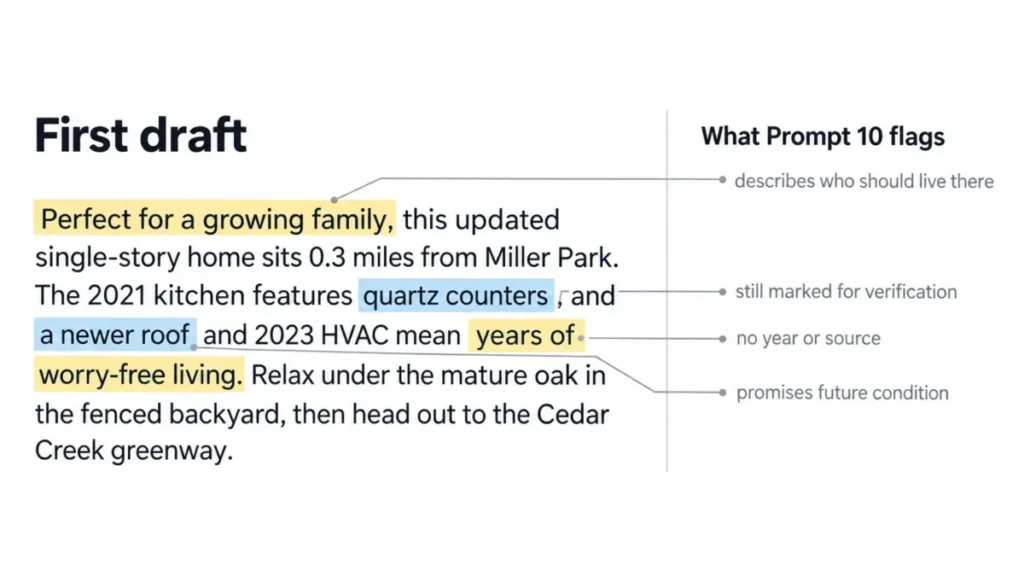
Perfect for a growing family, this updated single-story home sits 0.3 miles from Miller Park. The 2021 kitchen features quartz counters, and a newer roof and 2023 HVAC mean years of worry-free living. Relax under the mature oak in the fenced backyard, then head out to the Cedar Creek greenway.Step 4: what Prompt 10 flags.
- “Perfect for a growing family” describes who should live there. The rewrite leads with the layout instead: three bedrooms on one level and a fenced backyard.
- “Quartz counters” is still marked for verification on the sheet. It stays out until an invoice or the seller’s disclosure confirms the material.
- “A newer roof” has no year or source. It goes, or it comes back with the year once a document supports it.
- “Years of worry-free living” promises future condition. It goes.
Step 5: the approved version, the example output to aim for.
Three bedrooms on one level, 1,640 square feet, and a fenced backyard with a mature oak. The kitchen was remodeled in 2021, luxury vinyl plank flooring went in the same year, and the HVAC system was replaced in 2023. The two-car garage includes a workbench. Miller Park and the Cedar Creek greenway trailhead are 0.3 miles away, and there's no HOA.The approved version is plainer than the draft, and every sentence traces to the fact sheet. That traceability is the standard for anything you publish.
Test a Prompt on a Closed Listing Before You Save It
A prompt earns a place in your library by passing a check where you already know every answer. A listing you closed recently is the ideal file, because an invented fact stands out immediately.
- Pick a recent closed listing with a verified fact sheet.
- Delete two facts from the sheet, such as the roof year and the HOA fee, then run the prompt. Pass: ChatGPT marks both as missing instead of filling them in.
- Run the same prompt in two new chats. Pass: the facts match across both drafts, even where the wording differs.
- Check the length in your MLS form or a character counter. Pass: it fits without trimming by hand.
- Run Prompt 10 on the output. Pass: nothing is flagged, or every flag has an easy property-focused fix.
- Compare it with the description you actually published. Pass: you would send it after light edits.
Save the prompt only when it passes steps 2 through 6. A failure at step 2 or 3 means the facts-only line needs tightening before anything else.
Which ChatGPT Plan These Prompts Need
Every text prompt here runs on the Free plan, which includes unlimited text chats with GPT-5.6 Luna. Paid plans add stronger reasoning models, more uploads and team features.
OpenAI changes the models and features in each plan, so treat this table as a snapshot and confirm the current plan before you pay.
| Plan | Price (USD) | What changes for these prompts |
|---|---|---|
| Free | $0 | Unlimited text chats with GPT-5.6 Luna, plus limited messages with uploads and limited voice chats |
| Go | $8 a month | More uploads and more voice chats than Free |
| Plus | $20 a month | Advanced reasoning models, plus expanded messages and uploads |
| Pro | From $100 a month | 5x or 20x more usage than Plus, positioned by OpenAI for research and coding |
| Business | $20 per user a month billed annually, or $25 per user billed monthly, for 2 or more users | No training on business data by default, plus a dedicated workspace with admin controls |
Last checked: September 21, 2026. Source: OpenAI’s ChatGPT plan pricing for prices and the ChatGPT pricing page for plan features.
For a solo agent, the decision comes down to uploads. If you upload listing photos or MLS exports every week, you will hit the upload limits on Free and Go first, and Plus expands them and adds the larger custom instructions field.
A team that shares prompts and client files fits Business, where business data isn’t used for training by default and the minimum is two users. I would skip Pro for this library, since OpenAI positions it for research and coding rather than for drafting client copy.
The ChatGPT pricing guide breaks down every tier in more detail, and the ChatGPT review covers whether the tool fits your wider workflow.
Common Mistakes
- Pasting the whole MLS printout. It carries agent-only remarks, seller names and showing details that don’t belong in a chat, so paste the fact sheet instead.
- Asking for copy with no facts attached. ChatGPT can fill the gap with generic claims and plausible features, so give it the fact sheet or don’t ask yet.
- Trusting ChatGPT’s own character count. It works in tokens, so check the length in the MLS form or wherever the text will live.
- Letting it describe the neighborhood from memory. Local details go stale and descriptions of residents invite fair housing trouble, so name verified public places and stop there.
- Publishing an edited photo without the label. California law and MLS rules such as CRMLS and ARMLS already require a disclosure for altered images, so keep the original and label every altered image.
- Treating ChatGPT’s market math as a valuation. File analysis summarizes the rows you uploaded, while the price opinion stays yours, documented in your CMA.
How These Prompts Were Built
These prompts and review rules are based on OpenAI’s ChatGPT help documentation and pricing pages, the federal fair housing advertising and steering regulations, and the NAR Code of Ethics and MLS policy. They also draw on FTC guidance on reviews and commercial email, NAR’s Do-Not-Call guidance and California’s altered-image law.
Plan details, prices and features were checked on September 21, 2026.
Each prompt was assessed against four criteria: it maps to a recurring agent task, it tells ChatGPT what to work from, it sets the format and length, and it carries a check for the specific way that task goes wrong.
Greater weight went to tasks where an error reaches a consumer or a license: listing copy, advertising, market figures, contracts and client data. Relationship messages carry lighter checks because they state fewer facts.
Legal points stay within what the cited rule or guidance says. State law and brokerage policy add requirements that vary, so the prompts leave a slot for them instead of guessing.
What to Do Next
The best ChatGPT prompts for real estate agents end up being the ones you’ve run on your own closed listings and saved with your own voice guide.
- Your approved drafts need to go out on a schedule. A CRM built for agents stores the approved versions and sends them on time, and the best CRM for real estate comparison covers the options.
- You want prompts for work beyond real estate. The ChatGPT prompts library covers general business tasks with the same copy-and-paste format.
- You’re still choosing an assistant. The best AI chatbots comparison covers the alternatives, and the text prompts in this guide carry over to most of them as plain instructions.
- You want the photo, file or voice prompts in Claude or Gemini. Those depend on the matching feature, so check that assistant’s documentation first, and the Claude review and the Gemini review cover what each one handles well.