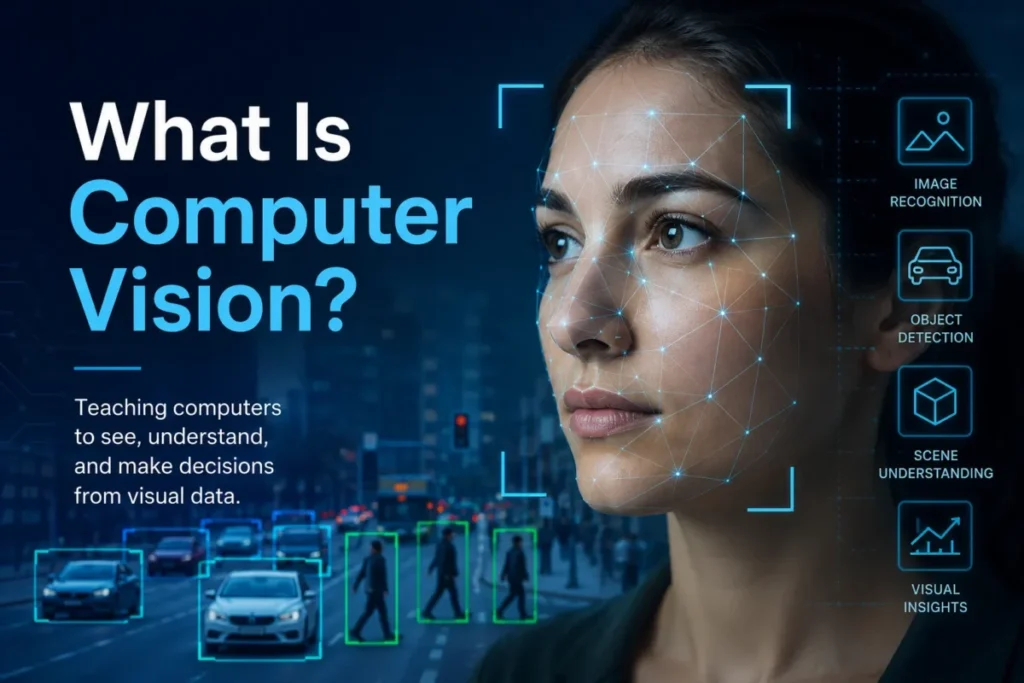
Computer vision is the field of artificial intelligence that turns images, video, and other visual inputs into machine-readable information a system can act on. It detects patterns, objects, text, faces, motion, and spatial relationships, then hands those results to software, a workflow, or a person.
Most explainers stop at that definition. The part that decides whether a computer vision project succeeds is everything after it: which task you actually need, what the model returns, and where it quietly fails once real cameras, real lighting, and real budgets get involved.
I read vendor pages the way a buyer reads a contract, so this guide is written for the person who has to defend a visual-AI decision to a team or a finance lead, not just pass a trivia question.
Quick answer: Computer vision is an AI field that extracts meaning from visual data by mapping pixels to learned outputs such as labels, boxes, masks, text, and confidence scores, and it powers OCR, defect detection, medical imaging, document capture, content moderation, and autonomous systems. It often uses deep learning, though not all of it does, and its confidence scores are estimates, not guarantees.
In This Article (15 sections)
The 60-Second Explanation of Computer Vision
In plain terms, computer vision is software that looks at a picture or video and reports back what it found, which is the reverse of the AI image generators that create new pictures from a prompt. A camera or a file supplies pixels, a model examines them, and the output is a set of labels, locations, or text a computer can use.
At a technical level, the system converts an image into numbers, channels, and features, then runs a classical algorithm or a neural network to predict what those numbers represent. IBM frames the field as software that processes, analyzes, and interprets visual inputs to derive useful information from images and video.
For a business, the value is not the model. The value is the decision the output feeds: approve the invoice, flag the defect, route the ticket, index the photo, or send the frame to a human for review.
One caution matters from the first sentence. Modern systems can hit very high recognition accuracy, but IBM Research is careful to note that these systems do not really understand what they see, so I treat computer vision as pattern matching with structured output, not comprehension.
How Computer Vision Actually Works
The model is one step in a longer pipeline, and buyers who only picture “the AI” underbudget the rest. A workable mental model has seven stages.
First, capture or ingest the visual input from a camera, scanner, drone, video stream, uploaded image, or scanned document. Second, preprocess it by resizing, normalizing, denoising, correcting lighting, cropping, or pulling frames from video.
Third, represent the image as pixels, channels, features, or embeddings the model can process. Fourth, run inference with a classical algorithm, a deep neural network, a cloud API, or a custom-trained model.
Fifth, return structured output: labels, bounding boxes, segmentation masks, extracted text, face rectangles, tracked objects, and confidence scores. Sixth, apply thresholds, business rules, or human review, then trigger a downstream action such as an alert, an approval, a search index update, or a defect rejection.
Seventh, monitor real-world performance and retrain or retune when cameras, lighting, product lines, or business rules change. That last stage is where most “one and done” projects fall apart.
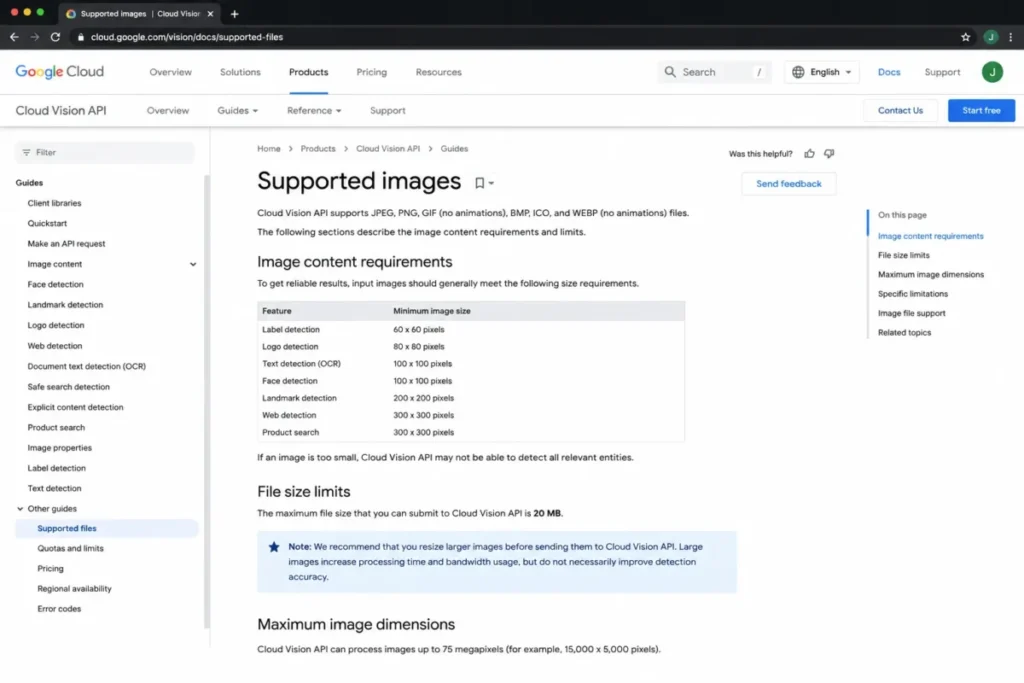
Input quality is a hard constraint, not a nice-to-have. As of July 6, 2026, Google Cloud Vision documentation recommends minimum image sizes for reliable results, caps OCR analysis at roughly 75 million pixels, and rejects image files larger than 20 MB, while noting that oversized images add processing time and bandwidth without a matching accuracy gain.
Not all computer vision is deep learning, which surprises buyers who think they must train a giant model to start. OpenCV, the open-source library, ships more than 2,500 optimized algorithms that span both classic techniques and modern approaches, so filtering, edge detection, feature matching, and camera calibration still earn their place inside many production pipelines.
The outputs are probabilistic, and this is the single most misread part of the field. Amazon Rekognition documentation describes confidence as a number between 0 and 100 that estimates how likely a prediction is correct, which means a “95% cat” is a ranked guess, not a verified fact.
That estimate is why threshold choice is a business decision. A lower confidence threshold catches more true cases but adds false positives, and AWS moderation documentation warns that dropping the minimum confidence raises the false-positive rate, while a higher threshold improves precision and lets real cases slip through.
The Main Computer Vision Tasks and What Each One Returns
Competitors list the tasks. Few of them say what each task actually outputs or when it is the wrong choice, so here is the version I would hand a team before they pick an approach.
| Task | The question it answers | What it returns | Common example | When it is the wrong fit |
|---|---|---|---|---|
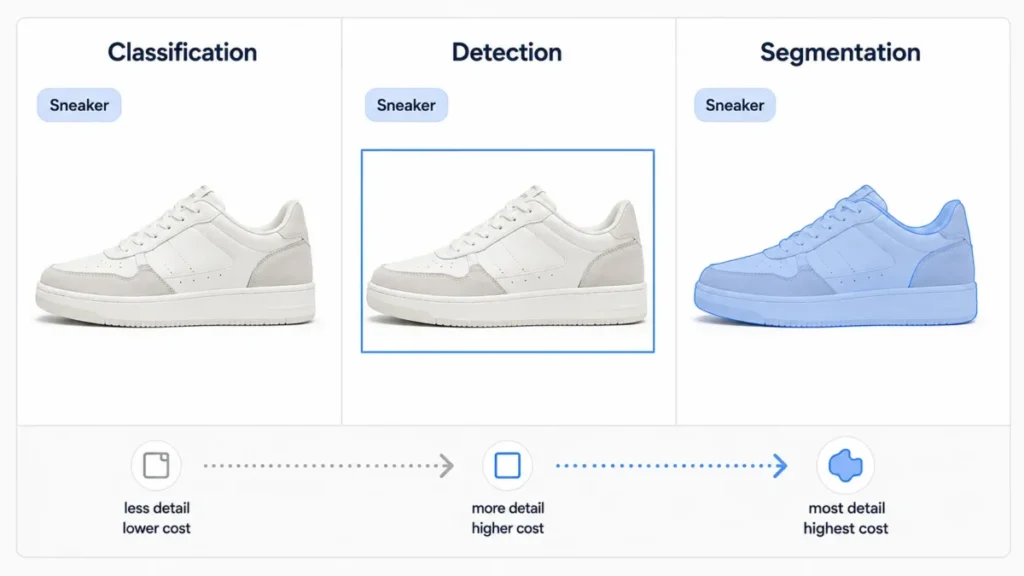
| Image classification | What category is this whole image? | One or more labels plus confidence | Tagging a photo as “invoice” or “receipt” | You need to know where the object is, not just that it exists |
| Object detection | What objects are here and where? | Bounding boxes, labels, confidence | Counting products on a shelf | You need exact pixel boundaries or object shape |
| Object localization | Where is the single main object? | One box around the primary object | Cropping a product from a listing photo | The scene has many objects of interest |
| Semantic segmentation | Which pixels belong to each class? | A pixel map per class | Separating road from sidewalk | You must tell two objects of the same class apart |
| Instance segmentation | Which pixels belong to each object? | A mask per individual object | Outlining each overlapping part in a bin | You only need a rough location, not a mask |
| OCR | What text is in this image? | Machine-readable text and positions | Reading an invoice number | The document needs field-level meaning, not raw text |
| Face detection | Is there a face, and where? | Face rectangles, landmarks | Auto-cropping a headshot | You need to know whose face it is |
| Facial recognition | Whose face is this? | Identity match or verification result | Confirming a phone sign-in by face | Consent, policy, or approval is unresolved |
| Object tracking | Where does this object go over time? | Object paths across frames | Following a shopper through a store | You only have still images |
| Visual search | Which images look like this one? | Ranked similar images | Finding visually similar products | Text metadata already answers the query |
A simple way to remember the geometry: a label says what, a bounding box says roughly where, and a mask says exactly which pixels. Pick the least expensive output that still answers your question, because masks and tracking cost more to build, run, and review than a plain label.
Computer Vision vs the Terms People Confuse It With
Half the confusion in this space comes from four word pairs. Getting them straight changes what you buy and how you scope a project.
| Term | What it does | How it differs from computer vision |
|---|---|---|
| Image processing | Changes or improves the pixels themselves | It edits an image; computer vision extracts meaning from it |
| Machine vision | Runs vision inside an industrial rig with cameras, lighting, and robotics | It is a full inspection system for a factory line, not just the algorithm |
| OCR | Converts text in an image into machine-readable text | It is one computer vision task, not the whole field |
| Document AI | Adds layout, fields, entities, and workflow logic on top of OCR | It understands a document; OCR only reads its characters |
Image processing and computer vision are the most-mixed pair. Denoising a photo or resizing it is image processing, the kind of work consumer AI photo editors do, while detecting a defect in that photo or reading its text is computer vision, and Snowflake draws the same line between manipulating pixels and interpreting them.
Machine vision deserves its own note because it shows up in manufacturing budgets. Industry sources such as Basler point out that machine vision and computer vision are often used as if they were the same, but machine vision centers on industrial inspection with its own cameras, lighting, and mechanical integration.
OCR is where CRM and revenue teams usually meet computer vision first. Google Cloud defines OCR as converting typed, handwritten, or printed text into machine-encoded text, while its Document AI adds NLP, entity extraction, and categorization so an invoice becomes structured fields, not a wall of characters.
If your real goal is to push contract dates, vendor names, and amounts into a system of record, plain OCR will underdeliver and document AI is the honest scope.
Face Detection Is Not Facial Recognition
Buyers say “facial recognition” when they often mean four different capabilities, and the difference is a compliance issue, not a pedantic one. Treat these as a ladder.
Face detection finds that a face exists and returns a rectangle around it. Facial analysis reads attributes about the face.
Verification checks whether two faces match. Identification searches a known set to answer who a person is.
The governance gap between the bottom and top of that ladder is real. Microsoft Learn documentation states that face detection is available without registration, but face identification and verification are Limited Access features that require registration, are unavailable on the Free tier, and are restricted from use by United States police departments.
Microsoft has also retired or limited several inferred attributes, including emotion, gender, age, smile, facial hair, hair, and makeup, so any roadmap that assumes “the API just tells us the customer’s mood” is building on capabilities a major provider has pulled back.
My rule here is blunt. If your use case only needs to know that a face is present, do not scope, budget, or promise identity recognition, because identity brings approval steps, biometric obligations, and jurisdiction risk that detection does not.
Where Computer Vision Shows Up
The stock examples are self-driving cars and phone sign-in by face. The useful examples are the ones tied to a workflow someone has to own.
In manufacturing, models flag surface defects, missing parts, label errors, or missing safety equipment on a line. In retail and ecommerce, they power visual search, shelf and out-of-stock monitoring, product tagging, and image moderation.
In document operations, OCR and document AI read invoices, receipts, forms, IDs, contracts, and signatures, which is the path most sales and support teams take into visual AI. In insurance, models triage vehicle-damage photos and claim images before a human adjuster looks.
Healthcare is the example that needs a caveat more than a headline. A 2024 robustness survey on arXiv gives the hospital case directly: a model trained on one hospital’s scanners and patient population can perform worse when moved to another, so medical imaging models need external validation on the exact setting where they will run.
Revenue and CRM teams rarely see themselves in vision examples, but the fit is concrete. Business-card and badge scanning into contact records in your CRM software, receipt capture for expense-linked deals, ID checks in onboarding, and logo or screenshot detection in support tickets all lean on the same task types above, and each one still needs a review queue when confidence is low.
Physical robotics is where 2D vision runs out of road. Practitioner discussions on r/computervision note that jobs like bin picking often need depth and 6-degree-of-freedom pose estimation, not just a 2D bounding box, so a detector that says the part is on screen still cannot tell a robot how to grasp it.
I treat that as practitioner-reported guidance rather than a universal law, but the direction is consistent with how grasping systems are built.
Where Computer Vision Breaks in Production
A demo works because the demo images look like the training images. Production breaks when they stop matching, and this is the gap that top explainers skim past.
The academic robustness literature is direct about the mechanism. The same arXiv survey reports that common corruptions such as noise, blur, and illumination changes degrade reliability, and that distribution shift between training and deployment is a core reason models that scored well on a benchmark still fail in the field.
Practitioners describe the same thing in plainer words. Threads on r/computervision repeatedly cite bad lighting, odd camera angles, motion blur, partial visibility, crowded scenes, and inconsistent annotations as the reasons accuracy drops after launch, which I read as qualitative sentiment rather than measured proof, but it lines up with the research.
Before anyone signs off on a computer vision rollout, I would walk this deployment checklist:
- Lighting: does it change across the day, seasons, or locations?
- Camera angle and distance: is the deployment camera the same as the one that collected training data?
- Motion blur and focus: are subjects or cameras moving during capture?
- Occlusion and crowding: do objects overlap or hide each other?
- Backgrounds and clutter: does the real scene match the training scenes?
- Annotation quality: were training labels consistent and correct?
- Camera-specific data: was training data captured from the actual production hardware?
- Domain shift: will the population, product mix, or site differ from training?
Deployment is not the finish line either. Because scaling models and data does not reliably fix robustness given the compute cost, teams should plan to monitor input distribution, false-positive and false-negative patterns, and camera or lighting changes after launch, then budget for retraining as a recurring line item, not a one-time build.
Privacy, Bias, and Responsible Use
This is the section generic AI pages avoid, and it is the one that gets a company in trouble. Handle it before the pilot, not after the incident.
Bias in computer vision is not a single fixed property you can dismiss or accept in one sentence. NIST’s 2019 face recognition study found that, in one-to-one matching, many algorithms produced higher false-positive rates for Asian and African American faces than for Caucasian faces, often by factors of 10 to 100, while also stressing that results varied by algorithm and by task type.
The practical reading is that bias depends on the dataset, threshold, algorithm, task, and deployment context, so “our vendor is unbiased” and “computer vision is racist” are both too coarse to act on. You test for it in your setting.
Biometric data adds obligations that sit on you, not the vendor. Microsoft’s Face documentation states that customers processing biometric data are responsible for notice, consent, and retention or deletion as applicable, which means the compliance work does not disappear because an API is easy to call.
Automated moderation has a ceiling worth stating plainly. AWS documentation notes that Rekognition content moderation is not an authority on offensive content, is not exhaustive, and does not detect whether an image contains illegal content such as child sexual abuse material, so it is a workflow signal, never a substitute for policy and reporting obligations.
The safe pattern across all of these is human-in-the-loop review. AWS documentation describes routing predictions below a chosen threshold to human reviewers, and I would apply that to any decision that is low-confidence, high-cost, regulated, or identity-related.
Common Misconceptions
A few beliefs quietly wreck computer vision projects. Correcting them early saves the most money.
The first is that the system sees like a human. It maps pixels to learned patterns and labels, and it lacks human context unless you wire it into other systems, which is why “understand” is a shorthand, not a technical claim.
The second is that a high confidence score means the model is correct. Confidence is an estimate that must be tuned against your tolerance for false positives and false negatives, and a 92% score on the wrong object is still wrong.
The third is that face detection means the system knows who someone is. Detection only locates a face; identity is a separate, gated, and more sensitive capability.
The fourth is that computer vision is finished once it is trained. Lighting, cameras, product lines, populations, and packaging drift, and performance drifts with them.
The fifth is that all modern computer vision is deep learning. Many pipelines combine neural models with classic preprocessing, geometry, and calibration, and sometimes a simpler method is the right call.
Cloud API vs Open-Source Library vs Custom Model
Once a team understands the concept, the real question is how to build, and there are three honest paths. I would route the decision like this.
Use a prebuilt cloud API when your task is common and well-supported: labels, OCR, safe-search, or standard object and face detection. Google Cloud Vision, Azure AI Vision, and Amazon Rekognition expose these through an API, so a team can ship without training a model.
Use an open-source library such as OpenCV when you need custom pipelines, local control, classic algorithms, or preprocessing that a hosted API does not expose. Train a custom model when your classes, environment, image types, or required outputs are specific enough that no prebuilt service fits.
| Approach | Best when | Main tradeoff |
|---|---|---|
| Cloud API | Common tasks, fast launch, no ML team | Per-unit cost and less control over the model |
| Open-source library | Custom pipelines, local processing, classic methods | You own the engineering and maintenance |
| Custom model | Domain-specific classes and outputs | Needs labeled data, ML skill, and ongoing retraining |
Most teams should start on a cloud API to validate the use case, then move to a library or custom model only when per-unit cost, data control, or a domain-specific class list forces the switch.
Edge versus cloud is a second axis. Cloud is simpler to start and scales without hardware, while edge processing suits low-latency, offline, bandwidth-limited, or privacy-sensitive cases where sending images off-device is undesirable.
Cost is where the “it’s just an API” assumption breaks. As of July 6, 2026, Google Cloud Vision pricing charges per image, charges multi-page files per page, and counts each feature applied to an image as a separate billable unit, with the first 1,000 units per month free for listed features, so running OCR and face detection on the same image is two billable units, not one.
For a buyer, that is the budget pressure point familiar from any usage-based SaaS contract: your bill scales with images times features times video volume, and a proof of concept on a free tier can look nothing like production spend.
When to Use Computer Vision and When to Avoid It
Every competitor promotes the uses. The trust-building move is telling readers when to walk away, so here is my avoid list.
Skip computer vision when a barcode, QR code, or RFID tag already solves identification more cheaply and reliably. Skip it when your images are poor, uncontrolled, or wildly inconsistent and you cannot fix capture conditions.
Avoid it when you have no labeled data and no realistic path to getting deployment-representative examples. Avoid full automation when a mistake is high-stakes and there is no human review, and avoid identity-level facial recognition when consent, policy, or approval is unresolved.
One more: if the information already exists as structured text or metadata, reading it directly beats extracting it from a picture. Use vision when the signal genuinely lives in the pixels, not when it is merely convenient to point a camera at a problem that a database query would answer.
Tools That Deliver Computer Vision
These are the platforms a buyer will meet first, described from their official documentation rather than any hands-on test.
Google Cloud Vision provides prebuilt APIs for image labeling, face and landmark detection, OCR, and safe-search, with Document AI handling structured document workflows. Azure AI Vision offers image analysis, OCR, face detection, smart cropping, and spatial analysis, with identity-level face features gated behind Limited Access.
Amazon Rekognition adds image and video analysis through APIs, covering object and text detection, content moderation, face analysis, and custom labels, with documented limits such as a 15 MB image size for objects stored in S3 and stored-video processing up to 10 GB or six hours. OpenCV is the open-source anchor: a computer vision and machine learning library with more than 2,500 algorithms, used for both classic and modern pipelines.
None of these choices is right by default. The API services suit teams that want speed and common tasks, and OpenCV suits teams that want control and custom engineering.
A Beginner Checklist Before You Build
Copy this before scoping a first project:
- Write the decision the output must drive, not the model you want.
- Pick the cheapest task that answers your question: label, box, or mask.
- Confirm the signal really lives in the image, not in existing data.
- Check whether a barcode, tag, or database query is simpler.
- Set a confidence threshold and decide what happens below it.
- Plan a human review path for low-confidence or high-risk cases.
- Match training data to the actual deployment camera and lighting.
- Resolve consent and biometric obligations before any face work.
- Estimate cost as images times features times volume, not per call.
- Budget for monitoring and retraining after launch.
If you cannot answer the first three lines, the project is not ready, no matter how good the model is.
Frequently Asked Questions
What is computer vision in simple terms?
It is AI that looks at images or video and reports what it finds, such as objects, text, or faces, as labels, boxes, or scores a computer can use.
Is computer vision part of AI?
Yes. It is a subfield of artificial intelligence that often uses machine learning and deep learning, the same foundations behind generative AI, though some computer vision tasks still rely on classic algorithms.
How does computer vision work?
It captures an image, preprocesses it, converts it to numbers, runs a model to predict labels or locations, then applies thresholds, review, or actions and monitors results over time.
What is the difference between computer vision and image processing?
Image processing changes or improves the pixels, like denoising or resizing. Computer vision extracts meaning from pixels, like detecting a defect or reading text.
What is the difference between computer vision and machine vision?
Computer vision is the broad field of interpreting visual data. Machine vision usually refers to industrial inspection systems that pair vision with cameras, lighting, and robotics on a production line.
Is OCR the same as computer vision?
OCR is one computer vision task that converts text in an image into machine-readable text. Document AI adds layout, fields, and entities so a document becomes structured data.
What does a confidence score mean?
It is a model’s estimate of how likely a prediction is correct, on a scale such as 0 to 100. It is not proof, so you set a threshold and review low-confidence results.
Are computer vision systems biased?
They can be. NIST’s 2019 face study found demographic differences in false-positive rates that varied by algorithm and task, so bias depends on the data, threshold, model, and setting and must be tested in your own use.
Can computer vision run on edge devices?
Yes. Edge deployment suits low-latency, offline, or privacy-sensitive cases, while cloud APIs are simpler to start and scale without local hardware.
When should you not use computer vision?
When a barcode, tag, or database query is cheaper, when image quality is poor, when labeled data is missing, when mistakes are high-stakes without review, or when biometric consent is unresolved.
The Short Version
Computer vision converts pixels into decisions, and the decision it feeds matters more than the model that produces it. Choose the smallest task that answers your question, treat confidence as an estimate, plan for real-world lighting and camera drift, resolve consent before any face work, and budget for images times features plus ongoing monitoring. Do that, and computer vision becomes a dependable input to a workflow instead of a demo that impresses once and disappoints in production.