

ChatGPT vs Claude is a tie on the team seat price: ChatGPT Business and Claude Team both list $20 per seat per month billed annually, or $25 billed monthly.
Pick Claude for long documents, a named Outlook app and published Enterprise pricing. Pick ChatGPT for image generation, Google Workspace and Slack connections, or teams of 151 to 200, because Claude Team covers 2 to 150 seats and ChatGPT Business covers 2–200 employees.
Ten standard seats on annual billing cost $20 x 10 seats x 12 months = $2,400 a year on either plan. The decision turns on usage limits, context size and admin gates, not on the invoice.
In This Article (9 sections)
The Short Answer: Which One Fits Your Team
If your team has one constraint that dominates, that constraint picks the product, because each one wins on a different published limit or gate.
| If your team… | Pick | Because |
|---|---|---|
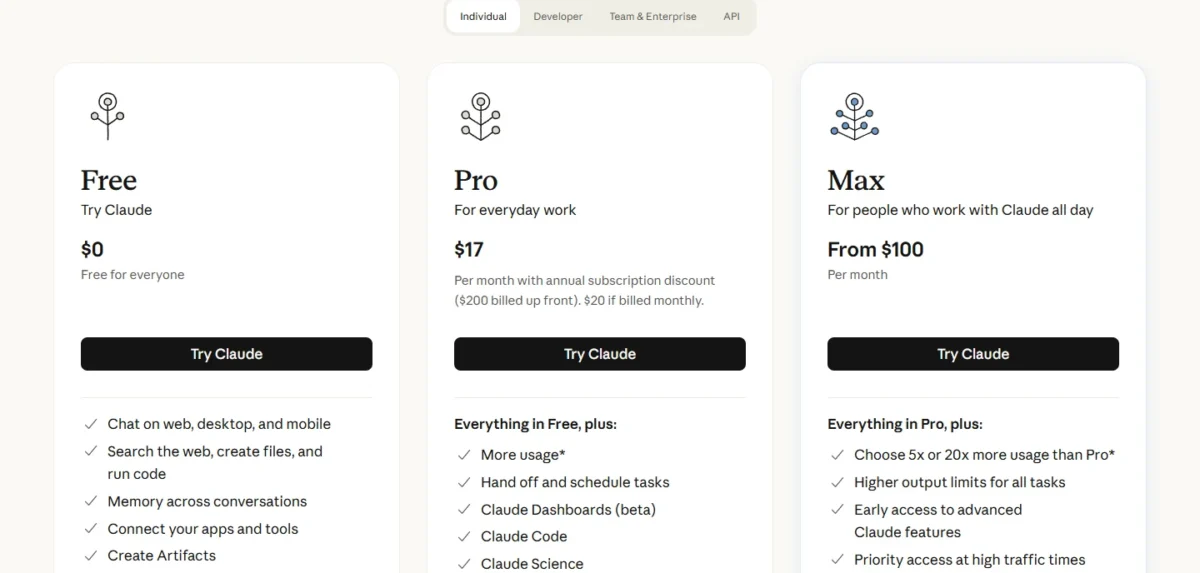
| Is one person paying yearly | Claude Pro | $200 billed up front; ChatGPT Plus bills $20 a month, monthly only |
| Needs generated images in the same tool | ChatGPT | Image generation is listed on every ChatGPT plan, limited on Free |
| Works with files longer than about 320 pages | Claude | Up to 1M tokens on every plan (varies by model); Business reasoning input tops out at ~320 pages |
| Has 151 to 200 people and wants a team plan | ChatGPT Business | Business covers teams of 2–200 employees; Claude Team covers 2 to 150 |
| Has heavy users who must not stop at a 5-hour wall | ChatGPT Business premium seat | Premium seat: “5x more usage than standard, with no 5-hour limit” |
| Needs SCIM and audit logs at a published price | Claude Enterprise | US$20 per seat per month billed annually plus usage at API rates; ChatGPT Enterprise is custom pricing |
Sources: Claude pricing page, ChatGPT pricing page, OpenAI Business pricing page and OpenAI’s ChatGPT Plus help article, checked October 2026.
The split is three rows each, so name your hardest constraint first and read only that row.
A team leaning toward OpenAI should read my ChatGPT review for the single-product verdict.
A team leaning toward Anthropic gets the same depth in my Claude review.
With the seat price tied, the attributes below are where the two products actually differ.
ChatGPT vs Claude at a Glance
ChatGPT Business and Claude Team charge the same for a standard seat but differ on usage rules, context size, team ceiling and visual output.
| Plan | Standard seat, annual / monthly | Team size | Usage rule | Context window | Visual output listed |
|---|---|---|---|---|---|
| ChatGPT Business | $20 / $25 per seat per month | 2–200 employees | Unlimited subject to abuse guardrails | 54K Instant, 256K Reasoning | Image generation |
| Claude Team | $20 / $25 per seat per month | 2 to 150 | Rolling 5-hour window plus weekly limits | Up to 1M, varies by model | Claude Design, Slides, Docs |
Sources: OpenAI Business pricing page and Claude pricing page, checked October 2026.
Both team plans include single sign-on and keep your content out of model training by default, so neither of those settles the choice.
For one person, the two plans that compete are ChatGPT Plus and Claude Pro:
| Plan | Price | Billing | Context window | Coding agent |
|---|---|---|---|---|
| ChatGPT Plus | $20 a month | Monthly only | 54K Instant, 256K Reasoning | Codex |
| Claude Pro | $17 a month billed annually ($200 up front), or $20 monthly | Monthly or annual | Up to 1M, varies by model | Claude Code |
Sources: ChatGPT pricing page, OpenAI’s ChatGPT Plus help article and Claude pricing page, checked October 2026.
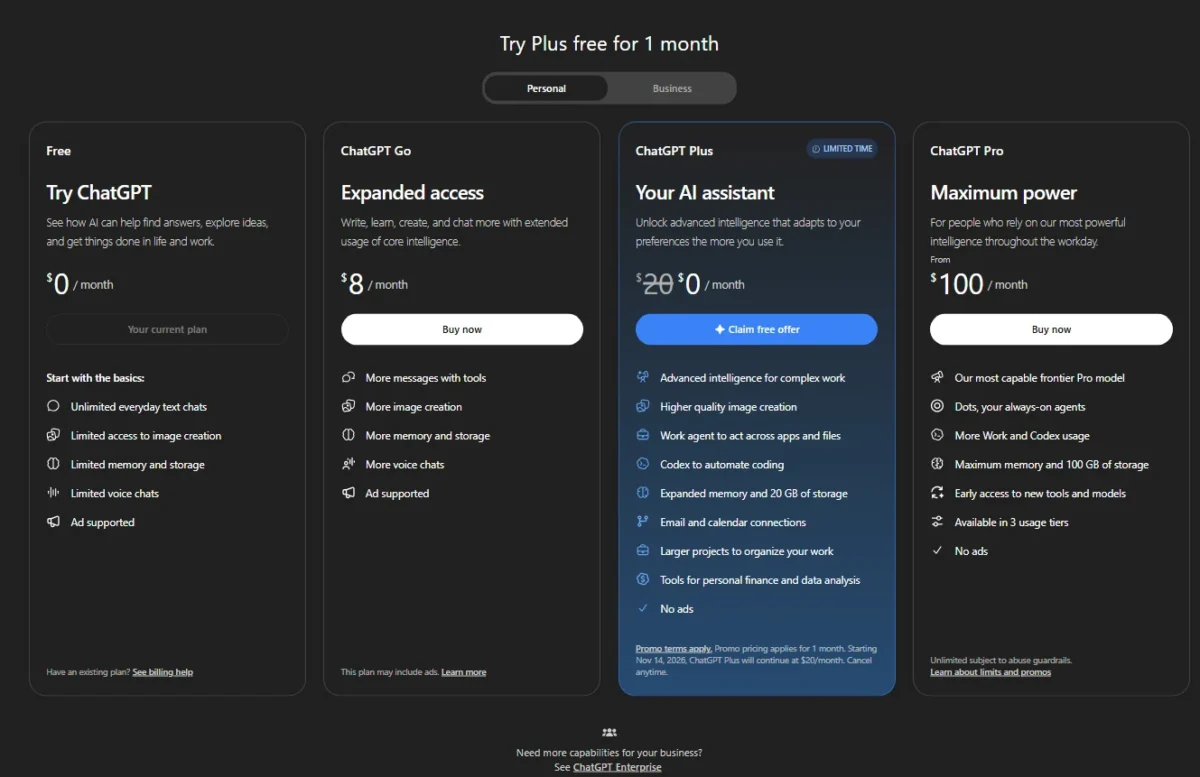
ChatGPT’s other individual plans sit on either side of Plus: ChatGPT Go at $8 a month and ChatGPT Pro from $100 a month.
The price columns match, but the same team does not always pay the same bill.
What Each Costs Now at Real Team Sizes
A 5-person team pays $1,200 in year one on annual billing, or $1,500 on monthly billing, on either product. The tie breaks only for a solo buyer, for Claude’s pooled API credits and at the Enterprise tier.
| Team and billing | ChatGPT, year one | Claude, year one |
|---|---|---|
| 1 person, annual | Plus: no annual billing | Pro: $200 billed up front |
| 1 person, monthly | Plus: $20 x 12 = $240 | Pro: $20 x 12 = $240 |
| 5 standard seats, annual | $20 x 5 x 12 = $1,200 | $20 x 5 x 12 = $1,200 |
| 5 standard seats, monthly | $25 x 5 x 12 = $1,500 | $25 x 5 x 12 = $1,500 |
| 20-seat team: 16 standard seats, annual | 16 x $20 x 12 = $3,840 | 16 x $20 x 12 = $3,840 |
| 20-seat team: 4 premium seats, annual | 4 x $100 x 12 = $4,800 | 4 x $100 x 12 = $4,800 |
| 20-seat team total, annual | $3,840 + $4,800 = $8,640 | $3,840 + $4,800 = $8,640 |
| 20-seat team: 16 standard seats, monthly | 16 x $25 x 12 = $4,800 | 16 x $25 x 12 = $4,800 |
| 20-seat team: 4 premium seats, monthly | 4 x $125 x 12 = $6,000 | 4 x $125 x 12 = $6,000 |
| 20-seat team total, monthly | $4,800 + $6,000 = $10,800 | $4,800 + $6,000 = $10,800 |
Sources: OpenAI Business pricing page, OpenAI’s ChatGPT Plus help article and Claude pricing page, checked October 2026.
Monthly billing adds $25 – $20 = $5 per standard seat and $125 – $100 = $25 per premium seat, every month, on either product. Pay monthly during a pilot, then switch to annual once the seat count settles.
A solo buyer saves $240 – $200 = $40 a year on Claude Pro’s annual plan. OpenAI’s help center says Plus does not support annual billing, so that saving has no ChatGPT equivalent.
Claude Team also lists up to $500 per month in pooled API credits. I leave them out of the year-one totals above, which count only what each plan charges for seats.
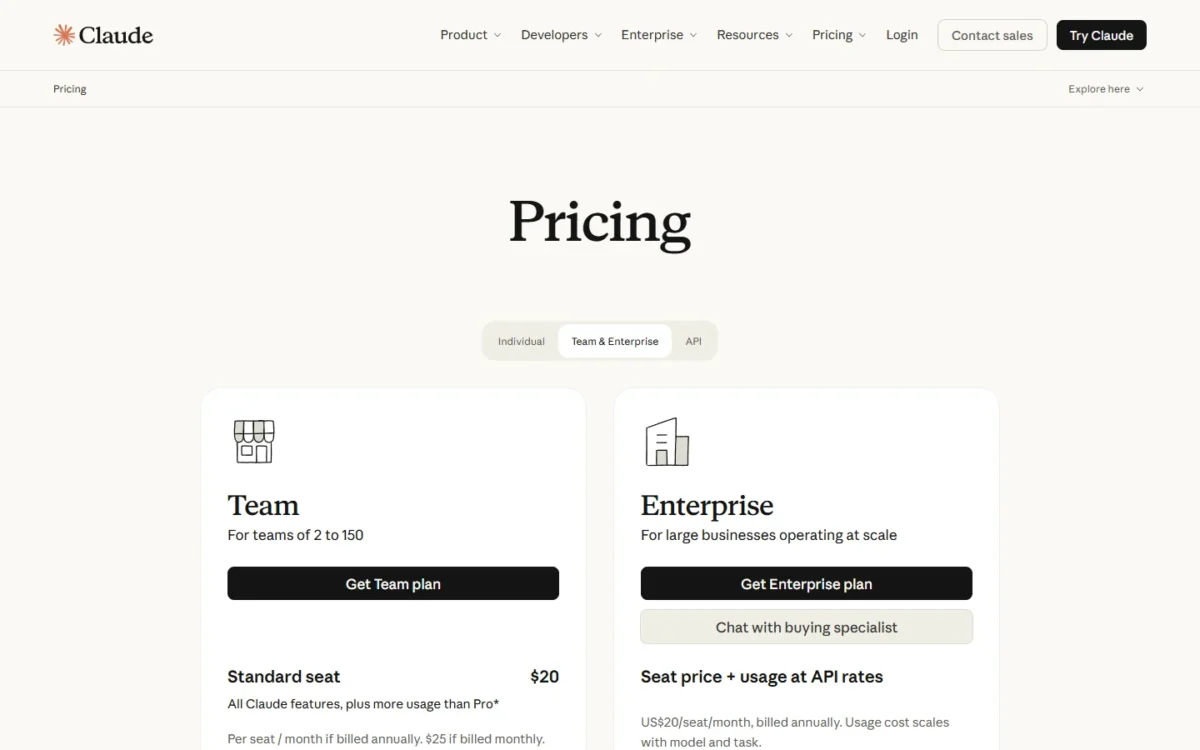
The upper tiers are where budgeting differs. Claude Enterprise lists US$20 per seat per month, billed annually, plus usage at API rates. For 50 seats, that floor is $20 x 50 x 12 = $12,000 a year before usage.
ChatGPT Enterprise has custom pricing through sales, with credit-based and token-based options. A buyer has no figure to plan against until a quote arrives.
ChatGPT also sells ChatGPT Go at $8 a month, which “may include ads”, and ChatGPT Pro from $100 a month, with a choice of 3 usage tiers. My ChatGPT pricing by plan breakdown covers those individual tiers.
Claude Max starts at $100 per month, billed monthly, for 5x or 20x Pro’s usage. Max and the full API rate card are in my Claude pricing and limits guide.
If you build on the API instead
Seats are the wrong unit for a team building its own tools; the API bills per million tokens, and the two price lists line up at three points.
| Rate per million tokens (input / output) | Claude Platform | OpenAI API |
|---|---|---|
| $10 / $50 | Fable 5.1 | gpt-6-astra |
| $2 / $10 | Sonnet 5.5 | gpt-6.1-sol (short context) |
| $0.10 / $0.50 | Haiku 5.5 (prompts up to 100K tokens) | gpt-6-luna (short context) |
Sources: Claude pricing page and OpenAI API pricing, checked October 2026.
Model choice, not vendor, sets the API bill. Claude’s Opus 5.5 sits between the top two rows at $4 input and $20 output per million tokens.
If seat cost is a tie, the next question is which seat runs out first in a heavy week.
Usage Limits and Context: What Stops Work Mid-Day
Claude meters every plan on a rolling 5-hour window, with weekly limits on top for paid plans. ChatGPT Business lists everyday text chats as unlimited, subject to abuse guardrails. On Claude, Claude Code and chat draw from one pool, so a developer who codes and chats spends a single allowance.
| Product | What limits a seat | What to do at the limit |
|---|---|---|
| Claude (all plans) | Rolling 5-hour session window; weekly limits on paid plans; no fixed message count | Wait for the reset, move to a higher plan, or turn on usage credits at standard API rates (paid plans) |
| ChatGPT Business | Unlimited subject to abuse guardrails; premium seat has “no 5-hour limit” | Move a user to the premium seat, or buy credits for more access |
Sources: Claude pricing page and OpenAI Business pricing page, checked October 2026.
OpenAI’s premium-seat wording, “with no 5-hour limit”, is the one hint on its business page that standard seats can be throttled inside a window. OpenAI’s help center adds that Plus may include message caps, “especially during high demand”.
The seat multipliers are the same: Claude’s Team premium seat and ChatGPT’s premium seat each give 5x more usage than a standard seat.
The difference is the window. Only ChatGPT’s premium seat is listed with “no 5-hour limit”, while Anthropic says every Claude plan resets on a rolling five-hour session window.
Claude Team standard seats give more usage than Pro, and Pro gives at least 5x Free per 5-hour session.
Budget premium seats for the people whose work runs long: developers, analysts and anyone feeding the assistant whole documents. At $100 per seat per month billed annually on either product, four premium seats cost 4 x $100 x 12 = $4,800 a year.
Context size is the second limit, and here the gap is wide:
| Plan | Total context window | Input maximum stated |
|---|---|---|
| ChatGPT Free | 27K Instant | ~12 pages |
| ChatGPT Plus and Business | 54K Instant, 256K Reasoning | ~40 pages, ~320 pages |
| ChatGPT Pro | 128K Instant, 400K Reasoning | ~250 pages, ~680 pages |
| ChatGPT Enterprise | 128K Instant, 256K Reasoning | ~250 pages, ~320 pages |
| Claude, every plan | Up to 1M, varies by model | Not published in pages |
Sources: ChatGPT pricing page, OpenAI Business pricing page and Claude pricing page, checked October 2026.
Claude’s 1M tokens is nearly four times ChatGPT Business’s 256K reasoning window (1,000 / 256 = about 3.9, in thousands of tokens). A file past ~320 pages exceeds the input maximum OpenAI lists for Business reasoning, so it has to be split or summarized first.
OpenAI adds that the input share is smaller than the total window, because system instructions and memories use space too. A team that drops whole contracts, transcripts or codebases into one chat should weigh this table above the price.
Limits decide how much work a seat does; the features below decide what that work is.
Business Features That Change the Workflow
ChatGPT Business names more of the tools a Google Workspace and Slack team runs on, and it generates images. Claude names Microsoft 365 and Outlook apps, and it gives Design, Slides and Docs to Free users too.
Writing, documents and research
Claude’s Free plan already includes Claude Design, Slides and Docs, and every Claude plan holds up to 1M tokens. ChatGPT puts deep research and interactive tables and charts on Plus and Business, while Claude’s Research feature starts at Pro.
For a writer drafting from long source files, Claude’s context is the deciding line. For an analyst who wants charts inside the chat, ChatGPT’s interactive tables and charts are.
The pricing pages cannot say which one writes better for your team, so run a short trial on both free plans:
- Pick three tasks your team does every week, such as a long-document summary, a client email and a data question.
- Give ChatGPT Free and Claude Free the same prompt and the same files for each task.
- Compare where each one stops: ChatGPT Free lists a 27K Instant context and limited uploads, and Claude Free caps Projects at 5.
Coding: Codex vs Claude Code
Both include a coding agent on paid plans. Codex is on Plus and Business, expanded on Pro and limited on Free and Go. Claude Code is on every paid Claude plan, not on Free.
The deciding factor is the usage rule. Claude Code shares one pool with chat, so a developer on Claude spends one allowance on both. Budget a premium seat or usage credits at standard API rates for that person.
Anthropic also points heavy coding sessions to pay-as-you-go API credits through a Console account. On ChatGPT Business, the premium seat has no 5-hour limit. My Codex vs Claude Code comparison goes further into the agents themselves.
Images and visual work
ChatGPT generates images on every plan, limited on Free, and adds image generation with Thinking on Plus, Pro and Business. Claude’s plan table lists Claude Design, Slides, Docs and Artifacts for visual output.
A marketing team that wants generated images inside its assistant should buy ChatGPT. A team whose visual work is decks and documents can stay on Claude.
Agents, scheduled tasks and the browser
Yes, both can run work without someone typing, but the features sit on different plans. ChatGPT lists scheduled tasks from Go up, Sites from Plus up and a built-in browser on every plan. Workspace agents appear only on Business and Enterprise, not on Plus or Pro.
That makes shared workspace agents a reason to buy Business rather than a stack of Plus seats.
Claude lists “hand off and schedule tasks” from Pro up, and the Team plan adds Claude Cowork. Its browser agent is Claude in Chrome, on Pro, Max and Team. A team that already works in Chrome can follow my guide on how to set up Claude in Chrome before buying seats.
Office apps and connectors
ChatGPT lists Excel, Word, PowerPoint and Google Sheets extensions on Plus and Business. ChatGPT Business connects to Google Workspace, Slack, GitHub and Microsoft 365.
Claude lists Claude for Microsoft 365 and Claude for Microsoft Outlook from Pro up, connectors on every plan, and enterprise search across your organization on Team. ChatGPT Business lists company knowledge, which Plus and Pro do not include.
A Google Sheets team finds a named extension in ChatGPT’s plan table. An Outlook-heavy team finds a named Outlook app in Claude’s.
Features a team uses need governance, which is where both team plans part ways with their Enterprise tiers.
Admin, Security and Data Training
Both team plans give single sign-on and keep business content out of model training by default. SCIM, role-based access and audit or compliance APIs are Enterprise-only on both, and only Claude publishes its Enterprise price.
| Control, as listed on each pricing page | ChatGPT Business | Claude Team | ChatGPT Enterprise | Claude Enterprise |
|---|---|---|---|---|
| Single sign-on | SAML SSO: Yes | SSO: Yes | Yes | Yes |
| Domain verification | Yes | Yes | Yes | Yes |
| SCIM | No | No | Yes | Yes |
| Role-based access | No (admin roles: Yes) | No | Yes | Yes |
| Audit or compliance API | No | No | Compliance API Logs Platform | Audit logs and Compliance API |
| Custom data retention | Not on pricing page | No | Yes | Yes |
| Training on business content | No, by default | None by default | No, by default | None by default |
Sources: OpenAI Business pricing page, OpenAI business data page and Claude pricing page, checked October 2026.
The practical gap is SCIM. A team that provisions accounts through an identity provider needs an Enterprise plan on either product. Claude lets it budget that step at $20 per seat plus usage; ChatGPT needs a sales call first.
The certifications differ by tier on the OpenAI side. ChatGPT Business lists SOC 2 Type 2, while the ISO 27001, 27017, 27018 and 27701 certifications are marked for Enterprise only. Claude Enterprise lists a HIPAA-ready offering, and OpenAI offers a BAA to ChatGPT for Healthcare and API healthcare customers.
Staff on personal plans sit outside these defaults. ChatGPT Free through Pro list training as “Opt-out available”, and Claude Free through Max list “Opt-out”. Anthropic uses consumer chats for training if you choose to allow it, and its Incognito chats are not used even with Model Improvement on (Anthropic Privacy Center).
That is the strongest argument for a team plan at two or more people. The no-training default comes with the workspace, not with a setting each employee must remember.
With the gates known, the next question is who should rule each product out.
Who Should Pick ChatGPT, Who Should Pick Claude
Rule ChatGPT out for solo annual billing, long files or a published Enterprise price. Rule Claude Team out for teams over 150, or for heavy users who must keep working past a 5-hour window without buying usage credits.
Skip ChatGPT if:
- you pay alone and want annual billing, which Plus does not offer;
- your files run past the ~320-page reasoning input on Plus and Business;
- you want SCIM and audit controls at a published price without a sales call.
Skip Claude if:
- you need a self-serve team plan for 151 to 200 people;
- image generation is a must: ChatGPT lists it on every plan, while Claude’s plan table lists Claude Design, Slides, Docs and Artifacts for visual output;
- your heaviest users must keep working past a 5-hour window: a Claude premium seat gives 5x usage within the window. At the limit, Anthropic lists waiting for the reset, moving to a higher plan or turning on usage credits at standard API rates.
ChatGPT Business is the broader workspace: more named connections, image generation and workspace agents. The trade-off is context, with 54K on Instant and 256K on reasoning. Buy it for a mixed marketing, sales and ops team that lives in Google Workspace and Slack.
Claude Team is the stronger choice for reading and drafting long material: up to 1M tokens on every plan, with Design, Slides and Docs from Free up. The trade-off is metering, a rolling 5-hour window plus weekly limits shared with Claude Code. Buy it for a team that works in long documents or Outlook and can budget premium seats.
If neither fits, my ranking of AI chatbots widens the shortlist beyond these two.
A choice is not permanent, but leaving each one takes different steps.
Switching Between ChatGPT and Claude
Both products export chat history. I treat any switch between them as a rebuild: plan to move files and recreate instructions by hand.
| Step | Leaving ChatGPT | Leaving Claude |
|---|---|---|
| Who can export | Free, Go, Plus and Pro users; not self-serve in Business or Enterprise workspaces | Free, Pro and Max users; on Team or Enterprise, only the Primary Owner |
| Where | Settings > Data controls > Export | Settings > Privacy > Export data, on web or desktop, not iOS or Android |
| Wait and link | Up to 7 days; link expires 24 hours after you receive it | A small delay; link expires 24 hours after delivery |
| What you get | ZIP file with chat history and account data | Conversation data and account user data |
| Billing exit | Plus and Pro refunds typically processed within 5–10 business days after approval | Cancel anytime; plan stays active to the end of the billing period; payments generally non-refundable |
Sources: OpenAI export help article, Claude export help article, OpenAI’s ChatGPT Plus help article and Claude pricing page, checked October 2026.
Treat the export as an archive, not a migration. Claude’s help center says exported data can’t be imported into another personal Claude account. That is why I plan the rebuild named at the top of this section rather than count on an import.
On a team plan, the export is an admin job. ChatGPT Business members must ask the workspace owner, and only the Primary Owner exports a Claude Team workspace, so agree who runs it before the renewal date.
Export before you cancel or merge accounts. OpenAI warns that once a personal ChatGPT workspace is gone, an older export link may stop working.
On Claude, cancel at least 24 hours before renewal to avoid the next charge. Canceling does not delete chats, projects or files.
Rebuild the instructions and reference files behind your most-used custom GPTs or Claude Projects first. Both products have Projects and Skills to hold them. For a team moving to Anthropic, my guide on how to set up Claude after switching covers that first week.
The questions below are the ones buyers still ask after the switching map.
FAQ
Is Claude still better than ChatGPT?
For long material, yes: Claude lists up to 1M tokens on every plan against 256K on ChatGPT Business reasoning. For image generation and teams of 151 to 200, ChatGPT is my pick: it lists image generation on every plan, and Business covers teams of 2–200 employees.
What can Claude do that ChatGPT cannot?
Three things stand out on the pricing pages. Claude lists up to 1M tokens of context, against the 400K reasoning window ChatGPT Pro lists. Claude Enterprise has a published seat price, while ChatGPT Enterprise is quoted.
Claude also lists a named Outlook app, Claude for Microsoft Outlook, from Pro up, while ChatGPT’s plan table names Excel, Word, PowerPoint and Google Sheets extensions.
Can one person buy ChatGPT Business or Claude Team?
No. OpenAI says Business plans start at 2 users, and Claude Team is for teams of 2 to 150. A solo buyer chooses between ChatGPT Plus and Claude Pro and should check the training setting. OpenAI lets Plus users opt out at any time; Anthropic uses consumer chats for training if you choose to allow it.





