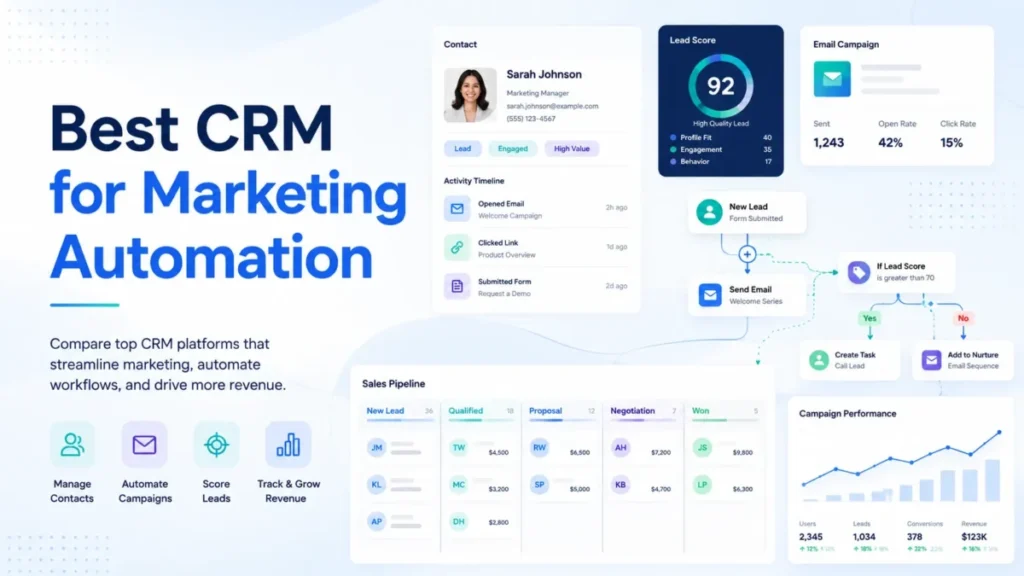

The headline price on a CRM marketing automation platform is almost never the price you pay. The plan that runs multi-step nurture, lead scoring, landing pages, and a clean sales handoff usually sits one or two tiers above the number in the ad, and the gap can be the difference between a $20 seat and an $890 monthly base.
In This Article (25 sections)
For most US teams comparing the best CRM for marketing automation in 2026, HubSpot is the safest all-in-one pick because contacts, forms, campaigns, workflows, and pipeline live in one system. ActiveCampaign wins on pure email automation depth if you can accept CRM pipelines as a paid add-on, Salesforce Account Engagement fits Salesforce-backed B2B revenue teams, and Brevo or EngageBay only win on budget when their contact limits fit your list.
This guide ranks ten platforms the way a buyer reads a contract, not a vendor brochure. It narrows the wider CRM software shortlist to the tools that automate marketing, and every price was checked on official pages on July 6, 2026, and the analysis focuses on plan gates, onboarding fees, contact ceilings, add-on costs, and which tool fits a specific team rather than a generic “small business” label.
Quick Verdict: Best CRM for Marketing Automation by Use Case
| Use case | Best pick | Why it fits |
|---|---|---|
| Best overall for growing B2B teams | HubSpot | CRM, forms, email, landing pages, and automation in one platform |
| Best for advanced email automation | ActiveCampaign | Deep automation builder, but CRM pipelines are an add-on |
| Best for Salesforce-backed B2B | Salesforce Account Engagement | Lead scoring, ABM, and nurture inside the Salesforce stack |
| Best budget CRM automation stack | Zoho | Journeys, segmentation, and CRM records at low per-user cost |
| Best usable free plan (and low-cost email) | Brevo | Free automation up to 2,000 contacts, then pays by send volume |
| Best for service businesses | Keap | CRM, invoicing, appointments, and follow-up in one package |
| Best budget all-in-one for tiny teams | EngageBay | CRM, email, helpdesk, and automation from a low entry price |
| Best for Freshworks users | Freshsales + Freshmarketer | Sales CRM plus marketing journeys across the Freshworks suite |
| Best for agencies and multi-client funnels | HighLevel | Sub-accounts, rebilling, and funnels for client work |
| Best for ecommerce lifecycle marketing | Klaviyo | Profile and event data for B2C, not B2B pipelines |
Read this table as a starting shortlist, not a final answer. The right pick still depends on your list size, whether you bill per seat or per contact, and how much of the automation you need is gated behind a higher tier, which is where most of the real cost hides.
How I Evaluated These CRM Marketing Automation Platforms
This is a research-led evaluation, not a hands-on test. I did not sign up, click through trials, or run live campaigns, so nothing here claims “in my testing.”
The analysis draws on official vendor pricing pages, product and feature pages, help-center notes, and third-party review patterns from sources like G2 and TechRadar. Pricing and plan gates were checked on July 6, 2026, and SaaS pricing changes often, so treat every number as a starting point to verify at checkout.
I scored each platform on nine things a buyer defends later: CRM depth, how well it delivers marketing automation end to end, lifecycle workflow capability, sales-and-marketing alignment, plan gates, hidden costs, scalability, integrations, and support. I also mapped each tool to a specific buyer cohort rather than a broad label, because “good for small business” is where most roundups stop being useful.
One limitation is worth stating up front. A few pricing calculators (ActiveCampaign, Zoho, HubSpot, Klaviyo) render dynamically or by region, so confirm those numbers on the live page before you budget.
Where a number was not cleanly verifiable, I say so instead of inventing precision.
Best CRM for Marketing Automation Compared
| Platform | Best for | Billing model | Automation type | Free plan | Starts at | Usable automation tier |
|---|---|---|---|---|---|---|
| HubSpot | All-in-one B2B growth | Per seat + marketing contacts | Native | Yes (limited) | $20/seat/mo | Professional (~$800-$890/mo) |
| ActiveCampaign | Email automation depth | Per contact + add-ons | Native email, add-on CRM | No (trial) | ~$15/mo (verify) | Plus or Pro |
| Salesforce Account Engagement | Salesforce B2B teams | Per org, annual | Native (in Salesforce) | No | $1,250/org/mo | Growth+ |
| Zoho | Budget CRM stack | Per user + contact plans | Native | CRM free (3 users) | $20/user/mo (CRM Plus) | Marketing Automation Professional |
| Brevo | Low-cost email plus CRM | Email volume + contacts | Native | Yes | $9/mo | Standard ($18/mo) |
| Keap | Service businesses | Platform package | Native | No (trial) | $299/mo | Single package ($299/mo) |
| EngageBay | Tiny all-in-one teams | Per user + contact caps | Native | Yes (250 contacts) | $14.99/user/mo | Growth ($64.99/user/mo) |
| Freshsales + Freshmarketer | Freshworks users | Per user + marketing contacts | Native (two products) | Yes | $9/user/mo | Freshmarketer paid |
| HighLevel | Agencies | Platform + usage | Native | No (trial) | $97/mo | Unlimited ($297/mo) |
| Klaviyo | Ecommerce B2C | Profiles + sends | Native | Yes (250 profiles) | ~$45 config | Paid build-a-plan |
The “usable automation tier” column is the one that changes budgets. Several of these tools advertise a low or free entry point, but the plan that runs real multi-step automation, lead scoring, or landing pages sits higher, so compare tools at the tier that unlocks the workflow you need, not at the tier that unlocks the login.
1. HubSpot Marketing Hub and Smart CRM: Best Overall
HubSpot is the strongest all-in-one choice for growing B2B teams that want CRM records, forms, email, landing pages, workflow automation, and reporting in a single system. The deeper feature picture is in our HubSpot CRM review, but the reason to pick it here is data unity, not any single feature.
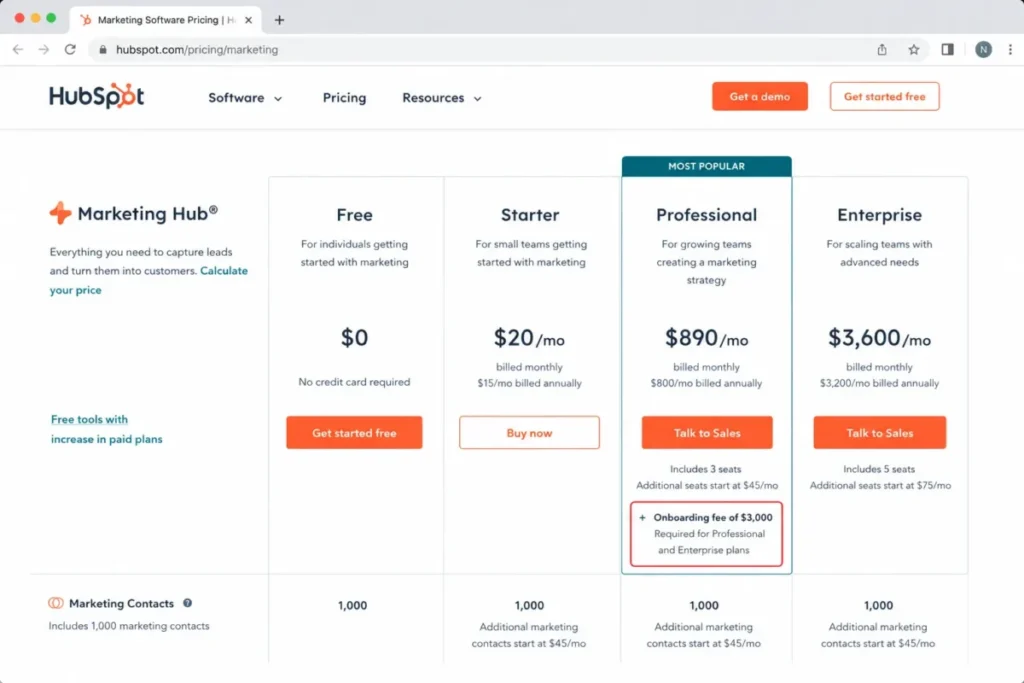
Pricing starts with a free tier for basic lead and email tools, and Starter appears from $20 per seat per month with 1,000 marketing contacts. The practical tier for scalable omni-channel automation is Professional, which starts around $800 per month billed annually (about $890 monthly) and includes 3 Core Seats.
Here is the catch most roundups skip. Professional and Enterprise require a one-time onboarding fee, listed at $3,000 for Professional and $7,000 for Enterprise, and additional Core Seats plus HubSpot Credits for AI features raise the real total.
What it does well:
- Native workflows that connect a form fill to a lead score, an email sequence, and a pipeline stage without external glue.
- Marketing contacts pricing that separates billable marketing contacts from stored CRM contacts, so a large database does not automatically inflate cost.
- A deep marketplace of integrations for the surrounding stack.
Where it falls short:
- The jump from Starter to Professional is the biggest budget shock in this list.
- AI features draw on HubSpot Credits, so heavy AI use adds variable cost on top of the plan.
Best for teams of roughly 5 to 50 people that run inbound campaigns and need marketing and sales working from the same record. Avoid HubSpot if you only send newsletters, or if you cannot fund the Professional base plus onboarding, because Starter alone will not carry real lifecycle automation.
Setup difficulty: Medium. The platform is approachable, but Professional-grade automation, lead scoring, and reporting take real configuration.
I would not budget from the Starter price. For most teams evaluating HubSpot for automation, the honest planning number is the Professional base plus onboarding plus any extra seats, and if that figure does not survive a finance review, the decision is already made.
2. ActiveCampaign: Best for Advanced Email Automation With CRM Add-Ons
ActiveCampaign is the pick for lifecycle marketers who want a deep automation builder and can treat CRM pipelines as a separate purchase. The full picture is in our ActiveCampaign evaluation, and the automation logic is the product’s real strength.
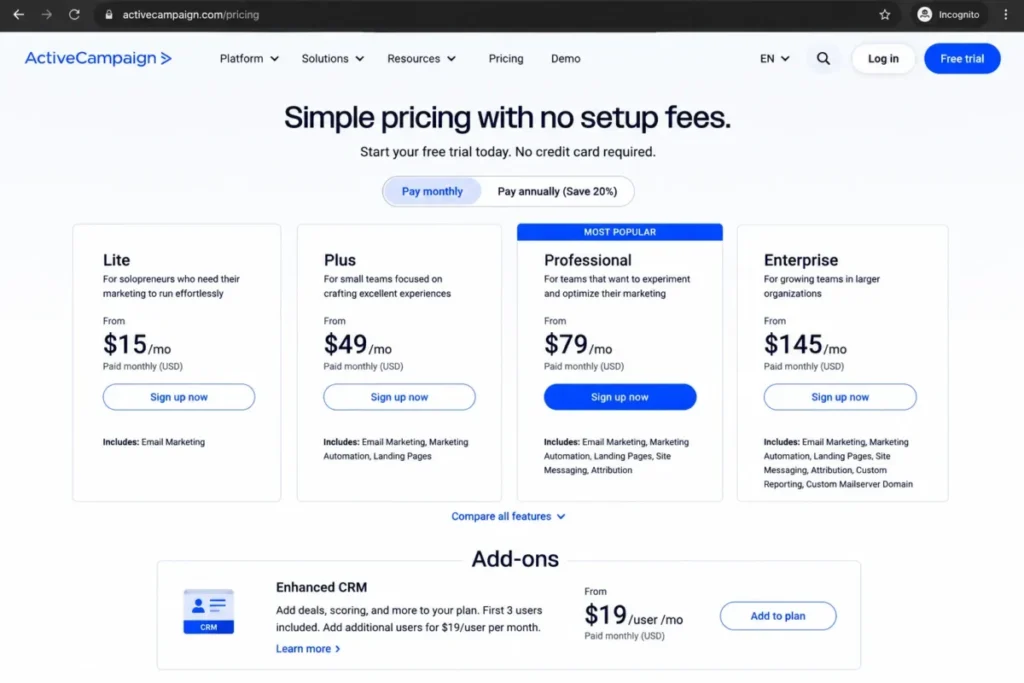
The official pricing page exposes a Starter, Plus, Pro, and Enterprise structure, but the numeric prices render dynamically and were not cleanly readable during research. Recent 2026 third-party pricing reports list Starter from about $15 per month billed annually (around $19 monthly) for 1,000 contacts, so confirm the live calculator before you commit a budget.
The gap CRM-first teams miss is this. Deeper CRM work, meaning pipelines and sales engagement, comes through an Enhanced CRM add-on rather than the base email plan, and Starter caps automations at 5 actions each with limited segmentation.
What it does well:
- One of the strongest automation builders in this category for branching, timing, and conditional logic.
- Site tracking and segmentation that support genuine lifecycle campaigns.
- Standard CRM and ecommerce integrations on entry plans.
Where it falls short:
- Pipelines, deal management, and lead scoring are add-on-driven, so an all-in cost can exceed the advertised email price.
- Third-party reviews note billing counts contacts including unsubscribed and bounced records, which inflates contact-based pricing over time.
Best for marketers with roughly 1,000 to 25,000 contacts who want automation depth first and can add CRM when the sales motion grows. Avoid ActiveCampaign if you expect full pipelines and lead scoring bundled into the base email plan, because that expectation leads to a mis-budget.
Setup difficulty: Medium to High. The automation builder rewards planning, and reviewers consistently mention a learning curve.
The email engine is excellent, but I treat ActiveCampaign as an automation platform with optional CRM, not a CRM with automation. That distinction decides whether the add-on math works for your team.
3. Salesforce Account Engagement: Best for Salesforce B2B Teams
Salesforce Account Engagement is the serious B2B automation layer for teams already committed to Salesforce CRM. It is powerful, and it is priced like enterprise software.
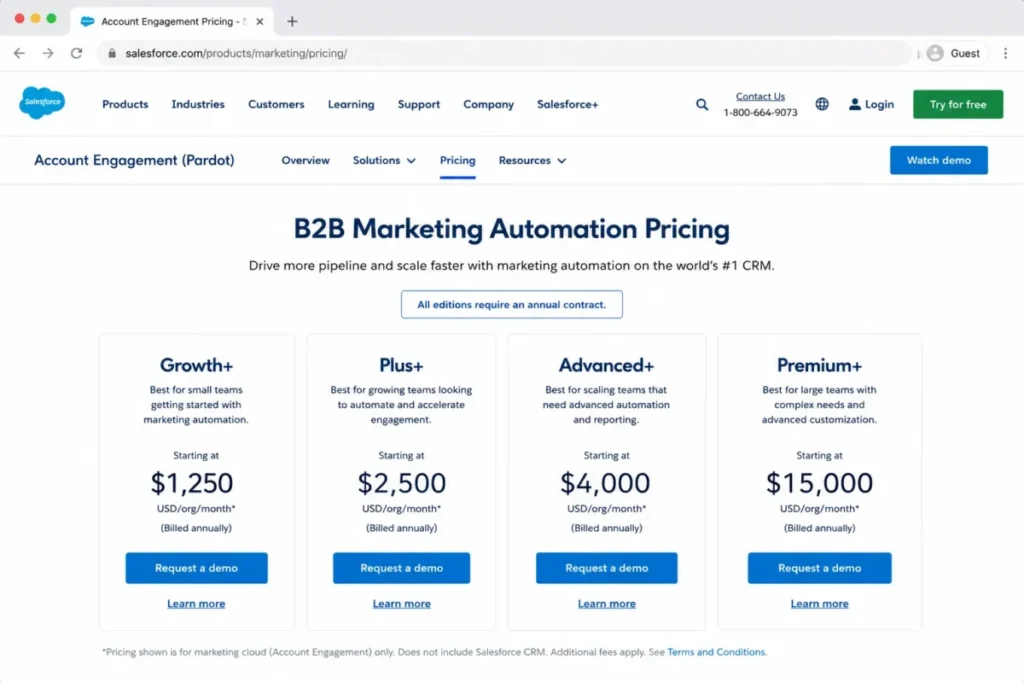
Growth+ starts at $1,250 per org per month billed annually, with Plus+ at $2,750, Advanced+ at $4,400, and Premium+ at $15,000. Our Salesforce pricing breakdown covers how those tiers and credits stack, and these are per-org prices, not per-seat, with every per-month product requiring an annual contract.
There is a caveat that changes the real cost. Account Engagement+ opens access to Marketing Cloud Next, but some Einstein request credits, messaging credits, and Data 360 credits may need separate purchase, so the plan price is a floor rather than a ceiling.
There is also a lighter Salesforce path many buyers overlook. Salesforce Starter Suite begins at $25 per user per month with 2,000 emails per month, and a Marketing Email Sends Bundle adds 1,000 sends for $10 per month, which suits basic small-business CRM and email but is not the same product as Account Engagement.
What it does well:
- Lead nurturing, scoring, and ABM that sit natively beside Salesforce pipeline data.
- Higher tiers add AI-powered scoring, B2B Marketing Analytics, business units, and a dedicated IP.
- Deep alignment for teams whose revenue reporting already lives in Salesforce.
Where it falls short:
- The entry cost and annual contract make it the wrong choice for small, self-serve teams.
- Credits and add-ons add procurement complexity on top of the base price.
Best for mid-market and enterprise B2B teams already on Salesforce who need lead scoring, ABM, and tight sales alignment. Avoid it if you want low-cost, month-to-month automation, because the Starter Suite is the small-business path and Account Engagement is not.
Setup difficulty: High. Implementation usually needs admin capacity or a partner, and reviewers describe a steep curve for smaller teams.
The renewal question here is simple. Before you sign the annual contract, confirm your team will use nurture, scoring, and ABM enough to justify an org price that starts at $1,250 a month and climbs with credits.
4. Zoho CRM and Zoho Marketing Automation: Best Budget CRM Automation Stack
Zoho is the value pick when a team already lives in Zoho apps and wants CRM records, journeys, and segmentation without enterprise pricing. The tradeoff, covered more in our Zoho CRM review, is product-stack complexity.
Zoho CRM Plus starts at $20 per user per month, while Zoho Marketing Automation is a separate product with Standard, Professional, and Enterprise tiers plus a 14-day trial. The pricing selector renders by region, so verify the USD edition prices on the live page before budgeting.
The confusion competitors leave unresolved is which Zoho product you need. Zoho CRM handles pipeline, workflows, and cadences, Zoho Marketing Automation handles journeys, landing pages, A/B testing, and WhatsApp automation on Professional, and Zoho CRM Plus bundles a broader suite.
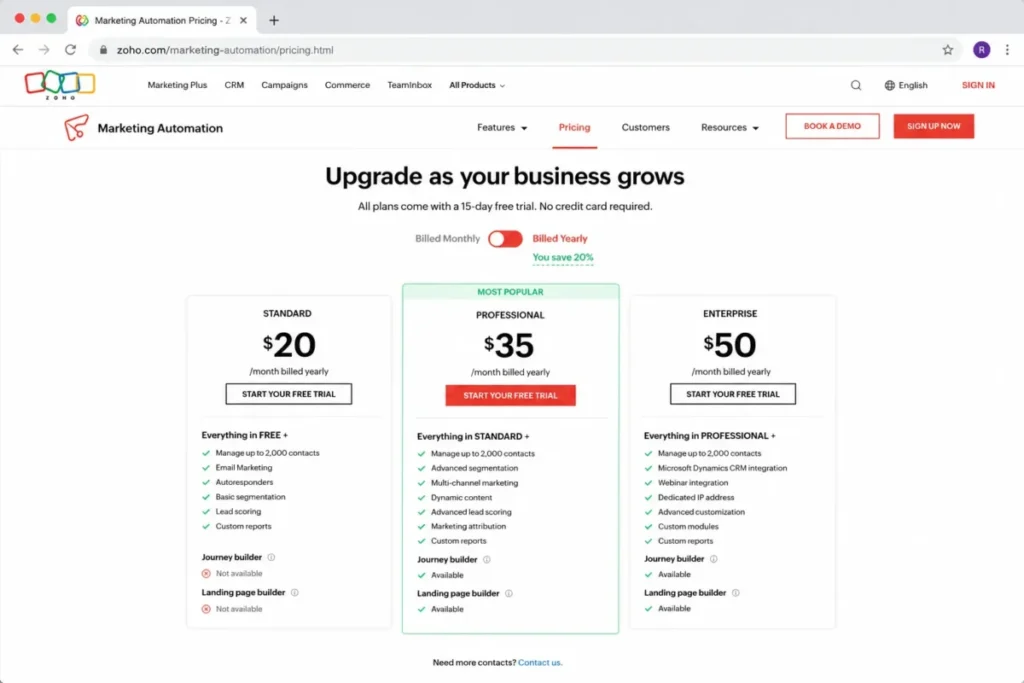
The limitation to plan around is the contact ceiling. Zoho Marketing Automation’s own FAQ states that exceeding your plan’s contact count stops new contacts from entering journeys and disables active sync imports until you resolve it, which can quietly break a live campaign.
What it does well:
- Workflow rules, cadences, and customer journeys at a low per-user entry.
- Segmentation, forms, and Google Ads integration for teams already in the Zoho suite.
- Strong value when sales and marketing both use Zoho.
Where it falls short:
- Choosing between CRM, Marketing Automation, and CRM Plus adds decision overhead.
- Reviewers note a steep learning curve for complex customization and automation.
Best for cost-conscious teams that want CRM plus journeys and accept some configuration work. Avoid Zoho if you want the simplest single-product buying path or turnkey enterprise analytics.
Setup difficulty: Medium to High. The pieces are affordable, but wiring CRM to Marketing Automation cleanly takes time.
Choose Zoho CRM alone if you mainly need pipeline with light email, add Zoho Marketing Automation when you need real journeys, and consider CRM Plus only when you want the broader bundle in one contract.
5. Brevo: Best Low-Cost Email and CRM Automation
Brevo is the budget path when email volume matters more than seat count and you want light CRM alongside campaigns. It bills on sends and contacts rather than per user, which changes who it fits.
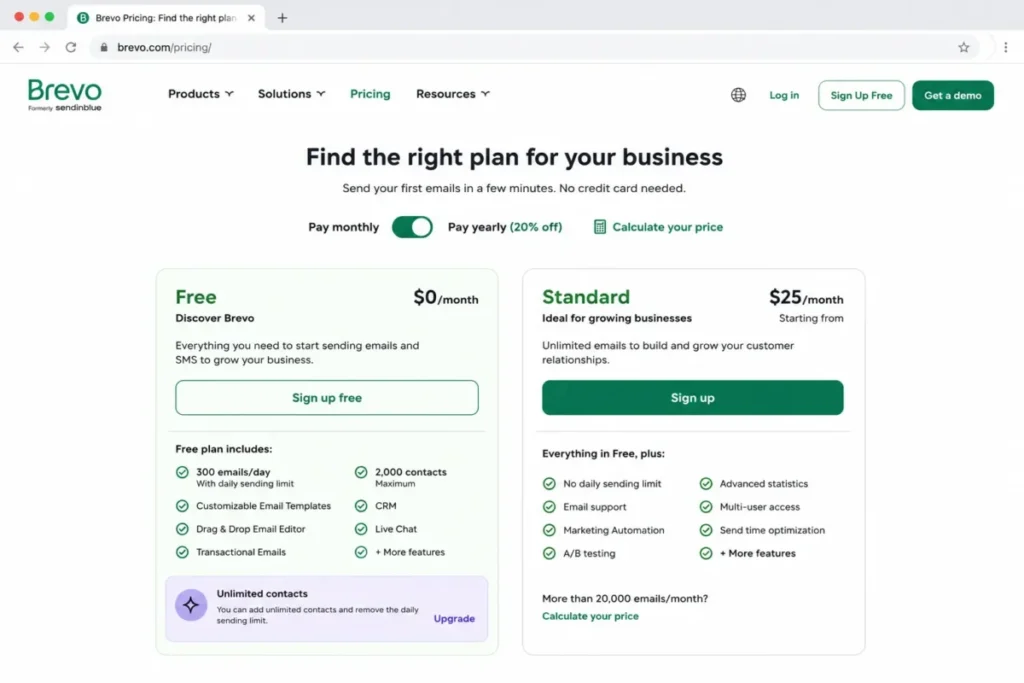
There is a free plan, with Starter from $9 per month, Standard from $18 per month, and Professional from $499 per month. The free tier allows 300 daily email sends and stores up to 100,000 contacts, but multi-channel marketing automation is capped at 2,000 contacts on free.
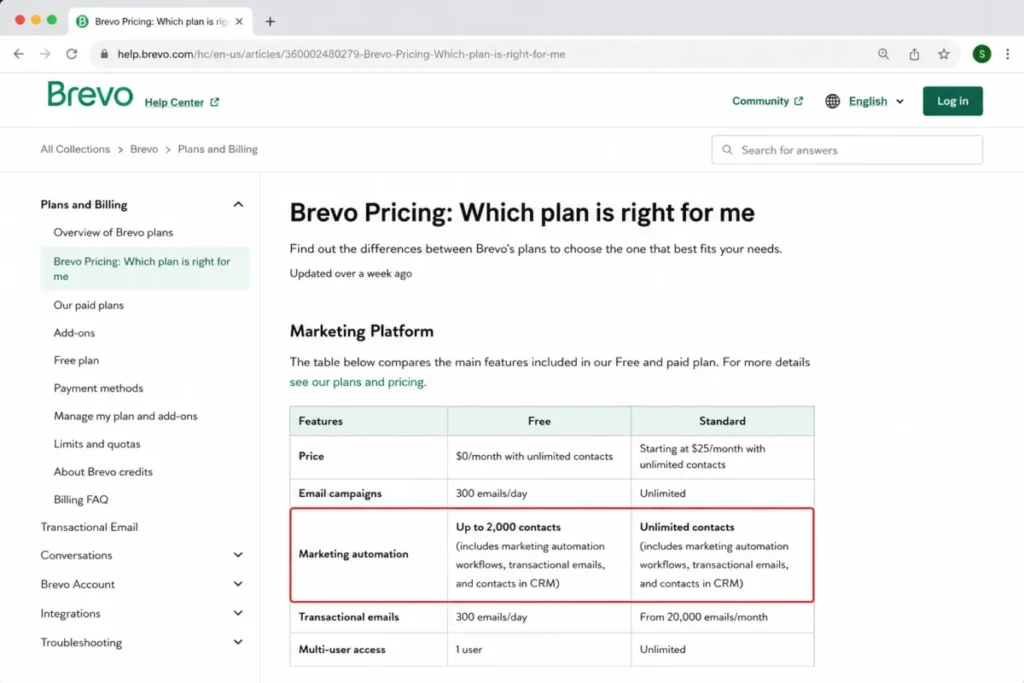
The upgrade trigger is clear. Standard unlocks marketing automation across your full contact count, plus A/B testing, advanced analytics, and a landing page builder, so Standard, not free, is the usable automation tier for most teams.
What it does well:
- Email and SMS campaigns, transactional email, and automation without paying per stored contact.
- Advanced segmentation and send-time optimization on paid plans.
- A genuinely low entry cost for small lists.
Where it falls short:
- WhatsApp, AI segmentation, and custom objects sit on Professional or add-on paths.
- Reviewers note advanced page design and real-time support can feel limited versus larger platforms.
Best for small teams that need affordable email plus basic CRM and automation and do not need enterprise pipelines. Avoid Brevo if you need deep B2B sales workflows or advanced landing page systems, because those are not its strength.
Setup difficulty: Low to Medium. Campaigns and simple automations are quick to launch.
I would budget Brevo at Standard, not free. The free plan is a real workspace, but the 2,000-contact automation cap is the point where a growing list forces the upgrade.
6. Keap: Best for Service Businesses With High-Value Leads
Keap fits coaches, consultants, agencies, and local service businesses that want CRM, follow-up automation, invoicing, and appointments in one package. It is more than an email tool, which is the point.
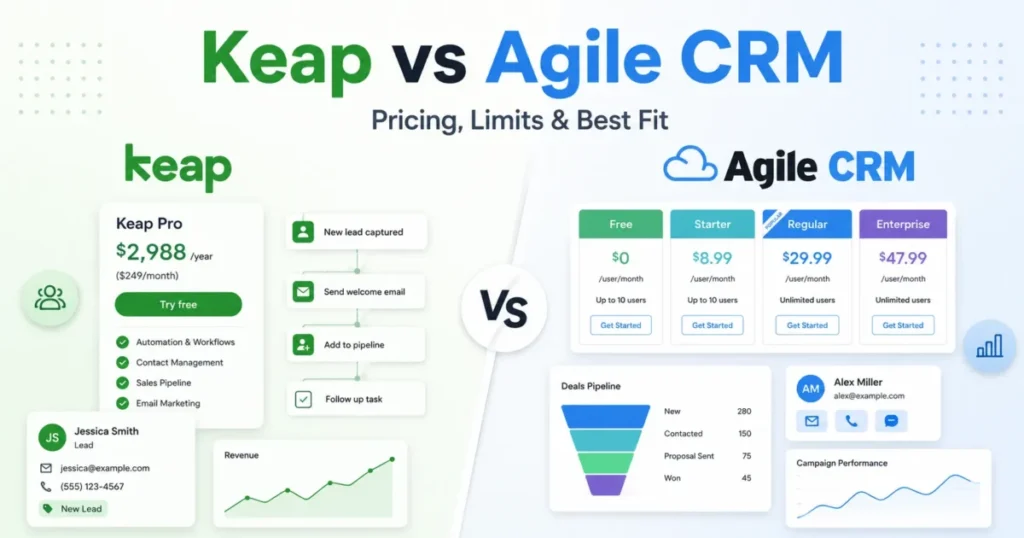
Pricing starts at $299 per month, shown as $2,988 per year on annual billing, and includes CRM, landing pages, forms, email marketing, sales automation, scheduling, invoicing, and a customer success manager. This is a platform package, not a per-seat entry price.
The cost most buyers miss sits in messaging. Keap’s text marketing runs in tiers up to $279 per month, with overages at $0.015 per text and $0.01 per minute, plus an optional local number at $10 per month.
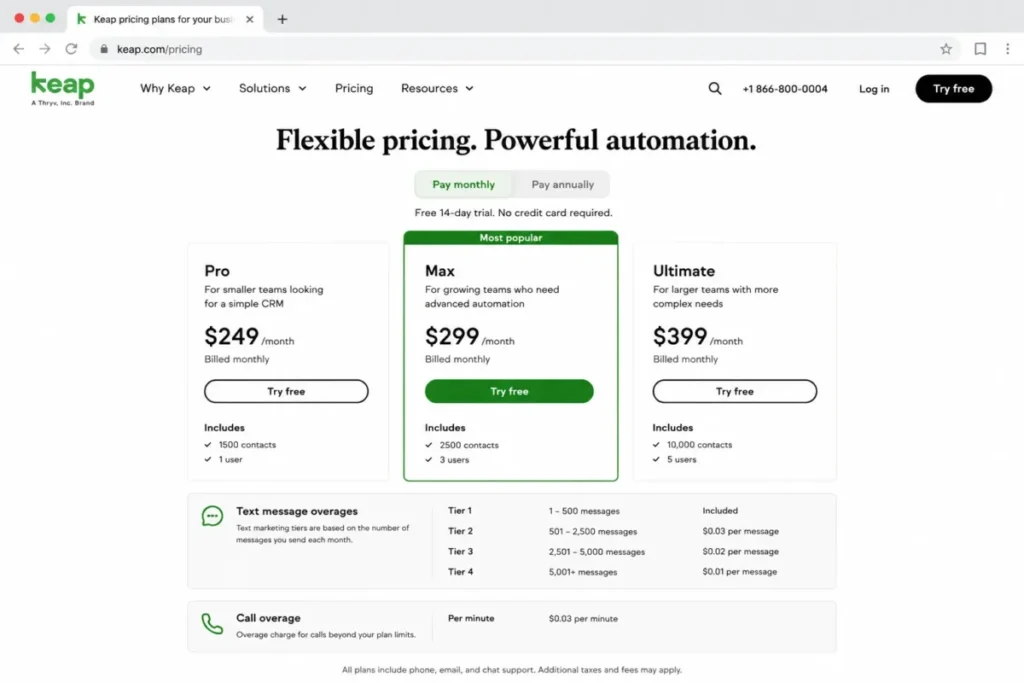
There is also a launch caveat for the trial. Keap’s free trial caps email sending at 25 messages and requires DKIM setup, so you cannot fully load-test deliverability before paying.
What it does well:
- Combines CRM, invoicing, appointments, and automation for businesses that sell services.
- A prebuilt automation library that shortens setup for common follow-up flows.
- Includes a dedicated customer success manager, which service teams value at launch.
Where it falls short:
- The $299 floor is steep for low-margin businesses or very large lists.
- Text overages and higher SMS tiers add cost as outreach scales.
Best for service businesses with high-value leads that need follow-up discipline more than newsletter volume. Avoid Keap if you are newsletter-first or run a large, low-value contact list, because the package price will not pay back.
Setup difficulty: Medium. The library helps, but pipelines and automations still need setup, which is partly why a success manager is included.
Keap earns its price when one recovered high-value client covers the monthly cost. If your average deal is small, the math turns against it fast.
7. EngageBay All-in-One: Best Budget All-in-One for Very Small Teams
EngageBay is the low-cost all-in-one for teams of roughly 1 to 10 people that want CRM, email, landing pages, helpdesk, and live chat in one suite. It covers a lot of ground for the money.
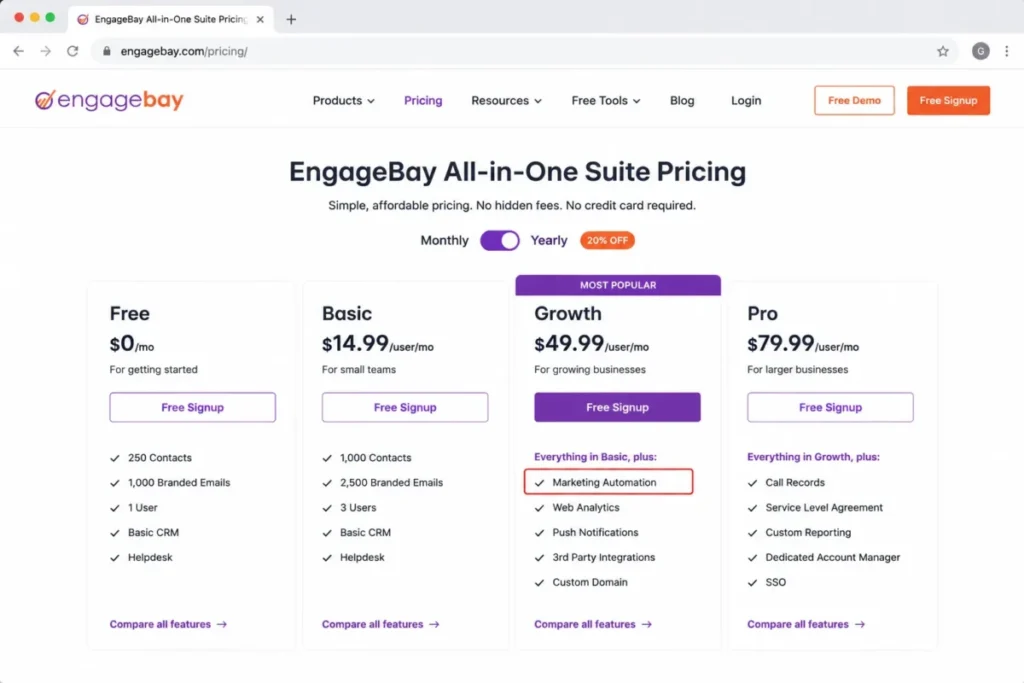
The free plan supports 250 contacts, Basic is $14.99 per user per month paid yearly with 500 contacts and lead scoring, Growth is $64.99 per user per month with 5,000 contacts, and Pro is $119.99 per user per month with 50,000 contacts, SSO, custom reporting, an SLA, and phone support.
The gate that catches budget buyers is where automation lives. Marketing automation starts on the Growth plan, not on free or Basic, so the true automation entry point is $64.99 per user per month, not the headline low price.
What it does well:
- Broad feature coverage (CRM, email, sequences, landing pages, helpdesk, live chat) at a low entry price.
- Lead scoring available from the Basic plan for early qualification.
- Contact caps that scale cleanly from 250 to 50,000 across tiers.
Where it falls short:
- Marketing automation is gated to Growth, which changes the budget math for small teams.
- Deep reporting, integrations, and automation governance are lighter than enterprise suites.
Best for very small teams that want one affordable system and can start automation at Growth. Avoid EngageBay if you need enterprise reporting, heavy integrations, or large-scale automation governance.
Setup difficulty: Low to Medium. The suite is approachable, and small teams can launch core flows quickly.
The trap is assuming Basic covers automation. Price EngageBay at Growth if automation is the reason you are buying, and it stays a strong value even then.
8. Freshsales + Freshmarketer: Best for Freshworks Users
Freshworks fits teams that want a light sales CRM and marketing journeys and are comfortable running two connected products. Freshsales handles pipeline, as our Freshsales evaluation details, and Freshmarketer handles marketing.
Freshsales Growth starts at $9 per user per month billed annually, with Pro at $39 and Enterprise at $59, plus a free plan for 3 users and a 21-day trial. Freshmarketer offers a free tier with 100 marketing contacts and a paid Enterprise plan from $15 per month with 500 marketing contacts billed annually.
The structural point competitors skip is that full marketing automation depends on Freshmarketer or the Freshsales Suite, not Freshsales alone. Freshsales is the CRM, and the journeys, landing pages, and attribution live on the marketing side.
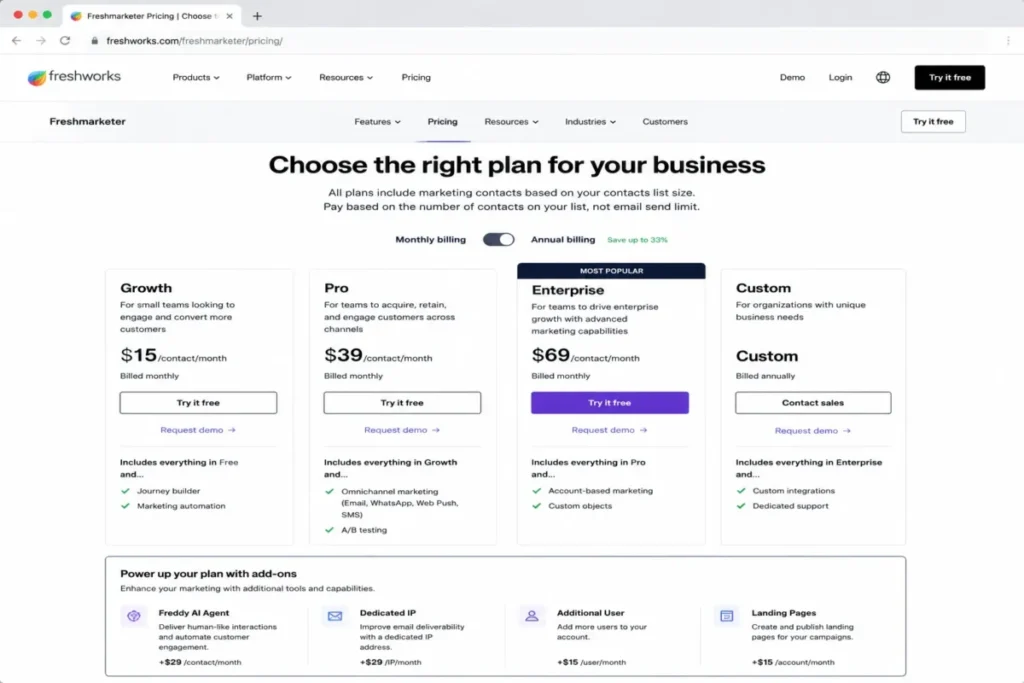
The add-on list is where cost drifts. Marketing contacts, conversion rate optimization, a dedicated IP, the Freddy AI Agent, and a messaging agent can all be add-ons, so a clean-looking base price is not the whole bill.
What it does well:
- Freshsales pipelines, workflows, and built-in chat, email, and phone at a low per-user entry.
- Freshmarketer journeys, landing pages, segmentation, and multichannel outreach for lifecycle work.
- Freddy AI features across the suite for scoring and assistance.
Where it falls short:
- Buyers must decide between Freshsales, Freshmarketer, or the Suite, which adds selection overhead.
- Marketing contacts and AI agents as add-ons complicate the true cost.
Best for teams already on Freshworks that want sales plus marketing without HubSpot-level pricing. Avoid it if you want HubSpot-depth inbound marketing or Salesforce-level customization in one product.
Setup difficulty: Medium. Two products means two configurations and a handoff to wire between them.
Decide which Freshworks product you are buying before you compare prices. The Suite is the honest comparison point when you need both sales and marketing automation.
9. HighLevel: Best for Agencies and Multi-Client Funnels
HighLevel is built for agencies, consultants, and multi-location operators that manage several client funnels and want sub-accounts, CRM pipelines, email, SMS, funnels, and rebilling. It is a different shape from an in-house CRM.
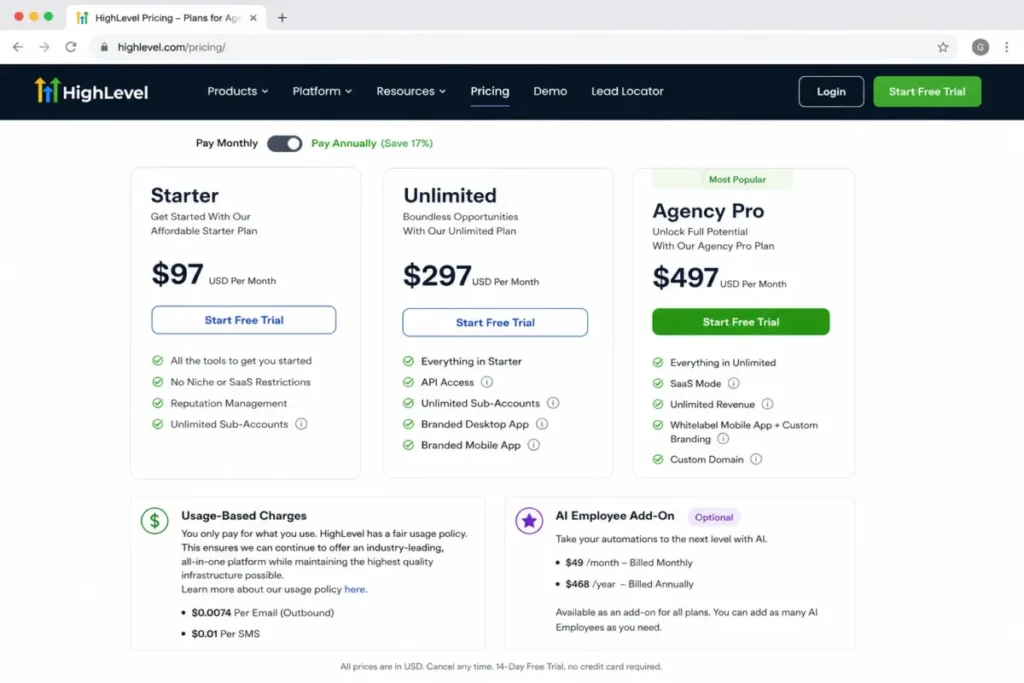
Starter is $97 per month, Unlimited is $297 per month, and Agency Pro is $497 per month, with a 14-day trial and annual pricing at $970, $2,970, and $4,970. Starter includes 3 sub-accounts, Unlimited adds unlimited sub-accounts and basic API access, and Agency Pro adds SaaS Mode, automated sub-account creation, and rebilling with markup.
The cost warning agency roundups underplay is usage. HighLevel applies usage-based charges for phone, email, and AI on top of the plan, and AI Employee add-ons run $50 or $97 per month per sub-account, so client margins depend on modeling usage, not just the plan price.
What it does well:
- Sub-account architecture, funnels, and rebilling designed for client work.
- CRM pipelines, unified conversations, booking, and payments in one platform.
- White-label and SaaS Mode options at higher tiers for agencies reselling the tool.
Where it falls short:
- Usage-based charges make the monthly bill variable and margin-sensitive.
- The sub-account model is awkward for a single in-house sales team that does not manage clients.
Best for agencies and operators managing three or more client funnels who need sub-accounts and rebilling. Avoid HighLevel if you are an in-house B2B team wanting polished native enterprise CRM governance, because the design is agency-first.
Setup difficulty: Medium to High. The platform is broad, and multi-client setup plus usage modeling takes planning.
For agencies, the real question is margin per sub-account after phone, email, and AI usage. Model that before you price client retainers, because the plan fee is only the starting line.
10. Klaviyo B2C CRM: Best for Ecommerce Lifecycle Marketing
Klaviyo is the pick for DTC and ecommerce brands that need customer profiles, event-based segmentation, and email plus SMS automation tied to revenue. It is a B2C CRM, and our Klaviyo review explains why that framing matters.
The free plan covers up to 250 active profiles, 500 emails per month, 150 mobile message credits, and 10,000 Composer credits, with built-in reporting and Customer Hub. Paid pricing is configuration-based through a build-a-plan calculator, which displayed a $45 total for one sample setup during research.
The disqualifier to state plainly is category. Klaviyo is not designed for complex B2B sales pipelines with reps, forecasts, and quote-to-close stages, so a B2B team choosing it for pipeline management will be disappointed.
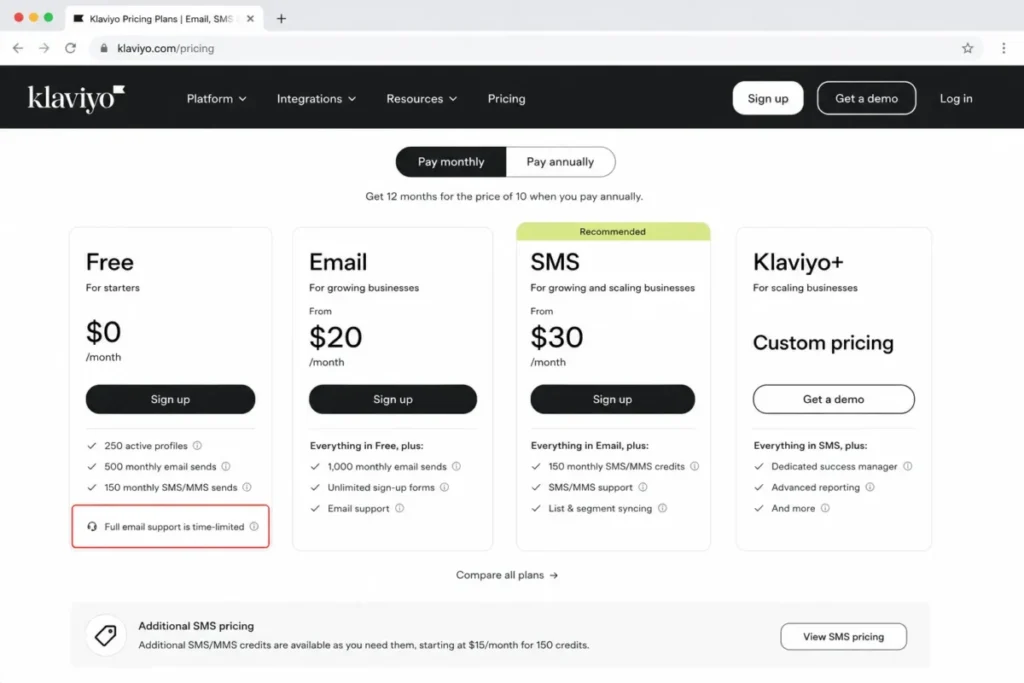
The support caveat on free is easy to miss. Full email support on the free plan is limited to the first 60 days, and exceeding free limits pauses sending or forces an upgrade.
What it does well:
- Profile and event data built for ecommerce lifecycle automation.
- Email and SMS automation, segmentation, and revenue attribution in one place.
- Customer Hub and ecommerce integrations that fit DTC operations.
Where it falls short:
- No opportunity pipelines, forecasting, or quote-to-close CRM for B2B sales.
- Costs scale with active profiles and channel volume, so growth raises the bill.
Best for ecommerce and B2C brands that live on customer profiles and lifecycle sends. Avoid Klaviyo if you run a B2B sales motion that needs deals, stages, and forecasts, because that is a different category of CRM.
Setup difficulty: Low to Medium for ecommerce stacks with native integrations.
Klaviyo is the right tool for the wrong buyer surprisingly often. If your revenue comes from repeat B2C purchases, it fits, and if it comes from sales reps closing deals, it does not.
Pricing Comparison: Starting Price vs Minimum Usable Automation Tier
| Platform | Billing model | Free plan | Starting price | Usable automation tier | Notable added cost |
|---|---|---|---|---|---|
| HubSpot | Per seat + marketing contacts | Yes (limited) | $20/seat/mo | Professional ~$800-$890/mo | $3,000 onboarding; AI credits |
| ActiveCampaign | Per contact + add-ons | No (trial) | ~$15/mo (verify) | Plus or Pro | Enhanced CRM add-on; SMS |
| Salesforce Account Engagement | Per org, annual | No | $1,250/org/mo | Growth+ | Einstein, messaging, Data 360 credits |
| Zoho | Per user + contact plans | CRM free (3 users) | $20/user/mo (CRM Plus) | Marketing Automation Professional | SMS credits; contact overage blocks journeys |
| Brevo | Email volume + contacts | Yes | $9/mo | Standard $18/mo | WhatsApp; AI on Professional |
| Keap | Platform package | No (trial) | $299/mo | Included in package | SMS tiers to $279/mo; overages |
| EngageBay | Per user + contact caps | Yes (250) | $14.99/user/mo | Growth $64.99/user/mo | Pro for SSO, SLA, reporting |
| Freshsales + Freshmarketer | Per user + marketing contacts | Yes | $9/user/mo | Freshmarketer paid | Marketing contacts; Freddy AI Agent |
| HighLevel | Platform + usage | No (trial) | $97/mo | Unlimited $297/mo | Usage charges; AI add-ons per sub-account |
| Klaviyo | Profiles + sends | Yes (250 profiles) | ~$45 config | Paid build-a-plan | Scales with profiles and SMS |
All prices were checked on official pages on July 6, 2026, and SaaS pricing changes often, so verify the live calculator, such as the HubSpot pricing tiers, before you buy. For per-seat tools the ten-user math is direct: HubSpot Starter runs about $200 per month at ten seats before contacts, EngageBay Basic about $150, Zoho CRM Plus about $200, and Freshsales Growth about $90, while contact-based tools like Brevo and Klaviyo and org-priced tools like Salesforce and HighLevel do not scale by seat, which is exactly why comparing them on one price line is misleading.
Pricing Model: Why These Tools Are Not Comparable on One Line
| Platform | Pricing model | Cheap when | Expensive when |
|---|---|---|---|
| HubSpot | Per seat + marketing contacts | Few seats, controlled marketing contacts | Many seats plus Professional plus onboarding |
| ActiveCampaign | Per contact + add-ons | Small clean list, email only | Large list plus CRM add-ons |
| Salesforce Account Engagement | Per org, annual | Large org spreading a fixed price | Small team paying enterprise floor |
| Zoho | Per user (CRM) + contact plans (marketing) | Small Zoho-native team | Large lists hitting contact ceilings |
| Brevo | Email volume + contacts | Small list, high send need | Very large multichannel volume |
| Keap | Flat platform package | Service team with high-value deals | Low-margin team, large list |
| EngageBay | Per user + contact caps | Tiny team wanting all-in-one | Automation need forces Growth |
| Freshsales + Freshmarketer | Per user + marketing contacts | Freshworks team, small marketing list | Add-ons stack on both products |
| HighLevel | Platform + usage | Agency spreading cost across clients | High phone, email, or AI usage |
| Klaviyo | Profiles + sends | Small profile count | High active profiles plus SMS |
A per-seat tool can be cheap for a two-person team with a huge list, while a contact-based tool can be cheap for a ten-person team with a small list, and the same product can be the budget winner or the budget loser depending only on your list-to-seat ratio. Match the pricing model to your own shape before you compare the numbers.
Free Plan Reality Check: Which Free CRM Automation Is Usable
| Platform | Free plan hard limit | Automation on free? |
|---|---|---|
| HubSpot | Free tier, up to 2 users | Basic lead and email tools only |
| Brevo | 300 daily sends, up to 100,000 contacts stored | Automation capped at 2,000 contacts |
| EngageBay | 250 contacts | No marketing automation on free |
| Freshsales | Free for 3 users | Limited; full journeys need Freshmarketer paid |
| Freshmarketer | 100 marketing contacts | Limited automation on free |
| Klaviyo | 250 active profiles, 500 emails/mo | Automation runs, but tiny volume ceiling |
| Zoho CRM | Free for 3 users | CRM only; journeys need Marketing Automation |
“Free CRM with marketing automation” is mostly a starting sandbox, not a running system. Brevo’s free plan is the most usable for real automation because it runs multi-channel flows up to 2,000 contacts, Klaviyo’s free plan works for a very small ecommerce list, and the rest treat free as lead capture with automation gated to a paid tier.
Feature Gate Comparison: Which Plan Unlocks Real Automation
| Platform | Multi-step automation | Lead scoring | Landing pages | AI features |
|---|---|---|---|---|
| HubSpot | Professional | Professional | Starter+ (basic), Pro (full) | AI via HubSpot Credits |
| ActiveCampaign | All plans (Starter limited to 5 actions) | Enhanced CRM add-on | Plus+ | Plus/Pro tiers |
| Salesforce Account Engagement | Growth+ | Plus+ (AI scoring) | Growth+ | Einstein credits |
| Zoho Marketing Automation | Standard+ | Professional+ | Professional | Enterprise/Zia features |
| Brevo | Free (to 2,000), full on Standard | Paid tiers | Standard | Professional |
| Keap | Included | Included | Included | Plan-dependent |
| EngageBay | Growth | Basic+ | Basic+ | Higher tiers |
| Freshmarketer | Paid plan | Freshsales Pro / Freddy | Paid plan | Freddy AI (some add-on) |
| HighLevel | All plans | Included | Included | AI add-ons |
| Klaviyo | Free+ (volume-limited) | Segmentation-based | N/A (flows/forms) | Composer credits |
The single most useful question is which plan turns on multi-step automation, lead scoring, and landing pages together, because that combination is the real definition of CRM marketing automation. On that test, HubSpot centralizes it at Professional, Salesforce at Growth+, Zoho at Marketing Automation Professional, and Brevo at Standard, while ActiveCampaign splits automation from CRM scoring across a base plan and an add-on.
Native, Add-On, or Connected: How the Automation Ships
| Platform | Automation delivery |
|---|---|
| HubSpot | Native in one platform |
| Salesforce Account Engagement | Native within the Salesforce ecosystem |
| Zoho | Native, but often two Zoho products working together |
| Brevo | Native |
| Keap | Native |
| EngageBay | Native |
| HighLevel | Native |
| Klaviyo | Native (B2C event data) |
| ActiveCampaign | Native email automation, add-on CRM pipelines |
| Freshsales + Freshmarketer | Two native products connected across the suite |
“All-in-one” hides a real difference in implementation effort. A single native system like HubSpot or Keap means one setup and one data model, while a two-product stack like Freshsales plus Freshmarketer or an add-on model like ActiveCampaign means more wiring, more data-sync risk, and more places for a handoff to break.
AI and SMS Costs: Where the Bill Moves
AI and SMS are the two line items most likely to turn a fixed plan into a variable one. Several platforms bill them by credit, tier, or usage rather than folding them into the base price.
On the AI side, HubSpot draws AI features from HubSpot Credits, Salesforce Account Engagement can require Einstein request credits, Freshworks offers a Freddy AI Agent as an add-on, HighLevel prices AI Employee add-ons per sub-account, and Klaviyo uses Composer credits. None of these are automatically included in the way a feature checkbox implies.
On the SMS side, Keap runs text tiers up to $279 per month with per-message and per-minute overages, Brevo and Freshmarketer treat SMS and WhatsApp as volume or add-on channels, HighLevel charges messaging as usage, and Salesforce meters messaging credits. A multichannel plan can look affordable until the first heavy SMS month lands.
If you plan to use AI scoring, AI content, or SMS at volume, model those costs separately before you compare base plans. That single step prevents the most common budget surprise in this category.
Setup and Migration Difficulty
| Platform | Setup difficulty | Why |
|---|---|---|
| Brevo | Low to Medium | Campaigns and simple automations launch quickly |
| EngageBay | Low to Medium | Approachable all-in-one for small teams |
| Klaviyo | Low to Medium | Native ecommerce integrations speed setup |
| Keap | Medium | Automation library helps, but pipelines need configuration |
| HubSpot | Medium | Approachable UI, but Professional automation takes real work |
| Freshsales + Freshmarketer | Medium | Two products means two configs and a handoff |
| Zoho | Medium to High | Wiring CRM to Marketing Automation cleanly takes time |
| ActiveCampaign | Medium to High | Powerful builder with a real learning curve |
| HighLevel | Medium to High | Multi-client sub-accounts and usage modeling |
| Salesforce Account Engagement | High | Usually needs admin capacity or a partner |
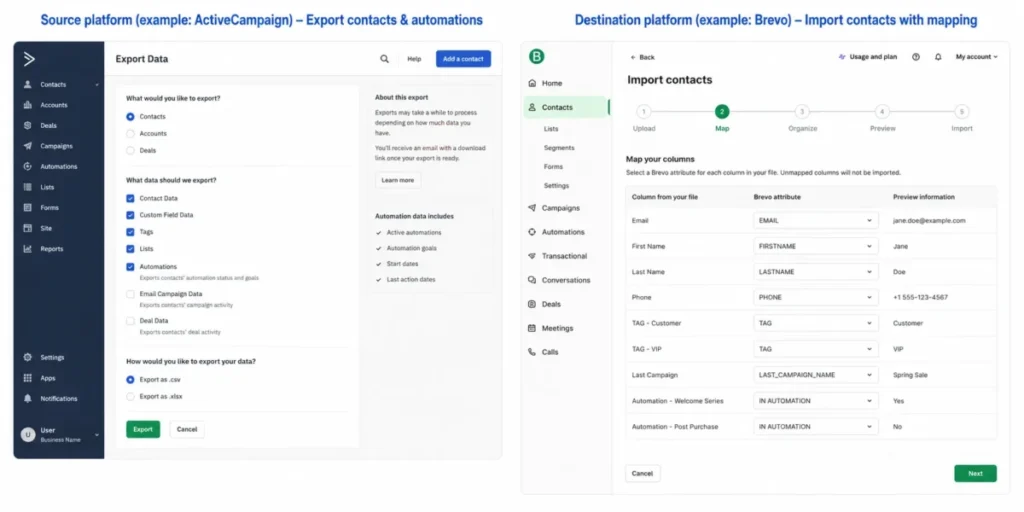
Migration is harder than a first setup because you move not just contacts but tags, lists, automations, and pipeline stages, and broken automations are worse than missing ones. Budget real time for rebuilding workflows and testing sends before you cut over, and do not promise leadership an exact migration timeline until the automation logic is mapped.
Which CRM Marketing Automation Tool Should You Avoid
No tool here is bad, but several are wrong for specific buyers, and matching the mismatch is more useful than another list of strengths.
Avoid Pipedrive as your marketing automation core if you are a marketing-led team. Pipedrive is a strong sales-first CRM, detailed in our Pipedrive CRM review, but serious campaigns require its Campaigns add-on starting around $13.33, and reviewers note it lacks native marketing automation depth, so a lifecycle-heavy team will outgrow it.
Avoid Salesforce Account Engagement if you are a small, self-serve team. The $1,250-per-month org floor and annual contract are built for mid-market and enterprise, and the Starter Suite is the correct small-business Salesforce path.
Avoid Klaviyo if your revenue depends on B2B sales reps. It is a B2C CRM without pipelines or forecasting, and no amount of segmentation turns it into a deal-management system.
Avoid HighLevel if you are a single in-house sales team. The sub-account and rebilling model is agency-first, and the usage-based charges add volatility you do not need without clients to bill.
Avoid HubSpot Professional if you cannot fund the base plan plus the $3,000 onboarding fee. Starter will not carry real automation, so an underfunded HubSpot purchase stalls at a tier that cannot do the job.
The first thing that breaks when you buy the wrong category is not a feature, it is trust in the data. A sales team handed a B2C tool, or a marketing team handed a sales-first CRM, stops using it cleanly within weeks, and abandoned automation is worse than none.
How to Choose the Right CRM for Marketing Automation
Start with your team shape, not the feature list. Work through these questions in order, because the first three eliminate most of the shortlist.
- Are you B2B or B2C? B2B pipeline teams need deals, stages, and lead scoring, while B2C ecommerce teams need profiles, events, and lifecycle sends.
- Do you bill your list or your seats? A large list on few seats favors contact or send-based pricing, while a small list on many seats favors per-seat CRM.
- Which plan unlocks the automation you need? Find the tier that turns on multi-step automation, lead scoring, and landing pages together, and price the tool there.
- What must it connect to? Map the CRM, email, calendar, ecommerce store, billing, and reporting stack it has to fit before you commit.
- How much setup can your team absorb? Match setup difficulty to your available admin time, because unconfigured automation is shelfware.
- What is the true cost with AI and SMS at your volume? Add credits, add-ons, and usage to the base plan before you compare.
- What is the total at your real seat and contact count in 12 months? Budget for growth, not just launch.
Here is a simple decision path by cohort:
- B2B pipeline team that wants one system: start with HubSpot, and consider Salesforce Account Engagement if you already run Salesforce CRM.
- B2B team that wants automation depth first: choose ActiveCampaign and add the CRM module when the sales motion grows.
- Budget-conscious team already in a suite: choose Zoho, or EngageBay if you want a single low-cost all-in-one.
- Service business with high-value deals: choose Keap for follow-up and invoicing in one place.
- Ecommerce or DTC brand: choose Klaviyo for profile and event-based lifecycle marketing.
- Agency managing multiple client funnels: choose HighLevel for sub-accounts and rebilling.
- Team that lives on email volume with light CRM: choose Brevo, or weigh dedicated email marketing platforms if you barely need CRM at all.
The workflow this whole category exists to serve is the marketing-to-sales handoff. A clean version looks like this: a form fill creates or updates a contact, behavior raises a lead score, the score crossing a threshold triggers a nurture sequence, and a qualified score notifies a rep and moves the contact into a pipeline stage they can act on inside the same system.
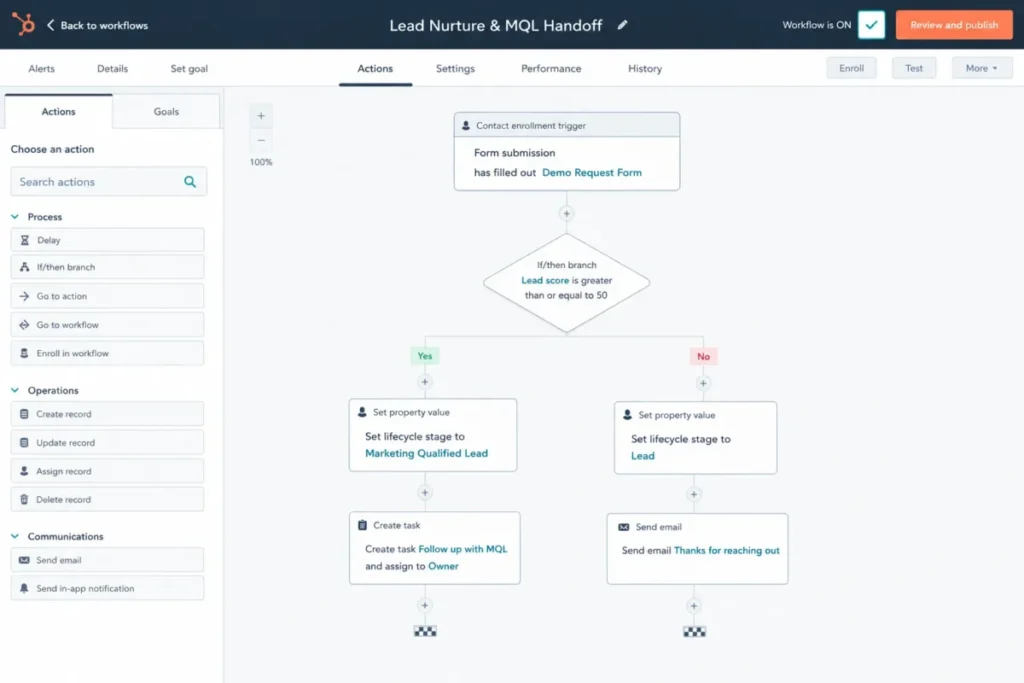
Run the 30 and 90 day check before you call the purchase a success. By day 30, the core automation should be live and passing scored leads to sales, and by day 90, reps should trust the lead data enough to work it without re-qualifying, because if they do not, the problem is adoption, not features.
Common Mistakes When Buying CRM Marketing Automation
Buying on the starting price. The advertised number rarely includes the tier that runs real automation, so budget from the usable tier instead.
Ignoring onboarding and add-on fees. HubSpot onboarding, ActiveCampaign CRM add-ons, and Freshworks marketing add-ons all change the real total.
Confusing marketing contacts with stored contacts. Some tools bill only the contacts you actively market to, while others bill your whole database, and the difference is large at scale.
Treating SMS and AI as free features. Both are frequently metered by usage or credits, so a multichannel plan can move with volume.
Picking the wrong category. A B2C tool for a B2B team, or a sales-first CRM for a marketing-led team, causes low adoption fast.
Underfunding setup. Marketing automation fails when nobody has time to build and test the workflows, no matter how good the tool is.
Skipping the pricing-model check. Comparing a per-seat tool and a contact-based tool on one price line hides which one is cheaper for your list-to-seat ratio.
Final Verdict: My Picks by Team Type
HubSpot is the best CRM for marketing automation overall in 2026 because it puts contacts, campaigns, workflows, and pipeline in one system, and the main risk is cost, not capability. Budget it at Professional plus onboarding, and it earns the top spot for most growing B2B teams.
For a B2B team that wants automation depth before CRM depth, ActiveCampaign is the better builder, as long as you plan for the CRM add-on. For a team already committed to Salesforce, Account Engagement is the natural B2B automation layer despite its enterprise pricing and annual contract.
On budget, Zoho is the value stack for teams already in its suite, Brevo wins when email volume matters more than seats, and EngageBay is the cheapest usable all-in-one once you accept automation starting at Growth. Keap is the service-business pick, HighLevel is the agency pick, and Klaviyo is the ecommerce pick that B2B teams should not buy.
The switch-or-stay call is straightforward. Switch when your current tool gates the automation you need behind a tier you refuse to pay, or when it sits in the wrong category for your revenue model, and stay if your only complaint is a missing feature you can add through an integration, because migrating automation is costly and rarely worth doing for a single gap.
Frequently Asked Questions
What is the best CRM for marketing automation?
HubSpot is the best overall for growing B2B teams because CRM, email, landing pages, workflows, and pipeline live in one platform. Budget for the Professional tier and its onboarding fee, since Starter alone will not run serious lifecycle automation.
Can a CRM do marketing automation?
Yes, if it includes native workflow tools rather than just contact storage. HubSpot, ActiveCampaign, Salesforce Account Engagement, Zoho, Brevo, Keap, EngageBay, Freshmarketer, HighLevel, and Klaviyo all automate email, nurture, and segmentation, though some gate that automation to higher tiers or add-ons.
Is HubSpot better than ActiveCampaign for marketing automation?
It depends on whether you need CRM unity or automation depth. HubSpot bundles CRM and marketing in one system, while ActiveCampaign has a deeper automation builder but treats CRM pipelines and lead scoring as an add-on, so CRM-first teams usually prefer HubSpot and automation-first teams often prefer ActiveCampaign.
What is the difference between CRM and marketing automation software?
A CRM stores contacts, deals, and pipeline for sales, while marketing automation runs campaigns, nurture, and lead scoring across a lifecycle. CRM marketing automation platforms combine both so a marketing-qualified lead can move to a rep inside one system.
Which CRM has the best email automation?
ActiveCampaign has one of the strongest automation builders for branching and timing, and HubSpot offers the best email automation inside a full CRM. For ecommerce lifecycle email and SMS specifically, Klaviyo leads on B2C profile and event data.
What is the best free CRM with marketing automation?
Brevo’s free plan is the most usable because it runs multi-channel automation up to 2,000 contacts with 300 daily sends. HubSpot, EngageBay, Freshsales, and Klaviyo offer free tiers too, but most gate real automation to a paid plan or a tiny volume ceiling.
Which CRM is best for small business marketing automation?
For small B2B teams, HubSpot Starter to Professional or Zoho are strong, and EngageBay is the cheapest all-in-one once automation starts at Growth. For service businesses, Keap fits, and for very small lists, Brevo keeps cost low.
Does Salesforce include marketing automation?
Yes, through Marketing Cloud Account Engagement for B2B, which starts at $1,250 per org per month billed annually. Salesforce Starter Suite includes basic email from $25 per user per month, but that is not the same as full B2B automation.
Which CRM is best for ecommerce marketing automation?
Klaviyo is the strongest for ecommerce because it is built around customer profiles, event data, and revenue attribution for B2C lifecycle sends. It is not suited to B2B sales pipelines, so B2B ecommerce sellers with reps may still need a separate sales CRM.
How much does CRM marketing automation cost?
It ranges widely by model, from Brevo at $9 per month and Freshsales at $9 per user per month to HubSpot Professional near $800 to $890 per month and Salesforce Account Engagement at $1,250 per org per month. Add onboarding, add-ons, AI credits, and SMS usage to reach a true monthly figure, and verify every price on the official page because SaaS pricing changes often.
About the author

Macedona is the founder and lead reviewer at SaaS CRM Review, where he has published 175+ in-depth reviews, pricing guides, and comparisons of CRM and SaaS tools. Each review is based on hands-on testing or verified documentation, and every article states clearly which method was used. Pricing and features are checked against official vendor sources, with the verification date noted in the article. Macedona follows a published review methodology and editorial policy. SaaS CRM Review earns affiliate commissions from some links, which never influence ratings or rankings. Read the full affiliate disclosure.