The distance between a platform’s advertised entry price and the plan that carries your workflows is where marketing automation budgets break. That distance is the organizing idea behind this ranking.
Ten platforms are ranked below by the tier that runs the workflow a buyer needs, the limit that stops it, and the unit each vendor bills against.
Most best marketing automation lists compare the cheapest plan on every pricing page. Those plans are not comparable: one bills per marketing contact, one per active profile, one per organization, and one is quoted only by a sales team.
HubSpot Marketing Hub takes the top position for CRM-led B2B teams. Klaviyo and Omnisend lead for ecommerce, Customer.io Journeys for event-driven SaaS, and Brevo for lean multichannel budgets.
Pricing and plan limits were checked on 2026-08-10 against each vendor’s official pages, and the workflow behavior described here comes from published product documentation.
In This Article (14 sections)
Quick Verdict: Best Marketing Automation by Use Case
| Use case | Best pick | Why it fits |
|---|---|---|
| CRM-led B2B demand generation | HubSpot Marketing Hub | Workflows, lead scoring, and campaign reporting sit on one CRM record |
| Deep branching automation on a small budget | ActiveCampaign | Unlimited automation actions open on Plus instead of the entry plan |
| Ecommerce lifecycle flows | Klaviyo | Metric, list, segment, date, and price-drop triggers map to commerce events |
| Budget multichannel and the strongest free automation tier | Brevo | Free automations accept up to 2,000 unique contacts, and Standard opens the channels Free excludes |
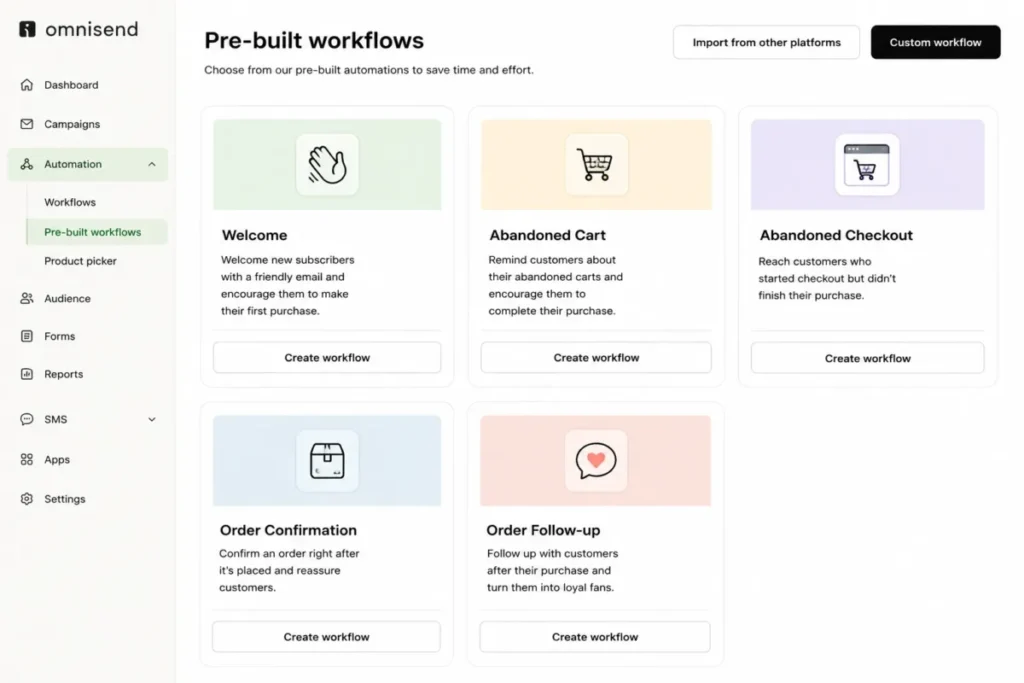
| Prebuilt ecommerce journeys with the lowest entry price | Omnisend | Welcome, cart, checkout, order, and follow-up workflows ship ready to enable |
| Event-driven product-led SaaS | Customer.io Journeys | Journeys trigger on product events, attributes, and object relationships |
| First step from newsletters into journeys | Mailchimp Standard | Marketing Automation Flows start on paid plans, not on Free |
| Funnels, landing pages, and automation from one vendor | GetResponse Marketer | Unlimited workflows, funnels, and web push sit on a single mid tier |
| Enterprise B2B marketing operations with dedicated admins | Adobe Marketo Engage | Smart Campaigns, engagement maps, and webhooks fit a staffed operations team |
| Salesforce-native B2B nurture and scoring | Salesforce Marketing Cloud Account Engagement | Engagement Studio and automation rules run on Salesforce data |
Each of those ten rows points at a different vendor, which is the useful signal in this category. These products rarely lose to each other on features; they lose because the buyer’s data model, channel mix, or budget cadence never matched the platform in the first place.
If you want the concept boundaries before the shortlist, marketing automation fundamentals covers what these platforms do and where a CRM stops.
What Each Platform Is Built To Automate
These ten products appear on the same search results page, but they do not solve the same job. The matrix below is an editorial assessment of documented feature scope, not a scored benchmark.
| Platform | Ecommerce lifecycle | B2B lead lifecycle | Product and event data | Native CRM record |
|---|---|---|---|---|
| HubSpot Marketing Hub | Limited | Yes | By plan | Yes |
| ActiveCampaign | Yes | Limited | Limited | By add-on |
| Klaviyo | Yes | No | Yes | No |
| Brevo | Limited | Limited | Limited | Limited |
| Omnisend | Yes | No | Limited | No |
| Customer.io Journeys | Limited | Limited | Yes | No |
| Mailchimp | Limited | Limited | No | Limited |
| GetResponse | Limited | Limited | No | Limited |
| Adobe Marketo Engage | No | Yes | Conditional | Conditional |
| Salesforce Account Engagement | No | Yes | Conditional | Yes |
Klaviyo and Omnisend compete directly, as do Marketo and Account Engagement, while Customer.io competes with almost none of them because it assumes an engineering team is feeding it events.
How We Chose and Ranked These Tools
These rankings are based on official pricing pages, product documentation, help-center guidance, and current feature pages. Pricing and plan limits were checked on 2026-08-10.
Each platform was assessed against the same buyer-focused criteria: workflow depth, the tier that carries that workflow, plan gates, documented limits, channel coverage, data-model fit, implementation burden, and change-management risk.
Greater weight was given to the factors that decide a purchase: the first tier that runs the required automation, the limit that stops it, the unit each vendor bills against, and the cost of scaling. Brand popularity and affiliate relationships did not influence the ranking.
Claims that could not be verified from official sources were excluded, and any figure that two official pages disagreed on is reported as a conflict rather than as a number.
The 10 Platforms Compared at a Glance
The column that decides most purchases is not the price. It is the billing basis, because contacts, active profiles, sends, and organizations are four different meters.
| Platform | Practical automation tier | Price of that tier | Billing basis | First hard limit |
|---|---|---|---|---|
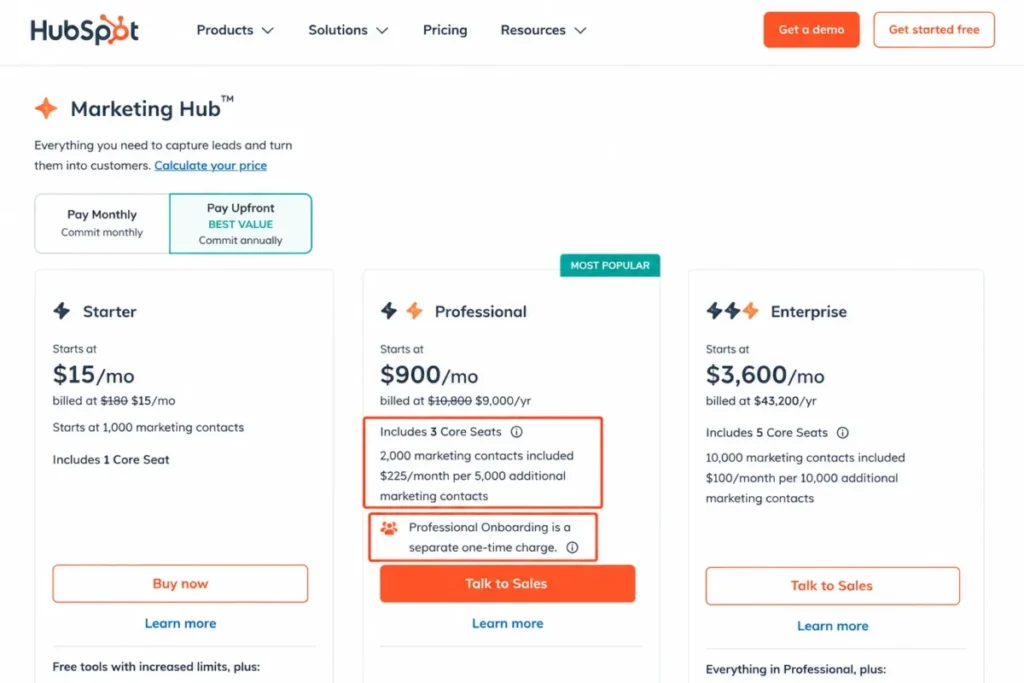
| HubSpot Marketing Hub | Professional | $900 per month | 3 Core Seats and 2,000 marketing contacts | 300 workflows |
| ActiveCampaign | Plus | $79 per month | Contacts, cited at up to 1,000 | 5 actions per automation on Starter |
| Klaviyo | Paid tier above Free | Not exposed in a stable form on 2026-08-10 | Active profiles | Free stops at 250 profiles and 500 sends |
| Brevo | Standard | $18 per month | Sends, cited at 5,000 with up to 500 contacts | Free automation stops at 2,000 contacts |
| Omnisend | Standard, or Pro when SMS is required | $16 or $59 per month | Billable contacts | SMS excluded from Standard for new subscriptions |
| Customer.io Journeys | Essentials | $100 per month | 5,000 profiles and 1 million emails | 1,000-profile trigger fan-out |
| Mailchimp | Standard | $20 per month for 12 months | Contacts and sends, cited at 500 and 6,000 | Free carries no automation flows |
| GetResponse | Marketer | $59 per month | Contact count not exposed on the rendered page | Starter allows one custom workflow |
| Adobe Marketo Engage | Quote-based | Customized pricing | Custom quote | Not published |
| Salesforce Account Engagement | Growth+ | $1,250 per organization per month | 10,000 contacts, billed annually | 50 automation rules |
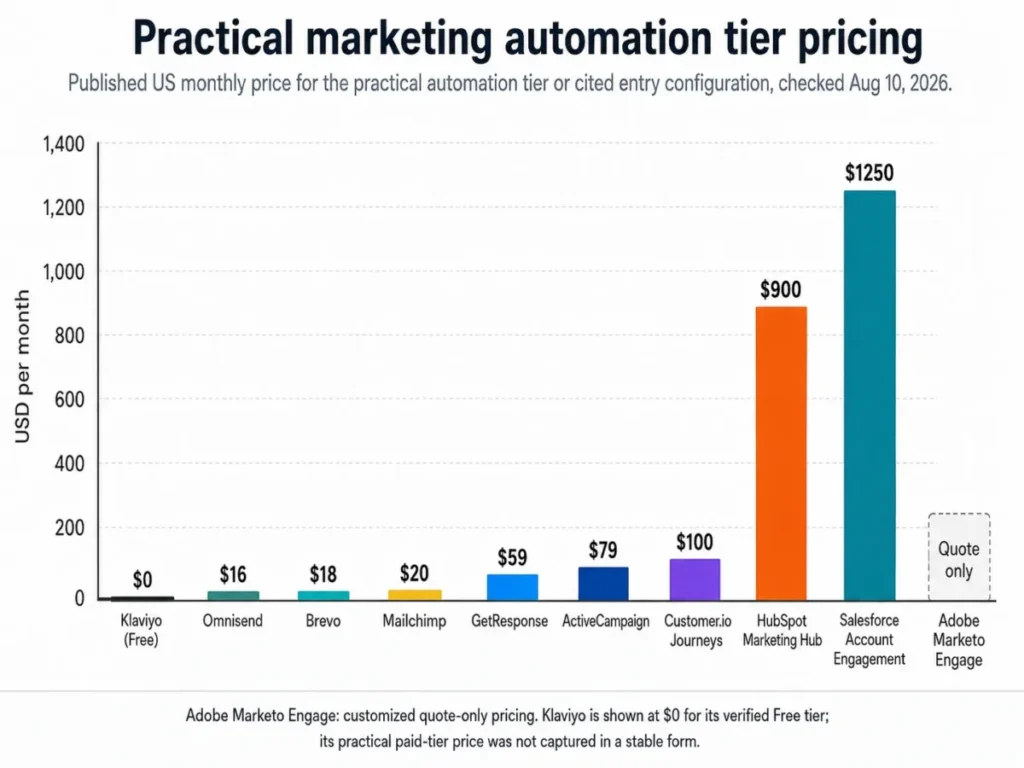
The spread runs from $16 per month to $1,250 per organization per month, and that range is close to meaningless on its own. A $16 Omnisend subscription and a $1,250 Account Engagement contract are not competing for the same buyer, the same data model, or the same approval process.
The comparison that does matter is narrower. Inside the ecommerce group, inside the small-team group, and inside the enterprise B2B group, the price gaps are small and the limit gaps are large.
Pricing Comparison: Starting Price vs the Tier That Runs Your Workflow
Entry prices in this category are marketing artifacts. The number worth budgeting is the first tier that carries branching automation, the channels you need, and the contact volume you already have.
| Platform | Practical tier | Price | What that price covers | 12-month baseline | Separate costs |
|---|---|---|---|---|---|
| HubSpot Marketing Hub | Professional | $900 per month | 3 Core Seats, 2,000 marketing contacts | $13,800 including required onboarding | Professional onboarding $3,000 one-time, Enterprise onboarding $7,000 |
| ActiveCampaign | Plus | $79 per month | Up to 1,000 contacts, unlimited automation actions | $948 | Pipelines add-on is where lead scoring sits |
| Klaviyo | Free, then a paid tier | $0 on Free | 250 active profiles, 500 email sends per month | $0 on Free | Paid entry amount not captured on 2026-08-10 |
| Brevo | Standard | $18 per month | 5,000 sends, up to 500 contacts | $216 | Channels and testing excluded from Free |
| Omnisend | Standard, Pro for SMS | $16 or $59 per month | Email automation; SMS on Pro for new subscriptions | $192 on Standard | SMS usage from $0.007 per message |
| Customer.io Journeys | Essentials | $100 per month | 5,000 profiles, 1 million emails | $1,200 | Premium starts at $1,000 per month billed yearly |
| Mailchimp | Standard | $20 per month for 12 months | Up to 500 contacts, 6,000 sends, up to 200 flows | $240 across the offer period | Contact and send overages bill separately |
| GetResponse | Marketer | $59 per month, or $48.38 annual-effective | Unlimited workflows, funnels, web push | $708 monthly, or $580.56 annual-effective | Contact basis not exposed on the page |
| Adobe Marketo Engage | Quote-based | Customized pricing | Scope set by the quote | Not published | Not published |
| Salesforce Account Engagement | Growth+ | $1,250 per organization per month | 10,000 contacts, 50 automation rules, 25,000 API calls per day | $15,000 annual contract | Advanced Dynamic Content add-on at $400 per month |
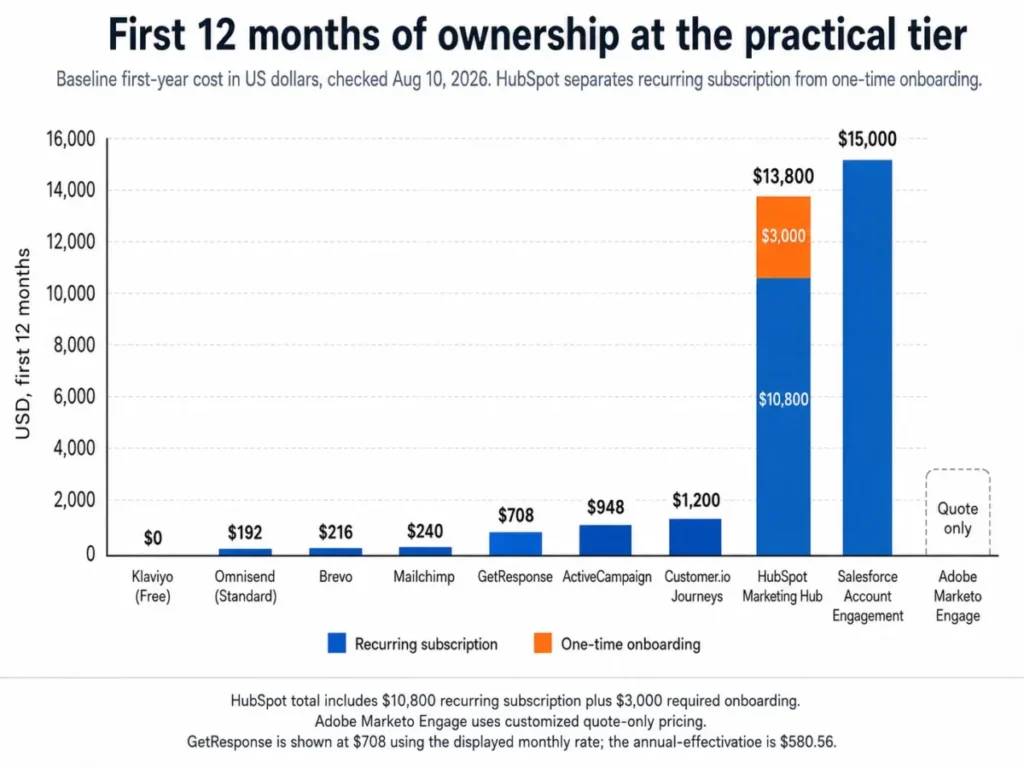
Every twelve-month figure above is editorial arithmetic on the cited entry configuration, not a vendor quote. It assumes no contact growth, no add-ons, no taxes, and no negotiated discount.
HubSpot is the clearest example of why the arithmetic matters. Professional lists at $900 per month and carries a required one-time onboarding charge of $3,000, so a twelve-month Professional baseline is $13,800 before a single extra contact tier.
Account Engagement produces the other kind of surprise. Growth+ is quoted as a monthly figure but billed annually, so $1,250 per organization per month is a $15,000 commitment signed on day one.
What a ten-person team pays
Seat-based math does not transfer to this category, and pretending otherwise is how buyers get the budget wrong.
Only one of these ten platforms publishes a seat count inside its cited entry configuration: HubSpot Professional includes 3 Core Seats. Everything else in this list meters contacts, active profiles, sends, billable contacts, or the organization itself.
For a ten-person marketing team, that means headcount barely moves the bill on eight of these platforms, while the size of your list moves it constantly.
The practical planning question is therefore not how many people need logins. It is how many contacts, profiles, or sends you will hold twelve months from now, because that is the meter that reprices your contract.
Where the bill changes without a decision
Omnisend states that the subscription tier follows billable contacts, so list growth can move the tier without anyone approving a change. Mailchimp discloses that contact and send overages bill on top of the plan.
Those are two different mechanics with the same effect: the invoice moves when the audience moves. A budget built on the entry price alone absorbs that badly.
Mailchimp’s Standard rate is displayed as a promotional price for twelve months, and the pricing page does not state the standard price that applies after the offer period. Promotional pricing was re-verified on the publish date: 2026-08-10.
Treat that Mailchimp figure as a first-year number, and ask the vendor for the renewal rate in writing before committing a list to it. The Mailchimp pricing tiers breakdown covers the plan ladder in more detail.
Feature Gate Comparison: What Opens on Which Plan
A feature list tells you what a platform can do. A gate list tells you what your plan will let you do, and the second one is what you are buying.
| Platform | Verified plan gate | What the gate blocks | Tier that removes it |
|---|---|---|---|
| HubSpot Marketing Hub | Professional supports up to 300 workflows | Building past 300 active workflows | Enterprise, at up to 1,000 workflows |
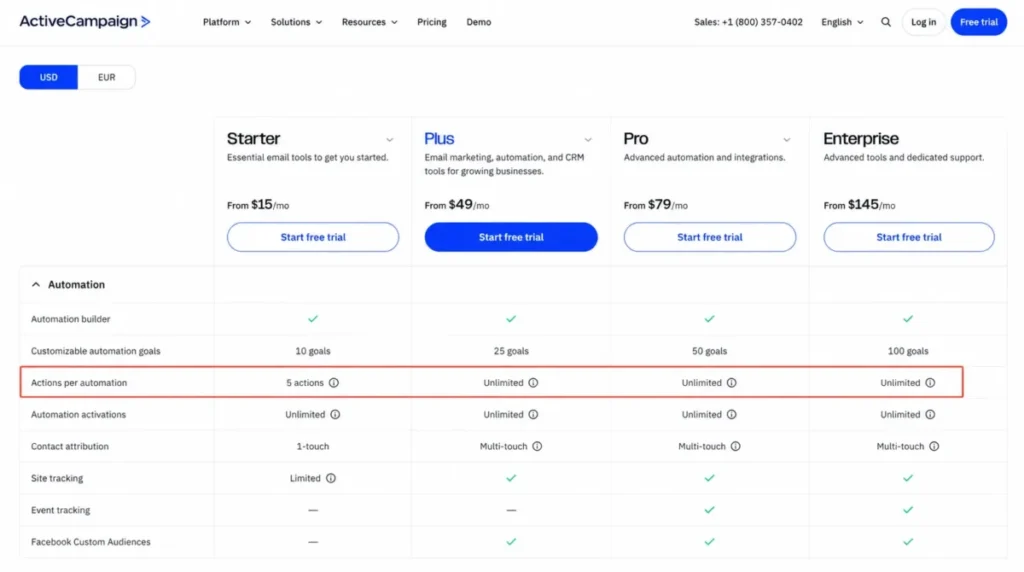
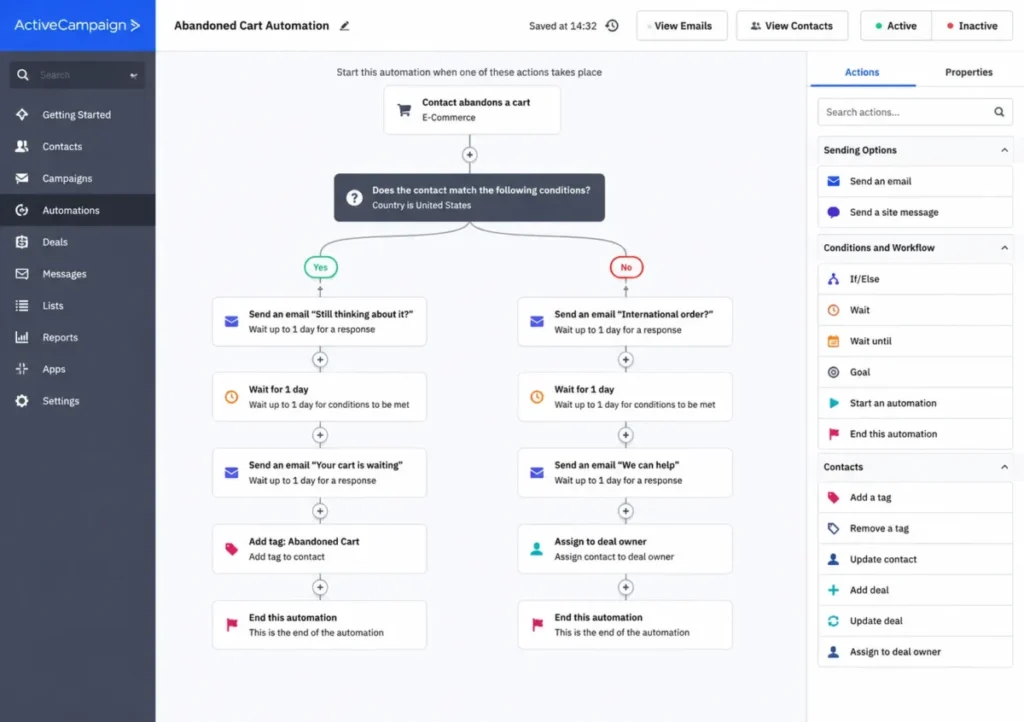
| ActiveCampaign | Starter is limited to five actions per automation | Any branching sequence longer than five steps | Plus, which lists unlimited triggers and actions |
| ActiveCampaign | Lead scoring is listed with the Pipelines add-on | Score-based routing without the add-on | The Pipelines add-on |
| Klaviyo | Free stops at 250 active profiles and 500 email sends per month | Sending to a list above the free ceiling | A paid tier |
| Brevo | Free excludes A/B testing, landing pages, popups, mobile and web push, WhatsApp, sales workflows, and phone support | Multichannel journeys and split testing | Standard and above |
| Omnisend | SMS is excluded from Standard for subscriptions created on or after May 4, 2026 | SMS steps inside ecommerce workflows | Pro |
| Customer.io Journeys | Premium adds premium support, 90-day onboarding, HIPAA support, premium integrations, and more governance | Regulated-data programs and guided implementation | Premium |
| Mailchimp | Free does not include Marketing Automation Flows | Every automated journey | A paid plan, with Standard listing up to 200 flows |
| GetResponse | Starter includes one custom automation workflow | A second custom workflow | Marketer, with unlimited workflows |
| Salesforce Account Engagement | Growth+ includes 50 automation rules and 25,000 API calls per day | Rule count and API volume above those ceilings | A higher tier, or paid add-ons |
| Adobe Marketo Engage | Packaging and limits are set inside the quote | Public gate comparison before a sales conversation | Not published |
Source: vendor pricing pages and help-center plan documentation, checked 2026-08-10. Links: HubSpot workflow allowance, ActiveCampaign plan features, Klaviyo free tier limits, Brevo free plan exclusions, Omnisend SMS policy, Customer.io Premium scope, Mailchimp flow entitlements, GetResponse workflow entitlements, Marketo Engage pricing status, Account Engagement rule allowance.
Three of those gates are the ones that most often force an unplanned upgrade in the first year. The five-action ceiling on ActiveCampaign Starter blocks any welcome sequence with a branch, which is most welcome sequences worth building.
Brevo’s Free exclusions are the second. A team that picks Free for automation discovers that the channels it wanted, along with split testing and landing pages, sit on Standard.
The third is Mailchimp’s Free tier, which carries no Marketing Automation Flows at all. Free is a newsletter plan in this category, not an automation plan.
Plan Limits and What Happens When You Hit Them
A ceiling is a planning input. The behavior at the ceiling is an operational risk, and it is the part almost nobody publishes.
| Platform and plan | Documented limit | Documented behavior at the limit |
|---|---|---|
| Brevo Free automations | 2,000 unique contacts | New contacts stop entering, and contacts already inside an active automation continue |
| Customer.io Journeys | 1,000 profiles per object or relationship trigger event | No profiles start the journey from that trigger event |
| Omnisend subscription | Billable contact count | The subscription tier adjusts as billable contacts grow |
| Mailchimp paid plans | Contact and send allowances | Overages create additional billing on top of the plan |
| HubSpot Professional | 300 workflows | Not disclosed on the pricing page |
| ActiveCampaign Starter | Five actions per automation | Not disclosed on the plan comparison |
| Klaviyo Free | 250 active profiles and 500 email sends per month | Not disclosed on the pricing page |
| GetResponse Starter | One custom automation workflow | Not disclosed on the pricing page |
| Salesforce Growth+ | 50 automation rules and 25,000 API calls per day | Not disclosed on the pricing page |
| Adobe Marketo Engage | Set inside the quote | Not published |
Source: official plan documentation and help-center limit pages, checked 2026-08-10. Links: Brevo free automation ceiling, Customer.io journey entrance troubleshooting, Omnisend contact-driven tiers, Mailchimp overage terms, HubSpot plan allowances, ActiveCampaign action cap, Klaviyo free profile ceiling, GetResponse Starter workflow limit, Growth+ automation rules, Marketo Engage packaging.
Six of those ten rows say the same thing: the ceiling is published and the consequence is not. Nothing in this guide converts an undisclosed overflow behavior into a guess, because a queue, a skip, a block, and an overage bill are four very different outcomes for the same number.
The two vendors that do publish the behavior disagree in kind, and the difference is instructive. Brevo’s free automation ceiling degrades gently, because contacts already in flight keep moving while new enrollments stop.
Customer.io documents the opposite shape. When a single object or relationship trigger event would fan out to more than 1,000 profiles, no profiles start the journey from that event at all.
That is a silent failure with no partial delivery, and it is an architecture decision rather than a pricing one. If one account update in your data model routinely touches thousands of user profiles, the trigger granularity has to change before the journey is built.
The one number this guide will not publish
Mailchimp’s official pricing page and its official help documentation disagreed on the exact automation-step cap for the Essentials plan when both were checked on 2026-08-10. One shows four flow steps and the other states three.
Publishing either number would mean choosing the convenient source. The safe planning position is that Essentials carries a low single-digit step cap, that Free carries no flows at all, and that Standard is the first plan documented with a workflow allowance in the hundreds.
Ask a Mailchimp sales or support contact to confirm the Essentials step count in writing before buying that tier for a branching journey.
The 10 Best Marketing Automation Platforms in 2026
Every block below carries the same decision fields in the same order, so you can scan one field across ten products. The analysis under each field set is where the products stop looking alike.
1. HubSpot Marketing Hub: Best Overall for CRM-Led B2B Teams

- Best for: B2B revenue teams that want workflows, lead scoring, and campaign reporting reading from the same CRM record.
- Avoid if: your whole automation need is a welcome sequence and a monthly newsletter, or you sell physical products and want commerce-event flows instead of lead lifecycle.
- Starting price: Professional lists at $900 per month.
- Practical tier: Professional, because that is the tier the pricing page attaches the workflow allowance to.
- Free plan: not part of the Professional configuration cited here.
- First limit that bites: the 300-workflow ceiling on Professional, alongside the 2,000 marketing contacts included at that price.
- Better than ActiveCampaign: native CRM objects mean segmentation and scoring read the same record the sales team edits.
- Worse than Klaviyo: commerce event modeling is not the design center, so cart and browse journeys need more assembly.
- Setup difficulty: High, because Professional carries a required onboarding engagement rather than a self-serve start.
- Hidden costs: onboarding is a separate one-time charge of $3,000 on Professional and $7,000 on Enterprise.
- Evidence status: seat count, contact allowance, workflow ceilings, and onboarding charges verified on the official Marketing Hub pricing page, with the workflow build path verified in the HubSpot knowledge base.
Ranking this first is a statement about coverage rather than about value. For the broad commercial query, most buyers are B2B teams who need automation attached to a pipeline, and that is the job the documented workflow model is built around.
The documented build path runs from More, then Automation, then Workflows, where an enrollment trigger is set and the actions follow. What matters is what the trigger can read: because the workflow sits on CRM objects, enrollment keys off the same properties the sales team edits every day.
The budget pressure point is not the monthly rate. Professional pairs a $900 monthly price with a required $3,000 onboarding charge, which makes $13,800 the honest twelve-month planning figure before any contact-tier growth.
That number assumes the entry configuration holds, and it covers 3 Core Seats with 2,000 marketing contacts. Marketing contacts are the meter here, so an inbound campaign that works is also the event that reprices the subscription.
The HubSpot pricing breakdown covers the tier ladder in more detail.
| Pros | Cons |
|---|---|
| Workflows, scoring, and reporting read one CRM record, so routing rules do not depend on a sync holding | The practical tier lists at $900 per month, well above the category median |
| Professional supports up to 300 workflows and Enterprise raises that ceiling to 1,000 | Required onboarding adds a one-time $3,000 charge on Professional |
| Enrollment triggers key off CRM properties the sales team already maintains | The cited configuration includes 2,000 marketing contacts, so list growth reprices the plan |
| The documented workflow build path is short and stable for a new admin | Commerce-event lifecycle work needs more assembly than a specialist platform |
- Verdict:
- Choose Marketing Hub if the automation you are buying is lead lifecycle attached to a CRM, and if a twelve-month figure near $13,800 survives a finance review.
2. ActiveCampaign: Best Automation Depth for SMB and Mid-Market Teams

- Best for: small and mid-market lifecycle teams that need multi-branch nurture logic without an enterprise suite underneath it.
- Avoid if: you expect the cheapest advertised plan to run branching automation, or you need lead scoring without buying an add-on.
- Starting price: Starter is listed at $15 per month on the cited official comparison page.
- Practical tier: Plus at $79 per month for up to 1,000 contacts, because that is where unlimited triggers and actions appear.
- Free plan: none in the cited plan comparison.
- First limit that bites: the five-action cap per automation on Starter.
- Better than HubSpot: the tier that runs unrestricted branching costs a fraction of the CRM-led alternative.
- Worse than Customer.io: product-event and object modeling is thinner, so engineering-fed journeys have less room.
- Setup difficulty: Medium, since standard email journeys are quick while branching logic and add-ons raise the admin load.
- Hidden costs: lead scoring is listed with the Pipelines add-on rather than inside the base plan.
- Evidence status: Starter and Plus amounts taken from the official comparison page for the cited contact configuration, with action caps and add-on placement taken from the plan feature table.
Automation depth per dollar is the reason this sits second, and the reason the entry price is a trap. Starter caps an automation at five actions, which is fewer steps than a welcome sequence with one branch needs.
Plus is therefore the honest comparison point at $79 per month for the cited configuration, which annualizes to $948 before contact-tier growth or add-ons.
The documented build sequence is conventional and quick: add a start trigger, pick the list and the run behavior, save the trigger, then add actions such as Send email. Depth comes from what you can chain after that, not from the first screen.
Scoring is the field to check before signing. The plan feature table places lead scoring with the Pipelines add-on, so a score-based routing design is a two-line purchase rather than one.
The ActiveCampaign review covers the builder in depth, and the ActiveCampaign pricing guide maps the tier ladder.
| Pros | Cons |
|---|---|
| Plus and above list unlimited triggers and actions, so branch depth stops being a plan question | Starter is capped at five actions per automation, which blocks most branched welcome journeys |
| The practical tier costs $79 per month for the cited contact configuration | Lead scoring sits with the Pipelines add-on rather than in the base plan |
| The documented build path reaches a working automation in four steps | The cited price covers up to 1,000 contacts, so list growth moves the tier |
| Segmentation, landing pages, and attribution sit inside one platform | Add-ons and branching logic raise admin overhead as the account matures |
- Verdict:
- Pick ActiveCampaign if you need serious branching on a small budget, and price it at Plus, because Starter is a different product wearing the same name. If routing depends on scores, add the Pipelines cost before comparing it to anything else, and see lead scoring explained for the model behind it.
3. Klaviyo: Best for Ecommerce Lifecycle Automation

- Best for: DTC and ecommerce teams running cart, browse, welcome, win-back, post-purchase, and replenishment journeys off commerce events.
- Avoid if: you run B2B opportunity workflows, or your team redesigns flow triggers often and needs unbroken historical reporting across those changes.
- Starting price: the Free tier is listed at $0.
- Practical tier: a paid tier above Free, which the pricing selector did not expose as a stable amount on 2026-08-10.
- Free plan: yes, at up to 250 active profiles and 500 email sends per month.
- First limit that bites: the 250 active profiles on Free, which most stores pass in their first quarter.
- Better than Mailchimp: the trigger taxonomy is commerce-native rather than list-native.
- Worse than HubSpot: there is no CRM record underneath, so B2B lead lifecycle work has nowhere natural to live.
- Setup difficulty: Medium for a store using standard commerce events, higher once custom event schemas enter the design.
- Hidden costs: the paid entry amount could not be captured in a stable form, so budget from a quoted configuration rather than from a list price.
- Evidence status: free-tier profiles and sends verified on the official pricing page, with trigger types and trigger-change behavior verified in the Klaviyo help center.
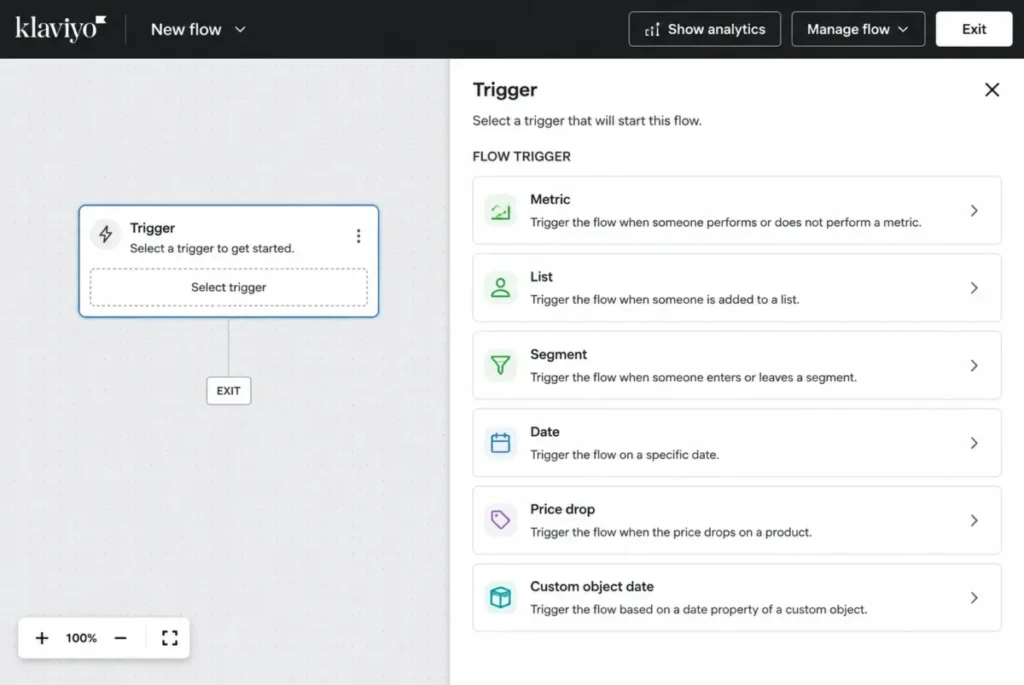
Ecommerce teams rarely lose with this platform on capability. Flows trigger on metrics, lists, segments, dates, price drops, and custom-object dates, which covers the events a store already emits.
The tradeoff sits in change management rather than in features. A flow trigger cannot be changed in place, so a trigger redesign means cloning or rebuilding the flow.
The consequence is the part worth planning for: a cloned flow starts without the original flow’s historical analytics. A team that iterates trigger architecture every quarter will keep resetting the reporting baseline it uses to prove the program works.
Set a naming and versioning convention on day one for that reason. The Klaviyo review goes deeper on flow design.
| Pros | Cons |
|---|---|
| Trigger types map directly to commerce events, so cart and browse journeys need no translation layer | A flow trigger cannot be changed in place once the flow exists |
| The free tier is usable for a first build at up to 250 active profiles and 500 sends per month | Cloning a flow to change its trigger starts a new analytics history |
| Email and SMS live in the same flow builder | The paid entry amount was not exposed as a stable figure on 2026-08-10 |
| Behavioral segmentation and reporting are built for store data, not adapted to it | B2B lead lifecycle work has no native CRM object to sit on |
Source for Klaviyo: Klaviyo pricing page and Klaviyo guidance on changing a flow trigger, both checked 2026-08-10.
- Verdict:
- Choose Klaviyo when commerce events are the trigger vocabulary your marketing already speaks, and budget from a quoted paid configuration rather than from the free tier.
4. Brevo: Best Budget Multichannel Option

- Best for: lean teams that want email, SMS, WhatsApp, and push automation on a small monthly budget.
- Avoid if: you assumed Free includes the whole channel set, or you need split testing and landing pages without paying.
- Starting price: Standard starts at $18 per month.
- Practical tier: Standard, since that is where the excluded Free features appear.
- Free plan: yes, with automations accepting up to 2,000 unique contacts.
- First limit that bites: the 2,000-contact ceiling on free automations, which arrives before send volume becomes the constraint.
- Better than Omnisend: the channel mix reaches beyond ecommerce messaging into WhatsApp and sales-adjacent workflows.
- Worse than ActiveCampaign: branching depth and attribution are lighter once journeys become genuinely complex.
- Setup difficulty: Low to Medium, because the documented model is a short trigger, rule, and action chain.
- Hidden costs: none captured as a separate charge, though the Free exclusions function as a forced upgrade.
- Evidence status: Standard pricing taken from the official pricing help page, with the free automation ceiling and the Free exclusion list taken from the free-plan limits page.
Budget is the reason most teams land here, and the free tier is the reason many of them stall. Free automations accept up to 2,000 unique contacts, and at that ceiling new contacts stop entering while contacts already inside an active automation keep moving.
That is a gentler failure than most platforms document, and it is still a failure you have to notice. Nothing in the send allowance warns you that enrollment has quietly stopped.
The Free exclusion list is the second thing to read before committing. Split testing, landing pages, popups, mobile and web push, WhatsApp, sales workflows, and phone support all sit outside Free, which means the multichannel promise starts on Standard at $18 per month.
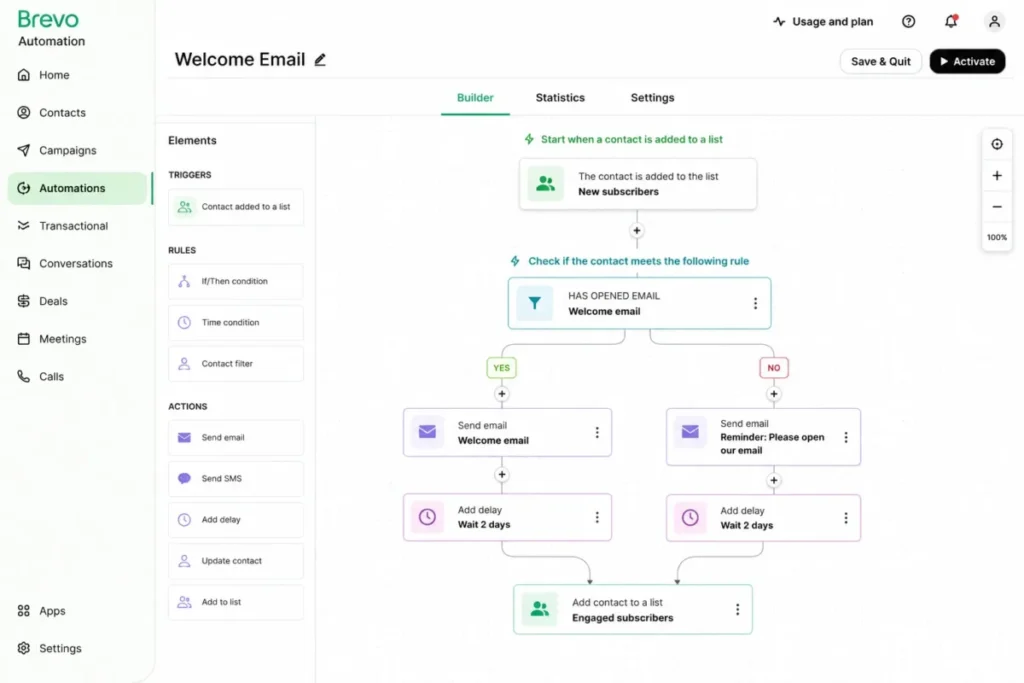
The automation model itself is a trigger, then a rule, then an action, with prebuilt journeys such as a welcome series. See the Brevo review for the builder, and Brevo pricing details for the plan ladder.
| Pros | Cons |
|---|---|
| The cheapest paid route in this list to email, SMS, WhatsApp, and push in one automation | Free excludes split testing, landing pages, popups, push, WhatsApp, sales workflows, and phone support |
| Free automations enroll up to 2,000 unique contacts before enrollment stops | The free ceiling is a contact ceiling, so it arrives before the send allowance runs out |
| Standard starts at $18 per month for the cited send and contact configuration | Branching depth is lighter than the dedicated automation platforms above it |
| The trigger, rule, and action model is quick for a non-specialist admin | Channel availability and send-time optimization are plan-gated |
Source for Brevo: Brevo pricing plans and Brevo Free plan limits, both checked 2026-08-10.
- Verdict:
- Go with Brevo if the requirement is several channels on a small budget, and treat Free as a build environment rather than as the plan you run the program on.
5. Omnisend: Best Ecommerce Value

- Best for: ecommerce teams that want welcome, cart, checkout, order, and post-purchase automations live quickly.
- Avoid if: you are a new customer who needs SMS on the cheaper plan, or you want a bill that ignores list growth.
- Starting price: Standard starts at $16 per month.
- Practical tier: Standard for email-only programs, and Pro at $59 per month whenever SMS is part of the journey.
- Free plan: yes, listed alongside the paid tiers on the official pricing page.
- First limit that bites: the SMS gate on Standard for subscriptions created on or after May 4, 2026.
- Better than Klaviyo: the prebuilt ecommerce workflow set gets a store to a live program faster.
- Worse than Customer.io: custom event modeling and API-triggered journeys are far more limited.
- Setup difficulty: Low, because the standard ecommerce journeys ship as prebuilt workflows.
- Hidden costs: SMS usage on qualifying new Pro subscriptions starts from $0.007 per message, and billable-contact growth moves the tier.
- Evidence status: plan prices, the 2026 SMS policy, SMS usage pricing, and contact-driven tier behavior verified on the official 2026 pricing plans page, with workflow components verified in the automation setup documentation.
Prebuilt workflows are the whole argument here. Welcome, Abandoned Cart, Abandoned Checkout, Order Confirmation, and Order Follow-up ship as documented starting points rather than as blank canvases.
The 2026 change is the detail that older comparisons get wrong. For subscriptions created on or after May 4, 2026, SMS is not available on Standard and requires Pro.
That single policy moves the practical entry price for any store planning SMS from $16 to $59 per month, before usage. New Pro subscriptions pay SMS usage starting from $0.007 per message on top of the subscription.
The second cost mechanic is quieter. The subscription tier follows billable contacts, so a successful list-building quarter changes the invoice without anyone approving a change.
If SMS is central to the plan, compare the numbers against dedicated SMS marketing tools before committing.
| Pros | Cons |
|---|---|
| Prebuilt ecommerce workflows cover the five journeys most stores need first | New subscriptions from May 4, 2026 cannot use SMS on Standard |
| Standard starts at $16 per month, the lowest paid entry in this list | SMS usage on qualifying new Pro subscriptions bills separately from $0.007 per message |
| Email, SMS, and push sit in the same workflow builder | The subscription tier follows billable contacts, so list growth reprices the plan |
| Prebuilt workflows shorten the distance between signing up and a live lifecycle program | Older comparisons still describe Standard as an SMS-capable plan, which no longer holds for new subscriptions |
Source for Omnisend: Omnisend 2026 pricing plans and Omnisend automation setup guide, both checked 2026-08-10.
- Verdict:
- Omnisend is the stronger fit for stores that want a working lifecycle program quickly, provided you price Pro from the start if SMS belongs in the journey.
6. Customer.io Journeys: Best for Event-Driven Product-Led SaaS

- Best for: product-led SaaS teams with engineering or data support that can send dependable events, attributes, and object relationships.
- Avoid if: your event instrumentation is unreliable, or a single relationship update routinely needs to reach more than 1,000 profiles at once.
- Starting price: Essentials starts at $100 per month.
- Practical tier: Essentials, which covers 5,000 profiles and 1 million emails.
- Free plan: none listed in the cited pricing page.
- First limit that bites: the 1,000-profile fan-out ceiling on an object or relationship trigger event.
- Better than Brevo: journeys can be driven by product behavior and API calls rather than by list membership.
- Worse than HubSpot: there is no CRM record for a sales team to work inside, so B2B handoff needs another system.
- Setup difficulty: High, because the platform assumes a data model someone has to design and maintain.
- Hidden costs: Premium starts at $1,000 per month billed yearly and is where premium support, a 90-day onboarding program, HIPAA support, premium integrations, and heavier governance sit.
- Evidence status: plan pricing and Premium scope verified on the official pricing page, with the journey canvas and the trigger fan-out ceiling verified in the product documentation.
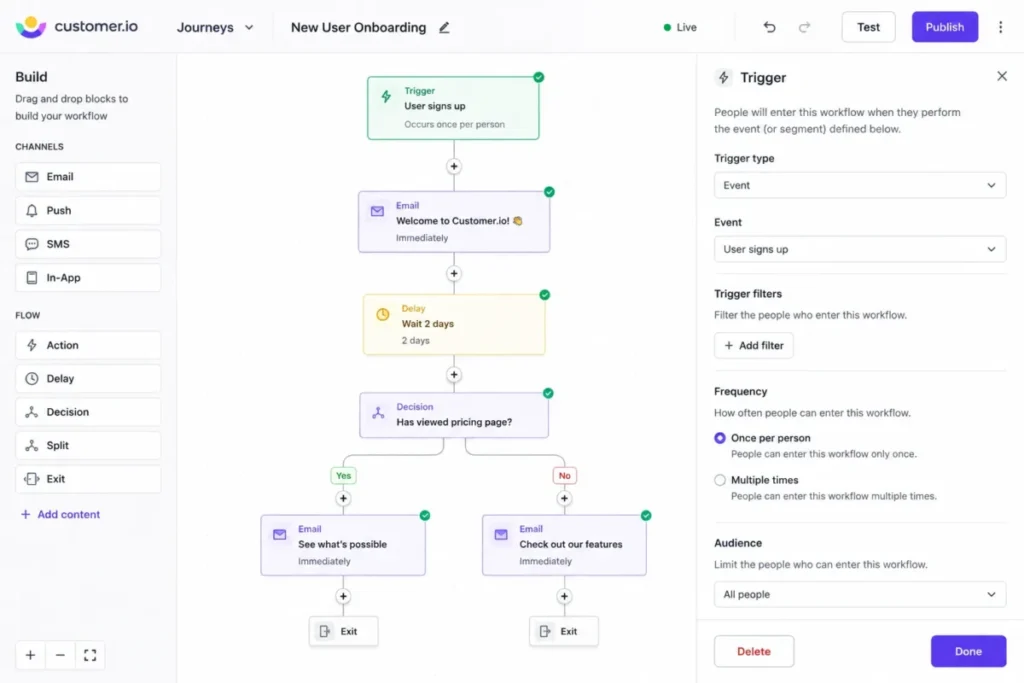
Event data is the entry requirement, not a nice-to-have. The visual canvas with drag-and-drop blocks is straightforward, and it does nothing useful if the events arriving underneath it are inconsistent.
The limit worth designing around is specific and severe. An object or relationship trigger event can fan out to only 1,000 profiles, and when a single event exceeds that fan-out, the documentation states that no profiles start the journey from that event.
There is no partial send and no queue described for that case, which makes it an architecture constraint rather than a capacity one. A workspace-wide flag flipped on one account object can therefore produce a journey that looks configured and delivers nothing.
Design triggers at the narrowest granularity the use case allows, and treat that as a build rule rather than as a workaround.
| Pros | Cons |
|---|---|
| Journeys trigger on product events, attributes, and object relationships rather than on list membership | An object or relationship trigger event that fans out beyond 1,000 profiles starts nobody at all |
| Essentials covers 5,000 profiles and 1 million emails at $100 per month | The platform assumes engineering capacity that many marketing teams do not control |
| The visual canvas keeps complex branching readable for a technical operator | Premium, at $1,000 per month billed yearly, is where governance and regulated-data support live |
| API-triggered journeys make lifecycle messaging part of the product, not beside it | No native CRM record for a sales team to work inside |
Source for Customer.io: Customer.io plan pricing and Customer.io journey entrance limits, both checked 2026-08-10.
- Verdict:
- Choose Customer.io when product events are the real trigger vocabulary and an engineer owns the data contract, and check the fan-out ceiling against your object model before the first journey is built.
7. Mailchimp: Best for Beginners Moving Beyond Newsletters

- Best for: solo marketers and small teams taking a first step from broadcast email into automated journeys.
- Avoid if: you expect automation on Free, or you need an exact Essentials step count before buying that tier.
- Starting price: Standard is displayed at $20 per month for 12 months.
- Practical tier: Standard, because Free carries no Marketing Automation Flows and Standard lists up to 200 flows.
- Free plan: yes at $0, without Marketing Automation Flows.
- First limit that bites: the absence of automation on Free, followed by the 500-contact and 6,000-send allowance on the cited Standard configuration.
- Better than GetResponse: the journey builder and audience model are gentler for a first-time automation owner.
- Worse than ActiveCampaign: branching depth and automation entitlements are thinner at a comparable price point.
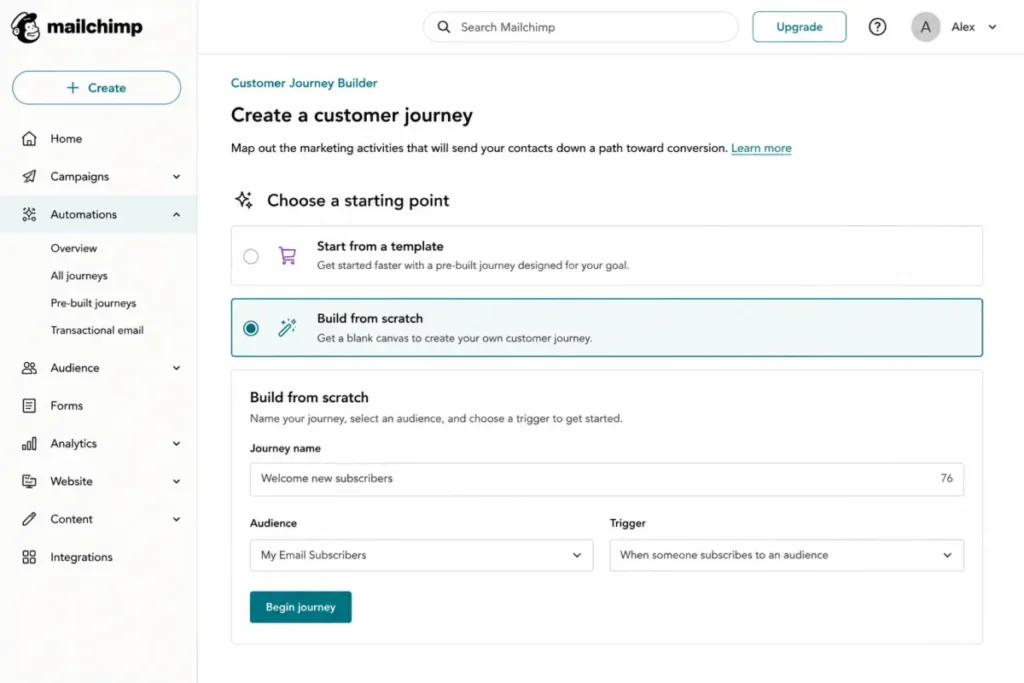
- Setup difficulty: Low, since the documented path is Automations, then build from scratch, then name, audience, and trigger.
- Hidden costs: contact and send overages bill on top of the plan, and the displayed Standard rate is a promotional twelve-month price.
- Evidence status: plan prices, flow entitlements, and overage behavior verified on the official marketing pricing page, with the journey build path verified in the Mailchimp help center.
Free is where the expectation breaks. Marketing Automation Flows are not included on Free, so the plan most beginners start on is a newsletter tool with a segmentation layer.
Standard is the first tier this guide treats as an automation plan, and the pricing page lists it with up to 200 flows for the cited 500-contact and 6,000-send configuration.
The Essentials tier in between is the one number this guide will not state, because the official pricing page and the official help documentation disagreed about its automation-step cap on 2026-08-10. The Mailchimp review covers the builder and the audience model.
| Pros | Cons |
|---|---|
| The documented journey build path is four steps and forgiving for a first-time owner | Free includes no Marketing Automation Flows at all |
| Standard lists up to 200 flows for the cited contact and send configuration | Two official pages disagreed on the Essentials automation-step cap on 2026-08-10 |
| Contact management, segmentation, templates, and journeys sit in one familiar product | The displayed Standard rate is promotional for twelve months, with no standard price stated for later |
| A very large integration catalog reduces the odds of a missing connector | Contact and send overages bill on top of the plan |
Source for Mailchimp: Mailchimp marketing plan pricing and Mailchimp classic-to-journey guidance, both checked 2026-08-10.
- Verdict:
- Mailchimp is the stronger fit when the job is a first automated journey rather than a lifecycle program, and Standard is the tier to price, since Free is not an automation plan.
8. GetResponse: Best All-in-One SMB Funnel and Automation Suite

- Best for: small businesses and creators who want funnels, landing pages, ecommerce messaging, and automation from one vendor.
- Avoid if: you need more than one custom workflow on the entry plan, or your team edits live workflows every week.
- Starting price: Starter is displayed at $19 per month, or $15.58 as an annual-effective rate.
- Practical tier: Marketer at $59 per month, or $48.38 annual-effective, because that is where unlimited workflows appear.
- Free plan: not captured in the cited pricing view.
- First limit that bites: the single custom automation workflow on Starter.
- Better than Mailchimp: funnels, landing pages, and web push come bundled instead of assembled from separate tools.
- Worse than Klaviyo: ecommerce triggers and store analytics are less specialized.
- Setup difficulty: Medium, because the bundle covers several surfaces that each need configuration.
- Hidden costs: the contact-count basis behind the displayed prices was not exposed on the rendered pricing page, so confirm it before signing.
- Evidence status: displayed monthly and annual-effective prices and workflow entitlements verified on the official pricing page, with published-workflow edit behavior verified in the GetResponse help center.
Bundling is the argument, and one workflow is the catch. Starter includes exactly one custom automation workflow, which makes it a landing-page and email plan rather than an automation plan.
Marketer is the tier that matches the marketing claim, listing unlimited automation workflows, advanced segmentation, abandoned-cart automation, sales funnels, and unlimited web push.
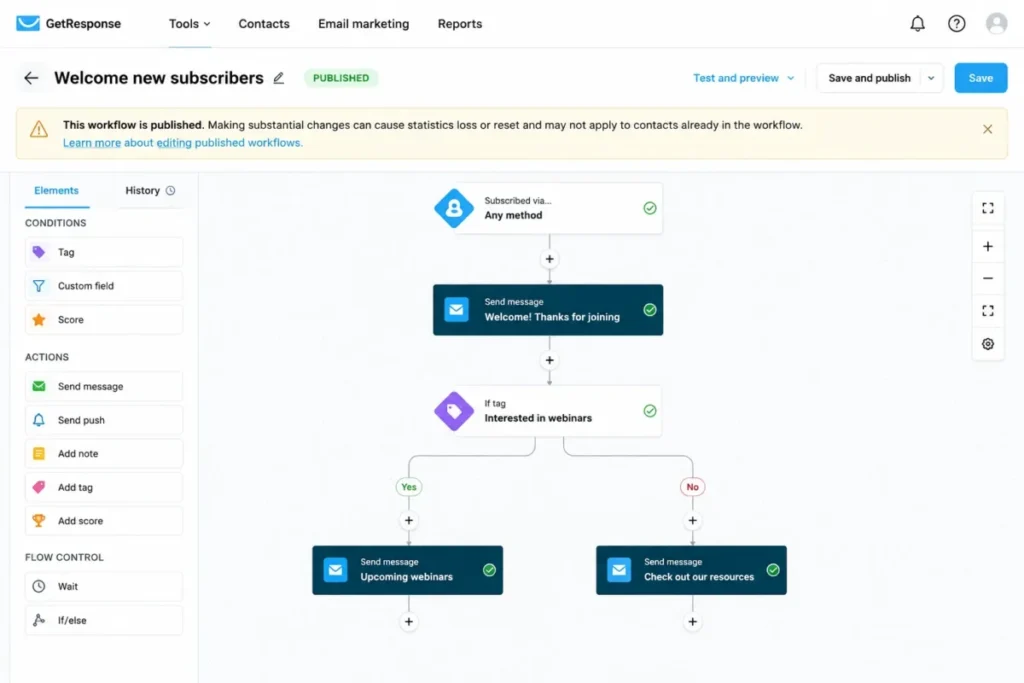
The operational risk sits after launch rather than during setup. Substantial changes to an already published workflow can reset or lose its statistics, and can fail to apply to some contacts already inside the workflow.
| Pros | Cons |
|---|---|
| Marketer lists unlimited automation workflows, funnels, and unlimited web push in one subscription | Starter includes only one custom automation workflow |
| The annual-effective rate of $48.38 per month undercuts most dedicated automation platforms | Editing a published workflow can reset or lose its statistics |
| Landing pages, funnels, and ecommerce messaging remove two or three separate vendors | Changes may not apply to contacts already inside the workflow |
| One admin surface for several channels suits a very small marketing team | The contact-count basis behind the displayed prices was not visible on the page |
Source for GetResponse: GetResponse plan pricing and GetResponse published-workflow editing, both checked 2026-08-10.
- Verdict:
- Pick GetResponse if consolidating funnels and automation with one vendor is worth more than the deepest single-purpose tooling, budget Marketer rather than Starter, and version workflows deliberately because live edits carry a documented cost.
9. Adobe Marketo Engage: Best for Mature Enterprise B2B Marketing Operations

- Best for: large B2B organizations with dedicated marketing-operations staff and complex lead-lifecycle requirements.
- Avoid if: you need a public price to build a shortlist, or nobody on the team owns campaign operations as a job.
- Starting price: not published, because pricing is customized.
- Practical tier: set inside the quote rather than on a public plan ladder.
- Free plan: none published.
- First limit that bites: the absence of a public price, which blocks any comparison before a sales conversation.
- Better than Salesforce Account Engagement: campaign operations tooling such as engagement maps and Smart Campaign cloning is built for programs at scale.
- Worse than ActiveCampaign: time to a first working automation is far longer for a small team.
- Setup difficulty: High, since Smart Campaign logic, smart lists, and lifecycle modeling all need an owner.
- Hidden costs: not published, which is itself the planning problem.
- Evidence status: the customized pricing status is confirmed on the official Adobe pricing page, and the campaign operations capabilities come from Adobe’s own product materials rather than from independent verification.
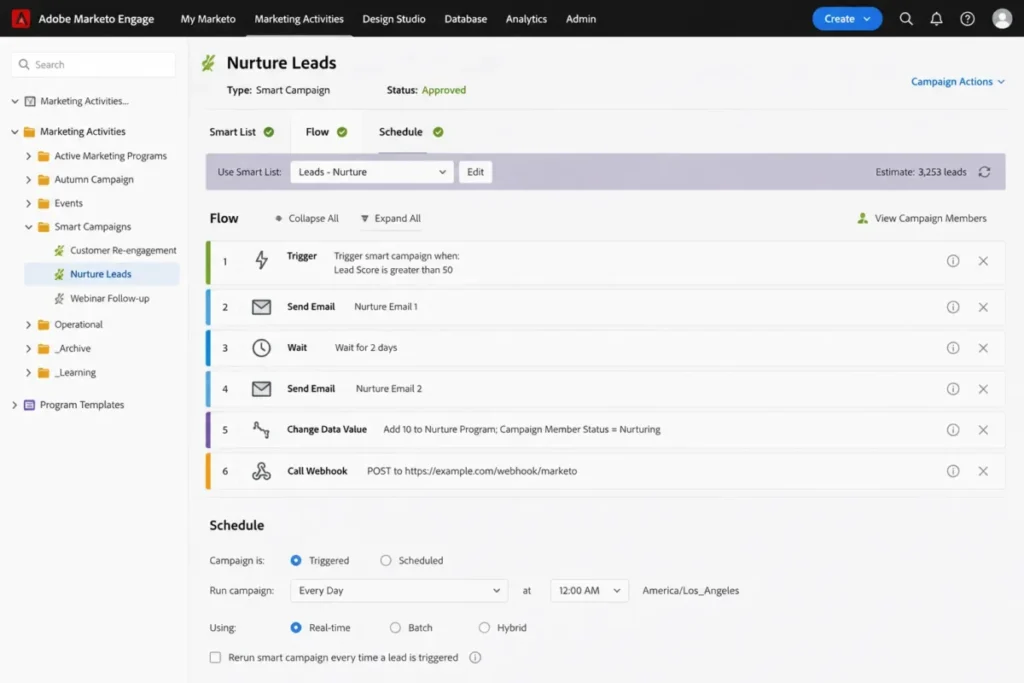
Nothing about this platform is a self-serve decision. Smart Campaigns support triggered and scheduled execution, built from smart lists, actions, triggers or batches, and webhooks, and the campaign operations materials also describe a journey-building canvas and engagement maps.
That is a real operations toolkit, and it presumes an operations team. The capability that makes Marketo effective for a staffed program is the same capability that makes it expensive to own without one.
The planning consequence is blunt: with customized pricing and no published limits, a like-for-like cost comparison against anything else in this list is not possible before a quote.
| Pros | Cons |
|---|---|
| Smart Campaigns cover triggered and batch execution with webhooks for external systems | Pricing is customized, so no public figure exists for a budget model |
| Engagement maps and a journey canvas suit multi-program lifecycle operations | Administrative overhead assumes a dedicated operations owner |
| Cloning and templating support the volume a large B2B program generates | Time to a first working automation is long compared with SMB platforms |
Source for Adobe Marketo Engage: Marketo Engage customized pricing and Marketo campaign operations detail, both checked 2026-08-10.
- Verdict:
- Marketo belongs on an enterprise shortlist when a marketing-operations function already exists, and it should be scored against a quote rather than against the published prices elsewhere in this list.
10. Salesforce Marketing Cloud Account Engagement: Best for Salesforce-Centric B2B Teams
- Best for: B2B organizations standardized on Salesforce CRM that want native account-engagement workflows.
- Avoid if: you are outside the Salesforce ecosystem, or your program will pass 50 automation rules quickly.
- Starting price: Growth+ is $1,250 per organization per month, billed annually.
- Practical tier: Growth+, with the higher tiers listed at $2,750, $4,400, and $15,000 per organization per month.
- Free plan: none.
- First limit that bites: the 50 automation rules included with Growth+.
- Better than Marketo: the price and the included allowances are published, so a budget can be built before a sales call.
- Worse than Brevo: the annual commitment removes the option to start small and stop.
- Setup difficulty: High, because it inherits Salesforce administration, permissions, and data governance.
- Hidden costs: selected capabilities are separately priced add-ons, including Advanced Dynamic Content at $400 per month.
- Evidence status: plan prices, contact, rule and API allowances and add-on pricing verified on the official Account Engagement pricing page, with Engagement Studio capability verified in Salesforce Trailhead documentation.
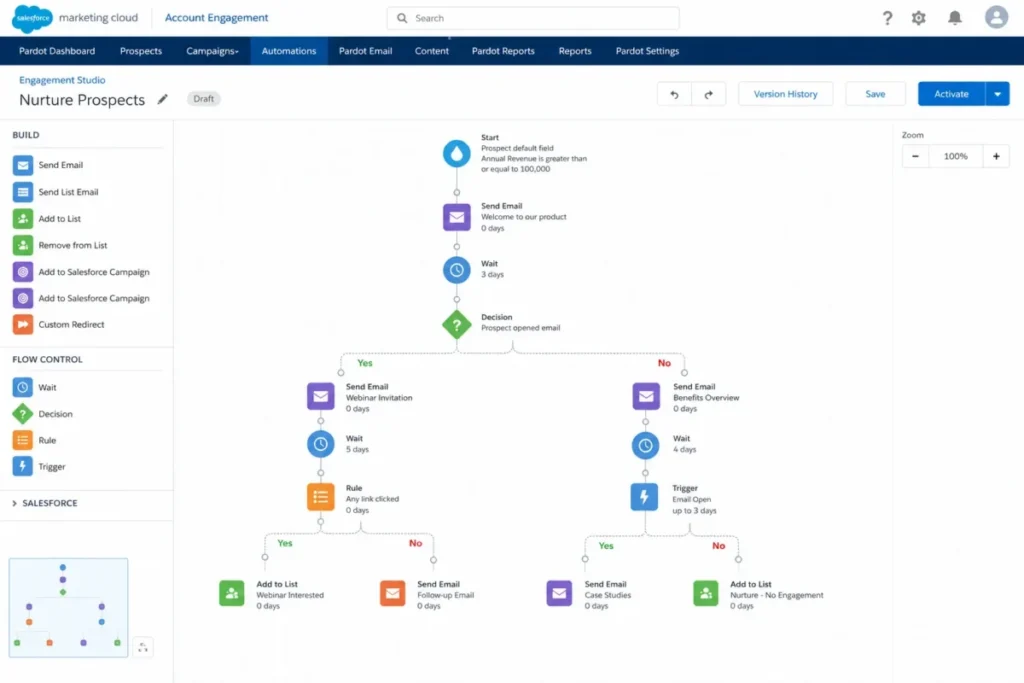
The deciding question here is not features, it is whether the CRM decision was already made. Engagement Studio builds responsive personalized B2B nurture journeys, and the product is positioned around lead generation, nurture, qualification, sales alignment, campaigns, account-based marketing, and revenue reporting.
Growth+ publishes what most enterprise platforms hide: 10,000 contacts, 50 automation rules, and 25,000 API calls per day, at $1,250 per organization per month.
Read the billing cadence carefully, because that monthly figure is billed annually. Twelve months at that rate is $15,000 committed at signature, which happens to equal the listed monthly rate of the top tier.
Fifty automation rules is the number to model against your current routing logic. The Salesforce CRM review covers the platform underneath, and the Salesforce pricing guide maps the wider product ladder.
| Pros | Cons |
|---|---|
| Allowances are published, so the entry tier can be modeled before a sales conversation | The entry tier is an annual commitment of $15,000 signed on day one |
| Native Salesforce data removes the sync layer between marketing and sales records | Growth+ includes 50 automation rules, which a mature routing design passes quickly |
| Engagement Studio handles B2B nurture, scoring, and account engagement in one place | Selected capabilities are separately priced, including a $400 per month content add-on |
| Reporting lines up with the pipeline the sales team already reports on | Value drops sharply for organizations that do not run on Salesforce CRM |
Source for Salesforce Account Engagement: Account Engagement plan pricing and Engagement Studio Trailhead module, both checked 2026-08-10.
- Verdict:
- Account Engagement is the stronger choice for a Salesforce-standardized B2B team that can sign an annual commitment, and the rule ceiling should be modeled before the contract, not after it.
Setup and Migration Difficulty
Setup cost is not the same as setup time, and the difference is who has to own the work. A platform that needs a data model needs a person who maintains it.
| Platform | Setup difficulty | Why it sits there |
|---|---|---|
| Brevo | Low | The documented model is a short trigger, rule, and action chain with prebuilt journeys |
| Omnisend | Low | The five standard ecommerce journeys ship as prebuilt workflows |
| Mailchimp | Low | The documented journey build path is name, audience, trigger, then steps |
| ActiveCampaign | Medium | Standard journeys are quick, while branching logic and add-ons raise the admin load |
| Klaviyo | Medium | Standard commerce events are quick, and custom event schemas are not |
| GetResponse | Medium | Several bundled surfaces each need their own configuration |
| HubSpot Marketing Hub | High | Professional carries a required onboarding engagement, and CRM object design needs an owner |
| Customer.io Journeys | High | The platform assumes an event and object data model that someone maintains |
| Adobe Marketo Engage | High | Smart Campaign logic and lifecycle modeling need a dedicated operations owner |
| Salesforce Account Engagement | High | It inherits Salesforce administration, permissions, and data governance |
Source: official product documentation and pricing pages describing setup scope, checked 2026-08-10. Links: Brevo platform model, Omnisend prebuilt workflows, Mailchimp journey build path, ActiveCampaign build sequence, Klaviyo trigger types, GetResponse plan scope, HubSpot onboarding requirement, Customer.io builder documentation, Marketo campaign operations, Engagement Studio module.
Migration is the gap this guide will not paper over. Object-level migration coverage, attachment history, duplicate handling, automation import, and rollback behavior were not comparable across all ten vendors in this research pass, so no cross-vendor migration ranking is published here.
The practical control is to ask each shortlisted vendor the same four questions in writing: what imports, what does not, what happens to automation history, and what the rollback path is if the import is wrong.
Workflow Change Control: What Breaks After Launch
Most comparisons score how easy a platform is to set up. Almost none score what happens the third time you change a live workflow, which is where the real admin cost lives.
| Platform | Documented change risk | Practical control |
|---|---|---|
| Klaviyo | A flow trigger cannot be changed in place, and cloning or rebuilding starts a new analytics history | Freeze trigger architecture before scaling a flow, and keep a naming and version convention |
| GetResponse | Substantial changes to a published workflow can reset or lose statistics and may not apply to contacts already inside it | Build changes as a new workflow version rather than editing a running one |
Source: Klaviyo flow trigger documentation and GetResponse published-workflow guidance, checked 2026-08-10.
Only those two vendors published this behavior in enough detail to compare, so the table stops at two rows rather than guessing at the other eight.
The lesson generalizes anyway. If your team iterates automation weekly, ask each vendor what an edit does to reporting continuity and to contacts already in flight, and treat a vague answer as a finding.
Buyer Risk Ledger: Where This Purchase Goes Wrong
Marketing automation rarely fails because a platform lacks a feature. It fails in five recognizable ways, and four of them are visible on the pricing page before anyone signs.
Risk 1: the plan you priced cannot run the workflow you bought it for
This is the most common and the most avoidable. ActiveCampaign Starter caps an automation at five actions, Mailchimp Free carries no automation flows, and GetResponse Starter includes exactly one custom workflow.
The consequence is an upgrade you did not plan, usually in month two, negotiated from a weak position because the program is already half built.
The control is a build test before purchase. Sketch the single most important journey on paper, count its steps and branches, then confirm in writing that the tier you priced supports it.
Risk 2: the meter is not the one you budgeted against
Contacts, active profiles, sends, billable contacts, and per-organization contracts are five different meters, and only one of them tracks headcount.
The consequence is that success reprices the contract. A campaign that grows the list is also the event that moves the tier, which is why Omnisend documents that the subscription follows billable contacts.
The control is to forecast the meter, not the seat count. Model the number twelve months out, price the tier that number lands on, and treat that as the real budget line.
Risk 3: the ceiling is published and the failure behavior is not
Six of the ten platforms in this list publish a numeric limit without publishing what happens when a program reaches it.
The consequence is an operational surprise rather than a billing one. A block, a queue, a skip, and an overage charge produce very different Monday mornings for the same number.
The control is a written answer. Ask each shortlisted vendor what happens at the specific limit your program will approach first, and record the answer alongside the contract.
Risk 4: the automation you built cannot be changed safely
Setup is a one-time cost and editing is a permanent one. Klaviyo documents that a flow trigger cannot be changed in place, and GetResponse documents that substantial edits to a published workflow can reset statistics.
The consequence lands on reporting rather than on delivery. A team that redesigns triggers every quarter keeps restarting the analytics baseline it uses to justify the program.
The control is versioning discipline from day one, including naming conventions, a change log, and a rule that live workflows are replaced rather than edited.
Risk 5: the contract shape outlives the decision
Two platforms here do not let a buyer start small and stop. Account Engagement bills its entry tier annually, and Marketo prices by quote with no published ladder to compare against.
The consequence is that a twelve-month commitment absorbs a mistake that a monthly plan would have surfaced in week six.
The control is to align contract length with confidence. If the data model, the owner, or the workflow design is still unsettled, buy the shortest term available and pay the premium for it.
Switch or stay
Switching platforms costs more than the difference in subscription price, and most of that cost is invisible on an invoice.
Stay where you are if the current platform runs your top three journeys, the reporting is trusted, and the only complaint is price. A ten to twenty percent saving rarely covers a rebuild plus the reporting gap it creates.
Switch when the trigger vocabulary is wrong for the business you now run. A B2B team automating on list membership, or an ecommerce team without commerce-event triggers, is fighting the tool every week.
Delay the decision when nobody owns the build. A platform bought before an owner exists becomes a subscription that sends broadcast email, which is the most expensive newsletter tool anyone can buy.
How to Choose the Right Marketing Automation Platform
Work through these in order. The first three questions eliminate more shortlists than any feature comparison will.
- What is the trigger vocabulary your program speaks: commerce events, CRM properties, product events, or list membership? That single answer usually removes six of these ten platforms.
- Which tier carries that workflow? Price the practical tier, never the advertised entry plan.
- What unit does the vendor bill against: contacts, active profiles, sends, billable contacts, or the organization? Project that unit twelve months forward rather than from the list size you hold at signup.
- Which channels must sit inside the automation, and are they included on the tier you priced?
- What is the hard limit you will hit first, and what does the vendor document happening at it?
- Who owns the build and the data model after launch, and does that person exist on the team already?
- What is the twelve-month committed cost including onboarding, add-ons, and any annual contract?
A shortlist that survives those seven questions is usually two or three products, which is the right number to take into a demo. If the answer to question one is CRM properties, start with the best CRM for marketing automation comparison before shortlisting a standalone tool.
The 30 and 90 day check
Set the success test before you sign, because a platform that fails quietly is the expensive failure mode in this category.
At 30 days, one revenue-relevant automation should be live, enrolling real contacts, and reporting numbers someone trusts. If that has not happened, the blocker is usually data quality or an unowned build, not the platform.
At 90 days, you should know your actual contact or profile count, the tier it puts you on, and which limit you are closest to. A team that cannot answer those three at 90 days will be surprised by the first renewal.
Common Mistakes When Choosing Marketing Automation Software
- Budgeting from the advertised entry price. On several platforms here the entry plan cannot run a branched welcome sequence at all.
- Treating entry prices as comparable. Contacts, active profiles, sends, and per-organization contracts are four different meters wearing one dollar sign.
- Ignoring onboarding and add-ons. A required onboarding charge and a scoring add-on can outweigh a monthly price difference in year one.
- Reading a ceiling without asking what happens at it. A soft stop and a silent no-entry failure are very different operational risks.
- Trusting stale channel claims. Plan entitlements change, and the Omnisend SMS policy dated May 4, 2026 is a live example.
- Skipping change-control questions. Setup happens once, and workflow edits happen for years.
- Buying lifecycle depth before adoption. A team that cannot keep the data clean will not be rescued by a better workflow builder.
Final Verdict
Each ranking reason below ties to one buyer cohort, the workflow that cohort runs every week, and the plan gate that decides whether the cheap tier is honest. Official pricing and documentation checked on 2026-08-10 sit behind every figure.
HubSpot Marketing Hub takes the top position for the broadest reading of this query, because CRM-connected workflows, scoring, and campaign reporting cover what most US B2B buyers mean by marketing automation. It is not the value pick, and a twelve-month figure near $13,800 including required onboarding has to be defensible before it is the right one.
If the budget will not carry that, ActiveCampaign Plus is the automation-depth answer at $79 per month for the cited configuration, with the Pipelines add-on priced in whenever routing depends on scores.
For ecommerce, the split is straightforward. Klaviyo wins when commerce events are the trigger vocabulary and analytics continuity is worth governing, and Omnisend wins when a store wants prebuilt lifecycle journeys live quickly.
Lean multichannel teams should start with Brevo, and product-led SaaS teams with real event instrumentation should start with Customer.io Journeys.
Mailchimp is the first automation plan rather than the last one, and GetResponse is the consolidation play for a very small team.
At the enterprise end, Adobe Marketo Engage fits a staffed marketing-operations function and has to be scored against a quote. Salesforce Marketing Cloud Account Engagement fits a Salesforce-standardized team that can commit annually, and its 50-rule ceiling should be modeled before signature.
The question to put to a vendor before renewal is simple: which limit is this account closest to, and what will it cost to cross it? For teams still deciding between automation and plain broadcast sending, the best email marketing platforms roundup covers the lighter end of this market.
Frequently Asked Questions
What is the best marketing automation platform in 2026?
For CRM-led B2B teams, HubSpot Marketing Hub, because workflows, lead scoring, and campaign reporting read the same CRM record. Professional lists at $900 per month plus a required one-time onboarding charge, which puts the twelve-month planning figure at $13,800.
If your automation is commerce-driven, Klaviyo is the stronger pick, and lean multichannel teams should start with Brevo.
What is the best free marketing automation software?
Brevo has the strongest free automation tier in this list, accepting up to 2,000 unique contacts before enrollment stops.
Klaviyo’s free tier is smaller, at 250 active profiles and 500 email sends per month. Mailchimp’s Free plan does not include Marketing Automation Flows at all, so it is a newsletter plan rather than an automation plan.
What is the cheapest marketing automation software worth buying?
Omnisend Standard is the lowest paid entry in this list at $16 per month. Brevo Standard follows at $18 per month and opens the channels that its free tier excludes.
Neither is a fit for B2B lead lifecycle work, so cheapest and correct are different questions in this category.
Which marketing automation tool is best for small business?
It depends on the trigger vocabulary rather than on company size. A small ecommerce store is better served by Omnisend or Klaviyo, and a small B2B team that needs branching nurture is better served by ActiveCampaign Plus.
A team that just wants one automated journey and a familiar interface should price Mailchimp Standard, since Free carries no flows.
Which platform is best for enterprise B2B marketing automation?
Adobe Marketo Engage when a dedicated marketing-operations function already exists, since its Smart Campaign and engagement-map tooling assumes one.
Salesforce Marketing Cloud Account Engagement is the better fit for a Salesforce-standardized organization, at $1,250 per organization per month billed annually, with 10,000 contacts and 50 automation rules on the entry tier.
What is the best ecommerce marketing automation platform?
Klaviyo, when your flows are driven by commerce events such as cart, browse, price drop, and post-purchase behavior, and when you can live with the fact that a flow trigger cannot be changed in place.
Omnisend is the better fit when speed matters more than depth, because welcome, cart, checkout, order, and follow-up workflows ship prebuilt.
How much does marketing automation software cost?
Published entry prices in this list run from $16 per month to $1,250 per organization per month, and one vendor publishes no price at all.
The number that matters is the tier that carries your workflow. That ranges from $18 per month at the budget end to $13,800 for a twelve-month HubSpot Professional baseline including required onboarding.
Can Mailchimp do multi-step automation?
Yes, if you are on a paid plan. Marketing Automation Flows are not included on Free, and the pricing page lists Standard with up to 200 flows for the cited contact and send configuration.
The Essentials tier in between is harder to advise on, because two official pages disagreed on its automation-step cap on 2026-08-10.
Is a free plan enough to run real automation?
No, unless your program is small and single-channel. Brevo comes closest, with free automations accepting up to 2,000 unique contacts before enrollment stops.
Every other free tier here is either a volume trial or excludes automation entirely, so treat free plans as build environments rather than as the plan you run the business on.
What is the difference between a CRM and marketing automation?
A CRM stores the record and the pipeline, while marketing automation decides what message that record receives and when. The two overlap most where lead scoring and lifecycle stages live.
Platforms in this list sit on different sides of that line, which is why a commerce-native tool and a CRM-native tool can both be correct answers to the same search.