Researched from official pricing pages and product documentation on August 4, 2026. Not all products were tested in authenticated accounts, and the review methodology explains how sources rank.
Most help desk ticketing shortlists collapse the moment a buyer opens a real pricing page. The advertised entry tier handles email, and the routing, live chat, telephony, and reporting a support lead lists in requirements sit one or two plans higher.
This ranking of the best help desk ticketing systems pairs every entry price with the first plan that carries the workflow, then names the limit that forces the upgrade. Zendesk leads for omnichannel service, Zoho Desk is the budget pick, and Jira Service Management wins for internal IT.
Settle the category question in our help desk software comparison, then check what a ticketing system does.
In This Article (12 sections)
Quick verdict: the best ticketing system by use case
| Use case | Best pick | Why it fits |
|---|---|---|
| Omnichannel customer service at scale | Zendesk | Documented path from email into routing, messaging, telephony, and analytics |
| Fast deployment with a low entry price | Freshdesk | Core ticketing, portal, and reporting at a $19 per agent/month entry tier |
| Smallest budget, under five users | Zoho Desk | $7 per user/month annual entry with email, social, and web-form intake |
| Email-first shared inbox | Help Scout | Multiple inboxes, live chat, and knowledge bases without contact-center weight |
| Internal IT service management | Jira Service Management | Incident, change, request, and asset workflows tied to Atlassian tooling |
| Free starting queue for a small IT team | Jira Service Management | Free tier exists, with community support rather than a vendor response commitment |
| CRM-connected service and customer success | HubSpot Service Hub | Tickets, help desk workspace, and customer context on one CRM record |
| AI-first in-app and chat support | Intercom | Messenger, help center, and Fin resolutions billed per outcome |
| Shopify ecommerce support | Gorgias | Order actions, social channels, and ticket-volume pricing instead of seats |
| Cross-functional operations and logistics inboxes | Front | Shared inbox with workspaces, automation rules, and account-management context |
| Enterprise case management and governance | Salesforce Service Cloud | Deep case customization, Flow Builder, and edition-level admin controls |
Source: official pricing pages for Zendesk, Freshdesk, Zoho Desk, and Help Scout.
Source: official pricing pages for Jira Service Management, HubSpot Service Hub, and Salesforce Service Cloud.
Most products here place at least one decision-critical workflow above the entry tier. The budget answer is Zoho Desk, the enterprise answer is Salesforce Service Cloud, and the free answer is a Jira Service Management project.
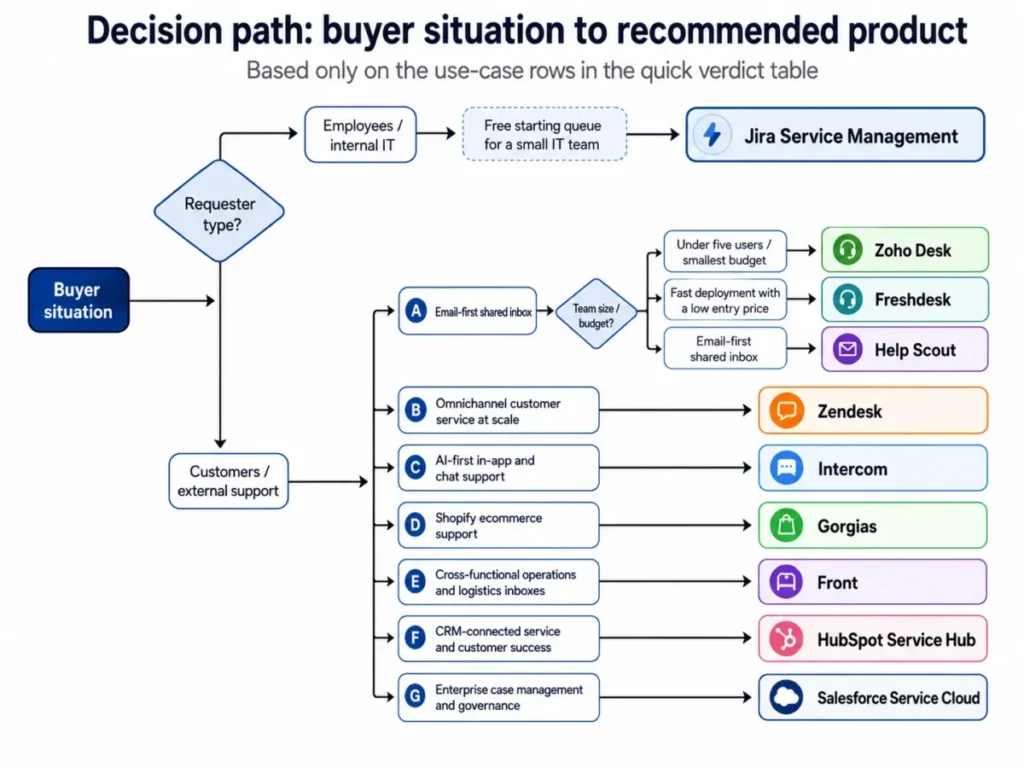
Customer support ticketing versus IT service management
This list covers help desk ticketing software and IT ticketing systems for internal service desks. It does not cover event or box-office ticketing, which shares the word “ticket” and little else.
The single most expensive mistake in this category is buying the wrong kind of ticketing system. External customer support and internal IT service management share the word “ticket” and almost nothing else.
Customer support tools optimize for channels, response time, and self-service deflection. IT service management tools optimize for incidents, change approvals, request catalogs, and asset records.
| Product | Primary category | External customer support | Internal IT service | Ecommerce order actions |
|---|---|---|---|---|
| Zendesk | Customer service suite | Yes | Limited | Limited |
| Freshdesk | Customer service suite | Yes | Limited | Limited |
| Zoho Desk | Customer service suite | Yes | Limited | Limited |
| Help Scout | Email-first help desk | Yes | Limited | Limited |
| Jira Service Management | IT service management | Limited | Yes | No |
| HubSpot Service Hub | CRM-native service | Yes | Limited | Limited |
| Intercom | Messaging-led support | Yes | Limited | Limited |
| Gorgias | Ecommerce help desk | Yes | No | Yes |
| Front | Collaborative inbox | Yes | Limited | Limited |
| Salesforce Service Cloud | Enterprise case management | Yes | Conditional | Conditional |
Source: category scope read from the official pages for Zoho Desk, Help Scout, and Jira Service Management.
Source: category scope read from the official pages for HubSpot Service Hub, Gorgias, and Salesforce Service Cloud.
This matrix is an editorial assessment of documented feature scope, not a certification of parity. Jira Service Management and Gorgias barely compete, while Zendesk, Freshdesk, Zoho Desk, and Help Scout compete directly for the same external queue.
Employees plus change-approval records point to Jira Service Management. Order edits inside the ticket point to Gorgias. Everything else belongs in the customer service group.
How we researched and evaluated ticketing systems
These rankings are built on official pricing pages, vendor product documentation, published plan comparison tables, and support-plan terms. Pricing, plan gates, and add-on rates were checked on August 4, 2026.
Every tool was assessed against the same buyer-focused criteria: channel coverage, routing and SLA depth, automation limits, reporting, security and admin controls, API capacity, implementation burden, and total cost at the tier a working team needs.
How we chose and ranked these tools
Greater weight was given to the factors that move a purchase decision: the gap between the advertised tier and the usable tier, the first limit that forces an upgrade, and the billing unit behind AI and channel charges. Brand familiarity and affiliate relationships carried no weight in the order.
Claims without a matching official source were excluded from the ranking rather than softened. Temporary promotions are kept separate from standard pricing and are re-confirmed against the vendor page on the publication date.
Third-party review sentiment is directional rather than statistically representative and was used only when recurring themes aligned with documented product or pricing constraints.
Quick comparison of the 10 best ticketing systems
| Tool | Entry plan and price | Practical tier | Best for | First limit that bites |
|---|---|---|---|---|
| Zendesk | Support Team, $19 per agent/month | Suite Team, $55 per agent/month | Omnichannel service teams | Entry tier is email and ticketing only |
| Freshdesk | Growth, $19 per agent/month | Pro, $55 per agent/month | Fast-deploying support teams | Intelligent routing and custom reporting sit in Pro |
| Zoho Desk | Express, $7 per user/month | Professional | Very small teams and Zoho users | Express stops at five users |
| Help Scout | Standard, $25 per user/month | Plus | Email-first support teams | Standard caps at 25 users and one basic SLA policy |
| Jira Service Management | Standard, $20 per agent/month | Premium | IT and engineering service desks | Change, incident depth, and the virtual agent need Premium |
| HubSpot Service Hub | Starter, $7 per seat/month | Professional, $90 per seat/month | CRM-connected service teams | Professional adds a mandatory $1,500 onboarding fee |
| Intercom | Essential, $19 per full seat/month | Advanced, $85 per seat/month | AI-first messaging support | Fin resolutions bill separately from $0.99 per outcome |
| Gorgias | Basic, $50 per month for 300 tickets | Pro | Shopify brands | Ticket volume, not seats, sets the bill |
| Front | Starter, $25 per seat/month | Professional | Collaborative operations inboxes | Starter allows one channel type and 10 automation rules |
| Salesforce Service Cloud | Starter Suite, $25 per user/month | Enterprise, $175 per user/month | Enterprise case management | Enterprise capability sits far above the entry suite |
Source: entry and practical tier prices from Zendesk pricing, Freshdesk pricing, Zoho Desk Express, and Help Scout pricing.
Source: entry and practical tier prices from Jira Service Management pricing and HubSpot Service Hub pricing.
Source: entry and practical tier prices from Intercom pricing.
Source: entry and practical tier prices from Gorgias pricing, Front pricing, and Salesforce Service Cloud pricing.
Read the third column before the second. The fifth column is the trigger that moves a team there.
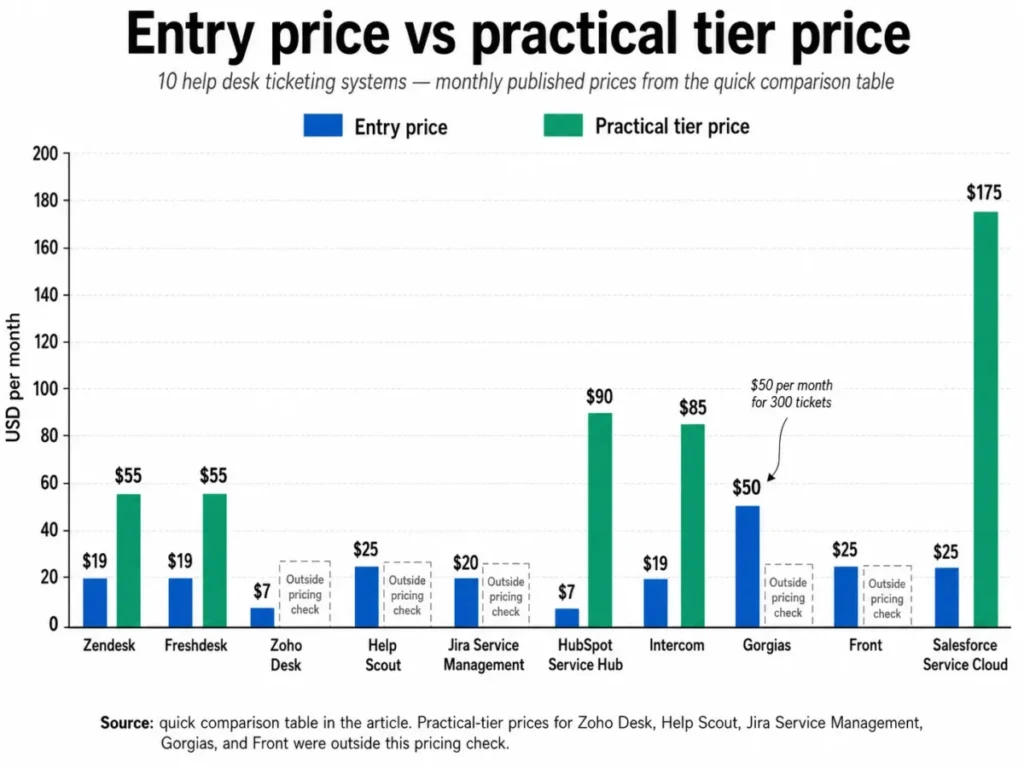
The paired view matters because the distance between the two bars, not the height of the first one, is the number a finance approver will question.
The three problems every ticketing system buyer faces
Three problems sit behind most ticketing purchases that go wrong in this category. Each one is invisible on a pricing page.
Problem 1: the category mismatch
A support leader buys a customer service suite and then discovers the IT team needs change approvals it cannot model. Or an IT manager standardizes on a service desk and the customer-facing team loses messaging and social channels.
Get the category wrong and no amount of configuration recovers it.
Problem 2: the entry-price illusion
Entry tiers in this category are email-and-ticketing products. Across much of this category, advanced channels, routing, or reporting require a higher tier.
Problem 3: usage billing that does not compare
AI and channel charges in this category use incompatible units: a resolution, an outcome, a session, a credit, or an allowance with metered overflow. None of them converts into another without a real ticket volume and a real deflection assumption.
The 10 best ticketing systems in 2026
Rank order below follows buyer coverage, workflow depth, plan transparency, cost at the usable tier, and implementation burden. Each block leads with the field a buyer checks first for that specific product.
1. Zendesk: Best for omnichannel customer service teams

- Best for:
- Customer service organizations of roughly 20 to 500 agents that need mature routing, telephony, knowledge management, and configurable automation in one suite.
- Avoid if:
- The team is under 10 agents, works email only, and has no plan to add messaging, voice, or advanced governance.
- Starting price:
- Support Team at $19 per agent/month, paid yearly, per the official Zendesk pricing page.
- Practical tier:
- Suite Team at $55 per agent/month, the first tier carrying omnichannel routing, messaging and live chat, telephony, and the knowledge base.
- Free plan:
- No free tier appears in the plan lineup on the checked pricing page.
- First limit that bites:
- A single messaging or voice channel request moves the whole team from $19 to $55 per agent/month.
- Better than Freshdesk:
- A longer documented runway from email ticketing into skills-based routing, telephony, and analytics without leaving the suite.
- Worse than Help Scout:
- Heavier configuration and administration for a team that only wants a shared inbox with a knowledge base.
- Setup difficulty:
- Moderate to high, because multiple channels, custom routing, and reporting all need design before go-live.
- Hidden costs:
- The Copilot add-on is listed at $50 per agent/month paid yearly, and AI automated resolutions are billed by usage rather than included outright.
- Evidence status:
- Plan names, prices, and the channel gate were read from the official Zendesk pricing page on 2026-08-04; the workflow description is reconstructed from that page and Zendesk product documentation.
Zendesk earns the top position on progression rather than on any single feature. The documented path runs from email ticketing into triggers and automations, then into omnichannel routing, messaging, telephony, skills-based routing, and analytics dashboards.
That progression is also the trap. The $19 Support Team tier is an email and ticketing product, and every channel a support lead describes in a requirements meeting lives at Suite Team.
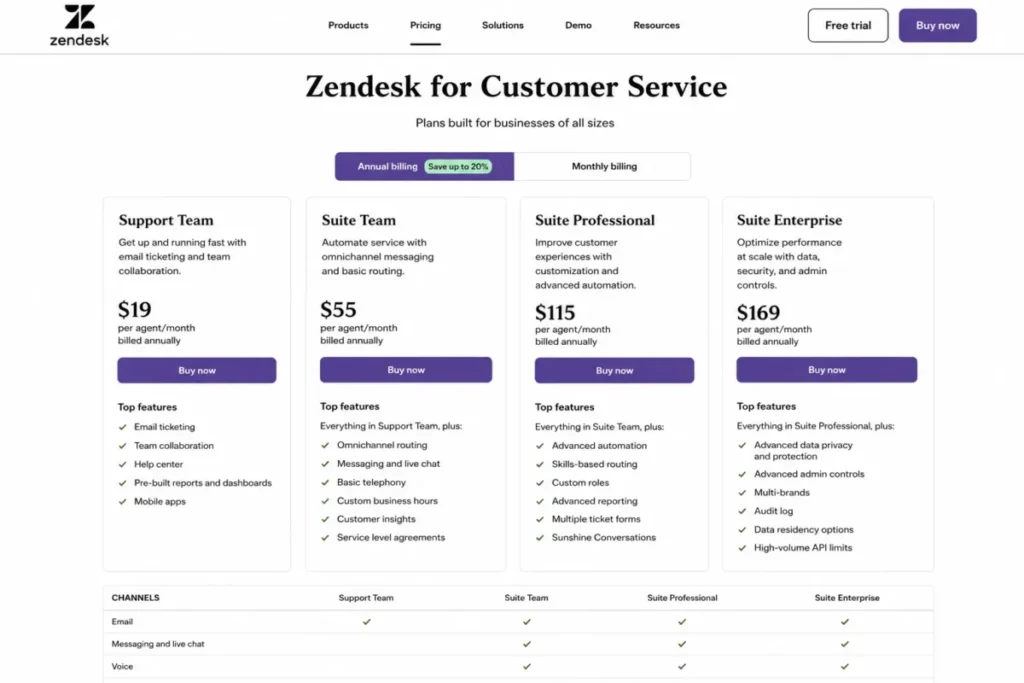
Governance is the other reason Zendesk holds the top spot for larger teams, with the deepest security and privacy controls concentrated in higher tiers. Per-plan API rate limits sit outside this pricing check, so an integration-heavy team should confirm them before signing.
Our full Zendesk review and the Zendesk pricing guide carry the tier-by-tier detail.
| Pros | Cons |
|---|---|
| Suite Team consolidates routing, messaging, live chat, telephony, and knowledge base in one plan | Omnichannel capability starts at $55 per agent/month, not the advertised $19 |
| Skills-based routing and analytics dashboards support contact-center escalation patterns | Copilot is a $50 per agent/month add-on rather than an included assistant |
| Large prebuilt marketplace and API surface for integration work | Enterprise governance controls concentrate in the higher tiers |
| Clear published plan structure makes tier modelling straightforward | Multi-channel implementation needs real configuration time |
- Verdict:
- Choose Zendesk if the queue is external, the channel list is longer than email, and the budget can absorb $55 per agent/month at the tier that carries those channels.
2. Freshdesk: Best for fast deployment on a lower entry price

Freshworks prices Freshdesk Growth at $19 per agent/month billed annually, matching Zendesk’s entry number while including ticketing, a shared inbox, threads and tasks, a customer portal, a knowledge base, and analytics.
- Best for:
- Support teams of roughly 5 to 100 agents that want core ticketing, a self-service portal, and reporting live quickly.
- Avoid if:
- The requirement list includes deep interface customization, or advanced routing and reporting on the entry plan.
- Starting price:
- Growth at $19 per agent/month billed annually, per the Freshdesk pricing page checked 2026-08-04.
- Practical tier:
- Pro at $55 per agent/month, which carries advanced reporting, intelligent routing, multiple SLA policies, and external collaborators.
- Free plan:
- Freshworks publishes a separate free versus paid comparison; confirm the current free-tier limits there before planning around it.
- First limit that bites:
- A second SLA policy or a workload-aware routing rule moves the team to Pro.
- Better than Zoho Desk:
- A wider set of included reporting and portal capability at the same broad price point for a mid-sized queue.
- Worse than Zendesk:
- A shorter runway into telephony-led contact-center operations and less configurable governance at the top end.
- Setup difficulty:
- Low to moderate for basic ticketing, higher once portals, custom objects, and advanced routing enter scope.
- Hidden costs:
- Freddy AI Copilot is listed at $29 per agent/month, additional AI Agent sessions cost $49 per 100 sessions beyond the first 500, and connector app tasks are sold in packs.
- Evidence status:
- Prices, plan gates, and AI add-on rates were read from the Freshworks pricing page for Freshdesk on 2026-08-04; workflow behaviour is described from that page and the vendor’s free-versus-paid comparison.
The gap between Growth and Pro is the whole Freshdesk decision. Growth is a competent ticketing product, and Pro is where the operational controls a support manager reports on come from.
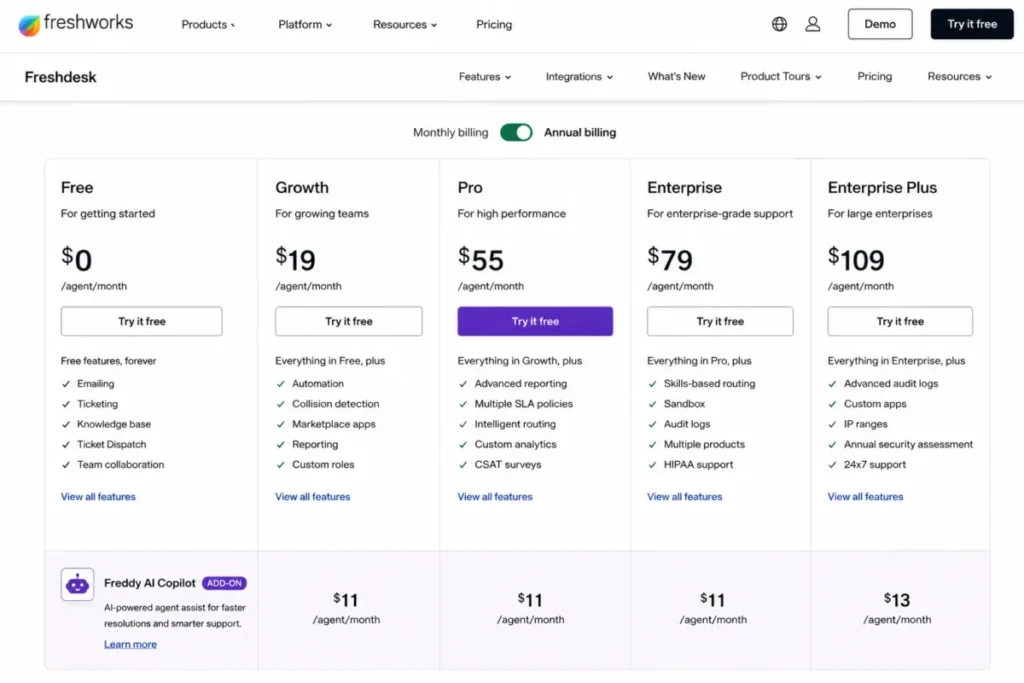
AI cost is the second thing to model, because the overage unit is a session rather than a resolved conversation.
Recurring themes in Capterra’s Freshdesk reviews are ease of setup and daily usability, with repeated concerns about higher-tier feature gates, customization limits, and the mobile app. Those themes match the plan structure rather than contradicting it, and our Freshdesk review walks through them.
| Pros | Cons |
|---|---|
| Entry tier includes ticketing, portal, knowledge base, and analytics rather than email alone | Intelligent routing and multiple SLA policies require Pro at $55 per agent/month |
| Faster time to a working queue than the enterprise suites in this list | AI Copilot adds $29 per agent/month on top of the seat price |
| Published AI session allowance and a stated overage unit | Connector app tasks are sold in packs rather than included |
| Portal and knowledge base support self-service deflection early | Interface customization is shallower than the enterprise platforms here |
- Verdict:
- Choose Freshdesk if the team wants a working queue in weeks rather than months and can plan for Pro once routing and reporting requirements appear.
3. Zoho Desk: Best for very small teams and existing Zoho customers

At $7 per user/month billed annually, or $9 month to month, Zoho Desk Express is the lowest verified entry price in this comparison. It is also the most tightly capped.
- Best for:
- Teams of roughly 1 to 25 agents, especially organizations already running other Zoho applications, that need affordable ticketing with room to grow.
- Avoid if:
- The requirement list includes enterprise routing, sandboxes, or multi-brand help centers while staying on the lowest tiers.
- Starting price:
- Express at $7 per user/month billed annually, or $9 month to month, per the Zoho Desk Express page checked 2026-08-04.
- Practical tier:
- Professional, which carries telephony, Blueprints, multi-department support, and round-robin routing; confirm the current Professional rate on the vendor page before budgeting.
- Free plan:
- Not part of the Express page checked for this comparison.
- First limit that bites:
- The fifth user. Express is capped at five users, so a sixth hire forces a plan change rather than a seat purchase.
- Better than Help Scout:
- A far lower entry price and native social and web-form intake without an add-on.
- Worse than Zendesk:
- Enterprise routing depth, multi-brand operations, and sandbox testing all sit further up the plan ladder.
- Setup difficulty:
- Low on Express, moderate once Professional automation or multi-department designs enter scope.
- Hidden costs:
- Vendor support itself is tiered. Premium support is priced at 20 percent of the subscription fee and Enterprise support at 25 percent of the annual subscription with a 25-license minimum, per the Zoho Desk support plans page.
- Evidence status:
- The Express price, the five-user cap, and the support-plan surcharges were read from Zoho’s own Express and support-plan pages on 2026-08-04; plan gate detail comes from Zoho’s customer service documentation.
The five-user ceiling is the honest headline. A six-person team does not get a $7 plan with one more seat, it gets Professional, and the features it gains are the ones that make Zoho Desk competitive with the suites above it.
The support-plan surcharge scales with the contract, so a growing team pays more each year for the same response commitment.
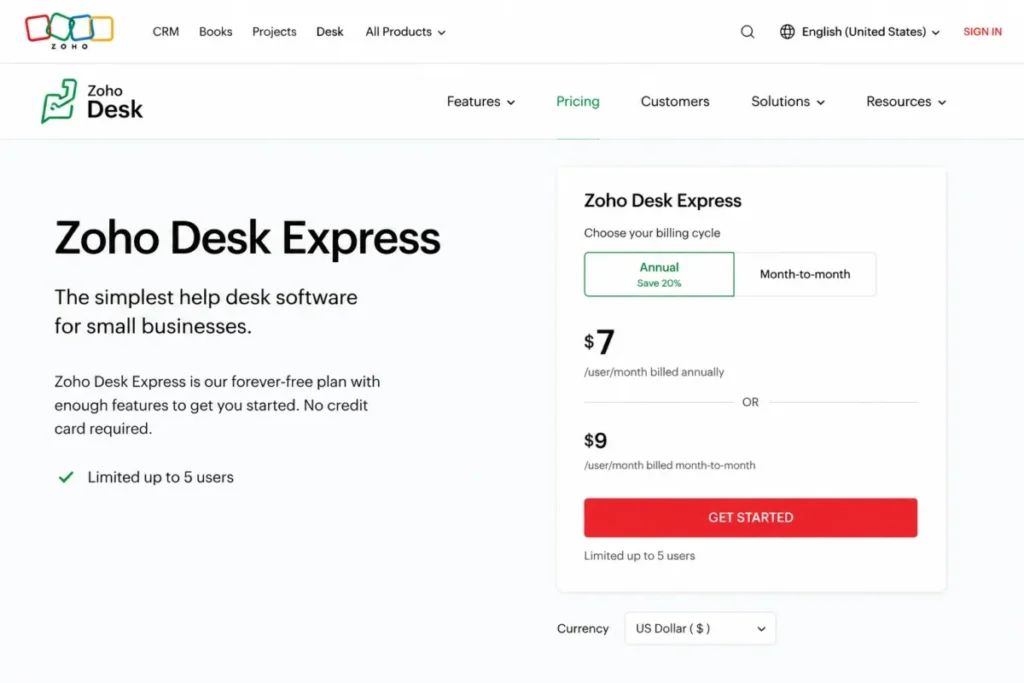
Zoho’s global pricing pages render regional currency by visitor location, so a US buyer should confirm the dollar figure on the page itself. Our Zoho Desk review records the same caveat.
| Pros | Cons |
|---|---|
| Lowest verified entry price in this comparison at $7 per user/month annually | Express stops hard at five users |
| Email, social, and web-form intake included at the entry tier | Telephony, Blueprints, and round-robin routing require Professional |
| Strong fit for organizations already standardized on Zoho applications | Skill-based assignment, multi-brand help centers, and sandbox are Enterprise features |
| Month-to-month option published alongside the annual rate | Premium and Enterprise support cost 20 and 25 percent of the subscription |
Source: plan gates from the Zoho Desk Express page and surcharges from the Zoho Desk support plans page, checked 2026-08-04.
- Verdict:
- Choose Zoho Desk if the team is under five people at signature and the growth path into Professional is acceptable, and skip it if enterprise routing or multi-brand operations are already on the requirement list.
4. Help Scout: Best for email-first support teams

- Best for:
- SaaS, professional-services, and ecommerce teams of roughly 5 to 50 people that value fast adoption over contact-center depth.
- Avoid if:
- The queue needs native voice, deep IT service customization, or enterprise automation on an entry plan.
- Starting price:
- Standard at $25 per user/month with the annual discount selected, per the Help Scout pricing page.
- Practical tier:
- Plus, which adds round-robin assignment, advanced workflows, and two advanced SLA policies.
- Free plan:
- A free tier is listed on the pricing page alongside the paid plans; confirm its current limits there.
- First limit that bites:
- The 26th user, or the second SLA policy, whichever arrives first.
- Better than Front:
- A lower entry price with knowledge bases and live chat included rather than gated behind a channel upgrade.
- Worse than Zendesk:
- No comparable native telephony path, and a thinner ceiling for complex escalation models.
- Setup difficulty:
- Low on Standard, moderate once multiple brands, advanced workflows, and identity controls enter scope.
- Hidden costs:
- AI Answers is billed at $0.75 per resolution with a monthly cap that can switch the feature off once reached, and SSO/SAML and HIPAA are add-ons on some tiers.
- Evidence status:
- Seat caps, SLA policy counts, API limits, and the AI resolution rate were read from the Help Scout pricing page and its Messages pricing documentation on 2026-08-04.
Help Scout is the clearest answer here for a team whose real requirement is a shared inbox that people adopt without training. Multiple inboxes, live chat, Messenger and Instagram, knowledge bases, SLAs, and workflows are documented as core rather than as a suite upgrade.
The API story is unusually transparent for this category: published limits rise by plan at 200, 400, and 800 calls per minute, which is a rare number to find on a pricing page at all.
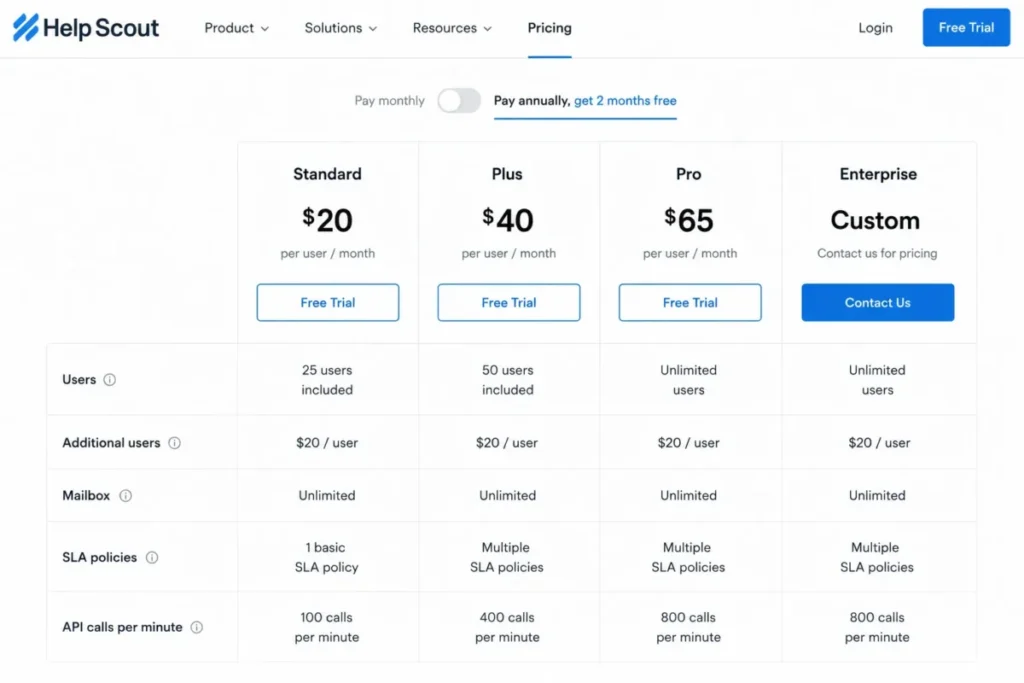
Recurring themes in TrustRadius reviews of Help Scout match what the documentation shows: quick adoption and an email workflow agents pick up without training, alongside weaker advanced integration and CRM depth than the platform players. Our Help Scout review covers the plan ladder in detail.
| Pros | Cons |
|---|---|
| Published API rate limits per plan, at 200, 400, and 800 calls per minute | Standard is capped at 25 users |
| Live chat, Messenger, Instagram, and knowledge bases without a suite upgrade | Round-robin and advanced workflows require Plus |
| Onboarding specialist and strategic account manager on the Pro tier | SSO/SAML and HIPAA are Pro features or paid add-ons |
| AI Answers priced per resolution rather than per seat | The AI monthly cap can disable AI Answers once reached |
- Verdict:
- Choose Help Scout if the team is email-led, under 25 people, and would rather grow into workflows than configure them on day one.
5. Jira Service Management: Best for IT and engineering service desks

The reason Jira Service Management sits at rank five rather than higher is category, not quality. It is the strongest tool here for internal service work and the weakest fit for a small external support inbox.
- Best for:
- IT, operations, and engineering organizations of roughly 5 to 500 agents that need incident, request, change, and asset workflows connected to development tooling.
- Avoid if:
- The requirement is a simple external help desk with minimal administration.
- Starting price:
- Standard at $20 per agent/month on the displayed monthly price, per the Atlassian service pricing page.
- Practical tier:
- Premium, which carries advanced incident, problem, and change management, deployment gating, the virtual service agent, and a 99.9 percent service commitment.
- Free plan:
- A free tier exists with community support rather than a vendor response commitment.
- First limit that bites:
- The first change-approval or major-incident requirement, which moves the project to Premium.
- Better than Zendesk:
- Native change, problem, and asset management, plus direct links into development and deployment workflows.
- Worse than Freshdesk:
- A steeper administration curve for a team that only needs an external customer queue.
- Setup difficulty:
- Moderate to high, because workflows, schemes, permissions, and reporting all compound as the service desk grows.
- Hidden costs:
- Assets objects above the included allowance start at $0.02 per object/month, and virtual agent assisted conversations above the included 1,000 start at $0.30 each.
- Evidence status:
- Plan prices, feature gates, and both usage overage rates were read from the Atlassian service pricing page on 2026-08-04, where the product is packaged inside the wider service collection.
Two usage meters make this product different from the rest of the list, so cost scales with the estate and the deflection volume rather than only with headcount. That is an advantage for a stable IT estate and a risk for a fast-growing one.
Model the object count before signing, because an asset-heavy configuration management database moves the bill without adding a single agent.
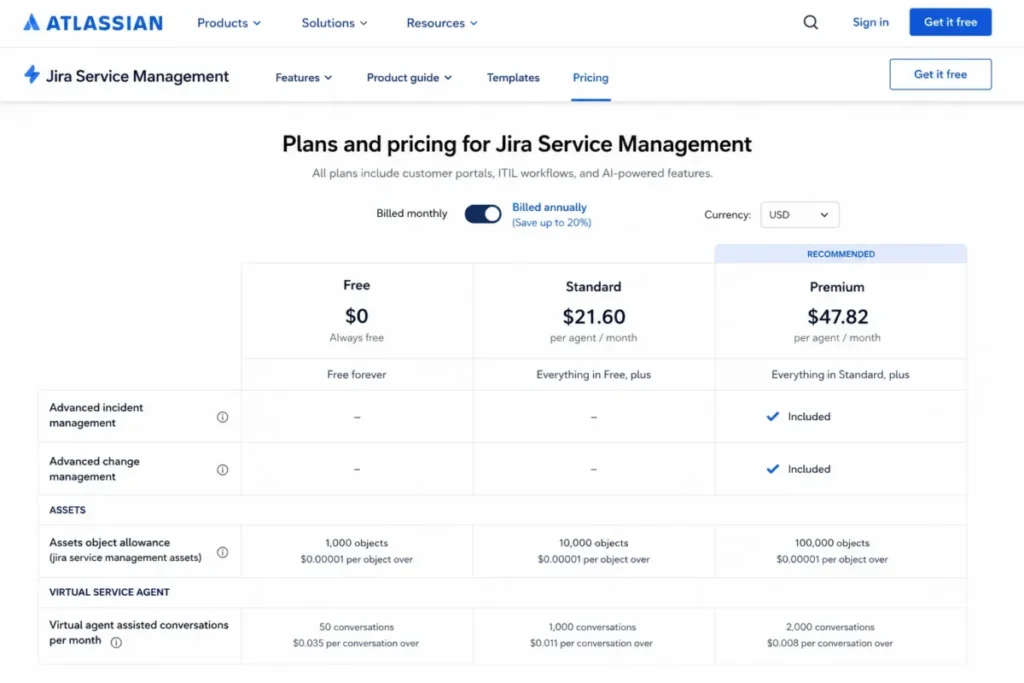
Recurring themes in G2 reviews of Jira Service Management are automation depth and Atlassian integration, alongside repeated concerns about setup complexity, learning curve, and reporting friction. Both halves of that pattern are consistent with a platform built for process modelling, and our Jira review and the Jira pricing guide go deeper on the plan ladder.
| Pros | Cons |
|---|---|
| Incident, problem, change, and asset workflows in one service project | Advanced incident and change management require Premium |
| Direct connection to Jira, Confluence, and deployment tooling | Setup complexity and permission modelling are recurring adoption issues |
| Published overage rates for Assets objects and assisted conversations | Two usage meters can move cost without adding agents |
| Free tier available for a first internal queue | Free support is community only, with no vendor response commitment |
- Verdict:
- Choose Jira Service Management when the requesters are employees and the queue needs change records, and choose a customer service suite when they are customers.
6. HubSpot Service Hub: Best for CRM-connected service teams

Seat price is the wrong number to start with here. HubSpot Service Hub Starter is $7 per seat/month billed annually, and the tier that carries the service workflow is Professional at $90 per seat/month with a mandatory $1,500 onboarding fee.
- Best for:
- Service teams of roughly 5 to 100 seats already running HubSpot CRM that want tickets, customer success, feedback, and customer context on one record.
- Avoid if:
- The team needs a standalone help desk and has no use for the wider CRM platform or the onboarding commitment.
- Starting price:
- Starter at $7 per seat/month billed annually, or $20 per seat/month on a monthly commitment, per the HubSpot Service Hub pricing page .
- Practical tier:
- Professional at $90 per seat/month, plus the one-time $1,500 onboarding fee.
- Free plan:
- A free tier is listed on the pricing page; confirm its seat and feature limits there.
- First limit that bites:
- The onboarding invoice, which lands before the first ticket is routed.
- Better than Front:
- Customer context, feedback programs, and customer success workflows sit on the same record as the ticket.
- Worse than Zoho Desk:
- Far higher cost to reach a working service configuration for a small team.
- Setup difficulty:
- Low on Starter, high on Professional and Enterprise because paid onboarding is mandatory.
- Hidden costs:
- Enterprise is listed at $150 per seat/month with a $3,500 onboarding fee, and AI usage consumes HubSpot Credits at $9 per 1,000 credits paid annually, with the Customer Agent consuming 50 credits per resolved conversation.
- Evidence status:
- Seat prices, both onboarding fees, and the credit rate were read from the HubSpot Service Hub pricing page on 2026-08-04; the monthly and annual commitment labels on that page should be re-confirmed at publication because they are presented dynamically.
Mandatory onboarding is the fact most comparison tables omit. It is one-time, so it belongs in a first-year model rather than a monthly one.
Credits are the second modelling job. A resolved AI conversation costs 50 credits, so deflection volume translates directly into a credit purchase rather than into a flat seat uplift.
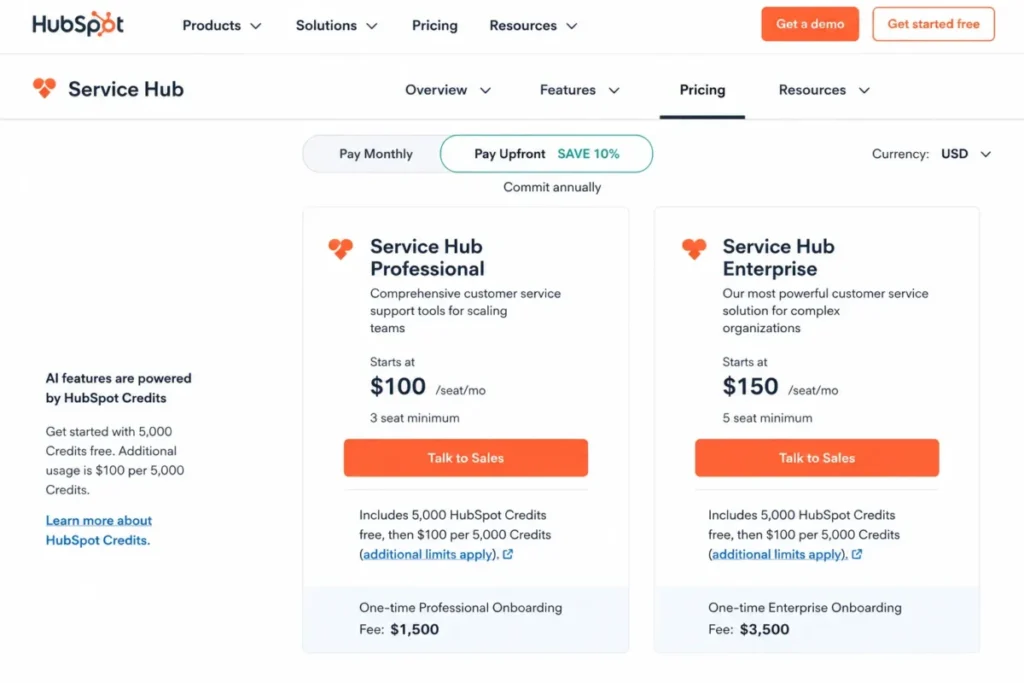
The HubSpot pricing breakdown covers how the seat model interacts with the rest of the platform, which matters because most buyers here are already paying for other hubs.
| Pros | Cons |
|---|---|
| Tickets, help desk workspace, customer success, and feedback share one CRM record | The practical tier is $90 per seat/month, not the $7 entry price |
| Large integration ecosystem across the wider HubSpot platform | Professional onboarding is a mandatory one-time $1,500 fee |
| Published credit pricing makes AI deflection cost modellable | Enterprise adds a $3,500 onboarding fee on top of $150 per seat/month |
| Customer portal and knowledge base included in the service tooling | Standalone buyers pay for platform capability they may not use |
Source: seat prices, onboarding fees, and credit rates from the HubSpot Service Hub pricing page and HubSpot’s own Service Hub pricing guide, checked 2026-08-04.
- Verdict:
- Choose HubSpot Service Hub when the CRM record is already the source of truth and the service team needs to work inside it, and skip it when a standalone queue would do the same job for less.
7. Intercom: Best for AI-first messaging support

- Best for:
- SaaS and digital-product teams of roughly 5 to 100 agents that lead with in-app messaging and AI-assisted resolution.
- Avoid if:
- Finance needs a single predictable line item without usage-based AI, phone, WhatsApp, SMS, or outbound messaging charges.
- Starting price:
- Essential at $19 per full seat/month billed annually, per the Intercom pricing calculator.
- Practical tier:
- Advanced at $85 per seat/month, where advanced routing begins.
- Free plan:
- Not part of the plan lineup on the pricing pages checked here.
- First limit that bites:
- The first workload-aware routing requirement, which is an Advanced feature.
- Better than Gorgias:
- A stronger in-product messaging and help-center model for software companies rather than ecommerce storefronts.
- Worse than Help Scout:
- Far less predictable monthly cost, because seats and outcomes bill separately.
- Setup difficulty:
- Moderate. AI knowledge, workflows, channel configuration, and usage governance all need design before launch.
- Hidden costs:
- Fin resolutions start at $0.99 per outcome, and Copilot is $29 per agent/month billed annually or $35 month to month. Phone, WhatsApp, SMS, campaigns, and Pro analytics all bill separately, per the Intercom pricing page.
- Evidence status:
- Seat prices, the Fin outcome rate, the Copilot rate, and the Expert-tier security gates were read from Intercom’s pricing calculator and pricing page on 2026-08-04.
The pricing model is the product decision. Intercom separates human capacity from automated resolution, and both meters run at the same time.
That structure rewards teams with high deflection and punishes teams with low deflection and high volume. Model a monthly outcome count before committing, because a $19 seat and a $0.99 outcome produce very different bills at 500 and 5,000 resolutions.
Security and governance sit at the top. SSO and identity management, HIPAA support, service level agreements, and multibrand all require the Expert tier, which puts compliance-driven buyers on the most expensive plan rather than the middle one.
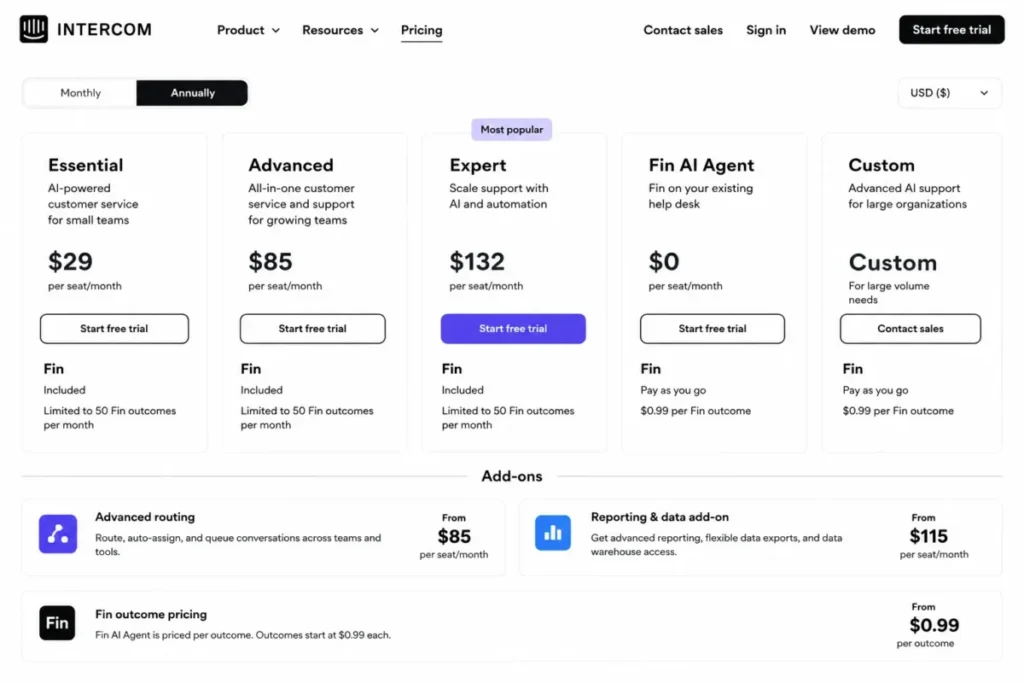
For the head-to-head that most buyers run at this stage, see Zendesk versus Intercom and our Intercom review.
| Pros | Cons |
|---|---|
| Messenger, help center, and ticketing designed around in-product support | Seats and Fin outcomes bill on two separate meters |
| Fin can run alongside an existing help desk rather than replacing it | Advanced routing starts at $85 per seat/month |
| Published per-outcome AI pricing rather than an opaque bundle | SSO, HIPAA support, SLAs, and multibrand all require the Expert tier |
| Strong fit for software products with an in-app support surface | Phone, WhatsApp, SMS, and campaigns each add usage charges |
- Verdict:
- Choose Intercom if deflection is the strategy and the finance team accepts a usage line, and choose a flat-seat competitor if predictability matters more than automation ceiling.
8. Gorgias: Best for Shopify ecommerce brands

Gorgias is the only product in this comparison that does not bill by agent. Basic is listed at $50 per month for 300 billable tickets on the current pricing page, with overage charged at $40 per 100 tickets.
- Best for:
- Shopify-centered brands handling roughly 300 to 5,000 support tickets a month that want order actions and social channels inside the help desk.
- Avoid if:
- The queue is B2B SaaS or internal IT, or volume is low enough that a seat-priced tool costs less.
- Starting price:
- Basic at $50 per month for 300 tickets, shown as the annual effective rate on the Gorgias pricing page checked 2026-08-04; monthly billing is higher.
- Practical tier:
- Pro, per Gorgias’s own plan selection guidance; confirm the current Pro rate on the pricing page before budgeting.
- Free plan:
- Not part of the plan lineup on the pricing page checked here.
- First limit that bites:
- Ticket 301 in a calendar month, which triggers the first overage block.
- Better than Zendesk:
- Native ecommerce actions and revenue statistics tied to the storefront rather than bolted on through integrations.
- Worse than Front:
- A narrower fit outside ecommerce, where ticket-volume pricing has no matching benefit.
- Setup difficulty:
- Moderate, because ecommerce actions, automation rules, and billing thresholds all need configuration.
- Hidden costs:
- AI Agent resolutions are billed at $0.90 per resolved conversation on annual billing, and voice and SMS are separate usage-based add-ons.
- Evidence status:
- The Basic price, the 300-ticket allowance, the overage unit, and the AI resolution rate were read from the Gorgias pricing page on 2026-08-04.
Seat-blind pricing flips the usual arithmetic. A 12-person team with a quiet queue can cost less here than on any per-agent tool in this list, and a three-person team with a busy queue can cost considerably more.
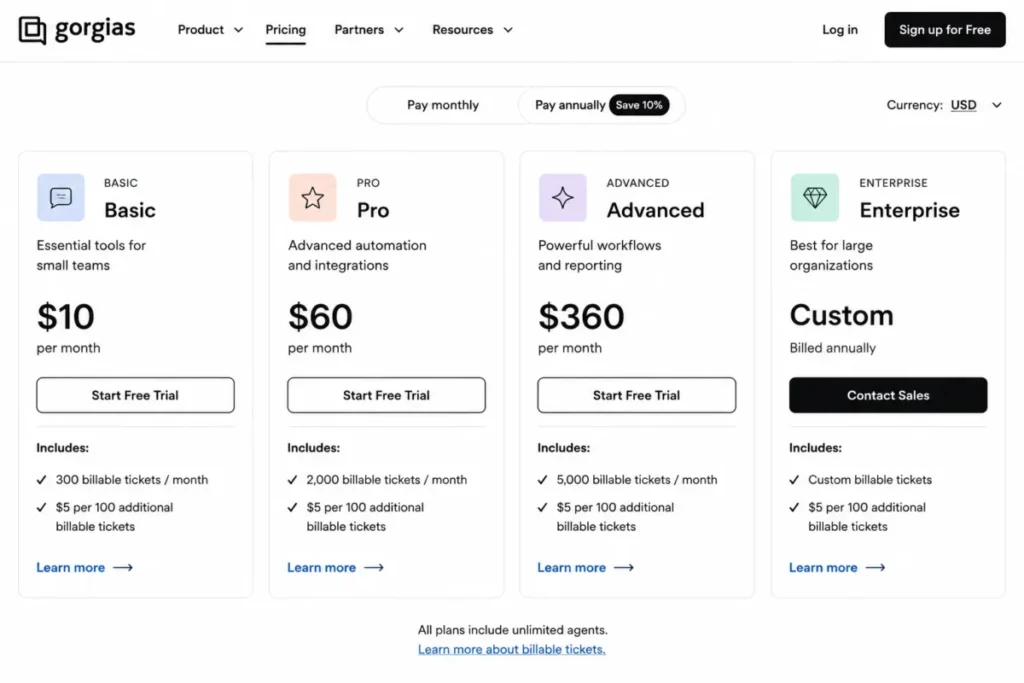
Our Gorgias review breakdown models the volume tiers in more detail.
| Pros | Cons |
|---|---|
| Ticket-volume pricing removes the per-agent cost of adding seasonal staff | A busy queue on a small team costs more than a seat-priced tool |
| Order actions, social channels, and revenue statistics built for storefronts | Overage is charged per 100 tickets once the allowance is used |
| Deep ecommerce integration set including Shopify, Klaviyo, and Recharge | Voice, SMS, and AI Agent all bill as separate usage |
| AI Agent priced per resolved conversation rather than per seat | Little benefit outside an ecommerce workflow |
- Verdict:
- Choose Gorgias if the storefront is the business and agents must act on orders inside the ticket, and model the monthly ticket count before comparing it to any per-seat quote.
9. Front: Best for collaborative operations inboxes

- Best for:
- Support, operations, logistics, and account-management teams of roughly 10 to 100 seats that need a shared inbox with stronger cross-functional collaboration than a classic help desk offers.
- Avoid if:
- A small team needs omnichannel support, advanced analytics, and AI while staying on the entry plan.
- Starting price:
- Starter at $25 per seat/month billed annually, per the Front pricing page.
- Practical tier:
- Professional, which is required for omnichannel, SSO and SCIM, advanced analytics, and up to 50 seats.
- Free plan:
- Not part of the plan lineup on the pricing page checked here; a trial is described in Front’s plan documentation.
- First limit that bites:
- The second channel type. Starter allows one channel type, 10 automation rules, and 10 seats.
- Better than Help Scout:
- Workspaces and collaboration patterns that suit operations and logistics teams rather than support teams alone.
- Worse than Zendesk:
- Weaker native contact-center depth once voice and skills-based routing become requirements.
- Setup difficulty:
- Low for a single inbox, moderate to high for multiple workspaces, omnichannel, and automation.
- Hidden costs:
- Front Copilot is $20 per seat/month unless the contract is Enterprise, an API rate-limit increase costs $200 per additional 100 requests per minute per month, and onboarding is required on contracts above $25,000.
- Evidence status:
- Seat prices, seat caps, the automation-rule limit, and both add-on rates were read from the Front pricing page on 2026-08-04.
Front is the only product here that publishes a price for API capacity itself, which tells an integration-heavy team what scaling the connection will cost.
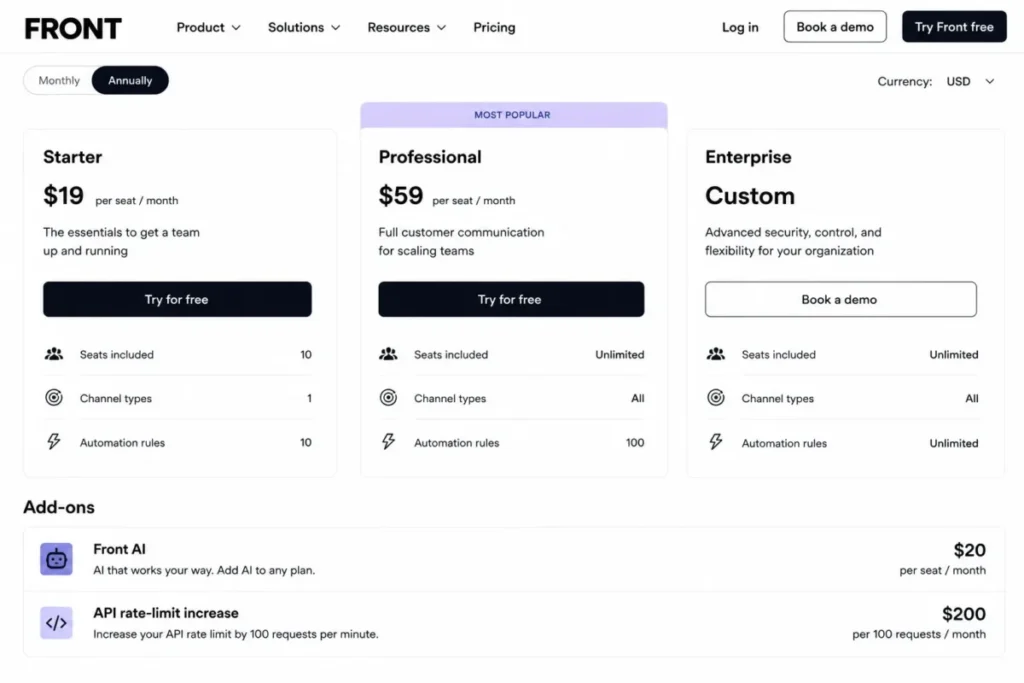
| Pros | Cons |
|---|---|
| Shared inbox model suits operations, logistics, and account teams, not only support | Starter is limited to one channel type and 10 seats |
| Published API rate-limit increase price at $200 per 100 requests per minute | Omnichannel, SSO, and SCIM all require Professional |
| Workspaces and automation rules support cross-functional queues | AI modules are separate add-ons unless the contract is Enterprise |
| Knowledge base and omnichannel available on the Professional tier | Onboarding is required on contracts above $25,000 |
- Verdict:
- Choose Front when the inbox is shared across functions rather than owned by a support team, and budget for Professional from the start if more than one channel is in scope.
10. Salesforce Service Cloud: Best for enterprise case management

Rank ten is a position on this list, not a judgement on the platform. Salesforce Service Cloud is the most configurable case-management system here and the least suitable for a team that wants a queue running next month.
- Best for:
- Organizations of roughly 50 to 1,000 or more agents already standardized on Salesforce that need deeply customizable case management, automation, data, and governance.
- Avoid if:
- The team wants quick deployment, transparent low total cost, or advanced digital channels without add-ons.
- Starting price:
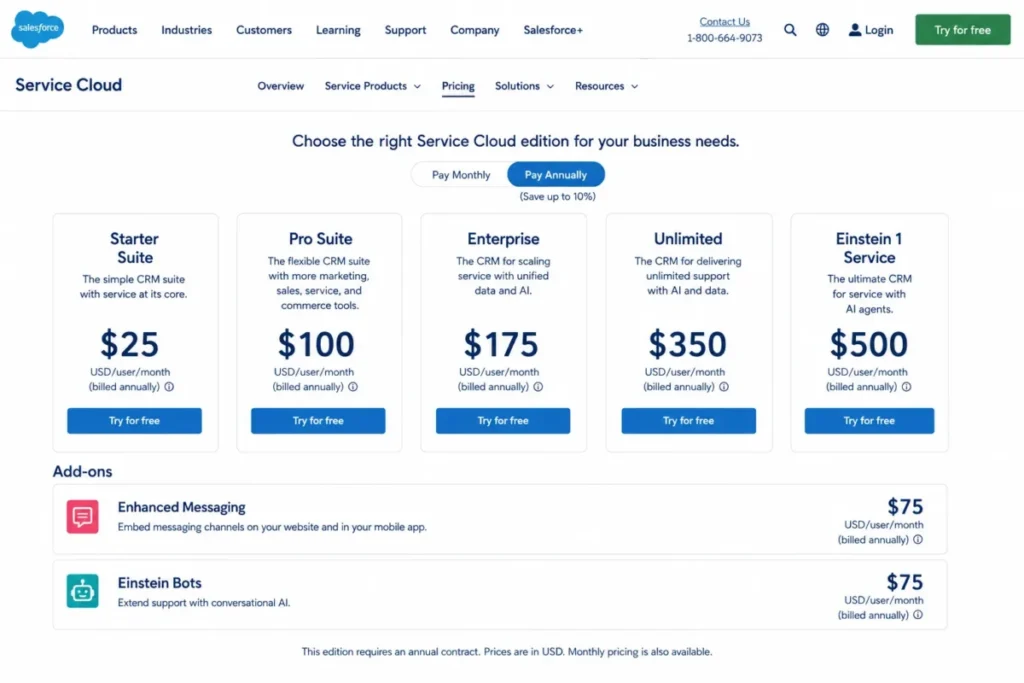
- Starter Suite at $25 per user/month, billed monthly or annually, per the Salesforce Service Cloud pricing page checked 2026-08-04.
- Practical tier:
- Enterprise at $175 per user/month billed annually.
- Free plan:
- Not part of the edition lineup on the pricing page checked here.
- First limit that bites:
- The first requirement that Starter Suite cannot model, which moves the contract to an annual enterprise agreement.
- Better than HubSpot Service Hub:
- Deeper case customization, Flow Builder automation, and edition-level governance for large service organizations.
- Worse than Freshdesk:
- Time to value, and the transparency of the all-in first-year figure.
- Setup difficulty:
- High. Implementation partners, data modelling, permissions, and integrations are normal parts of the project.
- Hidden costs:
- Enhanced messaging and Einstein Bots can each add $75 per user/month, the Web Services API is an additional $25 per user/month on Pro Suite, and some self-service and sandbox capabilities are purchased separately.
- Evidence status:
- Edition prices, contract terms, and add-on rates were read from the Salesforce Service Cloud pricing page on 2026-08-04; the Service Cloud product page carries the positioning detail.
Starter Suite is an entry product, and the capabilities that put Salesforce on an enterprise shortlist begin at Enterprise, before any messaging or bot add-on is priced in.
Our Salesforce CRM review covers how the service editions interact with the wider platform contract.
| Pros | Cons |
|---|---|
| Deep case customization, Flow Builder, and service console for large operations | Enterprise service capability starts at $175 per user/month annually |
| Data Cloud, AppExchange, and Slack integration across the Salesforce estate | Enhanced messaging and Einstein Bots can each add $75 per user/month |
| Edition-level governance suited to regulated service organizations | Web Services API costs an extra $25 per user/month on Pro Suite |
| Unlimited edition includes Premier Success support | Implementation partners are a normal cost, and they are not published |
- Verdict:
- Choose Salesforce Service Cloud when the organization is already standardized on Salesforce and case complexity justifies an implementation project, and choose almost anything else on this list when it is not.
Pricing, limits, and hidden costs
Entry price answers one question: what does it cost to open a queue? Practical-tier price answers the question a buyer is asked in a budget review, which is what the configuration described in the requirements document costs for a year.
What five and 25 agents pay in a year
| Tool | Entry tier, 5 agents | Entry tier, 25 agents | Practical tier, 5 agents | Practical tier, 25 agents | Year-one extras |
|---|---|---|---|---|---|
| Zendesk | $1,140 | $5,700 | $3,300 | $16,500 | Copilot add-on at $50 per agent/month |
| Freshdesk | $1,140 | $5,700 | $3,300 | $16,500 | AI Copilot at $29 per agent/month |
| Zoho Desk | $420 | Not available, five-user cap | Outside this pricing check | Outside this pricing check | Support plans at 20 to 25 percent of subscription |
| Help Scout | $1,500 | $7,500 | Outside this pricing check | Outside this pricing check | AI Answers at $0.75 per resolution |
| Jira Service Management | $1,200 | $6,000 | Outside this pricing check | Outside this pricing check | Assets and assisted-conversation overage |
| HubSpot Service Hub | $420 | $2,100 | $5,400 | $27,000 | Mandatory onboarding at $1,500 |
| Intercom | $1,140 | $5,700 | $5,100 | $25,500 | Fin outcomes from $0.99 each |
| Gorgias | $600 | Not seat-based | Outside this pricing check | Outside this pricing check | Overage at $40 per 100 tickets |
| Front | $1,500 | Not available, 10-seat cap | Outside this pricing check | Outside this pricing check | Copilot at $20 per seat/month |
| Salesforce Service Cloud | $1,500 | $7,500 | $10,500 | $52,500 | Enhanced messaging at $75 per user/month |
Source: the Zendesk and Freshdesk figures use Zendesk and Freshdesk,.
Source: the Zoho Desk and Help Scout figures use Zoho Desk and Help Scout.
Source: the Jira Service Management, HubSpot, and Intercom figures use Jira Service Management, HubSpot Service Hub, and Intercom.
Source: the Gorgias, Front, and Salesforce figures use Gorgias, Front, and Salesforce.
Figures are annual software cost in US dollars, calculated as rate times seats times 12 months. They exclude tax, implementation services, usage overage, and any add-on not listed in the final column.
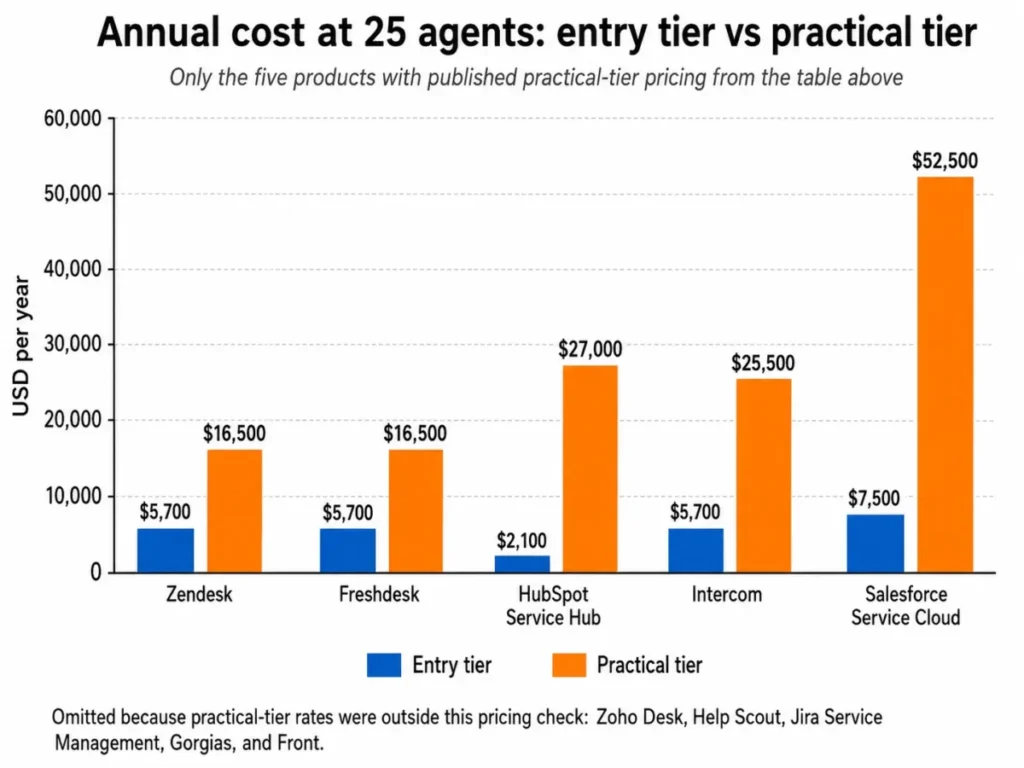
Five practical-tier rates sit outside this pricing check and are marked as such rather than estimated. Confirm the Zoho Desk Professional, Help Scout Plus, Jira Service Management Premium, Gorgias Pro, and Front Professional rates on the vendor page before signing anything.
The pattern in the table is the point. HubSpot starts cheapest at five seats and becomes one of the most expensive first-year commitments once Professional and its onboarding fee are counted.
Salesforce moves the other way: a competitive-looking entry suite, then $52,500 a year for 25 agents at Enterprise.
How AI is billed, and why the units do not compare
| Tool | AI billing unit | Published rate | Included allowance |
|---|---|---|---|
| Zendesk | Automated resolution, plus a seat-based assistant | Copilot at $50 per agent/month paid yearly | Automated resolutions are usage-based |
| Freshdesk | AI Agent session, plus a seat-based copilot | $49 per 100 sessions, Copilot at $29 per agent/month | First 500 sessions included |
| Help Scout | Resolution | $0.75 per resolution | Monthly cap can switch the feature off |
| Jira Service Management | Assisted conversation | $0.30 per assisted conversation | 1,000 assisted conversations included |
| HubSpot Service Hub | Credit | $9 per 1,000 credits paid annually | 50 credits per resolved conversation |
| Intercom | Outcome, plus a seat-based copilot | From $0.99 per outcome, Copilot at $29 per agent/month | Outcomes are usage-based |
| Gorgias | Resolved conversation | $0.90 per resolved conversation on annual billing | Resolutions are usage-based |
| Front | Seat-based copilot | $20 per seat/month | Included in Enterprise |
| Salesforce Service Cloud | Seat-based bot licence | Einstein Bots at $75 per user/month | Sold as an edition add-on |
At least six different units appear in nine rows. A resolution, a session, an assisted conversation, a credit, an outcome, and a seat are not interchangeable.
At 1,000 automated resolutions a month, Help Scout bills $750 on its published per-resolution rate.
Gorgias bills $900 for the same volume on annual terms, and Jira Service Management includes the first 1,000 assisted conversations before its per-conversation rate applies.
Seat-based assistants behave differently again: Front Copilot and Freddy AI Copilot cost the same whether the team automates 10 conversations or 10,000.
Annual commitment versus monthly flexibility
| Tool | Published annual-effective rate | Published month-to-month rate | Commitment note |
|---|---|---|---|
| Zoho Desk Express | $7 per user/month | $9 per user/month | Both rates published side by side |
| HubSpot Service Hub Starter | $7 per seat/month | $20 per seat/month | Re-confirm the commitment labels at purchase |
| Intercom Copilot | $29 per agent/month | $35 per agent/month | Add-on rate, not the seat rate |
| Salesforce Starter Suite | $25 per user/month | $25 per user/month | Billed monthly or annually, higher editions require a contract |
Source: dual-rate disclosures on the Zoho Desk Express page and the HubSpot Service Hub pricing page.
Source: dual-rate disclosures on the Intercom pricing page and the Salesforce Service Cloud pricing page.
Most vendors here publish one number and attach annual billing to it quietly. The four rows above state both, so they are the only cases where the cost of flexibility can be read off the page.
One more cost sits outside every pricing table. Vendor support can itself be a purchase, and Zoho prices Premium support at 20 percent of the subscription fee and Enterprise support at 25 percent of the annual subscription with a 25-licence minimum.
Feature gates by plan
| Tool | Routing depth | Reporting | AI | API and integrations | Security and admin |
|---|---|---|---|---|---|
| Zendesk | Omnichannel and skills-based routing from Suite Team | Analytics dashboards in the suite tiers | Copilot add-on plus usage-based resolutions | Marketplace and APIs, per-plan limits not published | Deeper governance in higher tiers |
| Freshdesk | Intelligent routing from Pro | Custom dashboards and reporting from Pro | Copilot add-on plus metered sessions | Connector app tasks sold in packs | Audit logs and added controls in higher tiers |
| Zoho Desk | Round-robin from Professional, skill-based at Enterprise | Dashboards from the paid editions | Not captured in this pricing check | API available, per-plan limits not published | Sandbox and multi-brand at Enterprise |
| Help Scout | Round-robin from Plus | Reporting rises with the plan | AI Answers at a per-resolution rate | 200, 400, and 800 API calls per minute by plan | SSO/SAML and HIPAA at Pro or as add-ons |
| Jira Service Management | Queues and request types from Standard | Reporting rises with the plan | Virtual service agent from Premium | Platform APIs, per-plan limits not published | Audit logs and residency from Standard, Guard at Enterprise |
| HubSpot Service Hub | Routing rises with the plan | Reporting rises with the plan | Credit-based AI across the platform | Capacity and API limit increases can be purchased | Advanced controls at Enterprise |
| Intercom | Advanced routing from $85 per seat/month | Pro analytics billed separately | Fin outcomes plus a Copilot add-on | Broad app ecosystem, per-plan limits not published | SSO, HIPAA, SLAs, and multibrand at Expert |
| Gorgias | Rules and macros across plans | Revenue statistics in the help desk | AI Agent per resolved conversation | Ecommerce integration set, limits not published | Google and Microsoft SSO on higher plans |
| Front | Omnichannel from Professional | Advanced analytics from Professional | Copilot add-on unless Enterprise | Rate-limit increase at $200 per 100 requests per minute | SSO and SCIM from Professional, custom roles at Enterprise |
| Salesforce Service Cloud | Flow Builder and console routing by edition | Reporting by edition | Einstein Bots as a paid add-on | Web Services API extra on Pro Suite | Governance depends on edition and add-ons |
Source: gates read from the Zendesk, Freshdesk, Help Scout, and Jira Service Management pricing pages.
Source: gates read from the HubSpot, Intercom, and Gorgias pricing pages.
Source: gates read from the Front and Salesforce pricing pages, plus the Zoho Desk customer service documentation.
API capacity is a paid constraint at Front and a published plan attribute at Help Scout, and undisclosed at most of the rest, which makes it a procurement question rather than a feature question.
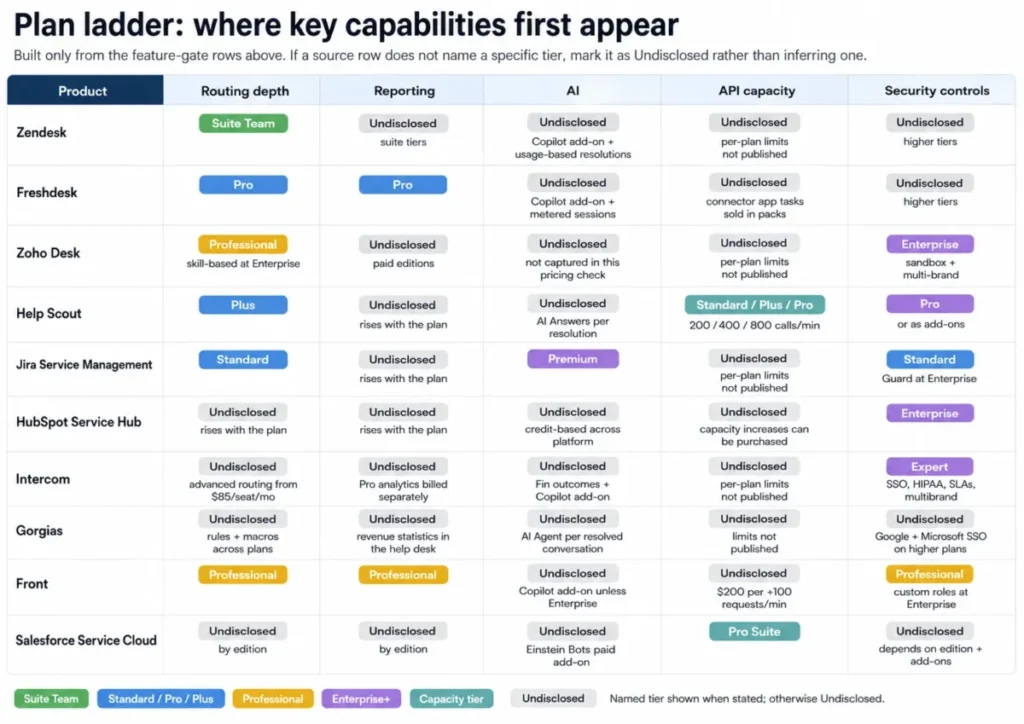
Security is the other one. SSO, SCIM, HIPAA support, sandboxes, and custom roles are purchase gates in this category, so the cheapest compliant plan is often several tiers above the cheapest plan.
Setup and migration difficulty
| Tool | Setup difficulty | Why | First configuration task |
|---|---|---|---|
| Zendesk | Moderate to high | Multiple channels, routing, and reporting each need design | Map channels to groups before importing agents |
| Freshdesk | Low to moderate | Basic ticketing is quick, portals and custom objects are not | Define SLA policies before turning on routing |
| Zoho Desk | Low | Express is a small configuration surface | Connect email and social intake, then build workflows |
| Help Scout | Low | Inbox-first model needs little upfront modelling | Split inboxes by brand or product before inviting users |
| Jira Service Management | Moderate to high | Workflows, schemes, permissions, and reporting compound | Model request types and approval paths first |
| HubSpot Service Hub | Low on Starter, high above it | Paid onboarding is mandatory on the higher tiers | Schedule the onboarding engagement before buying seats |
| Intercom | Moderate | AI knowledge, workflows, and usage governance need design | Build and test the help center content Fin will draw on |
| Gorgias | Moderate | Ecommerce actions, rules, and billing thresholds need setup | Connect the storefront and set a ticket-volume alert |
| Front | Low for one inbox, higher beyond it | Workspaces, omnichannel, and automation add complexity | Decide the workspace model before adding channels |
| Salesforce Service Cloud | High | Data modelling, permissions, and integrations are project work | Agree the case data model with the platform owner |
Source: implementation and support terms from the Zendesk pricing page, the Zoho Desk support plans page, and the Help Scout pricing page.
Source: implementation and support terms from the Atlassian service pricing page and the HubSpot Service Hub pricing page.
Source: setup and onboarding terms for Front and Salesforce come from the Front pricing page and the Salesforce Service Cloud pricing page.
Setup difficulty tracks configuration surface rather than product quality. A tool that is quick to launch has fewer decisions to make, which is an advantage for a small team and a ceiling for a large one.
What migration costs you
Object-level migration coverage is the least documented area in this category. Vendors advertise migration assistance, and almost none publish which objects survive the move.
Ask each vendor in writing, before the demo, how the migration handles open and closed tickets, contact records, attachments, internal notes, macros, automation rules, SLA history, satisfaction scores, and audit trails. Our CRM migration checklist covers the same object-mapping discipline.
Which ticketing system is best for your team?
Work through these seven questions in order. Each one eliminates products rather than ranking them, which is faster than comparing feature lists.
- Are the requesters customers or employees? Employees with change approvals point to Jira Service Management, and everything else stays in the customer service group.
- Does an agent need to act on an order, refund, or subscription inside the ticket? If yes, Gorgias moves to the top of the list and stays there.
- Which channels are in scope on day one? Email only keeps the cheapest tiers viable, and any second channel type moves most of these products up a plan.
- How many agents will hold a seat in 12 months? Five, 25, and 100 produce different winners, and the five-user and 10-seat caps in this list bite early.
- What identity and compliance controls are mandatory? SSO, SCIM, and HIPAA support are plan gates here, so the cheapest compliant plan is the real floor.
- What is the realistic monthly automated-resolution volume? That number, not the seat price, decides whether usage-based AI is cheaper or costlier than a seat-based assistant.
- Who owns the implementation? A team with no admin capacity should discount Salesforce Service Cloud and Jira Service Management regardless of how well they score on features.
Every ranking reason in this list resolves to one buyer cohort and one workflow, because a plan gate that blocks that workflow becomes the disqualifier for that micro-cohort even when the entry price wins. If your cohort’s workflow clears a product’s practical tier, that product is the winner by scenario, and the gate detail behind each judgment sits on the vendor’s own pricing page checked 2026-08-04.
The answers map onto the quick verdict table above. An email-first team under twenty-five people points to Help Scout or Zoho Desk, an omnichannel team to Zendesk or Freshdesk, and an internal queue to Jira Service Management.
A storefront points to Gorgias, and an existing CRM standard to HubSpot Service Hub or Salesforce Service Cloud.
Common mistakes when choosing ticketing software
- Comparing entry prices across products that gate different features. The $19 Zendesk tier and the $19 Freshdesk tier do not contain the same product.
- Treating a per-agent quote and a per-ticket quote as comparable. Gorgias scales with volume, so a seasonal team with a quiet queue can pay far less there than anywhere else in this list.
- Ignoring one-time onboarding fees in the first-year model. The $1,500 onboarding fee adds about 28% to the first-year subscription price of a five-seat Professional deployment.
- Assuming AI pricing is comparable because every vendor advertises AI. A resolution, a session, an assisted conversation, a credit, and an outcome are five different meters.
- Leaving security requirements to the security review. SSO, SCIM, and HIPAA support sit on higher tiers, so a late compliance requirement can double the seat price.
- Skipping API capacity questions during procurement. Front sells rate-limit increases and Help Scout publishes per-plan limits, and most vendors here disclose neither.
- Buying before mapping the migration objects. Attachments, internal notes, and SLA history are the three that most often arrive incomplete.
Final verdict
Zendesk is the strongest overall pick in this comparison for external customer service, on one condition: budget for Suite Team rather than the entry tier, because that is where the channels begin.
For a team under five people, Zoho Desk is the better economic answer, and the five-user cap is the deadline for revisiting the decision. For a team that wants a working queue fast without contact-center depth, run Freshdesk and Help Scout side by side.
For an internal IT queue, Jira Service Management is the correct product and the customer service suites are the wrong ones. For a Shopify storefront, Gorgias earns its position on order actions rather than on price, and the monthly ticket count decides whether it is cheap or expensive.
For CRM-native service, the choice is a platform decision rather than a help desk decision. HubSpot Service Hub suits teams already living in the HubSpot record, and Salesforce Service Cloud suits large organizations that have already accepted an implementation project.
Two products earn a narrower recommendation. Intercom is the strongest fit for AI-first in-product support when finance accepts a usage line, and Front is the strongest fit when the inbox is shared across operations and account management rather than owned by support.
Frequently asked questions
These are the follow-up questions buyers ask most often once the shortlist is down to two or three products.
What is the best help desk ticketing system overall in 2026?
Zendesk, for external customer service. It carries the longest documented path from email ticketing into omnichannel routing, telephony, and analytics, and the omnichannel capability begins at Suite Team rather than the entry tier.
What is the cheapest ticketing system that is still usable?
Zoho Desk Express at $7 per user/month billed annually, with email, social, and web-form intake included. The five-user cap is the deadline for revisiting the choice.
Which ticketing system has a genuinely free plan?
Jira Service Management, for a small internal queue. Support on that tier is community-based rather than a vendor response commitment, and several other products publish free tiers whose current limits should be confirmed directly.
How much does a ticketing system cost for a 25-agent team?
Among the five products with verified practical-tier pricing, a 25-agent team pays between $16,500 and $52,500 a year, excluding onboarding, implementation, tax, and usage charges.
Is Zendesk better than Freshdesk?
Not on price, because both charge the same at entry and at the practical tier. Zendesk wins when telephony, skills-based routing, and contact-center escalation are in scope; Freshdesk wins when speed to a working queue matters more than ceiling.
Can HubSpot be used as a ticketing system?
Yes, if the CRM record is already the source of truth. Service Hub carries tickets, a help desk workspace, a knowledge base, a customer portal, and SLAs, and the constraint is cost rather than capability.
Is Jira Service Management good for external customer support?
No, unless the external queue is unusually process-heavy. Its Premium features concentrate on incident, problem, change, request, and asset management for internal service work.
Which ticketing system is best for a Shopify store?
Gorgias, because agents work with order data and social channels inside the ticket. It also prices on billable ticket volume rather than agents, so model the monthly volume before comparing it with a per-seat quote.
How do AI ticketing features get billed?
By at least six different units across this list, including per resolution, per outcome, per assisted conversation, per credit, and per seat. The AI pricing table above lists the published rate and included allowance for each product.
What should a help desk ticketing system include at minimum?
Shared intake from every channel the team supports, assignment and routing rules, SLA tracking, a knowledge base for deflection, reporting a manager can act on, and an API for the rest of the stack.
Check which plan carries each one before comparing prices. In this category the entry tier often carries the first item only.