Alloy Navigator is worth a trial for an internal IT team of 4 to 25 technicians that wants tickets, a self-service portal and asset records in one system, especially a team that must host on its own servers. Editions cost $19, $49 or $89 per technician per month, billed annually. A team of 3 or fewer can start on the $19 Explorer edition, which stops at 3 technicians.
This Alloy Software review rests on 8 tasks I ran in Alloy’s promo demo on November 2, 2026. The incident screen put SLA timers and the linked computer on one page, the AI summary arrived in about 8 seconds, and Suggest Solution leaned on unrelated tickets.

Quick verdict
Alloy Software (Alloy Navigator) is worth a trial for internal IT teams; your technician count decides the edition and the bill.
- Worth it for: an internal IT team of 4 to 25 technicians that wants service desk and asset management in one system, or must run it on its own Windows Server and SQL Server. A desk of 3 or fewer technicians fits Explorer at $19 per technician per month, billed annually.
- Skip it if: you support external customers, need monthly billing or want a free tier.
- Main strength: in my demo, one incident screen showed the lifecycle stage, two SLA timers and the linked computer (the edition note under Pricing says what Express may not keep).
- Biggest limit: the fourth technician moves everyone from Explorer to Express at $49, and CMDB plus the service catalog sit only in Enterprise at $89.
- Price basis: per technician per month, billed annually, with unlimited requesters on every edition.
In This Article (12 sections)
Alloy Navigator at a Glance
Alloy Navigator is Alloy Software’s combined IT service management (ITSM) and IT asset management (ITAM) platform: one system for tickets, the employee portal and the hardware and software records behind them.
- Category: ITSM and ITAM in one platform
- Best for: internal IT teams of 4 to 25 technicians
- Starting price: $19 per technician per month, billed annually, up to 3 technicians (Explorer)
- Free plan or trial: a fully functional free trial; no free plan listed
- Deployment: on-premises or cloud on every edition
- Main limitation: CMDB and the service catalog are listed only under Enterprise
Alloy Navigator Pros and Cons
Pick Alloy Navigator for the asset context inside each ticket; hesitate over the jump from $19 to $49 per technician at the fourth seat.
Pros
- Unlimited requesters on every edition, so you do not pay for requesters
- On-premises or cloud on every edition, which keeps it on shortlists where data cannot leave your servers
- My demo incident showed SLA timers and the linked computer on the same screen
- One portal search for “printer” returned a knowledge article, two catalog items and a past request (catalog items need Enterprise)
- AI runs on your own OpenAI or Azure OpenAI key, and the pricing page sells the suite with no add-on features
Cons
- Explorer stops at 3 technicians, so a team of four pays Express rates of $49 per technician
- CMDB, the service catalog and ITIL are listed only in Enterprise at $89 per technician
- Suggest Solution cited 5 unrelated past tickets in my demo run
- Cloud hosting, audit licenses and training cost extra, and every contract is annual
- Allie, the technician AI assistant, is announced for the Fall 2026 release, not available today
Alloy Navigator Features
Four features decide the fit. The demo does not show its edition, but its service catalog and Project Management dashboard are listed only under Enterprise, so each section names the edition that holds the feature.
Self Service Portal and Service Catalog
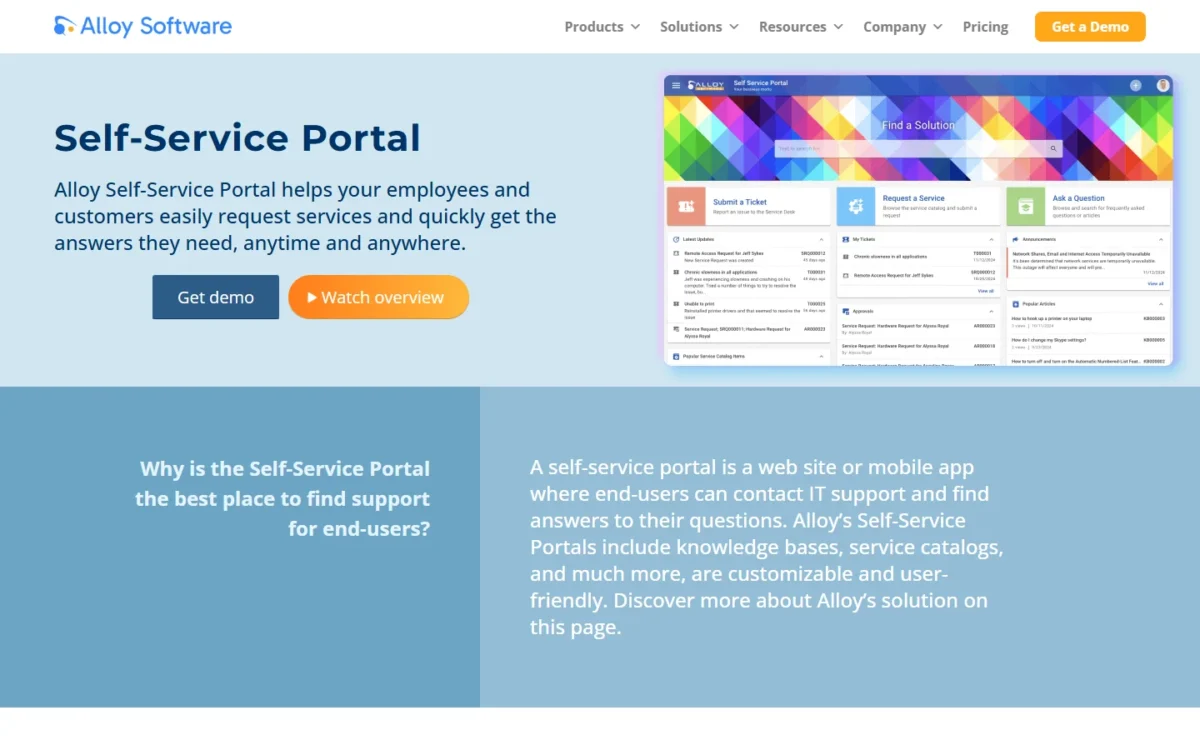
Employees get a tile portal on every edition, but the catalog I browsed is an Enterprise item on the pricing page. As the sample requester, I saw three entry tiles (Submit a support ticket, Service Request, Ask a question), My Tickets, Approvals, an active outage announcement and Popular Articles.
The catalog held 14 items in 6 categories. Hardware Request stated that it requires management approval and opened as a multi-step wizard with “Request for” already filled in.
Search covered the most ground. One query for “printer” returned four record types on one page: knowledge article KB000003, the Printer Request and Toner Request catalog items, and an earlier service request.
The portal license is unlimited at no additional cost, with eleven localization packs. Express buyers get the portal, knowledge base and approvals; a team that wants employees ordering laptops from a menu should budget for Enterprise.
Incident Management With Asset Context
Yes, a technician gets the context to close a ticket on one screen. Demo incident T000026, “Dead Keyboard”, showed a 5-stage lifecycle bar, the timers “Responded before SLA target: 27h 23m” and “Resolution late by: > 3 d”, and the linked configuration item, an OptiPlex 3020 computer.
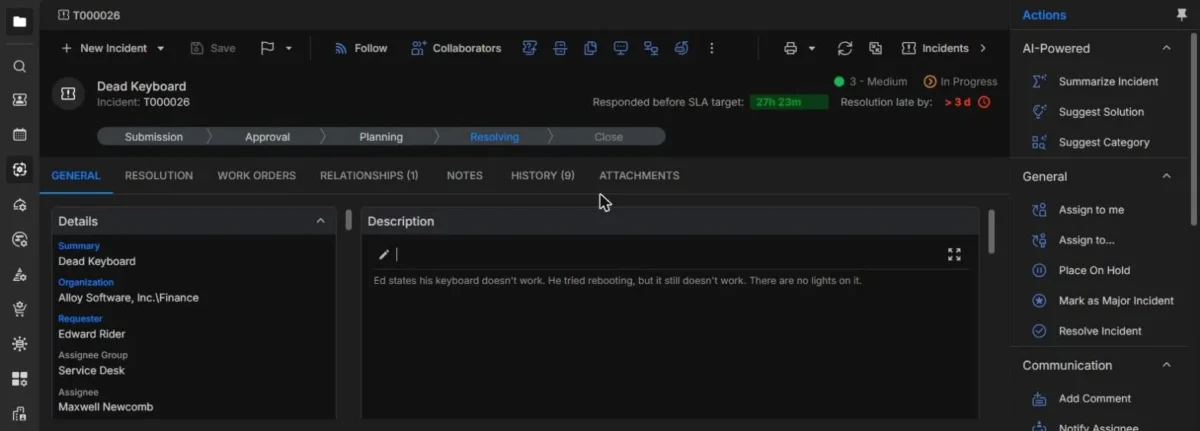
The Actions panel held Assign, Place On Hold, Mark as Major Incident, Escalate, Create Problem, Create Change Request and Create Quick Article.
Two of those links are edition-bound: Change Management starts on Express, and Configuration Management and CMDB appear only under Enterprise. Alloy’s small-business page, which steers growing teams to Express, promises to “link tickets to assets”, so confirm in your trial how much of the linked-computer view Express keeps.
AI Actions: Summarize and Suggest Solution
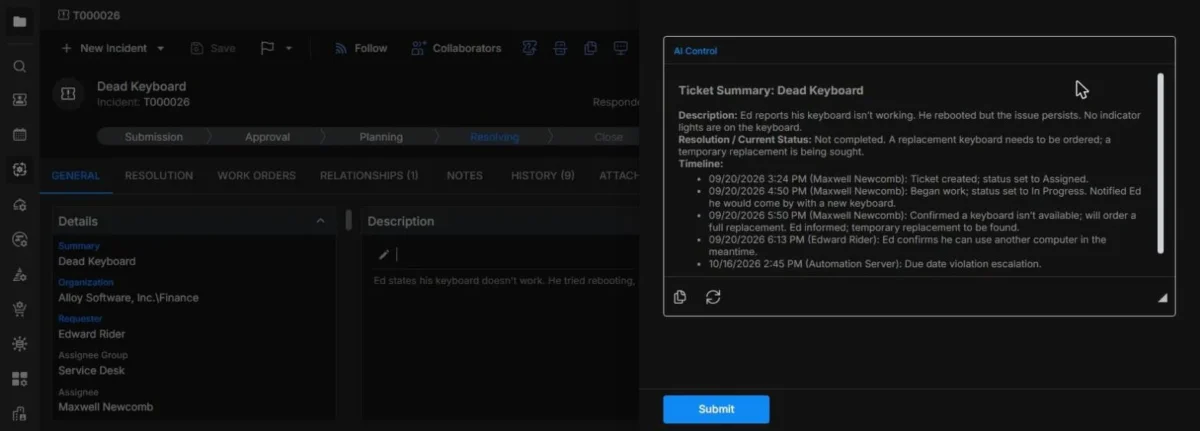
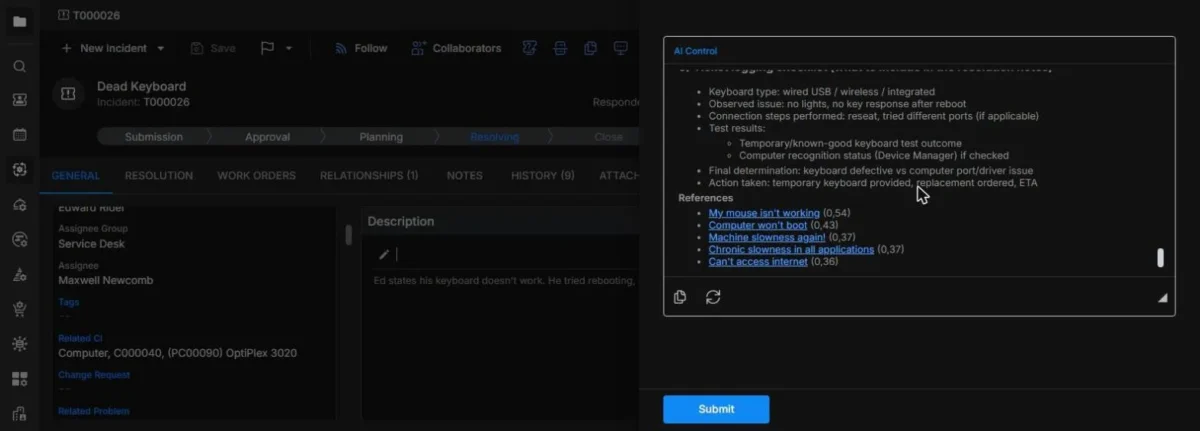
Summarize Incident was useful in my one run, Suggest Solution was not, and both run on an AI provider key you supply. Summarize Incident returned the description, the current status (a replacement keyboard needed, a temporary one sought) and a 5-entry timeline within about 8 seconds.
Suggest Solution produced a troubleshooting plan that restarted diagnosis, although the ticket history already recorded the replacement decision. Its References listed 5 past tickets, none about keyboards: “My mouse isn’t working” scored 0.54 and “Can’t access internet” 0.36.
Suggest Solution draws on historical data, so import your own closed tickets during the trial before judging it.
The AI connects under Admin Center > AI Integration > AI Configuration, where a Test Connection button validates your API key, and Alloy’s AI hub names OpenAI or Azure integration. Freshservice, by contrast, sells Freddy AI Copilot as a $29 per agent per month add-on.
The 2026.1 release notes for both Alloy Navigator and Alloy Navigator Express document the AI Assistant, with gpt-5.4-nano as the new default model; Alloy does not publish whether Explorer includes it.
Portal AI Assistant and Allie
The portal assistant answered my printer question with numbered steps and 2 knowledge-article citations in about 10 seconds. It replied in the portal’s language and asked whether the printer was USB or network before going further.
Its quality tracks your knowledge base. Alloy’s Spring 2026 update, released in May 2026, lets admins set the assistant’s scope, greeting, tone, system prompt and AI skills, and an AI Assistant Log shows every conversation, which tells you which articles to write next.
Allie, the technician-side assistant, is another matter. Alloy introduced it on October 12, 2026 as “coming in Alloy Navigator 2026 Fall”, so judge the purchase on the actions that ship today.
IT Asset Management, Discovery and Dashboards
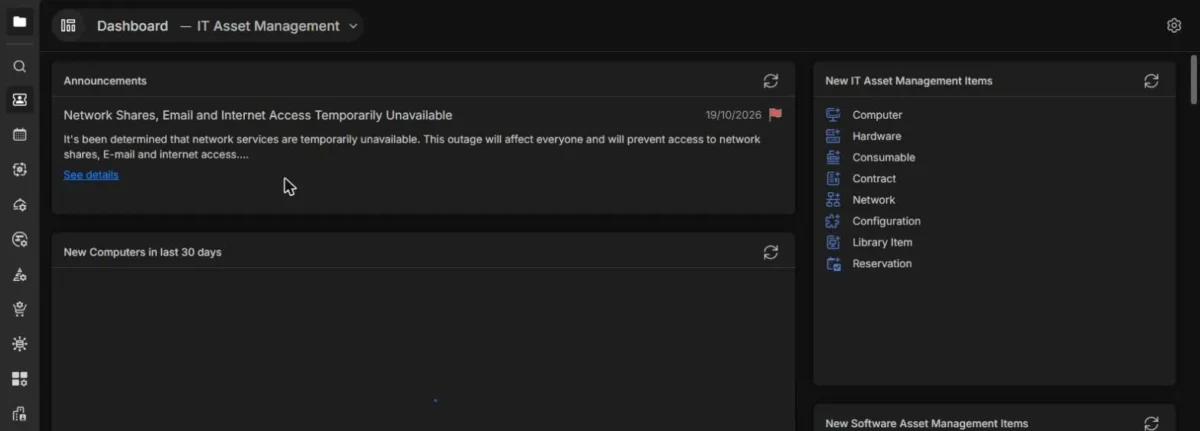
The demo shipped 9 prebuilt dashboards, and its IT Asset Management dashboard counted assets and flagged stale audits; auto-discovered computers, though, need paid audit licenses. That dashboard counted 30 active computers, 33 hardware items, 16 software licenses and 4 configurations, listed computers not audited for more than 30 days, and linked reports such as Assets Depreciation and Expiring Contracts.
Alloy’s network audit needs no extra software on servers or workstations. The audit license applies only to auto-discovered computers; machines you create by hand or import, and all hardware assets, are free. Count the computers you will auto-discover before you ask for a quote.
Alloy Navigator Ease of Use
Requesters get a simple tile portal, technicians a console that holds the whole ticket record, and the admin carries the setup. In my session the portal followed the browser’s language (Vietnamese) while the technician console stayed in English, which suits a multilingual workforce served by an English-speaking IT team.
Employees can also use a Self-Service Mobile App on Android and iOS and a Microsoft Teams chatbot that submits tickets and handles approval requests. Alloy says a team that already runs Windows Server and SQL Server has everything to deploy it in-house, and the AI needs an API key in the Admin Center.
Training resources run from video courses to remote, onsite, offsite and custom classes. A team without a Windows admin should budget for cloud hosting or paid training.
Alloy Navigator Pricing
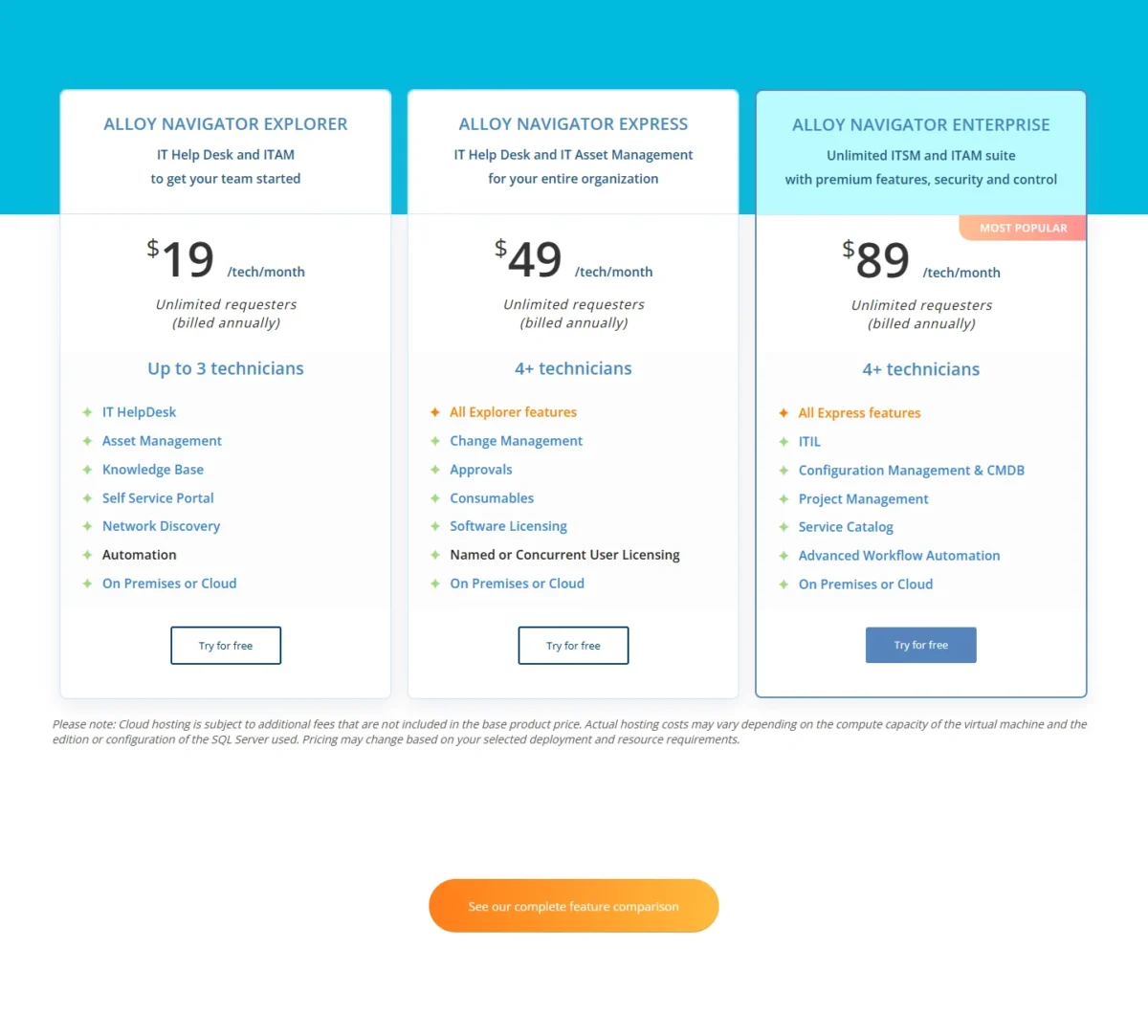
Alloy Navigator costs $19, $49 or $89 per technician per month, billed annually, so a team of 10 technicians pays $5,880 a year on Express or $10,680 on Enterprise before extras. Headcount and process decide the edition.
All three editions bill annually per technician, include unlimited requesters and run on-premises or in the cloud.
| Edition | Price | Billing | Key limit |
|---|---|---|---|
| Explorer | $19 per technician per month | Billed annually | Up to 3 technicians |
| Express | $49 per technician per month | Billed annually | 4+ technicians; no CMDB or Service Catalog |
| Enterprise | $89 per technician per month | Billed annually | 4+ technicians; adds ITIL, CMDB, Project Management, Service Catalog |
Sources: Alloy Software pricing page, checked Nov 2026.
Which edition fits:
- Explorer fits a team of up to 3 technicians that needs tickets, assets, a knowledge base and the portal.
- Express starts at 4 technicians and adds change management and approvals.
- Enterprise fits a team that runs ITIL processes, a CMDB or a service catalog.
What a year of licenses costs, from a team of 3 to a team of 25, before hosting, audit licenses and training:
| Team size | Edition | Annual math (price x technicians x 12 months) | Per year |
|---|---|---|---|
| 3 technicians | Explorer | $19 x 3 x 12 | $684 |
| 5 technicians | Express | $49 x 5 x 12 | $2,940 |
| 10 technicians | Express | $49 x 10 x 12 | $5,880 |
| 10 technicians | Enterprise | $89 x 10 x 12 | $10,680 |
| 25 technicians | Express | $49 x 25 x 12 | $14,700 |
| 25 technicians | Enterprise | $89 x 25 x 12 | $26,700 |
Sources: Alloy Software pricing page, checked Nov 2026.
The first upgrade trigger is headcount. A fourth technician moves the team from $19 x 3 x 12 = $684 to $49 x 4 x 12 = $2,352 a year, so one extra person adds $2,352 – $684 = $1,668. At three and growing, budget for Express from the start.
The second trigger is process. Enterprise costs $89 – $49 = $40 more per technician, or $40 x 10 x 12 = $4,800 a year for a team of 10. Pay it if you run formal configuration management or want a catalog; skip it if a portal and knowledge base serve your employees.
Edition note
Three screens in the demo I tested map to Enterprise listings on the pricing page: the service catalog (Service Catalog), the Project Management dashboard (Project Management) and the linked configuration item (Configuration Management & CMDB). If you trial Express, confirm which of them you keep before you budget at $49.
The list price leaves out three costs. Cloud hosting fees vary with the virtual machine’s compute and the SQL Server edition, and there is “a nominal cloud setup” fee. Audit licenses are priced by the computers you inventory, on a calculator that runs from 500 to 20,000 nodes. Training is extra.
Contracts are annual, but you can change plans at any time. Alloy discounts multi-year subscriptions and orders from non-profit organizations, educational institutions and government agencies.
Deployment, Integrations and Security
Every edition runs on-premises or in the cloud: on your own servers, as SaaS hosted by Alloy, or on your own Azure or AWS cloud, with the same ITSM feature set. Alloy pitches on-premises to teams that already run Windows Server and SQL Server, and for an agency under data sovereignty rules it may be the only acceptable option.
Alloy Navigator connects to other systems through native integrations or its REST API, and the integrations directory labels each listing Native or API. The key listings are Microsoft Entra ID, Intune, SCCM (MECM) and Teams, plus Jamf, Okta, Slack, Jira and ServiceNow CMDB, and the REST API covers a system the directory does not list. Check the three to five your team depends on before the trial ends.
For security reviews, the Alloy trust center lists SOC 2 Type 1 2024 and SOC 2 Type 2 2025 audits, with documents on request. On the cloud edition, Alloy hosts customer data on Amazon Web Services in SSAE 16 audited data centers via Amazon RDS.
The free trial includes Technical Support; the support channels each edition includes are not published.
Who Should Use Alloy Navigator?
Alloy Navigator suits an internal IT team of 4 to 25 technicians that wants ITSM and ITAM in one system or must self-host; customer-facing support teams and buyers who need monthly billing should look elsewhere.
Best for
- An internal IT team of 4 to 25 technicians that wants tickets and assets in one system, with change management on Express at $49
- An organization that must self-host on its own Windows Server and SQL Server
- A team with an OpenAI or Azure OpenAI account that wants in-ticket AI without a per-technician AI add-on
- A team of 3 or fewer technicians that fits Explorer’s cap at $19 per technician
- A government, healthcare or education IT team whose data sovereignty rules prevent third-party hosting, since every edition runs on-premises
Not ideal for
- A team that supports external customers rather than employees
- A team that needs monthly billing, since contracts are annual
- A 4-technician team with an Explorer budget: the fourth seat moves everyone to $49
- A team that wants AI with no provider setup
- A team that wants a free tier: Jira Service Management is free for 3 agents
Outside ratings are thin but positive: Gartner Peer Insights showed 14 reviews with an overall average rating of 4.4 for Alloy Software when I checked in November 2026. That is a small sample, so weigh your own trial above it.
Alloy Navigator vs Competitors
Freshservice matches Alloy’s $19 and $49 price points but sells AI as an add-on, InvGate costs less at both 5 and 10 agents, and Jira Service Management is free for 3 agents.
| Software | Best for | Starting price | Key difference | Main trade-off |
|---|---|---|---|---|
| Alloy Navigator | Internal IT teams that want ITSM plus ITAM or must self-host | $19 per technician per month, billed annually, up to 3 technicians | On-premises or cloud on every edition | CMDB and Service Catalog only on Enterprise at $89 |
| Freshservice | IT teams that want a service catalog on a mid plan | $19 per agent per month, billed annually (Starter) | Service catalog from Growth at $49 | Change management starts on Pro at $99; Freddy AI Copilot costs $29 per agent per month extra |
| InvGate Service Management | A desk of 5 agents on Starter, or 5 to 100 on Pro, that will not self-host | $1,499 per year, fixed for 5 agents (Starter) | 30-day free trial | On-premise hosting only on Enterprise, from $12,000 per year |
| Jira Service Management | Teams already working in Jira | Free for 3 agents; Standard $21.50 per agent per month | A free plan for up to 3 agents | Hardware Asset Management needs Premium (HAM included) |
Sources: Alloy Software pricing, Freshservice pricing, InvGate pricing, Jira Service Management pricing, checked Nov 2026.
At 10 technicians on annual billing, Alloy Express and Freshservice Growth tie at $49 x 10 x 12 = $5,880 a year, and InvGate Pro costs $500 x 10 agents = $5,000. The tie breaks on change management: Alloy includes it on Express, while Freshservice holds it for Pro at $99 x 10 x 12 = $11,880, a $11,880 – $5,880 = $6,000 yearly gap.
On these figures InvGate costs less at both sizes. At 10 agents InvGate Pro is $5,880 – $5,000 = $880 a year below Alloy Express, and at 5 agents InvGate Starter costs $1,499 a year against $49 x 5 x 12 = $2,940, so a fixed five-person desk that will never self-host pays less there. Alloy lists On Premises or Cloud on all three editions, while InvGate lists on-premise hosting only on Enterprise, from $12,000 a year.
Alloy Navigator Alternatives
Teams whose help desk serves customers rather than employees, and teams that need a free tier, should start elsewhere. If your agents answer customers, my ranking of customer service software by plan and AI cost covers tools built for that job.
How I Tested Alloy Navigator
I tested Alloy Navigator in one session on November 2, 2026, in Alloy’s promo demo with the vendor’s sample data; the demo does not show its edition or license tier. I ran 8 tasks: the portal home, the service catalog (14 items), one portal search, one incident (T000026), one run each of Summarize Incident and Suggest Solution, one question to the portal AI Assistant, and the dashboard set (9 dashboards).
I submitted and saved nothing, so notifications, approval routing and automation runs stayed out of view, and AI response times are approximate because I timed them against fixed waits.
Everything else comes from Alloy’s pricing page, AI hub, 2026.1 release notes and trust center, and from each rival’s pricing page, all read in November 2026. Alloy does not publish the trial length, cloud hosting and setup fee amounts, training prices, AI usage cost or support channels by edition.
Alloy Software FAQ
Is Alloy Software a reputable company?
Yes, on the evidence it publishes. Its trust center lists SOC 2 Type 1 and Type 2 audits, and its homepage quotes customers including Makita USA and Titusville Area Hospital. In procurement, request the SOC 2 Type 2 2025 report itself through the trust center rather than relying on the listing.
What does Alloy Software make?
Alloy Software makes Alloy Navigator, an ITSM and ITAM platform. When you research it, rely on reviews and threads that name Alloy Navigator.
Does Alloy Navigator have a free plan?
No free plan is listed. Alloy offers a fully functional free trial with Technical Support and licensing for all your staff, and trial users get dedicated staff for questions. The trial length is not published, so ask for it when you book.
Alloy Software Review: Final Verdict
Yes, Alloy Navigator is worth a trial for an internal IT team of 4 to 25 technicians that needs ITSM plus ITAM in one place or must self-host. Its edge: tickets with SLA timers and the linked computer (see the edition note), unlimited requesters, and AI on your own provider key.
Its trade-offs: the fourth technician more than triples the license bill, CMDB and the catalog cost Enterprise rates, and Suggest Solution needs your real ticket history.
Trial Express unless you already know you need CMDB or a catalog. Before you sign, ask sales for your audit-license price, the cloud hosting and setup fees, and which demo screens your edition keeps, then price your AI provider’s usage.
Choose Freshservice if you want its service catalog on Growth at $49 per agent per month, billed annually.
Choose InvGate for a desk of 5 to 10 agents that will not self-host: it costs $1,499 a year at 5 agents and $5,000 at 10, against $2,940 and $5,880 on Alloy Express.
Choose Jira Service Management if your team of three already works in Jira.