Microsoft Copilot is worth paying for when your files, email and meetings already live in Microsoft 365, and the free app is enough if you only want a chat assistant. This Microsoft Copilot review separates the four products sold under one name, because what Copilot can read depends on which one you buy.
For one person, the cheapest paid path is Microsoft 365 Personal at $9.99 a month or $99.99 a year, with Copilot in the Word, Excel, PowerPoint and Outlook desktop apps. Businesses add Copilot per user, and the add-on’s current price is a first-year promotion.
Quick verdict
Microsoft Copilot is worth it for people whose work files, email and meetings sit in Microsoft 365. Its main strength is the paid Microsoft 365 Copilot license, which grounds answers in your emails, files, meetings and calendars automatically, with no uploads.
Skip Microsoft Copilot if you want a chat assistant only (the free app covers that) or expect AI for every member of a Family plan, where Copilot is for the subscription owner only.
Biggest limit: Copilot Chat, the work version included with eligible Microsoft 365 licenses, reads company content only when you add it to the prompt.
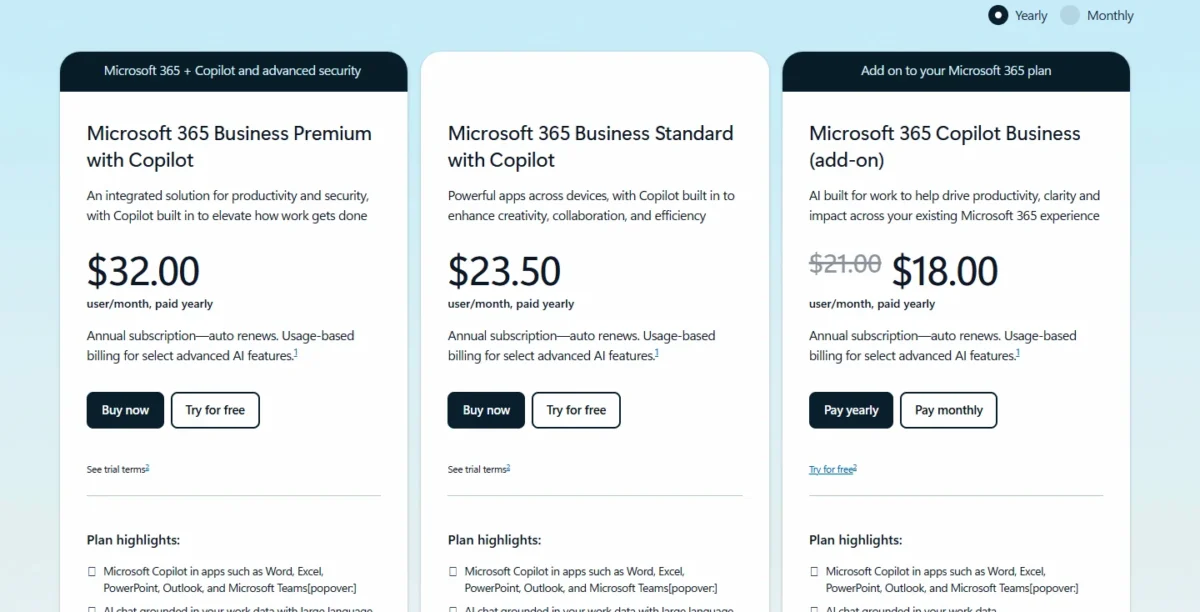
Price basis: the app is free, and Microsoft 365 Personal costs $9.99 a month. The Copilot Business add-on is listed as originally $21.00, now $18.00 per user per month, paid yearly, a promotion that covers the first year only.
In This Article (13 sections)
Microsoft Copilot at a Glance
Microsoft Copilot is Microsoft’s AI assistant: free in its own app with a Microsoft account, and paid through Microsoft 365 plans for individuals and businesses.
- Category: AI assistant in a standalone app (web, desktop, mobile) and inside Word, Excel, PowerPoint, Outlook and Teams
- Best for: Microsoft 365 users, from one person to businesses of up to 300 users
- Starting price: free with a Microsoft account; paid from Microsoft 365 Personal at $9.99/month
- Free plan or trial: free app with usage limits; one-month free trial on Personal, Family and Premium; one-month business trial with a credit card
- Main limitation: answers grounded in company email, files and meetings need the paid Microsoft 365 Copilot license
Microsoft Copilot Pros and Cons
The main downsides of Microsoft Copilot are plan gates, not missing features: Family AI stops at the owner, Excel needs OneDrive, and company-data answers need the paid license.
Pros
- The paid Microsoft 365 Copilot license reads emails, files, meetings and calendars through Microsoft Graph, so a business team stops pasting documents into prompts
- Microsoft 365 Personal includes the Word, Excel, PowerPoint and Outlook desktop apps with Copilot, so one person pays one subscription for apps and AI
- With a Microsoft 365 Copilot license (not Copilot Chat), Copilot in Teams summarizes and transcribes meetings and captures action items, which helps managers with back-to-back calls
- Copilot Chat is included with eligible Microsoft 365 licenses, so a business can trial AI chat at work before buying seats
- Microsoft states that prompts, responses and file contents in Microsoft 365 apps for home aren’t used to train foundation models
Cons
- On Microsoft 365 Family, Copilot AI features are for the subscription owner only
- Copilot in Excel needs AutoSave on, so the file must sit in OneDrive
- The Copilot Business add-on is sold only to existing customers with an eligible Business plan, and its promotional price lasts the first year only
- Some AI experiences, such as Cowork, bill on usage beyond the license fee, so a heavy team’s bill can exceed the seat price
- Personal, Premium and Pro describe Copilot usage as higher, extensive and highest without numbers, so a heavy user cannot size the plan in advance
Most of these cons depend on which edition you hold.
Which Microsoft Copilot Are You Buying?
Copilot comes in four editions, and the difference that matters is what data each one can use: the web, the file you hand it, or your whole Microsoft 365 account.
| Edition | Who gets it | What it can read | Price basis |
|---|---|---|---|
| Copilot app (free tier) | Anyone with a Microsoft account | The web; some capabilities have usage limits | Free |
| Copilot in Microsoft 365 Personal, Family, Premium or Pro | Individuals; on Family, the subscription owner only | The file you are working in, or another file you ask it to look at | From $9.99/ |
| Copilot Chat (Basic) for work | Work (Entra) accounts with an eligible Microsoft 365 license | Mainly web data; company content only when you add it to the prompt | Included with eligible licenses |
| Microsoft 365 Copilot (Premium license) | Business plans with Copilot, the Business add-on, or the enterprise add-on | The web plus emails, files, meetings and calendars through Microsoft Graph and Work IQ | $23.50 user/ |
Sources: Microsoft Copilot app, Copilot plans for individuals, Microsoft Copilot overview on Microsoft Learn, Microsoft 365 business plans, checked Nov 2026.
The free app runs on the web, desktop and mobile, on Windows, Mac and in Microsoft Edge. Copilot Chat for work adds enterprise data protection, but it does not include Copilot inside Word, Excel, PowerPoint or OneNote. Only the paid license searches your mailbox and files on its own.
GitHub Copilot is a separate coding assistant with its own license; this review does not cover it.
Microsoft Copilot Features
Four features decide the purchase: Copilot inside the Office apps, meeting recaps in Teams, answers grounded in your work data, and the usage tiers on consumer plans. Agent building in Copilot Studio is a separate tool, covered in my list of AI agents for business.
Copilot in Word, Excel, PowerPoint and Outlook
In the apps, Copilot drafts, rewrites and summarizes in Word, analyzes data and creates formulas and visuals in Excel, builds presentations from a prompt or existing content in PowerPoint, and drafts emails and summarizes threads in Outlook. Microsoft 365 Personal is the entry plan for individuals that includes the desktop apps with Copilot.
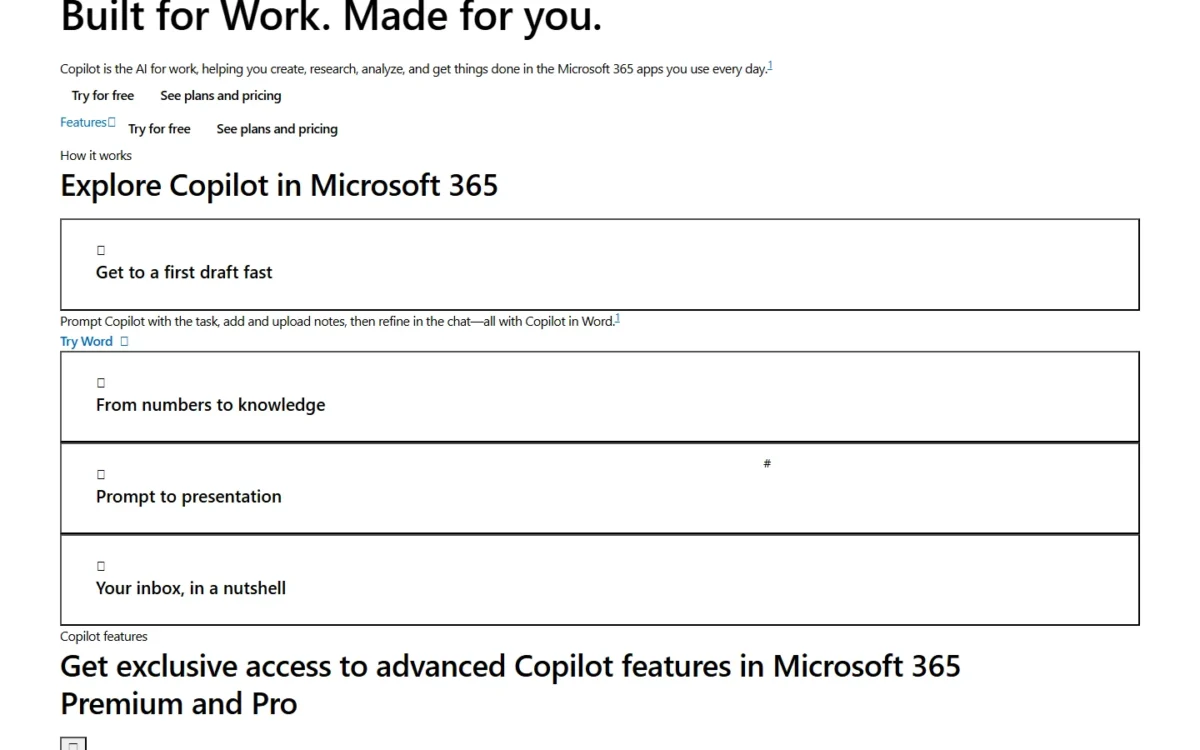
The useful scenario is reuse: Copilot can reference a file to create a document in Word or a presentation in PowerPoint, so a finished report becomes the client deck without a blank slide. At work, the Copilot Chat (Basic) license has no access to Copilot in Word, Excel, PowerPoint and OneNote, which I see as the first reason a business pays for Copilot seats.
Meeting recaps in Teams
Yes, Copilot can spare you from re-watching a meeting, on a Microsoft 365 Copilot work license rather than Copilot Chat: in Teams it summarizes meetings (up to 30 days, in Microsoft’s wording), transcribes them and captures action items.
This helps managers with daily stand-ups and client calls, where someone would otherwise write the notes by hand. If Teams itself is still an open question, my Microsoft Teams review covers the platform.
Answers grounded in your work data
Only the paid Microsoft 365 Copilot license grounds answers in your emails, files, meetings and calendars, through Microsoft Graph and Work IQ, and it pulls that context automatically. Copilot Chat users must upload a file, use Copilot with content open in Outlook or Teams, or pay per use for an agent with access to it.
That gap is the deciding line between free and paid Copilot at work. A question such as “what did we promise this client last quarter” needs the mailbox and the meeting history, and only the paid license searches them without uploads.
Two details for admins: Work IQ can be turned off, and then answers lose the work context. The business plans list chat “with large language model (LLM) choice,” and Anthropic models are available only in applicable licensed experiences.
Usage limits on Personal, Premium and Pro
Personal gives Copilot chat “with higher usage than free,” Premium “extensive usage,” and Pro the “highest usage,” with no numbers behind those words. Researcher, Analyst and Cowork are listed as exclusive to Premium and Pro, and Premium carries “limited usage” for that agentic AI.
So the upgrade trigger for an individual is behavior, not a quota: move from Personal to Premium when you hit the chat limits or need Researcher and Analyst. Pro only makes sense when agent tasks are a daily habit.
Microsoft Copilot Ease of Use
Microsoft integrates Copilot into Word, Excel, PowerPoint, Outlook and Teams, where your work already happens. Microsoft’s documentation names the catches to check during a trial:
- Excel files must live in OneDrive. Copilot in Excel requires AutoSave, so a spreadsheet not saved to OneDrive gets no Copilot.
- Family sharing stops at the owner. Apps and OneDrive storage are shared on Family, but Copilot AI features are currently for the subscription owner only.
- Two privacy settings switch Copilot off. Turning off “Experiences that analyze content” or “All connected experiences” stops Copilot in Excel, OneNote, Outlook, PowerPoint and Word.
- Work users must sign in with their Entra account. Enterprise data protection applies when employees sign in with the work account, not a personal one.
The practical test: open a real report from OneDrive during the one-month trial, ask Copilot for a summary and a deck, and judge the app integration on your own file.
Microsoft Copilot Pricing
Copilot costs nothing in its free app, and Microsoft 365 Personal at $9.99 a month is the cheapest paid path for one person. For businesses, Microsoft lists the Copilot Business add-on as originally $21.00, now $18.00 per user per month, paid yearly. The business plans also note “Usage-based billing for select advanced AI features,” so the seat price is the floor.
| Plan | Price | Billing | Key limit |
|---|---|---|---|
| Microsoft 365 Personal | $9.99/ | Monthly or yearly | 1 person; Copilot usage higher than free |
| Microsoft 365 Family | $12.99/ | Monthly or yearly | 1 to 6 people; AI for the subscription owner only |
| Microsoft 365 Premium | $19.99/ | Monthly or yearly | Extensive usage; Researcher, Analyst and Cowork |
| Microsoft 365 Pro | $99.99/ | Monthly billing only | Highest usage; 5 TB of storage |
| Business Standard with Copilot | $23.50 user/ | Paid yearly | Up to 300 users |
| Business Premium with Copilot | $32.00 user/ | Paid yearly | Up to 300 users; adds device and threat protection |
| Copilot Business (add-on) | Originally $21.00, now $18.00 user/ | Paid yearly, annual commitment | Existing customers with an eligible Business plan |
| Microsoft 365 Copilot (enterprise add-on) | $30.00 user/ | Paid yearly | Needs a qualifying Microsoft 365 plan license |
Sources: Microsoft 365 plans compared, Copilot for small business, Copilot for enterprise, checked Nov 2026.
Promotion terms
The $18.00 add-on price is a discount offer available between July 1, 2026, and December 31, 2026. It needs an annual commitment, applies to the first year only, is not available on trial subscriptions, and Microsoft can change or cancel it without notice.
For one person, the choice is Personal or Premium. Paying Personal monthly for a year costs $9.99 x 12 months = $119.88, while the yearly plan is $99.99, a saving Microsoft puts at $19.89. On yearly billing, Premium costs $199.99 a year; Personal costs $99.99 a year, about half. Premium earns its higher price only once Personal’s limits interrupt your work or you need Researcher and Analyst.
Pro at $99.99 a month comes to $99.99 x 12 months = $1,199.88 a year, which is money for heavy agent use, not an upgrade for a busy writer.
For a business, ten users cost the following in the first year:
| Setup for 10 users | Math | Year-one cost |
|---|---|---|
| Copilot Business add-on (promotional year) | $18 x 10 users x 12 months | $2,160, plus your existing Business plan |
| Business Standard with Copilot | $23.50 x 10 users x 12 months | $2,820 |
| Business Premium with Copilot | $32.00 x 10 users x 12 months | $3,840 |
Sources: Copilot for small business, Microsoft 365 business plans, checked Nov 2026.
The add-on row looks cheapest, but it sits on top of a Business plan you already pay for, and Microsoft’s pages do not list which base plans qualify. If the add-on renews at its original $21.00, ten seats cost $21 x 10 users x 12 months = $2,520 in year two. A company starting from scratch is choosing between the two bundles, and Business Premium with Copilot adds device management and threat protection.
The upgrade trigger at work: stay on the included Copilot Chat while people paste in documents, and buy seats once answers need the mailbox, files and meetings without uploads. My full Microsoft Copilot pricing breakdown covers every plan’s storage and apps.
Microsoft Copilot Privacy and Data Protection
Microsoft states that prompts, responses and file contents in Microsoft 365 apps for home aren’t used to train foundation models, and that Copilot there uses only the file you are working in or another file you ask it to look at.
Work accounts get a contractual layer. Copilot and Copilot Chat used by organizations fall under the Data Protection Addendum (DPA) and the Product Terms, which Microsoft calls enterprise data protection. Microsoft says prompts, responses and data accessed through Microsoft Graph aren’t used to train foundation models, and that Copilot supports HIPAA compliance for properly configured implementations, though not for web search queries.
Two caveats for admins: Anthropic models are currently excluded from the EU Data Boundary, and agents follow their own privacy terms, so check each one before you turn it on. The home-user statement covers Microsoft 365 apps only; for the standalone app, the Microsoft 365 apps privacy page points to a separate article, “Microsoft Copilot for individuals: your data, privacy, and responsible AI,” so read that one before pasting client data into the free tier.
Who Should Use Microsoft Copilot?
Yes, buy Copilot if your team’s documents, email and meetings already run on Microsoft 365 and you will pay for the license that reads them. Skip it if you only want a chat assistant, or expect one Family subscription to give AI to the whole household.
Best for
- A small business on Microsoft 365 whose files, email and meetings sit in its tenant: the paid license reads them through Microsoft Graph without uploads
- Managers who run many Teams meetings, on a Microsoft 365 Copilot work license: Copilot summarizes and transcribes them and captures action items
- An individual already paying for Microsoft 365 Personal: Copilot in the desktop apps is part of the plan
- An admin who needs AI chat under contract terms: Copilot and Copilot Chat for organizations fall under the DPA and Product Terms
Not ideal for
- Someone who wants a chat assistant only: the free Copilot app covers that with a Microsoft account
- A family that expects AI for every member: Family’s Copilot features are for the subscription owner only
- A team that works in Gmail and Google Docs: Google AI Pro lists Gemini inside Gmail and Docs
- A buyer who cannot commit for a year: the add-on’s promotional price needs an annual commitment
If you came for a free assistant and do not use Microsoft 365, my list of free AI tools worth using is a better start than any Copilot plan.
Microsoft Copilot vs ChatGPT, Gemini and Claude
The right choice depends on where your work happens: Copilot inside Microsoft 365 files and meetings, ChatGPT outside an office suite, Gemini in Google accounts, and Claude as a separate writing and coding assistant.
| Software | Best for | Starting price | Key difference | Main trade-off |
|---|---|---|---|---|
| Microsoft Copilot | Microsoft 365 users and businesses | Free app; Personal $9.99/ | Works inside Word, Excel, PowerPoint, Outlook and Teams | Company-data answers need the paid work license |
| ChatGPT | A general assistant outside an office suite | ChatGPT Plus: $20/ | File uploads, image generation and voice on Plus | OpenAI may use conversations for training unless you opt out |
| Google Gemini | Gmail and Google apps users | Google AI Plus: $4.99/ | Gemini in Gmail, Vids and more from AI Plus | Gemini in Docs is listed on Google AI Pro: $19.99/ |
| Claude | A separate writing and coding assistant | Claude Pro: $17/ | Pro includes Claude Code and projects to organize chats and documents | Pro usage limits apply every 5 hours and every week |
Sources: ChatGPT Plus help article, Google AI plans, Claude pricing, Copilot plans for individuals, checked Nov 2026.
ChatGPT suits work that does not start in a Word file. ChatGPT Business costs $20 per user per month billed annually, with at least two paid seats; my breakdown of what ChatGPT’s plans cost covers the rest.
If ChatGPT is the rival you are weighing, my ChatGPT vs Copilot comparison puts the pair side by side.
If your company runs on Gmail and Docs, Copilot’s main advantage disappears. My Gemini review covers which Google AI plan fits that setup.
Claude Pro includes Claude Code and projects to organize chats and documents, which suits a writer or developer who wants a separate assistant. My Claude review covers its plan limits.
Before you commit, run one real task, such as a report summary, through the free tiers or one-month trials of your top two.
Best Microsoft Copilot Alternatives
If you need chat and not Microsoft 365 integration, start with the free assistants: Copilot’s paid value sits almost entirely in the apps and the work data.
For paid chat assistants for a team, my ranking of the best AI chatbots by job sets them side by side.
If the shortlist is down to the two biggest names outside Microsoft, my ChatGPT vs Gemini comparison settles that pair.
How I Evaluated Microsoft Copilot
This review rests on Microsoft’s plan pages for individuals and businesses, the enterprise Copilot page, the Copilot overview and enterprise data protection pages on Microsoft Learn, the home privacy page and the Copilot app homepage, all read on November 1, 2026, plus each rival’s own pricing or help page.
The verdict rests on that documentation and my analysis of it: which edition reads which data, the cost at one seat and at ten, and the limits a buyer hits first. The Microsoft pages I read do not state usage-limit numbers for Personal, Premium or Pro, the rates for usage-based features, the list of Business plans eligible for the add-on, or an integrations count.
FAQ
Is Microsoft Copilot the same as GitHub Copilot?
No. GitHub Copilot is an AI coding assistant that helps developers write code, and Microsoft licenses it separately from Microsoft 365 Copilot. This review covers the Copilot app and Copilot in Microsoft 365, so a developer budgeting for code completion should price GitHub Copilot on its own.
Can I cancel Copilot Business after I buy it?
Yes, but the refund has a deadline. Microsoft gives you 7 days from the start of a paid subscription to cancel for a prorated refund, so you pay only for the days used. After those 7 days, the annual commitment applies: the plan stays on recurring annual billing and renews automatically.
I would budget a Business seat as a full year’s spend unless you cancel in that first week. Cancellation happens in the Microsoft 365 admin center, and it deletes all associated data, so export what you need first.
Microsoft Copilot Review: Final Verdict
Is Microsoft Copilot really worth it? Yes, if your team’s files, email and meetings are in Microsoft 365 and you want answers that draw on them without uploads: that is what the paid license buys. Individuals should start on Personal and move to Premium only when the chat limits bite. Everyone else can stay on the free app or try a rival that fits where they work.
Final recommendation
Microsoft 365 teams: start on the included Copilot Chat, then buy Microsoft Copilot seats for the people whose work depends on mail, files and meetings.
Before signing up, check three things: that your Business plan qualifies for the add-on, what the add-on costs once the promotional first year ends, and which features in your tenant bill on usage.