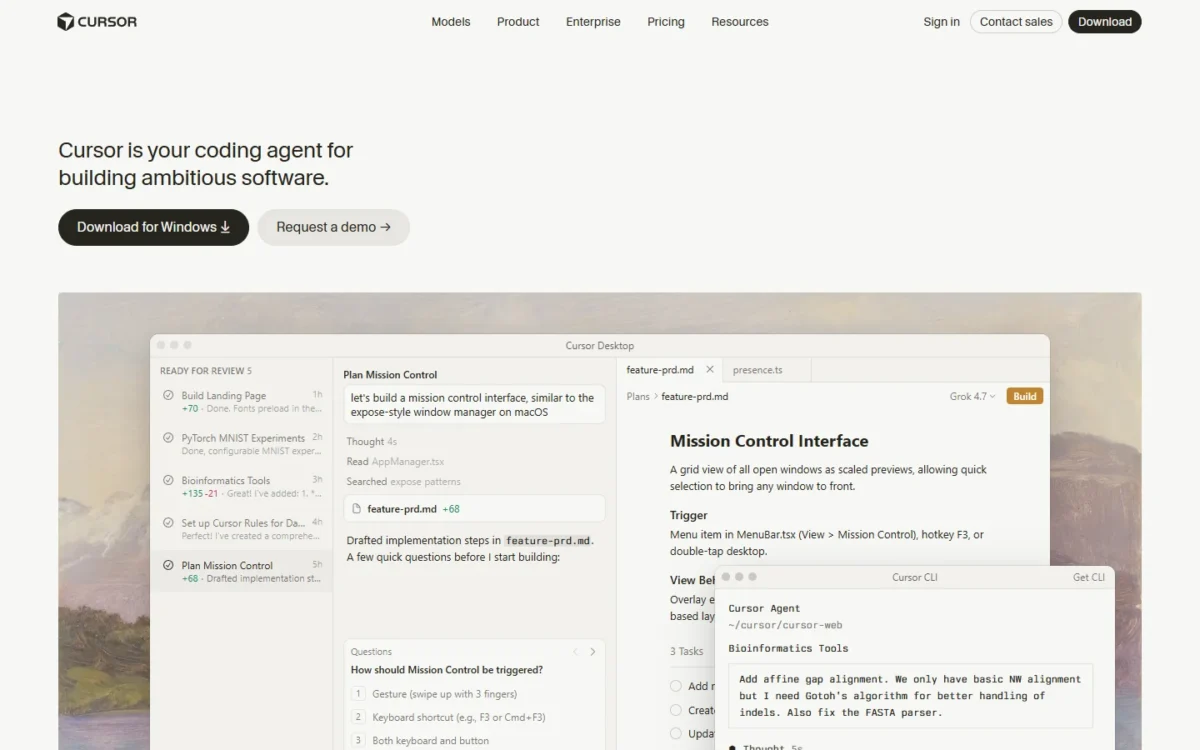
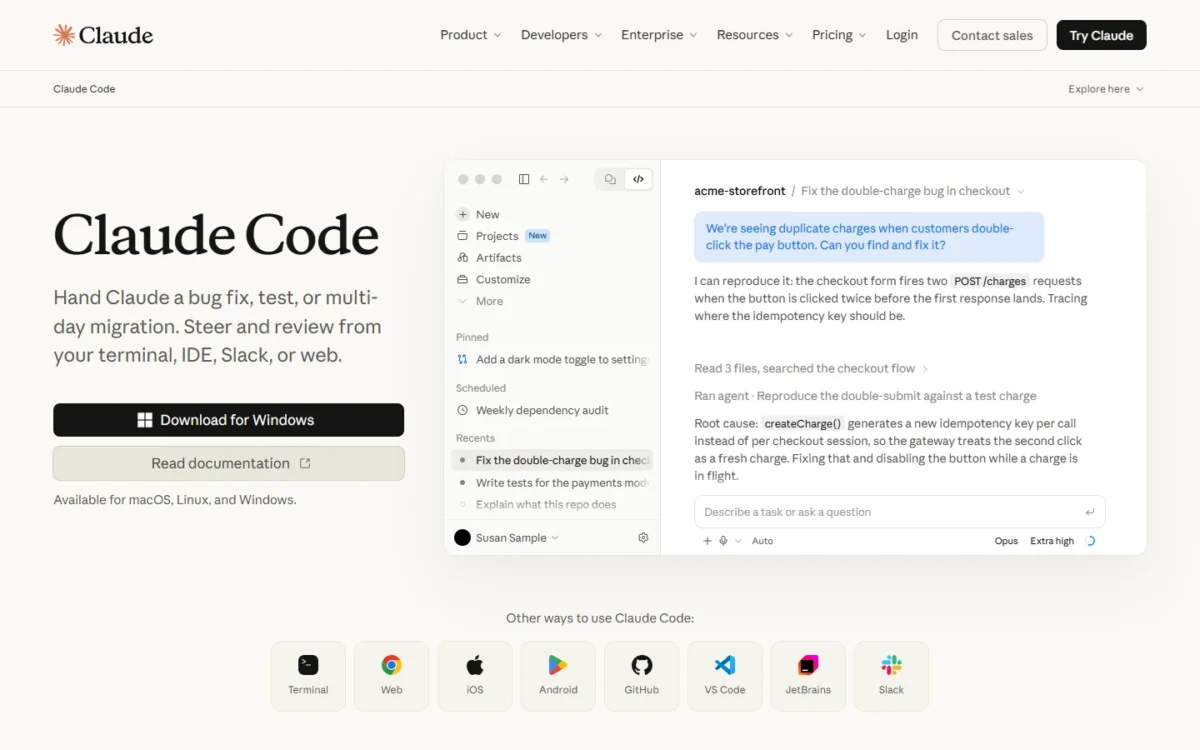
Cursor fits a developer who wants an AI code editor with several model vendors in one place; Claude Code fits a developer who wants a coding agent inside a flat Claude subscription, used from the terminal, an IDE, the desktop app or the web.
The feature difference that decides most purchases is what the fee pays for: Cursor’s weekly usage pool covers Cursor’s own models (Grok 4.7 and Composer 2.5), while Claude, GPT and Gemini cost API list price from the Premium plan up.
At the comparable entry plans, Claude Pro costs $20 a month when billed monthly and $17 a month when billed annually, before tax. Cursor Premium costs $30 a month, before tax.
For a five-person team, Cursor Teams comes to 5 x $30 x 12 = $1,800 for the year before any Claude tokens, against 5 x $20 x 12 = $1,200 on Claude Team Standard seats billed annually.
Claude Code’s extension also runs inside Cursor, so an editor-first developer can keep Cursor and pay for the agent through a Claude plan. The catches: Cursor’s $8 Plus plan runs Grok models only, Claude’s Free plan has no Claude Code, and Claude Code shares its limits with your Claude chats.
Cursor became part of SpaceX in August 2026 and is now sold inside The X Subscription, with Pro and Pro+ kept as legacy plans. The facts below were checked in November 2026.
Quick verdict
Pick Claude Code if you code mostly with Claude models: Pro at $20 a month includes Claude Code and Opus inside its five-hour and weekly limits, and one login covers the terminal, VS Code, JetBrains, the desktop app and the web.
Pick Cursor if you want one AI editor that switches between Grok, Composer, GPT, Gemini and Claude: Premium adds Cloud Agents and Bugbot code review, but third-party models like Claude, GPT and Gemini bill at the model’s API list price from the first request, paid from prepaid credit.
Skip Cursor if Claude is your only model and the bill must stay flat; skip Claude Code if you want GPT or Gemini in the same tool. Running the Claude Code extension inside Cursor gets you both.
Choose Cursor if
- You mix model vendors per task and can budget a token line
- An $8 Grok-only agent on Plus covers your side projects
Choose Claude Code if
- Claude is your daily model and the fee must not move
- You code in the terminal or JetBrains as much as in VS Code or Cursor
In This Article (12 sections)
Cursor vs Claude Code at a Glance
| Attribute | Cursor | Claude Code |
|---|---|---|
| What it is | An AI code editor with an agent CLI, Cloud Agents and Slack and GitHub integrations | An AI coding agent for the terminal, VS Code, JetBrains, a desktop app and the web |
| First plan with Claude-class models | Premium: $30 a month | Pro: $20 billed monthly, or $17 a month billed annually ($200 up front) |
| Cheapest paid plan | Plus: $8 a month, Grok models only | Pro (the Free plan has no Claude Code) |
| Models the fee covers | Cursor’s own Grok and Composer models | Claude models within the plan’s usage limits (Opus from Pro up; Fable via usage credits on Pro) |
| How usage resets | One weekly pool, shared with the Grok apps | A five-hour session limit and a weekly limit on Pro and Max, shared with Claude chat |
| Team seat | Cursor Teams: from $30 per seat per month | Claude Team seat: $20 per seat per month if billed annually |
Sources: Cursor pricing, Cursor models and pricing docs, Claude plans and pricing, Claude Code product page, Claude Code with Pro, Max or Ultra, checked Nov 2026.
Key Differences Between Cursor and Claude Code
Four differences decide it:
- Models in the fee: Cursor’s pool pays for Grok and Composer, and Claude, GPT and Gemini run from prepaid credit. Claude Code’s plan pays for Claude models within its limits, so Opus 5.5 is a meter in Cursor and a flat fee in Claude Code until you reach the plan’s limits; past them you wait for the reset or turn on usage credits at standard API rates.
- Where you work: Cursor centers on its own desktop editor, plus an
agentCLI and Cloud Agents you check on the web or a phone. Claude Code is one engine across the terminal, VS Code and its forks, JetBrains, a desktop app, the web and Slack. - How usage runs out: Cursor refills one pool every week. Claude Pro and Max also reset a five-hour session limit, so a long morning of agent work can end in a wait on Pro.
- What else the fee buys: Grok Chat, Imagine, Voice and Grok Bot draw from Cursor’s weekly pool. Claude chat on the web, desktop and mobile draws from the same limits as Claude Code.
My take
For most buyers the first difference settles it. If Claude is the model you want, Claude Code turns it into a fixed monthly cost; if you pick a model per task, Cursor is built for that, and you budget the Claude part separately.
Cursor vs Claude Code: Features Compared
Both products now ship an agent, a CLI, background work and MCP support, so the differences sit in model access and in which plan unlocks each feature.
| Feature | Cursor | Claude Code |
|---|---|---|
| Agent in an editor | Cursor editor, all plans | VS Code, Cursor and JetBrains extensions, Pro and up |
| Terminal agent | agent CLI, draws from the weekly pool | claude CLI, Pro and up |
| Autocomplete as you type | Tab | Not listed on the Claude Code overview |
| Cloud or background agents | Cloud Agents and Automations, Premium and up | Hand off and schedule tasks, Pro and up |
| AI code review on pull requests | Bugbot, Premium and up | Code Review on Team and Enterprise; GitHub Actions on any paid plan |
| Claude models | Add-on: API list price, Premium and up | Within plan limits |
| GPT and Gemini models | Add-on: API list price, Premium and up | Not listed on Claude’s pricing page |
| MCP transports | stdio, SSE, Streamable HTTP | HTTP, stdio, SSE (deprecated) |
Sources: Cursor pricing, Cursor Tab docs, Cursor MCP docs, Claude Code overview, Claude Code MCP docs, Claude Code GitHub Actions, checked Nov 2026.
My take
Pick on the plan line, not the feature list: Cursor is worth it when you want background agents, PR review and other vendors’ models together at Premium, while Claude Code is the better buy when the agent, the CLI and scheduled tasks at the Pro price are enough.
Where the agent fits your workflow: editor, terminal, desktop and web
Cursor asks you to work in its own editor, with its CLI and Cloud Agents as extensions of it; Claude Code meets you in the terminal, VS Code, JetBrains, Cursor itself, a desktop app or the browser. Cursor’s editor carries Tab, an autocomplete that suggests code as you type and predicts edits in other files.
Cursor’s CLI installs on macOS, Linux, WSL and Windows PowerShell, with Plan and Ask modes and a print mode for scripts and CI. Claude Code installs natively on the same systems plus Windows CMD, or through Homebrew, WinGet, apt, dnf and apk.
If you want to watch every change, Claude Code’s VS Code extension shows inline diffs and plan review, and the desktop app reviews diffs visually and runs sessions side by side.
Verdict: where you work
Depends on use. An editor-first developer who leans on autocomplete fits Cursor; a developer who lives in the terminal or a JetBrains IDE fits Claude Code. Claude Code’s extension installs in Cursor, so the editor choice does not force the agent choice.
Model choice and what each fee covers
Cursor’s weekly pool pays for the four models Cursor calls its own, three Grok versions and Composer 2.5; Claude, GPT and Gemini need Premium or higher and bill at API list price from the first request. Plus runs Grok 4.7 at fixed settings with a 256k context window, while Claude’s plans list context windows of up to 1M tokens, varying by model.
That makes Cursor the broader catalog, while Claude Code puts Claude models inside the fee: Claude Pro at $20 a month covers them within its limits, against Cursor Premium at $30 a month plus Claude billed at API list price. A developer who compares GPT-5.6 Sol and Opus 5.5 on the same task gets both in Cursor. Claude’s pricing page lists Fable, Opus, Sonnet and Haiku as the models in its plans, with Opus from Pro up.
Fable is the exception to the flat fee: Pro pays for Fable with usage credits, while Max includes Fable for up to half your weekly limit. For a verdict on those models, my Claude review covers Opus 5.5 and the plan gates.
Verdict: model access
Claude-model users fit Claude Code, because the plan pays for Claude inside its limits. Developers who mix vendors fit Cursor. The caveat: neither vendor publishes how many tokens its included allowance equals.
Background agents, automations and code review
Cursor puts Cloud Agents, Automations and Bugbot code review on Premium and above; Claude Code runs parallel web sessions, cloud scheduled tasks and GitHub Actions or GitLab CI/CD review. Cursor’s Cloud Agents use their own computers to build, test and demo features, and from the CLI you hand one a task by starting a message with “&”.
Claude’s Pro plan lists “Hand off and schedule tasks”, and cloud scheduled tasks keep running when your computer is off. Claude Code’s managed Code Review is generally available for Team and Enterprise; on Pro you can run review through the Claude Code GitHub Action instead, which consumes GitHub Actions minutes. For agents that handle work beyond code, see AI agents for other desk work.
Verdict: background work and review
Both have background agents and pull request review, gated on different plans. Cursor bundles Bugbot review into Premium, while Claude Code keeps managed Code Review for Team and Enterprise and leaves Pro users the GitHub Action route.
MCP and tool connections
Both tools reach tickets, docs and databases through MCP, so a server you already run works in either. Cursor configures servers in mcp.json or installs them with OAuth from its Marketplace. Claude Code adds them with claude mcp add, recommends HTTP for remote servers and can import servers set up in Claude Desktop.
Claude Code warns when an MCP tool returns more than 10,000 tokens and caps output at 25,000 tokens by default, a limit an environment variable raises. A team that pulls large query results into the agent should check that setting first.
Cursor vs Claude Code Pricing
A Claude Team Standard seat costs $20 per seat per month if billed annually, or $25 if billed monthly; a Cursor Teams seat starts at $30 per seat per month, so each seat costs $30 – $20 = $10 more a month on Cursor before any model usage.
| Plan tier | Cursor | Claude Code |
|---|---|---|
| Free | $0, Agent and Chat with limited usage | $0, no Claude Code |
| Cheapest paid | Plus: $8 a month, Grok models only | Pro (next row) |
| Entry plan with Claude-class models | Premium: $30 a month, 4x Plus usage | Pro: $20 billed monthly, or $17 a month billed annually |
| Mid tier | Super: $100 a month, 15x Plus usage | Max: $100 a month, billed monthly, 5x Pro usage |
| Top tier | Ultra: $200 a month, 50x Plus usage | Ultra: $200 a month, billed monthly, 10x Pro weekly usage |
| Team seat | Cursor Teams: Premium, Super or Ultra seat at $30, $100 or $200 per seat per month | Claude Team seat at $20 per seat per month if billed annually; Premium seat at $100 per seat per month if billed annually, $125 if billed monthly |
| Enterprise | Custom, contact sales | US$20 per seat per month billed annually, 20-seat minimum, plus usage at API rates |
Sources: Cursor pricing, Cursor models and pricing docs, Claude plans and pricing, checked Nov 2026.
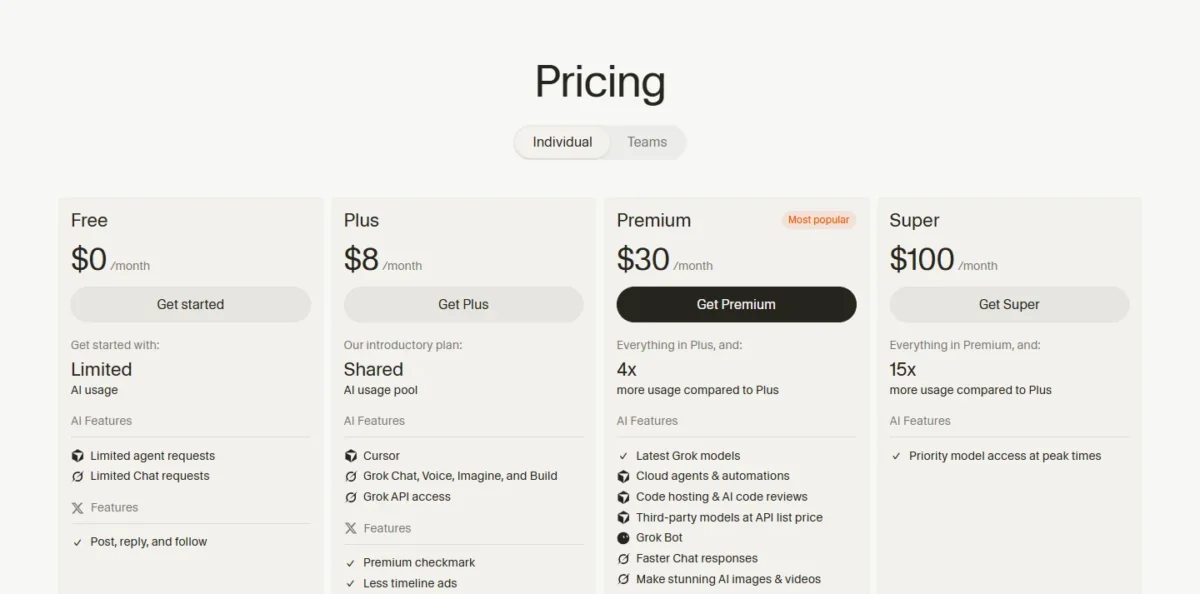
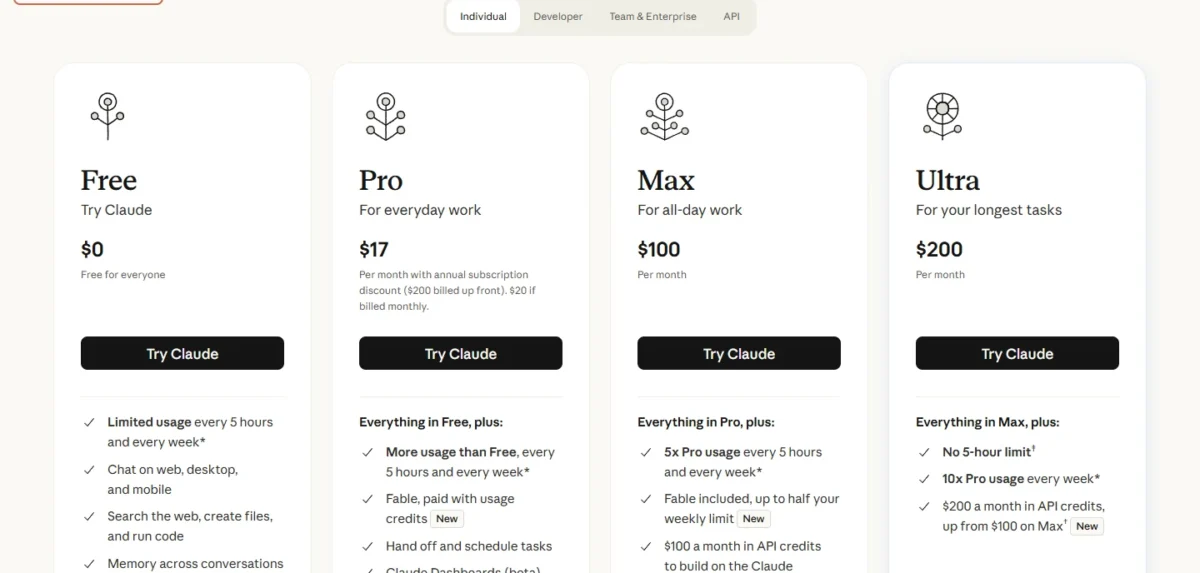
On Cursor’s annual billing, Plus costs $80 a year and Premium $300 a year. Super costs $1,000 a year and Ultra $2,000 a year, and Cursor gives no annual price for Teams seats. Claude bills Pro and Team monthly or annually, while Max and Ultra are monthly only, and Team covers 2 to 150 seats.
Cursor’s legacy Pro, Pro+ and Teams Standard seats keep working for existing customers with two monthly pools. For every Claude plan and API rate in depth, see Claude’s full plan and API pricing.
Cost for one developer and a 5- or 10-person team
Claude Code costs less on list price for one developer and for a team on Standard seats, and the gap grows with the team. My Claude Code pricing guide breaks down each plan’s usage limits and API rates.
| Scenario | Cursor | Claude Code |
|---|---|---|
| One developer, annual billing | Premium: $300 a year | Pro: $200 billed up front |
| One developer, monthly billing | Premium: $30 x 12 = $360 | Pro: $20 x 12 = $240 |
| Five developers | Teams: 5 x $30 x 12 = $1,800 | Team Standard: 5 x $20 x 12 = $1,200 annual, or 5 x $25 x 12 = $1,500 monthly |
| Ten developers | Teams: 10 x $30 x 12 = $3,600 | Team Standard: 10 x $20 x 12 = $2,400 annual, or 10 x $25 x 12 = $3,000 monthly |
| One heavy user, mid tier | Super: $1,000 a year | Max: $100 x 12 = $1,200 |
Sources: Cursor models and pricing docs, Claude plans and pricing, checked Nov 2026.
Assumptions: list prices before tax; Cursor Teams uses Premium seats at the per-seat monthly price; Claude Team uses Standard seats; the totals exclude Cursor’s third-party model usage, the Cursor Token Rate that eligible third-party model requests include on Teams and Enterprise plans at $0.25 per million tokens, and Claude usage credits past the plan limits. My Cursor pricing breakdown covers the seat prices and the charges these totals leave out.
At five seats, Cursor costs $1,800 – $1,200 = $600 more a year before a single Claude token, and at ten seats $3,600 – $2,400 = $1,200 more. The mid tier flips the order: Cursor Super on annual billing is $1,200 – $1,000 = $200 a year cheaper than Claude Max, as long as Grok and Composer do the work.
Verdict: team seat cost
Claude Code fits better on list price for a 5- to 10-person team on Standard seats billed annually. The caveat: Standard seats share their limits with Claude chat, and a team that outgrows them pays the same at the next tier, where Cursor’s Super seat and Claude’s Premium seat billed annually are priced alike.
What Claude models cost inside Cursor
Every Claude token in Cursor is metered from the first request, at per-million-token rates that match Claude’s own API price card: Opus 5.5 at $4 input and $20 output, Sonnet 5.5 at $2 and $10, Haiku 5.5 at $0.1 and $0.5.
Take an illustrative month in which one developer sends Claude Opus 5.5 10 million input tokens inside Cursor and gets 1 million output tokens back. The model bill is 10 x $4 + 1 x $20 = $60, paid from prepaid credit on top of the $30 Premium fee, so the month costs $30 + $60 = $90. On a Teams seat, the Cursor Token Rate adds (10 + 1) x $0.25 = $2.75, for $60 + $2.75 = $62.75 in model charges.
The Token Rate also applies to cached tokens. It skips models whose cache-read price is below $0.10 per million tokens, which exempts Haiku 5.5 at $0.01, while Sonnet 5.5 at exactly $0.1 pays it.
On Teams, Auto’s Balance and Intelligence modes can route a request to a third-party model and bill it that way; Cost mode stays in the pool. Claude states its plan limits as multiples of Pro usage (5x on Max, 10x weekly on Ultra), not as tokens, so the practical contrast is behavior: on Pro a heavy week ends in a wait or in usage credits, while in Cursor every Claude token shows up on the bill.
Usage Limits: What Happens When You Run Out
Cursor refills one weekly pool and lets you keep going on prepaid credit; Claude Pro and Max reset every five hours and every week, and past that you turn on usage credits, wait or upgrade.
| At the limit | Cursor | Claude Code |
|---|---|---|
| Reset | Weekly | Five-hour session and weekly on Pro and Max; weekly only on verified Ultra |
| Keep working now | Prepaid credit or Auto Top-up, same per-model rates | Usage credits at standard API rates, or a Console account with API credits |
| Upgrade path | Premium to Super to Ultra | Pro to Max to Ultra |
| Spend cap | Monthly additional usage limit; one shared cap on Teams | Monthly spend limit for usage credits |
| Where to check | Editor settings and grok.com/ | Settings > Usage, and /usage or /status in the CLI |
Sources: Cursor models and pricing docs, Claude Code with Pro, Max or Ultra, Claude Code costs docs, Claude plans and pricing, checked Nov 2026.
Cursor’s pool covers Agent in the editor, the CLI, Cloud Agents, Grok Bot and the Grok apps, and Cursor’s docs say requests are never downgraded in quality or speed. Claude Code draws from the same limits as Claude chat, so a long chat session shrinks your coding budget for that window. When a five-hour limit hits mid-response, Claude Code may finish the step in progress, an allowance Pro gets up to once per weekly usage period.
Two Claude traps matter before you buy. The monthly API credits on Max and Ultra cannot be used in Claude Code or the Claude apps. And if an ANTHROPIC_API_KEY environment variable is set, Claude Code uses that key instead of your subscription and bills API usage.
Security and Admin Controls for Teams
Both team plans include SSO and central billing; Cursor publishes SOC 2 Type II and ISO certifications on its security page, and Claude Team does not train on your content by default.
| Control | Cursor | Claude Code |
|---|---|---|
| Single sign-on | Teams: SAML/ | Team: SSO |
| SCIM and audit logs | Enterprise | Enterprise |
| Training on your code | Privacy Mode, available to anyone, blocks training when on | Team and Enterprise: none by default; Pro, Max and Ultra: opt-out |
| Spend controls | Teams: one shared cap; Enterprise: granular spend controls | Team: user and organization spend controls; Enterprise: admin spend limits |
| Certifications | SOC 2 Type II, ISO/ | Not listed on Claude’s pricing or product pages |
Sources: Cursor security, Cursor pricing, Claude plans and pricing, checked Nov 2026.
Claude Code in the terminal runs locally, talks directly to model APIs without a remote code index, and asks permission before changing files or running commands. Cursor’s CLI lets you review proposed changes and approve commands, with sandbox controls for network access. On Claude Team, a spend report per user and per model, with CSV export, shows a lead whose sessions cost what.
Verdict: security evidence
Cursor holds AIUC-1, ISO/IEC 27001:2022 and ISO/IEC 42001:2023 certifications plus a SOC 2 Type II attestation, with certificates and reports available on request at trust.cursor.com. A buyer with a compliance checklist should request both vendors’ reports before signing.
Cursor vs Claude Code: Pros and Cons
Cursor pros and cons
Pros
- GPT, Gemini, Grok and Claude models in one editor from Premium up
- Bugbot code review and Cloud Agents included on Premium
- An $8 Plus plan for a Grok-only agent and Tab autocomplete
- SOC 2 Type II and ISO/IEC 27001:2022 stated on its security page
Cons
- Third-party models like Claude bill at API list price from the first request, on top of the plan fee
- Plus has no third-party models, Cloud Agents, Bugbot or your own API keys
- Teams and Enterprise seats pay a $0.25 per million token Cursor Token Rate on eligible third-party requests
- The weekly pool is shared with Grok Chat, Imagine and Voice
- Skip it if:
- Claude is the only model you want and the bill has to stay flat; Claude Code on Pro or Max fits that better.
Claude Code pros and cons
Pros
- Claude models, Opus included, sit inside the Pro plan’s limits
- One subscription covers the terminal, VS Code, Cursor, JetBrains, desktop and web
- A Claude Team seat at $20 per seat per month if billed annually, against $30 per seat on Cursor Teams
- Cloud scheduled tasks keep running with your computer off
Cons
- The Free plan has no Claude Code, so Pro is the floor
- Five-hour and weekly limits are shared with your Claude chats
- Max and Ultra API credits cannot pay for Claude Code usage
- Managed Code Review needs a Team or Enterprise plan
- Skip it if:
- you compare GPT, Gemini and Claude on the same task, or a free tier has to come before the first payment; Cursor fits that better.
My take
Who should skip each: skip Cursor if Claude is the only model you want and the bill has to stay flat, because on Cursor Premium and above, Claude bills at API list price from prepaid credit. Skip Claude Code if you want GPT, Gemini and Claude side by side in one tool or need a free tier first, because the Free plan has no Claude Code. An all-day user on Pro reaches the shared five-hour and weekly limits sooner than on Max, which gives 5x Pro usage.
Which Is Better for Your Needs?
| Your priority | Better fit | Reason | Trade-off |
|---|---|---|---|
| Claude models at a flat fee | Claude Code | Pro and Max include Claude models within their limits | Limits reset every five hours and weekly, shared with chat |
| Several model vendors | Cursor | Claude, GPT and Gemini run at the model’s API list price on Premium and above | Every non-Cursor token is billed on top |
| Cheapest paid entry | Depends | Cursor Plus is $8 a month; Claude Pro is $20 | Plus runs Grok models only |
| Editor-first daily coding | Cursor | Its own editor with Tab autocomplete | Claude, GPT and Gemini bill at API list price there |
| Terminal-first work | Claude Code | One agent across terminal, IDEs, desktop, web and Slack | No GPT or Gemini in the plan |
| A 5- to 10-seat team on list price | Claude Code | Standard seats are $20 annual against $30 on Cursor Teams | Standard seats share limits with chat |
| A pull request review bot | Tie | Bugbot on Cursor Premium; Code Review on Claude Team | Different plan gates on each side |
| Certifications on file | Insufficient evidence | Cursor states SOC 2 Type II; Claude’s saved pages list none | Request reports from both |
Sources: Cursor models and pricing docs, Claude plans and pricing, Cursor security, checked Nov 2026.
My take
Pick Claude Code when Claude is your model and cost has to be predictable; pick Cursor when the editor and model choice come first and you can budget a token line. If neither an AI editor nor Claude Code fits, the wider list of AI coding tools ranked by job adds GitHub Copilot and others.
If Claude’s shared limits are the reason you are shopping, the guide to other tools for readers leaving Claude covers the options beyond Claude.
Using Both, or Moving Between Them
Yes, you can run both. Claude’s support page says its Pro, Max and Ultra plans cover Claude Code in VS Code forks, including Cursor, and that IDE usage counts toward the same usage limits shared across Claude and Claude Code. On Cursor’s side, its docs say it installs third-party VS Code extensions from the Open VSX registry and that not every Microsoft Marketplace extension is listed there. That setup keeps Cursor’s editor and Tab, so the Cursor plan you pick only has to pay for Cursor’s own models.
Moving from Cursor to Claude Code, MCP servers carry over: Claude Code reads an mcpServers block written for another client once you pass the object inside it to claude mcp add-json. Project instructions carry over if they live in AGENTS.md, because Cursor reads it as a plain alternative to .cursor/rules and Claude Code can read it in place of a CLAUDE.md. Rules kept as .mdc files are the part to move by hand.
Moving from Claude Code to Cursor, the main change is billing: Claude models used inside a flat plan become API list price from prepaid credit on Premium or higher. MCP servers go into Cursor’s mcp.json, and a CLAUDE.md becomes a Cursor rule or an AGENTS.md file. For ready prompts in either setup, see Claude Code prompts for planning and refactors.
My take
I would keep project instructions in AGENTS.md from day one, because both tools read it, and a team can then switch or mix the two without rewriting its rules.
How I Compared Cursor and Claude Code
I built this comparison from both vendors’ official pages, read in November 2026. For Cursor: its pricing page, models and pricing docs, features page, security page, and its CLI, MCP, Tab and Rules docs. For Claude Code: Claude’s pricing page, the Claude Code product page, the Claude Code docs pages “Overview”, “Manage costs effectively”, “Advanced setup”, MCP and GitHub Actions, and the Claude Help Center article “Use Claude Code with your Pro, Max, or Ultra plan”.
I set Cursor Premium against Claude Pro as the first plans that pair a coding agent with Claude-class models, then lined up the mid and top tiers, team seats and enterprise terms. The criteria were the models each fee covers, where the agent works, cost per developer and per team, how usage runs out, background agents and review, and team admin and security.
Prices are US list prices before tax. The vendors do not publish the size of either allowance in tokens, and Cursor does not publish an annual Teams price, so the cost table keeps model usage separate. Agent output depends on your own codebase, so run the same task from your own repository on Cursor’s Free plan and on one month of Claude Pro billed monthly before you buy seats.
FAQ
Is Cursor still relevant with Claude Code?
Yes, for developers who want an AI editor that runs several vendors’ models. Cursor Premium opens Claude, GPT and Gemini at the model’s API list price, with Bugbot and Cloud Agents on the same plan, while Claude’s plans list Claude models: Fable, Opus, Sonnet and Haiku. Cursor’s weekly pool also covers Grok Bot and the Grok apps, so one X Subscription pays for coding and Grok together.
Does Cursor support Claude models?
Yes, on Premium and higher, billed from prepaid credit at API list price and never from the weekly pool. Claude Fable 5.2 costs $8 per million input tokens and $40 per million output tokens in Cursor.
Is anything better than Claude Code?
It depends on the model you want behind the agent. For OpenAI’s agent on the same jobs, see how Claude Code compares with Codex; for GitHub Copilot and others, the wider list of AI coding tools covers them. Against Cursor, Claude Code is the better buy when Claude models do most of the work.
Final Verdict: Cursor or Claude Code?
Claude Code is the pick for a developer or team that codes mostly with Claude models; Cursor is the pick for an editor-first developer who mixes model vendors; both together make sense when the editor matters and Claude is the model.
Choose Cursor if
- You want GPT, Gemini, Grok and Claude in one editor and can budget API list price for the non-Cursor models
- Tab autocomplete in your own editor is how you write most code
- You want Bugbot review and Cloud Agents on the Premium plan
- You lean on Grok and Composer heavily, where Super costs $1,000 a year on annual billing
Choose Claude Code if
- Claude Opus or Sonnet writes most of your code and the bill has to be flat
- Your agent work spans the terminal, JetBrains, the desktop app and the web
- A team of 5 to 10 can commit to annual billing on Standard seats
- You want to keep Cursor’s editor and run Claude Code’s extension inside it
My take
My pick for a Claude-first developer is Claude Pro, moving to Max only when the five-hour window keeps cutting work short. For a multi-model developer, Cursor Premium is the plan that opens third-party models, and I would set a monthly usage cap on day one.