Canva pricing for a US buyer starts at $0 on Canva Free. Canva Pro costs $144 a year for one person or $18 a month billed monthly. Canva Business costs $250 per person per year or $25 per person per month, and Canva Enterprise is quoted by Canva Sales.
One rule decides most purchases: Pro holds one person only, so a second person means Business. I priced 1, 5 and 10 people on both billing bases from Canva’s US pricing, help and plan pages, read on October 27, 2026.
Quick pricing answer
- Free: $0, with up to 20 Standard or Premium AI uses a month.
- Pro: $144 a year for one person ($12 a month billed yearly) or $18 billed monthly; Canva Pro has a 30-day free trial.
- Business: $250 per person per year (about $20.83 a month billed yearly) or $25 per person per month; Canva Business has a 30-day free trial.
- Enterprise: a quote from Canva Sales.
- My pick: Pro for one person, Business once two people share a brand.
- Caveat: the pricing page says prices exclude applicable tax, and Canva Teams is closed to new sign-ups. US prices, checked October 2026.
In This Article (14 sections)
Canva Pricing at a Glance
Canva has four plans for US buyers, priced per person: Free costs $0, Pro $18 a month or $144 a year, Business $25 a month or $250 a year, and Enterprise is quoted.
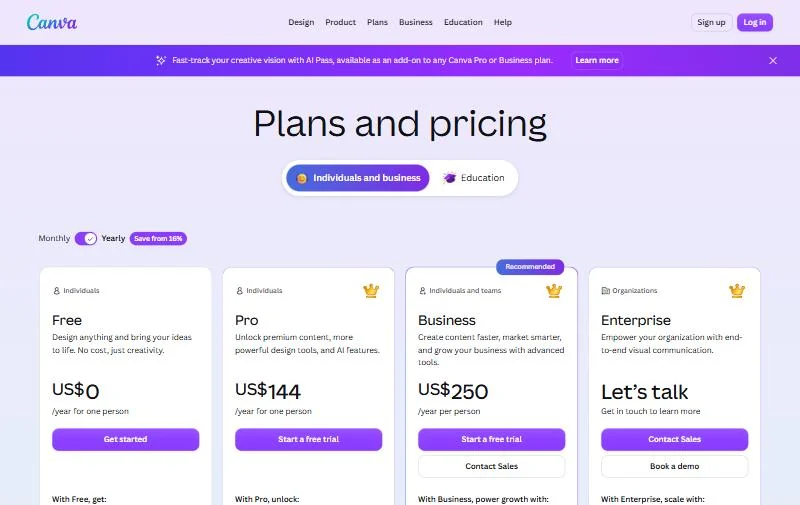
| Plan | Monthly billing | Annual billing | Best for | Main limitation |
|---|---|---|---|---|
| Free | $0 | $0 | Occasional personal designs | Up to 20 AI uses a month; 1 Brand Kit with 3 colors |
| Pro | $18 per month for one person | $144 per year for one person | One person who needs premium content | One person only |
| Business | $25 per person per month | $250 per person per year | Two or more people sharing brand assets | Every member needs a paid seat |
| Enterprise | Contact sales | Contact sales | Canva Enterprise targets organizations of 100+ employees that need SSO | No published price, no free trial |
Sources: Canva pricing page, Yearly and Monthly views, checked October 2026.
These are the prices Canva’s US pricing page showed on October 27, 2026, in US dollars, per person, before tax. Canva says pricing depends on your location, so other countries see other prices. A monthly equivalent of a yearly price is that price divided by 12, not a bill you can pay month to month.
Each per-person price stops at a different limit, and that limit tells you when to move up.
Canva Pricing Plans Explained
Free covers casual design, Pro adds premium content and more AI for one person, Business is the first plan for two or more people, and Enterprise adds SSO, SCIM and governance on a quote. Editor features are judged in my Canva AI review; this section stays on what each plan’s money buys.
Canva Free
Canva Free costs $0 and includes 1.6M+ templates, 4.7M+ photos, videos, graphics and audio, 5GB of cloud storage and 1 Brand Kit limited to 3 colors. Its AI allowance is up to 20 Standard or Premium AI uses a month, with no Ultra AI tools.
Free stops at three gates a regular user meets: premium templates and assets, background removal and social content scheduling, none of which Free includes. If none of those shows up in your month, Free is the right plan.
Canva Pro
Canva Pro costs $144 a year or $18 a month, and it buys one seat: Canva’s FAQ says only one person can use a Canva Pro account. Over Free, Pro adds 3.6M+ templates including premium ones, 141M+ premium photos, videos, graphics and audio, 5 Brand Kits, social content scheduling and 100GB of storage.
Pro’s AI allowance rises to up to 200 Premium or 20 Ultra AI uses a month, and Standard AI tools stop drawing from it. For a freelancer, that is the whole premium library for one yearly payment.
The plan breaks at a second person. Design approvals, Brand Controls and a sixth Brand Kit are the other upgrade triggers, since all three sit on Business.
Pricing note
Because Invite team members is unavailable on Pro, a second person in your workspace means Business at $250 per person per year.
Canva Business
Canva Business costs $250 per person per year or $25 per person per month, and it is the plan that lets you invite team members. Over Pro it adds team admin tools, 100 Brand Kits with approvals, Brand Controls, 500GB of storage, Flourish, faster priority support and 10% off print orders.
Each member gets up to 400 Premium or 40 Ultra AI uses a month, twice Pro’s counts. Billing is pay-as-you-grow, and during the 30-day Canva Business trial you can invite people without being billed.
Canva Teams is no longer available for new sign-ups or upgrades; existing Teams subscribers stay unless they switch or cancel. A Teams price quoted in an older pricing article no longer applies to a new buyer, who lands on Business.
Canva Enterprise
Canva Enterprise has no published price: the pricing page says “Let’s talk” and sends buyers to Canva Sales. Canva aims it at large single teams of 100+ employees or multiple teams.
Enterprise adds SSO and SCIM provisioning, custom apps, 1,000 Brand Kits with tiered approvals and 1TB of storage. A dedicated success manager needs 150+ contracted seats, and Canva Shield’s AI output indemnity needs at least 100 seats. There is no free trial, only a demo.
The paid plans differ most in how much AI they include, which is where a heavy user’s real cost sits.
Canva AI Usage Limits by Plan
Canva Free includes up to 20 Standard or Premium AI uses a month, Pro up to 200 Premium or 20 Ultra uses, and Business and Enterprise up to 400 Premium or 40 Ultra uses per member. On paid plans, Standard AI tools draw nothing from the allowance, with fair use limits.
| AI tier | Free | Pro | Business | Enterprise |
|---|---|---|---|---|
| Standard AI tools | Limited: up to 20 uses, shared with Premium | No allowance used | No allowance used | No allowance used |
| Premium AI tools | Limited: up to 20 uses | Up to 200 uses | Up to 400 uses per member | Up to 400 uses per member |
| Ultra AI tools | Not available | Up to 20 uses | Up to 40 uses per member | Up to 40 uses per member |
| AI Pass | Not available | Add-on: 40x more AI | Add-on: 20x more AI | Not available |
| AI top-ups | Not available | Not available | Add-on: a month’s worth of AI | Not listed on the pricing page |
Sources: Canva pricing page, compare table and FAQ and Canva AI Pass help page, checked October 2026.
The counts are Canva’s estimates for simple tasks; complex tasks and advanced tools use more, so real uses can be lower. The allowance resets each month.
On Business and Enterprise, each member has their own allowance, and allowances aren’t pooled. A five-person Business team gets five separate 400-use allowances, so one heavy user cannot borrow a colleague’s unused uses.
That allowance only starts with the paid plan, which changes what a free trial can show you.
Does Canva Have a Free Plan or Trial?
Yes: Canva Free costs $0 with no trial clock, and Canva Pro and Canva Business each come with a 30-day free trial. During either trial the AI allowance is the same as Canva Free.
All Canva plans renew automatically, so a trial becomes a paid plan when it ends unless you cancel. Canva Enterprise has no free trial.
A trial therefore cannot show the AI volume you would pay for. To judge AI volume, run a normal month of work on Free and watch how fast its 20 uses go.
Once the trial ends, the billing basis you pick changes the yearly bill.
Monthly vs Annual Canva Pricing
Yearly billing saves $72 a year on Pro ($216 – $144) and $50 per person a year on Business ($300 – $250).
| Plan | Monthly billing | Annual billing | Monthly equivalent | Commitment | Saving |
|---|---|---|---|---|---|
| Pro | $18 x 12 months = $216 a year | $144 per year | $144 / 12 = $12 per month | One year, paid up front | $216 – $144 = $72 |
| Business | $25 x 12 months = $300 per person a year | $250 per person per year | $250 / 12 = $20.83 per person per month | One year per person | $300 – $250 = $50 per person |
Sources: Canva pricing page, Yearly and Monthly views, checked October 2026.
Yearly billing is paid when you upgrade and every year after, so it pays off only past the break-even month: 8 months x $18 = $144. A Pro project that ends within 7 months costs less on monthly billing (7 x $18 = $126).
On Business the break-even is 10 months x $25 = $250 per person, so a seat kept fewer than 10 months costs less on monthly billing. You can switch billing in the Billing section of Settings.
Some buyers pay neither price, because Canva gives two groups its paid features at no cost.
Canva Education and Nonprofit Pricing
K-12 teachers, their students, and eligible K-12 schools and districts pay nothing: Canva lists both the Teachers and the Schools and Districts plans as Free. The Teachers plan includes premium features such as Magic Resize, AI tools and 1TB of cloud storage.
Teachers sign up with an education email or proof of employment, and Canva verifies them within a few days.
Universities buy Canva Campus on a quote (“Let’s talk”). Campus is based on Canva Enterprise pricing, with a minimum number of staff licenses that varies with student enrollment size. Once the threshold is met, every student gets premium Canva access at no additional cost.
Registered charitable nonprofits, such as a 501(c)(3) in the US, get a free subscription with all Canva Pro premium features plus team tools for one team of up to 50 users. Additional seats are 50% off Canva Enterprise.
The nonprofit program excludes government bodies, political groups, schools, businesses run for profit and grant-making foundations. For an eligible nonprofit of 10 people, the free team workspace replaces what a for-profit team pays $250 x 10 people = $2,500 a year for on Business.
Paying buyers, meanwhile, can see charges beyond the seat price.
Additional Canva Costs to Consider
Beyond the plan price, a Canva bill can add sales tax, AI Pass at $100 per person per month, Business AI top-ups, and Business seats added mid-year or left empty.
| Cost type | When it applies | Pricing basis | Notes |
|---|---|---|---|
| Sales tax | Any paid plan | By billing address, where required | Prices exclude applicable tax |
| AI Pass | Web-managed Pro, Teams, Business or Nonprofits plans | $100 per person per month | Not on Free, Education, Enterprise, trials, prepaid or app-store plans |
| AI top-ups | Business plans subscribed online | One-time purchase; no price on the pricing page | A month’s worth of AI, valid for 30 days |
| Added seats | Business on yearly billing | Remaining plan duration, billed every three months | Seats added within 3 days of a bill go on the next one |
| Empty seats | Business plans that show Manage seats | Billable until removed | Removing a member does not remove the seat |
| Print orders | Canva Print orders | Per order | 10% off on Business where Canva Print is offered |
Sources: Canva AI Pass help page, Canva Business billing help page and Canva pricing page, checked October 2026.
One Pro user who adds AI Pass pays $18 + $100 = $118 a month, billed monthly, for 40x more AI than Pro. The same person on Business pays $25 a month, billed monthly, for twice Pro’s counts. Business is the cheaper step only when 400 Premium uses a month cover the work; past that, AI Pass is what buys the volume.
On Teams and Business, only owners and admins can buy AI Pass. Annual subscribers can choose an annual AI Pass, charged pro rata for the rest of their billing year.
Business has two billing models. If Settings, then People, shows Manage seats, you pay for seats; otherwise the bill follows who is on the team at the billing date.
Pricing note
On a seat-billed Business plan, inviting someone when no empty seat is free can add a paid seat before the invite is accepted. Removing a member leaves the seat billable until you remove it in Manage seats.
With the extras known, the base subscription is what a whole team pays each year.
How Much Does Canva Cost for Your Team?
One person pays $144 a year on Pro yearly, a team of 5 pays $250 x 5 people = $1,250 a year on Business yearly, and a team of 10 pays $250 x 10 people = $2,500.
Enter the number of people, pick monthly or yearly billing and tick what you need (a shared workspace, more than 5 Brand Kits). The calculator shows Pro and Business side by side, with monthly and yearly cost, and names the cheapest plan that covers the need. It leaves out tax, regional prices and AI Pass.
Canva cost calculator
This calculator needs JavaScript. The scenario table below gives the same estimate for typical workloads.
Enter what you need. The calculator prices it on every plan at list prices and names the cheapest plan that covers it.
- List prices in USD from Canva’s official pricing pages, checked Oct 27, 2026. Tax and regional prices are not included.
- 12-month figures are 12 times the monthly cost at the billing you choose.
- A planning estimate at list prices, not a quote.
| Team size | Plan | Billing | Monthly equivalent | Annual total | Assumptions |
|---|---|---|---|---|---|
| Solo, yearly | Pro | Yearly | $12 per person ($144 / 12) | $144 x 1 person = $144 | Before tax, no AI Pass |
| Solo, monthly | Pro | Monthly | $18 per person | $18 x 1 person x 12 months = $216 | Before tax, no AI Pass |
| 5 people, yearly | Business | Yearly | $20.83 per person ($250 / 12) | $250 x 5 people = $1,250 | Five paid seats, before tax |
| 5 people, monthly | Business | Monthly | $25 per person | $25 x 5 people x 12 months = $1,500 | Five paid seats, before tax |
| 10 people, yearly | Business | Yearly | $20.83 per person ($250 / 12) | $250 x 10 people = $2,500 | Ten paid seats, before tax |
| 10 people, monthly | Business | Monthly | $25 per person | $25 x 10 people x 12 months = $3,000 | Ten paid seats, before tax |
Sources: Canva pricing page, Yearly and Monthly views, checked October 2026.
These totals are list-price estimates, not quotes, and leave out tax, AI Pass, AI top-ups and print orders. Monthly billing costs a 10-person team $3,000 – $2,500 = $500 more a year, so a team sure of its size should bill yearly.
The totals show what each team size pays; the next question is which plan fits the work.
Which Canva Plan Should You Choose?
Choose Free for occasional use, Pro for one person, Business as soon as two people share brand assets, and Canva Enterprise for 100+ employees who need SSO.
| Your needs | Plan to consider | Why | Main limitation |
|---|---|---|---|
| A few personal designs a month | Free (no upgrade) | 1.6M+ templates and 20 AI uses at no cost | No premium content or background removal |
| One person using premium assets weekly | Pro, yearly | Lowest yearly cost for one person | One person only |
| One person, project under 8 months | Pro, monthly | $18 a month, billed monthly | $216 if kept a full year |
| Two or more people sharing a brand | Business | Team invites, 100 Brand Kits, approvals | Every member is a paid seat |
| A heavy AI user | Business | Up to 400 Premium or 40 Ultra uses | AI Pass on top costs $100 per person per month |
| 100+ employees needing SSO and SCIM | Canva Enterprise | SSO, SCIM, 1,000 Brand Kits | Quote only, no free trial |
| K-12 teacher or registered nonprofit | Canva Education or Canva Nonprofits | Free for eligible users | Eligibility check first |
| A university | Canva Campus | Premium access for every student | Quote only; minimum varies with enrollment |
Sources: Canva pricing page and Canva AI Pass help page, checked October 2026.
Three freelancers who only trade files can each buy Pro at $144 x 3 = $432 a year, against $250 x 3 = $750 on Business. For the three of them, Business costs $250 x 3 – $144 x 3 = $318 more a year for the shared workspace, approvals and twice the AI per person.
Skip that premium if each freelancer runs a separate brand. A small business budgeting Canva next to other software can weigh it against my picks of AI tools for small business.
Is Canva Worth the Price?
Canva Pro is worth $144 a year for one person who uses premium templates, premium assets or background removal every week. Business is worth its premium of $250 – $144 = $106 per person a year over Pro only when approvals, a shared workspace or twice Pro’s AI allowance matter.
For a five-person marketing team, Business at $1,250 a year buys approvals, 100 Brand Kits and five 400-use AI allowances. Five separate Pro accounts cost $144 x 5 = $720, but Pro cannot invite team members, so the five accounts never form one team workspace.
A paid plan is poor value for someone who opens Canva a few times a month: Free’s templates and 20 AI uses cover that.
When to skip Canva for an alternative
Skip a paid Canva plan when the only job is generating AI images; the free AI image generators I ranked handle that without a subscription.
A team already paying Adobe should read Adobe Firefly pricing and its credit plans before adding Canva. If you want a dedicated image generator instead, compare my Firefly alternatives.
A buyer who only retouches photos may be better served by one of the AI photo editors I compared.
Before paying for any plan, the billing and cancellation terms decide how locked in you are.
Billing, Discounts and Cancellation
Every Canva plan renews automatically; if you cancel, the plan does not renew at the next billing date. When you upgrade to a paid plan, billing starts immediately at the chosen rate.
The discounts Canva publishes are yearly billing, free Education plans for K-12, free Nonprofits plans, 50% off additional Enterprise seats for nonprofits, and 10% off print orders on Business and Enterprise.
In the US, Canva applies sales tax where required, based on your billing address, and shows the total with tax before you confirm. Canva accepts PayPal and major credit cards.
How I Verified Canva Pricing
Every plan price comes from Canva’s pricing page in its US view, read on October 27, 2026 in the Yearly view, the Monthly view and the Education tab. Monthly equivalents are the yearly price divided by 12.
The AI Pass price and terms come from Canva’s AI Pass help page. Seat rules come from its Business billing help page.
The pricing region is the US. Prices are in US dollars, per person, before tax. Plan prices and AI counts are Canva’s published figures.
Team totals are my calculation, price x people x months or the yearly price x people, and are estimates, not quotes.
Canva does not publish an Enterprise or Canva Campus price, a Business seat minimum or an AI top-up price.
Frequently Asked Questions
How much is 1 year of Canva Pro?
One year of Canva Pro costs $144 in the US on yearly billing, before tax. You pay it when you upgrade, or when the 30-day Canva Pro trial ends, and again each year until you cancel. Paying month to month for the same year costs $18 x 12 = $216.
Why is Canva charging me more than expected?
Canva lists these reasons: you switched plans (for example from Pro to Business after inviting team members), added team members near a billing date, let a trial renew, or kept empty Business seats. AI Pass adds $100 per person per month. Charges show as Canva, Canva invoice id, APPLE Canva or GOOGLE Canva.
Is Canva Pro free for students?
Only for K-12 students, and only when a teacher invites them to Canva Education. University students get premium access at no additional cost when their institution buys Canva Campus; otherwise they can use Canva Free or pay for Pro at $144 a year.
Final Pricing Verdict
One person should buy Canva Pro on yearly billing at $144; two or more people who share a brand should buy Canva Business at $250 per person per year. Canva Pro and Canva Business each have a 30-day trial, so start there, knowing it carries Free’s AI allowance.
Skip paid Canva if premium assets, background removal and scheduling never come up. Move from Pro to Business the day a second person needs your Brand Kits, and pay monthly only for a project shorter than eight months. To compare a dedicated AI art tool, see my Leonardo.Ai pricing breakdown.
Before buying AI Pass, check whether Business’s 400 Premium uses per member already cover the work. If Canva is one of several tools you are budgeting for content, my ranking of AI tools for content creation shows where it fits.