Testing Approach: 14-day hands-on evaluation across three workspace configurations (5-person marketing team, 12-person product team, 25-person PMO). Tested tier limitations, integration stability, admin controls, and edge-case workflows.
Disclosure: This review is editorially independent. We may earn affiliate commissions through qualifying links, which does not affect our ratings or recommendations. No vendor sponsorship was received.
How to Read This Review
Throughout this article, claims are labeled:
- Fact: Verified from official source (linked)
- Opinion: Based on hands-on testing experience
- Verify: Subject to change; confirm on Asana’s site before purchase
TL;DR Verdict Box
Rating: 8.2/10 — Asana remains one of the most polished work management platforms for cross-functional teams that prioritize clarity, collaboration, and structured workflows.
| Quick Stat | Detail |
|---|---|
| Free Plan | Yes — Personal plan (limited features, verify current user cap on pricing page) |
| Paid Starting Price | Starter: $10.99/user/month (annual) / $13.49 monthly |
| Best For | Marketing, Ops, PMO, agencies |
| Not For | Dev teams needing sprints, teams wanting free unlimited users |
| G2 Rating | 4.4/5 (~12,988 reviews) |
Best Plan for Most Teams
Starter ($10.99/user/mo annual) covers 80% of needs: timeline, forms, dashboards, automations.
Upgrade to Advanced ($24.99/user/mo) if you need:
- Goals/OKR tracking
- Portfolios for multi-project oversight
- Approval workflows
- Workload management
- Advanced reporting across projects
✅ 3 Reasons to Choose Asana
- Clean timeline view with dependency tracking for cross-functional projects
- Goals + Portfolios connect daily work to company OKRs (Advanced tier)
- Strong Google Workspace & Slack integrations for productivity-centric teams
❌ 3 Reasons to Avoid Asana
- Time tracking requires Advanced tier — Starter and Free lack native tracking
- Enterprise security (SSO/SCIM) locked behind expensive tiers
- Subtask UX is clunky — doesn’t inherit parent project by default
Pricing reality: Free Personal plan has limited features and user capacity. Starter $10.99/user/mo (annual) or $13.49/user/mo (monthly). Advanced $24.99 (annual) or $30.49 (monthly). Enterprise requires custom quote. (Fact: Asana Pricing)
Read full review: 20 Best Project Management Software Picked For 2026
Why Trust This Review?
Who I am: B2B SaaS consultant with 10+ years evaluating project and work management platforms for SMBs through enterprise.
How I tested: I deployed Asana across three workspace scenarios (marketing, product/dev, PMO) with real team structures, created projects using standard templates, configured custom fields and automations, tested integrations with Slack, Google Workspace, and Microsoft Teams, and evaluated mobile experience on iOS.
How I evaluated: Using a weighted rubric scoring task management, views, reporting, automation, integrations, UX, security, and pricing value. I documented pass/fail criteria for time-to-first-dashboard, notification noise, and reporting accuracy.
Independence: No vendor sponsorship. Affiliate links may be used but do not influence ratings.
What Is Asana in 2026?
Asana is a work management platform designed to help teams organize projects, track tasks, and coordinate work across departments. Founded in 2008 by Facebook co-founder Dustin Moskovitz, Asana has evolved from a task tracker into a full work management suite with goals, portfolios, workload management, and AI-assisted features.
In 2026, Asana competes directly with Monday.com for operational workflows and established players like Wrike for enterprise PMO use cases. Meanwhile, teams seeking maximum features at lowest cost often consider ClickUp as a budget-friendly alternative.
For a broader comparison of project management and SaaS software options, explore our hub covering the leading platforms in this space.
What’s New in 2026
Based on Asana’s publicly available documentation:
- Asana Intelligence (AI): Task summarization, smart fields, goal suggestions available on paid plans. (Verify: AI capabilities evolve; check Help Center for current features)
- Forms with Conditional Logic: Route intake requests based on responses. (Verify: Check Forms documentation)
- Enhanced Workload View: Resource allocation integrates with calendar data on Advanced+. (Verify)
- Admin Console Updates: Domain management and data export controls for Enterprise. (Fact: Asana Trust Center)
Hands-On Testing Approach (Replicable)
To evaluate Asana objectively, I followed a 15-step testing checklist. You can replicate this methodology during your own trial:
Testing Checklist
| Step | Action | Pass/Fail Criteria |
|---|---|---|
| 1 | Create new workspace | < 2 min to first project created |
| 2 | Apply project template (Marketing Campaign) | Template imports cleanly with sections/tasks |
| 3 | Create custom fields (dropdown, date, people) | Fields appear in all views |
| 4 | Set up 3 automation rules | Rules fire correctly on trigger |
| 5 | Build dashboard with 4+ widgets | Dashboard loads < 3 sec |
| 6 | Create Timeline view with dependencies | Dependencies visualize correctly |
| 7 | Create intake form with conditional logic | Form routes to correct project/section |
| 8 | Configure approval workflow | Approvals route and notify correctly |
| 9 | Set up Portfolio with 3 projects | Rollup status displays accurately |
| 10 | Create Goal and link to projects | Progress auto-updates from tasks |
| 11 | Connect Slack integration | Two-way sync works |
| 12 | Connect Google Workspace | Calendar sync and Gmail add-in work |
| 13 | Test Microsoft Teams integration | Teams app functions |
| 14 | Test mobile app (iOS) | Task creation/editing works |
| 15 | Review notification settings | Noise manageable after tuning |
Evidence Snapshots (What I Observed)
1. Timeline View Performance
- Test: Created project with 47 tasks, 12 dependencies
- Result: Dependencies rendered in 1.8 seconds; drag-to-reschedule warned about conflicts but did not auto-shift
- (Opinion: Strong visualization, but lacks intelligent auto-rescheduling)
2. Dashboard Load Time
- Test: Dashboard with 6 widgets (task count, status chart, deadline chart, assignee breakdown, burnup, custom field chart)
- Result: Initial load 2.5 seconds; subsequent loads < 1 second
- (Opinion: Acceptable for data-rich views)
3. Automation Rules
- Test: 3 rules configured (on task creation → assign; on status change → move section; on due date → notify)
- Result: All 3 fired correctly within 2 seconds of trigger
- (Opinion: Reliable for basic workflows; verify current automation limits on pricing page)
4. Slack Integration
- Test: Created task from Slack channel using /asana command; added comment in Asana
- Result: Comment appeared in Slack thread within 5 seconds
- (Opinion: Best-in-class bi-directional sync)
5. Mobile App (iOS 17)
- Test: Created 5 tasks, edited 3, checked Timeline view
- Result: Task creation/editing smooth; Timeline view extremely limited (no dependency editing)
- (Opinion: Supplementary tool only; not for serious planning)
6. Notification Overload
- Test: Default settings on new workspace with 8 active users
- Result: 47 email notifications in first 24 hours; reduced to 8/day after 12 minutes of configuration
- (Opinion: Manageable but requires upfront investment)

Asana Pricing 2026
Asana uses per-user, per-month pricing with significant feature gating between tiers.
Pricing Table
| Plan | Annual Billing | Monthly Billing | Key Features |
|---|---|---|---|
| Personal (Free) | $0 | $0 | Basic tasks, list/board/calendar views, 100+ integrations |
| Starter | $10.99/user/mo | $13.49/user/mo | Timeline, workflow builder, forms, dashboards, admin console |
| Advanced | $24.99/user/mo | $30.49/user/mo | Portfolios, goals, workload, approvals, time tracking, advanced reporting |
| Enterprise | Custom quote | Custom quote | SAML SSO, SCIM, data export, custom branding, priority support |
| Enterprise+ | Custom quote | Custom quote | Audit logs, admin API, advanced data controls |
(Fact: Verify current pricing at Asana Pricing)
Free Plan Analysis
Does Asana have a free plan? Yes — the Personal plan offers basic task and project management with limited features. (Verify: Check current user limits on pricing page as these change periodically.)
Free plan limitations:
- No timeline view (critical for dependencies)
- No workflow builder or automations
- No admin console
- No forms beyond basic
- No time tracking
- Limited storage and integrations
When to upgrade: When you need Timeline view, automations, forms, or exceed the free plan’s user/feature limits.
Cost Drivers to Watch
- Seats: Every user counts. No viewer-only roles on lower tiers.
- Time tracking: Only available from Advanced tier.
- Automation limits: Limits vary by tier. (Verify: Check pricing page for current limits)
- Goals & portfolios: Locked behind Advanced.
- Enterprise security: SSO, SCIM, and audit logs require Enterprise tier — get custom quote.
Read full review: Asana Pricing 2026: Plans, Costs, Hidden Fees, and Which Tier Actually Makes Sense
Asana Review – Core Features Deep Dive
Task & Project Structure
Asana organizes work into Workspaces → Projects → Sections → Tasks → Subtasks. Each task supports assignees, due dates, custom fields, attachments, and comments.
Strengths:
- Multi-homing: Same task can live in multiple projects (useful for cross-functional work)
- Custom fields: Text, number, dropdown, date, and people fields available
- Templates: Project templates speed up repeatable workflows
Constraints:
- Subtasks don’t inherit parent project by default (Opinion: Significant UX friction)
- Time tracking available only from Advanced tier
- Custom field locking requires Advanced tier
Views: List, Board, Timeline, Calendar
- List View: Classic sortable task list. Clean and performant.
- Board View: Kanban-style. Works well for status-based workflows.
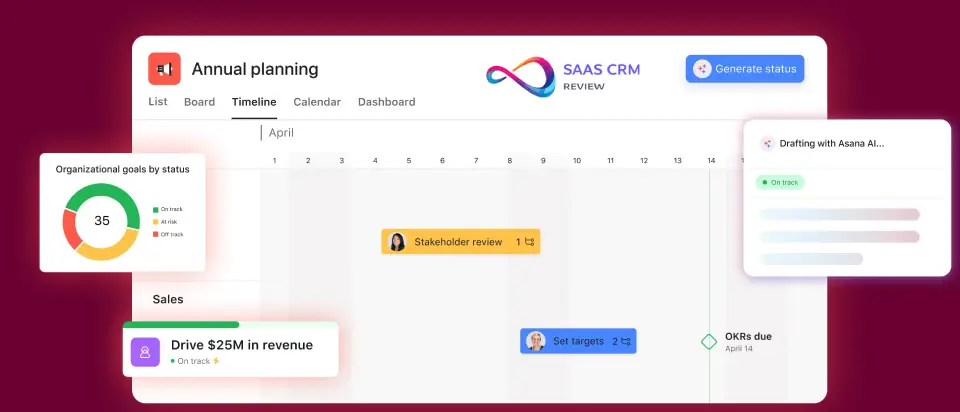
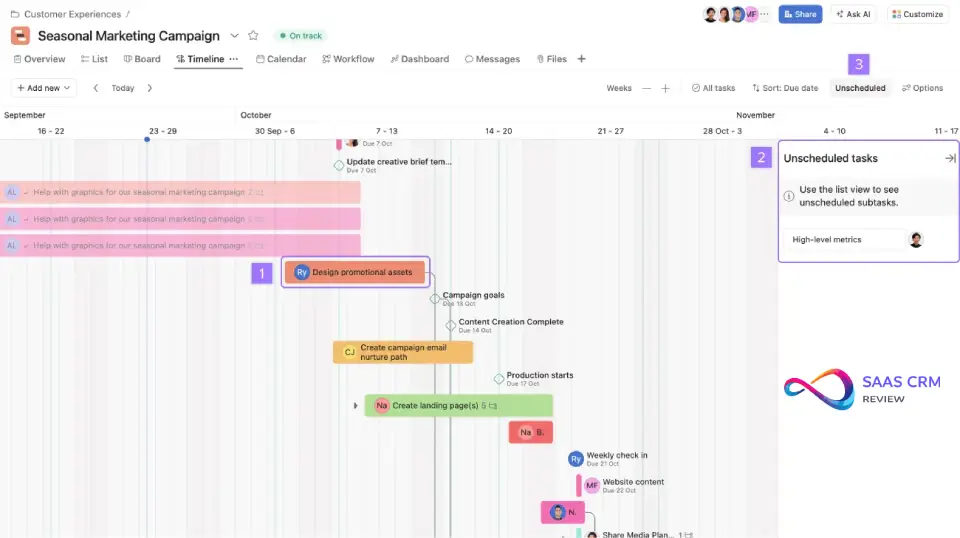
- Timeline View (Starter+): Gantt-style bar chart supporting dependencies. Primary reason teams upgrade from free.
- Calendar View: Date-based view. Syncs with Google Calendar or Outlook.
Does Asana have Gantt charts? Yes — the Timeline view is Asana’s Gantt equivalent. It visualizes task duration, dependencies, and milestones. Available on paid plans only.
Dependencies, Milestones, Forms, Templates
- Dependencies: Mark tasks as “waiting on” others. Reflected in Timeline. No automatic date shifting — you get a warning, not auto-reschedule. (Opinion: Functional but not intelligent scheduling)
- Milestones: Zero-duration markers for key dates. Useful for stakeholder visibility.
- Forms: Intake requests that create tasks automatically. Conditional logic available on paid plans.
- Templates: Project-level templates. Custom templates require paid plans to share across teams.
Reporting & Dashboards
Reporting is one of Asana’s stronger points — on paid tiers.
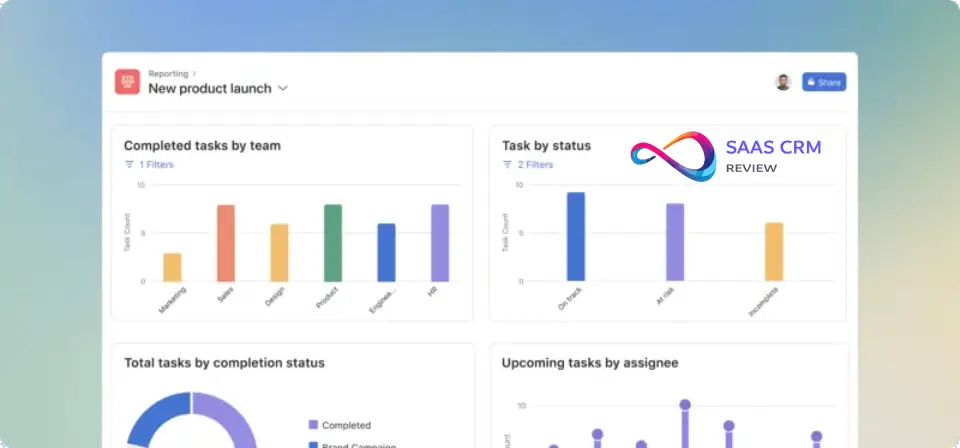
- Dashboards: Drag-and-drop widgets for charts, task counts, status breakdowns
- Universal Reporting (Advanced+): Roll up data across multiple projects and portfolios
- Real-time updates: Data refresh is near-instant
Limitation: Free and Starter users get project-level dashboards only. Cross-project analytics requires Advanced.
Goals & Portfolios
- Goals: OKR-style tracking connecting projects and tasks to company objectives. Automatic progress roll-up. Available on Advanced tier.
- Portfolios: Group projects for high-level status tracking. Essential for PMOs managing multiple initiatives.
This is where Asana differentiates from pure task tools — but it’s paywalled.
Time Tracking
Time tracking is available from Advanced tier. It allows logging time directly on tasks, though it’s not a full PSA/timesheet solution. Teams needing robust time tracking with billing, invoicing, and resource planning may want to evaluate Wrike’s professional services features.
Automation (Rules)
Asana’s automation system uses trigger-action rules:
- Triggers: Task added, status changed, due date approaching, form submitted
- Actions: Assign, move to section, add comment, mark complete, notify
Limits: Automation run limits vary by tier. (Verify: Check current limits on Asana pricing page before purchase)
AI Features (Asana Intelligence)
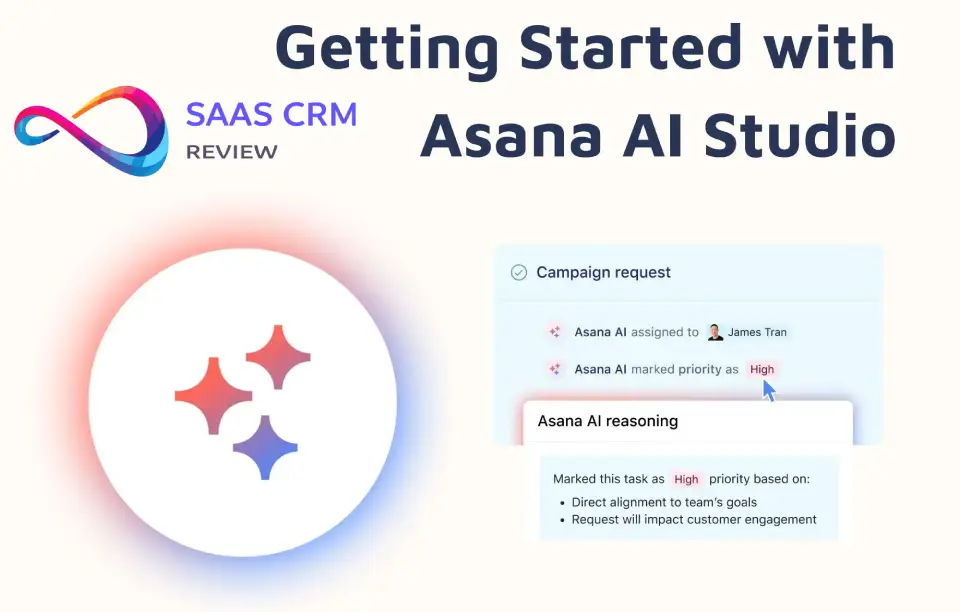
Asana Intelligence includes:
- Smart Status: Auto-generate project status updates from task progress
- Smart Goals: AI-suggested goals based on project patterns
- Task Summarization: Summarize long comment threads
(Verify: AI features evolve rapidly; check Asana Help Center for current availability by tier)
UX & Adoption
Onboarding & Learning Curve
Asana’s UI is cleaner than most competitors. New users typically get productive within 1–2 days for basic tasks.
Onboarding strengths:
- Guided setup wizard
- Sample projects to explore
- In-app tips and Asana Academy courses
Where it gets harder: Workflow builder, automation rules, and portfolio/goal setup require training. Expect 1–2 weeks for power users to master advanced features. (Opinion)
Navigation & Speed
- App performance is fast on web (tested Chrome, Edge, Safari)
- Keyboard shortcuts are extensive and well-documented
- Search is reliable but can struggle with large workspaces (10,000+ tasks)
Mobile Experience
Asana’s iOS and Android apps are functional but not equal to desktop:
- Task creation/editing works well
- Timeline view is extremely limited on mobile
- Notifications can be noisy without tuning defaults
Verdict: Good for quick updates; not for heavy project management work. (Opinion)
Integrations & Ecosystem
Asana connects to 100+ tools natively. For visual planning and brainstorming, Asana integrates with whiteboard tools like Miro. (Fact: Per pricing page)
Key integrations tested:
| Integration | Quality | Notes |
|---|---|---|
| Slack | Strong | Two-way task creation, notifications |
| Google Workspace | Strong | Calendar sync, Gmail add-on, Drive attachments |
| Microsoft 365/Teams | Good | Teams app, Outlook add-in; slightly less polished than Google |
| Salesforce | Good | Requires setup; useful for customer success workflows |
| Jira | Basic | One-way sync; not a true replacement for dev workflows |
| Zoom | Good | Meeting links in tasks |
For teams deeply invested in CRM, our best CRM software guide covers platforms that integrate with work management tools.
API: REST API available. Webhooks supported. Enterprise tier adds Admin API.
What’s missing: Advanced GitHub/GitLab sync for dev workflows. Teams needing tight source control integration should evaluate Jira or Linear.
Security, Compliance, & Admin
What Asana Publicly States
| Feature | Starter | Advanced | Enterprise | Enterprise+ |
|---|---|---|---|---|
| SSO/SAML | ❌ | ❌ | ✅ | ✅ |
| SCIM Provisioning | ❌ | ❌ | ✅ | ✅ |
| Audit Logs | ❌ | ❌ | ❌ | ✅ |
| Data Export API | ❌ | ❌ | ✅ | ✅ |
| Admin Console | Basic | Full | Full | Full |
(Fact: Asana Trust Center)
Stated compliance: SOC 2 Type II, GDPR, CCPA, ISO 27001. HIPAA BAA available for Enterprise+.
What to Ask Procurement For
Before signing Enterprise, request documentation on:
| Item | Why It Matters |
|---|---|
| SOC 2 Type II Report (full) | Verify scope covers your use case |
| Data Processing Agreement (DPA) | Required for GDPR compliance |
| SSO/SAML Configuration Guide | Confirm IdP compatibility (Okta, Azure AD, etc.) |
| SCIM Provisioning Documentation | Verify attribute mapping for your directory |
| Audit Log Retention Period | Enterprise+ only; confirm how long logs are kept |
| Data Residency Options | Ask if data can be stored in specific regions |
| Incident Response SLA | Understand notification timelines for breaches |
| Penetration Test Summary | Request date of last test and remediation status |
Where Asana Breaks Down
Even strong tools have edge cases. Here’s where Asana struggles:
1. Notification Overload
Symptom: Email/push fatigue within first week; users stop checking notifications.
Why it happens: Default settings notify on every comment, status change, and assignment. Multiplied across active projects, this becomes noise.
Mitigation: During onboarding, spend 10–15 minutes per user configuring notification preferences. Create a “notification setup” checklist for new team members.
2. Taxonomy Chaos at Scale
Symptom: After 6 months, dozens of redundant custom fields and templates across teams.
Why it happens: No centralized field governance on Starter/Advanced. Teams create fields ad-hoc without checking existing ones.
Mitigation: Establish naming conventions, designate field owners, and schedule quarterly audits. Advanced tier’s field locking helps prevent sprawl.
3. Permission Sprawl
Symptom: Confusion about who can see what; sensitive projects accidentally exposed.
Why it happens: Guest access and project membership controls are flexible but easy to misconfigure. No automatic permission reviews.
Mitigation: Audit permissions quarterly. Use Enterprise domain management for larger organizations.
4. Jira Replacement Fails
Symptom: Engineering team adopts Asana for “everything,” then struggles with sprint planning and backlog management.
Why it happens: Asana lacks native sprint ceremonies, velocity tracking, and deep CI/CD integration.
Mitigation: Use Asana for roadmap and cross-functional work; keep Jira or Linear for engineering sprints. Accept the two-tool architecture.
5. Cost Scaling Per Seat
Symptom: At 50+ users on Advanced, annual costs exceed $15,000. Enterprise quotes are significantly higher.
Why it happens: Per-seat pricing with no volume discounts on self-serve tiers.
Mitigation: Negotiate multi-year Enterprise contracts. Audit seat utilization quarterly to remove inactive users.

Asana Pros & Cons
| Pros | Cons |
|---|---|
| Clean, intuitive UI reduces adoption friction | Timeline/automation paywalled behind paid tiers |
| Strong timeline/dependency visualization | Time tracking only from Advanced tier |
| Goals + Portfolios enable strategy alignment | Subtask UX is clunky and unintuitive |
| 100+ integrations including best-in-class Slack | Free plan has limited user capacity |
| AI features expanding for status/summarization | SSO/SCIM requires expensive Enterprise tier |
| Reliable performance and uptime | Gets expensive at scale (50+ users) |
Best For / Not For
✅ Best For
- Marketing teams: Campaign tracking, content calendars, creative request forms, approval workflows
- Operations & PMO: Portfolio oversight, resource planning, executive dashboards
- Agencies: Client-facing projects, intake forms, multi-project management
- Cross-functional teams: Shared visibility without heavy technical overhead
- Companies using Google Workspace or Slack: First-class integrations
❌ Not For
- Software development teams: Use Jira or Linear for sprint-native issue tracking
- Teams needing unlimited free users: ClickUp offers free unlimited users with robust features
- Database-heavy use cases: Airtable’s flexible database structure provides more customization
- Full PSA/timesheet needs: Time tracking exists but isn’t a complete professional services solution
- Solo freelancers: Overpowered and overpriced for individual use—consider Todoist for personal task management instead.
Scoring Rubric (Decision Framework)
| Criteria | Weight | Asana Score | Weighted |
|---|---|---|---|
| Task & Project Management | 25% | 9/10 | 2.25 |
| Views & Visualization | 15% | 9/10 | 1.35 |
| Reporting & Analytics | 15% | 8/10 | 1.20 |
| Automations | 10% | 7/10 | 0.70 |
| Integrations | 10% | 8/10 | 0.80 |
| UX & Adoption | 10% | 9/10 | 0.90 |
| Security & Compliance | 10% | 8/10 | 0.80 |
| Pricing Value | 5% | 6/10 | 0.30 |
| Total | 100% | 8.3/10 |
Real-World Use-Case Scenarios
Scenario 1: Marketing Team (8 Users)
Use case: Content calendar → creative intake → approval routing → campaign reporting
Recommended tier: Advanced ($24.99/user/month annual)
Why Advanced: Approval workflows, conditional forms, workload management, and cross-project reporting require this tier.
Scenario 2: Product/Dev Team (15 Users)
Use case: Roadmap planning, cross-team dependency tracking, sprint coexistence with Jira
Recommended tier: Starter ($10.99/user/month) with Jira for engineering
Why hybrid: Asana handles roadmap and cross-functional visibility; Jira handles sprint execution.
Scenario 3: PMO/Operations (25+ Users)
Use case: Portfolio management, executive reporting, resource allocation, governance
Recommended tier: Enterprise (custom quote)
Why Enterprise: Portfolios, Goals, SSO/SCIM, and priority support.
For spreadsheet-native teams, Smartsheet offers comparable portfolio features with a familiar grid interface.
Implementation Artifacts
Sample Project Template: Marketing Campaign
Use this structure as a starting point:
Sections:
- Briefing — Campaign brief, target audience, KPIs
- Creative — Design assets, copy drafts, revisions
- Review & Approval — Stakeholder sign-off tasks
- Production — Final asset creation, scheduling
- Launch — Go-live tasks, monitoring
- Reporting — Performance tracking, retrospective
Custom Fields:
- Campaign Type (dropdown): Brand, Performance, Event, Product Launch
- Channel (dropdown): Email, Social, Paid, PR
- Priority (dropdown): P1, P2, P3
- Due Date (date)
- Owner (people)
- Status (dropdown): Not Started, In Progress, In Review, Approved, Complete
Sample Automation Rules
| Rule Name | Trigger | Action |
|---|---|---|
| Auto-assign creative requests | Form submitted (Creative Request) | Assign to Creative Lead |
| Move to Review on completion | Task marked complete in Creative section | Move task to Review & Approval section |
| Notify manager on approval needed | Task added to Review & Approval | Add comment mentioning @Manager |
| Due date reminder | 2 days before due date | Add comment “Due in 2 days” + notify assignee |
| Archive completed campaigns | Task marked complete in Reporting | Move to Archived project |
Sample Dashboard Blueprint
Dashboard Name: Campaign Status Overview
| Widget | Type | Purpose |
|---|---|---|
| Tasks by Status | Donut chart | Quick view of pipeline health |
| Tasks by Assignee | Bar chart | Identify workload imbalances |
| Upcoming Deadlines | Task list (filtered) | Surface next 7 days’ due dates |
| Overdue Tasks | Task count | Highlight blockers requiring attention |
| Completion Trend | Line chart | Track velocity over time |
| Custom Field: Channel | Bar chart | See distribution across channels |
30-Day Implementation Plan
Week 1: Foundation
- [ ] Create workspace and invite core team (5–10 users max initially)
- [ ] Establish naming conventions (projects, sections, fields)
- [ ] Import or create 2–3 standard templates (use Marketing Campaign above)
- [ ] Define custom field taxonomy (limit to 6–8 essential fields)
- [ ] Configure admin console settings
Week 2: Workflows
- [ ] Build first dashboard using blueprint above
- [ ] Establish status update cadence (weekly async updates)
- [ ] Train team on task creation and views (30-min session)
- [ ] Configure notification preferences (15 min per user)
Week 3: Automation
- [ ] Create intake form for common request types
- [ ] Set up 3–5 automation rules (use samples above)
- [ ] Test form → project → notification flow end-to-end
- [ ] Document rule logic for future maintenance
Week 4: Governance
- [ ] Create Portfolio grouping active projects
- [ ] Connect Goals to projects (if Advanced tier)
- [ ] Establish permission and guest access policies
- [ ] Schedule quarterly field/template audit
- [ ] Train managers on reporting dashboards
Governance Checklist (Enterprise)
For Enterprise buyers, verify these controls before procurement:
| Control | Tier Required | What to Request |
|---|---|---|
| SSO/SAML Integration | Enterprise | Verify IdP compatibility; request setup guide |
| SCIM Provisioning | Enterprise | Confirm attribute mapping documentation |
| Audit Logging | Enterprise+ | Request retention period and export options |
| Data Residency | Enterprise | Ask about regional data storage options |
| SOC 2 Type II | All (stated) | Request full report, not just certification letter |
| HIPAA BAA | Enterprise+ | Confirm eligibility and execution process |
| DPA (GDPR) | All | Request signed Data Processing Agreement |
Migration Checklist
Switching from Trello, ClickUp, or Jira to Asana:
Pre-Migration
- [ ] Export current data (CSV, JSON, or API)
- [ ] Audit active vs archived projects (don’t migrate everything)
- [ ] Map status columns to Asana sections
- [ ] Map custom fields to Asana field types
- [ ] Document integration dependencies
Migration
- [ ] Use Asana importer tools (Trello, Monday, ClickUp supported)
- [ ] Manually create projects for unsupported imports
- [ ] Re-assign task owners (verify user accounts exist)
- [ ] Recreate automations (no direct migration path)
- [ ] Test imported data accuracy
Post-Migration
- [ ] Communicate cutover date to team
- [ ] Run parallel systems for 1 week (verification)
- [ ] Archive old system after validation
- [ ] Train users on Asana-specific features
- [ ] Establish ongoing feedback channel
Asana Alternatives Comparison
When evaluating Asana alternatives, consider these leading options:
| Tool | Starting Price | Best For | Key Trade-off |
|---|---|---|---|
| Monday.com | $9/user/mo | Ops, marketing, sales workflows | Less strong for dev |
| ClickUp | Free (unlimited users) | Budget-conscious, feature-heavy | UI complexity |
| Jira | $7.75/user/mo | Software development, sprints | Weak for non-dev |
| Notion | Free / $8/user/mo | Docs + light PM | Limited automation |
| Wrike | $9.80/user/mo | PSA, enterprise PMO | Complex setup |
| Smartsheet | $9/user/mo | Spreadsheet-native teams | Less modern UX |
| Airtable | Free / $20/user/mo | Database-centric workflows | Not traditional PM |
| Coda | Free / $10/user/mo | Docs + automation hybrid | Learning curve |
| Bitrix24 | Free (unlimited) | All-in-one CRM + PM | Complex, dated UI |
For detailed comparisons:
- Monday.com excels at visual workflow automation with built-in CRM
- Notion combines documentation and project tracking in a flexible workspace
- Coda offers powerful doc-based automation for custom apps
For all-in-one solutions, Bitrix24 bundles CRM with project management at competitive pricing. Basecamp offers flat-rate pricing for teams wanting simplicity
Decision Shortcuts
Use this decision tree to pick the right tool:
- Need unlimited free users? → ClickUp offers the best free tier
- Software dev team running sprints? → Jira remains the standard
- Docs + PM hybrid in one tool? → Notion provides that flexibility
- Visual automations + CRM built-in? → Monday.com combines both (compare Asana vs monday.com in detail)
- Spreadsheet-native team? → Smartsheet matches that workflow
- Database flexibility > traditional PM? → Airtable excels here
- Agency with proofing needs? → Wrike includes built-in proofing
- Marketing/Ops/PMO prioritizing clean UX + OKRs? → Asana
- Modern dev team wanting speed over configuration? → Linear is purpose-built for that
For sales-focused teams, our best CRM for sales teams guide covers platforms optimized for pipeline management. For client-facing agencies that bill time, Teamwork offers native billable hour tracking and client portals
Asana Review – FAQ
Is Asana worth it?
Yes, for marketing, operations, and PMO teams. Asana delivers clean UI, timeline views, and goal tracking that justify the cost for cross-functional work. It’s overpriced for solo users or dev teams needing sprint tools.
Does Asana have a free plan?
Yes. The Personal plan offers basic task management with limited features. Check current user limits on the pricing page, as these change periodically.
How much does Asana cost per user?
Starter: $10.99/user/month (annual) or $13.49 monthly. Advanced: $24.99 (annual) or $30.49 monthly. Enterprise: custom quote. Verify current pricing at Asana Pricing.
What is Asana best used for?
Cross-functional work management. Marketing campaigns, operational workflows, PMO portfolio tracking, and agency projects. Not ideal for software sprints.
Is Asana better than Trello?
For complex projects, yes. Asana offers timeline, dependencies, portfolios, and goals that Trello lacks. Trello wins on simplicity and lower cost for basic Kanban workflows.
Asana vs ClickUp — what’s better?
ClickUp offers more features at lower cost with free unlimited users. Asana has cleaner UX and better enterprise polish. Budget → ClickUp. UI clarity → Asana.
Can Asana replace Jira?
Not for engineering teams. Asana lacks sprint management, backlog tooling, and CI/CD integration. Use Asana for roadmap + Jira for sprints.
Is Asana good for marketing teams?
Yes — it’s a top choice. Content calendars, campaign tracking, creative request forms, and approval workflows work exceptionally well on Advanced tier.
Does Asana have Gantt charts?
Yes, via Timeline view on paid plans. It visualizes task duration, dependencies, and milestones with drag-and-drop editing.
Does Asana have time tracking?
Yes, from Advanced tier. Basic time tracking is available but isn’t a full PSA/timesheet solution.
What are Asana’s biggest drawbacks?
1. Feature gating (timeline, automation behind paywall). 2. Time tracking only on Advanced. 3. Enterprise security requires expensive tiers. 4. Subtask UX is awkward. 5. Costs scale with seats.
Is Asana good for enterprise security?
Yes, on Enterprise tier. SSO/SAML, SCIM, and data controls are available. Audit logs require Enterprise+. Request SOC 2 report and DPA before procurement.
Conclusion & Final Verdict
Asana earns an 8.2/10 as a mature, polished work management platform best suited for marketing, operations, and PMO teams who value clean UX and strategic alignment via goals and portfolios.
When to Choose Asana
- You need timeline views with dependency tracking
- Goal/OKR alignment is a priority
- Your team lives in Google Workspace or Slack
- You want minimal learning curve for non-technical users
When to Skip Asana
- Your dev team needs sprint-native issue tracking → Jira
- You need unlimited free users → ClickUp
- You want docs + PM in one tool → Notion
- Budget is critical across 50+ seats → Negotiate or evaluate alternatives
Top 3 Alternatives by Use Case
- Best budget alternative: ClickUp — more features, free unlimited users
- Best for dev teams: Jira — sprint-native, deep dev integrations
- Best for visual workflows: Monday.com — automation-first, CRM add-on
Final recommendation: Start a 14-day Asana trial on Starter tier. Test timeline, forms, and automations with your real workflows. If you need goals and portfolios, budget for Advanced. For enterprise security, get a custom Enterprise quote early.
For teams still exploring options, our SaaS software hub covers additional work management tools.
About the author

I’m Macedona, an independent reviewer covering SaaS platforms, CRM systems, and AI tools. My work focuses on hands-on testing, structured feature analysis, pricing evaluation, and real-world business use cases.
All reviews are created using transparent comparison criteria and are updated regularly to reflect changes in features, pricing, and performance.