The Todoist decision is rarely about whether the app works. It is about which plan you need, and whether your planning model survives a tool that has no true start dates.
This Todoist review prices that decision out at real team sizes and names the limits that stay in place after you pay. Beginner is free, Pro is $7 per month or $60 per year, and Business is $10 per user per month or $8 per user per month billed yearly, according to official Todoist plans and billing FAQ, checked August 6, 2026.
Todoist is worth paying for if your problem is capturing and scheduling a high volume of small commitments across devices. It is the wrong purchase if your team plans around start dates, dependencies, or workload, which is a category boundary worth checking against the best project management software before you commit.
In This Article (21 sections)
Quick Verdict on Todoist
| Category | Verdict |
|---|---|
| Best for | Solo consultants and individual professionals running many small, recurring commitments across desktop, mobile, and email |
| Not ideal for | Teams whose schedule depends on start dates, dependencies, workload balancing, or portfolio reporting |
| Starting price | Free on Beginner; Pro $7 per month or $60 per year |
| Best practical plan | Pro, from the moment the workflow needs a sixth project or a fourth saved filter |
| Free plan / trial | Beginner is free; Pro has a 7-day trial; Business has a 14-day trial |
| Setup difficulty | Low for one person, medium for a governed Business workspace with folders, roles, and permissions |
| Main strength | Capture speed: multiline paste, project email addresses, and priority syntax turn a list into tasks in one action |
| Main limitation | No true start date, so future work stays visible instead of appearing when it becomes actionable |
| Best alternative | A heavier project platform, when dependencies, start dates, or workload views are non-negotiable |
Read that table as one decision rather than nine facts. Todoist wins on the front end of the workflow, where work gets captured and scheduled, and loses on the back end, where work has to be sequenced and reported.
Todoist Pros and Cons
| Pros | Cons |
|---|---|
| Multiline paste creates one task per line after an “Add X tasks” confirmation, which cuts migration and meeting-notes entry to a single action | No true start date, so a task scheduled for next quarter is visible from the day it is created |
| Every plan can share personal projects, so basic collaboration does not force a Business purchase | Paid features in a shared personal project follow each collaborator’s own plan, so a shared project does not standardize capability |
| Automatic reminders for tasks with a date and time are available on all plans, including the free one | Custom, time-based, location-based, and recurring reminders sit behind Pro or Business |
| Project-level CSV import and export gives a documented exit path for the data in each project | Two Todoist accounts cannot be merged, and the CSV workaround drops completed tasks, filters, unused labels, and Karma progress |
| Business adds folders, team roles and permissions, granular activity, shared templates, and centralized billing in one workspace | Moving a parent task with many subtasks can trigger a sync error, and dismissing that error can make the task tree disappear until Support restores it |
| The four priority levels are consistent everywhere and can be set with p1 to p3 syntax during capture | Priority names and colors cannot be renamed to match an internal severity scale |
What Is Todoist?
Todoist is a task manager built by Doist Inc. for capturing, organizing, scheduling, prioritizing, and sharing work across web, desktop, and mobile.
It sits one category below project management software. Projects, sections, subtasks, labels, filters, comments, and a calendar layout are all there, while dependency chains, critical-path scheduling, capacity planning, and portfolio reporting are not part of the verified feature set.
That positioning is the whole review. A buyer who wants a fast, opinionated place to keep commitments is buying the right thing, and a buyer who wants a delivery system for cross-functional projects is buying one level too low.
Methodology: How Todoist Was Evaluated
This review is based on Todoist’s official pricing page, the plans and billing FAQ, Help Center documentation covering usage limits, calendar layout, sharing, CSV import and export, backups, priorities, and email capture, plus the integrations directory, developer documentation, the refund policy, and the published known-issues page. Pricing and plan limits were checked on August 6, 2026.
Todoist was assessed against the same buyer-focused criteria applied to every product on this site: plan gates, usage limits, workflow fit, collaboration depth, migration and data portability, integration reach, billing terms, and documented failure modes.
Greater weight was given to the factors that change a purchase: the point where the free plan stops working, the cost at real team sizes, the limits that survive an upgrade, and the requirements that rule the product out. Independent review commentary is labeled as user opinion and is never used for a price, a limit, or a feature gate.
Claims that official documentation did not support were left out rather than softened, and open items are named where they affect a decision.
The Three Problems Todoist Solves Well
Capturing work faster than it arrives
The capture path is the strongest part of the product, and it is where the daily time saving comes from.
Pasting a multiline list into Add Task or Quick Add produces an “Add X tasks” confirmation and can create each line as a separate task, according to official documentation on adding multiple tasks. Formatted text can introduce paste problems, and the documented fix is to paste as plain text.
For anyone who leaves a weekly client call with fourteen actions, that single step replaces fourteen. It also makes a small migration from a spreadsheet or a notes app a copy-and-paste job instead of a project.
Email capture works on the same principle. Opening a project, selecting “Email tasks to this project”, copying the unique address, and forwarding a message turns the subject into a task name and attaches the body as a comment, per official Todoist email forwarding guide, with supported syntax for dates, labels, priorities, and assignees.
One caveat matters for document-heavy inboxes. Inline images inside forwarded email can appear broken in the resulting comment, and the documented workaround is to attach images as files instead of embedding them.
Holding recurring commitments without babysitting them
Recurring tasks plus four fixed priority levels give a consultant a reliable weekly spine.
Priorities run P1 to P4 and can be set from the task view, the task menu, or with p1 to p3 syntax during entry, according to official Todoist priority documentation. Sorting follows those levels, which is why priority syntax during capture is worth learning in the first week.
The trade-off is that the names and colors are fixed. A support team that already runs a P1 to P4 severity scale with different meanings has to either adopt Todoist’s definitions or carry its own scale in labels, which is a workaround rather than a native equivalent.
Sharing a project without buying a workspace
Any plan can share a personal project by opening it, selecting Share, and inviting someone by name or email, according to official guide to working with others.
That single fact removes the most common reason people over-buy. A couple splitting a house move, a founder and a virtual assistant, or two colleagues running a launch checklist do not need Business to assign tasks and comment on them.
The boundary is entitlement, not access. In a shared personal project, each participant’s paid features follow that participant’s own plan, so sharing a project with a free-plan collaborator does not give that person calendar layout, custom reminders, or full activity history.
The Two Problems Todoist Creates
Future work never gets out of the way
Todoist does not provide true start dates that hide a task until its start day, per official answer on start dates, which suggests workarounds instead.
Due dates, deadlines, and recurring dates are all present, and none of them does the job a start date does. A due date says when something is owed, a deadline marks the outer limit, recurrence repeats the commitment, and a start date is the only one of the four that controls when work becomes visible.
For a solo user with sixty active tasks, this is friction. For a team that plans a quarter in advance and expects each person’s list to surface work only when it becomes actionable, it is a structural mismatch, and I would treat it as a disqualifier rather than a missing field.
Large task trees are not safe to move casually
Moving a parent task with many subtasks can trigger a sync error, and dismissing that error can make the task and its subtasks disappear until Support recovers them, according to official Todoist known issues page, which reported no current issues on August 3, 2026 alongside its list of known limitations.
There is no published frequency for this, so treat it as an operating rule rather than a probability. Move large subtask trees in smaller groups, keep a current backup, and contact Support instead of dismissing a sync error when one appears.
That rule matters most during exactly the work that produces big trees: a reorganization, a client offboarding, or a migration between projects.
Todoist Pricing and Plans
| Plan | Price (US) | Best for | Key limits | Worth it? |
|---|---|---|---|---|
| Beginner | $0 | One person testing the habit, with five or fewer active projects | 5 personal projects, 3 filter views, 7 days of activity history, 10 Ramble sessions per month | Good for a real trial, not for a working system |
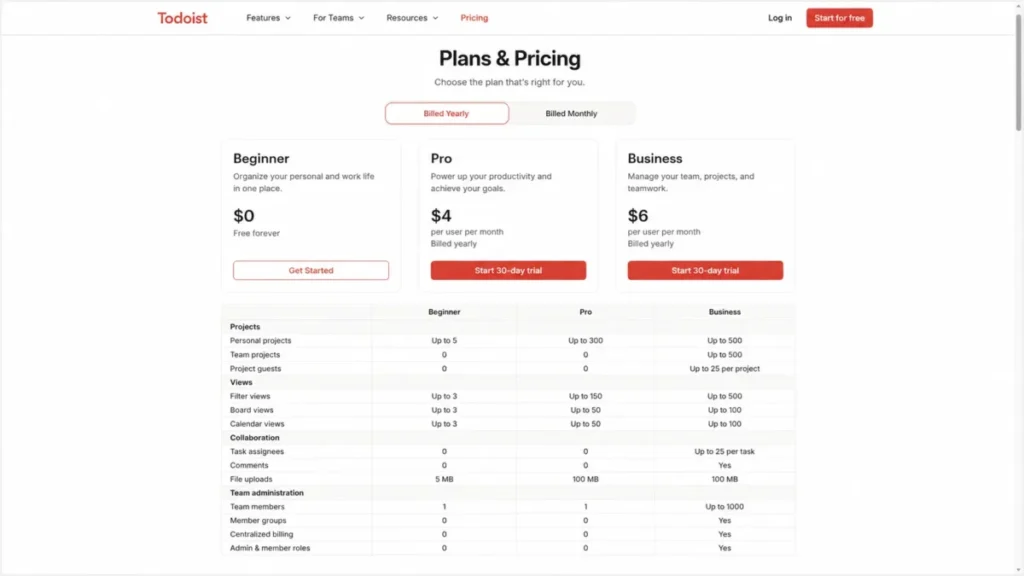
| Pro | $7 per month or $60 per year | Individuals whose workflow needs calendar planning, filters, backups, or AI capture | 300 personal projects, 150 filter views | The practical plan for most paying individuals |
| Business | $10 per user per month, or $8 per user per month billed yearly ($96 per user per year) | Teams that need a governed shared workspace | 500 team projects, 1,000 team members, 1,000 team guests | Worth it for governance, not for basic sharing |
Sources: Todoist plans, pricing, and billing FAQ and the official Todoist pricing page, both checked August 6, 2026. Local tax may be added where applicable, and prices can change after the checked date.
What Todoist costs across a full year
Pro is licensed per account rather than per device, and paid Pro features cannot be shared with another user’s account, according to official Pro subscription setup guide. Five people who all want Pro features need five Pro subscriptions.
That is the budget pressure point, and it is invisible in a per-seat price comparison.
| Team size | Pro, billed annually | Pro, monthly billing annualized | Business, billed annually | Business, monthly billing annualized |
|---|---|---|---|---|
| 1 | $60 | $84 | $96 | $120 |
| 5 | $300 | $420 | $480 | $600 |
| 10 | $600 | $840 | $960 | $1,200 |
| 25 | $1,500 | $2,100 | $2,400 | $3,000 |
Annualized figures are calculated from the official monthly prices: $7 x 12 = $84 per Pro account and $10 x 12 = $120 per Business user, then multiplied by team size. Annual billing saves $24 per person per year on both plans, which is about 28.6 percent on Pro and 20 percent on Business.
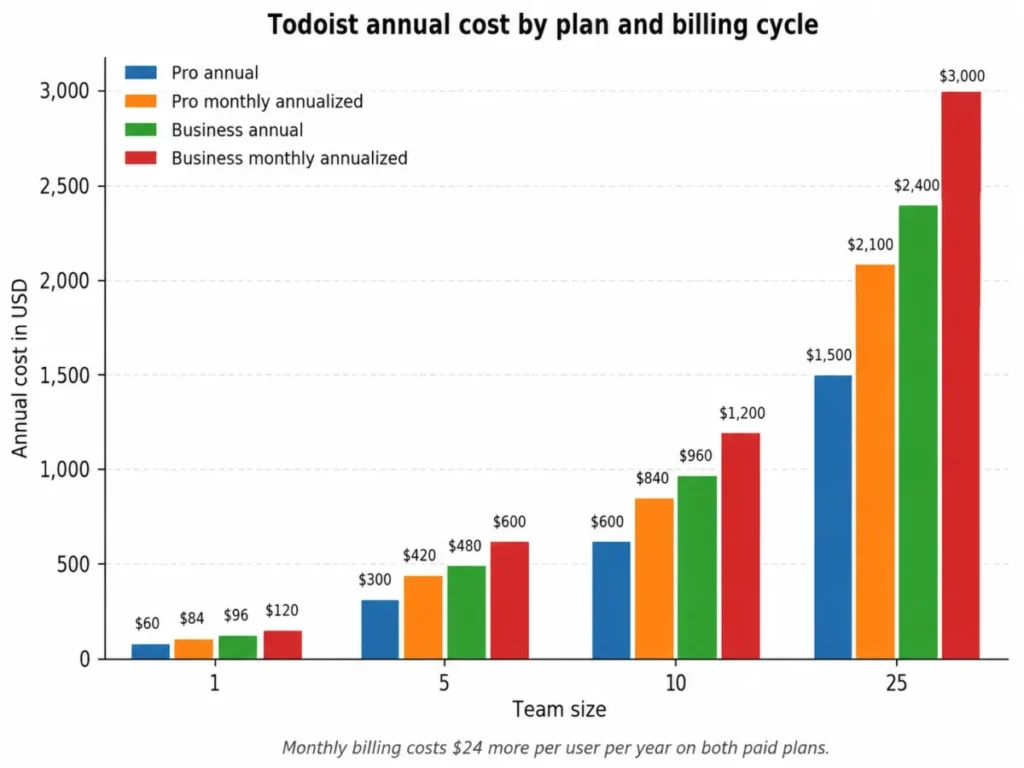
At ten people the choice of billing cadence alone is worth $240 a year on Pro and $240 on Business. That is not a large number, and it is the easiest saving in the entire purchase.
Billing terms that decide the downside
Monthly Pro and Business payments are generally non-refundable after cancellation, except where applicable law requires otherwise, while eligible yearly subscriptions can receive a full refund within 30 days of purchase or renewal, subject to the procedures of the purchase channel, per official Todoist refund policy.
The practical reading is counterintuitive. Annual billing is both the cheaper option and the one with the refund window, so paying monthly to stay safe buys the opposite of safety.
Store purchases follow the platform’s own process rather than Todoist’s, and the subscription setup guide flags the risk of ending up with a duplicate App Store subscription. Anyone who has ever tapped upgrade on a phone before checking the web account should verify that first.
Feature Gates: What Each Todoist Plan Includes
| Capability | Beginner | Pro | Business |
|---|---|---|---|
| Personal projects | 5 | 300 | 300, plus up to 500 team projects |
| Filter views | 3 | 150 | 150 |
| Activity history | 7 days | Full | Full, plus granular team activity |
| Calendar layout, task durations, time blocking, deadlines | Not offered | Included | Included |
| Reminders | Automatic reminders for tasks with a date and time | Adds custom, time-based, location-based, and recurring reminders | Adds custom, time-based, location-based, and recurring reminders |
| AI capture: Ramble, Todoist Assist, Email Assist | 10 Ramble sessions per month; Assist features not included | Ramble described as unlimited, with rate limits noted as possible; Assist features included | Same as Pro |
| Team workspace: folders, roles, permissions, shared templates, centralized billing | Not offered | Not offered | Included |
Sources: Todoist plans, pricing, and billing FAQ and official Todoist Pro feature guide, checked August 6, 2026.
The reminder row is the one most reviews still get wrong. Automatic reminders on dated and timed tasks are available on every plan, so a free user is not flying blind, and the paid upgrade buys reminder types rather than reminders themselves.
The AI row deserves the same care. Beginner allows up to ten Ramble sessions per month, and the paid description of unlimited carries a stated qualification that rate limits may apply, so a heavy voice-capture user should not plan around a guaranteed throughput number that has not been published.
Where the free plan stops working
Beginner fails on a specific trigger, not on a feeling.
The trigger is the sixth project, the fourth saved filter, the first week you need history older than seven days, the first attempt to time-block a week in calendar layout, the first custom or location-based reminder, or the eleventh Ramble session in a month. Any one of them ends the free plan for that workflow, which is a cleaner test than comparing feature lists across free project management tools.
I would not treat Beginner as a long-term system for anyone with client work. I would treat it as a 30-day adoption test: if the habit survives a month, Pro at $60 a year is a rounding error against the time it saves, and if the habit does not survive, no plan fixes that.
Limits That Survive the Upgrade
Plan limits and system limits are different things, and paying more does not remove the second kind.
| Limit | Value | Where it bites |
|---|---|---|
| Active tasks per project | 300, including subtasks and recurring tasks | A single long-running project, such as a content calendar or a support backlog, hits the ceiling and has to be split |
| Sections per project | 20 | A workflow modeled as columns runs out of stages faster than a board tool would |
| Total active projects | 500 across personal and team projects | An agency running a project per client reaches the account ceiling, not the plan ceiling |
| Labels per account | 500, with up to 100 labels on one task | Label-driven systems that replace missing fields, such as a custom severity scale, consume this budget quickly |
| Attachments per comment | 1 | Document-heavy review cycles need several comments or an external file link for one round of feedback |
Source: official Todoist usage limits documentation, checked August 6, 2026.
The 300-task ceiling is the one to plan around, because it applies per project rather than per account. A team that models one project as “Support” and never splits it will meet that wall, and the fix is structural rather than financial.
The one-attachment rule looks small and is not. Any workflow where a task carries a brief, a draft, and a marked-up version turns into a comment thread, which is exactly the friction that pushes teams toward a document-centric tool instead.
Key Features and Where Each One Stops
Calendar layout and time blocking
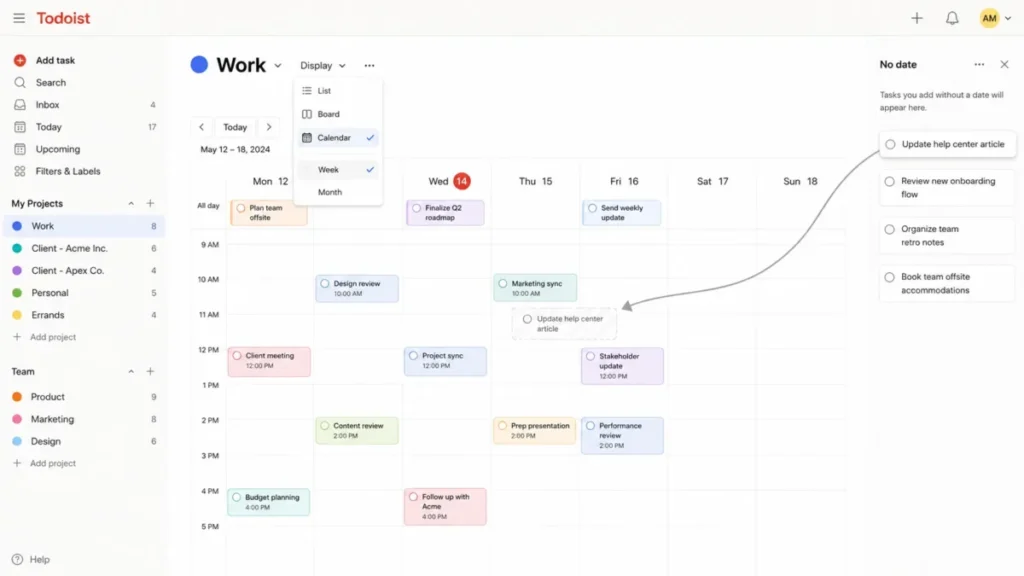
Opening a project, filter, or label, selecting Display, and choosing Calendar gives a Week or Month layout on web, and undated work can be scheduled by dragging it from the No date panel onto a date, according to official calendar layout guide.
This is the feature that makes Pro feel like a planning tool rather than a list. Dragging a task to Thursday is a commitment, and dragging it again on Thursday afternoon is an honest reschedule.
Two constraints apply. Calendar layout requires Pro or Business, and future occurrences of recurring tasks are not supported in the mobile apps, so a mobile-first planner sees a different surface than a desktop planner does.
Filters and saved views
Three filter views on Beginner and 150 on Pro is the widest proportional gap in the plan comparison.
Filters are how a Todoist account stays usable past a few hundred tasks, because they replace the project list as the primary way to find work. A consultant typically needs one view per client context plus one for the day ahead, which passes three almost immediately.
The limitation is that a filter is a query, not a field. It can surface work that already carries the right date or label, and it cannot create a start-date behavior that the product does not have.
Reminders
Automatic reminders arrive on tasks that carry a date and time on every plan, and custom, time-based, location-based, and recurring reminders require Pro or Business.
Location-based reminders are the underrated one for field work, and recurring reminders matter for anything with a compliance cadence. Both are plan-gated, so a free user testing whether reminders change their follow-through is testing the weaker half of the feature.
Ramble, Todoist Assist, and Email Assist
Ramble is capped at ten sessions per month on Beginner, and Todoist Assist, Email Assist, and capture from text, images, and documents are listed for Pro and Business.
The buying question is not whether the AI features are impressive. It is whether voice or image capture removes a step you perform ten times a week, because that is the only version of the feature that pays for itself.
Paid Ramble is described as unlimited with a stated caveat that rate limits may apply, and no numeric ceiling is published, so a team planning heavy daily voice capture should verify throughput during the 7-day Pro trial rather than after the invoice.
Project Insights and activity history
Pro adds Project Insights, automatic backups, and full activity history, against seven days on Beginner.
Seven days is enough to answer “what happened yesterday” and not enough to answer “when did this deadline move”. For anyone who bills clients or runs a retrospective, the history gate is a stronger reason to upgrade than the AI features are.
Ease of Use and Setup
Setup difficulty is low for one person and medium for a Business workspace, and the difference is governance rather than complexity.
An individual can be productive on day one: paste a list, forward two emails, set p1 on the three things that matter, and the system is live. There is no data model to design first, which is precisely why Todoist wins against heavier tools for personal use.
A team setup is a different job. Folders, team roles, permissions, team-visible projects, and shared templates all have to be decided by someone, and the 20-sections and 300-tasks-per-project ceilings should shape that structure before the first import rather than after it.
The honest 30-day test is whether the inbox is being processed rather than accumulating. The 90-day test is whether anyone has needed a start date, a dependency, or a report the product does not produce, because that is when a category mismatch shows up as friction instead of a feature request.
Integrations, API, and the Automation Layer
Todoist publishes an integrations directory spanning calendar, email, messaging, time tracking, automation, and AI agent categories, alongside automation partners and a developer API, per official Todoist integrations directory.
The integration surface matters more here than in a heavier tool, because several capabilities a project platform includes natively have to come from somewhere else. Time tracking is the clearest example: it appears as an integration category rather than as a verified native timer, so a team that bills hours should assume a second tool in the stack.
For anyone building against the API rather than clicking an integration, availability and predictability are two different questions. The official Todoist developer documentation documents rate-limit errors with retry_after and max_count metadata, and no universal numeric requests-per-second ceiling was verified on the reviewed page.
That is a normal situation for an application programming interface and still a real procurement question. A high-volume sync should be validated endpoint by endpoint during evaluation, with retry handling built in from the start rather than added after the first throttled batch.
Security, Support, and Admin Controls
Business is where administrative control appears: folders, team roles and permissions, granular activity, shared templates, and centralized billing, per the plan comparison.
Two things are open rather than settled. Detailed security and compliance controls, including certification status, data residency, retention, SSO, and SCIM, sit outside the evidence set behind this review, and no plan-specific support response commitment was found in the reviewed official sources.
Treat both as procurement questions rather than assumptions. If a security review or a support commitment is a condition of purchase, ask Doist directly and get the answer in writing before the Business seats are approved, because nothing on the public pages reviewed here settles it.
Migration and Data Portability
Project-level CSV import runs through the project’s three-dots menu, Manage data, then Import from CSV, and assignment mapping requires the collaborator’s name and user ID in the RESPONSIBLE column, according to official CSV import and export documentation.
The user ID requirement is the detail that ruins migrations. Assignee names alone do not map, so the sensible sequence is to export a shared project first, copy the exact identity values, then build the import file.
Backups follow the same path in reverse. A downloaded backup is restored by importing the project CSV into a newly created project, which restores active tasks, dates, comments, attachments, and supported layouts, per official Todoist backup documentation.
Restoring creates a new project rather than rolling the original back in place.
| Object | Moves through a project CSV | What that means for the move |
|---|---|---|
| Active tasks, sections, dates, comments, attachments, supported layouts | Yes | The working set arrives intact and is the part worth validating first |
| Assignees | Conditional | Requires the name and user ID in the RESPONSIBLE column, copied from an exported shared project |
| Completed tasks | No | Historical delivery evidence has to be exported and archived outside Todoist before the source account closes |
| Filters | No | Saved views are rebuilt by hand, which is a real cost at up to 150 of them on Pro |
| Unused labels | No | Any label not applied to a task is lost, so a taxonomy has to be recreated deliberately |
| Karma progress | No | The streak and score do not survive, which matters more for adoption than for data |
Source: Todoist’s guidance on merging accounts and its CSV documentation, checked August 6, 2026. Two accounts cannot be merged directly, so consolidation is a project-by-project export and import rather than a merge, and duplicate handling was not established by the reviewed documentation.
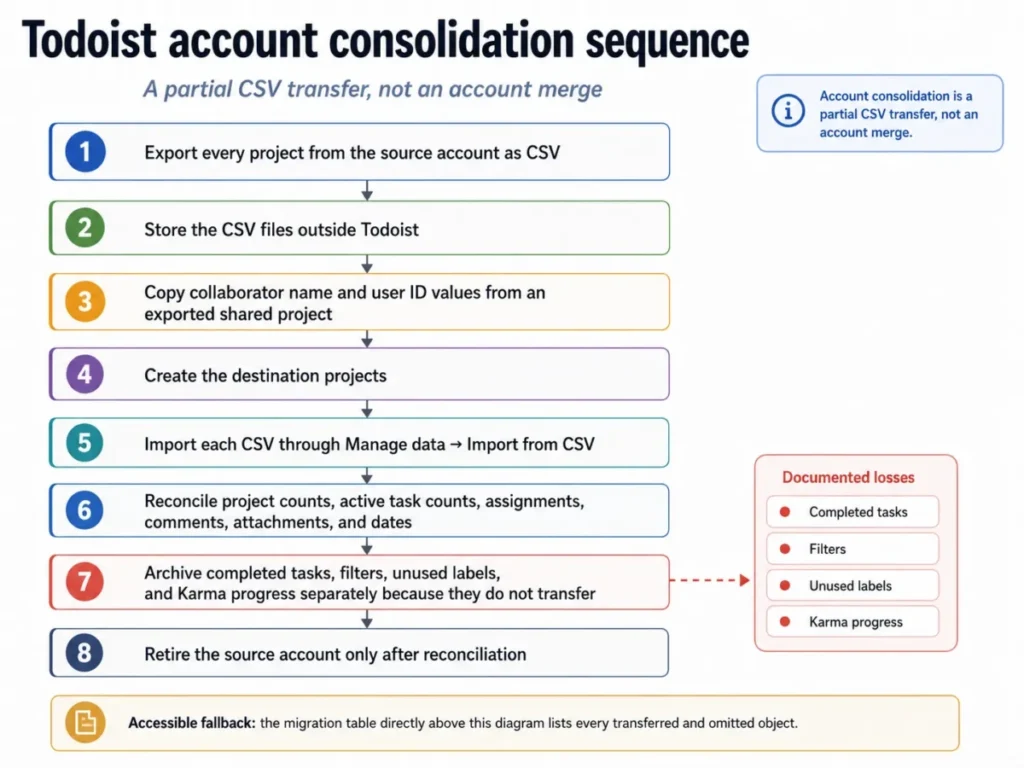
Keep every CSV file and every paid-plan backup until the reconciliation is finished. The deletion of the source account is the only irreversible step in the sequence, and it should be the last one.
Todoist for Teams: Sharing Versus a Governed Workspace
| Capability | Shared personal project | Business team project |
|---|---|---|
| Available on | Every plan, including Beginner | Business |
| Invite path | Share, then invite by name or email | Team invitation, shareable links, and project previews |
| Paid feature access | Follows each collaborator’s own plan | Standardized across the team workspace |
| Folders, roles, and permissions | Not offered | Included |
| Activity visibility | Personal activity history by plan | Granular team activity |
| Billing | Each account pays for itself | Centralized |
Source: Todoist’s guide to working with others and the Pro subscription documentation, checked August 6, 2026.
The decision rule falls out of the first and third rows. Headcount does not justify Business, and governance does: folders, team-visible projects, roles, permissions, team activity, and one invoice.
A five-person team that just needs assignments and comments can stay on shared personal projects, and the open question is whether the capability gap between members is acceptable.
If the answer is no, five individual Pro subscriptions cost $300 a year against $480 for Business, and Business buys governance the five Pro accounts cannot provide. That comparison is worth running against project management tools for small teams before either option is approved.
What Users Consistently Report
Reviewers on TrustRadius return to the same strengths: an interface that stays out of the way, fast task creation, and synchronization that holds across devices. That pattern supports the capture-speed finding above rather than proving it.
The critical pattern is more useful. Recurring complaints cover subtask visibility, project-list clutter, coordination depth for teams, inconsistent notifications, and the impact of occasional outages, with one reviewer noting it is “tough to see the breakout of tasks right from the page.”
Read the first two as confirmation of the structural limits in this review: 20 sections per project and a 500-project ceiling produce clutter when a system grows without being restructured. This is opinion evidence from one public platform whose reviewers are self-selected, so it validates or challenges the documented findings rather than measuring product behavior.
Who Should Use Todoist
Solo consultants with recurring client commitments. Email forwarding, recurring tasks, priority syntax, and calendar layout cover the whole week, and Pro at $60 a year is the cheapest part of a consulting stack.
Individual professionals splitting work and personal projects. Five projects is the constraint that pushes them to Pro, and 300 projects means they never think about it again.
Managers who coordinate follow-ups rather than deliverables. Assignments and comments in a shared project are enough when the job is chasing commitments, not sequencing a delivery plan.
Households and small informal groups. Shared personal projects work on any plan, and each participant can decide independently whether their own workflow justifies Pro.
Teams of roughly 3 to 15 that need light governance. Business earns its price when folders, roles, permissions, team activity, and centralized billing are requirements, not preferences.
Who Should Avoid Todoist
Teams that plan around start dates. Work that should stay hidden until it becomes actionable will be visible from creation, and the documented workarounds are manual habits rather than a field.
Anyone who needs dependencies, critical paths, or workload balancing. These are not part of the verified feature set, and a task manager is the wrong layer to force them into. A platform built for that model is the better evaluation, starting with a tool such as the one covered in this ClickUp review.
Teams with a fixed internal severity taxonomy. Four priority levels with fixed names and colors cannot be renamed to match an existing scale, and labels are a workaround with their own 500-per-account budget.
Document-heavy review workflows. One attachment per comment turns a single review round into a thread, and a document-centric tool handles that natively.
Buyers who need consolidated history from two accounts. Accounts cannot be merged, and completed tasks, filters, unused labels, and Karma progress do not survive the CSV workaround.
Todoist Alternatives
| Alternative | Evaluate it when | Verify before switching |
|---|---|---|
| Asana | The plan depends on start dates, dependencies, and workload views | That the specific scheduling model your team uses is available on the plan you would buy |
| ClickUp | You want task management, docs, and reporting in one workspace | Whether the added configuration cost is acceptable against Todoist’s setup speed |
| Notion | Tasks are one part of a wider documentation and database system | Whether daily capture stays as fast as multiline paste and email forwarding |
| Trello | The work is genuinely board-shaped and small in volume | Whether recurring work and cross-project filters are handled well enough |
| Todoist Business | The gap is governance rather than scheduling capability | Whether folders, roles, permissions, and team activity are the actual requirement |
This table is a shortlist rule, not a feature comparison: every row names the Todoist limitation that would push you to look, and the thing to confirm on the other side. Pricing and feature details for each alternative sit outside this review’s sources, so treat each row as a starting point rather than a verdict, beginning with the Notion review if documentation and databases are the binding requirement.
If the blocker is scheduling rather than documentation, the Asana review is the closer starting point, because that is the category boundary Todoist does not cross.
The last row is the one most buyers skip. Switching tools when the problem is governance is an expensive way to solve a licensing question.
Final Verdict: Is Todoist Worth It?
Todoist is worth it for individuals and small groups whose problem is capture, scheduling, and follow-through, and it is not worth it for teams whose problem is sequencing, dependency, and reporting.
Beginner is a legitimate trial and a poor system: five projects, three filters, and seven days of history end the moment client work arrives. Pro at $60 a year is the practical plan for a paying individual, because it removes the project ceiling, the filter ceiling, the history ceiling, and the calendar gate in one step.
Business at $96 per user per year is a governance purchase. Choose it when folders, roles, permissions, team activity, and centralized billing are requirements, and skip it when the only need is sharing a project, which every plan already does.
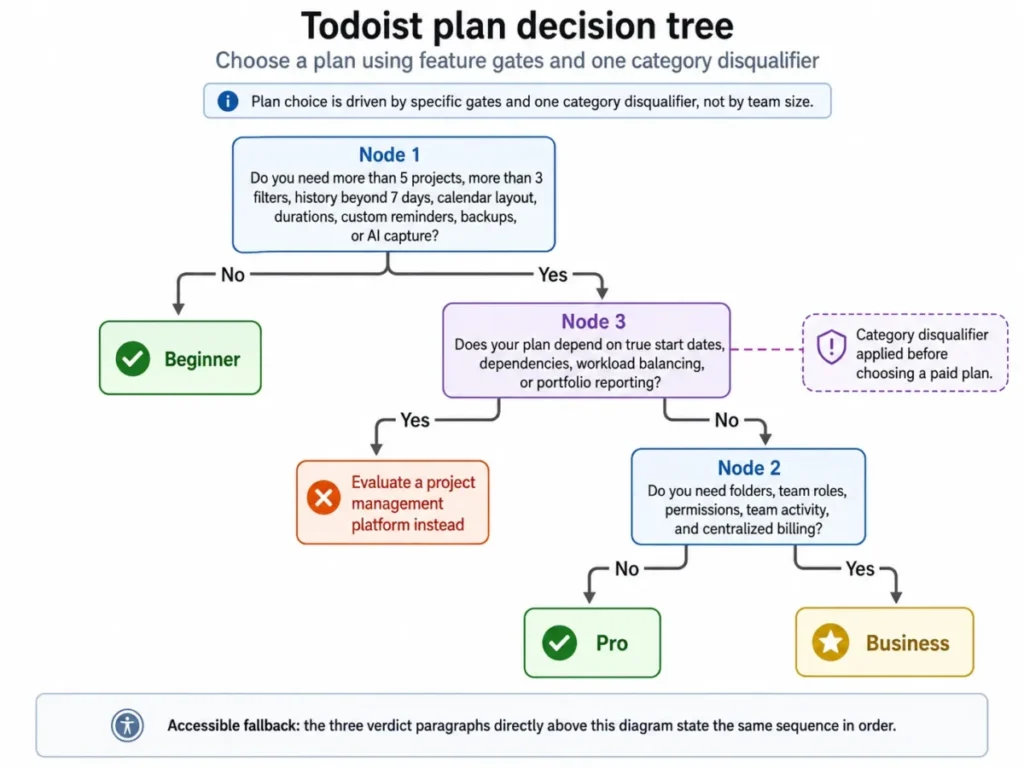
The switch-or-stay rule is short. Stay if the last quarter produced no moment where a hidden-until-start task, a dependency, or a report would have changed an outcome, and switch if that moment happened more than twice, because the third time is a pattern rather than an inconvenience.
The renewal question to answer before the next invoice: did the calendar layout, the filters, and the full activity history change how the week ran, or is the free plan doing the same job under a paid subscription?
Frequently Asked Questions
Is Todoist worth paying for?
Yes, if your workflow has already outgrown five projects or three saved filters, or if calendar planning, custom reminders, full activity history, or automatic backups would change how you work. Pro costs $60 a year, which is low against the time saved by faster capture.
If the free plan still covers everything after a month of real use, paying adds nothing.
How much does Todoist cost in 2026?
Beginner is free. Pro is $7 per month or $60 per year.
Business is $10 per user per month, or $8 per user per month billed yearly, which comes to $96 per user per year. These are US prices from the official billing FAQ, checked August 6, 2026, and local tax may be added where applicable.
Is Todoist free forever?
The Beginner plan is free and includes five personal projects, three filter views, seven days of activity history, and up to ten Ramble sessions per month. Automatic reminders on tasks with a date and time are included.
It works as a genuine long-term option for a light personal system, and it stops working the moment client or team work arrives.
What are the main Todoist limitations?
No true start dates, 300 active tasks per project, 20 sections per project, 500 total active projects, 500 labels per account, and one attachment per comment. Priority names and colors cannot be customized.
Future occurrences of recurring tasks are missing from the mobile calendar, and moving a parent task with many subtasks carries a documented sync and recovery risk.
Does Todoist support start dates?
No, unless you count a manual workaround. Todoist does not provide true start dates that hide a task until its start day, and its own documentation suggests workarounds instead.
Due dates, deadlines, and recurrence all exist and none of them hides future work. For teams that plan around hidden-until-active work, this is a structural mismatch rather than a small gap.
Do my teammates get my Pro features when I share a project?
No. In a shared personal project, each participant’s paid features follow that participant’s own plan, and paid Pro features cannot be shared with another user’s account.
A collaborator on Beginner keeps Beginner limits inside your shared project. Standardizing capability across a group means either individual Pro subscriptions for everyone or a Business workspace.
Is Todoist good for teams?
Yes, for small teams that need assignments, comments, and shared projects rather than dependency management. Every plan can share personal projects, so collaboration alone does not require Business.
Business earns its price when folders, team roles, permissions, granular team activity, shared templates, and centralized billing become requirements, with capacity for up to 1,000 team members and 1,000 team guests.
Can I merge two Todoist accounts?
No. Todoist accounts cannot be merged directly, and the documented workaround is a project-by-project CSV export and import.
Completed tasks, filters, unused labels, and Karma progress do not transfer. Export everything, reconcile project counts, task counts, assignments, comments, and dates in the destination account, and only retire the source account after that check is finished.
Can Todoist replace a project management tool?
Only for teams whose projects are organized task lists rather than delivery plans. Dependency chains, critical-path scheduling, capacity planning, and portfolio reporting are not part of the verified feature set, and there are no true start dates.
If those are the reason you want a tool, compare Todoist against dedicated team collaboration tools rather than trying to configure them into a task manager.
What happens if I cancel Todoist?
Monthly Pro and Business payments are generally non-refundable after cancellation, except where applicable law requires otherwise. Eligible yearly subscriptions can qualify for a full refund within 30 days of purchase or renewal, subject to the procedures of the channel you bought through.
App Store, Google Play, and Microsoft Store purchases follow the platform’s own process rather than Todoist’s.