These AI image prompts are 42 copy-paste prompts for making new images from text, grouped by job. Each one pastes into ChatGPT, Gemini, Ideogram or Adobe Firefly. Six carry a Midjourney short form, and the Midjourney section shows how to cut any other prompt down.
To change a photo you already have, use the AI photo editing prompts instead. The syntax notes rest on the five vendors’ own prompt guides and help pages, read in October 2026.
Every numbered prompt is a filled version of this template. Copy it whole when no prompt below fits:
[IMAGE TYPE] for [USE]: [SUBJECT AND KEY DETAILS], [ACTION], [SETTING].
Style: [STYLE OR MEDIUM].
Composition: [FRAMING, ANGLE, LENS].
Lighting and color: [LIGHT, MOOD, PALETTE].
Text: "[EXACT WORDS]" in [LETTERING STYLE], [PLACEMENT].
Aspect ratio [W:H].
Show instead: [WHAT SHOULD BE THERE IN PLACE OF THE THING YOU DON'T WANT].| Group | Prompts | Aspect ratios used |
|---|---|---|
| Marketing and ads | 1–6 | 16:9, 2:3, 4:5, 3:1 |
| Product photos | 7–12 | 1:1, 4:5, 3:2 |
| Social media | 13–18 | 4:5, 9:16, 16:9, 2:3, 1:1 |
| Illustrations and stickers | 19–24 | 1:1, 4:3, 16:9, 3:4 |
| Logos and text in images | 25–30 | 1:1, 2:3, 16:9 |
| Photorealistic scenes | 31–36 | 4:5, 3:2, 16:9, 1:1, 2:3 |
| Concept art and cinematic | 37–42 | 21:9, 16:9, 1:1 |
Sources: channel shapes from Ideogram’s image settings guide, checked October 2026.
Jump to a group: Marketing and ads · Product photos · Social media · Illustrations and stickers · Logos and text in images · Photorealistic scenes · Concept art and cinematic
In This Article (8 sections)
What’s in the Template
An AI image prompt that works names the subject, action, setting, style, composition and lighting, then adds any text, the shape and what to show instead of an unwanted item.
| Field | What to enter | Example |
|---|---|---|
| Image type and use | The kind of image and where it will run | A product photo for a spring email banner |
| Subject and key details | Who or what, specific and countable | A matte sage-green ceramic mug of Harbor & Pine Coffee |
| Action | What is happening | Steam rising from fresh coffee |
| Setting | Where it happens and what is behind it | A light oak café counter by a rainy window |
| Style or medium | The look | Photorealistic, watercolor, flat vector, 3D render |
| Composition and camera | Framing, angle, lens | Close-up, low angle, 50mm, mug on the left |
| Lighting, mood and color | Light quality and palette | Soft morning window light, #8FA98C accents |
| Text in image | Exact words in quotes, lettering, placement | “SPRING BLEND” in bold serif, top right |
| Aspect ratio | The output shape, set the way your tool reads it: 1:1 for logos and stickers, 4:5 for feed posts, 9:16 for Stories and Reels, 16:9 for thumbnails, 2:3 for pins, posters and book covers, 3:1 for banners | 3:1 |
| Show instead | What fills the place of the unwanted thing | A clean, empty counter |
Sources: field order drawn from OpenAI’s GPT Image prompting guide, Google’s Gemini prompting tips and Ideogram’s prompt structure page, checked October 2026; example values are fictional.
Google names subject, composition, action, location and style; Adobe’s Firefly Text to Image page adds lighting. OpenAI’s guide asks for the intended use (ad, UI mock, infographic) to set the level of polish, which is why “for [USE]” opens the template.
For photographs, Google’s Imagen guide suggests starting with “A photo of…” and naming a lens type such as 35mm, 50mm, fisheye or macro. My explainer on what prompt engineering is covers the idea behind this structure.
How to Use the Template
Six steps take you from the blank template to a usable image:
- Copy the prompt from the job group closest to your image, or start from the blank template.
- Fill the image type, subject and setting first; Ideogram notes that words near the start carry more weight.
- Add the framing, angle, lens word and light.
- Put every word that must appear in the image inside quotation marks, and keep it short.
- Set the shape the way your tool reads it: a sentence in ChatGPT and Gemini,
--arin Midjourney, the aspect ratio control in Ideogram and Firefly. - Generate, then change one thing per follow-up so you can see what made the difference.
Step six is advice Ideogram’s and OpenAI’s guides share. Some tools also expand a short prompt for you: Ideogram’s Magic Prompt rewrites it before generating, so turn Magic Prompt off when you want your exact words followed.
Example: One Prompt Filled In From the Template
Here is a hypothetical brief: Harbor & Pine Coffee, a fictional brand, wants a wide banner for its spring email.
| Field | Sample value |
|---|---|
| Image type and use | A product photo for a spring email banner |
| Subject and key details | A matte sage-green ceramic mug with a small pine-tree mark |
| Action | Steam rising from fresh coffee |
| Setting | A light oak café counter by a rainy window |
| Style or medium | Photorealistic product photography |
| Composition and camera | Close-up, low angle, mug on the left, empty space on the right |
| Lighting, mood and color | Soft morning window light, warm muted tones, #8FA98C accents |
| Text in image | “SPRING BLEND” in bold serif, top right |
| Aspect ratio | 3:1 |
| Show instead | A clean, empty counter |
Sources: sample data invented for this example; no real brand or person.
Joined in template order, the sample prompt reads:
A product photo for a spring email banner: a matte sage-green ceramic mug with a small pine-tree mark, steam rising from fresh coffee, on a light oak café counter by a rainy window.
Style: photorealistic product photography.
Composition: close-up, low angle, mug on the left, empty space on the right.
Lighting and color: soft morning window light, warm muted tones, #8FA98C accents.
Text: "SPRING BLEND" in bold serif, top right.
Aspect ratio 3:1.
Show instead: a clean, empty counter.
The last line replaces “no clutter” with what the counter should look like, and the empty right side leaves room for the headline.
The same pattern runs through all 42 prompts below.
AI Image Prompts by Job
The 42 prompts come in seven groups of six. All but prompts 8, 19 and 38 end with their shape as a sentence, which ChatGPT and Gemini read from the prompt; in Ideogram and Firefly, delete that line and set the shape with the aspect ratio control.
Marketing and Ad Prompts
These six make campaign visuals where the copy and the product share the frame.
Works in: OpenAI’s ChatGPT Free tier and Ideogram’s Free plan for the prompts with a headline, since both vendors’ guides cover quoted text; Google’s Gemini app without a Google AI plan for prompts 3 and 6.
1. Launch hero banner with a headline
A wide hero banner for a product launch: a matte white Lumen desk lamp glowing on a walnut desk at dusk, lamp on the right, open space on the left. Headline "MEET LUMEN" in bold sans-serif, top left. Aspect ratio 16:9.2. Seasonal sale poster
A vertical poster for a spring sale at Fern & Field garden shop: terracotta pots of tulips on wooden crates, morning sun, pastel green and coral, flat graphic illustration. The only text is "SPRING SALE" in rounded capitals at the top. Aspect ratio 2:3.3. Lifestyle ad scene with a fictional model
A photorealistic lifestyle ad photo: a woman in her thirties laughing at a sunny café window table, holding a sage-green ceramic mug, morning light, shallow depth of field, warm natural tones, 50mm look. Aspect ratio 4:5.Midjourney version:
candid photo, woman laughing at a sunny café window holding a sage-green mug, warm morning light, shallow depth of field --ar 4:5 --no text4. Email header banner
A slim email header banner for Rye & Rise bakery: a row of sourdough loaves on a linen cloth, top-down view, soft daylight, cream and wheat tones, the center left kept as plain linen for a headline. Aspect ratio 3:1.Note: Ideogram’s ratio menu lists this banner shape; in Midjourney’s Basic plan, move it to --ar.
5. Event flyer
A flyer for a street food evening: string lights over food stalls, people in silhouette, navy sky, warm orange glow, bold retro poster illustration. Text in reading order: "NIGHT MARKET" large at the top, "Friday 6 PM" small at the bottom. Aspect ratio 2:3.6. Minimalist background with space for copy
A minimalist composition with a single sprig of eucalyptus in the bottom-right of the frame. The background is a vast, empty off-white canvas with generous negative space for text. Soft, diffused light from the top left. Aspect ratio 16:9.Product Photo Prompts
These six replace a studio session for catalog, store and ad shots.
Works in: Google’s Gemini app without a Google AI plan, OpenAI’s ChatGPT Free tier and Adobe Firefly with a free Adobe account; prompt 7 follows Google’s own product-mockup template. Prompt 8 needs a transparent background, so run it in ChatGPT or on Ideogram 4.5, as its note says.
7. Studio shot with three-point softbox lighting
A high-resolution, studio-lit product photograph of a matte white desk lamp on a plain pale grey backdrop. Three-point softbox lighting, soft even highlights, a slightly elevated 45-degree angle, sharp focus on the brass switch. Square image.8. Product on a transparent background
A product cutout of an amber glass candle jar with a cork lid, isolated on a fully transparent background. The jar alone, with crisp edges, on a fully transparent background. Even studio light, crisp edges, front view.Note: OpenAI lists a transparent background among the specifics a ChatGPT prompt can ask for; on Ideogram 4.5, set Background to Transparent under Advanced settings.
9. Product in use on a kitchen counter
A photorealistic lifestyle photo of a steel pour-over kettle pouring water into a glass coffee dripper on a light oak kitchen counter, morning window light, steam rising, plants softly blurred behind, eye-level close-up. Aspect ratio 4:5.10. Top-down flat lay
A top-down flat lay of a skincare set on a pale terracotta surface: a frosted serum bottle, a white jar and a folded linen towel, evenly spaced, dried flowers in one corner, soft shadowless daylight. Square image.11. Perfume bottle on wet stone, macro
A macro product photograph of a clear glass perfume bottle on dark wet slate, water droplets beading on the glass, cool blue rim light, deep shadows, shallow depth of field, sharp focus on the cap. Aspect ratio 4:5.Midjourney version:
macro product photo, clear glass perfume bottle on dark wet slate, water droplets, cool blue rim light, deep shadows --ar 4:512. Colorway set with hex codes
A product lineup photo of three enamel water bottles in a row on a white studio backdrop, colored #2F5D50 forest green, #E9C46A mustard and #E76F51 coral, same angle and size, soft even light. Aspect ratio 3:2.Note: OpenAI names hex codes among the specifics a ChatGPT prompt can carry; Ideogram’s custom color palette on Ideogram 3.0 needs the Plus plan or above.
Social Media Prompts
These six fit social formats; the feed, story, thumbnail and pin shapes follow the channel list in Ideogram’s settings guide.
Works in: Ideogram’s Free plan and OpenAI’s ChatGPT Free tier for the prompts with words in them (13, 15, 16, 17). Prompts 14 and 18 suit Google’s Gemini app without a Google AI plan or Adobe Firefly with a free Adobe account.
13. Feed quote card
A feed post graphic: the quote "Small steps, every day." centered in an elegant serif on a cream background, a soft sage-green watercolor wash in the corners, wide margins, calm minimalist mood. Aspect ratio 4:5.14. Story or Reel cover
A vertical cover image for a hiking video: a hiker seen from behind on a mountain ridge at sunrise, mist in the valleys, vivid orange sky, photorealistic, the top third open sky for a title. Aspect ratio 9:16.Midjourney version:
photo of a hiker from behind on a mountain ridge at sunrise, mist in the valleys, vivid orange sky, open sky above --ar 9:1615. Video thumbnail with a two-word title
A video thumbnail: a surprised home cook holding a burnt pan with smoke rising, bright kitchen, saturated high-contrast colors, face on the right third. Text "FIX THIS" in huge bold yellow letters with a black outline on the left. Aspect ratio 16:9.16. Tips pin
A tall pin graphic for a plant blog: a flat illustration of three houseplants in clay pots on a shelf, soft pastel palette. Title "3 Plants You Can't Kill" in a friendly rounded font at the top. Aspect ratio 2:3.17. Carousel cover slide
The first slide of a carousel for a budgeting app: a flat vector piggy bank climbing a staircase of coins, navy and mint palette. Text "5 MONEY HABITS" in heavy sans-serif across the top, an arrow pointing right at the bottom. Aspect ratio 4:5.18. Mood-board collage grid
A mood board collage in a neat 3x3 grid for a coastal summer collection: linen, seashells, a sun-bleached door, a striped towel, olive branches, sand, sea glass, a straw hat, turquoise water. Warm faded film tones, thin white borders. Square image.Illustration and Sticker Prompts
These six cover drawn styles, from stickers to picture-book pages.
Works in: Adobe Firefly with a free Adobe account and OpenAI’s ChatGPT Free tier. Prompts 19 and 24 follow Google’s own sticker and comic templates, so they also run in Google’s Gemini app without a Google AI plan; for prompt 24, Redo with Nano Banana Pro needs a Google AI plan.
19. Kawaii sticker on white
A kawaii-style sticker of a happy fox in a tiny knitted scarf, holding a steaming cup of cocoa. Bold, clean outlines, simple cel shading, a cheerful palette and a thick white die-cut border. The background must be white.20. Children’s book watercolor page
A soft watercolor illustration for a children's picture book: a small hedgehog in a red raincoat jumping into a puddle on a forest path, autumn leaves drifting, loose brush strokes, pastel tones, a plain margin at the bottom. Aspect ratio 4:3.Midjourney version:
watercolor children's book illustration, small hedgehog in a red raincoat jumping into a puddle, autumn forest path, pastel tones --ar 4:321. Flat vector article cover
A flat vector illustration for an article cover about remote work: a person at a laptop on a balcony with a city skyline and potted plants, simple geometric shapes, flat solid teal, coral and cream. Aspect ratio 16:9.22. Isometric 3D office scene
An isometric 3D render of a tiny cozy home office on a floating square base: a desk with a monitor, a swivel chair, a bookshelf, a rug and a sunlit window. Soft clay-like materials, pastel colors, plain light grey background. Square image.23. Line-art coloring page
A black-and-white line art coloring page of a lighthouse on rocky cliffs with seagulls and waves. Clean, even outlines only, large open white areas to color, plain white paper. Aspect ratio 3:4.24. Three-panel comic
Make a 3 panel comic in a bright, flat cartoon style about a cat who wants the last slice of pizza. Panel 1: the cat stares at the slice. Panel 2: the owner looks away. Panel 3: the cat sits innocently beside an empty plate. Aspect ratio 16:9.Note: Google’s Gemini API guide says sequential-art prompts work best with Gemini 3 Pro, the model behind Redo with Nano Banana Pro on a Google AI plan.
Logo and Text-in-Image Prompts
These six put readable words into the image, so each keeps the wording short and in quotes.
Works in: OpenAI’s ChatGPT Free tier, Ideogram’s Free plan, and Google’s Gemini app with a Google AI plan, where Google says Redo with Nano Banana Pro adds detail for text and infographics.
25. Minimalist café logo in a circle
Create a modern, minimalist logo for a café called "Harbor & Pine". The text is in a clean, bold sans-serif font, black and white only. Put the logo in a circle and work a pine sprig into the letter H. Square image.26. Wordmark lettering
A wordmark for a bakery brand that reads "Rye & Rise", hand-lettered brush script with a slight upward slant, warm brown ink on cream, centered, generous margins, lettering only. Square image.27. T-shirt slogan graphic
A T-shirt graphic on plain white: the words "STAY CURIOUS" in a distressed retro varsity font, arched over a simple line drawing of a telescope, navy and orange only. Spell it S-T-A-Y C-U-R-I-O-U-S. Square image.Note: OpenAI’s guide suggests spelling tricky words letter by letter, which the last sentence does.
28. Book cover with title and author
A book cover for a mystery novel: a foggy harbor at night, one lit window in a lighthouse, muted teal and black. Title "THE LAST LANTERN" in large serif capitals at the top; author "Mara Ellison" in small capitals at the bottom. Aspect ratio 2:3.29. Four-step infographic
A clean vertical infographic titled "How to Brew Pour-Over Coffee" with four numbered steps top to bottom: "1. Rinse the filter", "2. Add the coffee", "3. Let it bloom", "4. Pour slowly". A flat icon per step, white background, dark brown text. Aspect ratio 2:3.30. Pitch-deck slide with your numbers
A clean presentation slide titled "Customer Growth" with a bar chart of four bars labelled Q1, Q2, Q3 and Q4 and the values [YOUR NUMBERS]. Navy and light grey, footnote "Source: [YOUR SOURCE]" bottom left, lots of white space. Aspect ratio 16:9.Note: OpenAI’s guide says to write the numbers and labels into the prompt, so replace both brackets first.
Photorealistic Scene Prompts
These six aim for images that read as real photographs, using the lens, light and texture words Google’s and OpenAI’s guides recommend.
Works in: OpenAI’s ChatGPT Free tier, Google’s Gemini app without a Google AI plan and Adobe Firefly with a free Adobe account; Midjourney’s Basic plan takes the short form under prompt 33.
31. Golden-hour beach portrait
A photorealistic portrait of a woman in her forties with short silver hair and a linen shirt on a beach at golden hour, wind in her hair, soft sun flare. 85mm look, shallow depth of field, natural skin texture with pores. Aspect ratio 4:5.32. 35mm street photo
A photo of a rainy evening street in an old city district, a cyclist with a yellow umbrella passing a lit bakery window, reflections on wet cobblestones, 35mm street photography, slight film grain. Aspect ratio 3:2.33. Long-exposure night city
A long-exposure photograph of a city intersection at night from a footbridge, headlights and taillights stretched into red and white light trails, sharp buildings, deep blue sky, wide-angle lens. Aspect ratio 16:9.Midjourney version:
long-exposure photo, city intersection at night from a footbridge, red and white light trails, deep blue sky, wide-angle --ar 16:934. Macro leaf with dew
A macro photo of a green leaf with dew drops at sunrise, each droplet reflecting the orange sky, fine veins in sharp focus, soft creamy background blur, macro lens. Square image.35. Full-body editorial fashion shot
A full-body editorial fashion photograph of a model in a camel wool coat and white sneakers crossing an empty concrete plaza, full body visible with feet included, overcast soft light, muted neutral palette, low angle. Aspect ratio 2:3.Note: “Full body visible, feet included” is the wording OpenAI’s guide suggests for body proportions.
36. Wide-angle real-estate interior
A photorealistic wide-angle interior photo of a bright Scandinavian living room: white walls, light oak floor, a grey sofa, a round coffee table, large windows with afternoon sun, straight vertical lines, eye-level camera. Aspect ratio 3:2.Concept Art and Cinematic Prompts
These six make film-style frames and design art for pitches, games and covers.
Works in: Google’s Gemini app without a Google AI plan, Midjourney’s Basic plan and Adobe Firefly with a free Adobe account. Google’s Gemini tips name “film noir” and “1990s product photography” among their style examples.
37. Cinematic sci-fi city wide shot
A cinematic wide shot of a vertical city built into a canyon wall at dusk, glowing windows, cable cars crossing the gap, tiny figures on walkways for scale, haze, warm-cool contrast, film still look. Aspect ratio 21:9.Note: Google’s Gemini API guide lists this widescreen ratio for Gemini’s image models.
38. Character sheet in three views
A character design sheet of an original young inventor with goggles, a patched leather apron and a tool satchel, in three full-body views side by side: front, side and back. Same outfit and proportions in each, plain light grey background.39. Environment matte painting
A matte painting of an ancient stone bridge over a misty gorge, a waterfall on the left, a ruined watchtower on the far cliff, morning light breaking through clouds, epic scale, painterly detail. Aspect ratio 16:9.40. Film-noir still
A film noir still: a detective in a trench coat and fedora under a single streetlamp on a rain-soaked street at night, long hard shadows, high-contrast black and white, steam rising from a grate, low angle. Aspect ratio 16:9.41. 1990s product photography style
A 1990s product photography shot of a chunky silver portable CD player on a glossy purple-and-teal gradient backdrop, hard studio flash, slight glare, bold drop shadow, catalog look. Square image.42. Surreal landscape
A surreal desert whose dunes are folded blue silk, a single orange door standing upright in the sand, a giant moon low on the horizon, long soft shadows, dreamlike calm, smooth realistic painting. Aspect ratio 16:9.Midjourney version:
surreal desert of folded blue silk dunes, a single orange door standing in the sand, giant low moon, dreamlike --ar 16:9Which AI Image Generator Reads Which Prompt Style
The description in each prompt pastes into all five tools; the controls do not. Midjourney reads --ar and --no as commands, Ideogram reads them as plain words, ChatGPT and Gemini take the shape from your sentence, and Firefly sets it in a panel. To pick the generator that runs them, compare my Adobe Firefly alternatives.
Midjourney V8.2 has been the default version since July 24, 2026. To choose which generator to paste into, start with my ranking of the best free AI image generators.
| Tool | How it reads a prompt | Length to aim for | Built-in helper |
|---|---|---|---|
| OpenAI ChatGPT | Chat sentences; OpenAI orders scene, subject, details, constraints, plus the intended use | Long prompts work; refine with single changes | Hex codes and a transparent background asked in the chat |
| Google Gemini app | Subject, composition, action, location, style; leave-outs described positively | One or two sentences work; detail adds control | Redo with Nano Banana Pro on a Google AI plan |
| Midjourney V8.2 | A short phrase, then parameters at the end | Short and simple; no long lists | Personalization profiles and --sref style references |
| Ideogram 4.5, 4.0, 3.0 | Full sentences, main idea first; no hidden syntax | Under about 150 words on 3.0; up to 10,000 characters on 4.5 | Magic Prompt rewrites and expands the prompt |
| Adobe Firefly | Subject and action, style and medium, environment, lighting, composition | Up to 750 characters | Partner models such as GPT Image and Google Gemini |
Sources: OpenAI’s 4o image generation post, Google’s Gemini Apps image help, Midjourney’s Version page, Midjourney’s Parameter List, Ideogram’s Prompting Basics, checked October 2026.
The helper column lists the AI features that change how you prompt. Every prompt on this page stays under Firefly’s 750-character cap, but Midjourney’s Prompt Basics says long lists and detailed instructions can confuse it, so Midjourney gets the short forms.
The Template’s Slots in Each Tool’s Syntax
Three slots change from tool to tool: the aspect ratio, the text and the leave-outs.
| Slot | ChatGPT | Gemini app | Midjourney | Ideogram | Firefly |
|---|---|---|---|---|---|
| Aspect ratio | In the chat | In the prompt; may not always hold | --ar W:H at the end, no decimals | Image app setting | Aspect ratio control |
| Text in image | Quotes or ALL CAPS, plus font, size, color, placement | The text, font style described, overall design | Not listed on Midjourney’s prompt pages | Quotes, near the start, short | Not listed on Adobe’s Text to Image page |
| Leave-outs | Explicit lines such as “no watermark” | Describe the scene positively | --no item, item | Positive phrasing; Negative prompt field on 3.0 only | Not listed on Adobe’s Text to Image page |
Sources: OpenAI’s GPT Image prompting guide, Google’s Gemini API image guide, Midjourney’s Aspect Ratio page, Ideogram’s Text in Images page, checked October 2026.
The leave-outs row holds the one real conflict. OpenAI’s guide asks for explicit exclusions such as “no extra text”, while Google, Midjourney and Ideogram ask you to describe what you want instead.
I wrote the prompts with positive descriptions (“an empty plaza”) so they carry across tools; add “no watermark” lines only in ChatGPT. For prompts 25 to 30, I would start in ChatGPT, Gemini with a Google AI plan or Ideogram, because their guides cover quoted text.
Which Plans Include Image Generation
ChatGPT, Gemini, Ideogram and Firefly each create images without a paid plan, and each free option has a catch. Midjourney’s four plans are all subscriptions. If you plan to run these prompts in Leonardo, see my Leonardo AI pricing guide first.
- OpenAI’s ChatGPT Free tier creates images under a usage limit separate from chat; upgrading to Plus, Pro or Business resets a reached limit.
- Google’s Gemini app creates images with Nano Banana 2 without a plan; a Google AI plan adds Redo with Nano Banana Pro and 2K downloads instead of 1K. Google AI Pro raises the standard usage limits 4x.
- Ideogram’s Free plan gives 30 credits a week, but accounts created with an email and password don’t get free credits, and everything generated on the free plan is public.
- Adobe Firefly gives free daily generations with an Adobe account; paid plans add volume and more partner models.
| Plan | Monthly billing | Annual billing | What it changes for images |
|---|---|---|---|
| Midjourney Basic | $10 a month | $96 a year ($8 a month) | 3.3 hours of Fast GPU time a month |
| Midjourney Standard | $30 a month | $288 a year ($24 a month) | Unlimited images in Relax mode |
| Ideogram Plus | $20 a month | $180 a year ($15 a month) | 2,400 credits a month and private generation |
Sources: Midjourney’s plan comparison, Ideogram’s Plans and Credits page, checked October 2026; US dollars.
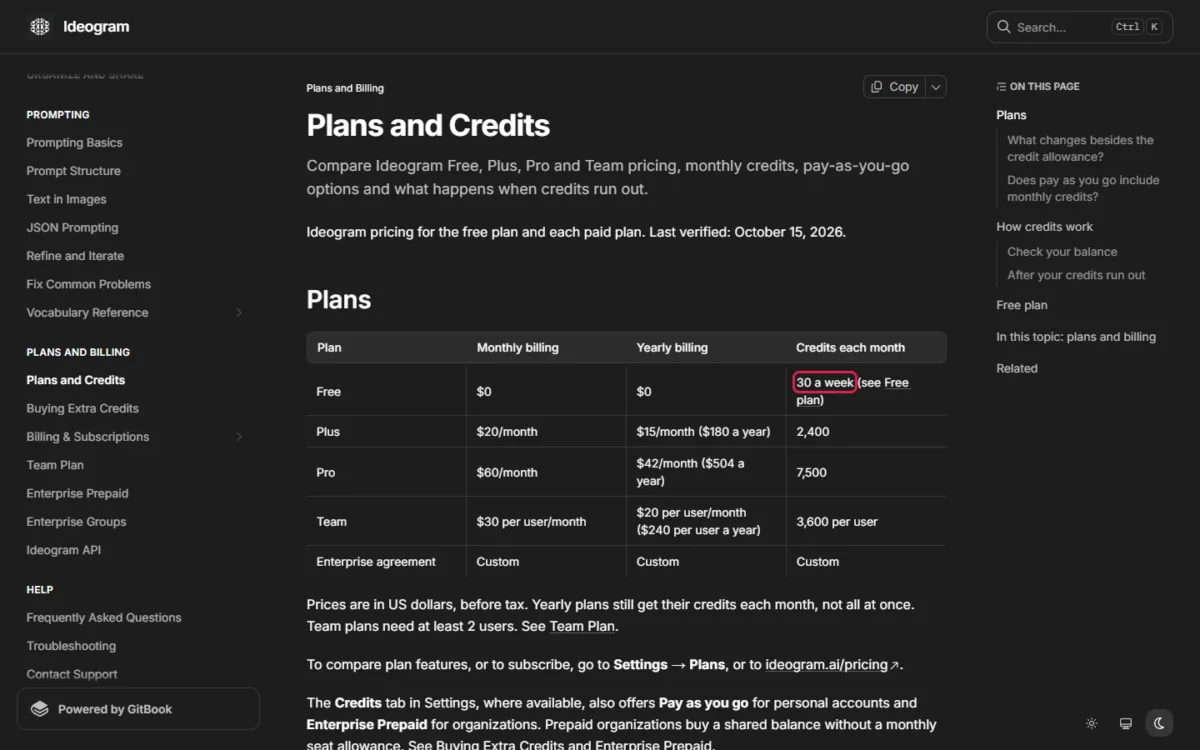
The Ideogram trap is privacy, not price. Free images are public, so a shot of an unreleased product belongs on Plus, where new images stay private until you publish them.
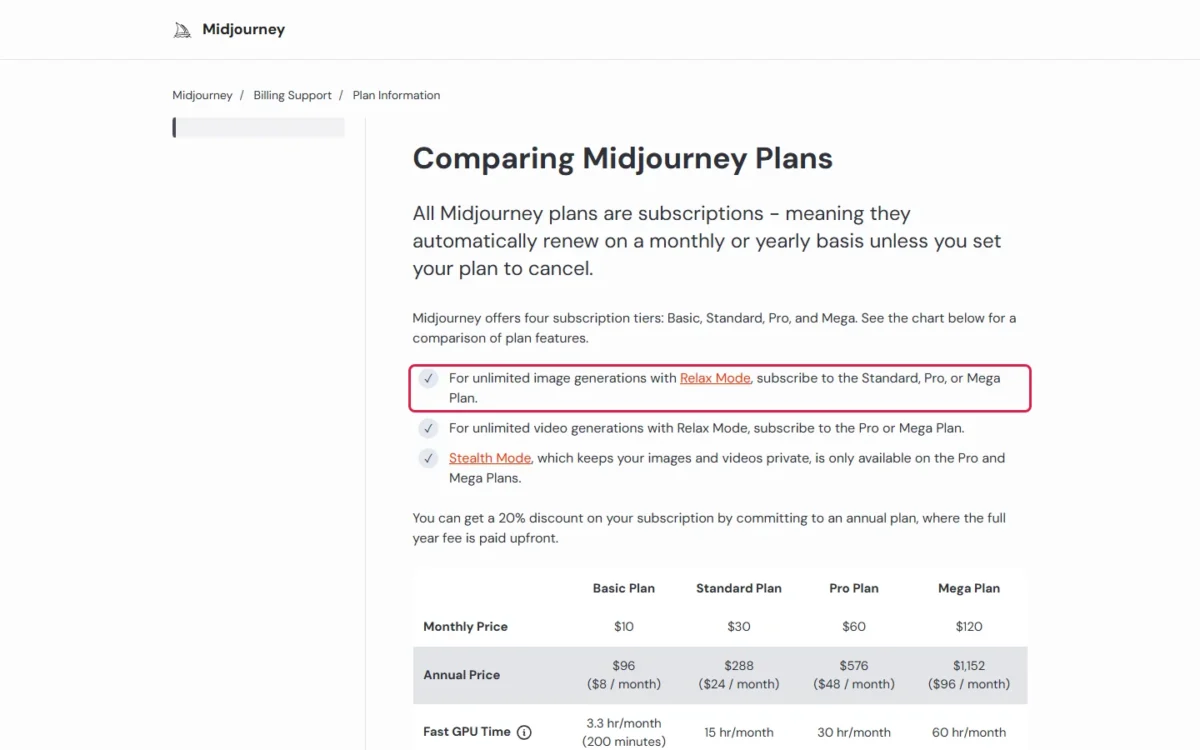
For Midjourney, the jump that matters is Basic to Standard: unlimited Relax-mode images start on Standard, so anyone running these prompts daily should price Standard first. My comparison of paid AI image generators covers the wider decision.
Turning Any Prompt Into a Midjourney Prompt
Cut a sentence prompt to a short phrase of subject, medium and look, then move the shape and the leave-outs to parameters at the end, with a space before the dashes. Here is prompt 9 after the cut:
photo of a steel pour-over kettle pouring into a glass coffee dripper, light oak counter, morning window light, steam --ar 4:5 --no peopleMidjourney’s moderation reads each word after --no on its own, so “–no modern clothing” reads as “no clothing”. Name the clothing you want in the prompt instead.
How to Fix a Bad AI Image Result
Find the problem you see in the first column; each row gives a fix for any tool, then a tool-specific one.
| Problem | Why it happens | Fix in any tool | Tool-specific fix |
|---|---|---|---|
| The thing you said “no” to appears | Models latch onto the word after “no” | Describe the scene without it: “an empty street” | Midjourney: --no item; Ideogram 3.0: Negative prompt field |
| Text is misspelled | Too much text or a busy scene | Quote the exact words, early and short | ChatGPT: spell tricky words letter by letter; Gemini: Redo with Nano Banana Pro on a Google AI plan |
| Subject cropped or too far away | The aspect ratio shapes the framing | Name the framing: “full body”, “head and shoulders” | Midjourney: --ar; Ideogram and Firefly: ratio setting |
| Part of the prompt is ignored | The detail comes late or conflicts | Move it earlier and describe it more | Midjourney: shorten to a phrase |
| The style is vague | “Beautiful” or “modern” names nothing drawable | Name a medium, technique or movement | Firefly: upload a style reference image |
| Hands or faces look distorted | The person is small in the frame | Move closer: “close-up”, “portrait” | ChatGPT: describe body framing and hand placement |
| A character changes between images | A consistency limit the vendors document | Define the character in detail in the first prompt | Gemini: keep follow-ups in the same chat |
| Extra objects or text appear | A vague prompt leaves gaps | Cut ideas you don’t need | Ideogram: turn Magic Prompt off; ChatGPT: “no extra text” |
Sources: Ideogram’s Fix Common Problems page, OpenAI’s image generation guide, Midjourney’s No page, checked October 2026.
Two rows are limits the vendors admit, not prompt mistakes. OpenAI’s image guide says its models can still struggle with precise text placement and recurring characters, and Google’s tips say Gemini may misspell words. For those, regenerate before you rewrite.
Small text also depends on the quality setting. OpenAI’s guide recommends medium or high quality for small text, and Ideogram’s models start at the cheapest Quality option on a free plan.
Related Prompt Libraries and Guides
Each neighbouring job has its own prompt page on this site:
- Editing a photo inside ChatGPT: ChatGPT photo editing prompts
- Gemini selfie trends: Nano Banana prompts for Gemini
- The couple photo trend: Gemini couple photo prompts
- Professional profile photos: AI headshot prompts
- Moving from stills to clips: AI video prompts
FAQ
Which AI is best for image prompts?
For logos, posters and infographics, start where quoted text is documented: ChatGPT, Gemini with a Google AI plan, or Ideogram. For short stylized art, Midjourney’s short-phrase style fits. For ads where licensing matters, Adobe says Firefly’s own models are trained on licensed Adobe Stock and public-domain content.
Are these AI image prompts free to use?
Yes. Copy and change any prompt here; the only cost is the generator. OpenAI’s ChatGPT Free tier, Google’s Gemini app, Ideogram’s Free plan and Adobe Firefly all create images without a paid plan.
Can I use AI-generated images commercially?
Yes, within each vendor’s terms. Midjourney gives every plan its General Commercial Terms, but a company with more than $1,000,000 in gross revenue a year must buy Pro or Mega. Adobe says you are responsible for checking output from Firefly’s partner models.
Which language should I write prompts in?
English is the safe choice. Ideogram says English gives the most reliable results, above all with text in the image. Google’s Gemini API guide lists the languages that perform best, including English (EN), Spanish (es-MX) and Japanese (ja-JP).
Why can’t I edit images in Gemini?
Google’s Gemini Apps require users to be 18 or over to edit images, while generating needs age 13 or the applicable age in your country. Every prompt on this page creates a new image, so a user who meets the generation age can run them all.