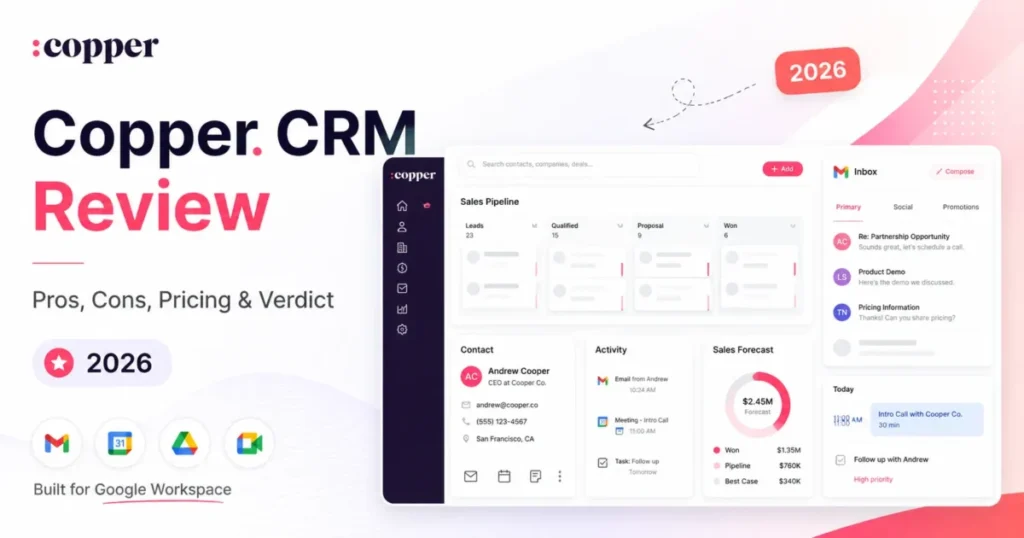
Copper CRM earns its place inside Gmail, and that is exactly why leaving it feels expensive. Most teams do not look for Copper CRM alternatives because the product failed them.
They start looking because a 2,500-contact cap, a workflow-automation gate, or a thin reporting layer has quietly started shaping how the sales team works. That is a different problem, and it needs a different shortlist.
This guide ranks ten Copper CRM alternatives by exit reason, not by popularity. Every price below was checked against the vendor’s official pricing page on July 9, 2026, and every plan gate is tied to the buyer consequence it creates.
If you are still deciding whether the category itself is the issue, our wider list of best CRM software options covers products outside the Google Workspace lane entirely.
In This Article (19 sections)
Quick verdict: the best Copper CRM alternative for each exit reason
Pick the row that matches why you are leaving. The ranking below is exit-driven, so the “best” alternative changes with the trigger.
| If you are leaving Copper because… | Best alternative | Practical tier | Why it solves that trigger |
|---|---|---|---|
| Reporting and dashboards are too shallow | HubSpot CRM | Professional, $90/ | Reporting depth plus marketing data on the same record |
| Workflow automation is gated to Professional | Zoho CRM | Professional, about $23/ | Workflow depth and customization without a Sales Cloud budget |
| Deals stall and pipeline discipline is weak | Pipedrive | Growth, $39/ | Full email sync, sequences, and forecast reports built around deal stages |
| Outbound calling and SMS live outside the CRM | Close | Essentials, $35/ | Calling, SMS, and a shared inbox inside the record, no dialer bolt-on |
| Post-sale handoffs disappear after the deal closes | monday CRM | Standard, $17/ | Boards, dashboards, and delivery workflows attached to the same contact |
| Projects and client delivery need CRM linkage | Insightly CRM | Professional, $49/ | Lead routing, workflow automation, and project objects in one schema |
| Per-seat cost is rising faster than headcount | Freshsales | Growth, $9/user/mo annual | Built-in phone and chat at roughly one sixth of Copper Professional |
| The team is not fully on Google Workspace | Nimble CRM | Single plan, $24.90/ | Microsoft 365 and Google Workspace treated as equal citizens |
Two rows deserve a caution. Copper Professional runs $59 per seat per month on annual billing, so a jump to HubSpot Professional at $90 raises seat cost by 53 percent before the required onboarding fee lands, while Freshsales Growth at $9 looks cheap until AI agent sessions run out and session packs enter the invoice.
The rest of this article is the evidence behind those eight rows, plus the two Copper CRM alternatives (Salesforce Sales Cloud and Capsule CRM) that only make sense at the extremes of budget and complexity.
Best by sales motion
Exit reason narrows the list. Sales motion narrows it further, because a dialer team and a referral consultancy fail on different tools.
| Sales motion | Best pick | The evidence behind the pick |
|---|---|---|
| Outbound calling and SMS at volume | Close Essentials, $35/ | Calling, SMS, email, and a shared inbox appear on every plan |
| Disciplined staged pipeline | Pipedrive Growth, $39/ | Full email sync, automations, sequences, and forecast reports start at Growth |
| Sales and marketing on one record | HubSpot Professional, $90/ | Free tier for two users, then one platform across marketing and sales |
| Built-in phone on a tight budget | Freshsales Growth, $9/user/mo | Built-in phone and live chat appear on the free plan |
| Relationship and referral selling | Nimble, $24.90/ | Prospector plus Microsoft 365 and Google Workspace integration |
| Services delivery after the close | monday CRM Standard, $17/ | Boards carry the deal, the delivery task, and the invoice |
A five-rep outbound team and a five-person design studio can both leave Copper for cost reasons and still land on different products. Match the motion before the price.
How I evaluated these ten CRMs
Macedona is the sole editor at SaaS CRM Review, and this article is a documentation-based buying analysis, not a hands-on lab test. No trial accounts were provisioned and no workflows were built, so you will not find “in our testing” language anywhere below.
Every pricing figure, plan limit, contact cap, and feature gate comes from the vendor’s official pricing page or help center, checked on July 9, 2026. Review sentiment from Capterra, TrustRadius, and TechRadar is used only as supporting context, never as the source for a price or a hard limit.
Where a source disagreed with itself, the official page won. Zoho CRM’s pricing page rendered regional currency during research despite a USD selector, so Zoho figures below are written with that caveat attached rather than stated as certainties.
Migration difficulty ratings for each Copper CRM alternative are editorial estimates based on data-model complexity, workflow rebuild effort, integration count, and admin overhead. They are not timed implementations.
The Copper problem map: what breaks first as the team grows
Copper is a relationship CRM that lives inside Gmail, and its strength is adoption. Reps who ignore Salesforce will log activity in Copper because the record sits in the sidebar of the inbox they already have open.
That design decision is also the source of every limitation below. Understanding what CRM software covers at the reporting and automation layer explains why Gmail-native convenience stops paying off around the 15-to-30 seat mark.
The five failure modes
Reporting depth. TrustRadius community insights praise Copper’s interface and Google Workspace integration while citing limits in automation, integrations, reports, dashboards, and filtering. Sales managers hit this first, usually when a board asks for pipeline coverage by segment.
Automation gating. Task automation ships on Basic. Workflow automation, bulk email, reporting, and integrations all start at Professional, which more than doubles the seat price.
Contact cliffs. Basic caps at 2,500 contacts and Professional at 15,000. Both are hard walls, and both arrive faster than teams expect once inbound forms and imported lists start filling the database.
Linear journeys. Copper’s data model is built around a forward-moving customer path. Teams with renewal loops, multi-stage delivery, or account expansion motions describe it as rigid, a point echoed in TrustRadius reviewer commentary about non-linear journeys.
Google gravity. A Capterra reviewer summarized the appeal plainly: “It’s a simple integration with the Google tools we already use.” That sentence is also the disqualifier for anyone who is not on Google.
Do not choose Copper if
Copper’s Chrome extension and Gmail sidebar are the product. Strip out Google Workspace and you are paying a premium for a contact database with average reporting.
Skip Copper entirely if your revenue team runs on Microsoft 365, if half the company uses Outlook and half uses Gmail, or if your sales motion depends on outbound dialing. Pipedrive publishes full Gmail and Outlook sync from Growth, Zoho CRM lists Gmail and Outlook integration, and Nimble ships Microsoft 365 and Google Workspace integration in its single plan.
The Copper buyer risk ledger
| Risk | Trigger point | Buyer consequence | Mitigation before you sign |
|---|---|---|---|
| Contact cap breach | 2,500 records on Basic | Forced upgrade at 2.5x seat cost | Count contacts plus imported lists, not just customers |
| Automation gate | Any handoff rule or follow-up sequence | Manual routing until Professional | Price Professional from day one, not Basic |
| Reporting ceiling | First board-level pipeline request | Exports to Sheets, then manual analysis | Ask for a custom-report demo before purchase |
| Email ecosystem drift | First Outlook hire in sales | Rep logs activity outside the CRM | Confirm 100 percent Google adoption in writing |
| Activity history lock-in | Migration day | Support ticket required to export activities | Request a test activity export during the trial |
Read that ledger as a purchase sequence, not a warning list. Four of the five risks are cheap to test before a contract, and the fifth (activity export) is the one most teams discover on the worst possible day.
Copper CRM pricing and plan gates in 2026
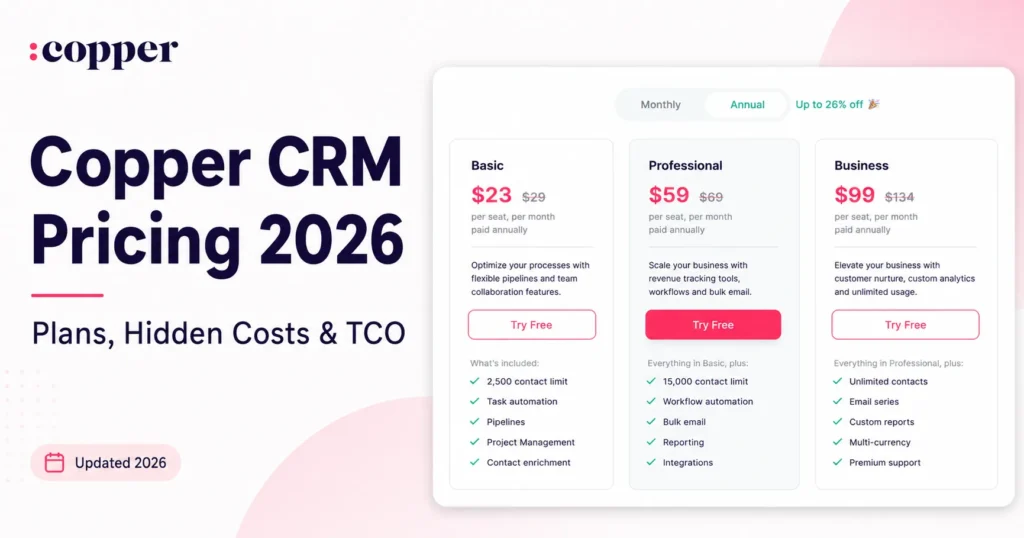
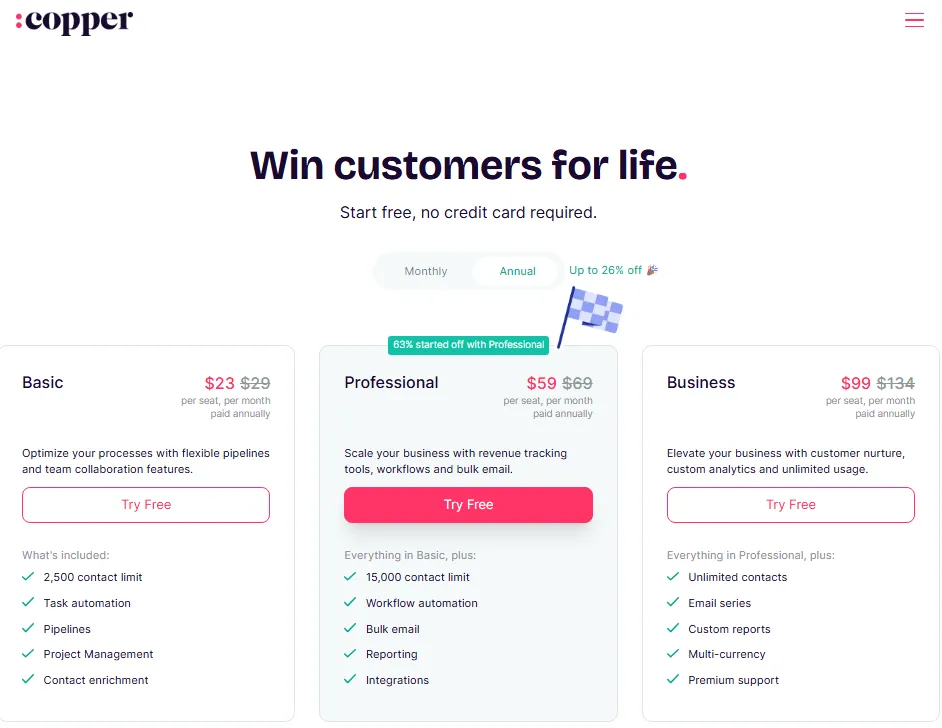
Copper publishes three seat-based plans. Pricing checked: July 9, 2026, on the official Copper pricing page.
| Plan | Annual price | Monthly price | Contact limit | What the tier adds |
|---|---|---|---|---|
| Basic | $23/ | $29/ | 2,500 | Pipelines, task automation, project management, contact enrichment |
| Professional | $59/ | $69/ | 15,000 | Workflow automation, bulk email, reporting, integrations |
| Business | $99/ | $134/ | Unlimited | Email series, custom reports, multi-currency, premium support |
The gap between Basic and Professional is where budgets break. A ten-person sales team pays $2,760 per year on Basic and $7,080 on Professional, and the trigger for that $4,320 increase is often a single automation rule.
Business at $99 per seat costs $11,880 annually for the same ten people. That is $8,880 more than ten seats of Salesforce Starter Suite at $25 per user per month, and Starter Suite is not even the edition most Copper switchers evaluate.
The budget pressure point
Copper’s advertised entry price of $23 is a real price for a real plan. It is not the plan most teams end up on.
Bulk email, reporting, and integrations are the three features that a growing sales org asks for within the first two quarters. All three sit behind Professional, and Professional is where Copper stops competing on price with Pipedrive Growth ($39), Freshsales Pro ($39), or monday CRM Pro ($28).
Custom reports and multi-currency require Business. If finance needs revenue reporting in more than one currency, Copper’s practical price is $99 per seat, and at that number a Sales Cloud Enterprise conversation becomes reasonable.
Marketplace listings complicate this further. Capterra shows a Copper starting price of $12 per user per month, and comparison pages still reference a Copper Starter edition, but the official pricing page in July 2026 lists only Basic, Professional, and Business.
Treat directory pricing as stale.
Migration effort from Copper: what exports cleanly and what you rebuild
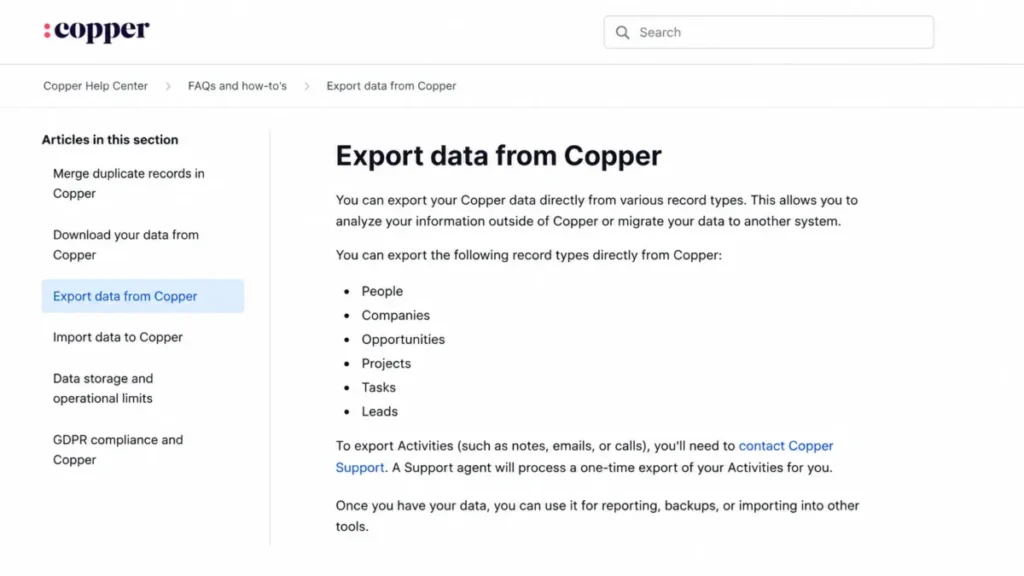
Copper’s export documentation is unusually honest, and it is the single most useful page a departing customer can read. Six record types export directly from the app: people, companies, opportunities, projects, tasks, and leads.
Activities are the exception. Copper’s official export documentation states that exporting activities requires contacting Copper Support for a one-time activity export.
That one sentence changes migration planning. Activities are the call logs, emails, and notes that make a relationship CRM worth keeping, and they are the records you cannot self-serve on a Friday afternoon before a Monday cutover.
The Copper migration checklist
| Data type | Exports directly | Rebuild required in the new CRM | Risk if skipped |
|---|---|---|---|
| People and companies | Yes | Field mapping, deduplication | Duplicate records on day one |
| Opportunities | Yes | Pipeline stages, probabilities | Forecast history resets |
| Projects and tasks | Yes | Owners, due-date logic | Delivery work goes untracked |
| Leads | Yes | Routing and assignment rules | Inbound leads sit unowned |
| Activities (calls, emails, notes) | No, support ticket required | Timeline reconstruction | Relationship history lost |
| Workflows and automations | No | Full rebuild | Follow-up gaps in week one |
| Reports and dashboards | No | Full rebuild | Managers fly blind for a month |
| Integrations | No | Reconnect and re-authorize | Broken syncs, silent data loss |
Request the activity export before you sign anything with a new vendor. A CRM migration that lands contacts and deals but drops three years of call notes is a rollback waiting to happen.
There is a second, smaller trap. Copper’s Google Sheets add-on documentation recommends importing in batches of 20,000 rows or fewer, and warns that larger operations fail.
Any Copper database above roughly 20,000 records therefore migrates in chunks. Plan for batch tracking, a row-count reconciliation, and a person who owns the spreadsheet.
The 30/90-day adoption test
At 30 days, contacts, companies, and open opportunities should be in the new CRM, deduplicated, with pipeline stages matching your actual sales process. If reps are still working deals from a spreadsheet, the migration is failing.
At 90 days, three things must be true: activity logging happens without reminders, at least one automation rule is running in production, and a manager can pull a pipeline report without exporting anything. Miss two of those and you switched tools without switching behavior.
Alternatives that fix reporting and automation gaps
Shallow dashboards and a Professional-tier automation gate are the two reasons most teams start shopping. The two Copper CRM alternatives below answer both, at opposite ends of the setup-effort scale.
The numbering across this article follows exit triggers, not overall product quality. A tool ranked seventh may be the correct purchase for your team.
1. HubSpot CRM: best for replacing Copper with sales and marketing together

- Best for:
- 10 to 40 person B2B teams on Gmail that send marketing email and need lifecycle reporting Copper dashboards cannot produce.
- Not best for:
- four-person teams with a first-year software budget under $5,000.
HubSpot moves the record out of the inbox into a platform where marketing, sales, and service share one contact. It leads this list because reporting depth is the most common Copper exit trigger.
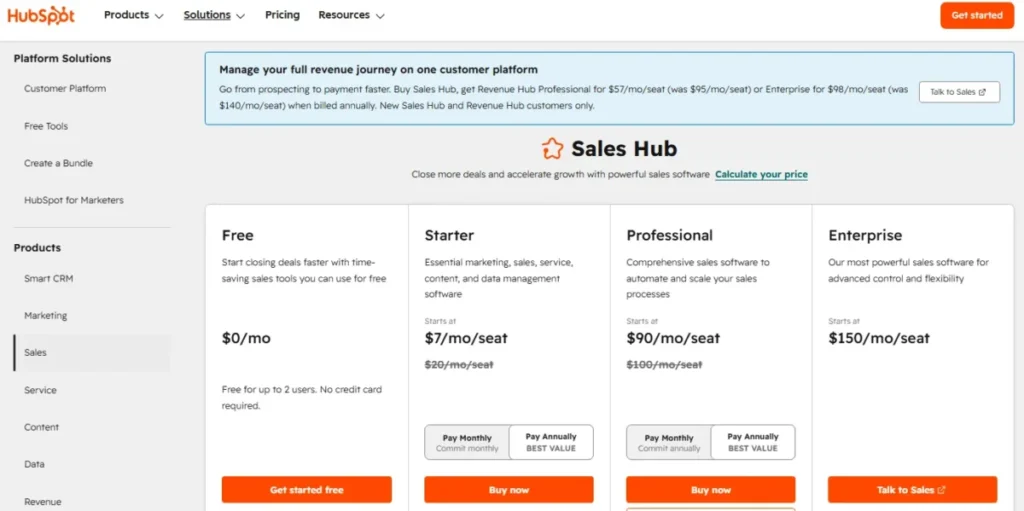
Sales Hub Free costs $0 for two users. Starter begins at $7 per seat per month billed annually, Professional at $90, and Enterprise at $150, per HubSpot’s official Sales Hub pricing page.
Pricing checked: July 9, 2026.
Read the fine print. Professional carries a required $1,500 onboarding fee and Enterprise a required $3,500 fee, neither included in the seat price.
HubSpot Credits add a second variable. Starter includes 500, Professional 3,000, and Enterprise 5,000; unused credits do not roll over, and extra credits cost $0.010 each.
Our HubSpot CRM review covers platform depth. A ten-seat Copper Professional team paying $7,080 a year faces $10,800 plus $1,500 onboarding.
| Pros | Cons |
|---|---|
| Free tier for two users removes the pilot cost Copper charges from seat one | Onboarding fees of $1,500 and $3,500 sit outside the advertised seat price |
| Reporting depth closes the gap TrustRadius reviewers name in Copper | Credits reset monthly without rollover, making AI usage a recurring cost |
| Marketing email and forms attach to the contact record | Professional at $90 per seat is 53 percent above Copper Professional |
| Email and phone support are included on Professional |
Verdict: Choose HubSpot if reporting and marketing alignment drove the exit and year-one budget clears $12,300 for ten seats. Stay with Copper if Gmail adoption is the only thing keeping the database populated.
2. Zoho CRM: best for automation depth without enterprise pricing

- Best for:
- 8 to 50 person sales teams with one admin who enjoys configuration and a per-seat ceiling near $25.
- Not best for:
- teams that need the CRM working by Tuesday with nobody to own field design.
Zoho CRM is the value answer to Copper’s automation gate. Workflows, blueprints, forecasting, CPQ, and portals sit in a product line priced well below Sales Cloud.
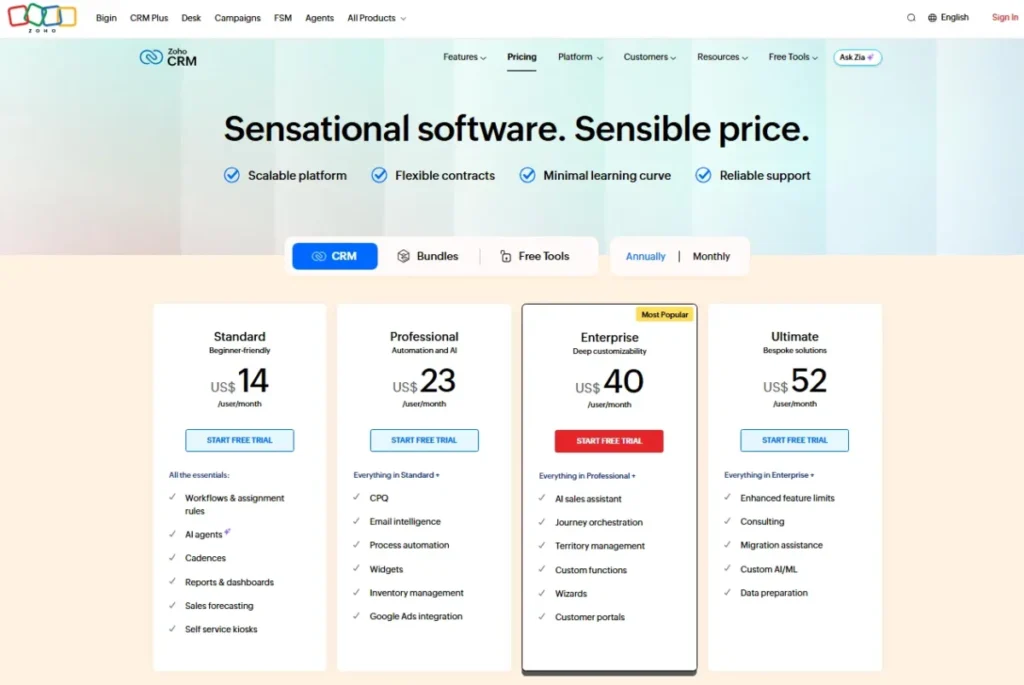
Zoho CRM is free for up to three users. The Zoho CRM pricing page commonly shows US annual pricing as Standard from about $14 per user per month, Professional about $23, Enterprise about $40, and Ultimate about $52.
Pricing checked: July 9, 2026.
One honest caveat. During research the page rendered regional currency despite a USD selector, so confirm the USD view before signing a purchase order.
Standard includes API access at 5,000 calls per day, which matters for teams leaving Copper because integrations were locked to Professional.
The trade-off is configuration weight, covered in our Zoho CRM evaluation. Copper works on day one because it asks nothing of you, while Zoho works on day forty because someone designed it.
| Pros | Cons |
|---|---|
| Workflows and assignment rules ship without Copper’s $59 Professional floor | Field, module, and blueprint design needs an internal owner or partner budget |
| API access at 5,000 calls per day is included on Standard | The pricing page renders regional currency, so US buyers must verify the USD view |
| A free plan for three users supports a real pilot | Gmail is an integration surface, not the primary workspace |
| Zia AI and forecasting sit in the same product family |
Verdict: Choose Zoho CRM if automation and customization drove the exit and you have an admin. Stay with Copper if nobody wants to own CRM configuration.
Alternatives that fix pipeline discipline and outbound execution
Copper tracks relationships well and pushes deals forward poorly. If the problem is stalled stages or an outbound motion living in a separate dialer, neither HubSpot nor Zoho is the shortest path.
3. Pipedrive: best for pipeline discipline and deal-stage hygiene

- Best for:
- 5 to 25 rep sales teams where deals stall between stages and managers want forecast reports without building them.
- Not best for:
- relationship-led consultancies that log far more emails than opportunities.
Pipedrive rebuilds the CRM around the deal instead of the contact. That design difference answers the Copper complaint that pipeline coverage is hard to see and harder to report on.
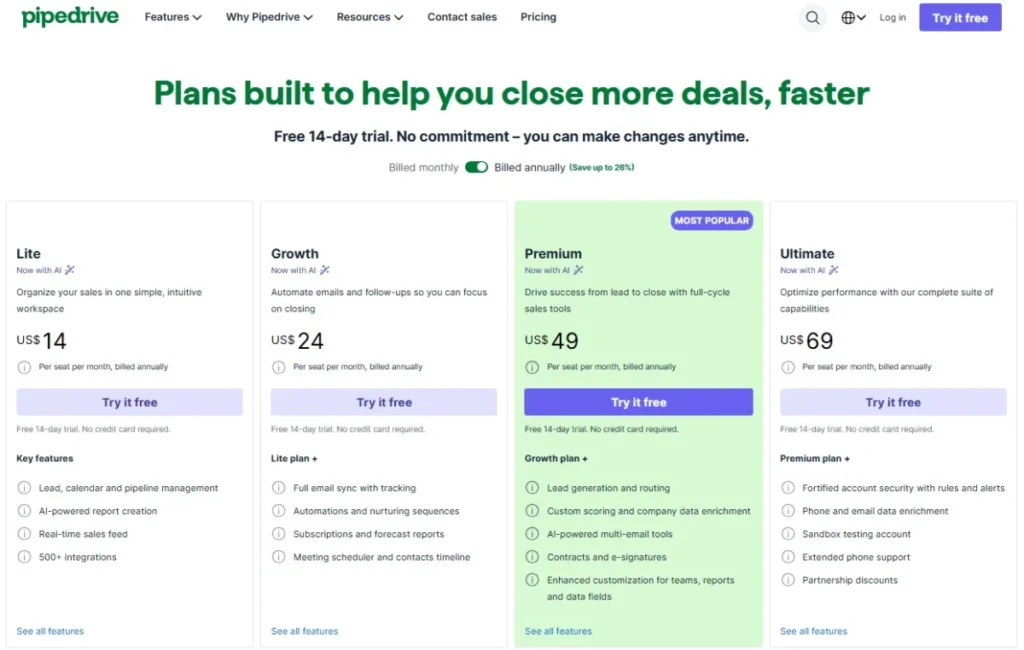
Lite starts at $14 per seat per month billed annually, Growth at $39, Premium at $59, and Ultimate at $79 on Pipedrive’s official pricing page, with a 14-day trial that runs without a credit card.
Pricing checked: July 9, 2026.
Lite is not the Copper replacement. Growth adds full Gmail and Outlook email sync, bulk email, open and link tracking, automations, nurturing sequences, forecast reports, the meeting scheduler, and the contact timeline.
Budget for $39, not $14. Then add whichever of LeadBooster, Projects, Campaigns, Web Visitors, or Smart Docs your process needs, because each is a separate add-on.
Our Pipedrive CRM review goes deeper on the automation builder. Against Copper, Pipedrive wins on deal velocity and loses on Gmail-native feel.
| Pros | Cons |
|---|---|
| Growth at $39 delivers full email sync and automations for $20 less than Copper Professional | Lite at $14 lacks the email sync and automations most switchers want |
| Forecast reports ship in the plan rather than requiring a Business-tier upgrade | LeadBooster, Projects, Campaigns, Web Visitors, and Smart Docs are separate add-ons |
| More than 500 integrations reduce reconnect risk during migration | Relationship history feels thinner than Copper’s contact timeline |
| Outlook and Gmail sync equally, removing Copper’s Google dependency |
Verdict: Choose Pipedrive if stalled deals or forecast blindness drove the exit. Stay with Copper if revenue comes from long relationships rather than staged opportunities.
4. Close: best for outbound teams that live in the dialer

- Best for:
- 3 to 20 rep outbound teams making 40-plus calls per rep per day who want dialing, SMS, and email inside the record.
- Not best for:
- inbound-led teams whose reps make fewer than five calls a week.
Close treats the call as the primary object. Calling, SMS, email, and a shared inbox sit in the record, with no dialer bolt-on to license and reconcile.
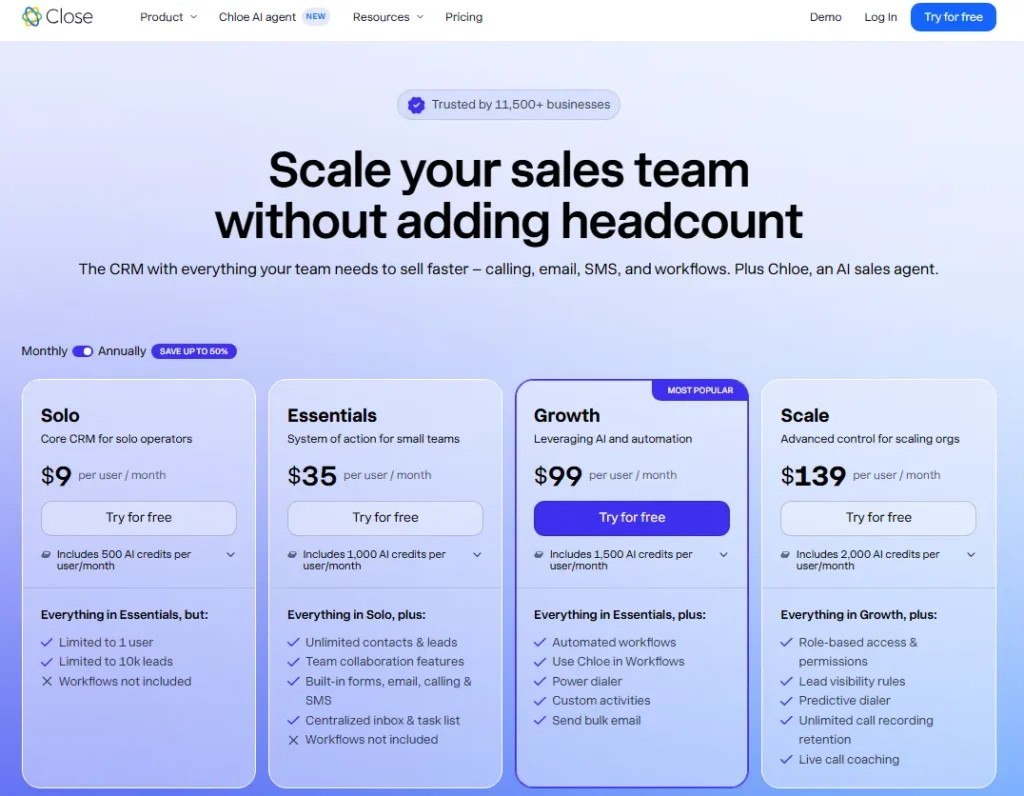
Close’s official pricing page lists Solo at $9 per user per month annually ($19 monthly), Essentials at $35 ($49), Growth at $99 ($109), and Scale at $139 ($149).
Pricing checked: July 9, 2026.
Ignore the $9. Solo is capped at one user, 10,000 leads, and no workflows, which makes it a freelancer plan rather than a Copper replacement.
Essentials at $35 is the small-team entry point, and Growth at $99 is where workflows and the power dialer arrive. AI credit allowances vary by plan, and additional credits are sold separately.
Against Copper the gap runs one way: Close wins on outbound execution and loses on project tracking. Our Close CRM review covers the dialer tiers.
| Pros | Cons |
|---|---|
| Calling, SMS, and email in the record remove a separate dialer subscription | Solo allows one user, 10,000 leads, and no workflows, so it cannot replace a team CRM |
| Workflows and the power dialer at Growth support sequenced outbound | Growth at $99 per seat costs $40 more than Copper Professional |
| Predictive dialer and live call coaching support ramping new reps | AI credits are capped by plan, with additional credits billed separately |
| Role-based permissions keep lead visibility controlled as the team grows |
Verdict: Choose Close if outbound volume is the business. Stay with Copper if reps send email and book meetings rather than dial lists.
Alternatives that fix cross-team handoffs and post-sale delivery
Copper includes project management, and agencies choose it partly for that. The complaint is not that projects exist, it is that the handoff from closed-won to delivery has nowhere to live once three teams touch the account.
Two Copper CRM alternatives keep that handoff visible on the same record.
5. monday CRM: best for post-sale handoffs and cross-team visibility

- Best for:
- 10 to 60 person agencies where a closed deal triggers onboarding, delivery, and invoicing across separate owners.
- Not best for:
- two-person sales teams, because plans start at three seats.
monday CRM is a work-management platform wearing a CRM schema. Contacts and deals sit on boards, so one object carries a sales stage, a delivery task, and an invoice status.
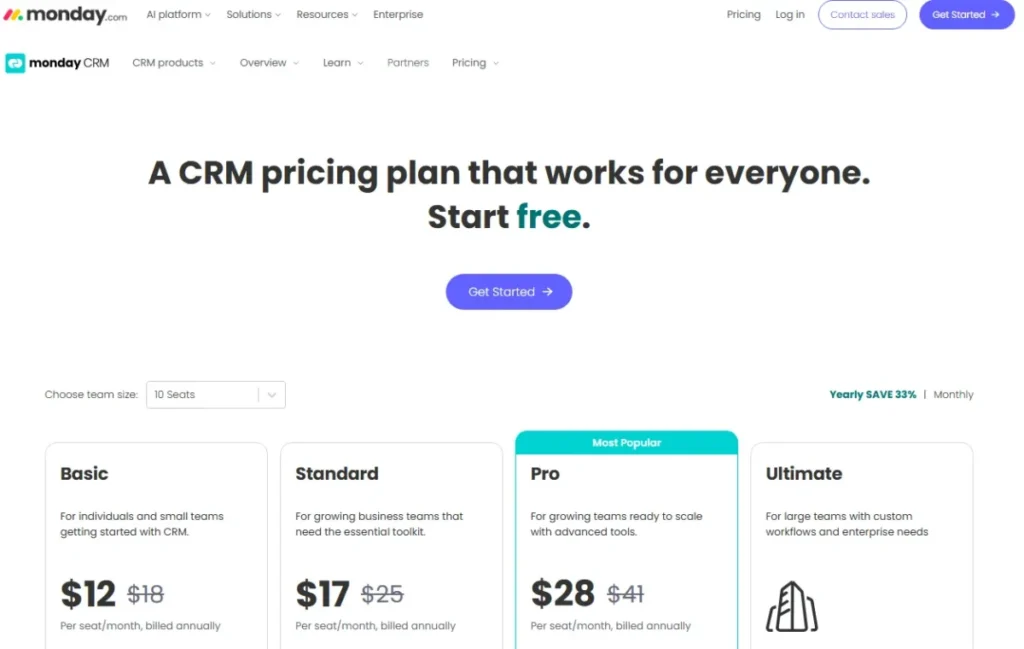
The monday CRM pricing page lists Basic at $12 per seat per month billed annually, Standard at $17, Pro at $28, and Ultimate as a custom quote.
Pricing checked: July 9, 2026.
The prices hide the real constraint. Basic caps at 1,000 active contacts and deals, Standard at 10,000, and only Ultimate is unlimited.
Plans start from three users, and monday states that prices exclude tax and depend on billing country. A two-person team therefore pays for three seats.
Standard at $17 with 10,000 active records is the sensible Copper Professional replacement, and our monday.com review explains where Pro earns its $28.
| Pros | Cons |
|---|---|
| Standard at $17 carries 10,000 active records against Copper Professional’s 15,000 at $59 | Basic caps at 1,000 active contacts and deals, which most switchers exceed in month one |
| Dashboards, quotes, and invoices attach to the deal, keeping post-sale work in one system | Plans start from three users, so two-person teams buy a seat they do not use |
| Automations and email sequences are configured without code | Final price varies by billing country and excludes tax |
| Ultimate adds governance and HIPAA compliance for regulated delivery work |
Verdict: Choose monday CRM if the deal is the beginning of the work, not the end. Stay with Copper if sales hands off to nobody and projects stay small.
6. Insightly CRM: best for CRM and project delivery in one schema

- Best for:
- 15 to 75 person professional-services firms needing lead routing at the top of the funnel and linked project records after the close.
- Not best for:
- teams whose automation lives in third-party integrations rather than inside the CRM.
Insightly connects opportunities to projects natively, so the account manager sees the delivery record without leaving the contact. That is a closer structural match to Copper than Pipedrive or Close.
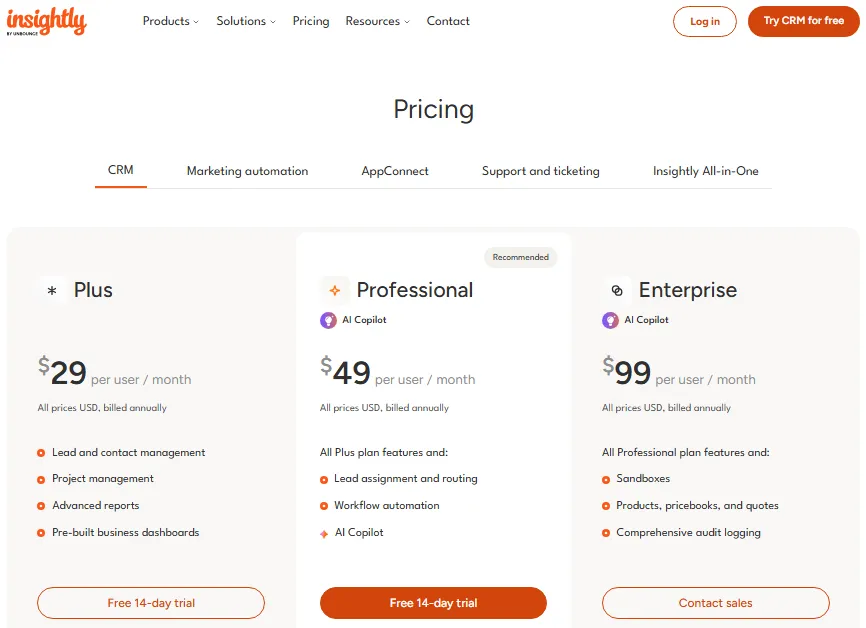
The Insightly pricing page lists CRM Plus at $29 per user per month, Professional at $49, and Enterprise at $99, all billed annually.
Pricing checked: July 9, 2026.
Professional adds lead assignment and routing, workflow automation, and AI Copilot. Enterprise adds sandboxes, products, pricebooks, quotes, and audit logging.
Now the number nobody quotes. AppConnect starts at $249 per account per month, with an additional 25,000 tasks at $249 and a required $3,000 technical setup fee.
Ten seats on Professional cost $5,880 annually, and cross-app automation adds roughly $2,988 plus setup. Our Insightly CRM review treats those as two purchases.
| Pros | Cons |
|---|---|
| Projects link to opportunities natively, preserving post-sale visibility Copper users expect | AppConnect starts at $249 per account per month with a required $3,000 setup fee |
| Lead assignment and routing at $49 per user close Copper’s inbound-ownership gap | CRM Plus at $29 excludes workflow automation, the feature most switchers came for |
| Enterprise adds sandboxes and audit logging for change-control requirements | Enterprise at $99 matches Copper Business without matching Salesforce depth |
| Quotes and pricebooks remove a separate CPQ tool for services pricing |
Verdict: Choose Insightly if projects and lead routing drove the exit and you can absorb AppConnect separately. Stay with Copper if your integrations already run through Zapier.
Alternatives that fix per-seat cost pressure
Copper Professional at $59 per seat is the number that starts most budget conversations. These two Copper CRM alternatives cut it hard, in different ways and with different sacrifices.
7. Freshsales: best for cutting seat cost without losing phone and chat

- Best for:
- 5 to 30 rep teams that need a dialer and live chat in the CRM but cannot justify $59 per seat.
- Not best for:
- teams planning heavy AI-agent usage in year one.
Freshsales is the price-per-capability outlier here. Built-in phone, live chat, Kanban views, and email templates appear on the free plan, which supports three users.
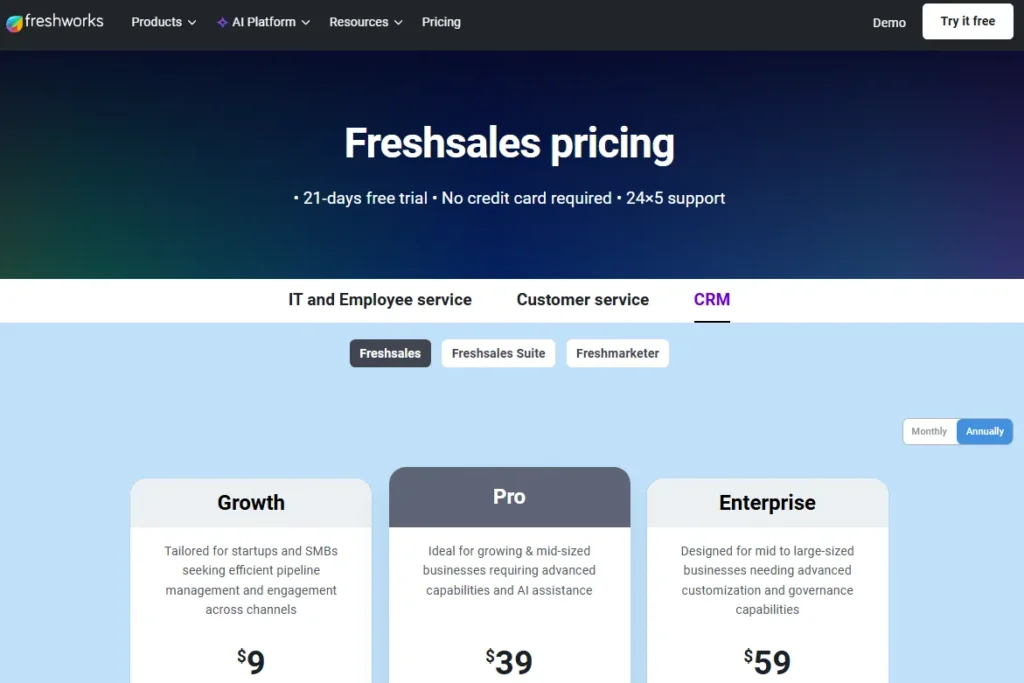
The Freshworks CRM pricing page shows Growth at $9 per user per month billed annually, Pro at $39, and Enterprise at $59, with a 21-day trial.
Pricing checked: July 9, 2026.
Ten reps on Growth cost $1,080 a year. The same ten on Copper Professional cost $7,080, and Copper does not include a dialer.
The catch is AI metering. Paid plans include 500 AI agent sessions once per account, after which session packs are purchased, so heavy Freddy usage becomes usage-based.
Enterprise at $59 adds sandbox, audit logs, and custom modules. Our review of Freshsales strengths and limitations sets out where Pro is the honest floor.
| Pros | Cons |
|---|---|
| Growth at $9 includes built-in phone, cutting roughly $50 per seat against Copper Professional | The 500 AI agent sessions are granted once per account, not monthly |
| The free plan for three users includes phone, live chat, and 24×5 support | Freddy AI and CPQ add-ons sit outside the seat price |
| A 21-day trial gives time to test routing before the card is charged | Pro at $39 is the practical tier once lead scoring and workflows matter |
| Kanban views reduce ramp time for reps leaving a Gmail sidebar |
Verdict: Choose Freshsales if seat cost and built-in calling drive the decision. Stay with Copper if AI-agent volume will be high and predictable budgeting matters more than entry price.
8. Capsule CRM: best for lightweight contact and pipeline management

- Best for:
- 3 to 15 person consultancies and studios that want contacts, pipelines, and a shared mailbox without an admin.
- Not best for:
- revenue teams that need marketing automation or manager-grade analytics.
Capsule is the deliberate downgrade. It does contacts, pipelines, tasks, and light project boards, and it does not pretend to do lifecycle marketing.
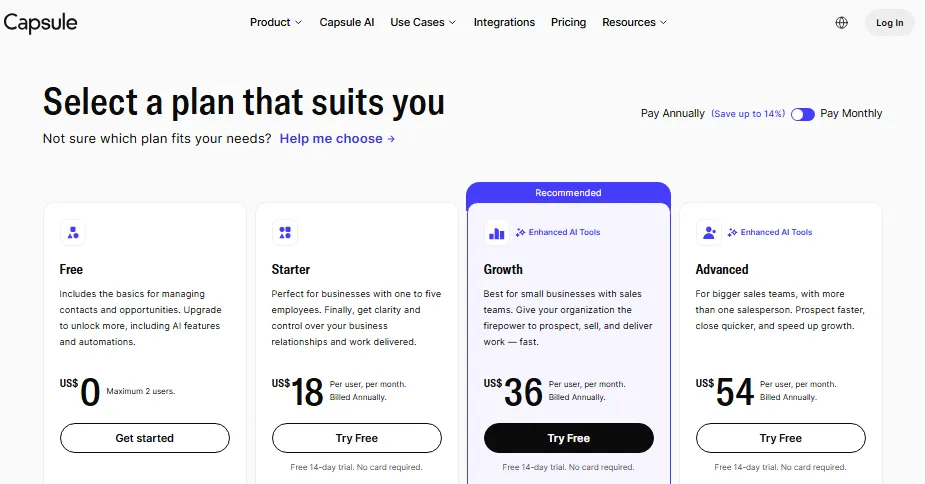
Capsule’s official plan details show Starter at $18 per user per month billed annually, with a 14-day free trial and no credit card. Starter includes 30,000 contacts, email templates, a shared mailbox, basic reporting, goals, and an AI pipeline generator.
Pricing checked: July 9, 2026.
Compare the contact math directly. Copper Basic charges $23 per seat for 2,500 contacts, while Capsule Starter charges $18 for 30,000.
Third-party summaries also describe a Capsule free plan and higher tiers. Those were not confirmed on the official page during research, so verify free-plan limits before building a rollout around them.
TechRadar reaches the same boundary our Capsule CRM review does: affordable for SMBs, weaker for complex CRM needs.
| Pros | Cons |
|---|---|
| Starter at $18 includes 30,000 contacts, twelve times Copper Basic’s cap for less money | Marketing automation is limited, so an email platform stays in the stack |
| A shared mailbox and email templates cover the collaboration Copper delivers through Gmail | Reporting is basic, which will not satisfy a manager who left Copper over dashboards |
| Project boards and custom activity types support light delivery work | Free-plan limits are not published on the official page checked in July 2026 |
| A 14-day trial runs without a credit card, so a pilot costs nothing |
Verdict: Choose Capsule if cost and contact caps drove the exit. Stay with Copper if the Gmail sidebar is the only reason reps log anything.
Alternatives that fix Google lock-in and enterprise scale limits
The last two Copper CRM alternatives sit at opposite ends of the market. One removes the Google dependency for a single flat price, and the other removes every ceiling at a price that requires a business case.
9. Nimble CRM: best for relationship prospecting across Google and Microsoft

- Best for:
- solo consultants and 2 to 10 person relationship-led teams split between Outlook and Gmail.
- Not best for:
- sales managers who need custom report builders or 24/7 support.
Nimble is the direct answer to Copper’s Google gravity. Microsoft 365 and Google Workspace are both first-class integrations, so a mixed-inbox team stops choosing sides.
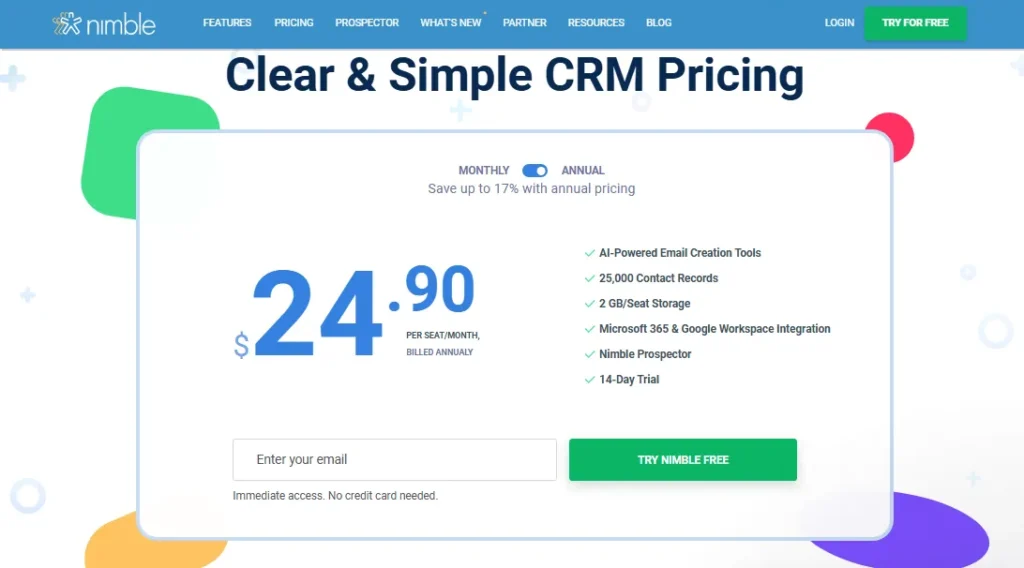
The Nimble pricing page publishes one plan at $24.90 per seat per month billed annually, or $29.90 monthly.
Pricing checked: July 9, 2026.
That single plan includes 25,000 contact records, 2 GB of storage per seat, Nimble Prospector, AI-assisted email creation, and a 14-day trial. Ten seats cost $2,988 a year, roughly 42 percent of Copper Professional.
The ceiling is real. TechRadar’s review notes weaker reporting customization, fewer native integrations, and no 24/7 support.
Our Nimble CRM review treats it as a prospecting tool rather than a pipeline system of record. Storage matters too: 2 GB per seat fills quickly when proposals attach to every deal.
| Pros | Cons |
|---|---|
| One plan at $24.90 removes the automation and reporting gates that push Copper users to $59 | Reporting customization is limited, so managers leaving over dashboards gain little |
| Microsoft 365 and Google Workspace integrate equally, ending the Gmail dependency | 24/7 support is not offered, per TechRadar’s review |
| 25,000 contact records exceed Copper Professional’s 15,000 cap at less than half the seat price | 2 GB of storage per seat constrains document-heavy records |
| Nimble Prospector supports contact enrichment during outreach |
Verdict: Choose Nimble if the team is not fully on Google and relationships matter more than pipeline stages. Stay with Copper if you need project tracking inside the CRM.
10. Salesforce Sales Cloud: best for teams that need governance more than speed

- Best for:
- 50-plus seat revenue organizations with a named CRM admin, territory rules, and a forecasting process finance depends on.
- Not best for:
- any team that chose Copper because it wanted a CRM without an administrator.
Salesforce is the endpoint, not the escape hatch. It removes every ceiling Copper imposes and replaces them with an implementation.
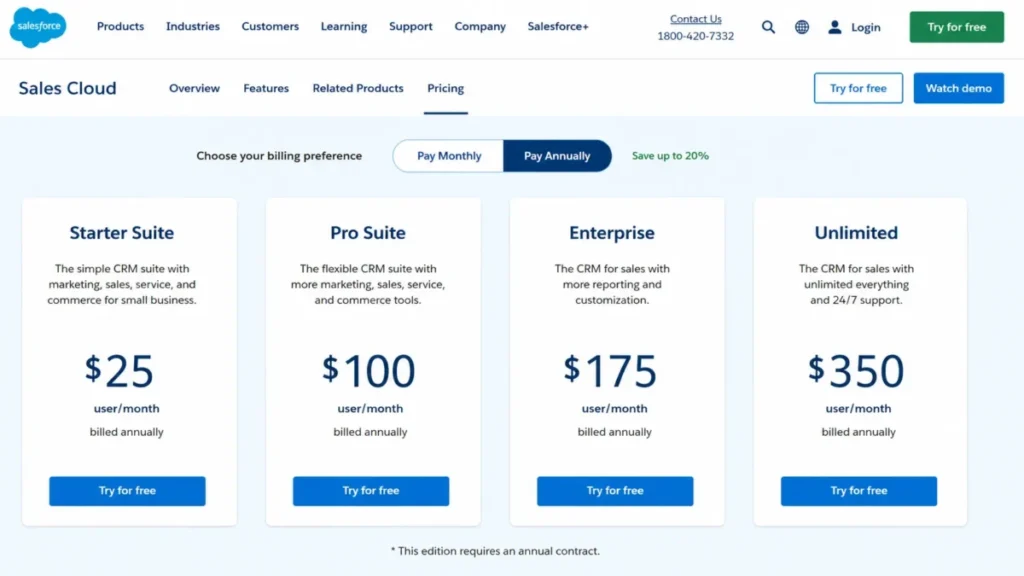
The product family confuses buyers, so separate it. Starter Suite begins at $25 per user per month and Pro Suite at $100 billed annually with a contract, while Sales Cloud pricing lists Enterprise at $175 and Unlimited at $350.
Pricing checked: July 9, 2026.
Most articles collapse those into one number. Starter Suite at $25 is an SMB suite, and Enterprise at $175 is the product people mean when they say they moved to Salesforce.
Ten seats on Enterprise cost $21,000 a year, nearly triple Copper Professional, before admin time and implementation.
Our Salesforce CRM review says the same: buy Salesforce for governance and forecasting rigor, not a nicer pipeline.
| Pros | Cons |
|---|---|
| Enterprise at $175 removes contact caps, reporting limits, and automation gates entirely | Ten seats cost about $21,000 a year before implementation and admin time |
| Territory management, permissions, and forecasting satisfy finance and audit requirements | Pro Suite at $100 requires an annual contract, unlike Copper’s monthly option |
| AppExchange and API depth support a revenue stack rather than a sales tool | Administration is a role, not a task, and Copper buyers rarely have one |
| Starter Suite at $25 offers a genuine SMB entry point below Copper Professional |
Verdict: Choose Salesforce if governance, forecasting, and permissions drove the exit and you will assign an admin. Stay with Copper if the honest answer is that nobody will own the system.
Pricing comparison and the real 10-user cost
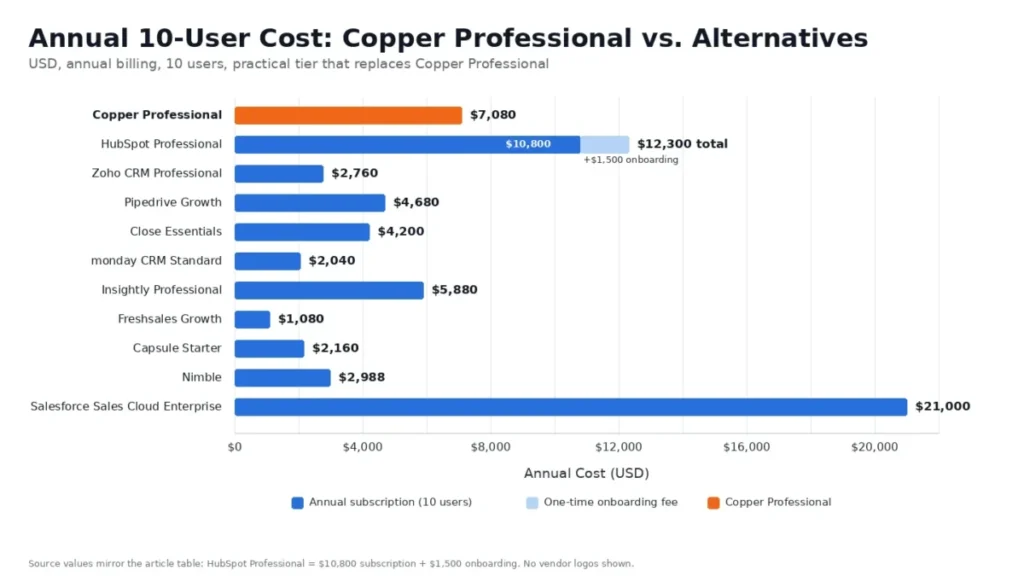
Starting prices decide nothing. The practical tier, the plan that holds the feature you left Copper to get, is the number to put in a budget.
All figures below assume annual billing and ten seats, checked July 9, 2026.
| Product | Starting price | Practical tier for Copper switchers | 10-user cost per year | Free plan or trial |
|---|---|---|---|---|
| Copper (current tool) | $23/ | Professional, $59/ | $7,080 | Free trial |
| HubSpot CRM | $0 (2 users) | Professional, $90/ | $10,800 + $1,500 onboarding | Free plan, 2 users |
| Zoho CRM | $0 (3 users) | Professional, about $23/ | About $2,760 | Free plan, 3 users |
| Pipedrive | $14/ | Growth, $39/ | $4,680 | 14-day trial |
| Close | $9/user/mo | Essentials, $35/ | $4,200 | Trial |
| monday CRM | $12/ | Standard, $17/ | $2,040 | Trial, 3-seat minimum |
| Insightly CRM | $29/ | Professional, $49/ | $5,880 | Trial |
| Freshsales | $0 (3 users) | Growth, $9/user/mo | $1,080 | Free plan, 21-day trial |
| Capsule CRM | $18/ | Starter, $18/ | $2,160 | 14-day trial |
| Nimble CRM | $24.90/ | Single plan | $2,988 | 14-day trial |
| Salesforce Sales Cloud | $25/ | Sales Cloud Enterprise, $175/ | $21,000 | Trial |
Eight of the ten Copper CRM alternatives cost less per year than Copper Professional at the tier that replaces it, and only HubSpot Professional and Salesforce Enterprise cost more. Freshsales Growth undercuts Copper by $6,000 annually for ten seats, and Salesforce Enterprise costs three times as much.
Hidden costs nobody prices in
| Product | Hidden cost | Amount | When it hits |
|---|---|---|---|
| HubSpot | Required onboarding | $1,500 (Professional), $3,500 (Enterprise) | At contract signature |
| HubSpot | Credits reset monthly, no rollover | $0.010 per extra credit | Any month AI usage spikes |
| Pipedrive | Add-ons: LeadBooster, Projects, Campaigns, Web Visitors, Smart Docs | Priced separately | When lead capture or documents matter |
| Insightly | AppConnect plus required technical setup | From $249/ | First cross-app automation |
| Close | AI credits capped by plan | Additional credits sold separately | Heavy AI usage |
| Freshsales | 500 AI agent sessions granted once per account | Session packs purchased after | Second month of AI use |
| monday CRM | 3-seat minimum, tax excluded, price varies by billing country | Roughly one extra seat for a 2-person team | At checkout |
| Salesforce | Implementation and admin ownership | Not published | Weeks 1 to 12 |
Insightly’s AppConnect line is the one that changes a shortlist. A ten-seat Professional deployment with cross-app automation reaches roughly $11,868 in year one, which lands within $500 of HubSpot Professional and just under Copper Business at $11,880.
Feature gates and reporting depth compared
Copper’s exit triggers are almost always gate problems. The table below records only the gates and limits confirmed on each vendor’s official pricing page on July 9, 2026, and names what a buyer still has to verify.
| Product | Plan gate confirmed on the official pricing page | Record or seat limit confirmed | Still to verify before purchase |
|---|---|---|---|
| Copper | Workflow automation, bulk email, reporting, and integrations start at Professional ($59); custom reports and multi-currency at Business ($99) | 2,500 contacts (Basic), 15,000 (Professional), unlimited (Business) | Nothing material |
| HubSpot CRM | Onboarding required at Professional ($1,500) and Enterprise ($3,500); credits are 500, 3,000, and 5,000 by tier | Free plan capped at 2 users | Which tier contains the dashboards and automations you need |
| Zoho CRM | API access included on Standard at 5,000 calls per day | Free plan capped at 3 users | Tier that contains workflows and blueprints; the USD pricing view |
| Pipedrive | Full Gmail and Outlook sync, automations, sequences, and forecast reports start at Growth ($39) | No seat-plan contact cap published | Add-on cost for LeadBooster, Projects, Campaigns, Web Visitors, Smart Docs |
| Close | Workflows start at Growth ($99); calling and SMS on every plan | Solo capped at 1 user and 10,000 leads | AI credit allowance per plan |
| monday CRM | Ultimate adds unlimited dashboards and quotes, governance, and HIPAA compliance | 1,000 active contacts and deals (Basic), 10,000 (Standard), unlimited (Ultimate); 3-seat minimum | Tier that contains the automations you need |
| Insightly CRM | Lead routing, workflow automation, and AI Copilot start at Professional ($49); sandboxes, pricebooks, and audit logging at Enterprise ($99) | No seat-plan contact cap published | AppConnect task volume beyond the included 25,000 |
| Freshsales | Built-in phone, live chat, Kanban views, and 24×5 support on the free plan; sandbox, audit logs, and custom modules at Enterprise ($59) | Free plan capped at 3 users; 500 AI agent sessions once per account | Tier that contains lead scoring and the workflows you need |
| Capsule CRM | Starter includes email templates, a shared mailbox, basic reporting, goals, and an AI pipeline generator | 30,000 contacts on Starter | Free-plan limits and the names of higher tiers |
| Nimble CRM | One published plan with no feature gates | 25,000 contact records; 2 GB storage per seat | Reporting customization limits and support hours |
| Salesforce Sales Cloud | Pro Suite ($100) requires an annual contract | No contact cap published | Which edition contains the automation and forecasting you need |
The empty cells are the point. Most alternatives publish prices loudly and plan gates quietly, so the “still to verify” column is the list of questions to put in writing before a contract, not a gap in the research.
Reporting is the clearest split, and Copper is unusually plain about it. Reporting arrives at Professional, and custom reports wait for Business at $99 per seat.
Pipedrive publishes forecast reports from Growth at $39, and monday CRM sells dashboard depth upward through Pro and Ultimate. HubSpot and Salesforce carry the strongest reporting on this page and the heaviest setup, which is why neither is a cheap answer to a dashboard complaint.
Ask every shortlisted vendor which plan contains the exact report your manager asked for. That question costs nothing and prevents the upgrade you would otherwise buy in month four.
Free plans and their seat ceilings
| Product | Free plan | Real limit | Can it replace Copper? |
|---|---|---|---|
| HubSpot CRM | Yes | 2 users | Only for a two-person pilot |
| Zoho CRM | Yes | 3 users | Yes, for a three-person team without heavy automation |
| Freshsales | Yes | 3 users, includes phone and live chat | Yes, for a three-rep team |
| Capsule CRM | Reported by third parties | Not confirmed on the official page in July 2026 | Verify before relying on it |
| Pipedrive, Close, monday, Insightly, Nimble, Salesforce | No | Trial only | No |
Three free plans stop at two or three users, which is a pilot boundary rather than a migration destination. Any team above four seats is choosing between paid tiers, and the free-plan headline is a distraction.
Migration difficulty and adoption effort by alternative
Migration difficulty across these Copper CRM alternatives is an editorial estimate based on data-model complexity, workflow rebuild effort, integration count, and admin overhead. It is not a timed implementation.
| Alternative | Migration difficulty | Main risk | Onboarding effort |
|---|---|---|---|
| Capsule CRM | Low | Reporting expectations reset downward | Low |
| Nimble CRM | Low to medium | Contact matching and storage cleanup | Low |
| Pipedrive | Low to medium | Rebuilding activity types and automations | Medium |
| Freshsales | Low to medium | Phone, chat, and lifecycle-stage setup | Medium |
| HubSpot CRM | Medium | Property mapping and lifecycle stages | Medium to high |
| monday CRM | Medium | Mapping pipelines and projects into boards | Medium |
| Close | Medium | Phone numbers, sequences, inbox rules | Medium |
| Insightly CRM | Medium | Project relationships plus AppConnect setup | Medium |
| Zoho CRM | Medium to high | Modules, blueprints, roles, and territories | High |
| Salesforce Sales Cloud | High | Object design, permissions, and admin ownership | High |
Two rows carry the same warning. Zoho and Salesforce both reward configuration and both punish teams that do not have someone willing to own it, which is a poor match for a company that picked Copper precisely to avoid CRM administration.
Every migration on this list also inherits the Copper activity-export ticket. Whichever destination you choose, request that export first and confirm the file arrives before the new contract starts.
Support depth is published unevenly across these vendors, so treat it as a diligence question rather than a comparison column. HubSpot includes email support on Starter and adds phone support on Professional and Enterprise, Freshsales includes 24×5 support on its free plan, and Copper reserves premium support for Business at $99 per seat.
TechRadar’s Nimble review notes that 24/7 support is not offered. For every other product here, ask the vendor to confirm support hours in writing before signing, because adoption problems surface in week three, not week one.
Which Copper CRM alternative should you avoid
No product here is a bad CRM. Each one is the wrong CRM for a specific team, and naming that is more useful than another feature list.
| Alternative | Avoid it if |
|---|---|
| HubSpot CRM | Your year-one budget cannot absorb $1,500 in onboarding on top of $10,800 in seats |
| Zoho CRM | Nobody on the team will own field, module, and blueprint configuration |
| Pipedrive | Your revenue comes from long relationships rather than staged opportunities |
| Close | Reps make fewer than five calls a week and the dialer will go unused |
| monday CRM | You have two sales seats, because plans start at three |
| Insightly CRM | Cross-app automation is required and $249 per month plus $3,000 setup is not budgeted |
| Freshsales | AI-agent usage will be heavy, because the 500 sessions are granted once per account |
| Capsule CRM | A manager left Copper over reporting, because Capsule’s reporting is lighter |
| Nimble CRM | You need custom report builders or 24/7 support |
| Salesforce Sales Cloud | You chose Copper originally because you did not want a CRM administrator |
Read that table before the pricing table, not after. Six of these ten disqualifiers are structural, and no discount fixes a structural mismatch.
The alternative nobody puts on these lists
Less Annoying CRM rarely appears on Copper CRM alternatives lists, and it should. It charges $15 per user per month with a 30-day free trial, no tiers, no contracts, and no additional fees, per the company’s own pricing help page.
There is no plan gate to hit, which is the entire pitch.
TechRadar’s review names the trade honestly: no built-in AI, no marketing automation, and no deep analytics. That is the cost of never having a pricing surprise.
For a five-person consultancy leaving Copper Basic at $115 per month, Less Annoying CRM costs $75 and lifts every contact cap. It belongs on a shortlist and not in a ranked list, because it competes on simplicity rather than capability.
How to choose your Copper replacement
Answer these six questions before you open a demo calendar. Each one eliminates products faster than a feature comparison.
Is the whole revenue team on Google Workspace? If no, Copper was never the right tool, and Pipedrive, Zoho, Nimble, or Capsule should lead the shortlist.
What broke first: reporting, automation, or cost? Reporting points to HubSpot or monday, and automation points to Zoho or Pipedrive. Cost points to Freshsales, Capsule, or Nimble.
Who will own the CRM? No named owner rules out Zoho and Salesforce, regardless of how good the demo looks.
How many contacts do you have today, including imported lists? Above 15,000 records, Copper’s own answer is Business at $99, and Capsule at $18 or Nimble at $24.90 make that number look strange.
Does work continue after the deal closes? Yes points to monday CRM or Insightly. No means a pure pipeline tool will serve better.
Can the team survive one month with imperfect reports? If not, delay the migration until quarter-end, because reports and dashboards are always the last thing rebuilt.
Score each product on the two questions that hurt most. A CRM that wins on four criteria and fails the ownership question will not survive contact with your team.
When to stay with Copper CRM
Switching costs money that never appears on an invoice. Before committing to any of the Copper CRM alternatives above, check whether these three things are true.
Every rep is on Gmail, activity logging happens without reminders, and the contact database sits below the plan cap you are paying for. Copper’s Gmail sidebar produces adoption that Salesforce buys with training budgets.
Stay if your automation needs are satisfied by task automation on Basic and you have not hit a routing problem. Paying $59 for Professional to run one workflow rule is a worse deal than paying $23 and assigning leads manually for another two quarters.
Stay if the exit reason is a single manager’s dashboard request. Exporting to Sheets for two quarters is cheaper than a migration that loses three years of activity history.
Switch when two or more of these are true: contacts are approaching the cap, a workflow gate is blocking a real process, reporting is blocking a real decision, or a new hire uses Outlook. One trigger is an annoyance, and two is a project.
The renewal question
Before Copper renews, answer this: can you name one workflow that runs without a person, and one report a manager pulled without exporting? If both answers are no after twelve months, you are paying $59 per seat for a shared address book with excellent Gmail integration.
Final verdict: the best Copper CRM alternatives for most teams
For most teams leaving Copper, HubSpot CRM is the safe default, because the exit reason is usually reporting and the free tier lets you test the platform before the $90 seat price applies. Budget $12,300 in year one for ten seats, not $10,800.
For teams leaving over cost rather than capability, Freshsales Growth at $9 per user is the strongest value on this page, and it ships with the dialer Copper never had.
For agencies and services firms, monday CRM Standard at $17 keeps post-sale work attached to the deal, and Insightly Professional at $49 does it with a stricter CRM schema.
For outbound teams, Close Essentials at $35 is the pick, and Solo at $9 is not a team plan.
For anyone not fully on Google Workspace, Nimble at $24.90 ends the ecosystem argument with published Microsoft 365 and Google Workspace integration, and Capsule Starter at $18 is the simplest low-cost replacement on this page.
For enterprises, Salesforce Sales Cloud Enterprise at $175 is the only product here that removes every ceiling, and it is the wrong purchase without a named administrator.
Stay with Copper if Gmail adoption is the only reason your CRM has data in it. That is not a weak reason, and no product on this list replaces it cheaply.
FAQ – Copper CRM alternatives
What is the best alternative to Copper CRM?
HubSpot CRM is the best all-round alternative for teams leaving over reporting depth, because custom dashboards and marketing data share the contact record. Freshsales wins on price at $9 per user per month, Pipedrive wins on pipeline discipline at $39, and monday CRM wins on post-sale handoffs at $17, so the right pick depends on which Copper limit you hit first.
Is Copper CRM only for Google Workspace users?
No, but the value drops sharply without it, because Copper’s Chrome extension and Gmail sidebar drive adoption and TrustRadius reviewers frame Copper as strongest for Google and Gmail users. A Microsoft 365 team pays a Google-CRM premium for a contact database with average reporting, while Nimble, Zoho CRM, and Pipedrive all publish Outlook support alongside Gmail.
Why do companies switch from Copper CRM?
Four triggers dominate: contact caps at 2,500 on Basic and 15,000 on Professional force upgrades, workflow automation and reporting sit behind Professional, custom reports require Business at $99 per seat, and mixed Google and Microsoft teams lose the Gmail advantage. Review sentiment on TrustRadius adds reporting, dashboard, and filtering limits to that list.
Is HubSpot better than Copper CRM?
Yes, if reporting and marketing alignment are the reasons you are leaving, because HubSpot Professional at $90 per seat delivers the reporting depth Copper reserves for Business at $99. No, if budget is the constraint: Professional carries a required $1,500 onboarding fee, and HubSpot Credits reset monthly without rolling over.
Is Pipedrive better than Copper CRM?
For staged sales processes, yes: Pipedrive Growth at $39 per seat includes full email sync, automations, sequences, and forecast reports that Copper gates at $59. For relationship-led account management, no, because Copper’s contact timeline and Gmail sidebar suit teams that log emails rather than move deals through stages, and Pipedrive Lite at $14 lacks the features most switchers want.
Which Copper CRM alternative has a free plan?
Three do: HubSpot Sales Hub Free covers two users, Zoho CRM is free for three, and Freshsales is free for three users with built-in phone and live chat included. All three are pilot plans rather than migration destinations, so any team above four seats should compare paid tiers instead, because the free-plan headline hides the seat ceiling.
How much does Copper CRM cost in 2026?
Copper’s official pricing page, checked July 9, 2026, lists Basic at $23 per seat per month billed annually ($29 monthly), Professional at $59 ($69), and Business at $99 ($134), with contact limits of 2,500, 15,000, and unlimited. Marketplace listings still show older Starter pricing near $12, which the official page no longer offers.
Can I export my data from Copper CRM?
Mostly, yes: Copper’s help center confirms that people, companies, opportunities, projects, tasks, and leads export directly from the app, while activities are the exception. Exporting call logs, emails, and notes requires contacting Copper Support for a one-time activity export, so request it before signing with a new vendor and reconcile row counts in batches of 20,000 or fewer.
What is the best Copper CRM alternative for outbound sales?
Close, at Essentials for $35 per user per month billed annually, because calling, SMS, email, and a shared inbox live inside the record and no separate dialer needs licensing or syncing. Growth at $99 adds workflows and the power dialer, while Solo at $9 allows one user, 10,000 leads, and no workflows.
What is the best Copper CRM alternative for agencies?
monday CRM Standard at $17 per seat fits agencies where delivery work follows the deal and lives on boards, while Insightly Professional at $49 is stronger when projects need a formal schema linked to opportunities, though AppConnect automation adds $249 per month plus a $3,000 setup fee. Capsule Starter at $18 fits smaller studios that need contacts, pipelines, and light project boards.