The hardest part of a FancyAI review in 2026 is not judging the output. It is confirming which product you are actually buying.
Search “FancyAI” and Google returns two different companies with near-identical names: FancyAI at fancyai.com, a creative and e-commerce AI platform, and a separate GEO/AI-visibility tool at getfancy.ai. This review covers only the first one, the creative platform at fancyai.com, so buyers stop paying for the wrong product.
FancyAI at fancyai.com is a good fit for small e-commerce, marketing, and retail teams that need AI product visuals, product videos, background swaps, and virtual try-on inside a repeatable workflow. It competes for the same budget as the best AI image generators aimed at commerce, but it is a weak fit if you need fully transparent public pricing, verified independent reviews, or a browser-only tool with no desktop dependency.
FancyAI’s official pricing page lists three credit subscriptions, starting at $34.90/month, as verified on July 10, 2026. Prices can change, so confirm the current numbers in checkout before you commit.
This FancyAI review is based on official pages and accessible third-party sources, not a paid account or hands-on output test. I read the homepage, tools page, desktop page, open-platform page, API documentation, and the user agreement and privacy policy, then mapped each claim to a source.
Where the public record is thin, I say so rather than fill the gap with a guess.

In This Article (18 sections)
Quick Verdict: FancyAI at a Glance
| Category | Verdict |
|---|---|
| Best for | 2 to 20 person e-commerce, retail, and marketing teams producing product visuals, videos, and virtual try-on at volume |
| Not ideal for | Browser-only teams, buyers needing public SOC 2/DPA proof, or anyone requiring transparent credit economics before trial |
| Starting price | $34.90/ |
| Best practical plan | Annual at $349.90/ |
| Free plan or trial | No free tier shown on the three paid subscription cards; the user agreement notes some services are free, so confirm in-app |
| Setup difficulty | Low to medium for a single creator; medium to high for CRM, ERP, DAM, and API-connected enterprise workflows |
| Main strength | Broad creative production stack (image, video, one-click product video, clothing and shoes try-on) in one platform |
| Main limitation | Per-tool credit burn and API rate limits are still not public, and full creation leans on the desktop app |
| Best alternative | PhotoRoom or Pebblely for product photos; Fashn AI for fashion try-on; Runway for generative video |
FancyAI earns its place for teams that live in product-visual production and want image, video, and try-on tools under one login. The catch is the paperwork around it: pricing you cannot fully verify online, a desktop-first creation model, and legal terms that put content responsibility back on you.
FancyAI vs getfancy.ai: Read This Before You Buy
FancyAI at fancyai.com and the tool at getfancy.ai are two different products, and mixing them up will wreck your budget and shortlist. This is the single most common mistake in the current search results, where directory pages and AI-tool listings blur the two.
The product in this FancyAI review, fancyai.com, is a creative AI platform. It is operated by Time Emergence Information Technology (Nanjing) Co., Ltd. and sells image generation, video generation, product visuals, virtual try-on, creative agents, a desktop app, and an open API platform.
The other product, getfancy.ai, is a separate generative-engine-optimization and AI-visibility platform. Its pricing and features do not apply here.
If a “FancyAI” price, feature, or screenshot you find elsewhere came from getfancy.ai, discard it for this decision. Confirm you are on fancyai.com before you compare anything, because the two products serve completely different jobs.
How I Reviewed FancyAI
This FancyAI review uses official research only, which means no paid login, no API key test, and no output-quality benchmark. Under that testing level I do not write “I tested” or “when I used it”; I write from official pages and accessible third-party sources, checked on July 10, 2026.
My sources were FancyAI’s homepage, apps/tools page, AI video page, desktop page, and open-platform page, plus the API documentation at platform.fancyai.com and the combined user agreement and privacy policy dated March 25, 2026. I also reviewed third-party directory descriptions from Neura Market and a SourceForge alternatives listing to log where their claims conflict with the official pages.
Two limits shape everything below. First, FancyAI does not publish how many credits each tool or model consumes, so cost-per-asset cannot be modeled from the pricing page alone.
Second, I found no reliable G2, Capterra, or TrustRadius profile for FancyAI at fancyai.com during research, so this review does not lean on aggregate user ratings.
Where a number or feature is not supported by a source, I leave it out. That is the safer failure mode for a buying decision.
The Problems FancyAI Solves Well
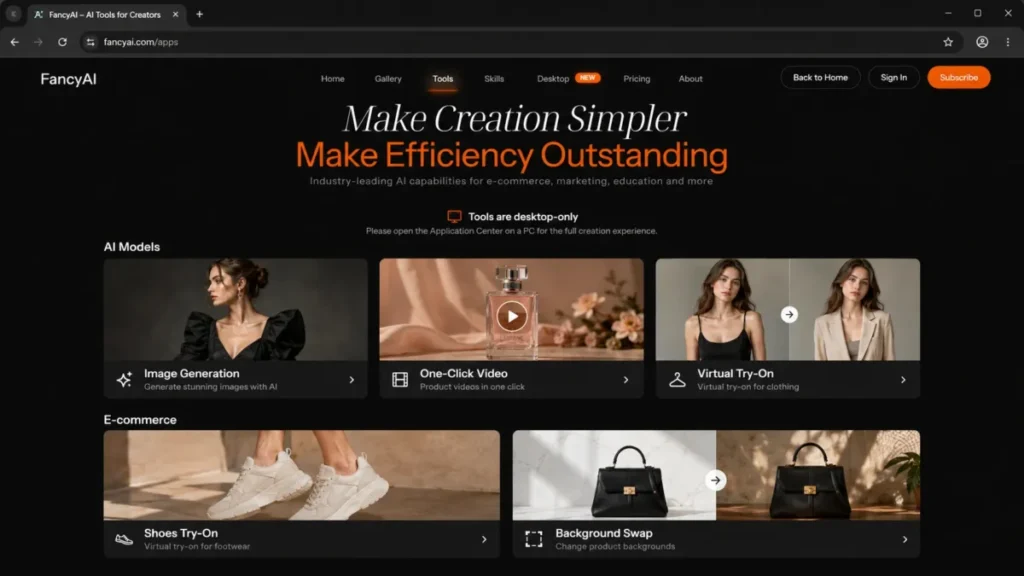
FancyAI is built to compress the cost and time of visual content production for commerce and marketing teams. Its tools page lists a wide stack: Image Generation, Text to Video, Image to Video, AI Video Studio, One-Click Video, Virtual Try-On, Shoes Try-On, Background Swap, Pattern Generator, Pattern Fusion, and Product Mockup.
That breadth is the real selling point for a small team that would otherwise juggle five separate subscriptions.
Product photography and background work
For an online seller, the practical win is turning a plain product shot into catalog-ready imagery. Background Swap and Product Mockup target exactly that job, and third-party directories describe FancyAI as useful for product backgrounds, background removal, and image enhancement, much like standalone AI photo editor tools.
The buyer impact is straightforward: if your bottleneck is a photographer and a studio day, an AI background and mockup workflow removes the biggest recurring cost. The number a vendor case study cites for one class of use case is a 90% lower shoot cost, though that figure is vendor-published and should be read as a marketing claim, not an independent benchmark.
Product video without a video team
One-Click Video and AI Video Studio aim at teams that need product clips for ads and listings but have no editor, and they compete with the broader field of best AI video generator tools. The AI Video Studio page describes motion control, presets, model choice, duration, and resolution settings, so there is real control rather than a single fixed template.
The limitation shows up in cost predictability, which I cover in the API section, because one-click video is charged by shot count.
Virtual try-on for apparel and footwear
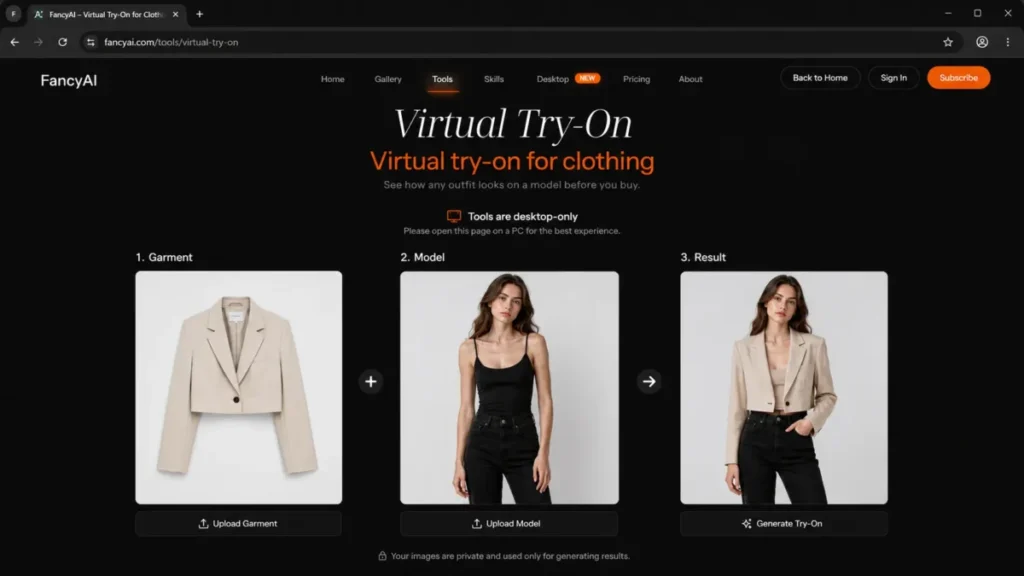
Clothing Virtual Try-On and Shoes Try-On are the sharpest differentiators for fashion and footwear sellers. Instead of booking a model shoot for every SKU, a team can generate on-model imagery from a garment or shoe photo.
For a fashion catalog with hundreds of SKUs, this is where FancyAI moves from “nice to have” to a budget line item, because model photography is the expensive part.
One platform, one asset hub
The open-platform page positions FancyAI as enterprise-native, with an asset hub, a content community, image and video generation, and specialized agents. For a team that wants generated assets, references, and reusable skills in one place, that consolidation reduces tool sprawl.
The stack fit works best when your creative operation is already centralized. If your assets live across Google Drive, a DAM, and three freelancers’ laptops, expect migration friction before the convenience pays off.
The Problems FancyAI Creates
A capable platform still carries real buying risk, and FancyAI’s risks cluster around transparency and control rather than raw capability. These are the issues the top search results skip.
The first problem is that you cannot fully price it from the outside. The second is that “using FancyAI” may mean installing a desktop app, not just opening a browser tab. Both belong in your evaluation before a trial, and both feed the Buyer Risk Ledger later in this review.
FancyAI Pricing: Plans and Credits
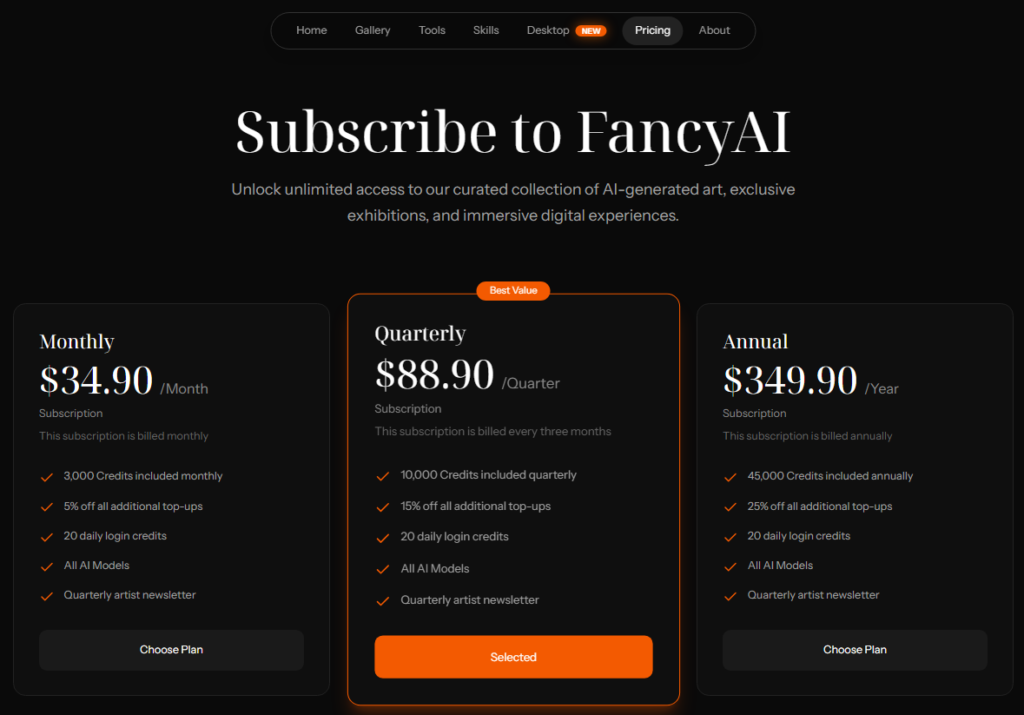
FancyAI sells three credit-based subscriptions rather than per-seat plans, and the numbers are public on the pricing page. As verified on July 10, 2026, the tiers are Monthly at $34.90, Quarterly at $88.90, and Annual at $349.90, each bundling a credit allowance and the same core features.
Every tier includes access to all AI models, 20 daily login credits, and a quarterly artist newsletter. The real differences are the included credit volume and the discount on additional top-up credits.
| Plan | Price | Included credits | Top-up discount | Best for |
|---|---|---|---|---|
| Monthly | $34.90/ | 3,000 per month | 5% | Trialing the platform or seasonal use |
| Quarterly | $88.90/ | 10,000 per quarter | 15% | Steady mid-volume production |
| Annual | $349.90/ | 45,000 per year | 25% | Committed, high-volume teams |
FancyAI badges the Quarterly plan as “Best Value,” but the math favors Annual for steady users. Annual bills $349.90 for 45,000 credits a year, while four quarterly renewals cost $355.60 for only 40,000 credits, so Annual delivers 5,000 more credits for less money and the largest top-up discount.
The budget pressure point is credit burn, not the sticker price. FancyAI does not publish how many credits each tool or model consumes, so a team generating videos or try-on images at volume can drain a 3,000-credit monthly bucket fast and pay for top-ups.
Start on Monthly at $34.90 to measure your real credit use per asset, then move to Annual once you know your monthly draw. Confirm current prices and per-tool credit costs in checkout, because published prices can change.
The pricing you will see elsewhere
A SourceForge alternatives page lists FancyAI starting at $1.99/week, which does not match the official subscriptions above. Treat that figure as outdated or app-store-style pricing, not the current rate.
The source hierarchy is simple: the fancyai.com pricing page and checkout are authoritative, and third-party directories come last. If a number disagrees with the official page, ignore it for your budget.
FancyAI Features and Tools, Mapped to the Job
FancyAI’s tools make more sense when you group them by the buyer job rather than by model type, since each one packages a different flavor of generative AI. The table below maps the main tools to who benefits and the caveat that matters.
| Tool | Best for | Buyer caveat |
|---|---|---|
| Image Generation | Marketing and social visuals | Credit cost per image not publicly listed |
| Text to Video / Image to Video | Ad and listing clips from prompts or stills | Output length and resolution controls sit in AI Video Studio |
| One-Click Video | Fast product videos | Charged by shot count, so cost scales with clip complexity |
| Virtual Try-On / Shoes Try-On | Fashion and footwear on-model imagery | Requires rights to model and garment images you upload |
| Background Swap | E-commerce product backgrounds | Full creation experience leans on the desktop app |
| Product Mockup / Pattern tools | Design studio and print workflows | Best-fit use cases are design-led, not sales-led |
The honest summary is that FancyAI is a production suite, not a single specialist tool. If you only need one job done, such as background removal, a focused competitor may be cheaper and simpler, which I cover in alternatives.
Browser vs Desktop: The Full-Creation Caveat
FancyAI is not a purely browser-based tool, and that surprises teams expecting a web app. The official apps page states the tools are desktop-oriented and asks users to open the Application Center on a PC for the full creation experience.
For a distributed team on mixed hardware, this is a real workflow constraint. A marketer on a locked-down laptop, a Chromebook, or a tablet may not get the full toolset, and that affects who on your team can actually produce assets.
Before you buy, confirm which tools run in the browser and which require the desktop install, because the answer decides whether FancyAI fits your team’s devices. If most creation happens on the desktop app, plan for installation permissions and IT review as part of onboarding.
FancyAI Desktop App and Enterprise Integrations
The desktop app is where FancyAI pitches itself beyond a creator tool, connecting local files and enterprise systems. The official desktop page describes workflows across CRM, ERP, DAM, ad platforms, and social channels, and it names Salesforce, HubSpot, ERP systems, a DAM library, Meta Ads, TikTok Ads, Instagram, Slack, Gmail, Google Drive, Notion, and Canva.
It also describes CRM-flavored use cases such as identifying churn-risk customers, drafting campaigns from purchase history, and automating recovery workflows. For a revenue team, that reads well on paper.
Here is the caution. I could not find public implementation docs for each connector, so it is not clear which of these are native, which are beta, and which are conceptual.
Broad connector lists are common in launch marketing and do not always mean production-ready, permission-scoped integrations.
Use this integration checklist in the demo before you trust the workflow:
| Question to ask | Why it matters |
|---|---|
| Is the connector native or a manual file bridge? | Determines real automation vs copy-paste |
| What OAuth scopes and admin permissions are required? | Drives your security review |
| Is sync one-way or two-way? | Affects data integrity in CRM and DAM |
| What is the export format and retention? | Impacts audit and rollback |
| Is there activity logging? | Needed for compliance and troubleshooting |
The stack-fit reality is that FancyAI’s desktop story is attractive for a marketing or revenue team already on Salesforce, HubSpot, and Meta or TikTok Ads. Just verify each named connector during a live demo rather than trusting the logo wall.
FancyAI API and Developer Access
FancyAI does offer an API, which sets it apart from the simple image editors it competes with. For teams unsure of what an API is, it is the programmatic access layer behind these tools.
The documentation at platform.fancyai.com confirms an API key flow, a production base URL, an OpenAI-style chat-completions example using a bearer API key, and a set of specialized skill endpoints.
The workflow patterns are legitimate for a platform team. The docs show streamed SSE responses for some skills, asynchronous generation tasks with a callback URL, polling by task number, and error states such as a 403 for insufficient balance.
Cost and limits are the gap. Two concrete signals do appear: one-click video tasks are charged by shot count, and at least one virtual try-on response example reports usage as a total-points value.
What I did not find in the crawled docs was a complete credit-cost table, rate limits, concurrency caps, or a published SLA.
Before you build on FancyAI, get written answers to this developer checklist:
| Developer question | Why it blocks integration |
|---|---|
| Credit cost per skill and per model | Cannot forecast unit economics without it |
| Rate limits and concurrency caps | Determines whether batch jobs are viable |
| Callback retry and failure behavior | Affects reliability of async video and try-on |
| Data retention for uploads and outputs | Compliance and privacy requirement |
| Model availability guarantees | The agreement warns providers can change |
For a developer, FancyAI is buildable but not yet forecastable from public docs. Treat the 403 insufficient-balance error as your reminder that credit economics, not code, will be the real constraint.
Security, Privacy, and Commercial-Use Terms
FancyAI’s legal terms matter more here than for a typical CRM, because commerce teams upload people, products, and unreleased assets. The user agreement and privacy policy, dated March 25, 2026, are the main public trust documents I could find; I did not find a public trust center, SOC 2, ISO, HIPAA, DPA, or SSO/SCIM documentation.
Three terms deserve a plain-English callout for any brand.
First, you own the review-and-clearance burden on generated content. The user agreement states that users must independently review, verify, edit, and judge AI-generated content and bear the legal and commercial risk of displaying, distributing, commercializing, or training on it. AI speed does not remove your rights-clearance, brand-approval, and compliance steps.
Second, uploads can be sensitive by nature. The privacy policy says content-generation services may collect prompts, uploaded images, audio, video, documents, selected models and parameters, generated results, and export records, and it puts the duty on you to hold lawful authorization for faces, voices, portraits, trade secrets, and other sensitive material.
Third, your content carries a service license. The agreement grants FancyAI a necessary license to use your content to provide services and permits de-identified, anonymized, or aggregated use of usage, log, and generation-effect data for security, product optimization, and model-performance evaluation.
Two more facts round out the risk picture. Some services may rely on third-party models, cloud, payment, or login providers, and FancyAI does not guarantee any specific model or provider stays continuously available.
The contracting entity is based in Nanjing and the agreement is governed by the law of the People’s Republic of China, which enterprise procurement and legal teams will want to weigh for US contracts.
Before uploading anything, set an internal rule for faces, voices, unreleased SKUs, customer photos, and trade secrets. For regulated brands, request the security and data-processing documentation directly, because the public pages do not provide it.
FancyAI Pros and Cons
| Pros | Cons |
|---|---|
| Broad creative stack (image, video, one-click product video, clothing and shoes try-on) in one platform | Full plan cards, credit allocations, and per-tool costs are not readable on the public pricing page |
| Virtual try-on and shoes try-on target a real fashion and footwear cost center | Full creation experience leans on a desktop app, limiting browser-only and mixed-device teams |
| Open API with key flow, skill endpoints, async callbacks, and OpenAI-style chat example | API rate limits, concurrency, SLA, and a full credit-cost table are not publicly documented |
| Desktop app claims CRM, ERP, DAM, and ad-platform connectors for revenue workflows | Connector maturity is unverified; named integrations may be native, beta, or conceptual |
| Enterprise-native positioning with asset hub, content community, and reusable agents | Users bear full legal and commercial responsibility for generated content and uploaded assets |
| Public user agreement and privacy policy dated March 25, 2026 | No public SOC 2, ISO, DPA, or trust center, and no reliable third-party review profile found |
The pros describe a genuinely capable production platform. The cons are almost entirely about what you cannot verify from the outside, which is exactly why a hands-on trial and a security-doc request should precede any annual commitment.
FancyAI Limitations
Beyond the pros and cons, five limitations deserve standalone attention because each can change a buying decision.
Credit-cost opacity is first. Plan prices are public at $34.90, $88.90, and $349.90, but FancyAI does not publish credit consumption per tool, so a video-heavy or try-on-heavy team cannot model total cost until it measures usage in-app.
Desktop dependency is second. If full creation runs through the PC Application Center, teams on tablets, Chromebooks, or locked-down machines lose access to the complete toolset.
API unpredictability is third. Without public rate limits, concurrency caps, and a per-skill credit table, a platform team cannot forecast cost or reliability, and the 403 insufficient-balance error confirms that credit exhaustion will halt jobs.
Third-party model dependence is fourth. Because some capabilities rely on outside providers that FancyAI does not guarantee to keep available, output consistency and model choice can shift under a repeatable campaign.
Evidence thinness is fifth. With no verified G2, Capterra, or TrustRadius profile and no public security certifications found, enterprise buyers are relying on vendor claims until they run their own trial and request documentation.
Who Should Use FancyAI
FancyAI fits several specific teams well, and the fit is strongest where visual production is the recurring bottleneck.
Small e-commerce and retail teams producing product visuals at volume are the core audience, because Background Swap, Product Mockup, and try-on tools attack their biggest cost. A 2 to 10 person store replacing recurring studio days is the clearest win.
Fashion and footwear sellers with large SKU counts benefit most from clothing and shoes try-on, since model photography is the expensive line item they can partly replace.
Marketing teams that need product videos without a video editor get value from One-Click Video and AI Video Studio, provided they accept shot-count-based costs and still compare it against general AI tools for content creation.
Platform and revenue teams already on Salesforce, HubSpot, and Meta or TikTok Ads are worth a demo, because the desktop connectors could automate campaign asset production if the integrations prove native.
Who Should Avoid FancyAI
Some buyers should look elsewhere, and being honest about that protects your budget.
Browser-only and mixed-device teams should be cautious, because a desktop-first creation model may exclude part of your staff.
Buyers who require transparent unit economics before purchase will be frustrated, since credit costs and API pricing are not fully public.
Regulated or enterprise-procurement-heavy organizations that need SOC 2, ISO, a DPA, or SSO/SCIM before a trial will not find that documentation on the public site, and PRC governing law adds a review step for US contracts.
Teams that only need one simple job, such as background removal from a browser, will get faster value and clearer pricing from a focused single-purpose tool.
FancyAI Alternatives
FancyAI competes across several jobs, so the right alternative depends on the specific workflow you are replacing rather than a single ranking. The table maps the best substitute to each job.
| Alternative | Better for | Why choose it instead |
|---|---|---|
| PhotoRoom | Product photos and background removal | Fast, mobile-friendly background and studio shots with clearer pricing |
| Pebblely | E-commerce product scenes | Simple product-in-scene generation focused on sellers |
| Fashn AI | Fashion virtual try-on | Specialist on-model apparel try-on rather than a broad suite |
| Runway | Generative and image-to-video | Deeper video model control for creative and ad teams |
| Canva | Template-driven marketing teams | Familiar editor with design templates and broad collaboration |
| Cutout.Pro | Simple background and cutout jobs | Lightweight browser workflow for quick removals and edits |
Choose PhotoRoom or Pebblely if product photography is your only real need and you want transparent pricing today. Choose Fashn AI if apparel try-on is the whole reason you are looking, and choose Runway if generative video quality matters more than an all-in-one stack.
If your team is template-first and collaborative, the Canva AI review covers the easier adoption path.
For the simplest background jobs without a desktop install, the Cutout.Pro review covers a lighter option.
Final Verdict: Is FancyAI Worth It?
The bottom line of this FancyAI review is a split decision by team. FancyAI is worth a trial for e-commerce, retail, and fashion teams producing product visuals, videos, and virtual try-on at volume, but it is a poor fit for browser-only staff and for teams that need transparent pricing, verified reviews, or public security documentation before they will run a tool.
My buying recommendation splits by team. Choose FancyAI’s creative platform if your bottleneck is visual production cost and your team can use a desktop app, but start on Monthly at $34.90 to learn your credit burn, confirm commercial rights in checkout, and request security docs before the $349.90 annual deal.
Choose a focused alternative if you only need one job done and want clearer pricing today, such as PhotoRoom for product photos, Fashn AI for try-on, or the Runway review pick for generative video.
The Buyer Risk Ledger for FancyAI is short but real: pricing you cannot fully verify online, a desktop-first workflow, unverified enterprise connectors, and legal terms that keep content responsibility with you. None of those are disqualifying for the right buyer, but all four belong in your evaluation before renewal, not after.
FAQ – FancyAI review
What is FancyAI used for?
FancyAI at fancyai.com is a creative AI platform for making product visuals, marketing content, and videos. Its tools include image generation, text-to-video and image-to-video, one-click product video, clothing and shoes virtual try-on, background swap, and product mockups. It targets e-commerce sellers, retailers, marketers, and creative teams that need visual content at volume.
How much does FancyAI cost?
As verified on July 10, 2026, FancyAI costs $34.90/month for 3,000 credits, $88.90/quarter for 10,000 credits, or $349.90/year for 45,000 credits. Every tier includes all AI models and 20 daily login credits. Annual is the lowest cost per credit. Per-tool credit costs are not published, so confirm your real usage in-app, and treat third-party “$1.99/week” listings as outdated.
Is FancyAI an AI image generator or a GEO platform?
FancyAI at fancyai.com is an AI image, video, and product-visual generator. A separate product at getfancy.ai is a GEO and AI-visibility platform. They share a similar name but are different companies with different pricing and features, so confirm you are on fancyai.com before comparing anything for this decision.
Does FancyAI have a desktop app?
Yes. FancyAI’s official apps page states that tools are desktop-oriented and directs users to open the Application Center on a PC for the full creation experience. The desktop app also connects local files and enterprise systems. Browser-only or mixed-device teams should confirm which tools run in a browser before buying, since the full toolset may require the desktop install.
Does FancyAI offer an API?
Yes. FancyAI’s documentation at platform.fancyai.com confirms an API key flow, a production base URL, an OpenAI-style chat-completions example, and specialized skill endpoints with streamed responses, async tasks, and callbacks. However, public docs did not expose complete rate limits, concurrency caps, a per-skill credit-cost table, or an SLA, so confirm those directly before building.
Can FancyAI create product videos?
Yes. FancyAI offers One-Click Video and an AI Video Studio with motion control, presets, model choice, duration, and resolution settings, plus text-to-video and image-to-video tools. In the API, one-click video tasks are charged by shot count, so cost scales with clip complexity. Confirm credit costs before producing videos at volume.
Can FancyAI do virtual try-on?
Yes. FancyAI provides Clothing Virtual Try-On and a dedicated Shoes Try-On tool for generating on-model imagery from garment or footwear photos. This is a strong fit for fashion and footwear sellers replacing some model shoots. You must hold lawful rights to any model, face, or product images you upload, per FancyAI’s privacy policy.
What are the best FancyAI alternatives?
The best alternative depends on the job. PhotoRoom and Pebblely suit product photos, Fashn AI specializes in fashion try-on, Runway is stronger for generative video, Canva fits template-driven marketing teams, and Cutout.Pro covers simple background jobs. The Pic Copilot review covers another e-commerce visual option worth comparing for product imagery.
Is FancyAI good for e-commerce brands?
Yes, if your bottleneck is producing product visuals, videos, and on-model try-on imagery at volume. FancyAI consolidates those jobs in one platform, which can cut studio and shoot costs. No, if you need transparent credit pricing, browser-only access, or public security certifications before committing, because those are not fully available today.
Does FancyAI integrate with CRM or ERP systems?
FancyAI’s desktop page lists connectors for CRM, ERP, and DAM systems, naming Salesforce, HubSpot, ERP systems, Meta Ads, TikTok Ads, and others. Public implementation docs for each connector were not found during research, so it is unclear which are native, beta, or conceptual. Verify each named integration and its permissions during a live demo before relying on it.