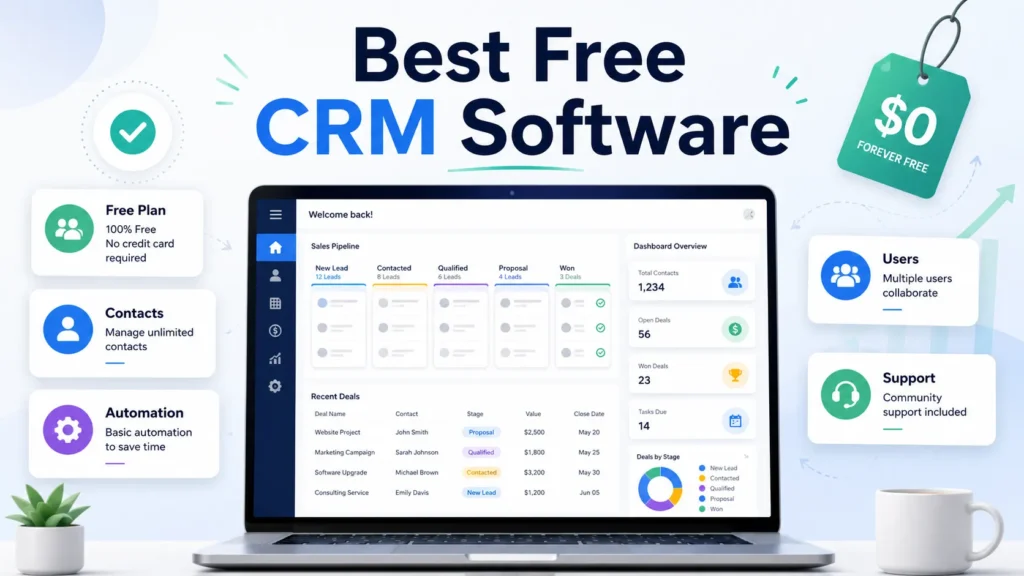
The word “free” hides the decision that actually matters: which plan runs out first for your team, your contacts, or your automation. Most free CRM lists rank tools without telling you when the free plan stops working, so buyers import their data and hit a wall in month two.
This guide ranks 10 CRM tools with a permanent free plan, then shows the exact ceiling that forces an upgrade on each one. If you want the wider CRM software roundup across paid tiers too, that hub covers it, but here the filter is strict: no free trials, no paid-only products dressed up as free.
For most one-to-two person teams, HubSpot CRM is the safest free starting point because its 1,000-contact free tier has no time limit. A three-person sales pod is better served by Zoho CRM, and a solo founder who wants less complexity should look at Bigin by Zoho. If you are new to the category, our explainer on what CRM software actually does is worth two minutes before you shortlist.
I read these free plans the way a buyer reads a contract. The job is not to celebrate that a tool is free. The job is to find what changes after you add seats, import contacts, connect tools, and ask a teammate to keep the data clean.
In This Article (16 sections)
Best Free CRM Software by Use Case
Here is the fast answer before the deep analysis. Each pick maps to a concrete team profile, not a generic “small business” label.
| Use case | Best free CRM | Why it fits |
|---|---|---|
| Best overall free CRM | HubSpot CRM | 1,000-contact free tier with no expiry and a clean upgrade path |
| Best for a 3-person sales team | Zoho CRM | Free forever for 3 users with workflow automation and API access |
| Best for teams that call leads | Freshsales | Free built-in phone and live chat for up to 3 users |
| Best all-in-one free workspace | Bitrix24 | CRM plus tasks, chat, and video on one free account |
| Best free CRM with marketing and support | EngageBay | Email marketing, helpdesk, and live chat free for 15 users |
| Best for more users and records | Vtiger One | Free plan allows 10 users and 3,000 records |
| Best for solo founders | Bigin by Zoho | Single-user free plan with a pipeline, phone, and 500 records |
| Best for email-driven outreach | Agile CRM | Free for 10 users with 5,000 branded emails |
| Best for simple relationship tracking | Capsule CRM | Clean 2-user free plan with 250 contacts and one pipeline |
| Best for client work and invoicing | Flowlu | Free CRM with invoices, estimates, tasks, and projects |
The pattern to notice: the “best” free CRM is decided by which limit you hit first, not by feature count. A 15-user marketing team and a solo consultant should not pick the same tool, and the sections below explain exactly why.
What Counts as a Free CRM in This Guide
A tool earns a place here only if it has a permanent no-cost CRM plan. A 14-day trial does not count, and neither does a free tier that removes core CRM features the moment the trial ends.
This rule matters because several high-authority lists mix free plans with free trials. Forbes Advisor, TechRadar, and Zendesk all publish 2026 free CRM pages, and each one blends permanent free plans with trial-only or paid-entry products in the same ranking.
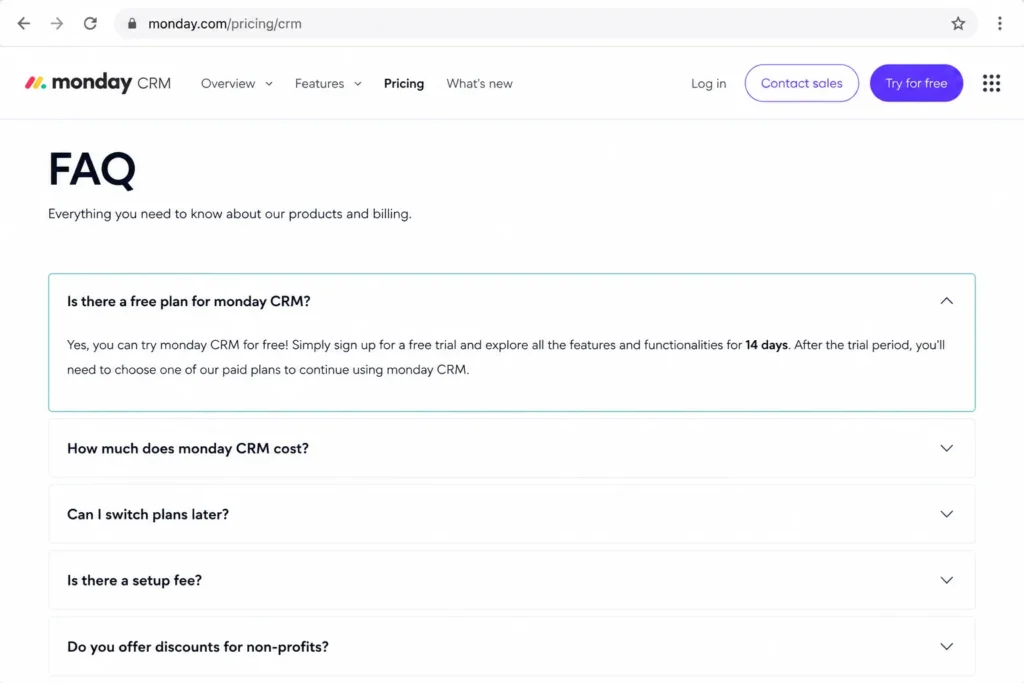
The clearest example is monday CRM. Its own pricing FAQ states that the free way to use monday CRM is a 14-day trial, after which a paid monday sales CRM plan is required, and monday’s blog confirms there is no free forever plan.
I excluded every product where the official page did not confirm a permanent free CRM plan. You will find those names, and the evidence, in the excluded-products section later so you do not waste an afternoon importing contacts into a tool that will lock them behind a paywall.
How We Chose and Ranked These Free CRMs
We evaluated these tools based on a detailed analysis of official pricing pages, product documentation, feature specifications, and public review-source patterns from G2, Capterra, and TechRadar. Pricing and plan limits were checked on July 6, 2026. No hands-on testing was performed, so this guide uses official plan data and documentation rather than first-person usage claims.
Ranking weighed permanent free-plan availability first, then free-plan depth: user caps, contact or record ceilings, automation, API access, support channels, telephony, mobile, and the cost of the first paid upgrade. We did not rank tools by brand popularity or affiliate payout.
Rankings favor the free plan a real team can run without immediately paying. A tool with a generous free tier but a punishing first upgrade can still rank well, as long as the article names the breakpoint clearly.
One limitation is worth stating up front. Several vendor pricing pages localize prices by currency or region, so paid-plan figures below reflect the official USD view checked on the date above, and you should confirm current pricing before you buy.
Best Free CRM Software Compared: The Free-Plan Truth Table
Most lists say “free plan” and stop there. This table puts the user cap, contact or record ceiling, storage, automation access, free support, and first upgrade trigger for all 10 tools in one place.
| CRM | Free users | Contacts / records cap | Free automation | Free support | First upgrade trigger |
|---|---|---|---|---|---|
| HubSpot CRM | Multiple users | 1,000 contacts | Limited free tools | Community and self-service | Beyond 1,000 contacts or paid hub features |
| Zoho CRM | 3 users | Standard CRM records | Workflow automation | Standard support tier | 4th user or advanced editions |
| Freshsales | 3 users | Contact records | None on free | 24×5 support | Any workflow automation |
| Bitrix24 | 1 to 2 users | CRM deals and contacts | Basic only | Self-service | 3rd user, telephony, or sales automation |
| EngageBay | 15 users | 250 contacts | Basic | Standard | 251st contact or advanced marketing |
| Vtiger One | 10 users | 3,000 records | Limited | Standard | 3,001st record or paid modules |
| Bigin by Zoho | 1 user | 500 records | 3 automations | Standard | 2nd user or 501st record |
| Agile CRM | 10 users | 1,000 contacts and companies | 1 workflow, 1 trigger | 24×5 channels | 1,001st contact or more automation |
| Capsule CRM | 2 users | 250 contacts | None | Self-service | 3rd user or 251st contact |
| Flowlu | 2 users | 100 contacts | 1 task workflow | Help center and AI bot | 3rd user or 101st contact |
Read this table by finding your first blocker. If you have three sales reps, Zoho CRM and Freshsales survive the user test while Bigin and Capsule do not, and if you have 800 contacts today, HubSpot and Agile give you runway that Flowlu’s 100-contact cap cannot.
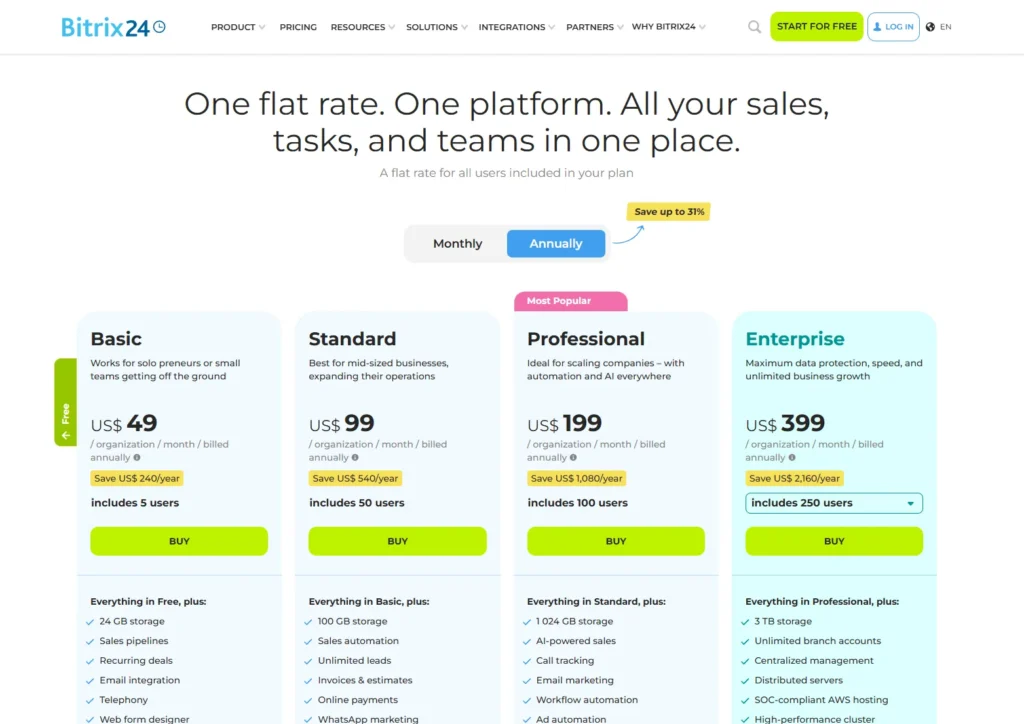
One caution on Bitrix24: its FAQ has described the free account as supporting unlimited users, while the current pricing table shows the free plan for 1 to 2 users with 5 GB storage. Bitrix24 has changed its free-plan user limit before, so I treat the visible pricing table as the current limit and recommend rechecking it before you commit a larger team.
Contacts, Records, and Storage Are Not the Same Limit
Before the product breakdowns, one distinction saves buyers from a nasty surprise. A “500-record” limit and a “500-contact” limit are not the same thing, and treating them as equal is how teams outgrow a free plan far faster than they expected.
A contact cap counts people. HubSpot’s free tier allows 1,000 contacts, and Capsule allows 250 contacts, so the number you track is the number of people in your database.
A record cap is broader. Bigin’s free plan allows 500 records across modules, which can include contacts, companies, deals, products, and activities, so 500 records may represent far fewer than 500 customers once pipelines and notes are counted.
Vtiger’s 3,000-record free ceiling looks generous next to Bigin’s 500, but the same rule applies: records fill up from every module, not just your contact list. When you compare free plans, convert every limit into “how many customers can I actually manage” before you decide.
Storage is the quieter third limit. Bitrix24’s free plan lists 5 GB, which matters most if your team attaches files, proposals, or call recordings to deals, and a file-heavy sales process can hit a storage wall before it hits a contact wall.
The 10 Best Free CRM Software Tools in 2026
Products appear in ranked order. Only the top pick carries the Best Overall label, and every card names who should choose it, who should avoid it, and what forces the first payment.
1. HubSpot CRM: Best Overall Free CRM
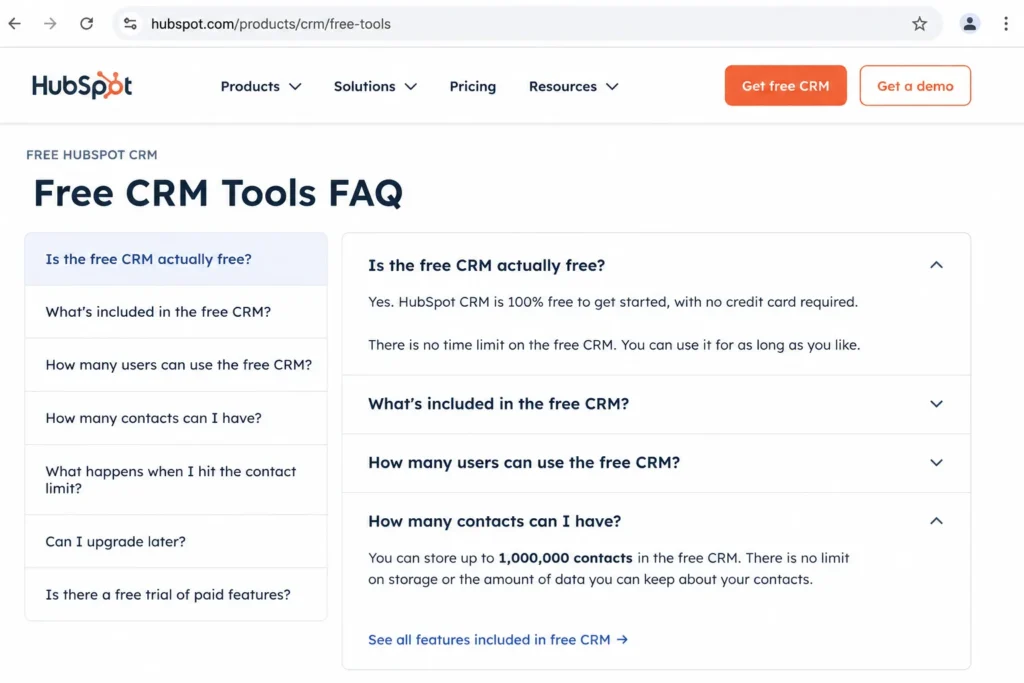
HubSpot CRM is the strongest free option for a one-to-two person inbound team that wants contact management, deal tracking, forms, and email connection with room to grow later. Its free tools have no time limit, which is the first thing that separates it from trial-based competitors.
- Starting price:
- $0 for the free tools. Official pricing page
The free plan allows up to 1,000 contacts and connects to Gmail, Google Workspace, and most versions of Outlook. That contact ceiling is generous for a new pipeline, but it is also the exact line where budgeting starts, because crossing it pushes you toward paid tiers.
What it does well is breadth without forcing a purchase on day one. You get a shared contact database, deal and task tracking, live chat, and lead-capture forms across sales, marketing, and service tools, all as free-tier versions of the paid products.
Where it falls short is depth. The free tools are lite versions, advanced automation and reporting sit behind paid hubs, and costs can climb once you add multiple hubs, seats, or contacts beyond the free cap. The full picture is in our HubSpot CRM review.
- Best for:
- solo founders and two-person teams that expect to add marketing or service tools later.
- Avoid if:
- you will pass 1,000 contacts within a quarter or need real automation now, because the free plan will force a paid hub sooner than the entry price suggests.
- Setup difficulty:
- Low to Medium. Onboarding is guided, but the size of the ecosystem means it takes a session to decide which free tools you actually turn on.
Upgrade when: your contact count nears 1,000, or automation and reporting become daily needs.
Verdict: choose HubSpot CRM if you want the safest free start with the clearest paid runway, and watch the contact counter closely.
2. Zoho CRM: Best Free CRM for a 3-Person Sales Team
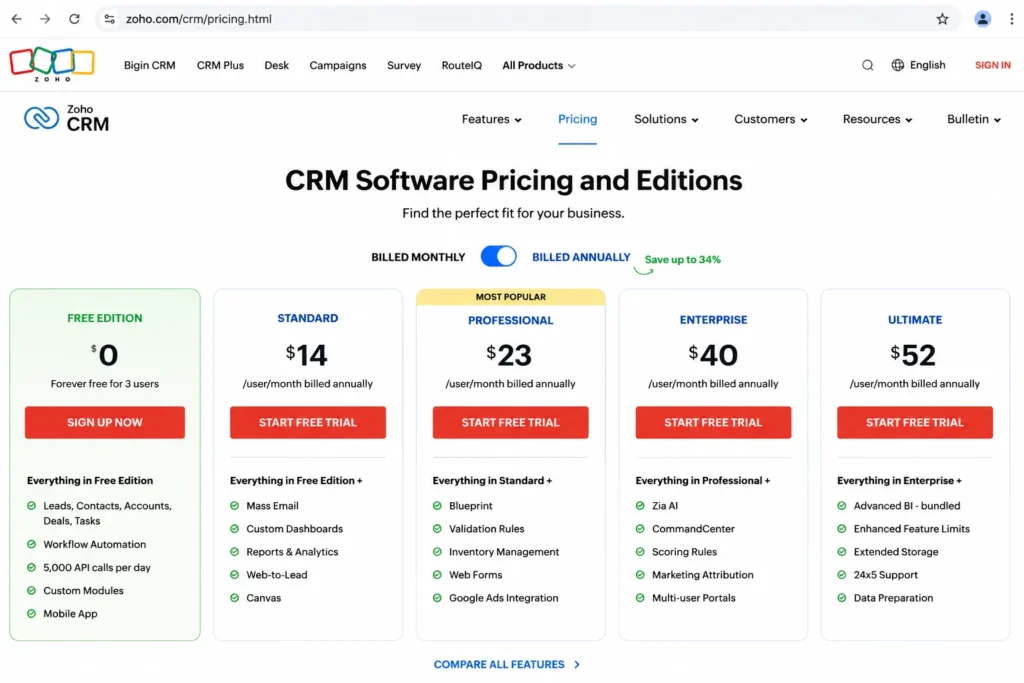
Zoho CRM’s Free Edition is free forever for 3 users, which makes it the natural pick for a small sales pod that has outgrown a spreadsheet but is not ready to pay. It is the rare free plan that includes workflow automation and developer access.
- Starting price:
- $0 for the Free Edition. Official pricing page
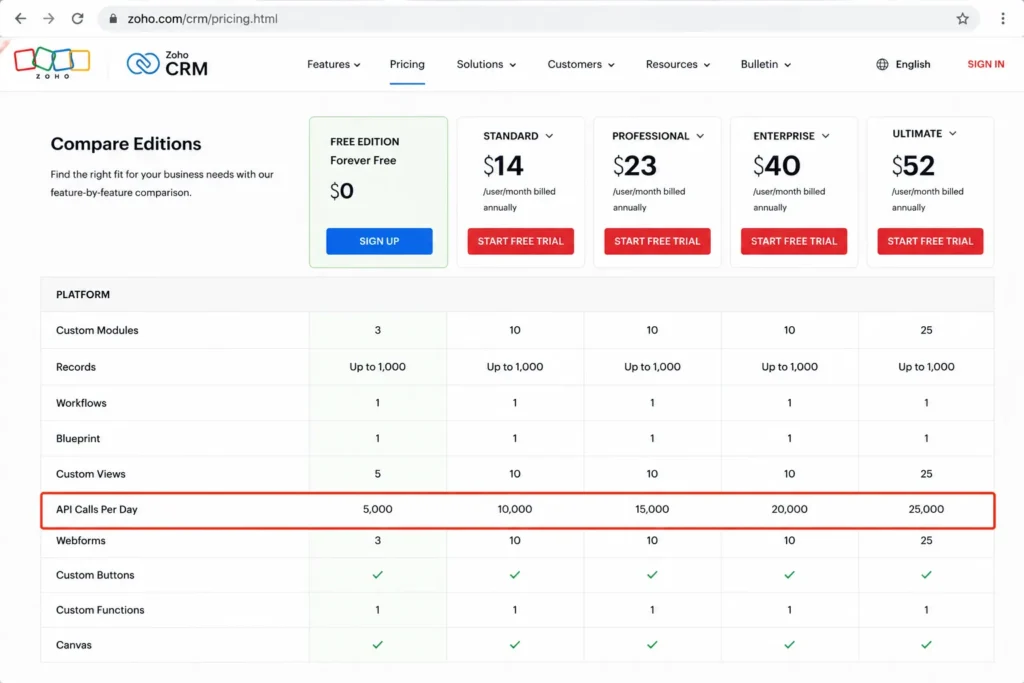
The free plan covers contact management, follow-up reminders, workflow automation, custom email templates, tasks, meetings, calls, data import and export, and standard reports. It also includes 5,000 API calls per day and mobile apps, which is more developer headroom than most free tiers offer.
What it does well is give three people a real CRM rather than a stripped demo. Automation on the free plan means you can route follow-ups without upgrading, and the API allowance supports basic web-to-lead and integration work.
Where it falls short is scale and integration breadth. Advanced AI, process management, predictive intelligence, unlimited reports, approval flows, and many third-party integrations require paid editions, and the feature comparison confirms several connectors are edition-gated. See the full Zoho CRM review for the paid-tier detail.
- Best for:
- three-person sales teams, especially those already using other Zoho apps.
- Avoid if:
- you have four or more users, or you need deep dashboards and broad integrations without paying, because the 3-user cap and edition gates will block you early.
- Setup difficulty:
- Medium. The feature depth that makes Zoho capable also means more fields, modules, and settings to configure before it feels tidy.
Upgrade when: you add a fourth user, or you need advanced automation, AI, or reporting.
Verdict: choose Zoho CRM if your team is exactly three people and you want automation and API access included for free.
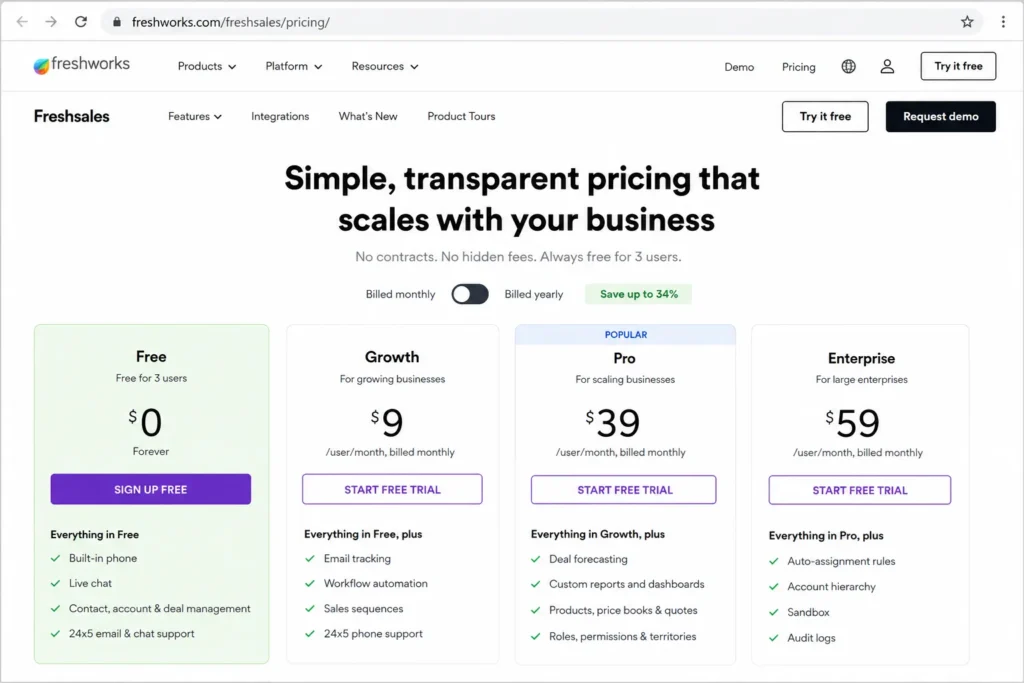
3. Freshsales: Best Free CRM for Small Teams That Call Leads
Freshsales offers a free plan for up to 3 users with a built-in phone, which makes it the strongest free pick for a tiny team that works the phones. The interface is modern, and the free tier keeps calling and chat rather than gating them.
- Starting price:
- $0 for up to 3 users; Growth starts at $9 per user per month per the official pricing checked July 6, 2026. Official pricing page
The free plan includes Kanban views, customer data management, email templates, built-in phone, live chat, and 24×5 support with no credit card required. For a small outbound team, free calling is the standout, because most free CRMs treat telephony as a paid feature.
What it does well is pair a clean UI with real contact and follow-up tools for a three-person team. The 24×5 support on a free plan is unusual and lowers adoption risk for a first-time CRM buyer.
Where it falls short is automation. The free plan is built for manual CRM work, so workflow automation and deeper customization require a paid move to Growth or higher. Our Freshsales evaluation covers where the paid tiers add value.
- Best for:
- up to three sales users who call and email leads and value a polished interface.
- Avoid if:
- you need workflow automation on the free plan, because Freshsales reserves it for paid tiers.
- Setup difficulty:
- Low. A three-person team can be tracking deals the same day, since there is little to configure before the pipeline is usable.
Upgrade when: you need automation, more users, or AI features; a 10-user Growth plan lands near $90 per month at $9 per user.
Verdict: choose Freshsales if your small team lives on calls and email and can wait on automation.
4. Bitrix24: Best Free CRM for Collaboration and Flat-Rate Scaling
Bitrix24 gives a small, tech-comfortable team one free workspace for CRM, tasks, chat, and video instead of separate tools. That breadth is its edge and its risk.
- Starting price:
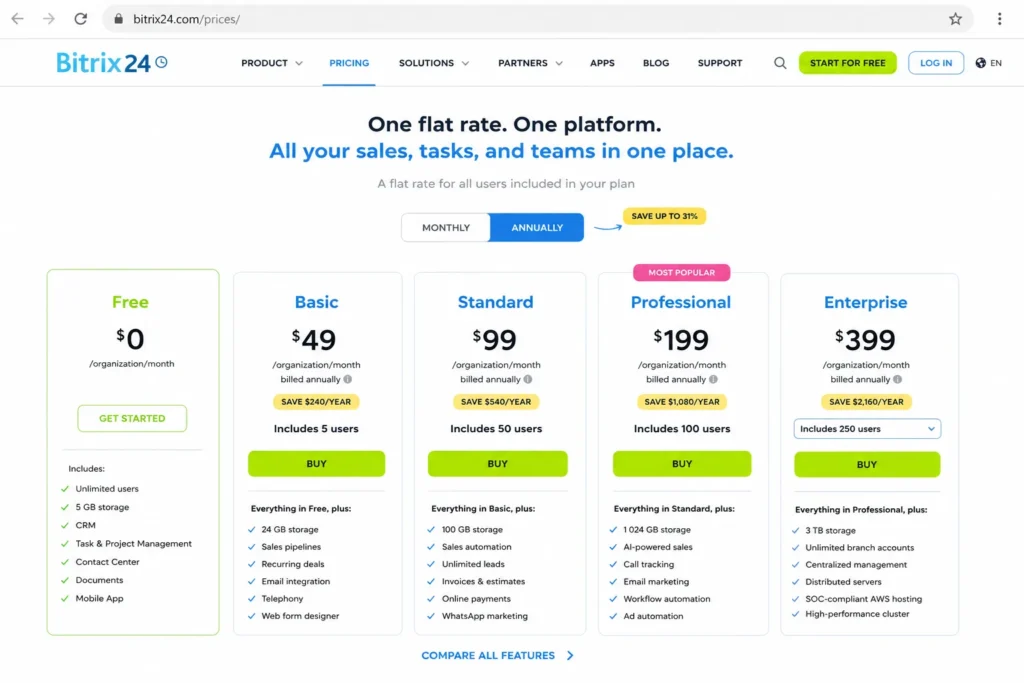
- $0 free plan; Basic is US$49 per organization per month billed annually or US$69 billed monthly. Official pricing page
The free plan includes basic CRM for deals and contacts, tasks with Kanban and Gantt views, shared calendars, chat, video calls, and 5 GB of storage. Paid plans move to flat organization pricing rather than per-seat billing, so Standard is US$99 annually or US$144 monthly, and Professional is US$199 annually or US$289 monthly.
What it does well is replace a stack of free tools with one account. For a founder who wants CRM plus internal collaboration without stitching apps together, the free workspace is unusually complete.
Where it falls short is complexity and gated CRM features. Telephony and Bitrix24 Market apps require paid plans, sales automation and reporting sit in higher tiers, and the sheer number of modules creates a learning curve that can slow adoption. The Bitrix24 CRM review digs into that tradeoff.
- Best for:
- solo founders or small teams that want CRM plus tasks, chat, and video on one free account.
- Avoid if:
- you want a simple, minimal sales CRM or need free telephony, because Bitrix24’s breadth and paid telephony gate will frustrate you.
- Setup difficulty:
- High. The platform does a lot, and configuring only the CRM without drowning in the rest takes deliberate effort.
Upgrade when: you add a third user, or you need telephony, sales automation, or Market apps; flat-rate Basic at US$49 per organization can be cheaper than per-seat rivals for a 5-person team.
Verdict: choose Bitrix24 if you want one free workspace and your team can absorb the learning curve.
5. EngageBay: Best Free CRM for Marketing, Support, and Live Chat
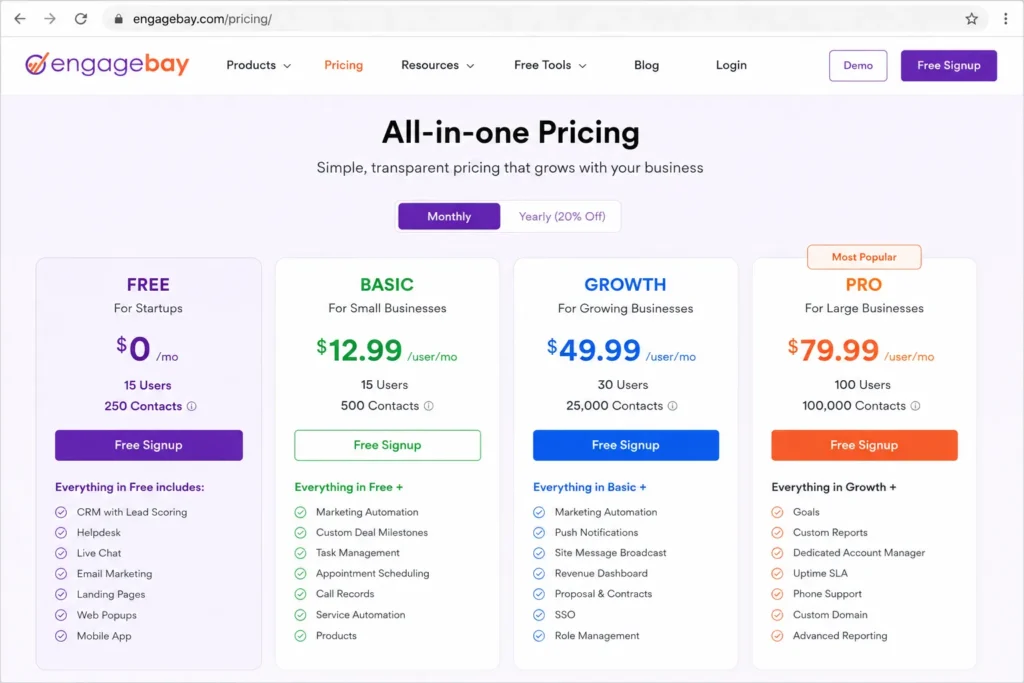
EngageBay’s free plan is built for 15 users and bundles CRM with marketing and support tools, which makes it the pick for an early marketing-led team. The catch is the contact ceiling, and it is low.
- Starting price:
- $0 per user per month for up to 15 users; Basic all-in-one is $14.99 per user per month monthly or from $12.74 with the yearly discount. Official pricing page
The free plan includes 250 contacts, email marketing, autoresponders, email broadcasts, sequences, lead grabbers, landing pages, CRM, helpdesk, and live chat with no credit card. Few free CRMs include a helpdesk and live chat alongside marketing tools, which is EngageBay’s real differentiator.
What it does well is give a small startup sales, marketing, and support in one free account for a larger headcount than most rivals allow. Fifteen free users is well above the 1-to-3 user caps common elsewhere.
Where it falls short is the 250-contact limit. For a lead-generation team, 250 contacts is a few weeks of list growth, and advanced automation, A/B testing, and higher contact limits require paid tiers.
- Best for:
- marketing-led startups up to 15 users that need CRM, email marketing, and support before paying.
- Avoid if:
- you already track more than 250 contacts, because active outreach will breach the free cap quickly and push you to Basic.
- Setup difficulty:
- Medium. The module breadth means more to switch on and organize than a sales-only CRM, though each module is approachable.
Upgrade when: you cross 250 contacts or need advanced marketing automation; a 10-user Basic plan lands near $127 per month at the $12.74 yearly rate.
Verdict: choose EngageBay if you need marketing and support with your free CRM and can live within 250 contacts at first.
6. Vtiger One: Best Free CRM for More Users and Records
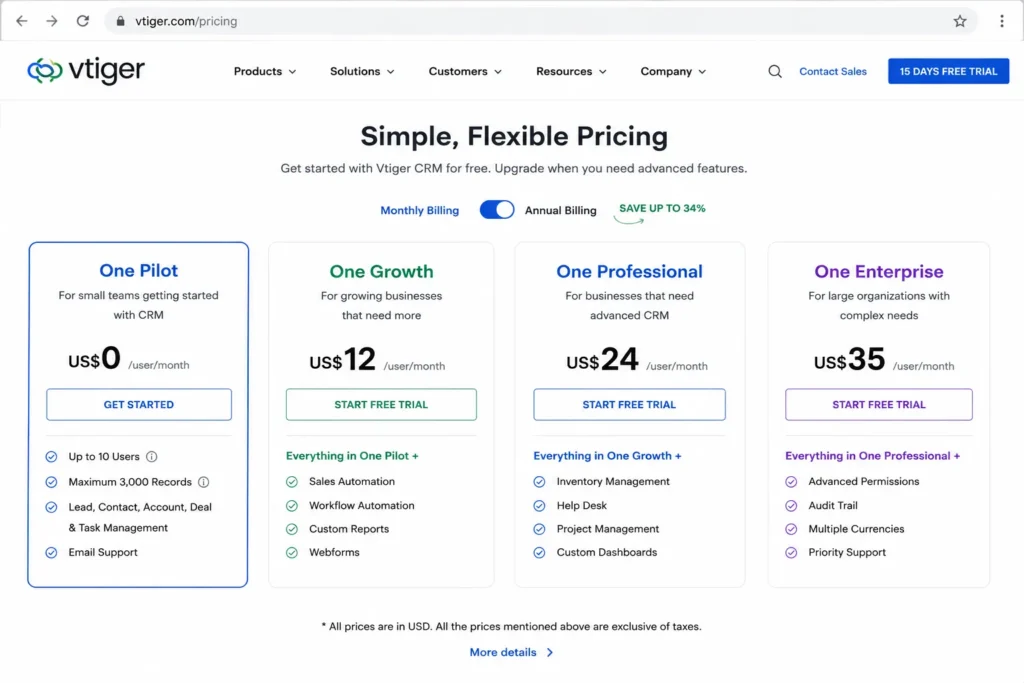
Vtiger’s One Pilot free plan allows 10 users and 3,000 records, which is more room than most SMB-focused free CRMs give on either axis. That headroom is the reason to shortlist it.
- Starting price:
- One Pilot at US$0 per user, capped at 10 users and 3,000 records; One Growth is shown at US$30 per user per month billed annually. Official pricing page
The free plan covers leads, contacts, and organizations, plus One View, idle alerts, duplicate prevention, profile scoring, and AI features listed on the pricing page. The combination of 10 free users and 3,000 records suits a small team importing existing CRM data.
What it does well is scale on two limits at once. A team that is both people-heavy and record-heavy will outgrow HubSpot’s contact cap or Bigin’s record cap long before it outgrows Vtiger’s free allowance.
Where it falls short is the ceiling that still exists. Three thousand records fills faster than it sounds once multiple modules are active, and higher record volumes, deeper automation, and broader modules require paid Vtiger editions.
- Best for:
- small teams up to 10 users that want more free record room than typical SMB CRMs allow.
- Avoid if:
- you need unlimited records or full automation without paying, because the 3,000-record cap and paid modules will bind.
- Setup difficulty:
- Medium. Vtiger has enough modules that a clean setup needs a plan for which objects and fields you will use.
Upgrade when: you approach 3,000 records or need advanced modules; a 10-user One Growth plan is roughly US$300 per month at $30 per user annually.
Verdict: choose Vtiger One if your free CRM has to hold more users and records than the usual SMB caps allow.
7. Bigin by Zoho CRM: Best Free CRM for Solo Founders
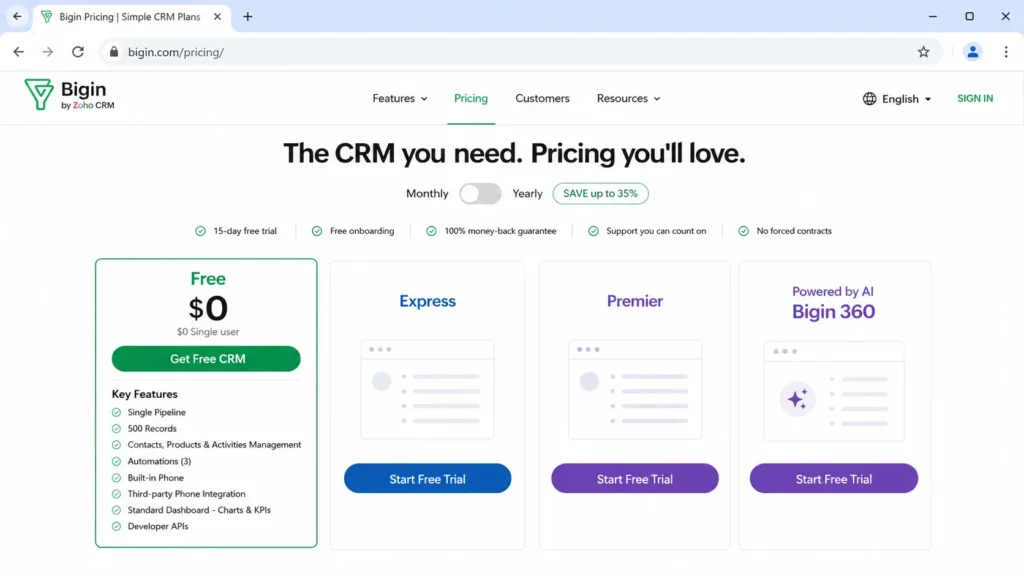
Bigin’s free plan is a single-user pipeline CRM with 500 records and built-in phone, which makes it the cleanest starting point for a one-person business. It trades breadth for simplicity on purpose.
- Starting price:
- $0 for a single user; paid Express and higher tiers use per-user pricing. Official pricing page
The free plan includes a single pipeline, 500 records, contacts, products and activities management, 3 automations, built-in phone, a standard dashboard, and developer APIs. For a solo operator, that is a genuine pipeline tool, not a demo, and the built-in phone is a bonus.
What it does well is stay out of your way. Bigin is the least complex option in the Zoho family, so a freelancer or independent consultant can run a pipeline without the setup burden of full Zoho CRM.
Where it falls short is the moment you grow. The free plan allows only one user and 500 records, and Express or Premier are required to remove the user limit and raise records to 50,000 or 100,000, add team pipelines, and expand automation and dashboards.
- Best for:
- solo founders and freelancers who want a simple pipeline with phone and light automation.
- Avoid if:
- you have a second user or expect to pass 500 records, because Bigin’s free plan is a one-person starter, not a team tool.
- Setup difficulty:
- Low. A single pipeline and a small record cap mean you can be selling from it within an hour.
Upgrade when: you add a teammate or hit 500 records; note that annual billing saves up to 35% on paid tiers.
Verdict: choose Bigin by Zoho if you are a one-person business that wants a real pipeline without Zoho CRM’s complexity.
8. Agile CRM: Best Free CRM for Email-Driven Startup Outreach
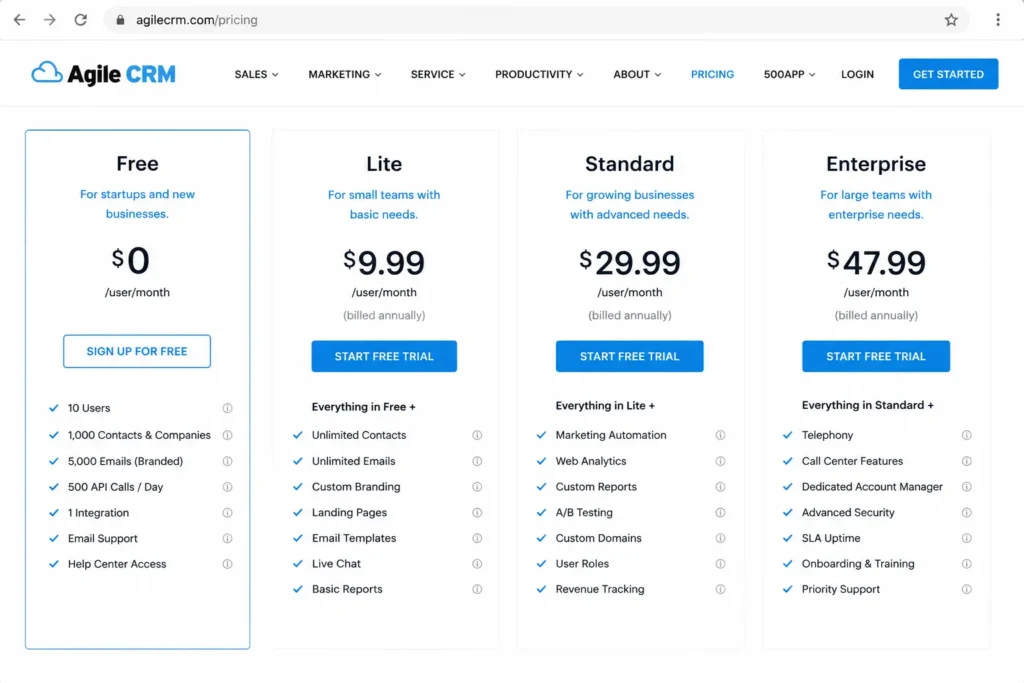
Agile CRM offers a free plan for 10 users with a mix of sales and marketing tools, including branded email campaigns. It is one of the few traditional CRMs that gives that many users for free.
- Starting price:
- $0 for 10 users; Starter is as low as $8.99 per user per month, Regular is $29.99, and Enterprise is $47.99. Official pricing page
The free plan lists 1,000 contacts and companies, unlimited deals, tasks, and documents, lead scoring, appointment scheduling, email campaigns, landing pages, 5,000 branded emails, one campaign workflow, one automation trigger, 500 API calls per day, and one plugin integration. That is a real blend of CRM and light marketing for a 10-person team. Our Agile CRM review covers how the paid tiers scale.
What it does well is combine more free users than most rivals with usable email outreach. A small startup can run campaigns and track deals from one free account.
Where it falls short is the constraints around that generosity. One integration, 500 API calls per day, and a single automation trigger limit anything beyond basic use, and the interface feels dated next to newer tools.
- Best for:
- up to 10-user startups that want CRM plus basic email campaigns and landing pages.
- Avoid if:
- you need modern UX, more than one integration, or high API volume, because Agile’s free plan caps all three tightly.
- Setup difficulty:
- Medium. The feature spread is wide, and the older interface means configuration takes patience.
Upgrade when: you cross 1,000 contacts or need more automation and integrations; a 10-user Starter plan is roughly $90 per month at $8.99 per user.
Verdict: choose Agile CRM if you want 10 free users and basic email marketing and can accept an older interface.
9. Capsule CRM: Best Free CRM for Simple Relationship Tracking
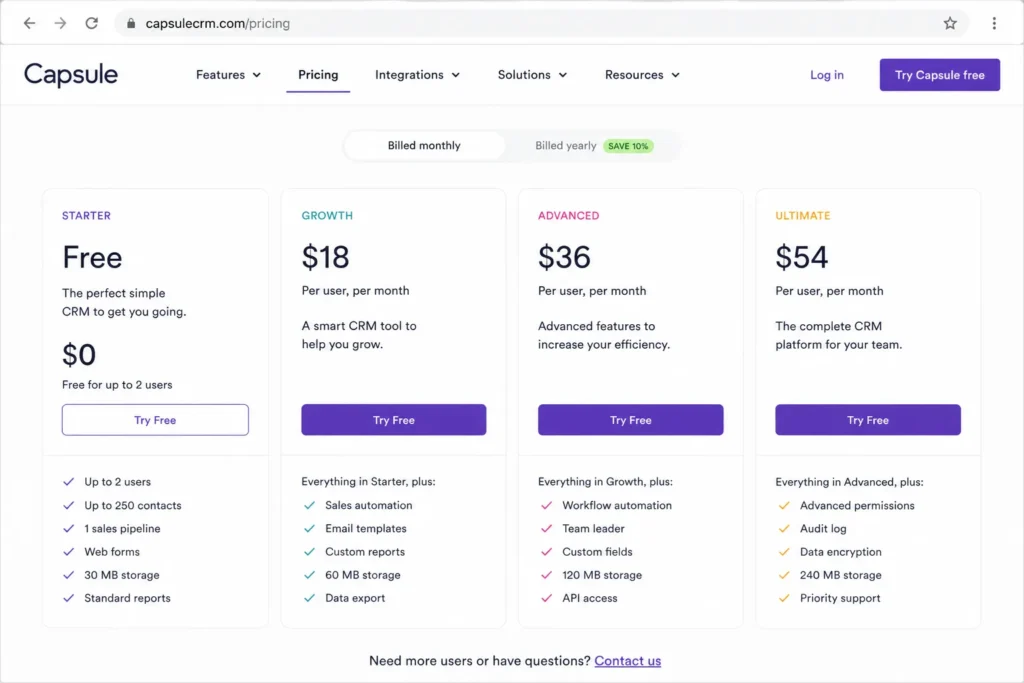
Capsule’s free plan is a focused, 2-user relationship database with one sales pipeline, which suits freelancers and small consultancies that want clarity over features. It does less on purpose, and that is the appeal.
- Starting price:
- $0 for up to 2 users; paid Starter includes a 14-day free trial. Official pricing page
The free plan includes 250 contacts, a maximum of 2 users, 5 custom fields, one sales pipeline, custom sales milestones, custom task categories, advanced Gmail and Outlook mail connection, and simple project board access. For low-volume relationship management, that is enough structure without clutter. The Capsule CRM review covers the paid tiers.
What it does well is stay clean. A two-person consultancy tracking a modest contact list gets a tidy CRM without the overhead of an all-in-one suite.
Where it falls short is room to grow. Workflow automation, advanced reporting, multiple pipelines, and AI enrichment are all paid, so Capsule is easy to outgrow once outreach volume rises.
- Best for:
- freelancers and two-person consultancies that want a simple, uncluttered contact and pipeline tool.
- Avoid if:
- you need more than 250 contacts, multiple pipelines, or automation, because Capsule’s free plan is deliberately minimal.
- Setup difficulty:
- Low. With one pipeline and a small contact cap, there is almost nothing to configure before it works.
Upgrade when: you add a third user, pass 250 contacts, or need automation and multiple pipelines.
Verdict: choose Capsule CRM if you want the simplest free relationship tracker and do not need automation.
10. Flowlu: Best Free CRM for Client Workflows and Invoicing
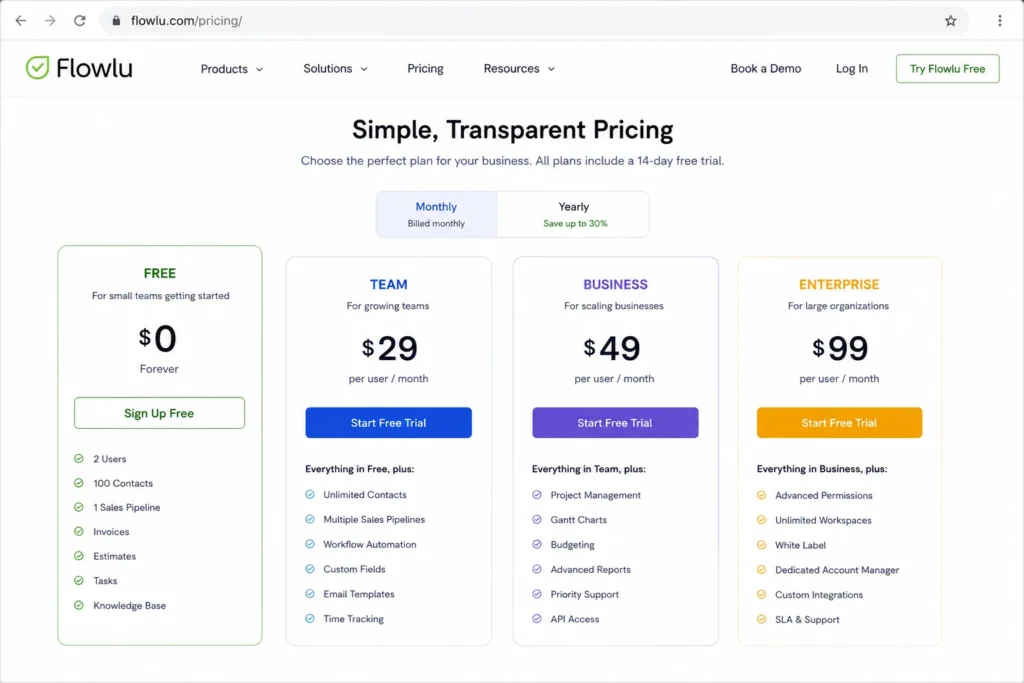
Flowlu’s free plan pairs a basic CRM with tasks, projects, invoices, and estimates, which makes it the pick for a service business rather than a pure sales team. Its 100-contact cap is the tightest on this list, so the fit is specific.
- Starting price:
- $0 always free; Essential is $9 per user per month billed yearly or $12 monthly, and Advanced is $17 yearly or $22 monthly. Official pricing page
The free plan includes a 2-user workspace, 100 contacts, one pipeline, lead capture forms, one task workflow, Kanban and list views, invoices and estimates, private chat, a calendar, a basic wiki, and help center plus AI bot support. Invoicing and estimates on a free plan are rare, and they are the reason a consultant would pick Flowlu over a sales-first CRM.
What it does well is connect CRM to client delivery and billing. A two-person agency can track a lead, run the project, and send an invoice from one free account.
Where it falls short is sales volume. With only 100 free contacts and one pipeline, Flowlu is built for managing client work, not high-volume prospecting, and email sync, multiple pipelines, and sales automation are paid.
- Best for:
- two-person agencies, consultants, and service businesses that need CRM plus tasks, projects, and invoicing.
- Avoid if:
- you run high-volume sales outreach, because 100 free contacts and a single pipeline will bind almost immediately.
- Setup difficulty:
- Medium. The all-in-one scope means deciding which of CRM, projects, and finance you set up first.
Upgrade when: you pass 100 contacts, need multiple pipelines, or want email sync and sales automation; the yearly discount is 25%.
Verdict: choose Flowlu if your CRM has to sit next to project delivery and invoicing rather than heavy prospecting.
Pricing Comparison: Free Plan vs First Paid Upgrade
Free is only half the budget story. The number that decides your real cost is what you pay the moment you outgrow the free plan, so this table pairs each free ceiling with its first paid tier and a 10-user cost where a clean per-user price exists.
| CRM | Free plan | First paid tier | 10-user monthly cost |
|---|---|---|---|
| HubSpot CRM | 1,000 contacts, no expiry | Paid hubs by seat and contact tier | Varies by hub; verify on official page |
| Zoho CRM | 3 users, free forever | Standard edition | Per-user; confirm USD on official page |
| Freshsales | 3 users | Growth from $9/user/mo | ~$90 |
| Bitrix24 | 1 to 2 users, 5 GB | Basic US$49/ | US$49 flat (org-based) |
| EngageBay | 15 users, 250 contacts | Basic $12.74/ | ~$127 |
| Vtiger One | 10 users, 3,000 records | One Growth US$30/ | ~$300 |
| Bigin by Zoho | 1 user, 500 records | Express, per user | Per-user; confirm USD on official page |
| Agile CRM | 10 users, 1,000 contacts | Starter from $8.99/ | ~$90 |
| Capsule CRM | 2 users, 250 contacts | Starter, per user | Per-user; confirm on official page |
| Flowlu | 2 users, 100 contacts | Essential $9/user/mo yearly | ~$90 |
The cheapest headline upgrade is not always the cheapest real upgrade. Bitrix24’s flat US$49 per organization beats every per-seat rival once you pass roughly five users, while Vtiger’s $30 per user makes a 10-user paid plan the most expensive on this list at around US$300 per month.
Two products deserve a closer read on the way up. HubSpot’s cost is driven by contacts and hub choice rather than seats, so budgeting from the entry price alone is a mistake, and you should model it against your contact growth using the HubSpot pricing plans page. Freshsales scales cleanly at $9 per user, so its 10-user Growth math is predictable, and the Freshsales pricing tiers confirm where automation unlocks.
Prices reflect the official USD view checked July 6, 2026. Several vendor pages localize pricing, and paid figures marked “confirm on official page” were not captured as stable USD values during research, so verify them before you buy.
Feature Gate Comparison: What the Free Plan Actually Includes
Two free plans can both say “automation” and mean completely different things. This table maps the features buyers ask about most to what the free plan delivers, so you can see the gate before you commit.
| CRM | Free automation | Free telephony | Free API | Advanced features gated to paid |
|---|---|---|---|---|
| HubSpot CRM | Limited free tools | No | Limited | Advanced automation, reporting, hubs |
| Zoho CRM | Workflow automation | No | 5,000 calls/ | AI, process management, integrations |
| Freshsales | None | Built-in phone | Not on free | Automation, AI, CPQ |
| Bitrix24 | Basic only | No (paid gate) | Limited | Sales automation, telephony, Market apps |
| EngageBay | Basic | No | Basic | Advanced marketing automation, A/B testing |
| Vtiger One | Limited | No | Limited | Advanced automation, paid modules |
| Bigin by Zoho | 3 automations | Built-in phone | Developer APIs | More automations, integrations, dashboards |
| Agile CRM | 1 workflow, 1 trigger | No | 500 calls/ | More campaigns, nodes, integrations |
| Capsule CRM | None | No | Limited | Automation, reporting, multiple pipelines |
| Flowlu | 1 task workflow | No | Limited on free | Sales automation, email sync, client portal |
The automation column is the fastest way to sort these tools. Zoho CRM and Bigin actually automate on the free plan, Freshsales and Capsule do not automate at all for free, and everyone else offers a basic slice that stops well short of a real workflow engine.
Telephony is the second dividing line. If your team calls leads, only Freshsales and Bigin include a built-in phone on the free plan, while Bitrix24 gates telephony to paid tiers, so an outbound team’s free shortlist is shorter than the full list suggests.
API access is the technical buyer’s gate. Zoho’s 5,000 free API calls per day is the most generous developer allowance here, Agile’s 500 calls per day is enough for light integration only, and most other free plans do not publish a usable free API allowance at all.
Email Marketing and Send Limits on Free Plans
“Includes email marketing” hides a cap that catches lead-generation teams. On a free plan, the questions that decide your budget are how many contacts you can email and whether the sends carry the vendor’s branding.
EngageBay’s free plan includes email marketing, autoresponders, and broadcasts, but the same plan caps you at 250 contacts, so your send audience is small before you pay. Agile CRM’s free plan lists 5,000 branded emails, which is a real allowance, but “branded” means the vendor’s mark travels with your campaigns until you upgrade.
For a marketing-led team, the email cap is usually the first upgrade trigger, not the CRM itself. If you plan to send campaigns from day one, size your list against these caps before you pick a tool, because a 250-contact free plan forces a paid move faster than a 1,000-contact sales plan does.
AI on Free Plans Is Not Always AI You Can Use
Several vendors market “AI CRM,” but a feature listed on a pricing page is not proof it is included on the free tier. Free-plan AI access is often unclear, credit-limited, or reserved for paid editions.
Vtiger lists AI features on its pricing page, and Zoho and Freshsales place AI capabilities in paid editions, so the free plan may show the label without the full function. I would treat any free-plan AI claim as “verify on the official page” rather than a guaranteed inclusion, especially where the vendor uses credits or per-session limits.
The buyer consequence is simple: do not choose a free CRM for its AI unless the official page confirms the specific AI feature is on the free tier. If AI is central to your workflow, budget for the paid edition rather than assume the free plan covers it.
Setup and Migration Difficulty
Free CRMs still cost time, and the setup burden varies more than the feature list suggests. A tool you cannot get your team to adopt is more expensive than a paid plan you actually use.
| CRM | Setup difficulty | Why |
|---|---|---|
| HubSpot CRM | Low to Medium | Guided onboarding, but a large ecosystem to work through |
| Zoho CRM | Medium | Feature depth means more fields and modules to configure |
| Freshsales | Low | Small-team CRM with little to set up before use |
| Bitrix24 | High | Broad platform with a real learning curve |
| EngageBay | Medium | Many modules to switch on and organize |
| Vtiger One | Medium | Multiple modules need a setup plan |
| Bigin by Zoho | Low | Single pipeline, minimal configuration |
| Agile CRM | Medium | Wide feature spread and a dated interface |
| Capsule CRM | Low | One pipeline, almost nothing to configure |
| Flowlu | Medium | All-in-one scope requires setup decisions |
Match setup difficulty to your team’s patience, not just its size. A non-technical two-person team will adopt Bigin, Capsule, or Freshsales faster than Bitrix24, and choosing the simpler tool often beats choosing the more capable one that no one maintains.
Migration deserves the same attention, because free tools still create lock-in once your data is inside. Zoho’s free plan supports import and export, Bigin advertises single-click migration from Pipedrive, HubSpot, Insightly, and Zoho CRM, and EngageBay promotes a migration service, which lowers the switching cost if you change your mind.
Before you import anything, confirm you can export it. A clean CSV export and clear data ownership are the two checks that protect you, and our CRM migration guide walks through the sequence for moving between tools without losing records.
Popular CRM Tools We Did Not Rank as Free
Several well-known names appear on other free CRM lists but do not belong on a permanent-free ranking. Here is why each one is excluded, based on public pricing evidence checked July 6, 2026.
| Tool | Why it is excluded |
|---|---|
| monday CRM | Official FAQ states free use is a 14-day trial; a paid plan is required after, and there is no free forever plan |
| Insightly | Current public pricing shows paid tiers only, with no permanent free CRM plan |
| Streak | Free forever email power tools exist, but full CRM collaboration features sit in paid tiers |
| Pipedrive | Public pricing offers a free trial, not a permanent free CRM plan |
| Nutshell | Public pricing is paid-only with a trial, not a free forever CRM |
| Less Annoying CRM | Single paid plan with a trial, not a permanent free tier |
The most important exclusion is monday CRM, because it appears as “free” on high-authority pages while its own pricing FAQ contradicts that framing. If you started a monday CRM account expecting a free forever plan, you would lose access to full features after 14 days, which is exactly the trap this guide is built to prevent. The Streak CRM review explains where its free email tools end and its paid CRM begins.
I am not claiming these are bad tools. Several are strong paid CRMs, and some appear in our paid rankings, but a “best free CRM” list should only include products a team can run at no cost indefinitely.
Which Free CRM Should You Choose? A Decision Path by Team Size
User caps are the first blocker most teams hit, so start the decision with headcount rather than features. This path moves from solo operators up to marketing-led teams and points each profile to the free plan that survives its first constraint.
If you are a solo founder or freelancer, start with Bigin by Zoho for a clean single-user pipeline, or Flowlu if you also invoice clients. Both keep setup light, which matters most when there is no admin to maintain the tool.
If you are a two-person consultancy, Capsule gives you the simplest shared contact database, while Flowlu adds projects and invoicing for client work. Pick Capsule for relationship tracking and Flowlu for delivery-plus-billing.
If you are a three-person sales pod, Zoho CRM and Freshsales are the two that fit the user cap. Choose Zoho if you want free automation and API access, and choose Freshsales if calling leads and a modern interface matter more.
If you are a 10-user startup, Agile CRM and Vtiger One are the free plans that hold that many seats. Agile suits email-driven outreach, Vtiger suits teams importing more records, and Bitrix24 fits if you want collaboration tools alongside CRM.
If you are a 15-user marketing-led team, EngageBay is the standout for its free helpdesk, live chat, and email marketing, as long as you can start within 250 contacts. Beyond that contact line, budget for the Basic upgrade early.
Simple CRM or All-in-One Workspace?
Team size decides how many free seats you need, but workflow decides how much software you should tolerate. Feature breadth is only an advantage if your team will use and maintain it.
| Need | Simple CRM | Balanced CRM | All-in-one workspace |
|---|---|---|---|
| Core focus | Contacts and pipeline | Sales plus light marketing | CRM plus tasks, projects, and comms |
| Best free picks | Bigin, Capsule | HubSpot, Zoho, Freshsales | Bitrix24, Flowlu, EngageBay |
| Adoption risk | Low | Medium | Higher |
A simple CRM wins when your only goal is to stop losing deals in a spreadsheet. Bigin and Capsule get a solo operator or small team tracking pipeline in an afternoon, with almost no risk that the tool goes unused.
An all-in-one workspace wins when the CRM has to connect to project delivery, billing, or internal communication. Bitrix24 and Flowlu earn their complexity for teams that would otherwise juggle three tools, but that same breadth is a liability for a team that just wants a pipeline.
When Not to Use a Free CRM
A free plan is the wrong choice more often than free CRM lists admit. Here are six situations where paying is the cheaper decision once you count adoption and rework.
Do not choose a free CRM if your contact list is already large. Every free plan here caps contacts or records, and importing 5,000 contacts into a 250-contact tier just to migrate again in a month wastes more time than a paid plan costs.
Do not choose a free CRM if automation is a day-one requirement. Freshsales and Capsule offer no free automation, and the others gate real workflow engines to paid tiers, so an automation-dependent team should budget from the start.
Do not choose a free CRM if you need SSO, audit logs, or advanced permissions. Free plans are built for low-governance teams, and enterprise admin controls sit in paid or enterprise tiers across the board.
Do not choose a free CRM if you have more users than the cap. A 3-user free plan does not stretch to a fourth seat, and a mismatched cap is the fastest way to a forced upgrade in week one.
Do not choose a free CRM if a support SLA matters. Most free tiers offer self-service or community support, and while Freshsales and Agile list live channels, response-time guarantees are a paid concern.
Do not choose a free CRM if telephony is central and the tool gates it. Bitrix24’s free plan excludes telephony, so an outbound team that picks it for breadth will still pay to make calls.
Common Mistakes When Choosing a Free CRM
The mistakes below cost teams weeks of rework, and every one traces back to trusting the word “free” instead of reading the plan.
Choosing by starting price is the first mistake. The free plan is not the budget; the first upgrade trigger is, and a tool with a low free ceiling can cost more sooner than a tool with a modest paid tier.
Treating records and contacts as identical is the second. A 500-record cap fills faster than a 500-contact cap, so a record-based free plan can bind before a contact-based one that looks smaller on paper.
Ignoring the automation gate is the third. Teams pick a “CRM with automation” and discover the free tier automates nothing, then upgrade under pressure rather than by plan.
Overlooking telephony and API limits is the fourth. An outbound team that needs calling or a technical team that needs API volume can be blocked on the free plan even when contacts and users are fine.
Choosing breadth you will not maintain is the fifth. An all-in-one free workspace that no one adopts is more expensive than a simple CRM the team actually uses, because the real cost of a CRM is adoption, not subscription.
Final Verdict: The Best Free CRM for Most Teams
HubSpot CRM is the best free CRM overall because its 1,000-contact free tier has no time limit and its upgrade path is the clearest on this list. For a one-to-two person team that expects to add marketing or service tools later, it is the lowest-risk free start.
The rest of the ranking is decided by your first blocker, not by a single winner. A three-person sales pod should pick Zoho CRM for free automation or Freshsales for free calling, a solo founder should pick Bigin by Zoho, and a client-services team that invoices should pick Flowlu.
For marketing-led teams up to 15 users, EngageBay is the strongest free bundle as long as 250 contacts is enough to start. For teams that need more free users or records, Vtiger One and Agile CRM give the most headroom, and Bitrix24 wins when you want CRM plus collaboration on one account.
My recommendation is to shortlist by the limit you will hit first, then confirm the current free plan on the official page before you import a single contact. Free CRM software is a strong way to start, but only if you choose the plan that survives your next 90 days of growth.
Frequently Asked Questions
What is the best free CRM software overall?
HubSpot CRM is the best free CRM overall for most small teams. Its free tools have no time limit and allow up to 1,000 contacts, with contact management, deal tracking, forms, and email connection included. It suits a one-to-two person team that may add marketing or service tools later, and its upgrade path is the clearest among free CRMs.
Is there a completely free CRM with no time limit?
Yes. HubSpot CRM, Zoho CRM, Freshsales, Bitrix24, EngageBay, Vtiger One, Bigin by Zoho, Agile CRM, Capsule CRM, and Flowlu all offer a permanent free plan rather than a trial. Each has caps on users, contacts, or records, so the free plan is genuinely free but limited, and you should check the ceiling that applies to your team.
What is the difference between a free CRM and a free trial CRM?
A free CRM plan lasts indefinitely with limited features, while a free trial gives full features for a short window before requiring payment. monday CRM, for example, offers a 14-day trial rather than a free forever plan per its own pricing FAQ. Importing data into a trial-only tool means migrating again when the trial ends.
Which free CRM allows the most users?
EngageBay allows the most free users at 15, followed by Agile CRM and Vtiger One at 10 each. Most other free CRMs cap at 1 to 3 users, so if you have a larger team, start with EngageBay, Agile, or Vtiger. Just check the contact and record limits too, because a high user cap can still meet a low contact cap.
Which free CRM has real automation?
Zoho CRM and Bigin by Zoho include automation on their free plans, with Zoho offering workflow automation and Bigin allowing three automations. Freshsales and Capsule offer no free automation at all. Most other free plans include only basic automation, so an automation-dependent team should confirm the free-plan gate before committing.
Can I run a sales pipeline on a free CRM?
Yes, if the free plan’s limits fit your team. Every CRM in this guide includes at least one sales pipeline on the free plan, and tools like Zoho CRM, Freshsales, and Bigin are built around pipeline tracking. The constraint is usually user count, contacts, or records, so match the pipeline tool to the cap you will hit first.
Are free CRM tools safe for customer data?
Free CRMs from established vendors include basic security, but advanced controls like SSO, audit logs, and granular permissions are usually paid or enterprise features. For a low-governance team, a free plan is reasonable, but a regulated or B2B team that needs strict admin controls should budget for a paid tier rather than rely on a free plan’s defaults.
When should a business upgrade from a free CRM?
Upgrade when you hit the free plan’s first hard limit: more users than the cap, contacts or records past the ceiling, or a need for automation, telephony, reporting, or support that the free tier gates. The smart move is to identify that trigger before you sign up, so the upgrade is a planned budget decision rather than a mid-quarter scramble.