

Close fits calling-heavy inside-sales teams and Pipedrive fits pipeline-led teams that sell through meetings and email, because Pipedrive has no built-in calling.
In the Pipedrive vs Close choice, Close builds calling and SMS into every plan and adds a power dialer on Growth at $99 per user per month, billed annually. Pipedrive puts Sequences on Growth at $24 per seat per month, billed annually.
Quick verdict
The deciding difference is what the seat includes. A Close seat carries the phone; a Pipedrive seat carries a cheaper pipeline and leaves calling to an app.
Pick Close if your reps dial lists all day: its power dialer starts on Growth and its predictive dialer on Scale. Pick Pipedrive if deals move through meetings and email: pipelines work on every plan, and automated follow-up starts at $24 per seat.
The trade-off is cost. On each Growth plan, billed annually, Pipedrive costs $24 x 5 users x 12 months = $1,440 a year. Close costs $99 x 5 users x 12 months = $5,940, before calling usage.
Choose Pipedrive if
- Your team sells through a deal pipeline, meetings and email
- You want automated email follow-up at $24 per seat per month, billed annually
Choose Close if
- Reps spend the day calling lead lists
- You need a power or predictive dialer inside the CRM
In This Article (10 sections)
Pipedrive vs Close at a Glance
Both vendors charge per seat, but Close’s seat includes calling while Pipedrive’s buys a cheaper pipeline.
Pipedrive recently launched new plan tiers, names and limits, so a price list that still shows Essential, Advanced, Professional or Power describes its old plans.
| Attribute | Pipedrive | Close |
|---|---|---|
| Best for | Pipeline-led teams selling through meetings and email | Calling-heavy inside-sales teams |
| Starting price | Lite: $14 per seat per month billed annually, $19 billed monthly | Solo: $9 per user per month billed annually, $19 billed monthly, 1 user |
| Automation plan | Growth: $24 per seat per month billed annually, $34 billed monthly | Growth: $99 per user per month billed annually, $109 billed monthly |
| Calling | Marketplace calling app or the rep’s own phone | Built into every plan, usage billed separately |
| Main strength | Customizable pipelines on every plan | Power dialer on Growth, predictive dialer on Scale |
| Main limitation | Pipedrive doesn’t have a built-in calling integration | Workflows start on Growth at $99 per user per month, billed annually |
Sources: Pipedrive pricing page, Pipedrive calling help, Close pricing page, checked October 2026.
At the automation tier, a Close seat costs about four times a Pipedrive seat.
Key Differences Between Pipedrive and Close
Close is built around a calling rep’s queue, while Pipedrive is built around the deal pipeline. Four differences follow from that:
- Calling: Close places and logs calls inside the CRM on every plan. Pipedrive logs calls but dials through a Marketplace app such as CloudTalk or Aircall, or through web-to-mobile on the rep’s phone bill.
- Automation price: Pipedrive Sequences start on Growth at $24 per seat; Close Workflows on Growth at $99 per user, both billed annually. Close’s steps add SMS.
- What sits on top of the seat: Close bills calls, SMS and phone numbers as usage. Pipedrive bills add-ons such as LeadBooster, plus the calling app.
- Admin control: custom permission sets start on Pipedrive Premium at $49 per seat; custom roles need Close Scale at $139 per user, both billed annually.
Pipedrive vs Close: Features Compared
Calling and automation are where the plans differ most; the matrix shows where each feature sits by plan.
| Feature | Pipedrive | Close |
|---|---|---|
| Customizable pipelines | All plans | Essentials and up |
| Built-in calling | Marketplace app or web-to-mobile | All plans, usage billed |
| Power dialer | Through a Marketplace calling app (Aircall Professional) | Growth |
| Predictive dialer | Not listed on Pipedrive’s plan-features page | Scale |
| Call recording retention | Not listed on Pipedrive’s plan-features page | 30 days on Solo and Essentials, 90 days on Growth, unlimited on Scale |
| Sequences or workflows | Growth | Growth |
| Email open tracking | Growth | Essentials |
| Forecast view or funnel report | Forecast view on Growth | Opportunity funnel report on Solo, Essentials, Growth and Scale |
| Custom permissions | Premium | Scale |
| AI | Report creation on all plans; AI email on Premium | 500 to 2,000 AI credits per user per month by plan |
| Integrations | 500+ Marketplace apps | Over 100 apps, plus Zapier |
| Mobile apps | iOS and Android | iOS and Android, with calls and texts |
| Support | Chatbot on all plans, live chat on Growth, phone on Premium | 24/7 knowledge base and email support |
Sources: Pipedrive plan features, Close pricing page, checked October 2026.
Pipeline management
Pipedrive is the stronger pipeline tool on price. Customizable pipelines, deal card customization and deal rotting work on every plan, starting with Lite at $14 per seat per month, billed annually.
Close Essentials adds pipelines and team-level visibility at $35 per user per month, billed annually. Close organizes the rep’s day around leads and Smart Views, saved lists a rep can call down, which suits a prospect queue more than a deal board.
Verdict: Pipeline management
Pipedrive fits better for a pipeline-led team: its board and deal rotting come with the $14 Lite seat, against $35 for Close Essentials.
Calling and dialers
No, Pipedrive has no built-in dialer: its help center says Pipedrive “doesn’t have a built-in calling integration” and points to calling apps in its Marketplace. Its iOS and Android apps place calls on the rep’s phone, and web-to-mobile calls are charged on the usual phone bill.
Close includes calling and SMS on every plan. Growth adds a power dialer that calls through a saved Smart View in order.
Scale adds a predictive dialer that dials several numbers at once and connects a rep only when a person answers.
A Pipedrive team can still get a power dialer: Aircall lists one on its Professional plan. That adds a second vendor and a second bill to the stack.
Verdict: Calling and dialers
Close fits better for calling-heavy teams, because the dialer, recordings and logging live in the CRM. Connect rates and call quality depend on your numbers and list, so dial your own list in Close’s 14-day trial, which includes $5 of calling and enrichment credits.
Sequences and workflow automation
Both vendors put automated follow-up on their Growth plan. A Pipedrive sequence holds up to 15 steps and up to 500 deals or leads. Each step is an email, sent manually or automatically, or an activity such as a call task.
Close Workflows are only available on the Growth and Scale plans. A workflow can mix email, SMS and call steps, with delays from 1 minute up to 365 days.
Verdict: Automation
It depends on what the cadence contains. For email plus reminder tasks, Pipedrive Growth does the job at $24 per seat, billed annually. For cadences with SMS and call steps, Close Growth at $99 per user, billed annually, is the plan.
Reporting and forecasting
Pipedrive gives every plan Insights reports and a dashboard, adds the forecast view on Growth, and adds multiple dashboards, custom field reports and team goals on Premium. A manager who wants several dashboards therefore pays for Premium at $49 per seat per month, billed annually.
Close puts activity reports, dashboards and the opportunity funnel report on all four plans, Solo included. The workflow performance report and the leaderboard start on Growth, and custom graphs in Explorer need Scale.
Verdict: Reporting
It depends on the report. Pipedrive’s forecast view comes on Growth at $24 per seat, and Close’s leaderboard on Growth at $99 per user, both billed annually. A manager who wants custom graphs in Close pays for Scale at $139 per user.
Integrations and API
Pipedrive’s Marketplace lists 500+ integrations, and API access and webhooks come with every plan. Close lists over 100 integrations, Zapier for 2000+ apps, and API access with an event log.
A calling team on Pipedrive spends one of those integrations, and a separate subscription, on the phone system.
Verdict: Integrations
It depends on the apps you need. Check that your calendar, enrichment and billing tools appear in the directory of the CRM you shortlist before the trial ends.
Pipedrive vs Close Pricing
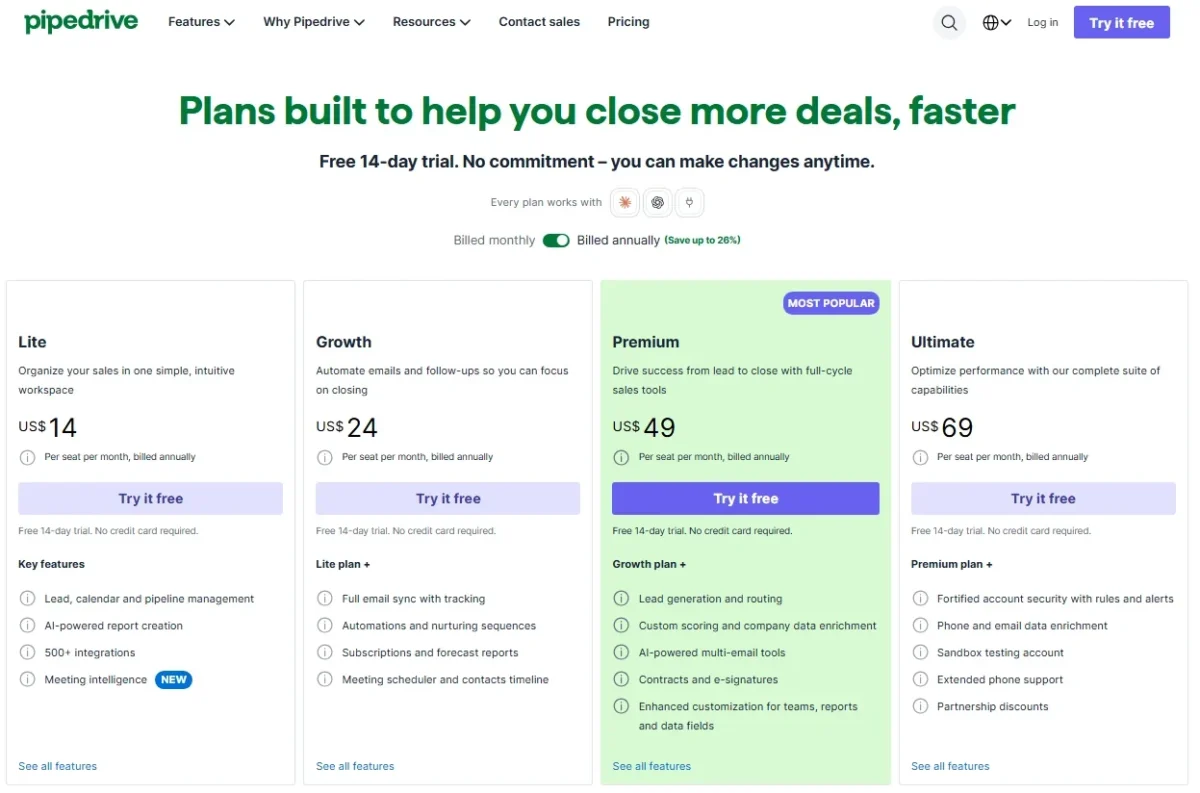
Pipedrive costs $14 to $69 per seat per month billed annually, or $19 to $89 billed monthly. Close costs $9 to $139 per user per month billed annually, or $19 to $149 billed monthly, plus calling usage.
Annual billing is one payment for the year on Pipedrive: $288 per seat on Growth. Close’s annual plans can be upgraded during the term, but downgrades and cancellations take effect at the end of it.
Both vendors offer a 14-day free trial with no credit card, and Close adds a 30-day money-back guarantee.
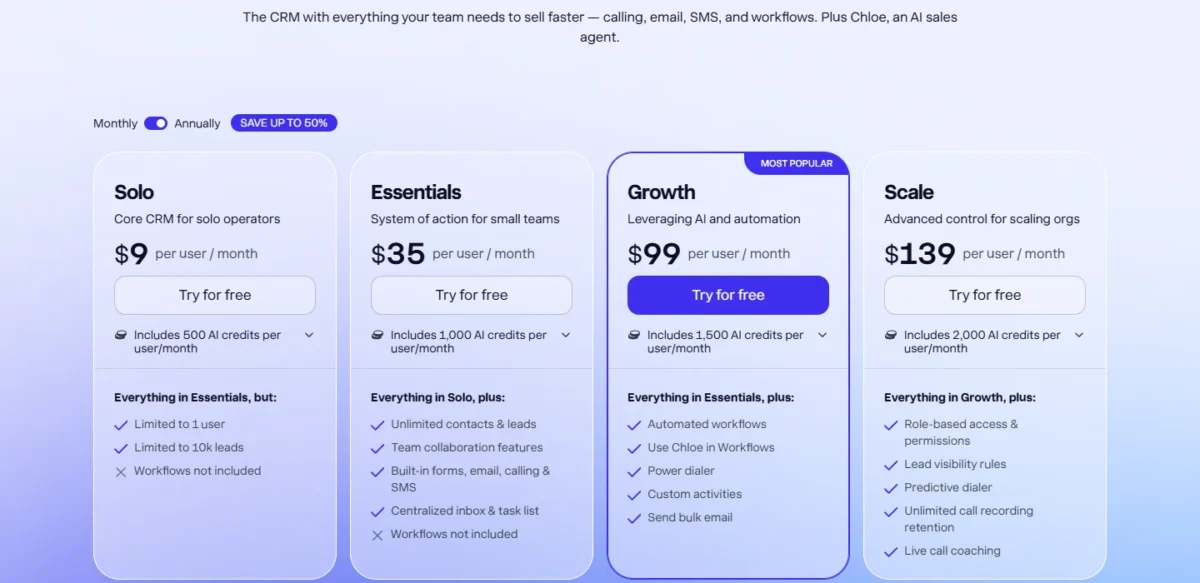
The “save up to 50%” banner on Close’s pricing page matches Solo: $9 billed annually against $19 billed monthly. On Close Growth, the annual view saves $109 minus $99, or $10 per user per month.
The Pipedrive pricing page says “save up to 26%” on annual billing, and Growth drops from $34 to $24 per seat per month.
Two vendor terms change bigger deals. Pipedrive makes implementation free on a plan over $400 a year, which five Growth seats at $288 per seat per year clear. Close offers discounts to teams with 10+ seats that commit for 12+ months, through its Success team.
Comparable plans side by side
The plans that do the same job pair up as entry, team entry, automation and admin control.
| Tier | Pipedrive plan | Pipedrive annual / monthly | Close plan | Close annual / monthly |
|---|---|---|---|---|
| Entry | Lite | $14 / $19 | Solo (1 user, 10k leads) | $9 / $19 |
| Team entry | Lite (no email sync) | $14 / $19 | Essentials (calling, no workflows) | $35 / $49 |
| Automation | Growth (Sequences) | $24 / $34 | Growth (workflows, power dialer) | $99 / $109 |
| Admin control | Premium (custom permission sets) | $49 / $64 | Scale (custom roles, predictive dialer) | $139 / $149 |
Sources: Pipedrive pricing page, Close pricing page, checked October 2026.
Upgrade triggers on each side:
- Pipedrive Lite to Growth: email sync, open tracking, automations and Sequences
- Pipedrive Growth to Premium: custom permission sets, phone support, and LeadBooster, Projects and Smart Docs included
- Close Essentials to Growth: workflows, the power dialer and bulk email
- Close Growth to Scale: the predictive dialer, custom roles and lead visibility rules
Pipedrive’s add-ons, from Campaigns to Web Visitors, are priced in my guide to Pipedrive’s plans and add-ons in detail.
What a 5-rep and a 10-rep team pays
A 5-rep team on the automation tier pays $1,440 a year on Pipedrive Growth and $5,940 on Close Growth, billed annually.
| Team and tier | Pipedrive | Close |
|---|---|---|
| 5 reps, automation, billed annually | Growth: $24 x 5 users x 12 months = $1,440 | Growth: $99 x 5 users x 12 months = $5,940 |
| 5 reps, automation, billed monthly | Growth: $34 x 5 users x 12 months = $2,040 | Growth: $109 x 5 users x 12 months = $6,540 |
| 5 reps, cheapest team plan, billed annually | Lite: $14 x 5 users x 12 months = $840 | Essentials: $35 x 5 users x 12 months = $2,100 |
| 10 reps, automation, billed annually | Growth: $24 x 10 users x 12 months = $2,880 | Growth: $99 x 10 users x 12 months = $11,880 |
| 10 reps, automation, billed monthly | Growth: $34 x 10 users x 12 months = $4,080 | Growth: $109 x 10 users x 12 months = $13,080 |
| 10 reps, admin control, billed annually | Premium: $49 x 10 users x 12 months = $5,880 | Scale: $139 x 10 users x 12 months = $16,680 |
Sources: Pipedrive pricing page, Close pricing page, checked October 2026.
Assumptions: US list prices, 12 months, one seat per rep. The totals exclude tax, Close calling, SMS, phone numbers and Call Assistant, Pipedrive add-ons, any calling app, and Close’s 10+ seat discount.
The seat math favours Pipedrive at every tier in this table. The gap narrows once a Pipedrive team must buy a phone system, because Close’s seat already carries one.
On the automation tier, Pipedrive Growth at $24 per seat plus Aircall Professional at $50 per license/month comes to $24 + $50 = $74 per rep a month. Close Growth is $99 per user, and Aircall needs at least 3 licenses.
Calling usage and add-ons
Close bills calls at around $0.02 a minute and phone numbers from about $1 a month, passed through at cost. Calls follow Twilio’s pay-as-you-go pricing, so each call is rounded up to the next minute: a 70-second call is charged as 2 minutes.
Take an illustrative team of 5 reps who each place 40 outbound calls a day, 20 working days a month, with every call lasting 40 seconds.
Per-minute rounding bills each 40-second call as 1 minute. One rep’s day holds 40 x 40 = 1,600 seconds of talk, about 27 minutes, but 40 billed minutes.
The team’s month is 5 reps x 40 calls x 20 days = 4,000 calls, so 4,000 billed minutes. At a rate of $0.02 a minute, that is 4,000 x $0.02 = $80 a month.
Short calls are where the rounding rule shows up; long calls barely change the bill. Close’s Call Assistant, for call transcripts and summaries, adds $50 a month per organization plus $0.02 per minute.
On Pipedrive, the calling cost is whatever route the team picks. Aircall, one of the calling apps Pipedrive’s help center lists, holds its Power Dialer in Professional. Aircall lists Professional at $50 per license/month and requires a minimum of 3 licenses.
Pipedrive’s add-ons are the other layer: LeadBooster starts from $32.50 and Smart Docs from $32.50, and both come included on Premium and higher. A Growth team that needs web forms should price Premium first.
Pipedrive vs Close: Pros and Cons
Each strength below holds on a named plan, and each weakness hurts a specific kind of team.
Pipedrive pros and cons
My full Pipedrive review covers the plans one by one; these lines decide this pairing.
Pros
- Customizable pipelines and deal rotting on every plan from $14 per seat, billed annually
- Sequences on Growth at $24 per seat, billed annually
- Marketplace with 500+ integrations, plus API and webhooks on all plans
- Custom permission sets on Premium at $49 per seat, billed annually
Cons
- No built-in calling: dialing needs a Marketplace app or the rep’s phone
- Lite has no email sync, automations or Sequences
- Phone support starts on Premium
- LeadBooster and Smart Docs are paid add-ons on Lite and Growth
Close pros and cons
The Close CRM review weighs Close on its own; against Pipedrive, these lines decide.
Pros
- Calling and SMS built into every plan
- Power dialer on Growth and predictive dialer on Scale
- Email, SMS and call steps in one workflow
- 500 to 2,000 AI credits per user per month included, by plan
Cons
- Workflows start on Growth at $99 per user per month, billed annually
- Solo is limited to 1 user and 10k leads
- Custom roles and lead visibility rules only on Scale
- Calls billed on top of seats, each rounded up to the next minute
Which Is Better for Your Needs?
Close is better for teams that dial all day, and Pipedrive is better for teams that work a deal pipeline on a budget. The matrix maps each priority to a pick.
| Your priority | Better fit | Reason | Trade-off |
|---|---|---|---|
| Reps dial lead lists all day | Close | Calling on every plan, power dialer on Growth, predictive on Scale | Growth costs $99 per user per month billed annually, plus usage |
| Pipeline-led selling through meetings and email | Pipedrive | Pipelines and deal rotting on every plan from $14 per seat | Calls go through the rep’s phone or an app |
| Automated email follow-up at the lowest seat price | Pipedrive | Sequences on Growth at $24 per seat, billed annually | Sequence steps are emails and activities |
| Calls and SMS inside one cadence | Close | Workflows mix email, SMS and call steps | Workflows need Growth or Scale |
| Custom permissions on a budget | Pipedrive | Custom permission sets on Premium at $49 per seat | Close custom roles need Scale at $139 per user |
| Manager forecasts and dashboards | Depends | Pipedrive’s forecast view is on Growth; Close’s funnel report is on every plan, its leaderboard on Growth and custom graphs on Scale | Several Pipedrive dashboards need Premium at $49 per seat |
| Solo founder who calls | Close | Close Solo at $9 includes calling for 1 user; Pipedrive Lite at $14 has no built-in calling and lacks email sync | Close Solo has no workflows and stops at 10k leads |
Sources: Pipedrive plan features, Close pricing page, checked October 2026.
Skip Pipedrive if: your reps’ day is mostly outbound calls. You would pay for a CRM seat and a phone seat, and Aircall alone needs 3 licenses.
If Pipedrive stays on your list but you want to size it up against one more rival, open Pipedrive vs Copper.
Skip Close if: your reps rarely dial and live in email and meetings. Close Growth costs about four times Pipedrive Growth for a dialer they will not use.
If Close stays on your list but Pipedrive does not, read Close vs Salesflare next.
If neither fits, my list of other Pipedrive alternatives compares tools with different trade-offs.
For a wider shortlist across the category, see the best CRM software for small teams.
Switching Between Pipedrive and Close
Moving from Pipedrive to Close runs through Close’s own CRM importer, which lists Pipedrive; moving from Close to Pipedrive runs through Close’s exporter and Pipedrive’s spreadsheet import.
From Pipedrive to Close:
- An admin opens Close’s Lead Importer and picks Pipedrive under Import from a CRM. Close’s partner Import2 runs the import, and in most cases it costs nothing when started inside Close.
- Import2 runs a sample migration first; check the mapped fields, then start the full import.
- Expect the data model to change. Pipedrive’s Organization becomes a Close Lead, a Person a Contact, a Deal an Opportunity, and a Stage an Opportunity Status.
- Rebuild the parts that are settings rather than records: Sequences as Workflows (on Growth or Scale), the phone setup, and custom permission sets, which become custom roles only on Scale.
From Close to Pipedrive:
- Export leads, contacts or opportunities from Close’s Leads page as CSV or JSON. JSON is the only format that exports all activities.
- Download Smart Views, email and SMS templates, notes and phone numbers as CSV files with Close’s support tools, which need a Close API key. Keep them as the record of what to rebuild in Pipedrive.
- Import into Pipedrive as XLS, XLSX or CSV files of no more than 200,000 rows and under 50 MB each. Activities exported as JSON must be turned into a spreadsheet first.
- Replace calling with a Marketplace app or web-to-mobile, and rebuild Workflows as Sequences, which carry email and activity steps.
Close’s migration guide says the sample import alone can take a few hours, depending on its size, so start it early in the trial.
How I Compared Pipedrive and Close
I read both vendors’ US pricing pages in both billing views, their plan-features pages and their help centers on October 21, 2026, then compared plans that do the same job.
The criteria were calling, automation, pipelines, reporting, permissions, integrations and price per rep. Plans were paired by job: Lite with Solo, Lite with Essentials as the cheapest team plans, Growth with Growth, Premium with Scale. Prices, limits and plan gates come from the vendors’ own pages; the cost tables are my arithmetic on list prices.
Two gaps shape the advice. Pipedrive’s pricing page prints add-on prices without a billing unit.
The migration guides give no time for a full import. Where a decision turns on one of them, the article points to the trial.
Frequently Asked Questions
Is Close a good CRM?
Yes, for teams whose day runs on the phone. Close logs every completed call on the lead page automatically and keeps calling, SMS and email in one record. Teams that rarely call pay for capability they skip: calling and SMS come with every Close plan, and workflows start at $99 per user per month, billed annually.
What are the downsides of using Pipedrive?
The main downside is calling: Pipedrive has no built-in dialer, so a calling team adds an app with its own price and subscription. Lite also lacks email sync and Sequences, which pushes any team that emails from the CRM to Growth at $24 per seat. Phone support starts on Premium.
What are the main competitors of Pipedrive?
Close is the rival for calling-heavy teams, as this page shows. If HubSpot is also on your shortlist, my comparison of HubSpot and Pipedrive prices that pairing the same way.
For a larger team weighing a full platform, my Pipedrive against Salesforce comparison covers that move.
For the wider field, my list of Pipedrive alternatives compares other CRMs by the trade-off each makes.
Final Verdict: Pipedrive or Close?
Buy Close if your inside-sales team calls all day and needs the dialer in the CRM. Buy Pipedrive if your team works deals through meetings and email and wants the cheaper seat with Sequences.
Choose Pipedrive if
- Deals move through a visual pipeline with stages and deal rotting
- You want Sequences at $24 per seat per month, billed annually
- You need custom permission sets on Premium at $49 per seat
- Calls are occasional and can run on the rep’s phone or an app
Choose Close if
- Reps spend most of the day dialing lists
- You need a power dialer (Growth) or a predictive dialer (Scale) in the CRM
- Calls and SMS must sit inside the same workflow as email
- You prefer usage-billed calling to a separate phone vendor
The main trade-off is price against the phone: Close’s higher seat buys the dialer, recordings and SMS that a Pipedrive team would rent elsewhere. Run your own call list through Close’s 14-day trial and your deal pipeline through Pipedrive’s before you sign an annual plan.
Before you commit, compare Close with one more rival in Freshsales vs Close.






Pingback: Pipedrive vs Salesflare 2026: Pricing, Features and Fit
Pingback: Pipedrive Pricing 2026: Plans, Costs and Add-Ons
Pingback: Close Pricing 2026: CRM Plans, Team Costs and Add-ons
Pingback: Freshsales vs Close (2026): Pricing, Calling and Verdict
Pingback: Pipedrive vs Nutshell (2026): Pricing, Plans and Who Fits