


The best AI image to video generators split by job. Google Flow (Veo 3.1) fits clips with sound, Kling AI longer keyframed shots, Runway generation with 4K upscaling in one plan, and Adobe Firefly client work that needs cleared rights.
This list is for US creators, marketers and small studios who already have a still. The deciding factor is rarely the model; it is the plan that unlocks commercial use and how many 5-second clips it buys.
Quick verdict
Start with Google Flow when the clip needs sound: its free tier includes Veo 3.1 with Frames to Video.
Pick Kling AI for one long shot, Runway to generate and upscale in one plan, and Adobe Firefly when a client asks about rights.
The trade-off: Kling AI, PixVerse and Leonardo.Ai print no cost per clip, so Kling’s 30-second shots come without a clip price to budget from.

Google Flow (Veo 3.1)
Best for: clips with native sound
Veo 3.1 generates dialogue, effects and ambient sound with the picture, and the free tier includes it.
Limit: non-subscribers may be blocked from video from about 2 PM to 5 PM UTC

Kling AI
Best for: longer multi-keyframe clips
Kling 4.0 lists native 30-second generation with multiple keyframes.
Limit: commercial use and watermark removal are paid-only

Runway
Best for: generating and finishing in one workspace
Gen-4.5 and Aleph 2.0 draw on one credit pool, and Pro adds unlimited 4K video upscaling.
Limit: Standard and Pro credits do not roll over

Adobe Firefly
Best for: commercially safe client work
Adobe says the Firefly model is trained only on licensed and public-domain content.
Limit: Firefly Video Model clips run about five seconds
| Software | Best for | Starting price | Plan this job needs | Free plan or trial | Key limitation |
|---|---|---|---|---|---|
| Google Flow | Clips with sound | Google AI Plus, $4.99/mo | Google AI Pro, $19.99/mo | 50 credits a day | Peak-hour video limits without a plan |
| Kling AI | Long keyframed clips | Standard, $8.8/ | Pro, $32.56/ | Basic, $0 | No per-clip cost printed |
| Runway | Generating and finishing | Standard, $12/ | Pro, $28/ | 125 one-time credits | Gen-4.5 needs Standard |
| Adobe Firefly | Client-safe work | Firefly Standard, $9.99/mo | Firefly Pro, $19.99/mo | Free daily generations | About 5-second clips |
| Luma Dream Machine | HDR for post-production | Plus, $30/ | Plus, $30/ | None on the pricing page | 1080p uses 400 credits per 5s |
| Midjourney | Animating MJ artwork | Basic, $10 a month | Standard, $30 a month | None listed | 720p maximum |
| Leonardo.Ai | High-volume drafts | Essential, $12/ | Ultimate, $60/ | 150 tokens a day | Relaxed video on select models |
| Pika | Pay-as-you-go | Starter, $10/mo billed monthly | Creator, $35/mo billed monthly | Packs only | No license below Creator |
| PixVerse | Daily free credits | Standard, $8/month billed yearly as $96 | Pro, $24/ | 30 credits a day | Standard capped at 720p |
| Hailuo AI | Multi-reference shots | Standard, $10.50 billed monthly | Standard | One-time trial credits | Trial covers Hailuo models only |
Sources: vendor pricing pages linked in each section, including Google Flow, Runway pricing and Pika pricing, checked October 2026.
On eight of the ten, the plan that does the job sits above the entry plan, so budget from the fourth column.
In This Article (16 sections)
How I Chose the Best AI Image to Video Generators
Every pick passed three gates, checked on vendor pages in October 2026: a vendor page documents animating an uploaded still, plan prices are published, and they show in US dollars. The rest were ranked on six criteria, in order:
- frame and motion control (start frame, end frame, references)
- clip length and resolution
- cost per clip, where the vendor prints it
- native audio
- commercial rights on the plan a buyer would pay for
- a free tier to test your own image
I considered fourteen tools: the ten picks below and the four under Also Considered. Avatar and script-to-video tools are a different job, covered in my ranking of AI video generators.
Output quality, motion, prompt adherence and character consistency depend on your own source image and prompt. Run the same still through your top two picks before you pay.
1. Google Flow (Veo 3.1): Best for Clips With Native Sound
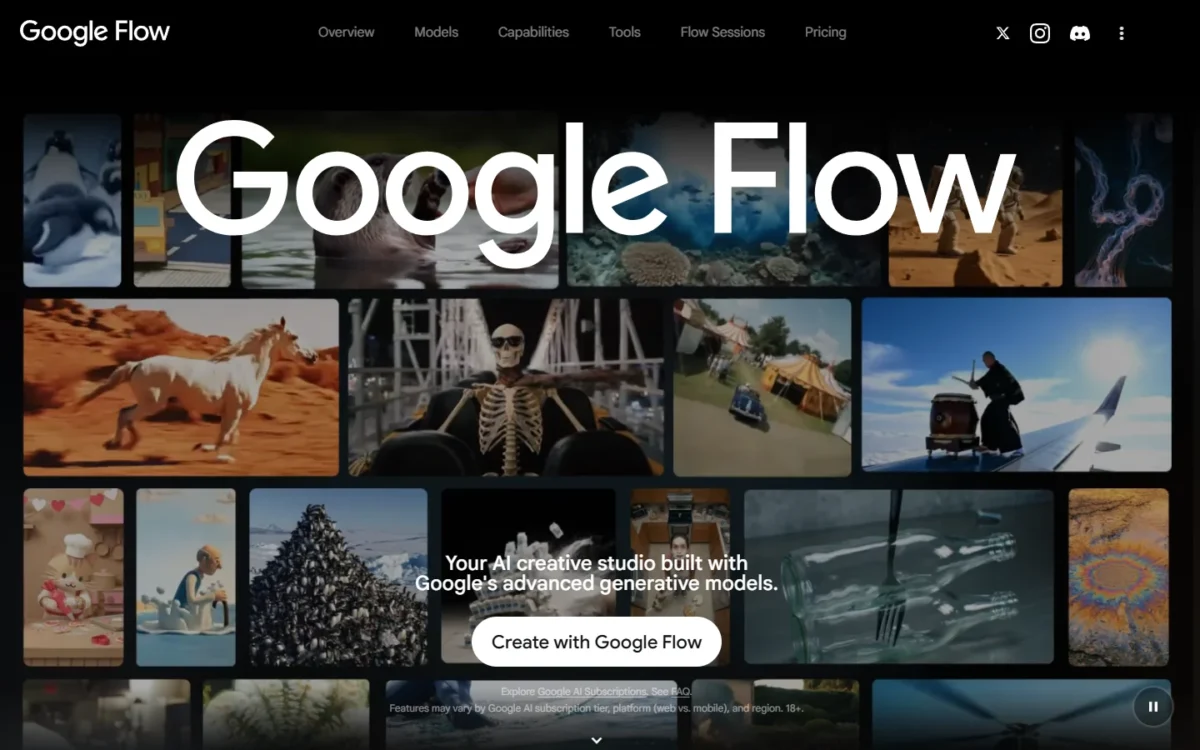
- Models: Veo 3.1 (Lite, Fast, Quality) and Gemini Omni Flash
- Free tier: 50 credits a day, with Veo 3.1 and Frames to Video
- Cost of one clip: 20 credits per Veo 3.1 Fast video for non-Ultra subscribers (10 for Ultra), 100 per 8-second Quality video
Sound is what sets Google Flow apart. Veo 3.1 generates sound effects, ambient noise and dialogue natively, so a product reveal needs no separate audio pass, and the free tier includes the model. The catch is access: non-subscribers may be unable to generate video from roughly 2 PM to 5 PM UTC.
Frames to Video and Ingredients to Video give control without prompt gymnastics. Veo supports first and last frames plus character reference images, so a brand mascot can stay the same across three shots.
The credit math is printed. Google AI Pro’s 1,000 monthly credits cover 50 Veo 3.1 Fast videos (1,000 / 20) or 10 Quality videos (1,000 / 100). For a weekly social calendar, that means drafting on Fast and saving Quality for the final cut.
One request may generate 2 videos, each billed: a 2-video Fast request uses 40 credits for non-Ultra subscribers.
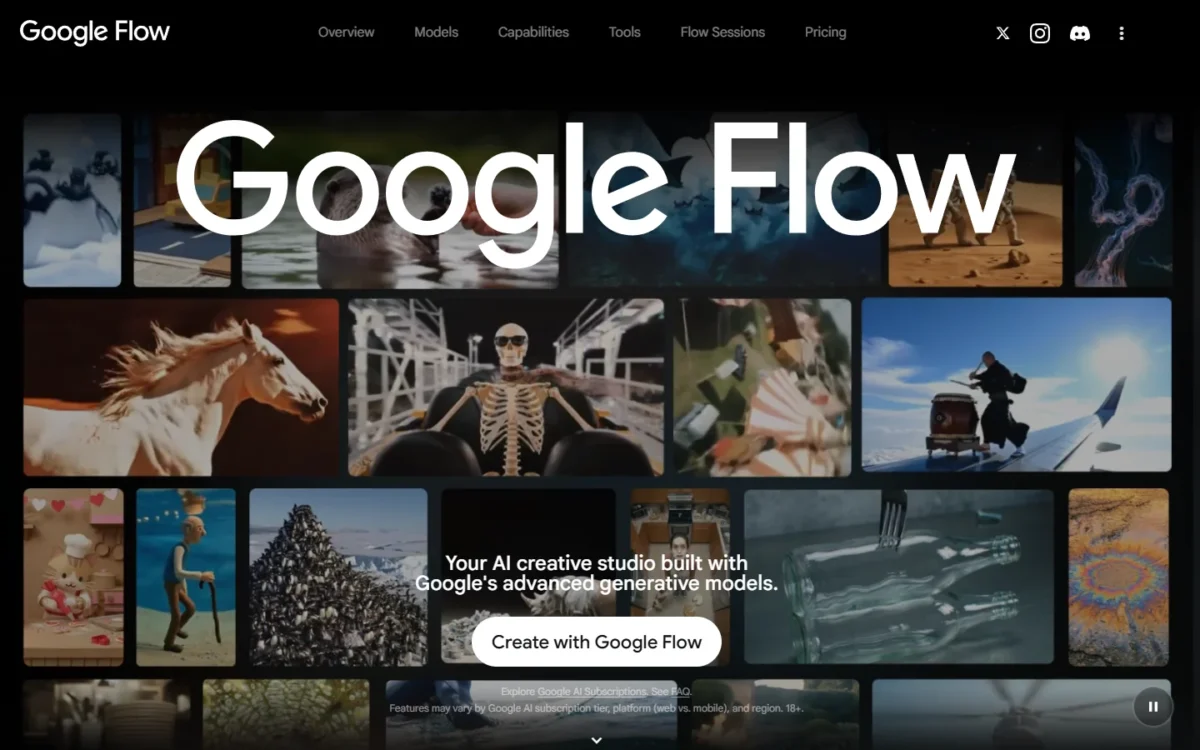
Google AI Plus costs $4.99/mo for 200 extra monthly credits; Google AI Pro at $19.99/mo adds 1,000, the first level where weekly video work fits. Prices may vary by market. My Google Flow pricing breakdown prices every plan.
| Plan | Price | Billing | Key limit |
|---|---|---|---|
| Google AI Plus | $4.99/mo | Monthly | 200 credits plus the daily 50 |
| Google AI Pro | $19.99/mo | Monthly | 1,000 credits |
| Google AI Ultra | $99.99/mo | Monthly | 10,000 credits; 4K upscaling |
Sources: Google Flow plans and Google Flow credits help, checked October 2026.
Pros
- Native dialogue, effects and ambient sound
- Free tier includes Veo 3.1 and Frames to Video
- Credits per generation printed for every Veo tier
Cons
- A Quality video uses a tenth of Google AI Pro’s monthly pool
- 4K upscaling is Ultra-only
- Daily and monthly credits expire unused
Choose Flow if sound matters or you already pay for Google AI Pro. My Google Flow review covers the rest of the studio.
- Skip it if:
- you need one shot longer than an 8-second Quality video without extensions; Kling AI generates 30 seconds natively.
Before the first generation, my list of Google Flow and Veo prompts gives wording to start from.
2. Kling AI: Best for Longer Multi-Keyframe Clips
- Models: Kling 4.0, Kling 3.0 and 3.0 Omni
- Starting price: Standard, $8.8/month after a $6.99 first month
- Commercial use: paid plans only
One image, one long take: that is Kling AI’s job. Kling 4.0 lists native 30-second generation with multiple keyframes, so a slow orbit around a product comes out of one generation instead of stitched pieces. The trade-off is cost visibility, because the membership page prices credits, not clips.
Keyframes make length usable: they pin where the shot should be at several points, not only at the start. Midjourney, by contrast, reaches 21 seconds through four extensions.
Kling Motion Control, in Kling’s words, recreates complex movement and accurate facial expression based on advanced motion capture technology. Kling 3.0 adds synchronized audio-video generation.
Standard costs $6.99 for the first month, then $8.8/month billed monthly, for 660 credits a month. Standard’s card states that generated content is for commercial use and adds brand watermark removal.
Kling 4.0, the 30-second model, shows a dash for Basic and Standard. I would budget long takes on Pro, at $32.56/month after a $25.99 first month.
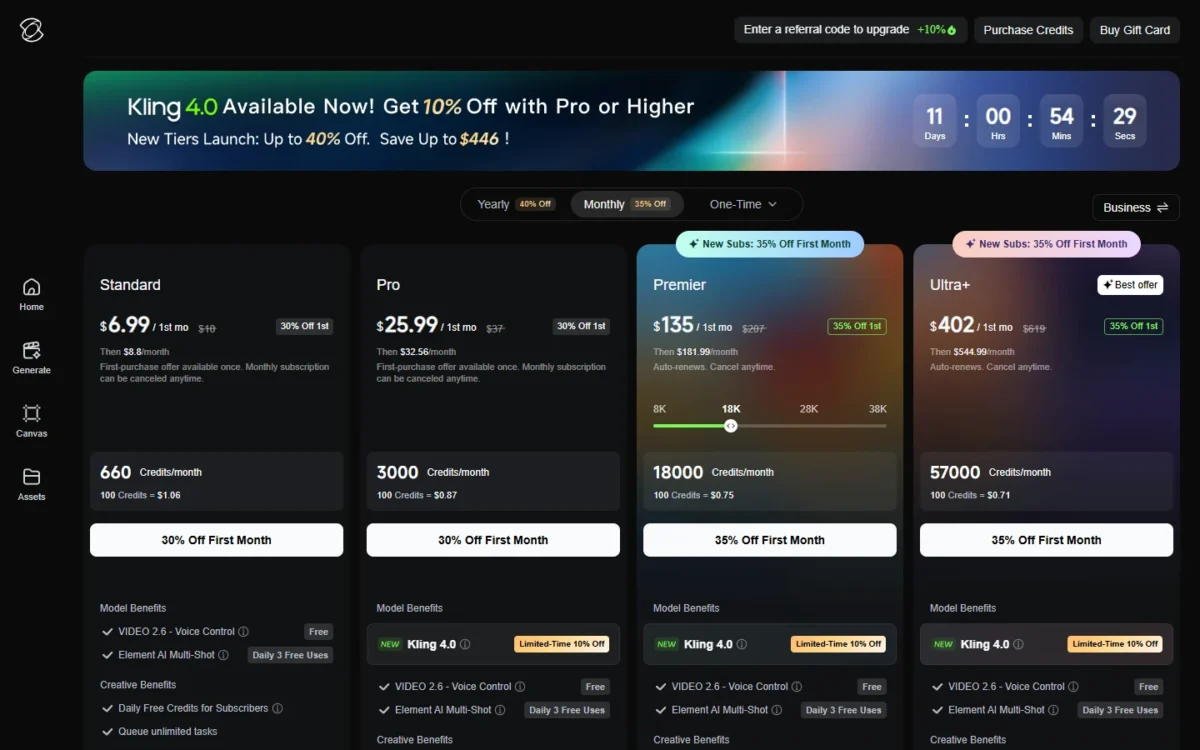
| Plan | Price | Billing | Key limit |
|---|---|---|---|
| Standard | $8.8/ | Monthly or yearly | 660 credits/ |
| Pro | $32.56/ | Monthly or yearly | 3,000 credits/ |
Sources: Kling AI membership plans, Monthly and Yearly views, checked October 2026.
Pros
- Native 30-second generation on Kling 4.0
- Motion Control recreates movement and facial expression
- Commercial use from the entry paid plan
Cons
- No credit cost per clip on the membership page
- Basic lacks watermark removal and 1080p/4K generation
- The lowest monthly prices are first-purchase offers
Choose Kling for long product or character shots, accepting that you estimate credits as you go.
- Skip it if:
- you must know each clip’s cost before subscribing; Runway and Luma print credits per second.
3. Runway: Best for Generating and Finishing in One Workspace
- Models: Gen-4.5, Aleph 2.0, plus Kling 3.0 and Seedance 2.5 (Pro and Max)
- Gen-4.5 image to video: Standard and higher, 2 to 10 seconds, 720p
- Starting price: Standard, $12/month billed annually or $15 monthly
Generation and finishing share one workspace on Runway. Gen-4.5 image-to-video and Aleph 2.0 draw on the monthly credit pool, Standard lists 4K upscaling, and Pro adds unlimited 4K video upscaling, so a still can be animated and delivered at 4K on one plan. Runway is also candid about volume: Standard’s 625 credits equal 52 seconds of Gen-4.5.
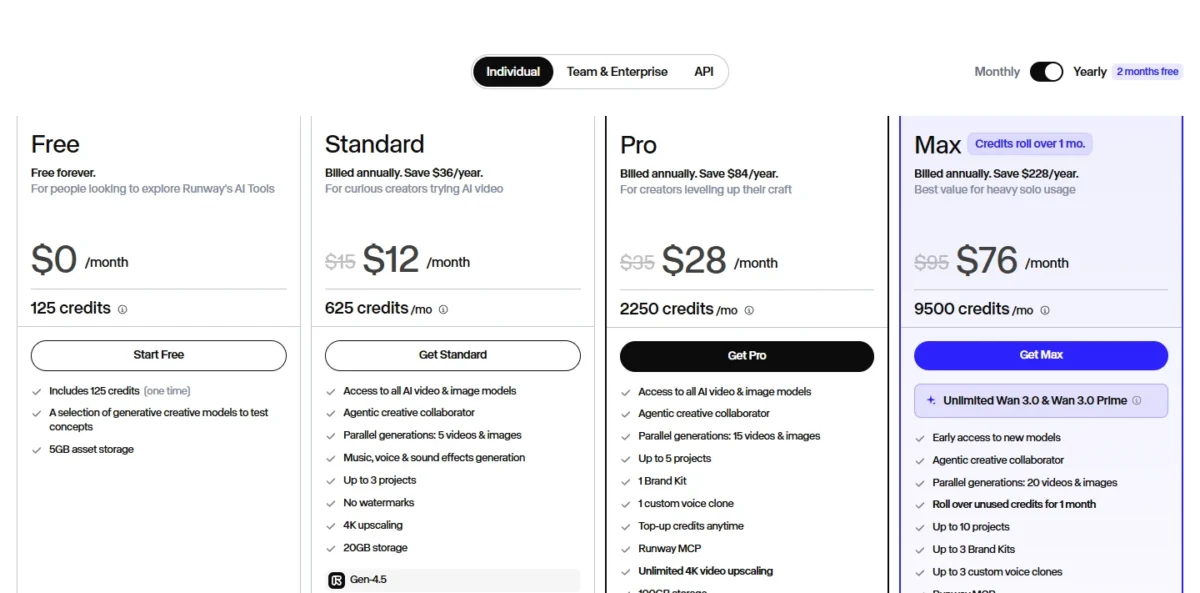
Pro also adds top-ups and Runway MCP. HDR and ProRes sit on Max, while Luma prices HDR from its entry plan.
Standard buys 10 Gen-4.5 videos of 5 seconds a month. Pro at $28/month billed annually ($35 monthly) lifts that to 37, the plan for weekly posting.
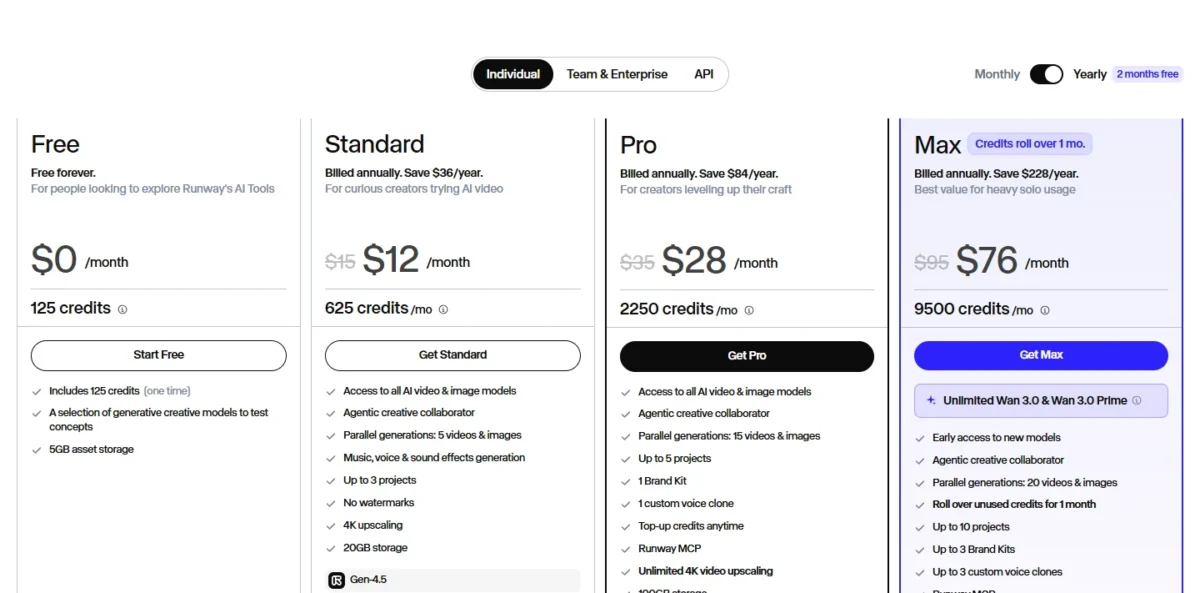
| Plan | Price | Billing | Key limit |
|---|---|---|---|
| Standard | $12/ | Billed annually ($15 monthly) | 625 credits/mo |
| Pro | $28/ | Billed annually ($35 monthly) | 2,250 credits/mo |
| Max | $76/ | Billed annually ($95 monthly) | 9,500 credits/ |
Sources: Runway pricing, Yearly and Monthly views, and Runway’s Gen-4.5 guide, checked October 2026.
Pros
- Credit cost printed per clip length for each video model
- Unlimited 4K video upscaling on Pro and Max
- Purchased credits never expire
Cons
- Free credits cannot run Gen-4.5
- Standard and Pro credits reset each cycle
- Gen-4.5 output is 720p
Choose Runway if most clips must leave the workspace upscaled to 4K, or, on Max, as ProRes.
- Skip it if:
- a client asks whether the model was trained on licensed content; Adobe Firefly states that for its own model.
4. Adobe Firefly: Best for Commercially Safe Client Work
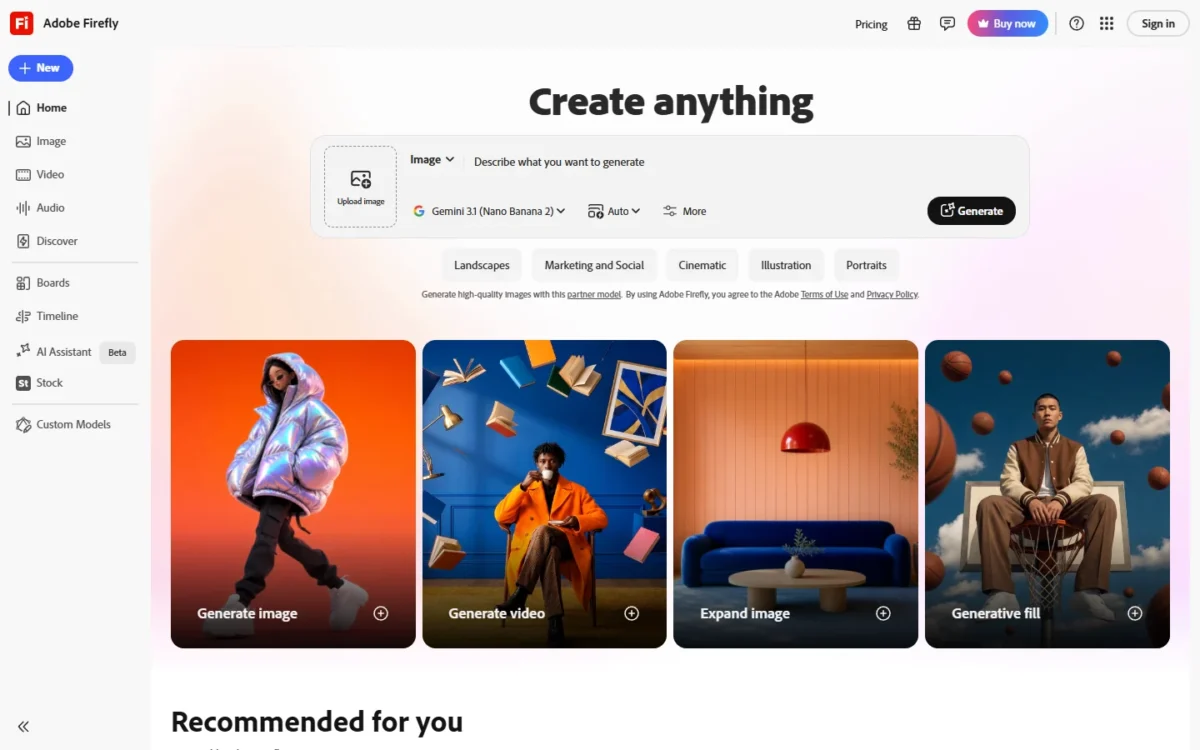
- Models: Firefly Video Model, plus integrated partner models from Google, Runway, Luma and OpenAI
- Output: MP4 up to 4K, about five seconds depending on the model
- Starting price: Firefly Standard, $9.99/mo
Adobe Firefly answers the question an agency’s client asks first: what was the model trained on? Adobe’s answer for its own model is licensed and public-domain content, with no watermark on any model. As I read the wording, that covers Firefly’s model, not the partner models in the same app.
Adobe’s commercial-safety promise holds only if the uploaded image itself does not violate copyright, trademark, privacy or publicity rights.
The controls suit B-roll: a first frame, an optional end frame, and camera moves such as zoom, pan and tilt set before generating. Clips export into Premiere and After Effects.
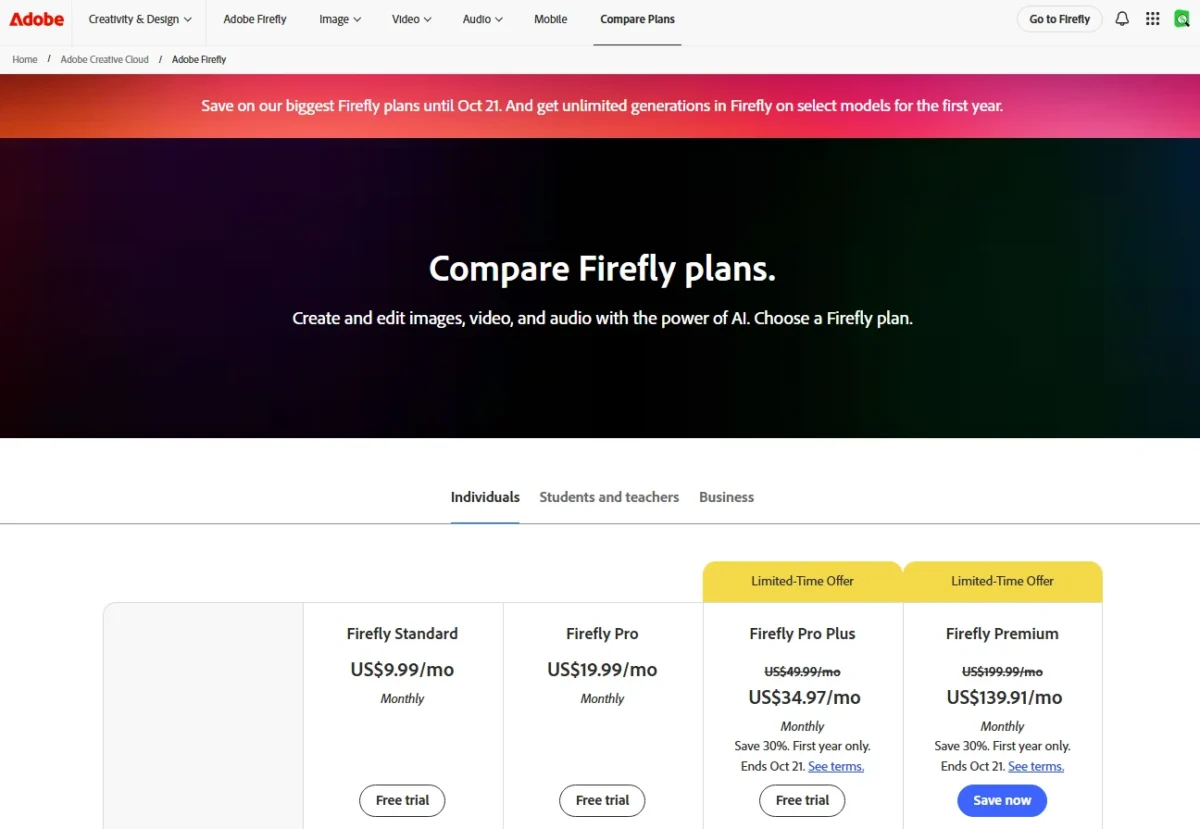
Firefly Standard costs $9.99/mo, monthly, for 2,000 credits and up to 20 five-second videos; Firefly Pro at $19.99/mo doubles both. My Adobe Firefly pricing guide covers every tier.
| Plan | Price | Billing | Key limit |
|---|---|---|---|
| Firefly Standard | $9.99/mo | Monthly | Up to 20 five-second videos |
| Firefly Pro | $19.99/mo | Monthly | Up to 40 |
| Firefly Pro Plus | $49.99/mo regular | Monthly | Up to 100 |
Sources: Adobe Firefly plans and Firefly image to video, checked October 2026.
Pros
- Training statement for Firefly’s own model
- No watermark on any model
- Exports into Premiere and After Effects
Cons
- Too short for one long take
- Partner models fall outside the training statement
- Standard caps out at 20 five-second videos
Choose Firefly if clips go into paid campaigns. My Adobe Firefly review covers its image tools too.
- Skip it if:
- you need one shot longer than the Firefly Video Model’s roughly five seconds; Kling AI lists native 30-second generation.
5. Luma Dream Machine: Best for HDR Footage for Post-Production
- Models: Ray3.2, plus Veo 3.1, Kling 3.0, Seedance 2.5 and MiniMax H3
- Output: SDR, HDR at 2x credits, HDR+EXR at 3x
- Starting price: Plus, $30/month or $300 billed yearly
Footage headed for a color grade belongs in Luma Dream Machine. Ray3.2 prices HDR and HDR+EXR output as credit multipliers from the entry Plus plan, which matters only if a colorist will touch the clip. That quality is costly: a 1080p Ray3.2 clip uses 400 credits per 5 seconds before HDR doubles it.
Draft mode keeps the bill down. Ten Ray3.2 drafts at 20 credits per 5 seconds cost 200 credits, half of one 1080p render.
Luma also resells models with audio in the same balance: Veo 3.1 at 280 credits per second, Kling 3.0 at 1080p at 49. Plus includes commercial use, and Luma connects to Figma and Frame.io.
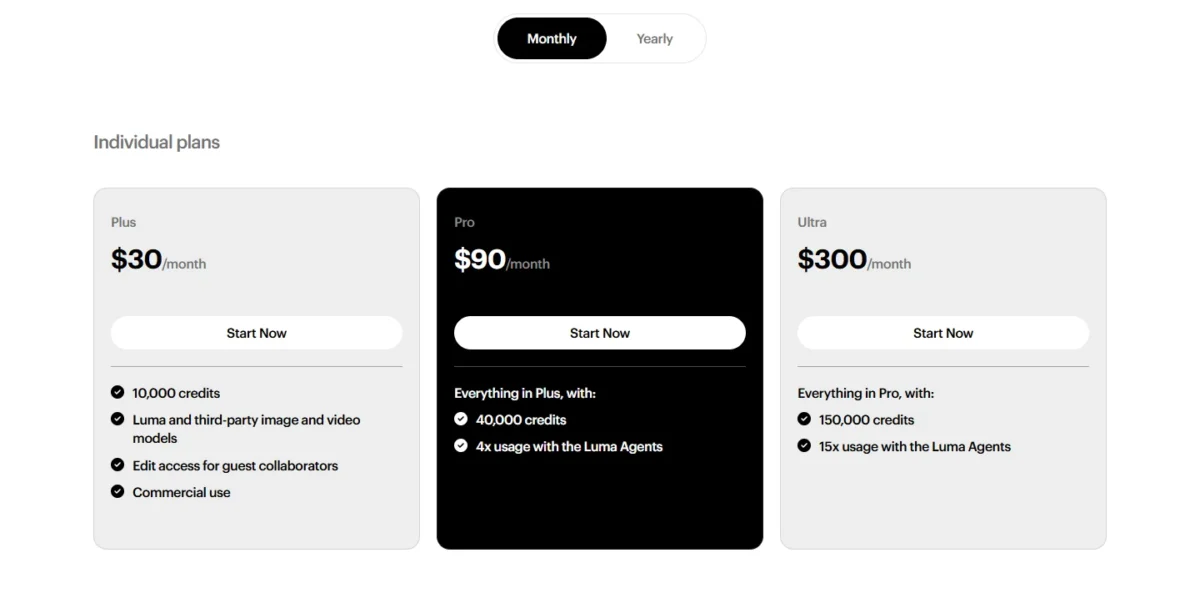
Plus costs $30/month or $300 billed yearly for 10,000 credits. Monthly billing for a year is $30 x 12 = $360, so yearly saves $60 once Luma is your grading source.
| Plan | Price | Billing | Key limit |
|---|---|---|---|
| Plus | $30/ | Monthly, or $300 billed yearly | 10,000 credits |
| Pro | $90/ | Monthly, or $900 billed yearly | 40,000 credits |
Sources: Luma pricing and Luma Dream Machine, checked October 2026.
Pros
- HDR and EXR output from the entry plan
- Cheap draft mode for iteration
- Veo 3.1, Kling 3.0 and Seedance 2.5 in one balance
Cons
- No free plan on the pricing page
- 1080p costs four times the 720p rate
- HDR+EXR triples the credit cost
Choose Luma if clips end up in a grading suite.
- Skip it if:
- you want a free plan; Luma’s pricing page lists none, while Google Flow and PixVerse have free tiers.
6. Midjourney: Best for Animating Midjourney Artwork
- Clip length: 5 seconds, extendable 4 seconds at a time to 21
- Resolution: 480p on every plan, 720p HD on Standard and up in Fast mode
- Starting price: Basic, $10 a month or $96 a year
If your stills already live in Midjourney, animating them there costs one click per image. Every gallery image carries Animate buttons, including a Loop option that reuses the first frame as the last. The ceiling is resolution: 720p suits social media posts, not a high-resolution deliverable.
GPU-time pricing hides a trap. The default batch is 4 videos, which costs 26 minutes in HD; a batch of 1 costs 7. Extensions cost the same GPU time as a new video.
Privacy and company size change the plan. Stealth Mode is on Pro and Mega only, and a company earning over $1,000,000 a year must buy Pro or Mega. Leonardo.Ai keeps creations private from its $12/month Essential plan.
Basic is $10 a month or $96 a year with SD video only; Standard at $30 a month ($288 a year) is the plan this job needs, since HD starts there. Extra GPU time costs $4/hr.
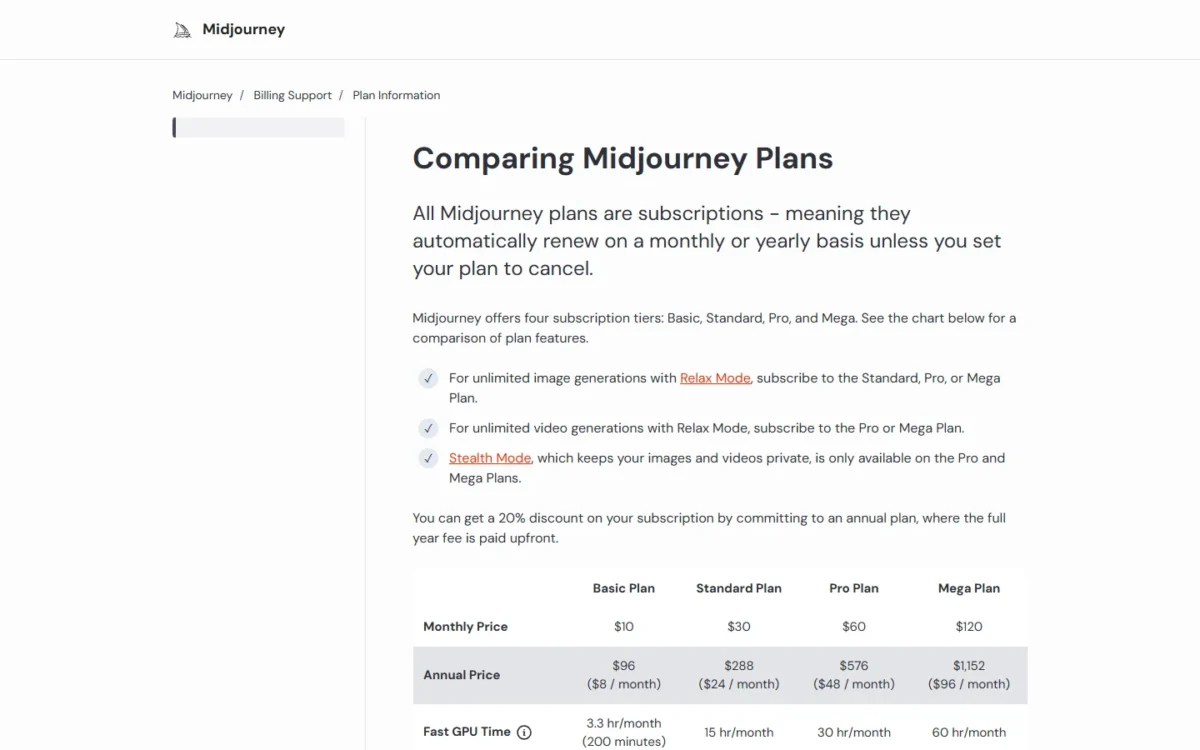
| Plan | Price | Billing | Key limit |
|---|---|---|---|
| Basic | $10/ | Monthly, or $96/ | 200 Fast minutes; SD only |
| Standard | $30/ | Monthly, or $288/ | 15 Fast hours; HD |
| Pro | $60/ | Monthly, or $576/ | Relax SD video; Stealth |
Sources: Midjourney plan comparison and Midjourney video docs, checked October 2026.
Pros
- Animate buttons on every gallery image
- One-click loops and end frames
- Blocked jobs cost no GPU time
Cons
- 720p maximum
- Unlimited Relax video only on Pro and Mega
- Default batch of 4 HD videos uses 26 GPU minutes
Choose Midjourney if you subscribe already; my Midjourney review covers the image side.
- Skip it if:
- you need sound or 1080p; Google Flow and Luma Dream Machine cover both.
The video docs describe no sound option, so a voiceover comes from one of the AI voice generators I ranked.
7. Leonardo.Ai: Best for High-Volume Drafts on a Flat Plan
- Image to video: Motion 2.0 takes one start-frame image, at 480p or 720p
- Starting price: Essential, $12/month on Pay Monthly
- Unlimited video: relaxed queue on Ultimate, select models only
Volume drafting on a flat bill is Leonardo.Ai’s niche. On Ultimate, select video models keep generating at a relaxed pace after the 60,000 monthly tokens run out, so testing dozens of motion ideas never hits a hard stop. The fine print decides the value: Veo 3.1 and Kling 2.5 Turbo still cost tokens every time.
The relaxed list includes Motion 2.0 and MiniMax H3 at 480p, so a storyboard artist can rough out every shot on H3, then render finals elsewhere.
Relaxed jobs run at lower priority and may slow at busy times, which suits overnight batches. My Leonardo.Ai review covers the image tools.
Ultimate, the plan with relaxed video, is $60/month on Pay Monthly or $48/month on Pay Yearly. Prices exclude tax.
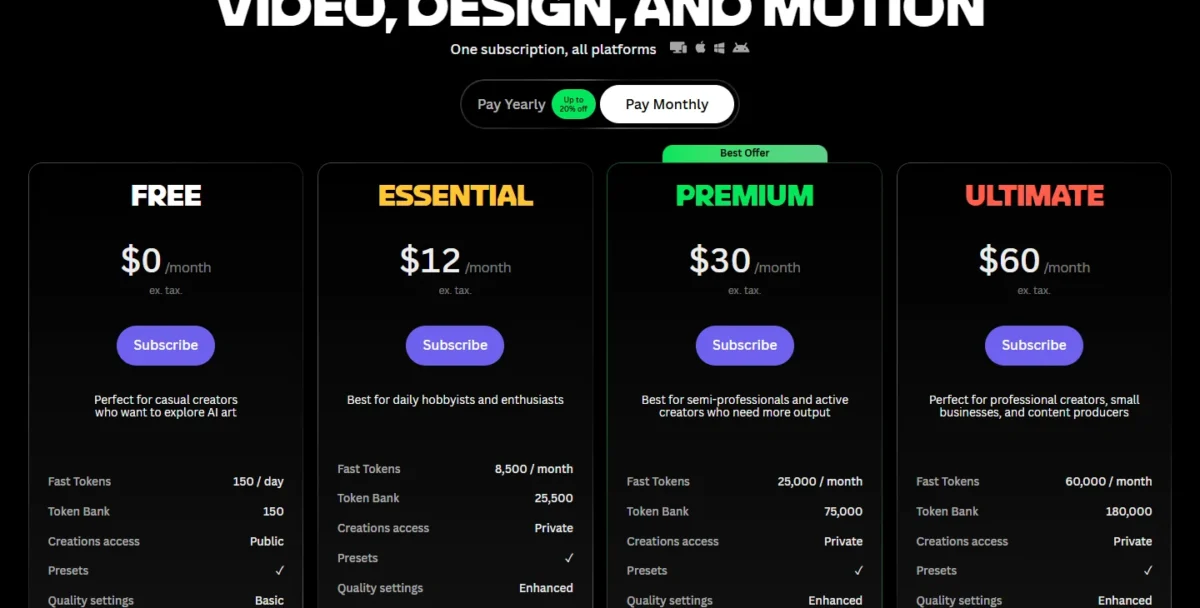
| Plan | Price | Billing | Key limit |
|---|---|---|---|
| Essential | $12/ | Pay Monthly ($10 Pay Yearly) | 8,500 tokens |
| Premium | $30/ | Pay Monthly ($24 Pay Yearly) | 25,000 tokens |
| Ultimate | $60/ | Pay Monthly ($48 Pay Yearly) | 60,000 tokens; relaxed video |
Sources: Leonardo.Ai pricing, Pay Monthly and Pay Yearly views, and Motion 2.0 docs, checked October 2026.
Pros
- Unlimited relaxed video on Ultimate for listed models
- MiniMax H3 at 480p in the relaxed list
- Images and video share one token pool
Cons
- Veo 3.1 and Kling 2.5 Turbo always use tokens
- Relaxed queue may slow under demand
- Free creations are public
Choose Leonardo if you iterate far more than you publish. If the still has to be made first, my ranking of AI image generators covers that step.
- Skip it if:
- drafts must come from Veo 3.1 or Kling; go to Google Flow or Kling AI directly.
8. Pika: Best for Pay-As-You-Go Credits Without a Subscription

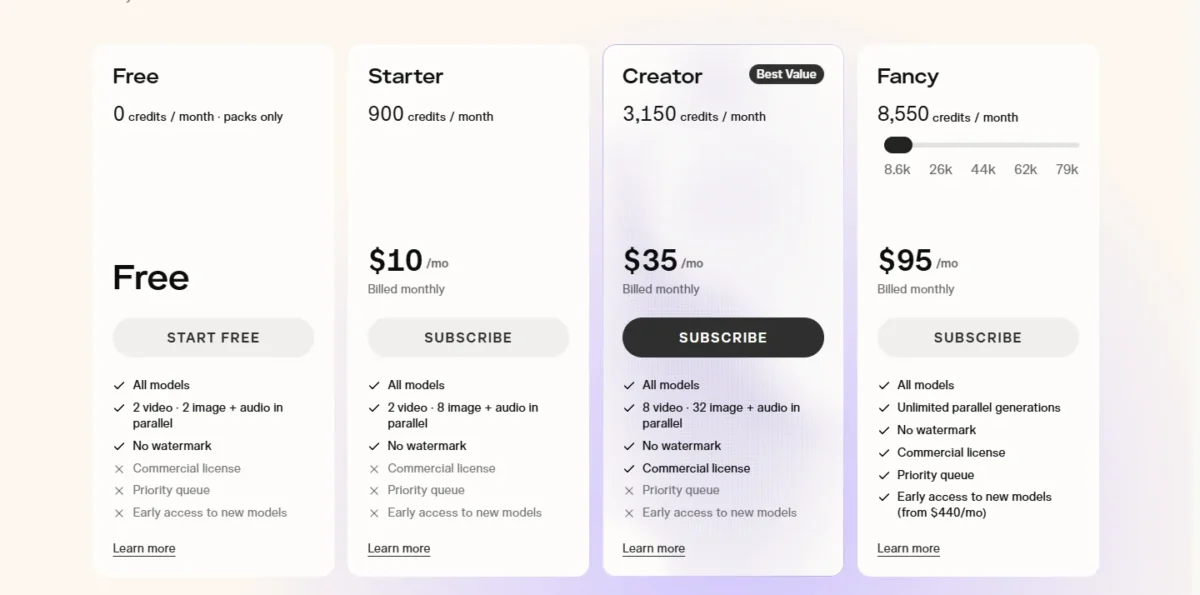
- Free plan: no monthly credits; credit packs only
- Starting price: Starter, $10/mo billed monthly
- Cost of one clip: Seedance 2.5 at 720p, 5 seconds, 122 credits
Pika suits people who hate idle subscriptions. A credit pack bought on the Free plan does not start a subscription, so someone animating a few product photos a quarter can pay once and use any model. The catch arrives with clients: the commercial license starts on Creator, not Free or Starter.
Packs keep the math simple at 60 credits per $1. The smallest, 1,500 credits for $25, buys 12 Seedance 2.5 clips by Pika’s count, and pack credits expire 365 days after purchase.
Every plan opens every model with no watermark, Free included. Pika’s developer docs list Pika 2.5 image to video at up to 1080p.
Starter costs $10/mo billed monthly for 900 credits; Creator, the plan client work needs, is $35/mo billed monthly for 3,150. Payments are non-refundable.
| Plan | Price | Billing | Key limit |
|---|---|---|---|
| Starter | $10/mo | Billed monthly | 900 credits; no commercial license |
| Creator | $35/mo | Billed monthly | 3,150 credits; commercial license |
| Credit packs | $25 to $1,000 | One-time | 1,500 to 66,000 credits |
Sources: Pika pricing and Pika 2.5 image to video, checked October 2026.
Pros
- Packs work on Free without a subscription
- Every model on every plan, no watermark
- Clips per plan printed for each model
Cons
- No commercial license on Free or Starter
- Free includes no monthly credits
- Pack credits cannot be used with the API or iOS app
Choose Pika if your volume is irregular.
- Skip it if:
- you want free credits every day; PixVerse refills them on its individual plans.
9. PixVerse: Best for Daily Free Credits and a Low Entry Price
- Free plan: Basic, 60 initial credits plus 30 a day
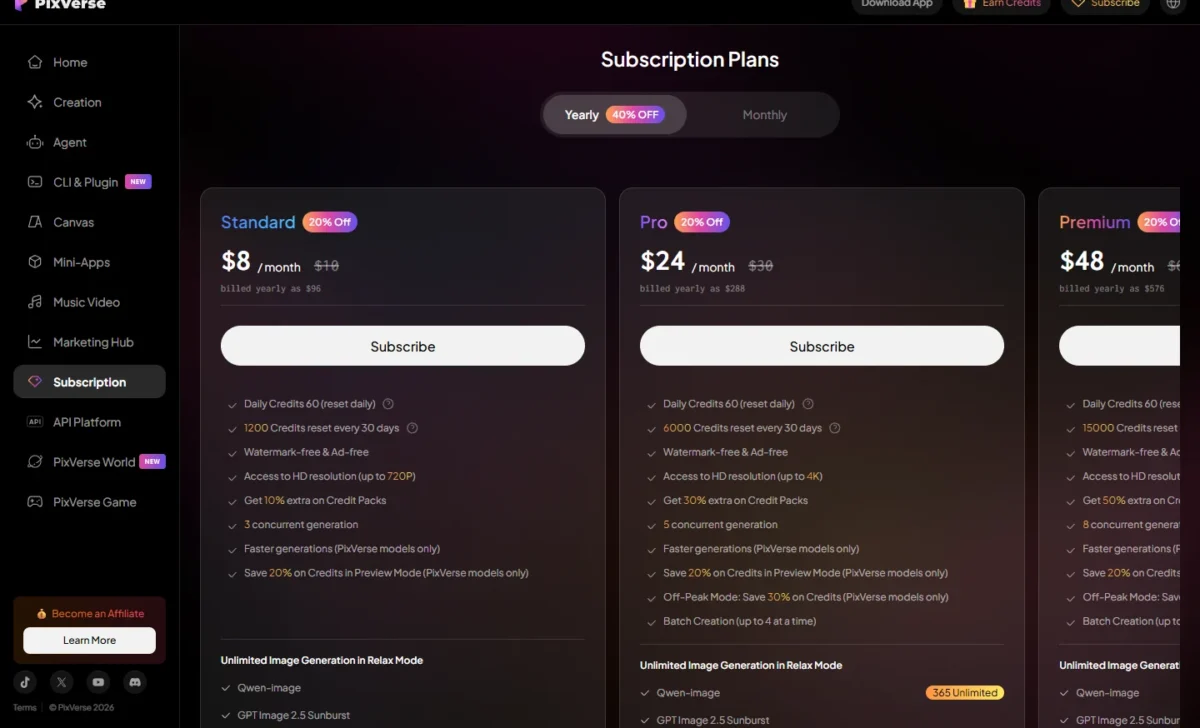
- Starting price: Standard, $8/month billed yearly as $96
- Resolution: up to 720p on Standard, up to 4K from Pro
Daily posting on a small budget points to PixVerse. Basic adds 30 free credits a day, and every individual paid plan adds 60 a day on top of its monthly pool. The entry plan is narrow, though: Standard caps output at 720p and lists only Kling O3 and Kling 3.0 among outside video models.
Pro is where PixVerse opens up, adding 4K, Seedance 2.5, MiniMax H3 and Wan 3.0, plus batches of up to 4.
Off-Peak Mode rewards flexible timing: Pro saves 30% and Premium 50%, and Ultra makes off-peak generations free, all on PixVerse’s own models only. Pika’s Creator plan states a commercial license; PixVerse’s plan list does not mention one.
Standard is $8/month billed yearly as $96 for 1,200 credits every 30 days; Pro is $24/month billed yearly as $288 for 6,000 credits and 4K.
| Plan | Price | Billing | Key limit |
|---|---|---|---|
| Standard | $8/month | Billed yearly as $96 | 1,200 credits; 720p |
| Pro | $24/ | Billed yearly as $288 | 6,000 credits; 4K |
| Premium | $48/ | Billed yearly as $576 | 15,000 credits |
Sources: PixVerse pricing, Yearly view, and PixVerse image to video, checked October 2026.
Pros
- Daily credits on Basic and the individual paid plans
- 4K, Seedance 2.5 and MiniMax H3 on Pro
- Off-peak discounts from Pro
Cons
- Standard caps output at 720p
- No per-clip credit cost printed
- Free off-peak use on Ultra covers PixVerse models only
Choose PixVerse if you publish daily and can wait for off-peak hours.
- Skip it if:
- you need a vendor statement about licensed training data; Adobe Firefly gives one.
10. Hailuo AI: Best for Multi-Reference Shots With MiniMax H3
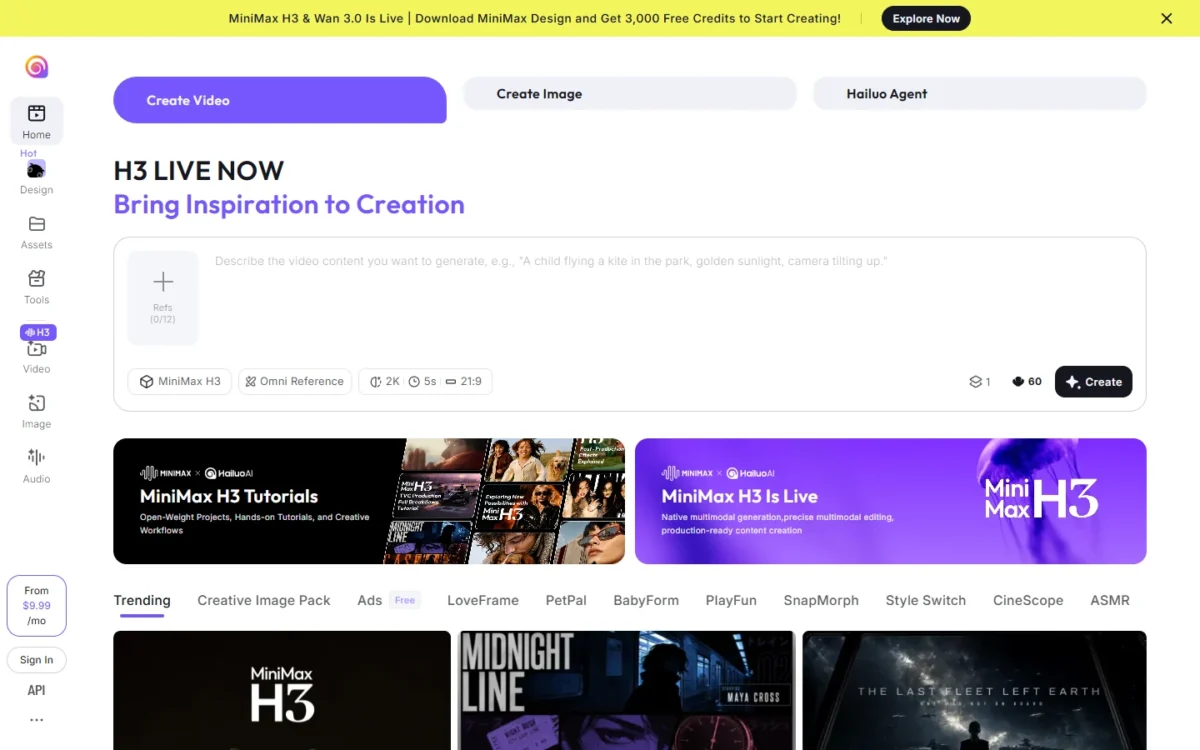
- Models: MiniMax H3 and H3 Max, plus Veo 3.1 and Sora 2 listed on paid plans
- Clip length: 5 to 15 seconds for MiniMax H3, with native stereo sound
- Starting price: Standard, $10.50 billed monthly
Several references in one shot is where Hailuo AI earns its place. MiniMax H3 accepts up to 12 reference files, so a character, a product and a location can anchor one clip. Hailuo also prints seconds of video per plan, not only credits; the weak spot is a one-time free trial limited to Hailuo models.
H3 also offers first-frame and first-and-last-frame workflows at 768p or 2K.
MiniMax H3 is sold elsewhere too: Luma charges 28 credits per second at 768p.
Hailuo’s plans page still lists Sora 2, though OpenAI’s Sora help page says the Sora API will be discontinued; confirm Sora 2 runs before paying.
Standard costs $10.50 billed monthly, or $8.40/month as $100.80 billed yearly, for 1,000 credits.
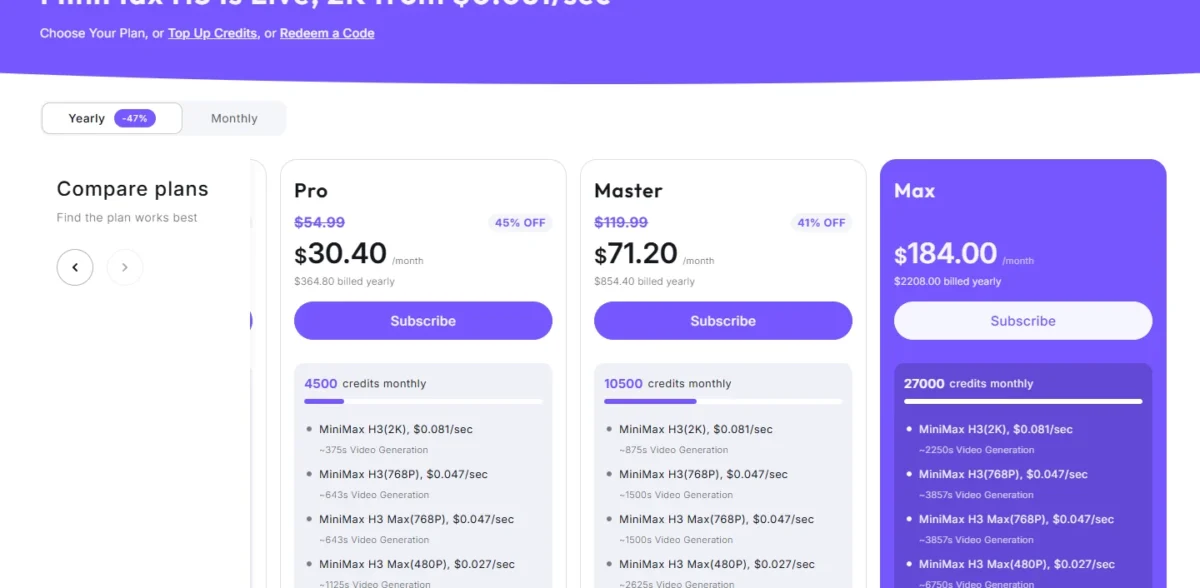
| Plan | Price | Billing | Key limit |
|---|---|---|---|
| Standard | $10.50/ | Billed monthly ($8.40/ | About 143s of H3 at 768p |
| Pro | $38.00/ | Billed monthly ($30.40/ | About 643s at 768p |
Sources: Hailuo AI plans, Monthly and Yearly views, and MiniMax H3 on Hailuo, checked October 2026.
Pros
- Up to 12 reference files per H3 clip
- Seconds of video printed for every paid plan
- Paid plans list Veo 3.1 alongside MiniMax H3
Cons
- One-time free credits, Hailuo models only
- Commercial rights left to a collapsed FAQ
- 2K uses credits faster than 768p
Choose Hailuo if your shots depend on several references staying consistent.
- Skip it if:
- you need commercial-use terms printed on the plan; Luma Dream Machine lists commercial use on Plus.
How Many 5-Second Clips Each Plan Buys
Each count divides the plan’s allowance by the vendor’s own cost per clip.
| Tool and plan | Price | Monthly allowance | Cost of one clip | Clips per month |
|---|---|---|---|---|
| Runway Standard | $15/ | 625 credits | 60 (Gen-4.5, 5s) | 10 (Runway’s figure) |
| Google Flow, Google AI Pro | $19.99/mo | 1,000 credits | 20 (Veo 3.1 Fast) | 1,000 / 20 = 50 |
| Adobe Firefly Standard | $9.99/mo | 2,000 credits | Not printed per clip | Up to 20 (Adobe’s figure) |
| Luma Plus, 720p | $30/ | 10,000 credits | 100 (Ray3.2, 5s) | 10,000 / 100 = 100 |
| Luma Plus, 1080p | $30/ | 10,000 credits | 400 (Ray3.2, 5s) | 10,000 / 400 = 25 |
| Midjourney Standard | $30/ | 15 Fast hours (900 minutes) | 7 minutes (HD, batch of 1) | 900 / 7 = about 128 |
| Pika Creator | $35/ | 3,150 credits | 122 (Seedance 2.5, 720p) | 25 (Pika’s figure) |
| Hailuo AI Standard | $10.50, billed monthly | 1,000 credits, about 143s of H3 at 768p | 5 seconds of H3 at 768p | 143 / 5 = about 28 |
Sources: Runway pricing, Google Flow credits help, Luma pricing, Midjourney video docs, Hailuo AI plans, checked October 2026.
On these figures, Midjourney Standard and Luma Plus buy the most 720p clips for $30 a month, about 128 and 100.
The same model costs differently on each platform
A 720p, 5-second Seedance 2.5 clip costs 122 credits on Pika and 390 on Luma (78 credits per second x 5). Both plans land near 25 clips: Pika Creator at 25, Luma Plus at about 25 (10,000 / 390).
On monthly billing, Luma Plus at $30 costs $5 less than Pika Creator at $35. With the counts this close, pick the platform for its other features.
How to Choose an Image-to-Video Generator
Match your clip’s needs against this matrix of what each vendor’s page states.
| Software | Start and end frame | Native audio | Longest clip stated | Commercial use, entry paid plan | API or MCP |
|---|---|---|---|---|---|
| Google Flow | Yes | Yes (Veo 3.1) | 8s, extendable | Not listed | Not listed |
| Kling AI | Yes (keyframes) | Yes (Kling 3.0) | 30s | Yes | Not listed |
| Runway | Not listed | Not listed | 10s | Not listed | Runway MCP (Pro and Max) |
| Adobe Firefly | Yes | Not listed | About 5s | Yes (Firefly model) | Not listed |
| Luma Dream Machine | Not listed | Yes (partner models) | 10s | Yes | Not listed |
| Midjourney | Yes, plus loop | Not listed | 21s | Yes, under $1,000,000 revenue | Not listed |
| Leonardo.Ai | Start frame (Motion 2.0) | Not listed | Not listed | Not listed for video (images: yes) | API, pay-as-you-go |
| Pika | Not listed | Not listed | Not listed | No (Creator) | API and MCP |
| PixVerse | Not listed | Not listed | Not listed | Not listed | Enterprise API, from $100 |
| Hailuo AI | Yes | Yes (MiniMax H3) | 15s | Not listed | MiniMax API |
Sources: Kling AI plans, Runway pricing, Runway’s Gen-4.5 guide, Firefly image to video, Midjourney plans, Leonardo.Ai API pricing FAQ, Pika pricing, PixVerse pricing, MiniMax H3 on Hailuo, checked October 2026.
The API or MCP column matters only if your own app or an AI agent starts the clips.
Social Media Clips vs Client Work: Which Features Matter
For social media clips, look for a vertical ratio and a clean export. Hailuo’s MiniMax H3 page lists 9:16 among six ratios, and Midjourney’s Download for Social option uses an encoder that reduces compression on social websites.
For client work, the license comes before the look: Adobe states what its Firefly model was trained on, and Pika licenses commercial use from Creator.
Creative Control and Realistic Motion
Creative control comes from inputs, not prompt length: start and end frames, Kling 4.0’s multiple keyframes and Hailuo’s up to 12 reference files pin a shot down.
Realistic motion depends on your own still and prompt, and no vendor page can promise it. Midjourney’s docs warn that High Motion may create unrealistic or glitchy movements, so test your own still first.
How to Create a Video From a Still Image
Creating a clip from a photo takes four steps: upload the image, describe the motion, set the model and length, then generate and download. Runway’s Gen-4.5 guide lays out this order.
- Upload a still with a clear subject. PixVerse’s image-to-video page says the clearest subject gives the best base.
- Describe the motion, not the picture. Runway’s guide says Image to Video prompts should focus on the motion of the scene.
- Set the model, ratio and length. Runway’s aspect ratio follows your image by default.
- Generate, compare, download. PixVerse suggests several takes from one image; Runway lets you upscale or download the result.
The steps barely differ, so the matrix above decides.
Editing a clip after it renders
Two picks let you edit after the render. Google Flow’s Gemini Omni Flash edits uploaded and generated videos for 40 credits per generation. Firefly’s video editor trims and rearranges clips on one timeline.
No still image yet? The job is then text to video, and my list of text-to-video AI generators fits better.
Also Considered
- Sora (OpenAI): the app is discontinued; the API date is in the FAQ below.
- Higgsfield: team plans from $65 per seat/month on its pricing page, reselling Kling 3.0 and Seedance 2.5, ranked here through other platforms.
- Canva: Image to Video is one Canva AI tool, and the free plan caps AI at up to 20 Standard or Premium AI uses.
- Seedance as a standalone app: Seedance 2.5 is sold inside Runway Pro, Luma, Pika and PixVerse Pro, so it is ranked through them.
FAQ
Can ChatGPT turn a photo into a video?
No. OpenAI discontinued the Sora web and app experiences on April 26, 2026, and its help page says the Sora API will be discontinued on September 24, 2026. For a still that needs sound, try Veo 3.1 in Google Flow’s free tier.
Is there a completely free AI image-to-video generator?
Not without caps. Google Flow gives 50 credits a day, PixVerse 30 a day, Leonardo.Ai 150 tokens a day with public creations, and Adobe Firefly free daily generations.
Kling AI’s Basic plan is $0, but watermark removal and commercial use start on Standard. Pika’s Free plan includes no monthly credits, only paid packs. My ranking of free AI video generators compares those plans in depth.
Which AI model is best for image to video?
It depends on the job: Veo 3.1 for native audio, Kling 4.0 for 30-second shots, MiniMax H3 for multi-reference clips.
Can I use AI image-to-video clips commercially?
It depends on the plan. Pika licenses commercial use from Creator, Kling AI on paid plans, and Luma on Plus; Midjourney requires Pro or Mega for companies over $1,000,000 in yearly revenue. These are vendor rules, not legal advice.
Final Verdict
Pick by the clip. Google Flow is my pick for a still that needs sound, testable free before paying $19.99/mo for Google AI Pro. Kling AI fits one long shot, and Runway clips that need 4K upscaling before they ship.
By budget, paid entry starts at $4.99/mo for Google AI Plus, $8/month billed yearly for PixVerse and $8.8/month for Kling. For special needs, Adobe Firefly fits when rights matter more than length, and Luma when footage goes to a colorist. For the rest of a content workflow, my list of AI tools for content creation covers the stack.





