Higgsfield AI is worth paying for if you want several premium video models behind one bill and you are prepared to watch the credit meter. It is a poor buy if you only ever use one model, or if you plan to stay on Starter, which cannot run Veo Fast or the full Seedance model in the plan table.
Evidence basis: hands-on testing in Macedona’s Ultra account on 2026-10-01 and 2026-10-02, run by Claude, an AI assistant, at Macedona’s request, with the notes and scores approved by Macedona, plus a new-account sign-up test Macedona ran personally on 2026-10-02. Official pricing was checked logged out on 2026-10-02, and the terms and About page on the same day.
The short version: Kling is the cheap workhorse, Seedance gave the better of the two product shots, and Veo Fast is the model to pay up for when camera movement carries the shot. Plus is the real entry plan for anyone who picked Higgsfield for its model catalogue, and the price you are shown can change from one session to the next.
In This Article (23 sections)
Quick Verdict
| Question | Answer |
|---|---|
| Best for | Creators and small teams who want Kling, Seedance and Veo behind one credit balance |
| Not ideal for | Anyone who needs only one model, or an agency that must keep client footage out of model training without an Enterprise deal |
| Starting price | Starter at $15 a month, the same on monthly or annual billing, in the logged-out view of 2026-10-02 |
| Practical plan | Plus at $49 a month on monthly billing, or $39 a month on annual billing: the first plan that includes the full Seedance 2.0 model and Veo Fast |
| Free option | No free plan card on the pricing page; the sign-up page promises free generation, but Macedona’s new email account opened with 0 credits |
| Setup difficulty | Low in the main generator; Cinema Studio takes longer to learn |
| Main strength | One prompt can be tried on several premium models side by side |
| Main limitation | Credits expire every cycle, and the price offered can differ between sessions |
| Best alternative | A single-model subscription if you only ever use one model |
Sources: prices and plan gates from the Higgsfield pricing page, logged out on 2026-10-02 and viewed from Vietnam; the US price was not observed. The sign-up offer is from the logged-out sign-up page of 2026-10-02, the new account’s credit balance from Macedona’s own sign-up test that day, and onboarding and setup from the test sessions.
Choose Plus if Seedance or Veo Fast is the reason you are here, and upgrade to Ultra when a cycle of Plus credits or its six parallel video jobs start holding back batch work. Avoid both if one model covers everything you make.
There is no free plan card on the pricing page, but the sign-up page says “Sign up and generate for free” and offers 50 credits for signing in with a business email. When Macedona created a new account by email on 2026-10-02, it opened on the Free Plan with 0 credits left, while the default GPT Image 2 generation showed a cost of 6.5 credits.
Whether the business-email credits or the onboarding rewards would have filled that balance was not verified, so do not count on free generations before you pay.
After that, pay monthly rather than annually until you know which models you will actually use, and check each model’s cost on the Generate button first.
Higgsfield AI Pros and Cons
| Pros | Cons |
|---|---|
| Kling, Seedance and Veo Fast sit behind one credit balance and one prompt box | Starter cannot run the full Seedance 2.0 model or Veo Fast |
| Kling charged the fewest credits per clip in the test, on a shorter clip than Veo’s | Subscription credits expire at the end of each credit cycle |
| Every test clip came back as a 720p MP4 file with an audio track, and the first-round frames showed no visible watermark | Starter runs only two video jobs at once |
| The cost of each generation shows on the Generate button before you submit | Two logged-out views of the pricing page on the same day showed different offers |
| Commercial use is included on every individual plan | The terms let Higgsfield train its models on your inputs and outputs |
| Ultra runs up to eight video jobs in parallel | Unlimited jobs run in the standard queue and only on the website |
Sources: plan comparison by tier and Terms of Use; credit, Unlimited, watermark, output and pricing-session notes from the test sessions.
What Is Higgsfield AI?
Higgsfield AI is a web app that puts third-party video and image models behind one subscription and one credit balance. You choose a model for each generation, and each model burns credits at its own rate, so the model you pick moves the bill more than the plan you are on.
The company behind it is Higgsfield; its About page says Higgsfield launched in 2025, is headquartered in San Francisco and is backed by leading venture firms. It also points to a dedicated Trust page covering terms, policies and support operations.
Higgsfield’s per-model credit rates list these 720p rates for the three video models tested here:
- Kling 3.0 720p: ~7 credits/5s
- Seedance 2.0 720p: ~22 credits/5s
- Google Veo 3.1 Fast 720p: ~16 credits/4s
The model picker in the test account listed dozens of video models, including several versions of Kling, Seedance, Veo, MiniMax and Wan. Higgsfield’s own tools sit in the main navigation: Cinema Studio, Ads Studio, Marketing Studio, Effects, Genjutsu and Audio.
Sora is the exception to check.
The public pricing table lists Sora 2 720p at ~10 credits/4s and Sora 2 Pro 720p at ~30 credits/4s, but Sora did not appear in the video model picker during the 2026-10-01 test. If Sora is the model you want, check the model list in the generator before you pay.
Cinema Studio got one test shot of its own, covered below.
The rest of the testing went to the third-party models, because the plans are sold on credits and model gates. The credit pool, the per-model rates and the plan walls around Seedance and Veo all apply to those models, so that is where a buyer’s money goes.
If Marketing Studio or Ads Studio is the main reason you are buying, this review cannot tell you how good they are, and Soul ID got only the one-photo test described below. Before you rely on one of them, check that your plan includes it, what one run costs on its Generate button, and whether it runs on Unlimited or on credits.
Methodology: How This Review Was Done
This review rests on four hands-on sessions and on Higgsfield’s official pricing page, Terms of Use and About page, plus the account’s usage and subscription screens. The first two sessions ran on 2026-10-01 and the other two on 2026-10-02, all from Vietnam.
Prices were captured from the pricing page while logged out on 2026-10-02. The plan-gate figures come from the same page’s Compare features table in a signed-in session on 2026-10-01.
Claude, an AI assistant, operated the interface in Macedona’s paid Ultra workspace at Macedona’s explicit request.
It ran one image prompt and three text-to-video prompts at 720p: a dog on a beach, a woman on a rainy Tokyo street and a steel wristwatch on a marble pedestal. It also ran two Cinema Studio prompts and a one-photo Soul ID test.
Every clip was scored on a five-point scale for prompt adherence, consistency, visual fidelity, motion and text artifacts. Claude gave the scores, and Macedona reviewed the clips, approved the notes and scores and supplied the logged-out pricing screenshots.
Macedona personally timed one new email sign-up on 2026-10-02; Claude created no account.
Each plan was assessed against the same buyer criteria from its pricing and plan-table data: credit cost per clip, model access, Unlimited rules, billing and refund terms, and data use. Unverifiable claims were left out.
Three Prompts, Three Models: What the Test Showed
The first prompt was identical for all three runs: a golden retriever running through shallow waves at sunset, filmed as a slow side tracking shot. Each job ran at 720p, and the charge for each was read from the account’s usage history once the clips were done.
| Model | Clip settings | Credits charged | Render time | What came back |
|---|---|---|---|---|
| Kling 3.0 | 5s, 720p, audio and Enhance on | 10 | About 2.5 minutes | Consistent dog and coat; it slowed to a walk by the end |
| Seedance 2.0 | 5s, 720p | 22.5 | About 2.5 minutes | A full-stride run all the way through, with heavy spray |
| Google Veo 3.1 Fast | 8s, 720p, Enhance on | 32 | Within about 2 minutes | Closest camera tracking to the prompt, with an audio track |
Sources: listed per-model rates from the pricing page; credit charges as logged in the test account’s usage history, a signed-in page, on 2026-10-01; settings, render times and output notes from the same test session.
Seedance and Veo Fast were charged in line with their listed rates. Kling’s 10 credits sat above its listed rate because audio was on; the cost section below shows the silent price.

On motion, Seedance gave the most convincing run: the dog kept a full stride from the first frame to the last. Kling held the dog’s look steady across frames but let it slow to a walk by the end, which reads as the model dropping the “runs” part of the prompt.
Veo Fast was the only one to honor the side tracking shot, keeping the dog centered while the surf moved behind it.

The second round added a people prompt and a product prompt, each billed at the same per-clip rates as the first. The people prompt asked for a woman in a yellow raincoat walking toward the camera on a rainy Tokyo street at night, with neon reflecting in puddles and the camera pulling back as she glances up and smiles.
Kling gave a quieter street with weak neon, but her face stayed stable and the pull-back was clear. Seedance gave the strongest neon and reflections, but showed no visible falling rain and filled the signs with unreadable pseudo-Japanese lettering.
Veo Fast gave the heaviest rain and a crowd with umbrellas, but the woman turned her head fully away mid-clip, and its signs carried unreadable pseudo-Chinese lettering.

The product prompt asked for a luxury steel wristwatch turning slowly on a black marble pedestal in macro close-up, and it ran on Kling and Seedance only. Kling’s dial carried garbled brand text, the base looked like speckled stone and the watch turned only part of the way.
Seedance put the watch on a black marble block with white veins and kept the dial numerals legible, which made it the only usable product shot of the pair.
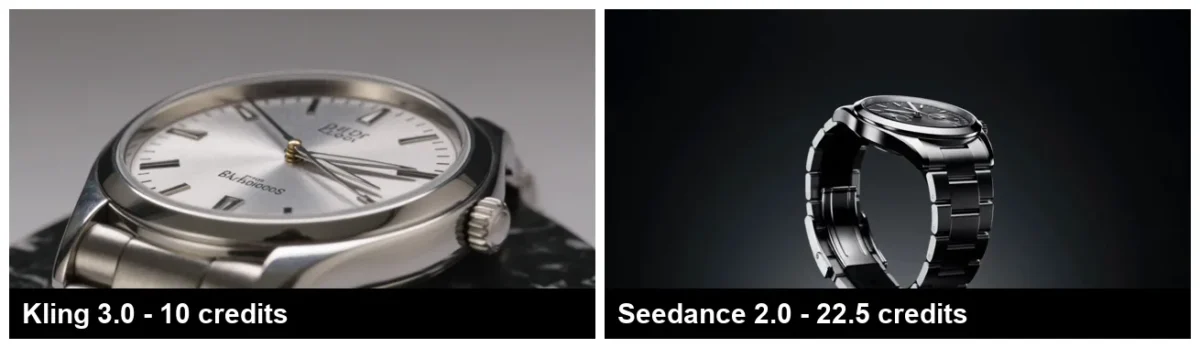
The scores below rate how good each video output was on prompt adherence, consistency, visual fidelity, motion and text artifacts. They are Claude’s scores on a five-point scale, approved by Macedona, where higher is better and a high text score means clean lettering; Veo Fast did not run the watch prompt.
| Prompt | Model | Credits | Adherence | Consistency | Fidelity | Motion | Text artifacts |
|---|---|---|---|---|---|---|---|
| Dog on a beach | Kling 3.0 | 10 | 4 | 5 | 4 | 3 | 5 |
| Dog on a beach | Seedance 2.0 | 22.5 | 4 | 5 | 5 | 5 | 5 |
| Dog on a beach | Google Veo 3.1 Fast | 32 | 5 | 5 | 5 | 5 | 5 |
| Rainy Tokyo street | Kling 3.0 | 10 | 4 | 5 | 4 | 4 | 4 |
| Rainy Tokyo street | Seedance 2.0 | 22.5 | 4 | 5 | 5 | 4 | 3 |
| Rainy Tokyo street | Google Veo 3.1 Fast | 32 | 4 | 4 | 5 | 4 | 3 |
| Steel wristwatch | Kling 3.0 | 10 | 3 | 4 | 4 | 4 | 2 |
| Steel wristwatch | Seedance 2.0 | 22.5 | 4 | 5 | 5 | 4 | 4 |
Sources: credits from the test account’s usage history; scores from the test notes, approved by Macedona.
Every clip came back as a 1280×720 MP4 file with an audio track, the first-round frames showed no visible watermark, and renders took about two to two and a half minutes. In the second round, all five video jobs went in within about two minutes and were accepted at once with no queue message, which is what a batch workflow needs.
Three prompts at 720p are a small sample, so read the scores as a first read rather than a ranking of the models. Sora, lipsync and 1080p or 4K renders were not tested, and this review makes no claim about them; Soul ID got only the one-photo test below.
On these results, Kling is the sensible default for volume work, with Veo Fast kept for shots where camera movement carries the scene.
Seedance sits between them on price. It tied Veo Fast for the top motion score on the dog prompt and beat Kling on every criterion but motion in the watch test, which Veo Fast did not run, so it earns a place in the rotation for product shots.
If your prompts need work before you spend credits, see our AI video prompts.
Soul ID Test: One Photo, No Likeness
Higgsfield’s About page describes Soul ID as its system for character consistency. In our test, the training step happened on the upload page, which takes photos of one person, and new images were then generated with that character.
Our test did not show that character consistency, and it was not a fair run. On 2026-10-02 Claude ran it in Macedona’s Ultra account at Macedona’s request, using one cropped photo of Macedona’s own face that Macedona supplied and agreed to have uploaded.
The upload page recommends 20+ photos of one person, and it rated our single photo “Low quality” and “Bad”. Creating the character on Soul 2.0 cost 25 credits, and training took about 4.4 minutes.
Generating with the character then used free Soul 2.0 generations included with Ultra, which showed 5,000 free generations left, so the five test images cost no credits.
None of the five matched. The reference photo shows Macedona with glasses and a cap, and all five outputs, from a studio headshot to a film-noir close-up, showed a young woman instead.
Identity match was 0 of 5. The five faces were only moderately consistent with one another, so the character did not even hold one stable stand-in face.
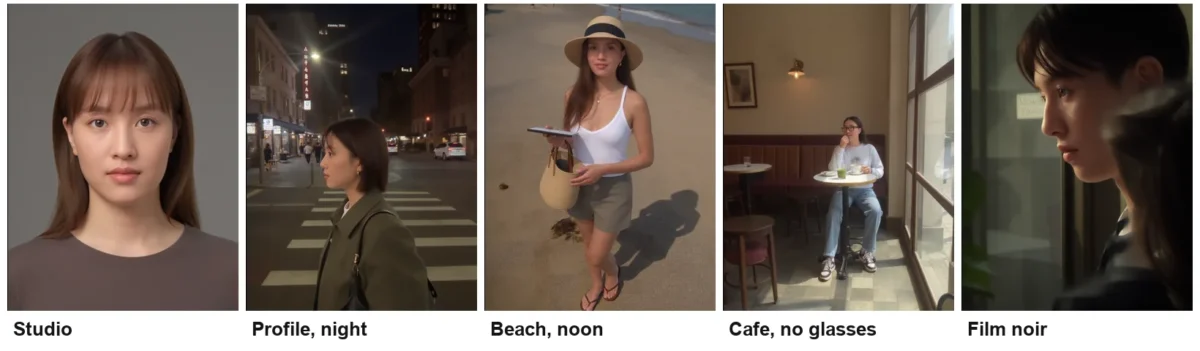
One low-resolution photo against a 20+ photo recommendation says little about how Soul ID performs with a proper set. It does show what a thin set produces: not a rough likeness but a different person, and the upload page’s “Bad” rating did not stop the 25-credit training run.
For a buyer, the lesson is practical. Prepare a full set of 20 or more clear photos of one person before you train, and budget 25 credits for every character you create, because a failed character costs the same as a good one.
Cinema Studio Test: Camera Controls and a Blocked Prompt
Higgsfield calls Cinema Studio its flagship horizontal workspace, and it is a separate workspace rather than another model in the picker.
On 2026-10-02 Claude opened it in the same Ultra account, where the screen read Cinema Studio 4.0 and offered these camera controls:
- Camera body: Modern, 35mm Film, 8mm Film and DV Camcorder
- Lens: Clean Sharp, Anamorphic, Vintage Anamorphic, Warm Vintage and Halation Vintage
- Apertures: f/1.4, f/4 and f/11
- Movement: a tab of more than 30 named camera moves, such as Dolly in, Crane up and Whip pan, which are added to the prompt
A 5-second shot showed a cost of 35 credits at 720p and 60 credits at 1080p on the Generate button. That is more per clip than any of the three models in the main test, for a shorter clip than Veo Fast’s.
The first prompt, an old fisherman mending a net on a wooden dock at dawn, ran for about three minutes and then stopped with “Protected content detected”. Nothing in the prompt named a person, brand or character, so this reads as a false positive.
The card said the credits were refunded, and the usage history logged the 35 credits coming back.
The second prompt asked for a lighthouse on a rocky coast at dusk, waves crashing against the rocks and the lamp turning on as the light fades.
It was shot on 35mm Film with an Anamorphic lens at f/1.4 and a Dolly in. It finished in about five minutes as a 1280×720 MP4 with an audio track.
Instead of one continuous dolly-in, the clip cut between three shots inside five seconds: a misty wide shot of the lighthouse on the rocks, a low angle where the lamp switches on, and a close-up of the lamp lens. The film look and the lighting were strong and the lamp-on moment matched the prompt, but the lighthouse changed design between shots.

| Prompt | Tool and settings | Credits | Adherence | Consistency | Fidelity | Motion | Text artifacts |
|---|---|---|---|---|---|---|---|
| Lighthouse at dusk | Cinema Studio 4.0, 35mm Film, Anamorphic, f/1.4, Dolly in | 35 | 4 | 2 | 5 | 4 | 5 |
Sources: the shot ran at 720p; settings, costs, render time, the blocked prompt and its refund, and the score from the Cinema Studio test notes of 2026-10-02, approved by Macedona.
Submitting from Cinema Studio also created a project workspace with a project brief, a canvas, a chat panel and an AI Director, which is built for multi-shot projects rather than one-off clips.
One shot is not enough to judge it as a filmmaking tool. It is enough to say that a Cinema Studio clip costs more, takes about twice as long as the main test’s clips, and makes its own cutting decisions.
What One Clip Really Costs in Dollars
Credits only mean something once they are turned into dollars.
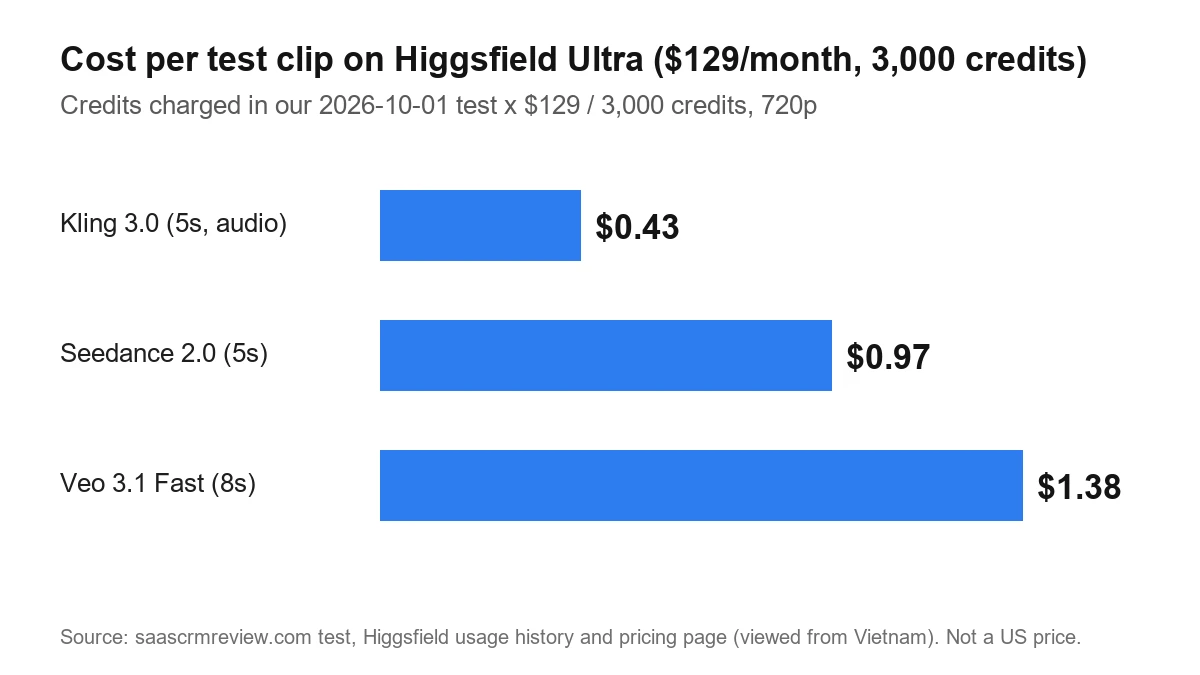
On the pricing page captured logged out on 2026-10-02, Ultra costs $129 a month on monthly billing for 3,000 credits, so one credit costs $0.043. On Plus, $49 for 1,000 credits works out to $0.049 a credit, so every clip below costs slightly more there.
Annual billing lowers Plus to $39 and Ultra to $99 a month on the same page, so rerun this arithmetic on the checkout total you are actually shown.
Each figure below is the $129 Ultra price divided by its 3,000 credits, times the credits each clip was charged in the test.
| Model in the test | Credits charged | Cost at the $129 Ultra price |
|---|---|---|
| Kling 3.0 | 10 | $0.43 |
| Seedance 2.0 | 22.5 | $0.97 |
| Google Veo 3.1 Fast | 32 | $1.38 |
Sources: Ultra plan pricing, logged out, for the price and credits; charges as logged in the test account’s usage history, a signed-in page. Calculated 2026-10-02.
The test account’s own usage page lands on a similar rate: 78.68 credits spent showed a total cost of just over three dollars, about four cents a credit.
How far a cycle goes is the other half of the math. The clip counts below are the 3,000 Ultra credits divided by the credits each test clip was charged.
| Model in the test | Credits per clip | Clips per Ultra credit cycle |
|---|---|---|
| Kling 3.0 with audio | 10 | 300 |
| Google Veo 3.1 Fast | 32 | 93.75 |
Fractions are shown as calculated, so round them down to whole clips.
Seedance needs no arithmetic here: its test charge matched the rate behind the plan table’s own Seedance figure, shown in the pricing section. The Veo Fast row counts eight-second clips, the length the test ran, so it sits below the plan table’s Veo figure, which counts four-second clips.
These are first-try clips, and every reroll comes out of the same pool, so a project that needs three attempts per usable shot gets a third of these counts.
Settings That Quietly Raise the Cost
The Generate button shows the cost before you submit, and two Kling settings move it more than you might expect. In Higgsfield’s Kling video generator, a 5s 720p clip showed 7.5 credits with Enhance and audio off, and 10 credits with audio on.
Audio therefore adds 2.5 credits to every 5-second Kling clip, which explains the gap between the test charge and the listed rate of ~7 credits/5s. Turn it off for drafts and keep it for the final pass.
The second trap is resolution. Each time the Kling generator page was reloaded in the test, it reset to 4K and the button showed 30 credits, so set 720p again before every run.
Enhance carries a different cost on Veo Fast: it rewrote the test prompt into a long shot description before generating. Leave it on for loose ideas, and switch it off when the wording of your prompt matters.
Pricing and Plan Gates
Higgsfield’s pricing page, captured logged out on 2026-10-02 from Vietnam, listed three individual plans and three business plans. The US price was not observed for this review, and a US visitor may see different figures.
| Plan | Monthly billing | Annual billing, per month | Credits per month | Model access and parallel video jobs |
|---|---|---|---|---|
| Starter | $15 | $15 | 200 | Seedance 2.0 Fast and 2.0 Mini only; up to 2 videos in parallel |
| Plus | $49 | $39 | 1,000 | All Seedance models; up to 6 videos in parallel |
| Ultra | $129 | $99 | 3,000, with 6,000 and 9,000 levels | Up to 8 videos in parallel |
| Team | $69 per seat | $65 per seat | 1,000 per seat | One shared workspace for 2 to 9 members |
| Scale | $169 per seat | $150 per seat | 2,500 per seat | Admin spend control, priority queue and basic SSO |
| Enterprise | Through sales | Through sales | Custom per seat | Unlimited seats, custom model access and volume rollover credits |
Sources: individual and business plan cards on the pricing page, logged out, Monthly and Annual toggles, 2026-10-02; Ultra’s parallel jobs and Scale’s credits per seat from the same page in a signed-in session, 2026-10-01; Scale’s admin items from Macedona’s screenshots of the business cards, 2026-10-02. Ultra’s prices are for the 3,000-credit level.
Prices exclude VAT and local taxes, calculated at checkout, so the plan card is not the amount that leaves your account.
Treat the table as one session’s offer rather than a fixed list.
On the same day, Macedona’s own logged-out screenshots of the page showed a different individual offer: Starter and Plus at higher prices, each with more credits, while Ultra’s prices matched the table. Prices vary by session, so read the total on the checkout screen for your country before you pay.
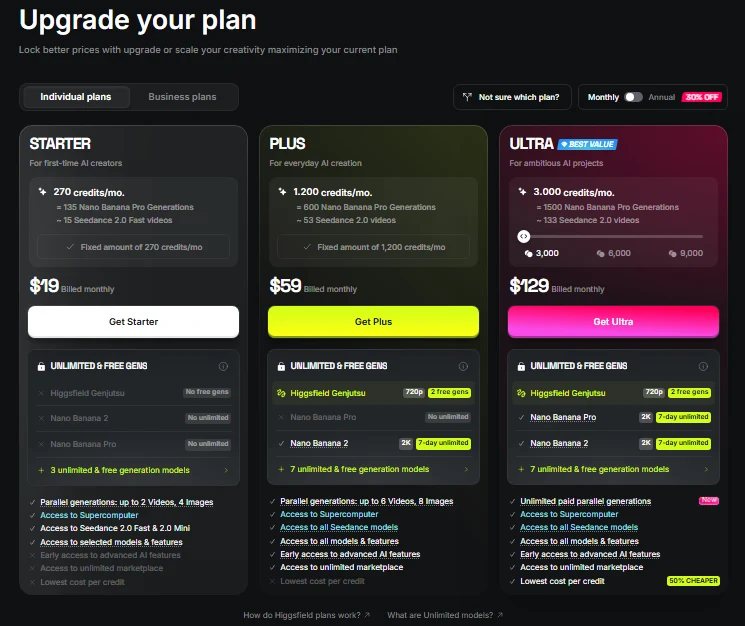
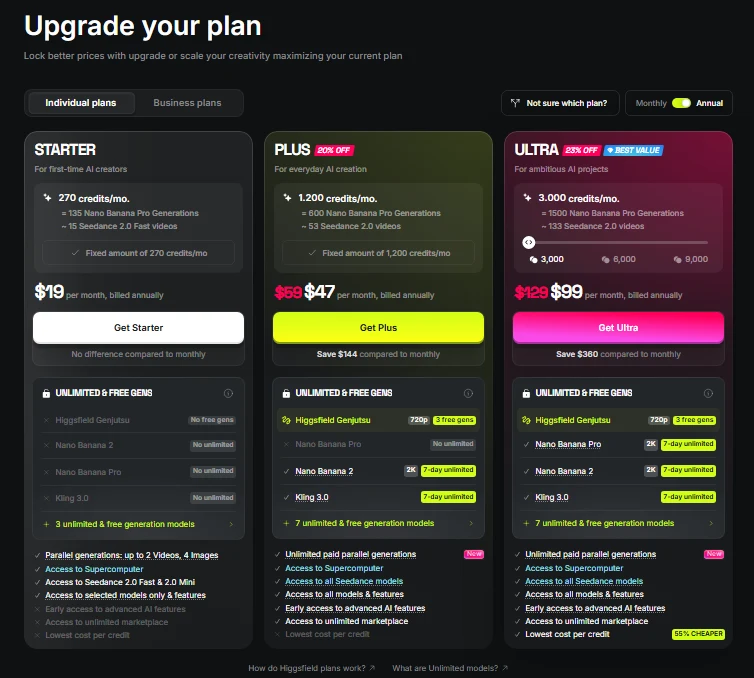
A signed-in view on 2026-10-01, shown under a personal discount banner, offered yet another set: a Basic plan at $9 a month for 120 credits, and Team and Scale seats at $60 and $130 a month. A new visitor is not shown those figures, and they are not used anywhere else in this review.
What Each Plan Unlocks
The plan-gate table below comes from the Compare features table on the same page, the only place that listed model access and clip counts plan by plan. Its credit levels of 200, 1,000 and 3,000 match the logged-out cards for Starter, Plus and Ultra.
| Plan gate | Starter | Plus | Ultra |
|---|---|---|---|
| Credits per cycle | 200 | 1,000 | 3,000 |
| Seedance 2.0 720p clips per cycle | Not included | 44 videos | 133 videos |
| Kling 3.0 720p clips per cycle | 26 videos | 133 videos | 400 videos |
| Google Veo 3.1 Fast 720p clips per cycle | Not included | 62 videos | 187 videos |
| Start & End Frame control | Not included | Included | Included |
| Higgsfield Speak | Not included | Included | Included |
| Commercial use | Included | Included | Included |
| Concurrent video jobs | 2 | 6 | 8 |
Source: Compare features table on the pricing page with the Monthly toggle, signed-in session, checked 2026-10-01.
The gates that matter most are the Seedance and Veo rows. Neither model is in Starter’s plan table, and nor are Start & End Frame control and Speak.
The logged-out cards point the same way: Starter lists access to Seedance 2.0 Fast and 2.0 Mini only, while Plus lists access to all Seedance models.
If those models are why you are looking at Higgsfield, the cheap plan is not a cheaper way in. It is a different product.
Read the clip counts with care, because the Monthly/Annual toggle changes them. On the Annual toggle the same rows list year totals: 1,600 Seedance videos on Ultra and 533 on Plus, 4,800 Kling videos on Ultra, and 2,250 Veo Fast videos on Ultra.
Ultra’s 1,600 Seedance figure equals 3,000 credits across 12 cycles at 22.5 credits per clip, the rate the test was charged. Ultra’s per-cycle Seedance figure of 133 matches that rate too.
Kling’s 400 clips per cycle are priced at the silent rate: 3,000 Ultra credits at 7.5 credits per silent Kling clip equals 400 clips. With audio on, the test’s 10-credit clip gives 300 clips per cycle, so the table overstates Kling volume for anyone who keeps audio on.
The Veo Fast row has the same kind of gap, this time from clip length.
Its 62 clips on Plus and 187 on Ultra match four-second clips at the listed ~16 credits per 4 seconds: 1,000 and 3,000 credits divided by 16, rounded down.
The test’s eight-second Veo Fast clip was charged 32 credits, as logged in the test account’s usage history. At that length, 3,000 Ultra credits at 32 credits per clip cover 93.75 clips, half the table’s figure.
No free plan card appears among the individual plans.
The free offer sits on the account sign-up page instead, which promises free generation and bonus credits for a business email, as covered under Ease of Use and Setup below. Macedona’s new email account, created on 2026-10-02, opened on the Free Plan with 0 credits left.
Inside the existing test account, the first-project guide offered free generations for finishing onboarding and warned that skipping it would lose them. Whether those onboarding rewards or the business-email credits reach a new account was not verified.
The safest paid trial is one month on monthly billing, on the cheapest plan that includes the models you need, cancelled before renewal if the clips disappoint.
Which Higgsfield Plan Fits You
For most buyers the answer is Plus. Choose Ultra only for batch volume, Team or Scale for a shared workspace, and Enterprise only when client material must stay out of model training.
The table puts the logged-out prices and the plan table’s per-cycle volume for each plan in one place.
Clip counts are the plan table’s own: Kling at the silent 5-second rate, Seedance at 5 seconds and Veo Fast at 4 seconds. Model access for Team, Scale and Enterprise was not checked for this review.
| Plan | Price, monthly / annual per month | Credits per month | Clips per cycle: Kling / Seedance / Veo Fast | Fits |
|---|---|---|---|---|
| Starter | $15 / $15 | 200 | 26 / Fast and Mini only, no count listed / none | A solo creator who mainly uses Kling |
| Plus | $49 / $39 | 1,000 | 133 / 44 / 62 | Most buyers: model shoppers comparing outputs |
| Ultra | $129 / $99 | 3,000 | 400 / 133 / 187 | Batch production at volume |
| Team | $69 / $65 per seat | 1,000 per seat | Not listed | Agencies that need one shared workspace for 2 to 9 people |
| Scale | $169 / $150 per seat | 2,500 per seat | Not listed | Larger teams that need admin spend control, a priority queue or basic SSO |
| Enterprise | Through sales | Custom per seat | Not listed | Client work that must stay out of model training |
Sources: prices and credits from the pricing page plan cards, logged out, 2026-10-02; clip counts from the same page’s Compare features table, Monthly toggle, signed-in session, 2026-10-01; both viewed from Vietnam, not US prices. The Enterprise fit reflects the training carve-out in the Terms of Use.
Read the table as a set of rules:
- Pick Starter only if Kling is the one tested model you need; its 200 credits buy 26 silent Kling clips a cycle.
- Pick Plus if you need the full Seedance 2.0 model or Veo Fast at all, because it is the cheapest plan that runs them.
- Move to Ultra when Plus runs out: more than 44 Seedance clips a cycle, or more than six video jobs at once.
- Pick Team when several people need one workspace and one credit pool, Scale when you also need admin spend control, a priority queue or basic SSO, and Enterprise when client footage must stay out of model training.
Solo Creators: Is Starter Enough?
Only if Kling is all you need.
Of the three models tested here, Starter is a Kling plan in practice. The plan table lists Kling on it and leaves out Seedance 2.0 and Veo Fast, and the logged-out Starter card names only the Seedance 2.0 Fast and 2.0 Mini variants.
Starter’s 200 credits cover 26 silent Kling clips a cycle by the plan table, and fewer with audio on. That suits testing ideas, not shipping a weekly content calendar.
The better plan for a solo creator is to start on the cheapest plan that includes every model you expect to use, not the cheapest plan overall, and to err on the small side. Higgsfield’s FAQ says an upgrade takes effect immediately and any credit difference is applied to your account, so a plan that turns out too small costs you little.
The expensive mistake is a plan that is too big.
A downgrade only applies at the end of the current plan duration, and unused subscription credits expire at the end of each credit cycle. You keep paying for the bigger plan until the period ends and lose whatever credits you did not use.
Model Shoppers: Plus Is the Real Entry Plan
Plus is the first plan with the full Seedance 2.0 model, Veo 3.1 Fast, Start & End Frame control and Speak, so it is the realistic floor for anyone who chose Higgsfield for its model range. Starter gets only the Seedance 2.0 Fast and 2.0 Mini variants.
In the plan table, its 1,000 credits cover 44 Seedance or 62 four-second Veo Fast clips a cycle. That is enough to compare models on real briefs, and Plus costs $49 a month on monthly billing or $39 a month on annual billing.
The risk on Plus is mixing models without a budget. Veo Fast cost about three times as much as Kling per clip in this test, on a longer clip, so a cycle spent defaulting to Veo can run dry halfway through.
A simple house rule helps: Kling with audio off for drafts, Seedance for product shots and Veo Fast only for the final pass.
Agencies and Teams: Ultra, Team or Scale?
Of the individual plans, Ultra has the largest credit pool at 3,000 credits a cycle and the most parallel work at 8 concurrent video jobs. In the test account, the signed-in subscription page lists the Ultra plan summary as “Parallel generations: up to 8 Videos, 8 Images”, which is what lets one operator queue a whole batch.
The Team and Scale plan cards are priced per seat and built differently. On the logged-out page of 2026-10-02:
- Team: $69 per seat/mo on monthly billing or $65 on annual, with 1,000 credits per seat/mo for 2 to 9 members in one shared workspace
- Scale: $169 per seat/mo on monthly billing or $150 on annual, with 2,500 credits per seat/mo; Macedona’s screenshots show it for 5 to 15 members
- Enterprise: priced through sales, with custom credits per seat, unlimited seats, custom model access and volume rollover credits
A Team seat buys 1,000 credits, the same as Plus at $49, so Team pays for the shared workspace rather than for cheaper output.
The admin and security lists need careful reading. On the business cards in Macedona’s logged-out screenshots, each card shows every item and marks it with a tick or a cross:
- Team ticks only basic analytics & priority support. Admin spend control, priority queue, SSO, delegated top-up access and every Security & Compliance item, including no training on your data, are crossed out.
- Scale ticks detailed analytics & priority support, admin spend control, priority queue and basic SSO. Delegated top-up access and every Security & Compliance item, including no training on your data, are crossed out.
- Enterprise ticks every Admin & Control and Security & Compliance item, including no training on your data.
So Team is a shared workspace and credit pool, Scale is the first tier with spend control and SSO, and Enterprise is the only tier whose card promises the compliance items. The cards name these controls without describing them, so ask Higgsfield how spend control, SSO and indemnification work before a client rollout depends on them.
How Unlimited Really Works
Unlimited needs the most care of any billing feature, because the switch loaded off in the test even though the account held an active Unlimited pass for that model. On the Nano Banana Pro image generator, the control bar on page load showed the Unlimited switch next to a Generate button costing 2 credits.
With the switch turned on, the button label changed to “Unlimited”, and the test account’s usage log recorded that image as Unlimited instead of credits. After the generation the switch showed off again.
The button label is the only cue that a run will not cost credits, so check it every time.

The rules behind the switch sit in the pricing FAQ:
- Unlimited generations run in the standard queue, while credit-based generations always run in the priority queue.
- Unlimited is for personal, human use only; automation tools, credential sharing and reselling access are prohibited.
- Unlimited models and Free Generations are accessible only via higgsfield.ai, not on MCP/CLI, Canvas or Supercomputer.
So Unlimited saves credits on the specific models a plan names, at the cost of speed when the platform is busy, and it does nothing for scripted or API work. None of the three video models in this test ran on Unlimited in this account.
Credits, Cancellation and Refunds
Credits are use-it-or-lose-it. The credits FAQ says subscription credits do not roll over and expire at the end of each credit cycle.
The same FAQ says you can cancel anytime in your account settings, and your plan will remain active until the end of the current period. A downgrade applies at the end of the current plan duration.
In the test account, the signed-in subscription settings show the cancellation warning in plain words. It reads: “If you cancel, you’ll lose access to your remaining credits when your billing period ends.” Cancellation sits behind a self-service button there; it was viewed but not used in this test.
Refunds are narrow. Under the refund clause, you may request a refund within seven days of your initial purchase, provided no Credits have been used, or as permitted by the law in your jurisdiction.
The same refund clause points consumers in the EEA or UK to a separate section that governs their statutory right of withdrawal.
Refunds apply only to initial purchases, not renewals, and refunds of initial purchases are subject to a service fee not exceeding six percent of the initial fee where permitted by law.
That pair of clauses is the trap: a single test generation spends credits, and from that moment the standard refund is gone unless local consumer law gives you more. Use any free onboarding generations you are offered and the Generate-button costs to decide before you spend a paid credit.
Ownership, Commercial Use and Training on Your Data
The ownership terms are buyer-friendly. The Higgsfield Terms of Use say the company does not claim ownership of any of your Inputs or Outputs, nor does it restrict your commercial use of Outputs.
The data terms are less so. The same section says your Content, Inputs, and Outputs may be used by Company to train, develop, enhance, evolve, and improve its AI models.
The terms also say Higgsfield may set retention periods for past outputs that vary by subscription tier, so download anything you need to keep.
The carve-out sits in the same section of the terms: different terms apply to customers under an Enterprise Agreement, and under those agreements Higgsfield does not use the customer’s content to train or improve its AI models.
The business plan cards, in Macedona’s logged-out screenshots of 2026-10-02, match that line. Team and Scale both cross out “No training on your data”, and only Enterprise ticks it.
For an agency feeding client footage or unreleased product shots into prompts, that makes Enterprise, not Team or Scale, the plan to price, and the no-training term is worth having in the signed agreement before client work goes in.
Ads With Real People: Consent, Disclosure and Provenance Marks
Commercial use does not clear the people in your ads.
If your content includes a person’s name, likeness or voice, the terms require you to have that person’s rights, releases and consents. That covers a UGC-style ad or an AI influencer built on a real face or voice.
Where the law requires it, you must also disclose that an output is artificially generated or manipulated. Check the rules for each market and ad platform you publish to.
The terms add that Higgsfield may embed machine-readable watermarks or C2PA / Content Credentials provenance signals in outputs, and that it does not warrant any marking will be applied to, or persist in, every output.
That explains the watermark result in this test. The first-round frames showed no visible watermark, but invisible provenance marks may still be in the files, so do not assume an output is unmarked, or that it is marked.
Is Higgsfield AI Safe to Pay For?
Yes, as a self-serve creator subscription, as long as you accept its refund and data terms. The answer rests on five checks.
Who you are paying: Higgsfield. Its company page says the company launched in 2025, is headquartered in San Francisco and is backed by leading venture firms, and it points to a dedicated Trust page covering terms, policies and support operations.
Money terms: the Terms of Use allow a refund request within seven days of the initial purchase, provided no Credits have been used, and never on renewals.
Cancellation is self-service: the pricing FAQ says you can cancel anytime in your account settings. In the test account, the signed-in subscription settings showed the button and warned that remaining credits go when the billing period ends.
Your content: the same terms leave ownership of your inputs and outputs with you, but let Higgsfield train its models on them unless you are under an Enterprise Agreement. The current terms were last updated on July 26, 2026, so read the current version rather than a summary from last year.
Moderation: in the Cinema Studio test, a harmless fisherman prompt was blocked as protected content after about three minutes, and its 35 credits were refunded automatically. A false positive is a nuisance, but in this test it did not cost credits.
Security credentials sit at the top tier only.
On the business plan cards, as Macedona’s logged-out screenshots of 2026-10-02 show them, every Security & Compliance item, from indemnification to the security certification line, is crossed out on Team and Scale and ticked only on Enterprise. No audit report was reviewed for this article.
For most creators that does not matter; for an agency with a client security questionnaire, it means an Enterprise conversation.
Ease of Use and Setup
Getting started is the easy part. The sign-up page, viewed logged out on 2026-10-02, offers four ways in: Google, Apple, Microsoft or email.
Its headline reads “Sign up and generate for free”, and it offers 50 credits for signing in with a business email.
To continue you agree to the Terms of Use and Privacy Policy and confirm you are at least 18 years old. A footer notes that SSO is available on Scale and Enterprise plans.
Macedona timed an email sign-up on 2026-10-02 at 240 seconds, from opening the email sign-up form to the image-creation screen, including waiting for the verification code and finishing the welcome steps. Sign-up with Google, Apple or Microsoft was not timed.
No payment card was asked for to sign up or to reach the creation screen. The new account opened on the Free Plan with 0 credits left, while the default GPT Image 2 generation showed a cost of 6.5 credits.
That is the gap behind the “generate for free” headline: the balance a plain email account opened with was zero, and the Higgsfield pricing page shows no free plan card to fall back on. Whether the business-email credits or the onboarding rewards would change that was not verified.
In the existing test account, the first visit to the image tool opened a guided “Create your first AI project for free” flow with four starter workflows, and trying to skip it warned that you would lose free generations.
Once inside, the generator is one prompt box with model, duration, aspect ratio and resolution controls, and the cost shows on the Generate button before you commit.
Switching models takes one picker, not a new tool: the same prompt box served Kling, Seedance and Veo Fast, and the picker listed dozens of video models. That is why the same-prompt comparison above was quick to run.
Renders took about two to two and a half minutes in the main generator, so a first clip arrives within minutes of opening it. Batch work needs no extra setup either: the parallel jobs described in the test section went in without any queue message.
Cinema Studio has a real learning curve. It names four camera bodies, five lenses, three apertures and more than thirty camera moves, and submitting a shot opens a project workspace with a brief, a canvas, a chat panel and an AI Director on top.
None of it is hard to click, but choosing well means knowing what a 35mm film body, an anamorphic lens or a dolly-in will do, and its clip took about five minutes. If those terms are new to you, start in the plain generator.
The weak spot is discoverability: the Unlimited switch is easy to miss, Kling’s resolution resets on reload, and a mistyped model link returned a generic “Something went wrong” page instead of a helpful error.
Higgsfield AI Limitations
- Starter leaves out Veo Fast and the full Seedance model, so for a buyer who wants those models the entry price is not the real starting cost.
- Credits expire every cycle, so an unused balance is money spent on nothing.
- The pricing page showed different offers in different sessions on the same day, so the price you see may not match this review.
- Unlimited only covers named models, runs in the standard rather than the priority queue and stays on the website.
- The default terms allow training on your inputs and outputs unless you are under an Enterprise Agreement; Team and Scale do not change that.
- Generator defaults can raise the bill: Kling audio adds to every clip, and Kling’s resolution setting resets on reload.
- Moderation can block a harmless prompt, as it did once in Cinema Studio, though the credits came back.
- This review covers three prompts on three video models, one image model, one Cinema Studio shot and a one-photo Soul ID test; higher resolutions, Sora, lipsync, Marketing Studio and Genjutsu sit outside its scope.
Who Should Buy Higgsfield AI and Who Should Skip It
Buy it if:
- You want to try the same idea on Kling, Seedance and Veo without three subscriptions.
- You produce short clips in batches and can use parallel jobs.
- You will set a model budget and stick to it.
Skip it if:
- You only ever use one model; a direct subscription to that model is simpler.
- You want to script generations or run them through an API on Unlimited, which works only on the website.
- You handle client material and cannot accept training on your inputs, and an Enterprise Agreement is not an option.
Higgsfield AI Alternatives
The honest alternative to Higgsfield is not another aggregator but a single model bought directly. If you already know which model you want, see our guide to the best AI video generators before paying for a catalogue you will not use.
For a single-model alternative, see our Runway review. For another option, see our Google Flow review.
For a wider list, see our text-to-video AI generators compared.
Final Verdict: Is Higgsfield AI Worth It?
Higgsfield AI is worth it for a creator or small team that genuinely uses more than one premium video model and can manage a credit budget. For that buyer, Plus is the practical starting plan and Ultra is the plan for batch work.
It is not worth it for a Kling-only user, who has little use for the catalogue, or for anyone who wants to automate generations on Unlimited. Agencies should price Team or Scale for the shared workspace, and Enterprise if client material must stay out of model training.
FAQ
Is Higgsfield AI worth it?
Yes, if you use several premium models and will budget credits by model. If you only use one model, a direct subscription is usually the simpler buy.
Who makes Higgsfield AI?
Higgsfield. Its About page says the company launched in 2025 and is headquartered in San Francisco, backed by leading venture firms.
Do Higgsfield credits roll over?
No. Subscription credits expire at the end of each credit cycle, and cancelling forfeits what is left when the billing period ends.
Is there a free Higgsfield plan?
No free plan card appears on the pricing page. The Higgsfield sign-up page promises free generation and 50 credits for signing in with a business email.
Macedona’s new email account still opened on the Free Plan with 0 credits left. Whether business-email credits or onboarding rewards would add to that was not verified.
Is Higgsfield AI safe to use?
It is a paid service from a named company with published terms and self-service cancellation. The caution is about data, because the default terms allow training on your inputs and outputs, and only an Enterprise Agreement carves that out.
Which is better, Higgsfield or Kling?
They are different kinds of product: Higgsfield offers Kling as one of many models in one subscription. If Kling is all you use, look at Kling’s own subscription first; if you switch between models, Higgsfield is the more practical bill.
Is there any AI better than Higgsfield?
That depends on the model you need, and this review only tested models inside Higgsfield, so it does not rank Higgsfield against other tools. To compare it with other video generators, start with the guide to the best AI video generators linked in the alternatives section above.