Agencies break CRM software in a way in-house sales teams never do. One company runs ten client rosters, ten reporting lines, ten inboxes and ten renewal dates, and the tool has to keep them apart without keeping the team apart.
That is the real test behind the search for the best CRM for agencies, and it is the one most rankings skip. They compare entry prices, then stop before the plan that actually carries agency automation, before the ceiling that forces the upgrade, and before the charge that lands outside the subscription.
This ranking is built the other way around. Every pick below names the plan an agency would genuinely run on, the documented limit that bites first, and the cohort that should walk away.
All of it is drawn from vendor pricing pages and help documentation rather than from feature grids. If you want the wider category first, the best CRM software roundup covers the general market, and how CRM software works covers the fundamentals this guide assumes.
In This Article (11 sections)
Quick Verdict: The Best CRM for Agencies by Use Case
| Agency situation | Best pick | The evidence behind the pick |
|---|---|---|
| Running many client rosters under one agency account | HighLevel | Unlimited Sub-Accounts on the Unlimited plan |
| Inbound and multi-service agencies needing pipeline depth | HubSpot Sales Hub | 15 deal pipelines and 3,000 credits on Professional |
| Turning a won deal into a delivery project | Insightly CRM | a won opportunity can be converted into a project |
| New-business teams that live inside a pipeline | Pipedrive | 50 automations and 5 sequences per company on Growth |
| Free plan pick for a two or three person shop | Zoho CRM | a free edition for up to 3 users |
| Agencies that already run delivery on boards | monday CRM | automations start on the Standard plan |
| Budget pick with phone, chat and email included | Freshsales | $9 per user a month billed annually |
| Agencies standardised on Google Workspace | Copper | Gmail, Calendar, Drive and Sheets sync |
| Outbound agencies that dial and text every day | Close | power dialer and workflows from Growth |
| Small B2B teams selling on relationships | Salesflare | multi-step email workflows on Pro |
| Enterprise pick for large agency groups | HubSpot Sales Hub Enterprise | up to 1,000 workflows on Enterprise |
Two picks in that table are architectural rather than commercial. HighLevel is there because it separates clients into their own environments, and Insightly is there because a closed-won record becomes the delivery record instead of dying at the pipeline’s end.
The rest are ordinary CRM choices with agency-shaped constraints attached, and the constraint is usually where the decision actually turns.
How We Evaluated CRM Software for Agencies and How We Chose These Ten
These rankings are based on official vendor pricing pages, official plan comparison pages, and vendor help-center documentation covering workflow limits, email behaviour and plan gates. Every price and plan limit in this article was verified against the vendor’s own page on 2026-08-20.
Each tool was assessed against the same buyer-focused criteria: client-account architecture, pipeline fit, automation depth and documented ceilings, post-sale delivery handoff, mailbox and calling fit, administration, and cost at a realistic agency seat count.
Greater weight was given to the factors that move a purchase decision: the first plan that genuinely carries agency automation, the documented ceiling that forces an upgrade, and the charges that sit outside the subscription line. Vendor popularity and commercial relationships carried no weight in the ordering.
Claims that could not be verified against an official page were excluded rather than softened. Where two vendor pages disagreed, the page dedicated to the claim was used and the conflict is stated in the section that relies on it.
The Three Problems That Decide an Agency CRM
Agency CRM selection fails in three predictable places. Each one is invisible on a pricing page and expensive six months after signature.
Problem 1: separate clients are not the same thing as separate pipelines
Almost every CRM will give an agency ten pipelines. Far fewer will give ten separate client sub-accounts that the agency provisions and administers as distinct environments.
The difference shows up the first time an account manager needs access to one client and nothing else, or the first time a client asks for a login. A pipeline filter is an internal convenience, while a sub-account is a boundary.
Only one product in this ranking documents that boundary as an unlimited entitlement, and it is the reason HighLevel sits at the top for multi-client operators rather than for sales teams. For everyone else, client separation is permissions work, and permissions work is admin overhead that grows with the client roster.
Problem 2: the automation ceiling arrives long before the seat count does
Agencies automate more per head than in-house teams, because the same lifecycle runs ten times over. A five-person agency with twelve clients can generate more workflow volume than a twenty-person sales floor with one.
That is why the cheapest paid tier is rarely the practical tier. Automation is the feature most consistently gated one level above the plan an agency would otherwise buy, and the ceiling is usually documented somewhere other than the pricing page.
Size this before the seat count, not after. The upgrade that follows a hit ceiling is unbudgeted, and it usually arrives during onboarding season when the team has the least appetite for a migration.
Problem 3: the CRM stops at closed-won and delivery starts somewhere else
A sales CRM is finished when the deal is marked won. An agency is only starting, because the won deal becomes a scope, a kickoff, a resource plan and a retainer with a renewal date.
Two products here list delivery work inside the CRM’s own plan documentation. Most of the others hand it to a project tool, which is a legitimate choice as long as the agency budgets for the second system and the integration between them.
The 10 Best CRM for Agencies in 2026
The ranking reason for each entry sits inside its own block: what the product documents that the alternatives do not, and which plan gate decides whether an agency can use it at the tier it can afford. Read the order as a default rather than a verdict, because the winner by scenario changes with the cohort an agency sits in and the workflow it has to run.
1. HighLevel for multi-client agency operations

- Best for:
- agencies running many client rosters that need genuine separation, agency-level administration and the option to rebill usage.
- Avoid if:
- the team is a single-client sales desk, or finance will not tolerate a variable monthly line on top of the subscription.
- Starting price:
- $97 a month on Starter, which carries 3 Sub-Accounts.
- Practical tier:
- Unlimited at $297 a month, or $2,970 a year, which works out at $247.50 a month on the annual commitment.
- Free plan:
- not listed on the HighLevel pricing page reviewed for this article.
- First limit that bites:
- the Starter plan’s 3 Sub-Accounts, which caps the entry tier at three client environments.
- Better than HubSpot Sales Hub:
- client separation is an entitlement rather than a permissions project, and the platform price does not scale with headcount.
- Worse than HubSpot Sales Hub:
- published plan entitlements, which HubSpot states tier by tier and HighLevel’s pricing page does not.
- Setup difficulty:
- high, because sub-account templates, phone and email provisioning and workflow libraries all have to be designed before the first client lands.
- Hidden costs:
- usage-based charges for telecommunications, email and AI features sit outside the subscription and are funded from an agency wallet.
- Evidence status:
- vendor pricing page plus HighLevel’s own billing and rebilling documentation.
The pricing model is the whole argument. HighLevel charges for the agency account rather than for seats, and the Unlimited plan carries unlimited Sub-Accounts, unlimited contacts and unlimited users, so a roster that doubles does not double the subscription.
That flat line is also what makes the usage charges easy to underestimate. HighLevel’s billing documentation prices email usage at $0.675 per 1,000 emails and prices premium workflow features at a cent per execution. Both are funded from an agency wallet rather than from the plan.
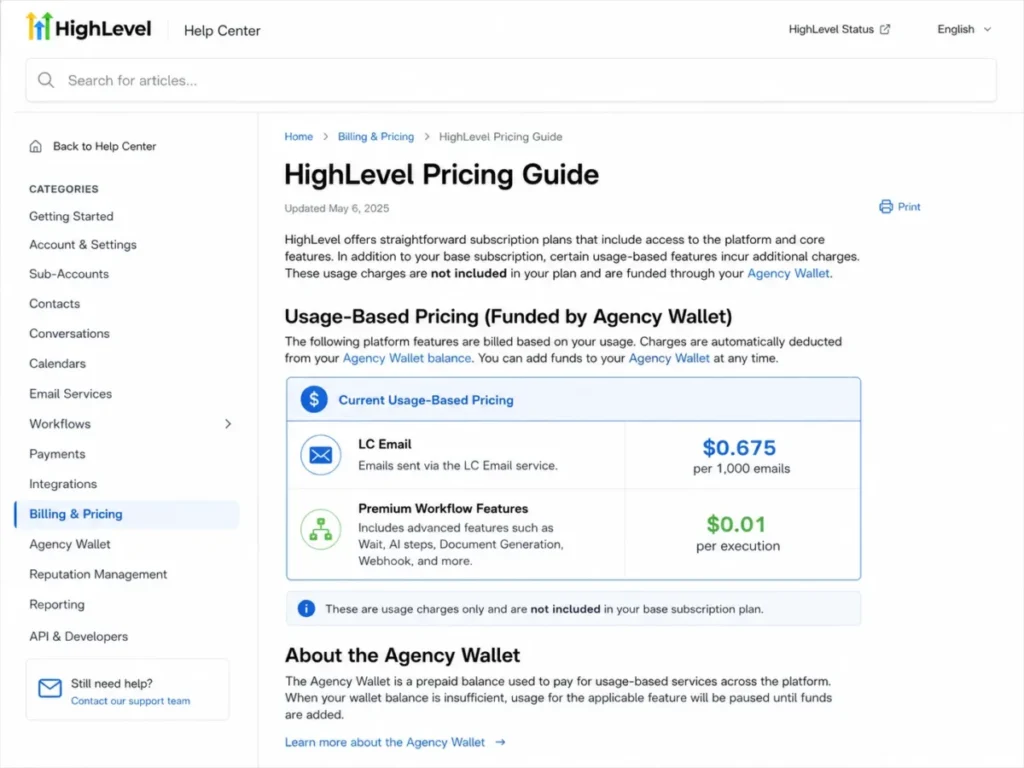
For an agency sending a modest 200,000 emails a month across a client roster, that is a real number to forecast, not a rounding error. The Unlimited plan lets an agency rebill phone and email at cost, so the charge can be passed on, but passing it on is a client conversation an agency has to be ready to have.
| Pros | Cons |
|---|---|
| Unlimited Sub-Accounts, contacts and users on the practical tier | Usage charges for email, telephony and AI sit outside the subscription |
| Subscription price does not rise with agency headcount | Starter is capped at 3 Sub-Accounts, so the entry tier expires quickly |
| Rebilling of phone and email at cost is built into the plan | Setup is a build project, not a configuration afternoon |
| Agency Pro adds rebilling with a markup for agencies reselling usage | Rebilling requires a client-facing pricing conversation |
- Verdict:
- the stronger choice for an agency whose operating problem is client separation and agency-level administration, provided the finance team is comfortable forecasting a variable usage line every month.
2. HubSpot Sales Hub for inbound and multi-service agencies

Start with the number that decides this one. Sales Hub Professional starts at $90 per seat a month on an annual commitment, and the same page states that the cost shown does not include a required one-time Professional onboarding fee of $1,500.
- Best for:
- inbound-led agencies with several service lines that need deep pipeline structure, reporting and workflow capacity in one platform.
- Avoid if:
- the budget is built around an entry price, or the automation requirement can be met by a tool at a fraction of the per-seat price.
- Starting price:
- a free plan with 1 deal pipeline; Professional starts at $90 per seat a month with annual billing, or $100 billed monthly.
- Practical tier:
- Professional, because it is the first tier with 15 deal pipelines and enough workflow capacity for multi-service delivery.
- Free plan:
- yes, with 1 deal pipeline.
- First limit that bites:
- the 300-workflow ceiling on Professional, which a large agency reaches by building per-client variants of the same lifecycle.
- Better than Pipedrive:
- workflow capacity, with a documented ceiling of 300 on the practical tier.
- Worse than Pipedrive:
- first-year cost, once the required onboarding fee is added on top of five seats.
- Setup difficulty:
- high, and the vendor treats it that way by making onboarding a required line item.
- Hidden costs:
- the one-time Professional onboarding fee, and credit consumption from AI-based workflow actions.
- Evidence status:
- vendor pricing page for plan entitlements plus HubSpot’s workflow knowledge-base article for the limits.
Five seats on Professional is $450 a month before that onboarding fee, which lands on top of the subscription in year one. An agency should only be here if the pipeline and reporting depth is doing work a cheaper CRM cannot do.
Where it earns the money is structural. Fifteen deal pipelines lets a multi-service agency run retained search, paid media, creative and web builds as genuinely separate motions rather than as one pipeline with a service field, and each carries its own stages and forecast.
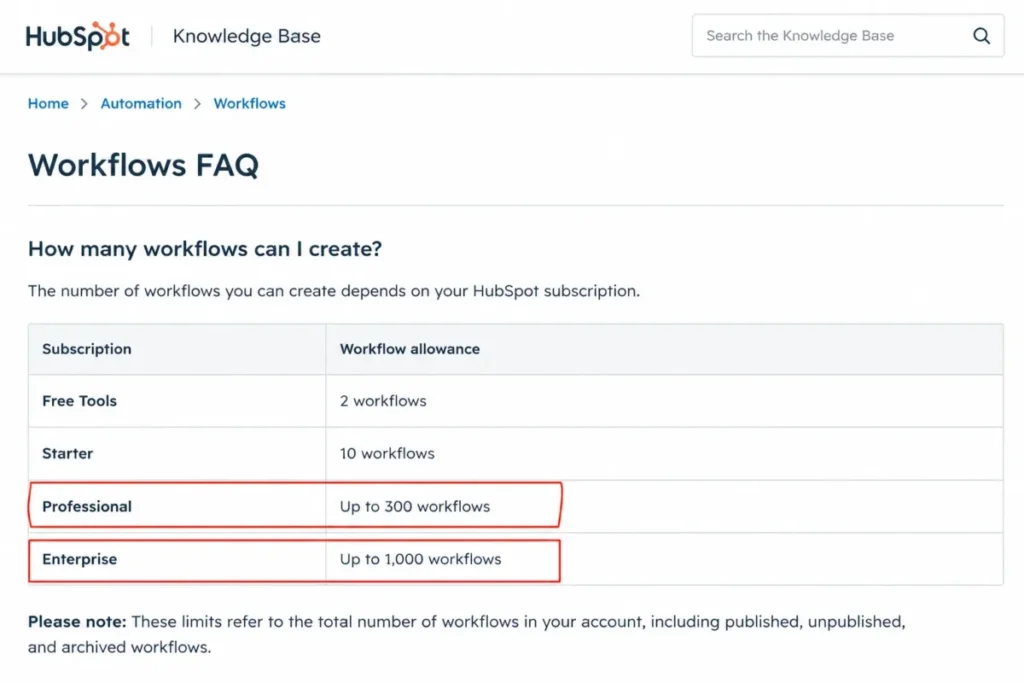
HubSpot documents up to 300 workflows on Professional against 1,000 on Enterprise, and 300 is more generous than it sounds until an agency starts cloning lifecycles per client.
The other thing worth watching is that all AI-related actions and triggers inside workflows consume credits, and Professional includes 3,000 of them, so an AI-heavy automation design changes the running cost rather than the subscription. The full HubSpot CRM review goes deeper on the platform outside the sales use case.
| Pros | Cons |
|---|---|
| 15 deal pipelines on Professional supports genuinely separate service lines | Required one-time onboarding fee of $1,500 on Professional |
| Documented workflow capacity of 300 on Professional and 1,000 on Enterprise | Seat pricing makes a five-person agency a $450 a month line |
| Included allowance of 3,000 credits on Professional | AI workflow actions consume credits, so automation design changes running cost |
| Enterprise carries 100 deal pipelines for large agency groups | Entry tiers carry only 1 or 2 deal pipelines |
- Verdict:
- recommended for an agency that will genuinely use Professional’s pipeline and workflow depth, and a poor fit for a team buying it because the brand is familiar.
3. Insightly CRM for sales-to-project handoff

- Best for:
- service agencies that want a won deal to become a delivery project inside the same system rather than in a second tool.
- Avoid if:
- the team’s daily work is high-volume calling and texting, which the Insightly pages reviewed here do not cover.
- Starting price:
- $29 per user a month on Plus, billed annually.
- Practical tier:
- Professional at $49 per user a month, because workflow automation begins there.
- Free plan:
- not listed on the Insightly pricing page reviewed for this article.
- First limit that bites:
- the absence of workflow automation on Plus, which turns the cheap tier into a manual system.
- Better than monday CRM:
- a documented conversion from a won opportunity into a project, which monday’s plan pages do not describe.
- Worse than monday CRM:
- seat cost, at $49 per user on the practical tier against $17.
- Setup difficulty:
- medium, and mostly spent on lead intake and the conversion rules.
- Hidden costs:
- none disclosed on the pricing page beyond the tier step from Plus to Professional.
- Evidence status:
- vendor pricing plans page plus two Insightly product and onboarding pages for the workflow and conversion behaviour.
The reason this ranks third is a single documented sequence. Insightly’s onboarding documentation describes qualifying a lead into an opportunity, which also creates a contact and an organisation record, and then states that a won opportunity can be converted into a project.
For an agency that is exactly the seam where work usually leaks. The scope agreed in the deal record is the scope the delivery team inherits, without a re-keying step and without the quiet divergence that starts when the project brief is typed fresh into a second system.
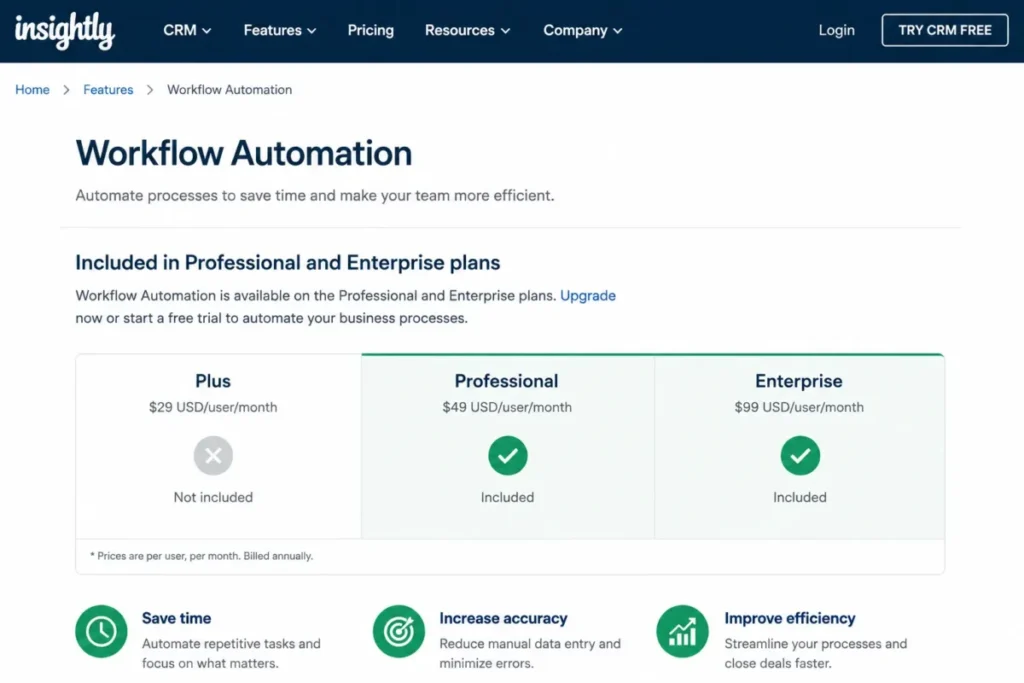
The catch is the tier. Insightly documents that workflow automation is available on the Professional and Enterprise plans. The $29 Plus tier will therefore do the conversion by hand, but it will not fire the notifications, tasks and field updates that make the handoff repeatable.
Buying Plus for the lower per-user price and then automating nothing is the false economy here, and the Insightly CRM review covers the wider platform.
| Pros | Cons |
|---|---|
| Won opportunities convert into projects inside the same system | Workflow automation is excluded from the Plus tier, which lists at $29 per user |
| Lead intake supports CSV import, web-to-lead forms and the API | Enterprise at $99 per user more than triples the Plus price |
| Project management is available from the Plus tier | Calling and texting are not listed in the Insightly pages reviewed |
| Documented conversion path reduces re-keying between sales and delivery | Object-level migration coverage is not documented on the pages reviewed |
- Verdict:
- the stronger fit when an agency’s biggest leak is the gap between closed-won and kickoff, and the wrong choice for a team whose main daily motion is outbound dialling.
4. Pipedrive for sales-led new business teams

- Best for:
- agency new-business teams that want a visual pipeline and follow-up automation without buying a platform.
- Avoid if:
- the agency expects delivery or project management in the same subscription, which the Pipedrive plan pages reviewed here do not list.
- Starting price:
- $39 per seat a month on Growth with annual billing, billed as one payment of $468 per seat a year.
- Practical tier:
- Growth, because it is the first tier carrying automations and sequences at all.
- Free plan:
- not listed on the Pipedrive pricing page reviewed for this article.
- First limit that bites:
- 5 sequences per company on Growth, which a two-person new-business team can consume on its own.
- Better than Close:
- cost at a five-seat agency, at $195 a month against a materially higher outbound-priced alternative.
- Worse than Close:
- built-in calling and texting depth for teams that dial all day.
- Setup difficulty:
- low, because the practical tier needs a pipeline, a synced mailbox and a small automation set rather than a build.
- Hidden costs:
- none disclosed on the pricing page reviewed here; the cost that bites is the Growth ceiling pushing heavier teams to Premium.
- Evidence status:
- vendor pricing page plus two Pipedrive knowledge-base articles for the usage limits and the overflow behaviour.
Pipedrive’s Growth plan allows 50 automations per company, 3 if/else conditions per automation and 5 sequences per company. It also allows one synced email account per user and a lead and deal capacity of 5,000 multiplied by seats up to a company cap of 300,000. Those four numbers describe an agency ceiling more honestly than any feature list.
Three if/else conditions is the one that constrains agency work first. A routing rule that checks service line, budget band and source is already at the limit, and anything more branching has to be split across several automations that then compete for the 50-automation allowance.
The failure mode at capacity is worth knowing before it happens rather than after. Pipedrive documents that when the open deal limit is reached, automated activities, emails and notes linked to the creation of a new deal will not be triggered and the deal is sent to a waitlist. Pipedrive also documents that chatbot and web-form deal creation fails the same way while still creating the contact.
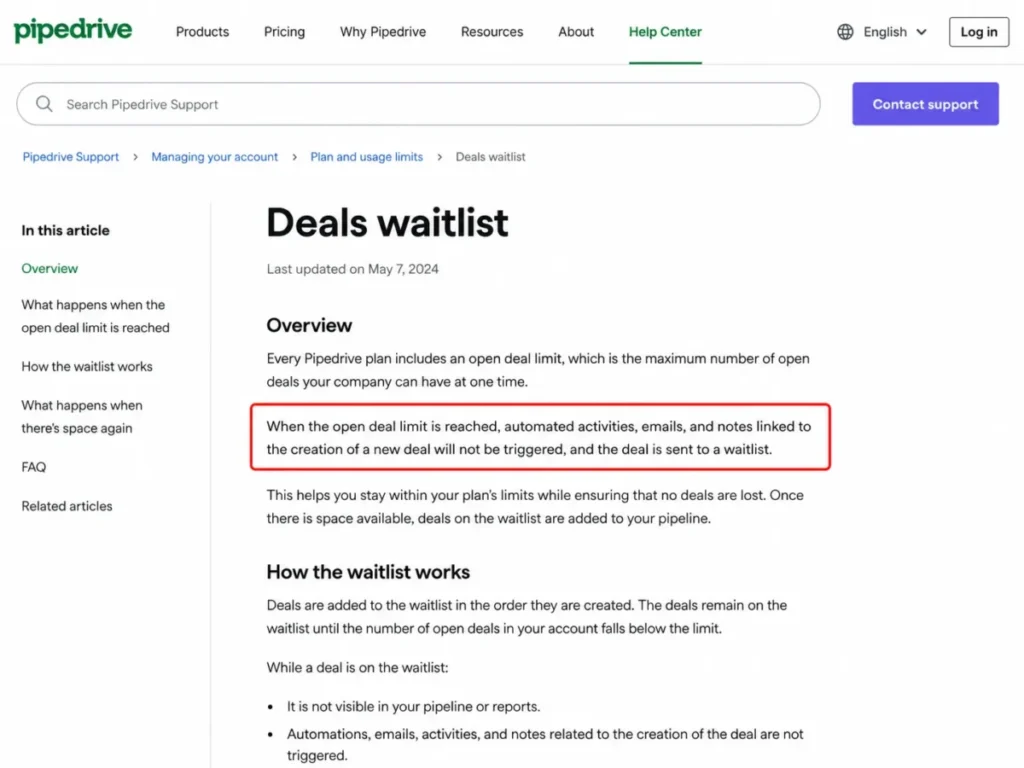
For an agency running inbound capture through forms, that is a silent failure during exactly the campaign week when the pipeline is fullest. The Pipedrive CRM review covers the day-to-day experience in more detail.
| Pros | Cons |
|---|---|
| Growth is the first Pipedrive tier that carries automations and sequences | 3 if/else conditions per automation constrains multi-branch routing |
| Five seats lands at $195 a month on the annual commitment | 5 sequences per company is a company-wide cap, not a per-user one |
| Documented, specific usage limits make capacity planning possible | At the open deal limit, linked automated activities and emails do not fire |
| Growth needs only a pipeline, a mailbox and a few automations to be useful | No project management is listed in the Pipedrive plan pages reviewed |
- Verdict:
- choose Pipedrive if the agency’s constraint is new business rather than delivery, and plan the move to Premium the moment routing logic outgrows three conditions.
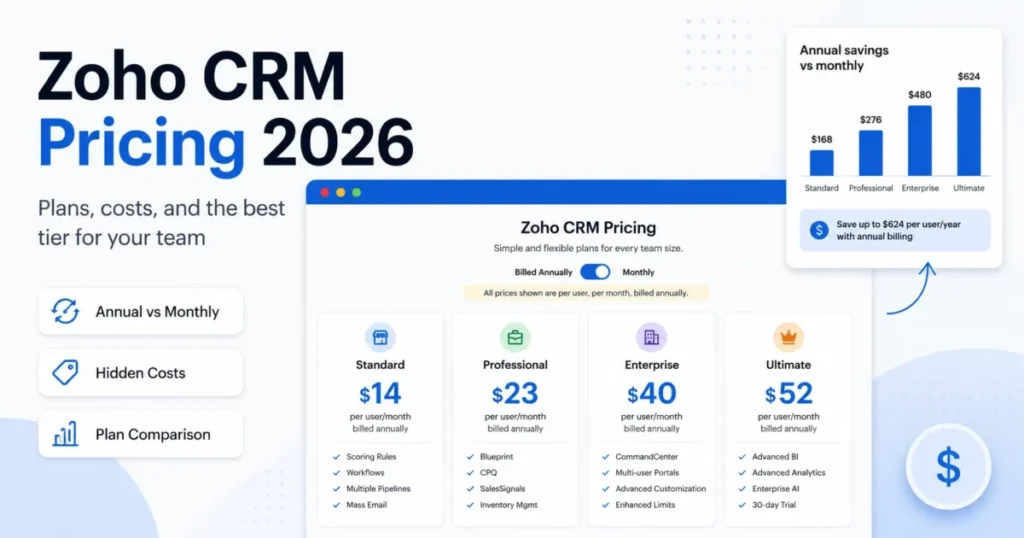
5. Zoho CRM for configurable agency workflows on a small budget

- Best for:
- cost-conscious agencies that want configurable workflow rules, document automation and telephony without a platform-level price.
- Avoid if:
- the buying process needs a published US dollar price for a paid tier before a shortlist can be approved.
- Starting price:
- a free edition for up to 3 users.
- Practical tier:
- a paid edition, though the amount is not stated here because the official pricing page served non-US currency during verification.
- Free plan:
- yes, for up to 3 users.
- First limit that bites:
- 5 conditions per workflow rule on the Standard and Professional editions.
- Better than Freshsales:
- breadth of configurable automation and document workflow for agency client onboarding.
- Worse than Freshsales:
- clarity of the edition lineup and of the US price a buyer will actually pay.
- Setup difficulty:
- medium to high, because the flexibility that makes it useful is also configuration work.
- Hidden costs:
- not established here, since the paid US pricing could not be verified in the session behind this article.
- Evidence status:
- vendor pricing page for the free edition only, plus Zoho’s agency vertical page and workflow help documentation.
The pricing situation needs stating plainly rather than glossed. Zoho’s official pricing page confirms a free edition capped at 3 users. The paid editions rendered in a non-US currency when the page was opened for this article, so no paid US dollar figure is published above.
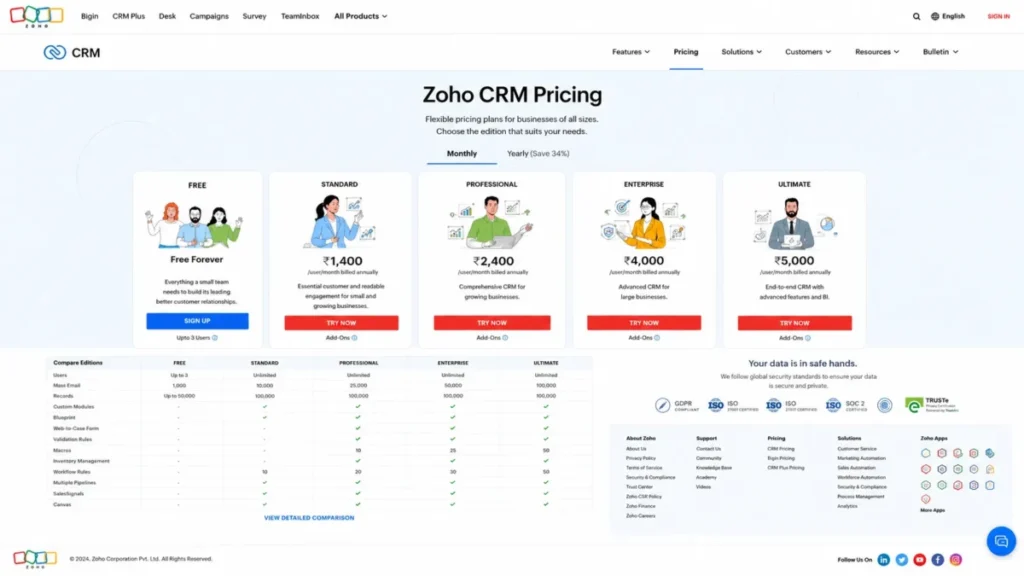
A US agency should open the page from a US session and confirm the amount directly before shortlisting.
What is well documented is the agency workflow itself. Zoho’s agency page describes assigning records to agents automatically, automating client documents to be filled from a client’s history and sent out, and integrating with any email provider. The same page describes integrating with over 50 telephony providers so that calling campaigns run from the CRM.
The ceiling to design around is rule complexity rather than rule count. Zoho documents a maximum of 5 conditions per rule on Standard and Professional and 10 on Enterprise and Ultimate. A rule processes a maximum of 5,000 records every 10 minutes, with the remainder carried into the next window.
For a retainer renewal rule that checks contract date, client tier, service line and owner, five conditions is tight, and splitting the logic across rules is the workaround an admin ends up maintaining. The Zoho CRM review covers the wider edition structure.
| Pros | Cons |
|---|---|
| Free edition covers a genuine three-person agency | Paid US dollar pricing was not published on the page as served |
| Documented agency workflows for assignment, documents and telephony | 5 conditions per workflow rule on Standard and Professional |
| Telephony integration with over 50 providers suits calling campaigns | A rule processes 5,000 records per 10 minutes, then queues the rest |
| Rule conditions rise to 10 on the Enterprise and Ultimate editions | Edition lineup takes real effort to compare before buying |
- Verdict:
- a strong shortlist candidate for a budget-constrained agency that will invest in configuration, on the condition that the buyer confirms the current US price directly before committing.
6. monday CRM for board-first agency teams

- Best for:
- agencies already running delivery on boards that want the sales motion in the same workspace.
- Avoid if:
- the automation plan is real and the budget assumes the Standard plan will carry it.
- Starting price:
- $12 per seat a month on Basic with annual billing, with plans starting from 3 users.
- Practical tier:
- Standard at $17 per seat a month, because automations and integrations begin there.
- Free plan:
- not covered on the CRM pricing page reviewed for this article.
- First limit that bites:
- 250 automation actions and 250 integration actions a month on Standard.
- Better than Copper:
- seat cost, at $17 per seat on the practical tier against $59.
- Worse than Copper:
- depth of native Google Workspace integration for a Gmail-centred team.
- Setup difficulty:
- medium, and the work is process design rather than technical configuration.
- Hidden costs:
- the step from Standard to Pro once automation volume is real.
- Evidence status:
- vendor CRM pricing page for plan pricing plus monday’s automations and integrations support article for the action allowances.
Five seats on Standard is $85 a month, and the three-user minimum is the packaging constraint worth knowing before pricing a team.
The number that decides this pick is not the price. monday’s support documentation states that automations and integrations are only available on the Standard plan and up. The same page gives Standard 250 automation actions and 250 integration actions a month, and gives Pro 25,000 of each.
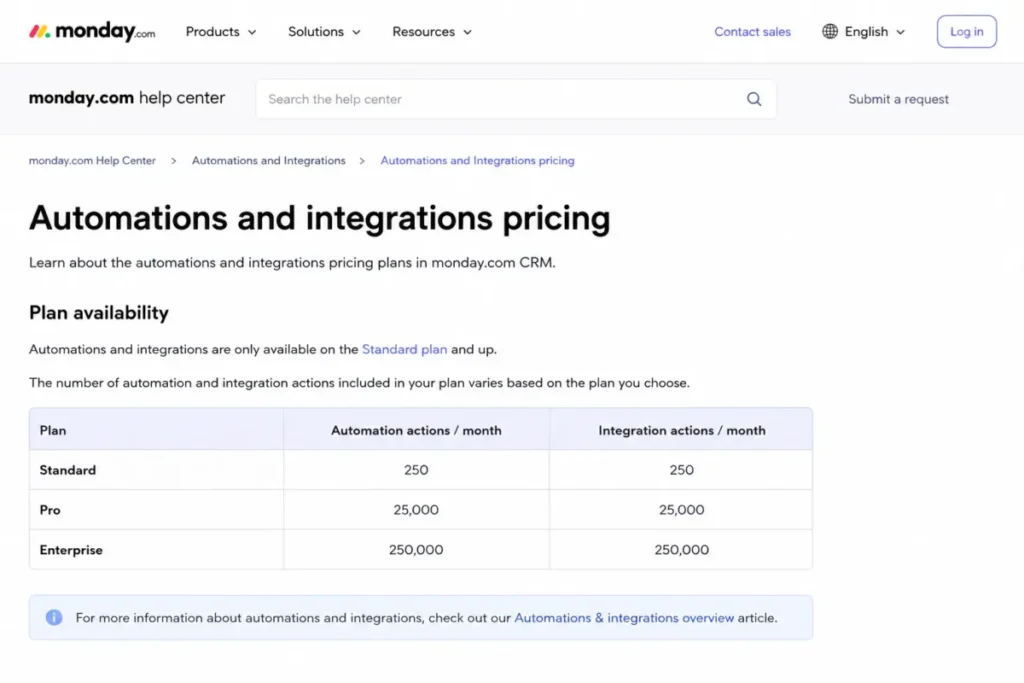
The same article says the Standard allocation is typically exhausted within days for accounts that notify multiple people or map multiple columns per automation, which is an unusually direct piece of vendor guidance.
The two monday pages describe the same allowance differently, with the pricing page counting automations and the support article counting actions. Plan against the stricter of the two.
An agency recipe that notifies an account manager, updates a client board and posts to a channel burns three actions per trigger, so a 250-action allowance covers well under a hundred triggers a month.
For an agency running the same lifecycle across a dozen clients, that allowance goes quickly, which is exactly what monday’s own guidance says. Budget Pro from the start if automation is part of the reason for buying, and treat Standard as a trial tier rather than a destination.
The monday.com review covers the platform beyond the CRM product.
| Pros | Cons |
|---|---|
| Automations arrive at the Standard tier, at $17 per seat a month | 250 automation actions a month is a genuine constraint, not a soft cap |
| Sales and delivery boards live in one workspace | Automations and integrations are excluded from the Basic plan entirely |
| Pro raises the allowance to 25,000 actions of each type | Reaching a workable allowance means paying for the Pro plan |
| Plans start from 3 users, so small agencies are not forced into a large minimum | Board design is the agency’s responsibility, not the vendor’s |
- Verdict:
- pick monday CRM if the agency’s delivery already runs on boards, and price the Pro plan rather than Standard if the automation plan involves more than notifications.
7. Freshsales for small agencies that need phone, chat and email

- Best for:
- small agencies that want calling, chat and email in one CRM at the lowest verified per-user entry price here, matched only by Close Solo.
- Avoid if:
- sequences or governance controls are needed on the entry tier.
- Starting price:
- $9 per user a month on Growth with annual billing.
- Practical tier:
- Growth for simple selling, Pro at $39 per user a month once sequences matter.
- Free plan:
- not listed on the Freshsales pricing page reviewed for this article.
- First limit that bites:
- sales sequences, which are a Pro feature rather than a Growth one.
- Better than Salesflare:
- channel breadth, with chat and phone alongside email at a lower entry price.
- Worse than Salesflare:
- the suggested-task prompts that keep follow-up moving without manual chasing.
- Setup difficulty:
- low.
- Hidden costs:
- the Freddy AI Agent add-on is priced separately at $49 per 100 sessions.
- Evidence status:
- the Freshworks pricing page, which carries the plan prices, the feature placement and the add-on price together.
At $9 per user a month, five seats is $45 a month, which is less than a tenth of the outbound-priced option in this ranking and roughly a quarter of the sales-led alternative. For an agency that needs a CRM to exist rather than to carry the business, that gap matters more than any feature comparison.
Freshworks lists Growth with Kanban view, contact lifecycle stages, chat, email and phone, email templates, custom fields and basic workflows, which is a complete small-agency toolkit at the price. The word doing the work is “basic”.
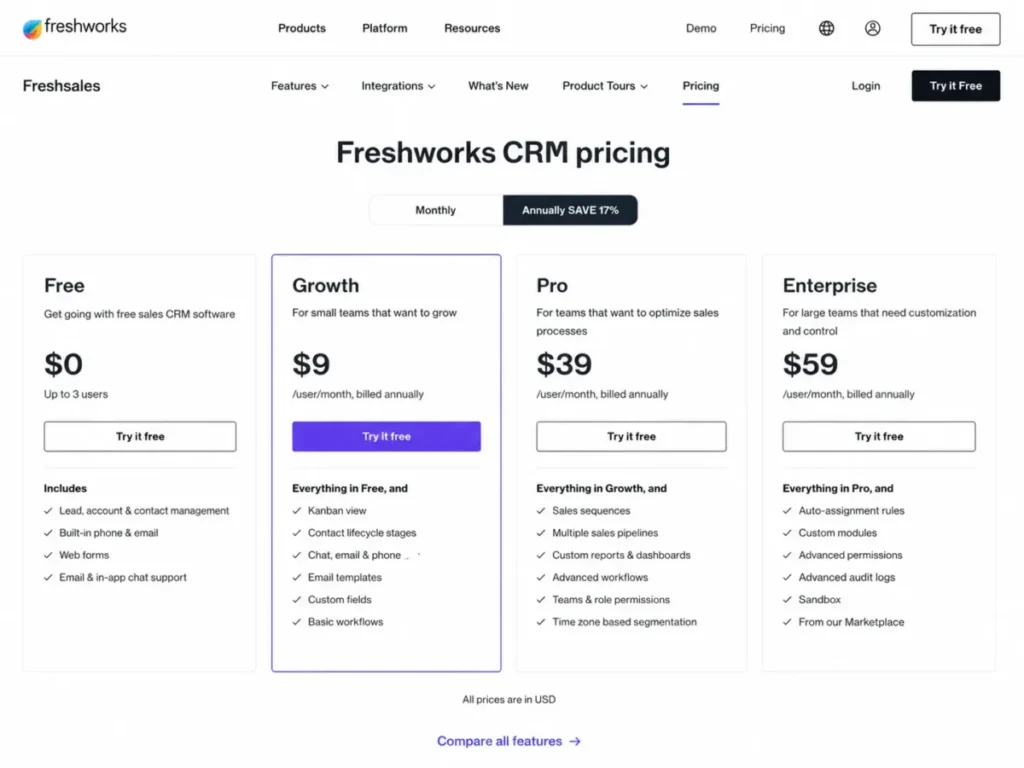
Sales sequences appear on Pro, and field-level permissions, custom modules, sandbox and audit logs appear on Enterprise. An agency that wants structured outbound is therefore looking at $39 per user a month, more than four times the entry price, which changes the comparison entirely.
The AI add-on is the other line to watch, priced at $49 per 100 sessions rather than bundled. The Freshsales review covers how the tiers behave day to day.
| Pros | Cons |
|---|---|
| Growth matches the lowest verified per-user price here, alongside Close Solo | Sales sequences require the Pro plan, at $39 per user a month |
| Chat, email and phone are included at the entry tier | Field-level permissions, sandbox and audit logs are Enterprise-only |
| Five seats costs $45 a month on the annual commitment | Freddy AI Agent is a separate add-on at $49 per 100 sessions |
| Kanban view and lifecycle stages cover basic agency pipeline needs | “Basic workflows” is the entry tier’s automation ceiling |
- Verdict:
- the stronger choice for a small agency whose CRM budget is genuinely small, provided nobody assumes structured outbound sequences are included at the entry price.
8. Copper for Google Workspace agencies

- Best for:
- relationship-led agencies whose working day already happens inside Gmail and Google Workspace.
- Avoid if:
- the agency sends high campaign email volume, or its mailboxes are not Gmail.
- Starting price:
- $23 per seat a month on Basic paid annually, with a 2,500 contact limit.
- Practical tier:
- Professional at $59 per seat a month paid annually, or $69 billed monthly.
- Free plan:
- not listed on the Copper pricing page reviewed for this article.
- First limit that bites:
- one email per automation on Professional, against up to 7 on Business.
- Better than Salesflare:
- contact capacity and the depth of the Google Workspace integration set.
- Worse than Salesflare:
- value at a small seat count, where the price gap is real.
- Setup difficulty:
- low for a Google-native team, and awkward for anyone else.
- Hidden costs:
- the Professional to Business step, which is where multi-step email and custom reports live.
- Evidence status:
- vendor pricing page for plans and contact caps, plus Copper’s email automation best-practice article for the send limits.
Copper’s argument is ecosystem fit. The pricing page lists Gmail email, contact and file sync, Google Calendar sync, Google Drive integration and Google Sheets and Looker Studio integration. It also lists contact ceilings of 2,500 on Basic, 15,000 on Professional and unlimited on Business.
The constraint that decides the shortlist is not in the pricing page at all. Copper documents that Professional automations can send a single email while Business automations can send up to 7. The same page documents that automated emails are only sent via Gmail with no way to automate from another provider, and that a company is capped at 900 automated emails a day with the overflow attempted the following day.
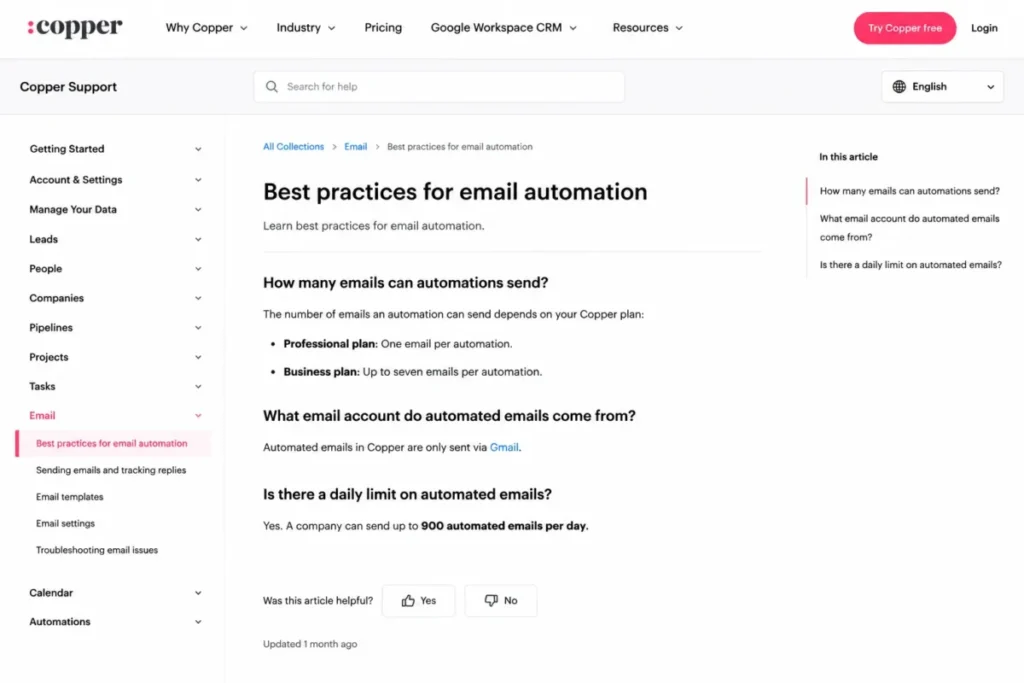
One email per automation means Professional cannot run a nurture sequence at all. An agency that budgets $295 a month for five Professional seats expecting a three-touch follow-up is buying a single-send tool and will discover it during the first campaign build.
The Gmail-only rule is the harder disqualifier. An agency on Microsoft 365, or one running a mixed estate after an acquisition, cannot automate email from Copper regardless of tier.
The Copper CRM review covers the platform in more depth.
| Pros | Cons |
|---|---|
| Gmail, Calendar, Drive, Sheets and Looker Studio integrations are native | Automated email sends only through Gmail, with no alternative provider |
| Workflow automation and bulk email begin at the Professional tier | Professional automations send one email each; up to 7 requires Business |
| Contact capacity rises from 2,500 to 15,000 to unlimited across tiers | 900 automated emails a day per company, with overflow deferred to the next day |
| Project management is available from the Basic tier | Custom reports are gated to the Business tier |
- Verdict:
- recommended for a Gmail-native agency doing warm, relationship-led follow-up, and the wrong tool for high-volume campaign sending or for a Microsoft-based estate.
9. Close for outbound agencies

- Best for:
- outbound agency teams whose day is calling, texting and emailing from one screen.
- Avoid if:
- the plan is to buy a cheap tier, because workflows are in neither Solo nor Essentials.
- Starting price:
- $9 per user a month on Solo with annual billing, with Essentials at $35 annually and $49 billed monthly.
- Practical tier:
- Growth at $99 per user a month annually, or $109 billed monthly.
- Free plan:
- not listed on the Close pricing page reviewed for this article.
- First limit that bites:
- the complete absence of workflows on both Solo and Essentials.
- Better than Pipedrive:
- calling, texting and multi-channel automation depth for a dialling team.
- Worse than Pipedrive:
- cost, at $495 a month for five seats against $195.
- Setup difficulty:
- low to medium, mostly telephony and number provisioning.
- Hidden costs:
- the step up from Essentials to Growth, which is where the workflows and the power dialer actually live.
- Evidence status:
- vendor pricing page for the plan gates plus Close’s workflows feature guide for the trigger and action set.
The plan gate is the story. Close’s help documentation states that workflows are only available on the Growth and Scale plans, and the pricing page places the power dialer, custom activities and bulk email in the same place.
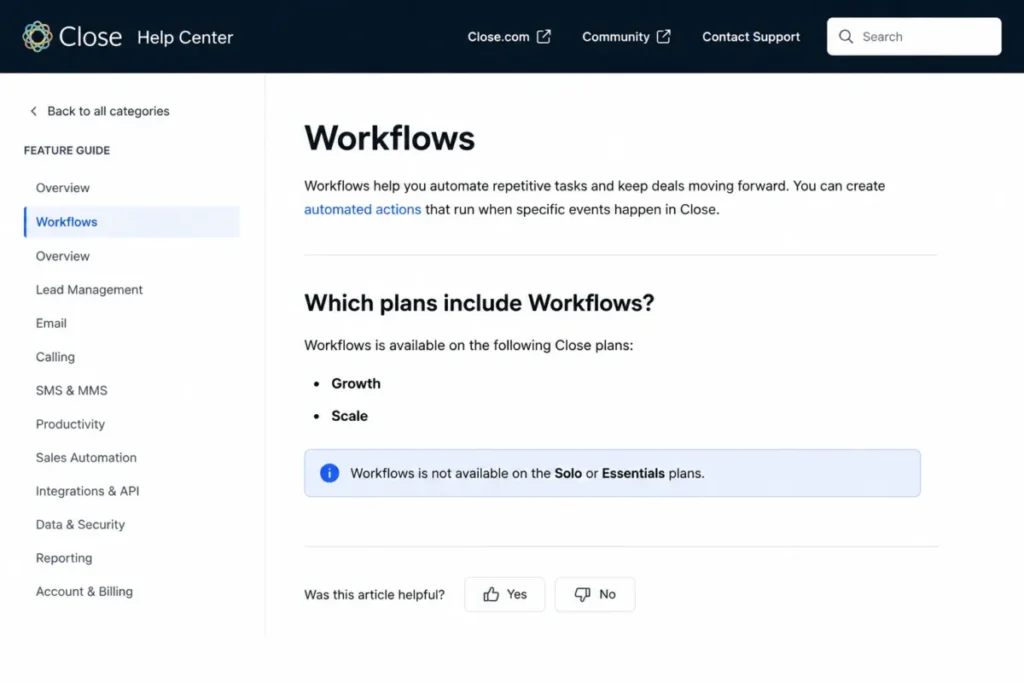
That turns Essentials at $35 into a $99 practical price for the feature most outbound agencies are buying the product for. Five Growth seats is $495 a month, the highest recurring line in this ranking and eleven times the cheapest.
What the money buys is genuine multi-channel automation rather than email sequencing with a phone bolted on. Close documents workflow triggers on lead, opportunity, contact, call, meeting, custom activity and form submission events, with steps that update leads, send email and SMS, create and assign tasks and create opportunities.
For an agency running its own new business as a dialling motion, that combination is hard to assemble elsewhere without stitching two products together. The Close CRM review covers the calling experience specifically.
| Pros | Cons |
|---|---|
| Calling, SMS and email automation run from one workflow engine | Workflows are absent from the Solo and Essentials tiers |
| Workflow triggers cover call, meeting, form and custom activity events | Growth is $99 per user a month, the highest per-user practical tier here |
| Power dialer and bulk email arrive together at the Growth tier | Five seats reaches $495 a month on the annual commitment |
| Opportunity creation can be a workflow step, not a manual one | Growth costs nearly three times the Essentials tier |
- Verdict:
- worth the premium for an agency whose new business genuinely runs on the phone, and hard to justify for a team that would use it as a pipeline tracker.
10. Salesflare for small B2B relationship-led agencies

- Best for:
- small B2B agency teams that want suggested follow-up and personal email at scale rather than campaign machinery.
- Avoid if:
- the agency needs a newsletter tool, or reads Google Workspace mail inside Outlook.
- Starting price:
- $29 per user a month on Growth with annual billing, or $39 billed monthly.
- Practical tier:
- Pro at $49 per user a month annually, or $64 billed monthly.
- Free plan:
- not listed in the Salesflare plan documentation reviewed for this article.
- First limit that bites:
- multi-step email workflows, which begin at Pro rather than Growth.
- Better than Copper:
- cost at five seats, at $245 a month against $295, with multi-step sequences rather than a single automated send.
- Worse than Copper:
- contact capacity and the breadth of the Google integration set.
- Setup difficulty:
- low, because the value sits in suggested tasks and email workflows rather than in a configuration project.
- Hidden costs:
- none disclosed beyond the tier step, with data migration handled as an Enterprise inclusion.
- Evidence status:
- Salesflare’s own help articles for pricing, plan contents, the workflow boundary and the Outlook add-in requirement.
Pro adds multi-step email workflows, user permissions, custom insights dashboards and 100 lead credits a month. Enterprise at $99 per user a month billed annually adds custom training, a dedicated account manager and vendor-performed data migration.
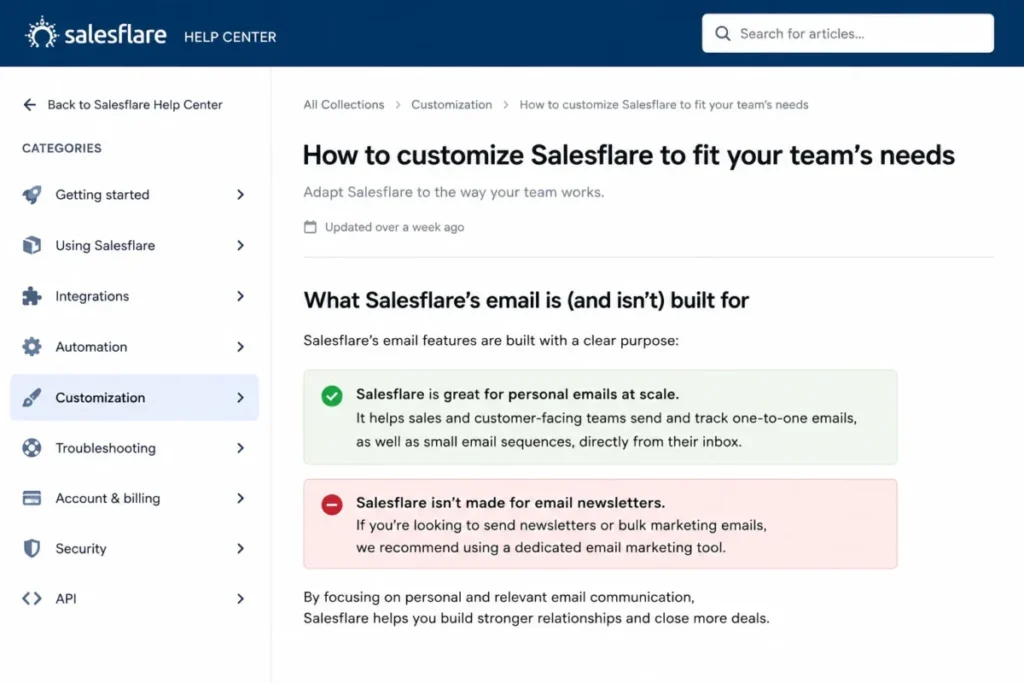
Two documented boundaries do most of the shortlisting work. Salesflare states that the product is great for personal emails at scale but not made for email newsletters, which means an agency running client-facing or list-based campaigns still needs a separate system alongside it.
The second is a mailbox rule that quietly excludes a common agency setup. The Outlook add-in only works in Microsoft 365 accounts and cannot be used for IMAP or for Google Workspace mail read inside Outlook, with Gmail served by a separate Chrome sidebar instead.
An agency where half the team reads Google mail in Outlook is therefore running two different Salesflare surfaces, which is workable but worth knowing before rollout.
| Pros | Cons |
|---|---|
| Pro includes multi-step workflows and permissions | Salesflare is not made for email newsletters |
| Suggested tasks prompt meeting notes automatically | The Outlook add-in requires a Microsoft 365 account |
| Five seats at $245 a month undercuts the Google-native alternative | Google Workspace mail read in Outlook is not supported by the add-in |
| Enterprise includes vendor-performed data migration | Growth lacks the multi-step workflows most agencies will want |
- Verdict:
- well suited to a small B2B agency selling on relationships, and a poor fit for any team that expected one tool to cover both personal follow-up and list marketing.
Pricing and Practical Tiers: What an Agency Actually Pays
Entry prices are not comparable across these ten products, because the tier that carries agency automation is rarely the tier on the headline. The table below prices the plan an agency would genuinely run, at five seats, on the annual commitment.
| CRM | Practical tier and price | Five seats a month | The charge the subscription does not cover |
|---|---|---|---|
| HighLevel | Unlimited, $297 a month | $297 for the agency account | Telecommunications, email and AI usage from the agency wallet |
| HubSpot Sales Hub | Professional, $90 per seat | $450 | One-time onboarding fee of $1,500, plus credit use by AI workflow actions |
| Insightly CRM | Professional, $49 per user | $245 | None disclosed on the pricing page |
| Pipedrive | Growth, $39 per seat | $195 | None disclosed on the pricing page reviewed |
| Zoho CRM | Free edition, up to 3 users; the paid tier is the practical one | Paid US amount not published on the page as served | Not established from a US pricing view |
| monday CRM | Standard, $17 per seat | $85 | The Pro upgrade once automation volume is real |
| Freshsales | Growth, $9 per user | $45 | Freddy AI Agent add-on at $49 per 100 sessions |
| Copper | Professional, $59 per seat | $295 | The Business step for multi-step email and custom reports |
| Close | Growth, $99 per user | $495 | Nothing disclosed beyond the tier steps up from Solo and Essentials |
| Salesflare | Pro, $49 per user | $245 | None disclosed beyond the tier step from Growth |
Source: official vendor pricing pages, checked 2026-08-20. Five-seat figures are this article’s arithmetic over the linked per-seat prices on the annual commitment, not vendor-quoted package prices.
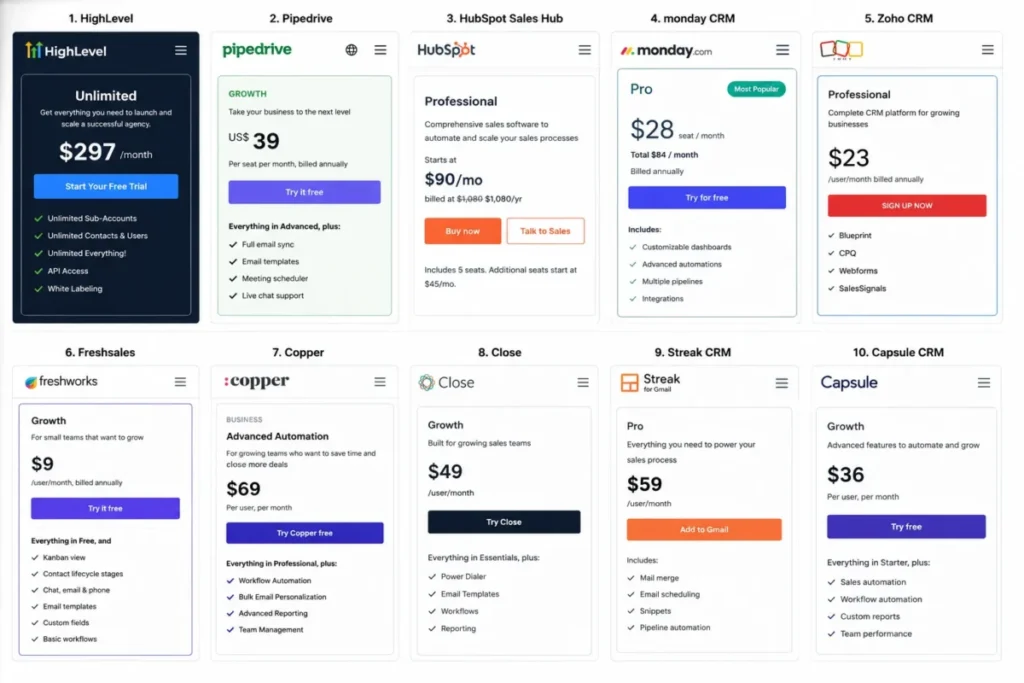
The spread is the finding. The same five-person agency pays $45 a month at the bottom of that table and $495 at the top, an elevenfold difference for products that all describe themselves as CRM software.
HighLevel is the only entry priced per agency rather than per seat, which inverts the usual scaling logic. A fifteen-person agency pays the same $297 as a three-person one, while every seat-priced option in the table multiplies by five over the same growth.
Zoho stays out of the five-seat column deliberately. The official pricing page served non-US currency during verification, and converting a foreign amount into a US figure would be an invented price rather than a verified one.
For a side-by-side of the tools where US pricing is unambiguous, the HubSpot pricing breakdown and the Pipedrive pricing tiers go tier by tier.
The column that changes budgets is the last one. HubSpot’s required onboarding fee alone is more than a year of Freshsales at five seats, and HighLevel’s usage charges scale with client activity rather than with headcount, which is a different budgeting problem from a per-seat increase.
Automation Ceilings and Plan Gates
Automation is where agency CRM budgets actually get set, because it is the feature most consistently gated one tier above where a buyer starts looking. The table below states the tier automation begins at and the documented ceiling behind it.
| CRM | Automation unlocks at | Documented ceiling | What that means for an agency |
|---|---|---|---|
| HighLevel | Included in the plan | Premium workflow features at $0.01 per execution | Volume shows up as a wallet charge, not an upgrade prompt |
| HubSpot Sales Hub | Professional | Up to 300 workflows, 1,000 on Enterprise | Per-client lifecycle clones consume the allowance fastest |
| Insightly CRM | Professional | Not available on the Plus plan | The $29 tier is a manual system, not a cheaper automated one |
| Pipedrive | Growth | 50 automations, 3 if/else conditions, 5 sequences | Branching routing rules hit the condition limit before the count |
| Zoho CRM | The free edition | 5 conditions per rule, 10 on Enterprise | Complex renewal logic has to be split across several rules |
| monday CRM | Standard | 250 automation and 250 integration actions a month | Multi-action recipes exhaust the allowance in days, per the vendor |
| Freshsales | Growth for basic workflows | Sales sequences listed on Pro | Structured outbound costs over four times the entry price |
| Copper | Professional | One email per automation, 7 on Business | Professional cannot run a nurture sequence at all |
| Close | Growth | Workflows only on Growth and Scale | The automation gate nearly triples the Essentials price |
| Salesflare | Pro | Multi-step workflows added at Pro | Growth handles tracking, not sequencing |
Read down the third column and a pattern appears that no pricing page shows. Ceilings come in two shapes, and they fail differently.
Count-based ceilings are forgiving. Running out of 300 workflows or 50 automations is a countable event an admin can see coming, and the fix is a plan decision rather than a rescue.
Behaviour-based ceilings are the dangerous ones. Copper’s one-email-per-automation rule and Pipedrive’s waitlist behaviour do not announce themselves as limits, they produce a campaign that sends once, or an inbound lead whose follow-up never fires.
Test both shapes during a trial rather than reading them off a page. Build the single most branched routing rule the agency actually needs, and the single longest follow-up sequence, and see which tier they require.
The condition limits deserve one more note. Pipedrive’s three if/else conditions per automation is the constraint that bites earliest on agency lead routing.
Zoho’s five conditions per rule creates the same problem one step later, and both bite on the same agency use case: routing an inbound lead by service line, budget and source at the same time.
Sales to Delivery, Email and Calling
An agency CRM has two jobs a sales CRM does not. It has to survive the handoff from closed-won to delivery, and it has to sit correctly on top of whatever mailbox and phone estate the agency already runs.
What happens after closed-won
Insightly is the only product here that documents a route from the sales record into delivery, converting a won opportunity into a project. Copper lists project management from its Basic tier without documenting that conversion, which still makes it a plausible single-system choice for a small agency.
For most of the others, delivery lives in a second tool and an integration. That is not a defect, but it is a cost and a data-ownership question that belongs in the evaluation rather than in the implementation.
Migration deserves the same honesty. Salesflare includes vendor-performed data migration at its Enterprise tier, and Insightly documents CSV import, web-to-lead forms and an API for lead intake.
Object-level coverage for notes, activities, attachments and existing automations is not documented on the pages reviewed for this article. Anyone switching should ask each vendor for that list in writing, and the CRM migration risks guide covers the questions worth asking.
Where automated email and calling actually work
| CRM | Where automated messaging runs | The documented constraint |
|---|---|---|
| HighLevel | Platform email and telephony, rebillable to sub-accounts | $0.675 per 1,000 emails from the agency wallet |
| HubSpot Sales Hub | Workflow-driven email and sales tooling | AI actions and triggers consume credits |
| Zoho CRM | Any connected email provider, plus telephony | Over 50 telephony provider integrations |
| Pipedrive | Synced mailbox and sequences | One synced email account per user on Growth |
| Freshsales | Built-in chat, email and phone | All three included from the Growth tier |
| Copper | Gmail only | 900 automated emails a day per company |
| Close | Email, SMS and calling in one engine | Workflow steps send email and SMS on Growth |
| Salesflare | Gmail sidebar or the Outlook add-in | The add-in requires a Microsoft 365 account |
Two rows in that table are hard disqualifiers rather than trade-offs. An agency on Microsoft 365 cannot automate email from Copper at any tier, and an agency reading Google Workspace mail inside Outlook cannot use the Salesflare add-in.
Both are the kind of constraint that survives a demo and surfaces only once the first automation is built. Check the mailbox estate before the feature list, because no amount of pipeline depth compensates for automation that cannot send.
The Costs That Sit Outside the Subscription
Three of these products carry charges that a subscription-only comparison misses entirely, and a fourth folds the equivalent into its plan.
HighLevel’s usage charges scale with client activity. Email at $0.675 per 1,000 messages and premium workflow features at a cent per execution are small units that become a forecastable line once a roster is busy, and the Unlimited plan’s rebilling at cost is what makes them recoverable.
HubSpot’s onboarding fee is a one-time $1,500 that arrives before any value does. It is the only one-time fixed charge disclosed on any of the vendor pricing and plan pages reviewed here, and putting it on the pricing page rather than in a contract is more than most vendors manage.
Freshsales prices its AI agent as an add-on at $49 per 100 sessions rather than bundling it, which is honest and also means AI usage is a variable line rather than a fixed one.
Salesflare takes the opposite route and folds 100 lead credits a month into its Pro tier, so enrichment volume is a plan characteristic rather than a separate invoice.
The pattern worth internalising is that usage-based charges are not inherently worse than seat-based ones. They are worse when nobody forecasts them, and better when an agency can rebill them, which is exactly the position HighLevel’s rebilling entitlement creates.
For agencies that also run client-facing email programmes, the newsletter boundary matters here too. Salesflare states plainly that the product is not made for email newsletters, which means the marketing spend sits with a separate system, and the marketing automation platforms roundup covers that side of the stack.
How to Choose the Right Agency CRM
Work through these six steps in order. The order matters, because each one eliminates products the next step would otherwise waste time on.
Step 1: decide whether client separation is an entitlement or a permissions project. If each client needs its own sub-account rather than a filtered view of one shared database, that requirement removes most of this list immediately and points at HighLevel.
Step 2: count the automation actions the agency will actually run each month. Multiply the number of clients by the number of lifecycle triggers, then by the actions each trigger fires. Compare the result to the ceilings in the automation table above.
Step 3: check the mailbox estate before the feature list. Gmail-only automation and Microsoft-365-only add-ins are absolute constraints, and they disqualify tools that would otherwise win on capability.
Step 4: price the practical tier at real headcount, not the entry tier at one seat. Add onboarding fees, add-ons and any usage line, then compare annual totals rather than monthly headline prices.
Step 5: decide where delivery lives. If the answer is “inside the CRM”, the shortlist is short; if it is “in a project tool”, budget the second system and the integration now rather than in month three.
Step 6: run one real workflow in a trial before committing. Build the agency’s most branched routing rule and its longest follow-up sequence, because those two artefacts reveal tier requirements that no comparison table can.
The CRM implementation steps guide covers what happens after the decision, and the small business CRM picks list is a better starting point for agencies under five people.
Six Mistakes That Cost Agencies the Most
Budgeting from the entry price. Seven of the ten products here put workflow automation above their cheapest paid tier, so the entry price is a marketing number rather than a planning number for most agencies.
Treating multiple pipelines as client separation. Pipelines organise a view; a sub-account is a separate client environment the agency provisions, and confusing the two produces a permissions problem that grows with the client roster.
Ignoring behaviour at the ceiling. Knowing that Pipedrive caps open deals matters far less than knowing that automated activities and emails linked to a blocked deal creation do not fire at all.
Assuming a CRM’s campaign feature is a newsletter tool. Salesflare says outright that it is not made for email newsletters, and buying on the assumption that one tool covers both leaves a client-facing programme unbuilt.
Skipping the mailbox check. Copper’s Gmail-only automation and Salesflare’s Microsoft 365 requirement are the two constraints most likely to be discovered after signature rather than before it.
Forgetting the handoff. A CRM that ends at closed-won leaves the agency re-keying scope into a delivery tool, and that re-keying step is where margin quietly leaves the business.
Final Verdict
The decision in front of an agency is not which CRM is better. It is which of three operating problems the agency actually has, because each one has a different answer and the wrong answer costs a migration.
If the problem is client separation, HighLevel is the pick, and it is the only product here where separate client environments are an entitlement rather than an admin project. The trade-off is a variable usage line that has to be forecast and, ideally, rebilled, and an agency unwilling to do either should not choose it.
If the problem is that work leaks between the sale and the delivery, Insightly at $49 per user is the stronger fit, on the condition that the buyer takes the Professional tier rather than Plus. The handoff without automation is a manual habit, and manual habits are what leaked the work in the first place.
If the core problem is that new business is unmanaged, Pipedrive at $195 for five seats does the job for less than half of what HubSpot Professional costs at the same headcount. Its ceilings are tight and clearly documented, which makes them plannable, and planning around a known limit is easier than discovering an unknown one.
Two cohort answers sit outside that frame. A Gmail-native agency doing warm relationship follow-up should look at Copper before anything else, and an agency whose new business genuinely runs on the phone should pay Close’s premium rather than assemble the same capability from two cheaper products.
One recommendation holds regardless of the pick, and it is procedural. Build the agency’s hardest routing rule and its longest follow-up sequence inside a trial before signing anything, because that single exercise surfaces the tier requirement, the condition limit and the mailbox constraint at once. Those three things decide more agency CRM outcomes than the feature comparison ever does.
FAQ
These are the questions the sections above answer only in passing, or answer across several products at once.
What is the best CRM for a marketing agency with multiple clients?
HighLevel, because its Unlimited plan carries unlimited sub-accounts, contacts and users, which gives each client its own environment rather than a filtered view of a shared one. The trade-off is that telecommunications, email and AI usage are charged separately from the subscription, so the monthly total varies with client activity.
Which agency CRM has a genuinely free plan?
Zoho CRM offers a free edition for up to 3 users, which makes it the free-tier pick for a genuinely small agency.
HubSpot Sales Hub also lists a free plan, with 1 deal pipeline. No free plan was listed on the pricing page reviewed for the remaining products.
How much does a CRM cost for a five-person agency?
Between $45 and $495 a month on annual billing across the products ranked here, depending entirely on which tier carries the automation the agency needs.
Add HubSpot’s one-time $1,500 onboarding fee or HighLevel’s wallet-funded usage charges where they apply, since neither appears in a per-seat figure.
Can a CRM handle agency retainer renewals automatically?
Zoho CRM documents workflow rules that create tasks automatically whenever a lead meets preset criteria, which is the mechanism a renewal reminder is built on. Rule complexity is the constraint rather than volume, since Standard and Professional allow 5 conditions per rule and Enterprise and Ultimate allow 10.
Which CRM works best with Google Workspace for agencies?
Copper, which lists native Gmail, Google Calendar, Google Drive and Google Sheets integration alongside Looker Studio. The limitation is the same as the strength: automated email sends only through Gmail, so a Microsoft-based or mixed mailbox estate rules the product out for automation.
Do agencies need a CRM and a project management tool, or just one?
Insightly and Copper are the two that list delivery work in their own plan documentation, and only Insightly documents the conversion from a won deal into a project, so most of the ten imply a second system and an integration between them. Deciding this before purchase is what keeps the integration budget from appearing as a surprise during implementation.
Which agency CRM should be avoided for outbound email campaigns?
Copper on the Professional tier, because its automations send a single email each and the multi-step version requires the Business tier. Salesflare is also the wrong tool for list-based campaigns, since the vendor states directly that the product is great for personal email at scale but not made for email newsletters.