
A follow-up email gets answered when its first line puts the earlier exchange back in view. It also hands the reader one reason to reply that your last message lacked, and one ask they can settle in under a minute.
The 12 follow-up email examples below are sorted by trigger (silence, a meeting, a proposal, a due date), not by tone, and each template holds a subject line, a body, a Send when line and a Swap line.
Send when the trigger date passes; a date the other person gave you overrides every waiting rule here. Each touch in a sequence needs a new reason, and the fourth closes the loop instead of asking again.
The library fits sales, client work, invoices and job applications. A template supplies the shape, not the new reason: with nothing new to say, wait.
Before you hit send
- The subject line names the earlier exchange or the item, never just “Following up”
- The first line restores what happened and when, in one sentence
- The email gives a reason to reply that your last message did not have
- There is exactly one ask, answerable in under a minute
- Any date the other person gave you has already passed
- Every date, amount and commitment is real: no invented urgency, fee or consequence
- The reader has an easy way to say no, not now or wrong person
- Every bracket is replaced, and the next follow-up date is logged
In This Article (9 sections)
Pick Your Follow-Up Situation
Find the row for what just happened: each of the 12 rows gives the template number, when to send it and the one ask.
| Situation | Template | Send when | The one ask |
|---|---|---|---|
| A request went unanswered | 1. Gentle nudge | 3 business days after asking | An answer to the request |
| You need an update or file by a date | 2. Update or request | Once your deadline is in sight | Send it, or say when |
| Your first nudge got no reply | 3. Second follow-up | 4-5 business days after the nudge | Yes or no to a narrower question |
| Three touches, still silence | 4. Close the loop | About a week after touch 3 | None: say what would restart it |
| You just had a meeting or call | 5. Meeting recap | The same business day | Correct anything I got wrong |
| A proposal or quote is out | 6. Proposal follow-up | Before the buyer’s decision date | Hold the start date, or move it? |
| A cold email got no answer | 7. Cold follow-up | When you have a new reason | Is this a priority this quarter? |
| You may have the wrong person | 8. Wrong person | After one unanswered email | Who owns this? |
| You met someone at an event | 9. Networking note | The same day | A short call, or stay in touch |
| A job application got no reply | 10. Application follow-up | About a week after applying | Is anything else needed from me? |
| Client work is blocked | 11. Client blocker | When a milestone date is at risk | Send the missing item by a date |
| An invoice is due or overdue | 12. Invoice reminder | Due date, then 15, 30 and 60 days late | Confirm the payment date |
Interview thank-you notes and status checks are not among the 12: they have their own page of follow-up emails after an interview.
Support-ticket replies are left out too, because they belong in the saved replies of the help desk software I compare.
What Goes in Every Follow-Up Email
A good follow-up message, and any professional follow-up email, has six parts in this order: a subject that names the last exchange, a context line, a new reason, one ask, an easy exit and a next date you log.
| Field | What to enter | Example |
|---|---|---|
| Subject line | The earlier exchange or item, so the email is found | Re: Northwind onboarding quote (Tuesday call) |
| Context line | What happened and when, in one sentence | On Tuesday you asked for team pricing. |
| New reason | New information, a resource, a real deadline, a narrower question, or closing the loop | The quote expires on Friday. |
| One ask | The single action, answerable in under a minute | Should I hold the Friday start date? |
| Easy exit | A way to say no, later or wrong person | If timing has changed, a one-line “not now” is fine. |
| Next date | The day you act if there is no reply, logged in your sheet or CRM | Next touch: the following Tuesday |
Keep the email readable on a phone without scrolling; every template below stays under about 100 words.
My take
The new reason is the field people leave empty, and it decides whether the email gets answered. If you cannot fill it, I would not send yet: wait for something new, or send Template 4.
12 Follow-Up Email Examples You Can Copy
The twelve emails come in four groups, numbered as in the situation table; brackets mark what you replace.
My take
Pick the group by trigger, then the template by touch. I would hold any template back if its Send when date has not arrived, because an early follow-up costs more goodwill than a late one.
When you have had no reply (templates 1-4)
These follow-up email examples after no response hold the nudge (Template 1), its own-deadline variant (2), the second follow-up (3) and the close (4). The third touch, a new angle or person, uses Template 7 or 8, as the four-touch planner further down shows.
Template 1: Gentle nudge (short and sweet)
Subject: Re: [original subject]

Hi [First name],

A quick nudge on [request] from [day]. I need it to [what it unblocks]
by [date]. Could you [one ask]? If someone else owns this now, just
send me their name.

Thanks,
[Your name]
Send when: 3 business days after your request, or the day after a date they gave you.
Swap: the “what it unblocks” clause, which turns a reminder into a reason.
Template 2: Update or request with your own deadline
Subject: [Item] needed by [date] for [task]

Hi [First name],

On [date] I asked about [item]. [Task] starts on [date], so I need
[the update / file / decision] by [date] to keep it on schedule.

Can you send it, or tell me when it will be ready? A one-line
"not yet" is fine too.

[Your name]
Send when: your own deadline is close enough that a late answer changes your plan.
Swap: the task. A follow-up email for an update works when the reader sees what their answer starts.
Template 3: Second follow-up that adds something new
Subject: Re: [original subject]

Hi [First name],

One addition since my note on [date]: [new information or a resource,
in one sentence].

That may make this easier to answer: [narrower yes-or-no question]?
If now is the wrong time, tell me when to check back.

[Your name]
Send when: 4-5 business days after the first nudge, once you have the addition.
Swap: the narrower question: ask “Is Q1 still the plan?” instead of “Any thoughts?”
Template 4: Close the loop
Subject: Closing the loop on [topic]

Hi [First name],

I have not heard back about [topic], so I will stop following up.

If [what would restart it: budget opens, the project resumes], reply
here and I will pick it up where we left off.

Thanks for your time,
[Your name]
Send when: about a week after the third touch, as the last email in the thread.
Swap: the restart trigger, which leaves the door open without asking again.
Sales and meeting follow-ups (templates 5-8)
Four sales emails: a same-day recap, a proposal follow-up tied to the decision date, a cold follow-up with an opt-out line, and a wrong-person email.
Template 5: Meeting or call recap
Subject: Recap and next steps: [meeting name], [date]

Hi [First name],

Thanks for today. What we agreed:

Decisions: [decision 1]; [decision 2]
Next steps: [task] ([owner], by [date]); [task] ([owner], by [date])
Open question: [what nobody answered]

If I misread anything, reply with the correction and I will update it.

[Your name]
Send when: the same business day as the meeting.
Swap: the open question, which makes the note the record the next meeting starts from.
Template 6: Proposal or quote follow-up
Subject: Re: [proposal name], [decision date] decision

Hi [First name],

You mentioned the team would decide on [proposal name] by [decision
date]. Is there anything in the [pricing / scope / timeline] section
I should clarify for [stakeholder] before then?

One date to know: [a real constraint, such as the quote's expiry].

Should I hold [start date], or plan around a later one?

[Your name]
Send when: a few business days before the buyer’s decision date.
Swap: the real constraint; drop the line if the quote has no expiry or fixed start.
Template 7: Cold follow-up with a new reason
Subject: [Specific problem] at [Company]

Hi [First name],

I wrote on [date] about [topic]. One new reason to look again:
[trigger event or resource for their role].

Is [specific problem] on your team's list this quarter? A yes or no
is enough. If you would rather not hear from me, reply "no thanks"
and I will not email again.

[Your name], [Company]
[Postal address]
Send when: you have a new reason, not because a timer ran out.
Swap: the trigger event; after a voicemail, open with the day you called.
CAN-SPAM and cold follow-ups
The FTC’s CAN-SPAM compliance guide says the law covers all commercial messages and makes no exception for business-to-business email.
The FTC’s guide says a commercial email must include a clear and conspicuous explanation of how to opt out and your valid physical postal address. The FTC’s guide adds that the opt-out must keep working for at least 30 days after you send, and that you must honor a request within 10 business days.
The FTC puts the penalty at up to $53,088 for each email in violation. This is the FTC’s summary, not legal advice.
Template 8: Wrong person, ask who owns it
Subject: Who handles [topic] at [Company]?

Hi [First name],

I may have the wrong person for [topic]. If someone else on your team
handles [area], could you point me to them? A name is all I need.

Thanks,
[Your name]
Send when: as touch 3, or earlier after one unanswered email when their title suggests the topic sits elsewhere.
Swap: the area; a narrow task such as “vendor onboarding” is easier to route than “operations”.
Networking and job search follow-ups (templates 9-10)
A same-day note that names one thing from the conversation, and a resume follow-up with the role, the date applied and one new proof point.
Template 9: Networking or event follow-up
Subject: Good to meet you at [event]

Hi [First name],

Thanks for the conversation at [event] today. Your point about
[something they said] stuck with me, so here is the [resource]
I mentioned: [link].

Would a 20-minute call in the next two weeks work? If not, I am glad
to stay in touch here.

[Your name]
Send when: the same day, before the detail you name fades.
Swap: the thing they said, which shows the note was written for them.
Template 10: Job application follow-up after no response
Subject: Application for [job title], [your name]

Hi [Hiring manager's name],

I applied for the [job title] role on [date] and wanted to confirm it
reached the right person. Since then I [one new proof point], which
fits the posting's focus on [skill from the posting].

Is there anything else you need from me?

Thank you,
[Your name] | [Phone] | [Portfolio or LinkedIn]
Send when: about a week after applying, or after any review date the posting states.
Swap: the proof point; without one, the email only asks for attention.
Client and invoice follow-ups (templates 11-12)
A client email that names what is blocked and the date it moves, and one invoice template with stage lines up to 60 days overdue.
Template 11: Client approval or missing files
Subject: [Project]: [deliverable] waiting on [item]

Hi [First name],

[Deliverable] is ready to move but is waiting on [approval / files]
from your side. Without it, [milestone] moves from [date] to [new date].

Could you send [item] by [date]? If someone else signs off, tell me
who and I will go to them directly.

[Your name]
Send when: as soon as a milestone date is at risk, not after it slips.
Swap: the two dates; a named slip is easier to act on than “we are behind”.
Template 12: Invoice reminder with stage lines
Subject: Invoice [number], [amount] due [date]

Hi [First name],

[Stage line from the table below]

Invoice: [number], issued [date]
Amount: [amount], terms [terms]
Due: [due date]
How to pay: [payment link or instructions]

Could you confirm the payment date, or tell me if anything on the
invoice needs correcting?

[Your name]
Send when: on the due date, then at each stage below.
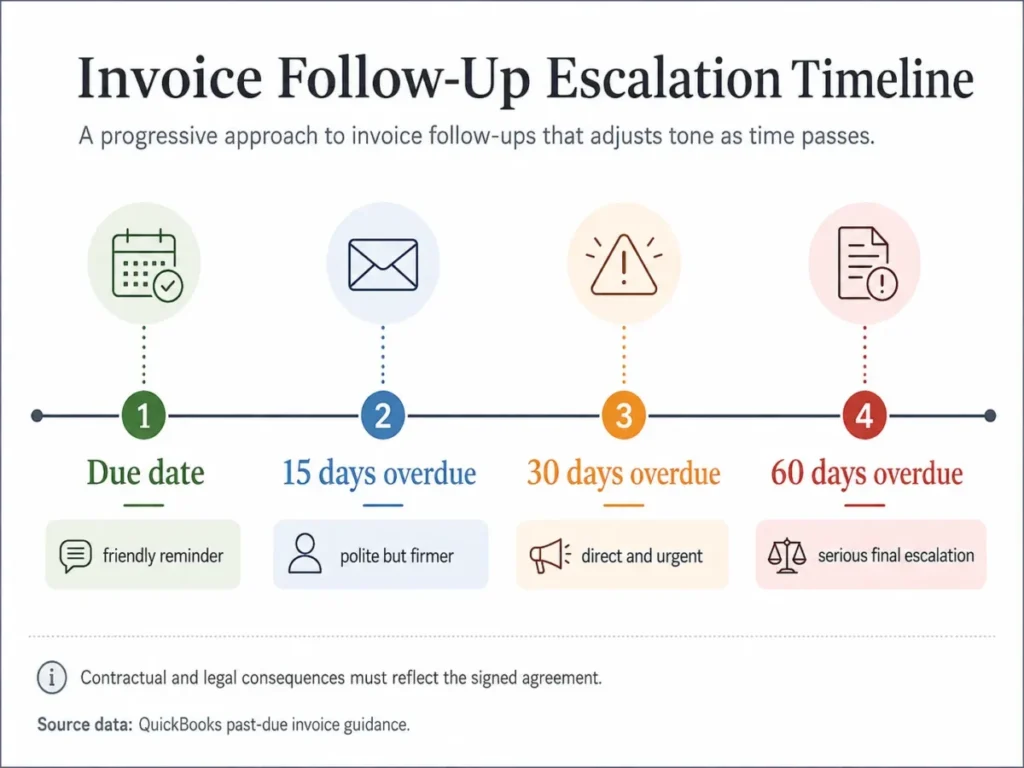
Swap: the stage line, the only part that changes as the invoice ages; at 60 days, fill the bracket only with a step your signed agreement provides.
| Stage | Tone | Stage line to paste |
|---|---|---|
| Due date | Neutral | The invoice is due today; the details are below for your accounts team. |
| 15 days overdue | Direct, friendly | The invoice still shows as open; could you share the expected payment date? |
| 30 days overdue | Firm | The invoice is 30 days past due; please confirm a payment date or who owns it. |
| 60 days overdue | Formal | The invoice is 60 days past due; under the signed agreement, [agreed next step] follows on [date]. |
Never write a late fee, interest charge or suspension into an invoice email unless your signed agreement contains it. The FTC’s guide treats a message that only facilitates or updates an agreed transaction as transactional or relationship: exempt from most CAN-SPAM provisions, but never allowed false or misleading routing information.
How to Use These Templates
Each template becomes a personal email in four steps:
- Pick the template by trigger, using the situation table, not by how impatient you feel.
- Check whether the other person gave you a date; if it has not passed, schedule the email for the day after.
- Fill every bracket with a real fact, and delete any sentence whose bracket you cannot fill.
- Send it in the existing thread, then log the next follow-up date in your sheet or CRM.
Example: a proposal follow-up, filled in
Here is Template 6 with sample data: Jordan Lee at Northwind Supply is a fictional buyer reviewing a 12-seat onboarding quote, with a decision due Friday, Nov 20.
Subject: Re: Northwind onboarding quote, Nov 20 decision

Hi Jordan,

You mentioned the team would decide on the onboarding quote by
Friday, Nov 20. Is there anything in the scope section I should
clarify for your finance lead before then?

One date to know: the 12-seat quote assumes a Dec 1 start.

Should I hold Dec 1, or plan around a later start?

Alex Rivera
alex@example.com | 555-0142
Every bracket became a fact from the last call, and “pricing / scope / timeline” narrowed to the one open section.
Personalize with ChatGPT without inventing facts
To adapt a template with ChatGPT, I give it the six facts below, forbid it to invent anything, and check every line of the draft against what I supplied.
Personalize the follow-up email below for my situation.
Relationship: [who they are to me]
Previous interaction: [what happened, and when]
Reason for writing now: [the new reason]
The one action I want: [the ask]
Real dates: [only dates that exist]
Tone: [warm, neutral, direct, formal, firm]
Rules: one call to action, under [word count] words, only the facts
I supplied. Never invent names, dates, prices, results, contacts or
promises; if a detail is missing, list what you need from me.
Keep the no-invention rule, and do not paste customer records or contract terms into an AI tool your company has not approved. The same structure carries over to other business tasks in my ChatGPT prompt collection.
How Long to Wait, How Many to Send, and When to Stop
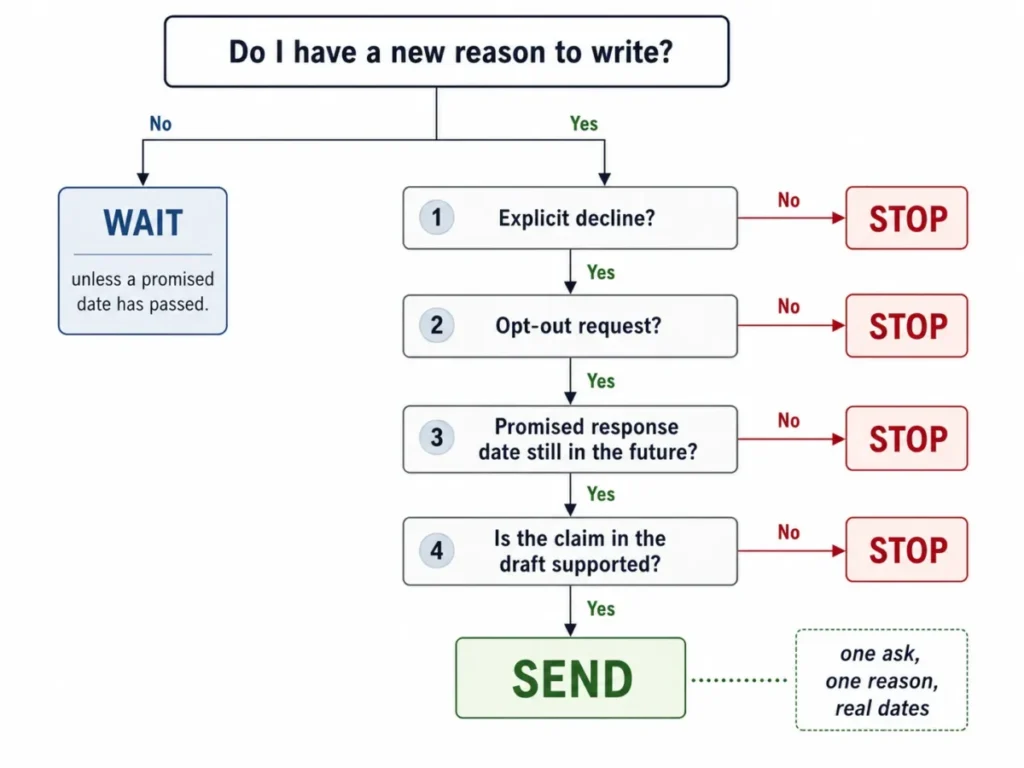
Plan up to four touches, each with a different reason, and stop at the fourth or sooner when one of six stop conditions applies. My default spacing:
| Touch | When to send | The new reason | Template |
|---|---|---|---|
| 1. Nudge | 3 business days after the request | What the answer unblocks, or your deadline | 1 or 2 |
| 2. Add value | 4-5 business days after touch 1 | New information, a resource or a narrower question | 3 |
| 3. New angle or person | About a week after touch 2 | A different problem, or “who owns this?” | 7 or 8 |
| 4. Close the loop | About a week after touch 3 | None: stop and name what would restart it | 4 |
Recaps (Template 5) and event notes (Template 9) go out the same day, outside this count, and invoices follow their stage table. Stop sooner when any of these is true:
- They said no. A follow-up after a decline turns “not now” into “never”.
- They asked to be removed. Stop and suppress the address now; for commercial email the FTC’s guide sets 10 business days as the maximum.
- Their date has not arrived. Wait, then reference it.
- You have nothing new to say. The same message earns the same silence.
- You cannot support the claim. A fee or deadline goes in only if it exists in writing.
- The issue needs a call. A payment dispute or an unhappy client needs a conversation.
In outbound selling, a planned prospecting cadence sets these touches before the first cold email goes out.
My take
Pick Template 4 over a fourth follow-up if touch 3 got no answer. I would plan the reason for all four touches before sending touch 1, so touches 2 and 3 cannot repeat touch 1 and the thread gets a real end.
Subject Lines That Name the Last Exchange
Reply in the existing thread when one exists; otherwise name the item and the exchange (“Northwind quote from Tuesday’s call”), never just “Following up”.
| Situation | Subject line | Why it works |
|---|---|---|
| No reply, thread exists | Re: [original subject] | Keeps your first message under the nudge |
| Request with a deadline | [Item] needed by [date] for [task] | Names the item and date before it opens |
| After a meeting | Recap and next steps: [meeting], [date] | Reads as a record they can search for |
| Proposal out | Re: [proposal name], [decision date] decision | Ties the email to the buyer’s own date |
| Cold follow-up | [Specific problem] at [Company] | Names their problem, not your product |
| Job application | Application for [job title], [your name] | Findable by role and name |
| Invoice | Invoice [number], [amount] due [date] | Holds what accounts payable searches by |
| Close the loop | Closing the loop on [topic] | Signals that no more emails are coming |
A fake “Re:” on a cold email is out: the FTC’s guide says a commercial email’s subject line must accurately reflect the content of the message.
Automate Follow-Ups That Stop When They Reply
By hand, Gmail’s Schedule send times one follow-up; once several people run many threads, a HubSpot sequence sends the touches and, by default, unenrolls a contact who replies or books a meeting.
Gmail’s Schedule send holds an email until the time you pick, with up to 100 scheduled emails, sent by the time zone you scheduled in.
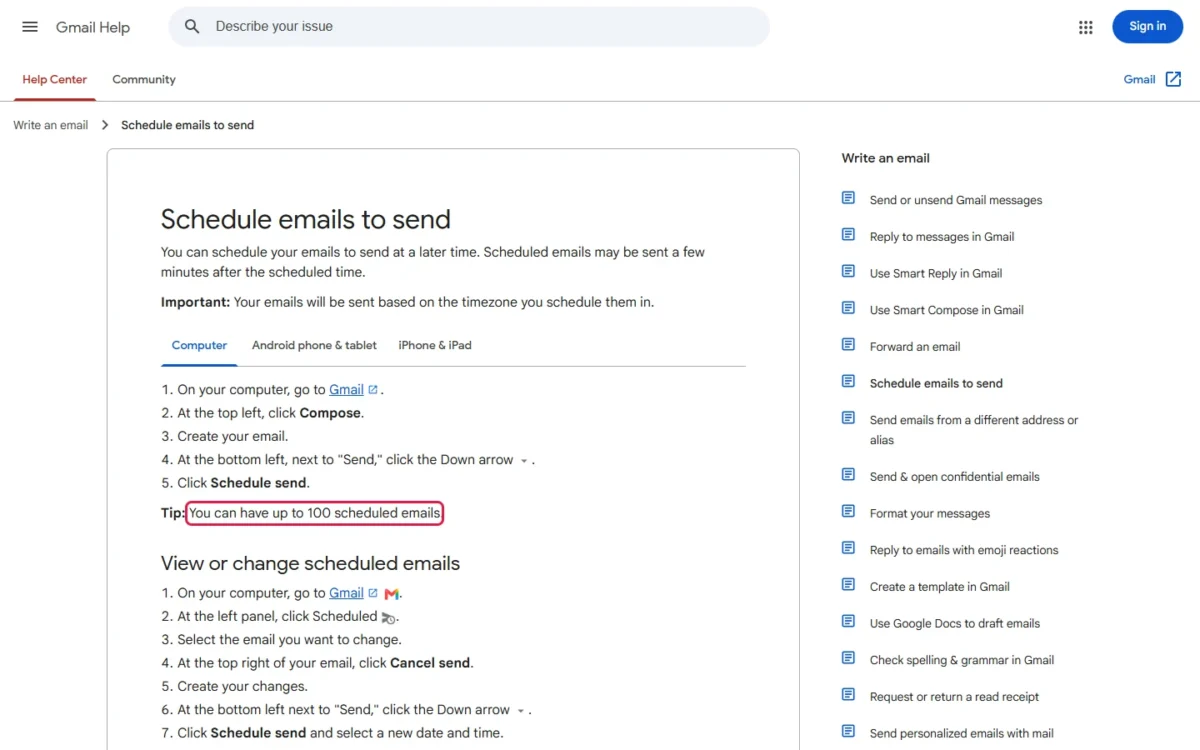
A scheduled nudge is yours to cancel: if they reply first, open Scheduled, select the email and click Cancel send, and it turns back into a draft.
Without a CRM, log each thread’s next date in a sheet; the free CRM Excel template is a ready starting point.
Google Workspace teams can keep the same tracker in the Google Sheets CRM template.
HubSpot sequences do this inside a CRM: by default, a contact is unenrolled when they reply to any sequence email or book a meeting through a sequence meeting link.
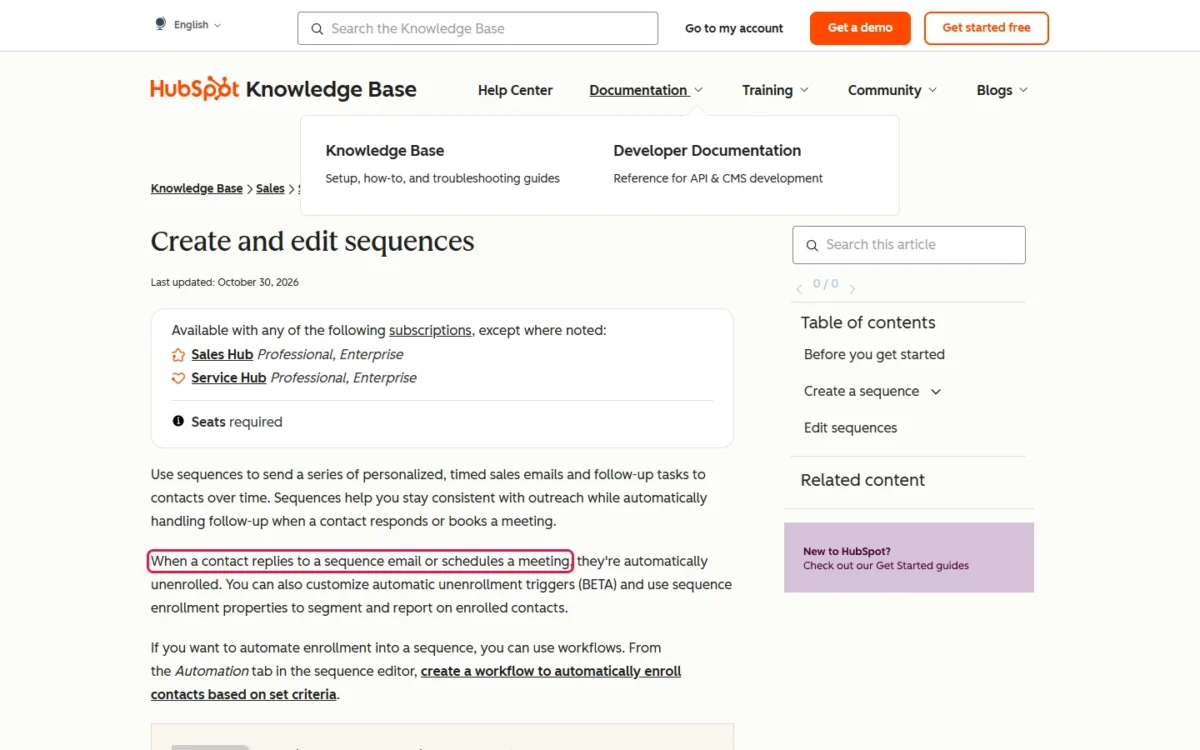
Each unenroll trigger can stop the sequence for that contact only or for all contacts at the same company. With company-wide unenroll, when you emailed three people on one buying team, the first reply stops the emails to the other two.
Delays are set in business days, up to 90 business days per email, and steps run on business days only unless you switch that off. An automated email can start a new thread or reply to an earlier sequence email, sent inside a time window you set.
Sequences need Sales Hub or Service Hub Professional or Enterprise, plus an assigned Sales or Service seat for each user. A team on a free or Starter plan would have to upgrade, and HubSpot’s plan prices show what that costs.
If you are still choosing a system, the CRMs I rank for sales teams show which ones run sequences.
A one-to-many announcement is a campaign, not a follow-up, and belongs in one of the email marketing platforms I compare.
My take
Stay with a sheet and Schedule send if one person sends fewer than about ten follow-ups a week. Sales Hub Professional with an assigned Sales seat is worth it when you email several people on one buying team, because company-wide unenroll stops the same sequence for the other contacts at that company once one of them replies.
Reporting: measure replies and meetings per template
Report on each template by replies and meetings booked. HubSpot bases sequence revenue attribution on enrollment, unenrollment, meetings booked and emails replied, and its enrollment properties let you segment and report on enrolled contacts. In a sheet, a reply column per template gives the same answer.
Follow-Up Mistakes That Cost the Reply
“Just checking in” with nothing new tops the list of six mistakes, each with what the reader experiences and the fix.
| Mistake | What the reader experiences | Do this instead |
|---|---|---|
| “Just checking in” with nothing new | No reason to reply | Restore context in one clause, then add one new thing |
| The same message again | You are broadcasting, not writing | Change the reason, not the synonyms |
| Following up before their date | You were not listening | Wait for their date, then reference it |
| Three asks in one email | Too much to answer quickly | One ask, answerable in a minute |
| Invented urgency, fees or consequences | Distrust of everything else you say | State only deadlines and terms in writing |
| Unedited brackets | Obvious mass mail | Replace every bracket or delete the sentence |
My take
Pick the invented fee as the first mistake to fix if you send invoice reminders: I would delete any fee line your signed agreement does not contain, because it turns a late payment into a dispute.
Frequently Asked Questions
How do I professionally say I will follow up?
Name the date and the action: “I will send the revised quote by Thursday,” or “If I have not heard back by the 12th, I will call your office.” A dated promise gives you permission to write again, and the reader knows when to expect you.
Should I reply in the same thread or start a new email?
Reply in the same thread when one exists, so the reader sees your earlier message. Start a new email with a subject naming the item when the topic has changed or you are writing to someone new.
How do you politely follow up on an email?
Restore the context in one clause, add one new reason, and ask for one thing answerable in under a minute; Template 1 does it in under 50 words. Politeness comes from making the reply cheap, so give the reader an easy way to say no, later or wrong person.