A help desk stops being enough on the day a support leader has to route a phone call, a WhatsApp thread, and an email about the same order to one agent, and then explain to finance why the AI agent that resolved half the queue produced its own invoice. That is the point where the shopping list changes from ticketing tools to customer service platforms.
This guide ranks ten customer service platforms for teams of roughly 20 to 500 agents on three things: which plan turns on voice and messaging, what 25 agents cost per month on the tier that carries the workflow, and which unit each vendor uses to bill its AI agent. Zendesk Suite ranks first on documented channel breadth, Salesforce Service Cloud leads for enterprise service on its own data model, and Intercom remains the reference design for AI-first support.
If the team is under 20 agents, works mostly in email, and needs a shared queue rather than a contact center, the better list is the best help desk software roundup, which covers Freshdesk, Help Scout, Zoho Desk, Gorgias, Front, and LiveAgent. This article deliberately leaves those six out, because a shared inbox and an omnichannel platform are different purchases.
In This Article (14 sections)
Quick Verdict: Best Customer Service Platform by Operation Type
| Operation type | Best pick | Why it fits |
|---|---|---|
| 20 to 200 agent omnichannel team | Zendesk Suite | Messaging, voice, and knowledge arrive together on Suite Team, with AI agents billed per automated resolution |
| Enterprise service on Salesforce data | Salesforce Service Cloud | Case governance, Agentforce, and add-on depth that scale with the org, at enterprise prices |
| Voice-first contact center with published tiers | Genesys Cloud CX | Four published tiers from voice-only to full workforce engagement, with AI tokens included per org |
| AI-first, in-product SaaS support | Intercom | Fin resolves inside the product and is billed per outcome, with chat, email, and in-app included on every seat |
| Budget omnichannel suite under 100 agents | Freshdesk Omni | The lowest omnichannel entry price of the ten, with a stated Freddy session allowance |
| Microsoft 365 organization | Dynamics 365 Customer Service | Unified routing and Copilot inside the Microsoft stack, with voice and messaging on Premium |
| Lowest entry price for voice plus digital | RingCX | Voice and 20 or more digital channels on one published seat price |
| Digital-first team that adds voice later | Talkdesk | Digital-only and voice-only entry tiers that merge at Elite, plus a free tier for very small US and Canadian companies |
| European team wanting flat AI pricing | Dixa | Mim AI agent billed at a flat rate per conversation, in euros, with voice on the entry plan |
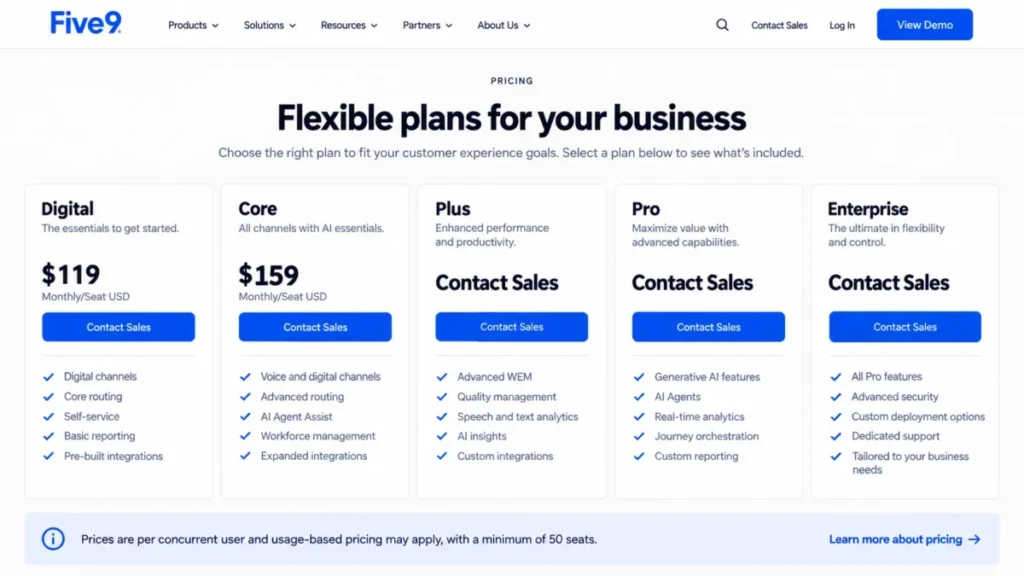
| 50 or more concurrent seats | Five9 | Published per-seat rates with every channel included, gated by a 50-seat minimum |
Source: official plan pages read on 2026-09-07, the Zendesk Suite pricing page and Salesforce Service Cloud pricing page; every other pick is sourced inside its own section below.
The budget pick is Freshdesk Omni, the enterprise pick is Salesforce Service Cloud, and the only free entry point in this set is Talkdesk Express, which is limited to companies under 50 employees in the United States and Canada. None of the ten publishes a permanent free plan for a general support team.
Customer Service Platform vs Help Desk vs Chatbot Platform: Which List You Need
A customer service platform is a help desk plus two things that change the purchase: native voice or contact center routing across channels, and an AI agent that resolves conversations before a human sees them. The definition in what customer service software covers explains the base category; this article covers the tier above it.
The distinction matters because the pricing shapes differ. A help desk is priced per agent with chat as an upgrade, while the platforms here price voice and messaging into the tier and then meter the AI agent separately.
An adjacent list covers the bot builders this one does not. Teams that only want an AI agent to sit on top of an existing desk should read the guide to AI chatbot platforms for customer support, because those products are priced and scored as bots rather than as platforms.
Here, chat is one channel in a queue and the AI agent is scored as a line item on the invoice, not as a product in its own right.
How We Chose and Ranked the Ten Platforms
Every price, plan gate, and AI billing unit in this guide was read from the vendor’s own pricing page or plan documentation on September 7, 2026. Where a vendor publishes a range rather than a rate, the article reports the range and names the gap.
Each platform was scored against the same buyer-focused criteria: channel coverage including native voice, AI agent economics, routing and workforce depth, governance and audit controls, practical cost at 25 agents, and integration reach. Documented limitations counted as evidence, not as a footnote.
Channel coverage and AI economics carried the most weight, because they are what separates this category from a help desk and what moves a renewal. Governance and cost at scale came next; integration reach carried the least, since every platform here publishes a marketplace.
A claim that could not be traced to an official page was left out, and a vendor with no published seat price was excluded from the ranking. Temporary offers are reported beside the standard rate, never in place of it.
| Criterion | Weight |
|---|---|
| Channel coverage, including native voice | 25% |
| AI agent economics and billing transparency | 20% |
| Routing, queue, and workforce depth | 15% |
| Governance, audit, and security controls | 15% |
| Practical cost at 25 agents | 15% |
| Integration reach | 10% |
Platforms Reviewed but Not Ranked
The exclusion rule is product-based and applies to every candidate the same way: a platform with no published seat price cannot be compared on cost, and a product whose primary job is a chat widget or a bot builder belongs on a different list.
Kustomer, Gladly, Sprinklr Service, NICE CXone, Helpshift, and Kapture were reviewed and left out because none publishes a seat price on its pricing page as of the check date. Ada, Tidio, and Crisp were left out because they are chatbot or chat products already covered in the adjacent lists.
Zendesk Suite places above Salesforce Service Cloud because its channel set arrives on one published tier, while Salesforce sells voice, knowledge, and bots as separate lines. Salesforce places above Genesys on governance depth rather than on price.
Best Customer Service Platforms at a Glance
| Platform | Best-fit operation | First omnichannel plan, billed annually | Voice in that plan | AI agent billing unit |
|---|---|---|---|---|
| Zendesk Suite | 20 to 200 agents, mid-market | Suite Team, $55 per agent per month | Yes | Automated resolution, rate not published |
| Salesforce Service Cloud | Enterprise on Salesforce | Core, $195 per user per month | Add-on, Salesforce Voice on Core and Advanced | Flex Credits, rate not published |
| Genesys Cloud CX | Voice-first contact center | CX 2, $115 per user per month | Yes, from CX 1 | AI tokens, allowance included per org |
| Intercom | AI-first SaaS support | Essential, $29 per seat per month | Pay as you go | Fin outcome, from $0.99 |
| Freshdesk Omni | Budget omnichannel under 100 agents | Growth, $29 per agent per month | Yes | Freddy session, $49 per 100 after 500 |
| Dynamics 365 Customer Service | Microsoft 365 organization | Premium, $195 per user per month | Yes, on Premium | Copilot Credits, Premium includes base capacity |
| RingCX | Lowest voice plus digital entry | Standard, $65 per user per month | Yes | Not published, IVA partner or AI Receptionist add-on |
| Talkdesk | Digital-first, voice later | Elite, $165 per user per month | Yes, at Elite or Voice Essentials | Autopilot, contact sales |
| Dixa | European team, flat AI rate | Growth, €89 per agent per month | Yes | Mim conversation, €0.35 |
| Five9 | 50 or more concurrent seats | Digital, $119 per concurrent user per month | Yes | Bundled or add-on, rate not published |
Source: official Genesys Cloud CX pricing page and Intercom pricing page, checked 2026-09-07.
Source: official Freshdesk Omni pricing page and Dynamics 365 Customer Service pricing page.
Source: official RingCX pricing page and Talkdesk pricing page.
Source: official Dixa pricing page and Five9 pricing page.
Read the last two columns before the third one. Six of the ten publish no rate for the AI agent, so the seat price sets the floor and the AI meter sets a range the buyer has to negotiate in writing.
The Intercom row is the outlier in the voice column. Chat, email, and in-app messaging are included on every seat, and phone, SMS, and WhatsApp are pay as you go rather than plan-gated, which is a different shape from every contact center vendor in the table.
The 10 Best Customer Service Platforms in 2026
Every block below carries the same decision fields in the same order, so the price, the gate, and the disqualifier sit in the same place for all ten. The analysis between the fields is where the platforms differ, and the verdict line at the end names who should sign.
1. Zendesk Suite: Best for 20 to 200 Agent Omnichannel Teams

- Best for:
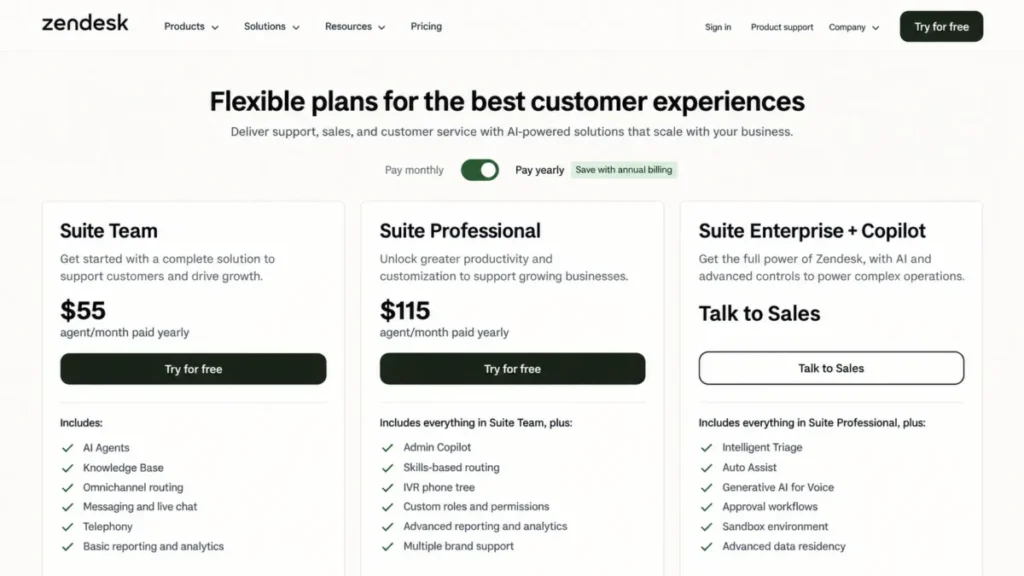
- Support organizations of 20 to 200 agents that need email, chat, messaging, voice, and a multilingual knowledge base in one queue, with an AI agent working the front of it.
- Avoid if:
- The team is email-only, wants one fixed invoice, or expects the AI agent’s cost to be predictable from the pricing page alone.
- Starting price:
- Support Team at $19 per agent per month paid yearly, which is a ticketing plan rather than a platform plan.
- Practical tier:
- Suite Team at $55 per agent per month paid yearly, where messaging, voice, and the knowledge base arrive; Suite Professional at $115 is the tier most mid-market buyers land on.
- Free plan:
- None is listed on the pricing page.
- First limit that bites:
- The entry Support plan carries no omnichannel routing, so the first constraint is the jump to a Suite tier rather than a numeric cap.
- Better than Salesforce Service Cloud:
- Channel completeness on a single published tier, with no separate voice, knowledge, or bot line item.
- Worse than Freshdesk Omni:
- Cost of entry to omnichannel, since Suite Team costs almost twice Freshdesk Omni Growth before a single add-on.
- Setup difficulty:
- Medium to high. Brands, business hours, routing rules, and knowledge structure all need an owner before launch.
- Hidden costs:
- Copilot at $50 per agent per month, the Workforce Engagement bundle at $50 per agent per month, and Contact Center at $83 per agent per month, all paid yearly.
- Evidence status:
- Plan prices, add-on prices, and the automated-resolution billing statement were read from the Zendesk pricing page on September 7, 2026; Suite Enterprise carries no published rate.
Zendesk ranks first because the channel set a platform buyer is shopping for arrives on one tier, and the pricing page says so in plain terms. The gap to the rest of the list shows up when a team stops thinking in tickets and starts thinking in queues, brands, languages, and shift coverage.
The $19 Support Team plan is the trap for this audience. It is a competent ticketing product, and it belongs on the help desk list, not on this one.
A 25-agent team budgeting from Suite Team pays 1,375 dollars per month, and the same team on Suite Professional pays 2,875 dollars. Neither figure includes the AI agent, which is billed per automated resolution at a rate the page does not state.
That is the number to get in writing before signing. Zendesk defines an automated resolution as a request resolved by the AI agent with no escalation, which is a fair unit, but a fair unit with no published price is still an open line on the invoice.
The add-on layer is where forecasting gets hard. Copilot and the workforce bundle each cost as much as the entry seat, so a 25-agent team that adopts both adds 2,500 dollars per month before the seat subscription.
| Pros | Cons |
|---|---|
| Messaging, voice, and knowledge base on one published tier | The platform-grade features start at $55, not at the $19 entry price |
| AI agents included on every Suite and Support plan | The automated-resolution rate is not published, so the AI line is negotiated |
| Routing, brands, and business hours scale to 200 agents and beyond | Copilot and the workforce bundle each cost as much as an entry seat |
| Largest integration marketplace in this set | Suite Enterprise is quote-only, so governance pricing is opaque |
- Verdict:
- Choose Zendesk Suite when the roadmap includes voice, more than one brand, or more than two languages, and budget from Suite Team or Suite Professional rather than the Support plan. The full Zendesk review covers the add-on stack in depth.
For a line-by-line view of every tier and add-on cost, including Copilot and the Contact Center add-on, the Zendesk pricing guide walks the whole ladder.
2. Salesforce Service Cloud: Best for Enterprise Service Operations on Salesforce Data

- Best for:
- Large or regulated organizations that already run Salesforce as the system of record and can fund administration, implementation partners, and per-user add-ons.
- Avoid if:
- There is no dedicated Salesforce administrator, no implementation budget beyond the licence, or the team needs voice and messaging on the entry tier.
- Starting price:
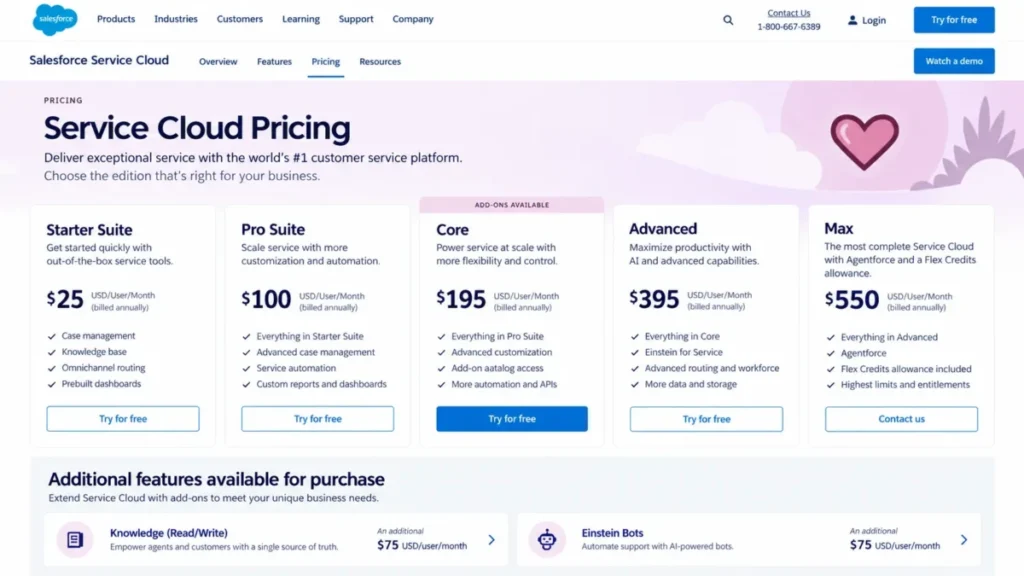
- Starter Suite at $25 per user per month, billed monthly or annually.
- Practical tier:
- Core at $195 per user per month billed annually, which is where the add-on catalogue opens; Advanced sits at $395 and Max at $550.
- Free plan:
- None. Pro Suite at $100 per user per month requires an annual contract.
- First limit that bites:
- Capability is sold in layers, so the first constraint is discovering that knowledge, bots, messaging, and voice are each separately priced above the seat.
- Better than Zendesk Suite:
- Case governance, data model extensibility, and audit posture at enterprise scale, on the same record the sales team already uses.
- Worse than Genesys Cloud CX:
- Voice, which Genesys includes from its first tier and Salesforce sells as Salesforce Voice on Core and Advanced.
- Setup difficulty:
- High. This is an implementation project with a named owner and usually a partner, not a weekend configuration.
- Hidden costs:
- Knowledge read-write at $75 per user per month, Einstein Bots at $75 per user per month on Core, and Enhanced Messaging at $75 per user per month on Core and Advanced.
- Evidence status:
- Edition prices, add-on prices, and the Flex Credits statement were read from the Service Cloud pricing page on September 7, 2026; the page lists no per-conversation rate for Agentforce.
Nothing else in this guide extends as far, and nothing else costs as much to run. The right question is not whether Service Cloud can do the job but whether the organization has the administrative capacity to keep the configuration honest after year one.
The edition ladder changed shape in 2026. The editions on the page are Starter Suite, Pro Suite, Core, Advanced, and Max, and the Enterprise and Unlimited labels that older comparisons quote no longer appear on it.
The add-on stack deserves specific attention. Knowledge read-write and Einstein Bots are each $75 per user per month, so a service function that treats knowledge and bots as table stakes pays 150 dollars per user on top of a 195 dollar Core seat.
For 25 agents that is 4,875 dollars per month on Core alone, and 8,625 dollars once knowledge and bots are added, before Salesforce Voice or Enhanced Messaging. It is why the Starter Suite price is the least useful number on the page for this audience.
Agentforce for Service is priced through Flex Credits, and only the Max edition states an included allowance, at 2.75 million Flex Credits per org per year. A buyer below Max should ask for the credit rate and the credits consumed per conversation in writing.
| Pros | Cons |
|---|---|
| Ranked first here for documented case governance and extensibility | Knowledge, bots, messaging, and voice are separate lines above the seat |
| Native continuity with an existing Salesforce data model | Core at $195 is the real entry point for a service platform |
| Edition ladder reaches genuine contact center scale on Advanced and Max | Agentforce credit rate is not published below the Max edition |
| Flex Credits allowance stated on Max | Time to first value is measured in months, not weeks |
- Verdict:
- Choose Service Cloud only where Salesforce is already the system of record and the implementation budget is real, and price Core plus knowledge and bots rather than the Starter Suite figure. The Salesforce CRM review shows how the same edition logic runs on the sales side of the platform.
Buyers pricing the whole Salesforce estate, with every add-on and hidden cost across the clouds, will find the Salesforce pricing guide more useful than the service page alone.
3. Genesys Cloud CX: Best Voice-First Contact Center With Published Tiers
- Best for:
- Contact centers where voice is the primary channel and the buyer wants published per-user tiers that step from voice-only to digital to workforce engagement.
- Avoid if:
- The operation is chat and email first with little phone volume, or the buyer needs a fixed AI line item rather than a token allowance.
- Starting price:
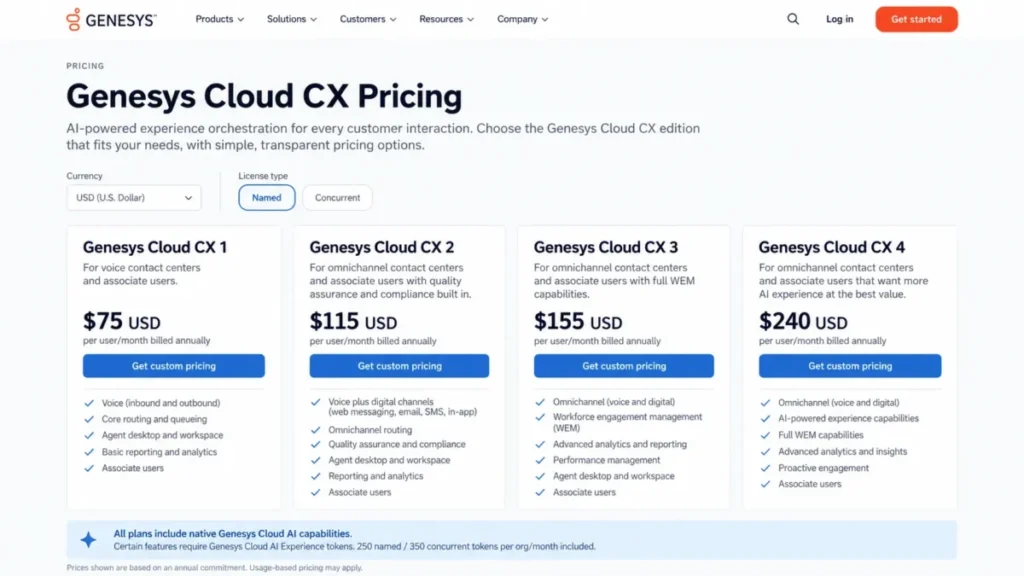
- Genesys Cloud CX 1 at $75 per user per month billed annually, which is voice only, with digital channels available as an add-on.
- Practical tier:
- CX 2 at $115 per user per month billed annually, where web messaging, email, SMS, and in-app messaging join voice; CX 3 at $155 adds workforce engagement.
- Free plan:
- None is listed.
- First limit that bites:
- The AI token allowance, stated as 250 named or 350 concurrent tokens per org per month on CX 1 through CX 3, with CX 4 at $240 adding per-agent tokens on top.
- Better than Talkdesk:
- A single ladder in which voice is present from the first tier and digital is added rather than sold as a parallel entry plan.
- Worse than Zendesk Suite:
- Help desk polish, knowledge base depth, and marketplace breadth for a team that is not a contact center.
- Setup difficulty:
- High. Queues, skills, IVR flows, and workforce rules are a contact center implementation, and the page notes that usage-based pricing may apply on top.
- Hidden costs:
- Usage-based charges the page flags without pricing, digital channels as an add-on on CX 1, and workforce engagement as an add-on below CX 3.
- Evidence status:
- Tier prices, channel inclusion, and the token allowance were read from the Genesys Cloud pricing page on September 7, 2026; usage-based rates are not published there.
Genesys earns third place for doing something the enterprise contact center vendors mostly refuse to do, which is print four tier prices and say what each one includes. A buyer can build a shortlist budget without a sales call, which is rare in this segment.
The ladder is easy to read. CX 1 is voice only, CX 2 adds the digital channels, CX 3 adds workforce engagement, and CX 4 adds a per-agent AI token allowance.
Twenty-five agents on CX 2 cost 2,875 dollars per month, which lands at the same figure as Zendesk Suite Professional. The difference is what that money buys: Genesys spends it on voice routing and IVR depth, Zendesk on ticketing, knowledge, and a marketplace.
The AI token model is the item to model carefully. Tokens are pooled per org rather than per agent on the first three tiers, so a growing team shares a fixed allowance until it moves to CX 4 or buys more.
| Pros | Cons |
|---|---|
| Four published tiers with stated channel and workforce inclusion | Digital channels are an add-on on the $75 CX 1 tier |
| Voice present from the first tier, with IVR and routing built for volume | Usage-based pricing may apply and is not quantified on the page |
| AI tokens included per org, with a per-agent uplift on CX 4 | Token allowance is pooled, so it is shared across a growing team |
| Workforce engagement included from CX 3 | Implementation effort is contact center scale, not help desk scale |
- Verdict:
- Choose Genesys Cloud CX when phone volume drives the operation and a published tier ladder matters more than help desk polish, and budget from CX 2 unless the team is voice only.
4. Intercom: Best for AI-First, In-Product SaaS Support

- Best for:
- Product-led SaaS teams whose support happens inside the product through chat and in-app messaging, with Fin handling the first pass and resolving a large share of it.
- Avoid if:
- Finance needs a fixed monthly number that does not move with resolution volume, or the operation is phone-heavy.
- Starting price:
- Essential at $29 per seat per month on annual billing.
- Practical tier:
- Advanced at $85 per seat per month, which includes 20 free Lite seats; Expert at $132 per seat per month includes 50 free Lite seats.
- Free plan:
- None is listed. Fin AI Agent is also sold standalone with no seats required, for teams keeping another help desk.
- First limit that bites:
- Fin outcome volume, because every resolved outcome adds to the invoice from $0.99 and no included allowance is published.
- Better than Zendesk Suite:
- AI agent pricing transparency, since Fin has a published per-outcome rate and Zendesk’s automated-resolution rate is negotiated.
- Worse than Freshdesk Omni:
- Budget predictability, because Freshdesk Omni states a session allowance and a block price while Fin’s meter has no published allowance.
- Setup difficulty:
- Medium. The messenger is fast, and Fin performs only as well as the content library behind it.
- Hidden costs:
- Fin outcomes from $0.99 each on top of every seat, Copilot at $29 per agent per month, and phone, SMS, and WhatsApp on pay-as-you-go usage.
- Evidence status:
- Seat prices, the Fin rate, the Copilot rate, and the channel inclusion statement were read from the Intercom pricing page on September 7, 2026.
Intercom is the clearest expression of a model the rest of the category is drifting toward, which is paying for results instead of paying for capacity. That is better economics when deflection works and a harder budget conversation when it does not.
Intercom is also the only vendor here that publishes its AI rate on the pricing page without qualification. Fin is from $0.99 per outcome, and that single published number is why it outranks platforms with wider channel sets.
The seat jump is the part buyers underestimate. Essential to Advanced is a move from $29 to $85 per seat, so a 25-seat team goes from 725 dollars to 2,125 dollars per month before a single Fin outcome is billed.
Then the meter starts. At 500 resolved outcomes in a month, $0.99 each adds 495 dollars, which is more than two thirds of the Essential subscription for that team.
Channels work differently from the contact center vendors in this list. Live chat, support email, in-app chat, banners, and tooltips are included on every plan, and phone, SMS, and WhatsApp are billed on usage rather than locked to a tier.
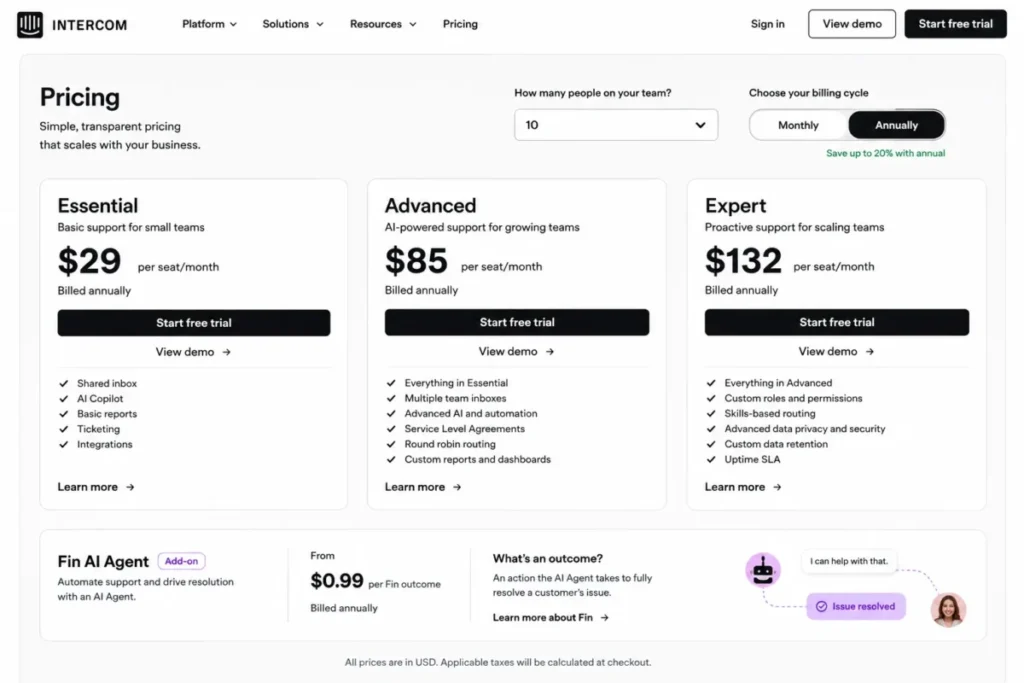
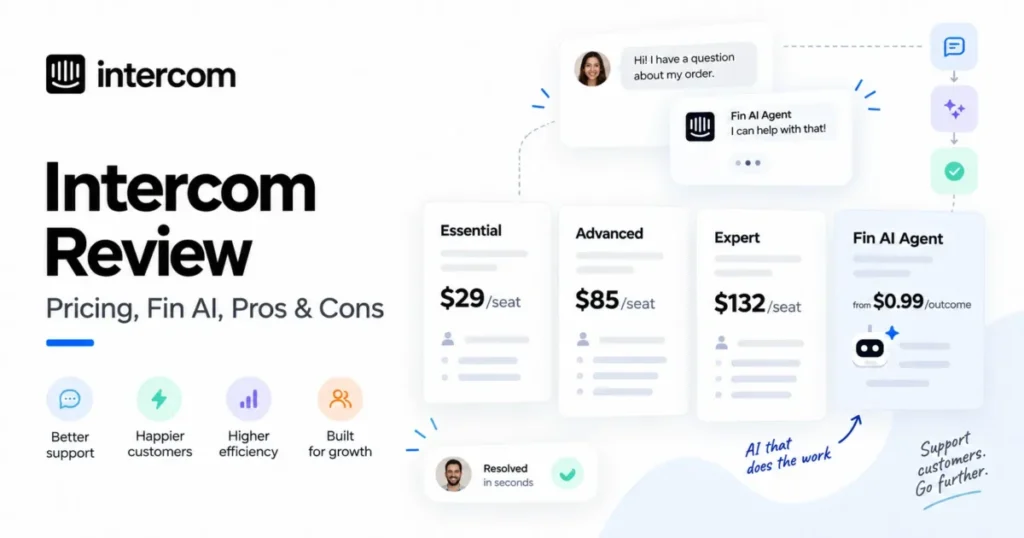
Intercom’s annual pricing lists Essential at $29, Advanced at $85, and Expert at $132 per seat per month. Fin AI Agent is billed separately from $0.99 per resolved outcome.
| Pros | Cons |
|---|---|
| Published per-outcome AI rate, from $0.99, with no seat required for Fin | Total cost moves with resolution volume, not with team size |
| Chat, email, and in-app messaging included on every seat | The Essential to Advanced jump nearly triples the seat cost |
| Free Lite seats on Advanced and Expert reduce viewer-seat spend | No published included-outcome allowance |
| Copilot priced per agent at $29 with a stated conversation allowance | Phone is usage-billed rather than a plan feature, so it is hard to budget |
- Verdict:
- Choose Intercom when support is a product surface rather than an inbox and finance accepts a variable AI line, and cap or alert on Fin outcomes before go-live. The Intercom review goes deeper on Fin and the seat ladder.
A team torn between an outcome meter and an automated-resolution meter should read the Zendesk vs Intercom comparison, which sets the two AI billing models side by side.
5. Freshdesk Omni: Best Budget Omnichannel Suite Under 100 Agents

- Best for:
- Support teams of roughly 20 to 100 agents that want voice, chat, and email in one queue at the lowest published omnichannel entry price, with an AI agent whose allowance is stated up front.
- Avoid if:
- The team needs skill-based routing, sandbox, or audit logs without paying for the Enterprise tier, or wants a per-agent Copilot on the entry plan.
- Starting price:
- Growth at $29 per agent per month billed annually, which is the omnichannel product and not the help desk edition of Freshdesk.
- Practical tier:
- Pro at $79 per agent per month billed annually, where intelligent routing, a multilingual help desk, and advanced analytics arrive.
- Free plan:
- None. A 14-day trial with Enterprise plan access is published.
- First limit that bites:
- The 500 included Freddy AI Agent sessions, after which sessions are billed at $49 per 100.
- Better than Intercom:
- Predictable AI cost, because the allowance and the block price are both stated on the pricing page.
- Worse than Zendesk Suite:
- Marketplace breadth and the polish of brand and business-hour administration at 100 agents and above.
- Setup difficulty:
- Low to medium. Email and portal go live quickly, and the effort starts when SLA policies, routing, and voice queues are layered on.
- Hidden costs:
- Freddy AI Agent sessions at $49 per 100 beyond the first 500, and Freddy AI Copilot at $29 per agent per month on Pro and Enterprise.
- Evidence status:
- Plan prices, the session allowance, the Copilot rate, and the tier features were read from the Freshdesk Omni pricing page on September 7, 2026.
Freshworks sells two products with similar names, and the distinction is the whole point of this entry. Freshdesk is the help desk that appears on the ticketing list, and Freshdesk Omni is the omnichannel platform with voice, chat, and email in one agent workspace.
At $29 per agent, Growth is the cheapest omnichannel entry in this comparison. A 25-agent team pays 725 dollars per month on Growth and 1,975 dollars on Pro, which is the tier most teams should budget from because intelligent routing sits there.
Where the ladder gets expensive is governance. Skill-based routing, sandbox, custom objects, and audit logs are Enterprise features at $119 per agent per month, so a regulated 25-agent team pays 2,975 dollars per month for controls a larger suite bundles earlier.
The AI meter is the most forecastable in this guide. A stated allowance of 500 sessions and a stated block price of $49 per 100 let a support lead model a bad month before signing, which is not possible with an outcome rate that has no allowance.
A session is not a resolution. Freshworks counts sessions, so a conversation that takes three AI turns can consume more of the allowance than a single clean deflection would, and that definition belongs in the contract.
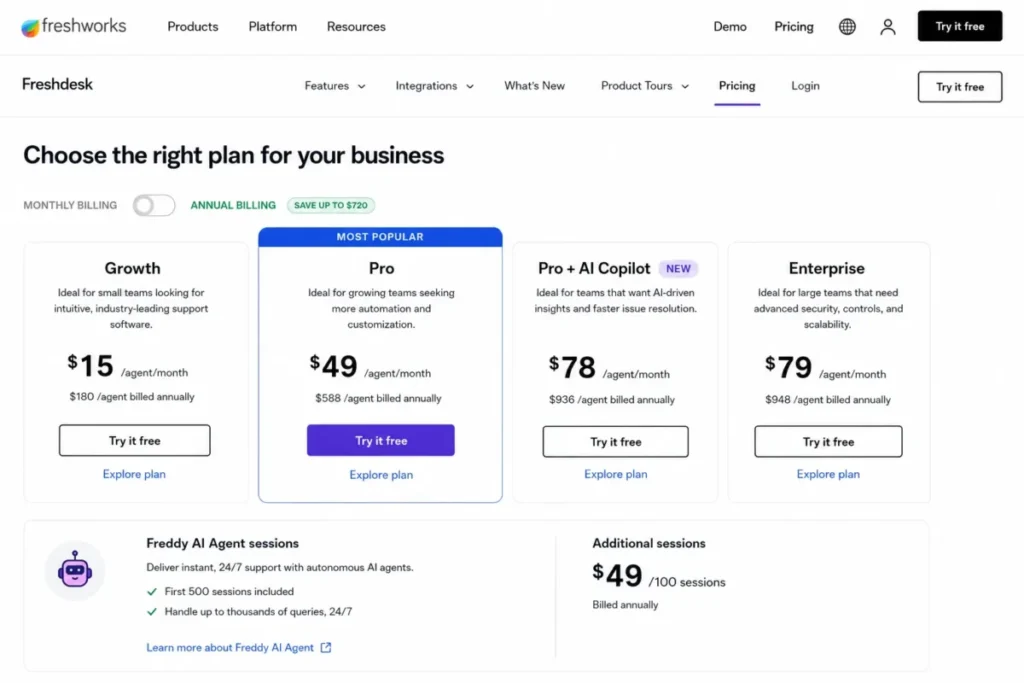
Freshdesk Omni includes the first 500 Freddy AI Agent sessions on every plan and charges $49 for each additional block of 100 sessions.
| Pros | Cons |
|---|---|
| Lowest omnichannel entry price of the ten, at $29 per agent | Governance controls are locked to the $119 Enterprise tier |
| AI usage sold in stated session blocks, so it can be forecast | The included 500 sessions run out quickly at real chat volume |
| Voice, chat, and email in one workspace from Growth | Copilot is a $29 add-on and unavailable on Growth |
| 14-day trial with Enterprise access published | A session is not a resolution, so the unit needs defining in the contract |
- Verdict:
- Choose Freshdesk Omni when the team is under 100 agents, wants voice and chat without a contact center contract, and values a stated AI allowance over a wider marketplace. The Freshdesk review covers the help desk edition that Omni is built on.
6. Microsoft Dynamics 365 Customer Service: Best for Microsoft 365 Organizations

- Best for:
- Service organizations already standardized on Microsoft 365, Teams, and Power Platform that want unified routing and Copilot inside the same tenant.
- Avoid if:
- The organization runs outside the Microsoft stack, or the team needs voice and messaging without stepping up to the Premium licence.
- Starting price:
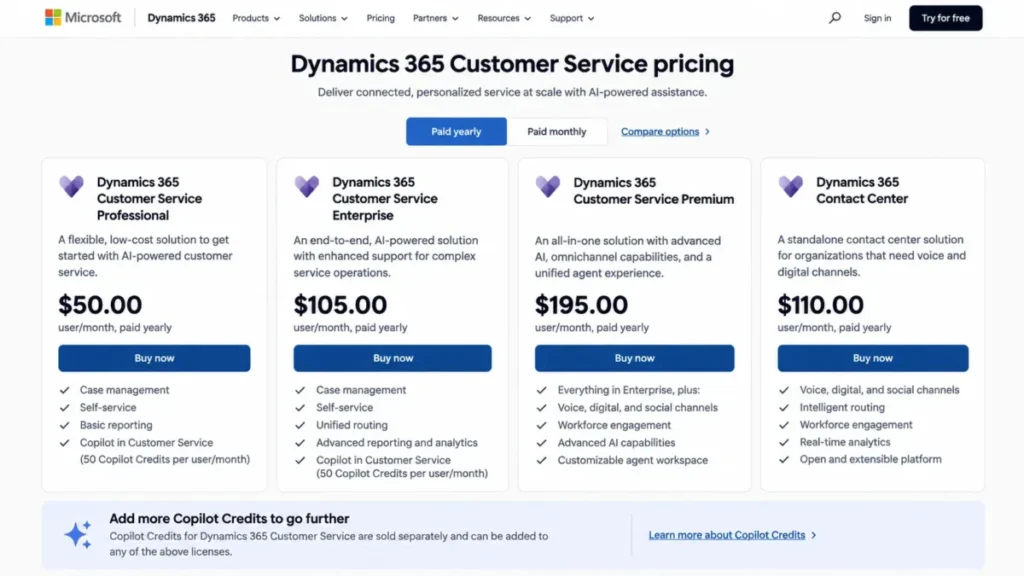
- Professional at $50 per user per month paid yearly, which covers case management and knowledge authoring without omnichannel routing.
- Practical tier:
- Enterprise at $105 per user per month paid yearly, where unified routing, Copilot in Customer Service, and workforce engagement features arrive; Premium at $195 adds the contact center.
- Free plan:
- None is listed.
- First limit that bites:
- Channel scope, because live chat, messaging, social, and voice are Premium capabilities, so an Enterprise licence buys routing without the channels to route.
- Better than Salesforce Service Cloud:
- Price of the governed tier, since Enterprise at $105 carries unified routing and Copilot where Salesforce Core at $195 still sells bots and messaging separately.
- Worse than Zendesk Suite:
- Time to a working queue, because Dynamics is configured through Power Platform tooling rather than a support-first admin console.
- Setup difficulty:
- High. Routing, entitlements, and Copilot agents are set up through the Dynamics and Power Platform admin surfaces, and most deployments involve a partner.
- Hidden costs:
- Copilot Credits sold separately for agent capabilities on Professional and Enterprise, and the standalone Dynamics 365 Contact Center licence at $110 per user per month for organizations that want the contact center on another CRM.
- Evidence status:
- Licence prices and the capability bullets per plan were read from the Dynamics 365 Customer Service pricing page on September 7, 2026; Copilot Credit rates are not published on that page.
Dynamics earns its place on the price of governance. A 25-agent team on Enterprise pays 2,625 dollars per month for unified routing, Copilot, Teams integration, and workforce features, which undercuts Salesforce Core by a wide margin for a comparable control surface.
The catch is the channel gate. Premium at $195 is where live chat, messaging, social channels, IVR, and voice arrive, and at that price the 25-agent figure becomes 4,875 dollars, the same as Salesforce Core.
Microsoft also sells the contact center on its own. Dynamics 365 Contact Center at $110 per user per month is the licence for organizations that want Microsoft’s routing and channels on top of a different CRM, which is an unusual shape in this list.
The AI agents are priced in credits. Premium includes base capacity for the Customer Intent, Knowledge Management, Case Management, and Quality Evaluation agents, while Professional and Enterprise buy Copilot Credits separately on a pay-as-you-go or pre-purchase basis.
| Pros | Cons |
|---|---|
| Unified routing and Copilot on the $105 Enterprise licence | Chat, messaging, social, and voice wait for the $195 Premium licence |
| Native Teams and Microsoft 365 interoperation | Copilot Credit rates are not published on the pricing page |
| Contact center available as a standalone $110 licence on another CRM | Configuration runs through Power Platform tooling, so a partner is usually involved |
| Workforce management features included on Enterprise | Weak fit for any organization outside the Microsoft stack |
- Verdict:
- Choose Dynamics 365 Customer Service when Microsoft 365 is already the workplace and the team can live on Enterprise until channels justify Premium. The licensing model mirrors what the Dynamics 365 Sales review describes on the revenue side of the same platform.
7. RingCX: Best Low Entry Price for Voice Plus Digital Channels

- Best for:
- Teams of 20 to 150 agents that want a contact center with voice and digital channels on one published seat price, and that can add AI tooling per user as the need appears.
- Avoid if:
- The buyer wants a customer-facing AI agent with a published rate, or needs help desk depth such as a knowledge base and SLA policies in the same product.
- Starting price:
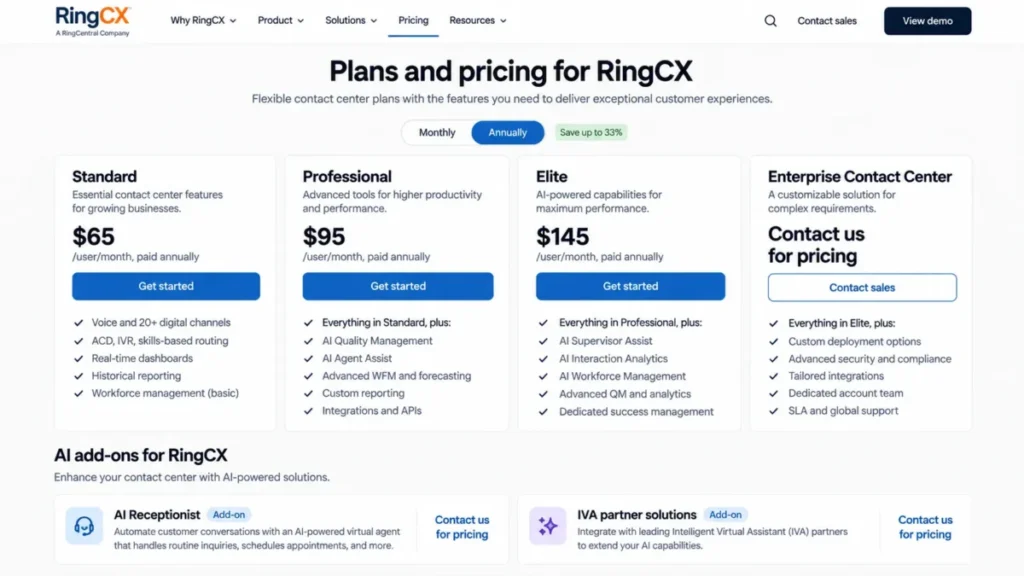
- Standard at $65 per user per month paid annually, or $75 per user per month on monthly billing.
- Practical tier:
- Professional at $95 per user per month paid annually, where AI Quality Management and AI Agent Assist join the seat; Elite at $145 adds supervisor assist, interaction analytics, and workforce management.
- Free plan:
- None is listed.
- First limit that bites:
- Customer-facing AI, because self-service is delivered through an IVA partner solution or the AI Receptionist add-on, both priced by sales rather than on the page.
- Better than Genesys Cloud CX:
- Entry cost for voice plus digital together, since Standard at $65 includes 20 or more digital channels where Genesys CX 1 at $75 is voice only.
- Worse than Freshdesk Omni:
- Help desk substance, because RingCX is a routing and agent workspace product rather than a ticketing and knowledge product.
- Setup difficulty:
- Medium. ACD, IVR, and skills-based routing are included on Standard, and the effort sits in designing the queues rather than in licensing them.
- Hidden costs:
- AI Quality Management, AI Interaction Analytics, AI Agent Assist, and AI Supervisor Assist each starting at $25 per user per month as add-ons, AI Workforce Management from $20 per user per month, and the Enterprise Contact Center tier on quote.
- Evidence status:
- Tier prices, the annual and monthly rates, channel inclusion, and add-on starting prices were read from the RingCX pricing page on September 7, 2026.
RingCX is the cheapest way in this list to put voice and digital channels in front of the same agent. Twenty-five agents on Standard cost 1,625 dollars per month on annual billing, which is below Zendesk Suite Team for a product that includes ACD, IVR, and skills-based routing.
The trade is what sits behind the routing. There is no knowledge base, SLA policy engine, or ticket object of the kind a help desk buyer expects, so RingCX pairs best with an existing desk or CRM rather than replacing one.
The AI story is agent-side first. Professional adds quality management and agent assist at $95, and Elite adds supervisor assist, analytics, and workforce management at $145, which is 3,625 dollars per month for 25 agents.
Customer-facing automation is the open item. Self-service arrives through an IVA partner or the AI Receptionist add-on, and neither carries a published rate, so a buyer expecting deflection economics should get that quote before comparing RingCX to Intercom or Dixa.
| Pros | Cons |
|---|---|
| Voice and 20 or more digital channels on the $65 Standard seat | No published rate for a customer-facing AI agent |
| ACD, IVR, and skills-based routing included from the entry tier | No knowledge base or SLA engine, so a help desk is still needed |
| Add-on AI priced per user from $20 to $25, so it can be adopted gradually | Elite at $145 is where supervisor tooling and workforce management arrive |
| Monthly billing published beside annual, at $75 | Enterprise Contact Center tier is quote-only |
- Verdict:
- Choose RingCX when a voice-heavy team needs digital channels on the same seat at the lowest published price, and keep the help desk it already has for tickets and knowledge.
8. Talkdesk: Best for Digital-First Teams That Add Voice Later
- Best for:
- Support teams that start on email, chat, SMS, and social messaging and expect to add a voice channel within a year, and very small US or Canadian companies that qualify for the free Express tier.
- Avoid if:
- Both voice and digital are required on day one at fewer than 50 agents, because that combination only arrives at Elite, or the buyer needs published AI agent pricing.
- Starting price:
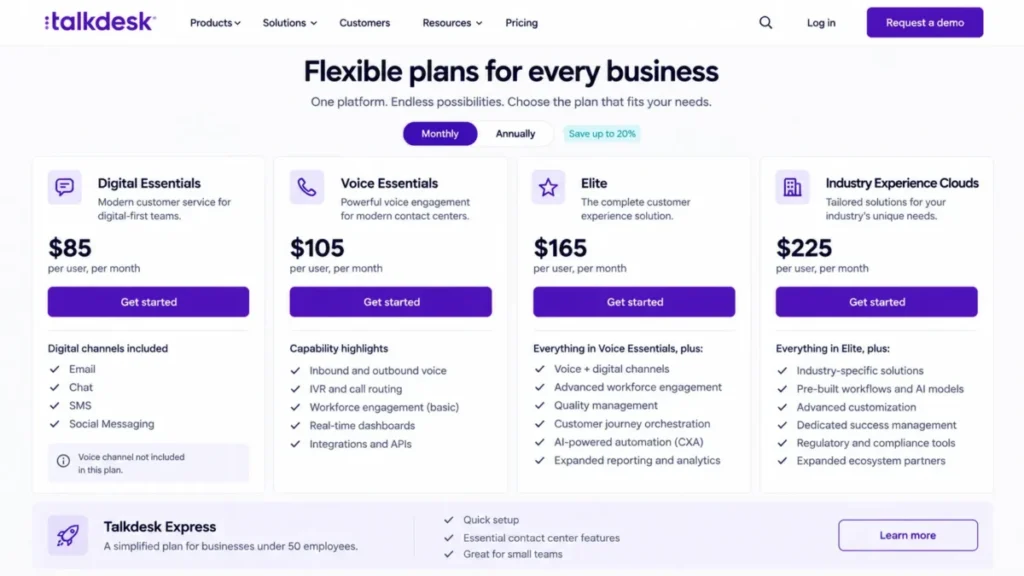
- Digital Essentials at $85 per user per month, which carries email, chat, SMS, and social messaging without voice.
- Practical tier:
- Elite at $165 per user per month, where voice and the digital channels come together; Voice Essentials at $105 is the voice-only mirror of the entry plan.
- Free plan:
- Talkdesk Express, for businesses under 50 employees in the United States and Canada, with 25 licences and $100 in credit.
- First limit that bites:
- The split between the two Essentials plans, because a team that needs voice and digital together has to buy Elite or run two entry plans.
- Better than RingCX:
- Digital channel depth on the entry plan, and a free tier for small companies that RingCX does not offer.
- Worse than Genesys Cloud CX:
- Ladder simplicity, because Genesys adds channels on one ladder while Talkdesk sells voice and digital as separate entry plans.
- Setup difficulty:
- Medium to high. Routing and the CXA automation layer need design work, and the industry clouds add configuration on top.
- Hidden costs:
- Copilot, Autopilot, Navigator, and Interaction and Quality Analytics are add-ons priced by sales, and the Industry Experience Clouds tier at $225 is where vertical workflows live.
- Evidence status:
- Plan prices, channel inclusion per plan, the Express eligibility rule, and the add-on statements were read from the Talkdesk pricing page on September 7, 2026; billing cadence and seat minimums are not stated there.
Talkdesk’s pricing page is unusual because it lets a buyer choose which channel family to start with. Digital Essentials at $85 is a digital contact center with no phone, and Voice Essentials at $105 is the reverse.
For a 25-agent digital team that is 2,125 dollars per month, the same figure as Intercom Advanced. The two products spend that money differently, since Talkdesk buys routing and CXA automation across four digital channels while Intercom buys in-product messaging and a metered AI agent.
Elite at $165 is where the two halves meet, and for 25 agents it is 4,125 dollars per month. A team that knows voice is coming within twelve months should model Elite from the start rather than migrating between Essentials plans.
The AI agent economics are the weakest part of the page. Autopilot and Copilot are add-ons with no published price, which means the deflection line of the budget is a sales conversation, as it is at Zendesk and RingCX.
| Pros | Cons |
|---|---|
| Digital-only entry plan with four channels at $85 | Voice and digital together only arrive at Elite, $165 |
| Free Express tier for companies under 50 employees in the US and Canada | Copilot, Autopilot, and Navigator are priced by sales |
| Industry Experience Clouds for vertical workflows at a published $225 | Billing cadence and seat minimums are not stated on the page |
| CXA automation included on every published plan | Two parallel entry plans complicate the migration path |
- Verdict:
- Choose Talkdesk when the channel roadmap starts digital and adds voice later, and budget Elite from the outset if both are needed within a year.
9. Dixa: Best Flat-Rate AI Conversation Pricing for European Teams
- Best for:
- European support teams of 20 to 200 agents that want phone, email, chat, and social on the entry plan and an AI agent billed at a flat per-conversation rate with no cap.
- Avoid if:
- The buyer needs skills-based routing or sandbox access on the entry plan, or prefers to be billed in US dollars.
- Starting price:
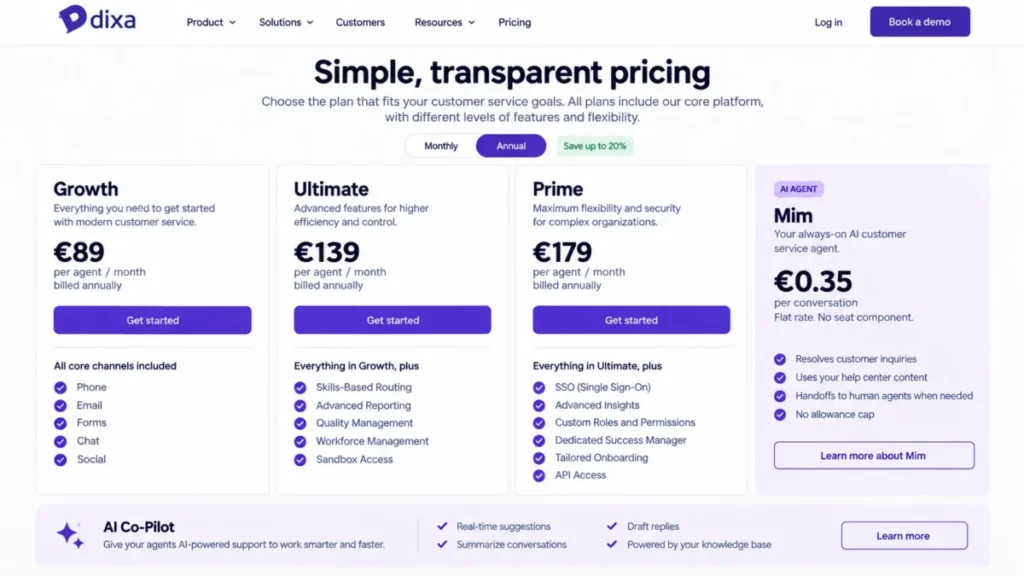
- Growth at €89 per agent per month, with phone, email, forms, chat, and social included and a 20 percent reduction stated for annual billing.
- Practical tier:
- Ultimate at €139 per agent per month, where skills-based routing, sandbox access, advanced automations, and third-party AI integrations arrive.
- Free plan:
- None is listed.
- First limit that bites:
- Routing depth, since Growth carries intelligent routing but skills-based routing waits for Ultimate.
- Better than Intercom:
- AI billing simplicity, because Mim is €0.35 per conversation whether it resolves or hands over, with no seat component and no allowance cap to model.
- Worse than Zendesk Suite:
- Marketplace and ecosystem breadth, and the absence of a US-dollar price list for an American buyer.
- Setup difficulty:
- Medium. Voice, IVR, and callback are on Growth, so the configuration work is in queues and workloads rather than in licensing channels.
- Hidden costs:
- Quality Assurance, Voice Transcription, and AI Co-Pilot as add-ons on every plan, SSO as an add-on below Prime, and Advanced Insights as an add-on below Prime at €179.
- Evidence status:
- Plan prices in euros, channel inclusion, tier features, the annual reduction, and the Mim rate were read from the Dixa pricing page on September 7, 2026; add-on prices are not published there.
Dixa’s entry plan is the most complete in this list for its price band. Growth at €89 already carries phone, IVR, call recording, callback, voicemail, SLAs, a knowledge base, and the Mim AI agent, which most competitors spread across two tiers.
For 25 agents that is 2,225 euros per month on Growth and 3,475 euros on Ultimate. The prices are listed in euros, and this article does not convert them, because the exchange rate on the invoice date is the buyer’s number, not this guide’s.
The AI model is the reason Dixa ranks above Five9 despite the smaller footprint. Mim is priced at a flat €0.35 per conversation on usage only, the rate covers both resolutions and handovers to agents, and there is no seat component and no allowance to exhaust.
At 500 conversations in a month that is 175 euros, against 495 dollars for the same volume of Fin outcomes at Intercom. The units differ, since Dixa bills every conversation Mim touches and Intercom bills only resolved outcomes, so a team with low deflection pays Dixa more per resolution and a team with high deflection pays it less.
| Pros | Cons |
|---|---|
| Phone, email, chat, forms, and social on the €89 Growth plan | Skills-based routing and sandbox wait for Ultimate at €139 |
| Mim AI agent at a flat €0.35 per conversation with no cap | The rate is charged on handovers as well as resolutions |
| Annual billing reduction stated on the page at 20 percent | SSO and Advanced Insights are Prime features at €179 or add-ons |
| Voice, IVR, and callback on the entry plan | Pricing is in euros only, with no US-dollar list |
- Verdict:
- Choose Dixa when the team is European, wants voice on the cheapest tier, and prefers a flat AI conversation rate to a resolution meter, and model Mim on total conversations rather than on deflections.
10. Five9: Best for 50 or More Concurrent Seats

- Best for:
- Contact centers that run 50 or more concurrent agents across voice and digital channels and want published per-seat rates with AI assistance bundled in.
- Avoid if:
- The operation is below 50 seats, or the buyer wants a customer-facing AI agent priced on the page.
- Starting price:
- Digital at $119 per concurrent user per month, with a minimum of 50 seats stated on the page.
- Practical tier:
- Core at $159 per concurrent user per month, described on the page as all channels with AI essentials; Plus, Pro, and Enterprise are quoted by sales.
- Free plan:
- None is listed.
- First limit that bites:
- The 50-seat minimum, which puts Five9 outside the 25-agent cost comparison used elsewhere in this guide.
- Better than Genesys Cloud CX:
- Channel completeness on the first published tier, since Digital lists voice, chat, email, SMS and MMS, and social messaging together.
- Worse than RingCX:
- Entry cost and flexibility, because RingCX publishes a $65 seat with no stated minimum where Five9 starts at $119 and 50 seats.
- Setup difficulty:
- High. Blended inbound and outbound, dialer, recording, and workforce options are contact center scale, and usage-based pricing may apply on top of the seat.
- Hidden costs:
- Usage-based charges the page flags without pricing, AI Agents as a separately customizable add-on with no published rate, and the quote-only Plus, Pro, and Enterprise tiers for advanced AI and workforce engagement.
- Evidence status:
- Seat prices, the concurrent-user basis, the 50-seat minimum, and the channel and feature lists were read from the Five9 pricing page on September 7, 2026.
Five9 sits last not on capability but on fit for this article’s audience. A 50-seat minimum and a $119 concurrent seat mean the smallest possible Five9 bill on Digital is 5,950 dollars per month, and on Core it is 7,950 dollars.
For an operation that already runs at that scale, the published grid is unusually complete. Voice, chat, email, SMS and MMS, social messaging, agent assist, live transcription, blended dialing, and recording are all listed on Digital rather than sold as add-ons.
The concurrent-user basis is worth understanding before comparing it to the named-seat prices elsewhere in this list. A center that staffs 80 agents across two shifts with 50 on the floor at once pays for 50 concurrent seats, which can make the per-agent figure lower than it looks.
Customer-facing AI is the gap. AI Agents that reason and act are described as a separate customizable add-on with no rate, so the deflection economics that Intercom and Dixa publish are a sales conversation here.
| Pros | Cons |
|---|---|
| Every channel listed on the $119 Digital tier | 50-seat minimum stated on the page |
| Concurrent-user pricing suits multi-shift centers | Usage-based charges may apply and are not quantified |
| Agent assist, transcription, and AI summaries bundled from Digital | Customer-facing AI Agents carry no published rate |
| Published Core tier at $159 with AI essentials across all channels | Plus, Pro, and Enterprise are quote-only |
- Verdict:
- Choose Five9 when the floor already runs 50 or more concurrent agents across voice and digital, and price the AI agent add-on and usage charges in writing before comparing it to the named-seat vendors above.
What Omnichannel Costs at 25 Agents
Twenty-five agents is the size at which a help desk stops being cheap and a platform starts being a decision. The table multiplies each published seat price by 25 on the tier that carries the omnichannel workflow, and it excludes every usage meter, because none of those meters has a fixed monthly value.
| Platform | Entry plan at 25 agents | Practical omnichannel tier at 25 agents | The meter on top |
|---|---|---|---|
| Zendesk Suite | 1,375 dollars on Suite Team | 2,875 dollars on Suite Professional | Automated resolutions, plus Copilot at $50 per agent |
| Salesforce Service Cloud | 2,500 dollars on Pro Suite | 4,875 dollars on Core | Knowledge and Einstein Bots at $75 per user each, Flex Credits |
| Genesys Cloud CX | 1,875 dollars on CX 1, voice only | 2,875 dollars on CX 2 | Usage-based charges, AI tokens beyond the org allowance |
| Intercom | 725 dollars on Essential | 2,125 dollars on Advanced | Fin outcomes from $0.99, phone and WhatsApp on usage |
| Freshdesk Omni | 725 dollars on Growth | 1,975 dollars on Pro | Freddy sessions at $49 per 100 after the first 500 |
| Dynamics 365 Customer Service | 2,625 dollars on Enterprise, no channels | 4,875 dollars on Premium | Copilot Credits below Premium |
| RingCX | 1,625 dollars on Standard | 2,375 dollars on Professional | AI add-ons from $20 to $25 per user, IVA on quote |
| Talkdesk | 2,125 dollars on Digital Essentials | 4,125 dollars on Elite | Copilot and Autopilot on quote |
| Dixa | 2,225 euros on Growth | 3,475 euros on Ultimate | Mim at €0.35 per conversation |
| Five9 | Not sold below 50 seats | 5,950 dollars on Digital at the 50-seat minimum | Usage-based charges, AI Agents add-on |
Source: seat prices from the official Zendesk pricing page and Service Cloud pricing page, checked 2026-09-07; the 25-agent totals are this guide’s arithmetic.
Source: seat prices from the official Genesys pricing page and Intercom pricing page.
Source: seat prices from the official Freshdesk Omni pricing page and Dynamics 365 Customer Service pricing page.
Source: seat prices from the official RingCX pricing page, Talkdesk pricing page.
Source: seat prices from the official Dixa pricing page and Five9 pricing page.
The spread on the practical tier runs from 1,975 dollars at Freshdesk Omni to 4,875 dollars at Salesforce Core and Dynamics Premium, before any AI or usage line. That is not a quality gap; it is the difference between a suite priced for a support team and a platform priced for a service organization.
Three rows deserve a reading note. Dynamics Enterprise at 2,625 dollars buys routing and Copilot with no customer channels attached, so the Premium column is the honest omnichannel figure.
Five9’s 5,950 dollar figure is for 50 concurrent seats, not 25, because the page states a 50-seat minimum. Dixa’s totals are in euros and are not converted.
Text fallback for the chart: on the practical omnichannel tier at 25 agents, Freshdesk Omni Pro is 1,975 dollars, Intercom Advanced 2,125 dollars, RingCX Professional 2,375 dollars, Zendesk Suite Professional and Genesys Cloud CX 2 both 2,875 dollars, Talkdesk Elite 4,125 dollars, and Salesforce Core and Dynamics 365 Premium both 4,875 dollars per month.
How AI Agents Are Billed: Resolution, Outcome, Session, Conversation, Credit, and Token
The most misleading comparison in this category is AI agent pricing, because the ten vendors bill in six different units and four of them publish no rate at all. A per-outcome rate cannot be compared with a session block, a per-conversation rate, or a token pool without converting every one into cost per resolved conversation at a stated volume.
| Platform | AI agent billing unit | Published rate | What is included or stated |
|---|---|---|---|
| Zendesk Suite | Automated resolution | Not published | AI agents included on every plan; billed only on resolutions with no escalation |
| Intercom | Fin outcome | From $0.99 per outcome | No included allowance; Fin also sold standalone with no seats |
| Freshdesk Omni | Freddy AI Agent session | $49 per 100 sessions | First 500 sessions included on every plan |
| Dixa | Mim conversation | €0.35 per conversation | Covers resolutions and handovers; no seat component, no cap |
| Genesys Cloud CX | AI token | Not published per token | 250 named or 350 concurrent tokens per org per month on CX 1 to CX 3 |
| Salesforce Service Cloud | Flex Credit | Not published | Max includes 2.75 million Flex Credits per org per year |
| Dynamics 365 Customer Service | Copilot Credit | Not published | Premium includes base agent capacity; pay-as-you-go or pre-purchase below it |
| Talkdesk | Autopilot add-on | Contact sales | CXA automation included on every plan; the AI agent is separate |
| RingCX | IVA partner or AI Receptionist add-on | Contact sales | Agent-side AI add-ons from $20 to $25 per user per month |
| Five9 | AI Agents add-on | Not published | Agent assist, summaries, and transcription bundled from Digital |
Source: the AI pricing statements on the official Intercom pricing page and Freshdesk Omni pricing page, checked 2026-09-07.
Source: the AI pricing statements on the official Dixa pricing page and Genesys pricing page.
Source: the AI pricing statements on the official Zendesk pricing page and Service Cloud pricing page.
Source: the AI pricing statements on the official Dynamics 365 Customer Service pricing page and RingCX pricing page.
Source: the AI pricing statements on the official Talkdesk pricing page and Five9 pricing page.
Only three vendors publish a rate a buyer can put in a spreadsheet. At 500 AI-handled conversations in a month, Intercom charges 495 dollars if all 500 are resolved outcomes, Dixa charges 175 euros whether they resolve or hand over, and Freshdesk Omni charges nothing until session 501 and then $49 per block of 100.
The units are not interchangeable. A session is not a resolution, because Freshworks counts AI turns; a conversation is not an outcome, because Dixa bills the handover too; and a Zendesk automated resolution excludes anything a human touched.
The convertible figure is cost per resolved conversation at the volume the team expects. Ask each vendor for that number in writing, with the definition of the unit attached, before comparing seat prices.
For the platforms that bill in credits or tokens, the question changes. Salesforce, Microsoft, and Genesys state an allowance without a unit price, so the two things to obtain are the credits or tokens consumed by one typical conversation and the price of the next block.
The workflow side of this, meaning what an AI agent is asked to do before a human sees the thread, is covered in the guide to AI customer service workflows. This section only prices the meter.
Channel and Governance Gates: Which Plan Turns Each One On
Every platform here gates something a growing service team eventually needs. The table records the first plan on which voice arrives and the first plan on which the governance controls a security review asks for arrive, using each vendor’s own plan names.
| Platform | Voice arrives on | Skills-based or advanced routing arrives on | Audit, sandbox, or SSO arrives on |
|---|---|---|---|
| Zendesk Suite | Suite Team | Suite tiers | Suite Enterprise, quote-only |
| Salesforce Service Cloud | Salesforce Voice add-on on Core and Advanced | Core | Core and above, with add-ons per capability |
| Genesys Cloud CX | CX 1 | CX 1 for skills routing, WEM on CX 3 | Enterprise controls not itemized on the page |
| Intercom | Pay as you go on every plan | Advanced | Expert |
| Freshdesk Omni | Growth | Pro for intelligent routing, Enterprise for skill-based | Enterprise for sandbox and audit logs |
| Dynamics 365 Customer Service | Premium | Enterprise for unified routing | Enterprise, through the Microsoft admin surfaces |
| RingCX | Standard | Standard, with skills-based routing included | Not itemized on the page |
| Talkdesk | Voice Essentials or Elite | CXA on every plan; detail not itemized | Not itemized on the page |
| Dixa | Growth | Ultimate for skills-based routing | Ultimate for sandbox, Prime for SSO |
| Five9 | Digital | Digital, with ACD detail on quote | Not itemized on the page |
Source: plan feature lists on the official Freshdesk Omni pricing page and Dixa pricing page, checked 2026-09-07.
Source: plan feature lists on the official Dynamics 365 Customer Service pricing page and Genesys pricing page.
Source: plan feature lists on the official Zendesk pricing page and Service Cloud pricing page.
Source: plan feature lists on the official RingCX pricing page and Talkdesk pricing page.
Source: plan feature lists on the official Intercom pricing page and Five9 pricing page.
Four of the ten pricing pages do not itemize audit logging, sandbox, or single sign-on at all, which is itself a finding. A security review will still ask, so those four require the vendor’s security documentation before the shortlist is final.
The voice column is where the category splits. The contact center vendors and Dixa put voice on the entry plan, the suites put it one tier up or sell it as an add-on, and Intercom meters it.
Add-ons that can exceed the base licence are concentrated at the top of the list. Zendesk lists Copilot and the workforce bundle at $50 per agent and Contact Center at $83, and Salesforce lists Knowledge, Einstein Bots, and Enhanced Messaging at $75 per user each, so at both vendors two add-ons can cost more than the seat.
Setup and Migration Difficulty
| Platform | Setup difficulty | Why it lands there |
|---|---|---|
| Zendesk Suite | Medium to high | Brands, business hours, routing rules, and knowledge structure all need deliberate design |
| Salesforce Service Cloud | High | An implementation project with a named owner and usually a partner |
| Genesys Cloud CX | High | Queues, skills, IVR flows, and workforce rules at contact center scale |
| Intercom | Medium | The messenger is fast, and Fin performs only as well as the content behind it |
| Freshdesk Omni | Low to medium | Email and portal go live quickly, and voice queues and SLAs follow |
| Dynamics 365 Customer Service | High | Routing and Copilot agents are configured through Power Platform tooling |
| RingCX | Medium | ACD, IVR, and skills routing are included; the work is queue design |
| Talkdesk | Medium to high | Routing plus the CXA automation layer, and industry clouds on top |
| Dixa | Medium | Voice, IVR, and callback are on Growth; the work is queues and workloads |
| Five9 | High | Blended inbound and outbound, dialer, recording, and workforce options at scale |
Difficulty ratings are an editorial assessment of the documented configuration surface on each vendor’s plan page, not a measured deployment time.
Migration is the part of this decision with the least public evidence. Object-by-object import coverage, duplicate handling, attachment fidelity, and rollback behavior are not documented consistently across these ten vendors, so treat any migration promise as a question for the vendor rather than a published fact.
Ask for four things in writing before signing: which objects import, how duplicate contacts are resolved, whether attachments and internal notes survive, and what happens if the import fails halfway. The same discipline applies to the CRM the platform will sit beside, and the CRM migration checklist covers that side of the cutover.
How to Choose a Customer Service Platform
Work through these seven questions in order. The first one that produces a hard constraint usually decides the shortlist.
- Is voice mandatory on day one? If yes, the entry plans at Genesys, RingCX, Dixa, Five9, and Freshdesk Omni carry it, and Zendesk, Dynamics, and Talkdesk need a higher tier or a second plan.
- How many agents will exist in twelve months, and are they named or concurrent? Five9 requires 50 concurrent seats, and every other vendor here prices named seats.
- How much of the queue should the AI agent resolve, and at what unit cost? Convert every vendor’s unit into cost per resolved conversation at the expected volume, and treat a vendor with no published rate as an open negotiation.
- Which single control would block security sign-off? Find the first plan that carries audit logging, sandbox, or single sign-on, and treat that plan as the real price.
- Which system of record must the platform share? Salesforce and Dynamics win when the CRM is theirs; the rest integrate through marketplaces and APIs.
- What are the two add-ons the team will adopt in year one? At Zendesk and Salesforce those two can cost more than the seat.
- What is the total at 25 agents on the tier that carries the workflow, including those add-ons and a realistic AI estimate?
If the answers point at two products, choose the one whose next upgrade trigger is furthest away. Paying more for a tier the team will not outgrow in nine months beats paying less for a migration.
Common Mistakes When Choosing a Customer Service Platform
Six mistakes account for most of the regret in this category, and every one of them is avoidable at the shortlist stage.
Buying a help desk for a contact center job. A shared inbox with a chat add-on will not route a phone call, and the migration to a platform a year later costs more than the difference in seat price.
Treating AI pricing as comparable. An outcome, a session, a conversation, a credit, and a token measure different things, and only one of them maps cleanly to a resolved customer conversation.
Budgeting from the entry price. On Zendesk, Dynamics, and Talkdesk the plan that carries voice is one or two tiers up, and the gap is often larger than the entry price itself.
Ignoring the seat basis. A concurrent seat at Five9 and a named seat at Genesys are not the same unit, and a multi-shift center should model both before comparing rates.
Assuming governance is included. Audit logs, sandbox, and single sign-on are the most reliably gated features in the whole category, and four of the ten pricing pages do not itemize them at all.
Skipping the migration questions. Import coverage and rollback behavior are rarely published, and finding out after the contract is signed is the expensive path.
Final Verdict
Zendesk Suite is the pick for a support organization of 20 to 200 agents that has outgrown a single channel, provided the budget starts at Suite Team or Suite Professional and the automated-resolution rate is negotiated before signing. Its documented channel breadth on one tier reduces the likelihood of an early migration.
Salesforce Service Cloud is the right answer only where Salesforce is already the system of record and an implementation budget exists, priced from Core plus the add-ons the service function will use. Dynamics 365 Customer Service earns the same conditional recommendation for a Microsoft 365 organization, with Premium as the honest omnichannel price.
Intercom is the better fit when support lives inside the product and finance accepts a variable AI line, and it is the only vendor here with a published per-outcome rate. Freshdesk Omni is the budget pick for a team under 100 agents that wants voice and chat with a stated AI allowance.
Genesys Cloud CX, RingCX, Talkdesk, and Five9 are contact center products first. Genesys wins for a voice-first center that values a published ladder, RingCX for the lowest voice-plus-digital seat, Talkdesk for a digital-first team that adds voice later, and Five9 for a floor already running 50 or more concurrent seats.
Dixa wins a narrower cohort: a European team that wants voice on the entry plan and prefers a flat per-conversation AI rate to a resolution meter.
The same test applies to any shortlist. Price the tier that carries voice at real headcount, convert the AI meter into cost per resolved conversation, and confirm in writing which plan carries single sign-on and audit logging.
Frequently Asked Questions
These answers repeat figures already sourced above rather than introducing new ones, and they cover the questions a buyer usually still has after reading the ranking.
What is a customer service platform, and how is it different from a help desk?
A customer service platform is a help desk plus native voice or contact center routing across channels and an AI agent that resolves conversations before a human sees them. A help desk prices chat as an upgrade and has no phone channel of its own, and a chat widget bought on its own is a third purchase, covered in the guide to dedicated live chat software.
What does omnichannel mean on a pricing page?
On these pricing pages it means one agent workspace and one routing engine across voice, chat, email, messaging, and social, with the channels listed on the plan card. The word does not guarantee every channel on every tier: Zendesk needs Suite Team, Dynamics needs Premium, and Genesys CX 1 is voice only.
Which customer service platforms include voice in the base plan?
Genesys Cloud CX, RingCX, Dixa, Five9, and Freshdesk Omni list voice on their entry plan. Zendesk Suite carries it from Suite Team, Dynamics 365 from Premium, Talkdesk on Voice Essentials or Elite, Salesforce as the Salesforce Voice add-on on Core and Advanced, and Intercom on pay-as-you-go usage.
How is an AI agent billed: per resolution, session, conversation, credit, or token?
Intercom bills Fin from $0.99 per resolved outcome, Freshdesk Omni sells Freddy sessions at $49 per 100 after 500 included, and Dixa bills Mim at €0.35 per conversation including handovers. Zendesk bills per automated resolution at an unpublished rate, and Salesforce, Microsoft, and Genesys bill through credits or tokens with an allowance stated and no unit price.
How much does a customer service platform cost per agent?
Published entry prices in this set run from $29 per seat at Intercom and Freshdesk Omni to $119 per concurrent seat at Five9, and the practical omnichannel tiers run from $79 at Freshdesk Omni Pro to $195 at Salesforce Core and Dynamics Premium. At 25 agents that is a range of 1,975 dollars to 4,875 dollars per month before AI and usage.
Which customer service platform fits a Microsoft 365 organization?
Dynamics 365 Customer Service, on Enterprise at $105 per user per month for routing and Copilot, or Premium at $195 when chat, messaging, social, and voice are required. The standalone Dynamics 365 Contact Center licence at $110 per user per month is the option for a Microsoft shop that keeps a different CRM.
Is a contact center product or a customer service suite the right choice?
A contact center product such as Genesys, RingCX, Talkdesk, or Five9 fits when phone volume drives the operation and tickets and knowledge live elsewhere. A suite such as Zendesk, Freshdesk Omni, Dixa, or Intercom fits when the same team owns tickets, knowledge, chat, and voice and wants them in one product.
Is Zendesk Suite better than Freshdesk Omni?
For a 100 to 200 agent operation with several brands and languages, yes, because Zendesk documents the broader channel and administration surface. Below 100 agents Freshdesk Omni delivers voice, chat, and intelligent routing on Pro at $79 against Suite Professional at $115, and states its AI allowance where Zendesk does not.
Is there a free customer service platform?
Talkdesk Express is free for businesses under 50 employees in the United States and Canada, with 25 licences and $100 in credit. None of the other nine publishes a permanent free plan, and Freshdesk Omni’s published entry is a 14-day trial.
Your Next Step
Shortlist two platforms from the operation-type table, price each on the tier that carries voice at real headcount, and ask both vendors for cost per resolved conversation and the plan that carries single sign-on, in writing. Compare those three numbers, then choose the platform whose next upgrade trigger is furthest away.