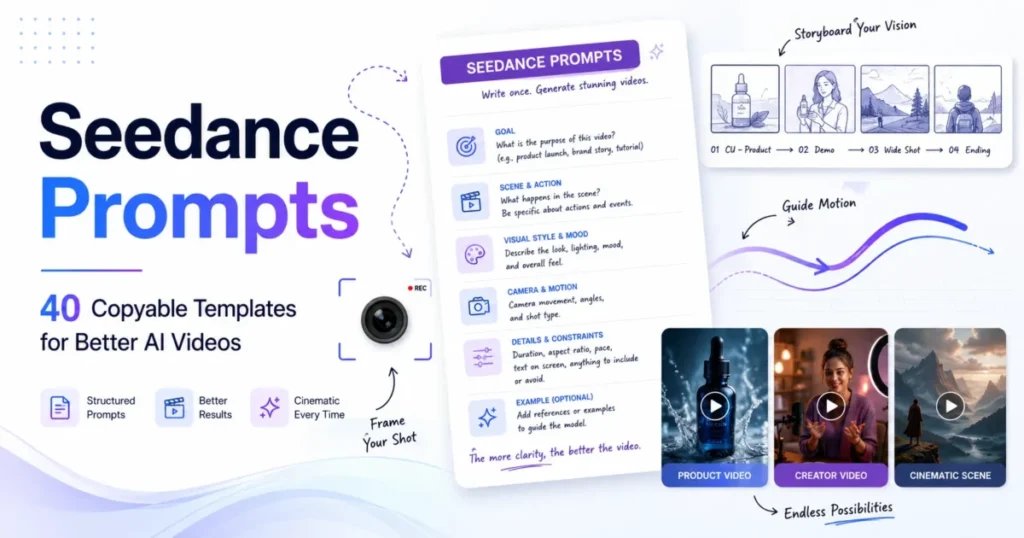
Most Seedance prompt collections hand you adjectives and hope for the best. This pack does something different: 40 Seedance 2.5 prompts you can copy and paste, plus the reference rules, timing checks, and repair steps that decide whether a generation is usable.
Every template below follows the same nine fields, so a prompt that fails tells you which field to change. Start with the copy block, confirm which Seedance model your account is running, then work through the Seedance video prompts by use case.
In This Article (18 sections)
Quick Copy: The 12-Point Seedance Prompt Checklist
Copy and paste this block into your brief document, then fill it in before you spend a single generation.
SEEDANCE PROMPT READINESS CHECKLIST
[ ] 1.  Model version confirmed in the interface (2.5 or 2.0)
[ ] 2.  One creative goal stated in a single sentence
[ ] 3.  One subject named, with immutable details listed
[ ] 4.  One primary action per beat, no stacked verbs
[ ] 5.  One camera move per beat, no competing moves
[ ] 6.  Environment, time of day, and light direction fixed
[ ] 7.  Style named once, not layered from three sources
[ ] 8.  Every uploaded asset given one role: identity, motion,
        style, audio, or shot order
[ ] 9.  Beat timings written out and summing to the clip length
[ ] 10. Audio intent stated, including what must not appear
[ ] 11. Negative constraints listed (no added text, no extra
        subjects, no second camera move, no role swap)
[ ] 12. Rights and privacy cleared for every reference file
Nine of twelve is the working floor. If items 1, 8, or 12 are open, fix them before generating rather than after.
Seedance 2.5 Release Status and Version Check
Dreamina publishes an official Seedance 2.5 workflow, and its guide describes 30-second continuous generation with up to 50 multimodal references and region-level edits. Those figures are vendor-published capability statements, which is the right way to read them until you see the model named in your own account.
The version question matters because the public record is split. ByteDance’s Seed model index lists Seedance 2.0 and Seedance 1.5 pro, and Seedance 2.5 does not appear in that index as checked on July 29, 2026.
Source: official ByteDance Seed model index and official Dreamina product documentation. Checked: 2026-07-29. Evidence status: vendor-published capability claims.
Every one of the Seedance 2.5 prompts below assumes you have settled that question first. So run the gate before you copy any version-specific number into a client brief.
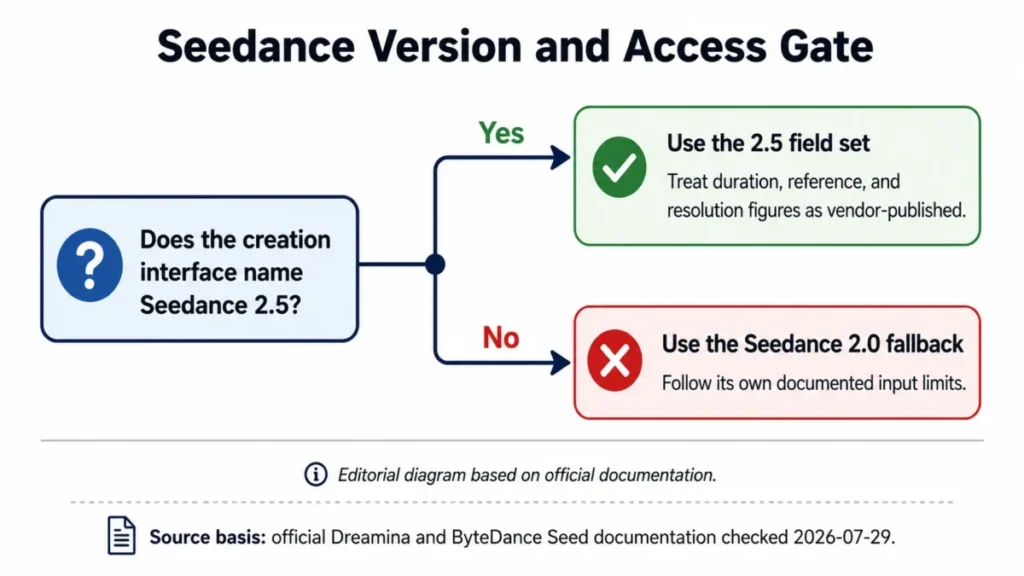
| Version signal | What it changes | Your next step |
|---|---|---|
| Interface names Seedance 2.5 | Nine-field template set applies | Use any template below as written |
| Interface names Seedance 2.0 | Input caps and syntax differ | Use the fallback section rules |
| No model name shown | Version-specific limits unsafe | Confirm in the account before briefing |
The one number nobody should copy blindly is resolution. Dreamina markets 4K-style cinematic control, and the same workflow guide describes Upscale as the route to 4K clarity, so treat 4K as an advertised finishing outcome rather than a settled native output specification.
Quick Prompt Formula: The Nine Fields
Dreamina’s own prompt guidance builds a brief from subject, action, camera, and style with beat timings, and the four-beat 30-second pattern it publishes is a workable spine for most commercial clips. The nine fields below extend that spine with the decision fields a reviewer needs.
SEEDANCE PROMPT COMPILER

1. GOAL            One outcome, one sentence.
2. SUBJECT         Who or what owns the frame.
3. PRIMARY ACTION  One dominant motion per beat.
4. ENVIRONMENT     Place, time, weather, light direction.
5. CAMERA          One framing and one move per beat.
6. LIGHT AND MOOD  Named setup, held across the clip.
7. STYLE           One aesthetic source, named once.
8. REFERENCE ROLES Identity / motion / style / audio / order.
9. CONSTRAINTS     Immutable details + what must not appear.

Then add: total duration, aspect ratio, beat ranges,
audio intent, and the pass criteria a reviewer will apply.
Fields 1 through 7 describe the shot. Fields 8 and 9 are what stop a good-looking clip from failing brand review.
If prompt structure itself is new to you, the general principles in our prompt engineering fundamentals guide transfer directly to video briefs.
Reference Hierarchy: Who Owns What
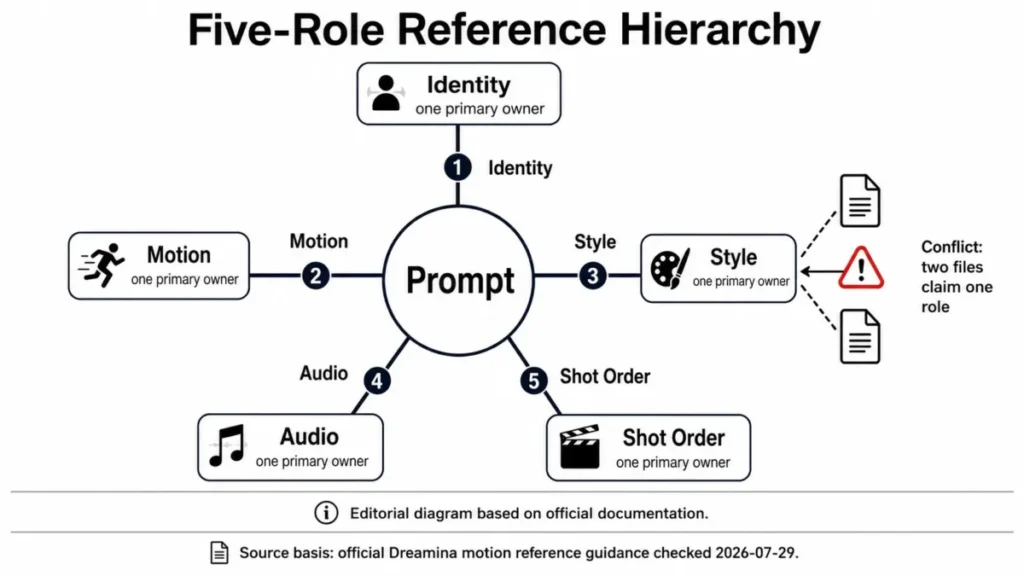
Uploading more references does not make a brief clearer. Dreamina’s motion guidance is explicit that inputs should be grouped by purpose, and the identity, motion, style, audio, and shot order grouping is the single most useful rule in the whole workflow.
Assign exactly one primary owner per role. A second file in the same role is not redundancy, it is a conflict the model has to resolve on its own.
| Role | Primary owner | Failure when it is unowned |
|---|---|---|
| Identity | One front reference plus one angle | Face, logo, or packaging drifts |
| Motion | One clip that owns rhythm and path | Movement stalls or inverts |
| Style | One palette or lighting plate | Look changes between beats |
| Audio | One dialogue or ambience file | Unrequested music appears |
| Shot order | One storyboard or frame set | Beats arrive out of sequence |
Choosing a motion control mode
Three control modes cover almost every motion brief, and the documented split is straightforward.
Use reference-to-video when a clip should carry overall rhythm, path, or camera behavior. Use a green-screen reference when the point is an isolated, authorized performance dropped into a new environment.
Use white-model guidance when blocking and camera geometry matter more than finish. Dreamina describes the 3D white-model preview as a way to test blocking, camera paths, and scene layout before committing to a full-quality render.
Naming your references
Keep names stable and role-shaped across the whole brief. Names like IdentityFront, IdentitySide, MotionPrimary, StylePalette, AudioDialogue, and Storyboard survive a handoff between a creator and a reviewer.
Dreamina’s Seedance 2.0 guide documents an @AssetName tagging syntax with tags such as @Image1, @Video1, and @Audio1, so confirm the exact tag format your interface accepts before you write forty briefs around it.
How to Use the Templates
Start from the use case, not the wording. Each template names its required input, so if you cannot supply that input yet, choose a different template rather than guessing.
Seven steps take a template from paste to approved master. Each step ends in a decision, not a feeling.
- Confirm the model version. If the interface does not name Seedance 2.5, switch to the fallback rules further down.
- Pick the smallest template that matches the outcome. Choose by input assets and control need, never by visual style alone.
- Replace every variable with a concrete value. Delete the tokens you do not need instead of leaving vague language in place.
- Assign reference roles. One owner each for identity, motion, style, audio, and shot order.
- Write the beat plan. One dominant action and one camera move per beat, with ranges that sum to the clip length.
- Run the readiness checklist. Nine of twelve, with items 1, 8, and 12 mandatory.
- Generate two variants, then score them. Dreamina recommends generating at least two variants before deciding whether a weak result comes from prompt wording, model fit, or scene complexity.
Customize in that order because a later step cannot rescue an earlier one. If you apply a style change before the reference roles are fixed, the official documentation’s own advice about conflicting instructions is exactly what you will run into.
The filled brief further down is the example output this workflow produces, and the two common errors it prevents are an unowned reference role and a beat plan that overruns the clip. Slot the result into your tool workflow only after the rights check passes.
The beat-timing validator
A timeline that does not add up produces rushed beats and a clipped ending. Run these four checks on any multi-shot prompt.
| Check | Rule | Fix when it fails |
|---|---|---|
| Coverage | Ranges sum to total duration | Remove a beat, do not compress |
| Overlap | No range overlaps another | Merge the two beats into one |
| Density | One action, one move per beat | Move the second action forward |
| Ending | Final hold of two seconds | Shorten the escalation beat |
The four-beat pattern Dreamina publishes for a 30-second clip runs 00 to 06 seconds for the opener, 06 to 14 for development, 14 to 24 for escalation, and 24 to 30 for resolution. Treat those ranges as a starting grid rather than a law, and keep the ending hold whatever else you cut.
Prompt Preflight: The 10-Point Readiness Check
Preflight catches the contradictions that make a detailed brief impossible to execute. Dreamina’s commercial guidance warns against conflicting instructions and recommends testing camera motion separately from character or product detail when a result drifts.
| Preflight item | Passes when | Common failure |
|---|---|---|
| Single goal | One outcome sentence | Two campaigns in one clip |
| Single subject | One named owner of the frame | Two leads competing |
| Action density | One dominant action per beat | Stacked simultaneous verbs |
| Camera density | One move per beat | Push-in plus orbit plus handheld |
| Light logic | One direction, one time of day | Night wording, daylight shadows |
| Style source | One aesthetic named once | Three style references layered |
| Role map | One owner per reference role | Two identity files, no motion file |
| Timing | Ranges sum, ending hold reserved | Beats overrun the duration |
| Audio intent | Wanted and unwanted sound named | Music arrives over dialogue |
| Rights | Every file cleared and authorized | Unlicensed face, voice, or track |
Score nine or more and generate. Score eight or fewer and edit the failing field first, because a second generation rarely fixes a contradiction the first one exposed.
40 Seedance 2.5 Prompt Templates
These are Seedance prompts to copy and paste, then edit. The library splits into six workflow groups: eight cinematic, eight product, six creator-style social, six character and dialogue, six motion transfer, and six editing and repair.
Replace the uppercase tokens, delete what you do not need, and keep the constraint line.
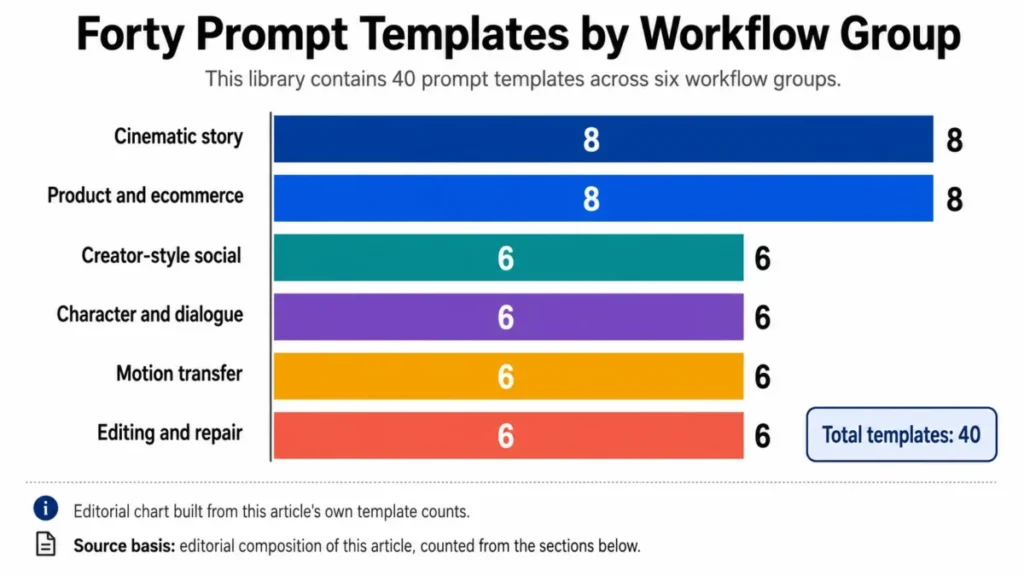
The weighting is deliberate. Commercial and character briefs carry the most identity risk, so they get the most coverage, while editing and repair sit last because they only apply once a clip already exists.
Cinematic Story Prompts
Eight narrative briefs, from a four-beat reunion to a restrained product story. Each one keeps a single subject and a single camera move per beat so continuity survives the cut.
Prompt 01: Four-Beat Reunion
Create a 30-second cinematic reunion between CHARACTER_ONE and
CHARACTER_TWO at LOCATION. 00-06: wide establishing frame, quiet
environmental motion, slow push-in. 06-14: CHARACTER_ONE notices
CHARACTER_TWO and pauses; one subtle handheld move. 14-24: they
approach and embrace; clothing, age, height, and facial identity
hold. 24-30: close two-shot, natural ambience, two-second hold.
Light and mood: LIGHT_MOOD. Style: STYLE. No extra people, no role
swap, no costume change, no cut, no generated text.
Variables: CHARACTER_ONE, CHARACTER_TWO, LOCATION, LIGHT_MOOD, STYLE
Pass check: both identities stay distinct, the emotional beat progresses across four ranges, and the closing hold is long enough to edit against.
Prompt 02: Suspense Corridor Reveal
Create a 20-second suspense scene with SUBJECT walking alone through
CORRIDOR. 00-05: rear medium shot, slow forward tracking, restrained
footsteps and room tone. 05-12: overhead lights fail one section at a
time while the subject keeps one steady walk. 12-17: subject stops at
DOOR; one slow lateral reveal. 17-20: the door opens slightly and the
frame holds. Preserve IMMUTABLE_DETAILS. Light and mood: LIGHT_MOOD.
No creature reveal, no extra subjects, no zoom, no shake, no music
swell unless supplied.
Variables: SUBJECT, CORRIDOR, DOOR, IMMUTABLE_DETAILS, LIGHT_MOOD
Pass check: one continuous path, sequential light failure, and a reveal that happens only inside the final range.
Prompt 03: Artifact Awakening
Animate ARTIFACT from IDENTITY_REFERENCE inside ENVIRONMENT. 00-04:
locked macro frame, drifting dust, engraved lines unchanged. 04-10:
one ring of light travels base to top while the camera orbits slowly.
10-15: the artifact rises a few centimeters, emits LIGHT_COLOUR, then
holds. Silhouette, material, engraving, scale, and color are fixed.
STYLE_REFERENCE controls atmosphere only. No redesign, no new
symbols, no hands, no rapid spin, no second camera move.
Variables: ARTIFACT, IDENTITY_REFERENCE, ENVIRONMENT, LIGHT_COLOUR,
STYLE_REFERENCE
Pass check: geometry is unchanged, the transformation has one cause and one direction, and the last frame is stable.
Prompt 04: Documentary Craft Process
Create a 24-second documentary sequence of MAKER building OBJECT in
WORKSHOP. 00-06: wide environmental shot, natural room sound. 06-12:
close hands perform STEP_ONE with TOOL_ONE. 12-18: medium side frame
shows STEP_TWO; hand count, tool geometry, and material continuity
hold. 18-24: the finished object is set down with a two-second hold.
Light: natural, one direction. No glamour lighting, no extra tools,
no duplicated fingers, no skipped step, no labels, no scoring music.
Variables: MAKER, OBJECT, WORKSHOP, STEP_ONE, TOOL_ONE, STEP_TWO
Pass check: process order reads logically and the finished object matches the material shown earlier.
Prompt 05: Game Trailer Encounter
Create a 30-second encounter. HERO owns hero identity, CREATURE owns
the opponent, WORLD_REFERENCE owns environment style. 00-07: aerial
establishing move over LOCATION. 07-15: hero enters frame and draws
WEAPON in one clean action. 15-24: creature emerges and circles;
camera tracks laterally without orbiting. 24-30: both face off in a
wide silhouette with TITLE_SPACE left empty. Armour, weapon, scale,
and color are fixed. No impact, no extra enemies, no interface, no
text, no role swap.
Variables: HERO, CREATURE, WORLD_REFERENCE, LOCATION, WEAPON,
TITLE_SPACE
Pass check: both identities hold, staging stays readable, and the title area is clean enough for a graphics pass.
Prompt 06: Vertical Travel Micro-Story
Create an 18-second vertical clip with TRAVELLER in DESTINATION.
00-05: low wide shot, traveller enters from lower right, open space
above reserved for captions added later. 05-12: side tracking shot
while the traveller performs ONE_LOCAL_ACTION. 12-18: static medium
frame at VIEWPOINT, wind and ambient sound, two-second hold. Time of
day: TIME_OF_DAY. Clothing and carried items are fixed. No crowd
duplication, no landmark distortion, no text, no drone move.
Variables: TRAVELLER, DESTINATION, ONE_LOCAL_ACTION, VIEWPOINT,
TIME_OF_DAY
Pass check: vertical framing stays readable, the landmark is unaltered, and caption space survives to the final frame.
Prompt 07: Three-Beat Visual Comedy
Create a 12-second comedy beat with CHARACTER and PROP in LOCATION.
00-04: static medium shot, the character carefully sets up
EXPECTED_ACTION. 04-08: the prop performs ONE_SAFE_SURPRISE while the
camera stays locked. 08-12: the character gives REACTION and holds
two seconds. Identity, prop geometry, and spatial positions are
fixed. Light: clean, even. No extra characters, no injury, no zoom,
no repeat of the gag, no text, no dialogue unless supplied.
Variables: CHARACTER, PROP, LOCATION, EXPECTED_ACTION,
ONE_SAFE_SURPRISE, REACTION
Pass check: the setup is legible, the surprise lands once, and nothing competes with the reaction.
Prompt 08: Problem-to-Relief Story
Create a 30-second story. CHARACTER_REFERENCE owns identity,
PRODUCT_REFERENCE owns shape, label, and color. 00-07: the character
meets PROBLEM in ENVIRONMENT; static medium frame. 07-15: the
character uses PRODUCT_ACTION in one clear motion. 15-24: light
shifts gradually from MOOD_BEFORE to MOOD_AFTER during one slow
push-in. 24-30: calm result and a product frame with clean space for
copy. No guarantee wording, no exaggerated change, no second product,
no label edit, no generated copy.
Variables: CHARACTER_REFERENCE, PRODUCT_REFERENCE, PROBLEM,
ENVIRONMENT, PRODUCT_ACTION, MOOD_BEFORE, MOOD_AFTER
Pass check: the product reads as itself, the mood change is gradual, and no outcome is promised in vision.
Product and Ecommerce Prompts
Every product template carries an identity lock. Dreamina’s commercial guidance also recommends keeping text overlays, logos, and small details for later editing once a brief gets crowded, which is why each of these asks for clean negative space instead of finished typography.
Prompt 09: Luxury Bottle Hero Film
Create a 20-second hero film for PRODUCT. FRONT_REFERENCE owns
silhouette, label geometry, cap, color, and logo position;
SIDE_REFERENCE confirms depth. 00-05: macro detail on MATERIAL_DETAIL,
locked camera. 05-12: one slow orbit over SURFACE with LIGHT_SETUP.
12-17: PRODUCT_ACTION happens once. 17-20: centered hero frame with
clean space at COPY_SIDE. Every immutable detail holds. No label
rewrite, no added text, no second product, no warped reflection, no
second camera move.
Variables: PRODUCT, FRONT_REFERENCE, SIDE_REFERENCE, MATERIAL_DETAIL,
SURFACE, LIGHT_SETUP, PRODUCT_ACTION, COPY_SIDE
Pass check: packaging geometry and label position are exact and the closing frame supports a later copy layer.
Prompt 10: Skincare Texture Demonstration
Create a 15-second vertical demonstration for PRODUCT.
IDENTITY_REFERENCE owns packaging; TEXTURE_REFERENCE owns the
movement of TEXTURE. 00-04: product close-up with the upper third
left open. 04-10: one measured amount appears on SURFACE and spreads
in a single direction. 10-15: the product returns beside the swatch
in soft light and holds two seconds. Label, color, cap, viscosity,
and amount are fixed. No skin transformation, no health claim, no
text, no floating bottle, no distorted fingers.
Variables: PRODUCT, IDENTITY_REFERENCE, TEXTURE_REFERENCE, TEXTURE,
SURFACE
Pass check: the pack stays exact, texture behavior is consistent, and no efficacy is implied in vision.
Prompt 11: Technology Unboxing
Create a 24-second unboxing of DEVICE. PRODUCT_REFERENCE owns device
geometry, ports, finish, and screen size; PACKAGE_REFERENCE owns box
structure; ACCESSORY_REFERENCE owns included items. 00-06: top-down
sealed package. 06-14: HAND_REFERENCE opens the box in one continuous
motion. 14-20: accessories appear in the exact order ACCESSORY_ORDER.
20-24: device rests centered with clean space on the right. No missing
or added accessory, no bent device, no changed port, no screen text,
no duplicate hands, no jump cut.
Variables: DEVICE, PRODUCT_REFERENCE, PACKAGE_REFERENCE,
ACCESSORY_REFERENCE, HAND_REFERENCE, ACCESSORY_ORDER
Pass check: every item matches its reference, hand anatomy stays coherent, and no interface content is invented.
Prompt 12: Apparel Movement Showcase
Create an 18-second vertical apparel clip. GARMENT_REFERENCE owns
cut, color, pattern, seams, length, and logo placement;
MODEL_REFERENCE owns the authorized model; MOTION_REFERENCE owns
walking rhythm. 00-05: full-body front view, one steady walk begins.
05-12: side tracking frame shows fabric movement. 12-18: the model
stops, turns once, and holds a three-quarter pose. Background:
BACKGROUND. No garment redesign, no body-shape change, no added
accessory, no logo shift, no rapid spin, no text, no crowd.
Variables: GARMENT_REFERENCE, MODEL_REFERENCE, MOTION_REFERENCE,
BACKGROUND
Pass check: garment details survive movement and the closing pose is usable as a still.
Prompt 13: Beverage Pour
Create a 15-second beverage clip for PRODUCT. PACKAGE_REFERENCE owns
bottle or can geometry, label, color, and closure; POUR_REFERENCE
owns liquid speed and arc. 00-04: product on SURFACE, slow push-in.
04-11: one continuous pour into GLASS with matching sound. 11-15:
glass and pack settle into a clean composition with condensation at
CONDENSATION_LEVEL. No label change, no impossible liquid, no
overflow, no extra ice, no second product, no text, no repeat pour.
Variables: PRODUCT, PACKAGE_REFERENCE, POUR_REFERENCE, SURFACE,
GLASS, CONDENSATION_LEVEL
Pass check: the pour happens once, the sound matches the action, and the pack reads correctly at the hold.
Prompt 14: Appliance Single-Feature Demo
Create a 20-second demonstration of APPLIANCE performing ONE_FEATURE.
APPLIANCE_REFERENCE owns dimensions, controls, material, color, and
logo position; OPERATION_REFERENCE owns the physical sequence. 00-05:
appliance idle in ROOM. 05-14: USER performs the exact setup and
activation steps in one continuous sequence. 14-20: the visible
result RESULT appears, then holds. Sound: device only. No extra
feature, no changed control, no floating part, no second pair of
hands, no performance claim, no camera move during the operation.
Variables: APPLIANCE, ONE_FEATURE, APPLIANCE_REFERENCE,
OPERATION_REFERENCE, ROOM, USER, RESULT
Pass check: controls and step order match the reference and the single feature is understandable without narration.
Prompt 15: Problem-Solution Comparison
Create a 20-second square comparison for PRODUCT. 00-07: show
PROBLEM_STATE in a locked camera and neutral light. 07-13:
PRODUCT_REFERENCE enters once and performs PRODUCT_ACTION. 13-20:
show RESULT_STATE using the same framing, scale, subject position,
and environment, then finish with the product at lower right and
clean space for copy. Product geometry and label are fixed. No
exaggerated change, no guarantee, no added text, no split screen, no
camera change between the two states.
Variables: PRODUCT, PROBLEM_STATE, PRODUCT_REFERENCE, PRODUCT_ACTION,
RESULT_STATE
Pass check: before and after remain directly comparable because framing and light did not move between them.
Prompt 16: One Product, Three Environments
Create a 30-second vertical lifestyle sequence for PRODUCT.
PRODUCT_REFERENCE is the sole identity owner across all scenes.
00-09: ENVIRONMENT_ONE, ACTION_ONE, static medium frame. 09-19:
transition through TRANSITION into ENVIRONMENT_TWO, one side track.
19-27: ENVIRONMENT_THREE, ACTION_THREE, locked close-up. 27-30:
centered hold with clean space above. Shape, color, label, scale, and
material are fixed in every scene. No duplicate product, no redesign,
no random accessory, no competing camera move, no text.
Variables: PRODUCT, PRODUCT_REFERENCE, ENVIRONMENT_ONE, ACTION_ONE,
TRANSITION, ENVIRONMENT_TWO, ENVIRONMENT_THREE, ACTION_THREE
Pass check: one product identity survives all three settings and each scene carries only one primary action.
Creator-Style Social Prompts
Six vertical briefs for performance work. Every one requires an authorized creator or speaker reference, and every one leaves the call to action as clean space rather than generated type.
Prompt 17: Hook, Demo, and Clean Call to Action
Create a 20-second vertical creator-style clip. CREATOR_REFERENCE
owns the authorized creator; PRODUCT_REFERENCE owns the product.
00-04: creator delivers HOOK_LINE to camera in SETTING. 04-13:
creator demonstrates ONE_FEATURE with one clear hand action and
matching natural sound. 13-18: creator states QUALIFIED_BENEFIT with
no guarantee. 18-20: creator holds the product beside clean lower
space. Face, clothing, product label, and hand count are fixed. No
second creator, no product change, no captions, no music over speech.
Variables: CREATOR_REFERENCE, PRODUCT_REFERENCE, HOOK_LINE, SETTING,
ONE_FEATURE, QUALIFIED_BENEFIT
Pass check: speech and mouth movement are reviewable, product handling is coherent, and the benefit stays qualified.
Prompt 18: Authorised Testimonial Reenactment
Create an 18-second vertical testimonial-style clip using
SPEAKER_REFERENCE and APPROVED_SCRIPT. 00-04: speaker introduces the
situation in a natural medium frame. 04-12: speaker describes
APPROVED_EXPERIENCE while holding PRODUCT_REFERENCE accurately.
12-16: one supporting shot shows APPROVED_USE_ACTION. 16-18: return
to the speaker with clean caption space. Face, voice direction,
clothing, product identity, and approved meaning are fixed. No
invented name, employer, result, endorsement, or quote card.
Variables: SPEAKER_REFERENCE, APPROVED_SCRIPT, APPROVED_EXPERIENCE,
PRODUCT_REFERENCE, APPROVED_USE_ACTION
Pass check: the approved meaning is unchanged and nothing about the speaker or the outcome was invented.
Prompt 19: Benefit, Proof, Objection
Create a 24-second vertical direct-response clip for PRODUCT. 00-05:
show PAIN_POINT with a clear visual hook and no exaggerated outcome.
05-13: demonstrate BENEFIT_ACTION using PRODUCT_REFERENCE as the sole
product owner. 13-19: show PROOF_ASSET exactly as approved. 19-24:
address OBJECTION and hold clean space for a later call to action.
One camera move per beat; speech sits above music. No invented
metric, no simulated interface, no invented testimonial, no altered
proof, no on-screen price.
Variables: PRODUCT, PAIN_POINT, BENEFIT_ACTION, PRODUCT_REFERENCE,
PROOF_ASSET, OBJECTION
Pass check: the proof asset is authorized and legible, and every beat answers one buyer question.
Prompt 20: Day-in-the-Life Product Use
Create a 30-second vertical sequence. USER_REFERENCE owns identity
and clothing; PRODUCT_REFERENCE owns the product. 00-08:
MORNING_CONTEXT with ACTION_ONE. 08-18: MIDDAY_CONTEXT with
ACTION_TWO and one side tracking move. 18-27: EVENING_CONTEXT with
ACTION_THREE in a locked frame. 27-30: user and product settle into a
calm hold with clean space above. Continuity holds across all three
scenes. No wardrobe drift, no duplicated product, no time-of-day
conflict, no lifestyle claim, no text, no second person.
Variables: USER_REFERENCE, PRODUCT_REFERENCE, MORNING_CONTEXT,
ACTION_ONE, MIDDAY_CONTEXT, ACTION_TWO, EVENING_CONTEXT, ACTION_THREE
Pass check: the user, the clothing, and the product read as one continuous day rather than three unrelated clips.
Prompt 21: Retail Discovery and Try-On
Create a 20-second vertical retail sequence. SHOPPER_REFERENCE owns
identity; GARMENT_REFERENCE owns cut, color, pattern, and logo;
STORE_REFERENCE owns the environment. 00-05: shopper notices the
garment on a rack. 05-11: a close hand selects the correct garment
once. 11-17: transition to an authorized try-on view with the same
shopper and the exact garment. 17-20: three-quarter pose with clean
caption space. No body-shape editing, no garment redesign, no extra
logo, no second shopper, no mirror duplication, no on-screen price.
Variables: SHOPPER_REFERENCE, GARMENT_REFERENCE, STORE_REFERENCE
Pass check: shopper and garment stay exact across the transition and no fit promise is implied.
Prompt 22: Presenter With Supporting Inserts
Create a 30-second vertical presenter clip. PRESENTER_REFERENCE owns
face, clothing, and speaking identity; APPROVED_SCRIPT owns wording.
00-08: presenter states PROBLEM_LINE to camera. 08-15: INSERT_ONE
illustrates FEATURE_ONE while presenter audio continues. 15-22:
return to presenter for QUALIFIED_EXPLANATION. 22-27: INSERT_TWO
shows OUTCOME_CONTEXT with no invented metric and no simulated
interface state. 27-30: presenter closes with clean lower space. No
invented credential, no second speaker, no captions, no music over
speech.
Variables: PRESENTER_REFERENCE, APPROVED_SCRIPT, PROBLEM_LINE,
INSERT_ONE, FEATURE_ONE, QUALIFIED_EXPLANATION, INSERT_TWO,
OUTCOME_CONTEXT
Pass check: script, presenter identity, and insert meaning stay aligned, and no interface or result is fabricated.
Character and Dialogue Prompts
Six briefs where identity is the thing most likely to break. Each fixes screen position, voice ownership, and wardrobe before it asks for any performance.
Prompt 23: Two-Person Dialogue With Fixed Roles
Create a 20-second dialogue scene. A_REFERENCE owns NAME_A, clothing,
screen-left position, and VOICE_A. B_REFERENCE owns NAME_B, clothing,
screen-right position, and VOICE_B. 00-05: two-shot establishes both
positions. 05-11: only NAME_A speaks LINE_A; camera sits over
NAME_B's shoulder. 11-17: only NAME_B speaks LINE_B; reverse once.
17-20: return to the two-shot and hold. No role swap, no voice swap,
no position crossing, no third speaker, no overlapping dialogue, no
subtitles, no additional camera move.
Variables: A_REFERENCE, NAME_A, VOICE_A, B_REFERENCE, NAME_B,
VOICE_B, LINE_A, LINE_B
Pass check: each line belongs to the correct face and voice, and left-to-right continuity survives the single reverse.
Prompt 24: One Character Across Four Beats
Create a 30-second sequence with CHARACTER_SHEET as the sole identity
owner. Face, age, hair, proportions, clothing, accessories, and
palette are fixed. 00-07: ACTION_ONE in ENVIRONMENT_ONE, wide frame.
07-15: ACTION_TWO, medium side track. 15-23: ACTION_THREE, close
static frame. 23-30: ACTION_FOUR and a two-second hold. One lighting
logic across every transition. No identity drift, no age change, no
wardrobe change, no second character, no duplicated limb, no text,
no unexplained location jump.
Variables: CHARACTER_SHEET, ACTION_ONE, ENVIRONMENT_ONE, ACTION_TWO,
ACTION_THREE, ACTION_FOUR
Pass check: the same person is recognizable in all four beats and every continuity change has a reason on screen.
Prompt 25: Two-Language Dialogue Handoff
Create a 24-second dialogue scene. SPEAKER_ONE owns identity and
LANGUAGE_ONE; SPEAKER_TWO owns identity and LANGUAGE_TWO. 00-05:
establish both speakers in LOCATION. 05-11: speaker one delivers
APPROVED_LINE_ONE only. 11-17: speaker two replies with
APPROVED_LINE_TWO only. 17-22: both perform SHARED_REACTION without
dialogue. 22-24: hold. Voices, language, mouth timing, clothing, and
positions stay distinct. No added translation, no voice swap, no
overlapping speech, no invented line, no subtitles, no extra person.
Variables: SPEAKER_ONE, LANGUAGE_ONE, SPEAKER_TWO, LANGUAGE_TWO,
LOCATION, APPROVED_LINE_ONE, APPROVED_LINE_TWO, SHARED_REACTION
Pass check: each approved line stays with the correct speaker and language, and the silent reaction still reads.
Prompt 26: Presenter Lesson With a Visual Aid
Create a 30-second educational presenter clip. PRESENTER_REFERENCE
owns identity, clothing, and voice; APPROVED_SCRIPT owns the spoken
content. 00-08: presenter introduces TOPIC in a centered medium shot.
08-18: presenter gestures once toward VISUAL_AID while explaining
KEY_POINT. 18-26: cut to the visual aid full frame with the voice
continuing and its data unchanged. 26-30: return to the presenter and
hold with clean lower space. No invented credential, no altered
chart, no new figure, no captions, no voice change, no second
presenter.
Variables: PRESENTER_REFERENCE, APPROVED_SCRIPT, TOPIC, VISUAL_AID,
KEY_POINT
Pass check: the script and the visual aid still agree after generation and no new fact appeared on screen.
Prompt 27: Character Sheet to Action Scene
Create an 18-second action scene. CHARACTER_SHEET is the sole
identity and wardrobe owner, PROP_REFERENCE owns the prop,
ENVIRONMENT_REFERENCE owns the setting, MOTION_REFERENCE owns
movement. 00-05: wide frame establishes positions. 05-13: the
character performs ACTION_SEQUENCE following the motion reference
with one camera track. 13-18: the character reaches END_POSITION and
holds. Face, clothing, prop geometry, hand count, and direction are
fixed. No new weapon, no costume change, no impossible impact, no
second camera move, no text.
Variables: CHARACTER_SHEET, PROP_REFERENCE, ENVIRONMENT_REFERENCE,
MOTION_REFERENCE, ACTION_SEQUENCE, END_POSITION
Pass check: identity and prop hold while the motion follows one readable path to the stated end position.
Prompt 28: Three-Character Blocking and Eyelines
Create a 24-second group scene. A_REFERENCE stays left foreground,
B_REFERENCE stays center, C_REFERENCE stays right background,
following BLOCKING_REFERENCE. 00-06: wide shot establishes all three
positions. 06-12: B speaks LINE_B while A and C look toward B. 12-18:
A performs RESPONSE_ACTION; camera pans once to A. 18-24: return to
the wide shot for GROUP_REACTION. Identities, clothing, scale,
eyelines, and depth are fixed. No position swap, no merged face, no
overlapping dialogue, no fourth person, no axis crossing, no
subtitles.
Variables: A_REFERENCE, B_REFERENCE, C_REFERENCE, BLOCKING_REFERENCE,
LINE_B, RESPONSE_ACTION, GROUP_REACTION
Pass check: three identities stay separate, eyelines make spatial sense, and only one character speaks at a time.
Motion Transfer Prompts
These four templates depend on a motion source. Dreamina’s motion guidance describes uses such as guiding dance, product operation, performance, sports action, character interaction, and video motion transfer, which is a fair map of where a motion reference earns its place.
Prompt 29: Green-Screen Performance Transfer
GREEN_SCREEN_REFERENCE is the sole performance and timing owner,
IDENTITY_REFERENCE is the identity owner, ENVIRONMENT_REFERENCE is
the background owner. Create a 15-second scene in which the character
performs the exact authorized movement inside ENVIRONMENT. Match foot
contact, body direction, speed, and ending pose. Camera: CAMERA, one
move only. Face, clothing, limb count, and proportions are fixed. No
extra motion, no reversed direction, no floating feet, no background
spill, no costume change, no added person, no text.
Variables: GREEN_SCREEN_REFERENCE, IDENTITY_REFERENCE,
ENVIRONMENT_REFERENCE, ENVIRONMENT, CAMERA
Pass check: timing and direction stay recognizable, foot contact looks physical, and identity does not shift.
Prompt 30: White-Model Spatial Choreography
WHITE_MODEL_REFERENCE owns spatial paths, blocking, camera
trajectory, and beat timing. Replace the proxy subject with
IDENTITY_REFERENCE and the proxy set with ENVIRONMENT_REFERENCE while
preserving positions and distances. 00-06: establish START_LAYOUT.
06-15: follow PATH with the camera path from the blocking reference.
15-20: arrive at END_LAYOUT and hold. Character identity and
environment scale are fixed. No path inversion, no extra subject, no
collision, no teleport, no redesigned camera, no new action.
Variables: WHITE_MODEL_REFERENCE, IDENTITY_REFERENCE,
ENVIRONMENT_REFERENCE, START_LAYOUT, PATH, END_LAYOUT
Pass check: start and end positions, path, timing, and camera geometry all match the blocking reference.
Prompt 31: Product Operation Motion Transfer
PRODUCT_REFERENCE is the sole identity owner and OPERATION_REFERENCE
is the sole hand and device motion owner. Create a 16-second
demonstration of OPERATION in ENVIRONMENT. 00-04: locked close-up on
the correct control. 04-12: reproduce the operation sequence once at
the reference speed. 12-16: show RESULT_STATE and hold. Device
geometry, control positions, screen proportions, hand count, and
contact points are fixed. No added control, no changed port, no
simulated interface state, no duplicated hand, no floating device, no
camera move during the operation.
Variables: PRODUCT_REFERENCE, OPERATION_REFERENCE, OPERATION,
ENVIRONMENT, RESULT_STATE
Pass check: operation order and physical contact match the reference and no control or interface state was invented.
Prompt 32: Camera Path Transfer Only
CAMERA_REFERENCE contributes camera path, speed, and easing only.
SUBJECT_REFERENCE contributes subject identity only.
ENVIRONMENT_REFERENCE contributes the setting only. Create a
12-second scene in which SUBJECT_ACTION happens once while the camera
follows the reference path. Keep the original path direction and
ending frame. Do not copy the reference subject, location, brand, or
audio. Light: LIGHT. No second orbit, no speed ramp, no shake, no
extra action, no text, no style transfer beyond the stated light.
Variables: CAMERA_REFERENCE, SUBJECT_REFERENCE, ENVIRONMENT_REFERENCE,
SUBJECT_ACTION, LIGHT
Pass check: the camera path is recognizable while subject, setting, and branding stay entirely your own.
Prompt 33: Effect Transfer With Identity Lock
IDENTITY_REFERENCE is the sole owner of shape, face, clothing,
material, and color. EFFECT_REFERENCE contributes EFFECT only, with
its timing, direction, and intensity. 00-05: subject appears
unchanged in ENVIRONMENT. 05-12: apply the effect once from
EFFECT_START to EFFECT_END while the camera stays locked. 12-15: the
effect settles and the subject holds. No identity redesign, no extra
particle type, no color outside EFFECT_COLOUR, no body deformation,
no extra transition, no copied background, no text.
Variables: IDENTITY_REFERENCE, EFFECT_REFERENCE, EFFECT, ENVIRONMENT,
EFFECT_START, EFFECT_END, EFFECT_COLOUR
Pass check: the effect transfers while the subject and environment stay under your control.
Prompt 34: Single Transformation Arc
Create a 20-second transformation from START_REFERENCE to
END_REFERENCE. Preserve ANCHORS throughout, including silhouette,
central landmark, core color, and scale. 00-05: stable start state.
05-15: the transformation progresses in one direction through
MECHANISM with a slow push-in. 15-20: exact end state and a
two-second hold. Environment: ENVIRONMENT. Sound: SOUND. No reverse
transformation, no extra stage, no object multiplication, no identity
replacement, no cut, no unrelated effect, no text.
Variables: START_REFERENCE, END_REFERENCE, ANCHORS, MECHANISM,
ENVIRONMENT, SOUND
Pass check: start and end states are both recognizable, the progression is continuous, and the anchors survive.
Editing and Repair Prompts
Localised repair is only appropriate when the clip is structurally sound. Dreamina describes region-level edits as a way to fix one area without rerendering the whole video, which is exactly the boundary these six templates hold to.
Prompt 35: Replace One Object, Preserve Motion
In SOURCE_CLIP, replace TARGET_OBJECT with REPLACEMENT_REFERENCE only
inside EDIT_REGION. Preserve the original subject motion, hand
contact, camera path, light direction, shadows, timing, audio,
background, and every frame outside the edit region. Match the
replacement scale, perspective, material response, and occlusion to
the source. No change to faces, hands, clothing, camera, scene
timing, sound, color grade, surrounding objects, or text outside the
replaced object.
Variables: SOURCE_CLIP, TARGET_OBJECT, REPLACEMENT_REFERENCE,
EDIT_REGION
Pass check: only the target object changed and every surrounding motion still reads as one continuous take.
Prompt 36: Remove an Unwanted Object
In SOURCE_CLIP, remove UNWANTED_OBJECT only from EDIT_REGION.
Reconstruct the hidden background using surrounding texture, light,
motion, perspective, and parallax. Preserve all subjects, faces,
hands, product details, camera movement, timing, audio, unrelated
shadows, and every pixel outside the repair boundary. No replacement
object, no crop, no stabilization, no color change, no text, no
added texture, no altered subject motion, no frame-rate change.
Variables: SOURCE_CLIP, UNWANTED_OBJECT, EDIT_REGION
Pass check: the object is gone, the background moves naturally behind it, and nothing else in frame moved.
Prompt 37: Repair a Bounded Defect
In SOURCE_CLIP, repair only DEFECT inside EDIT_REGION using
CORRECT_REFERENCE. Preserve the original performance, expression
timing, body movement, camera path, shot order, light, audio, product
detail, and every region outside the edit boundary. Match the
corrected area's scale, perspective, texture, color, and motion to
adjacent frames. No identity redesign, no beauty transformation, no
age change, no wardrobe redesign, no background replacement outside
the region, no new gesture, no timing change.
Variables: SOURCE_CLIP, DEFECT, EDIT_REGION, CORRECT_REFERENCE
Pass check: the bounded defect is corrected while identity, performance, and timing are untouched.
Prompt 38: Extend a Clip Ending
Extend SOURCE_CLIP by EXTENSION_LENGTH. Begin from the exact final
frame and preserve subject identity, clothing, product detail,
environment geometry, camera trajectory, motion direction, speed,
light, ambience, and color grade. Continue SUBJECT_ACTION until
END_STATE, then settle into ENDING_HOLD. No reset to an earlier pose,
no reversed direction, no new subject, no camera jump, no location
change, no object mutation, no new music, no text, no unexplained
transition.
Variables: SOURCE_CLIP, EXTENSION_LENGTH, SUBJECT_ACTION, END_STATE,
ENDING_HOLD
Pass check: the first extended frame joins cleanly and the new ending is stable enough to cut on.
Prompt 39: Bridge Two Clips
Create a TRANSITION_LENGTH bridge from the final frames of CLIP_A to
the opening frames of CLIP_B. Preserve the identity, direction,
speed, camera axis, dominant shape, light logic, and audio continuity
named in MATCH_FIELDS. Use MECHANISM once and keep it subordinate to
the existing motion. Do not alter the main content of either source
clip, invent an intermediate subject, reverse direction, add an
orbit, change aspect ratio, add text, or introduce unrelated sound.
Variables: TRANSITION_LENGTH, CLIP_A, CLIP_B, MATCH_FIELDS, MECHANISM
Pass check: the bridge connects direction and composition without rewriting either source clip.
Prompt 40: Clean Master With Controlled Audio
Create a clean master from SOURCE_CLIP. Remove UNWANTED_TEXT and
UNWANTED_AUDIO only. Preserve subject identity, product identity, all
approved picture content, camera movement, timing, the dialogue named
in APPROVED_DIALOGUE, and the ambience named in APPROVED_AMBIENCE.
Reconstruct the area beneath the removed text and smooth audio
transitions without changing mouth timing. No new subtitle, logo,
price, call to action, music, voice, face, object, color grade,
crop, speed change, or scene replacement.
Variables: SOURCE_CLIP, UNWANTED_TEXT, UNWANTED_AUDIO,
APPROVED_DIALOGUE, APPROVED_AMBIENCE
Pass check: the picture is unchanged except for the removed text, and approved speech stays in sync.
Output QA Checklist and Scoring Matrix
A prompt library that stops at generation leaves the hardest decision unmade. This matrix turns “looks good” into a repeatable accept, repair, or regenerate call, and the weights are editorial rather than vendor-published.
| Criterion | Points | What a full mark requires |
|---|---|---|
| Identity and product accuracy | 25 | Face, packaging, logo, and color exact |
| Motion and physics | 20 | Movement plausible, contact believable |
| Shot continuity and timing | 20 | Beats in order, ending hold intact |
| Camera and composition | 15 | One move per beat, framing usable |
| Audio and dialogue | 10 | Speech clean, no unrequested music |
| Artifacts, text, and policy | 10 | No stray text, rights and policy clear |
Total the six criteria out of 100 points. Eighty-five or higher goes to final review, 70 to 84 goes to bounded repair, and anything below 70 goes back for a fresh generation rather than a patch.
Repair or regenerate
Use localized repair only when identity, timing, motion path, and shot order all pass and the defect sits inside one bounded region. Regenerate when the primary action, the camera path, a character role, or the beat structure is wrong, because repairing a structural fault preserves the fault.
The single-variable iteration log
Change one field between variants and write down what you expected. Dreamina’s Seedance 2.0 guidance makes the same point in blunt terms, advising creators to change only one variable when iterating so an improvement can be attributed to something.
| Log field | Example entry |
|---|---|
| Run reference | Variant B, morning session |
| Fixed assets | Identity, style, audio unchanged |
| Changed field | Camera move in beat two only |
| Expected effect | Steadier product reveal |
| Points change | Motion 14 to 18, identity unchanged |
| Decision | Keep the change, retest audio next |
Example Filled-In Prompt Brief
Here is the nine-field compiler completed for a 30-second skincare hero clip aimed at a brand site and a vertical cutdown.
GOAL            One 30-second hero film for a matte amber bottle.
SUBJECT         The bottle, shown alone on stone.
PRIMARY ACTION  Beat 2 only: one drop lands and spreads.
ENVIRONMENT     Studio stone surface, single window light, left.
CAMERA          B1 push-in, B2 locked, B3 slow orbit, B4 static.
LIGHT AND MOOD  Cool rim light, warm practical fill, low contrast.
STYLE           Clean still-life, no color grade beyond the plate.
REFERENCE ROLES Identity: ProductFront. Geometry: ProductSide.
                Motion: PourClip. Style: NightPlate. Audio: DropWav.
CONSTRAINTS     Silhouette, cap geometry, label position, amber
                glass, and cream color are fixed. No added text,
                no second product, no fast cut, no extra camera move.
DURATION        30 seconds. RATIO 16:9 master, 9:16 cutdown.
BEATS           00-06 macro, 06-14 drop, 14-24 orbit, 24-30 hold.
AUDIO           Drop sound only, restrained room tone, no music.
PASS CRITERIA   Identity exact, beats fit, drop reads as one event,
                right third clean for copy, no generated text.
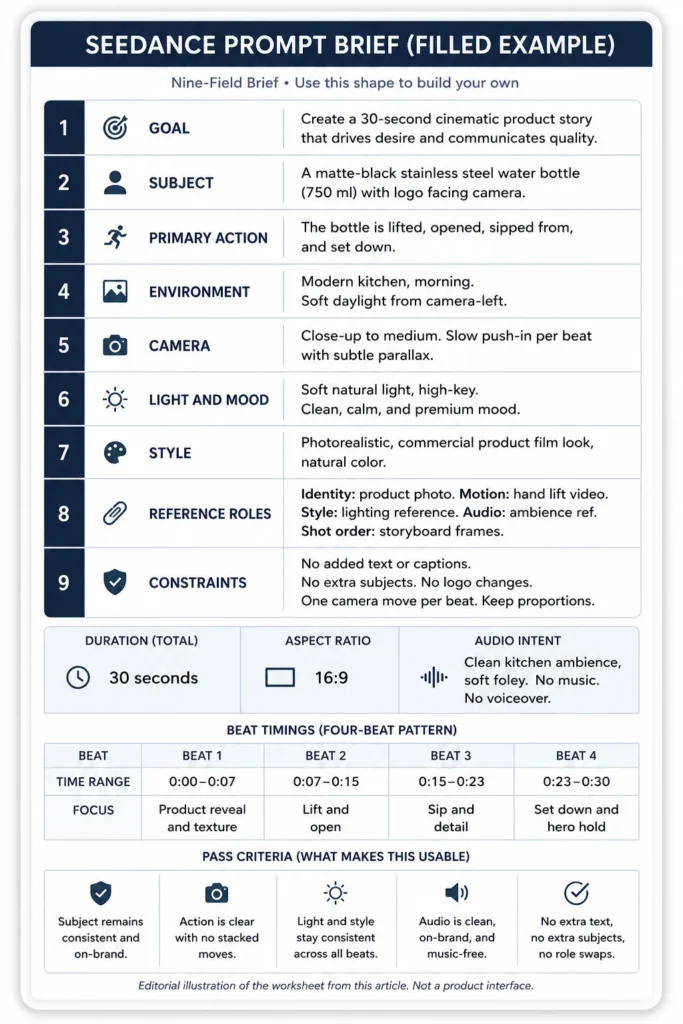
Notice what the brief does not ask for. Final typography, the price line, and the legal disclaimer are all absent, because those belong in an editor where a lawyer can read them before anyone publishes.
Common Mistakes and Fixes
Six patterns account for most wasted generations, and each has a single-field repair.
| Mistake | Fix |
|---|---|
| Treating every Seedance version as the same | Put the model version beside every count and rule |
| Uploading many references with no roles | One primary owner per role, secondary ones named |
| Stacking camera moves inside one beat | One move per beat, move the second to beat three |
| Leaving identity implicit | List immutable geometry, color, and placement |
| Asking for finished campaign typography | Request clean space and add text in post |
| Changing prompt, assets, and timing at once | One variable per variant, logged |
Failure-to-fix matrix
Read the symptom, change the one field named, and keep everything that already passed.
| Symptom | Likely cause | Change this field only |
|---|---|---|
| Identity drifts between beats | Two identity owners | Reference roles |
| Product deforms in motion | Motion owner overrides shape | Immutable details |
| Characters swap roles | Positions unstated | Blocking and constraints |
| Camera jitters | Two moves in one beat | Camera, one per beat |
| Motion reference ignored | Competing motion source | Reference roles |
| Beats arrive out of order | Ranges overlap | Beat timing |
| Unwanted text appears | No text constraint | Negative constraints |
| Music covers dialogue | Audio intent unstated | Audio field |
These are diagnostic starting points drawn from documented prompt behavior, not guaranteed model responses, so log what each change did before you trust it twice.
Red Flags to Watch For
Stop and escalate before generating if any of these are true.
- The interface does not name the model version you are briefing against.
- A reference file arrived without a license, release, or written client approval.
- The brief needs a real person’s face or voice and consent is undocumented.
- A public figure appears in the reference set or the script.
- The clip depends on generated on-screen prices, legal wording, or claims.
- The reference pack contains unreleased products or customer data.
- Two files claim the same role and nobody has decided which one wins.
- The deliverable needs frame-accurate continuity with no correction pass.
- The timeline leaves no room for rights, brand, and accessibility review.
- Success is defined as “looks good” with no written pass criteria.
- The team plans to publish the first generation without a second variant.
- Nobody owns the final export decision.
Safety, Rights, and Privacy Preflight
Run this before uploading anything, not before publishing. Dreamina’s United States terms prohibit use that infringes third-party rights of publicity, privacy, copyright, or trademark, which puts clearance on you rather than on the model.
| Preflight gate | Pass condition |
|---|---|
| Reference rights | Every image, clip, track, and logo licensed |
| Likeness and voice | Written release for each identifiable person |
| Confidentiality | No unreleased product or customer data uploaded |
| Provenance | Export inspected for watermark and credential data |
| Claims review | Benefit wording approved before the clip ships |
Treat uploads as processed platform data. Dreamina’s privacy policy states that it may collect the content you create, import, upload, or generate through the platform, including associated metadata.
That is reason enough to keep confidential briefs out of a public creation tool.
Provenance is not optional either. CapCut describes visible watermarks, C2PA Content Credentials, invisible watermarking, and moderation around the Seedance 2.0 rollout, so inspect each export and preserve those signals through your edit.
Source: official Dreamina terms and privacy policy plus the official CapCut newsroom page. Checked: 2026-07-29. Evidence status: documented policy text.
Seedance 2.0 Fallback and Version Compatibility
Most searches for Seedance 2 prompts cover both releases at once, so this section keeps them apart. If your account runs Seedance 2.0, the structure of every template above still works.
The numbers do not carry over, and mixing them is how briefs quietly break.
| Element | Carries over to 2.0 | Stays version-specific |
|---|---|---|
| Nine-field compiler | Yes, unchanged | No |
| Reference role map | Yes, unchanged | No |
| Beat timing and ending hold | Yes, within clip length | No |
| Input counts | No | Yes, use documented 2.0 caps |
| Prompt length guidance | No | Yes, 2.0 has its own range |
Dreamina’s Seedance 2.0 documentation states support for images up to 9, video clips up to 3 at 15 seconds each, and audio tracks up to 3 at 15 seconds each. The same page recommends prompts between 30 and 100 words, and those are 2.0 figures, so keep them out of any brief you label 2.5.
For context on availability, CapCut’s newsroom describes the Seedance 2.0 rollout reaching the United States by April 2026 after earlier regional launches.
Running these prompts inside invideo Agent
invideo is a third route to Seedance, and it is the one route where you should check the version before you pay. Its own pages disagree with each other.
The pricing page lists every paid plan as including “all AI models, including Seedance 2.5, Veo 3.1 and Kling 3”. The Seedance 2.5 model page says the opposite in its FAQ, that Seedance 2.5 is “coming soon to invideo”, and the model roster lists 2.0, 2.0 Fast, 2.0 Mini, 1.5 Pro, Pro, and Pro Fast with no 2.5 entry, all checked August 12, 2026.
Treat that as unresolved and plan for 2.0. If your account only exposes Seedance 2.0, you get 4K up to 15 seconds with lip-synced dialogue, and that 15-second ceiling is the number to plan your beats against rather than the 2.5 figures in your brief.
The authoring layer moves too. invideo states that the agent writes the prompt and attaches your references, and that you never choose a model unless you want to, so the nine fields become Context and Brief entries rather than text you paste into a model box.
Then price your iteration before you start. Credits are billed at generation and not at export, so a rejected take bills exactly what an approved one bills, and a credit runs about $0.21 at invideo’s best published annual rate.
Two habits follow from that. Pin Seedance as the preferred model in a Playbook if you want the agent to stop selecting for you, and read the credit estimate before each run rather than after it.
When Not to Use Seedance 2.5
A negative recommendation is still decision support. Skip these templates when any of the following is true.
- You cannot confirm the model version or feature access in the account.
- The deliverable needs frame-accurate simulation or unbroken continuity without a human correction pass.
- The reference set includes unlicensed faces, voices, music, footage, logos, or scripts.
- The brief carries confidential client plans, customer records, or unreleased products.
- The request involves a political figure, impersonation, or policy evasion.
- The final cut depends on generated legal wording, medical claims, or exact figures.
- Your workflow needs a signed enterprise agreement, data residency, or a support commitment you have not obtained.
- Nobody can run identity, rights, audio, accessibility, and channel review before publication.
When the answer is no, a different tool may fit better. Our roundup of the best AI video generators covers alternatives, and the Runway video model review and Pika Art review go deeper on two of them.
What to Do After Your First Generation
Your next step depends on what the scorecard said, not on how the clip felt.
- Eighty-five or higher. Send it to rights and brand review, then add typography, captions, and the call to action in an editor.
- Seventy to 84. Repair one bounded region, keep every passing field frozen, and rescore the same six criteria.
- Below 70. Rewrite the single failing field, regenerate two variants, and compare them against the same pass criteria.
- Identity failed twice. Rebuild the reference pack before touching prompt wording, starting with a cleaner front and angle pair.
Related Resources
- Build stronger reference images first with the best AI image generators roundup.
- Take the same shot fields to other generators with prompts that work across video models.
- Adapt the variable pattern used here from our reusable ChatGPT prompt templates.
- Compare the same structure applied to stills in the Nano Banana image prompts library.
Methodology
The Seedance 2.5 prompts in this library were built from official Dreamina, ByteDance Seed, and CapCut documentation reviewed on July 29, 2026. Source types were ranked in that order: official model documentation first, official product and policy pages second, official newsroom material third.
Each template was assessed against criteria a reviewer can apply: field completeness, one action and one camera move per beat, explicit reference roles, timing that sums to the stated duration, and named negative constraints.
Capability figures such as duration, reference counts, and resolution are reported as vendor-published statements and attributed to the page that publishes them. Version-specific numbers stay attached to the version that documents them, and Seedance 2.0 figures are never carried into a Seedance 2.5 brief.
Scoring weights, thresholds, and the failure-to-fix mapping are editorial judgments by the SaaS CRM Review team, offered as a working standard rather than a vendor specification.
FAQ
Ten questions that come up while a brief is being written, answered in the order they usually arrive.
How do you write a good Seedance 2 prompt?
Write one goal, one subject, and one primary action per beat, then add camera, light, style, reference roles, timing, audio, and constraints. Dreamina’s guidance builds prompts from subject, action, camera, and style with beat timings, and the nine-field compiler above is that pattern with the review fields attached.
Where can I get Seedance prompts to copy and paste?
Every template in this article sits in its own copy block, so you can take the whole thing, swap the uppercase tokens for your own values, and run it. A field-based brief beats a paragraph, so keep the nine fields in the same order and let the pass check underneath each block act as the acceptance test.
Can Seedance use image and video references?
Yes. Dreamina’s Seedance 2.5 workflow describes multimodal references across images, video, audio, scripts, character sheets, and storyboard frames, with each asset bound to a role in your brief.
How many references can Seedance 2.5 use?
Dreamina publishes a ceiling of up to 50 multimodal inputs. The split between images, video, and audio is not broken out on those pages, so plan with the smallest decisive set and add a reference only when it owns a distinct role.
How do I keep a character consistent in Seedance?
Give one character sheet sole ownership of identity, then repeat the immutable details in the constraint line: face, age, hair, proportions, clothing, accessories, and palette. Never add a second identity file for the same character.
How do I prompt camera movement in Seedance?
Name one framing and one move per beat, using plain language such as slow push-in, lateral track, or locked-off. Dreamina’s commercial guidance recommends describing camera movement with a single phrase, and stacking two moves in one beat is the most common cause of jitter.
Can Seedance generate a 30-second video?
Dreamina’s documentation describes 30-second continuous generation as the standard Seedance 2.5 output, with a four-beat structure as the suggested spine. Confirm the duration options in your own account before you promise a length to a client.
Why does my Seedance video drift from the reference?
Drift usually means two files are competing for one role, or the prompt asks for two things at once. Fix the role map first, then remove the second camera move, and only then rewrite descriptive wording.
Should I regenerate or use a localized edit?
Repair locally when identity, timing, motion path, and shot order pass and the fault sits in one bounded region. Regenerate when the action, camera path, character role, or beat structure is wrong.
Is Seedance 2.5 the same thing as Seedance 2.0?
No, and treating them as interchangeable is the fastest way to publish a wrong limit. Confirm the version named in your interface, then use only the numbers documented for that version.