Yes—for most small to mid-sized businesses. In this comprehensive Zoho CRM review, we find that Zoho CRM delivers enterprise-grade capabilities at 40-60% less than Salesforce or HubSpot paid tiers. The platform combines AI-powered sales predictions (Zia), visual process automation (Blueprint), and deep customization (Canvas, custom modules) at price points accessible to growing teams.
Best plan for most SMBs: Professional at $23/user/month offers the optimal balance of automation, inventory management, and structured sales processes.
Skip Zoho CRM if: You prioritize phone support as standard, want the simplest possible interface, or require Salesforce-tier ecosystem depth.
Quick Verdict – Zoho CRM Review 2026
| Aspect | Assessment |
|---|---|
| Overall Rating | ⭐ 4.3/5 |
| Best For | SMBs (5-200 users), scaling sales teams, Zoho ecosystem users |
| Value for Money | ✔ Excellent—one of the best feature-to-price ratios in 2026 |
| Ease of Use | ⚠ Moderate—basic features are intuitive; advanced customization requires learning |
| Customization | ✔ Excellent—Canvas, custom modules, Deluge scripting |
| Automation | ✔ Powerful—Blueprint, workflows, macros, sales sequences |
| AI Capabilities | ✔ Zia AI (Enterprise+)—predictions, anomaly detection, voice commands |
| Support Quality | ⚠ Email-only on standard plans; premium support costs extra |
| Top Alternative | HubSpot (ease of use), Salesforce (enterprise), Pipedrive (simplicity) |
Read more: Best CRM Software Review 2026
Who This Zoho CRM Review Is For
This guide is designed for:
- Sales managers evaluating CRM platforms for teams of 5-100+ users
- SMB owners comparing Zoho against HubSpot, Salesforce, Pipedrive, or Freshsales
- Operations leads seeking practical, honest guidance—not vendor marketing
- Existing Zoho users considering tier upgrades or ecosystem expansion
If you’re a startup exploring free CRM options, also see our guide: Best Free CRM Software in 2026.
Our Testing Methodology
We evaluated Zoho CRM using a structured approach designed for transparency and reproducibility:
| Criterion | How We Tested |
|---|---|
| Pricing accuracy | Verified against zoho.com/crm/pricing (January 2026) |
| Feature depth | Hands-on exploration of Standard, Professional, and Enterprise tiers |
| User sentiment | Aggregated feedback from G2 (4,000+ reviews), Capterra, Forbes Advisor |
| Competitor benchmarking | Direct comparison with HubSpot, Salesforce, Pipedrive, Freshsales |
| Support quality | Tested response times; documented common user complaints |
| Integration testing | Verified native Zoho ecosystem connectivity and key third-party integrations |
Limitations: This review does not include long-term (12+ month) deployment testing. Implementation outcomes vary based on team size, complexity, and technical resources.
Sources: Zoho CRM Official, G2 Reviews, Forbes Advisor, TechRadar
Zoho CRM Pricing 2026: Complete Breakdown
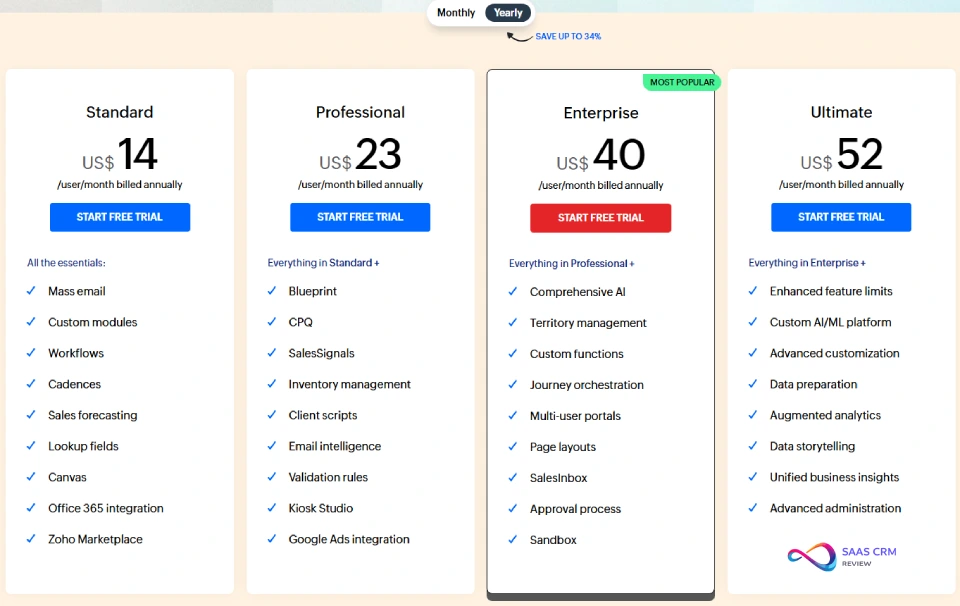
Zoho CRM uses per-user, per-month pricing with up to 34% savings on annual billing. Here’s the full pricing structure as of January 2026:
Zoho CRM Pricing Table
| Plan | Price (Annual Billing) | Key Features Included | Best For |
|---|---|---|---|
| Free | $0 (up to 3 users) | Leads, contacts, deals, basic reports, mobile apps | Solo entrepreneurs, home businesses |
| Standard | $14/user/month | Email tracking, workflows, web forms, Canvas customization, Zoho Marketplace (900+ apps) | Small teams needing basic automation |
| Professional | $23/user/month | Blueprint process management, CPQ (quotes), SalesSignals, inventory management, validation rules | Growing businesses with structured sales processes |
| Enterprise | $40/user/month | Full Zia AI, territory management, multi-user portals, sandbox, CommandCenter, journey orchestration | Mid-market companies with complex requirements |
| Ultimate | $52/user/month | Advanced BI (augmented analytics), data preparation, QuickML custom AI/ML, enhanced API limits | Data-driven enterprises needing custom AI models |
Bundle option: Zoho CRM Plus ($57/user/month) combines CRM with Marketing Automation, Zoho Desk, SalesIQ, and Zoho Analytics.
WARNING
Hidden cost alert: Zoho’s standard support is email-only (Monday-Friday, 24-48 hour response). Premium phone support requires an additional fee—verify pricing during your trial.
For a complete tier-by-tier breakdown including hidden costs and team-size scenarios, see our dedicated Zoho CRM Pricing 2026 guide.
Which Zoho CRM Plan Is Right for You?
Use this decision framework to select the optimal tier:
| Your Situation | Recommended Plan | Why |
|---|---|---|
| Solo or team of 1-3 with basic needs | Free | Core CRM features at no cost |
| Need email automation + basic workflows | Standard ($14) | Unlocks workflow rules, email tracking |
| Need structured processes (Blueprint) or quotes | Professional ($23) ⭐ | Best value for growth-stage teams |
| Need AI predictions, sandbox, or portals | Enterprise ($40) | Full Zia AI, advanced customization |
| Need custom ML models or advanced BI | Ultimate ($52) | QuickML, augmented analytics |
Pro tip: Most growing SMBs find Professional sufficient for 2-3 years. Upgrade to Enterprise only when you actively need Zia’s predictive capabilities, territory management, or multi-user customer portals.
Zoho CRM Key Features: What It Actually Does Well
Lead & Contact Management
Zoho CRM excels at organizing and centralizing your customer database. The platform captures leads from multiple channels—web forms, social media, email, live chat, phone calls—and automatically routes them to appropriate sales representatives based on predefined rules.
Core capabilities:
- Unified contact view with complete interaction history, social profiles, and purchase patterns
- Custom fields and custom modules adapt to your specific business data structure
- Duplicate detection identifies and merges redundant records
- Tagging and segmentation enable precise targeting for campaigns and outreach
- Lead scoring rules prioritize high-potential prospects
This foundation supports everything from simple contact tracking to complex multi-touch sales engagements. For teams managing leads from social channels, see: Best Social Media CRMs 2026.
Sales Automation & Blueprint
Sales automation represents one of Zoho CRM’s strongest differentiators. The platform eliminates repetitive manual tasks through:
Workflow rules: Create if-then automation (e.g., “When lead score exceeds 80, assign to senior rep, send notification, and schedule follow-up task”). Supports multi-step processes with time delays.
Macros: Bundle multiple actions into a single click—perfect for recurring scenarios like lead qualification or deal closure.
Sales sequences (Professional+): Design multi-touch email campaigns with automated follow-ups for consistent prospect engagement.
Blueprint (Professional+): Zoho’s standout feature. Blueprint provides visual process management that guides reps through standardized procedures step-by-step. Define mandatory fields per stage, auto-trigger emails at transitions, and prevent deals from advancing without proper approvals. Ideal for organizations with complex sales methodologies or compliance requirements.
Zia AI: Zoho’s Artificial Intelligence Assistant
Zia is Zoho’s built-in AI assistant, available in full from the Enterprise tier ($40/user/month). Unlike standalone AI add-ons that inflate competitor pricing, Zia is included in the base subscription.
| Zia Capability | What It Does | Business Value |
|---|---|---|
| Predictive lead scoring | Analyzes historical data to identify conversion likelihood | Helps reps prioritize high-potential prospects |
| Deal predictions | Forecasts probability of closing specific opportunities | Improves pipeline accuracy |
| Anomaly detection | Flags unusual patterns in sales data (drops in activity, pipeline value) | Enables proactive problem-solving |
| Best time to contact | Analyzes when prospects are most responsive | Optimizes outreach timing |
| Sentiment analysis | Evaluates customer emails for satisfaction signals | Flags at-risk accounts before escalation |
| Conversational queries | Natural language questions (“Show me deals closing this quarter”) | Reduces reporting friction |
| Macro suggestions | Recommends automation based on repetitive manual actions | Identifies efficiency opportunities |
Honest assessment: Zia is competent but not groundbreaking compared to GPT-era AI. It excels at structured predictions (lead scoring, deal forecasting) rather than generative content. Think of it as mid-tier Salesforce Einstein functionality at a fraction of the cost—not a replacement for dedicated AI writing or research tools.
Customization: Canvas, Kiosk Studio & Custom Modules
Zoho CRM is one of the most customizable mid-market CRMs available, rivaling Salesforce’s flexibility at lower cost:
Canvas (Standard+): Drag-and-drop UI builder that lets you redesign record layouts per team, role, or use case. Create visual, card-based views instead of default table layouts.
Kiosk Studio (Professional+): No-code tool for building custom screens, guided actions, and record workflows without developer involvement.
Custom modules: Build entirely new data structures with unique fields, relationships, and layouts. Essential for businesses with non-standard entities (e.g., equipment, properties, contracts).
Deluge scripting: Zoho’s proprietary language for complex logic, external API integrations, and advanced automation beyond standard workflow rules.
Page layouts: Create different record layouts for different teams within the same module (e.g., separate lead forms for inbound vs. outbound sales).
This flexibility advantage is significant. Organizations with unique sales processes often abandon rigid CRMs; Zoho accommodates specialized requirements without expensive consultants.
Analytics, Reporting & Dashboards
Zoho CRM transforms raw data into actionable insights through multiple reporting layers:
Pre-built reports: Cover standard sales metrics—pipeline value, conversion rates, sales cycle length, rep performance, revenue forecasting.
Custom report builder: Drag-and-drop interface supporting charts, pivot tables, and cross-module reporting. Non-technical users can create complex reports.
Dashboards: Role-specific visual displays with real-time widgets. Customize views ensuring each team member sees relevant KPIs.
Scheduled reports: Automatically generate and email reports to stakeholders at defined intervals (daily, weekly, monthly).
Advanced analytics (Enterprise+): Comparative reporting, target tracking, cohort analysis, forecasting based on historical patterns.
Omnichannel Communication
Modern customers engage across multiple channels; Zoho CRM centralizes these conversations:
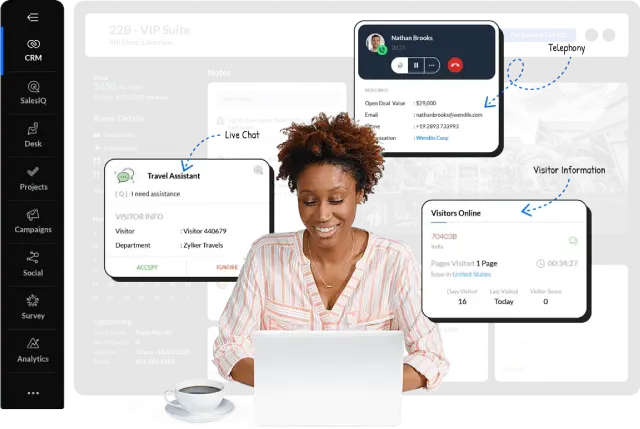
Telephony (PhoneBridge): Click-to-call, automatic call logging, recording. Screen pops display customer context during incoming calls.
Email integration: Syncs with Gmail, Outlook, and other providers. Send/receive emails within CRM; automatic association with records. Templates, tracking, and scheduling included.
Social media: Monitor mentions, messages, and interactions across Twitter, Facebook, and LinkedIn. Unified inbox consolidates all social communications.
Live chat (SalesIQ integration): Capture website visitor information directly into CRM with conversation history.
Mobile App
Zoho CRM’s iOS and Android apps deliver full-featured access—not stripped-down versions:
- Update records, log calls, check in at customer locations
- Scan business cards with automatic data capture
- Offline mode with sync when connection resumes
- Voice notes, photo attachments, location tracking
- Push notifications for important updates and assigned tasks
Field sales teams can manage complete workflows without laptop access.
Zoho CRM Pros and Cons
Based on aggregated user reviews (G2, Capterra), expert analysis, and hands-on testing:
| ✅ Pros | ❌ Cons |
|---|---|
| Competitive pricing—40-60% less than Salesforce | Steep learning curve for advanced features |
| Highly customizable (Canvas, custom modules, Kiosk Studio) | Email-only support on standard plans |
| Zia AI included at Enterprise tier (no expensive add-on) | Interface can feel cluttered with complex workflows |
| Blueprint for enforceable, standardized sales processes | Free/Standard tiers lack AI and advanced automation |
| 50+ native Zoho app integrations create unified ecosystem | Some third-party integrations require workarounds or middleware |
| Strong mobile app with offline capabilities | Reporting customization limited on lower tiers |
| No per-contact limits—predictable scaling costs | Implementation success depends heavily on proper planning |
Who Should Use Zoho CRM?
Ideal User Profiles
✅ You’re in the Zoho ecosystem. If you already use Zoho Desk, Zoho Campaigns, Zoho Books, or Zoho Projects, adding CRM creates seamless data flow without integration headaches.
✅ You need customization without coding. Canvas and custom modules handle unique workflows that rigid CRMs cannot accommodate.
✅ You want AI features without Salesforce pricing. Zia at $40/user delivers meaningful predictions at a fraction of Einstein’s cost.
✅ You’re a growing SMB (5-200 users). Professional and Enterprise tiers scale well for mid-market growth trajectories.
✅ Budget is a priority. At $23/user for Professional, Zoho undercuts most competitors on feature-to-price ratio.
✅ You have structured sales processes to enforce. Blueprint standardizes complex methodologies across teams.
For startup-specific recommendations, see: Best CRM for Startups 2026.
Who Should Skip Zoho CRM?
❌ You need phone support as standard. Zoho’s email-only support frustrates users requiring real-time assistance.
❌ You want the simplest possible UX. Pipedrive or Monday CRM offer more intuitive out-of-box experiences.
❌ You’re a large enterprise requiring Salesforce-tier ecosystem depth. Salesforce’s AppExchange (3,000+ apps) and consultant network exceed Zoho’s marketplace.
❌ You need plug-and-play generative AI. Zia is predictive, not generative. For AI content creation, look elsewhere.
❌ Your team is non-technical with no implementation support. Without proper setup investment, Zoho’s complexity leads to underutilization.
❌ For micro-businesses (under 10 users) prioritizing affordability over polish, Apptivo offers similar all-in-one functionality at lower cost.
Integrations & Ecosystem
Native Zoho Integrations
Zoho CRM’s greatest integration strength lies within the Zoho ecosystem. Seamless connectivity with 50+ Zoho applications creates a unified business platform:
| Zoho App | Integration Benefit |
|---|---|
| Zoho Campaigns | Email marketing with CRM data, automatic list sync, campaign response tracking |
| Zoho Desk | Connect support tickets to sales records; complete customer journey visibility |
| Zoho Books | Auto-create invoices from deals, track payments, sales-to-revenue analytics |
| Zoho Projects | Link project delivery to customer accounts (critical for service businesses) |
| Zoho Analytics | Advanced BI across all Zoho data sources |
| Zoho Sign | E-signatures embedded directly in CRM workflows |
| Zoho SalesIQ | Live chat with website visitors, captured directly into CRM |
Businesses committed to the Zoho ecosystem experience significant efficiency gains compared to assembling disparate best-of-breed tools.
Third-Party Integrations
Zoho CRM connects with 800+ external applications through native connectors, Zoho Flow, and REST API:
- Communication: Google Workspace, Microsoft 365, Slack, Microsoft Teams
- Marketing: Google Ads, Facebook Lead Ads, LinkedIn Sales Navigator, Mailchimp, WordPress
- E-commerce: Shopify, WooCommerce, Magento
- Accounting: QuickBooks, Xero
- Productivity: Trello, Asana, Evernote, Wrike, ClickUp
- Documentation: Confluence, Airtable, Coda, Notion
- Telephony: RingCentral, Twilio, Aircall
Note: Integration quality varies. Popular applications (Google Workspace, Mailchimp) have robust, well-maintained connectors. Niche tools may require Zapier, Make (Integromat), or custom API development.
Developer Platform
For technical teams, Zoho CRM provides:
- REST API with comprehensive documentation and code samples
- Deluge scripting for custom functions within workflows
- Widgets to embed external applications in CRM pages
- SDKs for Java, Python, PHP, Node.js
- API rate limits: Standard = 5,000 credits/day; Ultimate = 100,000 credits/day
Zoho CRM vs Top Competitors: Objective Comparison
Feature Comparison Matrix
| Feature | Zoho CRM | Salesforce | HubSpot | Pipedrive |
|---|---|---|---|---|
| Starting Price | $14/user | $25/user | Free (limited) | $14/user |
| Professional Tier | $23/user | $80-165/user | $90/user | $34-49/user |
| Lead Management | ✔ Strong | ✔ Very Strong | ✔ Strong | ✔ Moderate |
| Workflow Automation | ✔ Strong | ✔ Very Strong | ✔ Moderate | ⚠ Limited |
| AI Features | ✔ Zia | ✔ Einstein | ⚠ Limited | ❌ None |
| Customization | ✔ Excellent | ✔ Best in Class | ⚠ Limited | ⚠ Limited |
| Multiple Pipelines | ✔ Yes | ✔ Yes | ⚠ Limited | ✔ Yes |
| Ease of Use | ⚠ Moderate | ⚠ Steep | ✔ Easy | ✔ Easy |
| Integrations | ✔ 800+ | ✔ 3,000+ | ✔ 1,000+ | ✔ 300+ |
Zoho CRM vs Salesforce
Pricing: Salesforce Essentials starts at $25/user but Enterprise ($165/user) is required for comparable features. Zoho Enterprise ($40/user) delivers 70-80% of Salesforce functionality.
AI: Einstein is more mature with deeper capabilities. Zia provides solid predictive features at significantly lower cost.
Ecosystem: Salesforce AppExchange (3,000+ apps) vastly exceeds Zoho Marketplace (900+). For niche integrations, Salesforce wins.
Complexity: Both require learning investment. Salesforce has more consultant resources; Zoho is more self-serviceable.
Verdict: Choose Salesforce for enterprise-scale complexity, deep industry solutions, and consultant ecosystem. Choose Zoho for mid-market value and solid functionality without premium pricing.
Zoho CRM vs HubSpot
Pricing: HubSpot’s free CRM is generous (unlimited users), but Sales Hub Professional ($90/user) vastly exceeds Zoho Professional ($23)—a 4x difference.
Marketing: HubSpot excels if marketing automation is core to your strategy. Zoho separates marketing into Zoho Campaigns (additional cost).
UX: HubSpot wins for user-friendliness with modern, intuitive interface. Zoho is more powerful but requires more training.
Automation: Both offer robust workflows, but Zoho includes advanced automation in lower-tier plans.
Verdict: Choose HubSpot if ease of use and inbound marketing are top priorities—and budget permits premium pricing. Choose Zoho for equivalent CRM power at lower cost with deeper customization.
Zoho CRM vs Pipedrive
UX: Pipedrive wins decisively on simplicity. The visual pipeline is immediately intuitive with almost no training required.
Features: Zoho significantly outpaces Pipedrive in breadth—AI, advanced analytics, inventory management, customization options.
Pricing: Entry-level ($14/user) is comparable, but Pipedrive Professional ($49/user) offers fewer features than Zoho Professional ($23).
Customization: Zoho’s flexibility dwarfs Pipedrive’s more rigid structure.
Verdict: Choose Pipedrive for sales-only teams wanting simplicity without extensive customization. Choose Zoho for broader operational needs, AI features, and growth-stage flexibility. For a complete side-by-side breakdown including pricing scenarios, AI comparison, and migration playbook, see our Pipedrive vs Zoho CRM 2026 guide. For sales-specific recommendations: Best CRM for Sales Teams 2026.
Ease of Use & Learning Curve
Realistic Adoption Timelines
| User Type | Time to Productivity |
|---|---|
| Basic contact/pipeline management | 2-5 days |
| Standard workflows and reports | 1-2 weeks |
| Advanced features (Blueprint, Canvas) | 2-4 weeks |
| Full implementation with integrations | 4-8 weeks |
Common Adoption Challenges
Based on user feedback and implementation experience:
- Feature overwhelm: Users from spreadsheets resist systems perceived as complex
- Mobile-desktop parity: Some features remain desktop-only, frustrating field teams
- Customization debt: Heavy customization creates maintenance burden when key personnel leave
- Integration gaps: Some third-party connections require API knowledge or middleware
Success Strategies
- Phase-based rollouts (core features first, advanced automation later)
- Internal power user champions for peer support
- Regular feedback loops to refine configurations based on actual usage
- Documented customization for knowledge transfer
Customer Support & Resources
Support Channels by Plan
| Plan | Support Channels | Typical Response Time |
|---|---|---|
| Free | Email only | 24-48 hours |
| Standard | Email + phone (business hours) | 12-24 hours |
| Professional | Email, phone, live chat (extended hours) | 8-12 hours |
| Enterprise | Priority support | 4-8 hours |
| Ultimate | Dedicated account manager | Same day |
Self-Service Resources
- Help documentation: Comprehensive written guides with screenshots
- Video tutorials: Zoho CRM YouTube channel
- Community forum: Active peer support with often faster responses than official channels
- Webinars: Regular live training sessions
- Zoho University: Structured courses and certifications
Implementation Support Options
- Professional Services: Custom setup, data migration, training (variable pricing)
- Certified Partners: Third-party implementation specialists
- Migration tools: Automated data import from Salesforce, HubSpot, Pipedrive, spreadsheets
Security & Compliance
| Standard | Status |
|---|---|
| Data encryption (TLS 1.2, AES-256) | ✔ All plans |
| Two-factor authentication | ✔ All paid plans |
| SOC 2 Type II certification | ✔ Certified |
| ISO 27001 certification | ✔ Certified |
| GDPR compliance | ✔ Full support (DPA, right to erasure, data portability) |
| HIPAA compliance | ✔ Available with BAA (Business Associate Agreement) |
| Regional data residency | ✔ Multiple geographic options |
| IP restrictions | ✔ Enterprise+ |
| Audit logs | ✔ Enterprise+ |
Data ownership: Customers retain full ownership of their data. Export via CSV, API, or bulk download anytime—no vendor lock-in on data portability.
Zoho CRM Review – Frequently Asked Questions
Is Zoho CRM really free?
Yes. Zoho CRM’s Free Edition supports up to 3 users with core features: lead/contact management, deal tracking, basic reports, and mobile apps. It’s a functional CRM for micro-businesses. Paid tiers ($14+/user) unlock workflow automation, AI features, and advanced integrations.
What’s the best Zoho CRM plan for small business?
For most small businesses (5-20 users), Professional ($23/user/month) offers optimal value. It includes Blueprint automation, inventory management, CPQ (quotes), and SalesSignals—features that streamline operations without Enterprise pricing.
Is Zoho CRM better than HubSpot?
It depends on priorities. Zoho offers deeper customization and better value for operations-focused teams. HubSpot excels for marketing-driven organizations needing integrated inbound tools and prioritizing ease of use. For pure CRM functionality at lower cost, Zoho wins.
Does Zoho CRM have AI?
Yes. Zia AI is included from the Enterprise tier ($40/user) without additional fees. Capabilities include lead predictions, deal forecasting, anomaly detection, sentiment analysis, and voice commands. Ultimate tier adds QuickML for custom machine learning models.
How secure is Zoho CRM?
Zoho CRM maintains SOC 2 Type II and ISO 27001 certifications, full GDPR compliance, and HIPAA readiness (with BAA). Enterprise tier adds IP restrictions, audit logs, and role-based access controls. Zoho operates its own data centers, avoiding third-party cloud dependencies.
Can I migrate from another CRM to Zoho?
Yes. Zoho provides migration tools and services for importing data from Salesforce, HubSpot, Pipedrive, and spreadsheets. Complexity and timing depend on data volume, custom field mapping, and relationship structures. Professional Services are available for complex migrations.
What is Zia in Zoho CRM?
Zia is Zoho’s built-in AI assistant available in Enterprise and Ultimate tiers. It analyzes sales data to predict deal outcomes, suggests optimal contact times, detects anomalies in pipeline performance, and supports natural language queries on mobile and desktop.
Is Zoho CRM easy to learn?
Basic features (contact management, pipeline tracking) are straightforward—most users achieve productivity within days. Advanced customization (Blueprint, Canvas, custom modules) requires 2-4 weeks for full adoption. The 2025 UI refresh improved navigation, but Zoho remains denser than Pipedrive or HubSpot.
How does Zoho CRM compare to Salesforce?
Zoho Enterprise ($40/user) delivers approximately 70-80% of Salesforce Enterprise ($165/user) functionality at a fraction of the cost. Salesforce offers deeper ecosystem (AppExchange), more industry-specific solutions, and larger consultant network. Zoho wins on value; Salesforce wins on enterprise scale. Comparing it directly with Salesforce? Read our Zoho CRM vs Salesforce comparison for pricing, best-fit, and total cost differences.
Final Verdict: Is Zoho CRM Worth It in 2026?
Rating: 4.3/5
Zoho CRM earns strong marks for delivering enterprise-capable features—AI predictions, process automation, deep customization—at mid-market pricing. It’s an excellent choice for small to mid-sized businesses that value flexibility, operate within (or plan to adopt) the Zoho ecosystem, and can invest in proper implementation.
Our Recommendation Summary
| Your Situation | Recommended Action |
|---|---|
| Growing SMB (5-50 users) needing automation | Start with Professional ($23/user) ⭐ |
| Need AI predictions or complex workflows | Consider Enterprise ($40/user) |
| Budget-constrained startup | Start with Free, upgrade when ready |
| Prioritize simplicity over power | Look at Pipedrive or HubSpot |
| Already using Zoho ecosystem | Zoho CRM is the natural choice |
| Need marketing automation integrated | Consider Zoho CRM Plus ($57/user) |
Next step: Start a 14-day free trial to test Professional or Enterprise tiers with your actual sales workflow.
About the author

I’m Macedona, an independent reviewer covering SaaS platforms, CRM systems, and AI tools. My work focuses on hands-on testing, structured feature analysis, pricing evaluation, and real-world business use cases.
All reviews are created using transparent comparison criteria and are updated regularly to reflect changes in features, pricing, and performance.