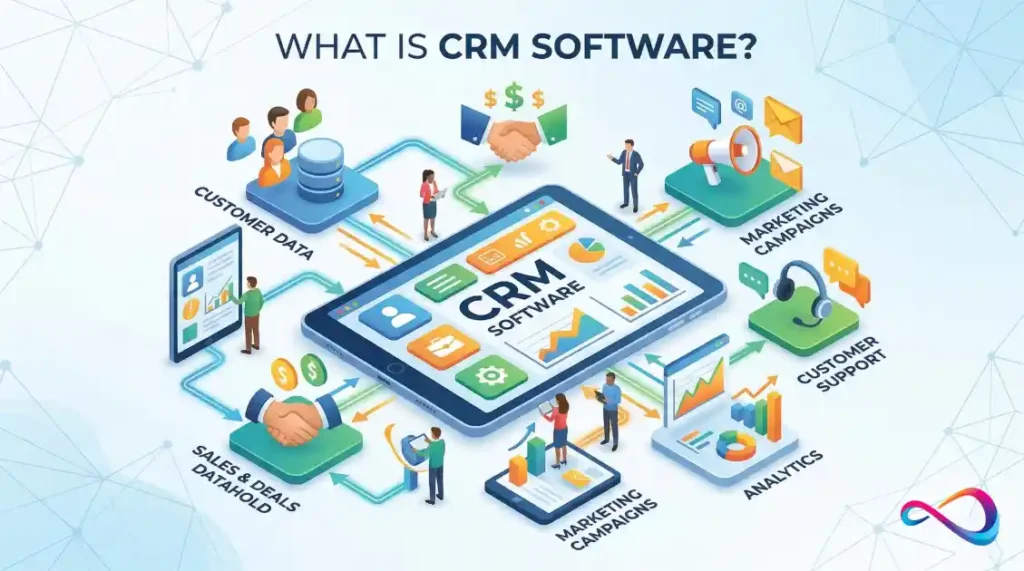
CRM software (customer relationship management software) is a platform that centralizes every customer interaction—contacts, deals, support tickets, emails, and purchase history—into one shared system. It replaces disconnected spreadsheets and siloed tools so sales, marketing, and service teams can track leads, close deals, retain customers, and forecast revenue from a single source of truth. This guide covers what CRM software is, what it costs, how to calculate ROI, and how to choose the right CRM for your business.
Definition: CRM software is a business application that stores customer data, tracks interactions across sales, marketing, and support channels, automates repetitive workflows, and provides analytics to help companies acquire, retain, and grow customer relationships profitably. (48 words)
TL;DR
- What it is: A centralized platform for managing customer data, sales pipelines, marketing campaigns, and support interactions.
- Who needs it: Any business with more than ~50 active customer relationships—especially B2B companies, SaaS teams, agencies, and growing e-commerce brands.
- What it costs: Free plans exist; paid CRM tiers typically range from $14–$350+/user/month depending on features and vendor. Total cost of ownership is always higher than the sticker price.
- Expected ROI: Industry research suggests an average return of $8.71 for every $1 invested in CRM (Nucleus Research), with average payback around ~13 months—but only with clean data and real user adoption.
- Biggest risk: Buying more CRM than you need. Low adoption and dirty data destroy ROI faster than any pricing tier.
Key Takeaways
| Takeaway | Detail |
|---|---|
| CRM is a system, not just software | Strategy + process + platform together drive results |
| Pricing is per-user, per-month | But the real cost includes setup, migration, training, and integrations |
| ROI depends on adoption | A CRM nobody uses returns nothing |
| Not every business needs one yet | If you have <50 contacts and no pipeline, a spreadsheet may be fine for now |
| AI is reshaping CRM fast | Lead scoring, email drafting, and forecasting are increasingly AI-automated |
What Is CRM Software?
CRM software is a technology platform that organizes, automates, and analyzes customer interactions throughout the entire customer lifecycle—from first website visit to post-sale expansion.
CRM Meaning vs. CRM Strategy vs. CRM Platform
These three terms get conflated constantly:
- CRM (the concept): Customer relationship management as a business discipline—how your company interacts with prospects and customers.
- CRM strategy: Your deliberate plan for acquiring, converting, retaining, and expanding customer relationships. This exists with or without software.
- CRM platform/software: The technology that executes and scales your CRM strategy by automating data capture, workflows, reporting, and communication.
Consultant insight: Buying a CRM platform without a CRM strategy is like buying accounting software without a chart of accounts. The tool works—you just won’t extract value from it.
Who This Guide Is For
This guide is for U.S. business buyers evaluating CRM software for the first time or reconsidering a platform they’ve outgrown—founders, sales leaders, marketing directors, RevOps managers, and IT decision-makers at small businesses, mid-market companies, and enterprises.
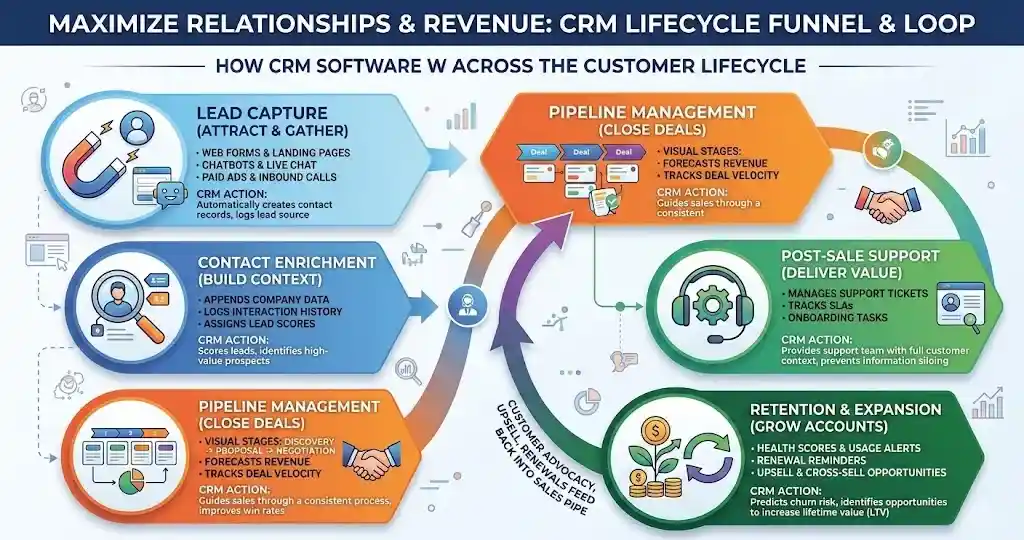
How CRM Software Works Across the Customer Lifecycle
A CRM system maps directly onto the customer journey. Here’s how each stage works in practice:
Lead capture. Web forms, chatbots, ad clicks, and inbound calls feed new contacts into the CRM automatically. The system logs the source so you can attribute marketing spend to pipeline.
Contact enrichment. The CRM appends data—company size, industry, engagement history—to raw lead records. Some platforms like Salesforce do this natively; others connect to third-party enrichment tools via API.
Pipeline management. Qualified leads become deals. Reps drag them through pipeline stages (Discovery → Proposal → Negotiation → Closed-Won). Managers see deal volume, velocity, and forecast accuracy in real time.
Post-sale support. Once a deal closes, the CRM links the customer record to support tickets, onboarding tasks, and renewal dates. Service teams see full purchase history without asking the customer to repeat context.
Retention and expansion. Automated health scores, usage alerts, and renewal reminders help customer success teams intervene before churn happens. Upsell and cross-sell opportunities surface from account activity.
The key point: a CRM is not a static database. It’s an operational system that moves with the customer.
Why Businesses Use CRM Software
Businesses adopt CRM for five practical reasons—not because the category is trendy, but because the problems it solves are expensive to ignore.
Revenue growth. CRM systems improve lead conversion and shorten sales cycles by giving reps the right context at the right time. Research suggests a 29% average increase in sales for businesses using CRM (Salesforce, “State of Sales” report).
Visibility. Without a CRM, pipeline data lives in spreadsheets, inboxes, and individual reps’ heads. A CRM makes deal status and forecast accuracy visible to leadership in real time.
Team alignment. Sales, marketing, and service teams share one customer record. Marketing sees which leads converted. Sales sees which campaigns drove them. Service sees what was promised.
Customer experience. Logged touchpoints mean no customer falls through the cracks. Follow-ups happen on time. Personalization becomes possible at scale.
Forecasting. CRM analytics turn pipeline data into revenue forecasts. Weighted pipeline, stage conversion rates, average deal size, and sales velocity metrics allow finance to plan with data instead of gut feel.
Core CRM Software Features
Not all features matter equally to every business. The table below maps core capabilities to the business need they solve.
| Feature | What It Does | Who Needs It Most |
|---|---|---|
| Contact management | Stores customer/prospect records with full interaction history | Everyone |
| Deal/opportunity pipeline | Visual pipeline with stage tracking and probability weighting | Sales teams |
| Workflow automation | Automates follow-up emails, task assignments, status changes | Teams doing 50+ deals/month |
| Email and calendar sync | Two-way sync with Gmail/Outlook; logs emails to contact records | Sales and account management |
| Marketing automation | Email sequences, nurture campaigns, landing pages, segmentation | Marketing teams |
| Customer service/ticketing | Ticket management, SLA tracking, knowledge base, chat routing | Support and success teams |
| Analytics and reporting | Dashboards for pipeline health, conversion rates, revenue forecasts | Managers and RevOps |
| Mobile access | Native iOS/Android apps for on-the-go pipeline management | Field sales, outside reps |
| AI assistance | Lead scoring, email drafting, deal insights, churn prediction | Mid-market and enterprise |
| Integrations and APIs | Connects to ERP, accounting, marketing, support, communication tools | Any team with existing tech stack |
Consultant insight: Most small businesses need contact management, a deal pipeline, email sync, and basic reporting. Everything else is valuable—but not essential on day one. SMBs routinely overpay for unused automation tiers.
Types of CRM Software
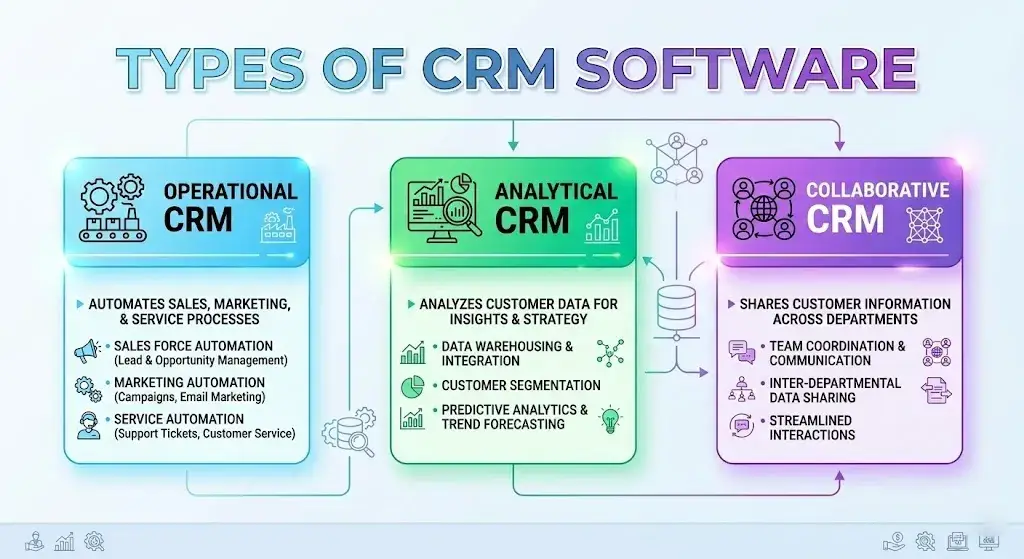
CRM platforms fall into five categories. Most modern platforms blend characteristics of the first three.
Operational CRM. Automates sales, marketing, and service processes. This is what most people mean by “CRM.” Examples: Salesforce Sales Cloud, HubSpot CRM, Pipedrive.
Analytical CRM. Emphasizes data analysis: customer segmentation, lifetime value modeling, campaign performance, buying patterns. Often layered on top of an operational CRM.
Collaborative CRM. Designed for cross-departmental communication—sharing customer data between sales, support, and marketing so no team operates in a silo.
Industry-specific CRM. Tailored for verticals like real estate (Follow Up Boss), healthcare (Veeva), or education. These platforms include compliance features, industry workflows, and terminology that horizontal CRMs don’t offer out of the box. See our guide to CRM software for education for an example.
Cloud vs. on-premise. Nearly all modern CRM is cloud-based (SaaS). On-premise deployment still exists for organizations with strict data sovereignty or compliance requirements (HIPAA, ITAR, FedRAMP), but it adds infrastructure cost and maintenance burden. For most U.S. businesses, cloud CRM is the default.
Who Needs CRM Software?
Small businesses (<25 employees). If you’re managing more than ~50 active customer relationships and your team is losing track of follow-ups, a CRM makes sense. Start with a free CRM or low-cost plan.
Startups. SaaS startups often adopt CRM early because their sales model depends on pipeline velocity and investor-facing KPIs (MRR, churn, CAC). A CRM is table stakes for fundraising conversations.
Mid-market companies (25–1,000 employees). This is where CRM complexity scales. Multiple teams share one system. Integrations with ERP, marketing automation, and billing become critical.
Enterprise (1,000+ employees). Enterprises need advanced security (SOC 2, SSO, field-level permissions), multi-currency/multi-language support, complex workflow engines, and sandbox environments.
B2B vs. B2C. B2B companies rely heavily on deal pipeline and account management. B2C companies need segmentation, marketing automation, and omnichannel communication at scale.
Industry-specific fit:
- SaaS → Pipeline velocity, churn tracking, product usage integration
- Agencies / freelancers → Project-linked contacts, retainer tracking. See our best CRM for freelancers guide.
- E-commerce → Order history, abandoned cart flows, customer segmentation
- Healthcare → HIPAA compliance, patient record separation, consent management
- Real estate → Property-linked contacts, showing schedules, MLS integration
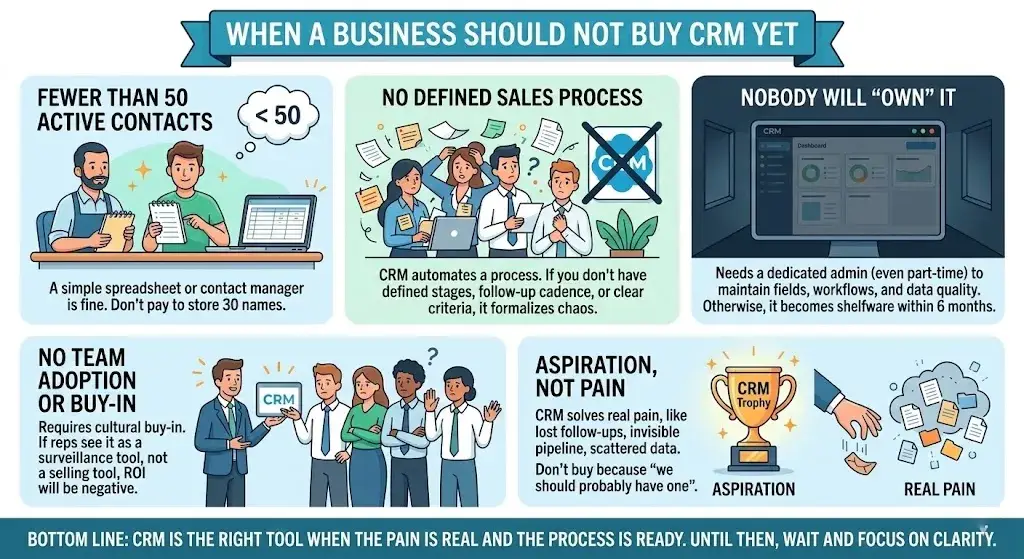
When a Business Should NOT Buy CRM Yet
Not every business needs a CRM right now. Here are the honest signals that you’re not ready:
- You have fewer than ~50 active contacts. A spreadsheet or simple contact manager is fine. Don’t pay for a CRM to store 30 names.
- You don’t have a sales process to automate. CRM automates a process. If you don’t have one—no defined stages, no follow-up cadence, no clear qualification criteria—the CRM will just formalize chaos.
- Nobody will own it. A CRM without a dedicated admin (even part-time) becomes shelfware within 6 months. If no one will maintain fields, workflows, and data quality, wait.
- Your team isn’t willing to adopt it. CRM adoption requires cultural buy-in. If leadership won’t enforce usage and reps see it as a surveillance tool rather than a selling tool, ROI will be negative.
- You’re buying based on aspiration, not pain. If you’re solving a problem, CRM works. If you’re buying it because “we should probably have one,” you’ll waste both money and attention.
Bottom line: CRM solves real pain—lost follow-ups, invisible pipeline, scattered data. If you don’t have that pain yet, wait until you do. Timing matters.
CRM Software Pricing Explained
CRM pricing is consistently one of the most opaque areas in SaaS. The sticker price is never the full cost.
Common Pricing Models
| Pricing Model | How It Works | Typical Range (USD) |
|---|---|---|
| Free tier | Limited users and features; good for testing and small teams | $0 (HubSpot, Zoho, Freshsales) |
| Per-user/month (Starter) | Entry-level paid plan; basic automation and limited storage | $14–$25/user/mo |
| Per-user/month (Professional) | Full pipeline, reporting, workflow automation, integrations | $49–$100/user/mo |
| Per-user/month (Enterprise) | Advanced customization, AI, sandbox, security, API access | $100–$350+/user/mo |
| Platform/bundle pricing | Flat fee for a set of users + modules (common with marketing CRMs) | $800–$3,600+/mo |
| Usage-based add-ons | Extra charges for contacts, emails sent, API calls, storage | Varies widely |
What Drives Price Differences
Vendors price based on the number of users, contacts, feature modules (sales vs. marketing vs. service), automation limits, storage capacity, support tier, and AI/advanced feature access. Two companies on the same per-user rate can have vastly different total costs depending on add-ons.
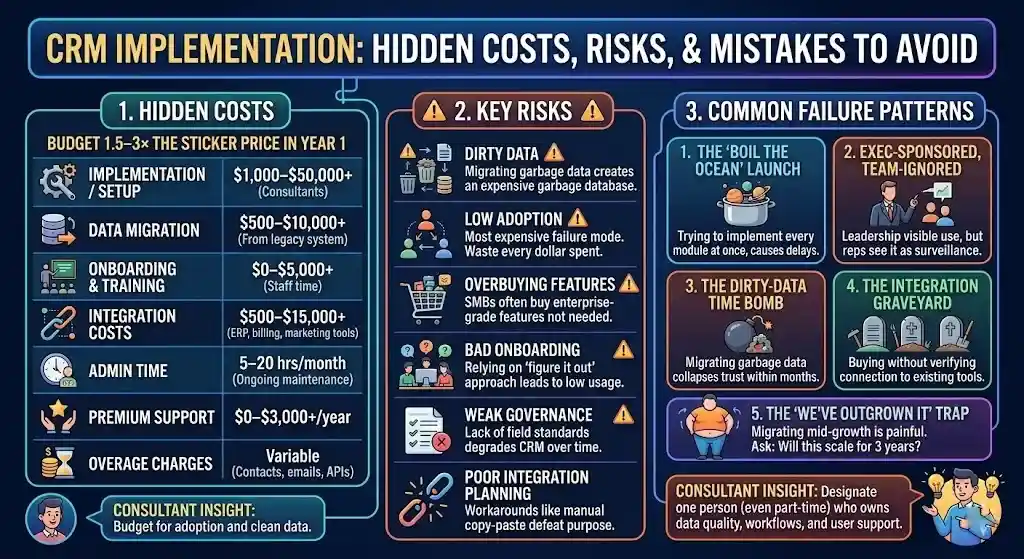
Hidden Costs Most Buyers Miss
| Hidden Cost | Typical Range | Notes |
|---|---|---|
| Implementation / setup | $1,000–$50,000+ | Mid-market and enterprise; may require consultant |
| Data migration | $500–$10,000+ | Moving contacts, deals, history from legacy system |
| Onboarding and training | $0–$5,000+ | Staff time + potential consultant fees |
| Integration costs | $500–$15,000+ | Connecting CRM to ERP, billing, marketing tools |
| Admin time | 5–20 hrs/month ongoing | Maintaining fields, workflows, reports, permissions |
| Premium support | $0–$3,000+/year | Many vendors charge for priority support or dedicated CSMs |
| Overage charges | Variable | Exceeding contact limits, email sends, API call quotas |
Representative Pricing Snapshot
Pricing checked on: March 2025. All rates are approximate annual-billing prices. Verify current pricing on each vendor’s official pricing page before purchasing.
| Vendor | Free Plan | Starter | Mid-Tier | Enterprise | Official Pricing Page |
|---|---|---|---|---|---|
| HubSpot | Yes (robust) | ~$15/user/mo | ~$90–$100/user/mo | ~$150/user/mo | hubspot.com/pricing |
| Salesforce | Limited | ~$25/user/mo | ~$100/user/mo | ~$165–$330/user/mo | salesforce.com/pricing |
| Zoho CRM | Yes (3 users) | ~$14/user/mo | ~$23–$40/user/mo | ~$52/user/mo | zoho.com/crm/zohocrm-pricing |
| Pipedrive | No | ~$14/user/mo | ~$49/user/mo | ~$79/user/mo | pipedrive.com/pricing |
| Freshsales | Yes | ~$9/user/mo | ~$39/user/mo | ~$69/user/mo | freshworks.com/crm/pricing |
Total Cost of Ownership (TCO)
TCO = (Per-user price × users × 12 months) + implementation + migration + training + integrations + admin time + add-ons/overages
Consultant insight: The license price is not the buying price. A 20-person sales team on a $50/user/month plan with moderate setup needs will realistically spend $18,000–$35,000 in year one—not the $12,000 the pricing page implies.
Bottom line: Budget for 1.5–3× the listed per-seat price in year one once you factor in hidden costs. After year one, ongoing costs drop closer to license + admin.
How to Calculate CRM ROI
The ROI Formula
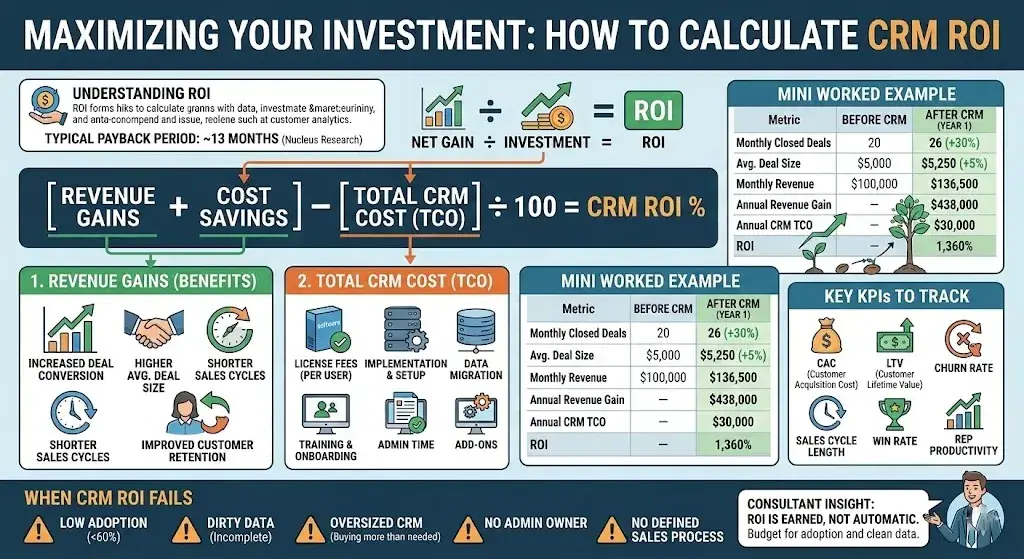
CRM ROI = [(Revenue gains + Cost savings) – Total CRM cost] ÷ Total CRM cost × 100
Revenue gains include increased deal conversion, higher average deal size, shorter sales cycles, and improved customer retention. Cost savings include reduced manual data entry, fewer lost leads, lower customer acquisition cost (CAC), and consolidated tooling.
Mini Worked Example
| Metric | Before CRM | After CRM (Year 1) |
|---|---|---|
| Monthly closed deals | 20 | 26 (+30%) |
| Average deal size | $5,000 | $5,250 (+5% via better upselling) |
| Monthly revenue | $100,000 | $136,500 |
| Annual revenue gain | — | $438,000 |
| Annual CRM cost (TCO) | — | $30,000 |
| ROI | — | 1,360% |
This example assumes clean data, trained reps, and genuine adoption. Change any of those assumptions, and ROI drops significantly.
Key KPIs to Track
- Customer Acquisition Cost (CAC): Did CRM reduce per-customer acquisition cost?
- Customer Lifetime Value (CLV/LTV): Are customers staying longer and spending more?
- Churn rate: Has proactive outreach via CRM reduced churn?
- Sales cycle length: Are deals closing faster with better pipeline management?
- Win rate: Is the percentage of deals won improving?
- Rep productivity: Are reps spending less time on admin and more time selling?
Payback Period
Industry data suggests an average CRM payback period of approximately 13 months (Nucleus Research). Companies with strong onboarding, clean data, and executive sponsorship often break even faster. Companies that skip training and ignore data hygiene may never break even.
When CRM ROI Fails
ROI is weak or negative when:
- User adoption is below ~60%
- Data is dirty, duplicated, or incomplete
- The CRM was oversized for the team’s actual needs
- No one owns CRM administration or governance
- The business lacks a defined sales process to automate
Bottom line: CRM ROI is not automatic—it’s earned. The $8.71-per-dollar-spent average is a good-implementation average, not a guarantee.
Benefits of CRM Software by Team
Sales. Pipeline visibility, automated follow-up reminders, deal tracking, forecast accuracy, quota management. Reps stop losing deals because they forgot to follow up.
Marketing. Lead scoring, campaign attribution, audience segmentation, email automation, and landing page tracking. Marketing proves which campaigns drive revenue, not just clicks. For marketing-focused teams, see our best CRM for marketing automation roundup.
Customer Support. Ticket routing, SLA management, customer history access, knowledge base, omnichannel communication. Agents resolve issues faster with full context.
Customer Success. Health scoring, renewal tracking, expansion signals, automated check-in workflows. CS teams intervene before churn happens.
RevOps & Leadership. End-to-end funnel analytics, forecast accuracy, revenue attribution, cross-team reporting. Decisions based on data, not anecdote.
Hidden Costs, Risks, and Implementation Mistakes
Dirty data. Migrating garbage data into a new CRM gives you a more expensive garbage database. Clean, deduplicate, and standardize data before migration.
Low adoption. The most expensive CRM failure mode. If reps don’t use the system, every dollar is wasted. Adoption requires training, executive mandate, and workflows that make reps’ lives easier—not harder.
Overbuying features. A 10-person team does not need enterprise-grade CRM. Start with what you need now and upgrade when the pain is real.
Bad onboarding. Relying on “figure it out” adoption leads to spotty usage, inconsistent data, and abandoned features.
Weak governance. Without field standards, pipeline stage definitions, required fields, and data hygiene rules, the CRM degrades over time. Assign a CRM owner from day one.
Poor integration planning. If the CRM doesn’t connect to your email, calendar, billing, and marketing tools, teams work around it instead of in it.
Consultant insight: A CRM without admin ownership becomes shelfware. Designate one person (even 5 hours/week) who owns data quality, workflow maintenance, and user support.
Common CRM Failure Patterns
Based on patterns we’ve observed across hundreds of CRM selection and implementation projects, here are the five most common ways CRM deployments fail:
1. The “boil the ocean” launch. Teams try to implement every module, integration, and custom workflow at once. Result: delayed go-live, overwhelmed users, and a bloated system nobody understands. Better approach: launch with core pipeline features, add modules in 90-day phases.
2. The executive-sponsored, team-ignored rollout. Leadership buys the CRM but never uses it personally. Reps see it as overhead, not a tool. Critical fix: leadership must visibly use the CRM in forecast reviews and deal strategy meetings.
3. The dirty-data time bomb. Old records are migrated without deduplication, field standardization, or data validation. Within 90 days, the CRM is full of duplicates and dead contacts, and trust in the system collapses.
4. The integration graveyard. The CRM was purchased without verifying it connects to existing tools (email, billing, marketing platform). Teams resort to manual copy-paste, defeating the purpose.
5. The “we’ve outgrown it” trap. A company buys a lightweight CRM for a 5-person team, scales to 50 users, and realizes the platform can’t handle custom objects, multi-team permissions, or advanced reporting. Migration mid-growth is painful and expensive. When choosing, ask: will this scale for 3 years?
The 30–60–90 Day CRM Implementation Reality
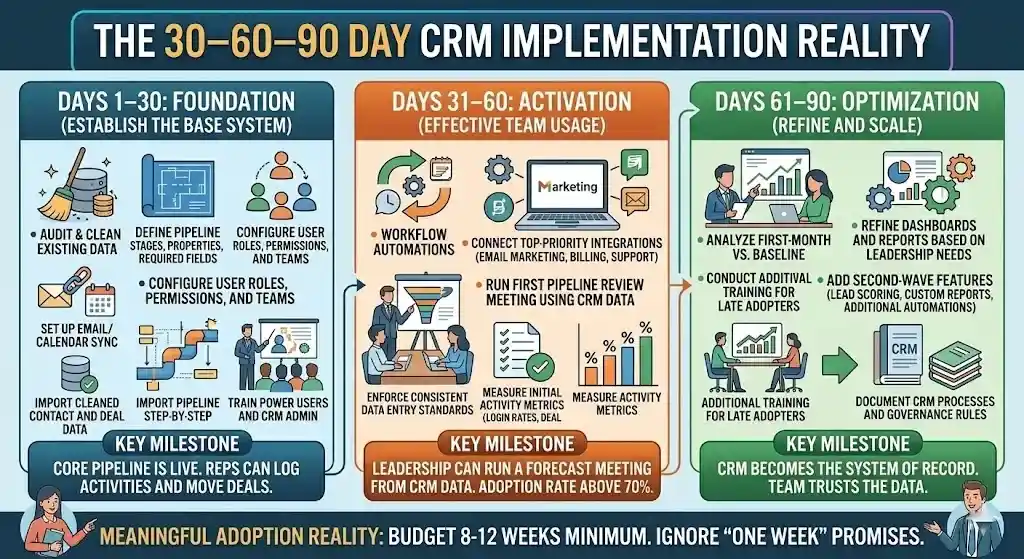
Most CRM vendors promise fast setup. Here’s what a realistic 90-day implementation actually looks like for a mid-market company:
Days 1–30: Foundation
- Audit existing customer data and clean duplicates
- Define pipeline stages, deal properties, required fields
- Configure user roles, permissions, and teams
- Set up email and calendar sync
- Import cleaned contact and deal data
- Train power users and CRM admin
Key milestone: Core pipeline is live. Reps can log activities and move deals.
Days 31–60: Activation
- Launch workflow automations (follow-up reminders, lead assignment)
- Connect top-priority integrations (email marketing, billing, support)
- Run first pipeline review meeting using CRM data
- Enforce consistent data entry standards
- Measure initial activity metrics (login rates, deal updates)
Key milestone: Leadership can run a forecast meeting from CRM data. Adoption rate is above 70%.
Days 61–90: Optimization
- Analyze first-month pipeline metrics vs. baseline
- Refine dashboards and reports based on leadership needs
- Add second-wave features (lead scoring, custom reports, additional automations)
- Conduct additional training for late adopters
- Document CRM processes and governance rules
Key milestone: CRM becomes the system of record. Team trusts the data.
Bottom line: If someone tells you CRM implementation takes a week, they’re selling—not implementing. Budget 8–12 weeks minimum for meaningful adoption.
CRM Software vs. Other Tools
CRM overlaps with several adjacent categories. Here’s where to draw the line.
| Tool | Primary Focus | Overlap with CRM | When to Use Instead or Alongside |
|---|---|---|---|
| Spreadsheets | Manual data tracking | Contact lists, deal tracking | Pre-CRM stage: <50 contacts and no sales process |
| ERP | Back-office operations (finance, inventory, HR) | Customer records, order data | Use alongside CRM; ERP handles fulfillment, CRM handles relationships |
| Marketing automation | Campaign execution, lead nurturing | Email campaigns, lead scoring | Often built into CRM; standalone for complex multi-channel orchestration. See tools like ActiveCampaign or Mailchimp |
| CDP | Unified customer data from all sources | Customer profiles | Use alongside CRM when you have multiple data sources feeding customer records |
| Help desk software | Ticket management, agent workflows | Support interactions | Some CRMs include ticketing; standalone for large support-only operations. See our Zendesk vs Intercom comparison |
CRM vs. spreadsheets is the most common comparison for early-stage teams. A spreadsheet works until you have multiple people needing simultaneous access, need automatic activity logging, or want pipeline analytics. At that point, even a free CRM outperforms any spreadsheet.
Bottom line: CRM is the system of record for customer relationships. Other tools handle adjacent functions—and usually integrate with the CRM rather than replace it.
CRM KPIs That Actually Matter
Once your CRM is live, track these metrics to measure whether it’s delivering value:
| KPI | What It Measures | Why It Matters |
|---|---|---|
| Win rate | % of deals won vs. total created | Shows if CRM is helping reps close |
| Pipeline velocity | Speed of deals moving through stages | Reveals bottlenecks and forecasting reliability |
| Sales cycle length | Average days from lead to close | Shorter cycles = faster revenue |
| Forecast accuracy | Predicted vs. actual close rates | Measures data quality and pipeline health |
| Expansion revenue / NRR | Revenue from upsells, cross-sells, renewals | Indicates retention and account growth |
| Lead-to-opportunity ratio | % of leads that become qualified deals | Shows marketing-sales alignment |
| CRM adoption rate | % of active users logging activities weekly | Leading indicator of CRM ROI |
| CAC (Customer Acquisition Cost) | Total sales + marketing spend ÷ new customers | Should decrease with CRM efficiency |
Consultant insight: The most important early metric is CRM adoption rate. If adoption is below 60%, nothing else on this list will improve.
How to Choose the Best CRM Software
Buyer Checklist
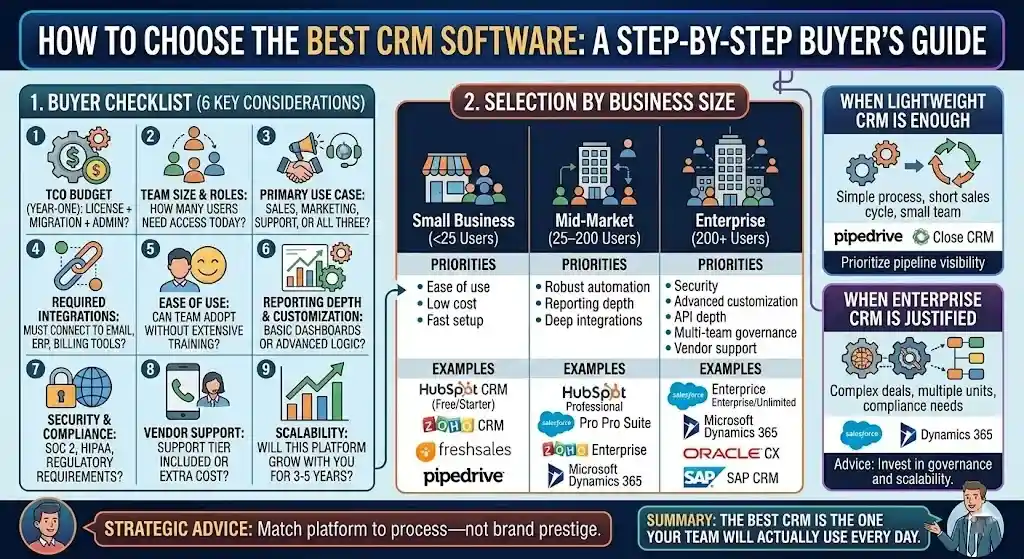
Use this when evaluating any CRM platform:
- Budget: What is your realistic year-one TCO budget (not just license cost)?
- Team size: How many users need access today—and in 12 months?
- Primary use case: Sales pipeline? Marketing automation? Support? All three?
- Required integrations: What tools must the CRM connect to (email, calendar, ERP, billing)?
- Ease of use: Can your team realistically adopt it without extensive training?
- Reporting depth: Do you need basic dashboards, or advanced custom reporting?
- Customization: Do you need custom objects, fields, and workflow logic?
- Security and compliance: Do you need SOC 2, HIPAA, CCPA compliance, or SSO?
- Mobile access: Do field teams need a full-featured mobile app?
- Vendor support: What support tier is included, and what costs extra?
- Data migration: How complex is your migration from an existing system?
- Scalability: Will this platform grow with you for 3–5 years?
Selection by Business Size
Small business / startup (<25 users): Prioritize ease of use, low cost, and fast setup. HubSpot CRM, Zoho CRM, Freshsales, or Pipedrive are common starting points. You probably don’t need enterprise features yet. Browse our full best CRM software ranking for more options.
Mid-market (25–200 users): You need solid automation, reporting depth, and integrations with your existing stack. HubSpot Professional, Salesforce Pro Suite, Zoho Enterprise, or Microsoft Dynamics 365 are typical fits.
Enterprise (200+ users): Prioritize security, customization, API depth, multi-team governance, and vendor support. Salesforce Enterprise/Unlimited, Microsoft Dynamics 365, or Oracle CX are the usual contenders.
When a Lightweight CRM Is Enough
If your sales process is straightforward (few stages, short cycle, small team), a focused CRM like Pipedrive or Close CRM offers pipeline visibility without the complexity tax. Don’t buy Salesforce for a 5-person team with a 3-stage pipeline.
When an Enterprise CRM Is Justified
If you have complex deal structures, multiple business units sharing customer data, regulatory compliance requirements, or need deep customization and extensive API integrations, an enterprise CRM pays for itself in governance and scalability.
Bottom line: Match the platform to the process—not to brand prestige. The “best” CRM is the one your team will actually use every day.
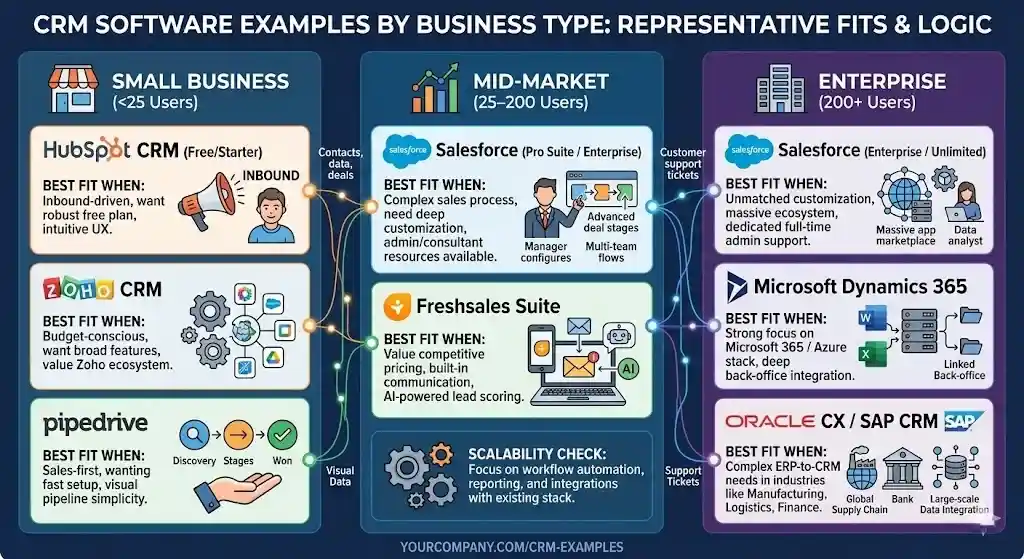
CRM Software Examples by Business Type
These are representative examples with fit logic—not endorsements. Your requirements should drive the choice.
Small Business
HubSpot CRM (Free / Starter)
- Best fit when: You’re an inbound-driven business wanting a robust free plan with intuitive UX and built-in marketing tools.
- Not ideal when: You need deep pipeline customization or advanced reporting at scale—HubSpot’s more powerful features are locked behind higher-priced tiers.
- Trade-offs: Free tier is generous, but growth from Free to Professional is a significant price jump.
Zoho CRM
- Best fit when: You’re budget-conscious, want a broad feature set, and value the Zoho ecosystem (Zoho Books, Zoho Desk, etc.).
- Not ideal when: Your team needs polished UX—Zoho’s interface is functional but not as refined as HubSpot or Pipedrive.
- Trade-offs: Excellent value per user, but can feel overwhelming with so many built-in apps. See how it compares in our Zoho CRM vs Salesforce analysis.
Pipedrive
- Best fit when: You’re a sales-first team wanting fast setup, visual pipeline management, and simplicity.
- Not ideal when: You need built-in marketing automation, ticketing, or customer success features.
- Trade-offs: Best-in-class pipeline UX, but limited marketing features force bolting on separate tools. Check Pipedrive alternatives if you need broader functionality.
Mid-Market
Salesforce (Pro Suite / Enterprise)
- Best fit when: Your sales process is complex, you need deep customization, and you’ll invest in an admin or Salesforce consultant.
- Not ideal when: You have a small team with a simple pipeline—Salesforce’s power comes with configuration overhead.
- Trade-offs: Unmatched ecosystem and scalability, but steep learning curve and total cost of ownership.
Freshsales Suite
- Best fit when: You want competitive pricing with built-in phone, email, and AI-powered lead scoring in one platform.
- Not ideal when: You need advanced enterprise customization or a massive third-party app marketplace.
- Trade-offs: Good all-in-one value, but smaller integration ecosystem than Salesforce or HubSpot. Compare in our Freshsales alternatives guide.
Enterprise
Salesforce (Enterprise / Unlimited)
- The default enterprise CRM—unmatched customization, app ecosystem, and scalability. Requires dedicated Salesforce admin and budget for integration/consulting.
Microsoft Dynamics 365
- Deep integration with Microsoft 365, Power Platform, and Azure. Strong for Microsoft-centric organizations. More complex pricing with module-based structure.
Oracle CX / SAP CRM
- Common in industries with complex ERP-to-CRM integration needs (manufacturing, logistics, financial services).
How We Evaluated CRM Software
Methodology
This guide is not based on fabricated hands-on product testing. Our evaluation framework includes:
| Criterion | Weight | How We Assessed |
|---|---|---|
| Published pricing accuracy | 25% | Verified directly on official vendor pricing pages (March 2025) |
| Feature breadth and depth | 25% | Analyzed published feature matrices spanning sales, marketing, service, and AI capabilities |
| Industry research and ROI data | 20% | Cross-referenced analyst reports (Nucleus Research, Gartner/Forrester coverage), aggregated ROI benchmarks |
| Real-world buyer pain points | 15% | Synthesized insights from user review platforms (G2, Capterra, TrustRadius), business buyer forums, and our editorial team’s advisory experience |
| Integration ecosystem | 15% | Evaluated published API documentation, native integration counts, and marketplace breadth |
Sample Selection
We focused on the CRM platforms most relevant to U.S. business buyers across small business, mid-market, and enterprise segments. This includes category leaders (Salesforce, HubSpot, Microsoft Dynamics 365) as well as strong contenders (Zoho CRM, Pipedrive, Freshsales, Close CRM, monday CRM, Insightly).
Limitations
- Pricing and features change frequently. We note when prices were last verified.
- We do not have proprietary access to all vendors’ back-end analytics or internal roadmaps.
- ROI benchmarks are aggregated industry averages—individual results vary based on implementation quality, team size, and adoption.
FAQs About CRM Software
What is CRM software?
CRM software is a platform that centralizes customer data, tracks interactions across sales, marketing, and support, automates workflows, and provides analytics. It manages the full customer lifecycle from lead capture through retention.
What does CRM stand for?
CRM stands for customer relationship management. It refers to both the business strategy of managing customer interactions and the software platforms that enable that strategy at scale across sales, marketing, and service teams.
How much does CRM software cost?
CRM software ranges from free (HubSpot, Zoho) to $350+/user/month for enterprise tiers. Most small businesses pay $14–$50/user/month. Total cost of ownership—including setup, migration, and training—is typically 1.5–3× the sticker price.
Is CRM software worth it for small businesses?
Yes, if you have a real sales pipeline and more than ~50 active contacts. For very small operations with minimal customer interactions, a spreadsheet suffices temporarily. Break-even typically comes within 6–13 months with proper adoption.
What is the ROI of CRM software?
Research from Nucleus Research indicates an average return of $8.71 per $1 spent. Actual ROI depends heavily on data quality, user adoption, and whether the business has a defined sales process the CRM can automate.
What are the main types of CRM?
Three main types: operational (automates sales/marketing/service), analytical (data analysis and customer insights), and collaborative (cross-team information sharing). Most modern CRM platforms blend all three.
CRM vs. ERP: what is the difference?
CRM manages front-office functions—sales, marketing, customer service. ERP manages back-office operations—finance, inventory, HR, manufacturing. They serve different purposes but often integrate to share customer and order data.
What features should CRM software have?
At minimum: contact management, deal pipeline, email sync, task management, and basic reporting. As you scale, look for workflow automation, marketing automation, analytics, mobile access, AI assistance, and API integrations.
How does CRM software help sales teams?
CRM gives reps pipeline visibility, automated follow-up reminders, email tracking, deal forecasting, and activity logging. It reduces time on administrative work and increases time spent selling—research suggests up to 34% productivity improvement.
What is the best CRM for startups?
No universal best. HubSpot CRM’s free tier is popular for inbound-led startups. Pipedrive suits sales-driven teams wanting simplicity. Zoho CRM works for budget-conscious teams needing broad features. See our best CRM software comparison.
Is cloud CRM better than on-premise?
For most U.S. businesses, yes. Cloud CRM offers lower upfront cost, automatic updates, remote access, and faster deployment. On-premise is justified only for organizations with strict data sovereignty or regulatory compliance requirements (HIPAA, FedRAMP, ITAR).
When should a business NOT buy CRM software?
When you have fewer than ~50 active contacts, no defined sales process, no person to manage the system, or a team unwilling to adopt a new tool. In those cases, a CRM becomes an expensive database nobody uses.
Conclusion
Understanding what CRM software is is the easy part: it’s the central system businesses use to manage customer data, sales pipelines, marketing outreach, and service interactions. The harder question is whether it’s the right investment for your business right now.
CRM is worth buying when you have a real sales process, enough customer relationships to justify a system, and a team willing to adopt it.
CRM is worth avoiding—or delaying—when the problem is process clarity, not tooling; when nobody will own system administration; or when the team will treat it as overhead rather than infrastructure.
The global CRM market exceeds $100 billion (Fortune Business Insights, 2025) for a reason: when CRM software is implemented well, it consistently delivers measurable returns in revenue, retention, and productivity. When implemented poorly, it’s an expensive compliance exercise that gathers dust.
Start with a clear use case. Budget for the real cost, not the pricing page. Invest in adoption. And remember: the best CRM is the one your team actually uses.
About the author

I’m Macedona, an independent reviewer covering SaaS platforms, CRM systems, and AI tools. My work focuses on hands-on testing, structured feature analysis, pricing evaluation, and real-world business use cases.
All reviews are created using transparent comparison criteria and are updated regularly to reflect changes in features, pricing, and performance.