Salesforce pricing ranges from $0 (Free Suite, 2-user cap) to $550/user/month (Agentforce 1 Sales), with paid plans starting at $25/user/month billed annually. But the listed price per seat rarely reflects what you’ll actually pay once add-ons, support plans, implementation, and admin resources are factored in. This guide breaks down every tier, shows real total costs, and helps you choose the right plan.
Written by Macedona — CRM consultant and reviewer specializing in SaaS procurement, CRM implementation strategy, and total-cost analysis for SMB, mid-market, and enterprise buyers. More about the author.
Last updated: February 2026. All prices are publicly listed USD rates billed annually unless otherwise noted. Final quotes vary by org size, contract terms, and negotiation.
How We Researched This Guide
- Official Salesforce pricing pages reviewed February 2026 (salesforce.com/pricing, Sales Cloud pricing)
- Salesforce Agentforce pricing page for AI/Flex Credits/conversation pricing (salesforce.com/agentforce)
- Cross-referenced with real procurement cycles and Salesforce Certified Partner consultations
- Common buyer pitfalls observed across 50+ CRM evaluations
Every price is labeled: List price (public), Market estimate (industry range), or Contract-dependent (ask for quote).
Editorial Policy
We verify pricing against official vendor pages and reputable sources. We do not accept paid placement or sponsored content. See our editorial policy and review methodology for details.
Key Terms in This Guide
- Starter Suite / Pro Suite: All-in-one CRM bundles for SMBs (sales + service + marketing basics)
- Enterprise / Unlimited: Dedicated per-cloud tiers with advanced customization, AI, and API access
- Sales Cloud / Service Cloud: Salesforce’s core products for sales pipeline and customer service workflows
- Agentforce / Flex Credits: Salesforce’s AI platform and its usage-based pricing model
- Data Cloud: Unification layer for customer data across systems
- AppExchange: Salesforce’s marketplace for third-party apps and integrations
- Success Plans (Standard / Premier / Signature): Tiered support packages from self-service to dedicated CSM
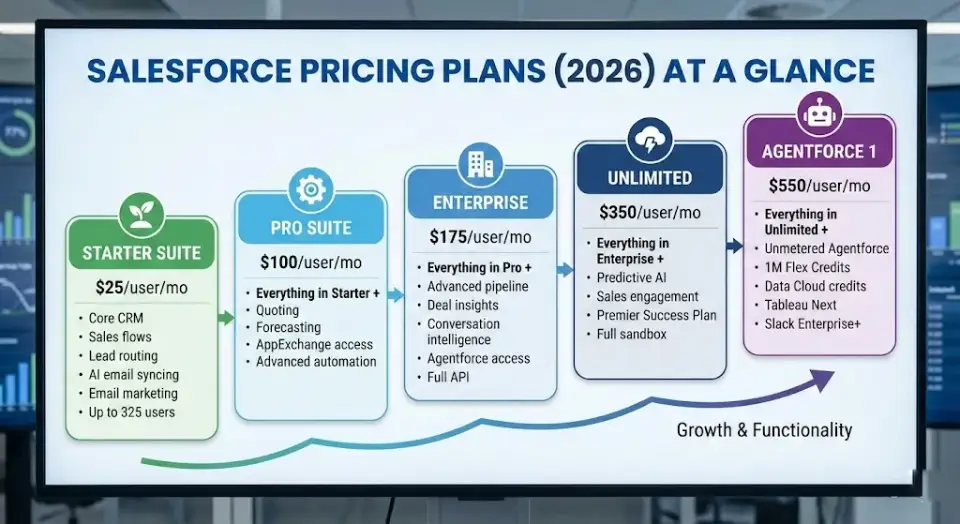
Salesforce Pricing Plans (2026) at a Glance
Here’s what Salesforce costs per user across all current editions. All prices are per user, per month, billed annually in USD.
| Plan | Price | Best For | Key Capabilities |
|---|---|---|---|
| Starter Suite | $25/user/mo | Small businesses needing core CRM | Sales flows, lead routing, AI email syncing, email marketing, unlimited users |
| Pro Suite | $100/user/mo | Growing teams needing customization | Everything in Starter + quoting, forecasting, AppExchange access, advanced automation |
| Enterprise | $175/user/mo | Mid-market / scaling organizations | Everything in Pro + advanced pipeline management, deal insights, conversation intelligence, Agentforce, full API |
| Unlimited | $350/user/mo | Large orgs needing max flexibility | Everything in Enterprise + predictive AI, sales engagement, Premier Success Plan included, full sandbox |
| Agentforce 1 Sales | $550/user/mo | AI-first enterprises | Everything in Unlimited + unmetered Agentforce, 1M Flex Credits, Data Cloud credits, Tableau Next, Slack Enterprise+ |
Source: Salesforce Sales Cloud pricing page, verified February 2026.
Quick take: Most businesses land on Pro Suite ($100) or Enterprise ($175). Enterprise is the first tier with full API access — if you need integrations, that’s your floor. Unlimited ($350) only makes sense if you’ll actually use predictive AI and sales engagement or want Premier Support included.
Who Should Choose Which Plan? (30-Second Guide)
| Your Situation | Recommended Plan | Annual Cost per User |
|---|---|---|
| Small team, simple pipeline, ≤10 users | Starter Suite | $300/yr |
| Need forecasting, quoting, AppExchange apps | Pro Suite | $1,200/yr |
| Multi-department, need API + integrations | Enterprise | $2,100/yr |
| Need predictive AI + included Premier Support | Unlimited | $4,200/yr |
| AI-first strategy with proven data maturity | Agentforce 1 Sales | $6,600/yr |
| Budget is the top priority | Consider Salesforce alternatives | Varies |
How Salesforce Pricing Actually Works
Understanding the pricing architecture is essential before comparing plans. If you’re new to CRM concepts, our guide to CRM software covers the fundamentals.
Per-Seat Licensing, No Flat Rates
Every edition charges per user, per month. There are no flat-rate plans and no “viewer-only” free tiers. If 50 people need CRM access, you’re paying for 50 seats.
Suites vs. Clouds
Salesforce organizes products in two layers:
- Suites (Starter, Pro): Bundled packages including sales, service, marketing, and commerce basics in one license. Aimed at SMBs.
- Clouds (Sales Cloud, Service Cloud, Marketing Cloud): Specialized products with deeper functionality. Enterprise, Unlimited, and Agentforce 1 plans are sold per-cloud.
Key implication: If you need both Sales Cloud and Service Cloud at the Enterprise level, you’re buying two cloud licenses per user or negotiating a bundle. This is where Salesforce subscription cost grows quickly.
Billing and Contracts
- Annual billing is the default and required for Enterprise+
- Monthly billing is only available for Starter and Pro Suites — typically costs 20–30% more than annual
- Most contracts are 12 months, with multi-year discounts possible
- Auto-renewal is standard — cancellation requires written notice 30–60 days before the renewal date
Editions Build Upward
Each tier includes everything in the tier below it, plus additional features. You cannot cherry-pick features from a higher tier without upgrading entirely or purchasing specific add-ons.
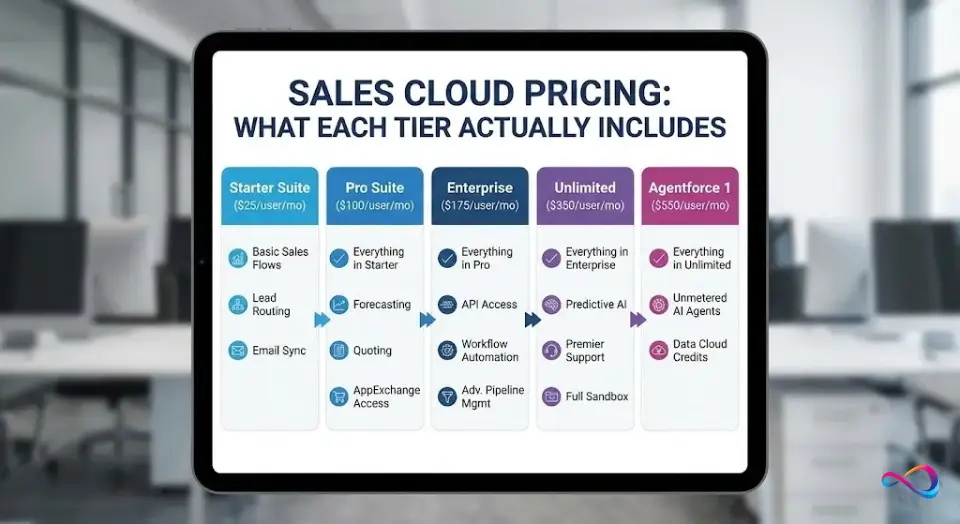
Sales Cloud Pricing: What Each Tier Actually Includes
Sales Cloud pricing mirrors the overall plan structure. Here’s who each tier serves — the kind of guidance you’d get from a best CRM for sales teams evaluation:
Starter Suite ($25/user/mo)
- Who it’s for: Small sales teams (3–15 reps) with straightforward pipelines
- What you get: Built-in sales flows, lead routing, AI-synced emails/events/contacts, dynamic email marketing and analytics, up to 325 users
- Limitations: Limited customization; no AppExchange; no forecasting; no APIs
- Verdict: Solid entry point. Adequate if you don’t need integrations or custom automations. Many startup CRM buyers start here.
Pro Suite ($100/user/mo)
- Who it’s for: Growing teams needing forecasting, quoting, and ecosystem connectivity
- What you get: Everything in Starter + sales quoting, forecasting, AppExchange access, greater customization and automation, lead scoring
- Limitations: No conversation intelligence; no advanced pipeline analytics; Premier Support is an add-on
- Verdict: The sweet spot for SMBs scaling their sales process. The 4× jump from Starter is worth it once you need forecasting or AppExchange apps. Ideal for small businesses evaluating CRM options.
Enterprise ($175/user/mo)
- Who it’s for: Mid-market companies with complex sales processes, multiple teams, or integration requirements
- What you get: Everything in Pro + advanced pipeline management, deal insights, conversation intelligence, Agentforce access, full API access, workflow automation, Einstein features as add-ons
- Limitations: Predictive AI requires Unlimited; no Premier Support included; no full sandbox
- Verdict: The most popular Salesforce Enterprise pricing tier for a reason — it balances power and price. Most serious deployments land here. Best for flexibility with workflows and process automation.
Unlimited ($350/user/mo)
- Who it’s for: Large organizations needing maximum flexibility, predictive AI, and included support
- What you get: Everything in Enterprise + in-depth lead and opportunity scoring, customer interactions and deal health insights, advanced forecasting, Premier Success Plan included, full sandbox
- Limitations: 2× the cost of Enterprise; many features go unused without dedicated admin resources
- Verdict: The Premier Support inclusion (worth ~30% of net license cost) partially closes the gap vs. Enterprise + Premier add-on. Top Gen AI features included.
Agentforce 1 Sales ($550/user/mo)
- Who it’s for: AI-first enterprises with clean data, governance frameworks, and specific AI use cases
- What you get: Everything in Unlimited + unmetered Agentforce usage, 1M Flex Credits/org/year, 2.5M Data Cloud Credits/org/year. May include Salesforce Spiff, Sales Planning, Salesforce Maps, Tableau Next, and Slack Enterprise+ (bundling varies by contract — confirm with your AE)
- Limitations: Highest per-seat cost; meaningful ROI requires data maturity
- Verdict: Only justifiable if your organization has a clear AI roadmap and the data infrastructure to execute it. Most companies are not there yet.
Service Cloud Pricing: Tiers and Key Differences
Service Cloud pricing tiers mirror Sales Cloud in structure and cost:
| Plan | Price | Key Service Differentiator |
|---|---|---|
| Starter Suite | $25/user/mo | Omni-channel case routing basics |
| Pro Suite | $100/user/mo | Knowledge base, service automation |
| Enterprise | $175/user/mo | Advanced case management, entitlement management, SLA workflows, API access |
| Unlimited | $350/user/mo | 24/7 Premier Support included, full sandbox, advanced analytics |
| Agentforce 1 Service | $550/user/mo | AI-powered service agents, unmetered Agentforce, Data Cloud |
Key Differences from Sales Cloud
- Service Cloud Enterprise adds entitlement management, milestone tracking, and SLA workflows not available in Sales Cloud
- Agentforce 1 Service enables AI-powered customer-facing agents — available at $2/conversation (list price) for external-facing agents as an alternative to per-seat pricing
- If you need both Sales and Service Cloud at Enterprise level, you’ll pay per-user for each cloud or negotiate a combined bundle
Who Should Choose Service Cloud?
- Companies where customer support is the primary CRM use case
- High-volume inbound support across email, chat, phone, and social
- Teams needing SLA tracking, knowledge bases, and omni-channel routing
For broader comparisons, our help desk solutions guide covers options across price points. If you’re evaluating Zendesk or Freshdesk as alternatives, those reviews offer direct pricing comparisons.
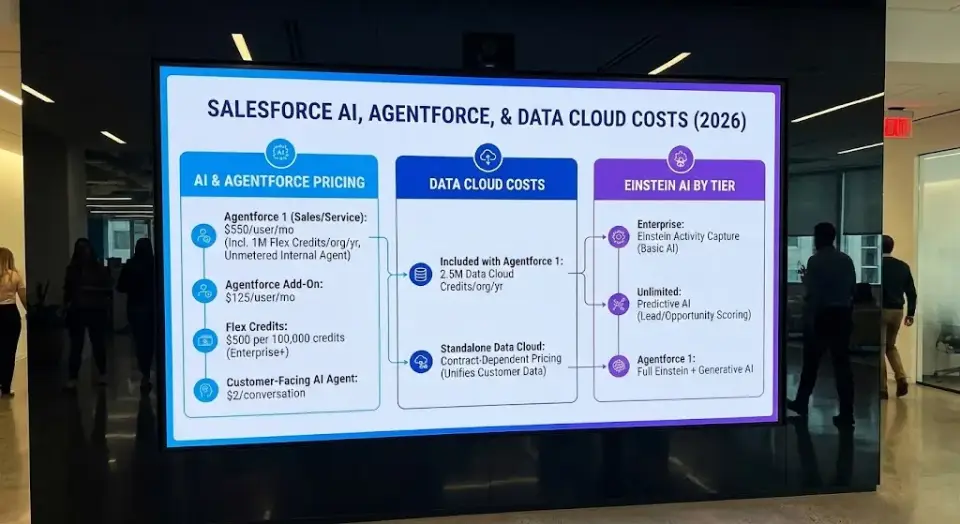
AI, Agentforce, and Data Cloud Costs in 2026
Salesforce AI pricing has shifted significantly with the Agentforce launch. Here’s what to budget:
Agentforce Pricing Table
| Component | Cost | Notes |
|---|---|---|
| Flex Credits | $500 per 100,000 credits | Power all AI agent actions; available on Enterprise+ |
| Agentforce 1 Sales / Service | $550/user/mo | Includes 1M Flex Credits/org/year + unmetered internal agent usage |
| Agentforce Add-On | $125/user/mo | Unmetered Agentforce, AI analytics, Prompt Builder |
| Agentforce Add-On (Industries) | $150/user/mo | Industry-customized AI tools |
| Customer-Facing AI Agent | $2/conversation | Alternative to credits for external-facing bots |
Source: Salesforce Agentforce pricing page, verified February 2026. Cross-referenced with Tech.co.
Einstein AI by Tier
- Enterprise: Includes Einstein Activity Capture (basic AI); AI features available as add-ons
- Unlimited: Adds predictive AI (lead scoring, opportunity scoring)
- Agentforce 1 Sales: Full Einstein + generative AI capabilities
Data Cloud
Data Cloud unifies customer data across systems. Agentforce 1 includes 2.5M Data Cloud Credits/org/year. For other editions, Data Cloud is a separate product with contract-dependent pricing.
AI Readiness Check (Before You Budget)
Before committing to Agentforce or Einstein:
- ✅ Is your CRM data clean, deduplicated, and consistently entered?
- ✅ Do you have data governance policies in place?
- ✅ Can you name 3+ workflows where AI measurably improves outcomes?
- ✅ Have you calculated the break-even for AI costs vs. productivity gains?
If fewer than 3 are checked: Start with Enterprise + Flex Credits for limited experimentation. Don’t buy Agentforce 1 on speculation.
Hidden Costs That Change the Bill
The Salesforce license cost on the pricing page is just the starting point. These add-ons are where total cost diverges from list price:
Cost Audit Checklist
- [ ] AppExchange subscriptions — Premium apps (CPQ, document generation, enrichment) range from $5–$100+/user/mo. Popular: Conga, DocuSign, ZoomInfo, LeanData.
- [ ] Data storage overages — Each edition includes base storage. Overages are billed per block (pricing varies by contract).
- [ ] Sandbox environments — Developer sandboxes included in Enterprise+. Full-copy sandboxes: $3,000–$6,000+/year.
- [ ] Integration middleware — MuleSoft starts at ~$15,000+/year. Simpler alternatives like Zapier or Workato: $50–$500+/month.
- [ ] Slack — Pro runs $8.75/user/mo. Included as Slack Enterprise+ in Agentforce 1. See our Slack review for details.
- [ ] Tableau — From $15/user/mo (Viewer) to $75/user/mo (Creator). Tableau Next bundled in Agentforce 1.
- [ ] Premier Support — ~30% of net license cost if not included in your edition.
- [ ] Dedicated admin — $70,000–$110,000/year for a US-based Salesforce admin.
Key takeaway: A $175/user Enterprise license can easily reach $300+/user/month when you factor in the full stack. Always model total cost before signing.
When to Upgrade to a Higher Tier
- Starter → Pro Suite: You need forecasting, quoting, or AppExchange apps
- Pro Suite → Enterprise: You need API access for integrations, complex workflow automation, or role-based permissions
- Enterprise → Unlimited: You need predictive AI, included Premier Support, or full-copy sandboxes
- Unlimited → Agentforce 1: You have clean data, governance in place, and specific AI agents driving measurable ROI
Support & Success Plans: What You Actually Get
| Plan | Cost | What’s Included | What’s Missing |
|---|---|---|---|
| Standard | Free | Knowledge articles, Trailhead, Trailblazer Community | No live support for non-critical issues |
| Premier | ~30% of net license cost | 24/7 support, expert coaching, health checks, proactive recommendations | No dedicated CSM |
| Signature | Contract-dependent | Designated CSM, proactive monitoring, fastest response times | Expensive; typically for 6-figure+ contracts |
What This Means in Practice
- On Enterprise with 50 users ($105,000/yr), Premier adds roughly $31,500/year
- On Unlimited, Premier is included — effectively reducing the real gap vs. Enterprise+Premier
- Signature is worth evaluating for 200+ users or mission-critical deployments
Tip: Premier’s 30% is applied to net license fees, not list price. If you’ve negotiated a 20% discount, your Premier cost drops accordingly.
Total Cost of Ownership: Implementation, Admins, Training
Salesforce implementation cost is the iceberg below the waterline. Here’s what to budget beyond licenses:
Implementation Costs
| Company Size | Typical Range | Notes |
|---|---|---|
| Small (5–10 users) | $5,000–$15,000 | Basic setup, data migration, light customization |
| Mid-market (50 users) | $20,000–$75,000 | Custom objects, workflow automation, integrations, training |
| Enterprise (200+ users) | $100,000–$500,000+ | Multi-cloud, complex integrations, change management |
Using a Salesforce Certified Partner is typically 20–40% less expensive than Salesforce Professional Services.
Ongoing Costs
- Admin: Part-time power user (small teams) → dedicated admin $70K–$110K/yr (50+ users) → admin team + developer $230K–$250K/yr (200+ users)
- Training: Free via Trailhead, but structured team onboarding costs $2,000–$10,000+
- Maintenance: 5–15% of initial implementation cost per year
Three Real-World Cost Scenarios
These show realistic annual costs with explicit assumptions. Your numbers will differ based on discounts, add-ons, and complexity.
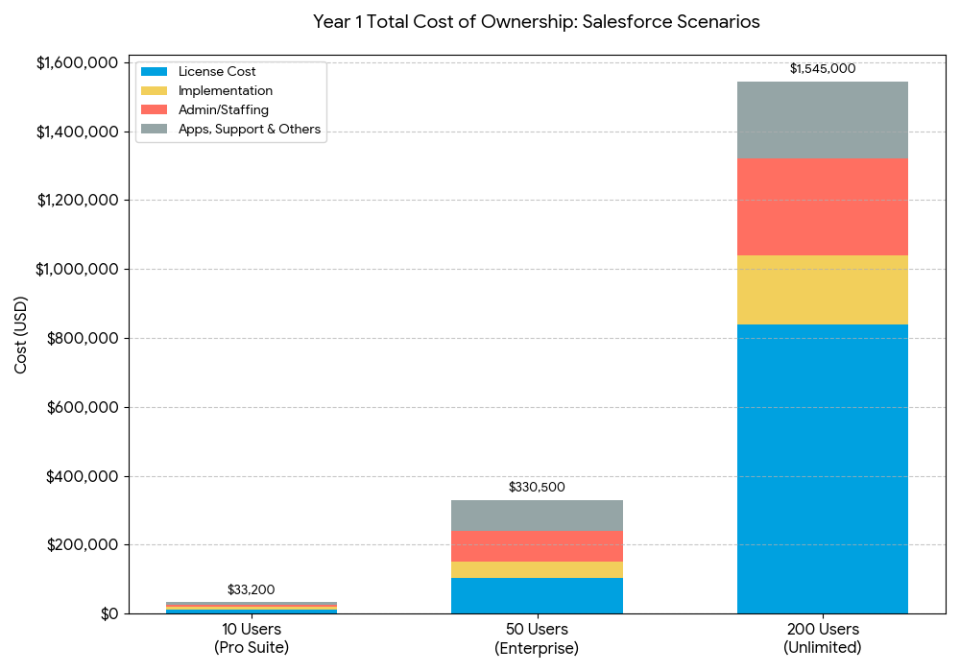
Scenario 1: 10 Users on Pro Suite
| Component | Annual Cost |
|---|---|
| Pro Suite licenses (10 × $100 × 12) | $12,000 |
| Implementation (Year 1 only) | $8,000 |
| 2 AppExchange apps (~$15/user/mo) | $3,600 |
| Premier Support (~30%) | $3,600 |
| Part-time admin (~10 hrs/mo) | $6,000 |
| Year 1 Total | ~$33,200 |
| Year 2+ Total | ~$25,200 |
Scenario 2: 50 Users on Enterprise
| Component | Annual Cost |
|---|---|
| Enterprise licenses (50 × $175 × 12) | $105,000 |
| Implementation (Year 1 only) | $45,000 |
| 3 AppExchange apps (~$20/user/mo) | $36,000 |
| Premier Support (~30%) | $31,500 |
| Full-time admin (US) | $90,000 |
| Storage + middleware + training | $23,000 |
| Year 1 Total | ~$330,500 |
| Year 2+ Total | ~$285,500 |
Assumes 2 integrations (ERP + marketing automation CRM).
Scenario 3: 200 Users on Unlimited
| Component | Annual Cost |
|---|---|
| Unlimited licenses (200 × $350 × 12) | $840,000 |
| Implementation (Year 1 only) | $200,000 |
| 5 AppExchange apps | $120,000 |
| Premier Support | $0 (included) |
| Admin team (2 admins + 1 dev) | $280,000 |
| Storage + sandboxes + MuleSoft | $75,000 |
| Agentforce Flex Credits (2M) | $10,000 |
| Training + change management | $20,000 |
| Year 1 Total | ~$1,545,000 |
| Year 2+ Total | ~$1,345,000 |
Note: Negotiated discounts (15–25% for contracts this size) are not reflected. These are list-price starting points.
Enterprise + Premier vs. Unlimited: Break-Even Analysis
The most common pricing question: Is it cheaper to buy Enterprise + add Premier Support, or just upgrade to Unlimited?
| Seat Count | Enterprise + Premier (30%) | Unlimited | Enterprise+Premier Saves |
|---|---|---|---|
| 50 users | $136,500/yr | $210,000/yr | $73,500 |
| 100 users | $273,000/yr | $420,000/yr | $147,000 |
| 200 users | $546,000/yr | $840,000/yr | $294,000 |
On pure cost, Enterprise + Premier is ~35% cheaper at any seat count. Upgrade to Unlimited only if you’ll use:
- Predictive AI (lead/opportunity scoring)
- Sales engagement (built-in cadences)
- Full-copy sandbox (for complex releases)
If not — stick with Enterprise + Premier and pocket the savings.
Choose the Right Plan: 5-Step Framework
Step 1: Assess Business Stage
- Under 10 users, single team? → Starter ($25) or Pro Suite ($100)
- 10–100 users, multiple departments? → Enterprise ($175)
- 100+ users, multi-region? → Unlimited ($350) or Agentforce 1 ($550)
Step 2: Evaluate Integration Needs
- Email sync only? → Starter or Pro Suite
- Need REST/SOAP API? → Enterprise (first tier with full API)
- Heavy middleware (MuleSoft)? → Enterprise+ with budget for middleware
Step 3: Gauge Automation Maturity
- Basic dashboards? → Pro Suite
- Complex automation, approval chains, custom reports? → Enterprise
- Predictive analytics? → Unlimited
Step 4: Determine AI Readiness
If you can’t answer “yes” to 3 of these, you’re not ready for Agentforce 1:
- Is CRM data clean and deduplicated?
- Do you have AI governance policies?
- Can you name 3 specific AI use cases?
- Have you calculated AI ROI break-even?
Step 5: Define Support Needs
- Self-service (Trailhead)? → Standard (free)
- 24/7 support + coaching? → Premier (~30% of license)
- Designated CSM? → Signature (contract-dependent)
Plan Picker: 6 Questions to Find Your Tier
- Need ERP or billing system integration? Yes → Enterprise+ | No → Starter/Pro Suite
- Need complex role-based permissions? Yes → Enterprise | No → Pro Suite
- Need sales forecasting with overlays? Yes → Pro Suite+ | No → Starter
- Need full-copy sandbox for testing? Yes → Unlimited | Dev sandbox → Enterprise | No → Pro Suite
- Need 24/7 included support? Yes → Unlimited | Willing to pay separately → Enterprise+Premier | No → Standard
- Have clean data ready for AI agents? Yes with use cases → Agentforce 1 | Experimenting → Enterprise+Flex Credits | No → Skip AI
Your result: The highest tier triggered by your “Yes” answers is your recommended starting plan.
Negotiation Playbook (US Market)
Salesforce pricing is negotiable — especially at Enterprise and above:
Before You Sign
- [ ] Get multiple quotes — request pricing for the tier you want and one tier lower
- [ ] Ask for multi-year discounts — 2–3 year commitments unlock 10–25% off
- [ ] Negotiate at end-of-quarter — Salesforce fiscal year starts February; quarters end April, July, October, January
- [ ] Benchmark against competitors — get a competing quote from HubSpot or use our Zoho CRM vs. Salesforce comparison for leverage
- [ ] Cap annual price increases — negotiate escalators down to 0–3% (default is often 3–7%)
- [ ] Right-size user count — you can add mid-contract but can’t reduce until renewal
Watch Out For
- Renewal traps: Auto-renewal is standard. Set a calendar reminder 90 days before renewal.
- Add-on creep: Audit AppExchange subscriptions annually.
- AI usage risk: Flex Credits consumed per action. Set consumption caps.
- Edition lock-in: Downgrading mid-contract is rarely permitted.
Questions for Your Account Executive
- “What’s included in my edition vs. add-on? Itemize the quote.”
- “What’s the renewal uplift cap? Can we lock a flat rate for 3 years?”
- “How is storage billed? What are overage rates?”
- “What support plan is included with this edition?”
- “What is the AI usage model — credits, per-conversation, or unmetered?”
Salesforce Alternatives and Pricing Comparisons
If Salesforce CRM pricing exceeds your budget or your needs are simpler:
| CRM | Starting Price | Best For | Key Difference vs. Salesforce |
|---|---|---|---|
| HubSpot CRM | Free (paid from $20/user/mo) | SMBs wanting marketing + sales in one platform | Free tier is far more generous; simpler UI |
| Microsoft Dynamics 365 | $65/user/mo | Microsoft-ecosystem companies | Tighter Office 365 integration |
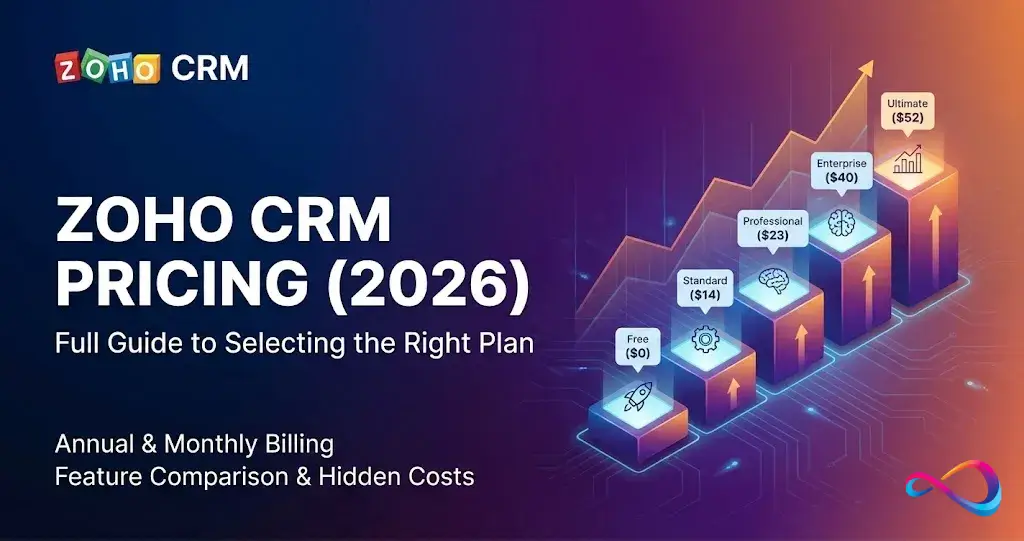
| Zoho CRM | Free for 3 users (paid from $14/user/mo) | Budget-conscious SMBs | Dramatically cheaper; solid automation |
| Freshsales | Free for 3 users (paid from $9/user/mo) | Small sales teams wanting AI at low cost | Built-in AI on lower tiers |
| Pipedrive | $14/user/mo | Pipeline-focused sales teams | Intuitive pipeline UI |
For a deeper dive, see our best CRM software review or the full Salesforce CRM review with feature scoring.
Salesforce vs. HubSpot Pricing
HubSpot’s free CRM tier is far more generous than Salesforce’s 2-user Free Suite — unlimited users with basic features. But HubSpot’s paid Hubs approach or exceed Salesforce costs at scale. HubSpot is easier to start with; Salesforce is more powerful to grow into. Full breakdown in our HubSpot vs. Salesforce comparison. Also see HubSpot CRM alternatives if you’re exploring options.
Salesforce vs. Dynamics 365 Pricing
Microsoft Dynamics 365 Sales Professional starts at $65/user/mo — cheaper than Salesforce Enterprise — and integrates natively with Outlook, Teams, and the Power Platform. Salesforce wins on ecosystem (AppExchange) and AI (Agentforce). Dynamics wins on Microsoft-stack integration and potentially lower TCO.
Salesforce vs. Zoho CRM Pricing
Zoho CRM starts at $14/user/mo (Standard) — around 44% cheaper than Salesforce Starter Suite at $25/user/mo. At enterprise tiers, the gap widens further: Zoho Enterprise ($40/user/mo) vs. Salesforce Enterprise ($175/user/mo). For a full pricing breakdown, weighted scorecard, and TCO scenarios across 5-user, 25-user, and 150-user teams, see our Zoho CRM vs Salesforce comparison.
Salesforce Pricing FAQ (2026)
How much does Salesforce cost per user?
From $25/user/month (Starter Suite) to $550/user/month (Agentforce 1), billed annually. Most businesses pay $100–$175/user/month. Total cost depends on edition, add-ons, and support plan.
Can you pay Salesforce monthly?
Only on Starter and Pro Suites, at 20–30% higher rates. Enterprise and above require annual contracts.
What are the hidden costs of Salesforce?
Premier Support (~30% of license fees), AppExchange subscriptions ($5–$100+/user/mo), data storage overages, sandbox fees, integration middleware, dedicated admin salaries ($70K–$110K/yr), and implementation. Budget 40–80% above license cost for true TCO.
How much does implementation cost?
Small business: $5,000–$15,000. Mid-market: $20,000–$75,000. Enterprise: $100,000–$500,000+. Using a Certified Partner is typically 20–40% less than Salesforce Professional Services.
Does Salesforce offer discounts?
Yes — multi-year contracts (10–25% off), end-of-quarter deals, nonprofit pricing (10 free licenses via Power of Us), and competitive displacement offers. Everything is negotiable above ~25 seats.
Enterprise vs. Unlimited — what’s the real difference?
Enterprise ($175) has full API, advanced automation, conversation intelligence. Unlimited ($350) adds predictive AI, sales engagement, full sandbox, and includes Premier Support. On pure cost, Enterprise + Premier add-on is ~35% cheaper.
How does Agentforce pricing work?
Agentforce 1: $550/user/month with unmetered internal AI and 1M Flex Credits/org/year. Or buy Flex Credits à la carte ($500/100K credits) on Enterprise+. Customer-facing AI agents: $2/conversation. Agentforce Add-On: $125/user/mo on existing plans.
What Success Plan should I choose?
Standard (free) if self-sufficient with Trailhead. Premier (~30%) for teams needing 24/7 support and coaching. Signature (contract-dependent) for mission-critical deployments. Premier is included free with Unlimited.
Can I switch plans mid-contract?
Upgrades: yes, with pro-rated billing. Downgrades: typically not permitted until renewal. Negotiate downgrade flexibility upfront if uncertain.
Is Salesforce worth it for small business?
A 10-person team on Pro Suite pays $12,000/year in licenses alone. If your needs are straightforward, HubSpot CRM or Pipedrive at $14/user/mo may deliver better ROI. Salesforce shines when you need deep customization, complex workflows, and a platform to grow into.
What’s the cheapest Salesforce plan?
Starter Suite at $25/user/month, billed annually. Budget alternatives: Zoho CRM ($14/user/mo) or Freshsales ($9/user/mo).
What is the total cost of owning Salesforce?
Beyond licenses: implementation ($5K–$500K+), admin staff ($70K–$250K+/yr), AppExchange apps ($5–$100+/user/mo), Premier Support (~30%), storage/sandboxes, integration tools, and training. A 50-user Enterprise deployment typically runs $285,000–$330,000+/year all-in.
Conclusion
Salesforce pricing in 2026 requires looking far beyond the per-seat sticker price. Agentforce, Flex Credits, and usage-based AI pricing add new cost layers on top of traditional licensing.
The key: build a realistic total cost of ownership. Use the 5-Step Framework and 6-Question Plan Picker to match your actual needs to the right tier — not the most feature-rich one.
For most growing companies, Enterprise ($175/user/mo) offers the best balance. Only upgrade to Unlimited or Agentforce 1 with concrete use cases and the organizational readiness to adopt them.
And negotiate. Multi-year commitments, competitive quotes, and end-of-quarter timing routinely yield 15–25% off list price.
Update Log
| Date | Changes |
|---|---|
| February 2026 | Initial publication. Verified all list prices against Salesforce.com. Added AI/Agentforce section, break-even analysis, negotiation playbook, 3 cost scenarios, and Plan Picker. |
This article is for informational purposes only and reflects publicly available pricing as of February 2026. Salesforce may change pricing, features, or plan structures at any time. We do not accept paid placement in our reviews. Always confirm current pricing directly with Salesforce before making purchasing decisions. See our editorial policy for more details.
About the author

I’m Macedona, an independent reviewer covering SaaS platforms, CRM systems, and AI tools. My work focuses on hands-on testing, structured feature analysis, pricing evaluation, and real-world business use cases.
All reviews are created using transparent comparison criteria and are updated regularly to reflect changes in features, pricing, and performance.