Kling AI is worth paying for if you make short ad, product or story clips every week and spend your credits within 31 days. The entry plan, Standard, costs $79.20 a year for 660 credits a month, about 11 five-second 1080p clips with sound.
An occasional user loses credits to expiry and should start on the free Basic plan. This Kling AI review covers Kling 4.0, released on October 15, 2026, what each plan’s credits buy, and what the Terms let Kling do with your uploads.
Quick verdict
- Worth it for: creators and small teams who publish short ads or narrative clips every week and use a month’s credits before they expire.
- Skip it if: you generate in bursts, or you upload client footage that must stay confidential.
- Main strength: Kling 4.0’s 3-30 second takes at up to 4K, plus a published per-second rate on VIDEO 3.0.
- Biggest limit: credits expire, and the Terms license your content to Kling until you revoke that by email.
- Price basis: Standard at $79.20 a year (660 credits a month) or Pro at $293.04 a year (3,000), billed yearly.
In This Article (13 sections)
Kling AI at a Glance
Kling AI sells credits, not unlimited video, and its cheapest paid plan is Standard, billed yearly.
- Category: AI video and image generator, on the web and in iOS, Android, macOS and Windows apps
- Best for: short ads, e-commerce product videos, music videos and narrative shorts
- Starting price: Standard at $79.2 a year, or $6.99 for the first month and then $8.8 a month
- Free plan: Basic at $0, with monthly free credits but no commercial use or watermark removal
- Newest model: Kling 4.0, released October 15, 2026
- Main limitation: monthly credits expire 31 days after they are issued
Kling AI Pros and Cons
Pros
- VIDEO 3.0’s published rate (60 credits for a 5-second 1080p clip with audio) lets a budgeter size a plan before paying
- Kling 4.0 makes up to 30 seconds per generation with up to 10 keyframes, so an ad needs fewer stitched clips
- Standard, the entry paid plan, already includes commercial use and watermark removal
- Yearly billing prints $0.72 to $1.00 per 100 credits, and that price holds at renewal
- The Team Plan adds role-based asset sharing for a small studio
Cons
- Monthly credits expire after 31 days and subscribers’ daily bonus credits at midnight, which punishes bursty users
- The monthly view’s “100 Credits = $1.06” uses a one-time first-month price; Standard renews at $8.8 a month
- Basic has no commercial use, no watermark removal and one video per generation, so it is a test bed only
- Kling does not publish Kling 4.0’s credit rate, so the newest model cannot be budgeted in advance
- The Terms license your input and output to Kling, including training on your input, until you revoke it
- The Team Plan is web only, and credits never move between workspaces
What Is Kling AI?
Kling AI is an AI video and image generator: you describe a shot or upload images, and its models render clips and stills paid for in credits. Kling AI Pte. Ltd operates it at kling.ai and in apps for iOS, Android, macOS and Windows.
Kling AI Features
Four capabilities decide the purchase: Kling 4.0’s 30-second takes, VIDEO 3.0’s native audio, 4K output for subscribers, and Canvas planning.
Kling 4.0 and 4.0 Flash: longer takes and keyframes
Kling 4.0 generates 3 to 30 seconds in one pass at 720p, 1080p or 4K, with up to 10 keyframes and prompts of up to 8,000 tokens. One task accepts up to 15 reference assets, such as product images, videos and voice styles.
For an ad maker, that means one generation can carry an opening, a product reveal and a closing frame. 10-bit HDR output at 1080p and 4K is marked “coming soon”.
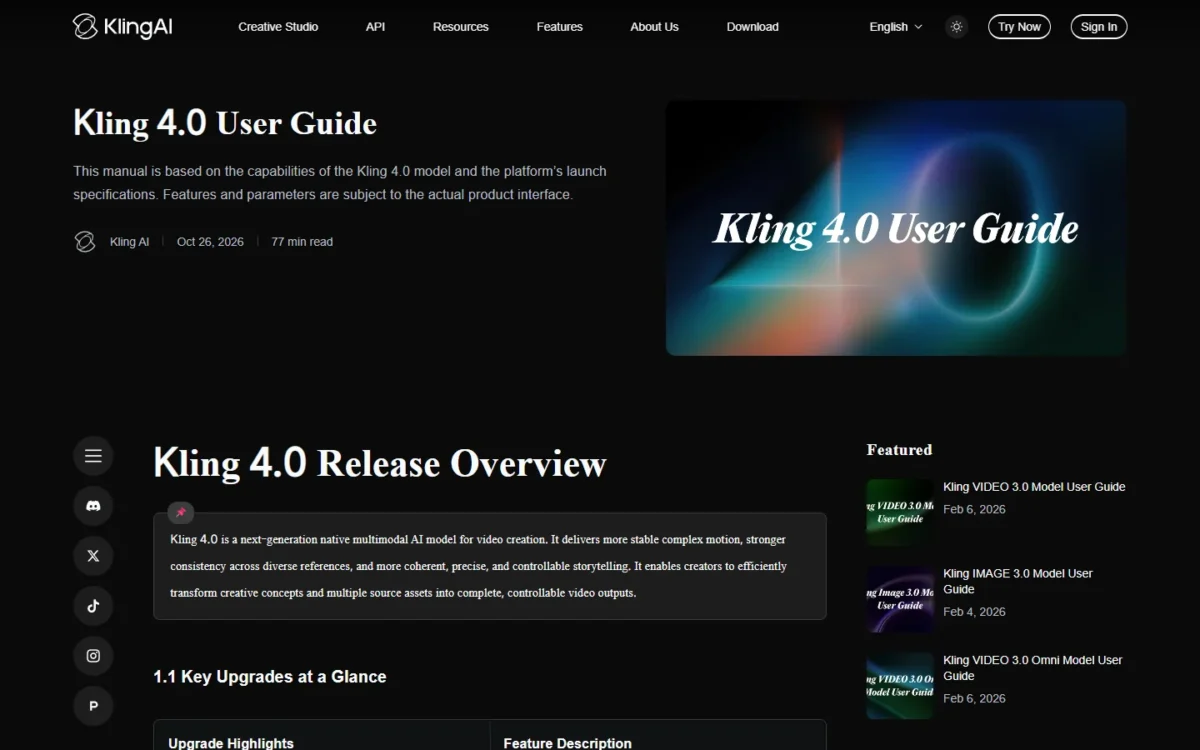
Kling 4.0 Flash trades control for speed: up to 20 seconds, 720p at most, and no start-and-end frames or multiple keyframes. It fits drafts and social cuts, not a 4K deliverable.
The catch is cost. Kling does not publish Kling 4.0’s credit rate on its plans page or in the Kling 4.0 user guide, so run one short clip and check the deduction first. On the plans page, only the yearly Ultra+ card lists “Kling 4.0 Flash Annual Early Access”.
VIDEO 3.0 and 3.0 Omni: native audio and multi-shot editing
Yes, VIDEO 3.0 still matters, because it is the model you can budget: 3-15 second clips with native audio and multi-shot storyboards at a published per-second rate. With native audio it costs 12 credits a second at 1080p and 9 at 720p; without audio, 8 and 6.
A 5-second 1080p clip with sound therefore costs 60 credits, the unit the pricing section uses. Multi-shot mode plans cuts and camera angles from one prompt, which suits a short narrative scene.
Kling 3.0 Omni handles video editing, upgraded on June 17, 2026. The limit is length: 15 seconds per generation, half of Kling 4.0’s ceiling.
Native 4K video and IMAGE 3.0
You can deliver 4K video and stills from one subscription, but not from credits alone: 4K generation and watermark removal need an active subscription. Native 4K arrived on April 23, 2026, and Kling does not publish its credit rate.
IMAGE 3.0, released on January 31, 2026, outputs 2K and 4K stills and adds an Image Series Mode. If stills are the whole job, a list of free AI image generators is a cheaper start than a video plan.
Creative planning: Canvas Agent, Elements and Motion Control
Canvas Agent brainstorms with you, writes scripts, and generates images, videos and storyboards inside one project. Its January 29, 2026 launch added one-click batch generation, so a marketer building six ad variants keeps storyboard and shots together. For the ad workflow itself, see how to make ecommerce video ads with AI.
Elements keep a character or product consistent across clips, capped per plan: 30 on Basic, 50 on Standard, 150 on Pro and Premier, 500 on Ultra+. A brand with many recurring characters should count them before choosing Standard.
Motion Control recreates complex movement and facial expression based on motion capture technology; its VIDEO 3.0 version launched on March 4, 2026.
Kling AI Ease of Use
A usable clip is mostly a prompt-and-iterate job, and Kling’s quickstart has a guide per model plus guides to prompts, camera movement, and start and end frames. My AI video prompts by style and shot give you text to test with.
Standard Mode renders faster at a lower inference cost; Professional Mode adds detail at a higher one. Paid plans return up to 4 videos per generation, against 1 on Basic, but each output is charged: credits are deducted by outputs, model, duration and resolution.
Run your own prompts on Basic’s monthly free credits before paying. Basic has no 1080p or 4K video generation, so the test shows motion and framing rather than final resolution. If you have not planned an AI video before, how to make AI videos from idea to export walks through the steps first.
Kling AI Pricing
Standard is $79.20 a year for 660 credits a month, about 11 five-second 1080p clips with audio on VIDEO 3.0. For three clips a week or more, my pick is Pro at $293.04 a year for 3,000 credits, about 50 such clips. Pay yearly, because the monthly view’s per-credit price rests on a one-time first-month discount.
Kling prices its individual plans by monthly credits; the Yearly prices below renew unchanged.
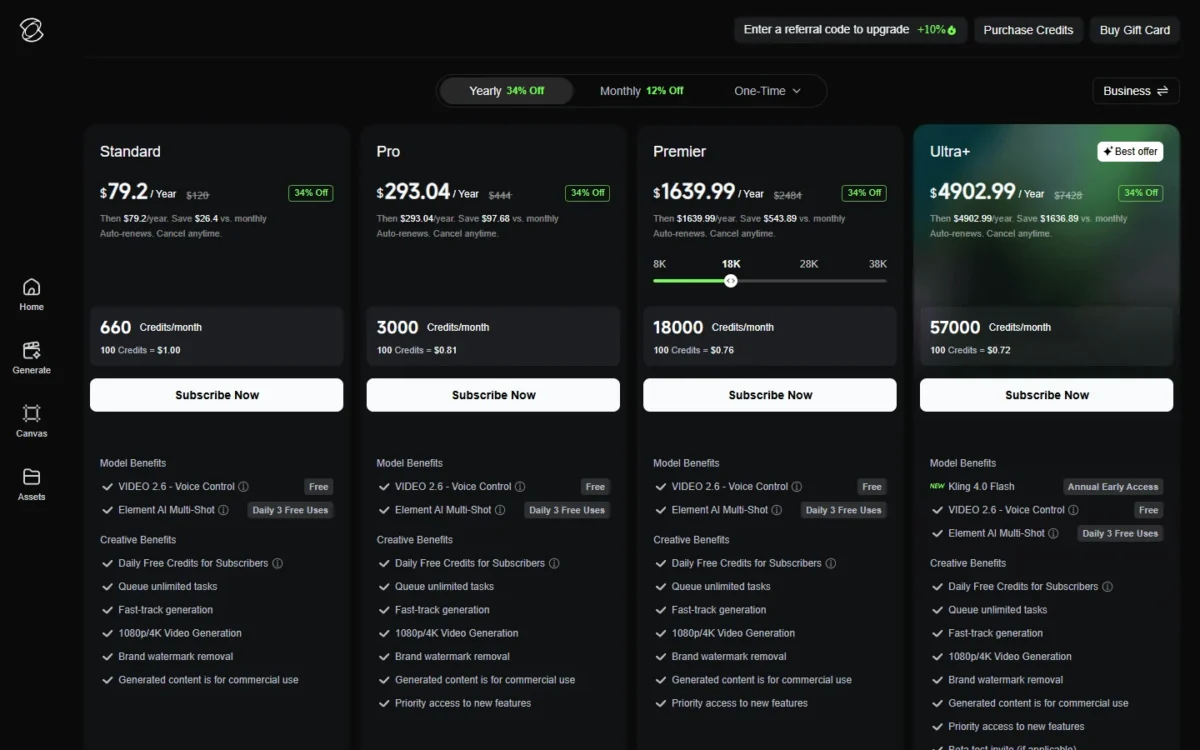
| Plan | Yearly billing | Monthly billing | Credits a month | Key limit |
|---|---|---|---|---|
| Basic | $0 | $0 | Monthly free credits; the Yearly and Monthly tables print “-“ | No commercial use; no 1080p or 4K; 1 video per generation |
| Standard | $79.2 a year | $6.99 first month, then $8.8 a month | 660 | 50 Elements |
| Pro | $293.04 a year | $25.99 first month, then $32.56 a month | 3,000 | 150 Elements |
| Premier (18K tier) | $1,639.99 a year | $144.99 first month, then $181.99 a month | 18,000 | The page shows one price at a time; this review reads the 18K tier |
| Ultra+ | $4,902.99 a year | $432.99 first month, then $544.99 a month | 57,000 | Kling 4.0 Flash early access on yearly only |
Sources: Kling AI membership plans, Yearly and Monthly views, checked October 2026.
A studio of three sharing assets belongs on the Team Plan below.
What each plan’s credits buy
Credits turn into clips at VIDEO 3.0’s published rate, so choosing a plan is a count of clips.
| Plan | 1080p with audio, 60 credits each | 720p without audio, 30 credits each |
|---|---|---|
| Standard | 660 / 60 = 11 | 660 / 30 = 22 |
| Pro | 3,000 / 60 = 50 | 3,000 / 30 = 100 |
| Premier (18K) | 18,000 / 60 = 300 | 18,000 / 30 = 600 |
| Ultra+ | 57,000 / 60 = 950 | 57,000 / 30 = 1,900 |
Sources: Kling VIDEO 3.0 model guide and Kling’s membership plans page, checked October 2026.
Those counts are ceilings, since a rejected take still costs credits. A creator who needs three finished clips a week, 12 in four weeks, has already outgrown Standard’s 11. Running out before day 31 is the upgrade trigger, and an upgrade to a higher tier takes effect immediately.
The first-month discount in the monthly view
The monthly view’s “100 Credits = $1.06” for Standard uses the first-month price: $6.99 / 660 x 100 = $1.06. From month two Standard costs $8.8 / 660 x 100 = $1.33 per 100 credits, and Pro $32.56 / 3,000 x 100 = $1.09.
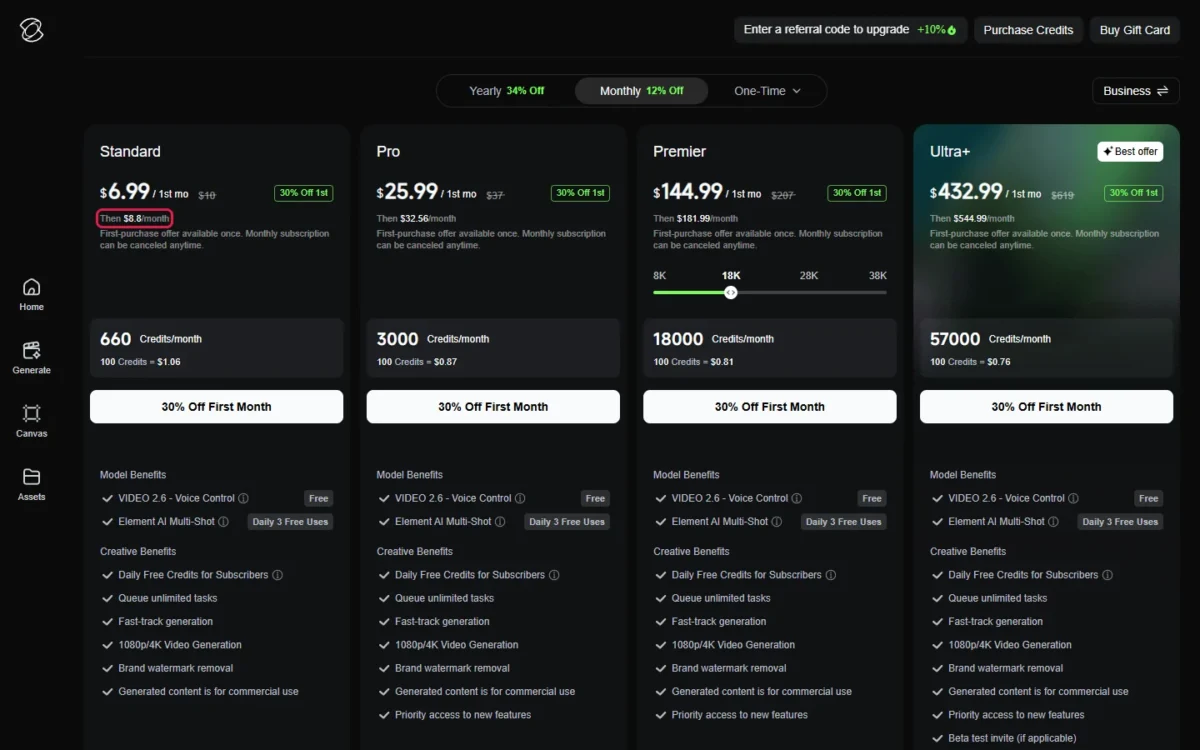
Over a first year, monthly billing costs $6.99 + $8.8 x 11 = $103.79 for Standard, against $79.20 billed yearly. Pro comes to $25.99 + $32.56 x 11 = $384.15, against $293.04 billed yearly.
When credits expire
Credit expiry
Monthly credits last 31 days from issue, subscribers’ daily bonus credits expire at 24:00 local time the same day, and purchased credits last 2 years. Unused monthly credits are lost when a subscription ends.
For a bursty user, that gap decides it. Owning credits does not grant subscription benefits, though, so on Basic purchased credits still carry no commercial use and no watermark removal: a bursty ad maker needs a subscription.
For Basic’s monthly free credits, the Yearly and Monthly tables print “-“, while the Team view’s comparison prints “0.1K/0.66K” for Personal Plans without naming the plan. The retired Ultra tier is closed to new subscribers.
Team Plan cost
The Team Plan costs $73 per seat per month billed yearly ($876 per seat per year), or $98 billed monthly, with 10,000 credits per seat each month. Three seats, the Team view’s default on Kling’s plans page, cost 3 x $876 = $2,628 a year, or 3 x $98 x 12 = $3,528 on monthly billing.
Yearly team credits print at $0.73 per 100, below Pro’s $0.81. The catch: the Team Plan runs on the Kling website only. Assets and credits never move between workspaces, so an agency with one workspace per client cannot pool a budget.
The Kling API is a separate developer platform with its own pricing, outside this review.
Is Kling AI Safe and Private?
You can trust Kling AI as a paid service with commercial rights on paid plans, but not as a private one. Clause 4.7.1 of its Terms of Use gives Kling a royalty-free licence to host, publicly display and distribute what you upload (Input) and generate (Output).
Clause 4.7.3(f) lets Kling use your Input to train its models. Clause 4.7.4 is the exit: email support@kling.ai to revoke that authorization for all or part of your content.
Clause 3.6 treats uploads as non-proprietary and non-confidential and tells users not to upload confidential material. For an agency, that rules out unreleased client footage unless the client accepts those terms.
Paid subscribers may use outputs commercially, provided the content is not used to build products that compete with Kling. The free Basic plan carries no commercial use. Clause 4.6 bars commercial use of Output without Kling’s written permission, which is why the paid right matters for client ads.
Clause 4.5 asks you to label Output with the Kling brand, or state prominently that Kling AI generated it, unless Kling permits otherwise in writing. Check that with your client before an ad runs unlabelled.
Kling AI Pte. Ltd stores data on servers in Singapore, and the Privacy Policy lists account deletion inside the app. Disputes go to binding individual arbitration, with no class action.
Who Should Use Kling AI?
Weekly creators of short ads, product clips and narrative shorts fit Kling best, because they spend a month’s credits before they expire. Occasional users, agencies splitting budgets across workspaces, and anyone with confidential uploads should test first or look elsewhere, starting with the best AI video generators matched to the job.
Best for
- A solo creator making 11 to 50 short 1080p clips a month, on Standard or Pro billed yearly
- A small agency producing ad variants, with 4 videos per generation on paid plans
- A studio that needs shared assets and roles, on the Team Plan
- A narrative maker who needs 15-second multi-shot scenes or 30-second keyframed takes
Not ideal for
- A bursty user who would lose monthly credits after 31 days
- A team with confidential client assets, given Terms clauses 3.6 and 4.7
- A free-only user who needs commercial rights, which Basic lacks
- A developer, who needs the separate Kling API platform
Kling AI vs Competitors
Kling’s yearly Standard works out to $6.60 a month ($79.2 / 12), less than Runway’s or Higgsfield’s yearly entry plans, and Google AI Plus at $4.99 a month is cheaper still. Runway and Higgsfield also sell Kling models inside their own credits, so the real choice is Kling direct or a multi-model platform.
| Software | Best for | Starting price | Key difference | Main trade-off |
|---|---|---|---|---|
| Kling AI | Short narrative and ad clips | $79.2 a year, Standard, 660 credits a month | Own models with published VIDEO 3.0 rates | Monthly credits expire after 31 days |
| Runway | An all-in-one suite with many models | $12 a month billed annually, Standard, 625 credits a month | Sells Kling 4.0 at 118 credits per 5 seconds at 1080p | Standard and Pro credits do not roll over |
| Higgsfield | Many models in one plan | $15 a month billed annually, Starter, 200 credits a month | Kling 3.0 at about 14 credits per 8-second 720p generation | Starter’s 200 credits are a small allowance |
| Google Flow | People already paying for Google AI | Google AI Plus, $4.99 a month, 200 Flow credits | Google AI Pro at $19.99 a month adds 1,000 Flow credits and Gemini | The price buys a Google bundle, not video alone |
Sources: Runway pricing, Higgsfield pricing, Google AI plans and Kling’s membership plans page, checked October 2026. Each vendor’s credits are its own unit.
Runway suits a buyer who wants Kling 4.0 beside Runway’s own models. It prices Kling 4.0 at 118 credits per five seconds at 1080p, or 89 with a 25% discount until November 30. Standard’s 625 credits cover five such clips at the full rate (625 / 118 = 5.3).
Its other plans are in my Runway pricing guide.
Higgsfield fits a creator who switches between Kling 3.0, Seedance and Nano Banana Pro; its Plus plan costs $39 a month billed annually for 1,000 credits. My Higgsfield AI review covers its plans and credit model.
Google Flow fits someone already paying for Google AI Pro, where Flow credits arrive with Gemini and 5 TB of storage. A buyer who only wants video pays for a bundle they may not use; my Google Flow pricing guide shows what each tier adds. The Google Flow vs Kling comparison sets the two side by side.
Kling AI Alternatives
Two kinds of reader should look past Kling. The first wants to compare free plans before paying; the free AI video generators ranked by what the free plan allows start there.
The second wants video inside a wider workflow of writing, images and audio, where the AI tools for content creation match a tool to each job.
How I Evaluated Kling AI
This review rests on official documentation and pricing pages, read on October 29, 2026. For Kling, that is the membership page in its Yearly, Monthly and Team views, its credit FAQ, the Kling 4.0 and VIDEO 3.0 user guides, the release notes, the Terms of Use and the Privacy Policy. Runway’s, Higgsfield’s and Google’s plan pages back the comparison.
The clip counts, renewal per-credit costs and first-year and team totals are my arithmetic from those printed numbers, with the math shown.
Kling’s “VIDEO 3.0 Model Pricing” table prints per-second credit rates for VIDEO 3.0 at 1080p and 720p. This review prices VIDEO 3.0 clips because Kling does not publish Kling 4.0’s credit rate.
FAQ
How do I cancel a Kling AI subscription?
Cancel through the store you paid with: on Apple, Settings > Apple ID > Subscriptions; on Google Play, Payments & subscriptions > Subscriptions; on the web, Profile > Manage Plan > Cancel Subscription. When the subscription ends, unused monthly credits expire, while purchased credits stay usable until their own validity runs out.
Which Kling credits are used first?
Kling spends the credits with the shortest remaining validity first, so a subscriber’s daily bonus credits usually go before monthly credits, and monthly credits before purchased ones. Credits cannot be transferred to another user or redeemed for cash, so buy only what you will generate yourself.
Can I get an invoice for Kling AI?
Yes, on the web only: sign in, open Subscription Management in the upper-right corner, go to the Purchase History tab and select Request Invoice. Kling issues the invoice within 10 business days as a PDF on the same page. The mobile apps do not take invoice requests.
Kling AI Review: Final Verdict
Yes, Kling AI is worth paying for if you will spend 3,000 credits a month: take Pro billed yearly at $293.04. A light but regular user should take Standard yearly.
Anyone who generates in bursts for personal work can stay on Basic and buy credits that last 2 years.
Two checks come before the first upload. Email support@kling.ai to revoke Kling’s licence if the work belongs to a client. That covers the clause 4.7 licence only: clause 3.6 still keeps confidential client footage out unless the client accepts those terms.
Then run one Kling 4.0 clip to see its credit charge before you plan a month around it.