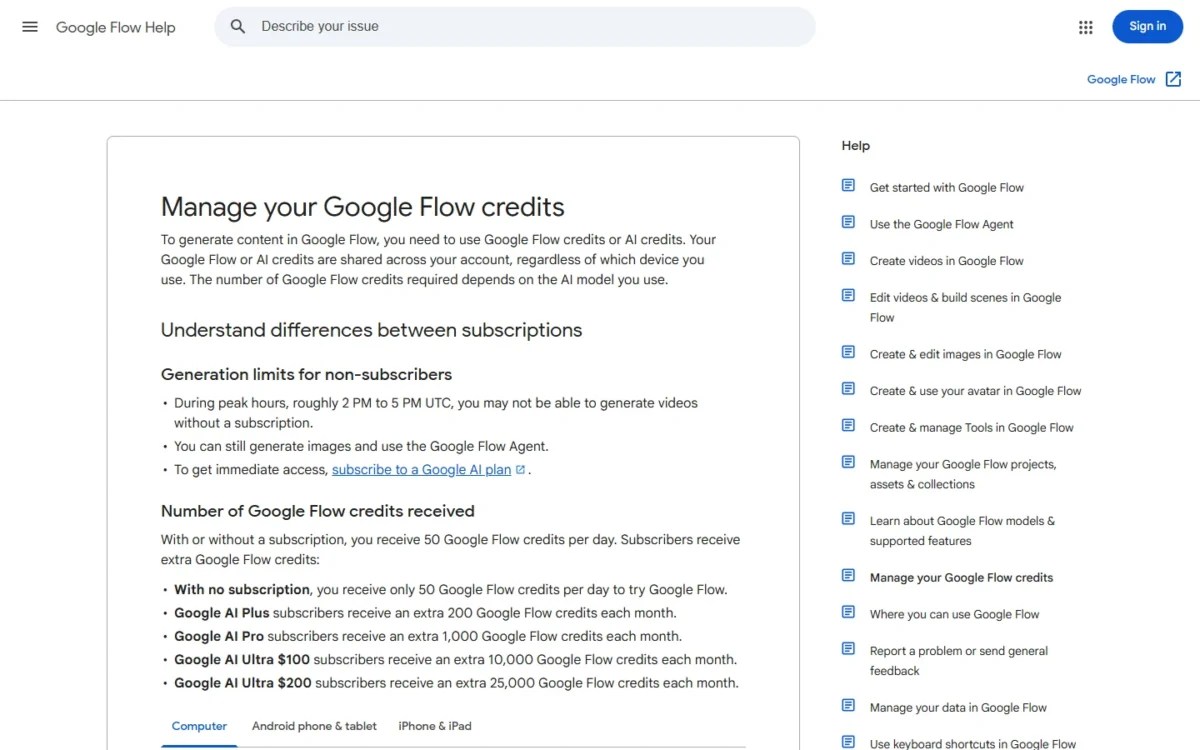
In Google Flow vs Kling, Kling is the better buy for longer single takes and 4K on a small budget, and Google Flow is the better free start. Kling 3.0 runs clips of 3 to 15 seconds, and 1080p/4K generation starts on Kling Standard at $8.80 a month after a $6.99 first month.
Google Flow gives any Google Account 50 credits a day, and Google AI Pro at $19.99 a month adds 1,000 Flow credits a month. Both vendors’ US plan and help pages were read on October 29, 2026.
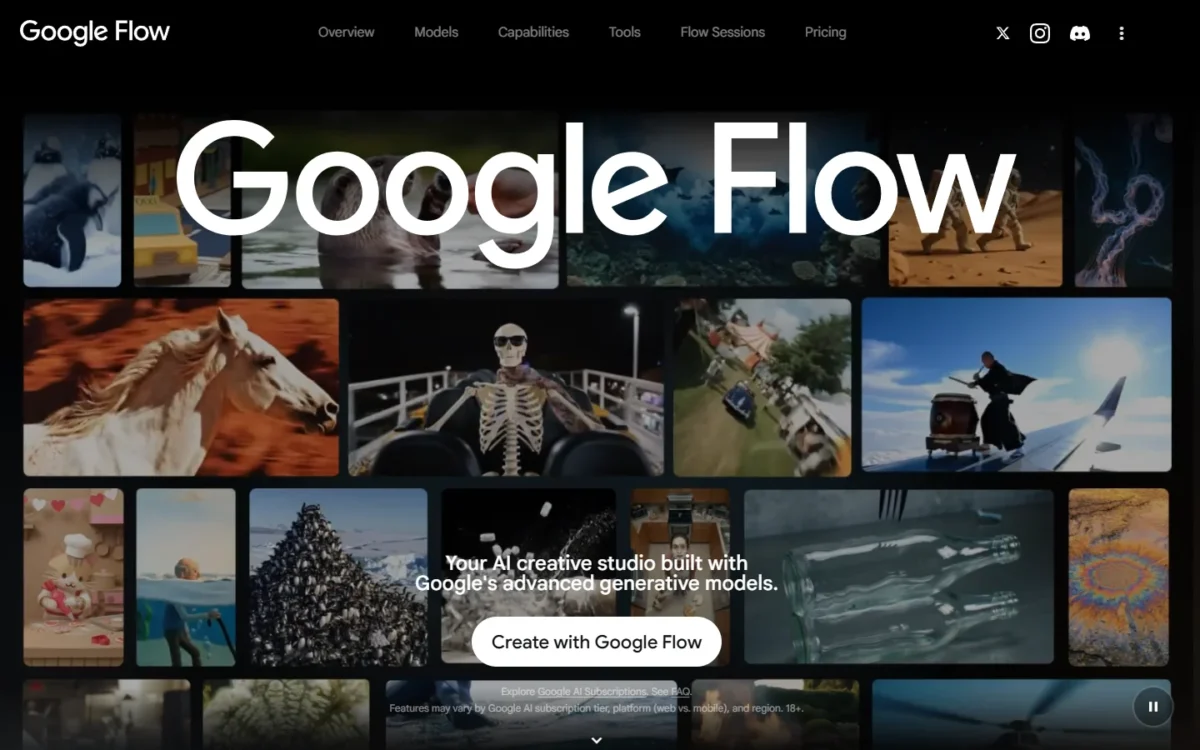
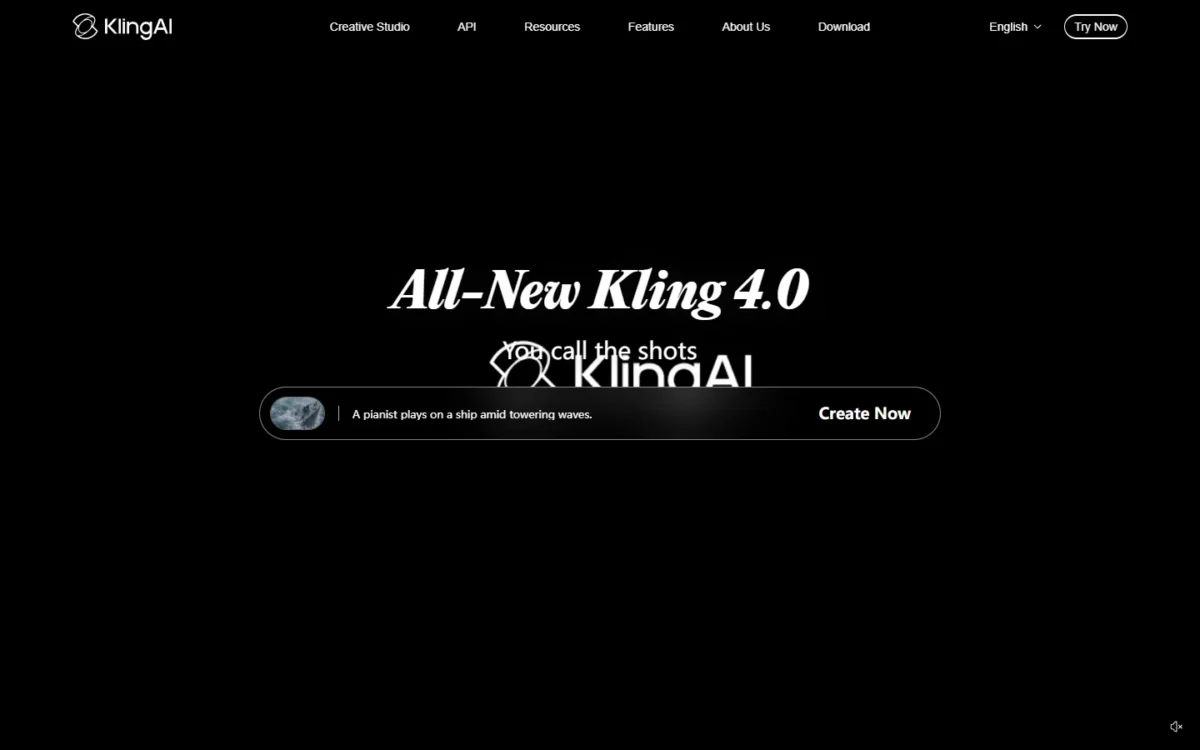
Quick verdict
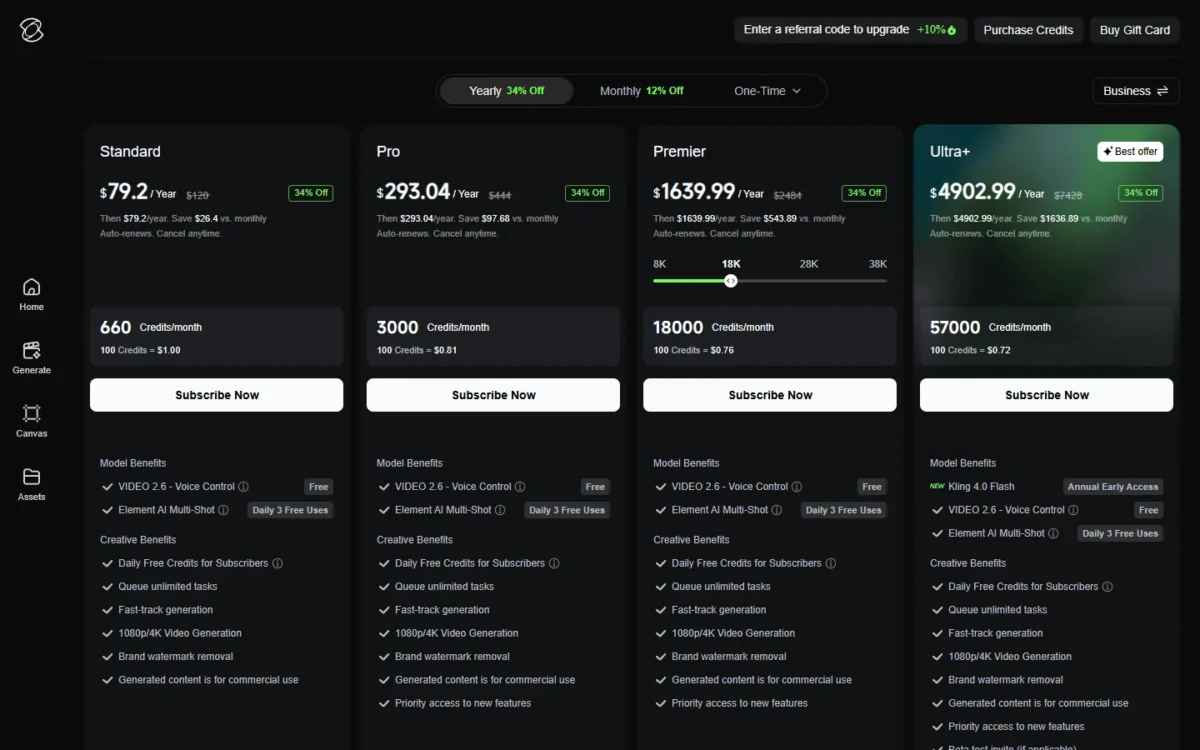
Pick Kling Pro for 3,000 credits a month: $32.56 a month after a $25.99 first month, or $293.04 a year. Choose Kling over Google Flow when your videos need takes over 10 seconds or 4K delivery (Standard and up). Kling 3.0 runs clips of 3 to 15 seconds.
Pick Google Flow on Google AI Pro if you want to start free, already use Google’s bundle, or edit your own footage: $19.99 a month for 1,000 Flow credits.
The trade-off: Kling’s monthly price rises after month one, and Google Flow’s 4K needs the AI Ultra plan.
In This Article (10 sections)
Google Flow vs Kling at a Glance
Kling sells 1080p/4K generation from its Standard plan; Google Flow sells free daily credits and a seat in the Google AI bundle. As of October 2026, Google sells AI Ultra at $99.99 and $199.99 a month.
| Attribute | Google Flow | Kling |
|---|---|---|
| Best for | Free trials, Google AI Pro subscribers, editing own clips | Takes over 10 seconds, 4K on a low plan |
| Free use | 50 credits a day | Basic $0: no monthly credits, not commercial |
| Entry plan | AI Plus: $4.99 a month, 200 credits | Standard: $8.80 a month or $79.20 a year, 660 credits |
| Mid plan | AI Pro: $19.99 a month, 1,000 credits | Pro: $32.56 a month or $293.04 a year, 3,000 credits |
| Longest clip | 10 seconds (Omni Flash) | 30 seconds (Kling 4.0, plan access unstated) |
| 4K | Limited: 4K upscaling on AI Ultra | 1080p/4K generation from Standard |
Sources: Google Flow plans, Kling membership plans, checked Oct 2026.
Key Differences Between Google Flow and Kling
- What you buy: Google AI Pro bundles Flow credits with the Gemini app and 5 TB of storage; a Kling membership pays for Kling alone.
- Clip length: Google Flow stops at 8 seconds on Veo 3.1 and 10 on Omni Flash; Kling 4.0 lists native 30-second generation.
- 4K gate: Google Flow upscales to 4K only on AI Ultra, while Kling generates 1080p/4K from Standard.
- Price path: Google charges one monthly price. Kling discounts the first month once and then bills more, or takes 34% off Pro’s $444 yearly list price ($37 x 12), so a Kling budget starts from month two.
Google Flow vs Kling: Features Compared
Kling lists 1080p/4K from Standard and 30-second Kling 4.0 generation, while Google Flow documents Scenebuilder and Omni Flash edits of uploads in one project.
| Feature | Google Flow | Kling |
|---|---|---|
| Longest single clip | Omni Flash: 10 seconds | Kling 4.0: 30 seconds, plan access unstated |
| Resolution | Omni Flash 720p; 1080p upscaling on paid plans | 1080p/4K on Standard and up |
| 4K | Limited: 4K upscaling on Ultra | Kling Native 4K Video |
| Start and end frames | Frames to Video: first and last | Kling 4.0: multiple keyframes |
| Multi-shot assembly | Scenebuilder | Element AI Multi-Shot, 3 free uses a day |
| Edit uploaded video | Omni Flash | Not listed on kling.ai membership page |
Sources: Google Flow models and features, Kling membership plans, checked Oct 2026.
Models and clip length
Kling runs longer single generations than Google Flow: Kling 4.0 lists native 30-second generation, while Google Flow stops at 8 seconds on Veo 3.1 and 10 on Gemini Omni Flash.
Google Flow closes part of the gap with Extend: any 8-second Veo 3.1 clip can be extended with Veo 3.1 Lite. Kling 4.0 has its own catch, since Kling does not say which plans include it; the Ultra+ yearly card lists Kling 4.0 Flash as early access. My Kling AI review judges Kling on its own.
Verdict: Clip length
Kling fits better for single takes over 10 seconds, such as a full dialogue beat. Google Flow fits creators who cut 4- to 8-second shots and join them in Scenebuilder.
Resolution and 4K
Kling reaches 4K on cheaper plans than Google Flow: Kling generates 1080p/4K from Standard, while Google Flow upscales to 1080p on any paid plan and to 4K only on AI Ultra.
Google Flow’s Omni Flash generates at 720p, or 360p as a draft. Upscaling to 1080p costs 0 credits for subscribers; 4K upscaling costs 50 credits per generation on Ultra.
Kling prices native 4K on the Kling 3.0 series at 30 credits per second. Standard’s 660 credits therefore make 22 seconds of 4K a month (660 / 30 = 22).
Verdict: 4K
Kling fits better for 4K on a budget: Pro’s 3,000 credits make 100 seconds of native 4K (3,000 / 30 = 100). Judge both on your own shots.
Audio and voice
Yes, both generate sound with the picture: Google Flow’s Veo 3.1 has native audio, and Kling 3.0 and 3.0 Omni generate synchronized audio and video.
Kling’s native audio covers dialogue, ambience, sound effects and lip movement, and Voice Control is free on paid plans. Google Flow restyles preset voices in Omni Flash and refunds credits when Veo’s audio fails, unless Return silent videos is on.
Verdict: Audio
Comparable on documented features. Judge lip sync with one dialogue prompt on Google Flow’s free credits and Kling’s first paid month.
Camera, references and scene control
Kling’s paid cards list Element AI Multi-Shot with 3 free uses a day, while Google Flow builds a scene from separate clips in one project.
Kling’s Custom Multi-Shot sets framing, viewpoint and camera movement for several shots in one generation, and Motion Control copies movement from a reference. Its reusable Elements are capped by plan: 50 on Standard, 150 on Pro.
Google Flow answers with first and last frames, Ingredients, a camera edit mode and Characters built from 1 or 2 images plus a voice. My beginner tutorial for Google Flow shows Scenebuilder step by step.
Verdict: Shot control
Depends on workflow. Kling fits a storyboard generated as one multi-shot take. Google Flow fits a creator who generates, edits and sequences clips in one place.
Free use, watermarks and commercial rights
Google Flow is the better free start: any Google Account gets 50 Flow credits a day, while Kling Basic costs $0 but carries no monthly credits and is not for commercial use.
Without a plan, Google Flow video may be unavailable roughly 2 to 5 PM UTC. Before you pay, check what Flow’s free daily credits cover.
Every Google Flow output carries an invisible SynthID watermark. For commercial use, Google’s Flow help page points to Google’s Terms of Service, under which Google won’t claim ownership of generated content. Kling Standard and higher plans remove the brand watermark and allow commercial use.
Verdict: Free use
Google Flow fits better for trying before paying. For client work, pay for Kling Standard or check Google’s Terms of Service first.
Google Flow vs Kling Pricing
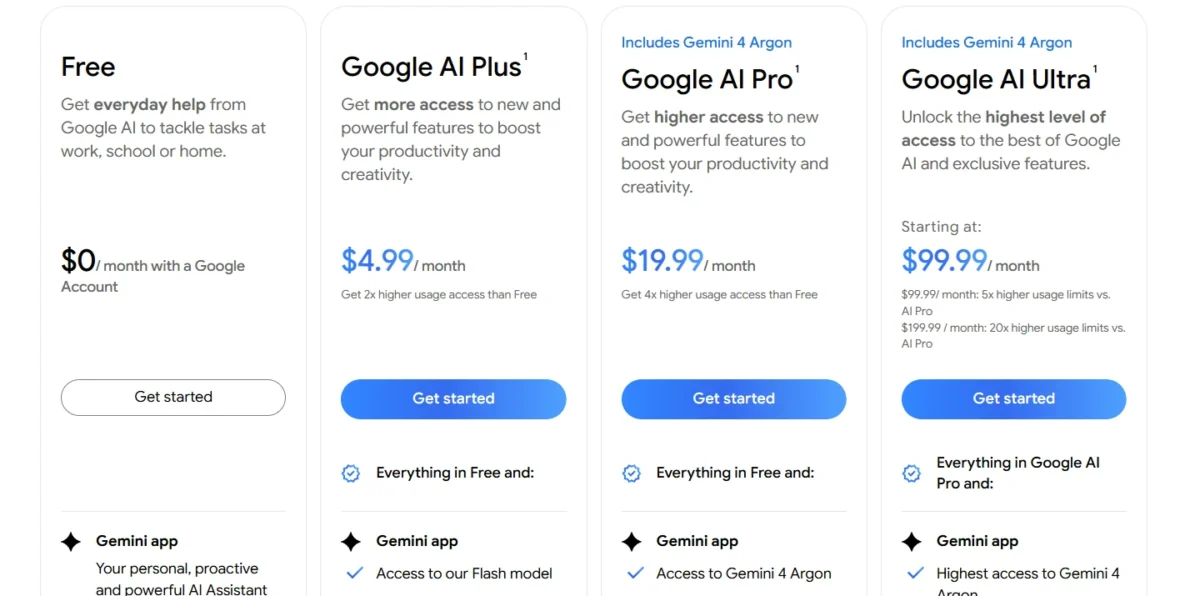
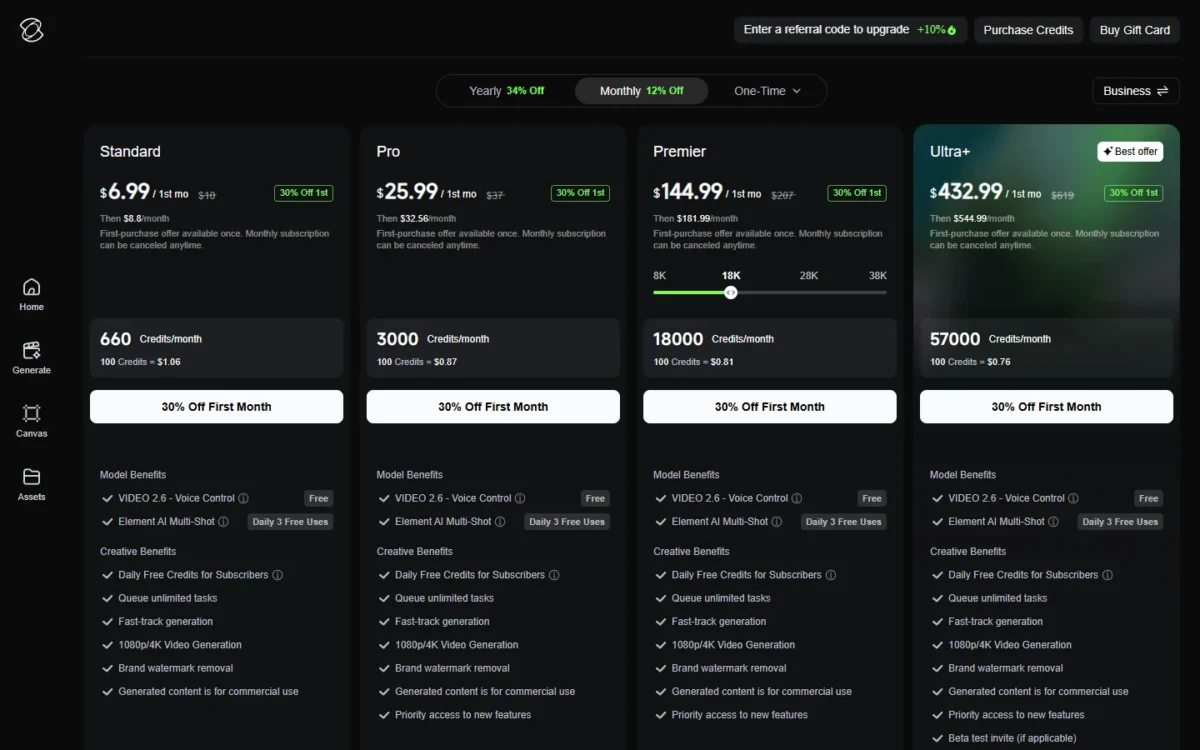
Google AI Pro costs $19.99 a month for 1,000 Flow credits, while Kling Pro costs $32.56 a month after a $25.99 first month for 3,000 credits.
| Tier | Google Flow (Google AI plans) | Kling |
|---|---|---|
| Entry | AI Plus: $4.99 a month; 200 credits a month | Standard: $6.99 first month, then $8.80 a month, or $79.20 a year; 660 credits |
| Mid | AI Pro: $19.99 a month; 1,000 credits a month | Pro: $25.99 first month, then $32.56 a month, or $293.04 a year; 3,000 credits |
| High volume | AI Ultra: $99.99 a month; 10,000 credits a month | Premier, 18,000 credits: $144.99 first month, then $181.99 a month, or $1,639.99 a year |
Sources: Google AI plans, US, Kling membership plans, checked Oct 2026.
Google bills monthly per personal Google Account, shows no annual US price and notes prices may vary by market. Kling’s first-purchase offer applies once; yearly billing auto-renews. Every Google tier is in my Google Flow pricing breakdown.
What the credits buy
Google AI Pro’s 1,000 monthly credits make 50 Veo 3.1 Fast clips of up to 8 seconds. Kling Pro’s 3,000 credits make 100 seconds of native 4K.
| Plan and pool | Model or mode | What the pool makes |
|---|---|---|
| Google AI Pro, 1,000 | Veo 3.1 Fast, up to 8 seconds | 1,000 / 20 = 50 clips |
| Google AI Pro, 1,000 | Veo 3.1 Quality, 8 seconds | 1,000 / 100 = 10 clips |
| Google AI Pro, 1,000 | Omni Flash 720p, 10 seconds | 66 clips (66 x 15 = 990) |
| Kling Pro, 3,000 | Native 4K, Kling 3.0 series | 3,000 / 30 = 100 seconds |
Sources: Google Flow credits, Kling 3.0 credit guide, checked Oct 2026.
Credit counts are not comparable units, so Kling’s 3,000 does not buy three times Google Flow’s 1,000. Kling prints no per-second cost for 1080p or Kling 4.0 on its plan page, which makes 4K the one Kling budget you can plan exactly.
For the same math across more tools, see AI video generators compared by cost per clip.
Year-one cost for one and three creators
Google AI Pro costs $19.99 x 12 = $239.88 in year one and Kling Pro $293.04 on yearly billing, so Google Flow’s mid plan costs less per creator even against Kling’s best rate.
| Plan and billing | One creator | Three creators |
|---|---|---|
| Google AI Plus, monthly | $4.99 x 12 = $59.88 | $4.99 x 12 x 3 = $179.64 |
| Kling Standard, yearly | $79.20 | $79.20 x 3 = $237.60 |
| Google AI Pro, monthly | $19.99 x 12 = $239.88 | $19.99 x 12 x 3 = $719.64 |
| Kling Pro, yearly | $293.04 | $293.04 x 3 = $879.12 |
| Kling Pro, monthly | $25.99 + $32.56 x 11 = $384.15 | $25.99 x 3 + $32.56 x 11 x 3 = $1,152.45 |
Sources: Google AI plans, US, Kling membership plans, checked Oct 2026.
Assumptions: US list prices read October 29, 2026; one subscription per creator, since each Google AI plan needs its own personal Google Account; Kling’s first-month offer used once each; no tax or top-ups.
Google Flow forces its first upgrade at 4K: AI Ultra costs $99.99 x 12 = $1,199.88 a year. Its 10,000 credits cover 166 Veo 3.1 Fast clips upscaled to 4K. Each costs 10 + 50 = 60 credits: Veo 3.1 Fast is 10 on Ultra (20 below Ultra), plus 50 for 4K (166 x 60 = 9,960).
Kling forces it at volume. Standard covers one 15-second 4K clip a month (15 x 30 = 450 of 660 credits), so a second one pushes you to Pro.
At the high end, Kling Premier costs $181.99 a month, and its 18,000 credits make 600 seconds generated at native 4K (18,000 / 30 = 600). At 10 credits for a Veo 3.1 Fast clip plus 50 for 4K upscaling, Google Flow Ultra’s 10,000 credits, at $99.99 a month, cover 166 upscaled clips of up to 8 seconds (10,000 / 60 = 166).
Google Flow vs Kling: Pros and Cons
Skip Google Flow if: your deliverables need 4K below the Ultra price, or single takes past 10 seconds on any plan.
Skip Kling if: you want to try free or publish commercially before paying.
Google Flow pros and cons
Pros
- 50 free credits a day, enough to judge Veo 3.1 Fast before paying
- Google AI Pro also carries the Gemini app and 5 TB of storage
- Omni Flash edits your own uploads in the US
- Scenebuilder sequences and downloads clips without another editor
Cons
- 4K only through upscaling on AI Ultra
- Single generations stop at 8 seconds on Veo 3.1, 10 on Omni Flash
- Unused daily and monthly credits are lost at each refresh
- Free users may lose video generation at peak hours
Kling pros and cons
Pros
- Kling 3.0 runs 3 to 15 seconds, and Kling 4.0 lists 30
- 1080p/4K generation from Standard
- Yearly billing saves $97.68 on Pro against 12 months at $32.56
- Custom Multi-Shot sets camera movement for several shots in one generation
Cons
- Pro rises from $25.99 to $32.56 a month after the first month
- Basic has no monthly credits and is not for commercial use
- No plan list for Kling 4.0 below Ultra+
- Editing uploaded footage is not listed on the membership page
Which Is Better for Your Needs?
Kling is the better fit when length or 4K decides, and Google Flow when free use, the Google bundle or editing your own footage decides.
| Your priority | Better fit | Reason | Trade-off |
|---|---|---|---|
| Takes over 10 seconds | Kling | Kling 3.0 runs to 15 seconds | Kling 4.0 plan access unstated |
| 4K on a low plan | Kling | 1080p/4K from Standard | Standard covers 22 seconds of 4K |
| Try before paying | Google Flow | 50 credits a day, no plan | Video may pause at peak hours |
| Already on Google AI Pro or Workspace | Google Flow | Flow credits come with the plan | Workspace gets 50 daily credits only |
| Edit your own footage | Google Flow | Omni Flash edits uploaded video | Kling’s membership page lists no upload editing; Flow edits 10 seconds per pass |
| Realism and audio quality | Insufficient evidence | Results depend on your own prompts and shots | Run one prompt on both |
| Lowest entry bill | Google Flow | AI Plus $59.88 vs Kling Standard $79.20 in year one | Kling Standard generates 1080p/ |
Sources: Google AI plans, US, Kling membership plans, checked Oct 2026.
If you are weighing a third tool, my Google Flow vs Runway comparison covers that pairing, and my Google Flow vs Higgsfield comparison covers another.
Switching or Using Both
Yes, through video files rather than accounts: Google Flow downloads clips, projects and Scenebuilder sequences, and accepts .mov, .mp4, .avi or .wmv uploads up to 60 seconds for Omni Flash edits.
From Kling to Google Flow, Omni Flash edits an uploaded clip 10 seconds per pass, for up to 3 conversational turns. Uploaded-video editing is not available in the EEA, Switzerland or the UK.
From Google Flow to Kling, the path depends on Kling’s own upload options, which its membership page does not detail; check Kling’s help first.
In both directions, credits stay behind and Flow Characters or Kling Elements are rebuilt; Google Flow prompts help when you rewrite shots for Flow.
How I Compared Google Flow and Kling
I built this comparison from both vendors’ official pages, read on October 29, 2026: Google’s US plans, Flow plans and six Flow help articles; Kling’s membership page in both billing views, homepage and July 2026 credit guide.
I compared AI Plus with Standard, AI Pro with Pro, and AI Ultra with Premier’s 18,000-credit option, in US dollars. Kling publishes no per-second cost for 1080p or Kling 4.0, and Google shows no annual US price. The verdicts rest on plan gates, length, resolution and cost, not on Google’s own Veo benchmark charts.
FAQ
Is Kling the best AI video generator?
Kling is the stronger pick in this pair for long takes and low-cost 4K, not for every video job. For a ranked shortlist, see the best text-to-video generators.
Is Google Flow any good?
Yes, for creators who want free daily credits, Google’s bundle and editing inside one project. My Google Flow review gives the full verdict on Flow alone.
Which app is better than Google Flow?
For longer takes and cheaper 4K, Kling is the better app. For other jobs, pick by the Flow limit you hit first, such as clip length or the 4K price; my Google Flow alternatives list matches tools to those limits.
Final Verdict: Google Flow or Kling?
Pay for Kling if your deliverables need 4K (Standard and up); pay for Google AI Pro if you want Google Flow inside Google’s bundle, free daily credits and editing of your own footage.
Choose Google Flow if
- You want to judge Veo 3.1 on 50 free credits a day first
- You already pay $19.99 a month for Google AI Pro or use a qualifying Workspace plan
- You edit uploaded footage and join 8- to 10-second shots in Scenebuilder
Choose Kling if
- Single takes run past 10 seconds, up to 15 on Kling 3.0
- You deliver 4K without paying for Google AI Ultra
- You want yearly billing, $293.04 a year for Pro
Run one real deliverable’s prompt on Google Flow’s free credits, then decide whether Kling’s $25.99 first month earns a side-by-side.