Pick Microsoft Copilot if your work already lives in Word, Excel, Outlook and Teams, and pick Claude if you want Anthropic’s newest models, Opus 5.5 and Fable 5.2, with published usage tiers. The claude vs copilot line is thinner than it looks: Microsoft added Claude as a model option in Copilot Chat in June 2026 and made Sonnet 5 Word’s default for higher-reasoning tasks in August 2026.
Copilot here means Microsoft Copilot: the Copilot features in Microsoft 365 Personal, Family, Premium and Pro (Microsoft’s plans for individuals), and Microsoft 365 Copilot for business. If you meant GitHub Copilot for code, my ranking of the best AI tools for coding covers that choice.
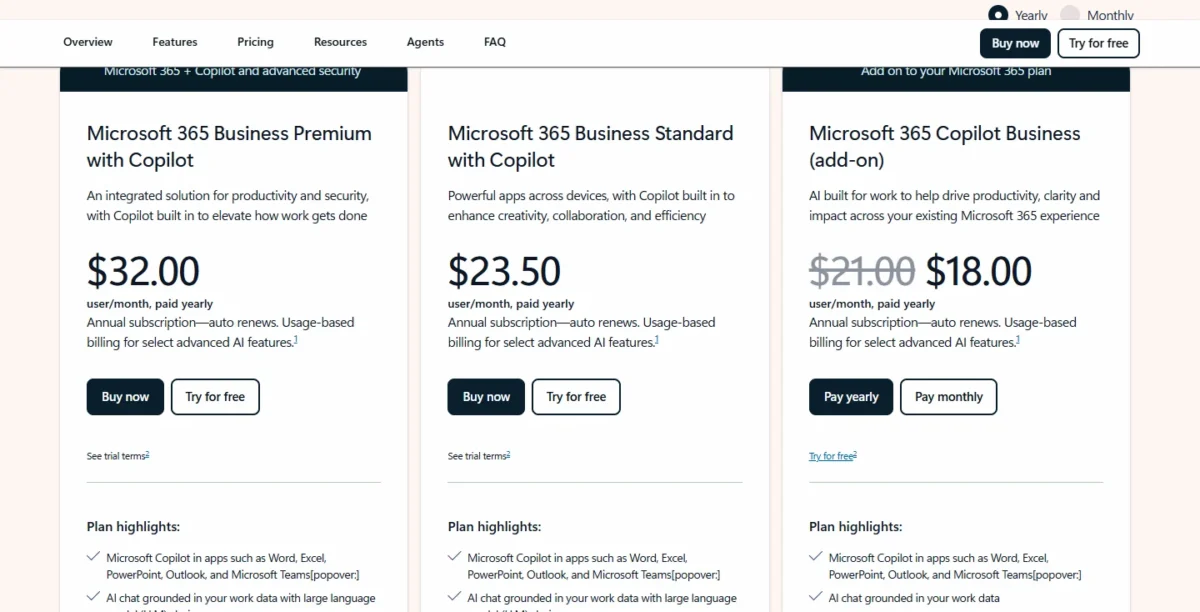
For one person on annual billing, Claude Pro costs $200 a year, billed up front. Microsoft 365 Premium costs $199.99 a year and also carries the Office apps. Ten Standard seats on Claude Team, billed annually, cost 10 x $20 x 12 = $2,400 a year; ten Copilot Business add-on seats cost 10 x $18.00 x 12 = $2,160 in the promo year, plus the Business plan.
A 10-person firm already on Microsoft 365 Business gets more from Copilot. A writer or analyst who wants Opus 5.5 and Claude Code gets more from Claude, though Claude inside Copilot can cover occasional needs where the tenant and region allow it.

Quick verdict
The deciding difference: Copilot works inside Microsoft 365 apps and, with its business license, grounds answers in your mail, files and meetings. Claude gives you Opus 5.5 from Pro upward and Fable 5.2 on Max and Ultra.
Choose Copilot for a Microsoft 365-centered team; choose Claude for Anthropic’s newest models and heavy individual use. The trade-off: Claude inside Copilot runs only where your admin and region allow it, and Microsoft does not say which Claude version Copilot Chat uses.
In This Article (11 sections)
Claude vs Copilot at a Glance
| Attribute | Claude | Copilot |
|---|---|---|
| Best for | People who want Anthropic’s models across many tools | Teams whose work lives in Microsoft 365 |
| Models named | Fable 5.2, Opus 5.5, Sonnet 5.5, Haiku 5.5 | GPT-5.2, GPT-5.5 Instant, Claude option, Sonnet 5 in Word |
| Individual plan | Pro: $17 a month billed annually ($200 up front) | Microsoft 365 Premium: $199.99 a year billed yearly |
| First business seat | Claude Team, Standard seat: $20 per seat per month billed annually | Copilot Business add-on: $18.00 per user per month paid yearly |
| Work-data access | Microsoft 365 connector, after Entra admin consent | Microsoft Graph grounding with the Copilot license |
| Main limitation | SCIM and audit logs only on Enterprise | Business add-on needs an eligible Business plan |
Sources: Claude pricing page, Microsoft Copilot plans for individuals, Microsoft Copilot for business pricing, Microsoft 365 Copilot release notes, checked Nov 2026.
The individual plans sit within cents of each other ($200 vs $199.99), and the business seats differ by $2 a month before the Business plan, so the rows below the price lines decide.
Key Differences Between Claude and Copilot
Four differences change what you pay for.
Where it works. Copilot is built into Word, Excel, PowerPoint, Outlook and Teams on Microsoft’s business plans. Claude reaches those apps through add-ins and a Microsoft 365 connector, and its Team plan also connects Google Drive, Gmail, GitHub and Slack.
Which models you reach. Claude sells Anthropic’s whole current lineup. Copilot offers a model menu of GPT models plus Claude where your admin allows it. If ChatGPT is also on your shortlist, my ChatGPT vs Copilot comparison covers that pair.
How usage is measured. Anthropic publishes multipliers: Max gives 5x Pro usage every five hours and every week. Microsoft calls Premium usage “extensive” and Pro usage “highest”, with no numbers.
What a seat buys. A Claude Team seat stands alone. The Copilot Business add-on is sold only to existing Microsoft 365 customers with an eligible Business plan.
My take
Pick Copilot if your documents, mail and meetings already sit in Microsoft 365. Pick Claude if your team is spread across Google, Slack and GitHub, or if a heavy user needs to size usage before paying.
The model lineups moved most in 2026, so they come next.
Which Models Each One Runs
Claude’s plans run Anthropic’s four current models: Fable 5.2 for demanding reasoning and long-horizon agentic work, Opus 5.5 for long-running agentic coding and knowledge work, Sonnet 5.5 and Haiku 5.5. The plan decides which you get:
- Free: Sonnet and Haiku, no Opus, no Fable
- Pro: adds Opus; Fable is paid with usage credits
- Max and Ultra: Fable included for up to half of the weekly limit
A writer who wants Opus needs Pro at minimum; my Claude review has the full verdict on Anthropic’s app.
Microsoft 365 Copilot’s release notes name these models, by the update window that added them:
- GPT-5.2 in the Copilot Chat model selector (updates through January 27, 2026)
- GPT-5.5 Instant in Copilot Chat (updates through May 19, 2026)
- Claude as a model option in Copilot Chat (updates through June 16, 2026)
- Sonnet 5 in Word’s models menu, default for higher-reasoning tasks (updates released August 11 to August 25, 2026)
The note does not say which Claude version runs in Copilot Chat. Anthropic’s own pricing page lists Sonnet 5 under legacy models, so the Claude in Word is not Anthropic’s newest.
Claude inside Copilot: what you get and what decides it
Yes, a Copilot user can work with Claude without a Claude subscription, where the tenant allows it. Microsoft’s admin page for Claude models says Claude is on by default for most commercial cloud customers, excluding the EU, EFTA and UK. Users can then select Claude in Researcher and in Edit with Copilot in Microsoft 365 apps.
In the EU, EFTA and UK, an AI Administrator or Global Administrator has to opt in. Claude models are not available in GCC High or Department of Defense environments. The same admin page says Fable 5.0 and Fable 5.1 may be made available to an organization with different or additional terms.
That sets the buying order for an IT lead: check the tenant’s Anthropic setting before buying Claude seats for occasional use.
Claude vs Copilot: Features Compared
Copilot fits better for Office apps and company data, research agents are comparable, and agents depend on plan and billing.
| Criterion | Claude | Copilot |
|---|---|---|
| Inside Word, Excel, PowerPoint, Outlook | Add-ins: Pro and above | Built in: Personal, Family, Premium, Pro; business license |
| Grounding in work mail and files | Connector: all plans | Copilot Business add-on; Business Standard with Copilot |
| Research agent | Pro, Max, Ultra | Premium, Pro, Copilot add-on |
| Multi-step task agent | Cowork: Team | Cowork: Premium, Pro; business needs usage-based billing |
| Context window | Up to 1M tokens, varies by model | Not listed on Microsoft’s Copilot overview |
| Published usage limits | Max 5x Pro; Ultra 10x Pro weekly | Not published as numbers |
Sources: Claude pricing page, Microsoft 365 Copilot overview, Use Claude with Researcher, checked Nov 2026.
Working inside Word, Excel, PowerPoint and Outlook
Copilot fits better because it ships inside the apps. Microsoft 365 Personal includes the Word, Excel, PowerPoint and Outlook desktop apps with Copilot, and the business Copilot license adds priority access to the full experience.
Claude for Microsoft 365, on Pro and above, is a set of add-ins. Claude for Word drafts, redlines and reviews with tracked changes, and Claude for Excel reads and writes cells, formulas and pivot tables. Claude for Outlook needs an admin’s one-time Microsoft Graph consent before deployment.
Verdict: Office apps
Copilot fits a team that drafts and analyzes inside Microsoft 365. Claude’s add-ins fit a writer or analyst on Pro who wants Anthropic’s models in Word or Excel.
Grounding in your mail, files and meetings
Copilot grounds answers in emails, files, meetings and calendars through Microsoft Graph and Work IQ with a business Copilot license: Microsoft lists “AI chat grounded in your work data” on the Copilot Business add-on and on Business Standard with Copilot. Copilot Chat (Basic) mainly uses web data and sees company content only when you attach it.
Claude’s Microsoft 365 connector, on all Claude plans, searches Outlook, OneDrive, SharePoint and Teams with a work account after a Microsoft Entra Global Administrator grants a one-time consent. Write tools need an admin to enable them and cannot send email attachments. Connectors come first in my guide on how to set up Claude.
Research and long documents
Research is comparable at the plan level. Claude’s Research is on Pro, Max and Ultra, not Free, while my Perplexity vs Claude comparison looks at a search-first rival. Copilot’s Researcher is on Microsoft 365 Premium and Pro and on business seats with the Microsoft 365 Copilot add-on, where Claude appears in the model dropdown once the admin allows Anthropic models. Claude lists a context window of up to 1M tokens; Microsoft states none.
Agents and multi-step tasks
Copilot Cowork, which plans and completes multi-step tasks, comes with Microsoft 365 Premium and Pro. On business plans it needs a Microsoft 365 Copilot license and a usage-based billing policy. Claude lists Cowork on Team and lets Pro hand off and schedule tasks. Either way, agent work turns a fixed seat price into a variable bill.
Claude vs Copilot Pricing
For one person the two cost almost the same; for a team, the gap depends on whether you already pay for Microsoft 365 Business.
| Plan tier | Claude | Copilot |
|---|---|---|
| Free | Free: $0 | Copilot Chat (Basic): included with eligible Microsoft 365 licenses |
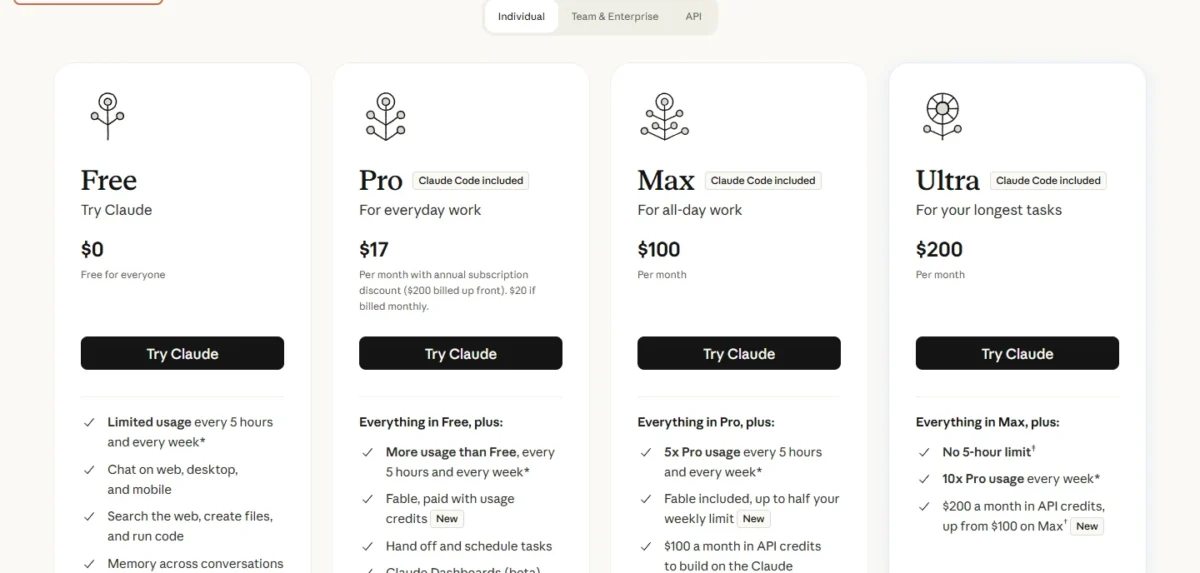
| Individual | Claude Pro: $17 a month billed annually ($200 up front), $20 billed monthly | Microsoft 365 Premium: $199.99 a year billed yearly |
| Heavy individual | Max: $100 a month | Microsoft 365 Pro: $99.99 a month, monthly billing only |
| Heaviest individual | Ultra: $200 a month | Not listed on Microsoft’s plan pages |
| First business seat | Claude Team, Standard seat: $20 per seat per month billed annually, $25 billed monthly | Copilot Business add-on: $18.00 per user per month paid yearly, originally $21.00 |
| Enterprise seat | Enterprise: $20 per seat per month billed annually, 20-seat minimum, plus API-rate usage | Microsoft 365 Copilot add-on: $30.00 per user per month paid yearly |
Sources: Claude pricing page, Microsoft Copilot plans for individuals, Microsoft Copilot for business pricing, Microsoft 365 Copilot for enterprise, checked Nov 2026.
At the individual tier, the bundle decides: Microsoft 365 Premium includes Office apps and storage, while Claude Pro includes Claude Code and Opus.
The Microsoft 365 Copilot Business add-on costs $18.00 per user per month paid yearly as its current price, originally $21.00. Microsoft’s discount offer runs from July 1, 2026, to December 31, 2026, and promotional pricing applies to the first year only.
What the same team pays per year
| Seats | Plan | Math | Per year |
|---|---|---|---|
| 1 | Claude Pro, annual | $200 up front | $200 |
| 1 | Microsoft 365 Premium, yearly | $199.99 a year | $199.99 |
| 10 | Claude Team, Standard seat, annual | 10 x $20 x 12 | $2,400 |
| 10 | Copilot Business add-on at $18.00, promo year | 10 x $18.00 x 12 | $2,160 plus the Business plan |
| 10 | Copilot Business add-on at $21.00, original price | 10 x $21.00 x 12 | $2,520 plus the Business plan |
| 10 | Microsoft 365 Business Standard with Copilot at $23.50 | 10 x $23.50 x 12 | $2,820 |
| 50 | Claude Enterprise seat fee, annual | 50 x $20 x 12 | $12,000 plus usage |
| 50 | Microsoft 365 Copilot add-on, yearly | 50 x $30.00 x 12 | $18,000 plus a qualifying plan |
Sources: Claude pricing page, Microsoft Copilot for business pricing, Microsoft 365 Copilot for enterprise, checked Nov 2026.
Assumptions: prices as printed on each vendor’s US page, with Claude’s excluding tax; annual billing; an existing Microsoft 365 license is excluded; Claude usage credits, Claude Enterprise token usage and Microsoft’s usage-based billing for advanced AI features are excluded.
In the promo year the add-on costs $240 less than Claude Team ($2,400 – $2,160), before the Business plan. Because the promotional price covers the first year only, I budget year two at the original $21.00, which is $120 more than Claude Team ($2,520 – $2,400).
The 50-seat rows are for buyers who need enterprise controls: Claude Team takes 2 to 150 seats, and Microsoft’s business plans are designed for up to 300 users, so a 50-person team without that need can stay on the 10-seat plans above. At 50 seats the Claude Enterprise seat fee is $6,000 lower ($18,000 – $12,000), yet every token on top is metered.
The upgrade trigger differs too. Claude Pro’s five-hour and weekly limits push a heavy user to Max at $100 a month. On Copilot the trigger is a date: the add-on’s discount offer closes December 31, 2026.
Every Claude plan and API rate is in my Claude pricing breakdown.
Microsoft’s home, business and enterprise plans are in my guide to Microsoft Copilot pricing.
With prices this close, data protection and admin controls often decide.
Security, Admin and Data Use
Both vendors state that business data is not used to train models by default, but the controls depend on the plan.
Claude’s pricing page lists “No model training on your content by default” for Team. On Claude’s consumer plans, model training is an opt-out setting, and Anthropic’s privacy center says chats are used to improve models if you allow it. Team adds single sign-on and admin controls for connectors; SCIM, audit logs, the Compliance API, custom data retention and a HIPAA-ready offering arrive only on Enterprise.
Microsoft’s enterprise data protection page says prompts, responses and Microsoft Graph data are not used to train foundation models. Copilot inherits sensitivity labels, applies retention policies and supports audit of interactions. It supports HIPAA compliance for properly configured implementations, not web search queries. Claude models inside Copilot are currently excluded from the EU Data Boundary.
My take
Pick Copilot if you need audit and retention controls for a team under 20 seats, since Claude holds audit logs and SCIM back for Enterprise and its 20-seat minimum; Microsoft says the specific controls vary by subscription plan, so confirm yours. An EU or UK company should weigh the EU Data Boundary exclusion before its admin turns on Claude in Copilot.
Claude vs Copilot: Pros and Cons
Each point carries the plan it applies to. My full Microsoft Copilot review covers which Copilot to buy.
Pros
- Claude: Anthropic’s newest models with no tenant setting standing in the way
- Claude: published usage multipliers, up to 10x Pro weekly usage on Ultra
- Claude: Claude Code included on Pro, Max and Ultra
Cons
- Claude: SCIM, audit logs and the Compliance API only on Enterprise
- Claude: the work-account connector waits on an Entra Global Administrator
- Claude: Enterprise tokens are metered at API rates on top of the seat fee
Pros
- Copilot: Graph grounding in mail, meetings and calendars with the Copilot license
- Copilot: GPT and Claude models in one menu for most commercial tenants
- Copilot: Copilot Chat (Basic) included with eligible Microsoft 365 licenses
Cons
- Copilot: the Business add-on requires an eligible Microsoft 365 Business plan
- Copilot: usage limits are words (“extensive”, “highest”), not numbers
- Copilot: Claude is off by default in the EU, EFTA and UK
Pick Claude when model access and usage clarity matter more than Office integration; pick Copilot when the data already sits in Microsoft 365.
Which Is Better for Your Needs?
Copilot is better for a Microsoft 365 business that wants AI in its own apps and data; Claude is better for people who want Anthropic’s newest models and published usage.
| Your priority | Better fit | Reason | Trade-off |
|---|---|---|---|
| AI in Office apps for a Microsoft 365 business | Copilot | Built into the apps, with Graph grounding | Add-on needs a Business plan |
| Claude only now and then, in a Microsoft 365 tenant | Copilot | Claude is selectable where the tenant allows it | Claude version in Copilot Chat not named in the release notes |
| Opus 5.5 or Fable 5.2 by name | Claude | Opus from Pro, Fable on Max and Ultra | Office work runs through add-ins |
| Sizing heavy use before paying | Claude | Max and Ultra publish multipliers over Pro | Microsoft publishes no numbers to compare |
| EU or UK organization wanting Claude | Depends | Off by default in Copilot, outside the EU Data Boundary | Claude direct adds a second vendor contract |
| One person on a tight budget | Depends | Premium bundles Office apps; Pro bundles Claude Code | Pick the bundle whose extras you would buy anyway |
A company can run both: Copilot for the whole staff, plus a few Claude seats for people who need Opus 5.5 or Max-level usage.
My take
Pick Copilot first for a 10-person Microsoft 365 business, then add Claude Team seats only for the two or three people who outgrow Copilot’s model menu. Pick Claude Pro for a solo consultant who works outside Office.
If neither fits, my shortlist of other AI chatbots worth comparing widens the field.
How I Compared Claude and Copilot
I compared Claude and Microsoft Copilot from both vendors’ official pages, read in November 2026. On Anthropic’s side, that means the pricing page, the models overview and help center articles on the Team plan, Enterprise billing, the Microsoft 365 connector and model training. On Microsoft’s side, it means the consumer and business Copilot pricing pages, the Copilot overview, the enterprise data protection page, the Claude admin page and the release notes.
Prices are US prices in USD as each vendor prints them; Claude’s exclude tax. I paired plans by job: Pro with Microsoft 365 Premium, Max with Microsoft 365 Pro, Claude Team’s Standard seat with the Copilot Business add-on, Enterprise with the Microsoft 365 Copilot add-on.
Microsoft does not publish usage numbers, a Copilot context window or the Claude version in Copilot Chat. Anthropic does not publish a fixed message count per plan. To judge answers on your own files, run the same document through Claude Free and the one-month Microsoft 365 Premium trial.
Frequently Asked Questions
Is Copilot free?
Partly. Copilot Chat (Basic) is included with eligible Microsoft 365 business licenses and mainly uses web data, working with company files only when you attach them. Grounding in your mail, files and meetings needs the paid Microsoft 365 Copilot license, and Microsoft’s consumer plans advertise more Copilot usage than free.
Is Claude better than Copilot for writing?
It depends on where you write. Inside Word, Copilot is built in and defaults to Sonnet 5 for higher-reasoning drafting and edits. Claude for Word, on Claude Pro and above, redlines with tracked changes. Pick Claude directly if you write outside Office apps and want the wider model choice.
Can I use Claude and Copilot together?
Yes, in two directions. Copilot runs Claude models in Copilot Chat, Researcher and Microsoft 365 apps once your tenant allows Anthropic as a subprocessor. Claude reaches Outlook, OneDrive, SharePoint and Teams through its Microsoft 365 connector on any Claude plan, after an Entra admin grants consent.
Final Verdict: Claude or Copilot?
There is no overall winner: Copilot is the pick for Microsoft 365-centered work, and Claude is the pick for direct access to Anthropic’s newest models.
Choose Claude if
- You want Opus 5.5 or Fable 5.2 directly, not whichever Claude your tenant exposes
- One person works all day and wants Max at 5x Pro or Ultra at 10x Pro weekly
- Your work spans Google Drive, Slack and GitHub as well as Microsoft 365
Choose Copilot if
- Your company already runs an eligible Microsoft 365 Business plan
- The job is AI inside Word, Excel, Outlook and Teams, grounded in company data
- You want Office apps, storage and Copilot in one Microsoft 365 Premium plan
Skip Claude if: your team only needs AI on Microsoft 365 data and your tenant already allows Claude in Copilot.
Skip Copilot if: you have no Microsoft 365 Business plan and want AI seats without buying email and Office apps.
Copilot’s add-on price is a first-year promotion, and Claude’s audit controls wait for Enterprise. If you lean away from Claude for other reasons, my list of Claude alternatives by reason for leaving covers the routes.