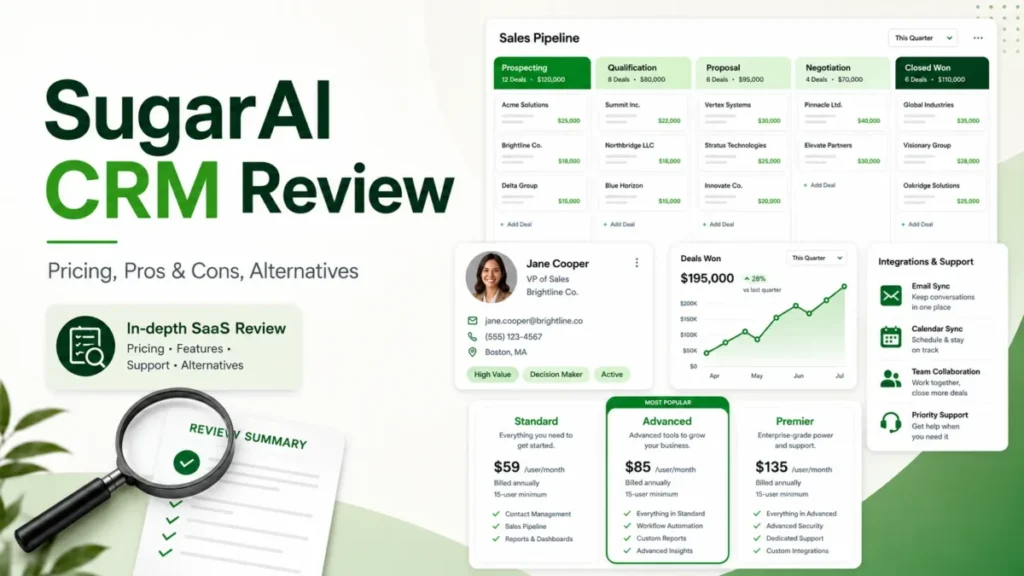
The first thing to know before you shortlist this product is that the vendor changed its name. SugarCRM rebranded to SugarAI in April 2026, and this SugarAI CRM review covers Sugar Sell, the sales CRM that still sits under that brand.
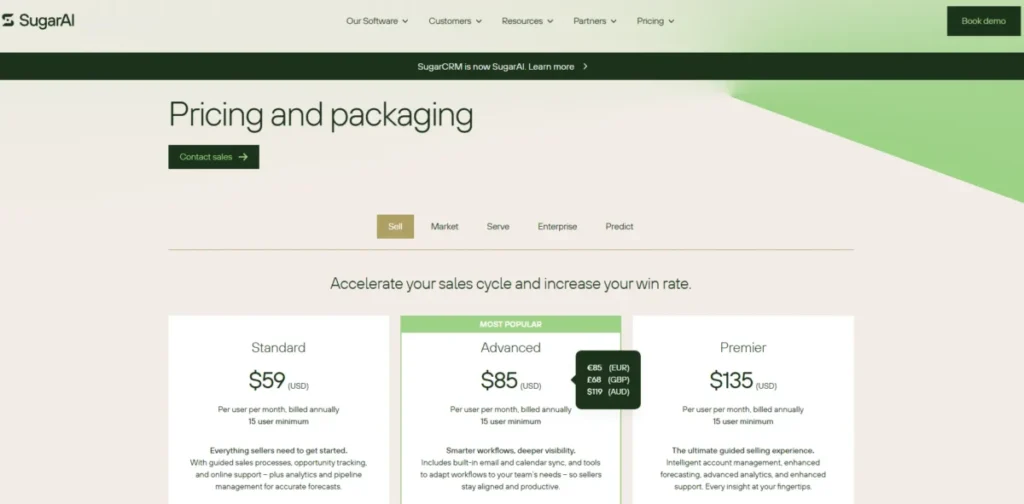
The second thing to know is the number nobody puts in the headline. Sugar Sell starts at $59 per user per month, but every public plan carries a 15-user minimum, so the real entry point is a $10,620 annual contract, not a $59 line item.
That gap between the sticker price and the signed contract is the whole story here. Sugar Sell is a capable account-and-revenue CRM for the right buyer, and a budget trap for the wrong one.
Based on official pricing, product documentation, cloud policy guides, and third-party review sentiment checked on July 11, 2026, here is who should sign and who should walk.
In This Article (15 sections)
Quick Verdict: SugarCRM (Sugar Sell) at a Glance
| Category | Verdict |
|---|---|
| Best for | 15+ seat B2B sales teams with large account portfolios, repeat purchases, and ERP or order-history data |
| Not ideal for | Teams under 15 users, lead-only sales pods, and marketing-led buyers wanting plug-and-play setup |
| Starting price | $59/ |
| Minimum annual contract | $10,620/ |
| Best practical plan | Advanced at $85/ |
| Free plan / trial | No free tier listed; no public trial duration verified on July 11, 2026 |
| Setup difficulty | Medium to high; official range is a couple of weeks to a few months |
| Main strength | Deep account management plus CRM and ERP data in one seller workflow |
| Main limitation | The 15-seat floor and add-on gates push the real cost well above the sticker price |
| Best alternative | HubSpot or Pipedrive for smaller, simpler teams; Salesforce for enterprise depth |
Two takeaways sit inside that table. The floor price is a five-figure annual commitment, and the plan you actually need is usually one tier above the one you first quote.
If you run a smaller or simpler sales motion, the closer fit may be a lighter tool from the best CRM for sales teams shortlist rather than Sugar. I will name specific alternatives by disqualifier near the end.
SugarCRM Is Now SugarAI: What Actually Changed
The company formerly called SugarCRM announced its rebrand to SugarAI in an open letter from the CEO dated April 3, 2026. The product you evaluate is Sugar Sell, the sales CRM, and legacy documentation still uses the SugarCRM name across support and app-store pages.
For a buyer, the practical effect is small but worth stating. SugarAI is the company brand, Sugar Sell is the sales product, and any older SugarCRM review you find is describing the same platform under its previous name.
One more contradiction matters here. Release notes for Sugar Sell 26.1, dated May 19, 2026, still list an Essentials edition, but the live public pricing page checked on July 11, 2026 showed only Standard, Advanced, and Premier.
I would not build a budget on an Essentials price. Several directories still publish $19 or $49 Essentials figures, and none of those appeared on the live pricing page, so treat them as stale until a SugarAI quote confirms otherwise. If you need a refresher on where a sales CRM fits in a broader stack, the primer on what CRM software does covers the category basics.
How This SugarAI CRM Review Was Done
This is a documentation-based review, not a hands-on trial. I did not sign up, click through an account, or run performance tests, and nothing here should be read as personal testing.
Pricing and packaging were checked against the live SugarAI US-dollar pricing page on July 11, 2026. Product fit, plan gates, support tiers, storage, sandboxes, API policy, licensing, security, and mobile availability were checked against official SugarAI and Sugar Support documentation.
User-experience patterns were triangulated across Capterra, GetApp, G2, Trustpilot, and Reddit. Third-party sentiment is treated as opinion, not product fact, and older pricing or packaging claims are marked stale when they conflict with the live official page.
Testing level for this review is official research only. Where I use first person, it is editorial judgment based on that evidence, not a claim that I operated the software.
Day 1: Setup and First Impressions
The first day with Sugar Sell is an administration project, not a self-serve signup. Official material describes deployment taking a couple of weeks to a few months depending on data migration, integrations, customization, and training, which tells you the platform expects a configured rollout rather than an instant start.
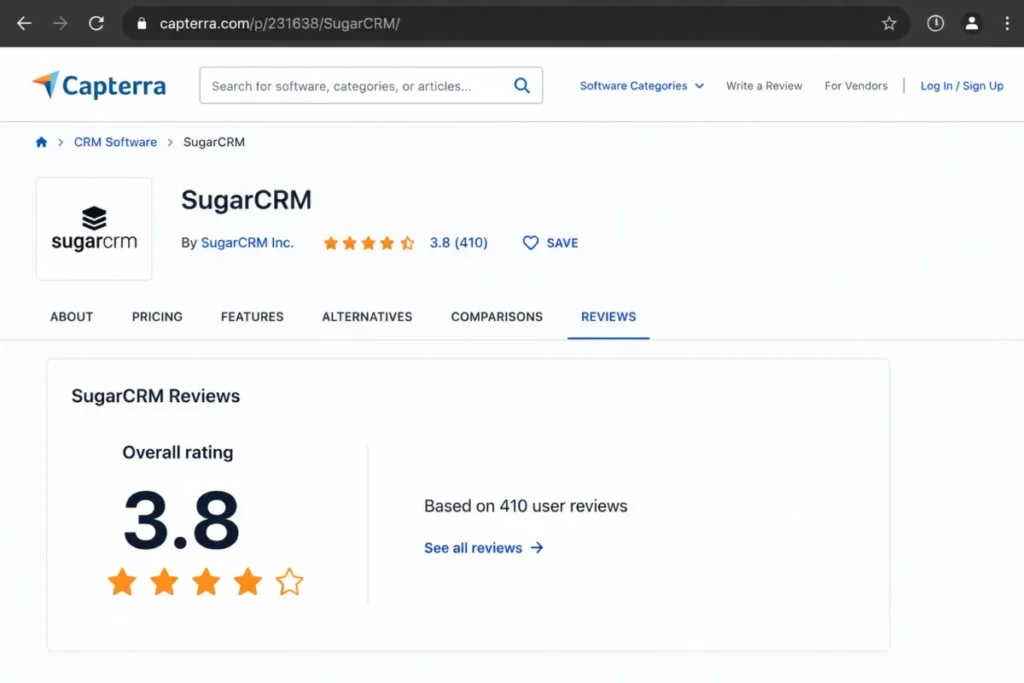
That framing matches the reviewer pattern. On Capterra and GetApp, roughly 410 and 413 reviews respectively cluster around one recurring theme: flexible and customizable, but the interface can feel dated and some setup needs technical help.
Here is the useful way to read that split. Reps experience whatever workflow the administrator configures, while admins and revenue-operations staff absorb the complexity, so “hard to use” is often an implementation-design problem rather than a fixed product flaw.
One recent critical signal deserves weighting, not amplification. A February 2026 Trustpilot review from a long-term customer described account management and support as declining and increasingly contract-driven, which is a fair question to raise in a renewal conversation.
I would not read that as the typical experience, though. Only two Trustpilot reviews appeared in the preceding 12 months, so the recent sample is too small to represent the installed base, and it should be weighed against the larger Capterra and GetApp datasets and the documented support-tier differences below.
On mobile, the current US Apple App Store listing confirms a Sugar app with access to accounts, contacts, leads, activities, quotes, dashboards, tasks, custom modules, and document merge. That covers core field workflows, but I would not assume full desktop parity or offline access, and I would test your exact custom modules before promising reps a mobile-first experience.
A realistic Day 1 needs a named process owner, a CRM administrator or RevOps lead, and a data plan. Without those three roles assigned, the first day produces a login screen and little else.
The administration load is the quiet cost buyers forget. Sugar’s flexibility means someone has to design modules, permissions, workflows, and reports, and that person either exists internally or arrives as a paid implementation partner.
Either way, I would confirm who owns configuration before the contract, because an unowned CRM drifts into shelfware faster than any pricing tier can save it.
Week 1: Real Workflows Under Load
By the first week, the question shifts from “is it installed” to “does our actual selling motion fit.” Sugar Sell is built around account, contact, lead, opportunity, quote, activity, and pipeline management, with configurable business-process automation, reports, and dashboards on top.
The differentiator SugarAI leans on is data breadth. Sugar Sell is positioned to combine CRM data with ERP, order-history, product, and customer-activity data to surface account risk, reorder signals, and expansion opportunities for sellers.
The AI value depends on your data, not the label
This is where I would slow down. Account-risk and expansion recommendations are only as good as the connected data, so incomplete ERP feeds or messy account matching will produce weak signals no matter how the feature is marketed.
The sales-i integration is the clearest example. Official documentation says the sales-i connection requires an active sales-i environment that is receiving ERP data, plus Customer Success involvement to configure it, which is a project rather than a toggle.
Before you count on AI-driven reorder alerts, confirm you have clean account matching, consistent product identifiers, real transaction history, duplicate control, and clear record ownership. Without those, the intelligence layer is a checkbox, not a revenue tool.
Picture a 40-seat industrial distributor moving off spreadsheets and a legacy ERP. Sugar’s account-risk and reorder signals only appear once the ERP feed, product catalog, and account history are connected and deduplicated, which is weeks of preparation rather than a first-week switch.
That sequencing is the part buyers underestimate. I would budget the data-cleanup effort as its own project line, because the CRM cost is wasted until the data behind the intelligence is trustworthy.
Integrations: available is not the same as included
Sugar’s materials describe native connectors, marketplace apps, partner integrations, and REST plus SOAP APIs. The SugarAI Marketplace lists ERP, document, authentication, payment, and productivity integrations, but a marketplace listing does not prove an integration is included, native, bidirectional, or free.
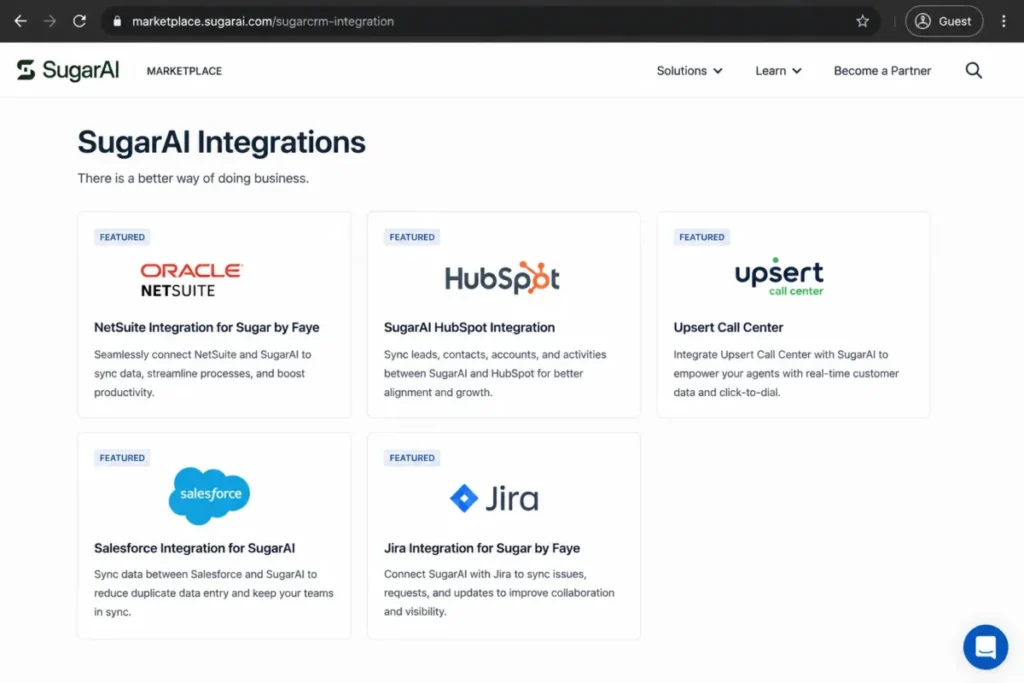
Before you sign, I would validate each required integration against a short checklist: source system, supported objects, sync direction, frequency, who owns it, add-on cost, API volume, and which partner implements it. The vendor also states it supports more than 180 ERP integrations, which is a marketing count worth verifying against the exact connector and objects your team needs.
API throughput is capped, and that matters at scale
Technical teams should read the SugarCloud Policy Guide before designing any high-volume sync. It states that activity above 20 requests per second may be temporarily blocked, inefficient requests may be blocked, and planned high-volume activity should be disclosed at least seven calendar days in advance.
A warehouse, ERP, or data-platform sync that bursts past 20 requests per second is a real architecture constraint, not a footnote. I would load-test the actual workflow with SugarAI approval before assuming the API will carry your volume.
Month 1: What Breaks First at Scale
By the first month, the constraints that no vendor page advertises start to shape daily work. These are the items I would surface in procurement, because each one carries a buyer consequence.
Scheduled jobs in SugarCloud have a maximum runtime of 30 minutes. A long-running ERP synchronization or bulk enrichment process that runs past that limit has to be split into batches or moved to an external worker, so plan the architecture accordingly.
SugarCloud does not provide direct database access, and custom database triggers and stored procedures are not permitted. Application-layer customization and APIs are available, but developers who expect to query or alter the database directly should evaluate the separate on-premises Enterprise route instead.
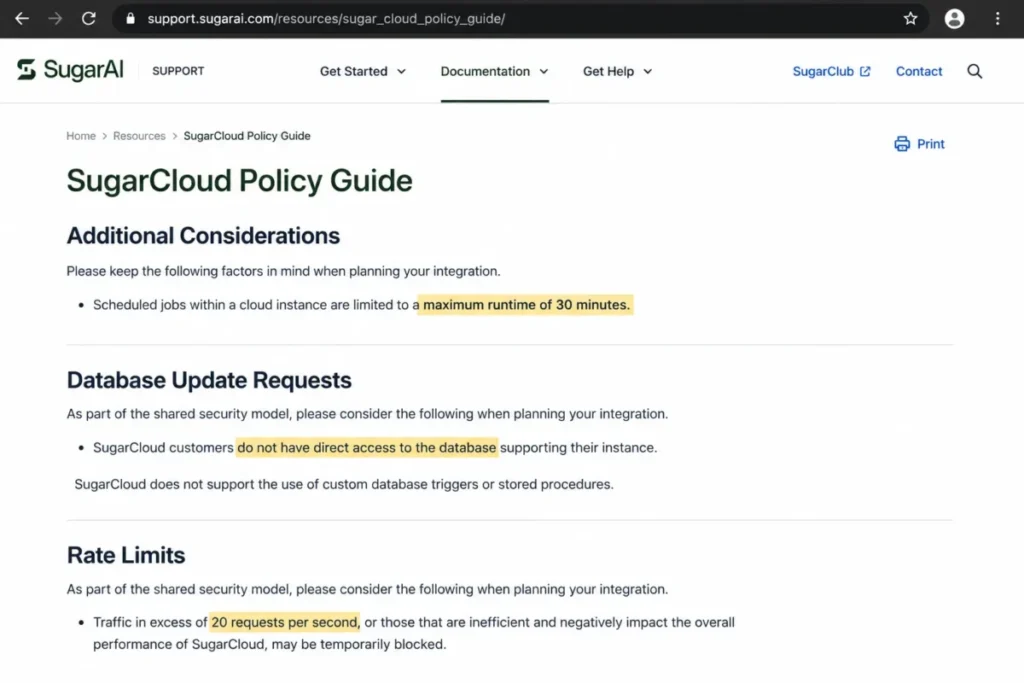
Load testing and penetration testing require advance notice and written approval from SugarAI. Security and performance teams cannot test the production service on their own schedule, so build vendor coordination into any procurement or security plan.
Feature gates: what you actually get by plan
Sugar Sell splits its capabilities across three public tiers, and several headline features are add-on or activation dependent rather than simply included. The table below maps the packaging based on official activation and licensing documentation.
| Capability | Standard | Advanced | Premier |
|---|---|---|---|
| Core CRM, pipeline, BPM, reporting, mobility | Included | Included | Included |
| Mail and calendar sync (Sugar Connect) | Add-on dependent | Included, needs activation | Included, needs activation |
| Case management and bug tracking | No | Included | Included |
| Intelligence / Sugar Automate | Not included | Separate purchase and license | Broader inclusion, confirm scope |
| Smart Guides (guided selling) | No | Separately licensed | Included per license docs |
| Geo mapping, Discover, LinkedIn connector | No | No | Included |
| Support level | Basic | Standard | Enhanced |
| Cloud sandboxes | 1 | 2 | 2 |
The trap on Standard is email. The live pricing page marks mail and calendar integration with an asterisk, and activation documentation describes Sugar Connect as a purchasable add-on for Standard, so daily email sync can be a forced upgrade trigger.
Advanced buyers hit a similar surprise with intelligence. Sugar Connect is part of the Advanced edition but still needs activation, and Intelligence or Sugar Automate can require separate purchase and license assignment, so “Advanced includes AI” is not a safe assumption.
Storage and sandboxes share one pool
Published SugarCloud storage allowances scale by tier, and this is another cost that the seat price hides. Standard starts at 10 GB plus 0.25 GB per user for each listed storage category, Advanced at 15 GB plus 0.25 GB per user, and Premier at 30 GB plus 0.5 GB per user.
| Tier | Base storage (per category) | Per-user add | Cloud sandboxes |
|---|---|---|---|
| Standard | 10 GB | 0.25 GB | 1 |
| Advanced | 15 GB | 0.25 GB | 2 |
| Premier | 30 GB | 0.5 GB | 2 |
Two details make this a governance issue, not a spec line. Sandbox file and database usage counts against the same managed-storage allowance, and additional capacity above the allowance can be invoiced at a price SugarAI does not publish.
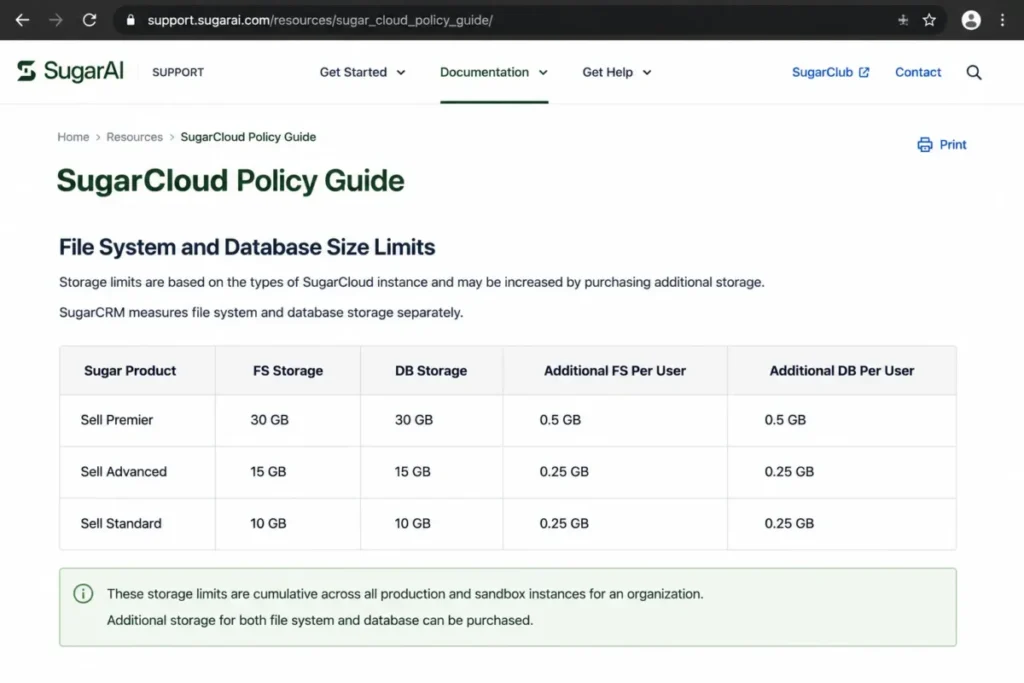
For a file-heavy or heavily customized deployment, I would ask for the storage-overage unit price in writing before signing, because that number is where a “predictable” per-seat cost quietly grows.
Licensing: over the limit means locked out
Seat governance in Sugar is an availability risk, not only an invoicing detail. Active administrators and regular users both consume licenses, and users assigned to multiple license types can count against each type.
Official documentation states that if an instance exceeds active-user limits for a license type, regular users may be unable to log in until the licensing is corrected. Tie this to your SSO, SCIM, import, and offboarding process, because sloppy provisioning can turn into a login outage rather than a polite overage warning.
The 30 and 90-day adoption test
Set two checkpoints before you sign, because Sugar’s payoff is a slow build rather than an instant win. By day 30, the test is whether reps log activities in Sugar instead of a spreadsheet, and whether the ERP or order-history feed is actually flowing.
By day 90, the test is harder. Account records should be deduplicated, dashboards should reflect real pipeline, and the intelligence signals should be accurate enough that a rep changes a call because of them. If those are not true at 90 days, the platform’s core advantage has not landed, and the renewal case gets difficult.
Security, Support, and Admin Controls
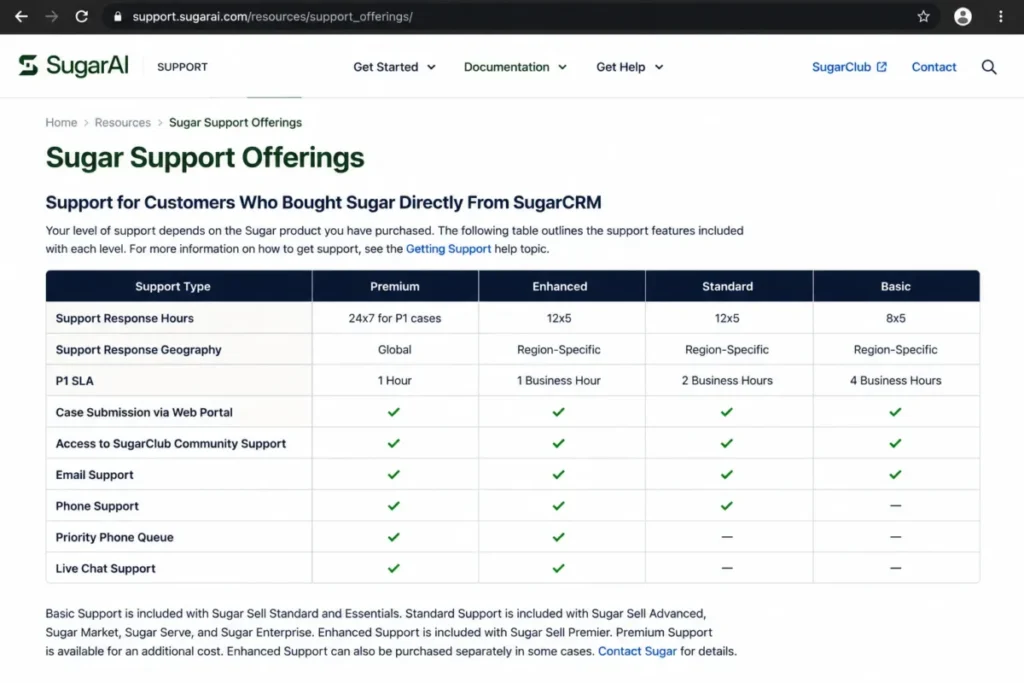
Support quality is not one number. It splits into four service levels tied to your plan, with Standard on Basic support, Advanced on Standard support, Premier on Enhanced support, and Premium as a purchasable upgrade.
| Support level | Comes with | P1 response target | Coverage |
|---|---|---|---|
| Basic | Standard plan | 4 business hours | 8×5 |
| Standard | Advanced plan | 2 business hours | 12×5 |
| Enhanced | Premier plan | 1 business hour | 12×5 |
| Premium | Purchasable add-on | 1 hour | 24×7 |
The operational read is simple. If your pipeline depends on the CRM being available and you are on the Standard plan, a four-business-hour priority-one target and 8×5 coverage is the risk you are accepting, and only Premium buys 24×7.
On security, the current Security and Trust page lists ISO/IEC 27001:2022, SOC 2 Type II, GDPR, CCPA, Data Privacy Framework participation, AWS hosting, encryption in transit and at rest, and regional hosting options. Those are real attestations, and procurement should request the current reports and confirm the product and region scope.
Certification is not the same as workload compliance, and this is where I would be careful. The October 2024 official security datasheet stated that standard products were not configured for HIPAA, PCI, or FedRAMP compliance, though some regional partner options might exist.
Because that datasheet predates the 2026 rebrand, I would not call SugarCRM HIPAA, PCI, or FedRAMP compliant out of the box. Require current written confirmation for the exact product, partner, region, hosting model, and contract before committing a regulated workload.
One more contract detail to confirm. The current Trust page indicates data may remain available for up to 120 days after you leave, while the older 2024 datasheet said 90 days, so confirm the current deletion schedule in the final contract.
The Pricing Math Nobody Shows You
Here is the arithmetic that changes the shortlist. Sugar Sell’s per-user prices look mid-market, but the 15-user minimum turns each headline number into a five-figure annual floor.
| Plan | Per user / month | 15-seat minimum / year | Best for |
|---|---|---|---|
| Standard | $59 | $10,620 | Core CRM where add-on email sync is acceptable |
| Advanced | $85 | $15,300 | Teams needing mail sync, cases, and faster support |
| Premier | $135 | $24,300 | Guided selling, geo mapping, Discover, LinkedIn, doubled storage |
Those annual figures are the subscription floor only, before implementation, migration, add-ons, storage overages, Premium support, or negotiated discounts. Prices were checked on the live SugarAI pricing page on July 11, 2026.
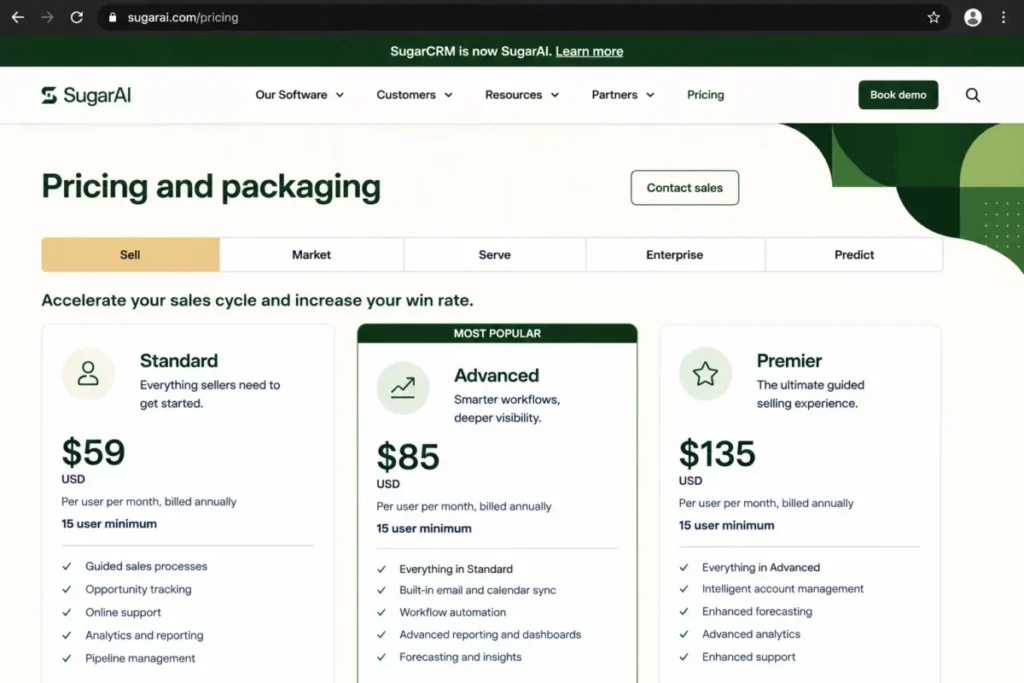
A common request is the 10-user cost, and here it does not exist. Because every public plan enforces a 15-seat minimum, a team of 10 pays for 15, which is exactly why the sticker price misleads smaller buyers.
The add-on prices are the missing budget line. SugarAI publicly confirms availability but not unit prices for implementation, migration, additional storage, Premium support, Sugar Connect on Standard, Intelligence, and Sugar Automate, so the seat price is a starting point, not a first-year budget.
On trials, be precise. No free tier is listed and I could not verify a current public trial duration on July 11, 2026, so ask SugarAI for a demo or proof-of-concept environment in writing rather than relying on older seven-day-trial claims.
The budget pressure point is easy to name. The advertised $59 stops being the real number the moment you add the 15-seat floor, and it moves again with the email add-on on Standard, storage overages, Premium support, and implementation.
I would build the business case on a fully loaded first-year figure that includes those line items, then compare that number to alternatives rather than comparing sticker prices that no buyer actually pays.
Cloud versus on-premises: two different products
The $59, $85, and $135 figures are Sugar Sell cloud prices. On-premises Enterprise deployment exists as a separate, sales-led route, and I would not attach the cloud seat prices to it.
If your requirement is direct database control or self-hosting, you are evaluating a different offer with different pricing, responsibilities, and technical limits. Get that quoted on its own rather than assuming the public cloud price applies.
Which Sugar Sell plan should you choose?
Match the tier to the workflow, not the feature list. Choose Standard only when you want core CRM and can accept that daily email sync is an add-on purchase.
Move to Advanced when included mail and calendar sync, case management, bug tracking, and a two-business-hour priority-one target become requirements rather than nice-to-haves. Choose Premier when Smart Guides, geo mapping, Discover, the LinkedIn connector, enhanced support, and doubled storage justify the jump to $24,300 a year.
For most account-based B2B teams that actually use Sugar’s strengths, Advanced is the honest practical plan. Standard looks cheaper until the first month, when the email add-on and Basic support start to bite.
The SugarCRM Buyer Risk Ledger
Before you sign, it helps to name the risks that actually derail a Sugar rollout and tie each one to a mitigation. This is the ledger I would bring to a procurement meeting.
| Risk | Buyer consequence | Mitigation |
|---|---|---|
| Seat-minimum overshoot | Paying for 15 seats with 10 active reps | Confirm you will fill and use 15 licenses within year one |
| Add-on creep | Standard budget grows once email sync and intelligence are added | Get every add-on price in the written quote before signing |
| Storage overage | Managed-storage pool fills from files plus sandboxes | Ask for the overage unit price and forecast data growth |
| Integration drift | ERP sync fails at high volume or needs a partner | Load-test the real workflow and confirm connector ownership |
| Adoption decay | Data goes stale by month three and AI signals weaken | Assign a data owner and a 30/90-day adoption checkpoint |
Each row maps to money or downtime, not abstract worry. The first two rows explain most of the “Sugar got expensive” complaints, and the last two explain most of the “the AI never delivered” ones.
None of these are reasons to walk away on their own. I would treat them as line items to resolve in the contract and the implementation plan before the first invoice clears.
SugarCRM Pros and Cons
| Pros | Cons |
|---|---|
| Deep account, opportunity, and quote management for complex B2B selling | 15-user minimum forces a $10,620+ annual contract regardless of team size |
| Combines CRM with ERP and order-history data for reorder and expansion signals | Daily email sync on Standard is an add-on, not an included feature |
| Highly configurable business processes, workflows, and dashboards | Intelligence and Sugar Automate can require separate purchase and licensing |
| Clear, documented support tiers with defined P1 response targets | SugarCloud caps API at 20 requests/ |
| Strong published security attestations (ISO 27001:2022, SOC 2 Type II, GDPR) | No direct database access or custom triggers in the cloud edition |
| Current iOS app covers core field-sales workflows | No free tier and no verified public trial duration as of July 2026 |
The pattern in that table is consistent. Sugar rewards teams that invest in configuration and data, and punishes teams that expected a cheap, self-serve pipeline tool.
Who Should Use SugarCRM
Sugar Sell fits a specific operating model, not a company-size label. The strongest buyers share the same traits.
A sales organization with at least 15 licensed users managing many accounts, products, and territories will use the account-management depth rather than pay for unused capacity. Manufacturers, wholesale distributors, software vendors, and business-services firms that need CRM and ERP signals in one seller workflow are the core fit.
Teams with a named CRM administrator or RevOps lead, real data-governance ownership, and willingness to configure workflows will get value that lighter tools cannot match. Account-management teams where reorder risk, product history, and repeat revenue matter more than fast lead capture also fit well.
Who Should Avoid SugarCRM
The disqualifiers are just as specific. If any of these describe you, I would look elsewhere before booking a demo.
Teams under 15 users cannot justify a minimum annual subscription that starts at $10,620, full stop. Small sales pods that need a plug-and-play pipeline with little administration will find the setup and configuration burden out of proportion to the payoff.
Marketing-led companies primarily buying inbound marketing, content management, and campaign automation are buying the wrong category here. Teams that require unrestricted direct database access in the vendor cloud, or that need out-of-the-box HIPAA, PCI, or FedRAMP compliance without a confirmed partner deployment, should also treat Sugar as a poor fit.
There is a case for staying, too. If you already run Sugar with clean ERP integration, trained admins, and dashboards your reps trust, switching CRMs is a bigger risk than tolerating the interface or the add-on pricing.
Migration cost and adoption relearning are real, so I would only leave an installed Sugar deployment for a specific, named problem rather than general dissatisfaction.
SugarCRM Alternatives
Pick the alternative by the exact reason Sugar fails for you, not by a generic ranking. Verify current pricing on each vendor’s page before committing, since these move.
| Alternative | Choose it instead when | Why it fits |
|---|---|---|
| Pipedrive | You are a small, sales-only team wanting simplicity | Fast pipeline setup with little admin overhead and no 15-seat floor |
| HubSpot | Your motion is marketing-led and lifecycle-wide | Easier adoption and tighter sales-marketing alignment for smaller teams |
| Zoho CRM | Per-seat budget is the blocker | Broad CRM functionality below Sugar’s minimum contract cost |
| Salesforce | You need ecosystem depth and enterprise platform breadth | Larger app ecosystem and configurability when admin resources exist |
| Microsoft Dynamics 365 Sales | Your stack is standardized on Microsoft | Native fit with Microsoft apps and data infrastructure |
| SuiteCRM | You want open-source self-hosting control | Database-level control that SugarCloud will not give you |
If cost or simplicity is the disqualifier, start with the Pipedrive CRM review or the HubSpot CRM review, and smaller teams can scan the best CRM for small business shortlist. If budget per seat is the issue, the Zoho CRM review is the natural next stop.
If the problem is the opposite, you need more platform depth than Sugar offers, then weigh the Salesforce CRM review and the Microsoft Dynamics 365 Sales review before deciding. Buyers torn between the two big platforms can also read the Pipedrive vs Salesforce comparison for a sense of the simplicity-versus-power tradeoff.
Verdict: Keep It or Kill It?
Sugar Sell is worth it for one clear buyer. If you run a 15-plus-seat B2B sales team with large account portfolios, repeat purchases, and ERP or order-history data, and you have a RevOps or IT owner to configure it, the account-and-revenue depth justifies the cost.
It is not worth it for the buyer the sticker price attracts. Small, lead-only, or budget-first teams will pay for 15 seats they may not fill, chase email sync as an add-on, and inherit configuration work that lighter tools avoid.
My recommendation is direct. Budget from the 15-seat annual minimum, plan on Advanced rather than Standard, and get implementation, add-on, storage-overage, and support-upgrade prices in a written quote before you compare Sugar to anything else.
This SugarAI CRM review comes down to a single test. If the ERP-driven account intelligence solves a problem you actually have, Sugar earns its price, and if it does not, a simpler CRM will serve you better for less.
The renewal question to answer before year two is whether reps kept the account and ERP data clean enough for the intelligence layer to pay for itself. If that answer is no by month three, the platform’s main advantage never arrives.
FAQ
Is SugarCRM still available, or is it now SugarAI?
Both names describe the same platform. SugarCRM rebranded to SugarAI in April 2026, so SugarAI is the current company brand and Sugar Sell is the sales CRM product. Older articles that say “SugarCRM” are covering the same software under its previous name, and the product remains available for purchase.
How much does SugarCRM cost in 2026?
Sugar Sell lists three cloud plans: Standard at $59, Advanced at $85, and Premier at $135 per user per month, billed annually. Every public plan carries a 15-user minimum, so the real starting cost is $10,620 per year, before implementation, add-ons, storage overages, or Premium support. Prices were checked on July 11, 2026.
Does SugarCRM have a free version?
No free tier was listed on the live pricing page checked on July 11, 2026, and I could not verify a current public trial duration. Older sources mention a seven-day trial, but that was not confirmed on the current page. Ask SugarAI for a demo or proof-of-concept environment in writing before committing.
Is SugarCRM good for small businesses?
Usually not, because of the 15-user minimum. A team of five or ten still pays for 15 seats and a $10,620 annual floor, which rarely makes sense for a small business. Smaller teams are generally better served by Pipedrive, HubSpot, or Zoho CRM, which allow lower seat counts and simpler setup.
What is the difference between Standard, Advanced, and Premier?
Standard covers core CRM but treats email sync as a paid add-on. Advanced adds included mail and calendar sync, case management, bug tracking, and faster support. Premier adds Smart Guides, geo mapping, Discover, a LinkedIn connector, enhanced support, and doubled storage. For most account-based teams, Advanced is the practical plan.
Does SugarCRM integrate with ERP systems?
Yes, ERP integration is a core selling point, and SugarAI says it supports more than 180 ERP integrations. That figure is a vendor count, and connectors vary between native, marketplace, partner, and custom API paths. Verify the exact connector, supported objects, sync direction, and cost for your ERP before assuming an integration is included or free.
What are the main disadvantages of SugarCRM?
The biggest drawbacks are cost and technical ceilings. The 15-seat minimum forces a five-figure contract, email sync on Standard is an add-on, and the cloud caps API traffic at 20 requests per second and scheduled jobs at 30 minutes. It also has no direct database access and no verified free trial as of July 2026.
Is SugarCRM HIPAA compliant?
Not out of the box, based on the available evidence. The October 2024 official security datasheet stated that standard products were not configured for HIPAA, PCI, or FedRAMP compliance, though some regional partner options might exist. That document predates the 2026 rebrand, so require current written confirmation for your exact product, region, and contract before deploying a regulated workload.
How long does SugarCRM implementation take?
Official material says deployment can take a couple of weeks to a few months, depending on data migration, integrations, customization, and training. There is no universal timeline. Budget for a named process owner, a CRM administrator, data mapping, sandbox testing, and user training, and expect ERP-heavy or highly customized rollouts to sit at the longer end.
What are the best SugarCRM alternatives?
It depends on why Sugar does not fit. Choose Pipedrive for small, simple sales teams, HubSpot for marketing-led motions, and Zoho CRM for tighter per-seat budgets. For more enterprise depth, weigh Salesforce or Microsoft Dynamics 365 Sales, and choose SuiteCRM if open-source self-hosting and database control are the priority.