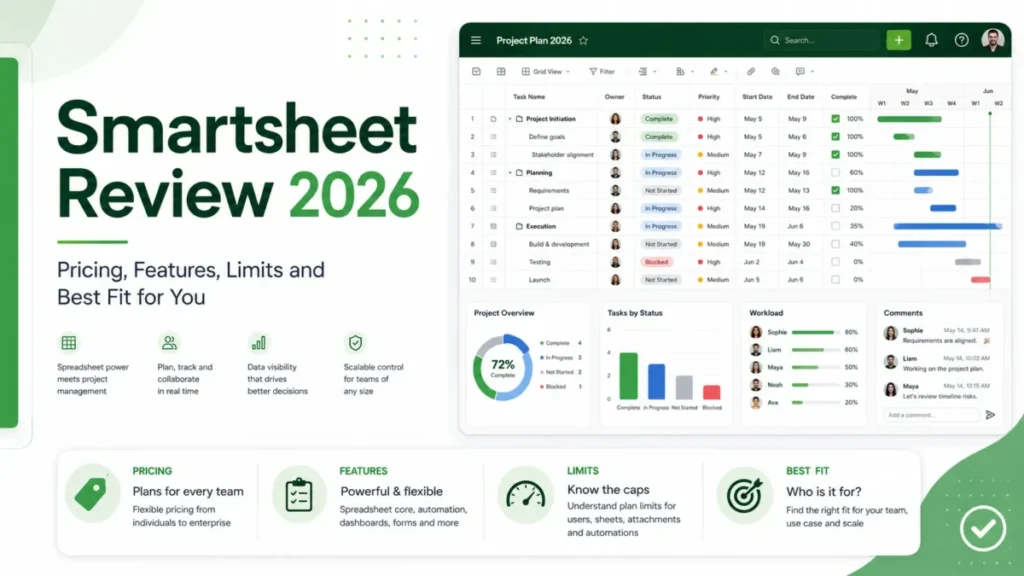
Smartsheet is worth buying when a spreadsheet-fluent team needs structured intake, dependency scheduling, automated routing, and live dashboards in one place. It is the wrong purchase for offline-first field crews, CRM-first sales teams, and organizations with hundreds of lightly editing internal collaborators and nobody assigned to seat governance.
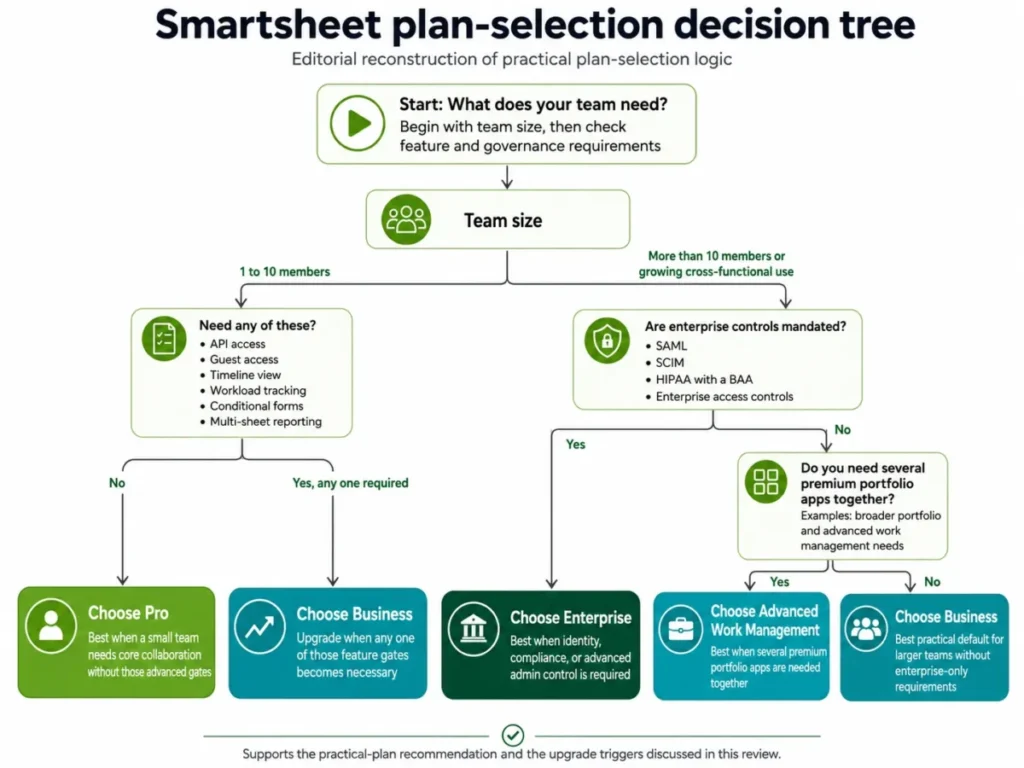
Pricing starts at an effective $9 per member per month on Pro billed annually. Most operational teams land on Business at $19 per member per month with a three-member floor, because API access, Guests, timeline view, workload tracking, and multi-sheet reports all begin there (Smartsheet pricing).
The decision that costs real money in 2026 is the seat model, not the feature list. An internal collaborator who takes a qualifying action becomes a provisional member, and inaction before reconciliation converts that person into a paid seat (how reconciliation and true-up works).
If Smartsheet is one of several options, the broader project management software roundup frames the category first.
In This Article (20 sections)
Quick Verdict: Smartsheet at a Glance
| Category | Verdict |
|---|---|
| Best for | Spreadsheet-fluent operations, PMO, and marketing delivery teams running repeatable intake, scheduling, and reporting |
| Not ideal for | Offline-first field crews, CRM-first sales teams, and organizations with many light internal editors and no seat governance |
| Starting price | $9 per member per month on Pro, billed annually ($108 per member per year) |
| Best practical plan | Business at $19 per member per month billed annually, because API, Guests, timeline, workload, and multi-sheet reports start there |
| Free plan or trial | No new Free plan signups since August 28, 2024. A 30-day trial gives Business-level access, 50 sheets, and needs no credit card |
| Setup difficulty | Medium to high. Dependency scheduling, forms, and automation each need deliberate configuration |
| Main strength | One layer for intake forms, dependency schedules, approval routing, and live portfolio dashboards |
| Main limitation | Provisional-member true-up converts internal collaborators into paid seats when nobody reviews them |
| Best alternative | Depends on the failure mode. See the alternatives table below |
Source: official Smartsheet pricing page and help documentation, checked 2026-08-05. Region: US, billing basis per member per month.
Smartsheet Pros and Cons
| Pros | Cons |
|---|---|
| Business lists unlimited automations, unlimited report source sheets, and unlimited dashboard widgets | Pro caps automations at 250 per month, and the public sources do not state what happens after the cap |
| Conditional intake forms write directly into a connected sheet and can trigger alerts, update requests, and approvals | A Pro report reads exactly one source sheet, and a Pro dashboard stops at 10 widgets |
| Dependency scheduling with predecessors, calculated dates, and critical path is documented on paid plans | Provisional members become paid seats when an administrator takes no action before reconciliation |
| Enterprise adds SAML single sign-on plus directory provisioning through Microsoft Entra ID and Okta | Sheet backups exclude dashboards, reports, workflows, formulas, cross-sheet references, and formatting |
| Published compliance spans SOC, ISO 27001, 27017, 27018, and 27701, FedRAMP, DOD SRG, and HIPAA on eligible Enterprise service | Excel import reads only the leftmost worksheet and does not preserve formulas |
| The 30-day trial runs at Business level with no credit card, which makes a real pilot possible | Forms are the only interactive offline feature in the mobile app |
Source: official Smartsheet pricing page, help documentation, and security pages, checked 2026-08-05.
What Smartsheet Is, and What It Is Not
Smartsheet positions itself as a work-management platform for planning, capturing, tracking, automating, and reporting on work at scale (platform features). The working unit is a sheet that behaves like a spreadsheet, wrapped in views, forms, reports, dashboards, and workflow rules.
That framing matters for buyers coming from Excel. The grid is familiar, and the surrounding governance layer is not.
Ownership changed recently too. Funds managed by Blackstone and Vista Equity Partners completed an acquisition valued at roughly $8.4 billion on January 22, 2025, which took the company private (acquisition announcement).
What Smartsheet is not: a relational CRM, a high-volume operational database, or an offline-capable field platform.
Each of those boundaries shows up later in this review as a specific documented limit rather than a matter of taste.
Methodology: How This Smartsheet Review Was Built
This analysis is based on the official US pricing page, Smartsheet help and developer documentation, the standard User Agreement and Data Processing Addendum, published security pages, 2025 and 2026 product announcements, and labeled third-party review patterns from G2, Capterra, and TrustRadius. Pricing and plan limits were checked on 2026-08-05.
Smartsheet was assessed against the same buyer-focused criteria applied to every platform on this site: workflow fit, plan gates, real annual cost including add-ons, administrative overhead, integration and API capacity, migration fidelity, security scope, and exit terms.
Greater weight went to factors that change a purchase decision rather than a demo impression. Those are seat mechanics, the first blocking plan gate, hidden add-on cost, and the effort required to leave.
Claims that could not be traced to a named source were left out of the analysis. Workflow descriptions follow documented product behavior and published plan requirements, and temporary offers are treated separately from standard list pricing.
Setup and Configuration: What the Documented Path Requires
Setup difficulty is medium to high, and the reason is structural. A sheet is easy to create, but the capabilities buyers want each require their own configuration pass.
Dependency scheduling is the sharpest example. A paid member has to open Project Settings, enable dependencies, map start date, end date, duration, and predecessor columns, then switch to Gantt view before dates calculate (enable dependencies using predecessors).
Critical path depends on that same Gantt configuration.
Independent review coverage repeatedly describes the same shape: flexible and capable for complex operations, harder for new users to pick up, and heavier than a simple task list (The Digital Project Manager). That pattern lines up with the documented configuration steps rather than contradicting them.
Two groups find onboarding easy: people who already build structured spreadsheets, and teams importing a clean single-tab dataset.
Two groups find it hard: teams migrating a formula-heavy workbook, and organizations that expect governance to work without an assigned administrator.
The 30-day trial is the sensible pilot vehicle. It runs at Business level, allows up to 50 sheets, and requires no credit card (free trial FAQs).
After expiry, sheets stay read-only for 30 days before deletion, so export before that window closes rather than after.
Where Real Workflows Run
Six capabilities carry most of the buying case. Each one has a plan gate, and each one has a documented boundary worth knowing before the contract.
Forms and Conditional Intake
A form is created from a destination sheet, and every submission lands as a new row that downstream automation can act on. Conditional logic, which shows follow-up questions only when they apply, is available on Business and higher, not Pro (conditional form logic).
For a request-intake process, that gate is decisive. A Pro team either builds several simpler forms or accepts that every requester sees every field.
Gantt Scheduling and Dependencies
Once dependencies are enabled and predecessors are entered, Smartsheet calculates dependent dates and duration, and Gantt view carries the critical path. This is genuine project scheduling rather than a task list with dates attached.
The friction is front-loaded into column configuration and predecessor logic.
I would build and validate a small task network before importing a full plan, because circular or invalid predecessor chains have to be corrected by hand.
Automation and Approval Routing
Business, Enterprise, and Advanced Work Management list unlimited automations, while Pro includes 250 per month. The public pricing page states the Pro number but does not document what happens to workflow runs after the cap.
Treat queueing, skipping, blocking, and overage as unverified, and put the question to a sales or support contact during a pilot.
There is a sharper trap inside automation itself. Cells holding cross-sheet formulas or cell links do not trigger certain sheet-changing actions, including move, copy, row locking and unlocking, and approval actions (visual workflows).
That is the kind of silent failure that erodes trust in a rollout. A workflow appears configured, the rule never fires, and the team quietly reverts to email.
Keep trigger values local to the sheet wherever the design allows it.
Reports, Dashboards, and Timeline View
Reporting is where Pro stops being viable for anything portfolio-shaped. A Pro report reads one source sheet and a Pro dashboard is limited to 10 widgets, while Business and above list unlimited source sheets and unlimited widgets.
Timeline view inside reports became generally available on October 29, 2025 for Business and Enterprise. Source sheets, columns, filters, and groupings carry into the view, but summarize and sort settings do not apply in timeline mode (timeline view in reports).
Rebuild expectations to match. A grouped and summarized executive report will not behave identically once someone flips it to timeline.
Workload Tracking
Workload tracking starts on Business and is also available on Enterprise, and the workload heatmap exposes up to 60 days in the past (workload tracking).
Sixty days covers a quarter-end capacity conversation. It does not cover annual utilization analysis, so resource managers need reports or an external dataset for anything longer.
AI Features Across Plans
The public comparison table places the fuller AI formula, text, and data-analysis rows on Enterprise, with lighter assistance available below it. Smartsheet also lists ChatGPT, Claude, and Gemini Enterprise among its named integrations (platform features).
I would not buy Enterprise for the AI rows alone.
Buy Enterprise for identity, compliance, and governance, and treat the generative capabilities as a bonus rather than the business case.
What Breaks First at Scale
Three ceilings decide whether Smartsheet can hold operational data or only surface it.
A single sheet is limited to 500,000 cells (API limitations). Translated into practical dimensions, 20,000 rows across 25 columns hits that ceiling exactly.
The API is gated to Business and above, runs on a general limit of 300 requests per minute per access token, and returns HTTP 429 once that limit is exceeded (API scalability options). Add-row and update-row calls are separately limited to 500 rows per request.
None of those numbers is unreasonable for a work-management platform. They are unreasonable for a system of record.
If your integration team is planning a continuous sync of a large transactional dataset, the architecture needs partitioning, batching, backoff, and retry from day one. That build cost never appears in a starting price, and it is the item finance will question at renewal.
Teams new to this scoping work can start from the basics of what an API is before sizing the effort.
My recommendation for high-volume cases: keep the authoritative dataset in a dedicated system and expose only the operational subset in Smartsheet.
The Pricing Math Nobody Shows You
List pricing is simple. Total cost is not.
| Plan | Annual billing | Monthly billing | Seats | Key limits | Worth it? |
|---|---|---|---|---|---|
| Pro | $9 per member per month ($108 per year) | $12 per member per month | 1 to 10 members | 250 automations per month, 1 report source sheet, 10 dashboard widgets, 20 GB storage, 30 MB attachments, no API, no Guests | Good only if every Pro limit fits |
| Business | $19 per member per month ($228 per year) | $24 per member per month | Minimum 3 members | 1 TB storage, 250 MB attachments, unlimited automations, reports, widgets, Guests, and Contributors | Best practical plan for operational teams |
| Enterprise | Custom quote | Custom quote | Minimum 10 members | Adds SAML, directory integration, Safe Sharing, chargeback, unlimited storage, several controls sold as add-ons | Required when identity or compliance mandates it |
| Advanced Work Management | Custom quote | Custom quote | Custom | Bundles portfolio premium capabilities and Premium Support | Only after a requirements inventory |
On a phone this table uses horizontal scroll with the plan label pinned, so read the Plan column first and swipe for limits.
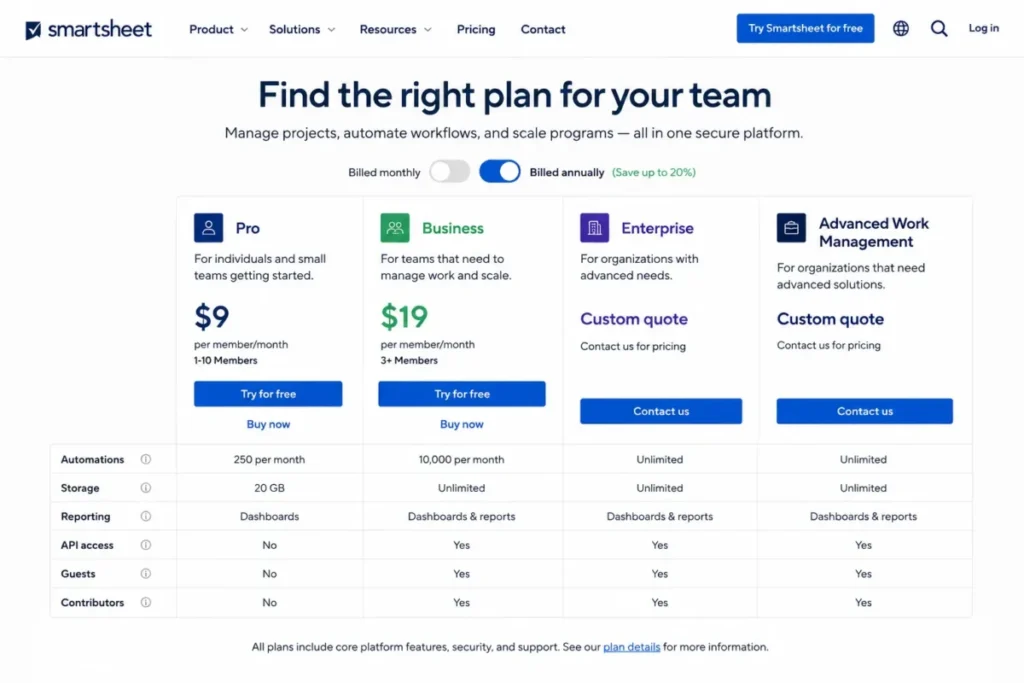
Annual billing is the cheaper commitment on both public plans. Pro saves $36 per member per year against twelve monthly payments, which is 25.0 percent, and Business saves $60 per member per year, which is 20.8 percent.
The pricing page also carries a caveat most reviews skip: Pro is listed as available to new customers only.
An existing account holder should confirm eligibility against their order terms rather than assuming a downgrade path exists.
Source: official US Smartsheet pricing page, checked 2026-08-05 and re-verified on the publish date: 2026-08-05. These are standard list rates with no active promotion applied, and the renewal price is set by the order form rather than this page.
What Ten Members Actually Cost
| Team size | Plan | Annual billing per year | Monthly billing annualized | Annual plus Standard Support |
|---|---|---|---|---|
| 1 | Pro | $108 | $144 | Not applicable |
| 5 | Pro | $540 | $720 | Not applicable |
| 10 | Pro | $1,080 | $1,440 | Not applicable |
| 3 | Business | $684 | $864 | $828 |
| 5 | Business | $1,140 | $1,440 | $1,380 |
| 10 | Business | $2,280 | $2,880 | $2,760 |
| 25 | Business | $5,700 | $7,200 | $6,900 |
| 50 | Business | $11,400 | $14,400 | $13,800 |
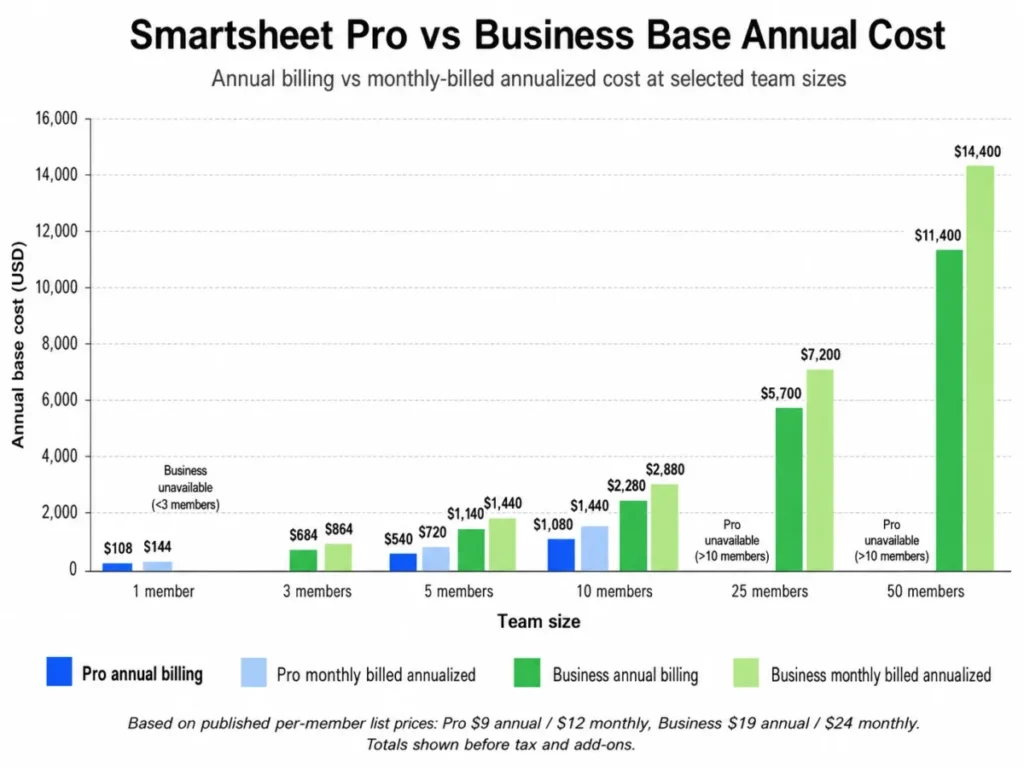
The three-member minimum is the number small teams miss. A two-person agency that needs one Business-only capability, conditional form logic for instance, still pays the three-seat floor of $684 per year on annual billing or $864 on monthly billing.
Source: calculated from official Smartsheet pricing page rates and the Standard Support datasheet starting price, checked 2026-08-05. Base subscription only, excluding premium apps.
Add-Ons That Change the Budget
Standard Support starts at $4 per user per month, includes global phone support and Smartsheet University, and is sold as a Business add-on while being included with Enterprise and Advanced Work Management (Standard Support datasheet). Twelve months of that is $48 per user per year.
Two premium apps move the budget further. Dynamic View starts at $125 per month and Data Shuttle starts at $100 per month as Business or Enterprise add-ons, both included in Advanced Work Management.
Held for a full year, those two alone start at $1,500 and $1,200, so $2,700 before support.
For a ten-person Business team paying $2,280 in base seats, controlled external sharing plus recurring data movement more than doubles the bill.
Several Enterprise governance controls carry no public price at all, including data retention options, data egress, event reporting, and customer-managed encryption keys. Premium Support has the same gap: the vendor page advertises 24/7 phone, email, and live chat with a first-response target within two hours, plus University and Pro Desk, without publishing a rate (Premium Support package).
The renewal question buyers should answer before signing: which of these add-ons became load-bearing during year one, and what does the quote look like once they are no longer optional?
Feature Gates: What Each Plan Includes
| Capability | Pro | Business | Enterprise | Advanced Work Management |
|---|---|---|---|---|
| Members | 1 to 10 | Minimum 3 | Minimum 10 | Custom |
| Automations per month | 250 | Unlimited | Unlimited | Unlimited |
| Report source sheets | 1 | Unlimited | Unlimited | Unlimited |
| Dashboard widgets | 10 | Unlimited | Unlimited | Unlimited |
| Storage | 20 GB | 1 TB | Unlimited | Unlimited |
| Max attachment size | 30 MB | 250 MB | 250 MB | 250 MB |
| API access | No | Yes | Yes | Yes |
| Guests and Contributors | No Guests | Unlimited | Unlimited | Unlimited |
| Conditional form logic | No | Yes | Yes | Yes |
| Timeline view and workload tracking | No | Yes | Yes | Yes |
| Proofing, publishing, baselines, activity log, document builder | No | Yes | Yes | Yes |
| SAML SSO and directory provisioning | No | No | Yes | Yes |
| HIPAA use with a signed BAA | No | No | Eligible service only | Eligible service only |
| Standard Support | Not listed | Paid add-on | Included | Included |
| Control Center, Dynamic View, Data Shuttle | No | Paid add-ons | Paid add-ons | Included |
The pattern is the point. The Business jump is not one capability, it is a cluster, so the honest upgrade trigger is the first item on that list your workflow genuinely requires.
Read the table as a chain rather than a menu. Each supported feature above is a documented capability in official documentation, and the workflow consequence of a plan gate is what decides the purchase.
A buyer whose intake, reporting, or integration work sits above that line cannot ship it on Pro at all, because the gate is a hard limit rather than a soft one.
That is why I recommend Business whenever any one of those gates is required, and Pro only when none of them is.
I would stay on Pro for a team of one to ten with modest automation volume, single-sheet reporting, no external Guests, and no integration roadmap.
Everything else pushes to Business.
Source: official Smartsheet pricing comparison, help documentation, and HIPAA guidance page, checked 2026-08-05.
The Seat Model: How a Collaborator Becomes a Billable Member
This is the section that separates an accurate Smartsheet budget from an optimistic one.
Under the User Subscription Model, documented qualifying actions convert internal collaborators, and certain external administrators, into provisional members. Those actions include editing or creating core items, changing permissions, handling approvals, and deleting assets, with exact behavior varying by starting user type (System Admin migration guide).
A provisional member gets member-level access at no cost for at least 30 days before a reconciliation decision is required (User Subscription Model overview). That grace period is genuinely useful, and it is also what makes the cost invisible until the invoice.
Reconciliation cadence depends on billing. Annual plans reconcile quarterly with roughly 30 to 35 days of notice, monthly plans reconcile monthly with roughly 7 days of notice, and inaction converts eligible provisional members into paid members billed pro rata for the remaining term.
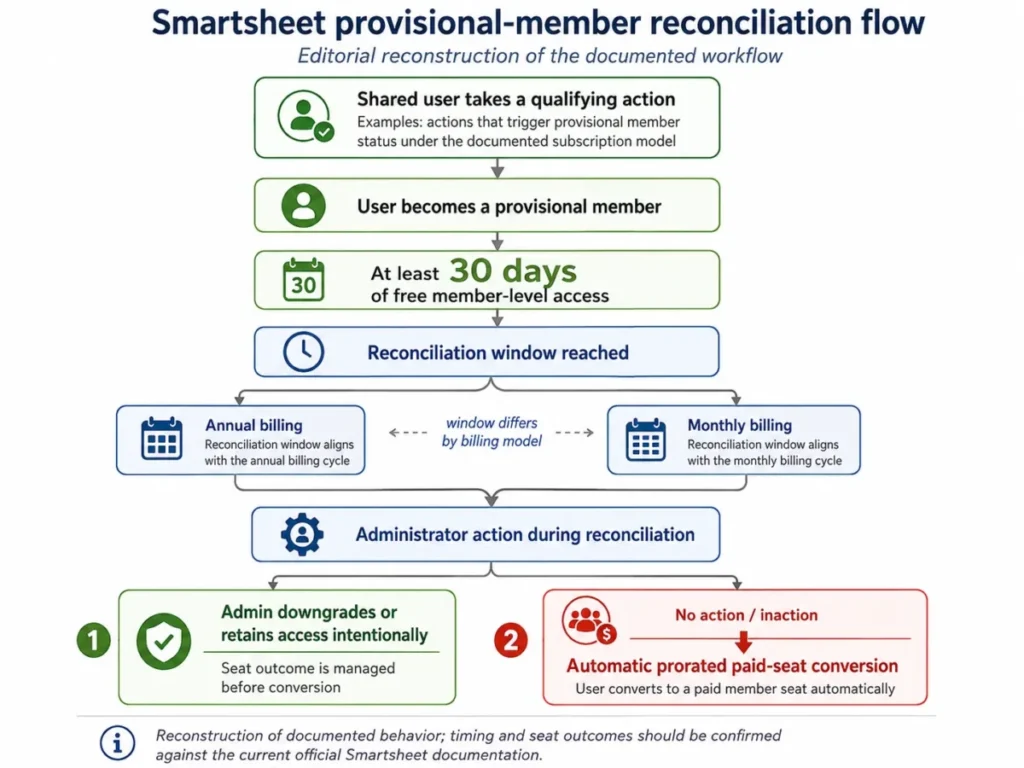
The control surface is Admin Center. A System Admin can review seat types and true-up there, filter provisional members, and bulk-change up to 200 users per page.
A downgrade can strip permissions, group memberships, and admin roles, and the documented change has no undo (manage users under the User Subscription Model).
Community discussion carries recurring, attributable complaints that true-up administration is confusing and time-consuming and can raise expected seat cost (licenses and true-up thread). Those are individual opinions rather than representative statistics, and they match what the documentation describes.
My practical read: this is recurring operational work, not a one-time setup task.
Budget a named System Admin, an approved seat roster, and a standing review before every reconciliation window, then treat that labor as part of total cost.
Terminology also moved this year. Smartsheet replaced the Viewer seat type with Contributor for covered Business, Enterprise, and Advanced Work Management commercial plans.
API clients still sending VIEWER must migrate to CONTRIBUTOR before October 30, 2026 (Contributor seat type announcement).
Integrations and Ecosystem
Smartsheet lists integrations with Microsoft 365, Google Workspace, Slack, Teams, Power BI, Tableau, ChatGPT, Claude, Gemini Enterprise, DocuSign, Salesforce, and Jira, with several advanced connections gated to Business, Enterprise, or paid add-ons.
The stack-fit question is narrower than the logo list suggests. What matters is whether the connections your revenue and delivery workflow depends on sit above or below your plan.
Three checks before signing. Confirm the specific connector you need is not add-on only, confirm API access is included at your plan, and confirm sync volume fits inside 300 requests per minute and 500-row batches.
For teams whose integration plan is a data-movement plan, Data Shuttle at $100 per month is the honest line item rather than an optional extra.
Security, Support, and Admin Controls
Smartsheet publishes coverage across SOC, ISO, HIPAA, DOD SRG, FedRAMP, FERPA, GLBA, GxP, ITAR, and accessibility programs (compliance overview). ISO coverage is listed as 27001, 27017, 27018, and 27701, SOC 2 Type II is available by request, and SOC 3 is public.
Badge-level coverage is not the same as plan-level entitlement, which is where procurement gets caught. Two boundaries matter most.
Identity is Enterprise. SAML single sign-on and automated directory provisioning are Enterprise capabilities, with official documentation covering Microsoft Entra ID and Okta provisioning paths (configure SAML-based SSO).
Protected health information is narrower still. PHI use requires an Enterprise plan and an executed Business Associate Agreement, and Pro, Business, trials, File Library, Brandfolder, University, and Community are not eligible under the official guidance (Smartsheet and HIPAA).
Data residency is order-specific rather than universal. The Data Processing Addendum defines controller and processor roles, states that Smartsheet requires its own DPA rather than customer paper, and ties transfer and hosting terms to the order and applicable region (Data Processing Addendum).
A healthcare, education, or EU buyer should get residency written into the order form.
One more control changes what external viewers see. With Safe Sharing enabled, a cross-plan dashboard widget can render blank with a “Data access restricted” state.
That happens unless the viewer is on the source plan’s allowlist or has explicit access to the underlying asset (Safe Sharing enforcement).
That failure mode hits client-facing dashboards hardest, because the dashboard itself looks correctly shared.
Check the allowlist and the source asset before blaming the widget.
Support tiers are layered. Help content, community access, and web ticket support are listed across plans, Standard Support adds phone and University from $4 per user per month, and Premium Support advertises 24/7 channels with a two-hour first-response target.
First response is not resolution, and no public resolution commitment was available, so ask for both response and resolution language in writing.
Migration and Exit: Import Fidelity, Backups, and Contract Timing
Treat a Smartsheet migration as a governed project, not a file upload.
Spreadsheet imports are limited to 50 MB, 20,000 rows, 400 columns, and 500,000 cells, and every import creates a new sheet (import files to create new sheets). Excel import reads only the leftmost worksheet and does not preserve formulas, unsupported formulas can arrive as #UNPARSEABLE, and merged cells, borders, dropdown validation, and external images need cleanup or are dropped.
Trello imports carry their own ceilings of 5,000 cards or 50 lists and 10 MB of cumulative cover images. Archived cards are not imported at all.
The backup story is the one that creates false confidence. A sheet backup includes sheet data, comments, and attachments, and excludes dashboards, reports, workflows, formulas, cross-sheet references, and formatting (back up your data).
Selected exports also omit conditional formatting, attachments, notifications, and cell history (exporting sheets and reports).
Read that as a plain warning. The archive is not a restorable environment, so keep an independent inventory of every workflow, dashboard, and cross-sheet reference outside the backup itself.
Exit terms tighten the timeline. Under the standard agreement fees are generally non-cancelable and non-refundable, and subscriptions renew for successive one-year terms unless non-renewal notice arrives at least 30 days before the term ends (User Agreement).
A written request buys 30 days of read-only access after termination, after which data becomes subject to deletion within 180 days. Introductory rates do not necessarily carry into renewal, and the renewal price can rise subject to the notice terms.
Put the non-renewal date in a finance calendar the day the contract is signed. A staged export plan built during the last quarter of the term is calm work, and the same plan built after cancellation is a fire drill.
Teams that have run a records migration before will recognize the pattern from this CRM migration walkthrough.
Product Changes Landing in 2026
Two transitions make older Smartsheet reviews unreliable this year.
Standalone-sheet Card view is scheduled for deprecation on September 13, 2026 for Pro, September 25, 2026 for Business, and October 25, 2026 for Enterprise, with Board view becoming the default 30 days before each date. Reports, published sheets, and mobile retain Card view for the time being (Card view deprecation notice).
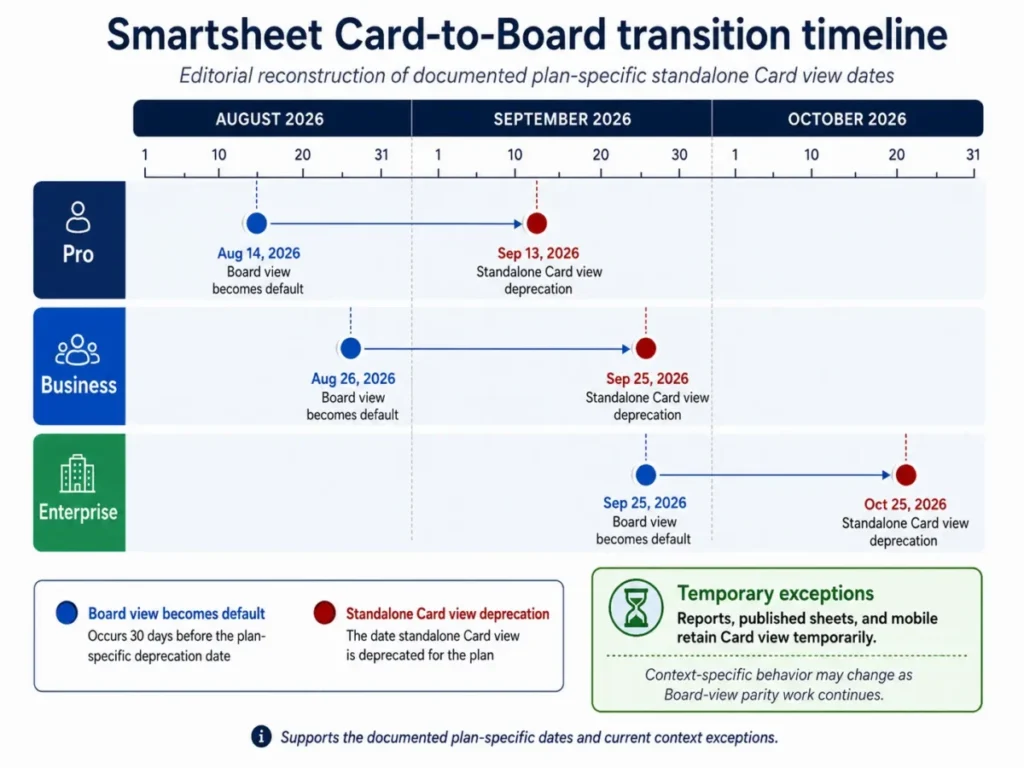
The announcement acknowledges that parity work is still in progress, and community replies raise open gaps. That uncertainty is itself decision-relevant for any team whose stakeholder workflow lives in cards.
The practical move is to switch representative sheets to Board view now, then validate filters, hierarchy, proofing, images, and stakeholder access before the default flips.
Recheck the release notes close to your plan’s date rather than trusting a summary written in August.
The second change is the Viewer to Contributor rename covered earlier, which matters most to whoever maintains API clients and internal admin documentation.
Smartsheet Limitations
Six limitations stand on their own, separate from the cons table.
Seat governance is permanent operational work. Qualifying actions plus automatic reconciliation mean an organization with many light internal editors needs a standing review process, or the seat count grows without a decision.
Pro’s automation cap has undocumented failure behavior. The 250 per month figure is published, the consequence of exceeding it is not, and that gap belongs in a pilot question rather than an assumption.
Reporting on Pro is single-sheet. One source sheet per report and 10 dashboard widgets rules out portfolio rollups without an upgrade.
Backups do not restore configuration. Dashboards, reports, workflows, formulas, cross-sheet references, and formatting are excluded, so disaster recovery requires manual reconstruction.
Offline capability is forms only. Other interactive items need connectivity, forms must be prepared while online, and submissions sync after reauthentication while unauthorized submissions are rejected and removed (offline mobile forms).
Sheet and API ceilings cap the system-of-record ambition. 500,000 cells per sheet, 300 API requests per minute per token, and 500 rows per mutation set the practical boundary.
Who Should Use Smartsheet
Five to ten person operations teams running structured intake. Forms feed a connected sheet, automation routes approvals, and dashboards report status, which replaces a mix of spreadsheets, email threads, and manual status slides. Business is the right entry point because conditional logic and cross-sheet reporting both sit there.
Ten to fifty person marketing operations and client-delivery teams. Proofing, publishing, baselines, document builder, and workload tracking all start on Business, and controlled external sharing through Dynamic View is available as an add-on when clients need scoped visibility.
Enterprise PMOs standardizing repeated project delivery. Portfolio templates, governed rollouts, SAML, SCIM, and Premium Support point toward Enterprise or Advanced Work Management, and the custom quote becomes defensible once several premium capabilities are mandatory rather than nice to have.
Field teams collecting inspections or requests in low connectivity. Offline forms handle intake and the connected side handles routing and reporting. This fit is narrow but real, and it works only when the offline requirement stops at data capture.
One to ten person spreadsheet-fluent project teams. Pro covers Gantt scheduling, forms, modest automation, and simple dashboards at $108 per member per year, which is the cheapest honest entry into the platform.
Who Should Avoid Smartsheet
Two to five person teams that only need tasks and a board. Configuration overhead outweighs the value, Pro still carries real limits, and standalone Card view is being retired this autumn. Something lighter from this shortlist of project management tools for small teams will cost less attention.
Organizations with hundreds of lightly editing internal collaborators and no license governance. Qualifying actions convert collaborators into provisional members, and quarterly or monthly reconciliation turns that into paid seats. Without an assigned administrator, the budget drifts by design rather than by accident.
CRM-first sales teams. Accounts, contacts, opportunities, email history, and forecasting are relational CRM jobs, and Smartsheet is positioned as a work-management platform. Use a CRM for the pipeline and Smartsheet only for adjacent delivery work if both are needed.
Offline-first field operations. Full sheet edits, dashboards, approvals, and project control all require connectivity, because forms are the only interactive offline feature.
Healthcare buyers unwilling to purchase Enterprise and execute a BAA. PHI is not eligible on Pro, Business, trials, or the named ancillary services, so the compliance answer is either the Enterprise contract or keeping PHI out entirely.
Smartsheet Alternatives
Pricing for the tools below changes on its own schedule, so each linked review carries current figures rather than repeating them here.
| Alternative | Better for | Choose it instead when |
|---|---|---|
| Asana | Task and project execution with lighter configuration overhead | Your blocker is Smartsheet setup effort rather than a missing capability, and the team needs adoption in weeks rather than a build project |
| ClickUp | Broad functionality inside fewer plan gates | The Business gate cluster is what forces your upgrade, and consolidating those capabilities into a single tier is the cheaper path |
| monday.com | Visual, board-first work management across mixed technical skill | Card and board workflows are central, and the 2026 standalone Card view retirement creates avoidable retraining |
| Airtable | Linked records and relational data modeling | Your data is relational rather than spreadsheet-shaped, and the 500,000-cell sheet ceiling is the constraint you keep hitting |
The Asana review covers the setup-effort trade-off in detail, and the ClickUp review covers what a single broader tier includes.
For board-centred delivery, the monday.com review is the closer match, while relational data belongs in the Airtable review.
Teams weighing a heavier enterprise option should also read the Wrike review, while board-first buyers coming from a lighter tool will find the Trello review more relevant.
Cost-side comparisons live in the Asana pricing and ClickUp pricing guides, both of which apply the same per-seat and add-on math used above.
Final Verdict: Is Smartsheet Worth It in 2026?
Smartsheet is worth it for operations, PMO, marketing delivery, and client-facing teams that already think in structured rows and need intake, scheduling, automation, and reporting inside one governed layer. It is not worth it for teams that only want tasks and a board, for organizations that will not staff seat governance, for CRM-first sales teams, or for offline-first field operations.
Choose Business at $19 per member per month billed annually as the default. It removes the gates that break workflows, and the three-member floor of $684 per year is the real starting budget rather than the headline seat price.
Choose Pro only when one to ten members live inside 250 automations per month, single-sheet reports, 10 dashboard widgets, 20 GB of storage, and no API or Guests.
Choose Enterprise when SAML, SCIM, HIPAA with a BAA, unlimited storage, or enterprise access controls are mandated rather than preferred, and get a written quote before assuming the jump is affordable.
The 90-day test for this purchase is straightforward. If a named administrator has run one clean seat reconciliation, if the first production workflow fires reliably, and if the finance owner can explain the next renewal number without opening a spreadsheet, the deployment is working.
If any of those three is missing, the problem is governance rather than software, and adding plans will not fix it.
Frequently Asked Questions
Is Smartsheet worth it in 2026?
Yes, if a team already works in structured spreadsheets and needs intake forms, dependency schedules, automated routing, and portfolio dashboards in one platform. Business at an effective $19 per member per month is the realistic entry point for that workload.
It is not worth it for teams that only need a task list and a board, where setup effort outweighs the benefit.
How much does Smartsheet cost per user?
Pro costs $12 per member per month on monthly billing or an effective $9 billed annually, which is $108 per member per year. Business costs $24 monthly or an effective $19 annually, which is $228 per member per year with a three-member minimum.
Enterprise and Advanced Work Management are custom quotes, so a small team’s real floor is $684 per year rather than a single seat price.
Is there a free Smartsheet plan?
No, unless the account already had one. The Free plan stopped accepting new signups on August 28, 2024, and legacy users may keep grandfathered access.
New evaluators get a 30-day trial with Business-level access, up to 50 sheets, and no credit card, after which sheets stay read-only for 30 days before deletion.
What is the difference between Smartsheet Pro and Business?
Business adds API access, unlimited automations, unlimited Guests and Contributors, conditional form logic, timeline view, workload tracking, unlimited report source sheets, unlimited dashboard widgets, proofing, publishing, baselines, activity log, and document builder.
Storage rises from 20 GB to 1 TB and maximum attachment size from 30 MB to 250 MB, while Pro stays capped at 10 members and 250 automations per month.
How does Smartsheet true-up billing work?
Qualifying actions turn internal collaborators into provisional members, who get member-level access free for at least 30 days. Annual plans reconcile quarterly with roughly 30 to 35 days of notice, and monthly plans reconcile monthly with roughly 7 days of notice.
If an administrator takes no action, eligible provisional members become paid seats billed pro rata for the remaining term.
Is Smartsheet good for small business?
It depends on the seat count and the capability list, not the company label. A one to ten person team that fits inside Pro’s limits pays $108 per member per year, which is reasonable.
A two-person business needing any Business-only capability still pays the three-member floor of $684 per year, which changes the value calculation considerably.
Smartsheet vs Asana: which one should I pick?
Pick Smartsheet when the work is spreadsheet-shaped and needs dependency scheduling, conditional intake, and cross-sheet portfolio reporting under enterprise governance. Pick Asana when the blocker is configuration effort rather than a missing capability and the team needs adoption quickly.
The deciding factor is usually setup tolerance, so compare current plan gates on both sides before committing.
Is Smartsheet HIPAA compliant?
Only under specific conditions. Using Smartsheet for protected health information requires an Enterprise plan and an executed Business Associate Agreement, and Pro, Business, trials, File Library, Brandfolder, University, and Community are not eligible under the official guidance.
Treat compliance badges as a portfolio claim and confirm exact service scope with the vendor before storing PHI.
Does Smartsheet work offline?
Barely. Forms are the only interactive offline feature in the mobile app, and they must be prepared while online first.
Everything else needs a connection, offline submissions sync after reauthentication, and unauthorized submissions are rejected and removed. Field teams can capture data offline, but they cannot edit sheets, run approvals, or view dashboards.
What are the biggest Smartsheet limitations?
The seat reconciliation workload, Pro’s 250-automation cap with undocumented overflow behavior, single-sheet reports and 10-widget dashboards on Pro, and backups that exclude dashboards, reports, workflows, and formulas.
Add forms-only offline support plus hard ceilings of 500,000 cells per sheet and 300 API requests per minute. Each one is documented rather than anecdotal.