For a buyer weighing ChatGPT vs Copilot, the deciding factor is where your work lives. Copilot fits people and teams on Microsoft 365, because its paid plans put AI inside Word, Excel, PowerPoint and Outlook. ChatGPT fits people who want a standalone assistant at the same price step: Plus costs $20 a month, Microsoft 365 Premium $19.99.
The money buys different things. Premium adds Office desktop apps and 2 TB of storage, while Plus pays for the assistant alone and bills monthly only. Below, I pair each plan with its rival at the same step and work out a year of business seats for two team sizes. This page covers Microsoft Copilot, not GitHub Copilot.
Quick verdict
Copilot fits a person or team that already works in Word, Outlook and Teams. Its home plans bundle Office desktop apps and storage, and a Microsoft 365 Copilot license grounds answers in your emails, files, meetings and calendars.
ChatGPT fits a buyer who wants the assistant on its own or works outside Microsoft. Its add-in now runs in Word, Excel and PowerPoint on every plan, Free included.
The trade-off: Copilot’s work-data features need a license on top of Microsoft 365. ChatGPT’s personal plans share chats for training unless you switch that off.
In This Article (10 sections)
ChatGPT vs Copilot at a Glance
ChatGPT is an assistant sold by the month; Copilot is sold mostly inside Microsoft 365 plans that also carry Office apps and storage.
| Attribute | ChatGPT | Copilot |
|---|---|---|
| Best for | A standalone assistant, Google or mixed tools | AI inside Word, Excel, Outlook and Teams |
| Free tier | Unlimited everyday text chats; tool limits | Free with a Microsoft account; usage limits |
| Entry paid plan | Go: $8 per month, billed monthly | Microsoft 365 Personal: $9.99 per month or $99.99 a year |
| Advanced plan | Plus: $20 per month, billed monthly | Microsoft 365 Premium: $19.99 per month or $199.99 a year |
| Business seat, annual billing | ChatGPT Business: $20 per user per month | Copilot Business: $21 per user per month |
| Main limitation | No annual billing on Go, Plus or Pro | Work-data grounding needs a paid Copilot license |
Sources: ChatGPT Go launch, ChatGPT Business FAQ, Copilot plans for individuals, Microsoft 365 business plans, checked November 2026.
Key Differences Between ChatGPT and Copilot
The deciding difference: with a Microsoft 365 Copilot license, Copilot grounds answers in your organization’s Microsoft Graph data, while ChatGPT reaches Microsoft apps through its own add-in and app connectors.
- Where the AI reads your work: the Copilot license covers emails, files, meetings and calendars; ChatGPT pulls SharePoint, Box and Dropbox files into its Library.
- What the plan bundles: Microsoft 365 Premium includes Word, Excel, PowerPoint and Outlook desktop apps and 2 TB of shared storage; with ChatGPT Plus you pay for higher model limits and GPT-6 Astra in ChatGPT Work and Codex.
- Who gets AI: Family, Premium and Pro share apps and storage with up to five other people, but AI stays with the owner; ChatGPT Business gives each user a seat, 2 seats minimum.
- Billing: ChatGPT Go, Plus and Pro bill monthly only; Microsoft’s yearly price saves $19.89 on Personal and $39.89 on Premium.
That first difference carries the most weight: a 10-person office on Microsoft 365 is really deciding whether Graph grounding is worth the seat price. Microsoft now sells Business Standard and Business Premium with Copilot built in, after its July 1, 2026 packaging update.
ChatGPT vs Copilot: Features Compared
The gap is widest in work-data grounding and narrowest in everyday chat.
| Feature | ChatGPT | Copilot |
|---|---|---|
| Word, Excel, PowerPoint | Add-in on every plan, Free included | Desktop apps with Copilot on Personal and up |
| Outlook | Outlook Email and Calendar apps | Copilot in Outlook |
| Teams meetings | Teams connector for chat search on Plus and Pro | Summarizes and transcribes meetings; Teams license required |
| Work data grounding | SharePoint, Box and Dropbox in Library | Microsoft Graph with a Microsoft 365 Copilot license |
| Storage | Library: 500 MB on Free | 1 TB Personal; 2 TB Premium; Microsoft 365 Pro: 5 TB of OneDrive storage, shared |
| Research agent | Deep research on Plus (where available) and Pro | Agentic AI for advanced research and analytics on Premium; Researcher in business bundles |
| Admin controls | Business: SAML SSO, multi-factor authentication (MFA), roles | Permissions, sensitivity labels, retention, audit |
Sources: ChatGPT release notes, OpenAI business data, Microsoft Copilot overview, Microsoft 365 plans compared, checked November 2026.
Working inside Microsoft’s apps and your work data
Copilot works better inside Microsoft 365 once the team pays for a Microsoft 365 Copilot license. That license grounds answers in emails, files, meetings and calendars through Microsoft Graph, and Microsoft says Copilot uses only content the user has permission to access.
Without the license, Copilot Chat runs mostly on web data: you upload a file or open it in Teams or Outlook to bring work in. Edit with Copilot in Word, Excel and PowerPoint also needs the license, and Copilot in Excel needs AutoSave on, with the file in OneDrive.
ChatGPT now works in the same apps from the outside. OpenAI’s add-in runs it in Excel (May 5, 2026), PowerPoint (generally available July 6, 2026) and Word (September 17, 2026), and the spreadsheet version also runs in Google Sheets.
On the data side, ChatGPT’s Library added SharePoint, Box and Dropbox on September 10, 2026, and its Outlook apps read shared mailboxes you can access. Each source is a connection you add, while Copilot’s license draws on whatever Graph content your account can reach. The plans that carry that license are in my full Microsoft Copilot pricing breakdown.
Verdict: Microsoft 365 work
Copilot fits better for a team whose mail, files and meetings sit in Microsoft 365 and that will pay for the license, because the license is what adds Graph grounding. ChatGPT fits better for a team in Google Sheets or mixed tools.
Models: is Copilot just ChatGPT under the hood?
No. Copilot runs large language models that include third-party OpenAI and Anthropic models, and an admin decides whether to use them, while ChatGPT runs OpenAI’s own models. Microsoft’s business bundles list “large language model (LLM) choice” for Copilot’s work chat.
ChatGPT ties models to plans. Since October 7, 2026, Plus, Pro, Business and Enterprise use GPT-6 Sol in chat, and a ChatGPT Business Standard seat includes 15 GPT-6 Pro messages a month.
So Copilot offers OpenAI and Anthropic models inside Microsoft’s grounding and admin controls. If Claude is the model you want, my comparison of ChatGPT and Claude for business prices it seat for seat.
Free tiers, research and usage limits
Both free tiers cover everyday chat. ChatGPT Free gives unlimited everyday text chats, with separate limits on uploads, images, voice and data analysis. Copilot’s free tier needs a Microsoft account and caps some capabilities, and Copilot Chat comes with eligible Microsoft 365 business subscriptions.
The first wall differs. On ChatGPT Free it is a tool limit, such as uploads, which Go raises. On Copilot it is the agentic AI features for advanced research and analytics, which Microsoft’s compare pages list on Premium.
Microsoft describes its consumer limits in words (“higher usage than free”, “extensive”), not numbers. On ChatGPT, deep research starts on Plus where available. If cited research is your main job, my Perplexity vs ChatGPT comparison for research covers a source-first option.
ChatGPT vs Copilot Pricing on the Same Billing Basis
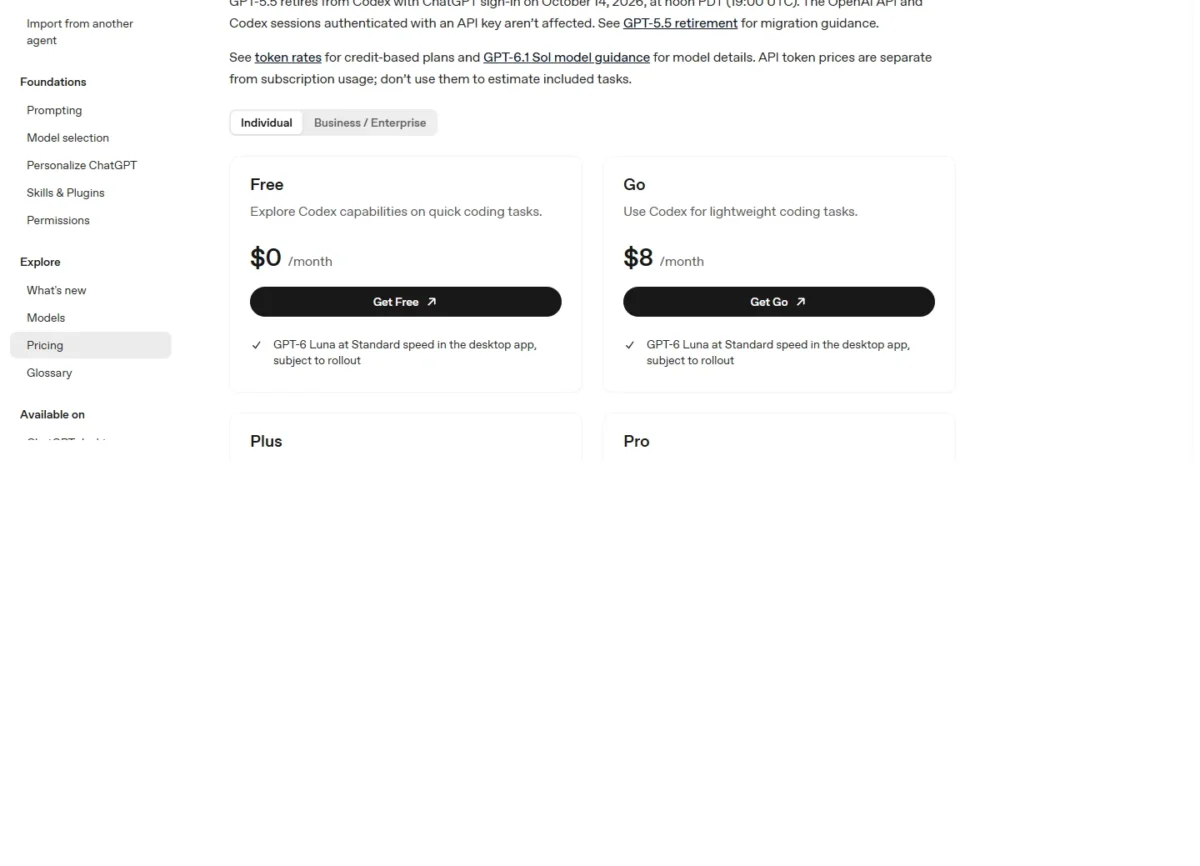
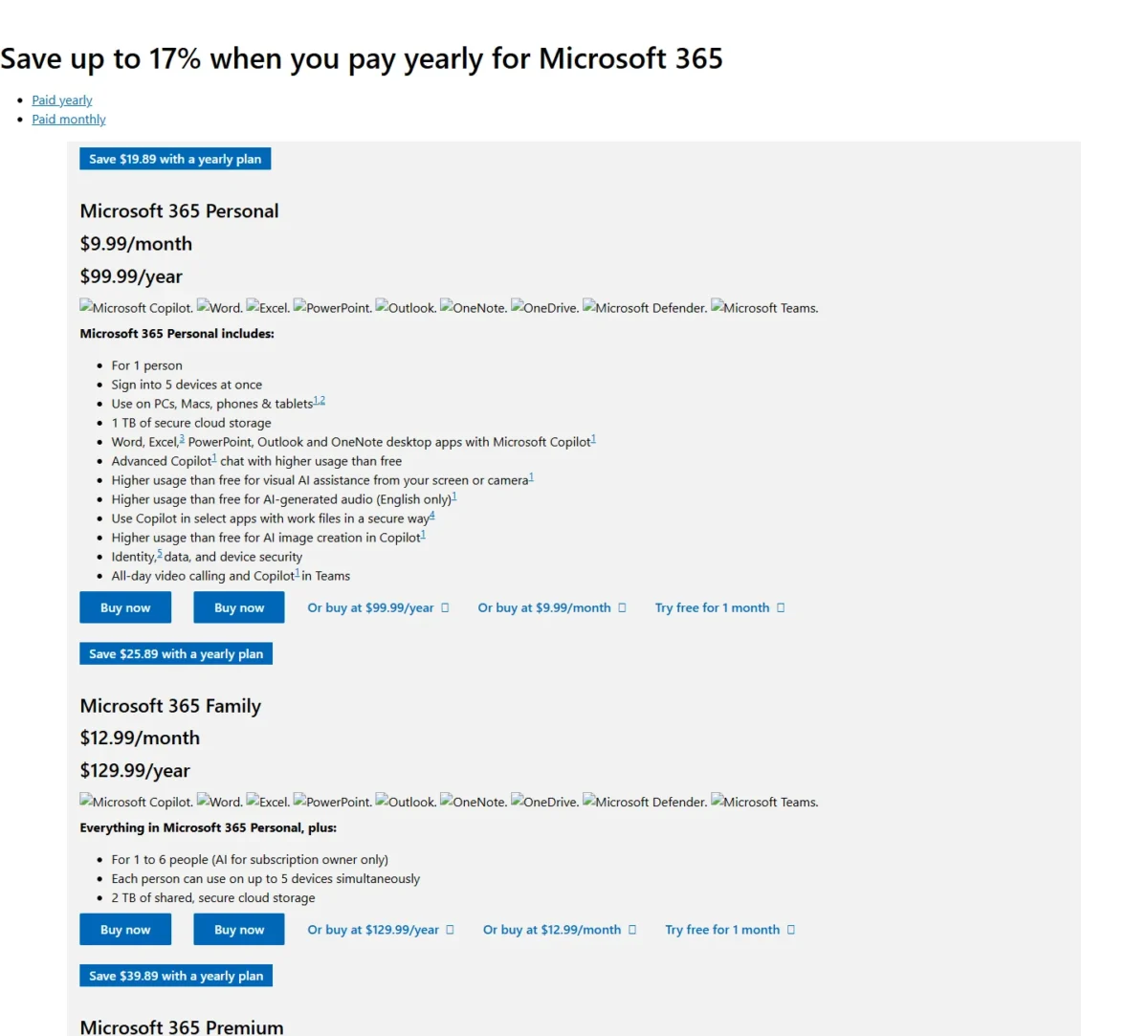
The price steps nearly match month to month. ChatGPT Go costs $8 against Microsoft 365 Personal at $9.99. ChatGPT Plus costs $20 against Microsoft 365 Premium at $19.99. Above that, ChatGPT Pro comes in tiers at $100, $200 and $500 a month, while the plan cards on Microsoft’s compare page show Personal, Family and Premium, and the page’s pricing menu also lists Microsoft 365 Pro.
| Plan tier | ChatGPT | Copilot |
|---|---|---|
| Entry | Go: $8 per month, billed monthly | Microsoft 365 Personal: $9.99 per month or $99.99 a year |
| Advanced | Plus: $20 per month, billed monthly | Microsoft 365 Premium: $19.99 per month or $199.99 a year |
| Top individual | Pro 100, Pro 200, Pro 500: $100, $200, $500 per month | Microsoft 365 Pro: 5 TB of OneDrive storage, shared with up to 5 other users |
| Business seat | ChatGPT Business: $20 per user per month billed annually; $25 billed monthly | Copilot Business: $21 per user per month paid yearly; Microsoft 365 Business Standard with Copilot: $23.50 |
| Enterprise | Enterprise: seat fees follow your agreement, bought through OpenAI’s sales contact form | Microsoft 365 Copilot add-on: $30 per user per month paid yearly |
Sources: ChatGPT pricing, Microsoft 365 plans compared, ChatGPT Pro tiers, What is ChatGPT Enterprise, Microsoft Copilot for enterprise, checked November 2026.
Every ChatGPT plan and limit is in my ChatGPT plan-by-plan pricing guide.
Personal plans side by side
Buy Microsoft 365 Premium if you also want Office apps and 2 TB of storage; buy ChatGPT Plus at $20 if you only want the assistant. Over a year, Premium’s $199.99 annual price costs $240 – $199.99 = $40.01 less than 12 months of Plus at $20 x 12 = $240.
At the entry step, Go costs $8 x 12 = $96 a year against Personal’s $99.99, a $99.99 – $96 = $3.99 gap, and OpenAI tests ads on Free and Go in the US.
Microsoft 365 Family costs $12.99 a month or $129.99 a year for 1 to 6 people, but only the owner gets AI. If you are looking for Copilot Pro, the Microsoft Store’s Copilot Pro page now sells Microsoft 365 Premium.
At the top, ChatGPT Pro comes in tiers at $100, $200 and $500 a month, and Pro 100 adds Work and Codex usage. On the Microsoft side, its FAQ gives Microsoft 365 Pro 5 TB of OneDrive storage to share with up to 5 other users.
Business seats: what 5 and 10 users pay in year one
On annual billing, ChatGPT Business costs $20 per user per month. Copilot Business costs $21 per user per month paid yearly and requires an eligible Microsoft 365 Business plan underneath. Microsoft 365 Business Standard with Copilot costs $23.50 per user per month, paid yearly, with Copilot built in.
Copilot Business brings your work content and context into AI chat in apps such as Word, PowerPoint and Teams, for up to 300 users. The bundles with Copilot built in list AI chat grounded in your work data, pre-built agents for research and data analysis, and access to Cowork and Autopilot. In my reading, this is the small-business route to the licensed, work-data Copilot the features section describes.
Microsoft also prints a promotion on the add-on: $18 instead of $21 for the first year, on an annual commitment, for existing customers with an eligible Business plan. The offer ends December 31, 2026.
| Plan | 5 users | 10 users |
|---|---|---|
| ChatGPT Business, annual | $20 x 5 x 12 = $1,200 | $20 x 10 x 12 = $2,400 |
| ChatGPT Business, monthly | $25 x 5 x 12 = $1,500 | $25 x 10 x 12 = $3,000 |
| Copilot Business add-on, list price | $21 x 5 x 12 = $1,260 | $21 x 10 x 12 = $2,520 |
| Copilot Business add-on, promotion year | $18 x 5 x 12 = $1,080 | $18 x 10 x 12 = $2,160 |
| Business Standard with Copilot | $23.50 x 5 x 12 = $1,410 | $23.50 x 10 x 12 = $2,820 |
Sources: ChatGPT Business FAQ, Microsoft 365 business plans, checked November 2026.
Assumptions: US list prices; tax excluded; the add-on rows leave out the Microsoft Business plan underneath; usage-based AI charges and workspace credits excluded.
For a team already on a Microsoft Business plan, ten Copilot seats cost $21 x 10 x 12 – $20 x 10 x 12 = $120 more a year than ten ChatGPT seats at list price. In the promotion year the order flips: $20 x 10 x 12 – $18 x 10 x 12 = $240 in Copilot’s favor.
For a team with no Microsoft plan yet, the Business Standard with Copilot bundle includes Office apps, custom email and 1 TB of storage per user, while a ChatGPT Business seat covers ChatGPT, ChatGPT Work and Codex. Business Basic plus the add-on comes to $7 + $21 = $28 a seat, so a new team that wants Copilot should buy the bundle.
The upgrade triggers differ too. ChatGPT Business needs at least 2 seats and stops at 200. A ChatGPT Business Premium seat costs $100 per user per month billed annually or $125 per user per month billed monthly. It includes 5x more usage than a Standard seat. Copilot Business covers up to 300 users; past that, the Microsoft 365 Copilot add-on costs $30 per user per month paid yearly.
Is ChatGPT or Copilot Safer for Your Data?
On business plans the two are comparable: neither trains on business data by default. The gap sits on personal plans: ChatGPT Free, Plus and Pro share your chats for model training until you turn that off. On the Copilot side, the home-plan terms below cover Copilot inside Microsoft 365 apps only.
OpenAI says it does not train on Business or Enterprise workspace content by default, and that its practices align with SOC 2 Type 2 and ISO/IEC 27001, 27017, 27018 and 27701. Microsoft states that Copilot’s prompts, responses and Graph data aren’t used to train foundation models, and Copilot follows your sensitivity labels and retention policies.
On ChatGPT, the switch is “Improve the model for everyone” under Data controls, and turning it off keeps your chat history. Temporary chats are not used for training and may be kept for up to 30 days.
Microsoft’s home-plan privacy page says prompts, responses and file contents in Copilot inside Microsoft 365 apps aren’t used to train foundation models; the standalone Copilot app has its own privacy page. Turning off connected experiences in Office also turns off Copilot there. My ChatGPT review covers ChatGPT’s other privacy settings.
Verdict: data handling
Comparable on business plans. On personal plans, Copilot inside Microsoft 365 apps starts from the stricter default. In ChatGPT, switching off “Improve the model for everyone” stops training on your regular chats, but a conversation you rate with a thumbs up or down may still be used to train OpenAI models. So may content from Daybreak sessions on a personal account, part of OpenAI’s Trusted Access programs for more sensitive work. Switch it off before pasting client work.
ChatGPT vs Copilot: Pros and Cons
ChatGPT’s main strength is reach without a Microsoft subscription; its biggest drawback is personal-plan billing.
Pros
- One add-in covers Word, Excel and PowerPoint, and the spreadsheet version also runs in Google Sheets
- ChatGPT Business costs $20 per user per month billed annually, with Codex in the seat
- Free, Go, Plus and Pro users can export their data from settings
- Plus, Pro, Business and Enterprise are ad-free
Cons
- Go, Plus and Pro bill monthly only
- Personal plans share chats for training by default
- Business needs at least 2 seats and caps at 200
- Business workspaces have no self-service data export
For Copilot, the case rests on grounding in your Microsoft work data, and the catch is how much of it sits behind a paid license.
Pros
- Graph grounding in emails, files, meetings and calendars with a Microsoft 365 Copilot license
- Personal (1 TB) and Premium (2 TB) bundle Office desktop apps
- Copilot Chat comes with eligible Microsoft 365 business subscriptions
- Yearly billing saves $39.89 on Premium
Cons
- Edit with Copilot in work accounts needs the Microsoft 365 Copilot license
- Some advanced AI features bill by usage beyond the license fee
- Copilot in Excel needs AutoSave on, with the file in OneDrive
If one of ChatGPT’s cons rules it out, my list of ChatGPT alternatives by job covers assistants built for other work.
Which Is Better for Your Needs?
Pick Copilot when your files, mail and meetings live in OneDrive, SharePoint, Outlook and Teams; pick ChatGPT when they do not, or when you want the assistant on its own.
| Your priority | Better fit | Reason | Trade-off |
|---|---|---|---|
| Work in Microsoft 365 | Copilot | Graph grounding with the Copilot license | $21 a seat on top of Microsoft 365 |
| Google Workspace or mixed tools | ChatGPT | Add-in also runs in Google Sheets | Files come in through connectors you add |
| Writing on a budget | Depends | Go is $8 a month; Personal is $9.99 with Word | Ads are tested on Go in the US |
| Research reports | Depends | Agentic AI for advanced research and analytics on Premium; deep research on Plus and Pro | Microsoft states Premium usage as “extensive”, not a number |
| Several people at home need AI | Depends | Family and Premium give AI to the owner only | Each AI user needs a plan on either side |
| 200 to 300 users | Copilot | Copilot Business covers up to 300 users | ChatGPT Enterprise is bought through OpenAI’s sales contact form |
Sources: Copilot plans for individuals, ChatGPT Business FAQ, checked November 2026.
A solo writer who drafts in Word should start on Microsoft’s Personal plan; one who only needs chat should start on Go and move to Plus when tool limits bite. A team on Google Workspace may also weigh Gemini, which my ChatGPT vs Gemini comparison prices tier for tier.
If your team already works in Microsoft’s apps, read my Microsoft Copilot review for a closer look at Copilot on its own.
How I Compared ChatGPT and Copilot
I built this comparison from official documentation and pricing pages, read on November 1, 2026, in US dollars. This comparison rests on OpenAI’s plan help articles, Business FAQ, models page, data controls, release notes and Go launch post, and on Microsoft’s plan pages, home-plan privacy page and Microsoft Learn’s Copilot articles.
I paired plans at matching steps on the same billing basis, and the year-one totals are my own arithmetic from the plan tables. Before you pay, run the same document through ChatGPT Free and Microsoft 365 Premium’s one-month free trial.
OpenAI does not publish a ChatGPT Enterprise seat price: seat fees follow your agreement and are arranged through OpenAI’s sales form, so the year-one table leaves Enterprise out. Microsoft’s Microsoft 365 compare page describes consumer Copilot usage only as higher than free or extensive, with no numbers.
FAQ
Why don’t people like Copilot?
The friction points are written into Microsoft’s own terms. Copilot’s best work features need a Microsoft 365 Copilot license on top of the plan, and Copilot in Excel needs files saved to OneDrive.
Is Copilot free?
Yes, with limits. A free tier comes with a Microsoft account, and business users get Copilot Chat with eligible Microsoft 365 subscriptions. The free route also includes Word, Excel and PowerPoint on the web; desktop apps with Copilot start on Microsoft 365 Personal at $9.99 a month.
Final Verdict: ChatGPT or Copilot?
Pay for Copilot if you will use it on your own Word files, Outlook mail and Teams meetings; pay for ChatGPT if you want a standalone assistant or your team works outside Microsoft.
Choose ChatGPT if
- Your team works in Google Sheets or mixed tools, where ChatGPT’s add-in and file connectors work
- You want the assistant without an Office bundle: Go at $8 or Plus at $20 a month
- You want ChatGPT Business at $20 per user per month billed annually, Codex included, for 2 to 200 people
- You want SAML SSO and roles on a self-serve Business plan
Choose Copilot if
- Your files, mail and meetings live in Microsoft 365 and you will buy the license for Graph grounding
- You also want Office desktop apps and storage: Personal at $9.99 a month with 1 TB
- Your team already pays for an eligible Business plan: Copilot Business is $21 per user per month paid yearly, or $18 in the first year under a promotion that ends December 31, 2026
- You need up to 300 users under Microsoft’s permissions and retention
Skip ChatGPT if your team lives in Outlook, SharePoint and Teams and will pay for Graph grounding. Skip Copilot if you work in Google Workspace. If neither paid plan fits, my list of free AI tools worth using covers options that cost nothing.