

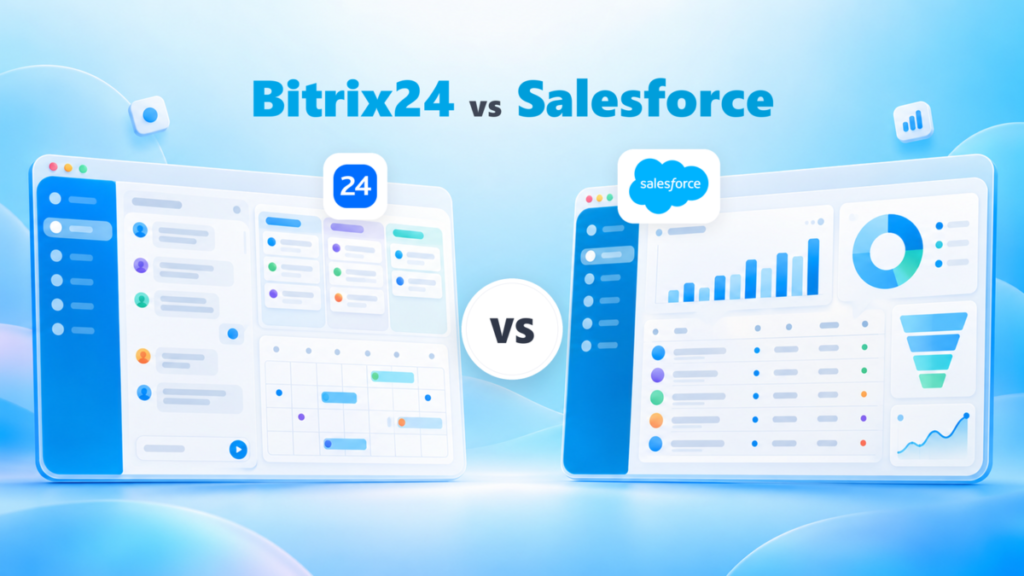
Bitrix24 is the better buy for a US business of 5 to 100 people that wants a CRM plus tasks, chat and video calls on one flat bill, with Professional covering 100 users. Salesforce Pro Suite fits a sales team that needs forecasting and quoting and can sign an annual per-user contract.
The pricing model decides most Bitrix24 vs Salesforce budgets. For 10 users on annual billing, Bitrix24 Standard costs $99 x 12 months = $1,188 a year, while Salesforce Starter Suite costs $25 x 10 users x 12 months = $3,000.
I read both vendors’ US-dollar pricing pages in October 2026, when Salesforce listed Core, Advanced and Max as the upgrades above Starter Suite and Pro Suite.

Quick verdict
Bitrix24 sells one flat price per organization with a user cap; Salesforce Sales Cloud charges per user per month. On annual billing, that one difference makes Bitrix24 the cheaper bill from the second user.
- Pick Bitrix24 if a team of 5 to 100 on a fixed budget wants tasks, chat, video calls and the CRM in one bill. Standard covers 50 users for $99 per organization per month, billed annually.
- Pick Salesforce Pro Suite if your sales process runs on forecasts and quotes. It costs $100 per user per month, billed annually, with a contract.
- The trade-off: Bitrix24 caps users on each plan and Market apps outside the Vibe+ plans, while Salesforce adds cost with every seat, and Agentforce for Sales is an add-on on Core and Advanced.
In This Article (11 sections)
Bitrix24 vs Salesforce at a Glance
Bitrix24 is an all-in-one workspace priced per organization, while Salesforce Sales Cloud is a per-user CRM that scales into enterprise editions.
| Attribute | Bitrix24 | Salesforce |
|---|---|---|
| Best for | Teams of 5 to 100 that want CRM, tasks and chat in one flat bill | Sales teams that forecast, quote and customize the CRM |
| Pricing unit | Per organization per month, with a user cap | Per user per month |
| Entry paid plan | Basic: $49 per organization per month, billed annually, 5 users | Starter Suite: $25 per user per month, billed monthly or annually |
| Automation plan | Professional: $199 per organization per month, billed annually, 100 users | Pro Suite: $100 per user per month, billed annually, contract required |
| User cap | Basic 5 users, Standard 50 users, Professional 100 users | No user maximum on Starter Suite |
| Free plan and trial | Free plan; 15-day trial, no credit card | Free Suite at $0; 30-day trial, no credit card |
| Self-hosted edition | On-Premise Business at $3,590 per organization, billed annually | Not listed on the Sales Cloud pricing page |
| Main limitation | Market apps capped by plan outside Vibe+ | Every added user raises the bill |
Sources: Bitrix24 plans and pricing, Bitrix24 On-Premise pricing, Salesforce Sales Cloud pricing, Salesforce small business pricing, checked October 2026.
One row decides more budgets than the rest: a Bitrix24 bill stays flat until the team passes a cap, while a Salesforce bill moves with every hire.
Key Differences Between Bitrix24 and Salesforce
Four differences decide the choice, and each one favors a different buyer.
Flat price versus seat price. Bitrix24 charges “a flat rate for all users included in your plan”, while Salesforce prices every Sales Cloud edition in USD per user per month. A company that hires often feels this first: its Bitrix24 bill moves only at a plan’s user cap.
Workspace breadth versus CRM depth. Bitrix24’s Free plan card already lists tasks with Kanban and Gantt views, shared calendars, and chat and video calls. Salesforce Pro Suite spends its seat price on the core of what CRM software does: quoting, forecasting, and greater customization and automation.
Monthly freedom versus an annual contract. Bitrix24 sells Basic, Standard, Professional and Enterprise month to month or annually. Salesforce bills Starter Suite monthly or annually, but Pro Suite bills annually with “Contract required”, and Core, Advanced and Max bill annually too.
Self-hosting versus cloud. Bitrix24 sells an On-Premise edition with source code access, while Salesforce lists no self-hosted option on its pricing pages, from Starter Suite to Max. That matters to a company whose data policy requires its own servers.
The pricing model is the difference most buyers feel first, so the next section turns it into dollars at real head counts.
Bitrix24 vs Salesforce Pricing
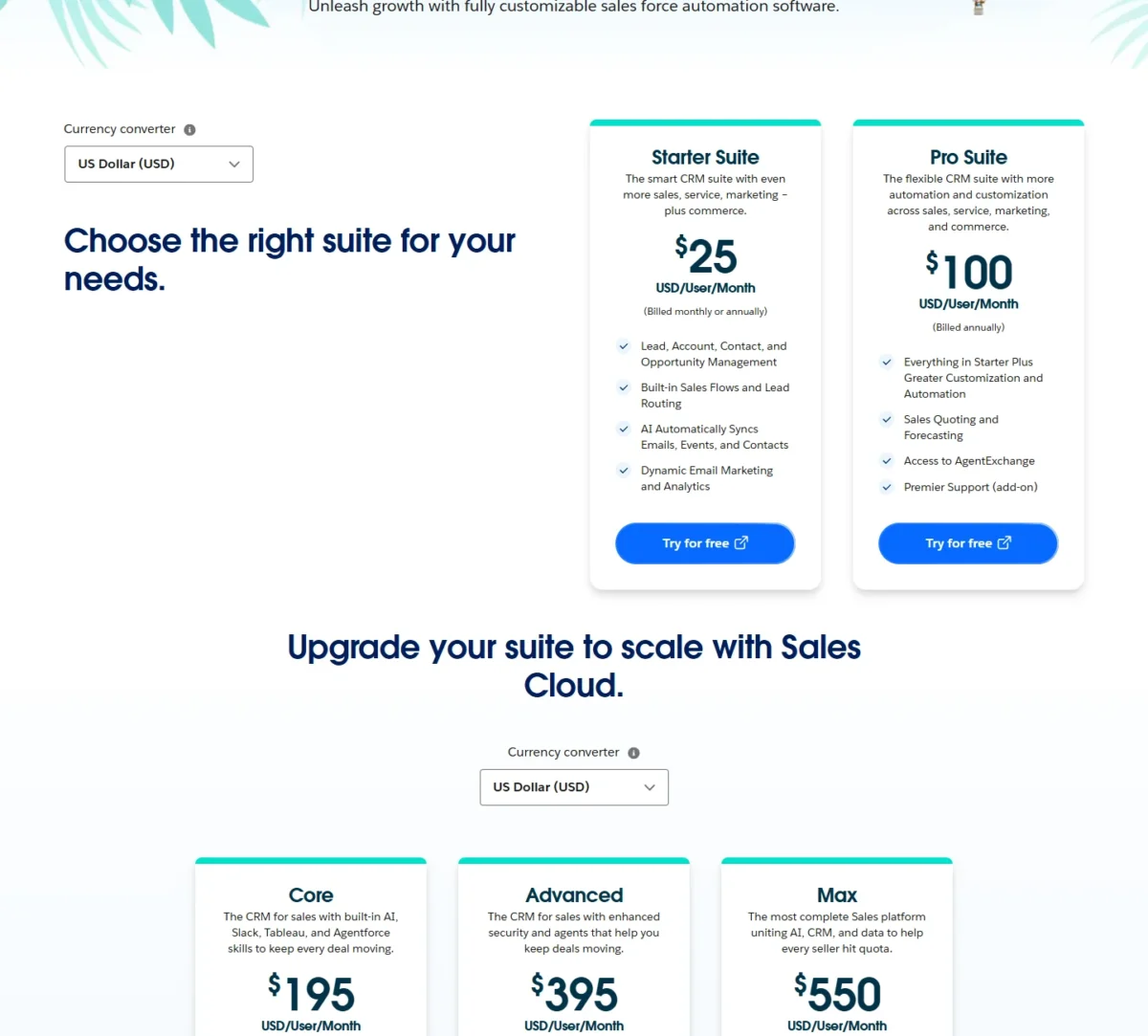
Bitrix24 charges $49, $99 or $199 per organization per month on annual billing for 5, 50 or 100 users. Salesforce charges $25 per user per month on Starter Suite and $100 per user per month on Pro Suite.
| Plan tier | Bitrix24 | Salesforce |
|---|---|---|
| Free | Free: $0, plan card says “for 1–2 users”, 5 GB storage | Free Suite: $0 per user per month |
| Entry CRM | Basic: $49 per organization per month, billed annually, 5 users | Starter Suite: $25 per user per month, billed monthly or annually |
| Growing team | Standard: $99 per organization per month, billed annually, 50 users | Starter Suite at the same $25 per user per month, no user maximum |
| Automation and reporting | Professional: $199 per organization per month, billed annually, 100 users | Pro Suite: $100 per user per month, billed annually, contract required |
| Upper tier | Enterprise: from $399 per organization per month, billed annually, 250 users | Core $195, Advanced $395, Max $550 per user per month, billed annually |
Sources: Bitrix24 plans and pricing, Salesforce Sales Cloud pricing, Salesforce small business pricing, checked October 2026.
Salesforce’s add-on catalog sits outside this comparison; the full Salesforce pricing breakdown prices each edition and add-on.
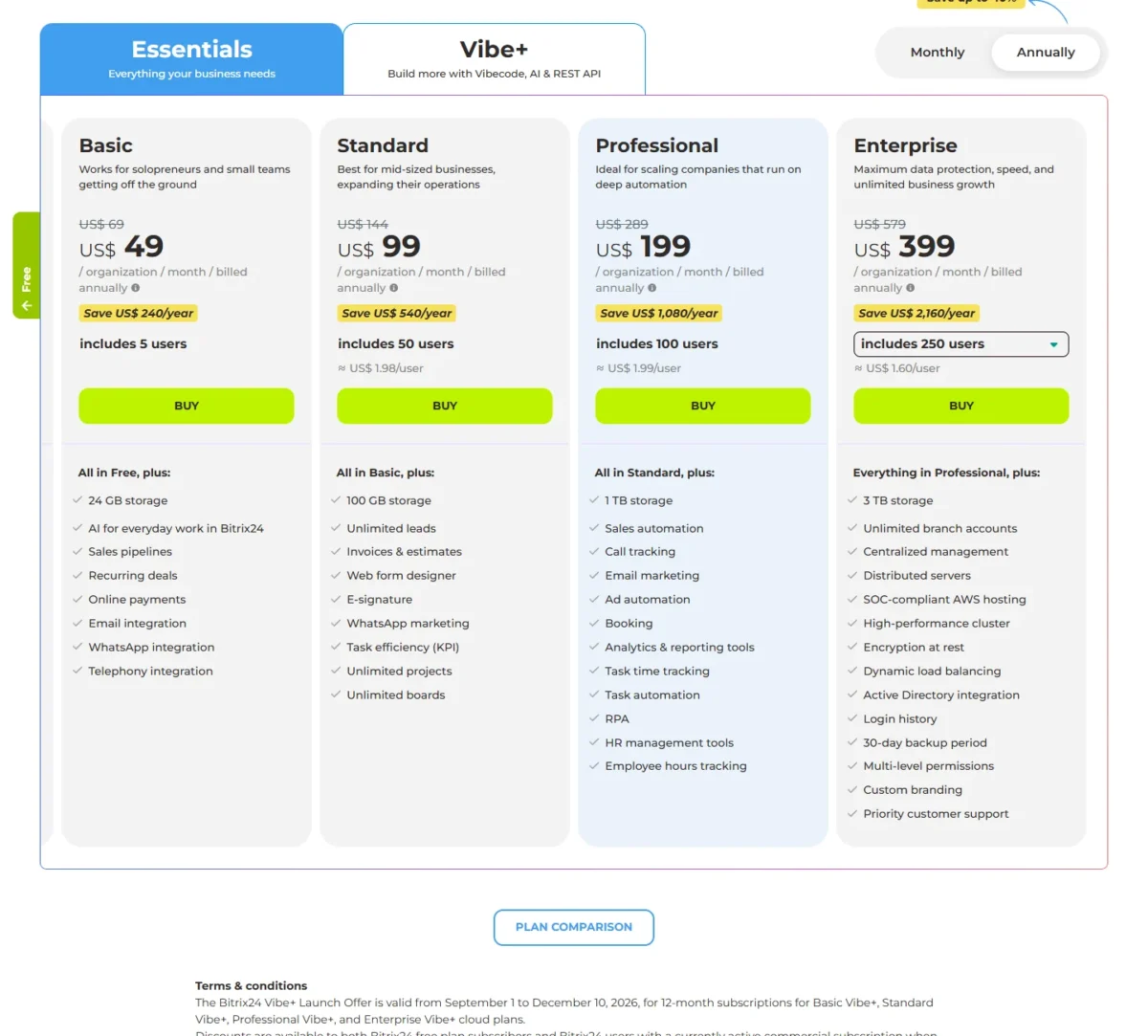
Paying Bitrix24 monthly raises Basic to $69, Standard to $144 and Professional to $289 per organization per month. Annual billing is paid in full every 12 months, with no installments. On Basic, monthly billing costs $69 x 12 months = $828 a year, $240 more than $49 x 12 months = $588.
Bitrix24’s Free plan is stated two ways on the same pricing page. The plan card reads “for 1–2 users”, while the FAQ answer reads that you can “add an unlimited number of users”. Confirm which applies to your account before you run a whole team on Free.
Salesforce’s small-business page adds “Transaction fees apply” to Starter Suite and Pro Suite without naming an amount. Pro Suite also lists Premier Support as an add-on rather than part of the seat price.
Bitrix24’s Vibe+ Launch Offer runs from September 1 to December 10, 2026, on 12-month Vibe+ subscriptions, and every renewal bills at regular prices. The cost math below therefore uses the regular Basic, Standard and Professional prices.
List prices hide the real gap, which appears only when you price the same team on both models.
What 5, 10, 25, 50 and 100 Users Pay in Year One
A 25-person team pays $99 x 12 months = $1,188 a year on Bitrix24 Standard and $25 x 25 users x 12 months = $7,500 on Salesforce Starter Suite.
| Team size | Bitrix24, smallest plan that fits | Bitrix24 Professional | Salesforce Starter Suite | Salesforce Pro Suite |
|---|---|---|---|---|
| 5 users | Basic: $49 x 12 = $588 | $199 x 12 = $2,388 | $25 x 5 users x 12 = $1,500 | $100 x 5 users x 12 = $6,000 |
| 10 users | Standard: $99 x 12 = $1,188 | $199 x 12 = $2,388 | $25 x 10 users x 12 = $3,000 | $100 x 10 users x 12 = $12,000 |
| 25 users | Standard: $99 x 12 = $1,188 | $199 x 12 = $2,388 | $25 x 25 users x 12 = $7,500 | $100 x 25 users x 12 = $30,000 |
| 50 users | Standard: $99 x 12 = $1,188 | $199 x 12 = $2,388 | $25 x 50 users x 12 = $15,000 | $100 x 50 users x 12 = $60,000 |
| 100 users | Professional: $199 x 12 = $2,388 | $199 x 12 = $2,388 | $25 x 100 users x 12 = $30,000 | $100 x 100 users x 12 = $120,000 |
Sources: Bitrix24 plans and pricing, Salesforce Sales Cloud pricing, checked October 2026.
Assumptions: US list prices, annual billing, seats equal to head count, 12 months. Excluded: sales tax, VAT or GST, Salesforce transaction fees, Premier Success, Agentforce, partner implementation and the Vibe+ Launch Offer.
The gap widens with every hire because only one side counts seats. At 50 users, Starter Suite costs more than 12 times Bitrix24 Standard, and Starter Suite is Salesforce’s entry paid plan.
Salesforce Starter Suite overtakes each Bitrix24 plan early, on annual billing:
- Bitrix24 Basic ($49 a month) at 2 users: $25 x 2 users = $50 a month
- Bitrix24 Standard ($99 a month) at 4 users: $25 x 4 users = $100 a month
- Bitrix24 Professional ($199 a month) at 8 users: $25 x 8 users = $200 a month
Pro Suite moves faster still. Two Pro Suite users cost $100 x 2 users = $200 a month, more than Bitrix24 Professional charges for 100 users.
Monthly billing narrows the gap without closing it. Bitrix24 Standard paid monthly costs $144 x 12 months = $1,728 a year, still below Starter Suite for 10 users, and Pro Suite is billed annually only.
The cheaper bill is not the better value for one buyer: a sales manager who forecasts and quotes inside the CRM. Pro Suite lists Sales Quoting and Forecasting, while Bitrix24 names no plan for its AI forecasting tool.
Where Each Bill Jumps
Bitrix24’s bill jumps at user, app and pipeline caps; Salesforce’s jumps with each seat, at the Pro Suite contract and at add-ons.
Bitrix24, on annual billing:
- The 6th user moves you from Basic ($49 a month) to Standard ($99 a month).
- The 51st user moves you to Professional ($199 a month).
- The 101st user moves you to Enterprise, from $399 a month for 250 users.
- Bitrix24 Market installs stop at 2 apps on Basic, 4 on Standard, 7 on Professional and 10 on Enterprise; the Vibe+ plans list unlimited apps.
- Sales pipelines stop at 5 on Basic, 10 on Standard and 20 on Professional, with unlimited pipelines on Enterprise.
Salesforce Sales Cloud:
- Every hire adds $25 a month on Starter Suite or $100 a month on Pro Suite.
- The step from Starter Suite to Pro Suite quadruples the seat price and adds an annual contract.
- The Premier Success Plan costs 30% of net license fees; Core lists it as included.
- Agentforce for Sales starts at $125 per user per month, and AI can be added to Core and above.
A 5-person team hits Basic’s cap with one hire. A Salesforce team takes the steepest percentage jump the day it needs forecasting, because Pro Suite lists Sales Quoting and Forecasting and the Starter Suite card does not.
Bitrix24 vs Salesforce: Features Compared
Salesforce Pro Suite lists forecasting, quoting and greater customization, while Bitrix24 puts tasks, calendars, chat and video calls on every plan from Free up.
| Feature | Bitrix24 | Salesforce |
|---|---|---|
| Sales pipelines | Limited: 1 on Free, 5 on Basic, 10 on Standard, 20 on Professional, unlimited on Enterprise | Pipeline management listed; pipeline count not published |
| Forecasting and quotes | Invoices and estimates from Standard; AI scoring for forecasting, plan not named | Plan-dependent: Pro Suite |
| Custom fields, apps and objects | Custom and hidden fields; Vibecode App Builder on Vibe+ plans | Custom Apps and Objects on the small-business compare table |
| Sales automation | Plan-dependent: Professional, with RPA | Sales flows on Starter Suite; greater automation on Pro Suite |
| AI | Limited from Free to Enterprise; unlimited from Standard Vibe+ | Assistive AI with Employee Agent on Starter Suite; Add-on: Agentforce for Sales on Core and Advanced, part of Max |
| Team collaboration | Tasks, calendars, chat and video calls from Free | Slack Free on Starter Suite and Pro Suite; Slack Business+ on Core and Advanced |
| App marketplace | Limited: 2 to 10 Market apps by plan; unlimited on Vibe+ | AgentExchange access on Pro Suite |
| API | REST API unlimited on Vibe+ plans | Plan not named on the pricing pages |
| Self-hosted edition | On-Premise Business and Enterprise | Not listed on the Sales Cloud pricing page |
Sources: Bitrix24 plans and pricing, Bitrix24 CRM, Salesforce Sales Cloud pricing, Salesforce small business pricing, checked October 2026.
Each criterion below says which reader the difference favors.
CRM Depth: Forecasting, Quotes and Customization
Salesforce fits a structured sales process better. Pro Suite lists Sales Quoting and Forecasting plus greater customization and automation, and the small-business compare table lists Custom Apps and Objects and Sandbox for Testing and Training.
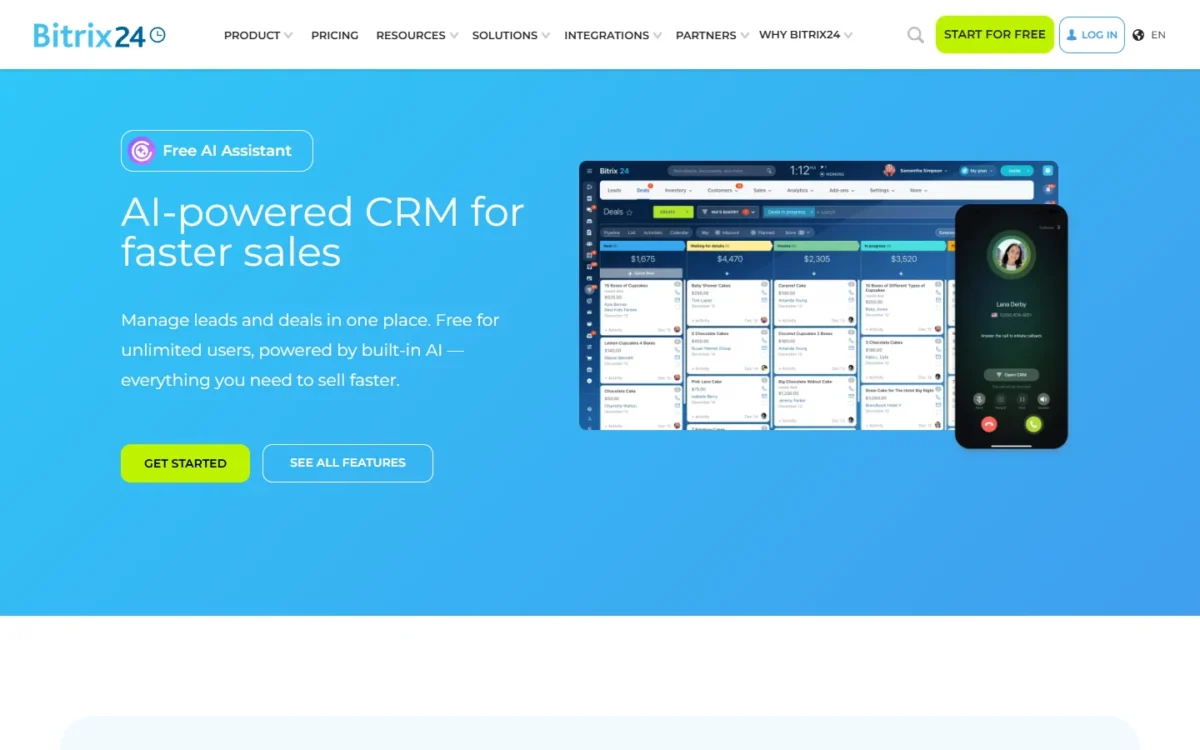
Bitrix24 covers the selling basics well: deals, contacts, recurring deals and online payments from Basic, then unlimited leads, invoices, estimates and e-signature on Standard. Its CRM page says an AI scoring tool helps with sales forecasting but ties it to no plan.
That difference matters to a sales manager who runs a weekly forecast and approves quotes in the CRM. Pro Suite is the edition I would price for that team, and my Salesforce CRM review covers the editions above it.
Verdict: CRM depth
Salesforce fits better for a sales manager who forecasts and quotes inside the CRM, on Pro Suite. The caveat is the annual contract: a team still settling its process can start on Starter Suite or a Bitrix24 trial first.
Collaboration and the All-in-One Workspace
Bitrix24 fits better here. Its Free plan card lists tasks with Kanban and Gantt views, shared calendars, and chat and video calls, and its plan comparison adds online documents, Scrum and workload management.
Salesforce connects Slack instead. The compare table puts Slack Free on Free Suite, Starter Suite and Pro Suite, Slack Business+ on Core and Advanced, and Slack Enterprise+ on Max.
For a 20-person company paying separately for a chat tool and a task board, Bitrix24 Standard can absorb both inside its flat bill. A Salesforce buyer gets a connected Slack workspace but buys task management elsewhere or upgrades Slack.
Verdict: collaboration
Bitrix24 fits better for a company that wants the CRM, task boards and team chat on one login and one bill. The caveat: a team already standardized on Slack loses little with Salesforce, because every Sales Cloud edition on the compare table includes a Slack plan.
Automation and AI
It depends on the plan. Bitrix24 puts sales automation, task automation and RPA on Professional, at $199 per organization per month billed annually for 100 users.
Salesforce starts earlier: Starter Suite lists built-in sales flows and lead routing, and Pro Suite adds greater automation. That puts some automation on Salesforce’s $25 entry seat, while Bitrix24 lists sales automation only from its $199 plan.
AI splits the two sharply. Bitrix24 rates AI as “Limited” from Free to Enterprise and “Unlimited” from Standard Vibe+ up, so the AI comes with the plan.
Agentforce for Sales starts at Core. Starter Suite lists Assistive AI with Employee Agent, while Salesforce says AI can be added to Core and above, and Max lists Agentforce for Sales in the edition. A team that adds Agentforce for Sales to Core pays at least $195 + $125 = $320 per user per month before anything else.
Integrations and API
It depends on how many apps you connect. Bitrix24’s CRM page names Gmail, Outlook, WhatsApp, Facebook Messenger, telephony providers and Zapier, plus its REST API, and Basic already lists email, WhatsApp and telephony integrations.
The catch is Bitrix24 Market. Basic installs 2 Market apps and Standard 4, so a team running five apps needs Professional or a Vibe+ plan, which lists unlimited apps and REST API.
Salesforce’s marketplace is now called AgentExchange, and Pro Suite lists access to it while the Starter Suite card does not. A Starter team that needs a marketplace app should confirm access with Salesforce before buying.
WhatsApp is one place the pages differ outright: Bitrix24 Basic lists WhatsApp integration, and neither Salesforce pricing page names WhatsApp.
Deployment, Hosting and Security
Bitrix24 is the one of the two whose pricing pages list a self-hosted edition. On-Premise Business costs $3,590 per organization, billed annually, and On-Premise Enterprise costs $24,990 a year for 1,000+ users.
Each commercial license includes a one-year subscription, so the edition price covers year one; renewing for each later 12 months costs 50% of the edition price.
A 30-day trial comes first, and the license includes source code access except for the mobile app and Bitrix24 Messenger. For a company whose policy rules out shared cloud hosting, Bitrix24 is the one of the pair with a self-hosted edition on its pricing pages.
In the cloud, Bitrix24 hosts data on Amazon Web Services in the US (Virginia) or the EU (Frankfurt). Bitrix24 Enterprise adds encryption at rest, SOC-compliant AWS hosting, login history, a 30-day backup period and multi-level permissions.
Salesforce Advanced, at $395 per user per month billed annually, adds Backup & Recover, Archive, Data Detect and Security Center. Bitrix24’s security page attributes HIPAA, GDPR, ISO 27001 and SOC certifications to AWS, and Salesforce’s pricing pages list no certifications.
Verdict: deployment and security
Bitrix24 fits better for a company that must host its CRM on its own servers. For compliance, there is not enough evidence for a verdict: ask both vendors for their current audit reports and data processing terms before you sign.
Setup, Support and Scalability
Both vendors let a team test before paying: Bitrix24 for 15 days and Salesforce for 30 days, neither with a credit card. The help after that differs, and so does the way each grows.
Setup Effort for a Small Team
Salesforce builds more starting help into the subscription. Its small-business compare table lists Guided Onboarding, and the Standard Success Plan, included in all licenses, gives access to knowledge articles, documentation, Trailhead and the Trailblazer Community.
Bitrix24 routes implementation to certified partners, who offer pre-sale consultation, demos, training and implementation. Priority customer support appears on the Enterprise plan card.
Premier Success adds 24/7 support for business-stopping issues. Because it is priced as a share of license fees, that support cost grows with the team too.
Ease of use depends on your own process, so build your real pipeline stages in both trials and import a small CSV of contacts before you pay.
How Each Scales Past 100 Users
Bitrix24 moves to Enterprise, from $399 per organization per month for 250 users up to $7,999 for 10,000 users, billed annually. Salesforce keeps adding seats, with no user maximum on Starter Suite, or steps up to Core, Advanced or Max.
At 250 users the models drift far apart. Bitrix24 Enterprise costs $399 x 12 months = $4,788 a year, while 250 users on Starter Suite cost $25 x 250 users x 12 months = $75,000.
Salesforce’s upper editions add tools as well as seats: Core brings Slack Business+ and Tableau Next, and Max adds Salesforce Spiff, Sales Planning and Salesforce Maps.
With costs and capabilities set out, each product’s strengths and weaknesses can be stated plainly.
Bitrix24 vs Salesforce: Pros and Cons
Each line names the fact and the condition that makes it matter.
Bitrix24
Pros
- One flat price covers up to 50 users on Standard, so the 10th or 40th hire adds nothing to the bill
- Tasks, calendars, chat and video calls come with the CRM, even on Free
- A self-hosted edition with source code access for companies that run their own servers
- Month-to-month billing on every cloud plan, about 30% cheaper when paid annually
Cons
- Hard user caps: the 6th, 51st and 101st user each force a plan change
- Market installs capped at 2 to 10 apps outside the Vibe+ plans
- The free plan’s user count is stated two ways on the same pricing page
- No plan named for the AI forecasting tool
Salesforce Sales Cloud
Pros
- Sales Quoting and Forecasting on Pro Suite, for managers who run the forecast in the CRM
- No user maximum on Starter Suite, so head count alone never forces a plan change
- A 30-day trial with no credit card, twice the length of Bitrix24’s
- A Slack plan in every edition on the compare table, from Slack Free to Slack Enterprise+
Cons
- The bill grows with every user, which hurts most at 25 users and up
- Pro Suite and every edition above it bill annually
- Agentforce for Sales is an add-on from $125 per user per month on Core and Advanced
- Starter Suite carries “Transaction fees apply” with no amount on the page
Which Is Better for Your Needs?
Bitrix24 is better for low cost and an all-in-one workspace, Salesforce for forecasting and CRM customization; the matrix maps each priority to its fit, and the lines under it say who should skip each.
| Your priority | Better fit | Reason | Trade-off |
|---|---|---|---|
| Lowest cost for 5 to 100 users | Bitrix24 | Standard covers 50 users for $99 and Professional 100 users for $199 per organization per month, billed annually | The 101st user forces Enterprise |
| Forecasting and quoting in the CRM | Salesforce | Pro Suite lists Sales Quoting and Forecasting | $100 per user per month, billed annually, with a contract |
| CRM plus tasks and chat in one tool | Bitrix24 | Tasks, calendars, chat and video calls come on every plan | A team on Slack runs two chat tools or moves |
| Custom apps and objects | Salesforce | The small-business compare table lists Custom Apps and Objects | Pro Suite’s annual contract |
| Self-hosting or source code access | Bitrix24 | On-Premise Business at $3,590 per organization, billed annually | Renewal costs 50% of the edition price each year |
| AI agents | Depends | Agentforce for Sales from $125 per user per month on Core and up; Bitrix24 lists AI automation agents on Professional Vibe+ | Full AI sits on a higher plan on both |
| Month-to-month billing on a mid plan | Bitrix24 | Standard sells monthly at $144 per organization per month | Annual billing saves about 30% |
| Security certifications | Insufficient evidence | Salesforce’s pricing pages list none; Bitrix24 cites its AWS host’s certifications | Ask both for current audit reports |
Sources: Bitrix24 plans and pricing, Bitrix24 On-Premise pricing, Salesforce Sales Cloud pricing, checked October 2026.
Skip Bitrix24 if your sales managers forecast and approve quotes in the CRM every week, because Pro Suite lists both and Bitrix24 names no plan for forecasting.
Skip Salesforce if a team of 5 to 100 needs CRM, chat and tasks on a fixed budget: Starter Suite alone costs more than Bitrix24 Standard from 4 users and more than Professional from 8.
An all-in-one buyer who also has HubSpot on the shortlist can check how Bitrix24 compares with HubSpot before deciding.
If monday is the other finalist beside Salesforce, see monday vs Salesforce before you commit.
Switching Between Bitrix24 and Salesforce
Both directions run through files. Salesforce’s Data Import Wizard accepts CSV only, up to 50,000 records at a time, in all editions except Database.com. It imports accounts, contacts, leads, campaign members, person accounts and custom objects.
Bitrix24 imports from CSV, Excel and popular CRM systems, and its CRM page calls its Market migration tools “one-click data migration”.
What moves as data, and what you rebuild by hand, in either direction:
- Export accounts, contacts, leads and deals to CSV from the system you leave; check that system’s export screen first.
- Import a small CSV before the full file, as Salesforce recommends, and run one Salesforce import job at a time.
- Rebuild pipelines and stages, automation rules, integrations and user permissions in the new system.
- Re-price the move: Bitrix24 to Salesforce turns one organization price into a per-seat bill from the first user.
Moving from Salesforce to Bitrix24 means checking the caps first. A Salesforce team with six pipelines already outgrows Bitrix24 Basic.
If Keap is the CRM you are weighing against Salesforce, open Salesforce vs Keap for that pairing.
How I Compared Bitrix24 and Salesforce
I compared Bitrix24’s cloud plans and On-Premise edition with Salesforce Sales Cloud’s Free Suite, Starter Suite, Pro Suite, Core, Advanced and Max. Every price comes from the vendors’ US-dollar pricing pages, read on October 21, 2026, with Salesforce’s from the US view of its Sales Cloud pricing page.
I judged both products on the same criteria, from the pricing model and year-one cost to CRM depth, collaboration, automation, integrations, security, setup and switching. The plan facts come from each vendor’s pricing, product, security and help pages. The cost math, break-even counts and fit calls are my analysis.
The pages I compared do not print these figures:
- the user limit of Salesforce Free Suite
- the amount of Starter Suite’s transaction fees
- the number of AgentExchange apps
- the Bitrix24 plan that carries AI forecasting
- the user count of On-Premise Business
Frequently Asked Questions
Is Bitrix24 a good CRM?
Yes, for a team that wants pipelines, tasks and chat on one flat price. Basic adds sales pipelines plus email, WhatsApp and telephony integrations for $49 per organization per month, billed annually. For forecasting, Bitrix24 names no plan, so a forecast-led sales team should confirm it in the trial; my full Bitrix24 review goes further.
Is Bitrix24 a Russian service?
Bitrix24’s pricing and security pages do not name the company’s home country, but they do say where your data lives. The cloud product runs on Amazon Web Services in the US (Virginia) or the EU (Frankfurt, Germany), and the On-Premise editions let you host it in your own country or on your own server.
Does Salesforce have a free plan?
Yes. Salesforce’s Sales Cloud compare table lists a Free Suite at $0 per user per month, with Slack Free connected. Salesforce prints no user limit for Free Suite next to that price, so check the limit at signup before you move a team onto it.
Can Bitrix24 replace Salesforce for a 100-person company?
On cost and collaboration, yes: Professional covers 100 users with sales automation and analytics and reporting tools. On forecasting, not fully, because Bitrix24 ties its AI forecasting tool to no plan. The 101st user also moves Bitrix24 to Enterprise.
Final Verdict: Bitrix24 or Salesforce?
Buy Bitrix24 if your US business has 5 to 100 people and needs a pipeline plus team collaboration on a fixed budget. Buy Salesforce Pro Suite if your sales organization forecasts, quotes and customizes the CRM and can sign an annual per-seat contract.
Choose Bitrix24 if
- Your team has 5 to 100 people and a fixed budget: Standard covers 50 users and Professional 100 for one organization price
- You want CRM, tasks, chat and video calls behind one login and one bill
- You prefer month-to-month billing on a mid plan
- You need self-hosting or source code access through On-Premise
Choose Salesforce if
- Forecasting and quoting run inside your CRM, which Pro Suite lists
- You need custom apps and objects to fit the CRM to your process
- You expect to grow without user caps, which Starter Suite does not have
- Your team already works in Slack and wants it connected to the CRM
The main trade-off runs both ways: Bitrix24’s caps on users, apps and pipelines against Salesforce’s per-seat cost and annual contract.
A team that wants Salesforce-style CRM depth without its seat price can compare other Salesforce alternatives.
If HubSpot is your other finalist, the HubSpot vs Salesforce comparison sets those two side by side.
If Microsoft is on your shortlist instead, read Salesforce vs Microsoft Dynamics next.
For a wider shortlist, start from my ranking of the best CRM software.





