

In the monday vs Salesforce decision, monday CRM costs less per seat on both comparable tiers on yearly billing for most sales teams of 3 to 20 reps. It lists email sequences on Pro at $28 a seat and AI agents on Standard and Pro.
Salesforce is the better buy for one or two users, for managers who forecast inside the CRM, and for teams heading past 40 users.
The gap is widest on the growth tier. monday CRM Pro costs $28 a seat a month, billed yearly, while Salesforce Pro Suite costs $100 a user a month, billed annually under a contract.
For 8 reps, that is 10 x $28 x 12 = $3,360 a year on a 10-seat monday bundle, against 8 x $100 x 12 = $9,600 a year on Pro Suite.

Quick verdict
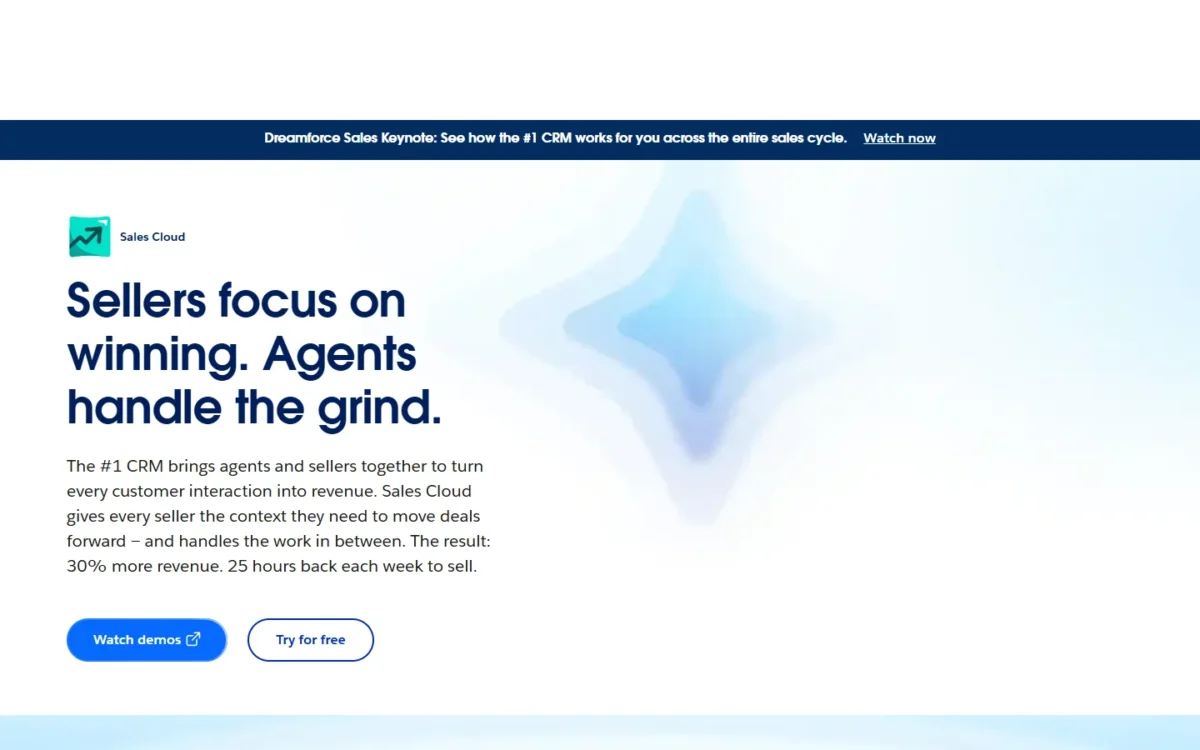
The deciding difference is how each vendor sells seats. monday CRM sells bundles from 3 seats at $12 to $28 a seat a month on yearly billing. Salesforce sells single users, from a $0 Free Suite for two people up to Pro Suite seats on an annual contract.
Pick monday CRM for a team of 3 to 20 reps that wants sequences and AI agents inside the seat price. Pick Salesforce for one or two users, for built-in forecasting, or for a company that will grow into Core, Advanced or Max.
The trade-off: monday rounds your headcount up to the next bundle, while Salesforce adds an annual contract, a paid support tier and Agentforce on top of the seat. Plan names and prices are as both vendors listed them in October 2026.
Choose monday CRM if
- You run 3 to 20 reps and want email sequences, which Pro lists at $28 a seat
- Read-only managers should see the pipeline without paying for a seat
Choose Salesforce if
- One or two people need a CRM at $0 on Free Suite
- Managers forecast in the CRM, which Pro Suite lists
In This Article (12 sections)
monday CRM vs Salesforce at a Glance
The two products price the same job in different units: monday by the seat inside a fixed bundle, Salesforce by the named user.
| Attribute | monday CRM | Salesforce |
|---|---|---|
| Best for | Teams of 3 to 20 reps that want sequences and AI agents in the seat price | One or two users at $0, or teams that forecast in the CRM |
| Starting paid price | Basic: $12 per seat per month, billed yearly | Starter Suite: $25 per user per month, billed monthly or annually |
| Free plan or trial | 14-day trial, then a paid plan | Free Suite: $0 for up to two users; 30-day Sales Cloud trial |
| Plan with sequences or forecasting | Pro: $28 per seat per month, billed yearly, with email sequences | Pro Suite: $100 per user per month, billed annually, with quoting and forecasting |
| Seat unit | Bundles of 3, 5, 10, 15, 20, 25, 30 and 40 seats; the menu also lists 50, 100 and 200+, while the FAQ sends teams over 40 users to a quote | Per user |
| Main limitation | Headcount rounds up to the next bundle; Basic caps 1,000 active contacts and deals | Pro Suite needs a contract; AI can be added from Core up, with Agentforce for Sales from $125 and included in Max |
Sources: monday CRM pricing, Salesforce Sales Cloud pricing and Salesforce Free Suite, checked Oct 2026.
The starting prices sit close together, but the growth plans do not, so the plan your team needs matters more than either entry price.
Key Differences Between monday CRM and Salesforce
Four differences change the decision: how seats are sold, where AI sits, what the growth tier buys, and how billing commits you.
- Seats: monday CRM sells bundles from 3 seats, so a 6-rep team pays for 10; Salesforce bills per user and gives two users Free Suite at $0.
- AI: monday lists AI agents and its Sidekick assistant on Standard and Pro; Salesforce lets AI be added from Core up and includes Agentforce for Sales in Max.
- Growth tier: monday Pro at $28 adds email sequences and mass email; Salesforce Pro Suite adds quoting, forecasting and AgentExchange access.
- Billing: monday bills Basic, Standard and Pro monthly or yearly; Salesforce bills Pro Suite annually, with a contract required.
One scope note: monday.com lists monday CRM and monday work management as separate products with separate plans. This page compares only the sales CRM; the project-management side of monday is weighed in my Asana vs monday.com comparison.
Each difference sits on a plan gate, so the next question is where each plan stops.
monday CRM vs Salesforce: Features Compared
Most features a small sales team needs exist on both sides; the difference is which plan unlocks them.
| Feature | monday CRM | Salesforce |
|---|---|---|
| Active contacts and deals | Limited: 1,000 Basic, 10,000 Standard, 100,000 Pro, unlimited Ultimate | Not listed on the pricing pages |
| Custom automations | Standard: 250 a month; Pro: 25K a month | Starter Suite: sales flows and lead routing; Pro Suite: more automation |
| Email outreach | Pro: email sequences and mass email | Starter Suite: email nurture campaigns and lead scoring |
| AI agents | Standard and Pro: outreach caller, lead sourcer and meeting prep agents | Add-on from Core up: Agentforce for Sales from $125; included in Max |
| Quotes | Limited: 20, 50 or 250 a month; unlimited on Ultimate | Pro Suite: quoting |
| Forecasting | Not listed on the pricing page | Pro Suite: forecasting |
| App marketplace | 850+ integrations and apps | Pro Suite: access to AgentExchange |
Sources: monday CRM pricing, monday integrations, Salesforce Sales Cloud pricing and Salesforce Free Suite, checked Oct 2026.
Pipeline size and record limits
monday CRM caps active contacts and deals at 1,000 on Basic, 10,000 on Standard and 100,000 on Pro, with no cap on Ultimate. Salesforce publishes no record cap per suite on its pricing pages; Advanced adds “expanded data capacity” over Core.
A team importing 1,500 contacts outgrows monday Basic on day one, so Standard is the realistic floor. Pro’s cap works out to 5,000 contacts and deals per rep for a 20-rep team (100,000 / 20).
Basic also limits each board to 5 columns. A deal board with stage, value, owner, close date and source already uses all 5, while Standard allows 15 and Pro 75.
Verdict: record limits
Not enough evidence. monday publishes its caps and Salesforce does not, so ask Salesforce for the data allowance of the suite you are quoted before you compare.
Automation and email sequences
monday CRM Standard runs 250 custom automations a month and Pro runs 25K, with email sequences and mass email listed from Pro up. Salesforce Starter Suite includes built-in sales flows, lead routing and email nurture campaigns with lead scoring, and Pro Suite adds greater customization and automation.
monday puts a monthly number on custom automations: 250 a month on Standard is about 8 a day (250 / 30). Salesforce’s pricing page gates automation by suite and prints no monthly count.
The email difference is one of scope. monday Pro’s sequences are rep follow-ups with reminders for manual tasks, while Starter Suite’s nurture campaigns are marketing email. Salesforce Free Suite includes up to 100 emails a month, and extra sends are paid.
Verdict: automation and sequences
Depends on volume and on the kind of email. Rep sequences point to monday Pro; marketing nurture with lead scoring points to Starter Suite. A team that only routes leads and assigns follow-ups can stay on Standard at $17 a seat or Starter Suite at $25 a user.
AI agents vs Agentforce
monday CRM puts its AI agents in the Standard and Pro seat price, while Salesforce sells Agentforce for Sales as an add-on from $125 per user per month and includes it in Max.
On monday, Standard and Pro list an outreach caller agent, a lead sourcer agent, a meeting prep agent, an AI meeting notetaker and a build-your-own agent; Pro adds an AI workflow builder. Every plan includes a package of AI credits, with no amount per plan printed.
On Salesforce, Starter Suite lists “Assistive AI with Employee Agent”, and the Sales Cloud page adds that AI can be added to Core and above.
As I read that page, a Pro Suite team that wants Agentforce for Sales moves up to Core first. At list price that is $195 + $125 = $320 per user per month, or Max at $550 with Agentforce included.
Verdict: AI in the price
monday CRM fits better for a small team that wants agents without a second line item. The caveat: monday prints no credit amount per plan, so ask how many credits your bundle includes before you plan on daily agent calls.
Forecasting, quoting and reporting
Salesforce Pro Suite includes sales quoting and forecasting, while monday CRM gates quotes and dashboards by plan and puts no forecasting feature on its plan cards. monday’s quotes and invoices run 20, 50 and 250 a month on Basic, Standard and Pro, and its custom dashboards run 1, 5 and 50.
monday’s CRM product page does market AI forecasting backed by pipeline coverage analysis, without naming the plan that carries it. For a manager who commits a number to leadership each quarter, that missing plan gate is the reason to price Pro Suite.
A team that needs a pipeline dashboard and a few quotes a month gets them on monday Standard, with 5 dashboards and 50 quotes and invoices.
Verdict: forecasting and quoting
Salesforce fits better for managers who forecast inside the CRM, because Pro Suite names the feature. The cost is the Pro Suite seat on an annual contract.
Integrations, API and apps
monday lists 850+ integrations and apps, plus APIs and SDKs for custom builds, and its Ultimate plan allows 25,000 API calls a day. Salesforce’s AppExchange is now called AgentExchange, and Pro Suite lists access to it.
monday also names official connections to Claude, Copilot and ChatGPT, plus the monday MCP. A raw count is still the wrong test: list the three tools your reps open every day, such as email, calendar and dialer, and confirm a native connector in each directory before your trial ends.
Verdict: integrations
Not enough evidence. Salesforce’s saved pages give no AgentExchange app count, so a count comparison would be guesswork; your own must-have list settles it.
Features set the plan, and the plan sets the bill.
monday vs Salesforce Pricing: What Each Team Pays
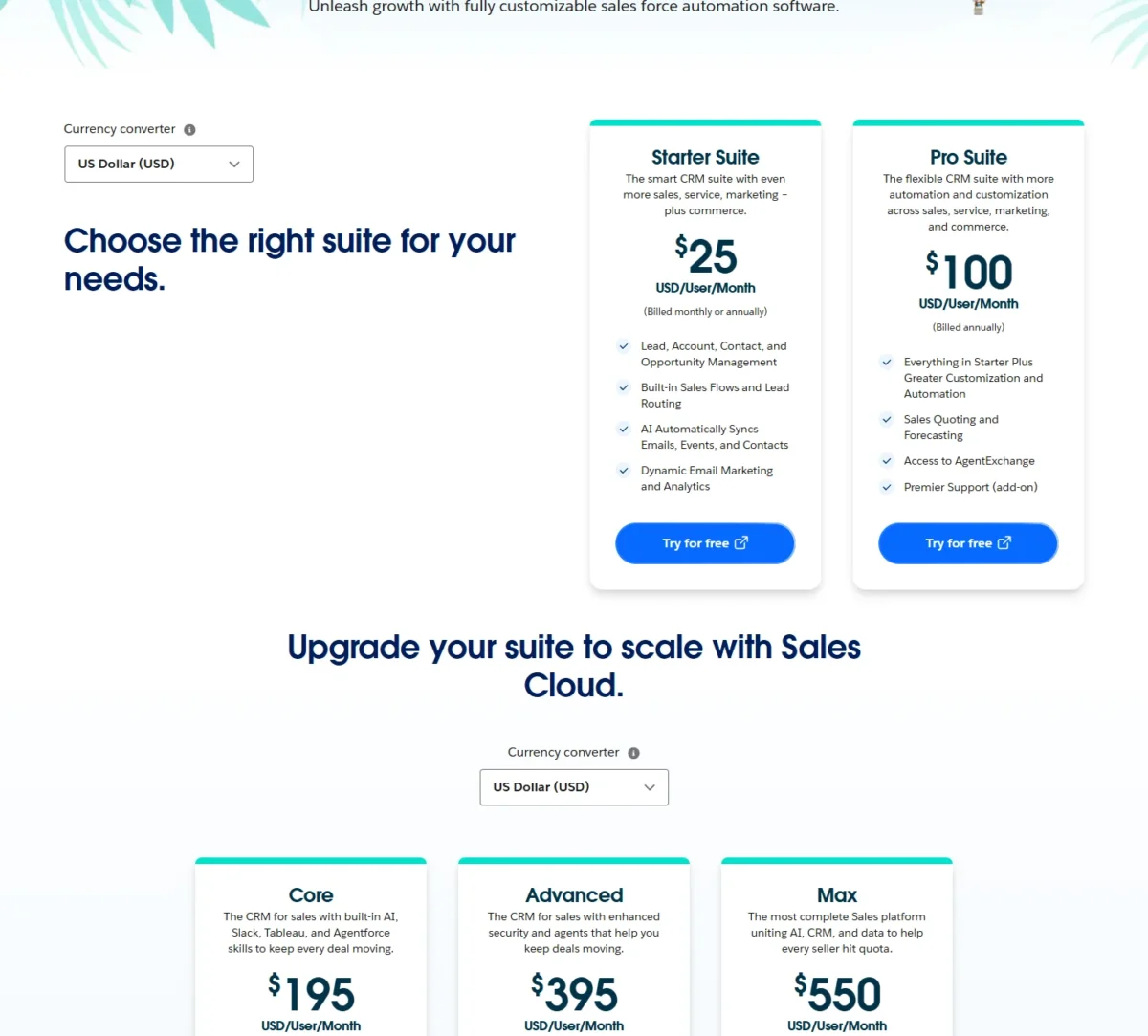
On yearly billing, monday CRM Standard costs $17 and Pro $28 a seat a month, sold in bundles from 3 seats. Salesforce Starter Suite costs $25 a user a month, billed monthly or annually, and Pro Suite costs $100, billed annually.
monday now calls its top tier Ultimate (“a new name for our Enterprise tier”), and Salesforce’s Sales Cloud page, read on October 21, 2026, lists Core, Advanced and Max above Pro Suite. Each edition and add-on is priced in my Salesforce pricing guide.
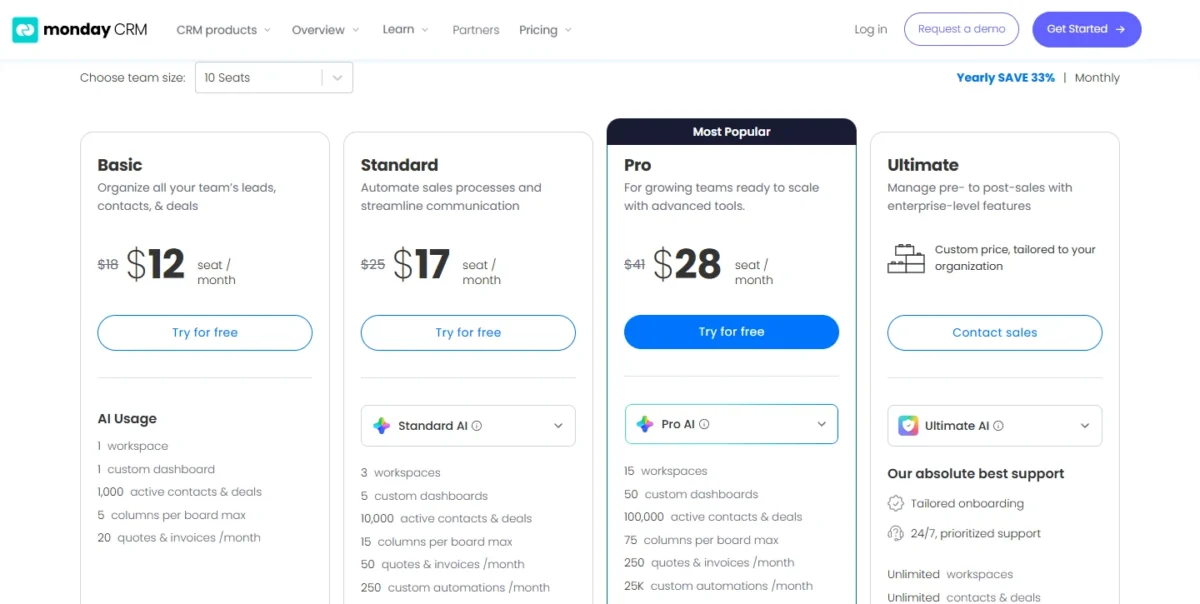
monday disagrees with itself on the yearly discount: the billing toggle says “SAVE 33%”, while its FAQ says yearly billing gives an 18% discount. Basic’s list prices give ($18 – $12) / $18 = 33%.
Comparable plans side by side
monday CRM Standard lines up with Salesforce Starter Suite as the first plan with sales automation, and monday Pro lines up with Pro Suite as the growth plan.
| Plan tier | monday CRM | Salesforce |
|---|---|---|
| Free | 14-day trial, then a paid plan | Free Suite: $0 for up to two users, no contract |
| Entry automation | Standard: $17 billed yearly, $25 billed monthly | Starter Suite: $25, billed monthly or annually |
| Growth | Pro: $28 billed yearly, $41 billed monthly | Pro Suite: $100, billed annually, contract required |
| Enterprise | Ultimate: custom price | Core $195, Advanced $395, Max $550, billed annually |
Sources: monday CRM pricing (yearly and monthly views), Salesforce Sales Cloud pricing and Salesforce Free Suite, checked Oct 2026.
monday Basic, at $12 a seat billed yearly or $18 monthly, lists no custom automations, so I set Standard against Starter Suite. Every monday plan and its AI credits are covered in monday CRM’s full plan breakdown.
The fine print differs too. monday prices exclude tax and depend on the billing country; Salesforce marks both suite prices “Transaction fees apply” without listing the amounts.
What 3 to 20 reps pay in year one
On yearly billing, monday CRM Standard costs less than Salesforce Starter Suite at every headcount from 3 to 20 except 6, and monday Pro costs less than Pro Suite at every headcount shown.
The per-seat price is the same on the 3-, 5-, 10-, 15- and 20-seat bundles: $12 on Basic, $17 on Standard and $28 on Pro, billed yearly. A team buys the smallest bundle that covers its headcount.
Assumptions: US list prices before tax; monday on yearly billing at the bundle the team must buy; Salesforce billed annually; excludes Salesforce transaction fees, Premier Success, Agentforce for Sales, monday AI credit top-ups and onboarding.
| Team | monday bundle | monday Standard per year | Salesforce Starter Suite per year |
|---|---|---|---|
| 2 reps | 3 seats | 3 x $17 x 12 = $612 | 2 x $25 x 12 = $600 |
| 3 reps | 3 seats | 3 x $17 x 12 = $612 | 3 x $25 x 12 = $900 |
| 5 reps | 5 seats | 5 x $17 x 12 = $1,020 | 5 x $25 x 12 = $1,500 |
| 6 reps | 10 seats | 10 x $17 x 12 = $2,040 | 6 x $25 x 12 = $1,800 |
| 8 reps | 10 seats | 10 x $17 x 12 = $2,040 | 8 x $25 x 12 = $2,400 |
| 11 reps | 15 seats | 15 x $17 x 12 = $3,060 | 11 x $25 x 12 = $3,300 |
| 16 reps | 20 seats | 20 x $17 x 12 = $4,080 | 16 x $25 x 12 = $4,800 |
Sources: monday CRM pricing (3-, 5-, 10-, 15- and 20-seat yearly views) and Salesforce Sales Cloud pricing, checked Oct 2026.
Six reps is the trap. The 5-seat bundle is one seat short, so the team pays for 10 seats and 4 of them sit empty.
The rule behind the table is simple. Standard’s $17 is 68% of Starter Suite’s $25 ($17 / $25 = 0.68), so on yearly billing monday stays cheaper while the bundle is under about 1.47 times the headcount ($25 / $17 = 1.47). Ten seats for six reps is 1.67 times.
Two reps are a near tie on yearly billing. monday Standard costs $612 for 3 seats ($17 x 3 x 12), because monday’s pricing FAQ says “Plans start from 3 users”. Salesforce Starter Suite costs $600 for 2 users ($25 x 2 x 12).
Free Suite costs nothing up to 100 emails a month, with extra sends paid. For 21 to 40 reps, run the same check against the 25-, 30- and 40-seat bundles in the team-size menu.
| Team | monday bundle | monday Pro per year | Salesforce Pro Suite per year |
|---|---|---|---|
| 2 reps | 3 seats | 3 x $28 x 12 = $1,008 | 2 x $100 x 12 = $2,400 |
| 6 reps | 10 seats | 10 x $28 x 12 = $3,360 | 6 x $100 x 12 = $7,200 |
| 10 reps | 10 seats | 10 x $28 x 12 = $3,360 | 10 x $100 x 12 = $12,000 |
| 15 reps | 15 seats | 15 x $28 x 12 = $5,040 | 15 x $100 x 12 = $18,000 |
| 20 reps | 20 seats | 20 x $28 x 12 = $6,720 | 20 x $100 x 12 = $24,000 |
Sources: monday CRM pricing and Salesforce Sales Cloud pricing, checked Oct 2026.
On the growth tier the rounding never matters. Pro Suite’s seat is 3.57 times monday Pro’s ($100 / $28 = 3.57), and no bundle on the menu is that much larger than the team that buys it.
Monthly billing changes the entry-tier result. monday Standard is $25 a seat billed monthly, the same as Starter Suite’s $25 a user, so every empty bundle seat makes monday the dearer option.
The growth tier still favours monday on monthly terms. A 10-seat Pro bundle billed monthly costs 10 x $41 x 12 = $4,920 a year, and Pro Suite has no monthly option at all.
Contracts, refunds and add-ons that change the bill
monday bills monthly or yearly, takes a yearly plan in one upfront payment, and refunds a cancelled yearly plan pro rata within 30 days of payment. Salesforce bills Pro Suite annually with a contract required, and Core, Advanced and Max are billed annually too.
After monday’s 30-day window, downgrades earn no refund, though admins can change the plan and user count at any time.
Two Salesforce add-ons move the bill most for this buyer:
- Premier Success costs 30% of net license fees on the Sales Cloud pricing page, and Core includes it.
- Agentforce for Sales starts at $125 per user per month and is included in Max.
monday’s help page on its pricing plans says that once the trial AI credits are used, you can purchase an AI credits add-on, and the pages I read print no price for it.
Ease of Use: What Each Trial Should Prove
monday CRM asks a team to shape its pipeline from board columns, while Salesforce starts small teams on a guided Free Suite setup and keeps deeper customization for Pro Suite.
On monday, the plan caps how far a board can be shaped: 5 columns per board on Basic, 15 on Standard and 75 on Pro. Viewers are unlimited on every plan and take no paid seat, and Standard adds up to three free guests.
On Salesforce, Free Suite starts with guided setup and no credit card. Pro Suite adds greater customization and automation, which is where a sales-ops owner starts building custom processes.
Your own reps settle adoption, and the trials give them time: monday allows 14 days, and Salesforce allows 30 days without a credit card.
A fair trial runs the same workflow on both. Import the same contact file: monday takes .xlsx, .xls or .csv, and Salesforce’s Data Import Wizard takes CSV only. Then build your real deal stages, set one follow-up rule, and have two reps log a week of calls.
Adoption also depends on whom you can call when something breaks and how your data is protected.
Support, Security and Data Control
monday CRM reserves 24/7 prioritized support, tailored onboarding, HIPAA compliance and advanced permissions for Ultimate. monday.com says its platform is built with security protocols such as ISO/IEC 27001 and ISO/IEC 27018.
Salesforce includes the Standard Success Plan in every license and sells Premier, with 24/7 support for business-stopping issues, at 30% of net license fees on its Success Plans pricing.
That makes support a plan decision on both sides. A monday team below Ultimate has no prioritized support on its plan card, and a Salesforce team below Core pays the Premier percentage for 24/7 help on urgent issues.
Salesforce Advanced adds Backup & Recover, Archive, Data Detect and Security Center. A regulated team on monday that needs HIPAA has one route: Ultimate at a custom price.
Data control differs in cadence. Salesforce’s Data Export Service produces CSV backups monthly in all editions except Database.com, and weekly in Enterprise, Performance and Unlimited. On monday, an account admin can download every board and file as one zip, and Ultimate admins can stop non-admins from exporting boards.
With the facts laid out, here is what each product does well and badly for a small or mid-size team.
monday CRM vs Salesforce: Pros and Cons
monday CRM’s strengths are price and AI inside the seat; Salesforce’s strengths are its free tier, forecasting and room to grow.
monday CRM
monday CRM suits a team that wants growth-tier features at $28 a seat rather than $100, with month-to-month plans available. If it is your likely pick, my monday.com review judges it without Salesforce in the frame.
If Freshsales is on your shortlist next to monday, monday vs Freshsales compares those two directly.
Pros
- Pro adds email sequences and mass email at $28 a seat a month, billed yearly
- Standard and Pro list AI agents, including an outreach caller and a lead sourcer
- Basic, Standard and Pro can be billed monthly, Pro at $41 a seat
- Viewers are unlimited and take no paid seat
Cons
- Seats come in bundles from 3, so 6 reps pay for 10 seats
- Basic stops at 1,000 active contacts and deals and 5 columns per board
- Forecasting is not listed on the pricing page
- The FAQ sends teams over 40 users to a sales quote for an exact price
Salesforce
Salesforce suits a team that values a free start and a long upgrade path over a cheap growth-tier seat. My Salesforce CRM review weighs it on its own terms.
A buyer who is also looking at Bitrix can open Bitrix vs Salesforce for that pairing.
Pros
- Free Suite gives up to two users a $0 CRM with no contract or credit card
- Starter Suite bills per user at $25, monthly or annually
- Pro Suite lists quoting and forecasting
- Core, Advanced and Max sit above Pro Suite, so a growing team can stay on one vendor
Cons
- Pro Suite is billed annually, with a contract required
- AI can be added to Core and above: Agentforce for Sales is a paid add-on from $125 there and is included in Max
- Premier Success, the 24/7 support tier, is priced as a share of license fees
- Outreach past Free Suite’s 100 emails a month costs extra
Which of these weigh most depends on the team’s first priority.
Which Is Better for Your Needs?
monday CRM is the better fit for most teams of 3 to 20 reps that buy on yearly billing. Salesforce is the better fit for two-person teams, forecast-led managers and companies heading past 40 users.
| Your priority | Better fit | Reason | Trade-off |
|---|---|---|---|
| One or two users, no budget | Salesforce | Free Suite costs $0 for up to two users, no contract | 100 emails a month included, extra sends paid; Starter Suite at $25 a user for more |
| 3 to 20 reps, entry automation, yearly billing | monday CRM | Standard at $17 a seat costs less than Starter Suite at every headcount from 3 to 20 reps except 6 | 250 custom automations a month and 10,000 contacts and deals |
| Exactly 6 reps on the entry tier | Salesforce | Starter Suite costs 6 x $25 x 12 = $1,800 a year against 10 x $17 x 12 = $2,040 for a 10-seat Standard bundle | A later move to Pro Suite means a contract |
| Rep email sequences | monday CRM | Pro lists email sequences and mass email at $28 a seat, billed yearly | Forecasting is not listed on the pricing page |
| Forecasting in the CRM | Salesforce | Pro Suite lists sales forecasting; monday’s plan cards list no forecasting feature | Billed annually, contract required |
| AI agents without an add-on | monday CRM | Standard and Pro list AI agents; Salesforce adds AI from Core up and includes Agentforce for Sales in Max | monday prints no AI credit amount per plan |
| Month-to-month billing | Depends | Starter Suite is $25 either way; monday Pro is the only growth plan billed monthly, at $41 | Empty bundle seats cost more on monthly Standard |
| Past 40 users on a customizable platform | Salesforce | Core, Advanced and Max sit above Pro Suite; monday quotes teams over 40 users | Editions from $195 to $550 a user, billed annually |
| App marketplace breadth | Insufficient evidence | Salesforce’s saved pages give no AgentExchange app count | Check your must-have apps in both directories |
Sources: monday CRM pricing, Salesforce Sales Cloud pricing and Salesforce Free Suite, checked Oct 2026.
A founder selling alone should start on Salesforce Free Suite and price monday once three or more reps need sequences. A 10-rep team that wants sequences should buy monday Pro, unless its manager already forecasts in a CRM.
A 6-rep team on a tight budget should take Starter Suite now and price monday again at 7 or 8 reps. A company that expects to pass 40 users within a year should start on Salesforce, because Core, Advanced and Max give it room above Pro Suite on one vendor.
Should Pipedrive be the rival you keep returning to, monday vs Pipedrive sets monday against it.
A team that picks one may still move later, which makes the switching path worth knowing before you sign.
Switching Between monday CRM and Salesforce
Contacts and accounts can move into Salesforce as CSV files through its Data Import Wizard. monday exports a board’s table views to Excel (board views are not exported), and Salesforce exports data as CSV files.
Moving from Salesforce to monday CRM, the Excel import guide says the import is available on all plans, through Import contacts in the New contact menu. Its duplicate step lets you add, skip or update rows that match items already on the board.
Check how each carries automations, dashboards and sequences before you count on them moving.
From monday CRM to Salesforce
- Export each board to Excel. monday exports up to 100,000 items at a time, and an account admin can download every board and file as one zip; board views do not export.
- Save each sheet as CSV, because Salesforce’s Data Import Wizard supports only CSV.
- Import a small CSV first, as Salesforce recommends, then import accounts, contacts and leads, up to 50,000 records at a time.
- Plan a separate route for deals. The wizard’s object list (accounts, contacts, leads, solutions, campaign members, person accounts and custom objects) does not name opportunities, and Salesforce’s help lists Data Loader as a separate tool.
- Rebuild monday automations as Salesforce flows and recreate your reports and dashboards before you cancel monday.
From Salesforce to monday CRM
- Schedule the export before the contract ends. The export help page names editions (Enterprise, Performance and Unlimited for weekly exports), not the Starter, Pro, Core, Advanced and Max suites on the pricing page, so ask Salesforce which cadence your suite gets.
- Split large files. monday imports up to 8,000 rows into a new board (only the first 50 columns) or 10,000 rows into an existing board, and each file must be 10 MB or less.
- Trim picklist values first. A column with more than 40 unique labels fails the import, and one with 9 or fewer is suggested as a Status column.
- Use duplicate handling on an existing board: monday’s import can skip rows that match an item already there, such as by email address.
- Rebuild automations inside your plan’s monthly limit (250 on Standard, 25K on Pro) and recreate sequences on Pro. Ultimate lists white-glove migration for teams that want help.
Neither vendor gives a migration time, so budget for a parallel month in which both systems run.
How I Compared monday CRM and Salesforce
I compared both products from their official pricing, plan and help pages, read on October 21, 2026. Prices, limits and features are quoted from those pages; plan-fit calls and cost conclusions are my reading of them.
For monday CRM, I read the pricing page in its monthly view and in its yearly view at the 3-, 5-, 10-, 15- and 20-seat bundles. I also read its CRM, integrations, user-type, import and export pages.
For Salesforce, I read the Sales Cloud pricing page, the Free Suite pages and the help pages on the Data Import Wizard and data export.
The criteria were the comparable plan’s seat price at real headcounts, record and automation caps, email sequences, AI in the seat price, forecasting and quoting, integrations, support and security, and data portability.
Some facts a buyer needs are not public. Salesforce gives no record or storage limit per suite, no AgentExchange app count and no transaction fee amounts on its pricing pages. monday gives no AI credit amount per plan and lists support channels only for Ultimate.
FAQ
Can monday CRM replace Salesforce?
Yes, for a sales team of up to 40 users that needs pipelines, email sequences and AI agents more than built-in forecasting. monday Pro holds 100,000 active contacts and deals and 25K custom automations a month. A team that forecasts inside the CRM, or expects to need Core-level editions, should stay on Salesforce.
Does either have a free plan?
Salesforce does. Free Suite costs $0 for up to two users and has no expiration date as long as someone logs in at least once every 60 days. monday CRM has no free plan: it offers a 14-day trial, and qualified nonprofits may get free or discounted access.
Who are their biggest competitors?
HubSpot is the rival I set against both products. For monday’s side of that rivalry, my HubSpot vs monday CRM comparison puts the two side by side on plans and price.
On Salesforce’s side, the same pairing is in my HubSpot vs Salesforce comparison, useful when a third CRM is still on your shortlist.
Final Verdict: monday CRM or Salesforce?
Buy monday CRM if you run 3 to 20 reps and want email sequences and AI agents at $28 a seat. Buy Salesforce if you are one or two people, forecast inside the CRM, or plan to grow into its Core, Advanced or Max editions.
Choose monday CRM if
- Your team has 3 to 20 reps and buys yearly, since Standard at $17 a seat beats Starter Suite at every headcount from 3 to 20 reps except 6
- Your reps run their own follow-up cadences, which Pro automates as email sequences
- You want AI agents in the seat price rather than an Agentforce add-on
- You want the growth tier on monthly billing, at $41 a seat on Pro
- Stakeholders only need to view boards, since viewers take no paid seat
Choose Salesforce if
- You sell alone or with one partner and want to start at $0
- Your sales manager commits a forecast every quarter and wants it in the CRM
- Your headcount sits just above a bundle, such as 6 reps on the entry tier
- You expect to pass 40 users and want Core, Advanced or Max above Pro Suite
- You need apps from AgentExchange, which Pro Suite lists access to
Skip monday CRM if: your manager forecasts in the CRM, or your team sits at 6 reps on the entry tier.
Skip Salesforce if: a $100 contract seat buys forecasting your reps will not use, since monday Pro covers sequences for $28.
If Salesforce’s contract is the problem but monday’s bundles do not fit either, my list of Salesforce alternatives covers other replacements.
If neither product fits, widen the shortlist with my ranking of the best CRM software for small teams.






Pingback: Salesforce vs Close (2026): Pricing, Dialers & Sequences
Pingback: monday vs Freshsales (2026): CRM Cost, Limits and Verdict