

HubSpot Sales Hub fits a B2B team whose pipeline starts in marketing and that wants to try, buy and grow on one cloud platform. SugarCRM, now trading as SugarAI, fits an account-based team that sells repeat orders from ERP data or must run its CRM on-premises.
On price, HubSpot vs SugarCRM is close at the forecasting tier, and I price the same HubSpot seats against Close in HubSpot vs Close. Sales Hub Professional costs $90 per seat per month billed annually, plus a required one-time $1,500 onboarding fee; Sugar Sell Advanced+ costs $98 per user per month, billed annually.
Quick verdict
The deciding difference: HubSpot keeps marketing, sales and service records on one cloud platform with a free entry. SugarCRM builds its sales CRM around ERP order history and still sells an on-premises edition.
- Pick HubSpot if marketing feeds your pipeline, you want a free plan or a trial first, and managers sit beside the reps on cheaper Core Seats.
- Pick SugarCRM if reps sell repeat orders into existing accounts, your ERP holds the buying history, or IT requires on-premises hosting.
- The trade-off: HubSpot adds a required onboarding fee from Professional up and keeps custom objects for Enterprise; SugarCRM bills Sugar Sell, Sugar Enterprise and Sugar Market annually and lists no free plan or trial for them.
In This Article (11 sections)
HubSpot vs SugarCRM at a Glance
HubSpot sells one cloud platform with a free way in, while SugarCRM sells an ERP-connected sales CRM that also comes as an on-premises edition.
| Attribute | HubSpot | SugarCRM |
|---|---|---|
| Best for | Marketing-led pipeline on one platform | Account-based repeat sales on ERP data |
| Entry paid plan | Sales Hub Starter, from $7 per seat per month billed annually ($20 shown beside it) | Sugar Sell Standard+, $68 per user per month, billed annually |
| Forecasting plan | Sales Hub Professional, $90 per seat per month billed annually, plus $1,500 one-time onboarding | Sugar Sell Advanced+, $98 per user per month, billed annually |
| Free plan or trial | Free for up to 2 users; 14-day trial of the sales tools | Not listed on sugarai.com/ |
| Deployment | Browser-based cloud, no installation | SugarCloud on AWS, or on-premises as Sugar Enterprise |
| Main limitation | Required onboarding fee; custom objects only on Enterprise | Sugar Sell, Enterprise and Market billed annually; no listed trial |
Sources: HubSpot Sales Hub pricing, HubSpot sales software, SugarAI pricing, SugarAI deployment options, checked October 2026.
Key Differences Between HubSpot and SugarCRM
The two differ in the data each CRM is built on, where it runs, how you buy it and how it prices users.
- Data source: HubSpot unifies marketing, sales and service data on one platform; Sugar Sell combines CRM data with ERP order history, and SugarAI lists 180+ ERP integrations.
- How you buy: HubSpot sells self-serve plans with a free plan and a 14-day trial; SugarCRM lists annual packages and routes buyers to a demo or a quote.
- Seat model: HubSpot prices Sales Seats, cheaper Core Seats and free View-Only Seats; SugarCRM lists one per-user price per package.
The data source matters most. A team whose leads arrive through forms, email and ads gains from HubSpot’s single record, the strength my HubSpot CRM review weighs on its own.
A distributor whose reps manage reorders gains more from SugarCRM reading purchase history, which my full SugarCRM review judges without a rival beside it.
HubSpot vs SugarCRM: Features Compared
HubSpot publishes per-plan limits for many sales features, such as calling minutes, workflows and pipelines, while SugarCRM lists features per package without caps.
| Feature | HubSpot | SugarCRM |
|---|---|---|
| Forecasting | Professional and Enterprise | Advanced+ and Premier+ |
| Custom objects | Enterprise | Not listed on sugarai.com/ |
| Workflows | Limited: 50 Starter, 300 Professional, 1,000 Enterprise | Business process management from Standard+ |
| Calling | Limited: 500, 3,000 or 12,000 minutes | Not listed on sugarai.com/ |
| Sequences | Professional and Enterprise | Not listed on sugarai.com/ |
| Marketing automation | Free marketing tools on the Free plan; Marketing Hub is a separate subscription | Add-on: Sugar Market |
| ERP integration | Not listed on hubspot.com/ | 180+ ERP integrations |
| On-premises | Not listed on hubspot.com/ | Sugar Enterprise |
Sources: HubSpot Sales Hub pricing, HubSpot custom objects help, SugarAI pricing, SugarAI integrations, checked October 2026.
Customization and data model
HubSpot keeps custom objects for Enterprise subscriptions and caps pipelines at 15, 100 and 350 per account on Starter, Professional and Enterprise. SugarCRM sells no-code configuration, with many options free of charge and no plan gate printed.
A team that must track its own record type, such as equipment or contracts, therefore pays for the $150 Enterprise seat on HubSpot. Sugar prints no plan gate for custom records and no per-package limits, so on SugarCRM the same need is a question for the demo.
Verdict: Customization
Depends on the demo. HubSpot Enterprise covers custom objects. SugarCRM says it is highly customizable without extensive coding, so ask it in writing whether custom record types are included in your package and what their limits are.
Deployment and data control
HubSpot’s CRM runs in the browser, while Sugar runs on SugarCloud or on your own servers as Sugar Enterprise, at $85 per user per month, billed annually. SugarCloud customers choose the AWS region their data stays in: Australia, Germany, the United Kingdom or the United States.
A manufacturer whose IT keeps the ERP on site can put Sugar Enterprise next to it, while HubSpot lists no such edition.
Verdict: Deployment
SugarCRM fits better when IT requires on-premises hosting or a chosen data region. HubSpot fits a team that wants nothing to install or run.
Forecasting and pipeline management
HubSpot Sales Hub Professional and SugarCRM’s Sugar Sell Advanced+ are the first plans on each side with forecasting, which makes them the fair pair. At the top tier, HubSpot Enterprise adds forecasting across team hierarchies, while Sugar Sell Premier+ adds best-action guidance, Smart Guides and meeting preparation.
A sales manager who needs a forecast therefore skips both entry plans. Sequences also start at HubSpot Professional, so a Starter team that needs them upgrades too.
Verdict: Forecasting
Comparable. HubSpot and SugarCRM both put forecasting on the second tier, at $90 and $98 per seat per month, both billed annually.
Integrations, ERP data and the API
HubSpot connects to over 2,000 apps, while Sugar lists 180+ ERP integrations, names Epicor, NetSuite, Sage and SYSPRO, and supports REST and SOAP APIs. The count favours HubSpot, but a B2B distributor needs one connector above all: the ERP.
Sugar Predict, sold in the Precision+ packages on a sales quote, reads ERP purchase data inside Sugar Sell for cross-sell, reorder windows and churn signals. If Salesforce is also on your list, my look at how HubSpot compares with Salesforce covers that third option.
Verdict: Integrations
Depends on use. An ERP-centred team fits SugarCRM; a team running ads, email and web tools fits HubSpot’s marketplace.
Marketing and the AI layer
HubSpot’s Free plan includes free marketing tools, and each paid Sales Hub tier includes HubSpot Credits: 500 on Starter, 3,000 on Professional and 5,000 on Enterprise.
SugarCRM sells marketing separately as Sugar Market, starting at $1,000 per month for 10k contacts, billed annually, with unlimited users. Its AI Summaries and Sugar Cube AI Assistant start at Advanced+.
HubSpot’s paid marketing product is Marketing Hub, a separate subscription from Sales Hub, which my HubSpot pricing guide prices. AI guidance quality depends on your own data, so run your pipeline through HubSpot’s trial and ask SugarCRM for a demo on your ERP data.
HubSpot vs SugarCRM Pricing
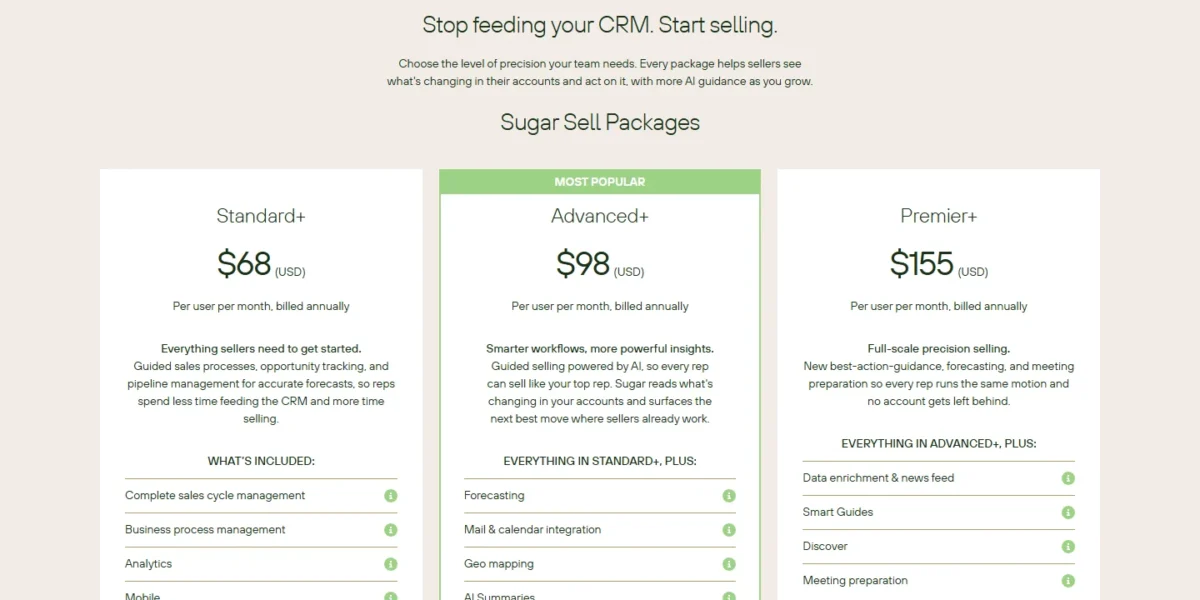
On annual billing, HubSpot’s seats cost less than Sugar Sell’s at each Sugar Sell tier, though Sugar Enterprise, at $85, sits below Professional’s $90. Sales Hub Professional and Enterprise also add a one-time onboarding fee of $1,500 or $3,500, and SugarCRM prints none.
HubSpot also sells monthly payment: Starter at $20 per seat per month with a monthly commitment, and Professional at $100 per seat per month, which still commits you for a year. Sugar Sell, Sugar Enterprise and Sugar Market are billed annually; SugarCRM sets the contract length in your quote.
HubSpot’s Sales Hub page marks its Starter discount as for new customers only and for a limited time.

Comparable plans side by side
Each row pairs the plans that do the same job, on annual billing.
| Plan tier | HubSpot Sales Hub | SugarCRM Sugar Sell |
|---|---|---|
| Entry, no forecasting | Starter: from $7 per seat per month ($20 shown beside it) | Standard+: $68 per user per month |
| Forecasting | Professional: $90 per seat per month, plus $1,500 onboarding | Advanced+: $98 per user per month |
| Top tier | Enterprise: from $150 per seat per month, plus $3,500 onboarding | Premier+: $155 per user per month |
| ERP purchase data | Not listed on hubspot.com/ | Advanced Precision+ and Premier Precision+: Contact sales |
| On-premises | Not listed on hubspot.com/ | Sugar Enterprise: $85 per user per month |
Sources: HubSpot Sales Hub pricing, Pay Annually view, SugarAI pricing, checked October 2026.
The entry row is not like for like: Starter lacks forecasting and sequences, while Standard+ is a full sales package.
What 10 and 25 reps pay in year one
Ten reps pay less on Sugar in year one and 25 reps pay less on HubSpot, because HubSpot’s one-time onboarding fee is spread over more seats.
| Team | HubSpot | SugarCRM |
|---|---|---|
| 10 reps, forecasting tier | $90 x 10 x 12 = $10,800 plus $1,500, which is $12,300 | $98 x 10 x 12 = $11,760 |
| 16 reps, forecasting tier | $90 x 16 x 12 = $17,280 plus $1,500, which is $18,780 | $98 x 16 x 12 = $18,816 |
| 25 reps, forecasting tier | $90 x 25 x 12 = $27,000 plus $1,500, which is $28,500 | $98 x 25 x 12 = $29,400 |
| 25 reps, top tier | $150 x 25 x 12 = $45,000 plus $3,500, which is $48,500 | $155 x 25 x 12 = $46,500 |
| 25 users, all Sales Seats, Professional, catalog rate of $100 | $100 x 25 x 12 = $30,000 plus $1,500, which is $31,500 | $98 x 25 x 12 = $29,400 |
| Same 25 users as 20 users on Sales Seats and 5 users on Core Seats, Professional, catalog rates of $100 and $50 | $100 x 20 x 12 = $24,000 plus $50 x 5 x 12 = $3,000 plus $1,500, which is $28,500, so the Core Seats save $50 x 5 x 12 = $3,000 against the row above | $98 x 25 x 12 = $29,400 |
| 25 users, on-premises | Not listed on hubspot.com/ | $85 x 25 x 12 = $25,500 |
Sources: HubSpot Sales Hub pricing, HubSpot product and services catalog, SugarAI pricing, checked October 2026.
Assumptions: US prices read October 21, 2026; HubSpot’s Pay Annually prices and SugarCRM’s billed-annually prices, except the two catalog rows, which use HubSpot’s catalog seat rates; onboarding counted once; no tax, add-ons, extra credits, SugarCRM services or partner implementation.
The lines cross at 16 reps, and from year two HubSpot Professional’s Pay Annually price keeps it below Advanced+ at every team size.
SugarCRM’s saving below 16 reps holds for year one only. Over two years, 10 reps pay $90 x 10 x 24 = $21,600 plus $1,500, which is $23,100, on HubSpot against $98 x 10 x 24 = $23,520 on SugarCRM.
Seat types change the bill for managers who update records but do not sell. HubSpot’s catalog lists a Professional Core Seat at $50 a month, half its $100 Sales Seat rate, and View-Only Seats at no additional cost; SugarCRM lists no lighter user type.
The top tier flips the result: Premier+ undercuts HubSpot Enterprise once onboarding is added.
Costs outside the seat price and the upgrade trigger
HubSpot’s extra costs are the onboarding fee, credits beyond the allowance at $0.010 each, and Data Hub Starter or higher for custom field mappings in HubSpot’s Data Sync app for Sugar (see Running Both). SugarCRM’s are Sugar Connect+ at $20 per user per month billed annually, Sugar Predict on a quote, and services with no published fee.
The upgrade triggers differ. Forecasting and sequences push a HubSpot Starter team to Professional, and custom objects or 1,000 workflows push it to Enterprise. Forecasting and the Sugar Cube AI Assistant push a SugarCRM Standard+ team to Advanced+.
Ease of Setup and Support
HubSpot needs nothing installed: its CRM runs in the browser with setup guides and templates, though Professional and Enterprise require paid onboarding. SugarCRM puts implementation at a couple of weeks to a few months, run by its team or a partner.
HubSpot Starter gets chat and email support, and Professional and Enterprise add phone and call-back. SugarCRM ranges from online-only to 24/7 global response depending on the solution, so ask which tier your quote includes.
On security, HubSpot offers SOC 2 Type 2 and SOC 3 reports; SugarCRM lists ISO/IEC 27001:2022, SOC 2 Type II, GDPR and CCPA.
HubSpot vs SugarCRM: Pros and Cons
HubSpot’s strengths are its free start and seat model; its costs sit in onboarding and Enterprise gates.
Pros
- Free plan for up to 2 users and a 14-day trial of the sales tools
- Over 2,000 apps in the HubSpot Marketplace
- Professional Core Seats at $50 a month and free View-Only Seats for non-selling users
- Calling and sequences built in: 3,000 minutes and sequences on Professional
Cons
- Required onboarding: $1,500 on Professional, $3,500 on Enterprise
- Custom objects only on Enterprise subscriptions
- No on-premises edition on the pricing page
- Professional paid monthly ($100 a seat) still commits you for a year
SugarCRM’s strengths are ERP data and hosting choice; its limits sit in how you buy it.
Pros
- On-premises Sugar Enterprise at $85 per user per month, billed annually
- 180+ ERP integrations, with Sugar Predict reading ERP purchase data
- Forecasting at $98 per user per month with no onboarding fee printed
- A choice of four data regions, including the United States
Cons
- Sugar Sell, Sugar Enterprise and Sugar Market are billed annually
- No free plan or trial listed for Sell, Enterprise or Market
- Sugar Predict and services priced only on request
- Calling and sequences not listed on the pricing page
Which Is Better for Your Needs?
HubSpot fits marketing-led teams and buyers who want to try first, while SugarCRM fits ERP-driven account selling and self-hosting.
| Your priority | Better fit | Reason | Trade-off |
|---|---|---|---|
| Marketing-led pipeline on one platform | HubSpot | Free marketing tools and one record for marketing and sales | Professional adds an onboarding fee |
| Repeat B2B orders from ERP data | SugarCRM | ERP integrations; Sugar Predict on Precision+ | Precision+ is priced by sales |
| On-premises or IT-controlled hosting | SugarCRM | Sugar Enterprise runs on your servers | You manage the hosting |
| Trying before annual billing | HubSpot | Free plan and a 14-day trial | The free plan stops at 2 users |
| Configuring your own records below a top tier | Depends on the demo | HubSpot keeps custom objects for Enterprise; SugarCRM sells no-code configuration with no printed plan gate | Confirm custom record types in the SugarCRM demo |
| Lowest forecasting-tier cost | Depends on team size | SugarCRM costs less below 16 reps in year one only; HubSpot costs less from 16 reps, and at 10 reps over two years | SugarCRM services fees not published |
| Many managers and viewers beside reps | Depends | HubSpot’s cheaper Core Seats and free View-Only Seats | SugarCRM lists no lighter user type |
| AI guidance quality | Insufficient evidence | AI output depends on your own CRM and ERP data | Settle it in a trial or demo on your data |
Sources: HubSpot Sales Hub pricing, SugarAI pricing, checked October 2026.
A reader whose shortlist pairs HubSpot with a different CRM can follow that matchup in EngageBay vs HubSpot.
Running Both, or Switching Between HubSpot and SugarCRM
Yes, a team can run both: HubSpot’s own Data Sync app syncs Sugar and HubSpot both ways, mapping Accounts to Companies, Contacts and Leads to Contacts, and Opportunities to Deals. Sales can stay in SugarCRM while marketing runs in HubSpot.
The sync supports Sugar 8.3.x and above on a Sell, Serve, Enterprise or Professional plan; changing its default field mappings needs Data Hub Starter or higher.
Moving from SugarCRM to HubSpot:
- Get your data out in time: SugarCloud keeps a departing customer’s data for up to 120 days, then deletes it permanently.
- Load it with HubSpot’s multi-object import, which creates companies, contacts and deals with their associations.
- Rebuild SugarCRM’s business processes as HubSpot workflows, within the 300 that Professional allows.
Moving from HubSpot to SugarCRM:
- Use the Jump Start program: SugarAI extracts data from HubSpot, maps fields and imports records and custom fields.
- Plan for two to three months, or as little as four weeks for smaller projects, by SugarAI’s own estimate.
- Keep a HubSpot export as a backup: CSV, XLS or XLSX files with associations, up to 300 exports in a rolling 24 hours.
Before you switch
Run a sample through the sync or the import first, check that associations and owners arrived, and only then switch off the old system.
If you are switching systems and HubSpot is still in the running against another vendor, the HubSpot vs ActiveCampaign page covers that pairing.
How I Compared HubSpot and SugarCRM
I based the comparison on both vendors’ official pages, read on October 21, 2026. For HubSpot, that meant the Sales Hub pricing page, product catalog, help articles and Sugar sync listing; for SugarAI, its pricing, product, deployment, migration and security pages.
The plans and editions compared are Sales Hub Starter, Professional and Enterprise against Sugar Sell Standard+, Advanced+ and Premier+, plus Sugar Enterprise for on-premises. Prices are US prices in USD, checked October 2026: HubSpot’s Pay Annually view and its product catalog, and SugarCRM’s billed-annually prices; the cost math is mine.
What the vendors do not publish: a user minimum on either side, and SugarCRM’s trial, services fees, Precision+ prices and workflow caps.
FAQ
Is SugarCRM still around?
Yes. SugarCRM now trades as SugarAI and still develops Sugar Sell: its support site announced Sugar Sell 26.2, with an October 2026 page in Release Central.
Does SugarCRM have a free plan or free trial?
Its pricing page lists neither for Sugar Sell, Sugar Enterprise or Sugar Market, only a demo and a quote request. HubSpot has a free plan for up to 2 users with no credit card required, plus a 14-day trial of its sales tools.
Does HubSpot offer an on-premises version?
No on-premises edition appears on HubSpot’s pricing page, and its CRM runs in Chrome, Firefox, Safari or Edge with no downloads or installations. If self-hosting is a requirement, Sugar Enterprise is SugarAI’s on-premises product.
Final Verdict: HubSpot or SugarCRM?
Buy HubSpot for a marketing-led pipeline and self-serve buying; buy SugarCRM for ERP-driven account selling or on-premises control.
Choose HubSpot if
- Marketing and sales must share one database, with free marketing tools on the Free plan
- You want to start on the free plan for 2 users or a 14-day trial before paying
- Managers and viewers sit beside the reps: $50 Professional Core Seats and free View-Only Seats
- You run 16 or more reps on the forecasting tier, where year one costs less at the Pay Annually price
- Reps need calling minutes and email sequences inside the CRM plan itself
Choose SugarCRM if
- Reps sell repeat orders into existing accounts and your ERP holds the purchase history
- IT requires on-premises hosting through Sugar Enterprise, or a chosen data region
- You want no-code configuration of your records below a top tier, and you confirm custom record types in the demo
- You run fewer than 16 reps and judge cost on year one: forecasting at $98 per user with no printed onboarding fee (at 10 reps over two years, HubSpot costs less)
- You pay annually after a demo built on your requirements
Skip HubSpot if IT demands self-hosting or you need custom objects below Enterprise. Skip SugarCRM if you must try the product before paying: its pricing page lists no trial for Sugar Sell, Sugar Enterprise or Sugar Market. Skip it too if you want free marketing tools on the same record as sales.
If HubSpot drops off your shortlist but SugarCRM stays on it, SugarCRM vs Microsoft Dynamics is the matchup to read next.
If neither fits, my list of other HubSpot alternatives prices the rest of the field.
To widen the shortlist further, start from my best CRM software shortlist.






Pingback: EngageBay vs HubSpot 2026: Price, Automation & Year-One Cost