


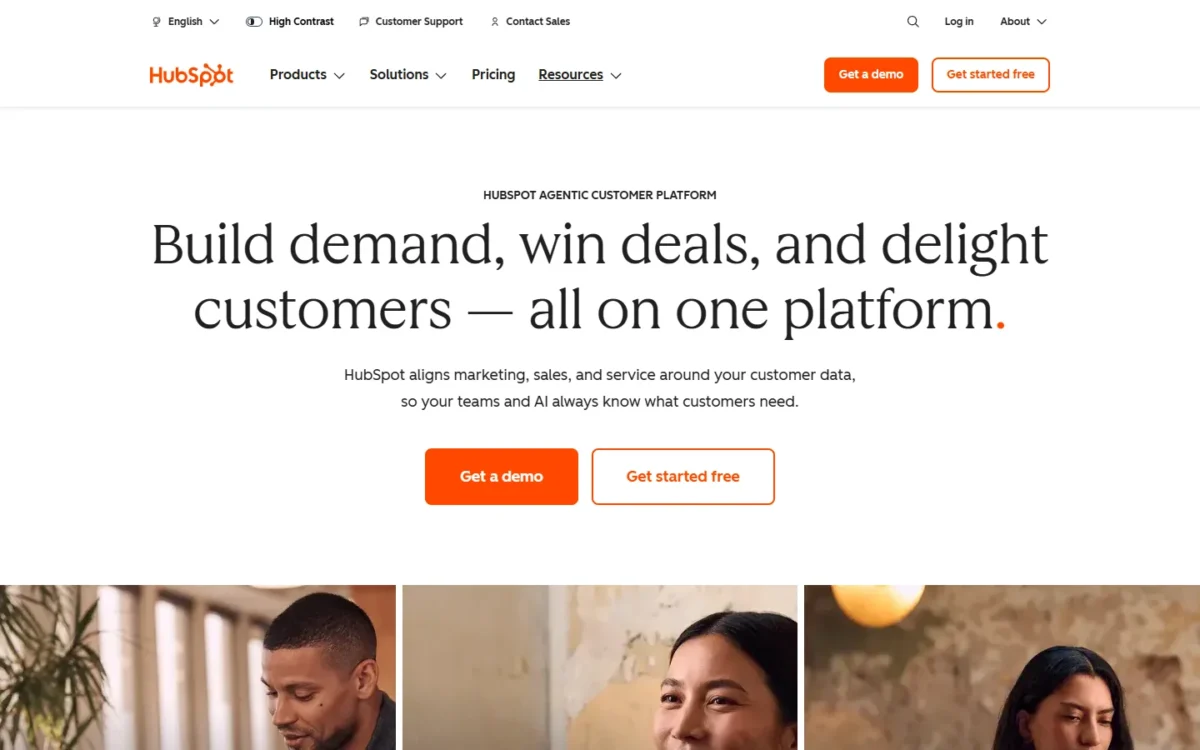
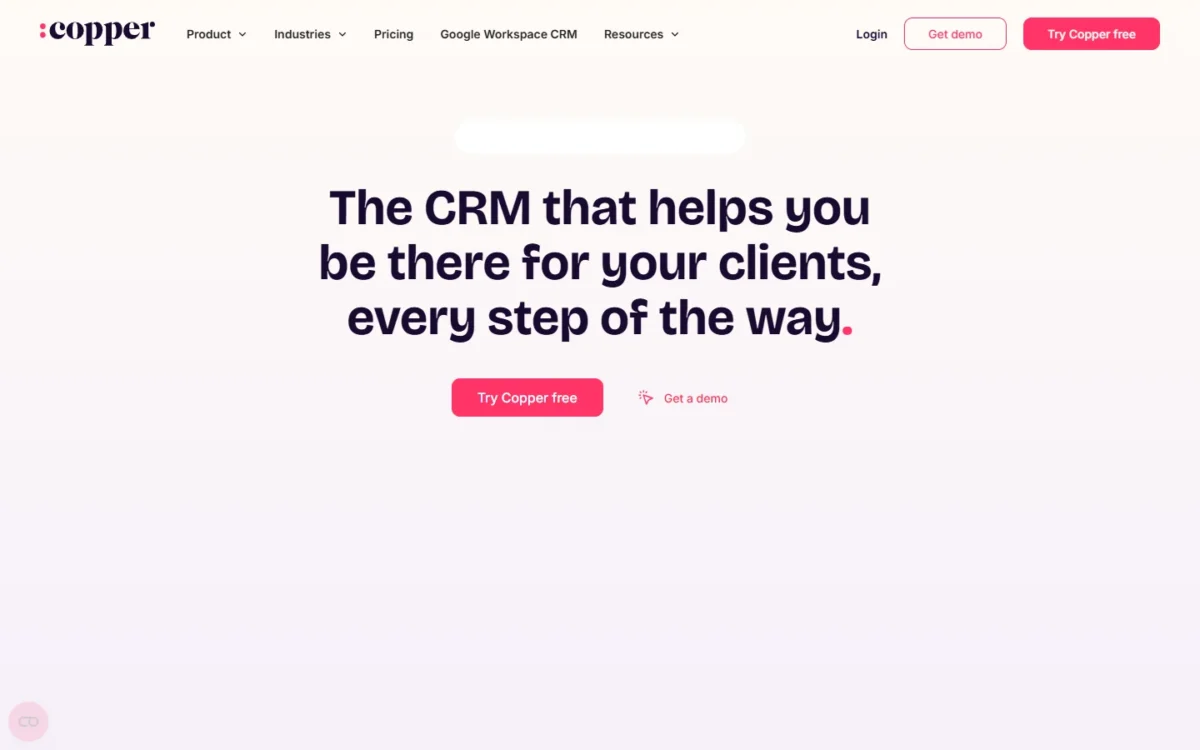
HubSpot vs Copper comes down to where your reps work and what they send. Copper fits a team that lives in Gmail, Calendar and Drive, with workflow automation on Professional at $59 per seat per month, billed annually.
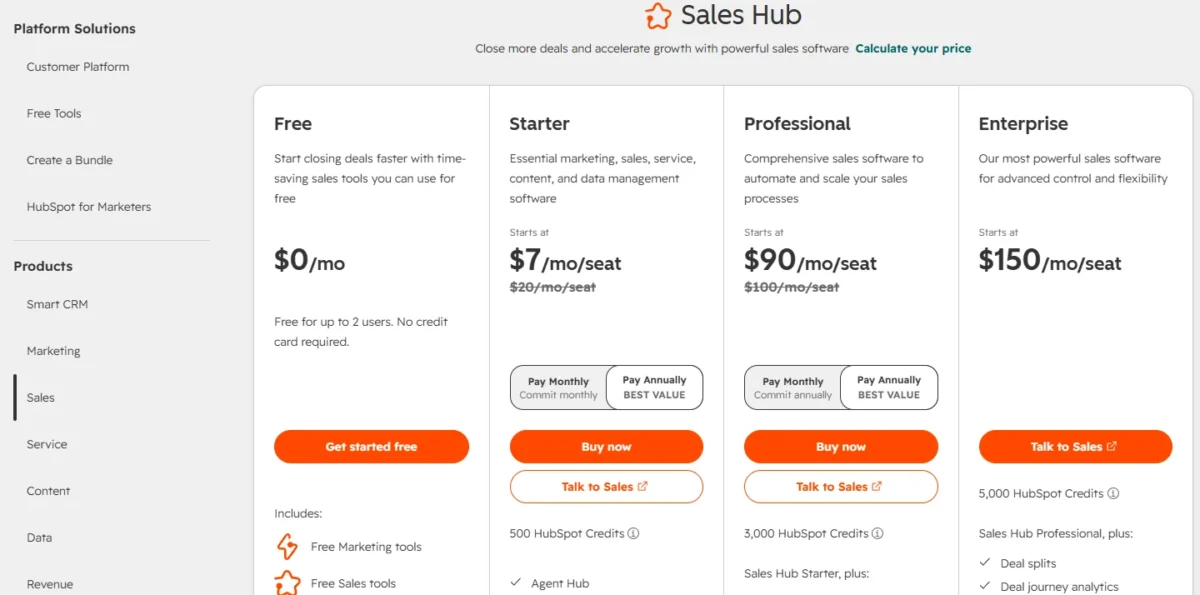
HubSpot Sales Hub fits a team that wants a $0 start or outbound tools. Free covers up to 2 users, while sequences and forecasting start on Professional at $90 per seat per month billed annually, plus a required one-time $1,500 onboarding fee.
Quick verdict
Copper is the pick for a small sales team that works only in Google Workspace. Its Google integrations sit on every plan, and its pricing page prints no onboarding fee.
HubSpot Sales Hub is the pick for a team that starts free, needs sequences, calling minutes or forecasting, or uses Outlook beside Gmail. An outbound team below 14 seats that needs only email series pays less in year one on Copper Business, billed annually.
The trade-off: Copper has no free plan and caps contacts below Business. HubSpot’s $7 Starter seat is a new-customer offer, and Professional carries the onboarding fee.
At 5 seats with email automation, billed annually, HubSpot Professional costs $90 x 5 x 12 = $5,400 plus $1,500, which is $6,900 in year one. Copper Business costs $99 x 5 x 12 = $5,940.
In This Article (12 sections)
HubSpot vs Copper at a Glance
Copper is a per-seat CRM built into Google Workspace with no free plan, while HubSpot Sales Hub starts free and also runs in Outlook.
| Attribute | HubSpot Sales Hub | Copper |
|---|---|---|
| Best for | Teams that start free or sell outbound with sequences | Teams that work only in Gmail, Calendar and Drive |
| Free plan or trial | Free: $0 for up to 2 users and 1,000 contacts, no credit card | No free plan listed; free trial on the Business plan, no credit card |
| Entry paid seat | Starter: $7 billed annually (new-customer offer, $20 list) | Basic: $23 billed annually, $29 billed monthly |
| First plan with workflow automation | Starter: up to 50 workflows with restricted triggers and actions | Professional: $59 billed annually, $69 billed monthly |
| Sequences or email series | Professional: $90 billed annually, plus $1,500 one-time onboarding | Business: $99 billed annually, $134 billed monthly |
| Main limitation | Required onboarding fee on Professional and Enterprise | Contact caps: 2,500 on Basic, 15,000 on Professional |
Sources: HubSpot Sales Hub pricing, HubSpot free CRM, Copper pricing, checked October 2026.
The table hides an asymmetry. HubSpot’s cheapest automation is restricted and its outbound plan carries a fee, while Copper charges more per seat from its first automated workflow.
Key Differences Between HubSpot and Copper
Four differences decide this choice: where the CRM lives, how you start, what outbound email costs, and where each plan stops.
- Where the CRM lives: Copper bundles Gmail, Calendar, Contacts and Drive integrations with every plan. HubSpot runs as its own app, reaching Gmail through a Chrome extension and Outlook through an add-in.
- How you start: HubSpot Free costs $0 for up to 2 users and does not expire. Copper lists no free plan, and its trial runs on Business.
- What outbound email costs: HubSpot puts sequences on Professional, behind an onboarding fee. Copper puts email series on Business with no fee printed, so billing period and seat count decide the cheaper year.
- Where each plan stops: Copper caps contacts until Business. HubSpot caps counts instead: Starter allows up to 50 workflows and 15 pipelines.
The first difference shapes daily work most, because reps touch the inbox all day. My HubSpot CRM review weighs the rest of HubSpot’s platform.
Copper’s narrower Google focus has costs of its own, which my full Copper review sets against its strengths.
HubSpot vs Copper: Features Compared
Copper lists Gmail, Calendar, Contacts and Drive integrations on every plan, while HubSpot puts calling minutes in Starter and sequences and forecasting in Professional.
| Feature | HubSpot Sales Hub | Copper |
|---|---|---|
| Gmail access | All plans, Free included (Chrome extension) | All plans (Gmail integration) |
| Google Calendar, Contacts and Drive | Not listed on the Sales Hub pricing page | All plans |
| Google Sheets and Looker Studio | Not listed on the Sales Hub pricing page | Listed in the pricing page’s feature grid |
| Workflow automation | Limited: 50 restricted workflows on Starter, 300 on Professional | Professional and Business |
| Sequences or email series | Professional and Enterprise | Business |
| Pipelines | Limited: 15 on Starter, 100 on Professional | Basic and up |
| Reporting dashboards | Free 10, Starter 30, Professional 75 | Reporting from Professional |
| Custom reports | Professional, up to 100 | Business |
| Forecasting | Professional | Not listed on the pricing page |
| Calling | Limited: 500 minutes on Starter, 3,000 on Professional | Not listed on the pricing page; JustCall and RingCentral are listed integrations |
Sources: HubSpot Sales Hub pricing, HubSpot Sales extension help, Copper pricing, Copper integrations, checked October 2026.
Working inside Gmail and Google Workspace
Copper fits an all-Google team better, because its Gmail, Calendar, Contacts and Drive integrations come with every plan. Its Chrome extension brings Copper into Gmail and Google Calendar on desktop, and a Sheets and Looker Studio integration syncs CRM data for reporting.
If Streak is also on your shortlist, Copper vs Streak puts the two side by side.
Copper also works with Gemini, adding meeting transcripts to Copper in one click. Copper calls itself a Recommended for Google Workspace app on its Google Workspace CRM page.
HubSpot reaches Gmail through the HubSpot Sales Chrome extension, available with all products and plans. A Google admin can install it for many users at once, and some sales tools need a connected inbox.
HubSpot’s email logging help page lists limitations a Gmail team should check first. Emails sent to a Google Group address are not logged, and neither are non-inline attachments.
A team that sells from a shared sales@ address run as a Google Group feels that first limit daily. HubSpot’s extension install page adds that Google’s Rapid Release track is not compatible with the extension.
Verdict: Google Workspace fit
Copper fits reps who work only in Gmail, Calendar and Drive, since those integrations start on Basic at $23 per seat per month billed annually. HubSpot fits a team that mixes Gmail and Outlook, because one CRM serves both inboxes.
Automation, sequences and email series
HubSpot Starter automates for less, within limits: up to 50 workflows with restricted triggers and actions. Professional allows 300 fully customizable workflows and adds sequences, with up to 500 email sends per user per day.
Copper Basic automates tasks only, creating a task after an action in Copper. Professional adds workflow automation and bulk email, and Business adds email series.
A team with simple follow-up rules pays $7 per seat per month billed annually on HubSpot Starter, against $59 on Copper Professional. HubSpot does not list which triggers Starter restricts, so confirm your three key rules with HubSpot before committing a year.
Verdict: Automation
Depends on plan. HubSpot Starter fits a budget team with simple rules, and Copper Professional fits a team that wants bulk email and reporting in the same seat. For sequences, HubSpot publishes a send limit; Copper publishes none for email series.
Reporting and forecasting
HubSpot gives a sales manager more reporting on paper. Dashboards come on every tier (10 on Free, 30 on Starter, 75 on Professional), and Professional adds default and custom forecasting plus up to 100 custom reports.
Copper’s reporting starts on Professional, and custom reports wait for Business. Its feature grid lists pipeline reports and revenue tracking but no forecasting, and its custom report builder exports data to Google Sheets.
Verdict: Forecasting
HubSpot fits better. A manager who needs a forecast inside the CRM needs HubSpot Professional; a manager who already reports in Sheets or Looker Studio can work with Copper.
Calling and marketing tools
HubSpot puts calling minutes in the seat price: 500 on Starter and 3,000 on Professional. HubSpot-provided phone numbers are not supported in all countries.
Copper’s pricing page lists no calling minutes. It lists JustCall and RingCentral among its integrations, and most Copper integrations need Professional or above.
For marketing, Copper Professional adds bulk email, and Copper lists a HubSpot integration for teams that run campaigns in HubSpot. HubSpot keeps campaign marketing in Marketing Hub, priced apart from Sales Hub.
Verdict: Calling
HubSpot fits better for reps who call every day, since minutes come with Starter. Copper suits a team whose calls already run in a separate tool that appears among Copper’s listed integrations.
HubSpot vs Copper Pricing
On annual billing, HubSpot Sales Hub Starter costs $7 per seat per month as a new-customer offer, and Copper Professional, Copper’s first plan with workflow automation, costs $59.
| Job | HubSpot plan | HubSpot price | Copper plan | Copper price |
|---|---|---|---|---|
| $0 start | Free (up to 2 users) | $0 | Free trial on Business | No free plan listed |
| Cheapest paid seat | Starter | $7 billed annually ($20 list); $10 paying monthly | Basic | $23 billed annually; $29 billed monthly |
| First workflow automation | Starter (up to 50 restricted workflows) | $7 billed annually; $10 paying monthly | Professional | $59 billed annually; $69 billed monthly |
| Outbound email automation | Professional (sequences) | $90 billed annually; $100 paying monthly on an annual commitment; plus $1,500 one-time onboarding | Business (email series) | $99 billed annually; $134 billed monthly |
| Top tier | Enterprise | Starts at $150; plus $3,500 one-time onboarding | Business | $99 billed annually |
Sources: HubSpot Sales Hub pricing, Pay Annually and Pay Monthly views, Copper pricing, Annual and Monthly views, checked October 2026.
Both vendors price per seat in US dollars, and Copper’s prices exclude taxes and fees where applicable. HubSpot’s pricing overview calls the Starter rate special pricing for new customers only, available for a limited time.
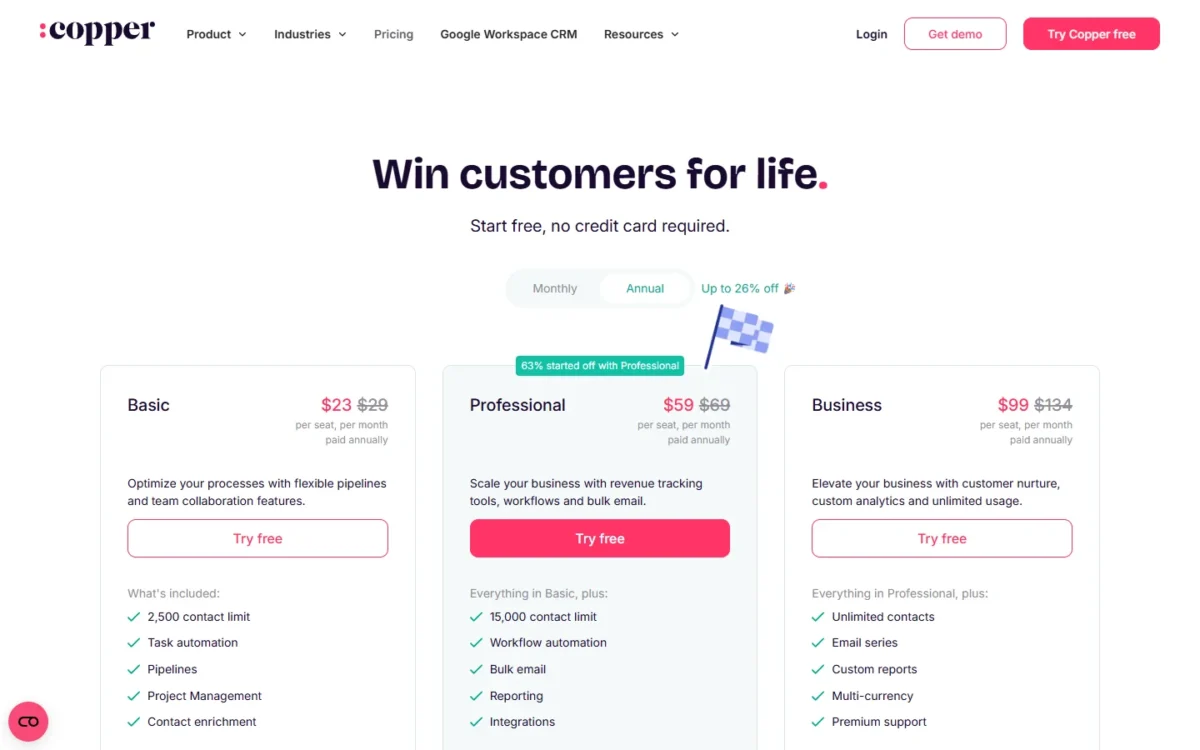
Copper’s Annual view advertises up to 26% off, and it matters most at the top. One Business seat costs $134 x 12 = $1,608 a year billed monthly, against $99 x 12 = $1,188 billed annually.
HubSpot’s seat price leaves out usage. Paid Sales Hub plans include HubSpot Credits (500 on Starter, 3,000 on Professional), and extra credits cost $0.010 each. View-only Seats cost nothing extra, so a manager who only reads reports needs no paid seat.
The onboarding fee is HubSpot’s real entry price for outbound; HubSpot’s full pricing breakdown covers the hubs and fees beyond Sales Hub.
Copper prints no onboarding fee, and its personal onboarding goes to eligible Business and Professional annual accounts. The conditions behind each tier are in Copper’s plans in detail.
Year-one cost for a 5- and 10-seat team
At 5 seats billed annually, HubSpot Starter is the cheapest automated setup, and Copper Business is the cheaper email-automation setup.
| Job and plan | 5 seats | 10 seats |
|---|---|---|
| HubSpot Starter (offer price) | $7 x 5 x 12 = $420 | $7 x 10 x 12 = $840 |
| HubSpot Starter at the $20 list price | $20 x 5 x 12 = $1,200 | $20 x 10 x 12 = $2,400 |
| Copper Professional | $59 x 5 x 12 = $3,540 | $59 x 10 x 12 = $7,080 |
| HubSpot Professional with onboarding | $90 x 5 x 12 = $5,400 plus $1,500, which is $6,900 | $90 x 10 x 12 = $10,800 plus $1,500, which is $12,300 |
| Copper Business | $99 x 5 x 12 = $5,940 | $99 x 10 x 12 = $11,880 |
Sources: HubSpot Sales Hub pricing, Copper pricing, checked October 2026. Assumptions: annual-view prices read on October 21, 2026, with the first HubSpot Starter row at the $7 new-customer offer and the second at the $20 list price; the same seat count on both products; tax, extra HubSpot Credits and integration fees excluded.
At 5 seats, monthly billing flips the outbound result. HubSpot Professional paid monthly on an annual commitment costs $100 x 5 x 12 = $6,000 plus $1,500, which is $7,500. Copper Business billed monthly costs $134 x 5 x 12 = $8,040.
Seat count flips it too. At 14 seats billed annually, HubSpot Professional costs $90 x 14 x 12 = $15,120 plus $1,500, which is $16,620, against $99 x 14 x 12 = $16,632 on Copper Business.
Below 14 seats, Copper Business is the cheaper outbound plan in year one on annual billing. The onboarding fee is one-time, so if both list prices hold, year two favours HubSpot’s $90 seat over Copper’s $99.
What forces an upgrade on each
On Copper, contacts usually force the upgrade: Basic stops at 2,500, Professional at 15,000, and only Business is unlimited. Email series and custom reports also wait on Business, so an outbound team moves up even below the cap.
Moving from Copper Basic to Professional costs $59 – $23 = $36 more per seat per month billed annually.
On HubSpot, features force it. Free stops at 2 users, and Starter has no sequences or forecasting. The step from Starter to Professional costs $90 – $7 = $83 more per seat per month billed annually, before onboarding.
Ease of Setup and Onboarding for a Gmail Team
Copper’s setup starts inside Google: you connect the team’s Google Workspace accounts, and Copper pulls in contacts and email conversations. Copper says that gets a team running “in days, not weeks”.
HubSpot setup runs through the extension. Each user installs the HubSpot Sales Chrome extension, or a Google admin installs it for many users, and Professional adds the required paid onboarding.
The trials settle daily feel, with one catch. Copper’s trial runs on Business, so test only the features of the plan you would buy, while HubSpot Free covers 2 users with no end date.
Integrations Beyond Google Workspace
HubSpot lists over 2,000 apps and web services, while Copper reaches 5,000+ apps through its Zapier partnership, so the two counts measure different things.
Copper’s pricing grid names LinkedIn, MailChimp, DocuSign, QuickBooks, PandaDoc, Slack and Zendesk, plus an API. Most Copper integrations need Professional or above, and some need Business.
A count is a weak guide either way. List your three must-have apps and check each vendor’s listing for the plan it needs.
Support also splits by plan. HubSpot Starter gets email support and Professional adds phone support, while Copper provides live chat, a help center and webinars, with premium support on Business.
HubSpot vs Copper: Pros and Cons
HubSpot’s strengths are a free start and outbound depth, while Copper’s are Google depth and an automation plan with no onboarding fee printed.
HubSpot Sales Hub pros and cons
Pros
- Free for up to 2 users, so two founders pay nothing to start
- Starter at $7 per seat per month billed annually for new customers
- Sequences with up to 500 email sends per user per day on Professional
- Calling minutes included: 500 on Starter, 3,000 on Professional
- Works in Outlook through an add-in as well as in Gmail
Cons
- A required one-time onboarding fee on Professional
- Starter’s $7 is an offer for new customers; the list price is $20
- Starter caps workflows at 50, with restricted triggers and actions
- Emails to Google Group addresses are not logged to the CRM
Copper pros and cons
Pros
- Google integrations on every plan, including Basic at $23 billed annually
- Sheets and Looker Studio sync for teams that report in Google tools
- Unlimited contacts on Business
- A HubSpot-to-Copper migration guide in its help center
Cons
- No free plan, and the trial runs on Business
- Contact caps of 2,500 on Basic and 15,000 on Professional
- Email series and custom reports only on Business
- No forecasting listed on the pricing page
- Activity history needs a one-time export from Copper Support
Which Is Better for Your Needs?
Pick by your first priority: the table names the better fit for seven common ones and the trade-off you accept with it.
| Your priority | Better fit | Reason | Trade-off |
|---|---|---|---|
| CRM inside Gmail, Calendar and Drive for an all-Google team | Copper | Google integrations come with every plan | No free plan; workflow automation starts on Professional |
| A $0 start for two people | HubSpot | Free covers up to 2 users with no credit card | A third user needs paid seats |
| The cheapest paid seat with any workflows | HubSpot | Starter includes up to 50 workflows | Restricted triggers; the low price is a new-customer offer |
| Outbound sequences, calling and forecasting | HubSpot | Professional holds all three | The one-time onboarding fee |
| Email automation at the lowest year-one cost below 14 seats, billed annually | Copper | Business costs less than Professional plus onboarding | No forecasting listed |
| A team that mixes Gmail and Outlook | HubSpot | A Chrome extension and an Office 365 add-in | Copper’s integrations center on Google |
| More than 15,000 contacts below the top plan | Insufficient evidence | Copper needs Business; HubSpot’s pricing page lists no paid Sales Hub contact cap | Check HubSpot’s contact terms first |
Sources: HubSpot Sales Hub pricing, Copper pricing, checked October 2026.
Skip Copper if a manager needs forecasting inside the CRM or the team wants a free plan. A Gmail team that needs neither product has other CRMs to consider instead of Copper.
Skip HubSpot if the onboarding fee breaks the year-one budget, Starter’s restricted workflows fall short, or reps live only in Google apps. The routes out are mapped in HubSpot alternatives by job.
Switching Between HubSpot and Copper
Records move both ways through spreadsheet files, but workflows, sequences, reports and integrations are rebuilt by hand, since neither vendor’s help pages say they migrate.
From HubSpot to Copper
- Export the HubSpot records with only the columns you plan to move; HubSpot emails a CSV file.
- Download Copper’s People Import Template and rename HubSpot’s column headers to Copper’s field names.
- Create Copper custom fields for HubSpot properties the template lacks.
- Import People first, then deals as pipeline records once matching pipeline stages exist.
- Check the import preview; Copper lets you revert an import.
Copper’s HubSpot migration guide walks through these steps.
From Copper to HubSpot
- An admin exports people, companies, opportunities, projects, tasks and leads from Copper’s Export Data option.
- Ask Copper Support for the one-time activity export, which the standard export leaves out.
- Import into HubSpot with a multi-object import that links records, such as companies with deals.
- Give the importing user Import and Edit permissions for each object.
Sources: Copper export help, HubSpot multi-object import, checked October 2026.
How I Compared HubSpot and Copper
I read both vendors’ US-dollar pricing pages on both billing views on October 21, 2026, plus their help pages on Gmail, email logging, import and export.
I compared plans by the job they do, not by tier name: the first plan with workflow automation, then the first with outbound email automation. Every year-one cost is the seat price times seats times 12 months, plus HubSpot’s onboarding fee where it is required.
Copper does not publish its trial length or any cap on workflows or email-series sends. HubSpot’s pricing page lists no paid Sales Hub contact cap and no end date for the Starter offer.
FAQ
What is Copper CRM?
Copper is a per-seat CRM built to work inside Google Workspace, with plans from $23 per seat per month billed annually. It suits teams whose selling happens in Gmail and Calendar. If the category itself is new, what a CRM does covers the basics.
Does Copper have a free plan?
No. Copper’s pricing page lists no free plan and offers a free trial with no credit card required. The trial runs on Business, so it shows email series, custom reports and unlimited contacts that Basic and Professional do not include.
Is HubSpot’s free CRM enough for a Gmail team?
For two people, it can be. HubSpot’s free CRM covers up to 2 users and 1,000 contacts with no expiration date, and the Sales Chrome extension works in Gmail on all plans. Workflows, sequences or a third user mean a paid plan.
Final Verdict: HubSpot or Copper?
Buy Copper if your small team works only in Google Workspace and sells through relationships. Professional at $59 per seat per month billed annually puts workflow automation beside Gmail. If Salesforce is still on your shortlist, Salesforce vs Copper puts the two side by side.
Buy HubSpot Sales Hub if you want a free start, your reps need sequences, calling minutes or forecasting, or you run Outlook beside Gmail. If Close is also on your shortlist, HubSpot vs Close puts the two side by side.
An outbound team below 14 seats that needs only email series should buy Copper Business on annual billing, the lower year-one cost.
Choose HubSpot if
- Two users can start on Free and grow into Starter at $7 per seat billed annually
- Reps need sequences, which start on Professional
- A manager needs forecasting inside the CRM
- Some reps use Outlook as well as Gmail
Choose Copper if
- The team works only in Gmail, Calendar, Contacts and Drive
- You want workflow automation with no onboarding fee printed
- Reports live in Google Sheets or Looker Studio
- An outbound team below 14 seats wants email series at the lower year-one cost on annual billing
The main trade-offs are Copper’s contact caps and missing free plan against HubSpot’s onboarding fee and offer-based Starter price. An outbound team still weighing pipeline tools can compare HubSpot vs Pipedrive.
If neither fits, my ranking of the best CRM software widens the shortlist by job and price.






Pingback: HubSpot CRM Alternatives 2026: 10 Best Options Compared