


Picking a free AI content generator comes down to three questions the vendor pages answer: what the free plan includes, whether a usage cap is published, and what the first paid step costs. ChatGPT Free is the default pick for text volume, Claude Free suits research-heavy long-form, and Copy.ai’s platform plans start at a paid Chat plan, although Copy.ai also offers free single-purpose generators.
Evidence basis: official pricing and documentation, checked 2026-09-30 and 2026-10-01.
Prices come from two vantage points, and each one is labelled where it appears: the vendor pages as displayed to a visitor in Vietnam on 2026-09-30, and Macedona’s captures of six official pricing pages through a US connection on 2026-10-01.
Image and video tools are a separate buying decision, and the best AI video generators guide covers that side. Everything below is about written content: blog drafts, marketing copy, rewrites and edits.
In This Article (14 sections)
Quick Verdict: Best Free AI Content Generator by Use Case
| Use case | Best pick | Why it fits |
|---|---|---|
| High-volume text drafting | ChatGPT Free | Unlimited text chats with GPT-5.6 Luna, subject to abuse guardrails |
| Research-backed long-form drafts | Claude Free | Web search, file creation, code and memory sit on the free card |
| Writers already in a Google Account | Google Gemini Free | Free plan at $0 a month with a Google Account |
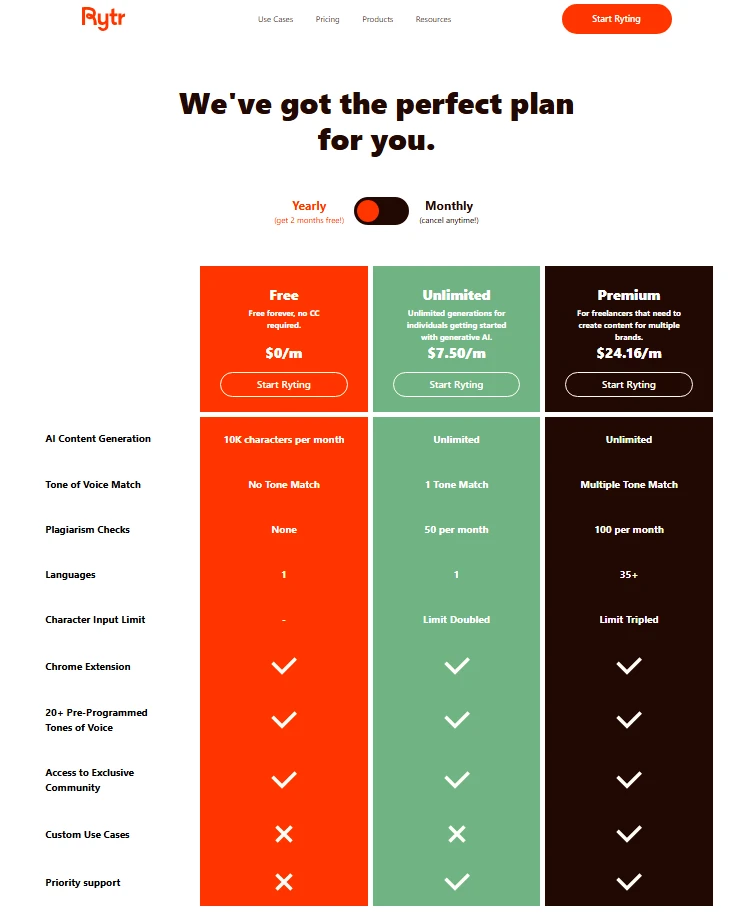
| Short marketing copy with no card on file | Rytr Free | 10K characters of AI generation a month, free forever |
| Editing and tone fixes on finished drafts | Grammarly Free | 100 AI prompts a month on top of grammar checks |
| Paraphrasing short passages | QuillBot Free | Paraphrases up to 100 words at a time |
| Teams that already publish from HubSpot | HubSpot AI content writer | Writer features are free, with no credit card required |
| Cheapest paid step for US readers | Google AI Plus | $4.99 a month in the author’s US capture of the Gemini plans page |
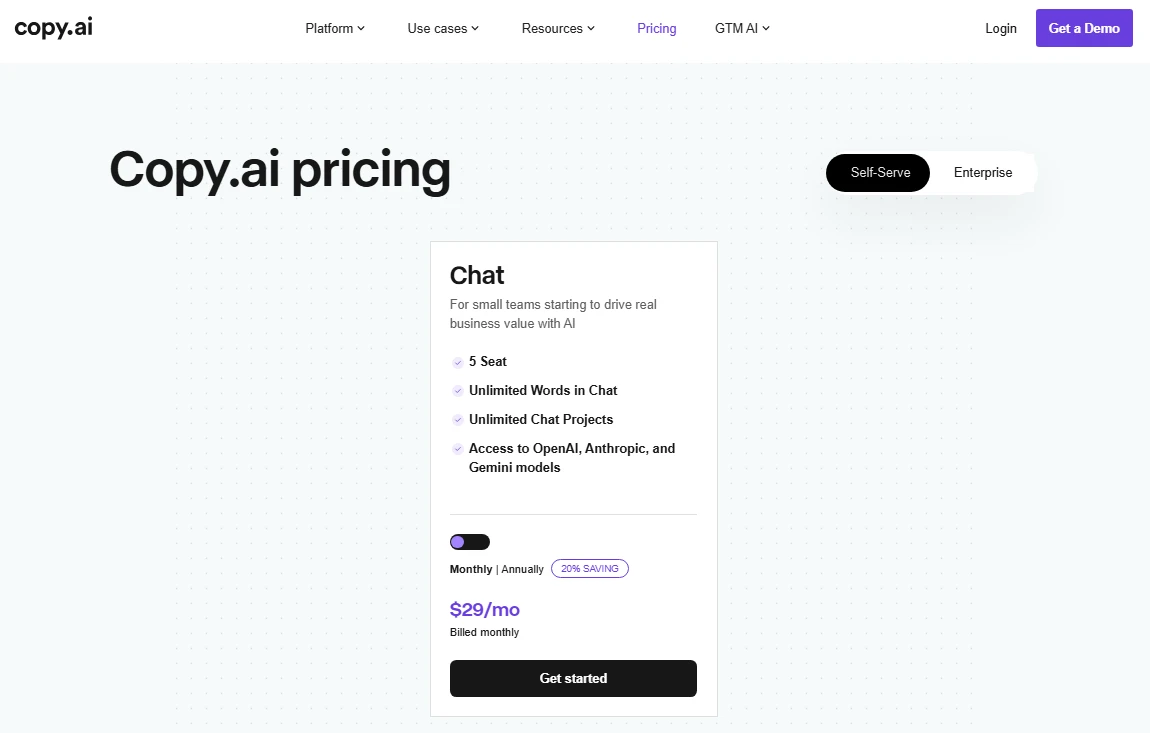
| Unlimited chat words on a paid budget | Copy.ai Chat | $29 a month, billed monthly |
Sources: ChatGPT pricing, Claude plans, Gemini plans, Rytr pricing, Grammarly plans, QuillBot Premium, HubSpot AI content writer, Copy.ai Chat plan pricing. Prices as displayed to a visitor in Vietnam on 2026-09-30, except Google AI Plus, from Macedona’s capture through a US connection on 2026-10-01.
Which Writing Job Each Free Tool Covers
| Tool | Long-form drafts | Short marketing copy | Rewriting and editing | Sourced research |
|---|---|---|---|---|
| ChatGPT Free | Primary job | Strong fit | Strong fit | Deep research is rationed |
| Claude Free | Primary job | Workable | Workable | Web search on the free card |
| Google Gemini Free | Workable | Workable | Workable | Not scored here |
| Rytr Free | Too small an allowance | Primary job | Secondary | Not its job |
| Grammarly Free | Not its job | Light use | Primary job | Not its job |
| QuillBot Free | Limited usage on Free | Light use | Primary job for paraphrasing | Not its job |
| HubSpot AI content writer | Blog posts, inside HubSpot | Prospecting emails and landing pages, inside HubSpot | Not stated on the page | Not its job |
Sources: ChatGPT pricing, Claude plans, Gemini plans, Rytr pricing, Grammarly plans, QuillBot Premium, HubSpot AI content writer
This matrix is an editorial assessment built from each vendor’s documented feature scope, not a feature audit. ChatGPT Free and Claude Free are the direct competitors for first drafts, while Grammarly Free and QuillBot Free compete for the editing and rewriting pass that comes after a draft exists.
Three Kinds of Free, and Which One Each Tool Offers
“Free” covers three different deals in this category, and each one runs out in a different way.
- Free plan, or freemium with caps. A permanent tier that costs nothing but caps something: characters, prompts, words per request or access to a stronger model. ChatGPT Free, Claude Free, Google Gemini Free, Rytr Free, Grammarly Free and QuillBot Free are all ranked on this kind, and HubSpot’s AI content writer belongs here too, with free features and paid editions above them.
- Free trial. Time-limited access to a paid plan that ends or turns into a bill. No pick in this guide is ranked on a trial, because a trial says nothing about what stays free after it.
- Free standalone tools. Single-purpose generators on a web page. QuillBot’s AI writer page says it is “Free to use with no sign-up required.” Copy.ai offers free generators on its tools page, including an outline generator and an AI Paragraph Rewriter, even though its account plans are paid.
Two names that appear in other roundups are not ranked here. This guide covers eight writing tools; writers built into design tools, such as Canva Magic Write, and research engines such as Perplexity are outside its scope.
How These Free AI Writers Were Chosen and Ranked
These rankings are based on each vendor’s official pricing page or product page, checked on 2026-09-30 from a connection in Vietnam. Those amounts are what the pages displayed to that location, so this guide labels them as the Vietnam view.
On 2026-10-01, Macedona, the author of this guide, also captured six of the same official pricing pages through a US connection.
Those six pages belong to ChatGPT, Google Gemini, Rytr, Claude and Copy.ai, plus the billing step of QuillBot’s Premium checkout.
These are captures of pricing pages, not product tests, and every price taken from them is labelled as the US capture. Grammarly and HubSpot were not part of that capture.
Two vendors also publish a USD list price in their help centers, read from the Vietnam connection. OpenAI’s ChatGPT Plus help article lists Plus at $20 a month, billed monthly.
Grammarly’s Pro pricing help article lists Pro in US dollars and names the US dollar as its default currency.
Each tool was assessed on five buyer-focused criteria: whether a real free plan exists, the first usage cap a writer hits, and the model or features on the free plan. The other two are the setup it needs and the cost of the cheapest paid step up.
The order puts breadth first: how much of a writer’s work, from drafting and research to rewriting and editing, the free plan covers on its official page. Between tools of similar breadth, a published number for the free AI writing allowance ranks above no published number, and the yearly cost of the first paid step settles what is left.
Brand popularity and affiliate relationships did not influence the order.
How We Chose What to Leave Out
The ranking is based on claims verified on an official page, so anything else was excluded, and a paid plan with no captured price, such as HubSpot’s paid Content Hub and Marketing Hub editions, is named without an amount. Temporary offers are kept apart from standard list prices, and the editorial policy explains how drafts are checked before publication.
Free Tier Champions: 7 Tools With a Real Free Plan
Seven of the eight tools in this guide show a free plan on their official pages. Copy.ai’s plan cards start at the paid Chat plan, so it sits in the paid section further down, where its free standalone generators are covered too.
The order below applies those criteria in turn: how much content work the free plan covers on its official page, then whether the vendor publishes a number for the free AI writing allowance, then the yearly cost of the first paid step.
1. ChatGPT Free: Best for High-Volume Text Drafting

- Best for:
- Bloggers, marketers and SEO writers who draft, restructure and rewrite text every day and need volume more than file handling.
- Avoid if:
- Your workflow runs on uploaded files, image batches or deep research reports, because those are the parts of the free tier that stay rationed.
- Starting price:
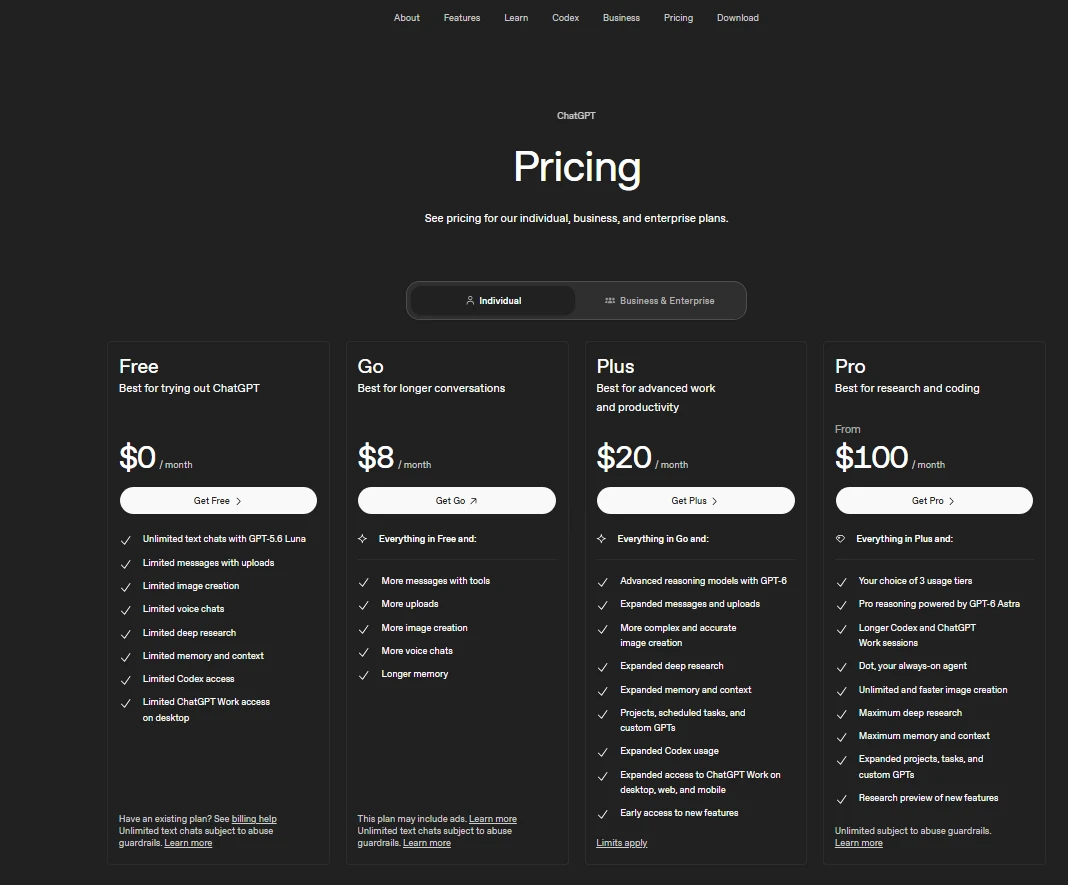
- ₫0 a month on the ChatGPT pricing page, as displayed to a visitor in Vietnam, and $0 a month in Macedona’s capture of the same page through a US connection on 2026-10-01.
- Practical tier:
- Free carries text drafting on its own. The next steps up are ChatGPT Go at ₫132,000 a month and ChatGPT Plus at ₫522,500 a month, as displayed to a visitor in Vietnam, and this guide does not convert dong to dollars.
US prices: The US capture shows Go at $8 a month, Plus at $20 a month and Pro from $100 a month.
Plus in USD: OpenAI’s ChatGPT Plus help article lists Plus at $20 a month, billed monthly, and says annual billing is not supported, so twelve months of Plus at that listed price is $240.
- Free plan:
- Unlimited text chats with GPT-5.6 Luna.
- First limit that bites:
- Messages with uploads, image creation, voice chats and deep research are each listed as limited on Free. The pricing page footnote adds that the unlimited text chats are subject to abuse guardrails.
- Better than Claude Free:
- for predictable daily volume, since the ChatGPT pricing page promises unlimited text chats and the Claude page names no free chat allowance.
- Worse than Claude Free:
- for research-backed drafts, because Claude lists web search and file creation on its free card while ChatGPT rations deep research.
- Setup difficulty:
- Low. The author’s notes cover the ChatGPT web app in Chrome on a Windows computer, which runs in the browser.
- Hidden costs:
- None for text; the cost appears when uploads, images or deep research become daily needs, and Plus cannot be prepaid for a year.
- Evidence status:
- Plan terms from the official ChatGPT pricing page and the Plus dollar price from OpenAI’s help center, with US prices from Macedona’s capture of the pricing page. It also draws on notes from Macedona, the author of this guide, on using ChatGPT Free throughout September 2026 for content and SEO work (author’s notes, September 2026).
Hands-on finding: Macedona, the author of this guide, used ChatGPT Free throughout September 2026 for SEO content audits, content-gap research and tone rewrites (author’s notes, September 2026), and found that it worked best when a request carried clear context and rules. For a buyer, that means the free tier rewards writers who brief it like an editor.
According to those notes, the work ran across many separate sessions that month, in the ChatGPT web app on the Free plan. The tasks that map most directly onto a content calendar:
- SERP competitor research and content-gap finding. The notes single out analysing article structure, finding content gaps and suggesting ways to expand coverage as the jobs where the free tier was most useful.
- Reviewing finished articles. The author used it to find missing or weak parts in articles that were already written.
- Building a prompt library. The author built a ChatGPT prompt library by use case and used the free tier to turn complex requests into detailed prompts for Claude Code and other workflows.
- Rewriting in different tones. Rewriting and editing content was a regular job, and ChatGPT kept reasonably well to format and editorial rules when they were given clearly.
- Alt text and captions for SEO images. The author wrote image filenames, alt text, captions and descriptions with it.
- Featured images. For featured images and editorial illustrations, very detailed prompts about composition, aspect ratio, lighting and what must stay unchanged made the results more consistent.
Across those tasks, results could usually be refined over several turns without starting the chat again, so a weak first answer was a reason to reply with corrections rather than open a new chat.
Two habits came out of that month. The author gives format and editorial rules clearly in the request, and does not treat a default ChatGPT answer about pricing, product features or current data as final until outside sources confirm it.
The notes cover content and SEO work and include no formal benchmark of response speed, message caps or rate limits, so this guide gives no numbers for those. For a solo blogger, the unlimited text chat on the pricing page is the reason ChatGPT Free can carry a full drafting calendar without an allowance to ration.
| Pros | Cons |
|---|---|
| Unlimited text chats on the free plan | Uploads, images, voice and deep research are limited on Free |
| Keeps reasonably well to editorial rules given clearly | Default answers on facts still need an outside check |
| Weak drafts improve over follow-up turns without restarting | Plus has no annual billing option |
The ChatGPT review covers the assistant beyond writing, and the ChatGPT pricing breakdown is the place to budget the paid tiers.
- Verdict:
- Choose ChatGPT Free if text drafting volume is your constraint; skip it as your only tool if your content depends on file uploads or image batches.
2. Claude Free: Best for Research-Backed Long-Form Drafts

- Best for:
- Writers who build long articles from sources and want the assistant to search the web, create files and remember context across conversations.
- Avoid if:
- You need a published free allowance to plan a content calendar around, because the Claude plans page states none.
- Starting price:
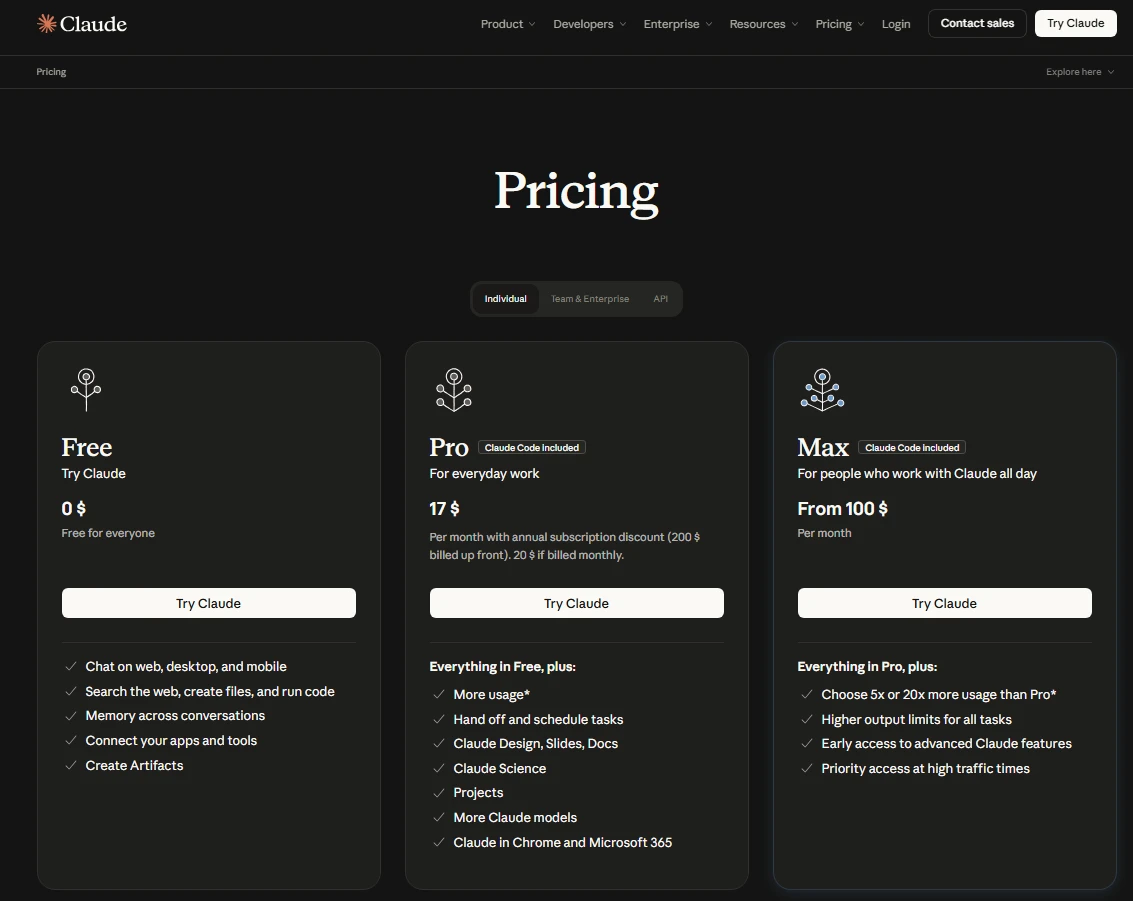
- $0 on the Claude plans page, which labels Free as free for everyone, as displayed to a visitor in Vietnam and in Macedona’s US capture of the same page on 2026-10-01.
- Practical tier:
- Pro costs $17 a month with the annual discount ($200 billed up front), or $20 if billed monthly, and the Vietnam view and the US capture show the same amounts.
- Free plan:
- Search the web, create files, run code and keep memory across conversations.
Model on Free: Not named on the Claude plans page, so this guide does not guess one. What the page does list for Free is the feature set above: web search, file creation, code execution and memory across conversations, all reached through the free sign-up described under setup below.
- First limit that bites:
- Not published. The Claude plans page lists what Free includes but gives no message or usage number for it.
- Better than ChatGPT Free:
- for drafts that start from live sources, since web search and file creation sit on the free card.
- Worse than ChatGPT Free:
- for predictable volume, since only the ChatGPT page promises unlimited text chats.
- Setup difficulty:
- Low. Claude’s help center says anyone in a supported location can access the free version of Claude at claude.ai by signing up with an email address.
- Hidden costs:
- Month-to-month Pro billing is the costlier way to buy the upgrade, and the yearly gap is worked out in the upgrade section below.
- Evidence status:
- Free and Pro terms from the Claude plans page, which publishes no free message number, confirmed in Macedona’s US capture of that page, and the sign-up route from Claude’s help center.
That feature set changes how a long-form draft gets built. A writer can ask for an outline, have the model search the web for current pages behind each section, and save the result as a file, which is the research step ChatGPT Free rations.
The catch is planning. With no published free allowance, a client deadline should not hang on Claude Free alone; pair it with ChatGPT Free for volume and keep Claude for the research-heavy pieces.
If the free allowance keeps running out on research days, Pro is the upgrade trigger worth pricing, and annual billing is the cheaper way to buy it. The Claude review goes deeper on writing quality and the paid plans.
| Pros | Cons |
|---|---|
| Web search on the free plan | No published free message number |
| File creation and code execution included free | Monthly Pro billing costs more per year than annual |
| Memory across conversations | Free model not named on the plans page |
- Verdict:
- Choose Claude Free if your drafts start from research and sources; pair it with a second free tool if you publish on a fixed daily schedule.
3. Google Gemini Free: Best for Writers Already in a Google Account

- Best for:
- Writers who already work inside a Google Account and want a free assistant without adding another subscription.
- Avoid if:
- You need to know which model answers each request, because the free card describes access to the stronger model as varying.
- Starting price:
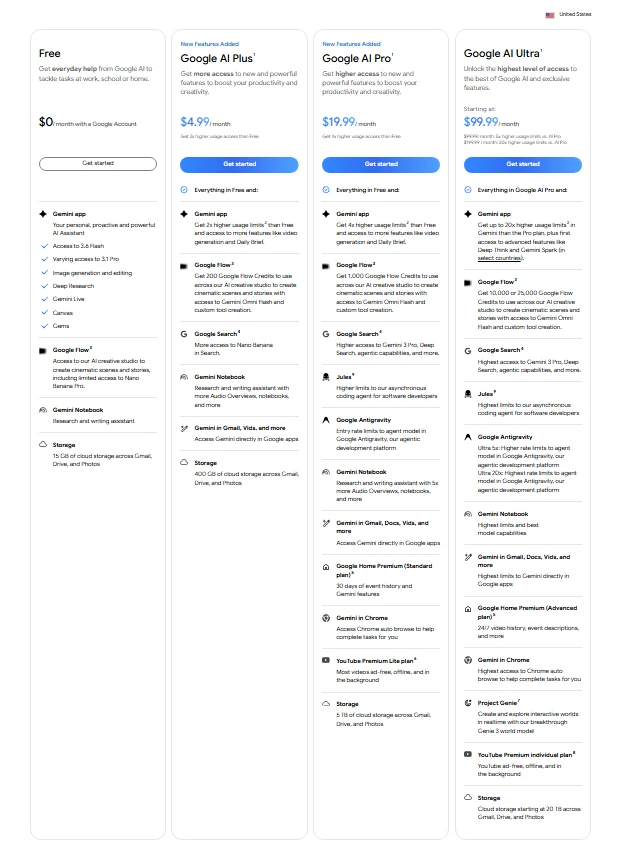
- $0 a month for the Free plan with a Google Account, as displayed to a visitor in Vietnam and in Macedona’s US capture of the plans page on 2026-10-01.
- Practical tier:
- Free for everyday drafting. Macedona’s capture of Google’s plans page through a US connection, with the United States region shown, lists Google AI Plus at $4.99 a month, Google AI Pro at $19.99 a month and Google AI Ultra from $99.99 a month.
- Free plan:
- Access to 3.6 Flash, with varying access to 3.1 Pro.
- First limit that bites:
- Model access rather than a word count, since the free card lists no character or message number.
- Better than Rytr Free:
- for long drafts, since Gemini’s free card lists no monthly character cap.
- Worse than ChatGPT Free:
- for predictable output, because Gemini’s free card grants only varying access to its stronger model.
- Setup difficulty:
- Low for anyone with a Google Account, which is the only requirement the free card names.
- Hidden costs:
- None on Free. Google AI Plus is the first paid step in the US capture, and twelve months at $4.99 a month is $59.88.
- Evidence status:
- The free-plan price and model access from Google’s Gemini plans page, and the paid prices from Macedona’s US capture of that page; the Vietnam view of the paid prices was not verified.
Setup comes down to the Google Account, since Google’s plans page lists the Free plan at $0 a month with one.
In this guide’s editorial view, that makes Gemini Free a convenient second opinion on a ChatGPT or Claude draft for a writer who already has a Google Account.
The model wording is the part to plan around. The free card lists access to 3.6 Flash with no qualifier and access to 3.1 Pro only as varying, so 3.6 Flash is the one model the Free plan promises.
The Gemini pricing guide covers the paid Google AI plans in more depth.
| Pros | Cons |
|---|---|
| Free with an existing Google Account | Only varying access to 3.1 Pro on Free |
| Access to 3.6 Flash on the free plan | No published message or character number |
| A Google Account is the only requirement named | Paid prices captured from the US only |
The Gemini review covers the assistant in more depth.
- Verdict:
- Choose Gemini Free if a Google Account is already your workspace and you want a second assistant at no cost; pick ChatGPT Free first if drafting volume matters more than convenience.
4. Rytr Free: Best for Short Marketing Copy With No Card on File
- Best for:
- Freelancers writing product blurbs, ad lines and social captions who want a free-forever plan with no card attached.
- Avoid if:
- You draft long-form posts, because AI content generation on the free plan is capped at 10K characters per month.
- Starting price:
- $0 a month for the Free plan on the Rytr pricing page, as displayed to a visitor in Vietnam and in Macedona’s US capture of the same page on 2026-10-01.
- Practical tier:
- The paid plans lift the generation cap to unlimited. With the Yearly toggle selected, Macedona’s US capture shows Unlimited at $7.50 a month and Premium at $24.16 a month; the monthly-toggle prices were not captured, so read them on the Rytr pricing page before budgeting.
- Free plan:
- Free forever, and the pricing page says no credit card is required.
- First limit that bites:
- The monthly character allowance for AI content generation, which the paid plans list as unlimited.
- Better than QuillBot Free:
- for planning a month of short copy, since Rytr publishes a number for free AI generation, 10K characters a month, while QuillBot lists AI chat and writing on Free only as limited usage.
- Worse than ChatGPT Free:
- for anything longer than a handful of short pieces a month, because ChatGPT Free’s text chats are unlimited.
- Setup difficulty:
- Low for a single writer; the constraint is the allowance, not the setup.
- Hidden costs:
- None on Free. At the yearly-view rate, twelve months of Unlimited at $7.50 a month is $90, and the real cost of staying on Free is the time spent splitting drafts across months once the allowance runs out.
- Evidence status:
- The free-plan terms and the character allowance from Rytr’s pricing page, and the paid prices from Macedona’s US capture of that page with the Yearly toggle selected.
A 10K-character budget is a short-form budget. It covers a steady run of captions, product blurbs and ad variations, and it runs dry fast if the same account is used for blog posts.
That makes Rytr Free a good fit for one buyer: the freelancer who writes many short pieces and refuses to hand over a card. The Rytr review covers the paid plans and templates in more detail.
| Pros | Cons |
|---|---|
| Free forever with no credit card required | 10K characters a month caps AI generation on Free |
| Paid plans list AI generation as unlimited | Monthly-toggle prices not captured |
| Suited to captions and ad lines | Long drafts outgrow it within a few pieces |
- Verdict:
- Choose Rytr Free if you write short copy and want no card on file; move to ChatGPT Free the first month your drafts get longer.
5. Grammarly Free: Best for Editing, Not Drafting

- Best for:
- Writers who draft elsewhere and want spelling, grammar and light AI rewrites on the final pass.
- Avoid if:
- You plan to generate first drafts daily, because a monthly prompt count runs out long before a content calendar does.
- Starting price:
- $0 USD a month for the Free plan on the Grammarly plans page, as displayed to a visitor in Vietnam.
- Practical tier:
- Pro, the step up once the prompt count runs dry. Grammarly’s help center lists it at $30 USD per member a month on a monthly subscription, or $144 USD per member a year on an annual subscription.
- Free plan:
- 100 AI prompts a month for generating text, on top of spelling and grammar checks.
- First limit that bites:
- The prompt count, since Pro allows 2,000 prompts per member per month, 20 times the free allowance.
- Better than QuillBot Free:
- for a known monthly allowance, since Grammarly’s free plan lists 100 AI prompts a month for generating text, while QuillBot lists AI chat and writing on Free only as limited usage.
- Worse than ChatGPT Free:
- for volume drafting, because a prompt count runs out long before unlimited text chats do.
- Setup difficulty:
- Low. Grammarly’s free AI writer page says you can use the AI writer on that page, and on a finished draft it works as an editor on text you already have.
- Hidden costs:
- Monthly billing. Twelve months of Pro at $30 is $360 per member, against $144 per member on the annual subscription.
- Evidence status:
- The free-plan price and both prompt allowances come from Grammarly’s plans page, and where to use the free writer from its AI writer page. The Pro prices and currency note come from Grammarly’s Pro pricing help article.
The same help article says Grammarly’s default currency is the US dollar, with regional pricing offered only in euros, British pounds and Indian rupees. It names no regional price in any other currency.
The plans page sets the free AI allowance at 100 prompts a month, so a writer who sends a separate prompt for each paragraph will feel that ceiling on long posts.
That positions Grammarly Free as the last pass, not the first draft. Pair it with ChatGPT Free or Claude Free for drafting and save the prompts for the sentences that still read badly.
| Pros | Cons |
|---|---|
| Spelling and grammar checks on the free plan | 100 AI prompts a month limits drafting |
| Generates text from AI prompts on the free plan | Monthly Pro billing costs $360 per member a year |
| Works as a last-pass editor | Prompt allowance resets only once a month |
- Verdict:
- Choose Grammarly Free if you already have a draft and want it cleaned up; do not make it your drafting engine.
6. QuillBot Free: Best for Short Paraphrasing and Summaries
- Best for:
- Editors, students and marketers who rewrite short passages and summarize source material rather than generating whole drafts.
- Avoid if:
- You need a predictable drafting allowance, because AI chat and writing on Free is listed as limited usage with no number attached.
- Starting price:
- Free, with Premium as the paid step on the QuillBot Premium page.
- Practical tier:
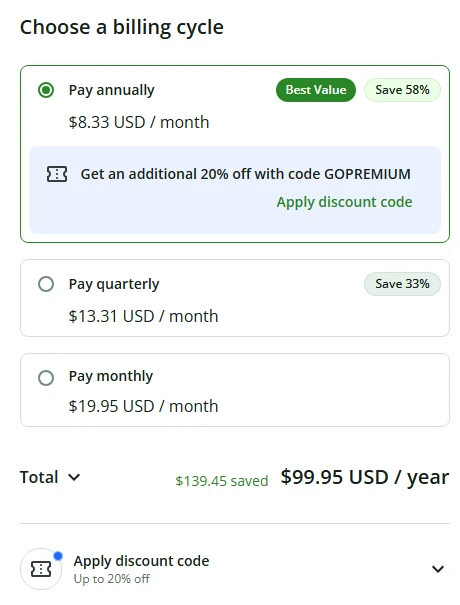
- Premium at $8.33 a month billed annually, or $99.95 a year, in Macedona’s capture of the Premium checkout through a US connection on 2026-10-01. The Premium page showed $4.17 per month on annual billing to a visitor in Vietnam, so check the checkout from your own location before budgeting.
- Free plan:
- Paraphrase up to 100 words at a time.
- First limit that bites:
- Summaries top out at 1,200 words on Free, against 6,000 words on Premium.
- Better than Grammarly Free:
- for rewording a sentence or paragraph several ways, since paraphrasing is the core job of the free plan.
- Worse than ChatGPT Free:
- for high-volume drafting, since QuillBot lists AI chat and writing on Free as limited usage while ChatGPT Free lists unlimited text chats.
- Setup difficulty:
- Low. QuillBot’s AI writer page says the writer is free to use with no sign-up required, and for the paraphraser the constraint is chunk size, not configuration.
- Hidden costs:
- The billing cycle. The US checkout also offers quarterly billing at $13.31 a month and monthly billing at $19.95 a month, and twelve months at $19.95 a month is $239.40, against $99.95 a year on annual billing.
- Evidence status:
- Free and Premium limits and the Vietnam-view Premium price from QuillBot’s Premium page, the US prices from Macedona’s capture of the checkout’s billing step, and the no-sign-up note from its AI writer page.
QuillBot’s free side has two parts: a paraphraser and summarizer with published word limits, and an AI writer that its page says is free to use with no sign-up. The 100-word paraphrase window means a long section takes several passes, which is tolerable for an edit and tiresome for a full rewrite.
For a US buyer, a year of Premium on annual billing costs $99.95, and the upgrade table below sets it against the other paid steps. The sensible time to upgrade is the month summaries of long reports become routine.
| Pros | Cons |
|---|---|
| Paraphrasing on the free plan | 100-word paraphrase window per request |
| Summaries of up to 1,200 words | AI chat and writing listed as limited usage |
| Annual, quarterly and monthly billing at the US checkout | Long rewrites need several passes |
- Verdict:
- Choose QuillBot Free if you rework existing text in short chunks; choose ChatGPT Free if you draft at volume.
7. HubSpot AI Content Writer: Best for Teams Already Publishing From HubSpot

- Best for:
- Small marketing teams whose emails, landing pages and blog posts already go out through HubSpot.
- Avoid if:
- You want a standalone writing app, because this writer only earns its place for a team that already works in HubSpot.
- Starting price:
- Free, and the HubSpot AI content writer page says no credit card is required.
- Practical tier:
- Free for the writer. The product page says more advanced content marketing functionality is available in paid editions of Content Hub and Marketing Hub, and this guide does not price those editions.
- Free plan:
- The page states that AI content writer features are available for free.
What it drafts: The product page says you enter a prompt or topic and the content writer drafts a prospecting email, a landing page or a blog post.
Where the writer lives: The product page says the AI-powered writing assistant is available in HubSpot’s marketing, sales and content features, so it is not a separate app.
Free HubSpot tools it works in: The page’s getting-started answer names AI-assisted copywriting inside HubSpot free tools including social media management, the landing page builder and email marketing.
Why use it inside HubSpot: HubSpot’s AI goes by the name Breeze, and its Breeze personalized outreach page says Breeze uses CRM data and real-time signals to craft personalized outreach at the right time.
- First limit that bites:
- The point where the team wants the more advanced content marketing functionality of a paid Content Hub or Marketing Hub edition, since the product page publishes no usage cap.
- Better than Rytr Free:
- for a team that already works in HubSpot, since the assistant sits inside HubSpot’s marketing, sales and content features.
- Worse than ChatGPT Free:
- for anyone outside HubSpot, because the writer’s value depends on the HubSpot account around it.
- Setup difficulty:
- Medium overall: low for existing HubSpot users, higher for anyone who has to set up HubSpot first.
- Hidden costs:
- The paid Content Hub and Marketing Hub editions that hold the more advanced content marketing functionality, whose prices sit outside this guide.
- Evidence status:
- Free-access terms, what the writer drafts, where the assistant is available and which functionality is paid, all from HubSpot’s AI content writer product page, plus the Breeze name and its use of CRM data from HubSpot’s Breeze outreach page.
HubSpot’s writer earns a place for one buyer: the team that already works in HubSpot. Because the product page places the assistant inside HubSpot’s marketing, sales and content features, that team drafts in tools it already uses.
In this guide’s view, the CRM data Breeze draws on is the other half of the case for a team whose contacts already live in HubSpot. HubSpot’s page describes that personalization for sales outreach, not for the free content writer, so this guide treats it as a reason to keep drafting inside HubSpot rather than as a free writer feature.
In practice, that means a landing page can be drafted inside the landing page builder that will publish it, and a campaign email inside the email marketing tool that will send it, with no copy-and-paste step between a writing app and HubSpot. That is this guide’s reading of where the page places the writer, not a tested workflow.
Anyone outside HubSpot pays for the free writer by adopting HubSpot first. Setting up HubSpot to get a free writer is backwards when ChatGPT Free does the drafting with nothing else attached.
| Pros | Cons |
|---|---|
| No credit card required to start | No usage cap published on the product page |
| Drafts prospecting emails, landing pages and blog posts from a prompt | Paid edition prices not quoted in this guide |
| Works inside free tools such as social media management and email marketing | Advanced content marketing needs a paid Content Hub or Marketing Hub edition |
- Verdict:
- Choose HubSpot’s writer if HubSpot is already your publishing system; skip it if you would be setting up HubSpot just to get free drafts.
Cheapest Paid Upgrades Once Free Runs Out
“Cheapest” in this guide means cheapest priced here: the lowest paid step whose amount and billing period could be read on an official page.
What US Visitors Saw on 2026-10-01
Macedona captured six of the official pricing pages through a US connection. The table sets those US prices beside what the same pages showed to a visitor in Vietnam a day earlier.
| Tool | Free plan, US capture | Paid plans, US capture | Same page from Vietnam |
|---|---|---|---|
| ChatGPT | $0 a month | Go $8, Plus $20 and Pro from $100 a month | Free ₫0, Go ₫132,000 and Plus ₫522,500 a month |
| Google Gemini | $0 a month with a Google Account | Google AI Plus $4.99, Google AI Pro $19.99 and Google AI Ultra from $99.99 a month | Free $0 a month with a Google Account; paid prices not verified |
| Rytr | $0 a month | Unlimited $7.50 and Premium $24.16 a month, Yearly toggle only | Free $0 a month; paid prices not verified |
| Claude | $0, free for everyone | Pro $17 a month with $200 billed up front, or $20 billed monthly; Max from $100 | The same amounts |
| Copy.ai | Not part of the capture | Chat $29 a month, billed monthly | Chat $29 a month, billed monthly |
| QuillBot | Not part of the capture | Premium $8.33 a month billed annually ($99.95 a year), $13.31 a month quarterly or $19.95 a month monthly | Premium $4.17 per month on annual billing |
Sources: Macedona’s captures through a US connection on 2026-10-01 of ChatGPT pricing, Gemini plans, Rytr pricing, Claude plans, Copy.ai Chat plan pricing and the billing step of the checkout behind QuillBot Premium. Vietnam view checked 2026-09-30.
Grammarly and HubSpot were not part of the US capture. Grammarly’s help center lists Pro in US dollars, and HubSpot’s paid editions are not priced in this guide.
Cost for One Year of Each Paid Step
The yearly figures below are the monthly rate times twelve months, or the annual amount the page states. US prices lead because this guide is written for US readers, and QuillBot’s Vietnam view stays in the table because it differs from the US checkout.
| Upgrade | Listed price | Billing basis | Cost for one year | Where the price was seen |
|---|---|---|---|---|
| QuillBot Premium, annual | $4.17 per month | Annual billing | $50.04 | Vietnam view |
| Google AI Plus | $4.99 a month | Per month | $59.88 | US capture |
| Rytr Unlimited | $7.50 a month | Yearly toggle | $90 | US capture |
| ChatGPT Go | $8 a month | Per month | $96 | US capture |
| QuillBot Premium, annual | $8.33 a month | $99.95 a year | $99.95 | US capture |
| Grammarly Pro, annual | $144 per member a year | Annual subscription | $144 | Grammarly help center, USD |
| QuillBot Premium, quarterly | $13.31 a month | Quarterly billing | $159.72 | US capture |
| Claude Pro, annual | $17 a month | $200 billed up front | $200 | US capture and Vietnam view |
| QuillBot Premium, monthly | $19.95 a month | Monthly billing | $239.40 | US capture |
| Claude Pro, monthly | $20 a month | Billed monthly | $240 | US capture and Vietnam view |
| ChatGPT Plus | $20 a month | Monthly only, no annual billing | $240 | US capture and OpenAI help center |
| Copy.ai Chat | $29 a month | Billed monthly | $348 | US capture and Vietnam view |
| Grammarly Pro, monthly | $30 per member a month | Monthly subscription | $360 | Grammarly help center, USD |
Sources: Gemini plans, Rytr pricing, ChatGPT pricing, QuillBot Premium, Claude plans, Copy.ai Chat plan pricing, Grammarly Pro pricing help, ChatGPT Plus help article. Each row names where its price was seen.
The plan you pick moves the yearly bill more than the billing choice does. Among the US-captured and USD-listed prices, the one-year figures run from Google AI Plus at the low end to Grammarly Pro billed monthly at the high end, a wider spread than annual billing saves on any single plan.
QuillBot is where the vantage point matters most. The US checkout totals $99.95 a year on annual billing, while the Vietnam view of the Premium page works out to $50.04 a year: $4.17 per month times twelve months.
On QuillBot’s US checkout, twelve months of monthly billing at $19.95 cost $139.45 more than the $99.95 annual total.
Paying for Claude Pro month to month costs $40 more a year, which is twelve months at the $20 monthly price against the $200 annual price.
Grammarly Pro on the monthly subscription costs $360 per member for twelve months, against $144 per member on the annual subscription.
ChatGPT Plus is billed monthly only, with no annual option, so twelve months at its $20 listed price, $240, is the only way to buy a year of it.
Pick the plan first, then the billing basis. A writer who is sure to need Claude Pro, Grammarly Pro or QuillBot Premium for the year should pay annually.
A writer testing whether the free allowance falls short should pay monthly for one month and then decide. The Claude pricing guide breaks down the other Claude tiers.
Best Paid Pick for Teams That Write All Day
Only one tool in this guide shows no free plan card on its captured pricing page, although it does offer free single-purpose generators outside its plans.
8. Copy.ai Chat: Best for Unlimited Chat Words on a Paid Budget

- Best for:
- Small marketing teams that want unlimited words in chat and access to OpenAI, Anthropic and Gemini models in one subscription.
- Avoid if:
- You need a free account plan, because the plan cards on Copy.ai’s Chat plan pricing page start at the paid Chat plan.
- Starting price:
- $29 a month on the Chat plan, billed monthly, as displayed to a visitor in Vietnam and in Macedona’s US capture of the pricing page on 2026-10-01.
- Practical tier:
- Chat is the self-serve entry point for a team that has outgrown free tools.
- Free plan:
- None among the pricing page’s plan cards, which is why Copy.ai sits in the paid section of this ranking.
Free standalone tools: Copy.ai’s tools page offers free single-purpose generators, including a free outline generator and a free AI Paragraph Rewriter that rewrites paragraphs to your instructions.
- First limit that bites:
- The bill starts on day one, and twelve months at the $29 monthly Chat price is $348 a year.
- Better than Rytr Free:
- for a team that writes all day, since chat words are unlimited rather than capped by characters.
- Worse than ChatGPT Free:
- for a solo writer on a zero budget, because unlimited text chats on ChatGPT Free cost nothing.
- Setup difficulty:
- Low for chat on its own.
- Hidden costs:
- Monthly billing gives up the 20% saving the Chat card shows for annual billing.
- Evidence status:
- Chat plan terms from Copy.ai’s pricing page, where no free plan card appears, confirmed in Macedona’s US capture of that page, and the free generators from Copy.ai’s tools page.
Copy.ai sits in the paid band because its platform plans start at Chat, not because nothing at Copy.ai is free. At least one ranking roundup in the top search results still describes a free Copy.ai plan, while the pricing page’s plan cards open at Chat.
The free side is the standalone generators, such as the outline generator, which Copy.ai says takes you from a blank page to full blog posts.
Those generators suit a one-off job such as an outline or a reworded paragraph. The unlimited chat workspace is what the $29 plan buys.
For a team, the decision is whether unlimited chat words across three model families are worth a monthly bill, set against juggling several free tiers. The Copy.ai review covers the workflow side of the platform.
| Pros | Cons |
|---|---|
| Unlimited words in chat | No free plan card on the pricing page |
| OpenAI, Anthropic and Gemini models in one plan | Paid Chat plan from the first month |
| Free outline and paragraph tools outside the plans | Annual saving requires committing for a year |
- Verdict:
- Choose Copy.ai Chat if your team writes all day and wants several model families in one place; stay on ChatGPT Free if you are a solo writer.
Pricing Comparison Matrix
| Tool | Free plan | First paid step, US capture unless noted | Cost for one year of that step |
|---|---|---|---|
| ChatGPT | $0 a month in the US capture, ₫0 in the Vietnam view | Go at $8 a month | $96 |
| Claude | $0, free for everyone | Pro at $17 a month with $200 billed up front | $200 |
| Google Gemini | $0 a month with a Google Account | Google AI Plus at $4.99 a month | $59.88 |
| Rytr | $0 a month, free forever | Unlimited at $7.50 a month, Yearly toggle | $90 |
| Grammarly | $0 USD a month in the Vietnam view | Pro at $144 USD per member a year, from Grammarly’s help center | $144 per member |
| QuillBot | Paraphrasing up to 100 words at a time | Premium at $8.33 a month billed annually; $4.17 per month in the Vietnam view | $99.95 in the US capture; $50.04 in the Vietnam view |
| HubSpot AI content writer | Free, no credit card required | Paid Content Hub or Marketing Hub editions, not priced here | Not in this guide’s cost math |
| Copy.ai | No free plan card | Chat at $29 a month, billed monthly | $348 |
Sources: ChatGPT pricing, Claude plans, Gemini plans, Rytr pricing, Grammarly plans, Grammarly Pro pricing help, QuillBot Premium, HubSpot AI content writer, Copy.ai Chat plan pricing. US capture by Macedona on 2026-10-01; Vietnam view checked 2026-09-30.
Every amount is labelled by where it was seen: the US capture of 2026-10-01, Grammarly’s USD help listing, or the Vietnam view of 2026-09-30. A ten-user cost is left out on purpose: among the priced entry plans, only Grammarly Pro is quoted per member, so a team total would compare unlike prices.
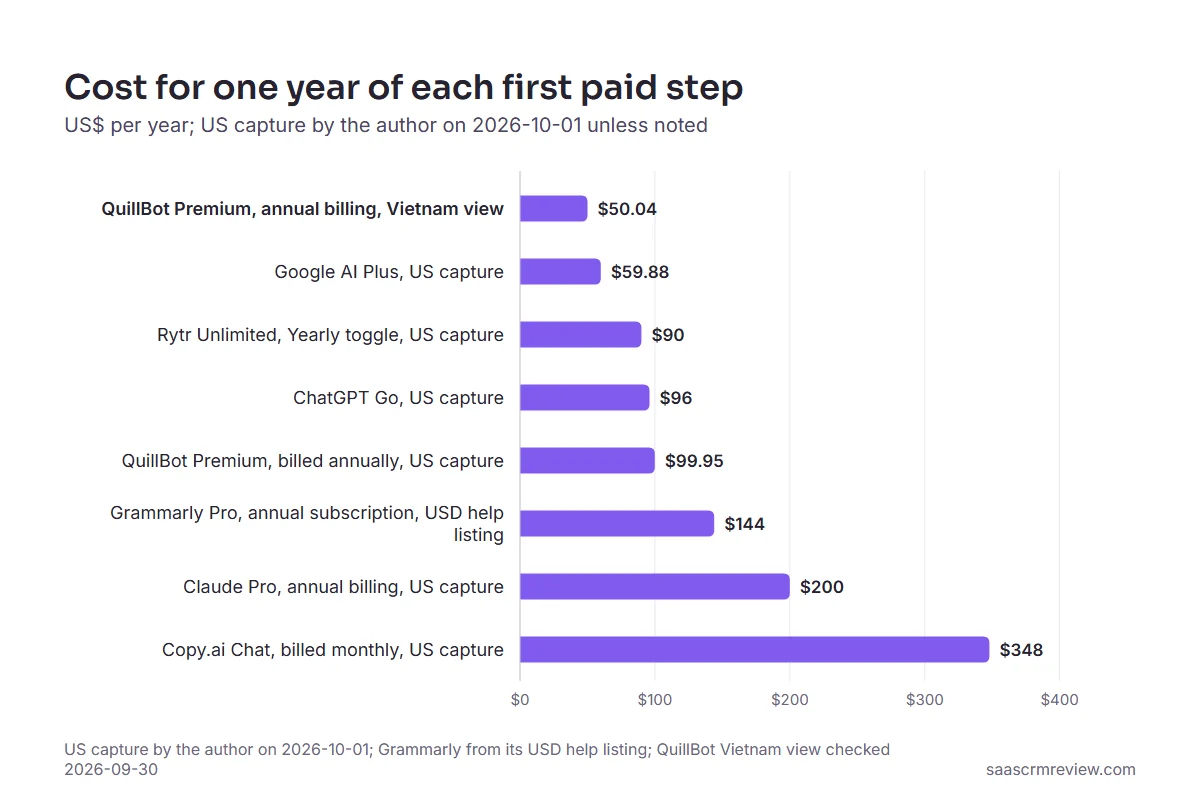
The gap is wide enough to change the plan.
From the US, a year of QuillBot Premium on annual billing costs about half of a year of Claude Pro on annual billing. A team that needs Copy.ai Chat is budgeting for a real subscription rather than a free-tier top-up.
Free-Plan Limits Compared
| Tool | First cap on the free plan | What stays limited or gated | Model or feature access on Free |
|---|---|---|---|
| ChatGPT Free | None for text, subject to abuse guardrails | Uploads, image creation, voice chats, deep research | GPT-5.6 Luna |
| Claude Free | No published message number | Usage volume, with Pro as the paid step | Web search, file creation, code and memory after a free sign-up at claude.ai with an email address; Free model not named on the plans page |
| Google Gemini Free | No published message number | Varying access to 3.1 Pro | 3.6 Flash |
| Rytr Free | 10K characters of AI generation a month | Unlimited generation only on paid plans | Free forever with no card |
| Grammarly Free | 100 AI prompts a month | Pro allows 2,000 prompts per member a month | Spelling and grammar checks |
| QuillBot Free | Paraphrasing up to 100 words at a time | Summaries capped at 1,200 words, 6,000 on Premium | AI chat and writing with limited usage |
| HubSpot AI content writer | No usage cap published | Advanced content marketing in paid Content Hub and Marketing Hub editions | AI content writer features free |
Sources: ChatGPT pricing, Claude plans, Claude free sign-up help, Gemini plans, Rytr pricing, Grammarly plans, QuillBot Premium, HubSpot AI content writer
The caps come in four different units: characters for Rytr, prompts for Grammarly, words per request for QuillBot, and no published number at all for Claude, Gemini and HubSpot. Match the unit to your job before you pick a tool, because a prompt count punishes many small edits while a character count punishes one long draft.
Setup Difficulty
| Tool | What you need to start | No sign-up? | No card? | Setup difficulty |
|---|---|---|---|---|
| ChatGPT Free | A browser; the author’s notes cover the web app in Chrome on Windows | The pricing page does not say | The pricing page does not say | Low |
| Claude Free | An email address to sign up at claude.ai | No: a sign-up with an email address | The plans page does not say | Low |
| Google Gemini Free | A Google Account for the $0 Free plan | No: a Google Account is needed | The plans page does not say | Low |
| Rytr Free | The Rytr Free plan | The pricing page does not say | Yes: no credit card required | Low |
| Grammarly Free | The free AI writer page, or the Grammarly Free plan | Not stated; the AI writer page says you can use the writer on that page | The plans page does not say | Low |
| QuillBot AI writer | Text to paste into the writer | Yes: no sign-up required | The page does not say | Low |
| HubSpot AI content writer | A HubSpot account | No: it runs inside HubSpot | Yes: no credit card required | Medium |
| Copy.ai Chat | A paid Chat subscription | The pricing page does not say | No: the $29 monthly plan is paid | Low for chat |
Sources: ChatGPT pricing, Claude plans, Claude free sign-up help, Gemini plans, Rytr pricing, Grammarly plans, Grammarly AI writer, QuillBot AI writer, HubSpot AI content writer, Copy.ai Chat plan pricing. Prices as displayed to a visitor in Vietnam.
Skipping the sign-up and skipping the card are separate questions with different answers. Here is what each tool asks for before the first draft:
- Nothing to hand over: QuillBot’s AI writer, the only tool here whose page says no sign-up is required at all.
- Use it on the page: Grammarly’s free AI writer, whose page says you can use the AI writer on that page; the plans page does not say whether a card is asked for.
- An email address: Claude Free, which anyone in a supported location can access at claude.ai by signing up with an email address, according to Claude’s help center.
- A Google Account: Gemini Free, listed at $0 a month with a Google Account.
- No card required: Rytr and HubSpot, which both state that no credit card is required, although HubSpot’s writer runs inside a HubSpot account.
- Not stated: ChatGPT Free, whose pricing page says nothing either way about a sign-up or a card, so this guide does not claim it works without one.
How to Choose a Free AI Content Generator
- Name the job first: first drafts, short copy, paraphrasing or a final edit, because each tool here leads in only one of them.
- Find the unit of the cap that matches that job, whether characters, prompts, words per request or no stated number.
- Decide what you are willing to hand over: with nothing at all, start with QuillBot’s AI writer; with an email address, Claude Free; with a Google Account, Gemini Free; and if keeping a card off file matters most, Rytr and HubSpot both state that no credit card is required.
- Check where the draft will be published, because HubSpot’s writer only earns its place when HubSpot is already the publishing system.
- Price the exit before you commit, using the yearly figures in the pricing matrix rather than the monthly headline.
If two jobs matter equally, pair two free tools rather than paying for one, and the roundup of AI tools for content creation covers paid and multimedia options once free tools stop being enough.
Common Mistakes When Picking a Free AI Writer
- Trusting an old roundup’s free-plan description. At least one ranking roundup still describes a free Copy.ai plan that the pricing page’s plan cards do not show, so read the vendor page before you plan around it.
- Budgeting from the monthly headline. QuillBot’s US checkout quotes every billing cycle per month and shows the annual option as a yearly total, so compare the one-year figures in the pricing matrix rather than the monthly number.
- Using an editor as a drafting engine. A monthly prompt allowance built for edits runs dry fast when it drafts whole posts.
- Publishing a first draft. Free tools produce drafts, not verified articles, and the fact-check below is the step that protects the page.
How to Fact-Check a Free AI Draft Before Publishing
Some free tiers can search the web, as Claude Free can, but a draft with sources attached is still a draft, and in this guide’s editorial view the final check belongs to the person who publishes it. The checklist below builds on one habit from the author’s month of using ChatGPT Free for content and SEO work (author’s notes, September 2026): no answer about pricing, features or current data counts as verified until an outside source confirms it.
- Open the vendor page for every price and plan limit. A model’s default answer about pricing, product features or current data is a starting point, never the source.
- Check each named product against its own official page. A sentence that mixes two products’ facts is where errors hide.
- Confirm every date and version name. Model names and plan names change often, and a stale one dates the whole article.
- Read the draft against your own editorial rules. Tone, banned phrases and formatting drift unless the rules were in the prompt.
- Cut claims no source supports. If a sentence cannot be traced to a source, cut it or rewrite it as clearly labelled opinion.
Getting Better Output From a Free AI Writer
The most useful habit in the author’s notes from that month was giving the assistant clear context and rules, the way an editor briefs a writer. The template below turns that habit into a reusable structure, and the ChatGPT prompts library has more examples by use case.
text

Role: You are editing for [publication] and its readers, who are [audience].

Task: Write [content type] about [topic], aimed at [reader goal].

Context: [facts, sources or notes the draft must use]

Rules: [tone], [words or phrases to avoid], [length], [format such as H2 sections or bullets]

Do not: invent prices, features, dates or statistics; flag anything unverified for checking

Output: [the exact structure wanted], then a list of every factual claim you made
The last line matters most. It asks the tool to list its own factual claims, which gives you a ready checklist to run against the vendor pages above.
Final Verdict
ChatGPT Free is the pick for most writers who need free text volume, and Claude Free is the pick when drafts start from research. Rytr Free suits short copy with no card on file, Grammarly Free and QuillBot Free belong on the editing pass, and HubSpot’s writer makes sense only for teams already publishing from HubSpot.
When the free tier runs out, Google AI Plus at $4.99 a month is the cheapest paid step in the author’s US capture.
For heavy paraphrasing, QuillBot Premium costs $99.95 a year on annual billing at the US checkout.
Claude Pro is the research upgrade worth paying for annually, and Copy.ai Chat is a paid team tool, with Copy.ai’s free standalone generators better kept for one-off jobs.
Pick one free AI content generator that fits your content type, note the limit its vendor publishes or the fact that it publishes none, and check what the upgrade costs for a year before you commit.





