Every tool below has a free plan that starts at $0. That is the easy part, and it is where most rankings stop.
The question that decides whether a free AI presentation maker survives real work is what happens after the first deck. Does the allowance come back next month, does the finished file leave the product in a format a colleague can open, and which exact limit turns the free workflow into a paid one.
Those three questions split ten tools that all describe themselves as free into the ones that refill on a schedule, the ones that hand you a finite pool and then stop, and two whose real budget the vendor never publishes. If you are also weighing the wider set of AI tools for content creation, the same test applies there.
I rank these on free runway and usable output first, design second. A deck that looks good and cannot leave the tool has not solved anything.
In This Article (15 sections)
Quick Verdict: Which Free AI Presentation Maker Fits Which Job
| Use case | Best free pick | Why it fits |
|---|---|---|
| One good deck, exported anywhere | Gamma | Four export targets on the free plan, including PowerPoint and Google Slides |
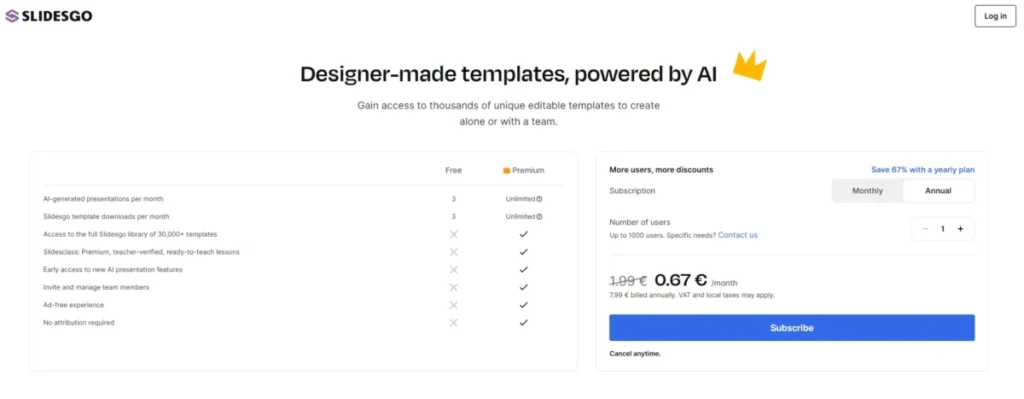
| Three editable decks a month, forever | Slidesgo | The allowance refills monthly and the output is a real PPTX |
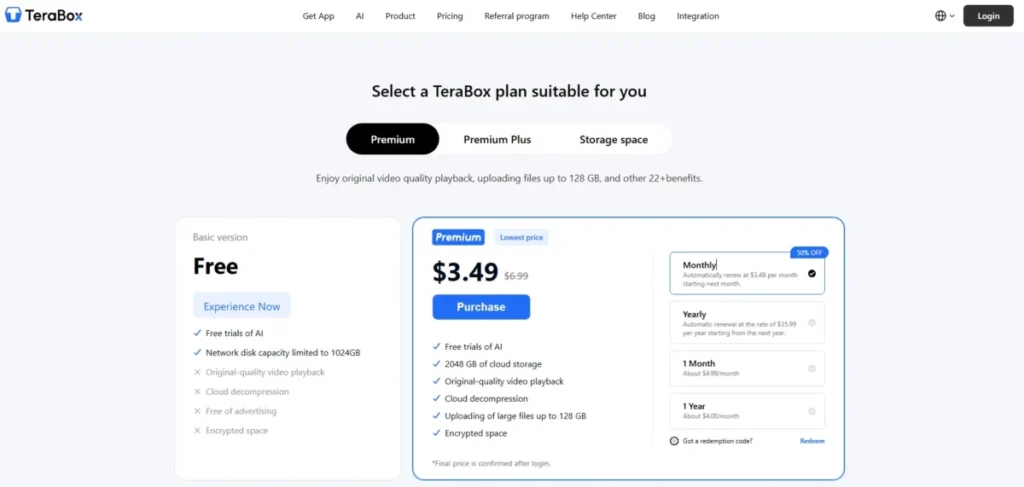
| Turning PDFs and Word files into slides repeatedly | TeraBox AI Presentation Agent | The quota renews daily rather than once |
| Design work you will finish by hand | Canva | The AI draft lands inside a template and media library you keep after the allowance ends |
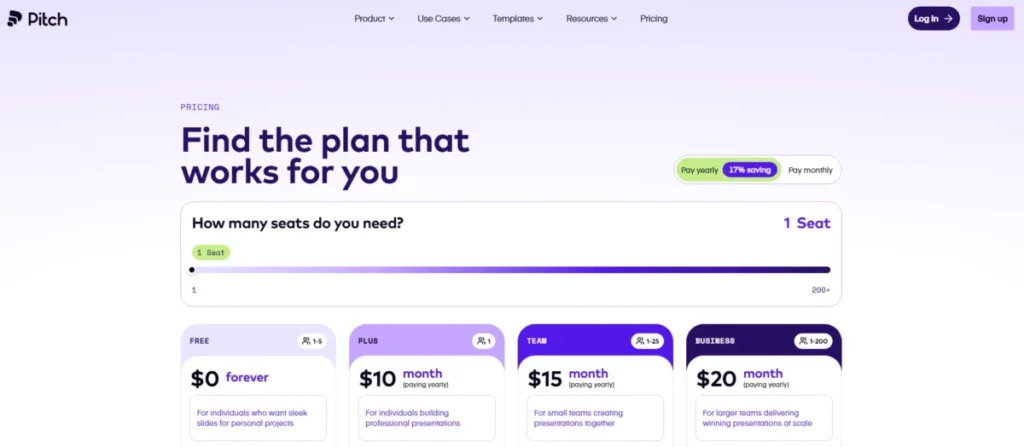
| A two-to-five-person team editing together | Pitch | Five members on the free workspace, with an AI agent inside the editor |
| Staying inside Google Slides or PowerPoint | SlidesAI | It runs where the deck already lives and exports native files |
| Presenting online rather than sending a file | Visme | Recurring monthly credits, with the deck shown from a link because Basic has no download |
| A short branded deck delivered as PDF | Riley by Simplified | No monthly deck cap, and PDF export on the free tier |
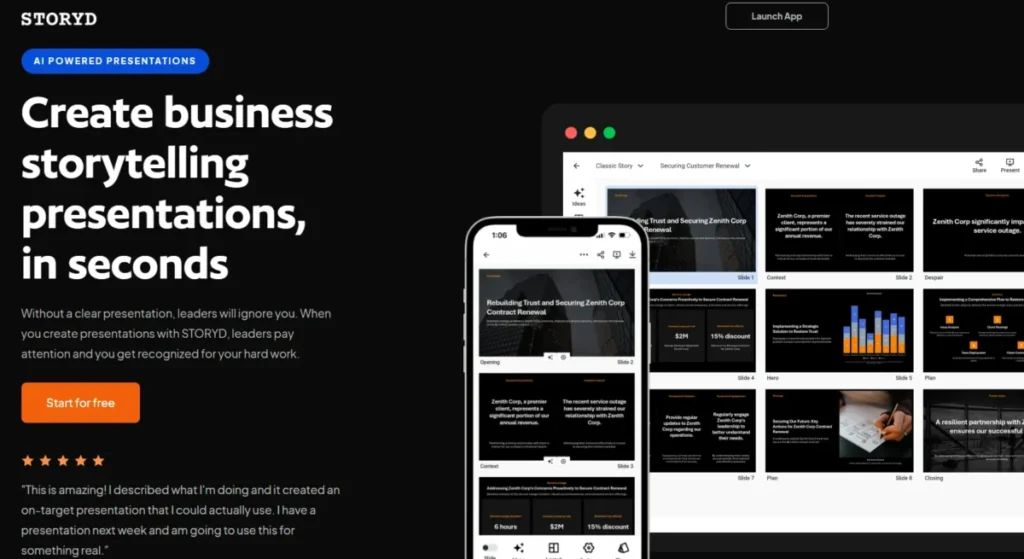
| One business narrative that has to land | STORYD | Structure-first generation and the widest export list here |
| Sampling a business generator before paying | Presentations.AI | The one vendor here publishing a per-slide credit rate, on a free balance it states two ways |
Source: vendor pricing and product documentation, linked in each product section below. The two recurring allowances that drive most of these picks are three AI presentations a month and a tool that is free to use twice a day. Verified 2026-09-03.
Most of those picks change the moment your workload does. Read the reset column in the at-a-glance table below before you commit a real deadline to any of them.
How We Evaluated the Best Free AI Presentation Makers
These rankings combine current vendor pricing and product documentation with attributed findings from independent and specialist reviewers who put the tools through real workflows. Every price, allowance and export claim below was verified against a vendor’s own page on 2026-09-03.
Each tool was assessed against the same buyer-focused criteria: the size of the free allowance, how often it resets, and what a finished deck is allowed to become. The same criteria also cover what source material the free plan accepts and the exact limit that forces a paid step.
Greater weight was given to the two factors that decide whether a free plan survives contact with real work, which are recurring capacity and a usable output file. Template counts, brand familiarity and affiliate relationships carried no weight in the order.
Three rules govern which evidence decides what. Vendor pricing and documentation control every plan, allowance and entitlement claim.
Attributed third-party findings control observed behaviour, and are never restated as this publication’s own experience.
Where a vendor’s pages contradict each other, the conflict is disclosed rather than quietly reconciled, and any editorial resolution is stated as one. Claims that could not be tied to a vendor’s own current page were excluded rather than softened, and one tool whose official material disagreed with itself was left out of the ten entirely.
The Three Problems Behind Every Free AI Presentation Maker
Free tiers in this category fail in three specific places, and none of them is design quality. Knowing which failure you are buying into is most of the decision.
Problem 1: The Allowance Has a Reset Cadence, and It Is Never in the Headline
“400 credits” and “three presentations a month” look like the same kind of promise. They are not.
One is a pool that empties once. The other is a tap that reopens on the first of every month, and over a quarter the smaller-sounding number delivers far more work.
Seven different reset states are in play across these ten tools: one-time, lifetime, daily, monthly, annual, undisclosed, and one where the vendor’s own pages disagree. A ranking that adds those numbers into one column is comparing a battery with a mains socket.
The practical consequence is that the tool with the biggest free number is often the wrong pick for anyone who presents regularly. Gamma hands a new account 400 credits once, while TeraBox hands you two runs a day and then two more the day after.
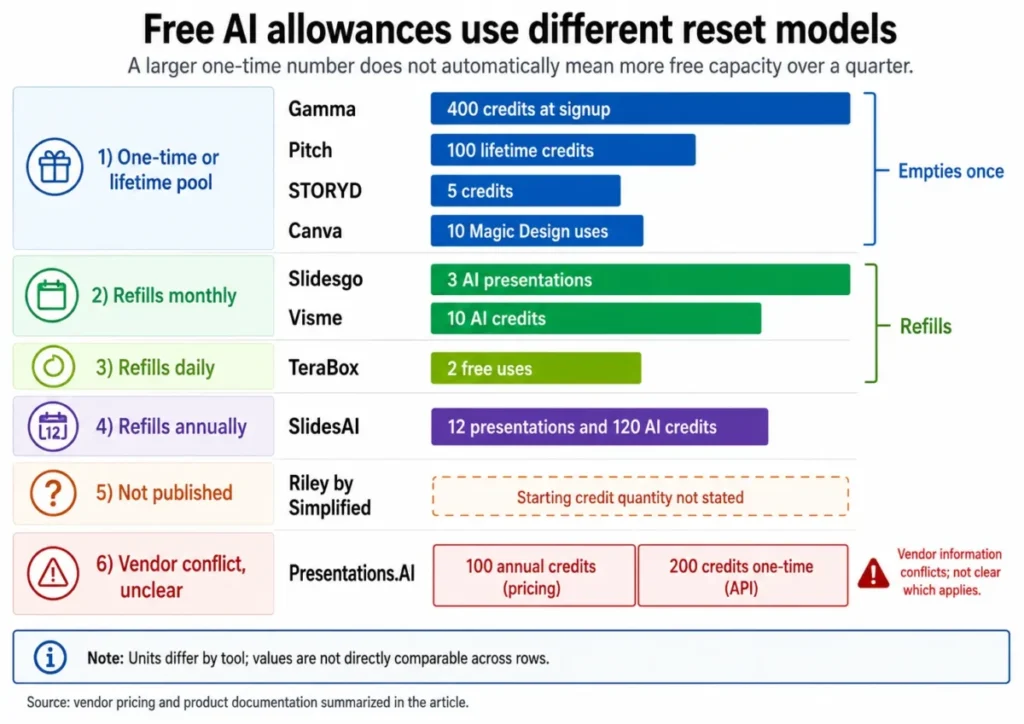
Read that grouping as a shape rather than a scoreboard. The bands sit on separate scales because that is what the vendors publish, and no total across them means anything.
I would decide the cadence question before looking at a single template. It is the one variable that cannot be fixed later by working harder.
Problem 2: A Free Plan Can Generate and Still Not Let You Export
A free plan can be generous right up to the moment you try to leave with the file.
Visme Basic renews ten AI credits every month and still does not include a download of any kind. Riley by Simplified has no monthly deck cap and documents PDF, HTML, PNG and ZIP output, with no PPTX in that list.
So the question to ask before starting is what the deliverable has to be. A link you present from a browser, a PDF someone reads, and an editable .pptx a colleague reworks are three different products, and the free plans split cleanly along that line.
If your deliverable is a file another person edits, five of these ten document an editable PowerPoint on a free plan without contradicting themselves elsewhere. That single filter settles the shortlist before design ever enters the conversation.
Problem 3: A Credit Balance Means Nothing Until the Exchange Rate Is Public
Credit systems only mean something when both halves are public: how many credits you get, and what each action spends.
Gamma, Pitch, Visme and Presentations.AI all publish the first number. Two of them publish the second, and the four split into three distinct failure modes.
Visme publishes both halves: ten monthly credits at two credits per AI Designer generation. That is the only clean case here, and it is why a Visme allowance converts into a countable number of generations.
Presentations.AI publishes the rate and loses the balance. Its API documentation states that each slide costs 5 credits, which is a real exchange rate.
The starting balance is then given as 100 on the pricing page and 200 on that same API page, so the rate is legible and the thing it multiplies is not.
Gamma and Pitch publish a balance and no rate at all. Pitch’s own guidance says every AI action takes credits and that more can be purchased when the balance runs out, without publishing what an action costs.
Riley by Simplified publishes neither, which is the worst position of the four.
That is not a reason to avoid credit-based tools. It is a reason to treat any credit figure as unranked information unless both halves are published, and to rank on what is checkable: reset cadence, slide ceilings, upload limits and export formats.
If the mechanics of generative AI pricing are new to you, the credit-versus-quota split is the first thing worth learning.
My rule is blunt: a balance without a published per-action price is a trial budget, whatever the vendor calls it. A published price against two different balances is not much better.
Free AI Presentation Makers at a Glance
| Tool | Free AI allowance | Resets | Free file output |
|---|---|---|---|
| Gamma | 400 credits at signup, 10 slides per prompt | Never, referrals only | PDF, PPTX, PNG, Google Slides |
| Canva | 10 Magic Design uses, shared across three surfaces | Never | Editable Canva design |
| Slidesgo | 3 AI presentations plus 3 template downloads | Every month | PPTX for PowerPoint, Google Slides, Figma |
| TeraBox AI Presentation Agent | 2 runs, 0 to 15 slides each | Every day | PPTX and PDF |
| Pitch | 100 lifetime credits, 5 workspace members | Never | Editor and share link |
| SlidesAI | 12 presentations and 120 AI credits | Every year | Native Google Slides and PowerPoint files |
| Visme | 10 AI credits, 2 per AI Designer generation | Every month | Online project link only, no download |
| Riley by Simplified | Credit-based, quantity not published | Not published | PDF, HTML, PNG, ZIP |
| STORYD | 5 credits to create or rewrite | Never | PowerPoint, Google Slides, Keynote, Canva |
| Presentations.AI | 100 or 200 AI credits, at 5 credits a slide | Conflicting: pricing says annual, the API page says one-time at signup | PDF; PowerPoint is a Pro feature |
Source: vendor pricing pages and help-center documentation, cited in each product section below. The two lifetime pools are documented as 400 credits that do not refresh and 100 lifetime credits. Verified 2026-09-03.
Two columns in that table do most of the work. Everything in the “Resets” column that says “Never” is a trial with no expiry date rather than a free plan, and everything in the “Free file output” column that lacks PPTX is a tool you will finish inside, not hand off from.
The ranking that follows is grouped by reset model rather than by score, because that grouping is what changes a buying decision. Rank numbers stay attached to each tool so the order is still readable.
Free Plans With a One-Time or Lifetime Allowance
These four give you the most generous first week and the least generous second month. Treat them as tools for a project, not for a habit.
Gamma: Best for a Fast First Draft You Can Take Anywhere
- Best for:
- Solo professionals, students and founders who need one strong deck and the freedom to finish it in PowerPoint, Google Slides or a PDF.
- Avoid if:
- You generate decks weekly, or you send client work that cannot carry a vendor’s brand mark.
- Starting price:
- $0 on the Free plan, with no card required at signup.
- Practical tier:
- Free covers a project. Plus is the step you take for branding control and more AI capacity.
- Free plan:
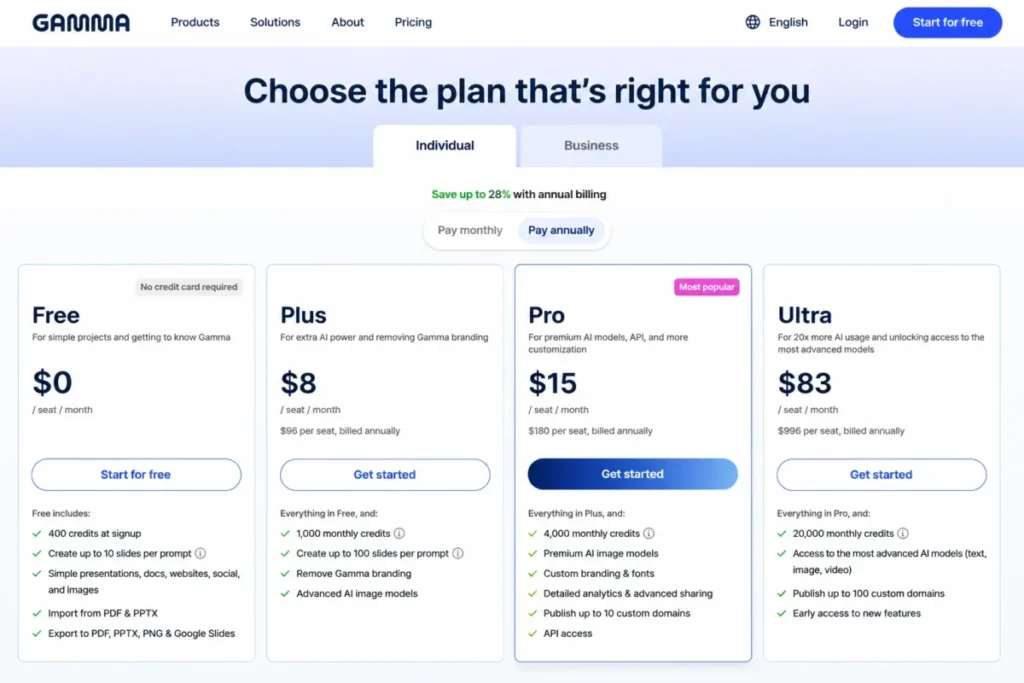
- 400 credits at signup and up to 10 slides per prompt, with PDF, PPTX, PNG and Google Slides export.
- First limit that bites:
- The credit pool. Gamma documents 400 credits that do not refresh, topped up only by referrals worth 200 credits each or by upgrading.
- Better than Slidesgo:
- Four export destinations against one file format, and no monthly ceiling on how fast you spend the allowance.
- Worse than TeraBox:
- The allowance never comes back on its own.
- Setup difficulty:
- Low. Prompt in, deck out, editing in the browser.
- Hidden costs:
- Brand removal sits on the paid tier, so a free deck is not a clean client deliverable.
- Evidence status:
- Free-plan price, slide ceiling, export list and the branding gate all read from Gamma’s own pricing page; the credit behaviour comes from its help-center article on credits.
Gamma earns the top position on output, not on volume. No other free plan here hands you PDF, PPTX, PNG and Google Slides at once, which means the deck is portable the moment it exists.
The trap is the shape of the allowance. Four hundred credits reads like a lot until you notice that every AI action draws on the same pool and nothing refills it, so heavy iteration on one deck can cost more than a light pass on four.
I would use Gamma for the deck that matters and then move the file out. Building a monthly reporting habit on a pool that only shrinks is how people end up on a paid plan they did not budget for.
The branding gate is the second thing to price in. For internal work it is irrelevant, and for a client proposal it is the whole decision.
| Pros | Cons |
|---|---|
| PDF, PPTX, PNG and Google Slides export all sit on the free plan | The 400-credit pool does not refresh on any schedule |
| Ten slides per prompt is enough for a full short deck in one pass | Removing Gamma branding requires a paid plan |
| No card required to start generating | Credit cost per action is not published, so the pool is hard to budget |
| Referrals add 200 credits each, giving a genuine free top-up path | Referral top-ups depend on other people signing up |
- Verdict:
- The strongest free plan here for a one-off deck that has to leave the product, provided you accept that the allowance is a pool and not a subscription.
Canva: Best for Drafting Inside a Design Library You Already Use
- Best for:
- Marketers, students and small teams who want an AI first draft to land inside a template and media library they will keep using afterwards.
- Avoid if:
- Repeat prompt-to-deck generation is the point, because the free Magic Design allowance is small and shared.
- Starting price:
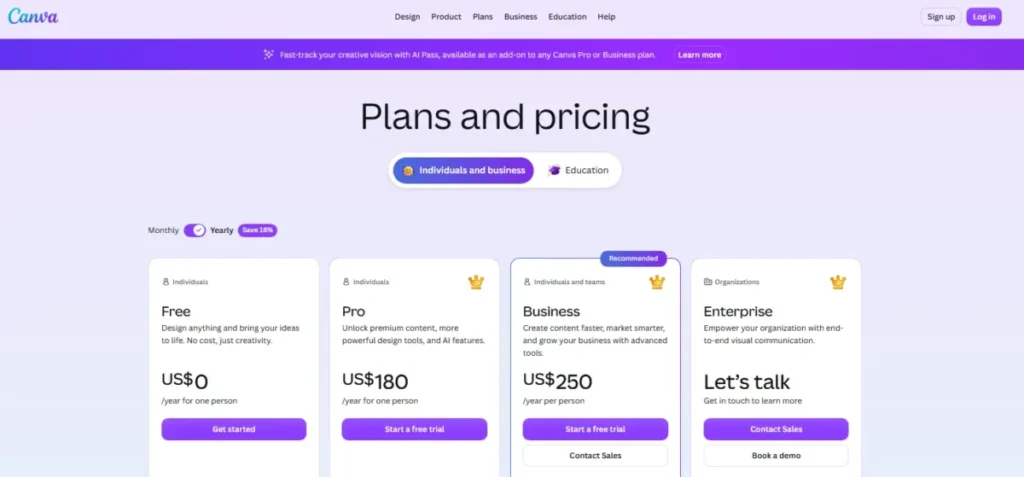
- Canva Free is $0 annually for one person.
- Practical tier:
- Free is a real design tool. The paid step is about assets and brand controls rather than about presentations specifically.
- Free plan:
- Magic Design is available up to 10 times for free across its versions, which include Global Search, Presentations and Video.
- First limit that bites:
- That ten-use allowance is shared. A generation you spend on video or search is a generation you cannot spend on a presentation.
- Better than Gamma:
- The design environment outlives the AI allowance, so the tool stays useful at zero credits.
- Worse than Slidesgo:
- No monthly refill, so the AI drafting stops permanently once the ten uses are gone.
- Setup difficulty:
- Low. A descriptive prompt produces a draft that stays editable in the Canva editor.
- Hidden costs:
- Template and asset access on the free tier is narrower than the marketing suggests, which shows up as a paid element hunt mid-deck.
- Evidence status:
- The $0 one-person price is read from Canva’s pricing page; the ten free Magic Design uses and the editable-draft workflow are read from its AI presentation page.
The shared-allowance detail is the one most comparisons miss, and it changes the arithmetic. Ten free uses of a feature that also powers video generation and search is not ten free presentations, and there is no way to reserve the allowance for slides.
What Canva gets right is what happens next. The AI draft is a normal Canva design, so the editing, the media library and the collaboration all keep working long after the generation allowance is spent.
For a student or a marketer who is going to hand-finish the deck anyway, that is a better trade than a bigger credit pool inside a tool with a thin editor. The full Canva AI review covers the wider feature set.
I would treat the ten uses as a sampling budget and plan to build the rest by hand.
| Pros | Cons |
|---|---|
| The generated deck is an ordinary editable Canva design, not a locked output | The ten free Magic Design uses are shared with Global Search and Video |
| The editor, templates and media stay usable at zero AI allowance | No monthly or annual refill of the free Magic Design allowance |
| Free tier covers one person at no annual cost | Many templates and assets sit behind the paid tier |
| Collaboration and mobile editing are available without an AI credit | Presentation-specific AI capacity cannot be reserved from the shared pool |
- Verdict:
- The right choice when the AI draft is a starting point and the design work is the real job, and the wrong choice if you need the generator itself more than a handful of times.
Pitch: Best for a Two-to-Five-Person Team That Edits Together
- Best for:
- Small teams who value collaborative editing and want an AI agent sitting inside the editor rather than in a separate generator.
- Avoid if:
- You expect the AI allowance to recur, because it does not.
- Starting price:
- $0 on the Free plan.
- Practical tier:
- Free is a genuine team workspace. The paid step buys AI capacity rather than seats.
- Free plan:
- Pitch documents five members on the Free plan, all with admin privileges.
- First limit that bites:
- 100 lifetime credits for new Free accounts, described as non-recurring.
- Better than Visme:
- Five collaborators at $0, against a single-person free seat.
- Worse than Slidesgo:
- The AI capacity is a one-time pool rather than a monthly allowance.
- Setup difficulty:
- Medium, because the workspace needs members invited before the free tier earns its position here.
- Hidden costs:
- Extra credits are purchased when the balance empties, at an unpublished per-action cost.
- Evidence status:
- Plan cost and member cap read from Pitch’s plans article, the credit model from its AI credits guide, and the agent capabilities from its Pitch Agent documentation.
Pitch is the only tool in this ranking whose free tier is built around more than one person. Five members with equal permissions is a real collaboration surface, and it does not expire when the AI allowance does.
The agent is more capable than most free generators, starting from a prompt, taking uploaded files as context, applying a template, adding slides and swapping images across a deck. Then the credits run out permanently, and what remains is a good collaborative editor with no generator attached.
Two details make the credit model easier to govern than most. A workspace can set a monthly credit budget, and AI can be switched off entirely, which matters when you hand the tool to a team and do not want surprise purchases.
Teams already comparing free collaboration tools will recognise the pattern.
| Pros | Cons |
|---|---|
| Five members on the free workspace, all with admin access | The 100 AI credits are lifetime and do not recur |
| The AI agent works inside the editor on an existing deck, not only from scratch | Per-action credit cost is not published, so the pool cannot be budgeted |
| Uploaded files can be used as context for generation | Extra capacity is a purchase rather than a refill |
| A monthly credit budget and a workspace-level AI switch keep spend controlled | The free tier’s value drops sharply once the pool empties |
I would invite the other four members before spending a single credit. The workspace is the asset that survives; the credits are the part you are borrowing against.
- Verdict:
- The stronger free choice for a small team that will keep editing together, as long as the AI generation is treated as a finite sample rather than an ongoing service.
STORYD: Best for One Business Narrative That Has to Land
- Best for:
- Consultants and founders who need one structured business deck that opens cleanly in whatever their audience uses.
- Avoid if:
- You iterate, since a rewrite spends the same credit as a new deck.
- Starting price:
- $0 on the Free plan.
- Practical tier:
- Free is a single-project budget.
- Free plan:
- STORYD’s own site lists a $0 plan with five credits to create or rewrite.
- First limit that bites:
- Those five credits, the tightest free allowance here.
- Better than Riley by Simplified:
- A published export list covering PowerPoint, Google Slides, Keynote and Canva.
- Worse than Gamma:
- Far less free capacity, on a pool that also never refills.
- Setup difficulty:
- Low, through a documented three-step flow.
- Hidden costs:
- None disclosed beyond the credit ceiling.
- Evidence status:
- Price, credit count, export destinations, browser presenting and the workflow all read from STORYD’s own site.
The structure-first flow is what separates STORYD from the general-purpose generators. You pick a business communication structure before any slides exist, which produces a narrative rather than a formatted outline.
Lindy, which sells its own AI agent product, reports asking STORYD for a deck on improving customer retention and getting problem context, solution, supporting arguments, expected results and recommendation in sequence. Revising one section expanded that slide while the surrounding structure held.
Treat that as a vendor’s own testing rather than neutral evidence, though it matches what the structure-first flow is built to do.
For a board update or an investment case, that ordering is worth more than a bigger credit balance, and PowerPoint, Google Slides, Keynote and Canva plus browser presenting is the broadest handoff set in this ranking. For a weekly team deck it is irrelevant, and five credits will be gone inside a fortnight.
| Pros | Cons |
|---|---|
| Exports to PowerPoint, Google Slides, Keynote and Canva | Five credits is the smallest free allowance in this ranking |
| Present directly from the browser without an export step | A rewrite spends a credit, so iteration is expensive |
| Structure-first flow produces a business narrative, not a topic outline | The allowance does not refill on any published schedule |
| The free plan is stated plainly at $0 with its credit count | Deep-linked pricing documentation is not published separately |
I would spend all five credits on one deck that matters and expect to pay if it works. Splitting them across five attempts is how the free plan ends with nothing finished.
- Verdict:
- Worth the five credits when a single business narrative is the deliverable, and the wrong tool for anyone producing decks on a schedule.
Free Plans That Refill on a Schedule
These four refill without a referral or a purchase, so they are still free in month three. Two of them refill often enough to build a working habit on.
Slidesgo: Best for Three Editable Decks a Month
- Best for:
- Students, teachers and freelancers who need a small, predictable number of decks every month and want the file to open in PowerPoint.
- Avoid if:
- Your deck needs your own product photography, or you produce more than three AI presentations a month.
- Starting price:
- $0 on the Free plan.
- Practical tier:
- Free at three a month. Premium is the step for volume, the full template library and attribution-free output.
- Free plan:
- Three AI presentations a month plus three template downloads a month.
- First limit that bites:
- The three-per-month ceiling, and the attribution requirement, since attribution-free output is listed as a Premium feature.
- Better than Gamma:
- The allowance returns every month instead of emptying once.
- Worse than Pitch:
- No team workspace, and no collaborative editing on the free tier.
- Setup difficulty:
- Low. Topic, then tone and content adjustments, then a design, then download.
- Hidden costs:
- An account is required to generate and download, and the free tier is ad-supported.
- Evidence status:
- Monthly allowances and the Premium feature split read from the Slidesgo pricing page; the workflow, export compatibility and the image-upload restriction from its AI presentation maker page.
Three decks a month with an editable PPTX file at the end is the most useful recurring free offer in this category. It is enough for a teacher running a weekly class, a student with two assignments, or a freelancer pitching occasionally.
The file compatibility matters as much as the count. The PPTX opens in PowerPoint and Google Slides and can be carried into Figma, so nothing about the free workflow traps the output.
One documented restriction rules out a whole category of work. Slidesgo’s own FAQ states that the option to upload your own images is not available, with the feature described as in development, which means product shots, portfolio work and anything built around real photography cannot be assembled here.
The attribution condition is the other thing to check before a client sees the deck. Removing it is a Premium feature, so a free deck carries a credit line.
| Pros | Cons |
|---|---|
| Three AI presentations every month, refilled rather than depleted | Own-image upload is not available in the AI maker |
| PPTX output works in PowerPoint, Google Slides and Figma | Attribution-free output is a Premium feature |
| Three template downloads a month on top of the AI allowance | The full template library sits behind the paid tier |
| A documented four-step flow with tone and content controls before export | The free experience carries ads and requires an account to download |
Timtis, working on the Free plan, generated an 11-slide deck in roughly three to five minutes from the topic “Hip-Hop Explained by My Parents”. That reviewer rated the image selection the standout, called the text serviceable but a little AI-ish, and named PowerPoint and Google Slides as the export routes.
The same review states its own boundary rather than overselling one run: no Premium, no billing, no team features, no long-term use.
I would put a teaching schedule or a monthly client update on Slidesgo before anything else here. The attribution line is the thing to settle first, and it is cheap to settle.
- Verdict:
- The strongest recurring free plan for anyone whose decks are text and template driven, and a poor fit for image-led work until uploads arrive.
TeraBox AI Presentation Agent: Best for Turning Documents Into Slides Repeatedly
- Best for:
- Students, researchers and analysts who start from a document rather than a prompt and need that conversion more than once a week.
- Avoid if:
- Your source files are large, or you need more than fifteen slides from a single free run.
- Starting price:
- Free, with no charge on the daily allowance.
- Practical tier:
- Free covers two runs a day. P+ Membership is the step for bigger uploads.
- Free plan:
- The agent is free to use twice a day, accepting PDF, DOCX and TXT sources up to 5 MB and generating 0 to 15 slides.
- First limit that bites:
- The 5 MB upload ceiling, which a long illustrated PDF passes well before its page count becomes a problem.
- Better than SlidesAI:
- Document upload is included on the free tier rather than reserved for a paid plan.
- Worse than Gamma:
- Fewer export destinations, and a hard fifteen-slide ceiling per free run.
- Setup difficulty:
- Low, at upload or topic entry, then download.
- Hidden costs:
- Larger files need the paid membership, and behaviour after the second daily run is not documented.
- Evidence status:
- Daily allowance, upload ceiling, accepted formats, slide range and both download formats read from TeraBox’s own guide to the agent.
Two runs a day is the most under-rated number in this ranking. Across a thirty-day month that is up to sixty separate opportunities to generate, which is an allowance rather than a promise of sixty finished decks.
The daily rhythm suits document work specifically, because turning a reading list or a report into slides rarely needs six conversions in one sitting and often needs one most days. Both ceilings are real, though: fifteen slides caps a free run at roughly a twenty-minute talk, and 5 MB rules out most scanned or image-heavy PDFs.
PPTX for editing and PDF for sharing is what keeps it this high. The free workflow ends in a file rather than a link.
One independent test supports the speed claim rather than the vendor’s framing of it. TechRadar, testing through the web app and the Android client, reports that a one-line prompt about small business marketing trends produced a ten-slide deck, icons and chart included, in under a minute.
The same review rated the Presentation Maker the strongest tool in the TeraBox AI suite.
That is a third-party finding, not a measurement made for this ranking, and it says nothing about whether the generated figures are sourced.
| Pros | Cons |
|---|---|
| The allowance renews every day rather than emptying once | Two runs a day is a hard daily ceiling |
| PDF, DOCX and TXT sources are accepted on the free tier | Source files are capped at 5 MB before a paid membership is needed |
| Editable PPTX and PDF are both free download options | Free runs are capped at fifteen slides |
| Document-to-deck conversion is not gated behind a paid plan | What happens after the second daily run is not documented |
I would trim the source before uploading rather than discover the ceiling mid-deadline. Two runs a day is generous, and neither run comes back if you waste one on a file that was never going to fit.
- Verdict:
- The best free option for recurring document-to-deck work with small source files, and the wrong one for a long, image-heavy report.
SlidesAI: Best for Occasional Decks Inside Google Slides or PowerPoint

- Best for:
- People who already build decks in Google Slides or PowerPoint and want AI drafting without changing editors.
- Avoid if:
- You present often, or your source material is a document rather than a paragraph.
- Starting price:
- $0 monthly on the Basic plan.
- Practical tier:
- Basic suits about one deck a month. Pro is the step that adds document upload.
- Free plan:
- Basic includes 12 presentations a year, 120 AI credits a year, and 1,000 characters of input per presentation.
- First limit that bites:
- The character ceiling. One thousand characters is two short paragraphs, so long material has to be summarised by hand before it goes in.
- Better than Visme:
- Native PowerPoint and Google Slides files come out of the free tier.
- Worse than TeraBox:
- Document upload is a paid feature, so a PDF cannot be the starting point on the free plan.
- Setup difficulty:
- Low, since the tool runs inside the editor where the deck already lives.
- Hidden costs:
- The annual allowance can be spent in a week, and the reset mechanics are not spelled out.
- Evidence status:
- Basic price, annual presentation and credit counts, the character ceiling and the paid document-upload gate read from the SlidesAI pricing page, with platform support from the vendor’s own product description.
Twelve presentations a year averages one a month, but the quota is annual rather than monthly, so nothing stops you spending the whole year in a single busy week. Older articles describing SlidesAI as a monthly free allowance no longer match the published plan.
One note on the character ceiling, because older write-ups still carry a different number. The SlidesAI pricing page lists 1,000 characters per Basic presentation, and the homepage, the AI presentation maker page and the use-case pages all repeat that figure, checked 2026-09-03.
Write-ups quoting a higher ceiling are describing an earlier version of the plan. Recheck it in your own account before planning around it, because this is a number SlidesAI has moved before.
SlidesAI positions itself as working in Google Slides, PowerPoint, ChatGPT and the browser, and describes the output as a real, working PPTX with native Google Slides and PowerPoint export. For an organisation standardised on either of those, that removes the import step other tools create.
The input ceiling of 1,000 characters decides fit. It is fine for a topic and a brief, and unworkable for pasting in a report, which is the job Document Upload does on the paid plans.
| Pros | Cons |
|---|---|
| Runs inside Google Slides and PowerPoint rather than replacing them | The free allowance is 12 presentations across a whole year |
| Exports native Google Slides and PowerPoint files | Input is capped at 1,000 characters per presentation |
| 120 AI credits a year on top of the presentation count | Document Upload is reserved for the Pro and Premium plans |
| No editor migration is required to adopt it | The annual quota can be exhausted in days with no monthly floor |
I would keep this as the tool for the deck that appears without warning, not the one on the calendar. An annual quota rewards restraint, and most teams do not have any.
- Verdict:
- A sensible free add-on for people committed to Google Slides or PowerPoint, and too thin to carry a regular presenting schedule.
Visme: Best for Presenting Online When No File Has to Leave the Browser
- Best for:
- People building interactive, visual presentations that will be shown from a link rather than handed over as a file.
- Avoid if:
- The deliverable has to be a file at all, in any format.
- Starting price:
- $0 monthly on the Visme Basic plan.
- Practical tier:
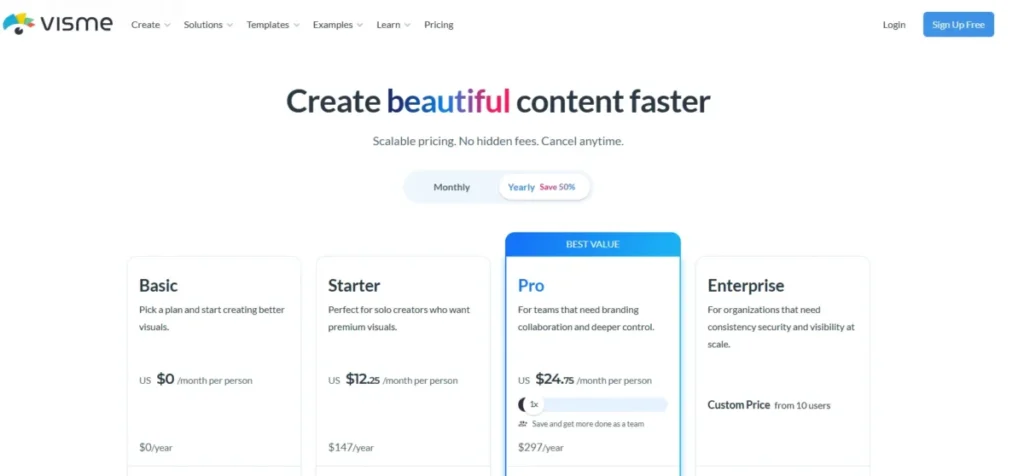
- Basic for online presenting. Starter at $12.25 monthly is the first plan that adds any download.
- Free plan:
- Basic includes 10 AI credits a month, 500 MB of storage, up to 50 slides or pages per project, public project links and hyperlinks, and no download in any format.
- First limit that bites:
- The download gate, and it sits lower than almost anyone expects. JPG, PNG and PDF start on Starter, and PPTX, MP4, GIF and HTML5 sit higher still.
- Better than STORYD:
- The credits refill every month instead of running out once.
- Worse than Slidesgo:
- No downloadable file of any kind on the free tier.
- Setup difficulty:
- Medium, since Visme carries more editor surface than a prompt-to-deck generator.
- Hidden costs:
- Template and design-asset access on Basic is limited, so a free build uses fewer of the assets shown in marketing.
- Evidence status:
- Basic price, monthly credits, storage, the per-project slide ceiling and the two-credit AI Designer cost read from Visme’s pricing page, which places “Download as JPG, PNG, PDF” on Starter rather than Basic. Visme’s own help centre states the same split in words, saying download options are available on paid plans.
Visme is the only tool here where a credit balance converts into a countable number of generations. Ten credits a month at two credits per AI Designer generation is at most five Designer generations, which is a credit ceiling rather than five finished presentations.
That transparency is worth something. It means you can plan a month’s work instead of guessing, which is more than Gamma, Pitch or Presentations.AI make possible.
The download gate is what holds Visme at seventh, and it is the single most misread fact in this ranking. Plenty of write-ups still describe Visme’s free plan as covering JPG, PNG and PDF.
Visme’s pricing table puts all three on Starter, and its help centre says plainly that download options belong to the paid plans. On Basic the deck is a URL, and nothing else.
That is not automatically a problem. If the deck is presented from a browser and never sent anywhere, a link is the deliverable and the gate never fires.
The moment anyone asks for a copy, the free plan is over.
| Pros | Cons |
|---|---|
| Ten AI credits refill every month rather than running out once | No download at all on Basic, not even PDF |
| The two-credit AI Designer cost is published, so the allowance is countable | Ten credits is at most five AI Designer generations a month |
| Public project links and hyperlinks work on Basic, so a deck can be presented without paying | 500 MB of storage limits how much media a project can carry |
| Up to 50 slides or pages per project is a generous free ceiling | Template and design-asset access on Basic is limited |
I would ask one question before starting here: does anyone need a copy of this. If the answer is yes, in any format, the free plan is the wrong place to build it.
- Verdict:
- A strong free plan for browser-based delivery, and the wrong free plan the moment any downloadable file is required.
Free Plans Whose Real Budget Cannot Be Read Off the Vendor’s Own Pages
Both tools below document useful free functionality, and in neither case can a reader work out how long the free plan lasts from what the vendor publishes. They fail at it differently.
Riley publishes no starting balance at all, while Presentations.AI publishes a per-slide rate and then two different balances for it to multiply. That is a rank penalty in both cases, not a verdict on either product.
Riley by Simplified: Best for a Short Branded Deck Exported as PDF
- Best for:
- Marketers and founders who need a short deck delivered as a PDF without entering a card to find out whether the tool works.
- Avoid if:
- You need to know your free budget in advance, or the deliverable is an editable PowerPoint file.
- Starting price:
- $0, described as free forever and credit-based, with no card required.
- Practical tier:
- Free until the undisclosed credit balance empties.
- Free plan:
- No monthly deck cap and no time limit, with 500 MB of cloud storage.
- First limit that bites:
- The credit balance, whose starting quantity the page does not state.
- Better than STORYD:
- No monthly deck cap and no time limit on the free experience.
- Worse than Gamma:
- No documented PowerPoint export, and no published allowance to plan against.
- Setup difficulty:
- Low, at six slides by default and thirty on demand.
- Hidden costs:
- Credits are consumed per action, so the first surprise arrives mid-project.
- Evidence status:
- The free-forever framing, credit model, storage, slide counts and export list read from Simplified’s own Riley page, which does not state a starting credit quantity.
“Free forever, no monthly deck cap, no time limit” is accurate and incomplete at the same time. The same page says you pay only for credits consumed, which means the deck cap has been replaced by a credit cap whose size is not disclosed.
Riley emits PDF, HTML, PNG and ZIP, with PDF available on every plan including free, and PPTX appears nowhere in that list. Six slides by default and thirty on demand suits a short pitch or an internal update, delivered as a PDF.
| Pros | Cons |
|---|---|
| No monthly deck cap and no time limit on the free experience | The starting free credit quantity is not published anywhere on the page |
| PDF export is available on every plan, free included | No documented PPTX export path |
| No credit card required to start | Credits are consumed per action, so the runway is invisible until it ends |
| Decks extend from six slides to thirty on demand | 500 MB of cloud storage caps how much a free account can accumulate |
I would not schedule anything against a balance I cannot see. For one short PDF it hardly matters, and that is the only use I would put it to.
- Verdict:
- A fair choice for a short PDF deliverable, and a poor one for anyone who needs to know how much free capacity they are starting with.
Presentations.AI: Best for Sampling a Business Generator on a Free Plan the Vendor Describes Two Ways
- Best for:
- People trying a business-focused generator on the free Starter plan who can treat the run as a sample rather than a deliverable.
- Avoid if:
- You need an editable PowerPoint file on the Starter plan, or a starting balance the vendor states the same way twice.
- Starting price:
- $0 on the Starter plan.
- Practical tier:
- Starter for a trial run, with any real schedule on a paid tier.
- Free plan:
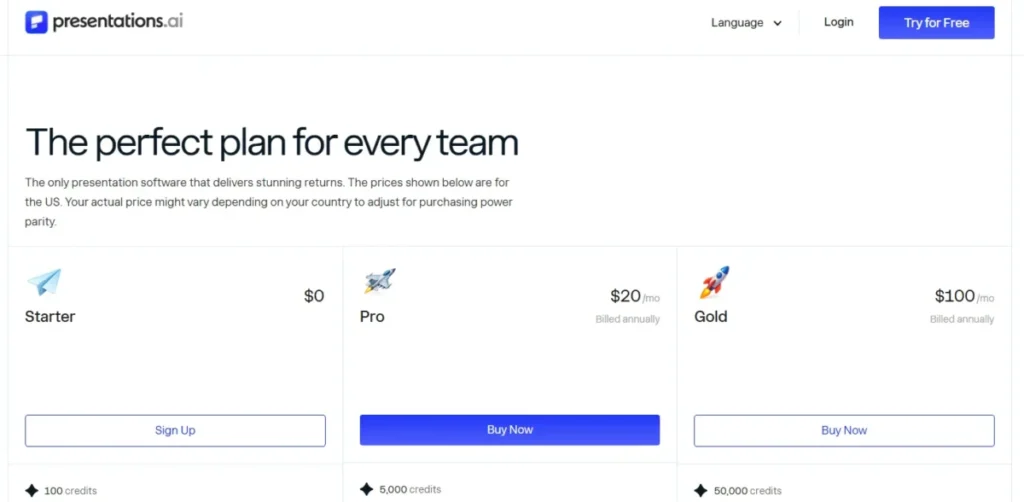
- Starter lists 100 AI credits and up to 20 slides. PowerPoint export is marked available on that tier and is placed behind Pro on three other vendor pages; the section below sets out how this ranking resolves that.
- First limit that bites:
- The PowerPoint button, since the FAQ places that export behind the paid plans and two comparison pages put it on Pro.
- Better than Riley by Simplified:
- Both the credit quantity and the per-slide credit cost are published somewhere.
- Worse than Slidesgo:
- No editable PowerPoint on the Starter plan, against three decks a month that do export.
- Setup difficulty:
- Low, through prompt-driven generation.
- Hidden costs:
- PowerPoint export, on the reading this ranking takes, is a paid feature rather than a free one.
- Evidence status:
- Starter price, annual credits and the twenty-slide ceiling read from the Presentations.AI pricing page. The five-credit per-slide rate and the 200-credit free balance read from the vendor’s API documentation. The export conflict is drawn from four vendor pages, all checked the same day.
Presentations.AI is the one vendor here that publishes a real credit exchange rate, and the one that then disagrees with itself about the balance that rate applies to.
The rate is unambiguous. Its API documentation states that each slide costs 5 credits, and works the arithmetic out loud: a 15-slide presentation is 75 credits, a 20-slide deck is 100.
The balance is not. The pricing page gives Starter 100 credits under a row headed AI Credits (annual), while the API page gives its free tier 200 credits one-time.
Those pages also run different plan ladders, Starter-Pro-Gold against Free-Starter-Growth-Scale, so a reader cannot be certain the two numbers describe the same product.
At the published rate, the two official balances imply either 20 or 40 generated slides before any other AI action is counted.
That is arithmetic from the vendor’s own rules rather than a measured result, and it counts slides rather than decks, since a deck can be any length and revisions spend credits too.
Read the lower figure and something else falls out. One hundred credits at five credits a slide is exactly one twenty-slide deck, which is also the plan’s stated slide ceiling.
On the pricing page’s own numbers, the free plan is a single maximum-length deck.
The export right is the second conflict, and here the weight of evidence points one way. The pricing comparison marks PowerPoint export on Starter.
The FAQ says paid plans are what open PowerPoint export, and both the Gamma comparison and the Slidesgo comparison list it as a feature of the Pro plan at $20 monthly.
Three vendor surfaces against one, so this ranking treats free PPTX export as unavailable until the pricing table is corrected. That is an editorial call on vendor evidence, and it is stated here rather than buried.
Use the Starter plan to see whether the output style suits you. Do not schedule work around a free tier that is one deck long on the vendor’s own arithmetic and cannot be relied on to produce a PowerPoint file.
| Pros | Cons |
|---|---|
| The per-slide credit rate is published, at five credits a slide | Free PowerPoint export is marked on the pricing table and denied on three other vendor pages |
| PDF export is marked available on Starter and is not contradicted anywhere | The free starting balance is given as 100 on one page and 200 on another |
| Up to twenty slides per deck is a high free ceiling | On the pricing page’s figures the whole free allowance is one twenty-slide deck |
| The Starter plan is stated plainly at $0 with no card gate on the tier | The two surfaces publishing credit rules run different plan ladders |
Publishing a per-slide rate is more than most vendors here manage, and I would rate it higher for that alone. Two starting balances and a contested export right are what keep it tenth.
- Verdict:
- Worth an evening to see the output style, and on the vendor’s own arithmetic that evening is about one deck long.
What Each Free Allowance Costs You When It Runs Out
| Tool | What is free | What forces the paid step |
|---|---|---|
| Gamma | 400 credits, 10 slides per prompt, four export formats | Credits empty with no refresh, or client work needs the branding removed |
| Canva | 10 shared Magic Design uses, full editor access | The shared allowance ends, or a needed template or asset is paid |
| Slidesgo | 3 AI presentations and 3 template downloads a month | A fourth deck in one month, or output that cannot carry attribution |
| TeraBox | 2 runs a day, PDF, DOCX and TXT input, PPTX and PDF output | A source file over 5 MB, or a deck longer than 15 slides |
| Pitch | 5 workspace members, 100 lifetime AI credits | The lifetime pool empties and more credits are purchased |
| SlidesAI | 12 presentations and 120 AI credits a year | Document upload, or a thirteenth deck inside the same year |
| Visme | 10 AI credits a month, public project links | Any download at all, starting with JPG, PNG and PDF on Starter |
| Riley by Simplified | Unlimited decks against an unpublished credit balance | The credit balance empties, at a point the free plan does not disclose |
| STORYD | 5 credits to create or rewrite | The sixth create or rewrite action |
| Presentations.AI | 100 annual credits, 20 slides, PDF export | The first PowerPoint file, or roughly one twenty-slide deck of generation at five credits a slide |
Source: vendor pricing and documentation pages cited in each product section. The two clearest upgrade triggers are documented on the Gamma pricing page and in the SlidesAI plan comparison. Verified 2026-09-03.
Three distinct upgrade triggers show up in that column, and they are worth separating because they arrive at different times.
Capacity triggers arrive on a schedule you can predict. A fourth Slidesgo deck, a thirteenth SlidesAI presentation and a sixteenth TeraBox slide are all knowable in advance, which makes them the easiest kind of limit to plan around.
Feature triggers arrive the first time you try something specific. Visme’s download button, SlidesAI’s document upload and Gamma’s brand removal all sit in this group, and each one can appear on day one rather than in month three.
Consumption triggers arrive without warning. Gamma, Pitch and Riley all spend an unpriced credit per action, so the moment the free plan ends is discovered rather than scheduled, and that uncertainty is why two of those three sit in the bottom half of this ranking.
What You Can Actually Export on a Free Plan
| Tool | Editable PPTX free | PDF free | Other free output |
|---|---|---|---|
| Gamma | Yes | Yes | PNG and Google Slides |
| Canva | Not documented | Yes | Editable Canva design and share link |
| Slidesgo | Yes | Not documented | PPTX opens in Google Slides and Figma |
| TeraBox | Yes | Yes | None documented |
| Pitch | Not documented | Not documented | Editor access and share link |
| SlidesAI | Yes | Not documented | Native Google Slides file |
| Visme | No, starts on paid tiers | No, starts on paid tiers | Public project link and embedded hyperlinks |
| Riley by Simplified | Not documented | Yes | HTML, PNG and ZIP |
| STORYD | Yes | Not documented | Google Slides, Keynote, Canva and browser presenting |
| Presentations.AI | No, Pro feature on three vendor pages | Yes | None documented |
Source: each vendor’s own pricing or product page, cited in that product’s section above. The two format splits most likely to surprise a reader are the Visme download tiers and the Riley export list. Verified 2026-09-03.
“Not documented” in that table means the vendor’s own pages do not state it, which is different from a stated no. Visme is the only row here with an explicit paid gate on every download format, and it is the row most people would get wrong from the marketing.
Five tools hand over an editable PPTX at zero cost: Gamma, Slidesgo, TeraBox, SlidesAI and STORYD. Presentations.AI appears to be a sixth on its pricing comparison and is a Pro feature on three other vendor pages, so this ranking leaves it out of the list.
If a colleague has to edit the file, those five are the shortlist.
Two tools are strongest when the deliverable never becomes a file. Pitch and Canva both keep the deck in an editor other people can open and change, which is a better outcome than a PDF for collaborative work and a worse one for anything that has to be emailed.
The pattern behind the table is worth naming. Export breadth tracks how the vendor makes money: tools charging for AI capacity give the file away, and tools charging for the design environment charge for the file.
Free-Plan Gates on Uploads, Images and Branding
| Tool | Source upload at $0 | Own images | Branding on free output |
|---|---|---|---|
| Gamma | Not documented for free | Supported in the editor | Gamma branding, removable on paid |
| Canva | Media uploads supported | Supported | No vendor mark documented |
| Slidesgo | Text and topic input only | Not available in the AI maker | Attribution required, removal is Premium |
| TeraBox | PDF, DOCX and TXT up to 5 MB | Not documented | Not published |
| Pitch | Files usable as agent context | Image replacement in the editor | Not published |
| SlidesAI | Paid feature on Pro and Premium | Not documented for free | Not published |
| Visme | Media uploads within 500 MB | Supported | Not published |
| Riley by Simplified | Not documented | Not documented | Not published |
| STORYD | Topic text only | Not documented | Not published |
| Presentations.AI | Not documented for Starter | Not documented | None on exports, vendor-stated |
Source: the AI feature and pricing pages cited in each product section. The two documented workflow restrictions are the Slidesgo image-upload limitation and the way Pitch Agent uses uploaded files. Verified 2026-09-03.
Only three tools here document a source-document path on the free tier, and they document very different ones. TeraBox accepts PDF, DOCX and TXT directly, Pitch treats uploaded files as context for its agent, and SlidesAI puts document upload behind a paid plan while its free tier accepts 1,000 characters of typed input.
That difference decides more free-tier fits than design quality does. If your input is a report, TeraBox is the only free option here built for it.
The image column rules out the most work. Slidesgo’s AI maker states plainly that uploading your own images is not available, which removes it from product decks, portfolio decks, real-estate decks and anything where the photography is the argument.
Branding is the column with the most blanks, and blanks are not clearances. Two vendors document a mark on free output: Gamma with removable branding on a paid plan, and Slidesgo with an attribution requirement.
A third, Presentations.AI, states the opposite, listing no branding on free exports on its own Gamma comparison page. That is a vendor claim on a competitive marketing surface rather than a documented policy.
The remaining eight state nothing either way, which is worth checking on your own deck before it reaches a client.
Setup and Handoff Difficulty
| Tool | Setup difficulty | Reason |
|---|---|---|
| Gamma | Low | Prompt to deck in one pass, with export available immediately |
| Canva | Low | Prompt produces a normal Canva design that edits like any other |
| Slidesgo | Low | Four documented steps, though an account is required before download |
| TeraBox | Low | Upload a document or enter a topic, then pick a download format |
| Pitch | Medium | The agent is quick, but the workspace and its members need setting up first |
| SlidesAI | Low | It runs inside the editor already in use, so nothing new is adopted |
| Visme | Medium | A larger editor with more surface to learn before the first deck ships |
| Riley by Simplified | Low | Six slides by default with an on-demand extension to thirty |
| STORYD | Low | Topic, structure, deck, in a documented three-step flow |
| Presentations.AI | Low | Prompt-driven generation with a twenty-slide ceiling on the free plan |
Source: the workflow documentation cited in each product section, including the Canva Magic Design workflow and the the Starter plan slide ceiling. Verified 2026-09-03.
Setup cost is low across this category, which is the honest finding. None of these tools requires an implementation project.
For several of them, published reviews by other outlets timed a first draft in seconds to a few minutes. No such timing exists for all ten, and none is claimed here.
The two medium ratings are not warnings. Pitch is medium because its value depends on inviting the other four members, and Visme is medium because it is a design tool that happens to generate rather than a generator that happens to have an editor.
Handoff difficulty is where the real variation sits, and it maps directly onto the export table above. A tool that gives you a PPTX has a handoff cost of zero, and a tool that gives you a share link has a handoff cost that shows up in someone else’s calendar.
How to Choose a Free AI Presentation Maker
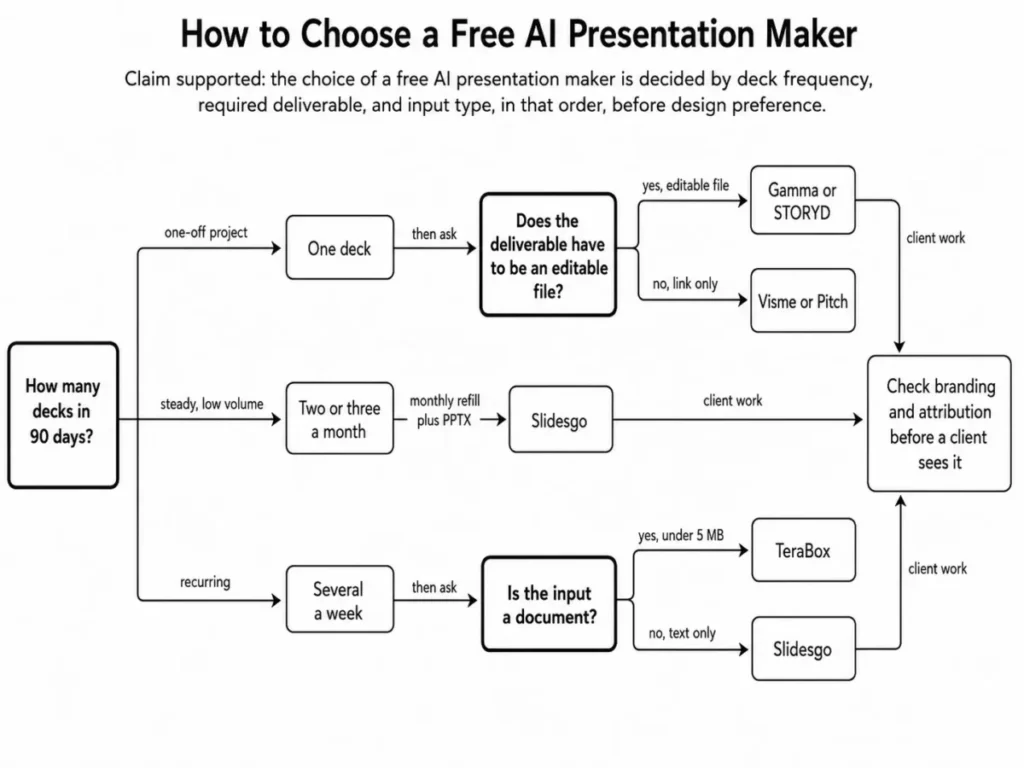
Work through these in order. The first two questions eliminate most of the field before design preference ever gets a vote.
- Count the decks you will make in the next ninety days. One deck points to Gamma or STORYD. Two or three a month points to Slidesgo. Several a week points to TeraBox.
- Name the deliverable. An editable PowerPoint leaves five confirmed options with Presentations.AI as a disputed sixth, a documented free PDF leaves five, and a share link leaves the whole field open.
- Check the input. If you start from a PDF or a Word file, TeraBox is the only free tool here that accepts one directly, and SlidesAI’s ceiling of 1,000 characters is the constraint to test first if you plan to paste text instead.
- Decide who sees the output. A client-facing deck needs the branding and attribution answer in writing before you start, which rules out Slidesgo’s free tier and Gamma’s unless you are willing to pay at the end.
- Ask whether the allowance refills. If the plan is a one-time pool, budget for the paid tier from day one rather than discovering it mid-project.
- Check whether the credit cost is published. A balance without a per-action price is a budget you cannot forecast, and it belongs on a trial rather than on a schedule.
- Test with your real material, not a demo topic. A generator that handles “quarterly sales review” beautifully can fall apart on your actual figures, and the free allowance is the cheapest place to discover that.
Common Mistakes That Cost People the Free Plan
Reading a credit number as a deck count. Four hundred credits, 100 credits and five credits are not comparable to each other, and only two vendors here publish what an action spends. Treat a credit balance as an unknown until you have watched it fall on your own work.
Assuming the allowance refills. Four of these ten free plans never refill without a referral or a purchase, and none of them says so in the headline. If you are planning a recurring deck, that question comes before every other one.
Confirming generation and forgetting export. Visme renews credits monthly and still charges for any downloaded file, PDF included. Check the format your audience needs before you spend the first credit, not after the deck is finished.
Ignoring the source-input path. Half of real presentation work starts from a document, and most free plans here start from a text box. TeraBox accepts PDFs at $0, SlidesAI charges for the same capability, and the difference is invisible on a feature list.
Treating an annual quota as a monthly one. Twelve presentations a year averages one a month and behaves nothing like it, because a single busy fortnight can spend the lot.
Sending free output to a client without checking the mark. Two of these vendors document branding or attribution on free output and eight say nothing either way, which is a question to settle privately before it reaches a meeting. If you are assembling an investor deck, the structure matters as much as the tool, and these pitch deck examples cover it separately.
Choosing on template count. Template libraries are the easiest thing to market and the least likely thing to change a decision, because every tool here produces a serviceable draft and none of them produces a finished deck.
Tools Left Out of This Ranking and Why
| Tool | Why it is not ranked |
|---|---|
| Prezi | Prezi’s own published material states two different answers about AI on its free Basic plan |
| Beautiful.ai | Access is trial-led rather than a persistent free tier |
| MagicSlides | The individual plan surface examined was paid, and the prominent free allowance found was specific to the API |
| PopAI | The pricing surface did not expose enough current detail to classify the free tier |
| Microsoft Copilot in PowerPoint | A paid Microsoft entitlement is not a standalone free AI presentation tier |
Prezi is the exclusion worth explaining, because it would otherwise be an obvious entry. One Prezi article describes the free plan as including 500 AI credits and calls that enough to create and refine several complete presentations.
A more recent Prezi comparison table states that the Basic plan carries no AI credits, alongside watermarked exports and public-only sharing. Both pages are published by the same vendor.
Ranking a free tier requires knowing what the free tier contains, and a figure a vendor states two ways is not a figure. Prezi returns to this ranking when its own surfaces agree.
The other four exclusions are simpler. A trial is a countdown rather than a free plan, an API quota is not a consumer workflow, a paid suite entitlement is not a free tool, and a pricing page that will not resolve is not evidence of anything.
Final Verdict
Each pick below names a cohort, the workflow it suits, and the plan gate that ends the free ride. The ranking reason is the same for every entry: how often the allowance refills, and what the official documentation says the finished deck is allowed to become.
Gamma is the strongest free AI presentation maker in this ranking for a single important deck, because no other free plan hands over PDF, PPTX, PNG and Google Slides at once. The condition attached is real: the 400 credits do not refresh, and the branding gate means a client-facing deck ends in a paid decision.
For anyone presenting on a schedule, the order changes. Slidesgo is the better pick at two or three decks a month, because the allowance refills and the output is an editable PPTX.
TeraBox is the better pick for document-driven work, because two free runs a day renews faster than any pool here empties.
For a small team, Pitch is the stronger fit, since five free members outlast the AI credits and leave a working collaborative editor behind. For a single business narrative that has to open in Keynote or Canva, STORYD’s five credits buy the widest handoff in this list.
Canva is the right answer when the AI draft is the beginning of design work rather than the end of it, and Visme is the right answer when the deck is presented from a link rather than sent as a file. SlidesAI suits people who will not leave Google Slides or PowerPoint and only need a dozen decks a year.
Riley by Simplified and Presentations.AI both do useful work and both ask you to start without a budget you can read, though not in the same way. Riley never publishes the size of its free credit pool.
Presentations.AI is the more transparent of the two on consumption, at five credits per generated slide, and its own pages then disagree on whether a free account starts with 100 credits or 200. Either is acceptable for a trial and neither is a basis for a term, a quarter or a client engagement.
If you take one rule from this ranking, take this one. Pick on how often the allowance returns and what the finished deck is allowed to become, and let design preference break the tie rather than start the decision.
I would rather hand someone a plain deck in the right file format than a beautiful one they cannot open.
FAQ – Best Free AI Presentation Maker
These are the questions the body above does not settle outright.
What is the best free AI presentation maker?
Gamma, for a single deck that has to leave the product, because its free plan covers PDF, PPTX, PNG and Google Slides export with up to ten slides per prompt. For recurring use, Slidesgo is the better answer, since its allowance refills every month rather than emptying once.
Is there a completely free AI PowerPoint generator?
Five of the ten tools here produce an editable PowerPoint file at $0: Gamma, Slidesgo, TeraBox, SlidesAI and STORYD. A sixth, Presentations.AI, marks PowerPoint export as available on its free tier on one page and restricts it to Pro on three others, so it is not counted.
All of them cap how much you can generate before paying, so “completely free” applies to the file format rather than to the volume.
Which free AI presentation maker exports to PowerPoint without paying?
Gamma, Slidesgo, TeraBox, SlidesAI and STORYD all document a PPTX or native PowerPoint path on their free tiers. Presentations.AI is the ambiguous case, marking PowerPoint export available on Starter on its pricing comparison while its FAQ and two comparison pages place that export on Pro.
Visme is the clearest exception, and it goes further than most readers expect: no download of any format on Basic, with JPG, PNG and PDF starting on the paid Starter plan.
Do Gamma’s free credits come back every month?
No. Gamma’s documentation states that free credits do not refresh, and that once the initial 400 are spent the options are referrals, worth 200 credits each, or a paid plan.
How many presentations can I make free with Slidesgo?
Three AI-generated presentations a month, plus three template downloads a month, on the free plan. The allowance resets monthly, which makes it the most predictable recurring free offer in this ranking.
Can AI turn a PDF into a PowerPoint for free?
TeraBox’s AI Presentation Agent is the one tool here that documents it at $0. It accepts PDF, DOCX and TXT sources up to 5 MB, generates 0 to 15 slides on a free run, and downloads as an editable PPTX or a PDF.
Which free AI presentation tools reset their credits?
Slidesgo and Visme reset monthly, TeraBox resets daily, and SlidesAI works on an annual allowance. Gamma, Canva, Pitch and STORYD hand out a one-time or lifetime pool that does not reset, and Riley by Simplified does not publish its reset behaviour at all.
Presentations.AI cannot be placed cleanly in any of those groups. Its pricing page describes 100 annual credits while its API documentation describes 200 credits granted once at signup, so both the size and the cadence of the free allowance are unsettled on the vendor’s own pages.
Which free AI presentation maker has no watermark or attribution?
Two vendors document a mark on free output: Gamma applies its own branding, removable on a paid plan, and Slidesgo lists attribution-free output as a Premium feature. Presentations.AI states the reverse on a comparison page of its own, listing no branding on free exports, which is a vendor claim rather than a documented policy.
The remaining seven leave it unstated, so a client-facing deck needs that checked on the finished file before it is sent.
What is the best free AI slide generator for students?
Slidesgo for coursework, because three decks a month covers a normal assignment load and the PPTX opens in whatever the university uses. TeraBox is the better fit for research work, since it converts reading material under 5 MB directly into slides twice a day.
Is Canva’s AI presentation maker free?
Canva Free costs $0 annually for one person, and Magic Design can be used up to ten times for free. Those ten uses are shared across Magic Design’s versions, including Global Search and Video, so they are not ten free presentations.
Whichever you choose, match the free quota and its reset cadence to your presentation workload first. Then confirm the export format, the editing workflow and the collaboration model fit before you generate anything.