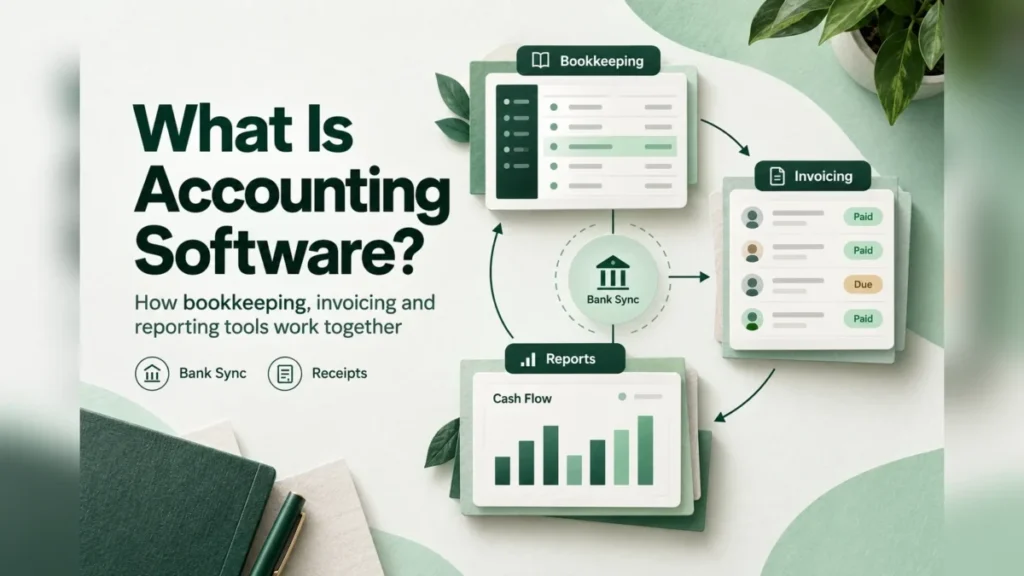
Accounting software is a business application that records a company’s income and expenses in a ledger and turns those entries into invoices, reconciled bank balances and financial reports. For a small US business, it replaces spreadsheet bookkeeping with computerized records that, under IRS rules, must reconcile with your books and your tax return.
A single owner with a few transactions a month can still keep simple records. A business that holds inventory, employs people or shares its books with an accountant is the one that needs software. If you only send a few invoices, start with my free invoice template.
This guide rests on IRS and SBA pages and on Xero’s and Intuit’s own plan pages, read in October 2026. If you already want product names, my ranking of the best accounting software for small business compares the options by business type.
In This Article (9 sections)
What Accounting Software Is, in Plain Terms
Accounting software is a recordkeeping system with four parts: a chart of accounts, a general ledger, the source documents behind each entry, and the reports built from the ledger. IRS Publication 583 describes recordkeeping packages as tools that “require very little knowledge of bookkeeping and accounting.”
- The chart of accounts: the categories (sales, rent, equipment, loans) that every transaction is sorted into.
- The general ledger, kept by double-entry: each transaction is a debit in one account and a credit in another, which keeps the books self-balancing.
- Source documents (invoices, receipts, deposit slips, canceled checks) attached to the entries they support.
- Reports: the profit and loss statement, the balance sheet and the cash flow statement.
A spreadsheet can hold the same rows. What the software adds is the double-entry ledger, which Publication 583 says has “built-in checks and balances to assure accuracy and control.” Tax preparation software uses the year-end totals instead of keeping the books, and a bookkeeper is the person who keeps the ledger current.
What people mean by accounting software is this whole system, also called bookkeeping software or an accounting package. The parts make more sense in motion, so the next section follows one month through them.
How It Works: One Month of Books
The software moves each transaction through five steps, from capture to report:
- Capture: bank feeds, invoices, bills and receipts bring transactions in.
- Categorize: each transaction is assigned to an account in the chart of accounts.
- Reconcile: entries are matched against the bank statement, so anything missing shows up.
- Post: entries land in the general ledger as debits and credits, an invoice when it is sent and a bank line once reconciliation matches it.
- Report: the ledger rolls up into a profit and loss statement, a balance sheet and a cash flow report.
The accounting method decides when income counts. Under the cash method, you report income in the tax year you receive it and deduct expenses when you pay them. Under the accrual method, income counts when you earn it and expenses when you incur them (IRS Publication 538).
The SBA’s finance guide gives the plain version: a sale made in January and paid in February sits on January’s books under accrual and on February’s under cash.
Take an illustrative three-person design studio; every figure in this example is invented. In January it sends one $4,800 invoice that the client pays in February, pays $1,200 in rent and $300 for software subscriptions, and buys a $900 laptop. Reconciliation then finds a $47 bank charge nobody entered.
| Illustrative January entry | Account debited | Account credited |
|---|---|---|
| Invoice sent | Accounts receivable | Sales |
| Rent paid | Rent expense | Bank |
| Software subscriptions paid | Software expense | Bank |
| Laptop bought | Equipment (an asset) | Bank |
| Bank charge found in reconciliation | Bank fees | Bank |
The two methods give the same studio two very different Januaries:
- Accrual: $4,800 of sales minus $1,200 + $300 + $47 = $1,547 of expenses leaves a $3,253 profit.
- Cash: no payment arrived in January, so the $1,547 of expenses shows as a $1,547 loss.
The laptop sits in an equipment account as an asset, so it reduces neither figure. Without reconciliation, the $47 charge would be missing and profit overstated by $47.
That is the core job: one set of entries, read under your method, with reconciliation catching what nobody typed in. Each step maps to a feature, and plans differ in how much of each they include.
Core Features: The Financial Jobs It Handles
On Xero’s and QuickBooks’ October 2026 US plan pages, every paid plan sends invoices, pays bills and runs reports. The plans split on volume caps, automation, multiple currencies, projects and inventory.
| Feature | Job it does | Where a plan gates it |
|---|---|---|
| Invoicing | Bills customers and records what they owe | Xero Early: quotes and 20 invoices |
| Bills | Records what you owe and pays it | Xero Early: 5 bills |
| Bank feeds and reconciliation | Matches bank lines to entries | Xero: reconciliation on every plan, auto-reconcile on Growing and Established |
| Cash flow forecast | Projects money in and out | Xero: 30 days on Early, 60 on Growing, 180 on Established |
| Multiple currencies, projects, expense claims | Foreign customers, job costing, staff spending | Xero Established |
| Auto-categorization | Assigns transactions to accounts | QuickBooks Plus and Advanced |
| Inventory | Tracks stock and its cost | QuickBooks Plus and Advanced; paid add-on on Simple Start and Essentials |
| Sales tax, W-9 and 1099 management | Tax tracking and contractor reporting | Every Xero plan |
Sources: Xero US pricing page and QuickBooks August 2026 release notes, checked October 2026.
Entry caps are where a cheap plan breaks first. Xero Early’s 20-invoice limit counts both approving and sending, and transactions started by app partners may count too.
The pricing page prints the cap as “20 invoices” without stating a period, so a business that bills a client every working day should ask Xero how the count resets before it picks Early.
Inventory is the other gate: a seller of goods on QuickBooks either starts on Plus or pays for the add-on.
What changed in 2026: AI categorization and bundled bill pay
The 2026 changes automate routine entries, with a person still approving the result. Intuit’s August 2026 QuickBooks release added AI auto-categorization to Plus and Advanced and moved Bill Pay Elite inside Advanced; Simple Start, Essentials and Plus pay $45 a month for it.
Invoicing on Autopilot and the Intuit Intelligence chat are betas with monthly capacity limits. Xero now includes free standard ACH bill payments on its US plans, and its assistant JAX reconciles matches “where it’s confident” while you keep the final say (Xero’s accounting software page).
I would not choose a plan for a beta feature that can run out mid-month; the ledger, reconciliation and reports are what the subscription must deliver. Feature sets also depend on the kind of product you buy.
Types of Accounting Software
The three splits that matter to a buyer are where the software runs (cloud or desktop), how far it scales (small-business software or ERP) and what it costs (free or paid).
| Type | Fits | Example | Watch out for |
|---|---|---|---|
| Cloud | Owner and accountant working in one file from anywhere | Xero, QuickBooks Online | Plan caps and monthly renewals |
| Desktop | Heavy inventory work | QuickBooks Desktop Enterprise | Up to 40 users on Desktop Enterprise |
| ERP | Several legal entities | Intuit Enterprise Suite | More system than a single company needs |
| Free | Very low volume | QuickBooks Free | No mobile app or third-party integrations |
Sources: QuickBooks Desktop page, QuickBooks pricing page and Xero US pricing page, checked October 2026.
Cloud vs desktop
Cloud software fits a business whose owner and accountant need the same file from different places; Xero, for example, lets you invite your accountant or bookkeeper into it. Desktop survives where inventory is heavy.
Intuit positions QuickBooks Desktop Enterprise for manufacturers and wholesalers, with up to 40 users and up to 1 million customers, vendors and inventory items. Moves to QuickBooks Online Advanced come with an implementation consultant, at no cost for simple migrations.
Where the books live also decides who protects them. Xero says it provides “multiple layers of protection” for the financial information you trust to it, and QuickBooks Online lists backup and restore in its plan comparison.
Books kept on your own computers are yours to protect: the SBA’s business guide says to regularly back up data on all your computers, weekly to cloud storage if possible.
Small-business software vs ERP
A business outgrows accounting software when it runs several legal entities that need inter-company accounting and one consolidated view. Intuit labels Intuit Enterprise Suite “a modern ERP” for that case, with inter-company accounting, eliminations and reporting built in.
One company with one set of books, even at 25 users, stays on the accounting-software side.
Free vs paid
Free accounting software works for very low volumes, on the vendor’s terms. QuickBooks Free costs $0 a month with no credit card required, but leaves out mobile app access and third-party integrations. Intuit adds that Free “may be offered for a limited time.”
Xero’s US pricing page lists three paid plans and no free one. A free plan is a place to learn the ledger, not a home for a business that needs its bank and sales apps connected.
Accounting Software vs Invoicing, Payroll, Inventory and ERP Tools
Accounting software is the system of record. An invoicing app covers one of its modules, payroll software pays people and files payroll taxes, and inventory tools track stock. ERP adds operations across entities, and a bookkeeper keeps the ledger current.
| Tool | What it does | What it leaves to others | When you add it |
|---|---|---|---|
| Accounting software | Ledger, reconciliation, financial statements | Payroll runs, detailed stock control | From the first invoice you need to track |
| Invoicing app | Bills clients and collects payment | The ledger and the statements | When billing is the only job |
| Payroll software | Pays staff, calculates and files payroll taxes | The general ledger | With the first employee |
| Inventory software | Tracks stock by item and location | Financial statements | When stock outgrows your accounting plan |
| ERP | Multi-entity finance plus operations | Simplicity for one company | When you run several entities |
| Bookkeeper or CPA | Keeps and reviews the books | The software itself | When entries pile up or tax gets complex |
| Tax preparation software | Prepares the return from year-end totals | Daily records | At filing time |
Payroll is an optional add-on: Xero Payroll, powered by Gusto, calculates and files payroll taxes and pays your team. With staff to pay, my guide to payroll software for small business compares dedicated options.
A seller with many items across several locations needs more than a plan’s stock module, which is where inventory management software comes in.
If billing clients is your whole finance workload, invoicing software for small businesses can carry you until you need a ledger. On the people side, the SBA notes that a CPA typically costs more than online services, while a bookkeeper handles basic day-to-day work at a lower cost. The remaining question is whether your business needs the system of record yet.
Benefits, Limits and Who Needs It
You need accounting software once your records must do more than list income and expenses. The IRS recordkeeping page accepts any system that clearly shows income and expenses.
Publication 583 also calls single-entry “a simple and practical system” when starting a small business. The benefits of software hold under conditions:
- It saves data-entry time: bank feeds bring transactions in daily, so the saving grows with your monthly volume.
- Records ready for financial statements and tax returns, two of the reasons the IRS gives for keeping records at all.
- Proof when it is needed: you carry the burden of proof for entries and deductions, and a reconciled ledger ties each figure to its source document.
The limits are as real. Software does not make a return correct: computerized records must reconcile with your books and return and identify the underlying source documents.
You must also keep a description of the system, and someone still sets up the chart of accounts and reviews the categories.
You need accounting software if any of these is true:
- You produce, buy or sell merchandise: the IRS generally requires an inventory and an accrual method for those purchases and sales, with an exception for small business taxpayers.
- You have employees, whose payroll brings its own records and retention rule.
- You send more invoices than a spreadsheet can track, or chase unpaid ones every month.
- An accountant or bookkeeper needs access to your books.
If none applies, a disciplined spreadsheet works for now. Once one does, the next question is the monthly bill.
How Much Accounting Software Costs
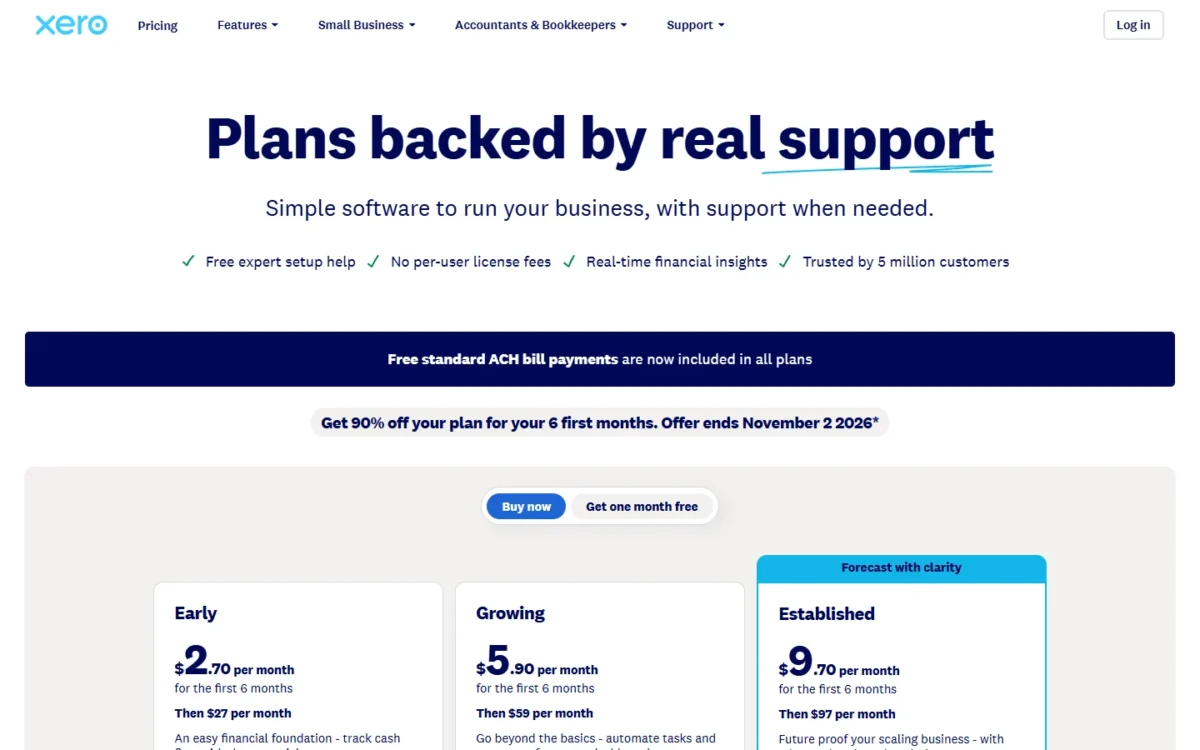
In October 2026, US list prices ran from $27 to $97 a month on Xero and from $38 to $340 a month on QuickBooks Online, which also lists a $0 Free plan.
The bill then moves with plan caps, add-ons and price changes, such as the new Essentials, Plus and Advanced prices for renewals on or after August 1, 2026. For recent QuickBooks Online subscribers, Intuit says the updated pricing takes effect only at their seventh invoice; that delay covers the price change, not a promotional discount.
| Vendor and plan | List price per month | Users, caps or what the plan adds |
|---|---|---|
| Xero Early | $27 | Quotes and 20 invoices, 5 bills |
| Xero Growing | $59 | Auto-reconcile, 60-day cash flow forecast |
| Xero Established | $97 | Multiple currencies, projects, 180-day forecast |
| QuickBooks Free | $0 | No mobile app or third-party integrations |
| QuickBooks Simple Start | $38 | 1 user, 2 accountant seats |
| QuickBooks Essentials | $85 | 3 users, 2 accountant seats |
| QuickBooks Plus | $140 | 5 users, 2 accountant seats, inventory |
| QuickBooks Advanced | $340 | 25 users, 3 accountant seats, Bill Pay Elite |
Sources: Xero US pricing page and QuickBooks pricing page, US view, checked October 2026. Prices in US dollars; Xero’s exclude taxes and renew monthly.
The add-ons decide what you actually pay. Xero Payroll, powered by Gusto, costs $36 a month + $6 per employee or contractor. QuickBooks charges $40 a month to add inventory to Simple Start or Essentials, and $45 a month for Bill Pay Elite on Simple Start, Essentials and Plus (Advanced includes it).
A five-person team on Xero Growing with payroll pays $59 + $36 + $6 x 5 = $125 a month. Over a year that is $59 x 12 = $708 plus $36 x 12 = $432 plus $6 x 5 x 12 = $360, which is $1,500.
At that size, payroll ($36 + $6 x 5 = $66 a month) costs more than the $59 accounting plan itself, so price the add-on before you compare base plans. For another option, read my FreshBooks review.
QuickBooks shows the effect from another angle. Essentials plus the inventory add-on comes to $85 + $40 = $125 a month, against $140 for Plus, which includes inventory, 5 users instead of 3, and AI auto-categorization.
Treat promotions as caveats, not prices. QuickBooks shows “50% off for 3 months” ($19, $42.50, $70 and $170 a month) or a 30-day free trial.
My QuickBooks Online pricing breakdown covers every plan detail behind those numbers.
Xero’s 90% off the first 6 months is for new US customers, ends November 2, 2026, and excludes add-ons, usage and payment fees. The Xero pricing guide lists each Xero plan and add-on. Budget on the list price, then match the plan to your situation.
How to Choose Accounting Software
Decide in this order: accounting method and inventory, then invoice and bill volume against plan caps, then add-ons. Access, currencies and entities come next, and the list price comes last. If you are choosing between QuickBooks and Xero, read my QuickBooks vs Xero comparison.
| Your situation | What to look for | Example from the October 2026 plan pages |
|---|---|---|
| You sell goods | Inventory in the plan, or the add-on cost | QuickBooks Plus and Advanced include inventory |
| You send more invoices than an entry plan allows | A plan above the entry cap | Xero Early stops at 20 invoices |
| Several people work in the books | User and accountant seats | QuickBooks Simple Start: 1 user; Essentials: 3 |
| You have employees | The payroll add-on’s per-person price | Xero Payroll, powered by Gusto |
| You bill customers abroad | Multiple currencies | Xero Established |
| You run several entities | ERP | Intuit Enterprise Suite |
| You are leaving desktop software | Migration help | Intuit’s consultant for QuickBooks Online Advanced |
Sources: Xero US pricing page, QuickBooks pricing page and QuickBooks Desktop page, checked October 2026.
My QuickBooks Online review covers Intuit’s plans, limits and fit in depth.
For the other example, the Xero review weighs the same questions for Xero’s three plans.
Mistakes that raise the bill or break the books
- Taking the promotional price as the price: both discounts end, and Xero’s never touches add-ons.
- Buying an entry plan whose invoice or bill cap your normal volume already exceeds.
- Leaving add-ons out of the budget.
- Downgrading too soon: Xero lets you move to a cheaper plan only 1 month after upgrading, while QuickBooks plans can be upgraded or downgraded at any time.
FAQ
Is Excel accounting software?
No. A spreadsheet can hold single-entry records, which the IRS accepts if they clearly show income and expenses. Accounting software adds the double-entry ledger, which Publication 583 says has built-in checks and balances, and reconciliation against the bank.
What software is used in accounting?
QuickBooks Online and Xero are two cloud examples for small US businesses. QuickBooks Desktop Enterprise is a desktop example, and Intuit Enterprise Suite is an ERP for companies with several entities.
Do private companies need to follow GAAP?
No. The SBA says private companies are not required to follow GAAP, the standard the Financial Accounting Standards Board maintains in the United States.
How long does accounting software need to keep records?
As long as the IRS needs them: generally 3 years, or 7 years if you claim a loss from worthless securities or a bad debt deduction (IRS record retention page).
Employment tax records stay at least 4 years. Keep that history in the software, or export it, before you cancel a subscription.