

In QuickBooks vs Xero, Xero’s three US plans list for less at each paid tier they share: $27, $59 and $97 a month against QuickBooks Online’s $38, $85 and $140. Xero also charges no per-user license fees, which suits service businesses watching cost.
QuickBooks Online suits businesses that want inventory inside Plus, class tracking, or up to 25 users with custom permissions on Advanced at $340 a month. For five users over a year at monthly list prices, Plus costs $140 x 12 = $1,680 and Xero Established $97 x 12 = $1,164.

Quick verdict
Xero is the lower-cost ledger at every shared tier, with no per-user license fees. It fits service businesses that invoice in volume from Growing up, and teams that will pass five logins without needing custom permissions.
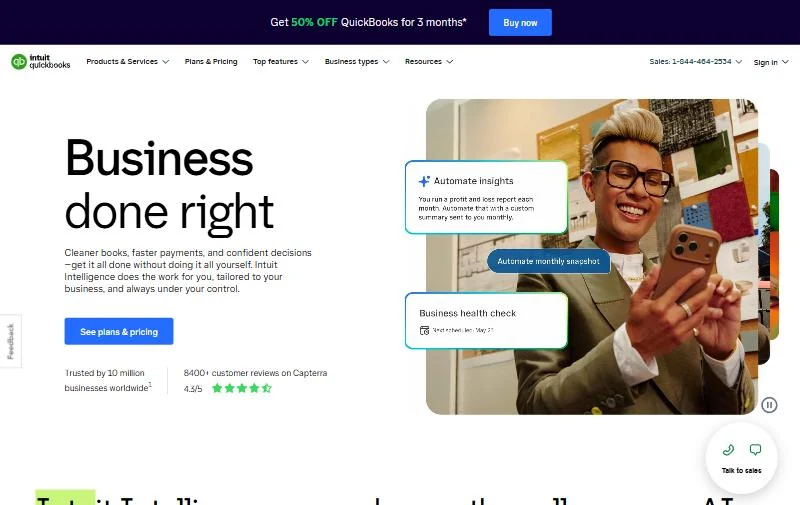
QuickBooks Online fits businesses that hold stock (inventory is built into Plus), bill in foreign currencies from Essentials, track classes or locations, or need 6 to 25 users with custom permissions on Advanced.
The trade-off: QuickBooks caps users and charges more per tier. Xero’s Early plan stops at 20 invoices and 5 bills a month, and its multi-channel inventory tool is a paid add-on.
Choose QuickBooks Online if
- You hold stock: Plus tracks products, cost of goods and purchase orders
- You need more than 5 users with custom permissions: Advanced holds 25
Choose Xero if
- You want the lowest list price at each tier and no per-user license fees
- You are leaving QuickBooks: Jet Convert moves your current and prior fiscal year free
In This Article (11 sections)
QuickBooks Online vs Xero at a Glance
QuickBooks Online sells four paid plans plus a $0 Free plan, and Xero sells three plans; both price per month in US dollars.
| Attribute | QuickBooks Online | Xero |
|---|---|---|
| Best for | Stock-holding businesses and teams of 6 to 25 users that need role control | Service businesses that want the lowest list price per tier |
| Plans, monthly list price | Free $0, Simple Start $38, Essentials $85, Plus $140, Advanced $340 | Early $27, Growing $59, Established $97 |
| Users | Limited: 1 on Free and Simple Start, 3 on Essentials, 5 on Plus, 25 on Advanced | No per-user license fees |
| Entry-plan limit | Free: 2 invoices a month; Simple Start: 1 user | Early: 20 invoices and 5 bills |
| Payroll | Add-on: Workforce Payroll, $50 a month + $7 per employee | Add-on: Xero Payroll powered by Gusto, $36 a month + $6 per employee or contractor |
| Multi-currency | Plan-dependent: Essentials, Plus, Advanced | Plan-dependent: Established |
| Inventory | Plan-dependent: Plus and Advanced | Limited: 4,000 tracked items; Add-on: Inventory Plus, $39 a month |
Sources: QuickBooks Online pricing page, QuickBooks payroll add-on pricing, Xero US pricing page, Xero stock control, checked October 2026.
The table shows where the two split, but only four of those gaps change which ledger a small business should buy.
Key Differences Between QuickBooks Online and Xero
QuickBooks Online prices by headcount and gates stock and role control by plan, while Xero prices by features and lets anyone in at no extra license fee. If you are new to this category, start with what accounting software is.
Users decide the QuickBooks plan, features decide the Xero plan. QuickBooks caps logins at 1, 3, 5 and 25 users, so a sixth person forces Advanced. Xero lists no per-user license fees, so a growing team pays the same until it needs a higher plan’s features.
My QuickBooks Online review covers how those caps play out on their own.
Xero’s cheapest plan caps volume, QuickBooks’ cheapest paid plan caps people. Xero Early caps the invoices and bills you send each month (the invoicing section below gives the limits), while QuickBooks Simple Start lists no invoice cap but allows one user.
My Xero review weighs where Early runs out.
Inventory is built in on one side and partly an add-on on the other. QuickBooks Plus tracks products, cost of goods and purchase orders. Xero tracks up to 4,000 finished items and sells multi-channel order handling as Inventory Plus.
Multi-currency starts a tier lower on QuickBooks. QuickBooks lists Multiple currencies from Essentials at $85 a month, while Xero needs Established at $97 for foreign-currency invoicing. That matters to any business billing customers abroad.
Each of these differences lives inside a feature area, and the sections below compare them on the same terms.
QuickBooks Online vs Xero: Features Compared
The matrix lines up the jobs a small business runs, and the H3s below explain the gates that change the choice.
| Job | QuickBooks Online | Xero |
|---|---|---|
| Invoices on the cheapest paid plan | Not listed as capped on the Simple Start card | Limited: 20 on Early |
| Bills on the cheapest paid plan | Free ACH bill pay; $0.50 per standard ACH over monthly allotments | Limited: 5 on Early |
| Progress invoicing | Plan-dependent: Plus, Advanced | Not listed on the pricing page |
| Automatic bank matching | Plan-dependent: learns categories from Simple Start; reconciles books on Plus | Plan-dependent: Growing, Established; Add-on: $5.00 a month on Early |
| Inventory | Plan-dependent: Plus, Advanced | Limited: 4,000 tracked items; Add-on: Inventory Plus |
| Classes and locations | Limited: 40 on Plus; unlimited on Advanced | Not listed on the pricing page |
| Custom user permissions | Plan-dependent: Advanced | Not listed on the pricing page |
| Apps | Not listed on the pricing page (count) | More than 1,000 apps |
Sources: QuickBooks Online pricing page, QuickBooks invoicing page, Xero US pricing page, Xero common questions, checked October 2026.
Invoicing, bills and getting paid
Xero Early stops at 20 invoices and 5 bills a month, while QuickBooks Simple Start lists no invoice cap but one user. On Xero, invoices or bills past the limit save as drafts until you upgrade or the next month starts.
That makes the cheapest plans serve different businesses. A solo consultant sending 30 invoices a month outgrows Early, yet fits Simple Start. A two-person shop sending 10 invoices fits Early but needs QuickBooks Essentials for the second login.
If invoicing is most of your bookkeeping, read my FreshBooks review.
QuickBooks invoices take cards, ACH, Apple Pay, PayPal and Venmo, and progress invoicing (billing a project by milestone) sits on Plus and Advanced. Xero accepts online invoice payments on every plan.
Both pay bills by standard ACH at no extra fee. QuickBooks charges $0.50 per standard ACH transaction over its monthly allotments, and Xero applies fees to payment methods other than standard ACH.
Verdict: invoicing on the cheapest plan
QuickBooks Online fits a one-person business that sends more than 20 invoices a month: Simple Start at $38 a month lists no invoice cap, while Xero would need Growing at $59. Xero Early fits a small team with low volume, because its price covers every login.
Bank reconciliation and automation
Xero includes auto-reconcile on Growing and Established and sells it on Early for $5.00 a month. QuickBooks learns how you categorize transactions from Simple Start up, and its Plus card adds an AI step that “reconciles your books”.
Xero’s matching tool, JAX, uses four methods: your bank rules, matches, your own past reconciliations, and predictions from how other Xero users coded similar lines. JAX reconciles on its own only when it is highly confident, and you can reject its matches.
QuickBooks Advanced adds workflow automation and batch invoices and expenses on top of the Plus matching. To see how each handles your transactions, connect the same bank account to both trials and compare a month of suggestions.
Payroll: QuickBooks Workforce vs Xero Payroll powered by Gusto
Xero Payroll, powered by Gusto, costs $36 a month plus $6 per employee or contractor, with two months free. QuickBooks Workforce Payroll costs $50 a month plus $7 per employee as an add-on to QuickBooks Online.
For five employees over a year, Xero Payroll costs $36 x 12 = $432 plus $6 x 5 x 12 = $360, which is $792. QuickBooks Workforce Payroll costs $50 x 12 = $600 plus $7 x 5 x 12 = $420, which is $1,020.
QuickBooks sells two higher tiers. Workforce Premium ($88 a month + $13 per employee) adds time tracking, same-day direct deposit and an expert setup review. Workforce Elite ($134 a month + $17 per employee) adds expert setup, tax penalty protection and a personal HR advisor.
Xero Payroll files payroll taxes in all 50 states at no extra cost, issues W-2s and 1099s, and moves your payroll data in for free on request. It is not available to Xero’s US mobile subscribers. My Gusto payroll review covers the engine behind it as a standalone service.
Verdict: payroll
Xero fits a small team that needs payroll and tax filing only: both its base fee and its per-person fee are lower ($36 and $6 against $50 and $7). QuickBooks fits a business that wants time tracking and same-day deposit in the payroll bundle, which starts at Workforce Premium.
Inventory and multi-currency
QuickBooks Plus tracks products, cost of goods and purchase orders, while Xero tracks up to 4,000 finished items and sells Inventory Plus for $39 a month on Growing and Established. Inventory Plus syncs orders from several sales channels, up to 10,000 orders a month.
QuickBooks lists inventory tracking, purchase orders and sales orders on Plus and Advanced only, and connects 1 sales channel on Simple Start, 3 on Essentials and all of them on Plus and Advanced.
Multi-currency sits on Xero Established only: Early and Growing users must change plan to bill in foreign currencies. Xero invoices and takes payments in more than 160 currencies on that plan. QuickBooks lists Multiple currencies on Essentials, Plus and Advanced, but not on Free or Simple Start, so a QuickBooks user can bill abroad from $85 a month.
A business that needs multi-channel stock and foreign currencies pays Xero Established plus Inventory Plus: $97 x 12 = $1,164 plus $39 x 12 = $468, which is $1,632 a year. QuickBooks Plus at $140 x 12 = $1,680 lists inventory tracking, Multiple currencies and all sales channels without an add-on, so the yearly costs nearly match.
Verdict: inventory
Depends on order volume and channels. A shop under 4,000 items on one channel can rely on Xero’s stock control; multi-channel selling costs Growing plus Inventory Plus, $59 + $39 = $98 a month, against QuickBooks Plus at $140, which connects all sales channels. QuickBooks keeps stock, cost of goods and purchase orders in one plan with no add-on.
Reporting and customization
QuickBooks tiers its reports by plan, while Xero gives real-time reports on every plan and adds dashboards and forecasts as you move up. QuickBooks runs general business reports on Simple Start, enhanced reports on Essentials, and inventory and profitability reports on Plus.
QuickBooks Plus tracks 40 classes and locations, and Advanced makes them unlimited, with custom KPIs, dashboards and Excel sync. That matters to a business that reports by department, branch or job.
Xero forecasts cash flow 30 days ahead on Early, 60 on Growing and 180 on Established. Growing adds custom dashboards and health scorecards, and Established adds KPIs and ratios, industry benchmarks and project time and cost tracking.
Verdict: reporting
QuickBooks Online fits a business that tracks results by class or location: Plus holds 40 and Advanced unlimited. Xero fits an owner who wants a 180-day cash flow forecast and KPIs on a $97 plan.
Users, permissions and accountant access
QuickBooks caps users at 1, 3, 5 and 25 and adds accountant access for 2 (3 on Advanced), while Xero charges no per-user license fees. QuickBooks Free includes no accountant access, and custom user permissions appear on Advanced only.
On Xero, you invite admin staff and your accountant or bookkeeper as users. Accountants and bookkeepers can join the Xero partner program, which is free with no ongoing costs.
Intuit is retiring QuickBooks Online Accountant on December 31, 2026 and moving firms to Intuit Accountant Suite. Ask your accountant which platform they will use after that date before you pick.
Verdict: users
Depends on headcount. Up to five users, QuickBooks works on Plus; at six, QuickBooks Advanced costs $340 a month while any Xero plan takes the extra user at no license fee.
The feature gates above decide which plan you need; the next question is what that plan costs for a year.
QuickBooks Online vs Xero Pricing
Xero’s plans cost $27, $59 and $97 a month, and QuickBooks Online’s paid plans cost $38, $85, $140 and $340 a month, both in USD at monthly list prices. QuickBooks sets a user cap per plan, while Xero prices per organization with no per-user license fees.
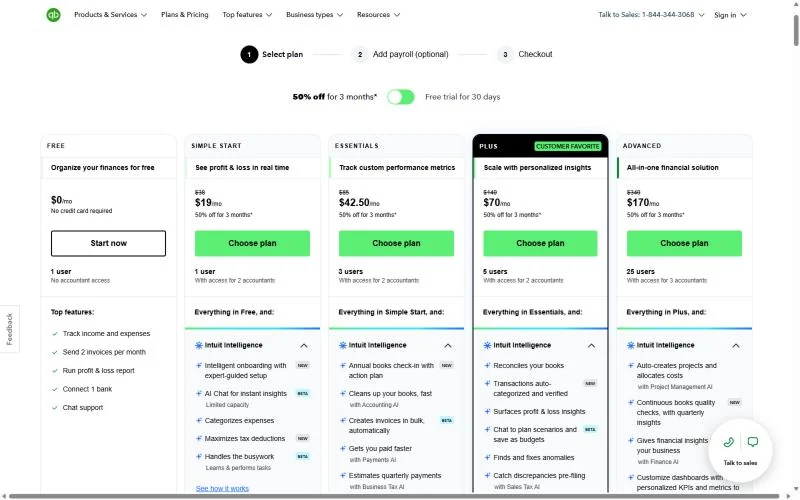
| Plan tier | QuickBooks Online | Xero |
|---|---|---|
| Free | Free, $0 a month, 1 user, 2 invoices a month | Not listed on the pricing page |
| Entry | Simple Start, $38 a month, 1 user | Early, $27 a month, 20 invoices and 5 bills |
| Mid | Essentials, $85 a month, 3 users | Growing, $59 a month |
| Growth | Plus, $140 a month, 5 users | Established, $97 a month |
| Top | Advanced, $340 a month, 25 users | Not listed on the pricing page (three plans) |
Sources: QuickBooks Online pricing page, Xero US pricing page, checked October 2026.
Xero lists its prices in USD without applicable taxes and renews monthly until you cancel. You can upgrade a Xero plan at any time and move to a cheaper one 1 month after upgrading. Every plan and add-on on the Intuit side is broken down in what each QuickBooks Online plan costs.
The same detail for Xero, offers included, is in Xero’s plans and add-ons explained.
Pricing note: offers end soon
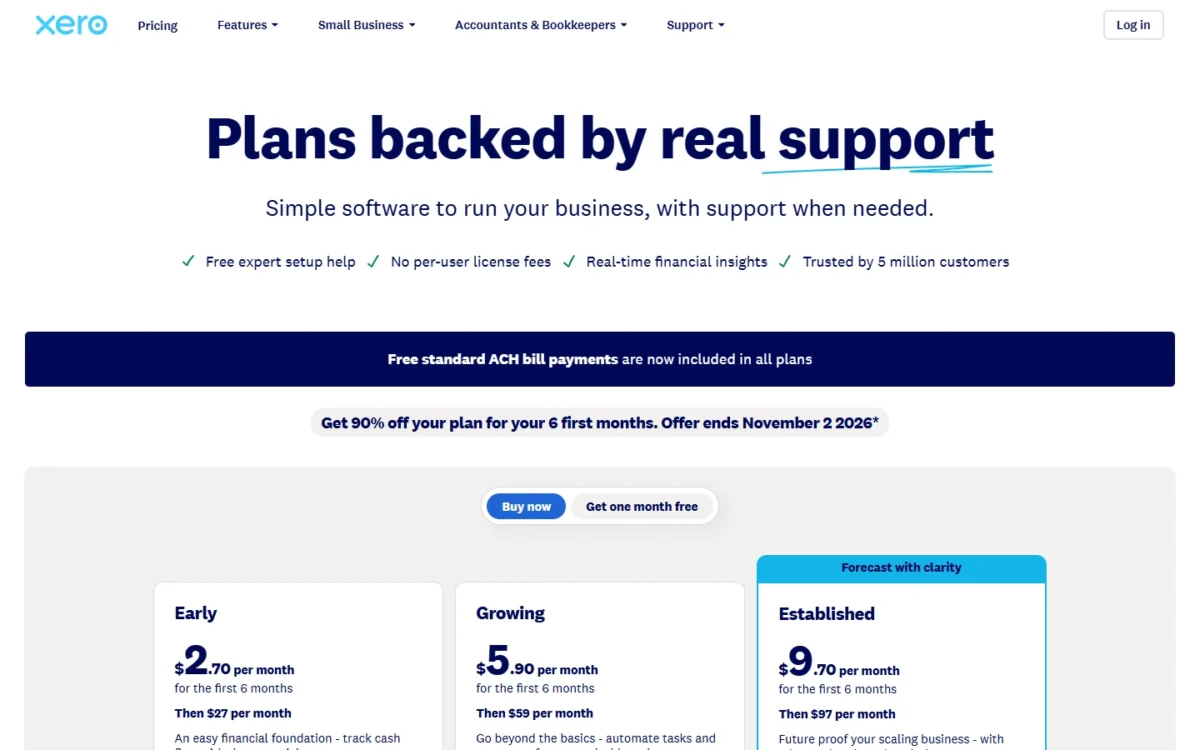
Xero gives new US customers buying their first organization 90% off the base plan for 6 months, until 11:59pm UTC on November 2, 2026: Early $2.70, Growing $5.90, Established $9.70 a month, then the regular price. QuickBooks shows 50% off for 3 months or a 30-day free trial. Neither offer is in the math below.
Cost at 1, 3, 5 and 6 Users
Xero costs less for a year at every headcount below, and the gap widens sharply at six users. The team sizes are examples, and the Xero rows are tier-matched: each sets Xero against the QuickBooks plan at the same tier, Plus against Established, as in the tier table.
A 5- or 6-user team that needs no Established feature (multi-currency, the 180-day forecast, projects) pays Growing, $59 x 12 = $708.
| Headcount | QuickBooks Online, year cost | Xero, year cost |
|---|---|---|
| 1 user | Simple Start, $38 x 12 = $456 | Early, $27 x 12 = $324 |
| 3 users | Essentials, $85 x 12 = $1,020 | Growing, $59 x 12 = $708 |
| 5 users | Plus, $140 x 12 = $1,680 | Established, $97 x 12 = $1,164 |
| 6 users | Advanced, $340 x 12 = $4,080 | Established, $97 x 12 = $1,164 |
| Payroll for 5 employees, on top | Workforce Payroll, $50 x 12 = $600 plus $7 x 5 x 12 = $420, which is $1,020 | Xero Payroll, $36 x 12 = $432 plus $6 x 5 x 12 = $360, which is $792 |
Sources: QuickBooks Online pricing page, QuickBooks payroll add-on pricing, Xero US pricing page, checked October 2026. Assumptions: monthly list prices for 12 months, no tax, no promotions, no payment fees, and no add-ons except the payroll in the last row, which adds to any accounting row.
The upgrade triggers differ by vendor. On QuickBooks, the 2nd user moves you to Essentials, the 4th to Plus and the 6th to Advanced, which costs $340 – $140 = $200 a month more than Plus.
On Xero, the 21st invoice of the month moves you from Early to Growing, and the first foreign-currency invoice moves you to Established. One case reverses the ranking: a solo business sending more than 20 invoices or 5 bills a month pays $38 x 12 = $456 on Simple Start against $59 x 12 = $708 on Xero Growing.
A lower price only matters if the plan does the job, and setup help and connected apps are part of that job.
Integrations, Setup and Support
Xero connects with more than 1,000 apps through the Xero App Store and gives free 24/7 online support, while QuickBooks includes app integrations on its paid plans without listing a count on its pricing page. QuickBooks Free gets neither the mobile app nor third-party integrations.
For setup, Xero offers a Xero Coach, a product specialist who connects your banks and sets up your dashboard, free for the first 90 days. Xero assigns no account manager. QuickBooks lists onboarding with expert-guided setup from Simple Start up.
QuickBooks reserves priority support and training for Advanced, and its plan comparison table shows product guidance from Simple Start up, with no chat or phone on Free. Start a trial of each with your own bank feed before you commit.
QuickBooks Online vs Xero: Pros and Cons
QuickBooks Online’s strengths are stock, roles and a no-cap entry plan; Xero’s are price, open user access and a free path in from QuickBooks.
QuickBooks Online
Pros
- Inventory, purchase orders and project profitability built into Plus
- Advanced holds 25 users with custom permissions, workflow automation and Excel sync
- Progress invoicing on Plus and Advanced bills a project by milestone
- Invoices take cards, ACH, Apple Pay, PayPal and Venmo
- A $0 Free plan for one user sending 2 invoices a month
Cons
- Simple Start allows 1 user, so a second login means Essentials at $85 a month
- The 6th user moves you from Plus to Advanced at $340 a month
- Each paid tier lists higher than Xero’s matching plan
- Free has no accountant access, mobile app or integrations
Xero
Pros
- No per-user license fees on any plan
- Auto-reconcile on Growing and Established, or $5.00 a month on Early
- Free Jet Convert migration from QuickBooks for the current and prior fiscal year
- More than 1,000 apps and free 24/7 online support
- A free Xero Coach for the first 90 days
Cons
- Early stops at 20 invoices and 5 bills a month; extras wait as drafts
- Multi-currency only on Established
- Multi-channel inventory costs $39 a month on top of Growing or Established
- Xero Payroll is not available to Xero’s US mobile subscribers
Which Is Better for Your Needs?
Xero is better than QBO, as QuickBooks Online is often called, for the lowest price per tier, cheap payroll or a free move off QuickBooks. QuickBooks Online is better for stock, role control, foreign-currency billing from a mid plan and solo invoicing in volume.
| Your priority | Better fit | Reason | Trade-off |
|---|---|---|---|
| Lowest monthly price at each tier | Xero | $27, $59 and $97 against $38, $85 and $140 a month | Early caps monthly invoices and bills |
| Selling physical products | QuickBooks Online | Plus tracks products, cost of goods and purchase orders | Plus costs $140 a month |
| Billing foreign customers | QuickBooks Online | Multiple currencies start on Essentials at $85 a month; Xero needs Established at $97 | Essentials allows 3 users and lacks inventory tracking |
| 6 to 25 users with role control | QuickBooks Online | Advanced holds 25 users and custom permissions | $340 a month |
| Solo, more than 20 invoices a month | QuickBooks Online | Simple Start lists no invoice cap at $38 a month | One user only |
| Payroll for a small team | Xero | $36 a month + $6 per person against $50 + $7 | Not for Xero’s US mobile subscribers |
| Leaving QuickBooks with history | Xero | Jet Convert moves the current and prior fiscal year free | More than two years may cost extra |
Sources: QuickBooks Online pricing page, Xero US pricing page, Xero conversion from QuickBooks, checked October 2026.
A service business with a few staff and steady invoicing should pick Xero Growing; pick QuickBooks instead once a sixth person needs custom permissions. A retailer with stock in the ledger should pick QuickBooks Plus; pick Xero Established plus Inventory Plus instead when more than five people need logins, since the two stacks cost nearly the same for a year.
A solo freelancer should pick Xero Early while invoices stay at 20 a month or fewer and bills at 5 or fewer, and QuickBooks Simple Start once either passes its cap. A choice made today can be reversed, but the effort differs by direction.
Switching Between QuickBooks Online and Xero
Moving from QuickBooks to Xero has three published paths: Jet Convert, a fresh start, or the Xero Conversion Toolbox. Jet Convert moves your current and prior fiscal year free, and a Jet Convert migration takes between 20 minutes and five business days.
- Prepare the QuickBooks file: reconcile bank and credit card accounts, review receivables and payables, and check inventory and sales tax balances.
- Choose a path. Jet Convert moves your chart of accounts, contacts and historical transactions; a fresh start enters balances from your latest tax return; the Conversion Toolbox imports CSV files and needs an accountant or bookkeeper.
- Keep the old QuickBooks data file for IRS compliance, as Xero advises for a fresh start.
- Set up payroll again: payroll data does not move in these conversions, though Xero Payroll offers a free data transfer on request.
More than two years of history may cost an extra fee, and several years or more than 6,000 items need Xero’s help.
Sources: Xero conversion from QuickBooks, Xero Payroll, checked October 2026.
Moving from Xero to QuickBooks has no conversion tool on Intuit’s pricing page, which lists onboarding with expert-guided setup instead. Xero lets you export your item list to CSV or PDF, and its subscription renews monthly, so keep Xero running until your opening balances agree in QuickBooks.
How I Compared QuickBooks Online and Xero
I compared QuickBooks Online and Xero from both vendors’ official US pricing, help and product pages, read in October 2026. Prices are the monthly US-dollar list prices each pricing page showed on October 27, 2026, in a US view.
The plans are compared tier by tier: Simple Start against Early, Essentials against Growing, Plus against Established, with Advanced and the Free plan shown on their own. Intuit’s invoicing and accountant pages come from Internet Archive copies dated October 15 to 17, 2026.
The criteria are invoicing, bank matching, payroll, stock, currencies, reporting, users and switching. Plan gates for QuickBooks come from its pricing page’s full feature comparison table. Intuit does not publish an app count on its pricing page.
QuickBooks vs Xero FAQ
Is QuickBooks Online or Xero better for a sole trader?
Xero Early is cheaper for a sole trader sending 20 invoices and 5 bills a month or fewer, at $27 against $38 a month on Simple Start. Above either cap, Simple Start beats Xero Growing on price.
Why do accountants prefer Xero?
Xero makes adding an accountant cheap: no per-user license fees, the accountant invited as a user, and a free partner program with no ongoing costs. QuickBooks counts accountant access separately (2 seats, 3 on Advanced) and is moving firms from QuickBooks Online Accountant to Intuit Accountant Suite by December 31, 2026.
Does either have a free plan?
QuickBooks has one: Free costs $0 a month for one user, with 2 invoices a month and one bank connection, but no accountant access or integrations. Xero lists no free plan; new US customers can take 90% off for 6 months until November 2, 2026, or one month free.
Final Verdict: QuickBooks Online or Xero?
Xero is the better buy for a service business that weighs price and user access, and QuickBooks Online for stock, teams of 6 to 25 and role control.
Choose QuickBooks Online if
- Stock belongs in the ledger without an add-on, from Plus up
- 6 to 25 people need logins with custom permissions on Advanced
- You work alone and send more than 20 invoices a month
- Class or location reporting decides your month-end
- You bill foreign customers and want Multiple currencies from Essentials at $85 a month
Choose Xero if
- Payroll for a small team should cost $36 a month plus $6 per person
- Forecasting cash six months out matters more to you than stock
- Your QuickBooks history should move in free for two fiscal years
- Staff and your accountant need logins at no license fee
Who should skip each. Skip QuickBooks Online if your team will pass five people without needing custom permissions, because the sixth login forces the $340 Advanced plan. Skip Xero if you work alone above 20 invoices or 5 bills a month, or bill abroad and need nothing else Established adds, since QuickBooks Essentials lists Multiple currencies at $85 a month.
For more options, see my list of the best accounting software for small business.





