This Salesforce CRM review breaks down everything a buyer needs to know in 2026—pricing tiers, key features across Sales Cloud and Service Cloud, the new Agentforce AI layer, real-world implementation costs, and where the platform genuinely excels or falls short. Whether you’re evaluating CRM software for a 10-person startup or a 5,000-seat enterprise, this guide is structured to help you make a decision—not just read about features.
🟢 Quick Verdict (TL;DR)
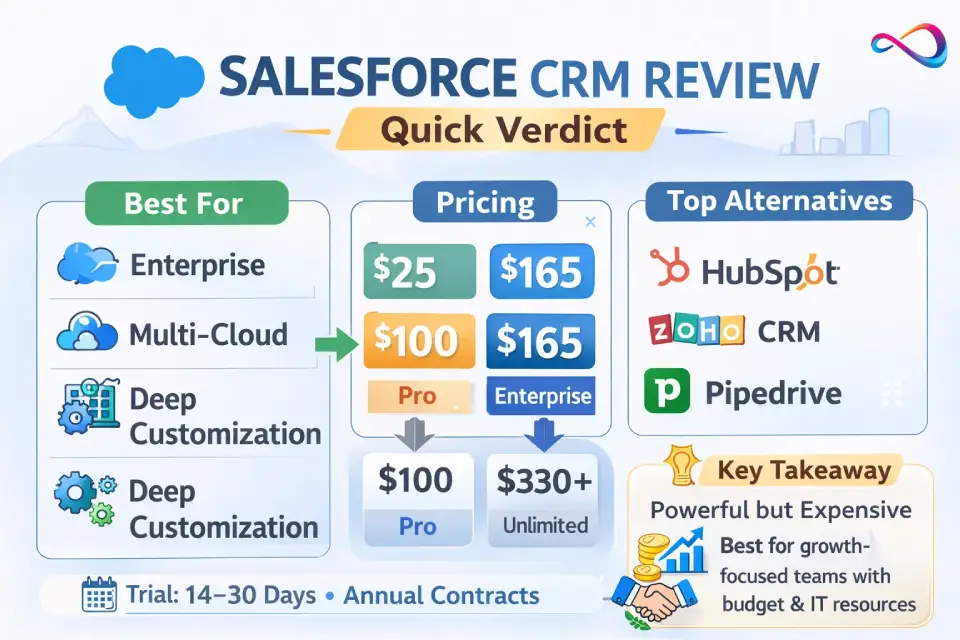
Salesforce remains the most feature-complete CRM platform on the market. It is best for mid-market and enterprise teams that need deep customization, complex workflows, and a massive integration ecosystem. It is not the best fit for small teams that want fast, affordable setup with minimal admin overhead. Budget $25–$500/user/mo depending on the edition, and plan for meaningful implementation investment. If costs or complexity feel prohibitive, HubSpot and Zoho are strong alternatives.
Key Takeaways
- Best for: Mid-market & enterprise teams needing multi-cloud CRM, deep customization, and compliance-grade security.
- Starting price: $25/user/mo (Starter Suite); most buyers land on Enterprise at $165/user/mo.
- Biggest drawback: High total cost of ownership—license fees are just the starting point.
- Top 3 alternatives: HubSpot CRM (marketing-led), Zoho CRM (budget), Pipedrive (pipeline simplicity).
- AI angle: Agentforce (successor to Einstein) is promising but premium-priced and still maturing.
At a Glance
- Best plan for most teams: Enterprise ($165/user/mo)
- Expected 1st-year cost drivers: Implementation + admin staffing + add-ons (often exceed license cost)
- Fastest alternatives: HubSpot (live in hours) / Pipedrive (live in a day)
- Contract model: Annual billing only — no monthly option
- Free trial: 14–30 days depending on edition
Salesforce CRM Review: Quick Verdict (2026)
Best For
- Mid-market and enterprise sales organizations with complex pipelines
- Companies that need deep workflow automation (Flow, Apex, Lightning)
- Teams running multi-cloud operations (Sales + Service + Marketing)
- Organizations requiring enterprise-grade security and compliance (HIPAA, FedRAMP, GDPR)
- Businesses wanting a massive integration ecosystem via AppExchange (thousands of listed apps and connectors)
Not For
- Solo founders or teams under 5 who need a CRM running within a week
- Budget-sensitive small businesses unwilling to invest in admin or consulting support
- Teams that only need simple pipeline management and basic email tracking
- Organizations without a dedicated admin or RevOps resource
If You’re Deciding in 60 Seconds
- Need maximum customization + scale? Salesforce is the category leader. Full stop.
- Need speed and simplicity? HubSpot or Pipedrive will get you live in hours, not weeks.
- Need to stay within the Microsoft ecosystem? Dynamics 365 is the natural fit.
Scorecard
| Category | Score (out of 10) | Justification |
|---|---|---|
| Features | 9.5 | Broadest functional scope in CRM; Sales, Service, Marketing, Commerce, and Data Cloud under one roof |
| User Experience | 7 | Lightning is modern but busy; steep learning curve compared to HubSpot or Pipedrive |
| Admin & Setup | 6.5 | Powerful but requires dedicated admin; non-trivial config even for standard deployments |
| Integrations | 10 | AppExchange with thousands of listed apps (per Salesforce) plus MuleSoft-grade API connectivity. Unmatched |
| AI (Agentforce) | 8 | Agentforce brings agentic AI workflows; promising but still maturing, and premium-priced |
| Value for Money | 6 | High capability-per-dollar at Enterprise+; poor value at Starter/Pro for what you actually unlock |
Recommended Plan by Team Size
| Team Size | Recommended Edition | Why |
|---|---|---|
| 1–10 users | Starter Suite ($25) orconsider alternatives | Salesforce is likely overkill; evaluate simpler CRMs first |
| 10–25 users | Pro Suite ($100) | Minimum viable Salesforce experience with Flow automation and API access |
| 25–50 users | Enterprise ($165) | Sweet spot for mid-market—custom objects, advanced reporting, partial sandboxes |
| 50–200 users | Enterprise ($165)+ add-ons | Enterprise with CPQ, Shield, or advanced analytics as needed |
| 200+ users | Unlimited ($330) or Einstein 1 ($500) | Full platform access; multi-cloud deployments, dedicated support, AI-ready |
For teams under 10 users, Salesforce is often overkill. We recommend starting with our best CRM for small business guide to find a better-matched solution.
What Is Salesforce CRM? (Customer 360 Explained)
Salesforce is a cloud-based CRM software platform built around the concept of Customer 360—a single, unified view of every customer interaction across sales, service, marketing, and commerce. In practice, Customer 360 means all customer data (contacts, deals, support tickets, marketing touchpoints, purchase history) lives in one platform and is accessible to every team.
Answer Block: What is Customer 360?
Customer 360 is Salesforce’s architecture for unifying customer data across all business functions—sales, service, marketing, and commerce—into one shared record. It eliminates data silos so every team works from the same source of truth, improving handoffs and customer experience.
Salesforce Ecosystem Entity Map
- Sales Cloud — Lead management, opportunity tracking, pipeline management, forecasting, CPQ
- Service Cloud — Case management, omnichannel support (phone, chat, email, social), knowledge base, field service
- Marketing Cloud / Account Engagement (Pardot) — Email marketing, journey orchestration, lead scoring, B2B marketing automation
- Commerce Cloud — B2B and B2C e-commerce storefronts, order management
- Data Cloud (Data 360) — Real-time data unification, audience segmentation, identity resolution, data governance
- Agentforce — Salesforce’s agentic AI layer (successor to Einstein AI). Builds autonomous AI agents for sales, service, and marketing tasks
- Platform & Extensibility — Flow (no-code automation), Apex (pro-code), Lightning Web Components, APIs
- AppExchange — Salesforce’s marketplace with thousands of third-party integrations and apps (Salesforce reports 7,000+)
- Slack — Team communication and workflow hub, deeply integrated with Salesforce data
- Tableau — Advanced reporting dashboards, data visualization, and analytics
- MuleSoft — Enterprise integration and API management platform
- Informatica — Data management, data quality, and data integration (added via acquisition)
- Shield — Enterprise security add-on: platform encryption, event monitoring, field audit trail
- Trailhead — Free, gamified learning platform for Salesforce skills and certifications
Key Terminology
- Sales Cloud vs. Service Cloud: Sales Cloud handles pipeline and revenue; Service Cloud handles support tickets and customer service. Both share the core platform but are licensed separately.
- AppExchange: Think “app store for Salesforce”—integrations, components, and consulting listings.
- Trailhead: Free learning platform. Genuinely useful for evaluating the platform before buying.
- Flow: Salesforce’s no-code automation builder, replacing older Workflow Rules and Process Builder.
Salesforce CRM Pricing in 2026 (Plans, Suites, Add-ons)
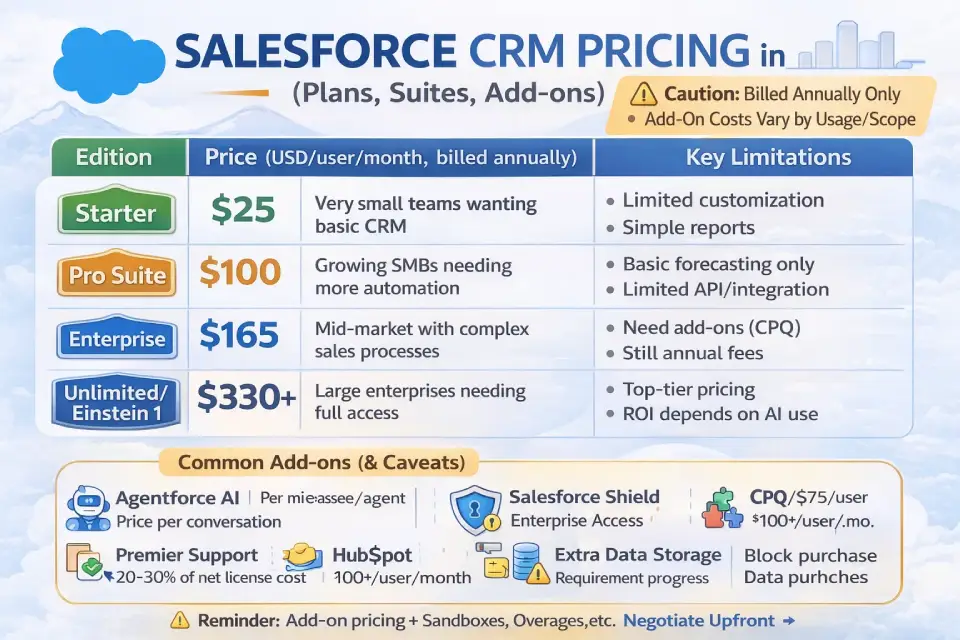
Salesforce CRM pricing in 2026 follows a per-user, per-month model billed annually. For a detailed breakdown with cost scenarios, see our Salesforce pricing guide.
Core Pricing Table
| Edition | Price (USD/user/mo, billed annually) | Best For | Key Limitations |
|---|---|---|---|
| Starter Suite | $25 | Very small teams wanting basic CRM | Limited customization, basic reporting, no Flow automation, 1 GB storage |
| Pro Suite | $100 | Growing SMBs needing more automation | Limited API calls, some integration restrictions, basic forecasting only |
| Enterprise | $165 | Mid-market with complex sales processes | Many premium features still require add-ons (CPQ, advanced analytics) |
| Unlimited | $330 | Large enterprises needing full access | High cost; still excludes some features like Shield and premium support |
| Einstein 1 / Unlimited+ | $500 | Enterprises wanting embedded AI (Agentforce) | Top-tier pricing; ROI depends heavily on AI adoption maturity |
Answer Block: How much does Salesforce cost per user in 2026?
Salesforce starts at $25/user/month for Starter Suite and goes up to $500/user/month for Einstein 1 (Unlimited+). Most mid-market buyers land on Enterprise at $165/user/month. All plans are billed annually—no monthly billing option.
Add-ons & Hidden Costs (Be Aware)
These are common cost escalators that typically don’t appear on the main pricing page:
- Agentforce AI — Priced per conversation or per agent; costs vary by usage volume. Not included in Starter or Pro.
- Premier/Signature Support — Often quoted at 20–30% of net license cost in partner proposals; provides faster SLAs and a dedicated Success Manager.
- Salesforce Shield — Platform encryption, event monitoring, audit trail. Enterprise add-on; pricing varies by contract (commonly quoted in the $25–50/user/mo range in market reports).
- CPQ (Configure, Price, Quote) — Often listed around $75/user/mo; confirm current pricing with your Salesforce representative.
- Additional Data Storage — Extra storage beyond plan limits is purchased in blocks.
- Sandbox Environments — Full-copy sandboxes are available only in Unlimited+; partial sandboxes at Enterprise.
- API Overage — Enterprise plans have API call limits; heavy-integration orgs may exceed these.
⚠️ Caution: Annual contracts are standard. Multi-year agreements often include renewal price uplifts. Negotiate caps on annual increases and document cancellation terms before signing.
Platform Limits & Constraints to Verify
Before signing a contract, confirm these limits with your Salesforce representative:
- [ ] API call limits per 24-hour period (varies by edition and user count)
- [ ] Data storage allocation (file storage vs. data storage; differs per edition)
- [ ] Sandbox types available (Developer, Developer Pro, Partial Copy, Full Copy—availability tied to edition)
- [ ] Custom object and field limits (especially relevant for heavily customized orgs)
- [ ] Release cadence impact — Salesforce pushes 3 major releases/year (Spring, Summer, Winter); confirm sandbox access for testing
How to Keep Costs Under Control
- [ ] Define your required edition before talking to a sales rep—use the trial to validate
- [ ] Map add-on needs (Shield, CPQ, Premier Support) before contract negotiation
- [ ] Negotiate sandbox access, API limits, and storage in the initial contract
- [ ] Set a renewal price cap (e.g., max 5–7% annual increase)
- [ ] Audit user licenses quarterly—deactivate unused seats
- [ ] Use AppExchange free/low-cost solutions before buying native add-ons
Key Features (What You Actually Get)
Salesforce CRM Features Summary (Snapshot)
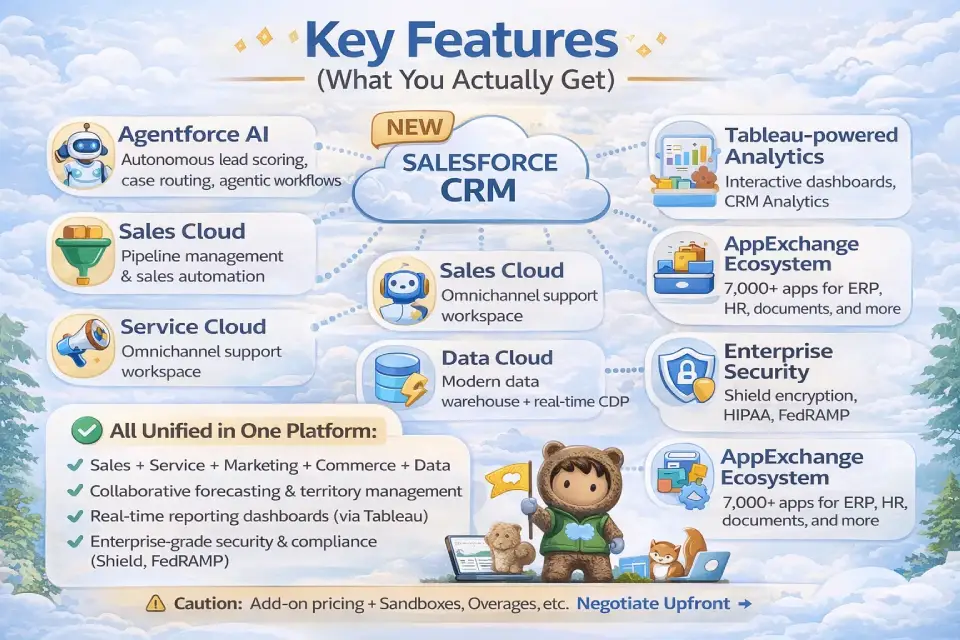
- Multi-cloud CRM: Sales, Service, Marketing, Commerce, and Data under one platform
- Agentforce AI for autonomous lead qualification, case routing, and agentic workflows
- Flow automation builder (no-code) plus Apex for complex business logic
- Thousands of AppExchange integrations (Salesforce reports 7,000+) and MuleSoft for enterprise API connectivity
- Collaborative forecasting, territory management, and revenue intelligence
- Omnichannel customer support with unified agent workspace
- Data Cloud for real-time customer data unification and audience segmentation
- Enterprise-grade security: Shield encryption, BYOK, FedRAMP, and HIPAA-capable compliance
- Tableau-powered reporting dashboards and embedded CRM analytics
Sales Cloud (Lead & Revenue Management)
Sales Cloud sits at the center of most Salesforce deployments. Core capabilities:
- Lead management: Capture, score, route, and convert leads with customizable qualification workflows
- Opportunity & pipeline management: Kanban and list views, weighted forecasting, deal alerts
- Forecasting: AI-assisted forecasting (at higher tiers), collaborative forecasting, territory management
- CPQ: Configure-Price-Quote for complex quoting (add-on at Enterprise; included at Unlimited+)
- Revenue Intelligence: Pipeline inspection, trend analysis, coaching signals
This is where Salesforce’s depth truly shines. The level of configurability in sales processes—stages, validation rules, approval workflows—is unmatched. However, complexity scales fast: a misconfigured sales process is worse than a simple one. For a head-to-head look at how Salesforce’s sales features compare, see our Pipedrive vs Salesforce comparison.
Service Cloud (Case Management + Omnichannel)
- Case management: Auto-assignment rules, escalation workflows, SLA tracking (milestones and entitlements)
- Omnichannel routing: Phone, email, live chat, SMS, social, and video—unified agent workspace
- Knowledge base: Article management with versioning, search, and customer-facing portals
- Field Service: Scheduling, dispatch, mobile workforce management (add-on)
Marketing (Account Engagement / Pardot + Journeys)
- Account Engagement (Pardot): B2B lead scoring, nurture campaigns, ROI reporting, Salesforce-native sync
- Marketing Cloud: B2C journey orchestration, email, SMS, ads, and social at scale
- Journey Builder: Visual campaign automation with branching logic and real-time triggers
Note: Marketing Cloud and Account Engagement are separate products with different pricing. Most B2B mid-market buyers use Account Engagement (Pardot); B2C enterprises lean on Marketing Cloud.
For CRMs where marketing automation is built in from day one, see our best CRM for marketing automation roundup. You may also want to explore the broader best sales and marketing software landscape.
Data & Analytics (Data Cloud + Tableau)
- Data Cloud (Data 360): Real-time customer data platform (CDP). Unifies data from any source, creates unified customer profiles, enables segmentation and activation
- Tableau: Advanced analytics, interactive reporting dashboards, and data visualization
- CRM Analytics (formerly Einstein Analytics): Embedded analytics within Salesforce with prebuilt dashboards
- Data governance: Data Cloud includes identity resolution, consent management, and data lineage tracking
Automation & Extensibility (Flow, Apex, Lightning)
- Flow: Visual, no-code automation builder for record-triggered, screen, schedule, and platform event flows
- Apex: Salesforce’s proprietary pro-code language for complex business logic
- Lightning Web Components (LWC): Build custom UI components; modern, standards-based framework
- APIs: REST, SOAP, Bulk, Streaming, and Metadata APIs for integration
TL;DR: Flow handles 80%+ of automation needs without code. Apex covers the rest. This combination of no-code and pro-code extensibility is one of Salesforce’s strongest competitive advantages.
Integrations (AppExchange + API Ecosystem)
Salesforce’s integration ecosystem is its deepest moat:
- AppExchange: Thousands of listed apps covering ERP, finance, HR, telephony, document management, e-signature, and more
- MuleSoft Anypoint: Enterprise-grade iPaaS for connecting Salesforce with legacy systems, APIs, and databases
- Informatica: Data integration and data quality, especially for complex data migration scenarios
- Native connectors: Google Workspace, Microsoft 365, Slack, LinkedIn Sales Navigator, Zoom, DocuSign, and more
Integration Selection Checklist:
- [ ] Confirm the integration is AppExchange-listed and currently maintained
- [ ] Check data sync direction (one-way vs. bidirectional) and frequency (real-time vs. batch)
- [ ] Review API call consumption against your plan limits
- [ ] Confirm compliance/data residency requirements for third-party connectors
- [ ] Test in a sandbox before production deployment
Security & Compliance (Shield + Trust)
🔒 Trust Callout: Salesforce maintains SOC 2 Type II, ISO 27001, and HIPAA-capable certifications. FedRAMP authorization is available for government use. Real-time system status is published at trust.salesforce.com. For full compliance details, consult the Salesforce Trust & Compliance documentation.
- Salesforce Shield: Platform encryption (at rest and in transit), event monitoring, field audit trail
- BYOK (Bring Your Own Key): Customer-managed encryption keys, available for regulated industries depending on edition and configuration
- Permissions: Profile-based access, permission sets, field-level security, sharing rules
- Data masking: Available for sandbox environments
- AI Governance: Agentforce includes configurable guardrails such as human-in-the-loop approvals, data permission scoping, and audit trails for AI-generated actions. This is an emerging capability—evaluate maturity and available documentation carefully before relying on it for regulated workflows.
Data Residency & Regional Compliance Checklist:
- [ ] Confirm data storage region options (Salesforce offers Hyperforce for regional deployment)
- [ ] Verify GDPR compliance if serving EU customers—check data processing agreements
- [ ] Check FedRAMP authorization level if your org has US government contracts
- [ ] Review cross-border data transfer mechanisms available under your contract
- [ ] Confirm audit log retention periods meet your regulatory requirements
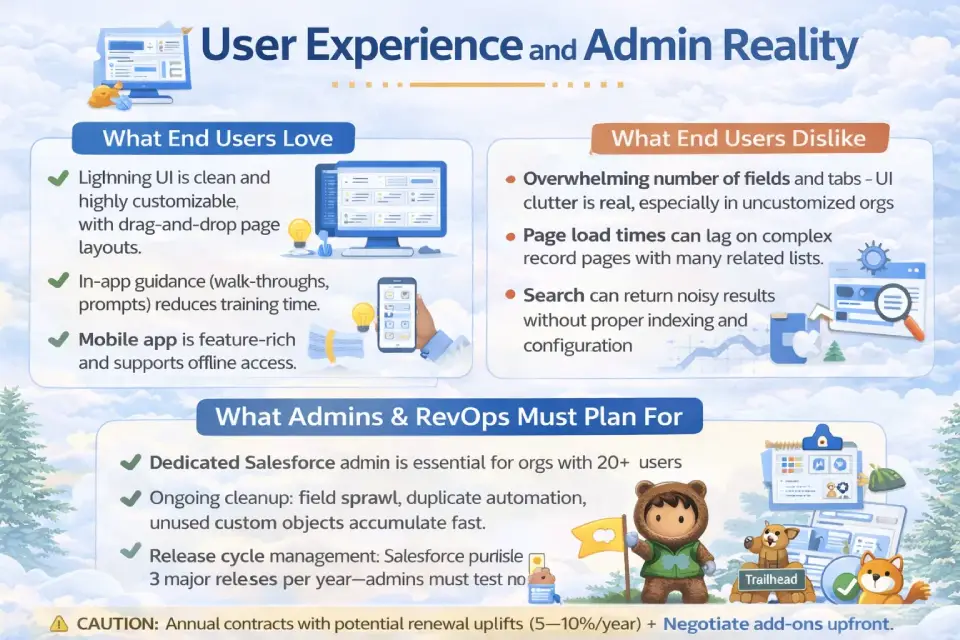
User Experience and Admin Reality
What End Users Love
- Lightning UI is clean and highly customizable with drag-and-drop page layouts
- In-app guidance (walk-throughs, prompts) reduces training time
- Mobile app is feature-rich and supports offline access
- Slack integration keeps CRM data visible in daily communication flow — for a broader look at collaboration tools that integrate with CRM, see our best team collaboration tools guide
What End Users Dislike
- Overwhelming number of fields and tabs—UI clutter is real, especially in uncustomized orgs
- Page load times can lag on complex record pages with many related lists
- Search can return noisy results without proper indexing and configuration
- Learning curve is steeper than competitors like HubSpot or Pipedrive
What Admins & RevOps Must Plan For
- Dedicated Salesforce admin is essential for orgs with 20+ users
- Ongoing cleanup: field sprawl, duplicate automation, unused custom objects accumulate fast
- Release cycle management: Salesforce pushes 3 major releases per year (Spring, Summer, Winter)—admins must test in sandboxes
- User adoption programs: Trailhead helps, but real adoption requires role-specific training and change management
What to Test in a Free Trial (14–30 Days): Step-by-Step Checklist
This is your personal evaluation playbook—run these steps during your trial to make an informed decision:
- Day 1–3: Import 50–100 real contacts and leads. Test data mapping quality.
- Day 3–5: Build your actual sales pipeline (stages, probabilities, fields). Does it map naturally?
- Day 5–7: Create 2–3 Flow automations (lead assignment, task creation, email alert). Assess no-code usability.
- Day 7–10: Connect your email (Gmail/Outlook). Test activity sync and logging reliability.
- Day 10–12: Build 3 reports and 1 dashboard reflecting your real KPIs. Evaluate ease of reporting.
- Day 12–14: Install 2 AppExchange packages relevant to your stack. Test integration friction.
- Day 14+: Invite 2–3 end users. Observe their experience without coaching. Note friction points.
- Throughout: Log every question you can’t answer alone—this estimates your admin/consulting needs.
Implementation and Total Cost of Ownership (TCO)
Typical Implementation Timelines
| Company Size | Estimated Timeline | Notes |
|---|---|---|
| Small (5–20 users) | 4–8 weeks | Starter/Pro Suite; minimal customization; often self-implemented |
| Mid-market (20–200 users) | 8–16 weeks | Enterprise edition; partner/consultant involvement recommended |
| Enterprise (200–2,000+ users) | 4–12 months | Multi-cloud; data migration, integrations, change management, phased rollout |
Implementation Cost Ranges by Scope
| Scope | Typical Investment Range | Key Variables |
|---|---|---|
| Self-serve (Starter/Pro, <20 users) | $0–$5,000 | Internal admin time; minimal customization; data import only |
| Partner-led (Enterprise, 20–200 users) | $15,000–$75,000+ | Consultant fees, custom configuration, integrations, training |
| Multi-cloud (200+ users, Sales+Service+Marketing) | $75,000–$500,000+ | Phased rollout, data migration from legacy CRM, change management, custom dev |
⚠️ Note: Ranges vary widely by region, partner, data complexity, and customization depth. Get 2–3 partner quotes before committing. These are directional estimates, not guarantees.
Data Migration & Governance Essentials
- Deduplicate and cleanse data before migration—not after
- Map field-to-field data relationships (especially custom objects from a legacy CRM)
- Establish data governance rules: who owns which fields, mandatory vs. optional, validation rules
- Plan for historical data: decide what to migrate vs. archive
Staffing Model
- Salesforce Admin (1 per ~75–150 users): Config, user management, reports, release testing
- Salesforce Developer (as needed): Apex, integrations, complex Lightning components
- Implementation Partner / Consultant: For initial setup, data migration, and architecture decisions—typical rates range from $150–$300/hr depending on partner tier and geography
- Change Management Lead: Often overlooked. Low adoption is the #1 cause of CRM failure
Common Failure Modes & How to Avoid Them
| Failure Mode | Prevention |
|---|---|
| Over-customization at launch | Start with out-of-box; iterate after adoption |
| Poor data quality | Cleanse and deduplicate before go-live |
| No executive sponsor | Secure VP+ champion before project kick-off |
| Skipping user training | Budget for role-based training, not just admin training |
| Ignoring change management | Appoint a change lead; run feedback loops post-launch |
Pros and Cons (2026)
| ✅ Pros | ❌ Cons |
|---|---|
| Deepest feature set in CRM—covers sales, service, marketing, commerce, data, AI | High total cost: License + add-ons + implementation + admin = significant TCO |
| Unmatched integration ecosystem (AppExchange, MuleSoft, APIs) | Steep learning curve for end users and admins compared to simpler CRMs |
| Enterprise-grade security and compliance (HIPAA, FedRAMP, SOC 2) | Annual contracts only—no monthly billing, limited flexibility |
| Agentforce AI brings agentic workflow automation to CRM | Agentforce is premium-priced and still maturing—ROI is not yet proven for most orgs |
| Scalability: Supports 10 to 100,000+ users on one platform | Overkill for simple use cases—complexity tax is real for small teams |
| Trailhead provides free, world-class learning resources | UI clutter and performance issues on heavily customized orgs |
| 3 releases/year deliver continuous innovation | Release management requires ongoing admin attention and sandbox testing |
Who This Matters To:
- SMBs: The cons (cost, complexity, admin needs) weigh heavier. Consider evaluating the best CRM solutions for startups first.
- Enterprise: The pros (scale, security, integration depth) are decisive advantages.
- Regulated Industries: Shield, compliance certifications, and BYOK are genuine differentiators few competitors match.
Salesforce vs Competitors (2026 Comparison Table)
| CRM | Starting Price (user/mo) | Best For | Key Tradeoff | Integration Ecosystem |
|---|---|---|---|---|
| Salesforce | $25 (Starter) | Enterprise + complex workflows | Highest cost and complexity | Thousands of AppExchange apps, MuleSoft |
| HubSpot CRM | Free (paid from $15) | Marketing-led SMBs, fast onboarding | Feature ceiling at scale; costly enterprise tier | Large marketplace (1,000+ reported) |
| Microsoft Dynamics 365 | $65 | Microsoft-stack orgs, ERP-CRM unified | Steeper UX than Salesforce; requires MS ecosystem | Tight Microsoft 365, Azure, Power Platform integration |
| Zoho CRM | $14 | Budget-first teams, full Zoho suite users | Less mature AI; smaller partner ecosystem | Zoho suite (40+ apps) + hundreds of integrations |
| Pipedrive | $14 | Simple pipeline teams, small sales orgs | Weak service/marketing; limited reporting | Hundreds of integrations |
| Freshsales | Free (paid from $9) | Service-heavy SMBs, Freshworks suite | Limited enterprise features; smaller community | Freshworks suite + growing integration library |
For a deeper feature-by-feature comparison, see our Zoho CRM vs Salesforce analysis, or explore the comprehensive best CRM software rankings to compare all six platforms side by side.
Choose Salesforce If…
- You need multi-cloud CRM (Sales + Service + Marketing)
- Your team exceeds 50 users and you need role-based permissions, territories, and advanced forecasting
- Integration volume and complexity demand MuleSoft-grade connectivity
- Security and compliance are non-negotiable (HIPAA, FedRAMP)
Choose an Alternative If…
- HubSpot: You want fast time-to-value with strong marketing tools and don’t need deep customization. See HubSpot CRM alternatives if HubSpot itself isn’t the right fit either.
- Dynamics 365: You’re a Microsoft-native org wanting CRM + ERP under one vendor
- Zoho: You need a full business suite on a tight budget
- Pipedrive: You want a dead-simple sales pipeline with minimal learning curve
- Freshsales: You’re a small service team using Freshworks for helpdesk
Best Salesforce Alternatives (Pick-by-Scenario)
1. SMB Needing Speed-to-Value
Best pick: HubSpot CRM
Why: Free tier, intuitive UX, live in hours not weeks. Strong for teams under 30. For a full cost breakdown, see our HubSpot pricing guide.
Caution: Enterprise tiers (Marketing Hub Enterprise, Operations Hub) get expensive quickly.
2. Marketing-Led Growth Teams
Best pick: HubSpot or ActiveCampaign
Why: Marketing automation is native and easy to configure. Content, ads, and email in one tool.
Caution: Sales reporting depth lags behind Salesforce significantly.
3. Microsoft-Native Organizations
Best pick: Microsoft Dynamics 365
Why: Deep Outlook, Teams, SharePoint, and Power BI integration. CRM + ERP on one platform.
Caution: UX is less intuitive than Salesforce Lightning; implementation can be equally complex.
4. Simple Pipeline Teams
Best pick: Pipedrive
Why: Visual pipeline-first design. Extremely easy to learn. Affordable — see the full Pipedrive pricing breakdown for plan details. Also explore Pipedrive alternatives if you want similar simplicity with broader features.
Caution: No service desk, limited marketing features, weak reporting at scale.
5. Budget-First Teams
Best pick: Zoho CRM
Why: $14/user/mo gets you significant functionality. 40+ Zoho apps for a full-suite approach. Check the Zoho CRM pricing breakdown for detailed edition comparisons.
Caution: Smaller partner and consultant ecosystem; AI (Zia) is less mature than Agentforce or Copilot.
6. Service-Heavy Support Organizations
Best pick: Freshdesk + Freshsales (Freshworks suite) or Zendesk
Why: Purpose-built for support-centric orgs. Simpler ticketing UX than Service Cloud. Explore our help desk solutions comparison for a full 30-tool breakdown. If considering Freshsales specifically, see our Freshsales alternatives guide.
Caution: Less robust for complex sales processes or multi-cloud CRM needs.
7. Custom Workflow / No-Code Preference
Best pick: : Monday.com CRM or Airtable + integrations Why: Extreme flexibility in data modeling and automation without traditional CRM constraints. Read our full Monday.com review for a detailed feature breakdown, or check monday CRM pricing for plan-by-plan cost analysis. Caution: These aren’t true CRMs—you’ll outgrow them if sales process complexity increases.
CRM Decision Tree: Which Platform Fits You?
Use this quick-reference decision tree to narrow your shortlist:
- Do you need enterprise-grade compliance (HIPAA/FedRAMP/SOC 2)?
- Yes → Salesforce (Enterprise+ with Shield) or Dynamics 365
- No → Continue below
- Are you a Microsoft-native org (Outlook, Teams, Azure)?
- Yes → Dynamics 365
- No → Continue below
- Is your team under 25 users?
- Yes → Continue to Q4
- No → Salesforce Enterprise is the strongest multi-department option
- Is inbound marketing your primary growth engine?
- Yes → HubSpot CRM
- No → Continue below
- Is your budget under $30/user/mo?
- Yes → Zoho CRM or Pipedrive
- No → Continue below
- Do you need deep customization and automation?
- Yes → Salesforce Pro Suite or Enterprise
- No → HubSpot or Pipedrive for simplicity
FAQs (Answer Engine / PAA-First)
1. Is Salesforce CRM worth it in 2026?
Yes—for mid-market and enterprise teams that need deep customization and multi-cloud CRM. It is not the right fit for very small teams or those needing a simple, low-cost pipeline tool. Evaluate total cost of ownership—not just license price—before committing, since add-ons, implementation, and admin costs can double or triple the base license.
2. How much does Salesforce cost per user in 2026?
$25 to $500 per user per month, billed annually. Most mid-market buyers choose Enterprise at $165/user/month. Add-ons like Shield, CPQ, and premium support can increase the effective cost by $25–$100+/user/month.
3. Does Salesforce offer a free plan?
No, Salesforce does not have a permanent free plan. It offers a 14–30 day free trial depending on the edition. Starter Suite at $25/user/month is the lowest-cost entry point.
4. What is Agentforce and how does it differ from Einstein?
Agentforce is Salesforce’s agentic AI layer, succeeding Einstein. Unlike Einstein’s predictive features (lead scoring, forecasting), Agentforce uses autonomous agents that execute multi-step tasks—case resolution, lead qualification, data entry—with human-in-the-loop guardrails. Pricing is typically consumption-based per conversation.
5. What is the difference between Sales Cloud and Service Cloud?
Sales Cloud manages leads, pipeline, and revenue forecasting; Service Cloud manages support cases and omnichannel service. Both run on the same Salesforce platform and share the same data model, but are licensed and configured separately.
6. Can Salesforce integrate with my existing tools?
Yes—Salesforce has one of the largest integration ecosystems in CRM. AppExchange lists thousands of apps, and MuleSoft provides enterprise-grade API connectivity. Native integrations exist for Google Workspace, Microsoft 365, Slack, LinkedIn, Zoom, DocuSign, and many more.
7. How secure is Salesforce?
Salesforce is enterprise-grade secure with SOC 2 Type II, ISO 27001, and HIPAA-capable certifications. FedRAMP authorization is available for government use. Shield (add-on) provides platform encryption, event monitoring, and audit trail. BYOK encryption is available for regulated industries.
8. How long does Salesforce implementation take?
Small teams typically go live in 4–8 weeks with minimal customization. Mid-market deployments take 8–16 weeks. Enterprise multi-cloud rollouts with data migration and phased deployment can require 4–12 months.
9. What are the biggest Salesforce hidden costs?
Add-ons and services are the main hidden costs. Common ones include Premier/Signature Support, Shield, CPQ, additional storage, sandbox environments, API overage, implementation consultant fees, and annual renewal uplifts.
10. Is Salesforce good for small businesses?
Often not the best fit for small teams. Starter Suite is basic and limiting; Pro Suite is capable but expensive versus alternatives. Small businesses should evaluate HubSpot, Zoho, or Pipedrive first. See best CRM for small business for a detailed comparison.
11. Salesforce Starter Suite vs Pro Suite—which should I choose?
Pro Suite is the minimum viable edition for real workflow automation. Starter ($25) provides basic CRM only—contacts, leads, simple reports. Pro Suite ($100) adds Flow automation, enhanced forecasting, and expanded API access.
12. What are the best Salesforce alternatives for small business?
HubSpot, Zoho CRM, and Pipedrive are the top three alternatives. HubSpot offers a free tier with strong marketing tools, Zoho provides a broad suite at $14/user/mo, and Pipedrive delivers pipeline simplicity at $14/user/mo.
13. Does Salesforce work well with Microsoft products?
Yes, but Dynamics 365 integrates more naturally with the Microsoft stack. Salesforce connects to Outlook, Microsoft 365, and Teams via connectors and AppExchange apps, but organizations deeply embedded in Azure and SharePoint may prefer Dynamics 365.
14. Can I migrate from HubSpot to Salesforce?
Yes—many implementation partners specialize in HubSpot-to-Salesforce migration. Key steps include mapping custom fields, migrating deal and contact history, and reconfiguring automation workflows. A typical mid-market migration takes 4–8 weeks.
15. What is Salesforce Data Cloud?
Data Cloud is Salesforce’s real-time customer data unification platform. It ingests data from any source, resolves customer identities across channels, and enables segmentation and activation—giving teams a unified profile for marketing, sales, and service decisions.
16. Which Salesforce plan should I choose?
Use the Recommended Plan by Team Size table in this article as your starting point. Under 10 users: consider alternatives first. 10–50 users: Pro Suite or Enterprise. 50+ users: Enterprise is the most common choice. Always trial before committing.
17. How much does Salesforce implementation cost?
Cost depends on scope and complexity. Self-serve setups cost $0–$5,000 in internal time. Partner-led mid-market projects typically range $15,000–$75,000+. Enterprise multi-cloud deployments can reach $75,000–$500,000+. Get multiple partner quotes—ranges vary significantly.
18. What are Salesforce’s biggest limitations for SMBs?
High total cost of ownership is the biggest barrier for small teams. Other limitations include a steep learning curve requiring admin investment, annual-only billing, and UI complexity that can overwhelm teams without dedicated RevOps. For SMB-focused alternatives, see our guide to the best CRM for sales teams.
Final Verdict: Is Salesforce CRM Worth It in 2026?
Overall Rating: 7.8 / 10 ⭐⭐⭐⭐
This Salesforce CRM review comes down to one question: does your organization need the depth, scalability, and integration breadth that only Salesforce delivers—and are you prepared to invest in the implementation, admin overhead, and total cost of ownership that comes with it?
If the answer is yes—if you have complex sales processes, 50+ users, multi-department CRM needs, and enterprise security requirements—Salesforce remains the clear category leader. The addition of Agentforce and the maturation of Data Cloud make the platform more capable than ever, especially for organizations ready to operationalize AI-driven workflows.
If the answer is no—if you need fast setup, low cost, and minimal admin—there are excellent alternatives. HubSpot wins for marketing-led simplicity, Zoho wins on budget, Pipedrive wins on pipeline focus, and Dynamics 365 wins for Microsoft-native organizations.
Your next step:
- Try a free trial — Use the evaluation checklist in this article to run a structured test
- Shortlist 2–3 alternatives — Run the same trial checklist for comparison
- Talk to an independent CRM consultant — Not a Salesforce partner, but someone who evaluates across vendors
For independent perspectives, read the reviews at Tech.co and TechRadar. For the latest pricing details, visit the official Salesforce pricing page.
About the author

I’m Macedona, an independent reviewer covering SaaS platforms, CRM systems, and AI tools. My work focuses on hands-on testing, structured feature analysis, pricing evaluation, and real-world business use cases.
All reviews are created using transparent comparison criteria and are updated regularly to reflect changes in features, pricing, and performance.