FreshBooks fits freelancers and service businesses that bill clients for time and projects, while QuickBooks Online fits businesses that sell stock or want an accountant in the books from the cheapest paid plan (Simple Start). That is the short answer to QuickBooks vs FreshBooks.
The list prices explain it. FreshBooks Lite costs $23 a month with time tracking included. Each extra person on FreshBooks costs $11 a month. QuickBooks Online Simple Start costs $38 a month for 1 user with access for 2 accountants. Both vendors run promotions this month, so every figure below is a monthly list price, and the offers sit in one dated note under pricing.
Quick verdict
FreshBooks charges by plan plus people and caps billable clients (5 on Lite, 50 on Plus). QuickBooks Online charges by plan and caps users (1, 3, 5 or 25). Only QuickBooks Online lists inventory tracking, from its Plus plan.
Pick FreshBooks for time-billed service work. Pick QuickBooks Online for stock, accountant seats on the entry plan, or growth past 5 users that also needs Advanced’s custom user permissions or workflow automation.
The trade-off: FreshBooks Lite has no accountant access or double-entry reports, and QuickBooks Online Simple Start has one user and no time entry.
Choose QuickBooks Online if
- Stock is part of what you sell
- One person runs the books with an outside accountant
Choose FreshBooks if
- Your revenue is billed hours or project fees
- A small team grows without inventory
In This Article (10 sections)
QuickBooks Online vs FreshBooks at a Glance
FreshBooks prices a plan plus each extra person and caps billable clients, while QuickBooks Online prices a plan that includes a set number of users and caps those users.
| Attribute | QuickBooks Online | FreshBooks |
|---|---|---|
| Best for | Product sellers (inventory tracking from Plus) and solo owners who want 2 accountant seats | Freelancers and service firms that bill time (unlimited time tracking on all plans) |
| Entry paid plan, monthly list price | Simple Start, $38 per month | Lite, $23 per month |
| Cap that forces an upgrade | Users: 1, 3, 5 or 25 by plan | Billable clients: 5 on Lite, 50 on Plus |
| Accountants | 2 accountant seats (3 on Advanced) | Up to 10 at no extra cost on Plus, Premium and Select |
| Inventory tracking | Plus and Advanced | Not listed on FreshBooks’ compare table |
| Time tracking | Essentials and above | All plans |
| Free option | QuickBooks Free ($0) and a 30-day trial on monthly plans | 30-day free trial, no credit card |
Sources: QuickBooks pricing page and FreshBooks pricing page, checked November 2026.
Read the cap row first: it tells you which product’s ladder you will climb.
Key Differences Between QuickBooks Online and FreshBooks
Four differences decide most choices between the two:
- What forces an upgrade: QuickBooks Online moves you up a plan as users grow; FreshBooks moves you up as clients grow and charges per team member instead. A freelancer with many small clients hits the FreshBooks cap first, and a growing office hits the QuickBooks one.
- Inventory: QuickBooks Online lists inventory, purchase orders and sales orders from Plus, and FreshBooks’ compare table has no inventory row. For a business that sells stock, the comparison ends before price.
- Time billing: FreshBooks includes unlimited time tracking on every plan. QuickBooks Online adds “Enter time” at Essentials, so a consultant who bills hours pays $23 a month on FreshBooks against $85 on QuickBooks Online.
- Accountant access: QuickBooks Online gives 2 accountant seats from Simple Start. FreshBooks starts accountant access, double-entry reports and bank reconciliation at Plus, so a solo owner with an outside accountant pays $38 on QuickBooks Online against $43 on FreshBooks.
Each difference is a plan gate, so the next question is how each product handles the daily jobs plan by plan.
QuickBooks Online vs FreshBooks: Features Compared
The two products hold back different things: FreshBooks gates bookkeeping depth and project profit, while QuickBooks Online gates time entry, projects, inventory and users.
| Feature | QuickBooks Online | FreshBooks |
|---|---|---|
| Billable clients | Not listed on QuickBooks’ compare table | Lite 5, Plus 50, Premium and Select unlimited |
| Double-entry reports, reconciliation | Bank feeds and general business reports on all plans; AI-powered reconciliation from Plus | Plus and above |
| Accountant access | All plans: 2 seats, 3 on Advanced | Plus and above, up to 10 accountants |
| Time tracking | Essentials and above | All plans |
| Project profitability | Plus (Basic), Advanced (Enhanced) | Premium and Select |
| Inventory tracking | Plus and Advanced | Not listed on FreshBooks’ compare table |
| Multiple currencies | Essentials and above | Not listed on FreshBooks’ compare table |
| Users | 1, 3, 5, 25 | Owner, then $11 per month for each extra person |
| Mobile app | All plans | iOS and Android apps; mobile mileage tracking on all plans |
| Payroll | Add-on: optional checkout step | Add-on: $40 per month plus $6 per user |
Sources: QuickBooks compare all features table and FreshBooks compare all plans table, checked November 2026.
The matrix gives the gates; each criterion below says what a gate means for a real business.
Invoicing, clients and getting paid
FreshBooks puts recurring invoices, scheduled late fees, payment reminders, deposits and a client portal on every plan, but caps Lite at 5 billable clients and Plus at 50. QuickBooks Online lists estimates, recurring invoices and auto-generated invoices and reminders on every plan, and its compare table shows no client count at all.
The FreshBooks cap counts active and archived clients together, so a freelancer who keeps old clients on file reaches the sixth sooner than the workload suggests. Deleting a client frees the spot, and its invoices stay accessible.
Proposals, client retainers and e-signatures start at FreshBooks Plus, while QuickBooks Online lists proposals and contract e-signature on Simple Start.
If your client count sits near 5 or 50, what each FreshBooks plan costs lays out every tier and add-on so you can price the jump.
Verdict: Client count
Depends on client count. FreshBooks Lite covers a freelancer with 5 or fewer clients, with full recurring billing. A business that invoices dozens of small customers fits QuickBooks Online, whose compare table lists no client count, or FreshBooks Premium at $70 a month for unlimited clients.
Bookkeeping depth and accountant access
QuickBooks Online gives a business access for 2 accountants from Simple Start, while FreshBooks starts double-entry accounting reports, bank reconciliation and accountant access at Plus ($43 a month), where up to 10 accountants join at no extra cost.
Every QuickBooks Online plan lists automated bookkeeping, automated bank feeds and “Invite your accountant”. Plus adds AI-powered reconciliation and budgeting, and Advanced adds revenue recognition, a custom report builder and forecasting.
On FreshBooks Plus and above, the accountant role works with the chart of accounts and bank reconciliation and can create journal entries. FreshBooks lists Profit and Loss, Balance Sheet and Trial Balance reports, and its compare table starts double-entry accounting reports at Plus. Lite does not list accountant access, so for anyone who files with outside help, the real FreshBooks entry plan is Plus.
For a closer look at QuickBooks Online on its own, see my QuickBooks Online review.
Verdict: Accountant access
QuickBooks Online fits a solo owner with an outside accountant. Simple Start lists 1 user with access for 2 accountants. On monthly list prices it costs $43 – $38 = $5 a month less than FreshBooks Plus, the first FreshBooks plan with accountant access.
That saving buys accountant seats, not the same books: FreshBooks Plus also lists double-entry reports and bank reconciliation, while QuickBooks Online lists AI-powered reconciliation from Plus.
From 2 people the advantage flips: QuickBooks Online needs Essentials at $85 a month, while FreshBooks Plus with one extra person comes to $43 + $11 = $54 a month.
Time tracking and projects
FreshBooks includes unlimited time tracking and project budgets and billing on every plan, with project profitability on Premium and Select; QuickBooks Online adds time entry at Essentials and project management at Plus.
QuickBooks Online’s project profitability tracking is Basic on Plus and Enhanced on Advanced. On FreshBooks, project profitability starts on Premium at $70 a month. On QuickBooks Online, it starts on Plus at $140 a month.
FreshBooks also lets an owner set a billable rate and a cost rate per team member, which feeds its project profitability: the core workflow of an agency that prices by the hour.
Verdict: Time-billed work
FreshBooks fits consultants and agencies that bill hours, because time tracking starts on its cheapest plan. QuickBooks Online is the better time-billing pick only when the same business also needs inventory or class tracking.
Inventory and product sales
A business that sells stock starts at QuickBooks Online Plus, which adds item receipts and shipping labels to inventory and order tracking; nothing on FreshBooks’ compare table covers stock.
QuickBooks Online connects 1 sales channel on Simple Start, 3 on Essentials and all from Plus, with automatic sales tax on every plan. Multiple currencies start at Essentials and class tracking at Plus (up to 40); neither appears on FreshBooks’ compare table.
A product seller who prefers FreshBooks would run stock in a separate tool: a second bill and a second place where numbers can drift.
Verdict: Inventory
QuickBooks Online fits a business that sells stock from Plus, the first plan with inventory tracking. FreshBooks fits a product seller only if inventory already lives in another tool.
Users and team members
QuickBooks Online moves a business up a plan at the 2nd, 4th and 6th user (Simple Start 1, Essentials 3, Plus 5, Advanced 25), while FreshBooks keeps the plan and adds $11 a month per team member, with up to 10 accountants free on Plus, Premium and Select.
FreshBooks Select includes 2 team member accounts. An owner can list people as Unassigned at no extra cost, and the $11 a month charge for an extra person starts once that person is given a role, such as admin or employee.
The jump to watch sits after 5 users: a sixth person moves a QuickBooks Online business to Advanced and adds $340 – $140 = $200 a month, against $11 a month on FreshBooks.
Verdict: Headcount
Depends on headcount. At one user with an accountant, QuickBooks Online Simple Start costs less. At 3 people, QuickBooks Online Essentials costs $85 a month, while FreshBooks Plus costs $43 + 2 x $11 = $65 a month, as long as nobody needs inventory. At 8 people, QuickBooks Online Advanced costs $340 a month, while FreshBooks Premium costs $70 + 7 x $11 = $147 a month.
Mobile app and integrations
Both list mobile apps on every plan, and QuickBooks Online states over 1,500 integrations against FreshBooks’ 100+, so check your own apps in each directory rather than the count.
FreshBooks has iOS and Android apps with mobile mileage tracking on every plan. QuickBooks includes free mobile apps and mileage tracking on all plans, but its mobile page marks in-person payments as “Only available for iOS”, which matters to a field crew on Android.
QuickBooks Online also counts “advanced app integrations”: 2 on Essentials and Plus, unlimited on Advanced. List the three apps you cannot drop (bank, payment processor, CRM) and search each directory for them before a trial.
QuickBooks Online vs FreshBooks Pricing
QuickBooks Online lists Simple Start at $38 a month, Essentials at $85 a month, Plus at $140 a month and Advanced at $340 a month. FreshBooks lists Lite at $23 a month, Plus at $43 a month and Premium at $70 a month. FreshBooks prices Select on request, and each extra person on FreshBooks costs $11 a month.
| Tier | QuickBooks Online | FreshBooks |
|---|---|---|
| Free | QuickBooks Free, $0 per month | Free plan not listed; 30-day free trial |
| Entry | Simple Start, $38 per month, 1 user | Lite, $23 per month, 5 billable clients |
| Mid | Essentials, $85 per month, 3 users | Plus, $43 per month, 50 billable clients |
| Upper | Plus, $140 per month, 5 users | Premium, $70 per month, unlimited clients |
| Top | Advanced, $340 per month, 25 users | Select, Let’s Talk (price on request) |
| Extra people | Included up to the plan’s user count | $11 per month for each extra person |
Sources: QuickBooks pricing page and FreshBooks pricing page, checked November 2026.
Both columns are monthly list prices on monthly billing, in US dollars. FreshBooks also has a Yearly toggle marked “Extra 10% Off”; the math here uses the Monthly view for both, so the columns compare like for like.
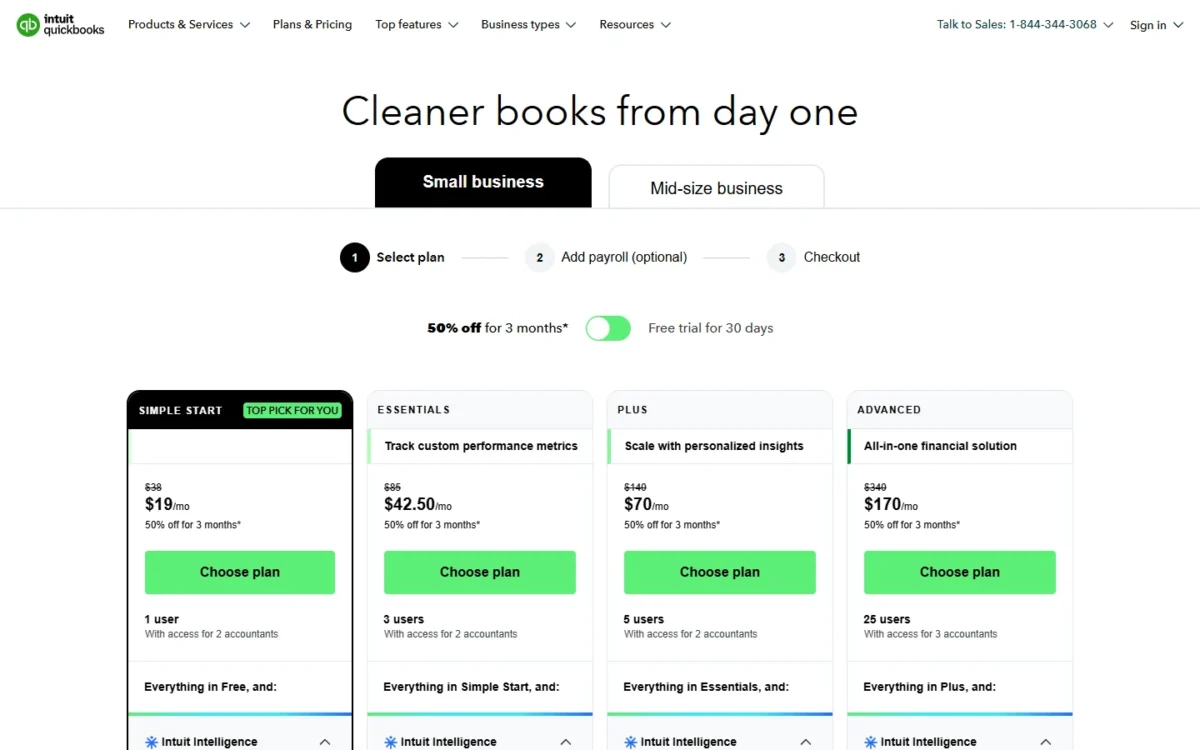
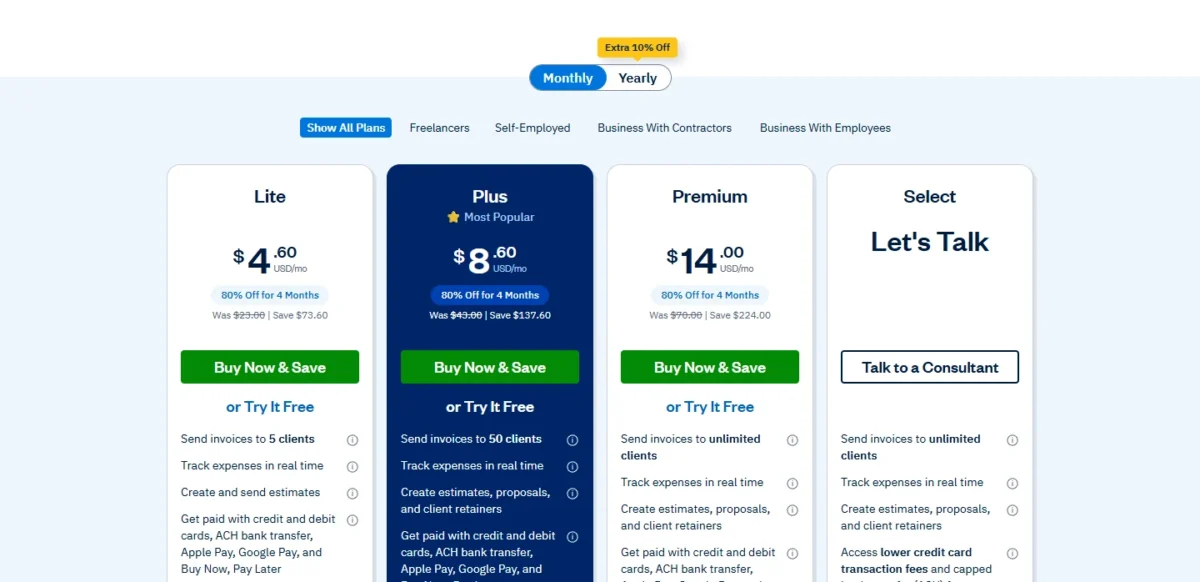
Promotions checked November 4, 2026
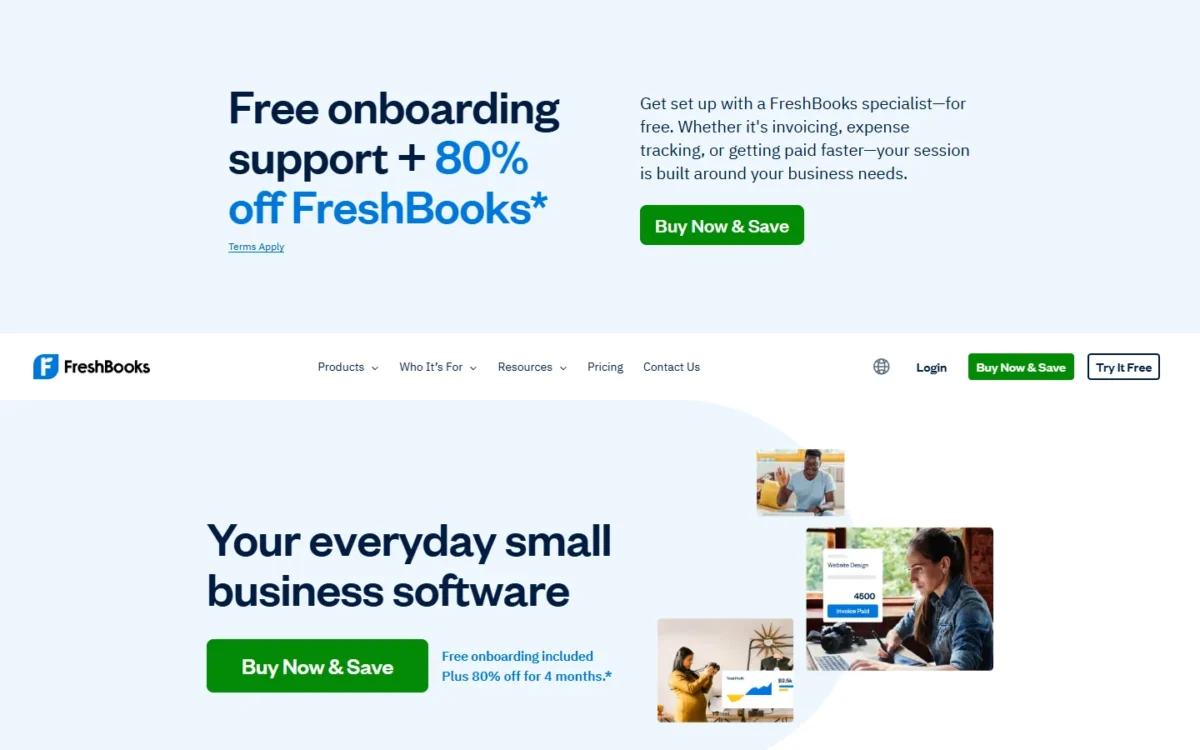
FreshBooks: for 4 months, Buy Now & Save takes 80% off, bringing Lite to $4.60 a month, Plus to $8.60 a month and Premium to $14.00 a month. It includes no free trial, and US buyers must purchase by 11:59 PM EST on November 16, 2026.
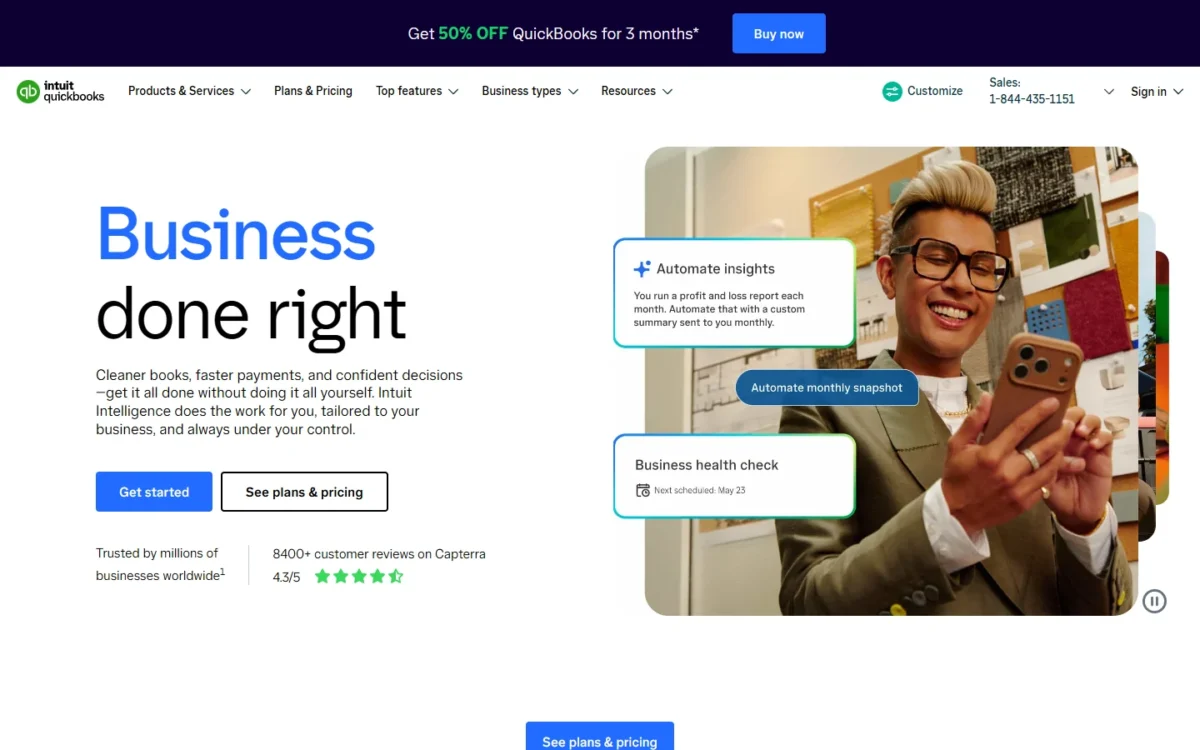
QuickBooks Online: for 3 months, the 50% discount applies to new monthly customers. Simple Start drops to $19 a month. Essentials drops to $42.50 a month. Plus drops to $70 a month. Advanced drops to $170 a month. The discount replaces the 30-day free trial, and Intuit reserves the right to modify or terminate this offer at any time.
At those promotional prices, QuickBooks Online Simple Start at $19 a month costs $19 – $8.60 = $10.40 a month more than FreshBooks Plus at $8.60 a month. At list prices, Simple Start at $38 a month costs $43 – $38 = $5 a month less than FreshBooks Plus at $43 a month.
The plan you need depends on your headcount and the cap you hit first, so the real comparison is what the same business pays on each.
What the Same Business Pays on Each Product
On monthly list prices FreshBooks costs less at every headcount below, except for a solo owner who needs an accountant in the books, where QuickBooks Online Simple Start is $516 – $456 = $60 a year cheaper.
| Business | QuickBooks Online | FreshBooks | What sets the plan |
|---|---|---|---|
| Solo, no accountant | Simple Start: $38 x 12 = $456 | Lite: $23 x 12 = $276 | 5 or fewer clients on FreshBooks |
| Solo with an accountant | Simple Start: $38 x 12 = $456 | Plus: $43 x 12 = $516 | FreshBooks accountant access starts at Plus |
| 3 people | Essentials: $85 x 12 = $1,020 | Plus: $43 + 2 x $11 = $65; $65 x 12 = $780 | 3 users on Essentials; 2 team members on FreshBooks |
| 5 people, project profit | Plus: $140 x 12 = $1,680 | Premium: $70 + 4 x $11 = $114; $114 x 12 = $1,368 | Project profitability: QuickBooks Plus, FreshBooks Premium |
| 8 people, project profit | Advanced: $340 x 12 = $4,080 | Premium: $70 + 7 x $11 = $147; $147 x 12 = $1,764 | QuickBooks Online Plus stops at 5 users |
Sources: QuickBooks pricing page, FreshBooks pricing page and FreshBooks team member help, checked November 2026.
Assumptions: monthly list prices in US dollars, read on November 4, 2026, billed monthly for a year. The FreshBooks plan price covers the owner, and each other person adds $11 a month. Accountants are not counted (QuickBooks Online accountant seats; up to 10 free on FreshBooks Plus and above), and FreshBooks Plus assumes 50 billable clients or fewer. The totals exclude promotions, tax, payroll, payment processing fees and other add-ons.
The solo rows use Simple Start, not QuickBooks Free, because Intuit describes Free only as basic accounting and invoicing, while Simple Start lists access for 2 accountants and adds automated bookkeeping and general business reports to everything in Free.
Two rows explain most of the result. At 3 people, QuickBooks Online forces Essentials to get 3 users, while FreshBooks adds two people to Plus for $43 + 2 x $11 = $65 a month, a gap of $1,020 – $780 = $240 a year. At 8 people QuickBooks Online costs more than twice as much a year, because it has no plan between Plus at 5 users and Advanced.
That advantage holds only while the business has no stock: FreshBooks’ compare table has no inventory row, and QuickBooks Online lists inventory tracking from Plus. Advanced also adds custom user permissions, workflow automation and backup and restore, so an 8-person firm that needs those controls is buying more than logins.
Customer Support, Payroll and Room to Grow
FreshBooks prices payroll on its plan page and grows by adding people; QuickBooks Online sells payroll as a separate step at checkout and grows by moving up a plan, with priority support only on Advanced.
FreshBooks Payroll, powered by Gusto, costs $40 a month plus $6 a month per user on every plan, so 3 people on payroll add $40 + 3 x $6 = $58 a month. QuickBooks Online’s checkout shows “Add payroll (optional)” as step 2, and the pricing page prints no payroll price. QuickBooks Online plans with payroll prices that combination at your headcount.
If payroll decides your pick, see my Gusto vs QuickBooks Payroll comparison.
Every QuickBooks Online plan includes QuickBooks customer support, and Advanced adds Priority Circle with priority support and training. FreshBooks gives free phone and email support during the 30-day trial, and Select adds dedicated phone support and customized onboarding. Neither pricing page lists support hours by plan, so ask before you count on phone help at month-end.
QuickBooks Online tops out at 25 users and unlimited classes and locations on Advanced. FreshBooks Premium lists unlimited billable clients. Past that point, each extra person on FreshBooks costs $11 a month rather than a plan change, so a growing service firm can stay on one FreshBooks plan longer.
Verdict: Support and payroll
Depends on plan. FreshBooks is easier to budget for payroll because the price sits on the plan page. QuickBooks Online’s priority support needs Advanced, and FreshBooks keeps dedicated phone support for Select.
QuickBooks Online vs FreshBooks: Pros and Cons
QuickBooks Online’s main strength is how much one person gets on the entry plan, plus inventory from Plus; its main cost is a plan jump every time users grow. FreshBooks’ main strength is cheap time billing for small teams; its main cost is a client cap and thin bookkeeping on Lite.
QuickBooks Online pros and cons
Pros
- Access for 2 accountants from the entry plan
- Inventory tracking, purchase orders and sales orders from Plus
- No client count on its compare table, so a high-volume invoicer pays for users, not clients
- QuickBooks Free at $0 for basic accounting and invoicing
- Multiple currencies from Essentials and automatic sales tax on every plan
Cons
- Simple Start has 1 user and no time entry
- A sixth user forces the $340 Advanced plan
- Project management waits for Plus
- The pricing page prints no payroll price
FreshBooks pros and cons
The full case for and against FreshBooks, including its downsides, is in my FreshBooks review.
Pros
- Unlimited time tracking and project billing on every plan
- Each extra person costs $11 a month instead of a plan change
- Up to 10 accountants at no extra cost on Plus and above
- Payroll priced on the plan page: $40 a month plus $6 per user
Cons
- Lite stops at 5 billable clients, archived ones included
- Lite lists no double-entry reports, bank reconciliation or accountant access
- No inventory row on its compare table
- Select has no published price
Which Is Better for Your Needs?
The better fit follows your main priority, and the table names the trade-off you accept with each pick.
| Your priority | Better fit | Reason | Trade-off |
|---|---|---|---|
| Freelancer with 5 or fewer clients | FreshBooks | Lite at $23 a month includes time tracking and recurring invoices | No accountant access until Plus at $43 |
| Solo owner with an outside accountant | QuickBooks Online | Simple Start at $38 a month includes access for 2 accountants | 1 user and no time entry |
| Service firm of 3 to 5 people | FreshBooks | Plus or Premium plus $11 a month per person costs less than Essentials or Plus | Plus caps billable clients at 50 |
| Product seller with stock | QuickBooks Online | Inventory, purchase orders and sales orders from Plus | Simple Start and Essentials have no inventory tracking |
| 6 to 25 users | Depends | QuickBooks Online Advanced at $340 a month against FreshBooks at $11 per extra person | Inventory or Advanced’s controls decide |
| Payroll on the same bill | Insufficient evidence | FreshBooks lists $40 a month plus $6 per user; QuickBooks Online’s pricing page prints no payroll price | Get both payroll quotes at checkout |
Sources: QuickBooks pricing page and FreshBooks pricing page, checked November 2026.
A freelancer with a handful of clients should start on FreshBooks Lite and consider QuickBooks Online only if an accountant needs to log in. A small agency with a few staff belongs on FreshBooks Plus or Premium, unless it also ships products.
Skip FreshBooks if: you hold stock or need class tracking, because its compare table lists neither. If your books run in more than one currency, confirm that with FreshBooks before a trial, since its compare table has no currency row.
Skip QuickBooks Online if: you bill hours on a one-person budget (time entry starts at Essentials), or you run a 6- to 8-person service team that would pay for Advanced only to get logins.
If both skip lists describe your business, compare my QuickBooks alternatives before you start a trial.
How I Compared QuickBooks Online and FreshBooks
My sources are both vendors’ US pricing pages and full compare tables, plus their accounting, team and mobile pages, read on November 4, 2026.
I compared QuickBooks Online Simple Start, Essentials, Plus and Advanced against FreshBooks Lite, Plus, Premium and Select on five criteria: how the business earns (billed time or sold stock), headcount, accountant access, billable clients and monthly cost. Plan gates come from the vendors’ compare tables and help pages; the fit verdicts and the headcount table are my analysis of them.
Neither vendor states a bank connection cap, QuickBooks prints no support hours or payroll price on its pricing page, and FreshBooks gives no Select price. Report quality depends on your own data, so run one month of real invoices and bank transactions through each 30-day trial before you commit.
FAQ
Is FreshBooks as good as QuickBooks?
For invoicing-first service work, yes: FreshBooks puts time tracking, recurring invoices, late fees and a client portal on its $23 Lite plan. For product sales or multi-currency books, QuickBooks Online covers jobs FreshBooks’ compare table does not list.
Can FreshBooks track inventory?
Not from its plan list: FreshBooks’ Compare all plans table has no inventory row on Lite, Plus, Premium or Select. QuickBooks Online lists inventory tracking, purchase orders, sales orders, item receipts and shipping labels on Plus and Advanced, and its pricing page also names a manufacturing inventory option with FIFO costing and reorder points.
Can I switch between QuickBooks Online and FreshBooks?
Into FreshBooks, the Select plan includes Easy Switch, where FreshBooks specialists move expenses, invoices and client details from QuickBooks. Neither vendor’s pricing page describes the move from FreshBooks to QuickBooks Online, so export your client list and reports first and keep both trials running until the balances match.
Does QuickBooks have a free plan?
Yes. QuickBooks Free costs $0 a month for basic accounting and invoicing and needs no credit card. FreshBooks’ pricing page lists no free plan; its 30-day free trial needs no credit card, and paid plans carry a 30-day money-back guarantee.
Final Verdict: QuickBooks Online or FreshBooks?
FreshBooks is my pick for invoicing-first freelancers and service teams that bill time and projects; QuickBooks Online is my pick for businesses that sell stock, need accountant seats on the entry plan, or outgrow Plus and need Advanced’s custom user permissions and workflow automation.
Choose QuickBooks Online if
- Purchase orders, sales orders and stock counts are daily work (Plus)
- One user with access for 2 accountants covers you (Simple Start)
- You will pass 5 users and need custom user permissions or workflow automation (Advanced)
- You need multiple currencies (Essentials) or class and location tracking (Plus)
Choose FreshBooks if
- Billed hours and project budgets drive your revenue
- Five or fewer clients make Lite at $23 a month enough
- Each new hire should cost $11 a month, not a plan change
- Payroll should be priced up front ($40 a month plus $6 per user)
The trade-off runs both ways: FreshBooks saves money per person but caps clients, while QuickBooks Online covers stock and accountants early but charges a new plan for each step in headcount.
If neither fits, for example a business that wants inventory without plan-based user caps, my ranking of accounting software for small business widens the shortlist by business type.
When Xero is the third name on your list, how QuickBooks compares with Xero covers that pairing.