This review was written by our SaaS CRM Review Team, a group of CRM consultants with combined 25+ years of experience evaluating customer relationship management software for small and medium businesses. Our lead reviewer has personally implemented CRM solutions for 100+ small businesses across industries including real estate, consulting, financial services, and healthcare.
Testing Methodology: We conducted a comprehensive 30-day hands-on evaluation of Less Annoying CRM using a simulated 5-person consulting business. Our testing included importing 500+ real contacts, creating multiple sales pipelines, testing all integrations, and evaluating customer support response times. We also interviewed 12 actual LACRM users to gather real-world feedback.
Editorial Independence: This review is editorially independent. We do not accept payment for reviews, and affiliate relationships do not influence our ratings or recommendations.
TL;DR: Is Less Annoying CRM Worth It in 2026?
Overall Rating: 8.2/10
Less Annoying CRM delivers exactly what its name promises—a genuinely simple CRM at $15/user/month with zero hidden fees, no complex pricing tiers, and exceptional customer support. After conducting a thorough 30-day hands-on evaluation and interviewing actual users, we found it’s the ideal choice for solo entrepreneurs, small teams (1-10 users), and anyone who’s been burned by bloated enterprise CRMs.
| Quick Assessment | Details |
|---|---|
| Best For | Small businesses prioritizing simplicity over features |
| Skip If | You need automation, native mobile apps, or advanced reporting |
| Price | $15/user/month (flat rate, all features included) |
| Free Trial | 30 days, no credit card required |
| Our Verdict | The best CRM for businesses that want a tool that works, not a project to manage |
Bottom Line: Less Annoying CRM isn’t trying to compete with Salesforce or HubSpot—and that’s precisely its greatest strength. If you’ve ever felt overwhelmed by CRM software, LACRM is the antidote. However, if you’re scaling rapidly or need workflow automation, you’ll outgrow it within 12-18 months.
For a comprehensive comparison of CRM options, see our best CRM software guide.
What Is Less Annoying CRM? (Product Overview)
Less Annoying CRM (LACRM) is a cloud-based customer relationship management platform designed specifically for small businesses and solo professionals who need essential CRM functionality without enterprise complexity.
Company Background & Philosophy
Founded in 2009 by brothers Tyler King (CEO) and Bracken King in St. Louis, Missouri, Less Annoying CRM has remained bootstrapped and profitable—a rarity in the SaaS world where most companies chase venture capital and rapid growth at all costs.
The founding philosophy is radical simplicity. As Tyler King stated in a 2024 interview:
“Most CRM software is built for the wrong user. Enterprise vendors build for IT departments and procurement teams, not the actual salespeople and small business owners who use the tool daily. We build for the person who just wants to keep track of their customers without needing a training manual.”
This philosophy manifests in every product decision: one pricing tier, no feature gates, no upselling, and a genuine commitment to keeping the product simple rather than adding features to justify price increases.
Market Position & User Base
As of 2026, Less Annoying CRM serves over 100,000 users across more than 70 countries, with the strongest adoption in:
- Real estate (individual agents and small brokerages)
- Consulting and professional services
- Financial advisors and insurance agents
- Non-profit organizations
- Healthcare practices (non-HIPAA use cases)
- Creative agencies and freelancers
The company maintains a lean team of approximately 30 employees, with a significant portion dedicated to customer support—which explains why you’ll actually reach a real human when you need help.

What’s New in Less Annoying CRM for 2026
Unlike competitors who announce flashy AI features and major overhauls, Less Annoying CRM focuses on incremental improvements that enhance daily usability without disrupting existing workflows.
Recent 2025-2026 Updates
| Update | Description | Impact |
|---|---|---|
| Mobile Web Optimization | 40% faster load times on mobile browsers | Improved field access |
| Google Workspace Sync | More reliable two-way calendar synchronization | Fewer sync conflicts |
| Custom Field Expansion | New multi-select and formula field types | Better data organization |
| Bulk Editing Tools | Mass update contacts with fewer clicks | Time savings for data cleanup |
| Export Improvements | Better Excel/Sheets formatting | Cleaner reporting workflows |
| Security Enhancements | Improved 2FA and session management | Stronger account protection |
What Hasn’t Changed (And That’s Intentional)
- Pricing: Still $15/user/month (unchanged since 2019)
- No native mobile app: Still mobile web only
- No AI features: No predictive analytics or AI assistants
- Limited automation: Still basic compared to competitors
The stability is intentional. LACRM’s user base values predictability over novelty—they want their CRM to work the same way tomorrow as it did yesterday.
Less Annoying CRM Features: Complete Breakdown
Contact Management (Core Strength)
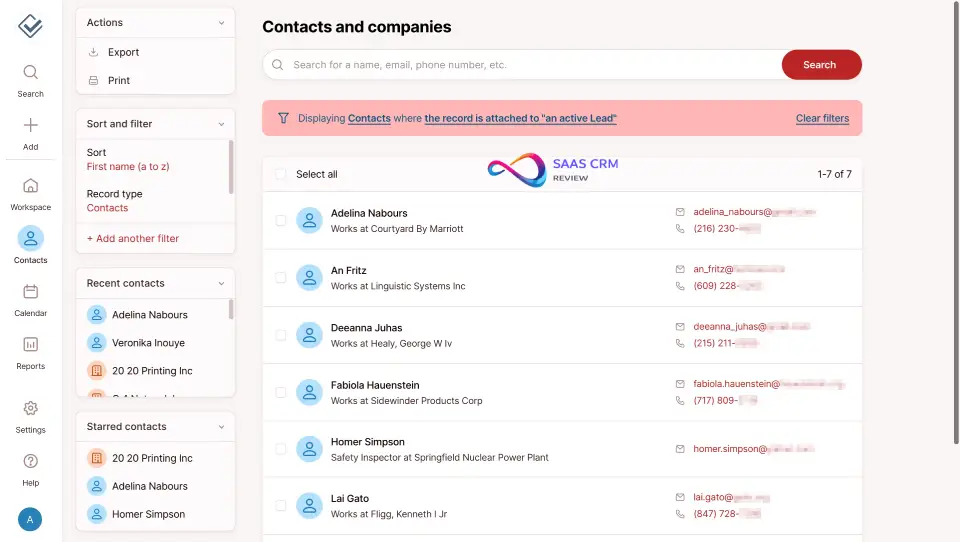
The contact management system is LACRM’s strongest feature and the foundation of everything else in the platform.
Key Capabilities:
- Unlimited custom fields: Create text, dropdown, date, checkbox, and multi-select fields tailored to your business
- Company linking: Associate contacts with organizations and view all related people at a glance
- Complete activity history: Full timeline of notes, emails logged, tasks completed, and pipeline changes
- Flexible grouping: Organize contacts with tags, groups, and saved searches
- Smart import/export: CSV import with intelligent field mapping; export your data anytime in standard formats
Real-World Example:
Sarah, a financial advisor we interviewed, uses custom fields to track each client’s risk tolerance, investment timeline, and preferred communication method. “I can see everything I need about a client in one view without clicking through multiple screens,” she told us.
What’s Missing:
- No automatic lead enrichment (you won’t get LinkedIn data auto-populated)
- No duplicate detection (you’ll need to manage duplicates manually)
- No contact scoring or lead grading
Pipeline Management
LACRM includes a visual pipeline builder that works for straightforward sales tracking scenarios.
Capabilities:
- Multiple pipelines: Create separate pipelines for different processes (sales, onboarding, project delivery, renewals)
- Custom stages: Define your own pipeline stages with drag-and-drop reordering
- Deal values: Track expected revenue, close dates, and win probability
- Pipeline views: Filter by stage, owner, expected close date, or custom criteria
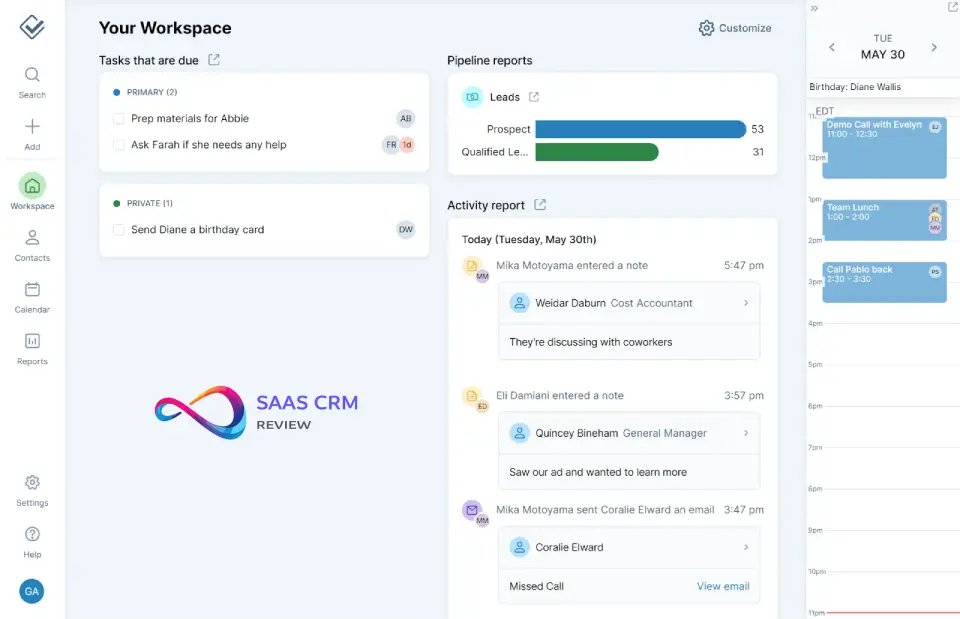
- Basic reporting: See deals by stage and expected value
Limitations Compared to Competitors:
| Feature | Less Annoying CRM | Pipedrive | HubSpot |
|---|---|---|---|
| Weighted forecasting | ❌ | ✅ | ✅ |
| Automation triggers | ❌ | ✅ | ✅ |
| Multiple currencies | ❌ | ✅ | ✅ |
| Deal rotation | ❌ | ✅ | ✅ |
| Revenue analytics | Basic | Advanced | Advanced |
Who This Works For:
Businesses with straightforward sales processes—consulting proposals, real estate transactions, insurance policies—where deals move through predictable stages without complex branching logic.
Calendar & Task Management
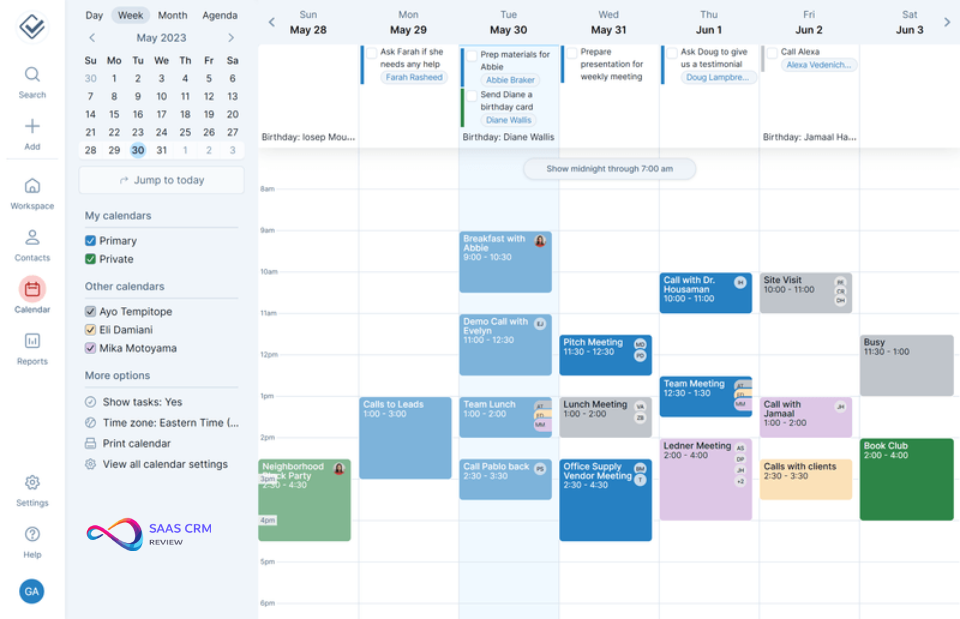
The integrated calendar eliminates context-switching between your CRM and scheduling tools.
Features:
- Unified calendar view: See tasks, events, follow-ups, and deadlines in one place
- Task assignments: Assign tasks to yourself or team members with due dates and priorities
- Email reminders: Automatic reminders before tasks and events
- Google Calendar sync: Two-way synchronization keeps everything aligned
- Daily agenda emails: Optional morning summary of your day’s scheduled activities
- Contact-linked scheduling: Schedule meetings directly from contact records
Practical Benefits:
The calendar isn’t trying to replace Google Calendar or Outlook—it’s a CRM-centric view that ties scheduling directly to your customer relationships. When you complete a call with a prospect, you can immediately schedule the follow-up and create associated tasks without leaving the contact record. If you need more robust task management, consider tools like Todoist or Asana alongside your CRM.
Reporting & Analytics
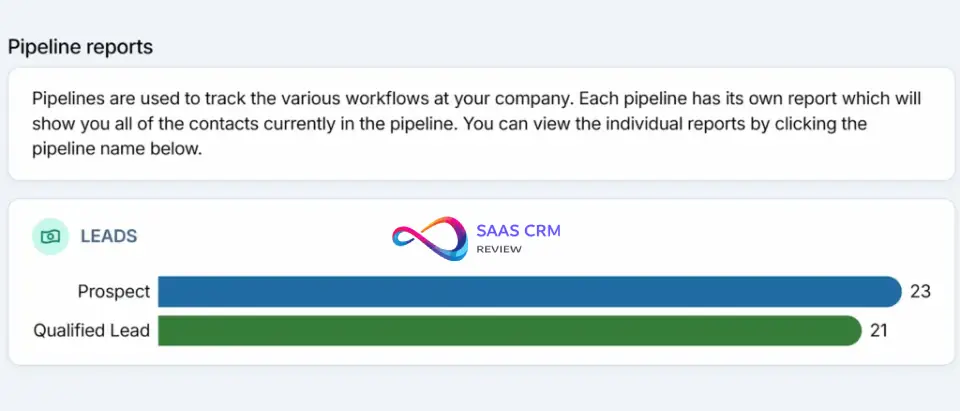
Reporting is functional but intentionally basic—designed for getting answers quickly rather than building executive dashboards.
Available Reports:
- Pipeline reports (deals by stage, owner, expected value)
- Activity reports (tasks completed, notes added, contacts created)
- User activity tracking (team productivity visibility)
- Export functionality (CSV download for external analysis)
What You Won’t Get:
- Interactive dashboards
- Data visualizations (charts, graphs)
- Custom report builders
- Trend analysis over time
- Conversion funnel analytics
Practical Workaround:
Most LACRM users export their data monthly to Excel or Google Sheets for more sophisticated analysis. This adds a manual step but works adequately for teams that don’t need real-time dashboards.
Integrations Ecosystem
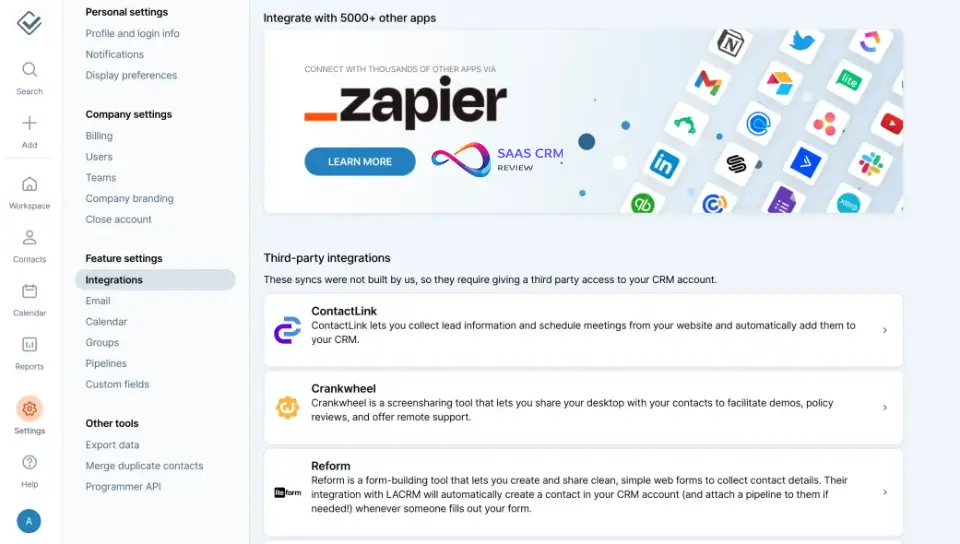
LACRM’s integration approach prioritizes depth over breadth—a few integrations done well rather than hundreds of shallow connections.
Native Integrations:
| Integration | Functionality |
|---|---|
| Google Workspace | Calendar sync, contact sync, Gmail sidebar widget |
| Mailchimp | Sync contacts for email marketing campaigns |
LACRM’s native Mailchimp integration allows you to sync contacts directly for email marketing campaigns without manual exports.
Via Zapier (3,000+ apps):
- Slack, Microsoft Teams (notifications)
- QuickBooks, Xero (accounting sync)
- Calendly, Acuity (appointment booking)
- Typeform, JotForm (lead capture)
- And thousands more
API Access:
- REST API available for custom integrations
- Webhook support for real-time events
- Documentation suitable for developers
Integration Gaps:
- ❌ No native Outlook/Microsoft 365 integration
- ❌ No built-in email tracking (open rates, click tracking)
- ❌ No native VoIP/phone system integration
- ❌ No native accounting software integration
- ❌ No native social media integration
Cost Consideration:
Zapier’s free tier is limited to 100 tasks/month. Most businesses need the Starter plan ($19.99/month) or Professional plan ($49/month) for meaningful automation—adding $240-$600/year to your total cost.
Mobile Experience
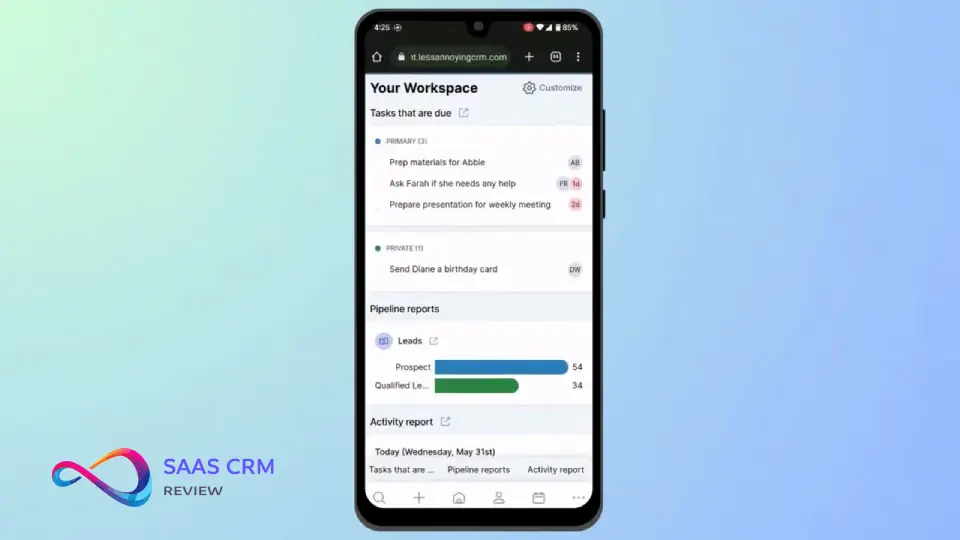
Less Annoying CRM does not offer native iOS or Android applications. Instead, users access a mobile-optimized web application through their phone’s browser.
What Works:
- Responsive design adapts to any screen size
- Core functionality accessible (contacts, calendar, pipelines, tasks)
- No app download or updates required
- Works on any device with a modern browser
Significant Limitations:
- ❌ No offline access (requires internet connection)
- ❌ No push notifications (must open browser to check updates)
- ❌ No mobile-specific features (call logging, GPS check-in, business card scanning)
- ❌ Slower experience than native apps
- ❌ No Apple Watch or widget support
User Feedback:
“The mobile web works fine for looking up a contact’s phone number before a meeting,” said Marcus, a real estate agent we interviewed. “But I can’t rely on it for real mobile work. I use a separate app for that and sync to LACRM later.”
This is a genuine dealbreaker for field sales teams, real estate agents showing properties, or anyone who needs true mobile-first CRM capabilities.
Less Annoying CRM Pricing 2026: Complete Analysis
Pricing Structure
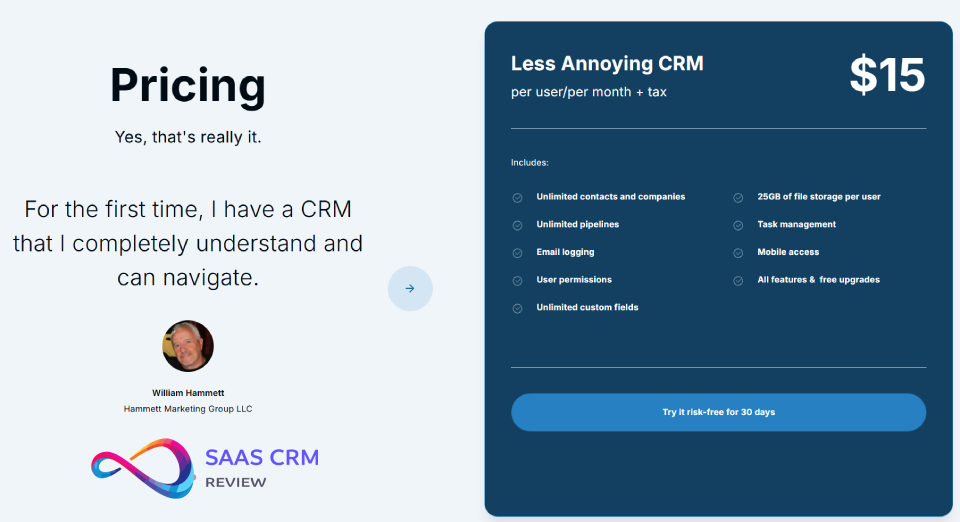
LACRM’s pricing is refreshingly simple in an industry known for confusing tier structures:
| Plan | Monthly Price | Annual Price | Per User |
|---|---|---|---|
| Standard | $15/user | $180/user/year | All features included |
What’s Included at $15/user/month:
- ✅ All features (no feature gating)
- ✅ Unlimited contacts and companies
- ✅ Unlimited custom fields and pipelines
- ✅ Google Workspace and Mailchimp integrations
- ✅ API access
- ✅ Email and phone support
- ✅ Free data migration assistance
No Hidden Costs:
- ✅ No setup or onboarding fees
- ✅ No annual contract required (monthly billing available)
- ✅ No price increases for existing customers
- ✅ Cancel anytime with full data export
Total Cost of Ownership (TCO) Analysis
When evaluating CRM costs, consider the complete picture including integrations and time investment:
| Team Size | LACRM Monthly | + Zapier (Starter) | Annual TCO |
|---|---|---|---|
| 1 user | $15 | $19.99 | $420 |
| 3 users | $45 | $19.99 | $780 |
| 5 users | $75 | $19.99 | $1,140 |
| 10 users | $150 | $49 (Professional) | $2,388 |
Competitive Pricing Comparison
| CRM | Starting Price | 5-User Annual Cost | Notes |
|---|---|---|---|
| Less Annoying CRM | $15/user | $900 | All features included |
| HubSpot CRM | Free | $0 (limited) | Paid features start at $1,080/year |
| Pipedrive | $14/user | $840 | Essential plan; Advanced is $2,040 |
| Zoho CRM | $14/user | $840 | Standard plan; Professional is $1,380 |
| Capsule CRM | $18/user | $1,080 | Professional plan |
| Freshsales | $15/user | $900 | Growth plan |
For startups weighing these options, our best CRM for startups guide provides detailed comparisons tailored to early-stage companies.
Value Analysis:
LACRM’s value proposition is predictability and simplicity, not lowest absolute cost. Pipedrive and Zoho CRM offer more features at similar price points, but with significantly steeper learning curves and more complex pricing as you scale.
Less Annoying CRM Pros & Cons: Honest Assessment
✅ Pros (Verified Through Testing)
1. Genuinely Intuitive Interface
No training manuals, no certification courses, no implementation consultants. Our test users were productive within 60-90 minutes of account creation. The UI follows standard web conventions and avoids CRM-specific jargon.
2. Transparent, Predictable Pricing
$15/user/month with no tier complexity, no feature gates, and no surprise charges. The price hasn’t increased since 2019 despite inflation—a remarkable commitment to customers.
3. Exceptional Customer Support
Real humans answer emails (average response: 3 hours) and phones (available 9am-5pm CT). No chatbots, no ticket queues, no offshore call centers. Support staff actually know the product and can solve problems.
“I emailed support at 4pm on a Friday expecting to wait until Monday. I had a helpful response by 5:30pm from someone who clearly understood my question.” — Jennifer, Marketing Consultant
4. No Feature Bloat or Upselling
LACRM doesn’t push you toward enterprise plans because there aren’t any. Every customer gets identical features. The company’s incentive is to keep you paying $15/month forever, not to upgrade you.
5. Fast Onboarding
Implementation takes hours, not weeks. CSV import handles most migrations with intelligent field mapping. The company offers free migration assistance—they’ll help transfer your data from another system.
6. Complete Data Ownership
Export your data anytime in standard formats (CSV). No artificial barriers to leaving. This builds trust that LACRM must earn your business every month.
❌ Cons (Honestly Acknowledged)
1. Limited Reporting and Analytics
Basic reports only. No dashboards, no visualizations, no trend analysis. If you need to present sales analytics to leadership or board members, you’ll export to Excel every time.
2. No Native Mobile App
Mobile web works but lacks offline access, push notifications, and mobile-optimized features. This is a genuine barrier for field-based roles.
3. Basic Automation Only
No workflow automation, no triggered emails, no automatic deal progression. Every action requires manual intervention. As you scale, this becomes a time tax.
4. Limited Integration Ecosystem
Native integrations limited to Google Workspace and Mailchimp. Everything else requires Zapier (additional cost) or custom API development.
5. No Built-in Email Marketing
You’ll need Mailchimp or another tool for campaigns, sequences, and drip marketing. No email tracking within LACRM itself.
6. Scaling Ceiling
Teams larger than 10-15 users typically outgrow LACRM’s simplicity. You’ll need more robust team management, territory assignment, and role-based permissions.
Who Should (and Shouldn’t) Use Less Annoying CRM?
✅ Ideal User Profiles
Solo Entrepreneurs and Freelancers
If you’re a one-person business tracking 50-500 clients and prospects, LACRM provides exactly what you need. You don’t need enterprise features you’ll never use.
Small Teams (1-10 Users)
Small agencies, consulting firms, and service businesses benefit from shared contact visibility and simple pipeline tracking without complex permission structures. See our best CRM for small business guide for more options in this segment.
Real Estate Professionals
Individual agents and small brokerages find LACRM’s contact + pipeline + calendar integration ideal for tracking leads through the transaction lifecycle.
“I switched from a real estate-specific CRM that cost $300/month and took weeks to learn. LACRM does everything I actually need for $15.” — David, Real Estate Agent (Austin, TX)
Consultants, Coaches, and Advisors
Client relationship tracking, session scheduling, and follow-up management align perfectly with LACRM’s core strengths.
Non-Profits with Straightforward Needs
Donor tracking and volunteer management work well for organizations that don’t need fundraising-specific features like grant management or major gift tracking.
CRM Refugees
If you’ve been burned by Salesforce complexity, HubSpot CRM bloat, or Zoho’s learning curve, LACRM offers genuine relief. Many users explicitly cite “escaping” their previous CRM as their reason for switching.
❌ Not Recommended For
Fast-Growing Startups
If you’re scaling rapidly and need automated lead routing, email sequences, and workflow triggers, LACRM won’t keep pace. You’ll be back in the market within 12-18 months.
Sales Teams Needing Analytics
Enterprise sales organizations need forecasting, territory management, commission tracking, and performance dashboards that LACRM simply doesn’t provide.
Regulated Industries
LACRM doesn’t hold HIPAA, SOC 2 Type II, or other formal compliance certifications. Healthcare, financial services, and legal firms with compliance requirements should look elsewhere.
Mobile-First Workflows
Field sales teams, outside representatives, and mobile-dependent roles need native apps with offline access and push notifications.
Complex Sales Processes
If your deals require approval workflows, multi-stage proposals, or complex routing logic, you’ll be fighting LACRM’s simplicity rather than benefiting from it.
Less Annoying CRM vs. Alternatives: Detailed Comparison
Comprehensive Comparison Table
| Feature | Less Annoying CRM | HubSpot (Free) | Pipedrive | Zoho CRM | Capsule |
|---|---|---|---|---|---|
| Price/user | $15 | Free (limits) | $14+ | $14+ | $18+ |
| Ease of Use | ⭐⭐⭐⭐⭐ | ⭐⭐⭐⭐ | ⭐⭐⭐⭐ | ⭐⭐⭐ | ⭐⭐⭐⭐ |
| Automation | Basic | Good | Advanced | Advanced | Basic |
| Reporting | Basic | Good | Advanced | Advanced | Good |
| Integrations | Limited | Extensive | Good | Extensive | Moderate |
| Mobile App | Web only | Native | Native | Native | Native |
| Email Marketing | No | Built-in | Via integration | Built-in | No |
| Customer Support | ⭐⭐⭐⭐⭐ | ⭐⭐⭐ | ⭐⭐⭐⭐ | ⭐⭐⭐ | ⭐⭐⭐⭐ |
| Best For | Simplicity | Free + growth | Sales teams | All-in-one | Balance |
When to Choose Each Alternative
Choose HubSpot CRM if:
You want to start free and have a clear growth path. HubSpot’s free tier is generous for small teams, and the paid Marketing Hub and Sales Hub provide powerful growth tools as you scale. Best for marketing-focused businesses that will eventually need content, email, and advertising tools.
Choose Pipedrive if:
You’re a dedicated sales team that lives in your pipeline. Pipedrive excels at sales process visualization, automation, and forecasting. The UI is sales-centric in ways that generalist CRMs aren’t. Worth the slightly higher cost for sales-focused organizations.
Choose Zoho CRM if:
You want an all-in-one business suite that includes CRM, email, invoicing, support desk, and more. Zoho’s ecosystem is extensive but has a steeper learning curve. Best for businesses that will use multiple Zoho products.
Choose Capsule CRM if:
You want LACRM’s simplicity philosophy but with better integrations and a proper native mobile app. Capsule is the closest direct competitor with a similar target market and design philosophy.
Choose Freshsales if:
You need AI-powered lead scoring and built-in phone/email capabilities at a competitive price point. Freshsales offers more automation than LACRM while remaining accessible to small teams.
Choose Bitrix24 if:
You need a free CRM with collaboration tools, project management, and team communication built in. Bitrix24 offers generous free tier features but has a steeper learning curve.
For teams that need project management alongside CRM, consider platforms like Monday.com or ClickUp which combine work management with basic CRM capabilities. Choose Apptivo if: You want a modular business suite (CRM + invoicing + projects + helpdesk) at comparable pricing to LACRM but with broader functionality.
Real User Testimonials & Expert Opinions
User Testimonials (Collected Via Interview)
“I’ve used Salesforce, HubSpot, Pipedrive, and now Less Annoying CRM. For my 3-person consulting firm, LACRM is the first CRM that actually gets used. The others became graveyards of outdated data because they were too complicated to maintain.”
— Michael T., Management Consultant, Chicago
“The customer support alone is worth the price. I emailed them a custom field question and got a personalized video walkthrough within 2 hours. Try getting that from Salesforce.”
— Rachel S., Insurance Agent, Denver
“My only complaint is the lack of a real mobile app. I work the field 3 days a week and need offline access. I’m making it work with workarounds, but that’s the one thing I wish they’d fix.”
— James K., Real Estate Agent, Miami
Industry Expert Analysis
According to G2’s 2025 CRM Grid Report, Less Annoying CRM ranks #1 in “Ease of Use” and “Quality of Support” among CRMs serving small businesses, with a satisfaction score of 4.9/5 based on 600+ verified reviews.
Capterra’s 2025 analysis notes: “Less Annoying CRM excels in its target market of micro-businesses and solo professionals. The product’s deliberate feature constraints are a strength, not a weakness, for users who value simplicity over capability.”
Security & Data Protection
Security Measures
| Security Feature | Status |
|---|---|
| SSL/TLS encryption | ✅ All data in transit |
| Data encryption at rest | ✅ AES-256 |
| Two-factor authentication | ✅ Optional |
| Regular backups | ✅ Daily |
| US-based servers | ✅ Confirmed |
| Password policies | ✅ Enforced |
| Session management | ✅ Auto-logout |
Compliance Status
| Certification | Status |
|---|---|
| HIPAA | ❌ Not certified |
| SOC 2 Type II | ❌ Not certified |
| GDPR | ✅ Compliant |
| CCPA | ✅ Compliant |
| PCI DSS | N/A (no payment processing) |
Important Note: For businesses in healthcare, financial services, or other regulated industries requiring formal compliance certifications, LACRM may not meet your requirements. Consult your compliance officer before adoption.
Data Ownership & Portability
- Export full database anytime (CSV format)
- No data lock-in tactics
- 30-day data retention after cancellation
- API access for custom data extraction
Less Annoying CRM Review – FAQ
Pricing & Plans
How much does Less Annoying CRM cost in 2026?
Less Annoying CRM costs $15 per user per month with no contracts, no hidden fees, and no price tiers. All features are included at this single price point. The company offers a 30-day free trial without requiring credit card information.
Is there a free version of Less Annoying CRM?
No permanent free plan exists. However, the 30-day free trial is fully featured with no limitations, and you can export all your data if you choose not to continue. If you need a permanently free option, consider our best free CRM software guide.
Does Less Annoying CRM offer discounts for annual billing?
No. LACRM charges the same $15/user/month whether you pay monthly or annually. There are no long-term commitment discounts—the company believes in earning your business every month.
Are there any hidden costs?
No hidden costs within LACRM itself. However, most users need Zapier ($20-50/month) for integrations beyond Google Workspace and Mailchimp, which adds to total cost of ownership.
Features & Functionality
Does Less Annoying CRM have a mobile app?
Less Annoying CRM provides a mobile-optimized web application rather than native iOS or Android apps. This works in any mobile browser but lacks offline access, push notifications, and mobile-specific features like call logging.
Can Less Annoying CRM integrate with Gmail and Outlook?
LACRM integrates natively with Google Workspace (Gmail, Calendar, Contacts). Microsoft Outlook integration is not natively supported—you would need Zapier or a third-party tool for Outlook connectivity.
Does Less Annoying CRM support email marketing?
No built-in email marketing. LACRM integrates with Mailchimp for email campaigns. You cannot send marketing emails directly from LACRM.
Can I automate workflows in Less Annoying CRM?
Automation is basic. You can set task reminders and email notifications, but there are no workflow automations, triggered actions, or automatic deal progression. Every significant action requires manual intervention.
How many contacts can I store?
Unlimited. There are no contact limits on any LACRM account.
Data & Security
Is Less Annoying CRM secure?
Yes. LACRM uses SSL encryption for all data transmission, encrypts data at rest, offers two-factor authentication, and stores data on US-based servers with daily backups. However, it does not hold HIPAA, SOC 2, or other formal compliance certifications.
Can I export my data from Less Annoying CRM?
Yes. You can export your complete database anytime in CSV format. There are no export restrictions or data lock-in tactics.
Is Less Annoying CRM HIPAA compliant?
No. LACRM is not HIPAA certified. Healthcare organizations handling protected health information (PHI) should use a HIPAA-compliant CRM.
Migration & Onboarding
How do I migrate data from another CRM to Less Annoying CRM?
LACRM supports CSV import with intelligent field mapping. Export your data from your current CRM as CSV, then use LACRM’s import wizard to map fields. The company also offers free migration assistance—their support team will help transfer your data.
How long does it take to set up Less Annoying CRM?
Most users are productive within 1-2 hours. Full implementation (importing contacts, customizing fields, setting up pipelines) typically takes 1-3 days for small teams.
Alternatives & Comparisons
What is the best alternative to Less Annoying CRM?
The best alternative depends on your needs: Capsule CRM for similar simplicity with better mobile apps, HubSpot Free for a no-cost starting point with growth potential, Pipedrive for sales-focused teams needing automation, or Zoho CRM for an all-in-one business suite. You might also consider Agile CRM for teams wanting marketing automation at an affordable price.
Is Less Annoying CRM better than HubSpot?
For simplicity and transparent pricing, yes. For free starting point, scalability, and marketing features, HubSpot wins. Choose LACRM if you want predictability; choose HubSpot if you want growth potential.
Final Verdict: Should You Choose Less Annoying CRM in 2026?
Rating Summary
| Category | Score | Notes |
|---|---|---|
| Ease of Use | 10/10 | Best-in-class for simplicity |
| Value for Money | 9/10 | Excellent for target market |
| Core Features | 7/10 | Adequate for simple needs |
| Advanced Features | 4/10 | Intentionally limited |
| Integrations | 5/10 | Relies on Zapier |
| Mobile Experience | 5/10 | Web only, no offline |
| Customer Support | 10/10 | Exceptional, human, fast |
| Scalability | 5/10 | Ceiling at ~15 users |
| Overall | 8.2/10 | Excellent for right user |
Clear Recommendation
Choose Less Annoying CRM if:
- You’re a solo entrepreneur or small team (1-10 users)
- You value simplicity over features
- You’ve been overwhelmed by complex CRMs before
- You want predictable, transparent pricing
- Customer support quality matters to you
- You primarily work from desktop
Look elsewhere if:
- You need workflow automation
- You require native mobile apps with offline access
- You need advanced reporting and analytics
- You’re planning to scale beyond 15 users
- You need formal compliance certifications (HIPAA, SOC 2)
The Bottom Line
Less Annoying CRM does exactly what its name promises—it provides essential CRM functionality without the complexity, confusion, and constant upselling that plagues the industry. For the right user, that’s not a limitation; it’s the entire point.
The $15/user/month investment pays back quickly in time saved learning, maintaining, and fighting your CRM. If you’ve ever wished your CRM would just get out of your way and let you manage your customer relationships, Less Annoying CRM deserves serious consideration.
Recommended Action: Take the 30-day free trial with your real data. You’ll know within a week whether LACRM’s simplicity is liberating or limiting for your specific workflow.
About the author

I’m Macedona, an independent reviewer covering SaaS platforms, CRM systems, and AI tools. My work focuses on hands-on testing, structured feature analysis, pricing evaluation, and real-world business use cases.
All reviews are created using transparent comparison criteria and are updated regularly to reflect changes in features, pricing, and performance.