getimg.ai is worth paying for if you generate images across several model families every week and you want one credit balance instead of six subscriptions. It is a poor buy if video is your main output, if you expected a free tier, or if you need one reusable brand reference spanning both images and video.
The platform is broad and the model roster moves fast, but breadth is rarely what decides whether the money works.
The credit arithmetic decides it, and the pricing page never publishes a per-action price.
Two numbers frame the decision. A 1K image generated in Auto mode consumes roughly 50 credits, while an Auto video consumes roughly 600.
Both figures fall out of getimg.ai’s own published capacity table and hold at every tier. A buyer who reads “3,000 credits” as a monthly allowance without reading that ratio will size the wrong plan.
In This Article (20 sections)
Quick Verdict
| Quick verdict | |
|---|---|
| Best for | Solo creators and small teams producing image volume across multiple model families |
| Not ideal for | Video-first workloads, zero-budget evaluators, teams needing one reference system across image and video |
| Starting price | Entry at $10 per month, or $96 billed yearly, excluding tax |
| Practical plan | Core at $30 per seat per month for anyone needing the full model roster or a shared team space |
| Free plan or trial | None. getimg.ai’s own 2026 comparison states it has no free plan |
| Setup difficulty | Low. Browser based, no install, no model training step |
| Main strength | One balance spanning image, video, editing, upscaling and audio, with model choice exposed rather than hidden |
| Main limitation | Derived credit cost per output swings roughly 400 times between the cheapest image model and the most expensive video model |
| Best alternative | A video-first platform if video dominates, or a local open-model workflow for full parameter control |
Source: official getimg pricing page, checked September 15, 2026, at the plan comparison table.
The Short Answer: Who Should Buy It and Who Should Not
Buy Entry if you work alone, your output is mostly images, and you can live inside a restricted model list. Buy Core if you need the full roster or a second person in the workspace, because Core is the first tier unlocking both.
Buy Plus if you run out of credits before the month does, because Plus is the first tier letting you buy more without upgrading again.
Buy Ultra only when throughput rather than features is the constraint.
Skip it entirely if you want to try before paying, because there is no free plan. Skip it if your month is mostly video, because the credit ratio turns a workable image budget into a thin video budget.
Skip it if you are an agency needing the same asset available in several client spaces, because assets do not cross between teams.
I would not budget from the $8 effective monthly price. That figure is Entry on annual billing, and Entry is a personal-use plan.
The moment collaboration or a specific model enters the requirement, the real number is 25 dollars a seat each month at minimum.
getimg.ai Pros and Cons
| Pros | Cons |
|---|---|
| One credit balance covers image, video, image editing, upscaling, music, speech and sound effects, so a mixed workload runs on one balance instead of several separate tools | Credit cost per output varies by roughly 400 times across the published model list once the published capacity figures are divided out, and the pricing page never states a per-action price |
| Model choice is exposed rather than abstracted away, with six image families and ten video families listed at the checked date | No free plan and a narrow refund window, so evaluation costs real money with limited reversibility |
| The published capacity table is detailed enough to derive a per-model credit cost, which most creative platforms do not allow at all | The advertised 20 percent annual saving holds only on Entry, and the three higher plans save less than the headline claims |
| Commercial rights, lossless output and faster generation are included on every paid plan rather than gated to the top tier | Elements, the reusable reference feature, works for image generation only and does not extend to video |
| Image editing is non-destructive, so the original survives every iteration | Assets cannot be used across teams, which turns multi-client work into a manual file round trip |
| The API reports the exact cost of every request in the response body, which makes programmatic spend auditable | The API is a separate product on a separate budget, and the studio subscription buys none of it |
Source: official getimg pricing page and product documentation, checked September 15, 2026. Each figure is sourced in the section that develops it.
Methodology: How This Review Was Built
Every documentary statement in this getimg review traces to getimg.ai’s own pricing page, FAQ, product guides, legal documents, changelog and developer documentation. All of it was retrieved on September 15, 2026. Everything reported under hands-on testing comes instead from running the product ourselves on the same date.
The criteria were the ones that change a purchase. Plan cost on both billing cadences, what a credit buys, and how that shifts by model.
Also which capabilities are gated by tier, what the documentation says stops or breaks, what the legal pages commit to, and what a buyer cannot recover after paying.
Claims about generation speed, prompt fidelity and visual quality now rest on our own testing rather than on vendor documentation. The five tasks below were run on a paid account on September 15, 2026, and every credit figure attached to them was read from the account balance rather than derived. Failure rates are a separate matter: six runs is not a sample large enough to state one, so this review does not.
Where the vendor publishes a capacity figure, the per-output credit cost below is arithmetic on that figure rather than a published price. Each derived figure is labeled where it appears.
Two conflicts inside getimg.ai’s own material were resolved rather than repeated. The pricing page advertises a flat 20 percent annual saving that its own displayed prices contradict on three of four plans, so the arithmetic is published instead of the headline.
The cancellation policy, last updated in November 2022, still describes a cancelled account being downgraded to a free plan, while the April 2026 comparison states there is none. The fresher source governs.
Hands-On Testing: Five Tasks on a Paid Account
On September 15, 2026 we ran getimg.ai through five standard photo-editing tasks on a paid Plus (Custom) annual account holding 9,590 credits, using public-domain source images from Wikimedia Commons so the inputs are reproducible. Every credit figure below was read from the account balance before and after each run rather than derived from a published capacity table.
| Task | Source | Setting | Credits | Output |
|---|---|---|---|---|
| Background removal | 2,340 x 3,520 portrait | No options offered | 10 | 1,361 x 2,048 transparent PNG |
| Object removal | 3,264 x 1,836 crowd scene | Auto, 1K, 16:9 | 50 | 1,376 x 768 JPEG |
| Canvas extension 30% | 2,400 x 2,192 coastal | Auto, 1K, 1:1 | 50 | 1,024 x 1,024 JPEG |
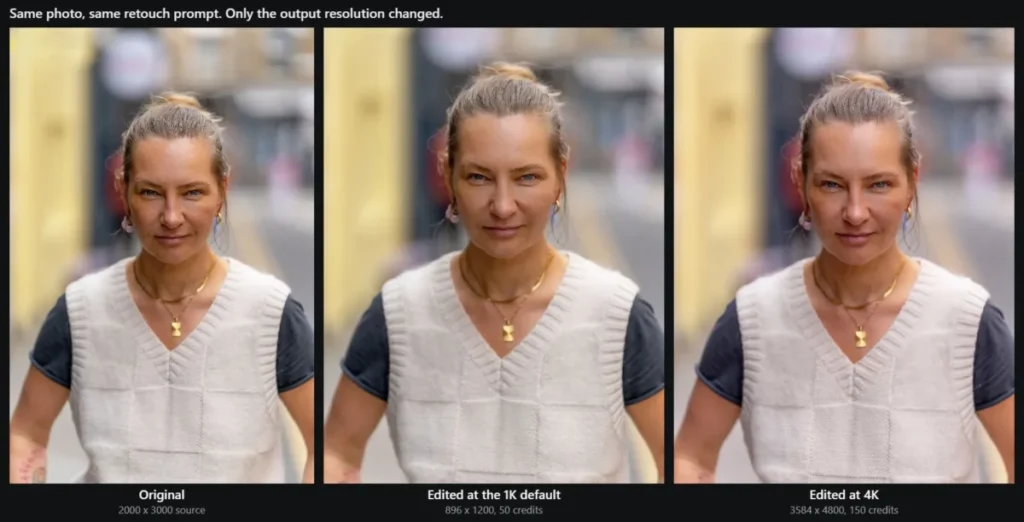
| Portrait retouch | 2,000 x 3,000 portrait | Auto, 1K, 3:4 | 50 | 896 x 1,200 JPEG |
| Portrait retouch, repeated | Same image, same prompt | Auto, 4K, 3:4 | 150 | 3,584 x 4,800 JPEG |
| Upscale and denoise | 2,048 x 1,536 candlelit | Topaz Wonder 3.5, 4K | 50 | 4,096 x 3,072 |
Source: account balance readings taken in the getimg.ai app, September 15, 2026. Balance moved 9,600 to 9,240 across the six runs.
The Resolution Control Is a Fidelity Control
The most consequential finding came from running the same portrait through the same retouch prompt twice, changing only the output resolution. The prompt asked to even out skin tone and remove small blemishes while keeping texture, and it ended with an explicit instruction not to change her face, hair, clothing or the background.
At the 1K default the tool reshaped the subject: larger eyes, redrawn brows, a narrower nose, a slimmer jaw, and a different expression. Her necklace, earrings, knitwear and the street behind her were all replaced. At 4K the same prompt kept her face, her freckles, the fine lines around her eyes and mouth, her jewellery and the original background, and returned a file larger than the source.
The app opens at 1K. A buyer who never changes that control is being handed a regenerated face and has no signal that it happened. The faithful result costs 150 credits rather than 50, which on the 3,000-credit Entry plan is twenty edits a month rather than sixty.
What a Prompt Edit Actually Does to the Frame
Three of the four prompt-driven tasks showed the same behaviour: the tool regenerates the entire image rather than patching the region named. Asked to remove one man holding a turquoise shopping bag from a crowded platform, it deleted the bag and left the man, and redrew the surrounding crowd, floor and tiling in the process. Asked to extend a coastal photograph outward by 30 percent, it returned a square re-imagining with different rock formations and different surf rather than an extension of the original frame. getimg.ai lists outpainting among its features, but we could not locate a dedicated surface for it in the app.
This is the honest cost of the design the product advertises. The editor page states “No manual selection tools. Ever.” Removing masks removes the mechanism that would confine a change to one area.
Where the Tool Performed Well
Background removal was the strongest result. At six times magnification against a contrasting background there was no halo and no colour fringing, and fine strands in the gaps between locks of hair were preserved semi-transparently. The outer silhouette was smoothed and flyaway strands were clipped, but the matte was clean enough for product and listing work. The single limit worth knowing is that this action caps output at 2,048 pixels on the long edge with no setting to change it, so a 12-megapixel portrait comes back at roughly 2.8 megapixels.
Upscaling was the second strongest. A noisy candlelit frame at 2,048 x 1,536 went to 4,096 x 3,072 with the shadow noise genuinely resolved rather than smeared, facial detail sharper, and no invented objects anywhere in the scene. Skin came back slightly waxy, which is the expected trade for a creative upscaler and matches the vendor’s own caution that some detail is interpreted rather than recovered.

Speed was not an issue in any run. Background removal finished in under sixteen seconds and the prompt edits in fifteen to twenty-five.
What Is getimg.ai?
getimg.ai is a browser-based creative studio that puts several third-party model families behind one interface and one credit balance. The Terms name the operating company as Webrockets, a limited liability company based in Poland.
The official guide documents ten workflows: image generation, reference images, Elements, video generation, frames and references for video, video upscaling, music generation, speech generation, sound effects, and image editing and enhancement. (documented workflow list)
What separates it from a single-model tool is that model selection is a first-class control rather than a hidden implementation detail. The plan comparison lists six image families at the checked date, Seedream, FLUX.2, Nano Banana, GPT Image, Grok Imagine and Qwen, alongside ten video families including Kling, Seedance, Sora, Google Veo, Wan, Gemini Omni, MiniMax and HappyHorse.
None of them is Stable Diffusion or SDXL. Anyone returning after a year should treat a saved prompt library as something to rebuild rather than reload.
The roster is not stable and is not meant to be. The changelog carries dated entries on September 13, September 5 and twice on September 4, 2026, each adding or replacing a model. (dated product changelog)
Treat any model list in any review of this product, including this one, as a snapshot with a date attached.
getimg.ai Pricing, Credits, and Plan Limits
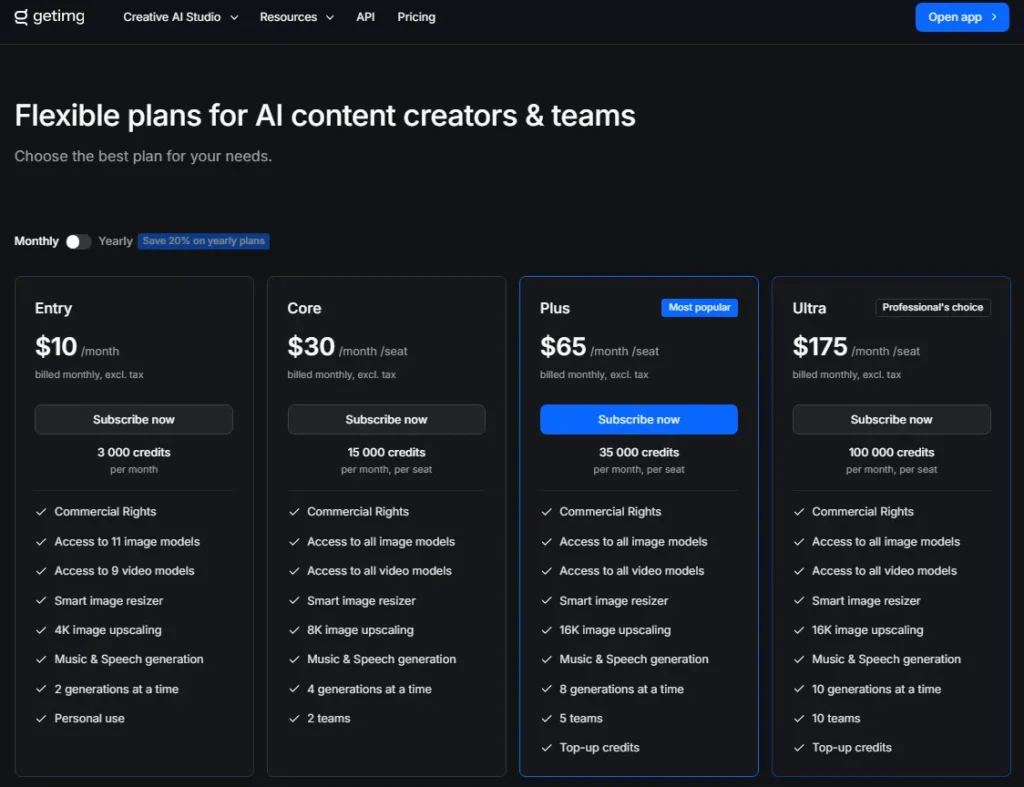
Four public plans, all paid, all quoted in USD excluding tax on the current pricing page.
Every figure below is the standard price. The pricing page publishes no separate introductory rate and does not state renewal pricing separately.
| Plan | Monthly billing | Annual billing | Effective per month | Credits per month |
|---|---|---|---|---|
| Entry | $10 | $96 | $8 | 3,000 |
| Core | $30 per seat | $300 per seat | $25 per seat | 15,000 per seat |
| Plus | $65 per seat | $660 per seat | $55 per seat | 35,000 per seat |
| Ultra | $175 per seat | $1,800 per seat | $150 per seat | 100,000 per seat |
Source: official getimg pricing page, checked September 15, 2026, at the four published plan cards. Entry is listed for personal use; Core, Plus and Ultra are priced per seat.
Every pricing and policy page behind this article was re-verified on the publish date: 2026-09-15.
Credits renew monthly on the anniversary of signup instead of on the first of the month, so a buyer subscribing on the 22nd receives a new balance on the 22nd. The cost varies with model, output count and settings, and the total appears above the action button before the run is confirmed. (credit mechanics in the FAQ)
The Annual Discount Is Not 20 Percent on Three of the Four Plans
The pricing page carries one banner reading “Save 20% on yearly plans” across all four tiers. Run the arithmetic on the prices displayed beside it and the saving is uneven.
| Plan | 12 months at monthly rate | Annual billing | Saving | Actual percentage |
|---|---|---|---|---|
| Entry | 120 dollars | 96 dollars | 24 dollars | 20.00% |
| Core | 360 dollars | 300 dollars | 60 dollars | 16.67% |
| Plus | 780 dollars | 660 dollars | 120 dollars | 15.38% |
| Ultra | 2,100 dollars | 1,800 dollars | 300 dollars | 14.29% |
Source: official getimg pricing page, checked September 15, 2026, calculated from the monthly and annual list prices. Figures exclude tax.
The headline holds on Entry and nowhere else. The gap widens as the plan gets more expensive, so the buyer making the largest annual commitment receives the smallest proportional discount.
Public material does not say whether this is a stale banner or a deliberate rounding.
The practical instruction is to price the commitment from the two numbers in the plan card rather than from the banner above it. That matters most at Ultra, where the difference between the promised and the actual saving is about 120 dollars a seat each year.
One related caution. The current pricing page labels annual totals as excluding tax, while the Terms of Service, last updated November 11, 2022, contains include-tax wording.
Every figure in this article is pre-tax list price, checked September 15, 2026, and checkout is where the real number appears.
What 3,000 Credits Actually Buys
The pricing page publishes capacity, not price per action. getimg.ai states how many outputs each plan’s credits produce, per model family, and that is where plan fit is actually decided.
Divide the credit allowance by the output count and the implied per-action cost falls out, consistently across all four tiers.
| Model family | Implied credits per output | Outputs on Entry’s 3,000 credits |
|---|---|---|
| Qwen, 3 image models | 5 | 600 images |
| FLUX.2, 4 image models | 15 | 200 images |
| Seedream, 4 image models | 30 | 100 images |
| Grok Imagine, 2 image models | 30 | 100 images |
| Nano Banana, 4 image models | 40 | 75 images |
| GPT Image, 5 image models | 60 | 50 images |
| Auto mode, 1K output | 50 | 60 images |
| Seedance video, 7 models | 50 | 60 videos |
| Wan video, 3 models | 125 | 24 videos |
| Gemini Omni video, 2 models | 167 | 18 videos |
| Kling video, 5 models | 300 | 10 videos |
| Sora video, 2 models | 500 | 6 videos |
| Auto video | 600 | 5 videos |
| FLUX video, 1 model | 1,000 | 3 videos |
| Google Veo video, 1 model | about 2,000 to 2,150 | not listed for Entry |
Source: official getimg pricing page, checked September 15, 2026, derived by dividing each plan’s credit allowance by the output counts in the published capacity table. These are implied costs from the vendor’s capacity figures, not a published per-action price list, and the underlying counts are presented as illustrative.
Google Veo lists three values where every other row lists four, so its tier alignment above is inferred from arithmetic consistency. Grok Imagine video, HappyHorse and MiniMax are left out for length; all three derive to between 300 and 400 credits per output.
Implied credits per output by model family. Every image family costs less per output than a single Auto video.
| Model family | Implied credits per output |
|---|---|
| Qwen image | 5 |
| FLUX.2 image | 15 |
| Seedream image | 30 |
| Nano Banana image | 40 |
| Auto mode 1K image | 50 |
| GPT Image | 60 |
| Seedance video | 50 |
| Wan video | 125 |
| Gemini Omni video | 167 |
| Kling video | 300 |
| Sora video | 500 |
| Auto video | 600 |
| FLUX video | 1,000 |
| Google Veo video | 2,000 |
Three consequences follow, and each changes what a buyer should do.
First, model choice costs more than plan choice. Generating in Qwen rather than GPT Image stretches the same 3,000 credits from 50 images to 600.
That is a twelve-fold swing available on the cheapest plan, before anyone considers upgrading. A team upgrading from Entry to Core to solve a volume problem, without first checking which model it defaults to, may be paying 20 dollars a month extra to fix something a model switch would have fixed for nothing.
Second, video costs an order of magnitude more per output than images do. The cheapest video family costs the same per output as a 1K Auto image, which sounds reassuring until you notice the range above it.
One FLUX video costs 200 Qwen images. One Google Veo video costs roughly 400.
Third, Auto mode is not the cheap option. At around 50 credits for a 1K image it sits near the expensive end of the image list, while also applying prompt enhancement and selecting the model for you.
Public material does not say what drives that cost, so treat Auto as a convenience setting with a measurable price.
The non-generation actions are cheaper than either. Music generation implies about 3 credits per song, image upscaling about 5 per run, image resizing about 10, and text to speech about 20 credits per 1,000 characters.
Video upscaling implies about 125 credits per video. A workflow built around editing and finishing existing assets is dramatically cheaper on this platform than one built around generating new video.
Team Cost at Three Seats and at Ten Seats
Per-seat billing and the team allowance are two different numbers sitting close together on the pricing page, and they are easy to conflate. Core lists 2 teams, Plus lists 5 and Ultra lists 10.
Those are workspace counts, not included users. Every user is a seat and every seat is billed.
| Scope | Core | Plus | Ultra |
|---|---|---|---|
| 3 seats, annual billing | 900 dollars | 1,980 dollars | 5,400 dollars |
| 3 seats, monthly billing annualized | 1,080 dollars | 2,340 dollars | 6,300 dollars |
| 10 seats, annual billing | 3,000 dollars | 6,600 dollars | 18,000 dollars |
| 10 seats, monthly billing annualized | 3,600 dollars | 7,800 dollars | 21,000 dollars |
| Monthly credits at 10 seats | 150,000 | 350,000 | 1,000,000 |
Source: official getimg pricing page, checked September 15, 2026, calculated from the per-seat plan prices. Figures exclude tax and exclude any API spend.
At ten seats the aggregate allowance is large enough that credits stop binding most image work. Public material does not say whether per-seat balances pool or stay separate, which is worth confirming before sizing a team, and what binds instead is concurrency and team count.
Refund Window, Credit Expiry, and the Downgrade Balance
This is the hardest part of the purchase to reverse, and it is documented clearly enough that no buyer should be surprised.
A refund requires two conditions at once: fewer than 100 credits used in the current billing period, and a request within three days of the subscription start or renewal date. Miss either and no refund is available regardless of circumstance.
Subscriptions bought at a discounted or promotional rate are excluded entirely. Unused credits are non-refundable and expire at the end of the billing period in which they were issued, so nothing rolls forward.
Refund requests are processed within 25 business days. (published refund conditions)
Put those together and the practical evaluation budget is 100 credits and three days. On Entry, 100 credits is one GPT Image generation with change left over, or twenty Qwen images, or one sixth of an Auto video.
That is enough to confirm the interface works and nowhere near enough to validate output quality across a real brief. Anyone needing a genuine trial should plan to spend a full month’s fee and treat it as spent.
The refundable slice also shrinks as the plan gets more expensive. Against each plan’s monthly allowance, 100 credits is 3.33 percent on Entry, 0.67 percent on Core, 0.29 percent on Plus and 0.10 percent on Ultra.
Those four percentages are my own division against the 100-credit ceiling set out in the refund conditions above. Source: official getimg pricing page, checked September 15, 2026, at the monthly credit allowances.
The refund ceiling shrinks as the plan gets more expensive. 100 credits is the refund ceiling on every plan, so the higher the allowance, the smaller the share it can return.
| Plan | Refund ceiling as a share of the monthly allowance |
|---|---|
| Entry | 3.33% |
| Core | 0.67% |
| Plus | 0.29% |
| Ultra | 0.10% |
In words, the same figures: Entry 3.33 percent, Core 0.67 percent, Plus 0.29 percent, Ultra 0.10 percent.
One useful provision sits further down the same policy and is easy to miss. Downgrading a plan can create a credit balance on the account, held against future charges, and that balance can be refunded on request rather than forfeited.
A downgrade is the one route the published refund policy describes for recovering money outside the three-day window.
Feature Gates: What You Get on Each Plan
| Capability | Entry | Core | Plus | Ultra |
|---|---|---|---|---|
| Image models | 11 listed | All | All | All |
| Video models | 9 listed | All | All | All |
| Batch size, listed as generations at a time | 2 | 4 | 8 | 10 |
| Image upscaling ceiling | 4K | 8K | 16K | 16K |
| Team workspaces | None listed | 2 | 5 | 10 |
| Top-up credits | No | No | Yes | Yes |
Source: official getimg pricing page, checked September 15, 2026, at the plan feature comparison.
Reading the path in words: Entry is enough for one person whose models sit inside its subset. Core is forced by a model outside that subset, or by a second person.
Plus is forced by running out of credits, or by needing 16K. Ultra is a throughput tier.
Read this table as a plan gate rather than a feature list, because the official documentation and the pricing page treat each row as a documented capability that a plan either carries or does not. If the capability an affected buyer needs sits above their tier, the workflow consequence is immediate: the team either changes what it produces or pays more.
For most buyers the right move is to shortlist the lowest tier that carries every capability the work actually requires, then treat each remaining trade-off as a limitation to plan around.
Three of these rows are real upgrade triggers rather than marketing differentiators.
Model access is the Entry-to-Core trigger. Entry lists 11 image and 9 video models against a roster of roughly 22 image and 28 video models.
The pricing page does not name which 11 image and 9 video models Entry includes, so a buyer whose brief depends on one specific model should confirm it before choosing Entry.
If the model your brief depends on falls outside that subset, Entry is a different product rather than a cheaper version of the same one.
Top-up credits are the Core-to-Plus trigger, and they carry two gates rather than one. They are available on Plus and Ultra only, and only once the account drops below 10 percent of its monthly allowance. (top-up eligibility rule)
A Core team exhausting its credits in week three cannot buy its way out. It waits for the anniversary date or it upgrades.
getimg.ai’s pricing page does not list what a top-up costs, so a buyer sizing a bursty month cannot price that safety valve in advance. I would ask about it before committing to Plus for that reason alone.
Concurrency is the row buyers skip. The pricing page labels it “batch size” on the comparison and “generations at a time” on the plan cards, and it does not disambiguate whether the cap counts images per request or jobs in flight.
Either way, two at a time on Entry is a working limit for a single person iterating on one idea.
It is not a working limit for anyone batching a campaign, and it is a throughput ceiling arriving long before the credit balance does.
Four rows are deliberately absent from the table above because they gate nothing. Commercial rights, lossless image format, faster image generation and unlimited content storage history all appear on every paid plan, including Entry.
Key Features and Where Each One Stops
Six capabilities carry the product, and each one stops somewhere a buyer should know about before paying.
Image Generation and the Auto Mode Tradeoff
The creator interface accepts a prompt, up to 10 reference images, an optional Element and a model selection, and shows the credit cost before the run. (documented reference-image limit)
Auto is the default and getimg.ai recommends it. Auto picks the model and applies prompt enhancement, which expands a short prompt into a longer description before generation.
The documented catch is that these two behaviors are welded together: “Auto needs prompt enhancement on, so if you want to turn it off you’ll also need to pick a specific model.” (prompt enhancement control)
That matters for anyone whose prompts are already precise. A product photographer who has written an exact lighting and framing specification does not want it expanded, and the only way to stop the expansion is to give up automatic model selection at the same time.
The consequence is that the literal-prompt workflow and the convenience workflow are mutually exclusive, and the more expensive of the two is the convenient one.
Elements, the Reusable Reference That Does Not Reach Video
Elements is getimg.ai’s answer to brand and character consistency. You create one from up to 20 images, assign it a type from a documented list including Person, Style, Product, Object, Place, Clothing, Pose, Sketch, Color Palette, Texture, Lighting, Composition and Animal, then invoke it by name inside a prompt.
The guide positions it as “a faster, simpler alternative to training custom image generation models”. The documented workflow carries no training step; generation latency is outside what this review can establish. (Element creation limits)
The boundary is explicit, and it is the single most important limitation in the product for anyone running campaigns. “Elements can only be used for generating images, not for generating videos.” (Elements modality boundary)
So a brand building a Product Element for its hero item gets consistency across every still and none of it across video. Video consistency has to be rebuilt through frame and reference controls, separately, by hand, every time.
If your requirement was one reference system spanning both media, this product does not have one, and no plan upgrade adds it.
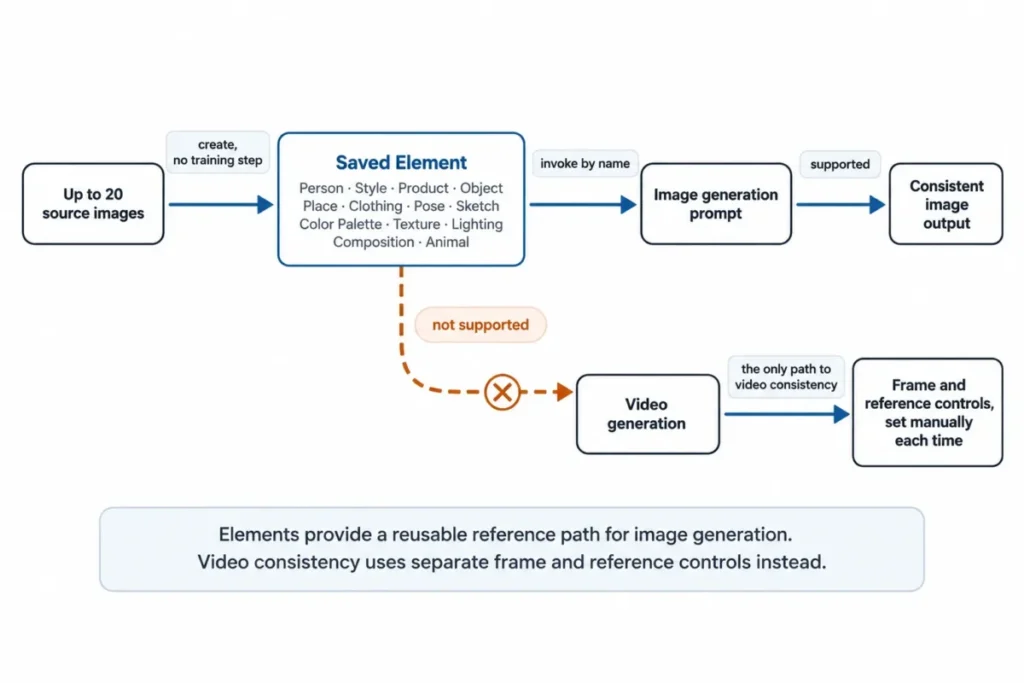
Image Editing That Keeps the Original
Editing is documented as non-destructive: “An edit creates a new image while keeping your original untouched.” (non-destructive editing behavior)
Background replacement, object manipulation, style changes and restoration all run through the same action model. The practical consequence is a credit consequence rather than a file-safety one.
Non-destructive editing removes the fear of overwriting, which encourages iteration, and every iteration is a fresh charge. Image editing actions sit at the cheap end of the scale, but a designer running twelve passes on one asset is paying for twelve, not for one asset with twelve states.
Non-destructive is accurate about the source file, and our testing confirmed the upload survives untouched. It is worth being precise about what comes back, though. The edit is a fresh render of the whole frame at whichever output resolution you selected, not a patch applied to your pixels, so a 6-megapixel source edited at the 1K default returns roughly 1 megapixel. At that setting the regeneration reached the subject’s face as well as the background.
Video Generation, the Real Credit Sink
Ten video families are listed on the video model capacity table, ranging from Seedance at an implied 50 credits per video to Google Veo at roughly 2,000. Changelog entries in the two months before the checked date show 1080p output arriving on two of them, with clip lengths reaching 30 seconds on Seedance and 20 seconds on FLUX.
Video is where plan sizing goes wrong. Entry’s 3,000 credits produce 5 Auto videos a month, and even Ultra’s 100,000 credits per seat produce 166.
A social team shipping one short video per working day is looking at Plus at minimum, and at a specific cheap model rather than Auto. A buyer sizing the plan on image throughput and adding video later will hit the wall within a fortnight.
Music, Speech, and Sound Effects
Audio is the most generous part of the credit economy and the least discussed. The published audio capacity implies roughly 3 credits per song, 20 credits per 1,000 characters of speech, and about 91 credits per sound effect.
The sound effect action arrived in July 2026, produces clips of 5, 10, 20 or 30 seconds, and returns an MP3. (sound effect release note)
For a small team assembling short-form video, the practical read is that the soundtrack and voiceover are effectively free next to the footage. That is unusual, and it is worth knowing before paying separately for an audio tool.
Upscaling to 4K, 8K, or 16K
Image upscaling is gated by tier on the upscaling tier rows: 4K on Entry, 8K on Core, 16K on Plus and Ultra. Video upscaling is available across plans, and the maximum supported clip length rose from 15 seconds to 5 minutes in July 2026.
If your deliverable is print or large format, the resolution ceiling becomes a plan gate independent of everything else. A studio needing 16K output a few times a year pays for Plus at $55 per seat per month for a capability it uses occasionally.
The pricing page lists no add-on route to buy that ceiling standalone.
Measured Credit Cost per Upscale
Tier gating is only half the story. The cost of one upscale varies by a factor of eighty depending on which of the five models you pick and which target you set. We read every combination from the app on September 15, 2026 against a known credit balance.
| Model | Type | 1K | 2K | 4K | 8K | 16K |
|---|---|---|---|---|---|---|
| SeedVR2 | Classic | 5 | 10 | 10 | Not offered | Not offered |
| Crystal Upscaler | Creative | 20 | 40 | 40 | 60 | 250 |
| Topaz Standard 2 | Classic | 50 | Not offered | 50 | 50 | 50 |
| Topaz Wonder 3.5 | Creative | 50 | Not offered | 50 | 100 | 200 |
| Topaz Bloom 2 | Creative | 50 | Not offered | 100 | 200 | 400 |
Source: remaining-run counter shown beside the generate button in the getimg.ai app, read against an account balance of 9,590 credits on September 15, 2026. Every value resolved to a whole number of credits across seventeen readings.
Two things follow for a buyer. The pricing page advertises 600 upscales on the 3,000-credit Entry plan, and only SeedVR2 at 1K reaches that figure; the same allowance buys about seven upscales on Topaz Bloom 2 at 16K. And Topaz Standard 2 is the cheapest route to a 16K file at a flat 50 credits, against 200 on Wonder 3.5 and 400 on Bloom 2, which no published material tells you.
Ease of Use and Setup
Setup is close to trivial. The product runs in a browser, there is nothing to install, and Elements removes a model-training step.
The learning curve is not in the interface. It is in the credit model.
The public documentation nowhere connects model choice to monthly output. The only cost signal it describes is the per-run figure above the action button, which reports the price of one run rather than the pattern across a month.
The most useful onboarding step for a new team is to agree a default model family before anyone generates anything. That makes the expensive families a deliberate choice rather than an accident.
Anyone evaluating this alongside other options should read the credit model first and the interface second. Cost at scale is the right lens for comparing this whole category, which is how the best AI image generators roundup is organised.
Teams, Shared Assets, and What Does Not Cross Between Them
Teams start at Core. Membership carries two roles: “Admin: can invite/remove members, delete the team, change settings” and “Creator: can generate and manage content, but not team settings.”
Visibility is either “Public: accessible to everyone in your workspace” or “Private: members must be invited.” Uploads are shared automatically inside a team. (team roles and asset isolation)
The constraint shaping agency work sits in the same guide: “Each team has its own assets, so content doesn’t mix between Teams. For example, you can’t use an image from one Team as a reference in another.”
That isolation is correct behavior for client confidentiality, and it is useful if separate clients are the reason you created separate teams. It becomes friction the moment a shared asset exists.
A house style reference, an agency logo treatment, a reusable Element: none of it crosses. The documentation describes the boundary and describes no transfer mechanism, so the practical workaround is the obvious manual one, downloading from the source team and re-uploading into the destination, and that is my inference from the isolation rather than a documented procedure.
What happens to folders, generation history, likes and metadata in that round trip is not documented at all.
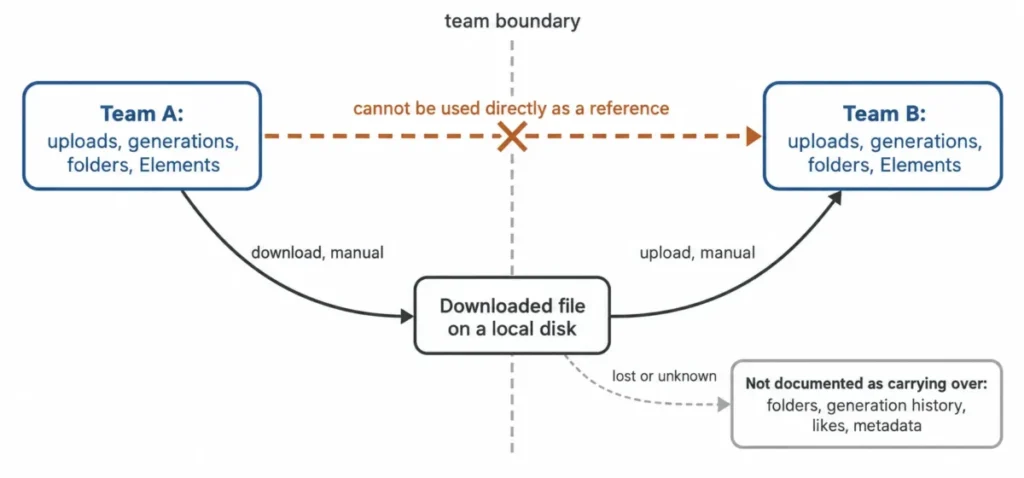
For a five-client agency, the honest cost of Plus is not $55 per seat but $55 per seat plus a standing filing discipline and a duplicated asset library per client.
Integrations, the API, and Developer Costs
There is no integration catalogue to report. What getimg.ai offers instead is a documented HTTP API with first-party Node.js and Python clients.
The billing boundary is unambiguous and stated in the FAQ as “No. API is a separate product with separate pricing.” (API access answer)
A Plus subscription at $660 per seat per year buys zero API calls.
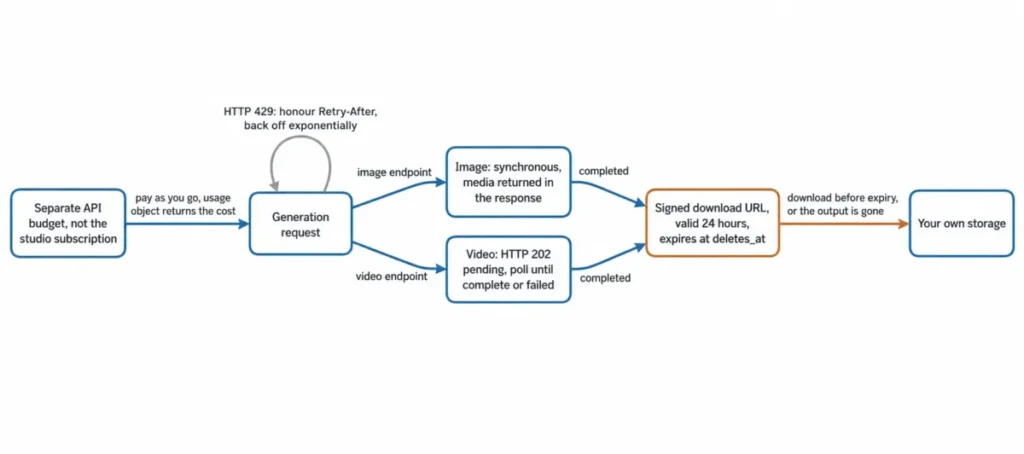
API usage is pay-as-you-go with no subscription and no minimum spend, starting at $0.015 per image and $0.022 per second of video. Every response carries a usage object reporting total cost, billable unit, unit price and quantity. (published API rates)
That per-response cost reporting is a real advantage over the studio, where the reader has to derive per-action costs from a capacity table the way this article did. On the API, spend is auditable per request by design.
Three engineering constraints decide whether the API is a fit.
Rate limits are account-specific rather than published. “There are three independent rate limits, all enforced on generation requests only: Image RPM, Video RPM, and Concurrent requests.”
The documentation adds that “Your current rate limits are shown in the developer dashboard. Limits vary by account setup.”
Exceeding a limit returns HTTP 429, and the documentation directs integrators to “Use the Retry-After header with exponential backoff.” (documented rate limit dimensions)
No public number exists, so capacity planning requires an account before it requires a design.
Media is temporary, and that is the constraint most likely to be discovered late. Videos return HTTP 202 with a pending status and only an id, so video generation is asynchronous and requires polling.
Completed media carries a signed download URL, and “Generated media is retained for 24 hours. The signed url is valid for that same window and expires at deletes_at.” (media retention window)
Any application storing the returned URL rather than the file has built a 24-hour product. Persistent storage is the integrator’s responsibility, and any download failure inside that 24-hour window is unrecoverable.
Error handling is documented cleanly enough to build a retry policy directly from it.
| Status | Meaning | Retry |
|---|---|---|
| 400 | Required parameter missing or value unsupported | No, fix the request |
| 401 | API key missing, malformed, revoked or invalid | No, fix the key |
| 402 | Insufficient account balance or quota | No, fund the account |
| 404 | Requested resource does not exist | No, fix the resource id |
| 422 | Prompt or reference image failed safety checks | No, change the input |
| 429 | Rate limit exceeded | Yes, with exponential backoff |
| 500 | Unexpected server-side error | Yes, with exponential backoff |
Source: official getimg API error documentation, checked September 15, 2026, at the documented status codes.
One surface difference is worth catching before it causes a bug. The web creator accepts up to 10 reference images, while the image endpoint accepts an images array of at most 8 items, with prompts between 1 and 4,096 characters and output in png, jpeg or webp. (image endpoint payload limits)
A workflow prototyped in the app with nine references does not port to the API unchanged.
Automation, Batch Throughput, and Usage Reporting
Automation inside the studio means batching, and batching is capped by the simultaneous generation limit: 2, 4, 8 and 10 across Entry, Core, Plus and Ultra. There is no documented scheduler, no queue management surface and no rules engine.
A team wanting generation triggered by an external event is looking at the API, on a separate budget.
Reporting is thinner still. The documented signal is the cost of the action about to run.
Nothing in the public material describes per-user, per-team or per-model spend analytics, which is a real gap once ten seats each draw 15,000 credits and someone has to explain where they went. The API is the opposite: every response carries its own cost breakdown, which makes attribution trivial programmatically and impossible in the interface.
For a team needing spend attribution, that asymmetry is the strongest argument for putting production volume through the API and keeping the studio for exploration.
Security, Support, and Admin Controls
The privacy policy is specific in a way deserving credit and dated in a way deserving scrutiny. It was last updated September 23, 2022.
It states that “All data is encrypted via SSL/TLS when transmitted” from getimg.ai’s servers to the browser, in the policy’s own wording, and that database backups are encrypted as well. It also states that “Most data are not encrypted” while resident in the live database, because the data has to be ready to serve on request, alongside an assurance that the company secures data at rest. (published encryption wording)
The policy states this explicitly, which is unusual in a published privacy page.
Retention is equally explicit. Access IP addresses are kept “for as long as your product account is active”, and signup IP addresses are kept “forever because they are used to mitigate spammy signups.”
Published subprocessors are Stripe for subscriptions and payments, Amazon Web Services and Google Cloud Platform for cloud services, Plausible Analytics and PostHog for website and app analytics, and Sentry for error reporting. (published subprocessor list)
That page was last updated September 22, 2022.
Public material does not establish SOC 2, ISO 27001, HIPAA, SSO, SCIM or audit logging. Nothing here says getimg.ai lacks them.
It says this review could not verify them, which is a different statement and a worse position for a procurement team, because an unverifiable control is one you cannot put in a risk register. If your organization requires any of those, ask before you buy rather than after.
Support runs through help@getimg.ai for bugs and an in-product Feedback option for feature requests. No general response-time commitment was verifiable, and the service level statement in the Terms puts it plainly, saying getimg.ai does “not offer service-level agreements” for most of its services yet.
The same document provides the service on an “as is” and “as available” basis.
Commercial use is permitted on all paid subscriptions per the FAQ. That is a usage permission and nothing more.
It does not establish who owns the output, whether the output is copyrightable, what the training data warranty is, or whether any indemnity exists. Do not read it as any of those.
getimg.ai Limitations
Credit cost is invisible at the level that matters. The documented cost signal is per-action, and no published material surfaces the per-model pattern across a month. Everything in the model-cost table above had to be derived, and the derivation is not something a buyer should have to do.
Evaluation is expensive and barely reversible. No free plan, a 100-credit refund ceiling, a three-day refund window, promotional purchases excluded, and unused credits expiring at period end. The realistic cost of finding out whether this product suits you is one full month’s fee.
Elements stop at images. The consistency feature carrying most of the product’s marketing weight does not work in video, and no plan fixes that.
Teams do not share. Assets cannot be used across teams, which for multi-client work means duplicated libraries and manual transfers with undocumented metadata behavior.
The legal surface has aged. The privacy policy dates from September 2022, the Terms from November 2022, the subprocessor list from September 2022, while the product roster changed four times in the two weeks before the checked date. A 2022 legal document describing a 2026 product is not automatically wrong, but the gap is wide enough that anything in it should be confirmed rather than assumed.
The cancellation policy contradicts current pricing. Last updated in November 2022, it still describes a cancelled account being downgraded to a free plan, while the 2026 comparison states there is none. Treat the cancellation wording as stale and plan for the subscription ending outright.
API media has a 24-hour life. Generated media and its signed URL expire at 24 hours, so every integration needs its own storage and a failed download is not recoverable.
Background removal caps output at 2,048 pixels. The action offers no resolution control, so a 12-megapixel portrait returns at about 2.8 megapixels. For listing images that is fine; for anything heading to print it is not.
The model picker sets the price and the app picks by default. Auto mode chooses a model for each prompt, and the spread between the cheapest and most expensive image model is wide enough that two identical-looking edits can differ several times over in credits.
Who Should Use getimg.ai?
Solo creators with image-heavy output across several model families. Entry at $96 a year is a genuinely low price for a multi-model roster with commercial rights included. The requirement is that the models you need fall inside Entry’s listed subset and that you pick cheap families deliberately.
Two to five person creative teams needing one shared space. Core at $25 per seat per month on the per-seat plan rates is the first tier combining the full roster with team workspaces. For three seats that is 900 dollars a year with 15,000 monthly credits each, which covers most image workloads comfortably.
Agencies running separate client workspaces. Plus at five teams, with private visibility and Admin and Creator roles, maps to client separation properly. Go in knowing the shared-asset cost.
Teams doing more finishing than generating. If the work is upscaling and resizing on existing assets, the implied credit costs sit at the bottom of the scale and even Entry stretches a long way. Editing actions with no published capacity figure cannot be priced from public material at all.
Developers wanting several model families behind one endpoint. The API with per-response cost reporting, documented error semantics and first-party SDKs is a reasonable way to avoid integrating six vendors. Budget it separately from any studio seat.
Who Should Avoid getimg.ai?
Anyone needing to try before paying. There is no free plan and the refund test is 100 credits inside three days. If unpaid evaluation is a requirement, this is the wrong product and no workaround exists.
Video-first teams on a small budget. Five Auto videos a month on Entry, 25 on Core. A team publishing daily video needs Plus or Ultra plus a deliberately cheap model family, and should model the cost against a dedicated video platform before committing, which the best AI video generators comparison makes faster.
Brands needing one reference system across image and video. Elements are image-only, so if cross-media character or product consistency is the actual requirement, this product does not meet it at any price.
Agencies needing frictionless asset reuse across clients. The team isolation protecting client separation also blocks sharing, and the transfer path is manual and undocumented.
Procurement-led buyers with a compliance checklist. No verifiable certification evidence, no SLA for most services, and legal documents four years older than the product. That combination is likely to require additional evidence at security review.
Anyone expecting the API inside their subscription. It is a separate product on a separate budget, and buyers who miss this line under-budget their build.
getimg.ai Alternatives
| Alternative | Choose it if | What you give up |
|---|---|---|
| Adobe Firefly | You already pay for Creative Cloud and want generation inside the apps your team uses daily | Model breadth, and the ability to pick between competing third-party families |
| Midjourney | You want a single-vendor image workflow instead of workflow breadth and multi-model access | Video, audio, editing actions and a team workspace in the same subscription |
| A dedicated video platform | Video is the primary output rather than an occasional addition | One shared balance across media types, and the cheap image and audio economics |
| A local open-model workflow | You need full parameter control with no per-action cost, or continuity with older open models | Hosted convenience, managed model updates, and zero maintenance |
| Direct model APIs | You need only one model family and want to remove the aggregator margin | Model switching behind one endpoint, one billing relationship, and one set of SDKs |
Pricing for the tools in each category is covered in the best AI content creation tools and best AI photo editors guides.
A note on user sentiment, offered as sentiment rather than as product evidence.
The accessible Trustpilot listing rests on a very small sample.
It showed a score of 2.7 out of 5 across 11 reviews at the checked date.
That is far too small a sample to characterize a user base.
The recurring critical themes in that small sample were the absence of a free trial, video credit consumption arriving faster than expected, and refund experience. The second and third match limitations documented in official material, and the first matches getimg.ai’s own statement that it has no free plan, which is the reason they are worth mentioning at all.
Final Verdict: Is getimg.ai Worth It in 2026?
Yes for image-led creators and small teams, with conditions. No for video-led buyers at the low tiers, and no for anyone needing to evaluate before paying.
The product does the hard thing well. Six image families and ten video families behind one balance, with commercial rights, lossless output and faster generation included on every paid plan, is real consolidation.
Non-destructive editing, a no-training consistency feature, and audio costing almost nothing next to video are all genuine advantages.
What holds it back is the pricing surface, which does not expose the variable that controls the bill.
A buyer can do everything right, pick the correct tier, read the credit allowance carefully, and still overpay by a factor of twelve because nobody told them which model family to default to. That information exists inside getimg.ai’s own published figures, and the product never surfaces it.
The recommendation is to shortlist Core first, compare it against a dedicated video platform when video dominates the month, and avoid getimg.ai entirely when unpaid evaluation is a requirement.
Solo, image-only, flexible on models: Entry at $96 a year, and pick a cheap model family on day one.
Anyone needing the full roster or a second person: Core at $300 per seat per year. This is the practical plan for most buyers and the one I would default to.
Bursty workloads, five client workspaces, or 16K output: Plus at $660 per seat per year, and ask what a top-up costs before signing, because that price is not public.
Sustained high volume: Ultra at $1,800 per seat per year, chosen for throughput rather than for features.
Building software: budget the API separately, design for 24-hour media expiry and account-specific rate limits, and do not let anyone assume the studio subscription covers it.
The renewal question to answer twelve months from now is simple. What did each seat generate, on which model families, and at what implied credit cost?
If the interface still cannot tell you, build that answer from API usage data or from a shared spreadsheet before the second year, because the alternative is renewing a plan you cannot justify.
Frequently Asked Questions
The questions buyers still ask at the point of payment.
Is getimg.ai free?
No. getimg.ai’s own April 2026 comparison states plainly that it has no free plan. (vendor statement on the free tier)
The cancellation policy, last updated in November 2022, still says a cancelled account is “automatically downgraded to the free plan”. Treat that as stale and assume the subscription ends outright. (cancellation wording)
How much does getimg.ai cost?
Four plans, all quoted excluding tax. Entry is $10 or $96, Core is $30 or $300 a seat, Plus is $65 or $660 a seat, and Ultra is $175 or $1,800 a seat.
The first figure in each pair is the monthly rate and the second is the yearly total.
Do getimg.ai credits roll over?
No. Unused credits are non-refundable and expire at the end of the billing period in which they were issued.
Credits renew on the anniversary of your signup date rather than on the first of the month.
How many credits does one image or video use?
getimg.ai does not publish a per-action price. Dividing each plan’s credit allowance by its published output counts implies the rates below.
Roughly 5 credits for a Qwen image, 50 for a 1K image in Auto mode, 60 for a GPT Image generation, 50 for a Seedance video, and about 2,000 for a Google Veo video.
Those figures are consistent across all four plans but they are derived rather than official, and the underlying counts are presented as illustrative.
We since measured several of these directly against an account balance. A background removal costs 10 credits. A prompt edit in Auto mode costs 50 credits at 1K, 100 at 2K and 150 at 4K. An upscale ranges from 5 to 400 credits depending on the model and target, which the table in the upscaling section sets out in full.
Can I buy more credits without upgrading?
Only on Plus and Ultra, and only once your balance falls below 10 percent of the monthly allowance. Entry and Core have no top-up route, so an exhausted balance on those plans means waiting for renewal or upgrading.
The top-up price is not listed on getimg.ai’s pricing page.
Does a getimg.ai subscription include API access?
No. The FAQ states the API is a separate product with separate pricing.
API usage is pay as you go from $0.015 per image and $0.022 per second of video, with no subscription and no minimum spend.
Can I use getimg.ai output commercially?
The FAQ states that all paid subscriptions permit commercial use. That is a usage permission only.
It does not establish output ownership, copyrightability, a training-data warranty or any indemnity, and none of those is addressed in the legal pages checked for this review.
Can I get a refund?
Only if you have used fewer than 100 credits in the current billing period and you request it within three days of your subscription start or renewal. Subscriptions bought at a discounted or promotional rate are excluded, and approved refunds are processed within 25 business days.
Separately, a credit balance created by downgrading a plan can be refunded on request.