
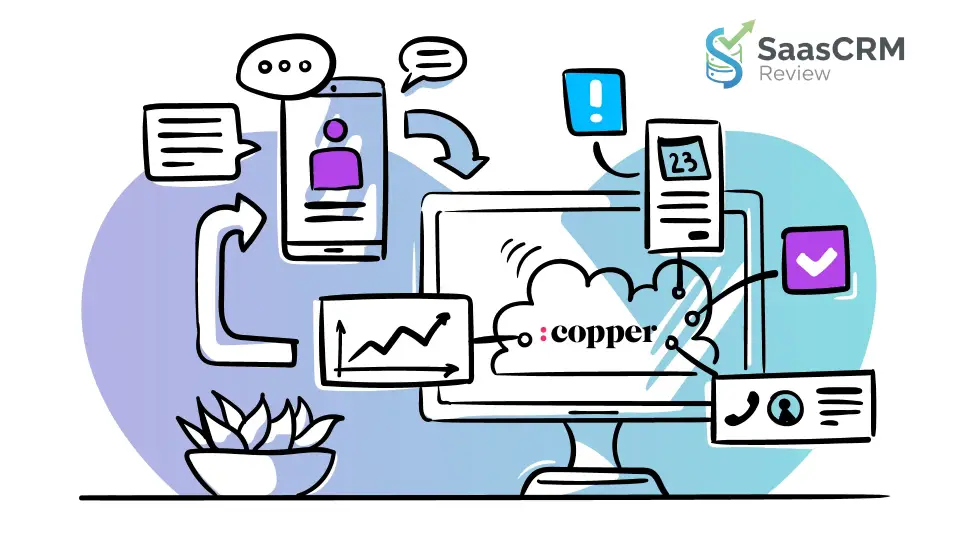
Copper CRM is designed for teams that live inside Google Workspace and want a CRM that actually gets used.
Instead of forcing sales reps to constantly switch tabs or manually log activities, Copper focuses on embedding CRM workflows directly into Gmail, Google Calendar, and Google Drive.
In this Copper CRM Review, we evaluate the platform from a practical, real-world perspective—looking beyond marketing claims to understand how Copper performs in daily sales operations. Based on hands-on usage patterns and feature analysis, this review covers key features, pricing plans, strengths, limitations, and real use cases, helping you decide whether Copper CRM is the right fit for your business in 2026.
If your team values ease of adoption, clean pipelines, and Google-native workflows more than heavy enterprise customization, Copper CRM is worth a closer look.
🔍 Quick Summary – Copper CRM Review 2026
| Category | Copper CRM Overview |
|---|---|
| Best for | Small to mid-sized teams using Google Workspace |
| Primary use case | Relationship management, sales pipelines, follow-ups |
| Core strength | Deep Gmail, Google Calendar, Google Drive integration |
| Ease of use | ⭐⭐⭐⭐⭐ (very low learning curve) |
| CRM adoption | High – designed to reduce manual data entry |
| Key features | Contact management, pipelines, automation, reporting, email tools |
| Automation | Task automation (Basic+), workflow automation (Professional+) |
| Reporting | Available from Professional; custom reports in Business |
| Email capabilities | Templates, bulk email, AI writing tools, email series (Business) |
| Integrations | Zapier (5,000+ apps), Slack, DocuSign, QuickBooks, API |
| Mobile apps | iOS & Android included on all plans |
| Pricing range | $9 – $99 per user/month (annual billing) |
| Scalability | Best for SMB & mid-market; limited for enterprise complexity |
| Main limitation | Advanced CRM features locked behind higher tiers |
| Top alternatives | HubSpot CRM, Salesforce, Pipedrive |
| Overall verdict | Excellent Google Workspace CRM with strong usability |
Copper CRM is a strong choice for Google Workspace–centric teams that prioritize ease of use, clean pipelines, and real CRM adoption over deep enterprise customization.
- Best CRM for Startups 2026: Expert Reviews & Comparisons
- Best CRM Software Review 2026: (Expert Picks + Comparison)
- Best CRM for Small Business 2026: Top Picks by Use Case + Honest Trade-offs
Key Features of Copper CRM (What You Actually Get in Daily Use)
Organize Contacts
Keep all your relationships in one place
Copper centralizes people and company records so your team always has context before engaging.
What this looks like in practice:
- Unified contact and company records
- Full interaction timeline (emails, meetings, notes, tasks)
- Custom fields to match your sales or service process
- Automatic association of activities to the right records
Why it matters:
Instead of searching Gmail threads or spreadsheets, reps see who the contact is, what’s happened, and what to do next—all in one view.
Track Deals
Set up the pipelines that work for you
Copper lets you build customizable sales pipelines that reflect how your team actually sells.
Key capabilities:
- Multiple pipelines for different sales motions
- Custom deal stages and templates
- Drag-and-drop deal movement
- Deal values and revenue tracking (plan-dependent)
Real-world benefit:
Pipeline reviews become faster and more accurate because deal stages and activities stay updated—especially when reps work primarily from Gmail.
Manage Projects
Build workflows that keep everything moving
Beyond sales, Copper supports project and process pipelines, making it useful for post-sale workflows.
Typical use cases:
- Client onboarding
- Service delivery milestones
- Internal processes (renewals, implementations)
Why teams use this:
Agencies and services firms often want one system to manage both sales and delivery workflows without adding a separate project management tool.
Elevate Emails
Build, personalize, scale, and automate outreach
Copper includes built-in tools for structured email communication.
Email features (by plan):
- Email templates with merge fields
- Bulk email campaigns
- AI email template generator
- AI email re-writer
- Email automation and sequences
- Open and click tracking (Business)
Practical advantage:
Outreach becomes consistent and measurable—without forcing teams into a separate email marketing platform for sales communication.
Automate Tasks
Create recurring tasks and notifications
Automation in Copper focuses on follow-up discipline, not complexity.
Automation capabilities:
- Task automation (e.g., auto-create follow-ups)
- Workflow automation (multi-step logic in higher plans)
- Notifications for stage changes or inactivity
Why this matters:
Most lost deals aren’t lost because of price—they’re lost because of missed follow-ups. Task automation reduces that risk.
Get Reports
Understand performance with clear, actionable insights
Copper’s reporting tools help teams move from gut feeling to data-driven decisions.
Reporting features:
- Activity reports
- Pipeline performance reports
- Revenue tracking
- Custom reports (Business plan)
What managers actually use this for:
- Weekly pipeline reviews
- Rep activity tracking
- Identifying stalled deals
- Understanding revenue trends
Integrate Apps
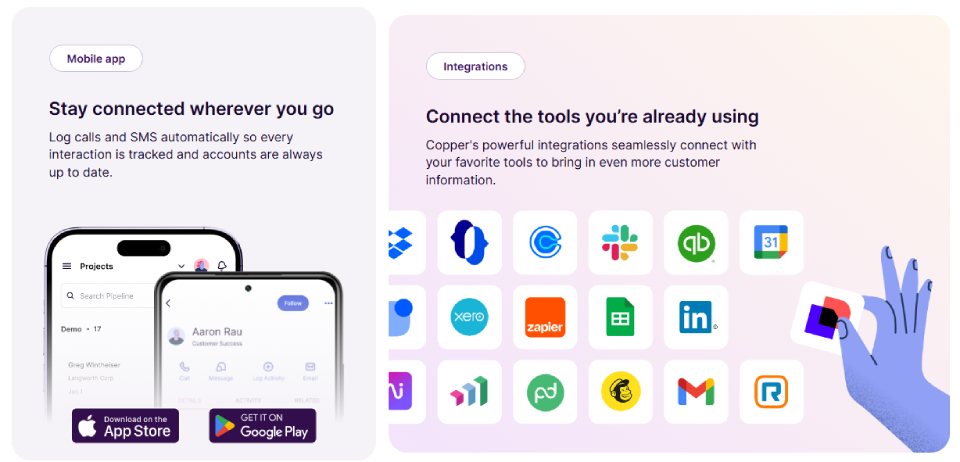
Connect Copper with your favorite tools
Copper integrates with common business tools to avoid data silos.
Integration highlights:
- One-click integrations with popular apps
- Zapier support (5,000+ apps)
- Native integrations (Slack, DocuSign, QuickBooks, Mailchimp, Zendesk, etc.)
- API & Embedded Integration SDK (Professional+)
Why this matters:
Most SMBs use multiple tools. Copper’s integrations let CRM data flow where it’s needed—without manual exports.
Mobile App
Stay connected wherever you go
Copper offers iOS and Android apps for teams that work outside the office.
Mobile use cases:
- Log calls and SMS automatically
- Review account history before meetings
- Update deal stages on the go
- Track tasks and reminders in real time
Adoption insight:
When reps can update CRM data immediately after calls or meetings, data quality improves dramatically.
Google Workspace CRM
Manage contacts, deals, and emails in one place
Copper is built specifically as a Google Workspace CRM, not a generic CRM with a Google plug-in.
Included Workspace features:
- Gmail email and contact sync
- Google Calendar sync
- Google Drive file integration
- Google Contacts sync
- Sign in with Google
- Chrome extension across Gmail, Calendar, LinkedIn, and web apps
Key advantage:
Copper works where teams already spend their time—reducing tab switching and increasing real CRM usage.
Chrome Extension
Manage contacts, deals, and emails anywhere
The Chrome extension brings Copper into your browser workflow.
What you can do:
- View and update CRM records from Gmail
- Create deals and tasks while emailing
- Access CRM context on LinkedIn and other sites
This is one of Copper’s strongest adoption drivers for sales teams.
Feature Summary (At-a-Glance)
| Feature Area | What It Solves |
|---|---|
| Contact Management | Centralized relationship history |
| Deal Pipelines | Clear sales execution and forecasting |
| Project Management | Sales + delivery workflows in one system |
| Email Tools | Scalable, trackable outreach |
| Task Automation | Consistent follow-up discipline |
| Reporting | Visibility into performance and revenue |
| Integrations | Connected business systems |
| Mobile Apps | CRM usage beyond the desk |
| Google Workspace CRM | Zero-friction daily workflows |
- Best CRM for Sales Teams 2026: Top Picks for Closing More Deals
- Best CRM For Freelancers 2026: Expert Review & Comparison
Copper CRM Pricing and Plans
This section is written with practical clarity and real usage context—so you can choose the right plan based on what your team actually needs.
📊 Pricing Table (USD, Annual vs Monthly)
| Plan | Annual (per user/month) | Monthly (per user/month) | Best For |
|---|---|---|---|
| Starter | $9 | $12 | Individual users & teams starting CRM habits |
| Basic | $23 | $29 | Teams needing pipelines & basic automation |
| Professional | $59 | $69 | Scaling teams needing workflows & reporting |
| Business | $99 | $134 | Mature teams needing advanced analytics & nurture |
Prices are in USD and do not include taxes or fees where applicable.
“Try Free” trials are offered on all plans.
⭐ Starter — Relationship Management & Workspace Sync
Best for: Solo users or very small teams that want lightweight CRM workflows without complexity.
Key features:
- Up to 1,000 contacts
- Google Workspace integration
- Gmail email, contact, and file sync
- Calendar sync
- Drive integration
- Tasks + Activity feed
- Forms
- Zapier integration
- Mobile apps (iOS & Android)
- Basic productivity tools
- Notes, reminders, global activity feed
What you won’t get in Starter:
- Pipelines (deal stages)
- Sales opportunities or leads
- Project pipelines
- Reporting and revenue tracking
Starter is a good fit when you want to organize contacts fast—but not ready to manage formal pipelines yet.
📈 Basic — Pipelines & Team Collaboration
Best for: Teams ready to adopt structured sales processes.
Everything in Starter, plus:
- Up to 2,500 contacts
- Task automation
- Customizable pipelines
- Project management features
- Contact enrichment
- Deal management
- More robust team collaboration
Why Basic matters:
- This is the first plan where pipelines and automations begin to shape predictable sales workflows.
- Better than Starter for teams that want consistent handoffs and accountability.
🚀 Professional — Workflow Automation & Reporting
Best for: SMB sales teams that need real process automation and meaningful insights.
Everything in Basic, plus:
- Up to 15,000 contacts
- Workflow automation
- Bulk email
- Reporting (activity & pipelines)
- Expanded integration ecosystem
- Leads & sales opportunities
- Revenue tracking
- Google Sheets & Looker Studio integrations
- AI-powered email tools
- AI email template generator
- AI email re-writer
- API & Embedded integration SDK
Why Professional is often the sweet spot:
- Most teams reach for Professional because it delivers workflow depth and reporting—turning raw CRM data into actionable pipeline insight.
🏆 Business — Advanced Analytics & Nurture
Best for: Scaling businesses needing sophisticated CRM capability and analytics.
Everything in Professional, plus:
- Unlimited contact storage
- Email series (nurture sequences)
- Custom reports
- Multi-currency support
- Premium support
- Remove Copper branding from forms
- Email click tracking
Who Business suits:
- Larger teams with multi-regional or multi-currency operations
- Growth teams using CRM for both sales and nurture
- Companies that want tailored insights or deep analytics
📌 Feature Comparison at a Glance
| Feature / Capability | Starter | Basic | Professional | Business |
|---|---|---|---|---|
| Contacts | 1,000 | 2,500 | 15,000 | Unlimited |
| Pipelines | ❌ | ✔️ | ✔️ | ✔️ |
| Task automation | ❌ | ✔️ | ✔️ | ✔️ |
| Workflow automation | ❌ | ❌ | ✔️ | ✔️ |
| Reporting | ❌ | ❌ | ✔️ | ✔️ |
| Custom reports | ❌ | ❌ | ❌ | ✔️ |
| Leads & opportunities | ❌ | ❌ | ✔️ | ✔️ |
| Bulk email | ❌ | ❌ | ✔️ | ✔️ |
| Email series | ❌ | ❌ | ❌ | ✔️ |
| Multi-currency | ❌ | ❌ | ❌ | ✔️ |
| Premium support | ❌ | ❌ | ❌ | ✔️ |
Read more: Best Social Media CRMs 2026
Ease of Use and User Experience
Interface Design
Copper’s interface deliberately mirrors Google Workspace’s visual language—clean, minimalist, with abundant white space. Users comfortable with Gmail will find the navigation patterns familiar rather than requiring cognitive adjustment to a completely different design system.
The left sidebar provides primary navigation across contacts, leads, opportunities, tasks, and reports. This persistent navigation allows quick context switching without losing your place. However, the search functionality sometimes struggles with partial matches, requiring more precise query construction than users expect.
The Gmail sidebar integration represents Copper’s signature interface innovation. While composing or reading emails, the Copper panel displays relevant contact information, recent interactions, and suggested actions. This contextual intelligence works impressively when it fires correctly but occasionally misidentifies contacts or fails to surface relevant deal information.
Onboarding and Setup
Initial setup typically requires 2-4 hours for a small team, significantly faster than enterprise CRM platforms that might require weeks of configuration. The setup wizard guides administrators through connecting Google Workspace, defining sales stages, establishing lead sources, and inviting team members.
Data import supports CSV files, allowing migration from spreadsheets or other CRM systems. The import mapping interface helps match columns to Copper fields, though complex data structures sometimes require cleaning before import succeeds.
The challenge emerges in customization decisions. Organizations must thoughtfully define their pipeline stages, custom fields, and automation rules during setup because retroactively restructuring requires data manipulation. Teams that rush through setup without strategic planning often face friction later.
Copper provides implementation support for Professional and Business tier customers, including configuration guidance and data migration assistance. This support significantly smooths the onboarding experience but isn’t available to Basic tier customers who represent the majority of users.
Learning Curve for Non-Technical Users
Sales representatives without technical backgrounds generally become productive with Copper within one week. The Gmail integration means they continue working in familiar territory while gradually adopting CRM capabilities.
Administrative functions like building custom reports or configuring complex automations require more investment. Non-technical administrators can typically handle standard configurations but may need occasional support for sophisticated requirements.
The documentation assumes reasonable technical literacy. Instructions for API integration or webhook configuration target developer audiences, while end-user guides appropriately simplify concepts.
Compared to Salesforce’s notoriously steep learning curve or HubSpot’s sometimes overwhelming feature breadth, Copper positions as the accessible option. However, this accessibility comes through limiting features rather than through superior instructional design.

Integrations and Ecosystem
Native Integrations
Beyond Google Workspace, Copper offers native integrations with approximately 40 applications, focusing on business tools common in the small-to-midsize segment.
Slack integration sends notifications for deal updates, task assignments, and pipeline changes directly into relevant channels. Teams that coordinate heavily through Slack appreciate centralized visibility without constantly checking the CRM.
Mailchimp and Constant Contact integrations sync contact lists bidirectionally, allowing marketing teams to build email campaigns based on CRM segments while feeding engagement data back to Copper.
QuickBooks integration connects financial records with customer data, helping teams understand customer lifetime value and payment history during sales conversations.
Project management integrations with Asana, Trello, and Monday.com create projects automatically when deals close, smoothing the handoff from sales to delivery teams.
However, the native integration catalog feels limited compared to HubSpot’s 1,000+ integrations or Salesforce’s vast AppExchange ecosystem. Organizations with specialized tools often find themselves without prebuilt connectors.
Third-Party Tools
Zapier provides the workaround for missing native integrations, connecting Copper to 5,000+ applications through automated workflows. Creating a Zap that triggers actions in other systems when Copper data changes extends functionality considerably.
The limitation: Zapier requires separate subscription costs, and complex automation scenarios consume significant task allowances. Organizations can easily spend $50-200 monthly on Zapier subscriptions to bridge Copper’s integration gaps.
Make (formerly Integromat) and Workato provide alternative integration platforms with similar capabilities and pricing structures.
API and Extensibility
Copper provides RESTful API access on Professional and Business tiers, allowing developers to build custom integrations, extract data for analysis, or synchronize with proprietary systems.
The API documentation offers clear endpoint references and example code in multiple languages. Developers with API experience can typically build basic integrations within a few hours.
However, rate limits restrict API calls to prevent system overload, which can constrain high-volume data synchronization scenarios. Organizations processing thousands of records daily may encounter throttling that requires more sophisticated scheduling.
Webhook support allows external systems to receive real-time notifications when specific events occur in Copper—deal stage changes, new contact creation, or task completion. This push-based architecture enables more responsive integrations than polling-based approaches.
Pros and Cons of Copper CRM
🔎 Pros and Cons Table — Copper CRM Review
| Pros (What Copper CRM Does Well) | Cons (Limitations & Trade-offs) |
|---|---|
| ⭐ Excellent Google Workspace integration | |
| – Gmail, Calendar, Drive, Contacts sync natively | ⚠️ Not an enterprise-level CRM platform |
| – Reduces context switching & increases adoption | – Limited deep customization (objects, roles, complex logic) |
| ✔️ Very easy to learn and use | |
| – Minimal onboarding friction | |
| – Clean UI lowers training needs | ⚠️ Key features gated by higher tiers |
| – Starter lacks pipelines; leads start in Professional | – Costs increase quickly as needs grow |
| 📈 Practical pipeline & deal tracking | |
| – Custom deals and stage boards | |
| – Revenue tracking (Professional+) | ⚠️ Reporting has limitations |
| – Clear views for weekly reviews | – Not BI-grade analytics; custom reports only in Business |
| 🔄 Automation improves follow-ups | |
| – Task automation (Basic+) | |
| – Workflow automation (Professional+) | ⚠️ Email tools are not full marketing suite |
| – Reduces manual work and missed activities | – Not a replacement for HubSpot/ActiveCampaign |
| 📊 Actionable reporting (Professional+) | |
| – Pipeline & activity reporting | |
| – Helps identify friction points | ⚠️ Contact limits on lower plans |
| – Custom reports on Business | – May require upgrades as database grows |
| 🔌 Strong integration ecosystem | |
| – Zapier (5,000+ apps) | |
| – Slack, DocuSign, QuickBooks, API/SDK (Professional+) | ⚠️ Mobile app has workflow limits |
| – Works within existing stacks without heavy dev | – Not as robust as dedicated mobile CRM apps |
| 📱 Mobile apps for iOS & Android | |
| – Log activity on the go | |
| – Keeps data fresh across teams | ⚠️ Google Workspace focus limits broad appeal |
| – Increases CRM usage and accountability | – Teams not on Google may see less value |
Copper CRM is a strong, user-centric CRM optimized for Google Workspace teams who value simplicity, pipeline discipline, and real CRM adoption. It trades deep enterprise customization for ease of use and practical sales execution.
Copper CRM vs Alternatives
| Feature / Category | Copper CRM | HubSpot CRM | Salesforce | Pipedrive |
|---|---|---|---|---|
| Best for | Google Workspace users | All-in-one growth suite | Enterprise & complex workflows | Pipeline-first sales teams |
| Ease of use | ⭐⭐⭐⭐⭐ (very intuitive) | ⭐⭐⭐⭐ (moderate) | ⭐⭐ (steep learning) | ⭐⭐⭐⭐ (easy) |
| Adoption potential | High | High | Medium | High |
| Google Workspace integration | ✔️ Native, deep | ✔️ via integrations | ✔️ via connectors | ✔️ via integrations |
| Pipeline management | ✔️ Custom pipelines | ✔️ Custom pipelines | ✔️ Highly flexible | ✔️ Excellent pipeline focus |
| Lead & opportunity tracking | ✔️ (Professional+) | ✔️ | ✔️ | ✔️ |
| Automation | ✔️ (Basic+) & advanced (Professional+) | ✔️ Strong | ✔️ Very strong | ✔️ Good |
| Reporting & analytics | ✔️ (Professional+) | ✔️ Strong | ✔️ Enterprise-grade | ✔️ Good |
| Email & outreach tools | ✔️ Templates, bulk & AI tools | ✔️ Built-in sequencing | ✔️ Add-ons needed | ✔️ Good |
| Integrations | ✔️ Zapier + native | ✔️ Extensive ecosystem | ✔️ Massive ecosystem | ✔️ Good ecosystem |
| Mobile apps | ✔️ iOS & Android | ✔️ iOS & Android | ✔️ iOS & Android | ✔️ iOS & Android |
| Custom objects | ❌ Limited | ✔️ (paid tiers) | ✔️ (strong) | ❌ Limited |
| Best for enterprise | ❌ Not ideal | ✔️ Upper mid-market | ✔️ Top choice | ❌ Not enterprise |
| Pricing range | $9 – $99/user/mo | Free to high | Typically high | Mid-range |
Copper CRM vs HubSpot CRM
- Copper CRM excels at Google Workspace-centric workflows, offering an embedded CRM experience inside Gmail, Calendar, and Drive.
- HubSpot CRM is one of the most popular all-in-one growth platforms, blending CRM with marketing, sales, and customer service tools.
| Aspect | Copper CRM | HubSpot CRM |
|---|---|---|
| Google Workspace fit | ⭐⭐⭐⭐⭐ | ⭐⭐⭐⭐ (via connectors) |
| Marketing automation | Basic tools only | ⭐⭐⭐⭐⭐ (robust) |
| Pipeline customization | Strong | Strong |
| Reporting depth | Moderate (Professional+) | Strong |
| Pricing structure | Tiered by features | Free tier + modular paid hubs |
| Ideal buyer | SMBs on Google Workspace | Growth teams needing marketing + CRM |
When to Choose
Choose Copper CRM if:
- You live in Gmail/Calendar and need CRM embedded in workflows.
- You want a simple, usable CRM with minimal setup.
Choose HubSpot CRM if:
- You want marketing automation & CRM combined.
- Your growth plans include lead scoring, nurturing, and attribution.
Copper CRM vs Salesforce
- Copper CRM is lightweight, user-friendly, and built for SMB teams and Google Workspace.
- Salesforce is the most configurable CRM platform, often chosen by enterprises and complex organizations.
| Aspect | Copper CRM | Salesforce |
|---|---|---|
| Custom objects | ❌ Limited | ✔️ Very flexible |
| Enterprise governance | ❌ Not ideal | ✔️ Leader |
| Admin complexity | Low | High |
| Adoption ease | High | Moderate to low |
| Workflow logic depth | Medium | Very deep |
| Reporting & BI | Good | Enterprise BI tools |
When to Choose
Choose Copper CRM if:
- You want a practical CRM that gets used daily.
- You need quick adoption with minimal admin overhead.
Choose Salesforce if:
- You need deep customization, complex permission models, and a full ecosystem.
- You have dedicated admins and ops staff.
Copper CRM vs Pipedrive
- Copper CRM is relationship-centric and Google-native.
- Pipedrive focuses on pipeline execution and sales motion first, with a simple interface and activity driven workflow.
| Aspect | Copper CRM | Pipedrive |
|---|---|---|
| Workspace integrations | ⭐⭐⭐⭐⭐ | ⭐⭐⭐⭐ |
| Pipeline focus | Strong | ⭐⭐⭐⭐⭐ (core strength) |
| Lead management | Good | Good |
| Email tools | Moderate | Strong |
| Automation | Good | Strong |
| Reporting | Moderate | Good |
| Integrations | Zapier + native | Marketplace + Zapier |
Real-World Use Cases
Sales Teams
A 12-person software-as-a-service sales team at a growing startup replaced spreadsheet-based tracking with Copper and achieved 34% improvement in follow-up consistency within the first quarter.
The automatic email logging eliminated the manual data entry that sales representatives had routinely ignored, giving management accurate visibility into sales activities for the first time. Pipeline forecasting became reliable enough to drive hiring decisions.
However, as the company scaled to 50 representatives across multiple time zones, Copper’s territory management limitations became frustrating. The team eventually migrated to Salesforce when the sales organization’s complexity exceeded Copper’s architectural boundaries.
Marketing Teams
A digital marketing agency serving professional services clients uses Copper to manage client relationships and project pipelines. The 8-person team tracks approximately 40 active client engagements through proposal, onboarding, execution, and renewal stages.
The Google Drive integration proves particularly valuable—client assets, campaign documentation, and deliverables attach directly to project records, eliminating the “where did we save that file” problem that plagued their previous system.
The limitation: Copper doesn’t serve as their marketing automation platform. They separately maintain Mailchimp for email campaigns and use Zapier to sync contact segments between systems, adding complexity and cost.
Agencies and Consultants
A management consulting firm with 15 partners uses Copper to coordinate business development and client relationship management. Each partner maintains relationships with 20-30 client contacts, creating substantial coordination challenges.
Copper’s shared pipeline visibility ensures partners don’t duplicate outreach to the same organization. The relationship detection feature automatically maps connections between partners and prospects, revealing warm introduction opportunities.
The custom fields capture consulting-specific information—practice area focus, decision-making timeline, budget authority—that guides qualification and proposal development.
Google Workspace–Centric Organizations
A technology startup with 35 employees operates entirely within Google Workspace—Gmail for communication, Google Drive for documents, Google Meet for video, Google Calendar for scheduling.
Adopting Copper felt like adding a natural extension to their existing workflow rather than learning completely new software. The team achieved 90% adoption within two weeks because the CRM lived inside tools they already used daily.
This organization represents Copper’s ideal customer profile: small-to-midsize, Google-native, straightforward sales process, limited technical resources, prioritizing speed and simplicity over sophisticated capabilities.
Security, Privacy, and Compliance
Copper implements enterprise-grade security practices appropriate for handling sensitive customer data, though the platform targets small-to-midsize businesses rather than large enterprises with the most stringent security requirements.
Data Security Approach
All data transmission uses TLS 1.2 or higher encryption, protecting information in transit between users and Copper’s servers. Data at rest receives AES-256 encryption, meeting current industry standards for stored information protection.
Copper’s infrastructure runs on Google Cloud Platform, inheriting Google’s physical security, network security, and infrastructure reliability. This architecture decision leverages Google’s substantial security investments rather than requiring Copper to build equivalent capabilities independently.
The shared responsibility model applies: Copper secures the platform infrastructure, while customers remain responsible for managing user access, implementing appropriate authentication policies, and training teams on data handling practices.
Two-factor authentication support strengthens account security beyond password-only access. However, enforcement remains optional—administrators can require 2FA for their organization, but it’s not mandated platform-wide.
Compliance Standards
SOC 2 Type II certification demonstrates Copper’s commitment to security, availability, processing integrity, confidentiality, and privacy controls through independent audit verification. This certification satisfies due diligence requirements for many business customers.
GDPR compliance addresses European Union data protection regulations through documented data processing agreements, data subject rights support (access, deletion, portability), and appropriate data handling procedures.
CCPA compliance meets California Consumer Privacy Act requirements for California residents’ data, though this primarily affects businesses selling to consumers rather than Copper’s B2B-focused customer base.
Notably absent: HIPAA compliance for protected health information and FedRAMP authorization for US government agencies. Healthcare organizations and government contractors cannot use Copper for regulated data without accepting significant compliance risk.
Data residency remains limited—Copper stores data in US-based data centers without options for EU or other geographic hosting. Organizations with strict data residency requirements may face regulatory challenges.
Customer Support and Learning Resources
Support Channels
Support availability varies dramatically by pricing tier, creating meaningful differences in the customer experience:
Email support (all tiers): Response times typically range from 4-24 hours depending on query complexity and tier. Basic tier customers report slower response times during high-volume periods.
Chat support (Basic tier and above): Available during business hours with generally responsive wait times under 10 minutes. Chat representatives handle straightforward questions effectively but escalate complex technical issues to email.
Phone support (Professional and Business tiers): Direct phone access to support engineers provides faster resolution for urgent issues. However, phone support operates during limited hours, creating challenges for globally distributed teams.
Dedicated support (Business tier): Assigned support contacts understand the customer’s specific configuration and use cases, providing more contextual assistance than general support queues.
Implementation support (Professional and Business tiers): Onboarding assistance includes configuration guidance, data migration support, and best practices consultation, significantly improving initial deployment success.
Support quality varies by issue complexity. Basic troubleshooting and feature explanation receive competent handling. Complex integration challenges, API questions, or unusual configuration scenarios sometimes require multiple exchanges before reaching resolution.
Documentation and Onboarding Resources
Copper maintains a comprehensive knowledge base covering feature explanations, setup instructions, and common troubleshooting scenarios. The documentation generally provides sufficient detail for self-service problem resolution.
Video tutorials demonstrate core functionality through screencasts walking through common tasks. These videos help visual learners understand features more effectively than text documentation alone.
Webinar training sessions occur regularly, covering topics from basic navigation to advanced automation configuration. Live sessions allow attendees to ask questions specific to their use cases.
The Copper Community forum connects users with each other and Copper staff for peer support and feature discussions. However, forum activity remains relatively modest compared to larger CRM platforms’ thriving user communities.
The limitation: documentation sometimes lags behind product updates. Recent feature changes occasionally lack updated documentation, creating temporary confusion until materials refresh.
Is Copper CRM Worth It in 2026?
Copper CRM delivers exceptional value for a specific organizational profile while remaining inappropriate for everyone else. This targeted positioning makes the “worth it” question entirely dependent on your specific circumstances.
Clear Verdict
Copper excels for organizations that:
- Operate primarily or exclusively within Google Workspace
- Employ small-to-midsize sales teams (5-50 representatives)
- Execute relatively straightforward sales processes without complex enterprise requirements
- Prioritize ease of use and rapid adoption over sophisticated capabilities
- Value automatic data capture and minimal manual CRM maintenance
- Lack dedicated CRM administrators or technical resources
For these organizations, Copper provides superior value through reduced administrative burden, faster implementation, and higher user adoption compared to alternatives. The Google Workspace integration genuinely differentiates rather than serving as marketing positioning.
Copper disappoints organizations that:
- Use Microsoft 365, mixed email platforms, or plan to remain platform-flexible
- Require sophisticated marketing automation alongside sales management
- Need complex forecasting, territory management, or enterprise sales capabilities
- Operate in industries with specialized CRM requirements not served by general-purpose platforms
- Demand extensive third-party integrations beyond Copper’s limited ecosystem
- Must comply with strict regulatory requirements like HIPAA or FedRAMP
For these organizations, Copper’s limitations outweigh its Google integration advantages. Starting with Copper often leads to eventual migration as requirements outgrow the platform’s capabilities.
Who Should Use Copper CRM
Ideal candidates: Small technology startups, digital agencies, professional services firms, consulting practices, and sales teams within larger Google Workspace–using organizations. These teams typically feature 10-40 users, straightforward sales cycles, and strong preference for tools that work seamlessly together.
Reasonable fits: Early-stage companies uncertain about long-term CRM needs but requiring immediate sales organization. Copper’s rapid implementation and reasonable pricing create acceptable risk—if you outgrow it, migration costs remain manageable at smaller scale.
Project teams: Specific divisions within larger organizations that maintain independent systems and exclusively use Google Workspace. Copper can serve departmental needs without forcing enterprise-wide adoption.
Who Should Consider Alternatives
Microsoft-centric organizations: If you use Microsoft 365 and Outlook rather than Google Workspace, Copper makes no sense. Evaluate Microsoft Dynamics 365, Salesforce, or HubSpot instead.
Marketing-led organizations: Companies where marketing drives lead generation and requires sophisticated automation should prioritize HubSpot, Marketo, or Pardot—tools designed for marketing technology stacks.
Enterprise sales teams: Organizations with complex sales processes, long sales cycles, multiple approval stages, and sophisticated forecasting requirements need Salesforce or Microsoft Dynamics 365 despite their complexity.
Regulatory-constrained industries: Healthcare organizations requiring HIPAA compliance or government contractors needing FedRAMP authorization must choose platforms certified for these frameworks.
Integration-dependent organizations: Teams relying on extensive third-party software that lacks Copper integrations should evaluate platforms with larger ecosystems or budget appropriately for Zapier-based workarounds.
Copper CRM succeeds by deliberately constraining its scope to serve a specific customer segment exceptionally well. Understanding whether you fit that segment determines whether Copper represents excellent value or expensive frustration. The platform doesn’t try to be everything to everyone—and for the right organizations, that focused approach delivers exactly what they need.
Frequently Asked Questions (FAQ)
Is Copper CRM good for Google Workspace?
Yes. Copper is designed specifically to work seamlessly with Gmail, Google Calendar, and Google Drive, aiming to reduce tab switching and keep CRM actions close to daily workflows.
How much does Copper CRM cost in 2026?
Copper’s official pricing lists Starter at $9/seat/month billed annually ($12 monthly), Basic at $23 annually ($29 monthly), Professional at $59 annually ($69 monthly), and Business at $99 annually ($134 monthly).
Does Copper have an API?
Yes. Copper provides developer API documentation and resources for building custom integrations and more advanced workflows.
Is Copper CRM secure?
Copper describes controls such as role-based access, encryption in transit and at rest, and security testing. It also references cross-border transfer mechanisms like SCCs.
About the author

I’m Macedona, an independent reviewer covering SaaS platforms, CRM systems, and AI tools. My work focuses on hands-on testing, structured feature analysis, pricing evaluation, and real-world business use cases.
All reviews are created using transparent comparison criteria and are updated regularly to reflect changes in features, pricing, and performance.


You have touched some pleasant factors here. Any way keep up writing.
Hi, I do believe this is an excellent web site. I stumbledupon it 😉 I may
come back yet again since i have book marked it.
I must thank you for the efforts you have put in writing this site.
I really hope to view the same high-grade content from you
later on as well. In fact, your creative writing abilities has inspired me to get my own website now 😉