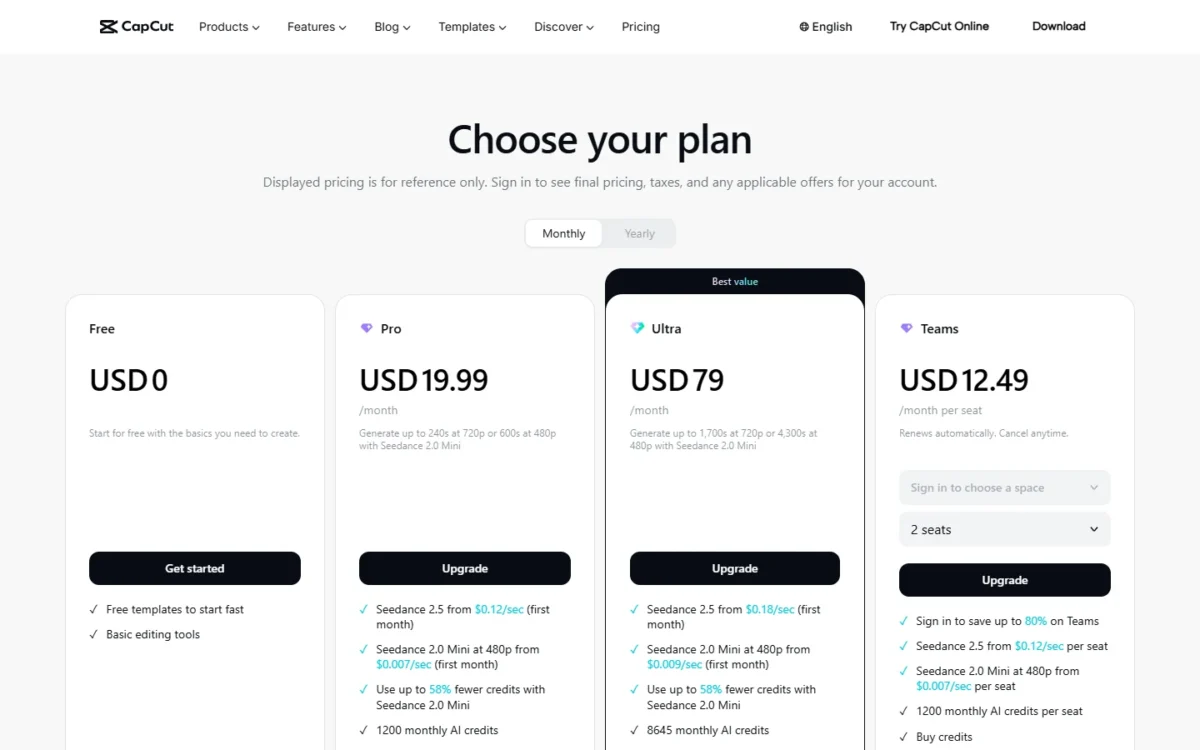
CapCut pricing in the US runs from $0 on Free to $79 a month on Ultra, billed monthly. Pro costs $19.99 a month or $179.99 a year. Teams costs $12 to $20 per seat per month billed monthly, depending on the seat count.
Where you buy matters too: the US App Store sells Standard at $9.99 a month, billed monthly, a plan capcut.com’s US pricing page does not list, while Pro is $19.99 a month in both places. These are signed-out US list prices, and CapCut tests promotional prices on selected accounts, so yours may differ.
A 5-person team pays $12 x 5 = $60 a month on Teams. Free suits editing without AI credits or cloud storage, Pro a solo creator using AI weekly, Ultra daily AI video, and Teams small groups sharing a Brand kit. The catch: no plan switch mid-cycle.
Quick pricing answer
CapCut Free costs $0. Pro costs $19.99 a month billed monthly or $179.99 a year billed yearly, with a 7-day trial for new users and no credit card. Ultra costs $79 a month or $900 a year. Teams costs $12.49 per seat per month at 2 seats, $12 at 5 or 7 seats and $20 at 10 or 30 seats, billed monthly. Standard is listed in the US App Store at $9.99 a month, absent from capcut.com’s US pricing page, with its allowances not published.
A solo creator who uses AI features weekly should start on Pro and move to yearly billing once it sticks. Prices vary by region, device and account promotion, so confirm yours after signing in. Checked November 2026.
In This Article (13 sections)
CapCut Pricing at a Glance
CapCut costs $0 to $79 a month per account, plus Teams at $12 to $20 per seat per month.
| Plan | Monthly billing | Annual billing | Best for | Main limitation |
|---|---|---|---|---|
| Free | $0 | $0 | Casual edits with free templates and basic tools | No AI credits or cloud storage listed |
| Standard | $9.99 a month in the US App Store | No yearly Standard item listed | Editing enthusiasts who want a cheaper paid plan than Pro | Absent from capcut.com’s US pricing page; allowances not published |
| Pro | $19.99 a month | $179.99 a year | Solo creators using AI features weekly | 1,200 AI credits and 240 seconds of 720p Seedance 2.0 Mini video a month |
| Ultra | $79 a month | $900 a year | Creators generating AI video daily | Small yearly discount |
| Teams | $12.49 per seat at 2 seats, $12 at 5 or 7, $20 at 10 or 30 | $107.50 per seat at 2 seats, $108 at 5 | Groups of 2, or 4 to 7, sharing a Brand kit | No 3-, 4-, 6-, 8- or 9-seat option |
Sources: CapCut’s pricing page (US view, Monthly and Yearly), CapCut on the US App Store, CapCut’s Standard vs Pro guide, checked Nov 2026.
All prices are US dollars from the US view of capcut.com/pricing, read signed out and checked on November 7, 2026, plus the US App Store listing. The pricing page does not state tax, and these list prices leave out any account promotion.
The plan names date from CapCut’s 2026 restructure, explained in a help page dated Mar 25, 2026: Pro’s AI credits rose from 550 to 1,200 and its cloud storage from 100 GB to 1 TB, a new Standard plan launched, and previous pricing closed to new subscribers.
CapCut Pricing Plans Explained
Pro is the plan most solo creators need, and each step above it adds AI video seconds or shared seats.
Free
Free costs $0 for free templates and basic editing tools, with no cloud storage since CapCut ended its 1 GB free allowance in August 2024. It lists no AI credits and none of the premium templates.
That is enough for trimming, captioning and exporting on one device. You outgrow it the first time you want AI generation, a premium template or projects in the cloud.
Standard (US App Store)
Standard costs $9.99 a month as an in-app purchase in the US App Store and is absent from capcut.com’s US pricing page. CapCut pitches it at editing enthusiasts as a more budget-friendly option than Pro, with templates, creative materials and editing tools, but publishes no AI credit or storage figure for it.
A year of Standard costs $9.99 x 12 = $119.88, which is $179.99 – $119.88 = $60.11 less than Pro yearly. CapCut prints no AI credit or storage figure for Standard, so you would pay for allowances you cannot check before you buy.
Pro
Pro costs $19.99 a month or $179.99 a year and includes 1,200 monthly AI credits, 1 TB of storage, all premium templates and up to 240 seconds of 720p video (or 600 seconds at 480p) with Seedance 2.0 Mini.
Those 240 seconds are four minutes of 720p AI video a month, about 60 seconds for each of four weekly posts. That covers a creator who drops a few generated clips into filmed videos, not a channel built on AI video. Extra credits are for sale under “Buy credits” with no published pack price.
On Pro, the page prints first-month rates from $0.12/sec for Seedance 2.5 and from $0.007/sec for 480p Seedance 2.0 Mini. It prints no per-second rate for 720p Mini, so a creator who needs far more 720p video has one priced step up: Ultra.
My take
Pick Pro if you post weekly and use AI features to supplement your own footage. Skip it if basic editing is all you do, because Free lists basic editing tools at $0, or if you generate AI video daily, because 240 seconds will not last the month.
Ultra
Ultra costs $79 a month or $900 a year for 8,645 monthly AI credits, up to 1,700 seconds at 720p (or 4,300 at 480p) with Seedance 2.0 Mini, and “Everything in Pro, plus exclusive AI features.”
That is about seven times Pro’s 720p seconds (1,700 against 240) for about four times the monthly price, so each included second costs roughly half as much, if you use them. The extra $79 – $19.99 = $59.01 a month pays off only when generated video is what you publish.
Teams
Teams costs $12.49 per seat per month at 2 seats, $12 at 5 or 7 seats and $20 at 10 or 30 seats, billed monthly; billed yearly, it is $107.50 per seat at 2 seats and $108 at 5 seats.
The plan lists 1,200 monthly AI credits per seat, Pro features for all seats, a Brand kit and 1 TB of storage. Against one Pro account per person, it saves money at 2 people and from 4 to 7; the team cost section shows where it stops.
The Teams card adds “Sign in to save up to 80% on Teams” without saying who qualifies, so treat these list prices as a ceiling. Its only larger yearly option, 15 seats, prints USD20/year per seat, below every other Teams price; confirm that figure at checkout before budgeting on it.
Web Checkout vs App Store: Where You Buy Changes the Price
Pro costs $19.99 a month on capcut.com and in the US App Store. The App Store list also shows Standard and three lines with no plan name, and Google Play’s US listing shows no prices.
| Plan or item | capcut.com (US view) | US App Store |
|---|---|---|
| Standard, monthly | Not listed | $9.99 |
| Pro, monthly | $19.99 | $19.99 |
| Pro, yearly | $179.99 | Not in the in-app list |
| Ultra | $79 a month, $900 a year | Not in the in-app list |
| Teams | $12 to $20 per seat a month | Not in the in-app list |
| “Monthly Subscription” (no plan named) | Not listed | $7.99 and $19.99 |
| “Yearly Subscription” (no plan named) | Not listed | $89.99 |
Sources: CapCut’s pricing page, CapCut on the US App Store, CapCut on Google Play, checked Nov 2026.
The unnamed $89.99 yearly item is about half of Pro’s web price, and nothing in the listing ties it to a plan. Read the plan name on the purchase screen before you tap, because a cheaper line may be Standard.
On desktop you buy through your CapCut account: the PC app’s subscription button sits under your user ID, and on the web it is Upgrade after you log in.
Pricing note
Cancel where you bought. CapCut subscriptions are managed through the App Store, Google Play or desktop billing, and you cancel through the platform you used, so a plan bought on an iPhone is cancelled in the App Store.
Why your price may differ by region or account
CapCut tests limited-time promotional prices on selected accounts, and pricing varies by region and device, so two people can see different prices for the same plan.
Allowances move with the region too: the copy of capcut.com/pricing served outside the US during this research listed Pro with 650 monthly AI credits, against 1,200 in the US copy. If a friend’s account shows less than you paid, that help page states refunds are not supported for the difference, so check the price after you sign in.
Does CapCut Have a Free Plan or Free Trial?
Yes. Free costs $0 with no end date on the pricing page, and new users can start a 7-day Pro trial with no credit card, cancelable before it ends; availability varies by region, platform, billing channel and promotion. My free video editing software ranking shows how CapCut’s plan compares with other editors.
A free export usually carries no watermark: the logo usually comes from a template’s ending clip or a built-in template element, and deleting it gives a clean export.
Export resolution is not tied to a plan on the pricing page. 2K and 4K export depend on your device, operating system, app version and platform, and CapCut Desktop exports up to 4K at 60 fps when the footage supports it.
Three limits push a Free user to pay:
- AI generation: Free lists no AI credits; Pro includes 1,200 a month.
- Premium templates: Free has free templates; Pro, Ultra and Teams list all premium templates.
- Cloud storage: Free’s list shows none, and CapCut’s blog says free cloud storage ended in August 2024; Pro, Ultra and Teams list 1 TB.
Output quality depends on your footage and device, so run a real project through the trial and cancel before day 7 if Pro does not change your videos. If Free is not enough, the next decision is how to pay.
Monthly vs Annual CapCut Pricing
Yearly billing saves $59.89 on Pro ($19.99 x 12 = $239.88 against $179.99), $48 on Ultra ($79 x 12 = $948 against $900) and $180 on 5 Teams seats ($12 x 5 x 12 = $720 against $108 x 5 = $540).
| Plan | Monthly billing | Annual billing | Monthly equivalent | 12 months billed monthly | Yearly saving |
|---|---|---|---|---|---|
| Pro | $19.99 a month | $179.99 a year | $15.00 | $19.99 x 12 = $239.88 | $59.89 |
| Ultra | $79 a month | $900 a year | $75 | $79 x 12 = $948 | $48 |
| Teams, 5 seats | $12 per seat a month | $108 x 5 = $540 a year | $9 per seat | $12 x 5 x 12 = $720 | $720 – $540 = $180 |
Sources: CapCut’s pricing page (US view, Monthly and Yearly), checked Nov 2026.
Pro’s yearly saving equals about three months of Pro billed monthly. Ultra’s saving is smaller than one month of Ultra at $79, so yearly Ultra mostly buys a 12-month commitment, while yearly Pro is the obvious move once you know you will keep it.
That commitment is real, because CapCut has no mid-cycle upgrade, downgrade or switch: you cancel, wait for the period to end and subscribe again. Start monthly if you are unsure between Pro and Ultra, and go yearly at the first renewal, or look at CapCut alternatives if that rigid cycle puts you off.
The subscription is not the whole bill, though.
Additional CapCut Costs to Consider
Beyond the subscription, three costs can add to the bill. The pricing page sells extra AI credits under “Buy credits” with no pack price, prints per-second Seedance rates, which it labels first-month on Pro and Ultra, and does not state sales tax.
| Cost type | When it applies | Pricing basis | Notes |
|---|---|---|---|
| Extra AI credits | Your monthly credits run out | “Buy credits” on Pro, Ultra and Teams | No pack price on the pricing page |
| Seedance video, Pro | You generate with Seedance 2.5 or 480p Seedance 2.0 Mini | Seedance 2.5 from $0.12/ | Listed as first-month rates |
| Seedance video, Ultra | You generate with Seedance 2.5 or 480p Seedance 2.0 Mini | Seedance 2.5 from $0.18/ | Listed as first-month rates |
| Seedance video, Teams | You generate with Seedance 2.5 or 480p Seedance 2.0 Mini | Seedance 2.5 from $0.12/ | No first-month label on the Teams card |
| Sales tax | Not stated on the US pricing page | No rate published | CapCut’s general Terms of Service say displayed fees exclude taxes outside the UK, EU and EEA, but US users fall under separate CapCut US Terms |
Sources: CapCut’s pricing page (US view), checked Nov 2026.
The Seedance lines are the hardest to budget: the page prints first-month Seedance rates, no rate for later months, no per-second rate for 720p Mini and no credit pack price. If AI video is your main expense, compare these rates with Seedance per-second pricing outside CapCut.
How Much Does CapCut Cost for Your Team?
A solo creator pays $179.99 a year on Pro yearly, a 5-person team $540 to $720 a year on Teams, and a 10-person team $1,799.90 a year with one yearly Pro account each, or $2,400 a year on Teams billed monthly.
CapCut cost calculator
This calculator needs JavaScript. The scenario table below gives the same estimate for typical workloads.
Enter what you need. The calculator prices it on every plan at list prices and names the cheapest plan that covers it.
- List prices in USD from CapCut’s official pricing pages, checked Nov 7, 2026. Tax and regional prices are not included.
- 12-month figures are 12 times the monthly cost at the billing you choose.
- A planning estimate at list prices, not a quote.
Enter the number of people, monthly or yearly billing, and whether you need a shared Brand kit or Ultra’s exclusive AI features. The calculator shows Pro, Ultra and each Teams seat option side by side and names the cheapest plan that covers the need.
It counts Pro and Ultra as one account per person and bills each Teams option for at least its seat count, with yearly Teams prices at 2 and 5 seats. Teams at 10 and 30 seats is $20 per seat a month, so the calculator applies that rate to every count between. It leaves out tax, credit top-ups, regional prices and Standard.
| Team size | Plan | Billing | Monthly equivalent | Annual total | Assumptions |
|---|---|---|---|---|---|
| Solo creator, monthly | Pro | Monthly | $19.99 | $19.99 x 12 = $239.88 | No credit top-ups |
| Solo creator, yearly | Pro | Yearly | $15.00 | $179.99 x 1 = $179.99 | One yearly payment |
| AI-heavy creator, yearly | Ultra | Yearly | $75 | $900 x 1 = $900 | Seedance use past the allowance extra |
| 5-person team, monthly | Teams (5 seats) | Monthly | $12 x 5 = $60 | $12 x 5 x 12 = $720 | Signed-out seat price |
| 5-person team, yearly | Teams (5 seats) | Yearly | $9 x 5 = $45 | $108 x 5 = $540 | Yearly per-seat price at 5 seats |
| 10-person team, monthly | Teams (10-30 seats) | Monthly | $20 x 10 = $200 | $20 x 10 x 12 = $2,400 | No yearly price at 10 seats |
| App Store subscriber | Standard (App Store) | Monthly | $9.99 | $9.99 x 12 = $119.88 | Billed by Apple; not in the calculator |
Sources: CapCut’s pricing page (US view), CapCut on the US App Store, checked Nov 2026. Totals exclude tax, credit top-ups and Seedance usage.
The per-person math decides between Teams and separate Pro accounts. A team with no matching seat option buys the next one up: 3 or 4 people buy 5 seats, and 8 or 9 people buy 10.
| Option | 2 people | 3 people | 4 people | 8 people | 10 people |
|---|---|---|---|---|---|
| Teams, billed monthly | $12.49 x 2 = $24.98 | $12 x 5 = $60 | $12 x 5 = $60 | $20 x 10 = $200 | $20 x 10 = $200 |
| Pro, one account each, billed monthly | $19.99 x 2 = $39.98 | $19.99 x 3 = $59.97 | $19.99 x 4 = $79.96 | $19.99 x 8 = $159.92 | $19.99 x 10 = $199.90 |
| Teams, billed yearly | $107.50 x 2 = $215 | $108 x 5 = $540 | $108 x 5 = $540 | No 10-seat yearly option | No 10-seat yearly option |
| Pro, one account each, billed yearly | $179.99 x 2 = $359.98 | $179.99 x 3 = $539.97 | $179.99 x 4 = $719.96 | $179.99 x 8 = $1,439.92 | $179.99 x 10 = $1,799.90 |
Sources: CapCut’s pricing page (US view, Monthly and Yearly), checked Nov 2026.
Billed monthly, Teams saves money at 2 people and from 4 to 7 people, and stops saving at 8; billed yearly, it saves at 2, 4 and 5 people, the counts its yearly options cover. At 3 people it costs a few cents more. At 10 people, Teams billed monthly costs $2,400 a year, $600.10 more than ten yearly Pro accounts, which is the yearly price of the Brand kit and shared seats.
Which CapCut Plan Should You Choose?
Free covers casual editing, Pro yearly suits most solo creators, Teams suits 2 people or 4 to 7 people sharing a brand, and Ultra is for daily AI video.
| Your needs | Plan to consider | Why | Main limitation |
|---|---|---|---|
| Casual edits without AI generation | Free | $0 with free templates and basic editing tools | No cloud storage and no AI credits listed |
| A paid plan priced below Pro, bought in the US App Store | Standard (App Store) | $9.99 a month, the lowest named monthly price | Allowances not published; absent from capcut.com’s US pricing page |
| Weekly posts that use AI features | Pro, yearly | $179.99 a year for 1,200 AI credits a month and 1 TB | 240 seconds of 720p Seedance 2.0 Mini video a month |
| AI video every day | Ultra | 8,645 AI credits and 1,700 seconds at 720p a month | $79 a month and a small yearly discount |
| 2 people, or 4 to 7, sharing a brand | Teams | $12 to $12.49 per seat a month with a Brand kit | No 3-, 4- or 6-seat option listed |
| 3 people sharing a brand | Teams (5 seats) for the Brand kit, otherwise Pro per person | Teams bills 5 seats, and the Brand kit and shared seats are the gain | Costs a few cents a month more than three Pro accounts |
| 8 or 9 people | Pro, one account each | Teams has no 8- or 9-seat option and bills 10 seats at $200 a month | No shared Brand kit |
| 10 or more people | Teams for the Brand kit, otherwise Pro per person | Teams costs $20 per seat a month. Pro billed yearly costs $179.99 per account a year | Against yearly Pro accounts, Teams costs $600.10 more a year at 10 people |
Sources: CapCut’s pricing page (US view), CapCut on the US App Store, checked Nov 2026.
My take
My default is Pro billed monthly for the first month, then yearly once you know you use the credits. Pick Teams when two people, or four to seven, edit under one brand, and Ultra only when the Seedance seconds, not the templates, are why you pay.
That leaves the bigger question: is the jump from Free to Pro worth it at all?
Is CapCut Pro Worth Paying For?
Paying for CapCut is worth it on Pro, at $179.99 a year, if you use its AI credits and 1 TB of storage every week; if you edit occasionally and use neither, Free does the job.
Billed yearly, Pro works out to $15.00 a month, and since CapCut’s 2026 restructure it carries 1,200 AI credits instead of 550 and 1 TB of storage instead of 100 GB. Newsweek, citing Sonary, reports that annual plans on older pricing could shift to the new $179.99 rate, so a long-time subscriber could pay for that upgrade whether they use it or not.
The value case breaks when CapCut is the wrong kind of editor:
- Your videos start as social graphics or slides rather than footage: compare Canva’s plan prices.
- You edit talking-head videos or podcasts from a transcript: compare Descript pricing.
- You record screen tutorials on a desktop: compare Camtasia pricing.
My take
I would pay for Pro when AI features save a step in most of your weekly videos and you move projects between phone and desktop through the cloud. If you use neither, $179.99 buys templates, and Free plus the 7-day trial is the better test.
- Skip it if:
- you edit a few clips a month without AI generation or cloud projects, because Free covers that at $0.
Billing, Cancellation and Refunds
CapCut subscriptions renew automatically, you must cancel at least 24 hours before renewal through the platform you bought on, and there is no mid-cycle plan change.
- Renewal: Pro and Teams auto-renew, and a plan not cancelled at least 24 hours before the renewal date is charged for a new cycle.
- Plan changes: a monthly or yearly plan stays unchanged until its cycle ends; changing means cancel, wait, resubscribe.
- Refunds: subscriptions count as virtual goods and generally do not support refunds, with an appeal route for cases such as accidental double billing.
- The 14-day clause: CapCut’s general Terms of Service give a full refund within 14 calendar days only with no use of premium services at all, but state that US users are governed by a separate CapCut US Terms of Service.
- App store purchases: the same general Terms say a cancellation or refund through the Apple App Store or Google Play is subject to Apple’s or Google’s own terms, and the refund comes from Apple or Google.
For a US buyer, a refund is the exception, not the plan. That is one more reason to use the trial and a first monthly payment before committing $179.99 a year or $900 a year up front.
How I Verified CapCut Pricing
I read capcut.com/pricing in its Monthly and Yearly views, the US App Store and Google Play listings, CapCut’s help center articles on pricing, cancellation and plan changes, and its Terms of Service, checked on November 7, 2026.
capcut.com prices by region, and the copy served outside the US showed another currency and smaller allowances. Every capcut.com price here therefore comes from the page’s US-dollar US copy, read signed out; App Store prices come from the US App Store listing. The pricing screenshot shows that US page as archived by the Internet Archive on Nov 3, 2026.
Published prices are quoted as printed. I calculated monthly equivalents, savings and team totals myself as price x seats x months; they are estimates from list prices, not quotes, and leave out credit top-ups, promotions and any sales tax, which the pricing page does not state.
CapCut does not publish the price of extra AI credits, a usable yearly Teams price above 5 seats, Teams prices for 3, 4, 6, 8 or 9 seats, Standard’s allowances, or prices on Google Play.
Frequently Asked Questions
Why do older articles show a cheaper CapCut Pro?
Because previous pricing closed to new subscribers in CapCut’s 2026 restructure (its help page on the change is dated Mar 25, 2026), an older article can quote a Pro price you can no longer buy. Check capcut.com/pricing or the purchase screen in the app before you pay.
Does CapCut Pro include 4K export?
The pricing page ties 4K to no plan. The App Store listing says the editor supports 4K 60fps exports, and 4K availability depends on your device, operating system, app version and platform rather than on the plan alone.
How much does CapCut Teams cost for 3 or 4 people?
No 3- or 4-seat option is listed; the nearest are 2 seats at $12.49 and 5 seats at $12 per seat per month. A 4-person team on 5 seats pays $12 x 5 = $60 a month, with one seat to spare. A 3-person team pays the same $60 and saves nothing against three Pro accounts, so it buys Teams for the Brand kit and shared seats.
Final Pricing Verdict
For most solo creators, buy Pro: start monthly at $19.99, then switch to $179.99 a year once the 1,200 AI credits and 1 TB of storage earn their place in your weekly routine. Stay on Free if basic editing tools are enough, and treat Standard as a $9.99 App Store plan whose AI and storage allowances CapCut does not publish.
Teams makes sense for 2 people, or 4 to 7, sharing a brand, where the seat price beats one Pro account per person. At 3 people and from 8 up, separate Pro accounts cost less; at 10 people, Teams costs $600.10 a year more than yearly Pro accounts, so buy it there for the Brand kit and shared seats.
Ultra is for creators who publish generated video daily. If CapCut’s model does not fit how you edit, my ranking of video editing software covers the alternatives.