
If you’re searching for a Brevo Review in 2026, you’re probably trying to answer one question: Is Brevo worth it for email marketing, automation, SMS, and transactional email—or should you pick an alternative?
In this review, I’ll give you a practical, buyer-focused evaluation of Brevo (formerly Sendinblue) based on how teams actually use these platforms: launching campaigns quickly, building lifecycle automations, integrating with a website or store, and protecting deliverability.
I’ll walk through what Brevo does well (and where it can frustrate you), how its pricing model typically works in real budgets, what you should set up first to improve email deliverability, and which competitors make more sense depending on your scenario—whether you’re a small business, a SaaS team sending SMTP transactional email, or an ecommerce brand comparing Brevo with tools like Mailchimp, ActiveCampaign, Klaviyo, or HubSpot.
Brevo Review 2026 – Quick Verdict
| What you want to know | Short answer | Why it matters (practical impact) |
|---|---|---|
| Is Brevo worth it in 2026? | Yes for most SMBs | Strong value if you need email + basic automation + optional SMS without enterprise overhead. |
| Best for | SMBs, service businesses, creators, SaaS-lite | Fast to launch campaigns and lifecycle flows without a steep learning curve. |
| Not ideal for | Ecommerce growth teams scaling hard | If you need deep product/revenue logic, you may prefer Klaviyo/Omnisend. |
| Biggest strength | All-in-one + transactional email (SMTP/API) | Useful if you want marketing + transactional in one platform (e.g., resets, receipts). |
| Automation quality | Solid for core lifecycle journeys | Great for welcome/onboarding/re-engagement; less “power-user” than specialist tools. |
| Deliverability outcome | Good if you set it up right | SPF/DKIM/DMARC + list hygiene matter more than the tool choice. |
| Pricing fit | Often cost-efficient | Typically aligns more with sending needs; verify current tiers on the pricing page. |
| Best alternatives | Mailchimp / ActiveCampaign / Klaviyo / HubSpot / Omnisend | Pick based on your main use case: newsletters, B2B automation, ecommerce, or suite CRM. |
What Is Brevo? (Formerly Sendinblue)
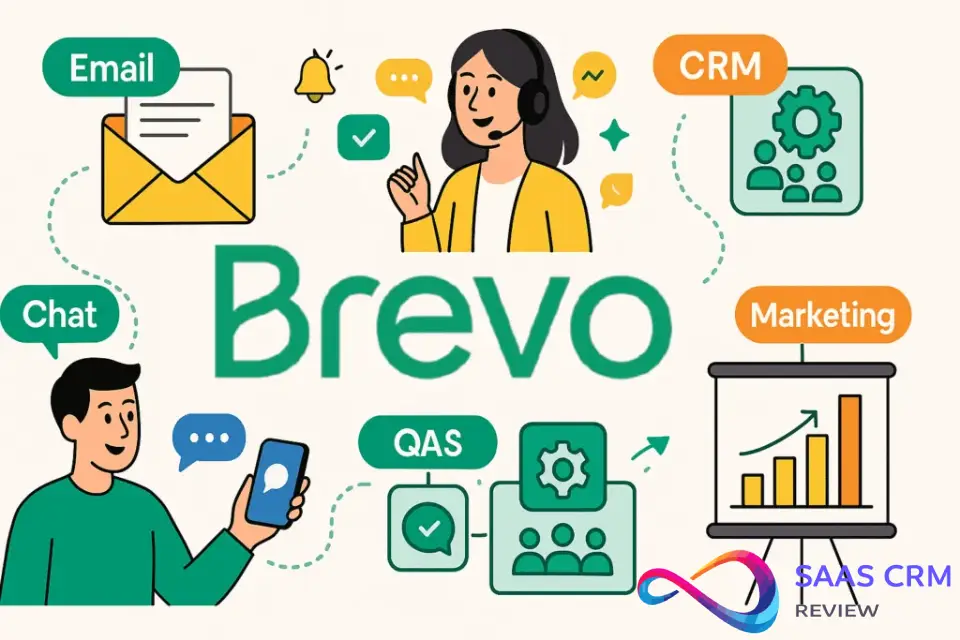
Brevo is an all-in-one digital marketing platform that combines email marketing, marketing automation, transactional email (SMTP), SMS campaigns, and a lightweight CRM. Founded in 2012 and headquartered in Paris, France, it rebranded from Sendinblue to Brevo in May 2023 to reflect its broader suite of tools beyond email.
Key Context: The Rebrand from Sendinblue to Brevo
If you’ve heard of Sendinblue, you’re thinking of the same company. The rebrand to Brevo came with a shift in positioning—from “email service” to “complete customer relationship platform.” Core features remain the same, but the company now emphasizes multi-channel campaigns, sales automation, and conversations (live chat, inbox management).
For existing users, nothing broke during the transition. If you’re researching “Sendinblue reviews,” you’re looking at the same product under a new name.
Brevo’s Core Value Proposition
Brevo positions itself as an accessible, affordable alternative to enterprise-heavy tools like HubSpot or pricey ecommerce specialists like Klaviyo. Its hook: you get email marketing, transactional email, SMS, and basic CRM in one subscription, often at lower cost per email than competitors. It’s especially appealing to European businesses due to GDPR compliance by design and data hosting in the EU.
Who Brevo Is Best For (And Who Should Look Elsewhere)
Best For
- Small to mid-sized businesses (SMBs): Teams of 1–50 that need email, automation, and transactional email without complexity.
- Agencies managing multiple clients: Brevo’s sub-account system and white-label features (on Business+ plans) work well for agencies.
- SaaS and app companies: Strong transactional email/SMTP capabilities for password resets, receipts, notifications.
- Budget-conscious marketers: The free plan offers 300 emails/day forever, and paid plans start low.
- Multi-channel marketers: If you want email + SMS in one platform (with unified reporting), Brevo delivers.
- European businesses: GDPR compliance and EU data residency matter here.
Not Best For
- High-volume ecommerce sellers (Shopify, WooCommerce): Brevo lacks native revenue attribution, product recommendation blocks, and the predictive analytics you’d get from Klaviyo or Omnisend.
- Brands obsessed with design: Email templates feel dated; you’ll need design skills or custom HTML.
- Enterprise teams with complex workflows: Automation builder is functional but less visual/intuitive than ActiveCampaign or HubSpot.
- Content creators monetizing newsletters: ConvertKit or Substack offer better subscriber management, paid subscriptions, and community features.
- Teams needing deep CRM: Brevo’s CRM is basic—task management and deal tracking exist, but it’s no replacement for Salesforce or Pipedrive.
How We Tested Brevo
Our Testing Methodology
I spent three weeks evaluating Brevo across multiple use cases: a sample ecommerce workflow (abandoned cart, product launch), a SaaS onboarding sequence with lead scoring, and a content newsletter campaign. I tested on both the free plan and a Business plan trial to assess feature differences.
What We Evaluated
- Interface & usability: Setup time, navigation, email editor responsiveness
- Automation capabilities: Workflow builder, triggers, conditions, lead scoring
- Segmentation & personalization: Dynamic content, contact attributes, behavioral triggers
- Templates & design flexibility: Template library quality, drag-and-drop vs HTML
- Transactional email/SMTP: Sending speed, API documentation, deliverability monitoring
- Reporting: Campaign analytics, heatmaps, A/B testing, conversion tracking
- Integrations: Ease of connecting Shopify, WordPress, Zapier, API usage
- Deliverability indicators: Sender reputation tools, authentication setup (SPF, DKIM, DMARC)
- Support responsiveness: Email support on free plan, chat on paid plans
Brevo Key Features Breakdown
Email Marketing & Campaign Builder
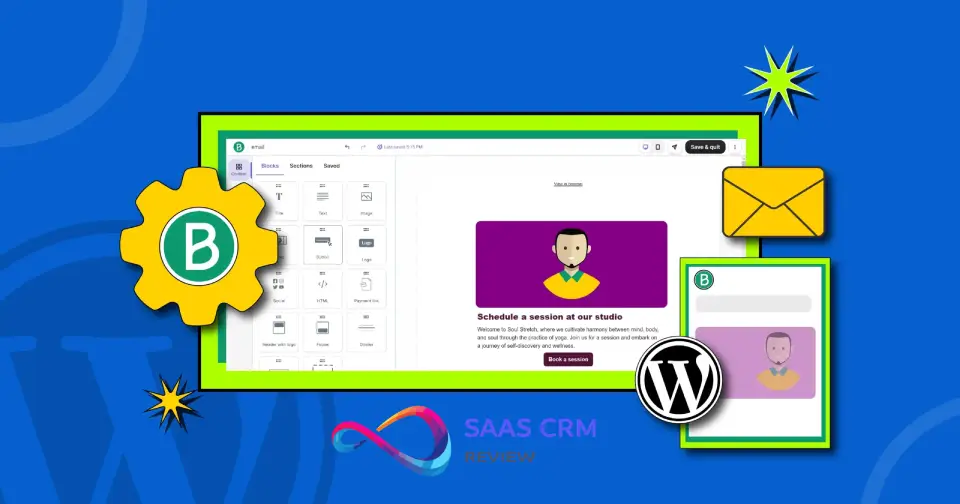
Brevo’s campaign builder uses a drag-and-drop editor. You can add text, images, buttons, dividers, and social icons. The editor is functional but feels less polished than Mailchimp’s or Klaviyo’s. What I noticed: moving blocks can be finicky; responsive design previews are basic.
Template library: Around 40–60 templates, organized by industry (ecommerce, events, newsletters). They’re serviceable but dated—expect to customize heavily or build from scratch. No modern, bold designs like you’d see in Flodesk or Beefree.
Personalization: Merge tags pull from contact attributes (first name, company, custom fields). You can use conditional content blocks to show/hide sections based on segments.
Marketing Automation & Workflows
Brevo’s automation builder lets you create workflows triggered by:
- Contact actions (email opened, link clicked, form submitted)
- Contact properties (tag added, custom field updated)
- Time/date triggers (anniversary, birthday, specific date)
Workflow steps include: send email, send SMS, wait, if/else conditions, update contact, add/remove from list, trigger webhook.
Strengths: Multi-channel workflows (email → SMS → email) are smooth. Lead scoring is built-in (assign points for opens, clicks, page visits).
Weaknesses: The interface feels older; no visual canvas like ActiveCampaign’s. Conditions are limited compared to enterprise tools (no complex “and/or” nesting). You can’t A/B test inside workflows without workarounds.
Transactional Email & SMTP Service
This is where Brevo shines. You get dedicated SMTP relay for transactional emails (order confirmations, password resets, etc.) with high deliverability and real-time analytics.
Key benefits:
- Separate sending infrastructure from marketing emails (good for reputation)
- RESTful API and SMTP relay
- Real-time webhooks for delivery, opens, bounces
- Unlimited free transactional emails on paid plans (though sending limits apply per month based on plan)
Use case: SaaS apps, membership sites, or ecommerce stores sending thousands of receipts/month benefit significantly. Many competitors charge separately for transactional email (e.g., Postmark, SendGrid).
SMS Marketing
Brevo includes SMS campaigns and automation. You buy SMS credits separately (pricing varies by country—US SMS costs approximately $0.016/message, UK around £0.035/message; verify current rates on Brevo’s site).
Features:
- Standalone SMS campaigns
- SMS in automation workflows
- Merge tags for personalization
- Delivery reports
Limitation: SMS credits don’t roll over month-to-month on some plans, and bulk discounts require negotiation on Enterprise plans.
CRM & Contact Management
Brevo’s CRM is lightweight. You get:
- Contact timeline (emails sent/opened, website visits, deals)
- Deal pipeline with stages
- Task assignments
- Company records linked to contacts
Realistic assessment: This CRM is suitable for tracking basic sales conversations and deal stages. Don’t expect robust forecasting, advanced reporting, or integrations with deep sales tools. It’s a “good enough” CRM for small teams already using Brevo for marketing.
Forms, Landing Pages & Signup Tools
Brevo offers:
- Embeddable signup forms (pop-up, inline, slide-in)
- Hosted landing pages (custom domain supported on Business+)
- Double opt-in confirmation workflows
Templates: Landing page templates are minimal. You’ll likely use forms more than landing pages. Forms are customizable (fields, colors, triggers) but not as flexible as dedicated tools like Unbounce or Leadpages.
Segmentation & Personalization
Segmentation: Create segments by:
- Contact attributes (location, custom fields, tags)
- Behavioral data (email engagement, site visits if Tracker installed)
- List membership, campaign activity
Dynamic content: Show/hide content blocks based on segment membership inside emails.
Limitation: Behavioral segmentation requires installing Brevo’s JavaScript tracker on your website. Ecommerce segmentation (last purchase date, lifetime value, cart value) is possible only if you sync order data via API or integrations—not as seamless as Klaviyo’s native Shopify sync.
Integrations & API
Brevo integrates with 150+ tools via native connectors and Zapier. Popular integrations:
- Ecommerce: Shopify, WooCommerce, Magento (but limited compared to Klaviyo’s native depth)
- CMS: WordPress plugin for forms/automation
- CRM/Sales: Salesforce, Pipedrive (basic sync)
- Webinar/Events: Zoom, Eventbrite
- Automation: Zapier, Make (Integromat)
API: Well-documented RESTful API (v3). Developers appreciate clear endpoints for contacts, campaigns, transactional email, and SMS. Rate limits are generous on Business+ plans.
What’s missing: Deep, bidirectional syncs with niche B2B tools or advanced ecommerce analytics (product affinity, predictive sending times).
Reporting & Analytics
Campaign reports show:
- Opens, clicks, bounces, unsubscribes
- Click heatmaps (where users clicked in email)
- Geographic and device data
- Conversion tracking (if goals/events configured)
A/B testing: Available on Starter+ plans. Test subject lines, sender names, or content (send to a sample, auto-select winner, send to remainder). You cannot A/B test send times.
Automation reporting: See performance by workflow step—useful for optimizing sequences.
Weakness: No revenue attribution or ROI dashboards unless you manually configure conversion tracking and connect ecommerce data.
Email Deliverability: What You Need to Know
What Is Email Deliverability?
Deliverability refers to whether your emails reach the inbox (not spam/promotions tabs). It’s influenced by sender reputation, authentication, content quality, and recipient engagement.
Brevo’s Deliverability Features & Reputation
Brevo maintains generally strong deliverability due to:
- Shared IP pools (free/Starter) with reputation monitoring
- Dedicated IP option (Business+ plans) for high-volume senders
- Built-in authentication: Easy SPF, DKIM, DMARC setup via DNS
- ISP monitoring: Brevo monitors blacklists and sender scores
Real-world observations: Users report solid inbox placement (70–85% inbox rate for engaged lists). However, shared IP reputation depends on other users’ behavior—if you’re on a free/Starter plan and someone else spams, you might see temporary reputation dips.
Tip: Upgrade to a dedicated IP if you send 50,000+ emails/month consistently. Warm up the IP gradually (Brevo provides guidance).
Practical Tips to Maintain Good Deliverability
- Clean your list regularly: Remove inactive subscribers every 3–6 months.
- Use double opt-in: Reduces fake/low-quality signups.
- Authenticate your domain: Set up SPF, DKIM, and DMARC (Brevo’s setup wizard makes this straightforward).
- Engage subscribers early: Send a welcome email immediately; engagement in the first 30 days improves long-term deliverability.
- Monitor metrics: Bounce rate >2% or spam complaints >0.1% signal list quality issues.
- Avoid spam triggers: Don’t use ALL CAPS subject lines, excessive punctuation, or misleading claims.
Brevo provides deliverability tests (send a test to multiple providers, see where it lands). Use this before launching major campaigns.
Brevo Pricing & Plans Explained
Understanding Brevo’s Pricing Model
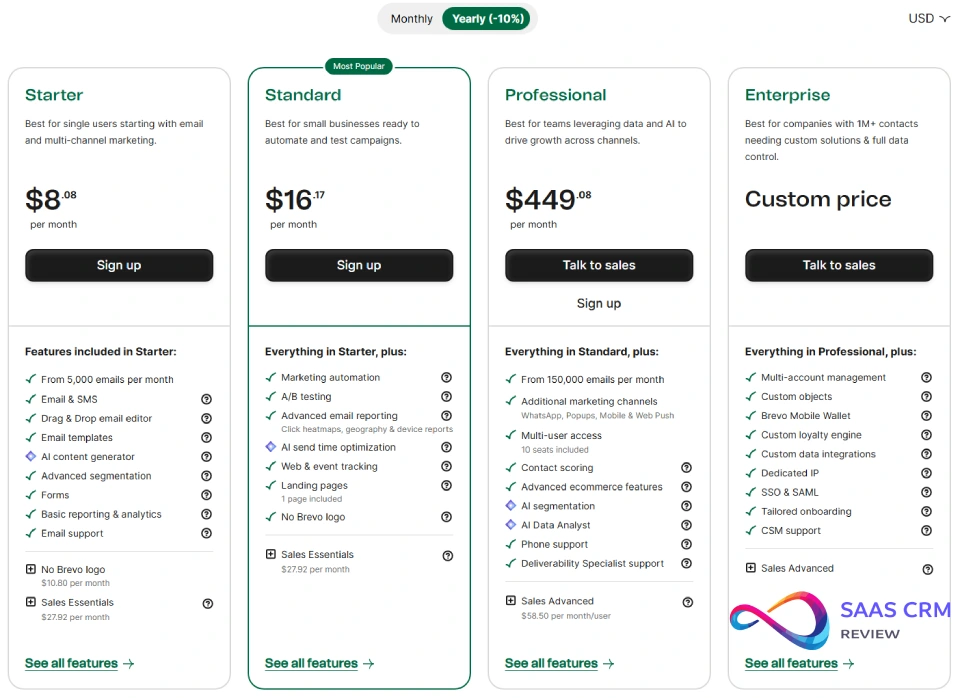
Brevo prices based on emails sent per month, not contacts stored. This is advantageous if you have a large, less-engaged list—you only pay for emails you send.
Example: 10,000 contacts, send once/month = 10,000 emails. Send twice = 20,000 emails.
Contrast this with Mailchimp or ActiveCampaign (priced by contacts), where you’d pay for 10,000 contacts regardless of send frequency.
Free Plan: What You Get
- 300 emails/day (9,000/month max)
- Unlimited contacts
- Email campaigns + basic automation
- Signup forms
- Brevo branding in emails
- Email support (slower response)
Good for: Solopreneurs, early-stage startups, or side projects testing Brevo.
Limitation: No A/B testing, no advanced automation, no phone/chat support, daily sending cap can be restrictive.
Paid Plans: Starter, Business, Enterprise
Pricing as of late 2025 (subject to change):
- Starter: Starts around $25/month (USD) or £20/month (GBP) for 20,000 emails/month. Removes Brevo branding, adds A/B testing, basic automation, email support.
- Business: Starts around $65/month (USD) or £50/month (GBP) for 20,000 emails/month. Adds marketing automation, lead scoring, landing pages, multi-user access, phone support, Facebook ads integration, send time optimization.
- Enterprise: Custom pricing (typically $1,000+/month). Adds dedicated IP, priority support, SSO, sub-account management (agencies), advanced permissions, custom contract terms.
SMS & WhatsApp: Priced separately as add-ons or credit packs (pay-as-you-go).
How to Estimate Your Monthly Cost
- Calculate monthly email volume (contacts × average sends/month).
- Choose a plan tier that covers your volume with headroom (Brevo charges overages at standard rates if you exceed).
- Add SMS credits if needed (estimate texts/month × per-message cost).
- Factor in user seats (Business+ supports multiple logins).
Example calculation:
- 15,000 contacts, send 2 campaigns/month = 30,000 emails.
- Business plan for 40,000 emails ≈ $75/month + $50 SMS credits = ~$125/month total.
Pricing Changes Disclaimer
Important: Pricing changes frequently—verify current plan limits, costs, and feature inclusions on Brevo’s official pricing page before committing. The figures above are approximate based on late 2025 data.
Ease of Use & User Experience
Initial Setup & Onboarding
Setup is straightforward:
- Create account, verify email
- Add sender domain, authenticate (SPF/DKIM)—wizard guides you; DNS changes take 10–60 minutes to propagate
- Import contacts (CSV upload or integrations)
- Create first campaign or automation
Time to first campaign: ~30–60 minutes if you have your list ready and domain access.
Onboarding tutorials: Brevo offers guided walkthroughs and video tutorials. Helpful but not as interactive as Mailchimp’s onboarding.
Email Editor & Template Library
The drag-and-drop editor works but feels clunky:
- Pros: Responsive by default, supports custom HTML blocks, undo/redo.
- Cons: Slow to load with image-heavy designs, limited styling controls (line height, letter spacing require custom CSS), occasional bugs when duplicating blocks.
HTML editor: Available for advanced users. Full control but no live preview toggle—you see code or preview, not both.
Template quality: As mentioned, templates are dated. Expect to spend time customizing or hire a designer. If you’re coming from Canva or Flodesk, you’ll be disappointed.
Learning Curve
Beginner-friendly? Mostly yes—email campaigns and basic automation are intuitive. The UI is less modern than Mailchimp but more straightforward than ActiveCampaign’s feature-dense interface.
Intermediate users: Will navigate comfortably within a week.
Advanced users: Might find automation builder limiting; you’ll lean on API/webhooks for complex needs.
Mobile Experience
Brevo offers iOS and Android apps. You can:
- View campaign stats
- Send campaigns (limited editing)
- Monitor automation performance
- Manage contacts
Limitation: You can’t build automations or design emails from scratch on mobile—apps are primarily for monitoring and quick edits.
Customer Support & Documentation
Support Channels Available
- Email support: All plans (slower on free, faster on paid)
- Live chat: Business+ plans only
- Phone support: Business+ plans (callbacks, not instant)
- Knowledge base: Extensive articles, video tutorials
Response Times & Quality
Free plan: Email responses in 24–48 hours (sometimes longer). Basic troubleshooting.
Paid plans: Faster (12–24 hours via email, under 1 hour via chat during business hours). Quality is generally good—support agents understand the platform and provide actionable answers.
Enterprise: Priority support with dedicated account manager.
Knowledge Base & Resources
Brevo’s help center is comprehensive: 500+ articles, video guides, API docs. Most common questions are covered. The community forum exists but is less active than Mailchimp’s or ActiveCampaign’s.
Time Zone Considerations
Brevo is based in Europe; support hours are primarily CET (Central European Time). US West Coast users might experience delays if contacting outside European business hours. Live chat availability is limited overnight US time.
Security & Compliance
GDPR Compliance
Brevo is GDPR-compliant by design. As a European company (HQ in Paris), they adhere to strict EU data protection regulations:
- Data hosting in EU data centers (with US and Asian options available)
- Data Processing Agreement (DPA) provided
- Double opt-in confirmation supported
- Easy unsubscribe and data export/deletion
Why it matters: If you have EU subscribers, GDPR compliance isn’t optional. Brevo makes it easier to manage consent, handle data subject requests, and avoid fines.
Data Privacy Best Practices
- Use double opt-in: Ensures explicit consent.
- Include clear privacy policy links in signup forms and emails.
- Segment and delete inactive users who haven’t engaged in 12+ months (GDPR’s data minimization principle).
- Limit user access: Only grant team members permissions they need.
Security Features
- Two-factor authentication (2FA): Available on all accounts.
- Role-based permissions: Business+ plans allow granular control (who can send, edit, view).
- SSL/TLS encryption: All data transmission encrypted.
- SOC 2 Type II certified: Brevo has undergone independent security audits.
Brevo Pros and Cons
Pros
✅ Generous free plan (300 emails/day forever, unlimited contacts)
✅ Competitive pricing (pay per email sent, not per contact)
✅ Multi-channel in one platform (email + SMS + SMTP + CRM)
✅ Strong transactional email/SMTP capabilities (separate infrastructure, high deliverability)
✅ GDPR-compliant with EU data residency
✅ Good API documentation (developer-friendly)
✅ Lead scoring included (Business+ plans)
✅ No daily sending limits on paid plans (unlike Mailchimp’s daily caps)
Cons
❌ Dated email templates (require customization or design skills)
❌ Basic CRM (not a replacement for dedicated CRM tools)
❌ Limited ecommerce features (no native revenue attribution, product recommendations lag Klaviyo)
❌ Clunky editor (drag-and-drop feels slower, less polished than competitors)
❌ Automation builder lacks visual canvas (more list-based, less intuitive)
❌ Support hours favor European time zones (slower for US West Coast overnight)
❌ SMS credits don’t roll over on some plans (verify current policy)
❌ Integration depth varies (native ecommerce integrations are shallow compared to specialists)
Brevo vs Major Competitors
Brevo vs Mailchimp
| Feature | Brevo | Mailchimp |
|---|---|---|
| Pricing model | Per emails sent | Per contacts stored |
| Free plan | 300 emails/day, unlimited contacts | 500 contacts, 1,000 emails/month |
| Automation | Included on Business+ | Available on Essentials+ |
| Templates | 40–60, dated | 100+, modern designs |
| Transactional email | Built-in SMTP, strong | Add-on (Mandrill), separate |
| SMS | Included (pay per credit) | Available on Standard+ |
| Deliverability | Good (shared or dedicated IP) | Good (strong reputation) |
| Best for | Multi-channel, transactional needs | Beginners, design-focused brands |
Verdict: Choose Brevo if you need transactional email + SMS in one platform at lower cost. Choose Mailchimp if you prioritize modern templates and ease of use for email-only campaigns.
Brevo vs ActiveCampaign
| Feature | Brevo | ActiveCampaign |
|---|---|---|
| Automation depth | Good, but basic | Excellent (visual canvas, complex logic) |
| CRM | Basic | Robust sales CRM with pipeline automation |
| Pricing | Lower (starts ~$25/month) | Higher (starts ~$49/month) |
| Learning curve | Easier | Steeper |
| Transactional email | Built-in SMTP | Limited (use external service) |
| Best for | SMBs, multi-channel, budget | B2B, complex workflows, sales teams |
Verdict: Choose Brevo if you want affordability and built-in transactional email. Choose ActiveCampaign if you need advanced automation and a capable CRM for sales.
Brevo vs Klaviyo
| Feature | Brevo | Klaviyo |
|---|---|---|
| Ecommerce focus | Basic | Advanced (native Shopify/WooCommerce sync) |
| Revenue attribution | Manual setup | Built-in, automatic |
| Segmentation | Good | Excellent (predictive, RFM analysis) |
| Pricing | Contact + email volume hybrid | Contacts + email volume |
| Templates | Dated | Modern, ecommerce-optimized |
| SMS | Add-on | Integrated, sophisticated flows |
| Best for | General email + SMS | Ecommerce brands, DTC |
Verdict: Choose Brevo if you’re budget-conscious and don’t need deep ecommerce analytics. Choose Klaviyo if you run a high-volume Shopify or WooCommerce store and want advanced segmentation and revenue tracking.
Brevo vs HubSpot
| Feature | Brevo | HubSpot |
|---|---|---|
| Platform scope | Email, SMS, light CRM | Full CRM, sales, service, CMS |
| Free plan | 300 emails/day | 2,000 emails/month, basic CRM |
| Pricing | Low (starts ~$25) | High (Marketing Hub starts ~$50/month) |
| Automation | Good, multi-channel | Excellent, enterprise-grade |
| Reporting | Basic | Advanced dashboards, attribution |
| Best for | SMBs, simple needs | B2B, enterprise, full inbound stack |
Verdict: Choose Brevo if you’re a small business needing email + SMS without CRM complexity. Choose HubSpot if you want an all-in-one CRM, marketing, and sales platform and have the budget.
Best Brevo Alternatives by Use Case
For Ecommerce: Klaviyo or Omnisend
Klaviyo excels at ecommerce: predictive analytics, product feeds in emails, dynamic product recommendations, abandoned cart with real-time sync, revenue dashboards. If you sell physical products online and have 5,000+ contacts, Klaviyo is worth the premium.
Omnisend is a middle ground: better ecommerce features than Brevo (product picker, automation templates for ecommerce), more affordable than Klaviyo. Good for growing Shopify stores.
For Content Creators & Newsletters: ConvertKit or Substack
ConvertKit is built for creators: subscriber management, paid newsletter tiers, landing pages, and simple automation. If you’re a blogger, podcaster, or course creator monetizing an audience, ConvertKit’s UX is friendlier than Brevo.
Substack is the simplest option for paid newsletters (though less control over design and data).
For B2B & Complex Automation: ActiveCampaign or HubSpot
ActiveCampaign offers sophisticated lead scoring, deal automation, and CRM pipelines. If you run a B2B SaaS or agency with complex nurture sequences, ActiveCampaign’s visual automation builder is superior.
HubSpot is the full-stack choice: CRM + marketing + sales + service. Expensive but unmatched for enterprise B2B.
For Budget-Conscious SMBs: Mailchimp or Sender
Mailchimp has a generous free tier (500 contacts) and is easier for non-technical users.
Sender is lesser-known but ultra-affordable (2,500 contacts free, paid plans start ~$15/month). Limited features but good for basic newsletters.
Use Case Walkthrough: Building a Welcome Series with Lead Scoring
Scenario Setup
You run a SaaS product with a 14-day free trial. Goals:
- Welcome new signups
- Educate on key features (3 emails over 7 days)
- Score leads based on engagement
- Alert sales team when a lead hits 20 points
Step-by-Step in Brevo
- Create a workflow trigger: “Contact added to list ‘Free Trial Users'”
- Email 1 (Day 0): Welcome email with setup guide. Assign +5 points if opened, +10 if clicked “Start Setup” CTA.
- Wait 2 days.
- Email 2 (Day 2): Feature highlight (collaboration tools). Assign +5 points if opened, +10 if clicked video link.
- Wait 3 days.
- Email 3 (Day 5): Case study + upgrade CTA. Assign +10 points if opened, +20 if clicked “Upgrade Now.”
- Condition: If lead score ≥ 20, send internal notification to sales via webhook or CRM task.
- Wait until Day 12, send final reminder email (“Trial ending soon”).
What Surprised Me
Positive: Lead scoring setup was simpler than expected—assigning points per action is straightforward.
Continue
09:26
Negative: You can’t visualize the workflow as a flowchart (it’s a vertical list). I initially missed a condition because scrolling through steps isn’t intuitive. Also, no native Slack notification—I had to use Zapier to alert sales, which added complexity.
What I’d do differently: Use tags (e.g., “High Engagement,” “Low Engagement”) alongside lead scores for easier segmentation later. Also, build a parallel SMS workflow for higher-engagement users (if they opted in to SMS).
Common Mistakes to Avoid with Brevo
- Skipping domain authentication: Emails sent from unauthenticated domains often land in spam. Set up SPF, DKIM, and DMARC immediately.
- Ignoring list hygiene: Brevo charges per email sent. Sending to inactive subscribers wastes money and hurts deliverability. Clean your list every 3–6 months.
- Over-relying on templates: The default templates need work. Invest time in custom designs or use the HTML editor if you have skills.
- Not using segmentation: Sending the same email to everyone reduces engagement. Segment by behavior, preferences, or lifecycle stage.
- Forgetting to test across devices: Brevo’s editor doesn’t always catch mobile rendering issues. Send test emails to Gmail, Outlook, iPhone Mail, etc.
- Assuming CRM replaces dedicated tools: Brevo’s CRM is basic. If you need sales forecasting, complex pipelines, or integrations with ERP systems, keep your existing CRM and use Brevo for marketing.
- Underestimating SMS costs: SMS credits add up quickly. Calculate cost per campaign before launching multi-channel workflows.
Decision Checklist: Should You Choose Brevo?
✅ Choose Brevo if you answer “yes” to 3+ of these:
- You need email + SMS + transactional email in one platform
- Your business is small-to-mid-sized (under 50 employees)
- You send emails infrequently to a large list (pay-per-send saves money)
- You appreciate GDPR compliance and EU data hosting
- You have technical resources to customize templates or use HTML
- You’re an agency managing multiple clients (sub-accounts on Enterprise)
- You want a generous free plan to test before committing
❌ Look elsewhere if you answer “yes” to 2+ of these:
- You run a high-volume ecommerce store (Shopify/WooCommerce)
- You need advanced revenue attribution and predictive analytics
- You want beautiful, modern email templates out of the box
- You require deep CRM for sales teams
- You prefer visual, drag-and-drop automation builders
- You need 24/7 support in US time zones
- You’re migrating from an advanced platform (ActiveCampaign, HubSpot) and expect feature parity
Frequently Asked Questions (FAQ)
Q: Is Brevo (formerly Sendinblue) good for email marketing?
Yes, Brevo is solid for email marketing, especially if you need multi-channel (email + SMS) and transactional email in one platform. It’s cost-effective for SMBs but lacks advanced ecommerce features compared to Klaviyo.
Q: How much does Brevo cost per month?
Pricing starts at $0/month (free plan: 300 emails/day). Paid plans start around $25/month (Starter) for 20,000 emails, with Business plans from $65/month. Pricing varies by email volume—check Brevo’s site for current rates.
Q: Does Brevo have good email deliverability?
Yes, Brevo maintains generally strong deliverability (70–85% inbox rate for engaged lists). They offer shared or dedicated IPs, SPF/DKIM/DMARC setup, and deliverability testing tools. Always clean your list and authenticate your domain.
Q: Can I send transactional emails with Brevo?
Absolutely. Brevo includes robust SMTP and API for transactional emails (order confirmations, password resets). This is a standout feature—many competitors charge separately for transactional email.
Q: Is Brevo better than Mailchimp?
Depends on your needs. Brevo is better if you need transactional email, SMS, and pay-per-send pricing. Mailchimp is better for beginners wanting modern templates and simpler UX. Both are good for general email marketing.
Q: Does Brevo work for ecommerce businesses?
Brevo works for basic ecommerce email campaigns but lacks advanced features like native revenue attribution, product recommendation blocks, and predictive analytics. For high-volume Shopify/WooCommerce stores, Klaviyo or Omnisend are stronger.
Q: Is Brevo GDPR compliant?
Yes, Brevo is GDPR-compliant by design. They’re based in the EU, offer data hosting in European data centers, provide DPAs, and support double opt-in and data export/deletion requests.
Q: What’s the difference between Brevo’s free and paid plans?
Free plan: 300 emails/day, unlimited contacts, email campaigns, basic automation, Brevo branding, email support. Paid plans remove branding, add A/B testing, advanced automation (Business+), phone support, landing pages, and higher sending limits.
Q: Can Brevo handle SMS marketing and email together?
Yes, Brevo supports unified email + SMS campaigns and automation workflows. You buy SMS credits separately (pricing varies by country). You can trigger SMS based on email engagement or vice versa.
Q: What are the best alternatives to Brevo?
For ecommerce: Klaviyo or Omnisend. For creators/newsletters: ConvertKit. For B2B/complex automation: ActiveCampaign or HubSpot. For budget SMBs: Mailchimp or Sender. Choose based on your primary use case.
Final Verdict: Is Brevo Worth It in 2026?
Yes, Brevo is worth it in 2026 for the right user.
If you’re a small-to-mid-sized business, SaaS company, or agency needing an affordable, multi-channel marketing platform with strong transactional email capabilities, Brevo delivers excellent value. The pay-per-send pricing model, generous free tier, and GDPR compliance make it especially attractive for European businesses and budget-conscious teams.
However, Brevo is not the best choice for everyone. High-volume ecommerce sellers will find Klaviyo’s native Shopify integration and revenue analytics more valuable. Brands obsessed with design will be frustrated by dated templates. Enterprises needing complex automation and robust CRM should consider ActiveCampaign or HubSpot.
My honest take after three weeks of testing: Brevo is the dependable, practical choice—not the flashiest, but it gets the job done at a fair price. If you’re willing to invest time in customization (templates, segmentation, automation fine-tuning), Brevo rewards you with a capable platform that won’t break the bank.
Final recommendation: Start with Brevo’s free plan. Test email campaigns, build a simple automation, and evaluate whether the interface and features meet your needs. If you hit the 300 emails/day limit and like what you see, upgrade to Starter or Business. If you feel constrained by template quality or automation depth within two weeks, explore alternatives before fully committing.
Brevo isn’t perfect, but for many SMBs, it’s exactly what they need—and that’s what makes this Brevo review ultimately positive.
About the author

I’m Macedona, an independent reviewer covering SaaS platforms, CRM systems, and AI tools. My work focuses on hands-on testing, structured feature analysis, pricing evaluation, and real-world business use cases.
All reviews are created using transparent comparison criteria and are updated regularly to reflect changes in features, pricing, and performance.





