

There is no single best website builder for small business, only the cheapest plan that does your job. That means Wix Core for bookings, Shopify for a product store, Squarespace for a polished brand site and WordPress.com for content you may move later.
This list ranks 10 picks for US owners building or replacing a site. The deciding factor is what you pay after year one, when intro rates and free domains run out. I built the ranking from each vendor’s pricing and help pages, read in October 2026.
Quick verdict
- Bookings and payments: Wix Core, $29 a month billed yearly, lists scheduling and payments in one plan.
- A product store: Shopify Basic is the store-first pick.
- A brand site that sells: Squarespace Core removes the online store fee.
- Articles you may move: WordPress.com documents a content export.
- Already on Square in person: Square Online’s free plan puts the same items online.
The trade-off: the cheapest headline price is rarely the cheapest site by year two.

Wix
Best for: service businesses that take bookings
One yearly plan, Core, carries the calendar, the payments and the site.
Limit: a Wix site cannot run on another host

Squarespace
Best for: polished brand sites with built-in selling
Core removes the online store fee and allows unlimited contributors.
Limit: no free plan, and store pages do not export

Shopify
Best for: product-led online stores
One catalog sells online, in person and in AI chats.
Limit: staff accounts start on Grow, not Basic

WordPress.com
Best for: content-heavy sites you may move later
Its export tool saves posts, pages and comments as a standard XML file.
Limit: the export leaves out the theme and plugins
| Software | Best for | Starting price | Plan the job needs | Free plan or trial | Key limitation |
|---|---|---|---|---|---|
| Wix | Service businesses that take bookings | Light, $17/mo billed yearly | Core, $29/mo billed yearly | Free plan; 14-day money-back guarantee | Site runs only on Wix’s servers |
| Squarespace | Polished brand sites with built-in selling | Basic, $19/mo billed annually | Core, $29/mo billed annually | 14-day free trial; no free plan | Store pages and products do not export |
| Shopify | Product-led online stores | Basic, $29/mo billed yearly | Basic, $29/mo billed yearly | 3-day trial, then $1/month for 3 months | 2% third-party payment fee on Basic |
| WordPress.com | Content-heavy sites you may move later | Personal, $4/mo billed yearly | Premium, $8/mo billed yearly | Free plan | Export omits theme and plugins |
| Hostinger Website Builder | Owners who can prepay four years | Premium, $2.49/mo as a 48-month prepay | Unlimited, $167.52 for 48 months | 14-day trial; 30-day money-back guarantee | Unlimited renews at $16.99/mo |
| GoDaddy Airo | An AI-built site next to your domain | Starter, $9.99/mo billed annually | Professional, $24.99/mo billed annually | Free plan with 50 AI credits a month | Monthly term: $49.99/mo on Professional |
| Square Online | Shops and cafes already using Square | Square Free, $0/mo per location | Square Free; Plus at $49/mo per location as sales grow | Free plan; 30-day trial of Plus | 3.3% + 30¢ per online card sale on Free |
| Webflow | Growing marketing sites that need a CMS | Basic, $15/mo billed yearly | Premium, $25/mo billed yearly | Free Starter plan | Exported code drops the CMS and forms |
| Framer | Designer-built marketing sites | Basic, $10/ | Basic, $10/ | Free plan for non-commercial use | No store on the pricing page |
| Strikingly | A small brochure site on a fixed yearly budget | Limited, $8/mo billed yearly | Pro, $16/mo billed yearly | Unlimited free sites | Yearly plans cannot drop to monthly |
Sources: Wix, Squarespace, Shopify, WordPress.com, Hostinger, GoDaddy, Square, Webflow, Framer and Strikingly pricing pages, checked October 2026.
In This Article (16 sections)
How I Chose These Website Builders
I considered 13 tools: the 10 picks below and 3 more tools under Also Considered. I ranked them on seven criteria, with US-dollar prices only.
Three must-haves came first: the builder sells to a small business directly, publishes US-dollar plans, and connects a custom domain on a paid plan. The ranking criteria, in order:
- Cost after year one, for the plan the job needs
- Selling online: the plan that takes payments, and any store fee
- Bookings for service businesses
- AI drafting of the first version
- SEO controls
- Portability: what the export carries
- Team editing and code access
Wix ranks first because Core puts bookings and payments in one $29 plan, with a free plan to build on. GoDaddy Airo’s Professional lists bookings for less, but its builds spend expiring AI credits and its branding removal is marked “coming soon”.
Squarespace is second: the same $29 buys a zero store fee and unlimited contributors, but its plan grid lists no scheduling. Shopify is third because it wins only when products are the business.
Prices for Wix, Squarespace and Shopify come from saved Internet Archive copies of their US pricing pages, and GoDaddy’s from the Annual and Monthly views of its US page. Template quality, editor feel and AI drafts depend on your content, so draft the same homepage in the free plan or trial of your top two before you pay.
AI that writes ad copy or answers customer email is a separate purchase, covered in my list of AI tools for small business by job.
1. Wix: Best for Service Businesses That Take Bookings

- Best for: salons, consultants, studios and trades that book and charge clients online
- Plan the job needs: Core, $29/mo billed yearly
- Free plan or trial: free plan; 14-day money-back guarantee
- Watch for: the site cannot move to another host
Bookings are where Wix pulls ahead for a service business: one plan carries the calendar, the payments and the site. Core is the cheapest Wix plan that lists “Scheduling and services” next to “Accept payments”, so there is no second scheduling subscription. The trade-off is lock-in, since Wix says its sites have to run on Wix’s servers.
The AI builder creates a site from a single prompt, then lets you switch to drag and drop for any detail. Building on the free plan needs no credit card, but a custom domain and online payments need a Premium plan.

The plan gate is the decision: Light lists no selling tools, so it suits a brochure site only. Wix’s SEO Assistant gives a checklist of fixes per page, with Google Search Console built in.
Against Squarespace, Wix wins on the way in: a free plan to build on, where Squarespace starts with a 14-day trial. Against GoDaddy Airo, which also lists bookings, Wix’s edge is control: you refine any detail by drag and drop, while Airo meters site creation in expiring AI credits.
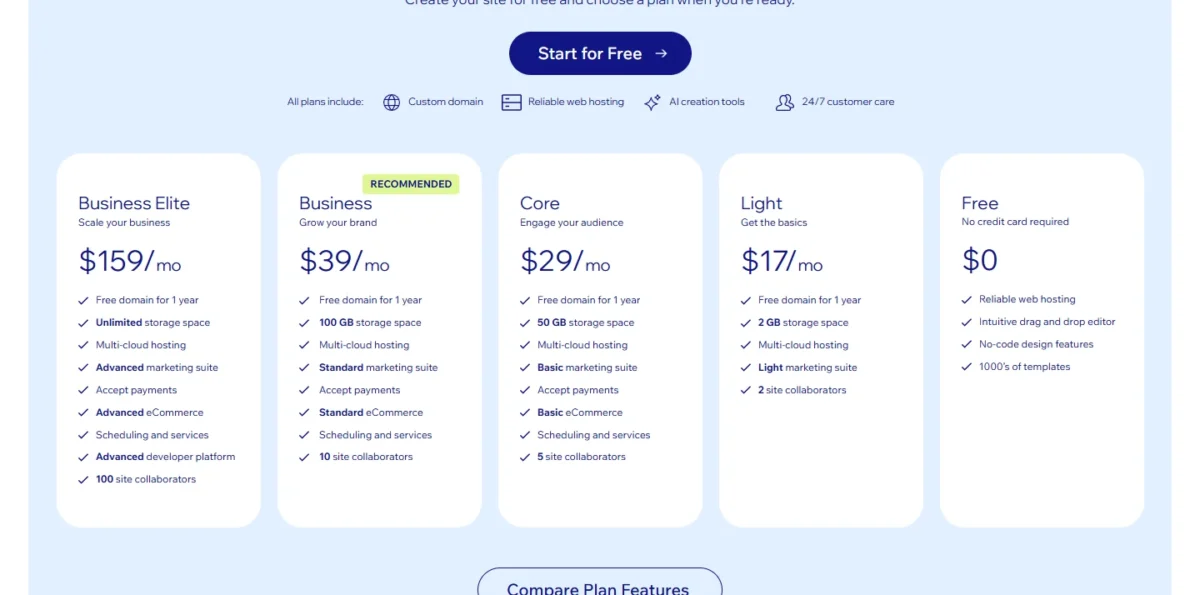
Wix shows yearly subscriptions paid in full, so Core is one payment of $29 x 12 = $348. Most Premium plans add a 1-year domain voucher, valid only for a new domain bought from Wix.
| Plan | Price | Billing | Key limit |
|---|---|---|---|
| Light | $17/mo | Yearly, paid in full | No payments or scheduling |
| Core | $29/mo | Yearly, paid in full | Basic eCommerce; 5 collaborators |
| Business | $39/mo | Yearly, paid in full | Standard eCommerce; 10 collaborators |
Sources: Wix plans page, US prices as archived on October 20, 2026, checked October 2026.
Pros
- Calendar, payments and a basic store share the Core plan
- Free plan to build the site before paying
- First draft from one prompt, then manual edits
Cons
- Light takes neither bookings nor payments
- The site cannot be hosted anywhere but Wix
- The domain voucher does not renew a domain you already own
Choose Wix when clients book time with you and pay online, and you want both on one bill.
- Skip it if:
- you expect to change platforms within a few years and want your pages to come with you; WordPress.com documents an XML export of posts and pages.
2. Squarespace: Best for Polished Brand Sites With Built-In Selling
- Best for: brand-led businesses that sell services or a modest catalog
- Plan the job needs: Core, $29/mo billed annually
- Free plan or trial: 14-day free trial, no credit card; no free plan
- Standout feature: no online store fee from Core
Squarespace earns its place for a brand that sells and cares how the site looks, but only from Core up. Core removes the online store fee and opens the site to unlimited contributors and custom code. The price of that polish is a weaker exit, and there is no free plan to start on.
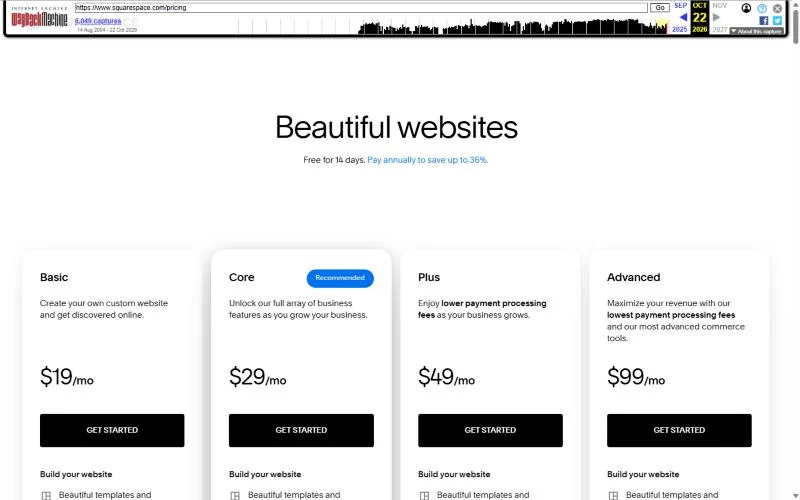
Basic charges a 2% online store transaction fee on top of card rates of 2.9% + $0.30, and Core charges 0%, per the Squarespace pricing page. That fee is the reason a selling business skips Basic.
Take an illustrative shop with $500 of online store sales a month. Basic’s fee is 2% x $500 = $10, the same as the $29 – $19 = $10 that Core costs more each month. Above that sales level, Core is the cheaper plan.
Basic allows up to 2 contributors; Core adds full CSS and JavaScript customization and Google Workspace email. SEO tools and search keyword analysis come with every plan, and Mailchimp and Zapier integrations start on Core.
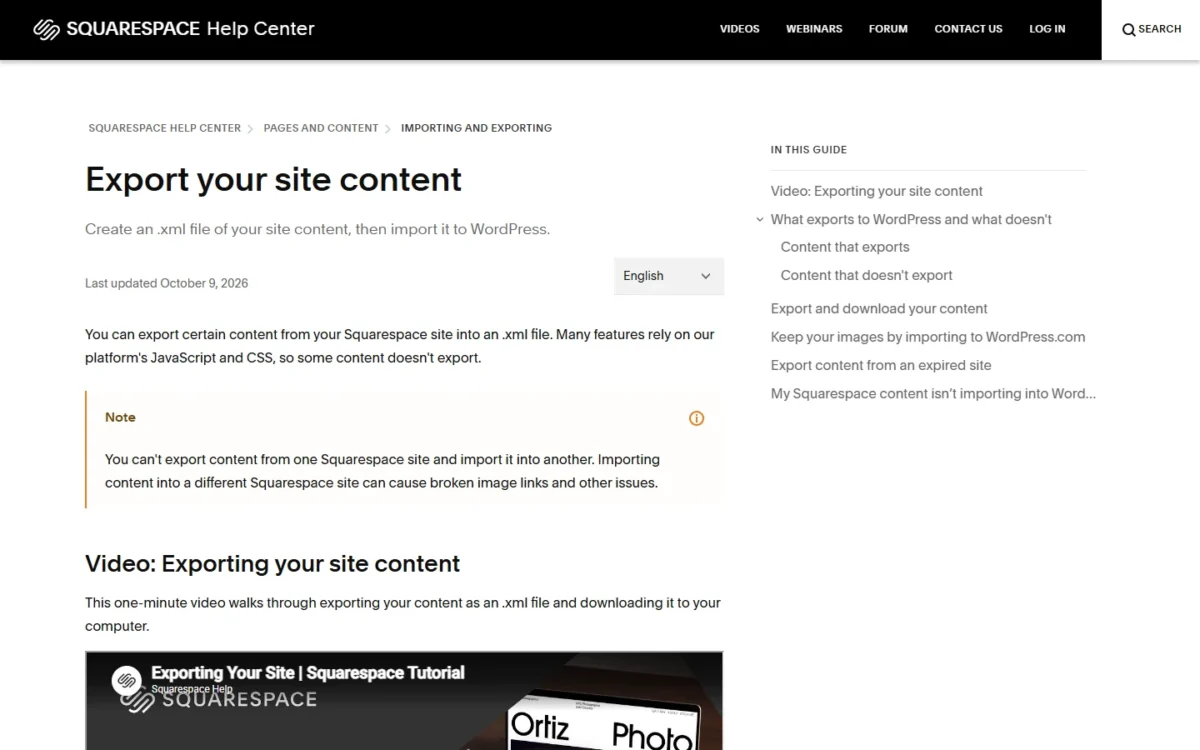
Squarespace exports an .xml file in WordPress format with layout pages, one blog, and text and image blocks. Store pages, product blocks, style settings and custom CSS stay behind, and a trial site cannot export at all.
Against Wix at the same $29, Squarespace’s Core is the better shop and the weaker booking tool. Its plan grid lists no scheduling, and Squarespace lists Acuity Scheduling as a separate product.
These are the pay-annually rates. Annual plans include a free custom domain for one year, and Core comes to $29 x 12 = $348 a year.
| Plan | Price | Billing | Key limit |
|---|---|---|---|
| Basic | $19/mo | Billed annually | Store fee; 2 contributors |
| Core | $29/mo | Billed annually | Unlimited contributors |
| Plus | $49/mo | Billed annually | Lower card rates |
| Advanced | $99/mo | Billed annually | Lowest card rates |
Sources: Squarespace pricing page, pay-annually view as archived on October 22, 2026, checked October 2026.
Pros
- No online store fee from Core
- Unlimited contributors and custom code from Core
- SEO tools and keyword analysis on every plan
Cons
- No free plan
- Basic adds a store fee to every order
- Store pages, products and custom CSS do not export
Choose Squarespace when the site is your storefront and your brand, and products or packaged services sell through it.
- Skip it if:
- clients mainly book appointments; Wix Core lists scheduling inside the plan.
3. Shopify: Best for Product-Led Online Stores

- Best for: businesses whose revenue comes mostly from products
- Plan the job needs: Basic, $29/mo billed yearly
- Free plan or trial: 3-day trial, then $1/month for 3 months
- Standout feature: in-person selling from the store’s own catalog
When products, not services, pay the bills, I think a store-first platform fits better than a site builder with a shop attached, and that is Shopify’s case. Every plan is a full-featured store with unlimited products. The trade-off is a bill that climbs with each tier, plus a fee when another provider processes the payments.
The payment setup decides the real rate. Card rates start at 2.9% + 30¢ on Basic, and a third-party provider adds 2% on Basic, 1% on Grow and 0.6% on Advanced, per the Shopify pricing page.
Staff accounts set the upgrade point: Grow allows up to 5 and Advanced up to 15. Once several people answer orders, the next need is a customer record, and my list of the CRM for an ecommerce store covers repeat-buyer follow-up.
Leaving is partly documented. Products export to a CSV file, but product images are not in it, so the old store stays public until the new one imports them. Against Square Online, Shopify costs more to start, since Square Free has no monthly fee.
Shopify Basic is $29 a month on yearly billing, and new stores start with 3 days free, then $1 a month for 3 months. After the intro, year two runs at $29 x 12 = $348.

| Plan | Price | Billing | Key limit |
|---|---|---|---|
| Basic | $29/mo | Billed yearly | No extra staff accounts listed |
| Grow | $89/mo | Billed yearly | Up to 5 staff accounts |
| Advanced | $359/mo | Billed yearly | Up to 15 staff accounts |
Sources: Shopify pricing page, US pay-yearly view as archived on October 22, 2026, checked October 2026.
Pros
- In-person sales from the same catalog
- Product CSV export from the admin
- Store from a prompt or a pre-built template
Cons
- Third-party transaction fee on every plan without Shopify Payments
- Product images are not in the CSV export
- No booking feature on the plan grid
Choose Shopify when the catalog is the business and you expect to sell in more than one channel.
- Skip it if:
- you already take card payments with Square and sell a small range locally; Square Online’s free plan puts the same items online with no monthly fee.
4. WordPress.com: Best for Content-Heavy Sites You May Move Later
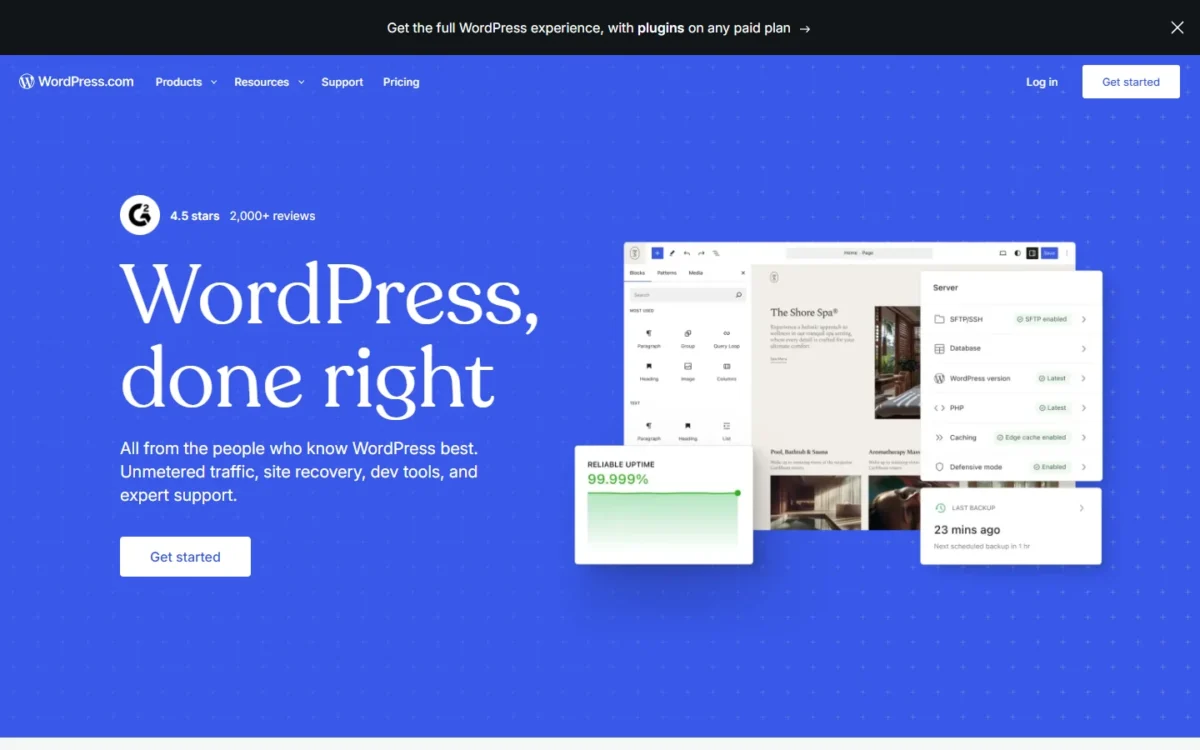
- Best for: businesses that publish guides, articles or news and want an exit path
- Plan the job needs: Premium, $8/mo billed yearly, the first plan with payment buttons and a 4% fee instead of 8%
- Free plan or trial: free plan with a WordPress.com subdomain
- Integrations: over 60,000 plugins on every paid plan
A business that publishes guides and articles should care most about the exit, and WordPress.com documents one. Tools > Export saves posts, pages, comments, categories and tags as a standard XML file that many platforms read. The trade-off: the export carries content, not design, so a move still means rebuilding the theme.
Plugins are the reason to choose it over a closed builder. Every paid plan, from Personal up, installs any of over 60,000 plugins, so a booking calendar or a store comes from the plugin you pick. The free plan installs none and has no custom domain.
Media files are linked rather than included in the export, so the old site stays public during the move. A migration plugin moves the whole site.
Selling is priced by plan: the fee on paid subscriptions and payments is 8% on Personal, 4% on Premium and 0% on Commerce, plus Stripe’s fee (WordPress.com pricing). Premium is the first plan with PayPal and Stripe payment buttons.
Against Webflow, the difference is what leaves with you: Webflow exports front-end code, WordPress.com exports content.
Premium is $8 a month billed yearly, a $8 x 12 = $96 payment, and it auto-renews at $9 a month, billed every 12 months. Yearly plans include a free domain for the first year; monthly plans do not.
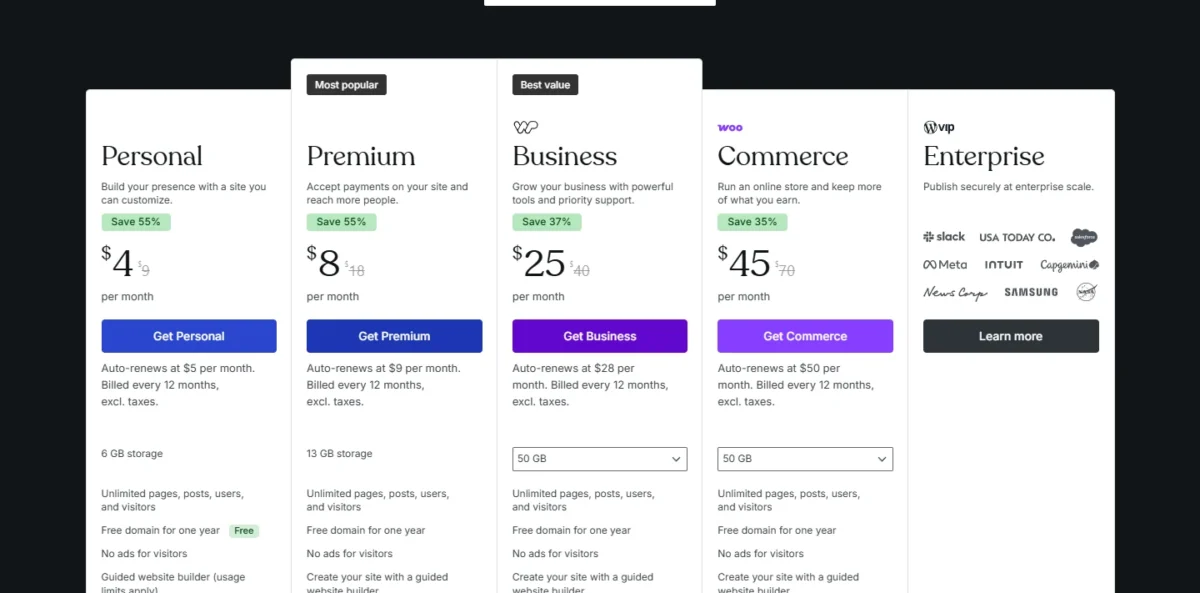
| Plan | Price | Billing | Key limit |
|---|---|---|---|
| Personal | $4/mo | Billed yearly | No payment buttons listed |
| Premium | $8/mo | Billed yearly | Payment buttons |
| Business | $25/mo | Billed yearly | Adds SFTP and real-time backups |
| Commerce | $45/mo | Billed yearly | Full WooCommerce store |
Sources: WordPress.com pricing page and export guide, checked October 2026.
Pros
- Documented XML export of posts, pages and comments
- Plugins on every paid plan, from Personal
- Built-in import tool for sites moving from other platforms
Cons
- Export leaves out the theme, customizations and plugins
- Payment fees stay above zero below Commerce
- Bookings and stores depend on picking the right plugin
Choose WordPress.com when publishing is the work and you want the option to move without retyping every page.
- Skip it if:
- you want bookings or a store working without choosing plugins; Wix Core and Shopify Basic include those jobs in the plan.
5. Hostinger Website Builder: Best for Owners Who Can Prepay Four Years
- Best for: price-first owners who can prepay four years
- Plan the job needs: Unlimited, $167.52 for 48 months
- Free plan or trial: 14-day free trial; 30-day money-back guarantee
- Integrations: Google Ads, Meta Pixel and Google Analytics
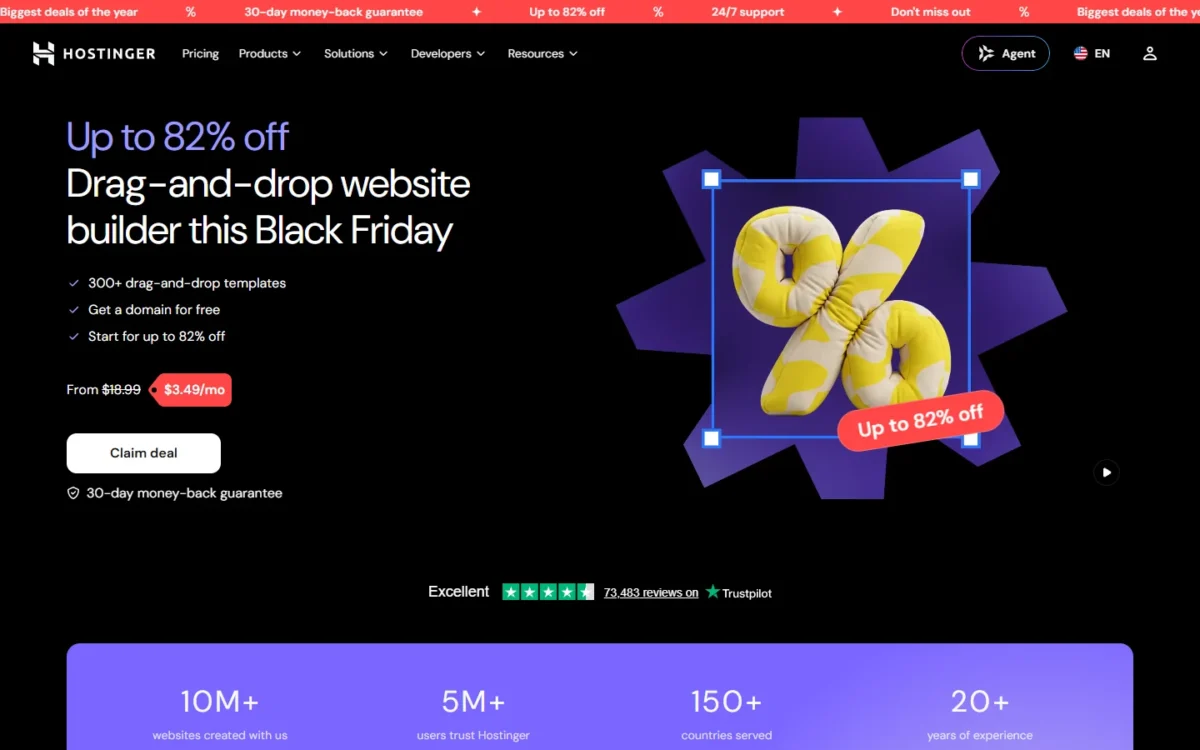
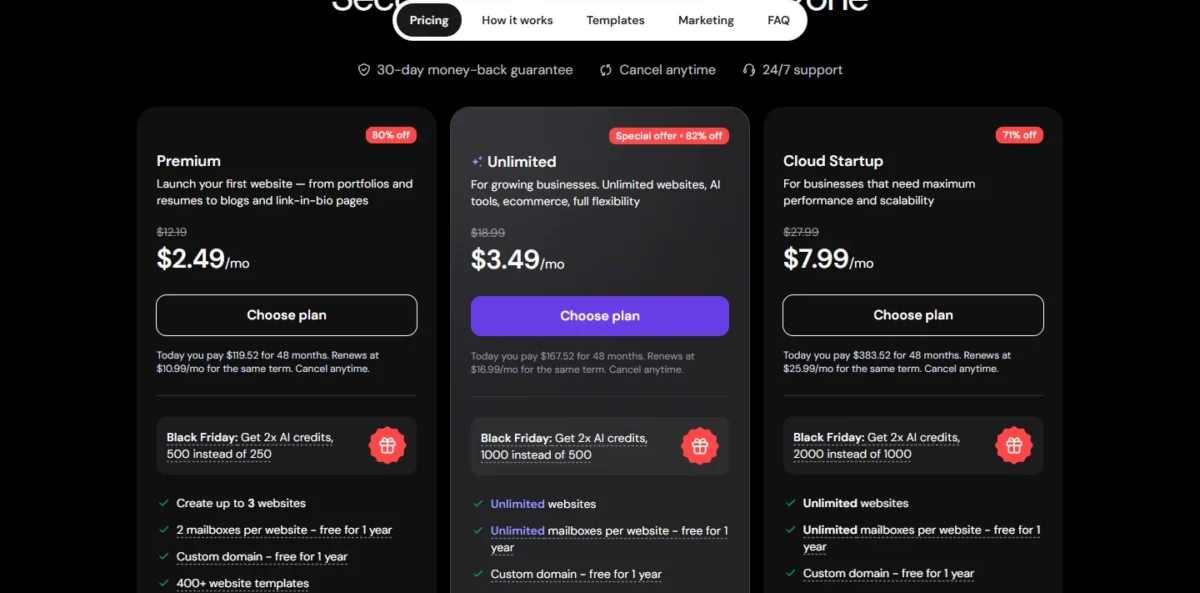
Hostinger’s intro price exists only as a prepaid term. Hostinger states that “All plans are paid upfront”, so the monthly figure is a 48-month total divided by 48. For an owner sure the site will run four years, one payment covers a selling site for the whole term.
Selling sits one plan up. Unlimited lists “Ecommerce available” and Premium’s card does not, so a shop budgets for Unlimited from the start. Premium also caps you at 3 websites.
You describe what you need to get a first version, then edit by drag and drop. AI Writer drafts copy, AI Logo Maker makes a logo, and the AI tools suggest keywords, meta titles and alt text.
Against Strikingly, Hostinger is cheaper per month and costlier to keep: Strikingly’s yearly rate needs no multi-year term, while Hostinger’s renewal resets to a much higher rate, priced in the year-two section.
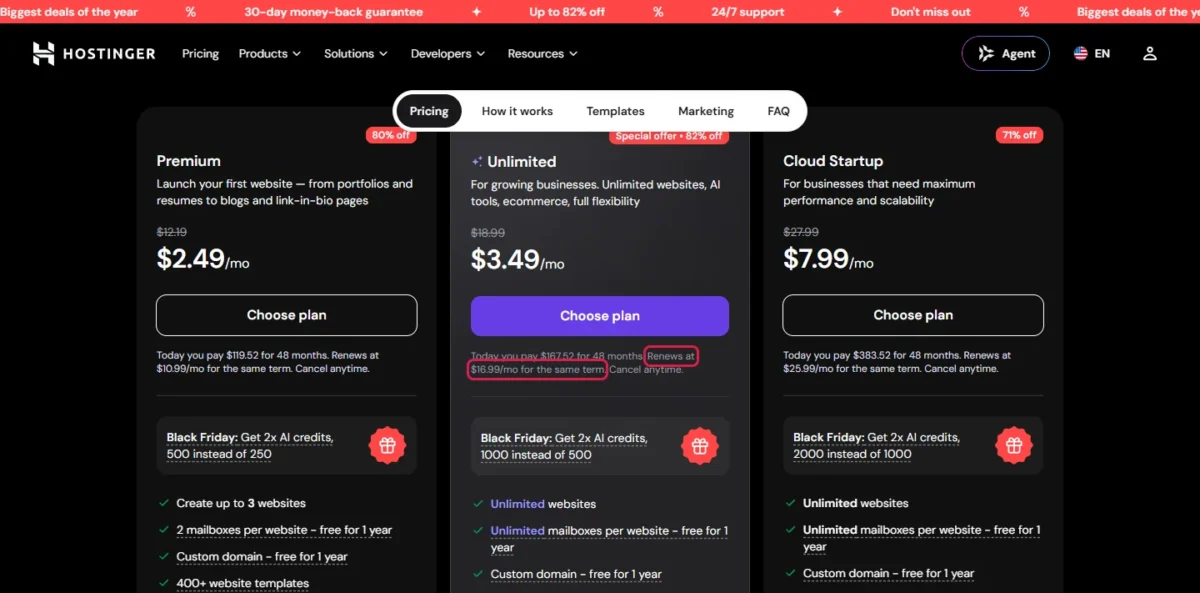
Unlimited, the plan that sells, is $167.52 for 48 months and renews at $16.99 a month for the same term.
| Plan | Intro price | Paid today | Renews at |
|---|---|---|---|
| Premium | $2.49/mo | $119.52 for 48 months | $10.99/mo |
| Unlimited | $3.49/mo | $167.52 for 48 months | $16.99/mo |
| Cloud Startup | $7.99/mo | $383.52 for 48 months | $25.99/mo |
Sources: Hostinger Website Builder page, US locale, checked October 2026.
Pros
- Unlimited includes ecommerce and unlimited websites
- Free trial plus a money-back window
- AI Writer, AI Logo Maker and AI SEO Assistant
Cons
- Intro prices require a 48-month prepay
- Renewal rates are several times the intro rate
- Premium lists no ecommerce and caps you at 3 websites
Choose Hostinger when cash today matters more than cost in year five and you are sure of the commitment.
- Skip it if:
- you cannot prepay four years or dislike renewal jumps; Strikingly’s Pro plan bills $16 a month yearly, with no multi-year term needed for that rate.
6. GoDaddy Airo: Best for an AI-Built Site Next to Your Domain
- Best for: owners who want AI to build the site, ideally next to a GoDaddy domain
- Plan the job needs: Professional, $24.99/mo billed annually
- Free plan or trial: free plan with 50 AI credits a month, no credit card
- Integrations: Facebook, Instagram, Google Business Profile and Mailchimp on Professional
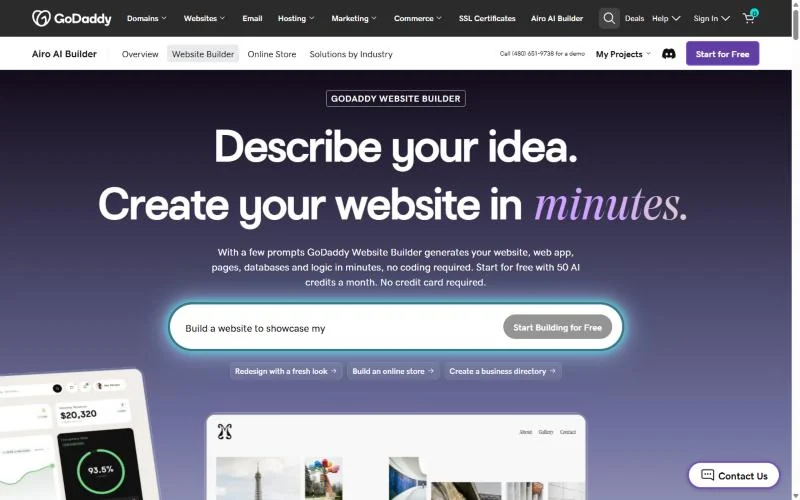
GoDaddy Airo goes further than a page builder: its prompts generate a website or a web app with pages, databases and logic. Every paid plan lets you download your code anytime. The trade-offs are credits that expire at the end of each billing cycle and a monthly term that costs twice the annual rate.
Professional is the plan for a local business. It lists appointment bookings, online payments and deposits, a built-in product catalog and automatic sales tax. Starter only lists getting paid by sharing a link or QR code.
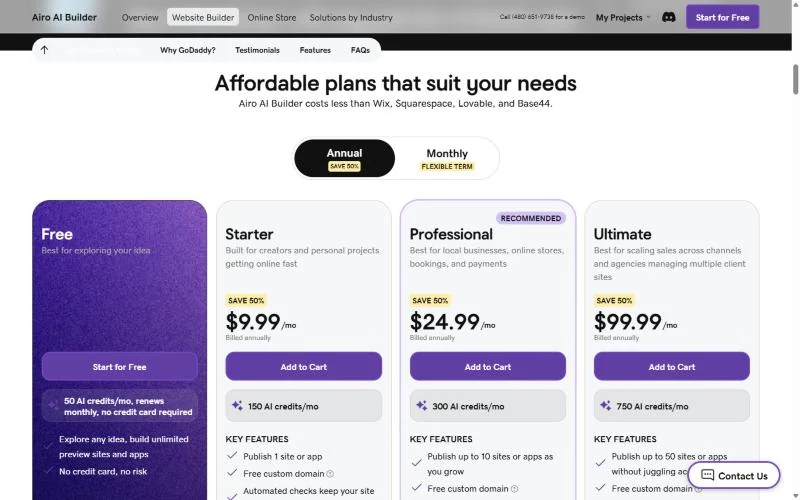
Credits are the usage meter: 150 a month on Starter, 300 on Professional and 750 on Ultimate. They expire at the end of each billing cycle, but editing text and images uses none.
Against Wix, Airo’s Professional lists bookings for less, but GoDaddy’s page does not say what the code download carries. Confirm that bookings and payments work outside GoDaddy before you count on it.
Professional is $24.99 a month billed annually or $49.99 a month on the monthly term. GoDaddy’s page offers a free domain with any paid Airo AI Builder plan.
| Plan | Billed annually | Monthly term | Key limit |
|---|---|---|---|
| Starter | $9.99/mo | $19.99/mo | 1 site; no bookings listed |
| Professional | $24.99/mo | $49.99/mo | Up to 10 sites |
| Ultimate | $99.99/mo | $199.99/mo | Up to 50 sites |
Sources: GoDaddy Website Builder page, US view, Annual and Monthly toggles, checked October 2026.
Pros
- Free plan with monthly AI credits and no credit card
- Professional lists bookings, deposits and a product catalog
- Code download on every paid plan
Cons
- Monthly term costs twice the annual rate
- Unused credits do not roll over
- Removing Airo branding is marked “coming soon”
Choose GoDaddy Airo when you want AI to do the build and a code download on every paid plan.
- Skip it if:
- you would rather build by hand than spend AI credits; Wix’s drag-and-drop editor and its Core plan cover bookings and payments.
7. Square Online: Best for Shops and Cafes Already Using Square

- Best for: shops, cafes and salons already taking payments with Square
- Plan the job needs: Square Free to start; Square Plus at $49/mo per location as sales grow
- Free plan or trial: free plan; 30-day free trial of Plus and Premium
- Standout feature: pickup, local delivery and shipping from one item library
If the card reader on your counter is Square, Square Online is the shortest path to selling the same items on the web. The free plan has no monthly fee, so each sale’s processing fee pays for the site. The trade-off is a higher online card rate on Free and basic site layouts until Plus.
Local fulfilment is the strength. Square Online lists free in-store or curbside pickup and local delivery with your staff or couriers, with ordering windows and minimum order amounts.
Service businesses get a booking website with a Book Now button and a QR code for contactless booking. The builder includes SEO tools.
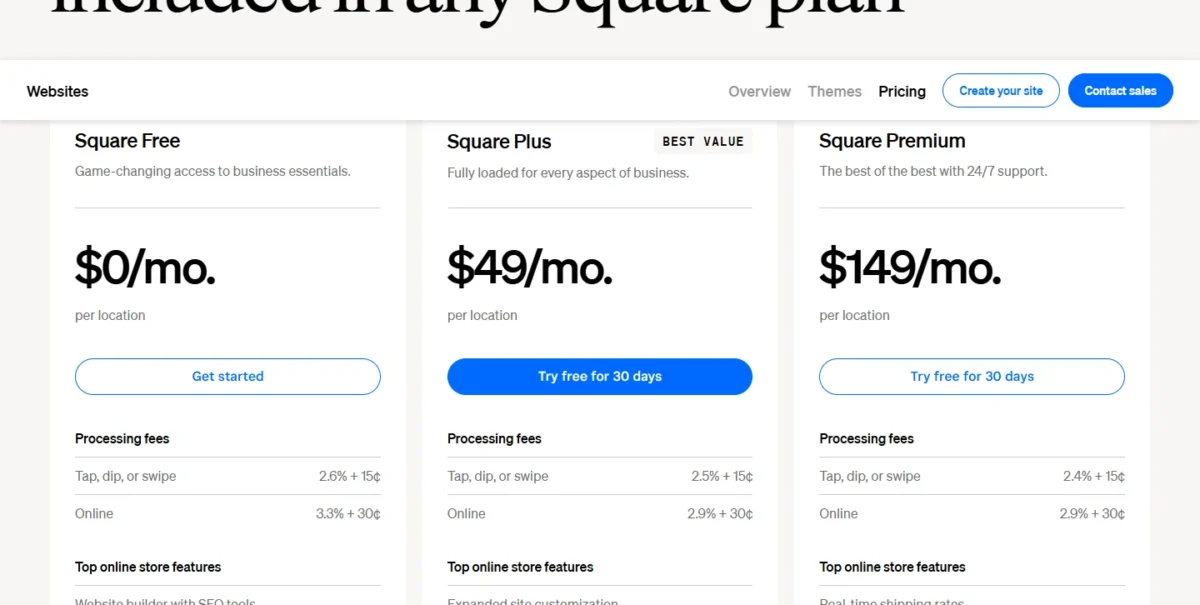
The plan choice is a fee calculation: online card payments cost 3.3% + 30¢ on Square Free and 2.9% + 30¢ on Square Plus (Square Online plans).
The 0.4-point gap is 1/250 of sales, so Plus’s fee is covered only above $49 x 250 = $12,250 of online card sales a month per location. Below that, Square Free is the plan the job needs.
Each plan is priced per location, and over $250,000 a year in processing, Square offers custom pricing.
| Plan | Price | Billing | Key limit |
|---|---|---|---|
| Square Free | $0/mo | Per location | Basic site layouts |
| Square Plus | $49/mo | Per location | Charged for each location |
| Square Premium | $149/mo | Per location | Charged for each location |
Sources: Square Online plans page, checked October 2026.
Pros
- A plan with no monthly fee that sells online
- Pickup, local delivery and shipping built in
- Booking website with a Book Now button
Cons
- Higher online card rate on the free plan
- Paid plans are charged per location
- Expanded site customization starts on Plus
Choose Square Online when Square already runs your counter and the website is another till.
- Skip it if:
- you do not use Square in person and sell mostly shipped products; Shopify is built for that store.
8. Webflow: Best for Growing Marketing Sites That Need a CMS
- Best for: growing businesses with a marketing hire or an outside designer
- Plan the job needs: Premium, $25/mo billed yearly
- Free plan or trial: free Starter plan on a webflow.io domain
- Standout feature: HTML, CSS and JavaScript export on a paid Workspace plan
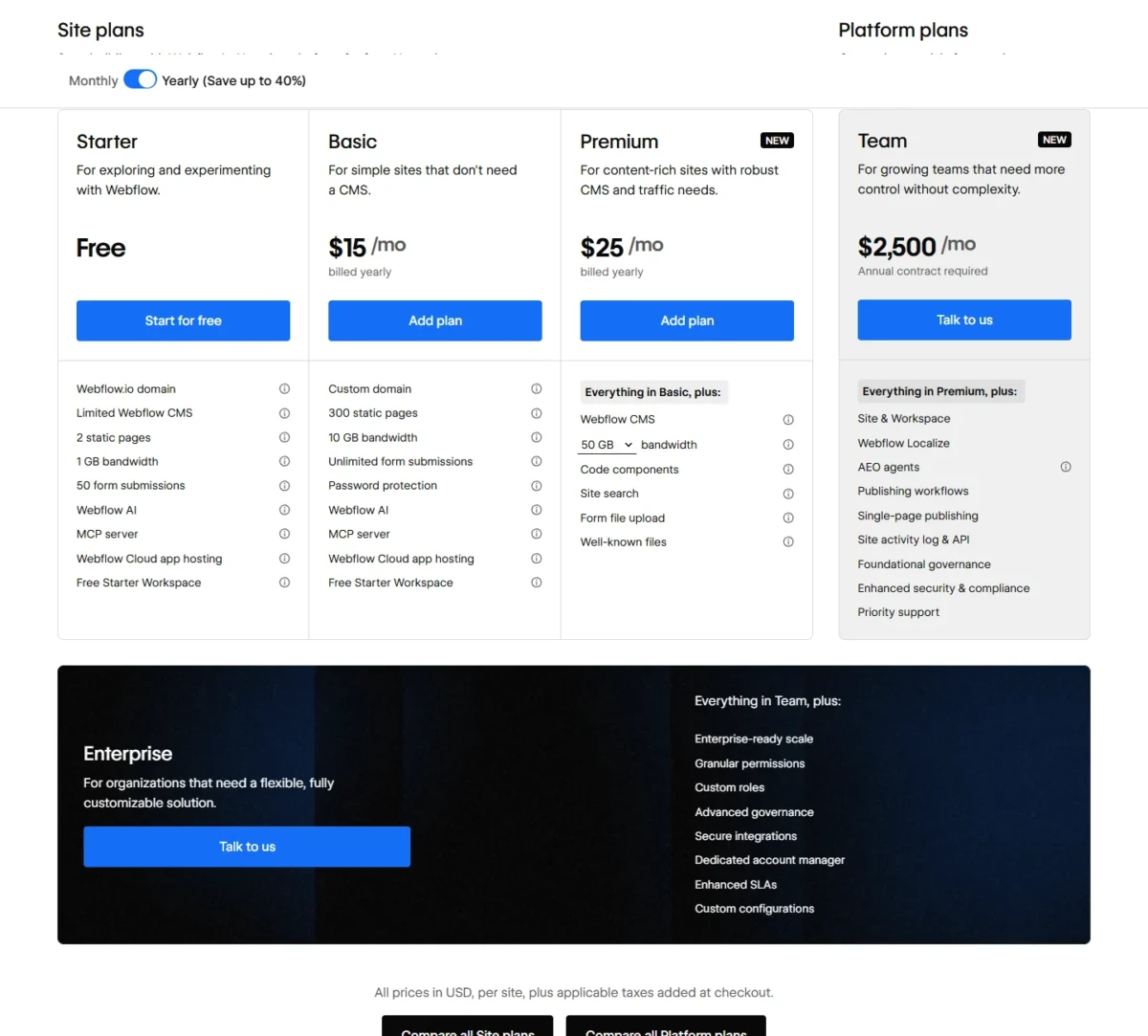
For a team with a designer or marketer on staff, Webflow gives them a CMS and front-end code they can take elsewhere. Premium, labelled New, adds the Webflow CMS and site search to Basic. The trade-off is a split bill: the site plan runs the site, and a Workspace plan holds code export.
Basic covers 300 static pages and a custom domain with no CMS, enough for a services site. A team that publishes case studies, locations or blog posts needs Premium’s CMS, where each item becomes a page built from one template.
Code export needs a paid Workspace plan such as Core, at $19 a month billed yearly. The export holds HTML, CSS, JavaScript and images, but the CMS, ecommerce, forms and site search do not work on exported code. CMS Collections export separately as CSV.
Selling is a separate ecommerce plan, from Standard at $29 a month billed yearly for 500 items. Against Framer, Webflow Basic allows 300 static pages where Framer Basic stops at 30, and Webflow documents a code export.
Webflow prices each site plan in US dollars per site per month, billed yearly, so Premium costs $25 x 12 = $300 a year.
| Plan | Price | Billing | Key limit |
|---|---|---|---|
| Starter | Free | None | webflow.io domain; 2 static pages |
| Basic | $15/mo | Billed yearly | 300 static pages; no CMS |
| Premium | $25/mo | Billed yearly | Adds Webflow CMS and site search |
Sources: Webflow pricing page and code export help article, checked October 2026.
Pros
- Exports front-end code on a paid Workspace plan
- 300 static pages on Basic
- Webflow AI on every site plan
Cons
- Exported code drops the CMS, ecommerce, forms and site search
- Code export needs a Workspace plan on top of the site plan
- Selling needs a separate ecommerce plan
Choose Webflow when someone on the team will own the site and you want a CMS without giving up the front end.
- Skip it if:
- nobody on the team will own a designer’s tool; Wix Core or Squarespace Core covers a services site without a second Workspace plan.
9. Framer: Best for Designer-Built Marketing Sites
- Best for: design-led service brands and startups with a small marketing site
- Plan the job needs: Basic, $10/mo on yearly billing
- Free plan or trial: free plan, which Framer calls ideal for non-commercial use
- Standout feature: built-in SEO and a custom domain from Basic
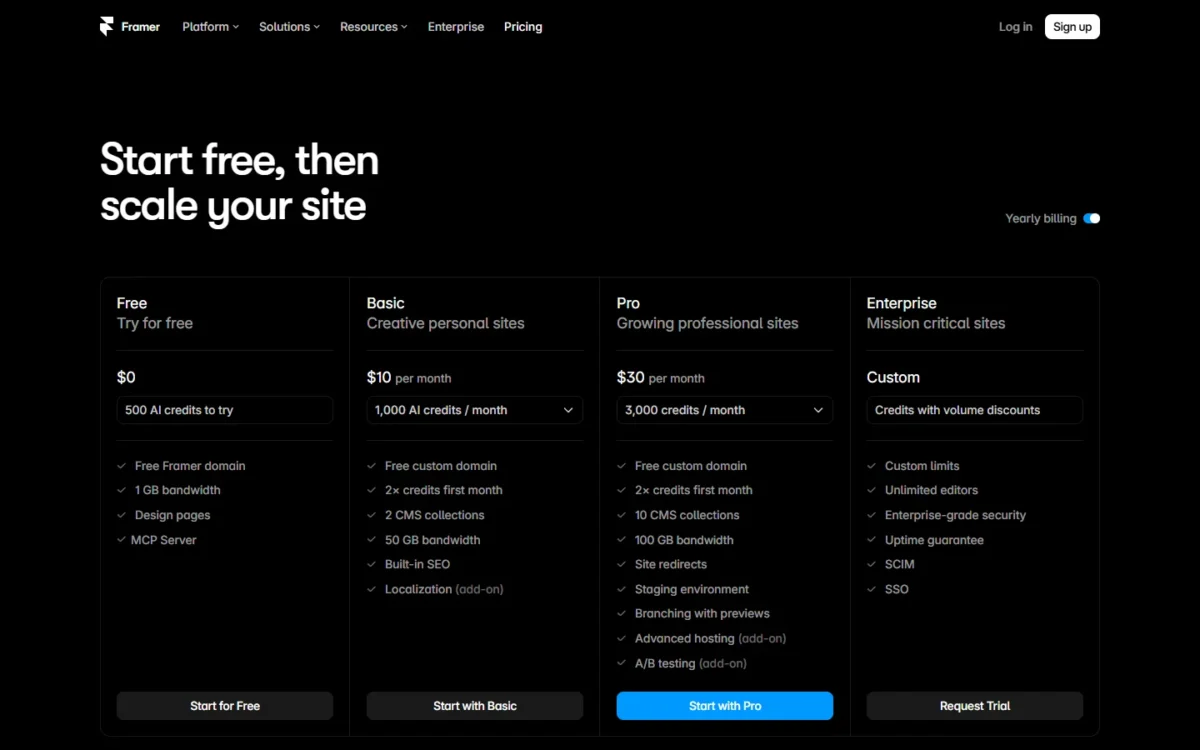
Framer suits a design-led brand that wants a sharp marketing site and will accept a page cap to pay less. Basic connects your own domain, includes built-in SEO and allows 30 pages and 2 CMS collections. The trade-off is scope: the pricing page lists no store, so it sells a service, not products.
The page and collection caps decide the upgrade. Pro raises the cap to 150 pages and 10 collections and adds staging and site redirects.
Editors are priced per seat: additional editors cost $20 a month and content editors $10 a month.
On the yearly billing view, Basic is $10 a month, so it costs $10 x 12 = $120 a year. Yearly plans include a complimentary domain.
| Plan | Price | Billing | Key limit |
|---|---|---|---|
| Free | $0 | None | Framer domain; non-commercial use |
| Basic | $10/mo | Yearly billing | 30 pages; 2 CMS collections |
| Pro | $30/mo | Yearly billing | 150 pages; 10 CMS collections |
Sources: Framer pricing page, checked October 2026.
Pros
- Low entry price for a custom-domain site
- Built-in SEO from Basic
- Staging and site redirects on Pro
Cons
- No store on the pricing page
- Basic stops at 30 pages
- Extra editors cost $20 a month each
- Skip it if:
- you need more than 30 pages for little money or want to sell products; Webflow Basic allows 300 static pages, and Shopify handles the store.
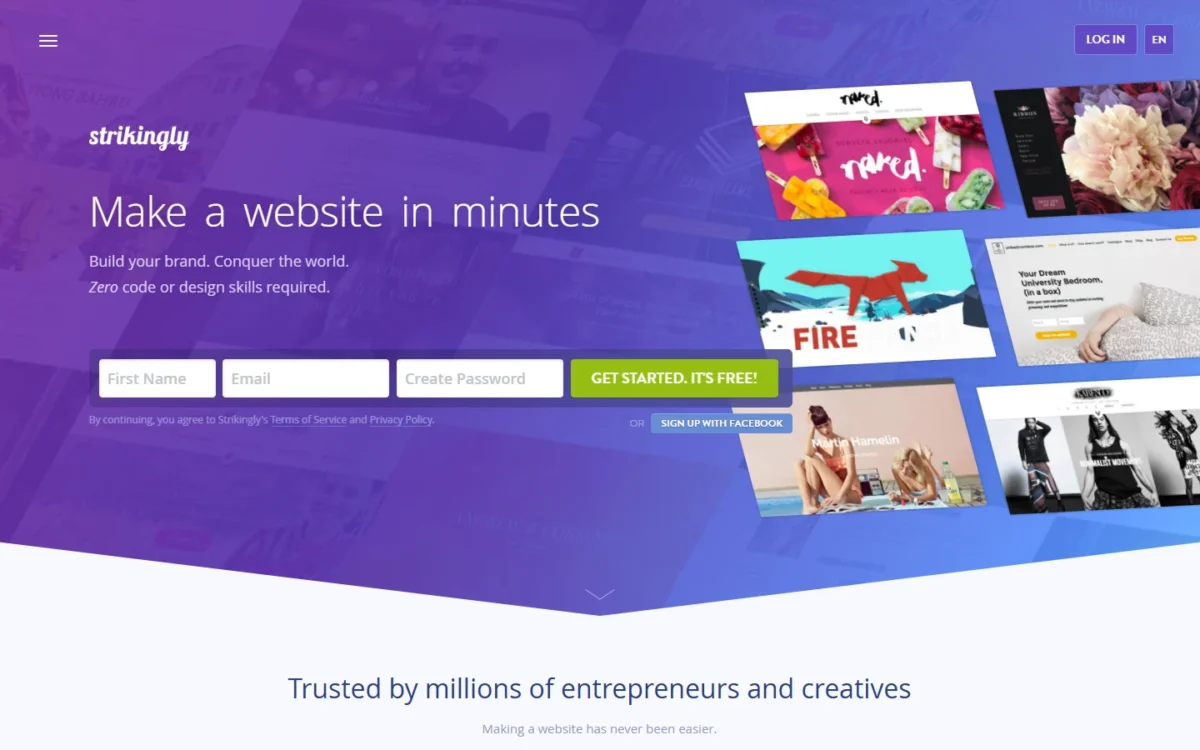
10. Strikingly: Best for a Small Brochure Site on a Fixed Yearly Budget
- Best for: a few-page brochure site or a one-product shop
- Plan the job needs: Pro, $16/mo billed yearly
- Free plan or trial: unlimited free sites
- Standout feature: printed yearly prices in US dollars
A handful of pages, perhaps one product, and a bill that does not surprise: that is the owner Strikingly serves. Its plans are priced yearly in US dollars, with no multi-year prepay needed to reach the listed rate. The trade-off is room to grow, because the entry plan caps pages and products hard.
On the Strikingly pricing page, Limited covers up to 5 pages per site and a single product at a 5% transaction fee. Pro lifts that to 100 pages and 300 products at a 2% fee, with custom forms, site search and custom code.
You can move from monthly to yearly, but not from yearly back to monthly. A domain bought through Strikingly costs $24.95 a year and a custom email address $25 a year, after the free domain year.
Pro is $16 a month billed yearly, so the job costs $16 x 12 = $192 a year before the domain.

| Plan | Price | Billing | Key limit |
|---|---|---|---|
| Limited | $8/mo | Billed yearly | 5 pages per site; 1 product |
| Pro | $16/mo | Billed yearly | 100 pages; 300 products |
| VIP | $49/mo | Billed yearly | 500 products; no transaction fee |
Sources: Strikingly pricing page, checked October 2026.
Pros
- Plain yearly prices in US dollars
- Unlimited free sites to start
- Domain and custom email prices are printed
Cons
- Limited caps sites at 5 pages and 1 product
- A transaction fee on sales below VIP
- Yearly plans cannot move back to monthly
Choose Strikingly when the site is a brochure and the budget is a fixed yearly number.
- Skip it if:
- you plan to sell more than a few products; Squarespace Core charges no online store fee.
What You Will Pay in Year Two: Intro Prices vs Renewals
Hostinger and WordPress.com print a higher price after the first term. Hostinger renews the same 48-month term at $16.99 a month, and WordPress.com Premium auto-renews at $9 a month instead of $8, billed every 12 months. The free domain covers the first year only.
| Software | Plan the job needs | Year one | Year two | What changes after year one |
|---|---|---|---|---|
| Wix | Core, yearly | $29 x 12 = $348 | $29 x 12 = $348 | Free domain year ends |
| Squarespace | Core, billed annually | $29 x 12 = $348 | $29 x 12 = $348 | Free domain year ends |
| Shopify | Basic, yearly | $1 x 3 = $3 for the intro months, then Basic’s yearly rate | $29 x 12 = $348 | Intro months end |
| WordPress.com | Premium, yearly | $8 x 12 = $96 | $9 x 12 = $108 | Auto-renews at $9 a month; free domain covers year one only |
| Hostinger Website Builder | Unlimited, 48 months | $167.52 once | Nothing (prepaid) | Same 48-month term renews: $16.99 x 48 = $815.52 |
| GoDaddy Airo | Professional, annual | $24.99 x 12 = $299.88 | $24.99 x 12 = $299.88 | Monthly term: $49.99 x 12 = $599.88 |
| Square Online | Square Free | $0, plus 3.3% + 30¢ per online card sale | $0, plus the same card rate | Plus, $49 x 12 = $588 per location, past $49 x 250 = $12,250 of monthly online sales |
| Webflow | Premium, yearly | $25 x 12 = $300 | $25 x 12 = $300 | Code export adds $19 x 12 = $228 |
| Framer | Basic, yearly | $10 x 12 = $120 | $10 x 12 = $120 | Extra editors: $20 a month each |
| Strikingly | Pro, yearly | $16 x 12 = $192 | $16 x 12 = $192 | Strikingly domain: $24.95 a year |
Sources: Wix, Squarespace, Shopify, WordPress.com, Hostinger, GoDaddy, Square, Webflow, Framer, Strikingly, checked October 2026. Year two assumes today’s list prices; fees are not added unless the row says so.
Hostinger is the one to read twice. Unlimited’s $167.52 covers four years, then the same 48-month term renews at $16.99 a month.
The domain is the quiet cost: the free domain on Wix, Squarespace, WordPress.com and Strikingly covers one year, and a domain bought through Strikingly costs $24.95 a year.
How to Choose the Best Website Builder for Your Small Business
Start with the job the site must do; the matrix shows the cheapest plan each pick lists for it.
| Software | Sell products | Take bookings | AI first draft | Export | Team editing |
|---|---|---|---|---|---|
| Wix | Core | Core | From a prompt | Site stays on Wix’s servers | Light: 2 collaborators |
| Squarespace | Basic, 2% store fee | Acuity Scheduling, separate | Built-in AI tools | Content XML; no store pages | Basic: 2 contributors |
| Shopify | Basic | Not listed | Built-in AI assistant | Products CSV, no images | Grow: 5 staff accounts |
| WordPress.com | Premium buttons; Commerce store | Not listed; plugins from Personal | Guided builder, usage limits | Content XML | Unlimited users |
| Hostinger Website Builder | Unlimited | Booking options, plan not named | From a description | Not listed | Not listed |
| GoDaddy Airo | Professional | Professional | Every plan, on AI credits | Code download, paid plans | Every paid plan |
| Square Online | Square Free | Booking website | Not listed | Not listed | Not listed |
| Webflow | Separate ecommerce plan | Not listed | Webflow AI, every site plan | Code, on Workspace Core | Workspace seats |
| Framer | Not listed | Not listed | AI credits, paid plans | Not listed | Extra editors, $20 each |
| Strikingly | Limited: 1 product | Not listed | AI Site Builder | Not listed | Not listed |
Sources: the pricing pages above and the Wix, Squarespace, Shopify, WordPress.com and Webflow export help pages, checked October 2026.
| Your situation | Builder to consider | Reason | Trade-off |
|---|---|---|---|
| Clients book and pay online | Wix Core | Scheduling and payments in one plan | Site stays on Wix’s servers |
| Products are most of the revenue | Shopify Basic | Store-first, sells online and in person | Extra fee with another payment provider |
| A brand site that also sells | Squarespace Core | No store fee, unlimited contributors | No free plan; store does not export |
| Articles and guides you may move | WordPress.com Premium | XML export of posts and pages | Theme and plugins stay behind |
| You already sell in person with Square | Square Online Free | Same items online, no monthly fee | Higher online card rate |
| You can prepay four years | Hostinger Unlimited | 48 months prepaid with ecommerce | Renews at $16.99 a month |
| AI builds the site, with a code download | GoDaddy Airo Professional | Bookings, payments, code download | Credits expire at the end of each billing cycle |
Sources: Wix plans, Hostinger Website Builder, WordPress.com export guide, checked October 2026.
On SEO controls, the difference is depth: Webflow adds structured data and AI crawler controls, Wix adds an SEO Assistant checklist, and Hostinger’s AI writes meta titles. If you need one page for an ad campaign, a full builder is more than the job needs; my ranking of landing page builders for a single campaign page covers that.
Also Considered
Three more tools sit outside the ranking:
- Duda: built for agencies; every plan lists unlimited clients and a client workspace, and its top tier is white label.
- Jimdo: the saved pricing page printed no plans or prices to compare, and its 14-day right of withdrawal does not apply to businesses.
- Zoho Sites: Lite allows 1 page and Basic 5 pages, and the plans page lists no store features.
FAQ
Can I build a small business website for free?
Yes, you can build on a free plan with Wix, WordPress.com, Webflow, Framer, GoDaddy Airo, Square Online or Strikingly. A business address is another matter: Wix needs a Premium plan to connect a domain, the WordPress.com free plan has no custom domain, and Framer calls its free plan ideal for non-commercial use.
Is Wix or GoDaddy a better website builder?
Wix is the better pick for a services site you want to build and refine by hand, with bookings and payments on Core and a free plan to start. GoDaddy Airo is better if you want AI to build the site: its Professional plan lists bookings too, and every paid Airo plan lets you download your code.
Do website builders include hosting?
Yes. Wix includes web hosting in every plan, Squarespace includes managed cloud hosting, Shopify lists unlimited web hosting, and WordPress.com hosts every plan, including the free one. Only self-hosted WordPress.org needs hosting you buy and manage separately.
Final Verdict
My pick depends on the job, not on an overall winner:
- Bookings and payments: Wix Core, $29 a month billed yearly.
- A product store: Shopify Basic, with Shopify Payments to avoid the third-party fee.
- A polished brand site that sells: Squarespace Core, with no store fee.
- Content you may move: WordPress.com Premium, for the XML export and plugins.
- Already on Square in person: Square Online Free, until online sales justify Plus.
On a tight budget, Strikingly Pro gives a plain yearly bill; Hostinger fits only if you will prepay 48 months and budget for the renewal. For an AI-built site with a code download, pick GoDaddy Airo. For a designer-run site, pick Framer under 30 pages and Webflow once you need a CMS.





